

Zoho CRM fits most US small and mid-size sales teams better than Copper. Its first paid plan with workflow rules is Standard, at $14 per user per month, billed annually. Copper’s first plan with workflow automation is Professional, at $59 per seat per month, paid annually.
Copper earns its higher seat price for one kind of team: sellers who live in Gmail and Google Calendar, where its Chrome extension puts the CRM on every plan.
For 10 sellers on annual billing, the automation pair costs $14 x 10 users x 12 months = $1,680 a year on Zoho CRM and $59 x 10 seats x 12 months = $7,080 a year on Copper.
Quick verdict
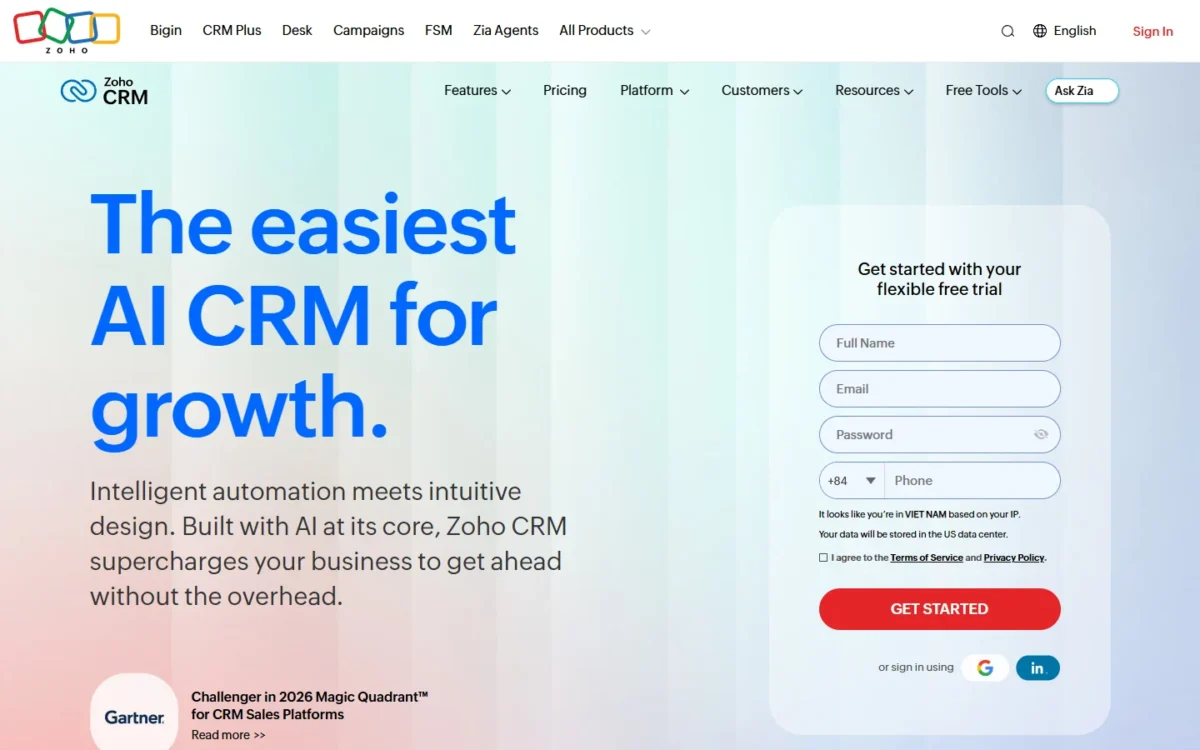
Zoho CRM is my pick for a sales team that wants workflow rules, Cadences, custom reports and sales forecasting on a $14 entry plan (per user per month, billed annually).
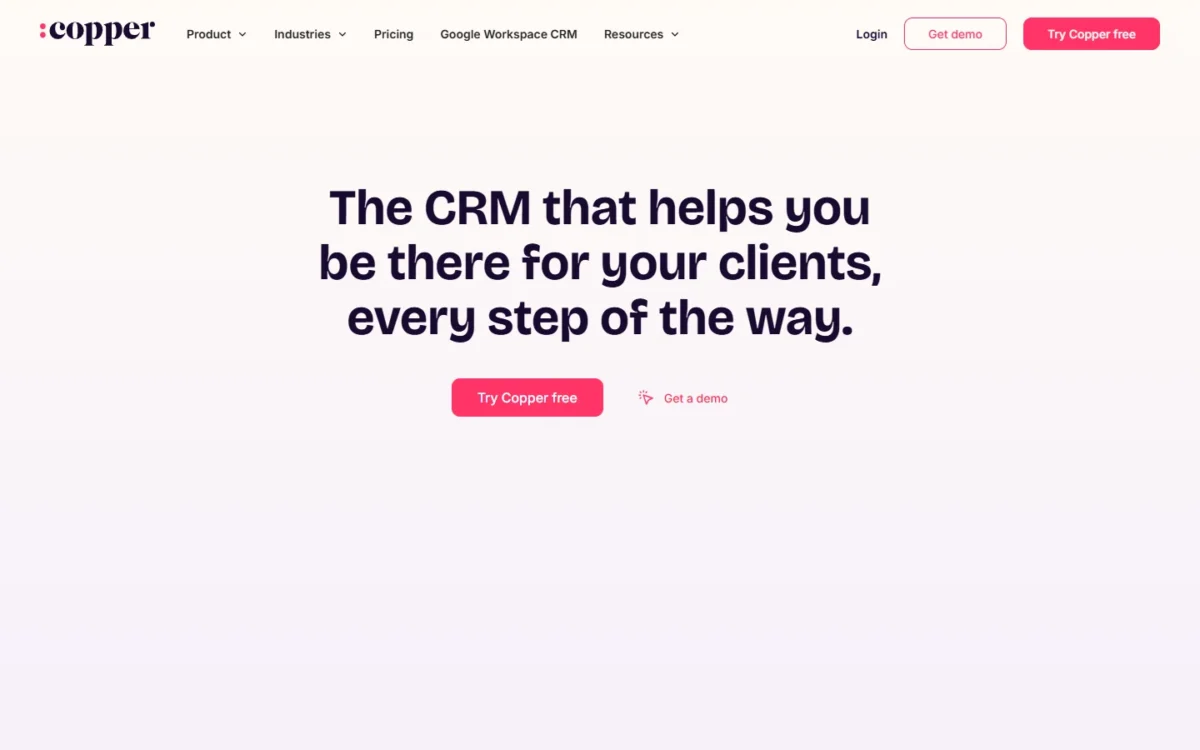
Copper is the pick for a Gmail-first, relationship-led team that wants contacts, email and files tied to the CRM from inside Gmail and Google Calendar on every plan.
The trade-off: Copper holds workflow automation until Professional and caps contacts at 2,500 on Basic and 15,000 on Professional, while Zoho’s Gmail fit is a contextual gadget plus Calendar and Contact sync.
In This Article (10 sections)
Zoho CRM vs Copper at a Glance
Zoho CRM costs less than Copper on each comparable pair of plans and opens workflow rules on its entry paid plan, while Copper builds its entry plan around Gmail and Google Calendar and caps it at 2,500 contacts.
| Attribute | Zoho CRM | Copper |
|---|---|---|
| Best for | Teams that want automation, guided processes and reports per dollar | Gmail-first teams that want the CRM inside Gmail and Google Calendar |
| Paid plans (US) | Standard, Professional, Enterprise, Ultimate | Basic, Professional, Business |
| Starting price | Standard: $14 per user per month billed annually, $20 billed monthly | Basic: $23 per seat per month paid annually, $29 billed monthly |
| First paid plan with workflow automation | Standard, $14 billed annually | Professional, $59 paid annually |
| Free plan | Free edition, free forever for 3 users | Not listed on copper.com/ |
| Entry-plan cap | 100,000 records (200 MB) on Standard | 2,500 contacts on Basic |
| Google Workspace | Gmail contextual gadget, Google Calendar and Contact sync from Standard | Chrome extension in Gmail and Google Calendar; Gmail, Calendar, Contacts and Drive on all plans |
| Main limitation | Gmail fit is a contextual gadget plus Calendar and Contact sync | Custom reports and email series only on Business |
Sources: Zoho CRM pricing, Zoho CRM edition comparison, Copper pricing, Copper integrations, checked Oct 2026.
The cap row compares different units: Zoho states storage in records, Copper caps contacts. A team above Copper Basic’s 2,500 contacts moves up a Copper plan.
Key Differences Between Zoho CRM and Copper
The deciding difference is the automation gate: Zoho CRM lists “Workflows & assignment rules” on Standard, while Copper starts workflow automation on Professional. Per seat on annual billing, that is $59 against $14, roughly four times the price for a first automated workflow.
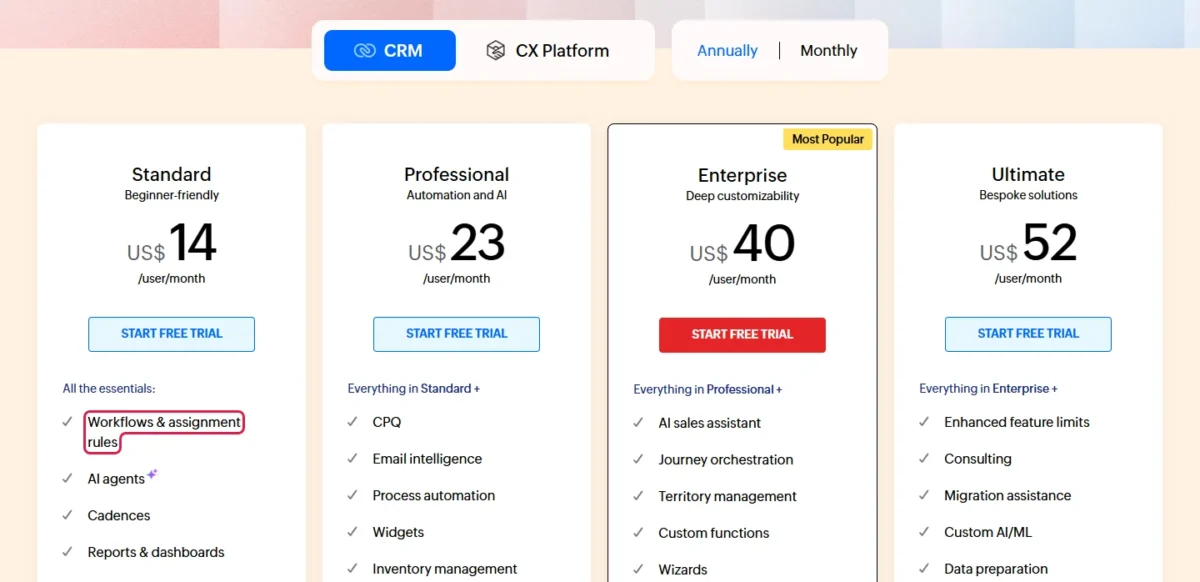
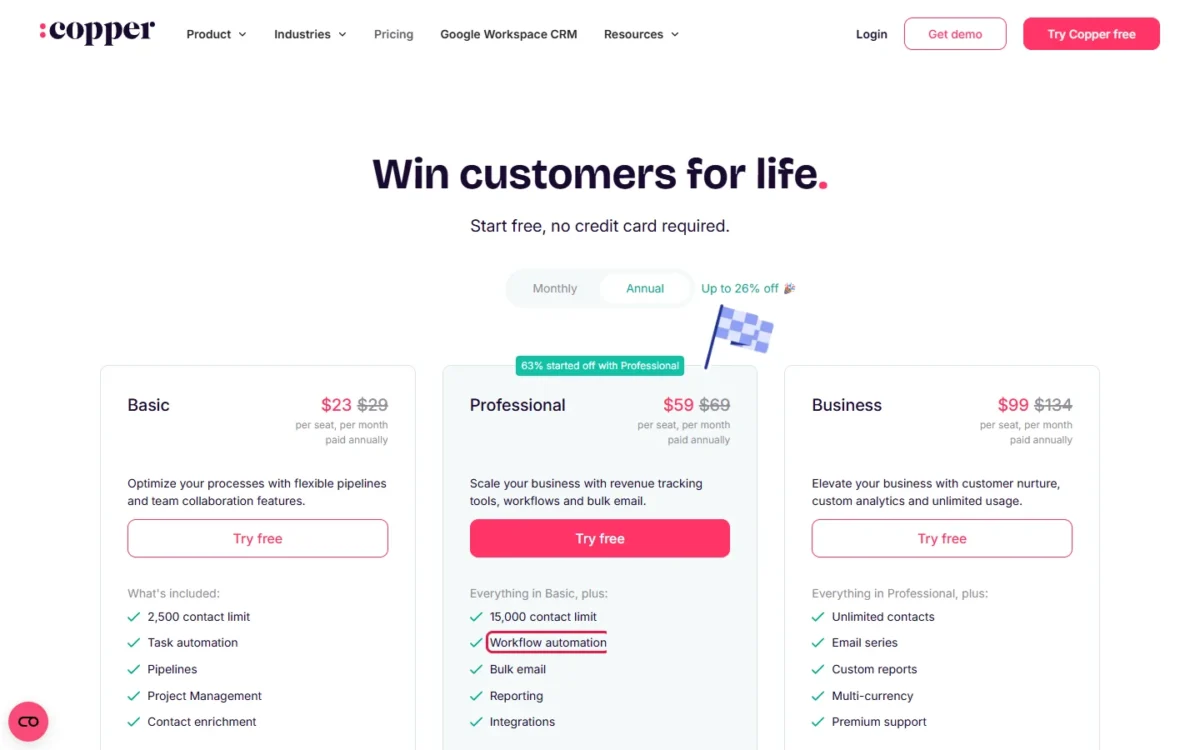
Automation price gate. Copper Basic lists task automation, so Professional is Copper’s first plan with workflow automation. The gap hits hardest for a team that wants follow-ups and assignments automated from the first paid seat.
Google depth against Microsoft support. Copper wins for a Gmail team, with Google integrations on all plans. Zoho is the one that lists Microsoft 365 and Outlook, so an Outlook team has one real option here.
Contact caps against record storage. Copper’s contact caps push a growing team up a plan; Zoho’s 100,000 records on Standard rarely do, so on Zoho a missing feature triggers the upgrade first.
Reporting gate. Custom reports start on Zoho Standard but only on Copper Business, so a manager who needs them pays far less on Zoho.
Zoho CRM vs Copper: Features Compared
Copper fits better inside Google Workspace; Zoho CRM fits better on automation, guided processes, reporting and customization depth.
| Feature | Zoho CRM | Copper |
|---|---|---|
| Workflow automation | Free edition; Standard is the first paid plan | Professional (Basic has task automation) |
| Email sequences | Cadences: Standard | Email series: Business |
| Bulk email | Mass email: Standard | Bulk email: Professional |
| Guided sales process | Blueprint: Professional | Not listed on copper.com/ |
| Custom reports | Standard, 100 reports | Custom Report Builder: Business |
| Sales forecasting | Standard | Not listed on copper.com/ |
| CRM in Gmail | Contextual gadget: Standard | Chrome extension: all plans |
| Google Sheets and Looker Studio | Not listed in Zoho’s Google Workspace rows | Professional |
| Microsoft 365 | Standard | Not listed on copper.com/ |
| Multi-currency | Standard | Business |
| Webhooks or developer API | Webhooks: Professional | Developer API: Professional |
Sources: Zoho CRM edition comparison, Copper plan comparison, checked Oct 2026.
Google Workspace and Gmail
Copper fits a Google Workspace team better: its Chrome extension works inside Gmail and Google Calendar, and its Gmail, Calendar, Contacts and Drive integrations come with all plans. Professional adds a Google Sheets add-on and Looker Studio.
Copper’s Google Workspace page also describes Gemini quick replies in Gmail and meeting transcripts added to Copper in one click.
Zoho CRM covers Gmail from the side. Standard adds a Zoho CRM contextual gadget for Gmail, Google Calendar and Contact sync, and export to Google Tasks; the Free edition has none of these, so a free start is not a Gmail start.
Zoho’s list is the one that covers Microsoft: Microsoft 365 integration from Standard and an Outlook plug-in from Professional. Copper’s pricing page lists no Microsoft 365 or Outlook row.
Verdict: Google Workspace
Copper fits better for a team that runs on Gmail, Calendar and Drive and wants CRM records beside the inbox from the $23 Basic plan (per seat per month, paid annually). The caveat: Copper’s free trial runs on the Business plan, so check what Basic or Professional keeps.
Automation and Guided Process
Zoho Standard automates the basics: workflows, assignment rules and Cadences, a sequence of follow-ups that branches on each lead’s response. Professional adds Blueprint, which keeps a sales process structured and easy to follow, with 3 active Blueprints; Enterprise allows 50 and adds an approval process.
Copper’s automation climbs one plan at a time: task automation on Basic, workflow and single-email automation on Professional, and email series on Business at $99 per seat per month, paid annually.
Verdict: Automation
Zoho CRM fits better for a team that wants automated follow-ups and a defined sales process at a low seat price: workflows and Cadences on Standard, Blueprint on Professional. The caveat: a team with more than three distinct processes outgrows Professional’s 3 active Blueprints.
Reporting and Forecasting
Zoho Standard gives a manager 100 custom reports, 10 custom dashboards and sales forecasting, and Professional makes custom reports and dashboards unlimited. Copper adds pipeline and activity reports on Professional and keeps its Custom Report Builder for Business.
A Copper team that reports in Google has a second route: Professional’s Sheets add-on and Looker Studio integration put Copper data into Google’s own tools.
Verdict: Reporting
Zoho CRM fits better for a manager who needs custom reports and a forecast on the entry paid plan. The caveat: Standard stops at 10 custom dashboards, and a Google-first manager may prefer Copper’s Looker Studio route.
Customization and Setup
Zoho customizes further from Professional up: 155 custom fields per module, 5 validation rules per layout and 3 Canvas record views per organization. Enterprise adds a sandbox and custom functions.
Zoho Standard is tighter, with 10 custom fields per module. Copper gives 25 custom fields on Basic and customizes fields by pipeline from Basic.
Copper’s setup begins with connecting your team’s Google Workspace accounts, after which it pulls in contacts and email conversations. Zoho offers a 15-day free trial with no credit card. Run either trial on your own pipeline: import a small batch of your own contacts, build one workflow and see which screen your sellers keep open.
Verdict: Customization
Zoho CRM fits better for a team that needs validation rules, many fields per module or a sandbox. The caveat: Copper Basic lists 25 custom fields and Zoho Standard 10 custom fields per module, so count the fields your team needs before paying for Zoho Professional.
AI Features
The AI choice depends on where the work happens. Copper’s AI email template generator and AI email re-writer are included on Professional and Business, not on Basic, and its Google page describes AI-suggested follow-ups inside Gmail with Gemini.
Zoho lists AI agents on Standard, email intelligence on Professional and an AI sales assistant on Enterprise, where Zia’s AI for emails also starts. Confirm its conditions for your team size before you pay for Enterprise to get it. A team that picks a CRM for AI first should compare the CRMs built around AI before this pair.
Verdict: AI
Depends on use: Copper for help drafting email inside Gmail, Zoho CRM for AI agents and email analysis inside the CRM. The caveat: output quality depends on your own threads, so try both on real messages during the trials.
Integrations and API
Zoho lists 1,100+ ready-to-use app integrations; its add-on integrations such as Slack, Zoom and QuickBooks sit outside the Free edition, with webhooks and Google Ads integration from Professional.
Copper connects to 5,000+ apps through Zapier and includes its Google integrations on all plans. Native integrations such as Slack, QuickBooks and DocuSign, and the Developer API, start on Professional, so a Copper team that needs them budgets for Professional from day one.
Zoho CRM vs Copper Pricing
Zoho CRM costs less than Copper on every comparable pair: $14 against $23 at entry, $14 against $59 for workflow automation and $40 against $99 for Zoho Enterprise against Copper Business. All are per user or seat per month on annual billing, and Zoho also sells Ultimate above Enterprise at $52.
Copper’s US pricing page, read on October 21, 2026, lists Basic, Professional and Business; its help center still describes a Starter tier with 1,000 contacts that the price list does not show.
| Job | Zoho CRM plan | Zoho CRM price | Copper plan | Copper price |
|---|---|---|---|---|
| Entry paid plan | Standard | $14 billed annually, $20 billed monthly | Basic | $23 paid annually, $29 billed monthly |
| First paid plan with workflow automation | Standard | $14 billed annually, $20 billed monthly | Professional | $59 paid annually, $69 billed monthly |
| Mid tier | Professional | $23 billed annually, $35 billed monthly | Professional | $59 paid annually, $69 billed monthly |
| Top tier compared | Enterprise | $40 billed annually, $50 billed monthly | Business | $99 paid annually, $134 billed monthly |
Sources: Zoho CRM pricing, annual and monthly views, Copper pricing, annual and monthly views, checked Oct 2026.
Zoho’s annual toggle says “Save up to 34%” and Copper’s says “Up to 26% off”. Zoho charges local taxes on top, and Copper’s USD prices exclude taxes and fees.
Zoho’s Ultimate edition and its add-ons sit in my full Zoho CRM pricing breakdown.
Each Copper plan’s terms are in Copper’s plans in detail.
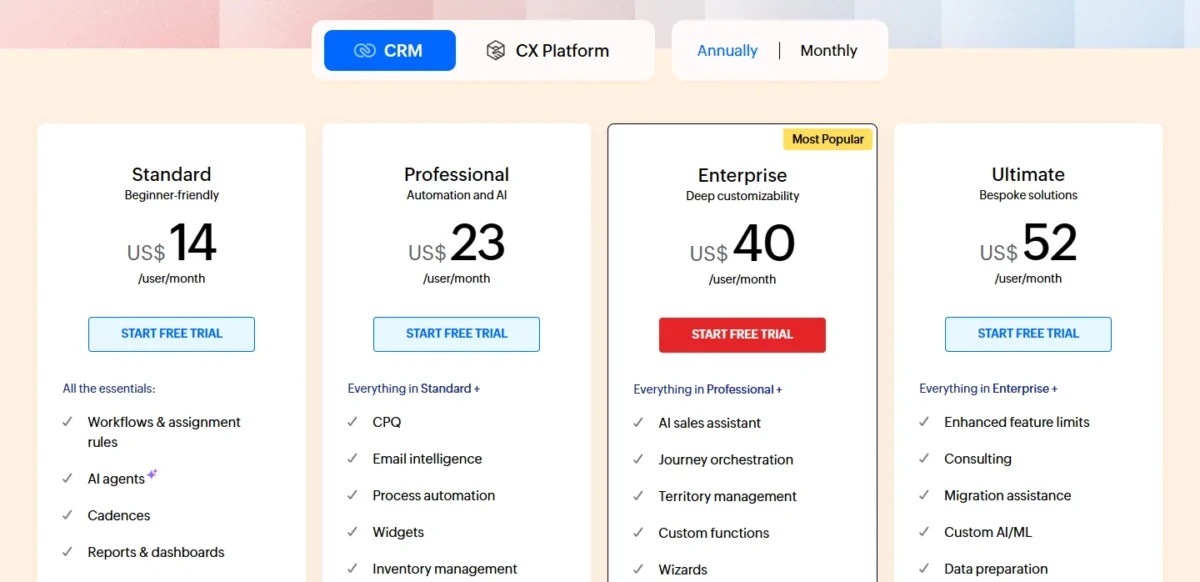
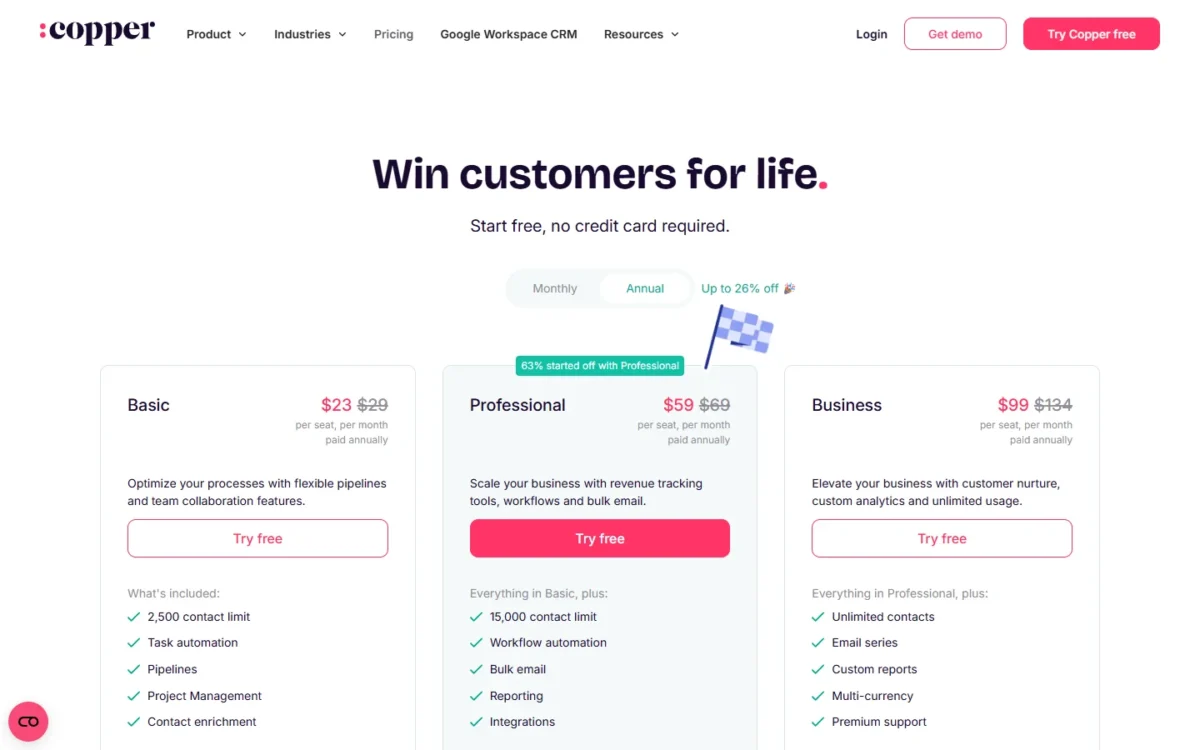
The cheaper product is not always the better value: a five-person Gmail team that needs no workflows gets Copper’s Chrome extension in Gmail and Google Calendar on Basic, while Zoho’s Gmail contextual gadget starts on Standard.
Cost for 5 and 10 Seats
At 10 seats on annual billing, the cheapest paid plans cost $14 x 10 users x 12 months = $1,680 a year on Zoho Standard and $23 x 10 seats x 12 months = $2,760 on Copper Basic.
| Plan | 5 seats, annual billing | 5 seats, monthly billing | 10 seats, annual billing | 10 seats, monthly billing |
|---|---|---|---|---|
| Zoho Standard | $14 x 5 users x 12 months = $840 | $20 x 5 users x 12 months = $1,200 | $14 x 10 users x 12 months = $1,680 | $20 x 10 users x 12 months = $2,400 |
| Zoho Professional | $23 x 5 users x 12 months = $1,380 | $35 x 5 users x 12 months = $2,100 | $23 x 10 users x 12 months = $2,760 | $35 x 10 users x 12 months = $4,200 |
| Zoho Enterprise | $40 x 5 users x 12 months = $2,400 | $50 x 5 users x 12 months = $3,000 | $40 x 10 users x 12 months = $4,800 | $50 x 10 users x 12 months = $6,000 |
| Copper Basic | $23 x 5 seats x 12 months = $1,380 | $29 x 5 seats x 12 months = $1,740 | $23 x 10 seats x 12 months = $2,760 | $29 x 10 seats x 12 months = $3,480 |
| Copper Professional | $59 x 5 seats x 12 months = $3,540 | $69 x 5 seats x 12 months = $4,140 | $59 x 10 seats x 12 months = $7,080 | $69 x 10 seats x 12 months = $8,280 |
| Copper Business | $99 x 5 seats x 12 months = $5,940 | $134 x 5 seats x 12 months = $8,040 | $99 x 10 seats x 12 months = $11,880 | $134 x 10 seats x 12 months = $16,080 |
Sources: Zoho CRM pricing, Copper pricing, checked Oct 2026.
Assumptions: list prices read on October 21, 2026; every seat paid for 12 months; monthly billing counted as 12 monthly charges; no tax, add-ons, extra storage or onboarding.
The row that decides most purchases is workflow automation. Copper Professional costs $59 – $14 = $45 more per seat per month than Zoho Standard on annual billing, and that premium buys Copper’s workflow automation on top of the Gmail CRM that Basic already has.
Zoho Professional and Copper Basic cost the same per seat at $23, billed annually. At that price Zoho adds Blueprint and unlimited custom reports, while Copper adds the CRM inside Gmail with task automation only.
The Limit That Forces an Upgrade
On Copper, contacts force the upgrade: Basic stops at 2,500 and Professional at 15,000, and only Business removes the cap. Business also brings custom reports and email series, at $99 against $59 per seat per month, paid annually.
On Zoho, features force it. Standard stops at 100 custom reports, 10 custom dashboards, 10 custom fields per module and no Blueprint. It also caps email notifications at 100 per user license per day, 5,000 a day at most.
Professional lifts most of these for $23 against $14 per user per month, billed annually. A Zoho team then meets a second gate: 3 active Blueprints on Professional, against 50 on Enterprise.
Pros and Cons of Zoho CRM and Copper
The main downside of Zoho CRM in this pair is a Gmail fit built from a gadget and syncs; its strength is how much automation and reporting the $14 Standard plan buys. Copper’s strength is the CRM inside Gmail and Calendar on every plan, and its downside a seat price that climbs fast once you need workflows or custom reports.
My Zoho CRM review judges Zoho on its own; this panel keeps to this choice.
Pros
- Workflow rules, Cadences and sales forecasting on Standard at $14 per user per month, billed annually
- Blueprint on Professional for a step-by-step sales process
- 100 custom reports and 10 custom dashboards on Standard
- Microsoft 365 integration from Standard and an Outlook plug-in from Professional
- Free edition for 3 users with 5,000 records and workflows
Cons
- Gmail fit is a contextual gadget plus Calendar and Contact sync, none of it on Free
- Only 3 active Blueprints on Professional
- Zia’s AI for emails starts on Enterprise at $40 per user per month, billed annually
- Standard allows 10 custom fields per module
The Copper CRM review covers Copper alone; its panel here weighs it against Zoho.
Pros
- Chrome extension puts the CRM in Gmail and Google Calendar on every plan
- Gmail, Calendar, Contacts and Drive integrations on all plans, with Sheets and Looker Studio on Professional
- Importers for Salesforce, Pipedrive and Zendesk Sell data, plus Excel and CSV templates
- 25 custom fields and SAML single sign-on (Okta) on Basic
Cons
- Workflow automation starts on Professional at $59 per seat per month, paid annually
- Contacts capped at 2,500 on Basic and 15,000 on Professional
- Custom reports and email series only on Business, at $99 per seat per month, paid annually
- No free plan and no Microsoft 365 or Outlook integration listed on copper.com/pricing
Which Is Better for Your Needs?
Pick Zoho CRM for automation, guided process, reporting and Microsoft needs, and Copper for working inside Gmail and reporting in Google’s tools.
| Your priority | Better fit | Reason | Trade-off |
|---|---|---|---|
| Workflow automation on a budget | Zoho CRM | Workflow rules on Standard at $14, against Copper Professional at $59, both billed annually | Zoho’s Gmail fit is a gadget plus syncs |
| CRM inside Gmail and Google Calendar | Copper | Chrome extension in Gmail and Calendar on every plan | Workflow automation needs Professional |
| Team on Microsoft 365 or Outlook | Zoho CRM | Microsoft 365 from Standard, Outlook plug-in from Professional | The Outlook plug-in needs Professional |
| Guided, repeatable sales process | Zoho CRM | Blueprint on Professional | 3 active Blueprints on Professional, 50 on Enterprise |
| Custom reports for a sales manager | Zoho CRM | 100 custom reports on Standard; Copper needs Business | 10 custom dashboards on Standard |
| Reporting in Google Sheets or Looker Studio | Copper | Sheets add-on and Looker Studio on Professional | $59 per seat per month, paid annually |
| More than 15,000 contacts below the top plan | Zoho CRM | 100,000 records on Standard | Storage is counted in records, 200 MB on Standard |
| Free start for up to 3 users | Zoho CRM | Free edition, free forever for 3 users | No Gmail gadget or Google sync on Free |
| AI email drafting inside Gmail | Depends | Copper’s AI email tools and Gemini in Gmail, against Zoho’s AI agents and email intelligence | Zia’s AI for emails starts on Enterprise; Copper’s AI email tools start on Professional |
Sources: Zoho CRM edition comparison, Copper plan comparison, checked Oct 2026.
A five-person Gmail team with fewer than 2,500 contacts and no workflow needs is the one case where Copper Basic wins on fit despite the higher seat price.
A reader weighing Copper against a third name can compare Nimble vs Copper.
Skip Copper if: you need workflow automation under $59 a seat, more than 15,000 contacts below Business, or an Outlook integration.
Those three needs are the usual exits, and the Copper alternatives ranked by why teams leave start from them.
Skip Zoho CRM if: your team wants the CRM inside Gmail and Calendar, with Drive and Sheets tied to records, and needs no Blueprint or deep reports.
A team that drops Zoho from the shortlist for another reason can weigh these alternatives to Zoho CRM.
A buyer who wants to set Zoho against a different rival can open Zoho CRM vs Bitrix.
Switching Between Zoho CRM and Copper
Copper’s importer offers Excel plus Salesforce, Pipedrive, Zendesk Sell and more, and Zoho’s data migration wizard maps fields from your existing system, so each direction runs on the export and import tools below.
From Zoho to Copper, export Zoho’s module data (every edition lists it) and import it with Copper’s Excel and CSV templates. Copper takes files up to 3MB, wants Companies first, then People, then Opportunities, and can revert an import.
From Copper to Zoho, admins export people, companies, opportunities, projects, tasks and leads as .xlsx files; activities need a one-time export from Copper Support. Zoho imports through its migration wizard, a CSV import or its Bulk Write API, at 10,000 records per batch on Standard.
Those export and import lists name record types only, so check whether your workflows, Blueprints, reports and email sequences can move before you plan the switch. Zoho’s Ultimate edition lists migration assistance. Copper lists personal onboarding with an onboarding consultant for eligible Business and Professional annual tier accounts.
A reader still deciding whether Copper is the right destination can see Copper vs Streak.
How I Compared Zoho CRM and Copper
I compared the two from both vendors’ US pricing pages in US dollars, each read in its annual and its monthly view, on October 21, 2026. I added Zoho’s edition comparison with its Google Workspace rows, Zoho’s integrations, Zia and migration pages, and Copper’s plan comparison help article, Google Workspace and integrations pages and import and export help articles.
I paired plans by the job they do: entry paid plan, first paid plan with workflow automation, mid tier and the top tier compared, at list prices before tax. Copper’s free trial runs on the Business plan, and its pricing page’s Compare Features table puts the AI email tools on Professional and Business.
FAQ
Is Copper CRM good?
Copper is a good buy for a Gmail-first team under its contact caps: the CRM runs in Gmail and Google Calendar on every plan, from $23 per seat per month, paid annually. Its Basic plan also lists project management and contact enrichment.
Does Zoho CRM or Copper have a free plan?
Zoho CRM does: its Free edition is free forever for 3 users, holds 5,000 records and lists workflows and reports. Copper’s pricing page lists no free plan; it offers a free trial with no credit card, and that trial runs on the Business plan. Zoho’s paid editions also start with a 15-day trial without a card.
Does Copper work without Google Workspace?
Copper is built for teams already on Google Workspace: its setup starts by connecting your team’s Google Workspace accounts, and users sign in with Google. Its pricing page lists no Microsoft 365 or Outlook integration, so an Outlook-based team is better served by Zoho CRM.
Final Verdict: Zoho CRM or Copper?
Zoho CRM is the better buy for most small and mid-size sales teams that want automation, guided processes and reporting at a lower seat cost. Copper is the better buy for a Gmail-first, relationship-led team under its contact caps that will pay more per seat to work inside Google Workspace.
Choose Zoho CRM if
- You want workflow automation at $20 a seat or less: Standard is $14 billed annually, $20 monthly
- You need a guided sales process: Blueprint starts on Professional
- A manager needs custom reports and forecasting on the entry paid plan
- Your team uses Outlook or Microsoft 365
Choose Copper if
- Your team works in Gmail and Google Calendar all day
- You want Drive files on records and reporting in Google Sheets or Looker Studio
- Task automation and pipelines cover your process on Basic
- You will stay under 2,500 contacts on Basic or 15,000 on Professional
The main trade-off is price against place: Zoho gives more automation per dollar, and Copper gives the CRM a place inside Gmail. Readers still weighing Zoho against its most-asked rival can see how Zoho CRM compares with HubSpot.
A team that fits neither profile can start from the best CRM software for small teams.






Pingback: 10 Best Zoho CRM Alternatives in 2026 (Pricing Compared)