Design collaboration usually breaks at one predictable moment: when somebody who is not a designer needs to open the file, leave a comment, or sign off on it. That is where seat types, guest roles, and free-plan ceilings quietly start making workflow decisions for you.
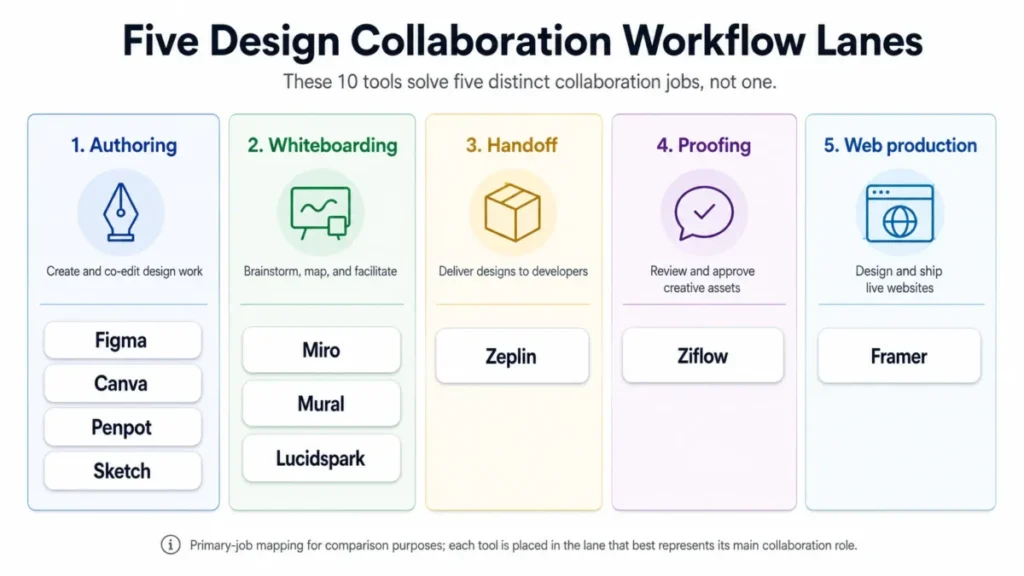
The ten tools ranked below solve five different jobs. Treating them as interchangeable is the most expensive mistake buyers make in this category, and it is the reason a shortlist built from feature counts so often produces a tool nobody uses six months later.
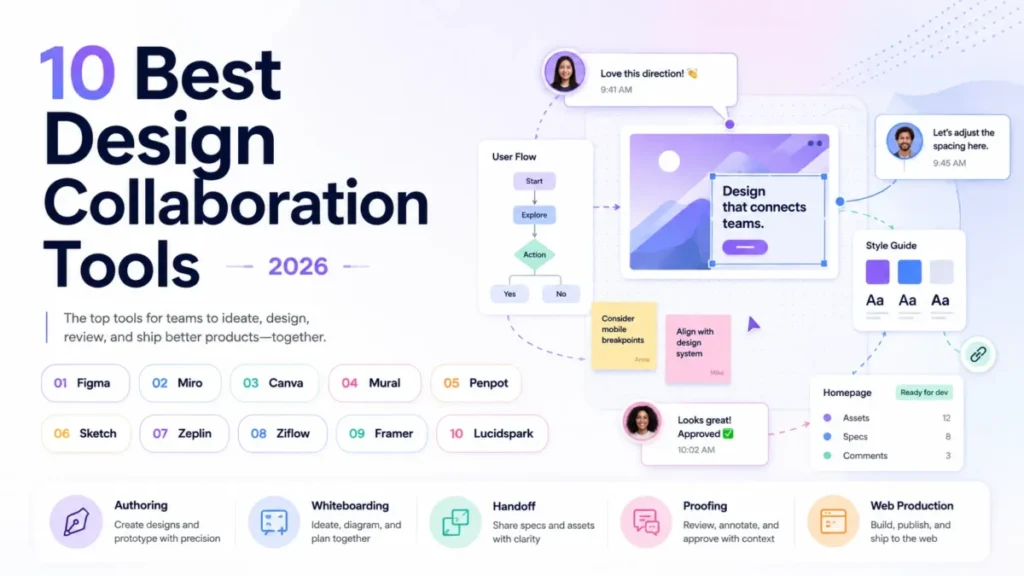
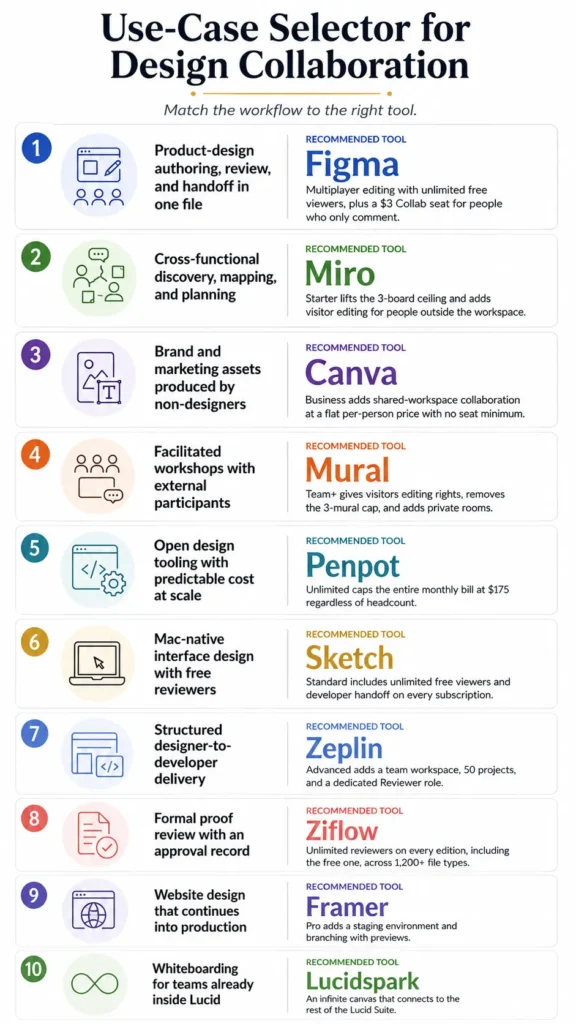
Figma is the top pick for product-design teams that author, review, and hand off in one place. Miro and Mural own facilitated whiteboarding, Ziflow owns formal proofing, Zeplin owns structured delivery, and Framer owns the path from visual design into a live site.
If you are still scoping the wider stack, our roundup of team collaboration tools covers the non-design layer.
Every price below comes from an official vendor page checked on August 13, 2026, and every limit is the one the vendor publishes.
In This Article (11 sections)
Quick Verdict: Best Design Collaboration Tool by Use Case
| Use case | Best pick | Why it fits |
|---|---|---|
| Product-design authoring, review, and handoff in one file | Figma | Multiplayer editing with unlimited free viewers, plus a $3 Collab seat for people who only comment |
| Cross-functional discovery, mapping, and planning | Miro | Starter lifts the 3-board ceiling and adds visitor editing for people outside the workspace |
| Brand and marketing assets produced by non-designers | Canva | Business adds shared-workspace collaboration at a flat per-person price with no seat minimum |
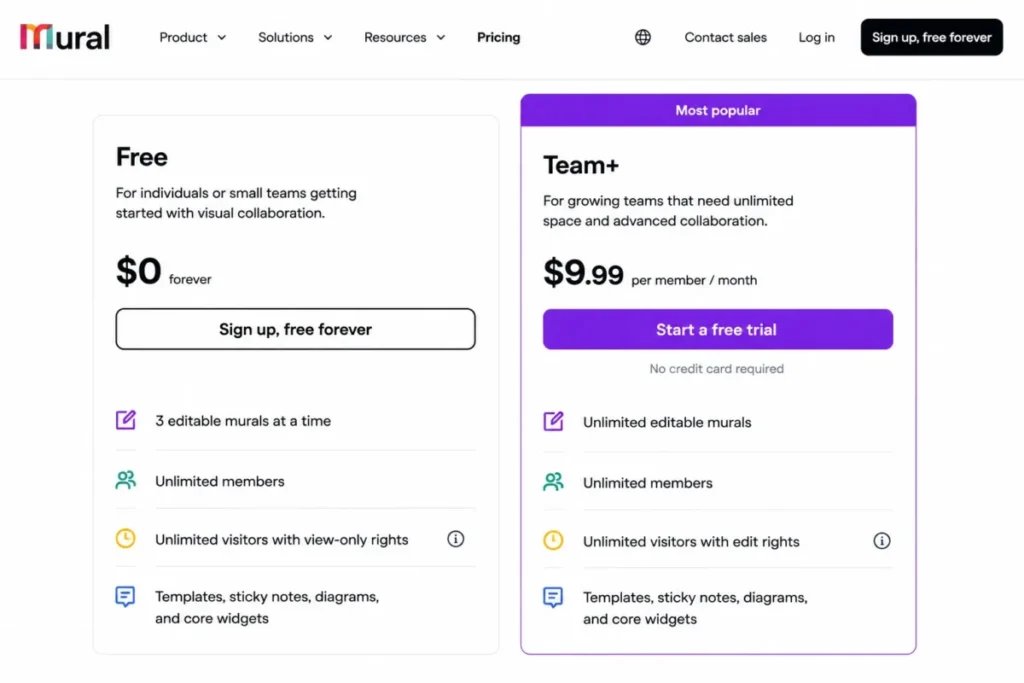
| Facilitated workshops with external participants | Mural | Team+ gives visitors editing rights, removes the 3-mural cap, and adds private rooms |
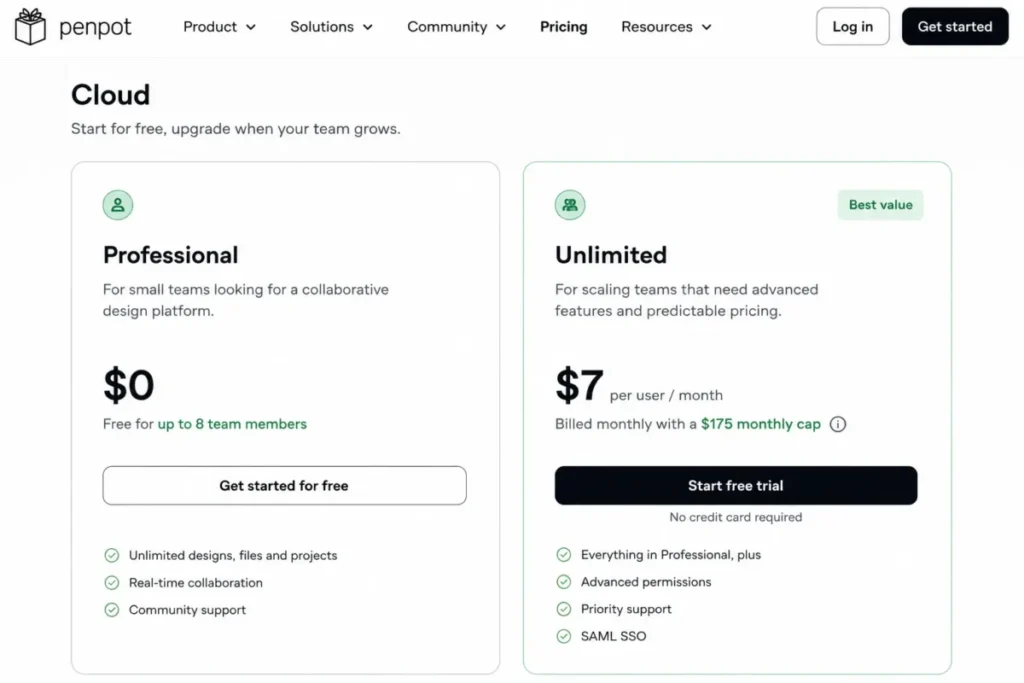
| Open design tooling with predictable cost at scale | Penpot | Unlimited caps the entire monthly bill at $175 regardless of headcount |
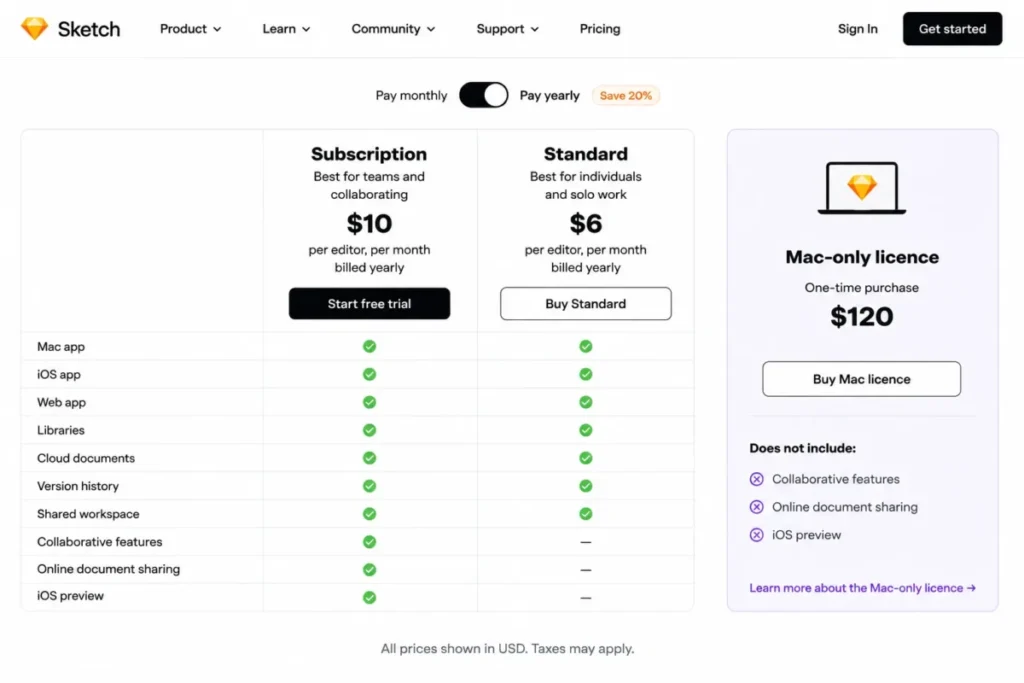
| Mac-native interface design with free reviewers | Sketch | Standard includes unlimited free viewers and developer handoff on every subscription |
| Structured designer-to-developer delivery | Zeplin | Advanced adds a team workspace, 50 projects, and a dedicated Reviewer role |
| Formal proof review with an approval record | Ziflow | Unlimited reviewers on every edition, including the free one, across 1,200+ file types |
| Website design that continues into production | Framer | Pro adds a staging environment and branching with previews |
| Whiteboarding for teams already inside Lucid | Lucidspark | An infinite canvas that connects to the rest of the Lucid Suite |
The budget pick for a real team is Penpot, because its free Professional tier carries eight members and its paid tier stops billing at $175 a month. The strongest free plan for external review is Ziflow Personal, which never charges for a reviewer.
The governance pick depends on where single sign-on sits: Mural puts it on Business, Sketch puts it on Professional, and Miro puts it on Business.
Comparison at a Glance
| Tool | Primary job | Free-plan ceiling | Reviewer access without a paid seat | Entry paid price (US) |
|---|---|---|---|---|
| Figma | Design authoring and handoff | Starter keeps 30 days of version history | Yes, unlimited free viewers | $16 per Full seat/ |
| Miro | Whiteboarding and ideation | 3 editable boards, no Guest role | Visitors are view-only on Free | $8 per member/ |
| Canva | Brand and marketing production | Not the practical team tier | Not documented as a free team role | $20 per person/ |
| Mural | Facilitated workshops | 3 editable murals at a time | Visitors are view-only on Free | $9.99 per member/ |
| Penpot | Open design authoring | 8 team members, 10GB storage | Yes, unlimited viewers | $7 per user/ |
| Sketch | Mac-native design authoring | No free tier beyond a 30-day trial | Yes, unlimited free viewers | $12 per Editor/ |
| Zeplin | Design delivery and handoff | 1 project, 100 screens | A dedicated Reviewer role on Advanced | From $13.75/ |
| Ziflow | Proofing and approvals | 2 users, 1 workflow stage, 60 days of history | Yes, unlimited reviewers on every edition | $199/ |
| Framer | Design into a live site | 1 GB bandwidth on a Framer domain | Viewers are free | $10/ |
| Lucidspark | Lucid-centered whiteboarding | Limited access to basic features | Not documented at a numeric price | Not published on the official pages checked |
Sources, all checked August 13, 2026: Figma pricing, Miro pricing, Canva Business, Mural pricing, Penpot pricing.
Also Sketch pricing, Zeplin pricing, Ziflow pricing, Framer pricing, and Lucid Plans.
Only three groups in that table hold true head-to-head competitors: Figma against Penpot and Sketch for design authoring, Miro against Mural and Lucidspark for whiteboarding, and Zeplin against Ziflow for post-design review. Canva and Framer compete with nothing else here, because one produces marketing assets and the other publishes websites.
Wide tables in this article use a pinned-label horizontal scroll on small screens so the tool column stays visible.
How We Chose
These rankings are based on verified pricing, official product documentation, help-center guidance, and current feature pages. Pricing and plan limits were checked on August 13, 2026.
Each tool was assessed against the same buyer-focused criteria: workflow fit, collaborative authoring depth, feedback and review handling, developer handoff, external participation, governance gates, and cost structure.
Greater weight was given to factors that change a purchase decision, including which collaborator types consume a paid seat, which limit ends the free tier first, and what the bill looks like at 25 people. Brand popularity and affiliate relationships carried no weight in the order.
Claims that could not be verified from official evidence were excluded rather than estimated, and our review methodology explains how that boundary is applied.
The Three Problems Every Design Collaboration Buyer Faces
Feature lists are close to useless in this category, because almost every tool on the shortlist has real-time editing, comments, templates, and integrations. The differences that decide the purchase sit in three places.
Problem 1: The sticker price is not the price
Every product here charges for a different unit. Figma charges by seat type, Miro and Mural charge per member, and Canva charges per person.
Zeplin charges by project on its entry tier. Ziflow charges a flat monthly fee with users bundled in, and Framer charges per site plan with editors billed on top.
That makes the published starting prices non-comparable in their raw form. A $10 Framer plan and a $199 Ziflow plan are not two points on the same scale, because one covers a website and the other covers a review workflow for fifteen people.
The number that matters is what your actual role mix costs. A design team of five with twelve stakeholders who only comment pays very differently across these tools, and the difference is often larger than the gap between the headline prices.
Take a realistic squad of three designers, two engineers who need specs, and seven stakeholders who only comment. On Figma’s published seat pricing that mix is three Full seats at $16 plus two Dev seats at $12, with the other seven reading and commenting for free, which lands the monthly bill at $72.
Price those same twelve people as though every tool charged the same way and the answer changes completely. Canva Business bills all twelve at $20 each because it charges per person rather than per role, and Miro Starter bills every member at $8 whether they draw or watch.
Neither of those is a criticism. It is the reason a per-person price and a per-role price should never be lined up in the same column as though they measured the same thing.
Problem 2: The free tier ends for a reason you did not plan for
Free plans in this category rarely end because of headcount. They end because of a capacity limit that has nothing to do with how many people you hired.
Miro Free allows unlimited team members but only three editable boards, and it has no Guest role at all. Mural Free also allows unlimited members while capping you at three editable murals at a time, with visitors restricted to view-only rights.
Penpot Free takes the opposite approach and caps the team at eight members while leaving the file count alone. Zeplin Free stops at one project and 100 screens, and Ziflow Personal stops at two users, one workflow stage, and 60 days of review history.
None of those ceilings is visible from a pricing table that only shows a dollar amount. Each one is the thing that forces the upgrade.
Problem 3: Half these tools are not competing with each other
A ranked list implies that position one beats position ten. In this category that reading is wrong often enough to be dangerous.
Zeplin does not replace a design editor, it organises what comes out of one. Ziflow does not replace comments inside a design file, it replaces the email chain your legal reviewer still has to manage.
Framer does not replace a whiteboard, it replaces a separate publishing environment. None of those three products competes with the tool sitting above it in this ranking.
Pick the lane first, then rank inside it. A team that buys the wrong lane will get a tool that works perfectly and still fails.
The 10 Best Design Collaboration Tools
The order below follows how completely each tool closes one collaboration job, not how many features it lists. Depth varies by rank and by how much the decision costs you.
Every entry names the buyer cohort it fits and the workflow it closes. It then states the plan gate that forces an upgrade and the disqualifier that should send you elsewhere.
The ranking reason sits in each verdict line, because a winner by scenario is more useful to a shortlist than a winner in the abstract.
1. Figma: Best Overall for Product-Design Collaboration
- Best for:
- Product-design teams of 5 to 25 people who author interfaces, gather stakeholder feedback, prototype, and hand work to engineers without changing tools.
- Avoid if:
- Your dominant job is workshop facilitation, campaign asset production, or a formal approval record with an audit trail.
- Starting price:
- Starter is free.
- Practical tier:
- Professional, at $16 per Full seat/month.
- Free plan:
- Yes, with 30 days of version history on Starter.
- First limit that bites:
- The 30-day version-history window on Starter, which ends the moment a design system needs to be rolled back further than a month.
- Better than Sketch:
- It runs in the browser, so a mixed-OS team of designers, PMs, and engineers all get the same file.
- Worse than Ziflow:
- Comments on a frame are not an approval record, and Figma does not stage a proof through named review rounds.
- Setup difficulty:
- Low for a small team, medium once a shared design system and library permissions are involved.
- Hidden costs:
- AI credit allowances and API usage differ by plan and by seat, so heavy automation is not free at the Starter level.
- Evidence status:
- Seat-type pricing and the Starter history window were read from the official Figma pricing page on August 13, 2026.
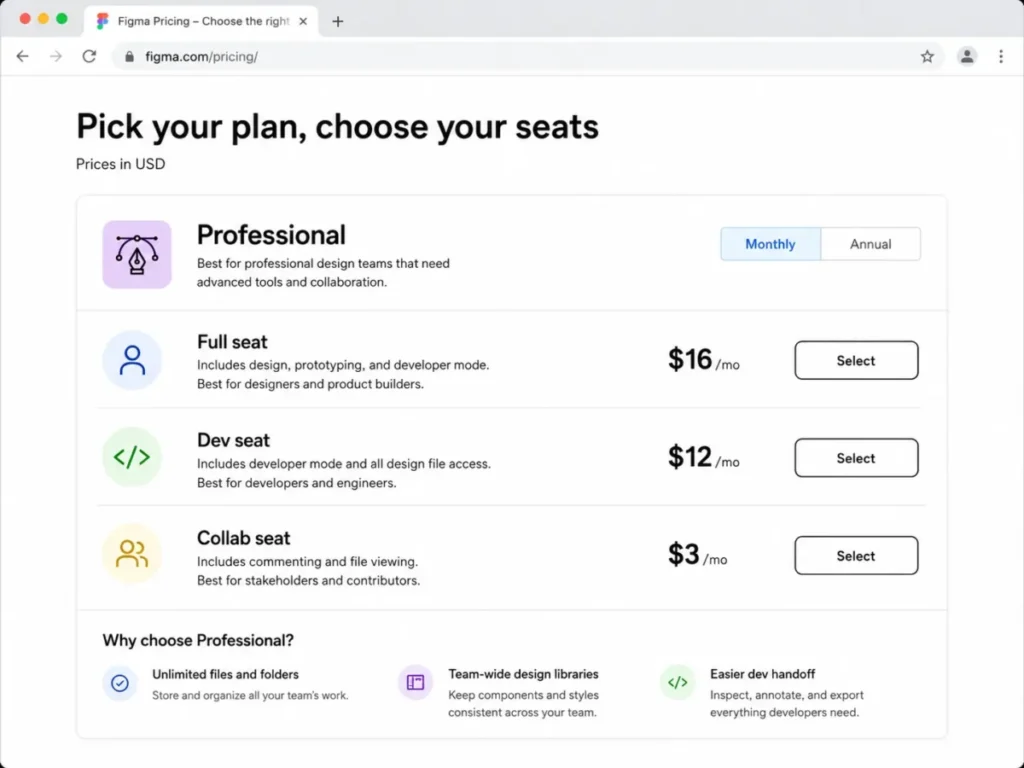
The seat model is the most decision-relevant thing about Figma, and most roundups skip it. Professional splits into a Full seat at $16 per month, a Dev seat at $12 per month, and a Collab seat at $3 per month.
Adding a product manager who only comments therefore costs roughly a fifth of what adding a designer costs.
That structure is why Figma lands first. A ten-person product squad with three designers, two engineers who inspect specs, and five people who only review does not pay ten Full seats; it pays for the seats that match the work.
Unlimited free viewers sit underneath all of that, so a client or an executive can open the file and comment without appearing on the invoice at all. Our detailed Figma review goes deeper on the authoring side.
The trade-off is that Figma is a design editor first. Its comment threads work well for iteration and badly for compliance, because there is no stage gate, no forced reviewer order, and no retained approval record of the kind a regulated marketing team needs.
| Pros | Cons |
|---|---|
| Three seat types let reviewer cost drop to $3 per month | Starter caps version history at 30 days |
| Unlimited free viewers keep stakeholders off the invoice | No staged approval workflow for compliance review |
| One environment covers authoring, prototyping, and handoff | AI and API allowances vary by plan and seat |
| Source: Figma official plan page, checked August 13, 2026. |
- Verdict:
- Choose Figma if interface authoring and developer handoff are the same team’s job and you want reviewer cost to stay near zero.
2. Miro: Best for Cross-Functional Ideation

- Best for:
- Product, research, and strategy groups of 5 to 50 running discovery, journey mapping, and planning sessions across functions.
- Avoid if:
- Pixel-level interface authoring is the primary workflow rather than an occasional sketch.
- Starting price:
- Free.
- Practical tier:
- Starter, at $8 per member/month billed yearly.
- Free plan:
- Yes, with unlimited team members.
- First limit that bites:
- Three editable boards, paired with the absence of any Guest role on Free.
- Better than Lucidspark:
- Its US price is published openly at every tier, so a Starter budget can be approved without a sales call.
- Worse than Figma:
- A board is not a design file, and Miro has no equivalent of a component library or a developer inspect view.
- Setup difficulty:
- Low. Templates cover most session formats out of the box.
- Hidden costs:
- AI credits are metered at 25 per member/month on Starter, and MCP calls are capped at 500 per day.
- Evidence status:
- Board limits, collaborator roles, and AI allowances come from Miro’s published plan comparison, checked August 13, 2026.
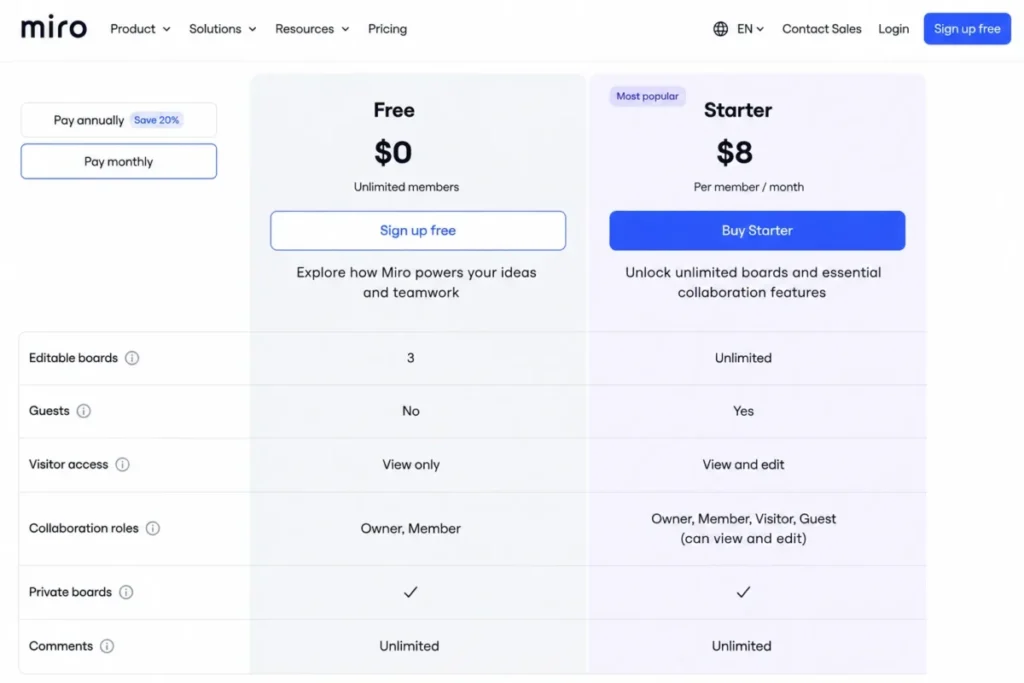
The catch on Miro Free is not the board count on its own. It is the board count combined with the missing Guest role, because anyone you invite to collaborate becomes a Member and consumes a paid seat once you upgrade.
Starter at $8 per member/month billed yearly fixes both problems at once. It removes the board ceiling, adds private boards, and introduces visitor editing so people outside the workspace can contribute without a seat.
For a research team running three concurrent studies, that upgrade is not optional by month two. Three editable boards is roughly one project.
Where Miro loses ground is depth of design work. It renders shapes, frames, and sticky notes well, and it does not pretend to hold a production design system, which is why the Miro review treats it as a thinking surface rather than an editor.
| Pros | Cons |
|---|---|
| Visitor editing on Starter brings in outside contributors | Free plan has no Guest role at all |
| Unlimited and private boards from the entry paid tier | Three editable boards on Free ends fast |
| Facilitation tools including timer and voting | Single sign-on is gated to Business |
| Source: Miro official plan page, checked August 13, 2026. |
- Verdict:
- Choose Miro if the job is cross-functional thinking and facilitation, and budget the Starter tier from the start rather than treating Free as a destination.
3. Canva: Best for Non-Designers and Brand Teams
- Best for:
- Marketing and brand teams of 3 to 25 where people without design training produce recurring visual assets.
- Avoid if:
- You need interface design systems, prototype states, or code-oriented handoff.
- Starting price:
- Free.
- Practical tier:
- Business, at $20 per person/month.
- Free plan:
- Yes, though it is not the team tier.
- First limit that bites:
- Shared-workspace collaboration and team approval workflows, which sit on Business rather than the individually oriented Pro plan.
- Better than Framer:
- Non-designers produce publishable output on day one without learning a layout or breakpoint model.
- Worse than Penpot:
- There is no multiplayer design-to-code inspection path for engineers.
- Setup difficulty:
- Low. Brand assets and templates carry most of the configuration.
- Hidden costs:
- Premium AI tooling is metered by usage limits that differ between Pro and Business.
- Evidence status:
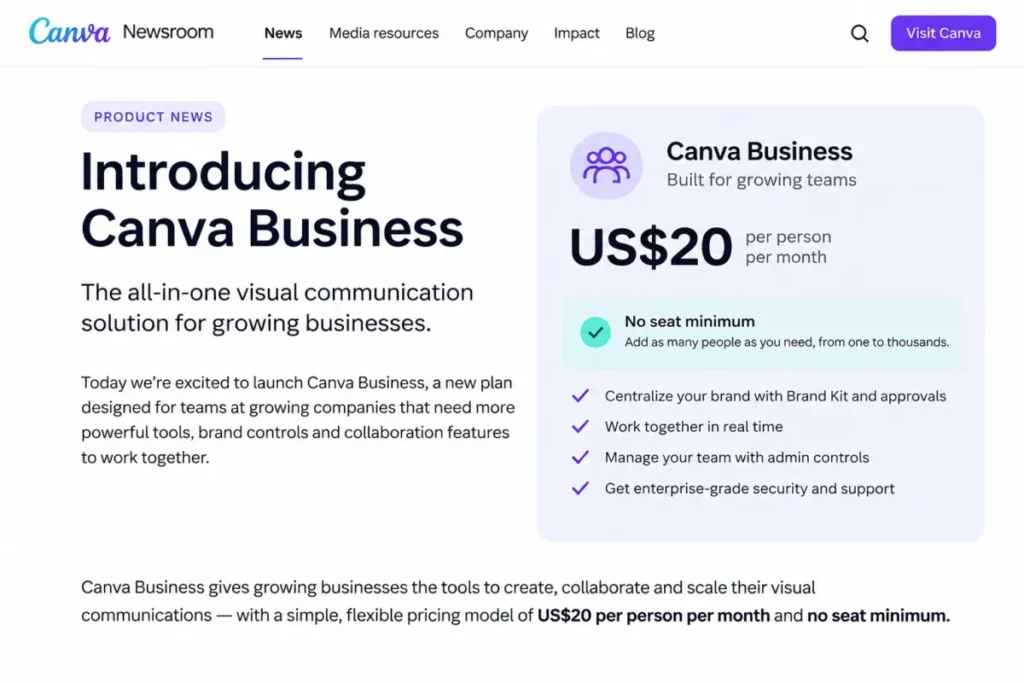
- The US price and the plan positioning were taken from Canva’s Canva Business announcement on August 13, 2026.
Canva Business is listed at US$20 per person per month with no seat minimum, which matters more than the number itself. A three-person brand team can buy the collaboration tier without being pushed to a five or ten seat floor, and that is unusual in this category.
The plan boundary is where buyers go wrong. Pro reads as the obvious upgrade because it is cheaper, but Canva’s own Pro page positions Pro around an individual creator, with the shared workspace, advanced brand controls, and team capabilities landing on Business.
A marketing team that buys Pro seats to save money ends up with several disconnected individual accounts and no shared brand governance. That is a workflow failure, not a billing one.
One more naming detail is worth carrying into a purchase conversation. Canva Teams is no longer available for new sign-ups or upgrades, so a 2026 buyer is choosing between Pro, Business, and Enterprise, and any third-party article still recommending Teams is out of date.
Our Canva AI review covers the generative side of the same account.
| Pros | Cons |
|---|---|
| No seat minimum on the team tier | Team collaboration and approvals require Business, not Pro |
| Non-designers reach publishable output quickly | No developer handoff or code inspection |
| Shared workspace and brand controls on Business | AI usage is capped differently by plan |
| Source: Canva official plan page, checked August 13, 2026. |
- Verdict:
- Choose Canva if the bottleneck is volume of on-brand marketing output, and budget Business rather than Pro the moment more than one person touches a file.
4. Mural: Best for Facilitated Workshops
- Best for:
- Facilitation, research, and innovation teams of 5 to 50 running structured sessions that include people from outside the company.
- Avoid if:
- You are producing production interface designs or need a retained approval record.
- Starting price:
- Free.
- Practical tier:
- Team+, at $9.99 per member/month billed annually.
- Free plan:
- Yes, with unlimited members.
- First limit that bites:
- Three editable murals at a time, which is one workshop series.
- Better than Miro:
- Visitors get editing rights on the entry paid tier rather than being held at view-only until a higher plan.
- Worse than Figma:
- No design system, no component library, and no developer inspect path.
- Setup difficulty:
- Low to medium, depending on how much facilitation structure a session needs.
- Hidden costs:
- Single sign-on and unlimited external users sit on Business, above the Team+ tier most workshop teams start on.
- Evidence status:
- Mural limits and tier contents were read from the official Mural pricing page on August 13, 2026.
Free looks generous here because member count is unlimited. The ceiling arrives through board capacity instead: three editable murals at a time, with visitors restricted to view-only rights.
For a facilitator that combination is close to unusable past a single engagement. A workshop typically needs a working canvas, a synthesis canvas, and a leave-behind, which uses the entire allowance before the second client is booked.
Team+ at $9.99 per member/month billed annually is the point where Mural becomes the tool it markets itself as. Unlimited editable murals, visitors with editing rights, private rooms, and Mural AI all arrive together, and the visitor rights are what separate it from Miro at a comparable price.
Governance is the next step up rather than an add-on. SAML single sign-on and unlimited external users are Business features, so a security review will move the budget before headcount does.
| Pros | Cons |
|---|---|
| Visitor editing rights included at the entry paid tier | Free is limited to 3 editable murals at a time |
| Unlimited members even on the free plan | Single sign-on requires the Business plan |
| Private rooms separate client work from internal work | Not a substitute for a production design editor |
| Source: Mural official plan page, checked August 13, 2026. |
- Verdict:
- Choose Mural if a facilitator runs recurring sessions with outside participants, and expect Team+ to be a first-month purchase rather than a later one.
5. Penpot: Best Open-Source-Oriented Option
- Best for:
- Design and engineering groups of 5 to 50 that want open tooling, multiplayer editing, and an API they can build against.
- Avoid if:
- You need the largest proprietary plugin ecosystem or free enterprise governance.
- Starting price:
- Professional is $0 per user/month.
- Practical tier:
- Unlimited, at $7 per user/month with the total bill capped at $175/month.
- Free plan:
- Yes, for up to 8 team members with unlimited viewers.
- First limit that bites:
- The 8-member cap on Professional, followed closely by 7 days of autosaved versions and 7 days of deleted-file recovery.
- Better than Figma:
- Cost stops growing. At 25 users the capped bill and the per-user maths land on the same number, and above that only one of them keeps rising.
- Worse than Sketch:
- A smaller third-party ecosystem, so specialised plugin workflows are harder to reproduce.
- Setup difficulty:
- Low on the hosted cloud, high if a team chooses to run its own deployment.
- Hidden costs:
- None documented on the cloud tiers beyond the plan price itself, since the cap is the ceiling.
- Evidence status:
- Member caps, retention windows, and the billing cap were taken from Penpot’s published pricing on August 13, 2026.
The capped bill is the single most useful fact in this entire comparison and almost nobody publishes it. Unlimited bills $7 per user/month, and the monthly total is capped at $175.
Run the arithmetic and the threshold is exact. Twenty-five users at $7 comes to $175, so every user after the twenty-fifth is free, and a 60-person design organisation pays the same $175 as a 25-person one.
Set that against the Figma Full seat rate of $16. A 25-person authoring team is looking at $175 on Penpot versus $400 on Figma for the same month.
That gap is not a rounding difference. It is the strongest argument for putting Penpot on a shortlist it would otherwise miss.
Retention is where the free tier gets thin. Seven days of autosaved versions and seven days of deleted-file recovery is a short window for a team that reviews work fortnightly, and it is a more realistic upgrade trigger than the member count for most groups.
| Pros | Cons |
|---|---|
| Monthly bill capped at $175 regardless of headcount | Free tier stops at 8 team members |
| Multiplayer editing, comments, prototyping, and code inspection | Seven-day version and deletion recovery on Professional |
| REST API and webhooks included across plans | Smaller plugin ecosystem than the proprietary tools |
| Source: Penpot official plan page, checked August 13, 2026. |
- Verdict:
- Choose Penpot if open tooling matters to your engineering culture, or if your authoring team is heading past 25 people and the per-seat maths has stopped making sense.
6. Sketch: Best Mac-Native Product-Design Workflow

- Best for:
- Mac-centred product-design teams with a small number of paid editors and a large number of reviewers and developers.
- Avoid if:
- Your designers work across Windows and Linux, or you expect the one-time licence to include cloud collaboration.
- Starting price:
- $12 per Editor/month, billed yearly, on Standard.
- Practical tier:
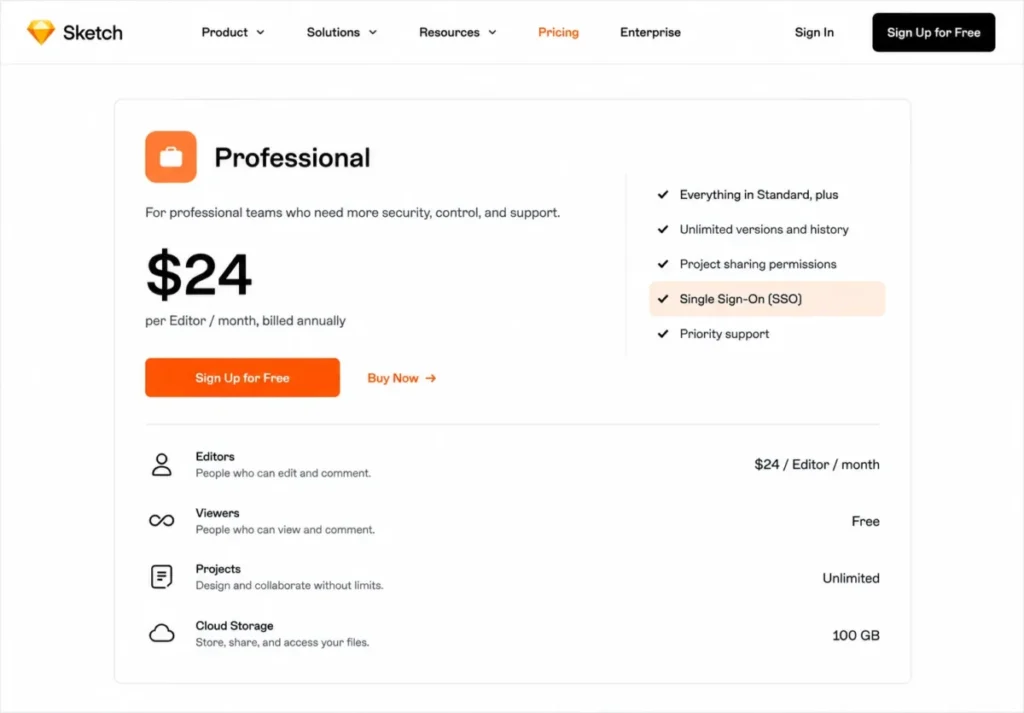
- Standard for most teams, Professional at $24 per Editor/month once single sign-on is required.
- Free plan:
- No. A 30-day trial is available instead.
- First limit that bites:
- Single sign-on, which is a Professional feature and a common blocker in an IT review.
- Better than Miro:
- Real design authoring with version history and free developer handoff, rather than a canvas that approximates it.
- Worse than Figma:
- The editor is Mac-only, which excludes any designer who is not on macOS.
- Setup difficulty:
- Low for the app itself, medium for workspace permissions and shared libraries.
- Hidden costs:
- The $120 Mac-only licence is a separate product, not a cheaper route to the subscription.
- Evidence status:
- Subscription tiers, viewer entitlements, and the licence exclusions were read from the official Sketch pricing page on August 13, 2026.
There is one purchase mistake in this category that costs real money, and it happens here. Sketch sells a $120 per-seat Mac-only licence described as yours to keep forever, and it explicitly does not include collaborative features, sharing documents online, or previewing on an iOS device.
A team that buys ten of those licences to avoid a subscription has bought ten offline drawing apps. The collaboration everything else in this article is about lives in the subscription, not the licence.
Standard at $12 per Editor/month billed yearly is the collaborative product, and its economics are quietly good. Real-time collaboration, unlimited documents, version history, and free developer handoff come with unlimited free viewers, so five paid editors can support an entire engineering organisation reading specs at no extra cost.
Professional at $24 doubles the editor price and adds single sign-on, project archiving, and permissions groups. That is the tier an enterprise IT review will land on, so it is the number to take into a budget conversation.
| Pros | Cons |
|---|---|
| Unlimited free viewers on every subscription tier | Editor is Mac-only, so mixed-OS teams are excluded |
| Developer handoff included from the entry tier | Single sign-on requires the $24 Professional tier |
| Version history on the $12 Standard plan | The $120 one-time licence has no collaboration at all |
| Source: Sketch official plan page, checked August 13, 2026. |
- Verdict:
- Choose Sketch if your designers are already on macOS and you want a low paid-editor count with free reviewers, and never treat the one-time licence as the cheap version of the subscription.
7. Zeplin: Best for Design Delivery and Handoff
- Best for:
- Product and design-system teams that author somewhere else and need delivery, reviewer access, and developer context to be organised rather than improvised.
- Avoid if:
- You are shopping for your primary design canvas.
- Starting price:
- Free.
- Practical tier:
- Advanced, which adds the team workspace and role-based access.
- Free plan:
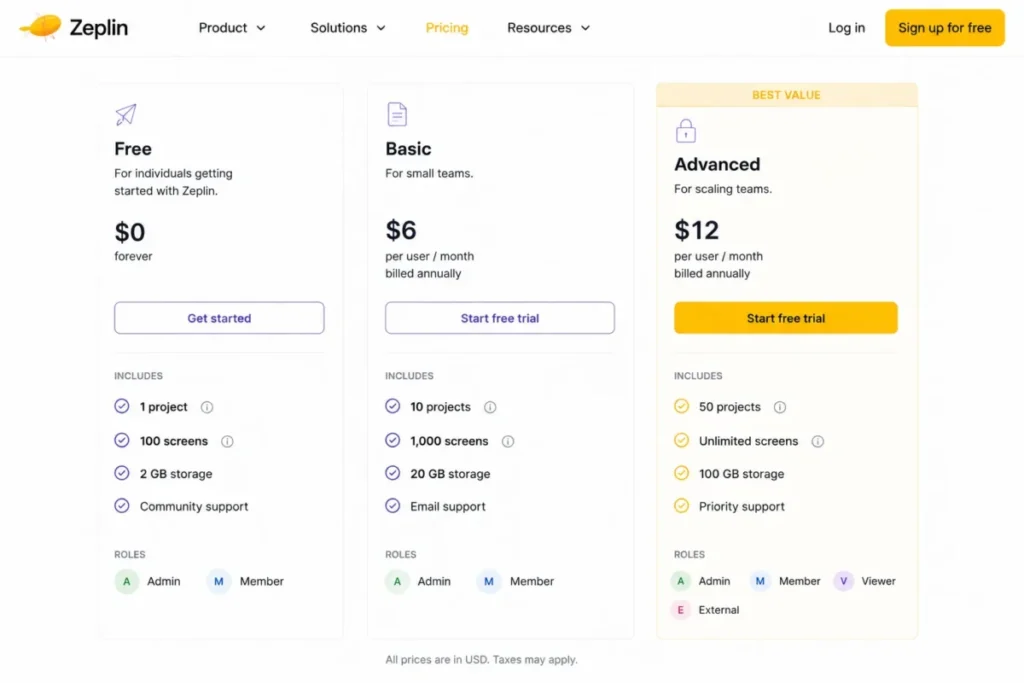
- Yes, capped at 1 project and 100 screens.
- First limit that bites:
- The single project on Free, which arrives before the screen limit for almost every team.
- Better than Ziflow:
- It speaks the language of screens, flows, and components rather than generic proof files.
- Worse than Figma:
- It does not author anything, so it is an addition to a design stack rather than a replacement inside one.
- Setup difficulty:
- Medium. Projects, flows, and permissions need a deliberate structure to pay off.
- Hidden costs:
- The entry paid plan is priced by project count rather than by seat, so cost scales with how you organise work, not with headcount.
- Evidence status:
- Project and screen ceilings and the Advanced tier contents come from the Zeplin plan comparison, checked August 13, 2026.
Basic starts at $13.75 per month for a single project rather than per seat, because Zeplin’s unit of cost is the body of work being delivered rather than the number of people looking at it.
Zeplin belongs on this list, but not in the way a ranked list implies. It is a delivery layer that sits after authoring, and judging it against a design editor on feature count produces a nonsense answer.
Advanced is the tier that turns it into a team system, adding a workspace, 50 projects, unlimited screens, Flow boards, and role-based access that includes a dedicated Reviewer role. A design-system team running one project per squad hits the Free ceiling in a week and the Basic project tiers not long after.
| Pros | Cons |
|---|---|
| Project-based entry pricing decouples cost from headcount | Free plan allows only 1 project and 100 screens |
| Role-based access includes a dedicated Reviewer role | Does not author designs, so it adds a tool rather than removing one |
| Flow boards and unlimited screens on Advanced | Structure has to be designed before the value appears |
| Source: Zeplin official plan page, checked August 13, 2026. |
- Verdict:
- Choose Zeplin if handoff quality is the bottleneck and you already have an authoring tool you are keeping.
8. Ziflow: Best for Proofing and Approvals
- Best for:
- Creative-operations and agency teams routing many file types through named review rounds with internal and external stakeholders.
- Avoid if:
- Informal comments inside the design file already close your review loop.
- Starting price:
- Personal is free.
- Practical tier:
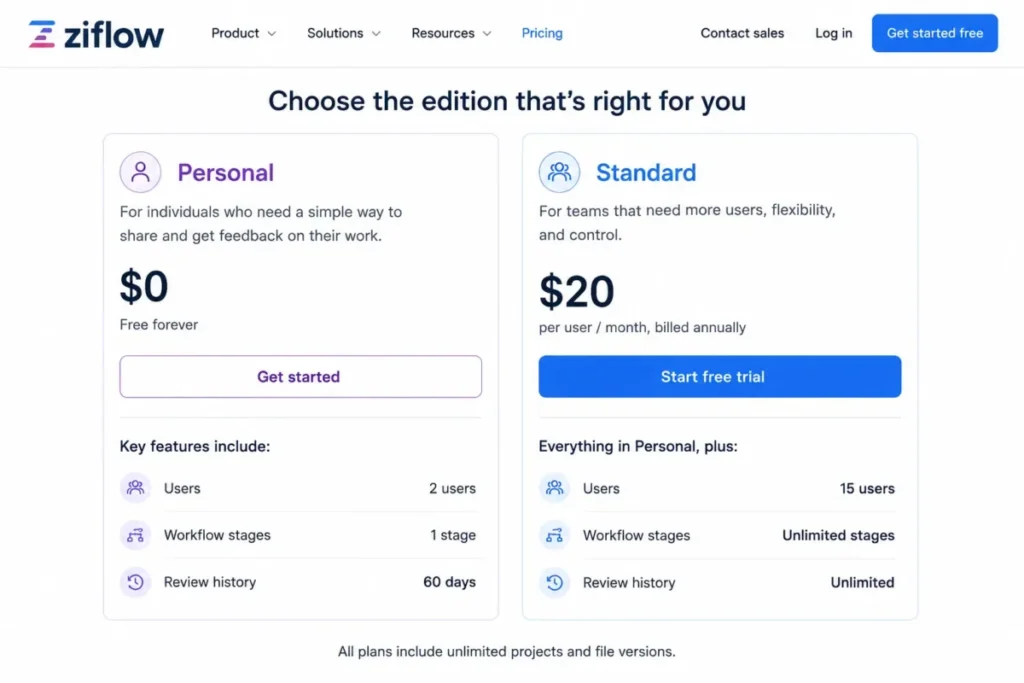
- Standard, at $199/month billed annually with 15 users included.
- Free plan:
- Yes, and it is unusually usable for external review.
- First limit that bites:
- One workflow stage on Personal, which means there is no such thing as a second round of approval.
- Better than Figma:
- Reviewers never consume a licence on any edition, and the review history is retained as a record.
- Worse than Penpot:
- It has no design authoring at all, so it only ever sits beside a design tool.
- Setup difficulty:
- Medium to high. Workflow stages and templates are configuration, not defaults.
- Hidden costs:
- The incremental price for users beyond the 15 included on Standard is not published, so a 25-person rollout needs a quote.
- Evidence status:
- Edition limits, reviewer licensing, and file-type coverage were read from the official Ziflow pricing page on August 13, 2026.
The free edition is genuinely strong on the axis that matters here: unlimited proofs, unlimited reviewers, 1,200+ file types, public proof links, and Adobe Creative Cloud plugins. Reviewers never need a user licence on any edition, which is the opposite of how most design tools price outside participation.
What Personal removes is the operations layer. Two users, 2GB of storage, one workflow stage, no workflow templates, and 60 days of review history is a freelancer setup, not an agency one.
The jump to $199 per month billed annually looks brutal against an $8 whiteboard seat, and it is not the same purchase. Standard bundles 15 users, adds a second workflow stage, a workflow template, and unlimited review history, which is the difference between commenting and having an approval trail.
| Pros | Cons |
|---|---|
| Unlimited reviewers on every edition, including free | Personal allows only 2 users and one workflow stage |
| 1,200+ file types covered in one review surface | $199/ |
| Unlimited review history on Standard | Pricing beyond 15 users is not published |
| Source: Ziflow official plan page, checked August 13, 2026. |
- Verdict:
- Choose Ziflow if approval governance is the bottleneck, and treat the free Personal edition as a real trial rather than a demo.
9. Framer: Best for Design-to-Live-Site Collaboration
- Best for:
- Small web teams that want visual site design, staged review, and publishing to happen in one place.
- Avoid if:
- You need whiteboarding, app-interface handoff, or a formal proofing trail.
- Starting price:
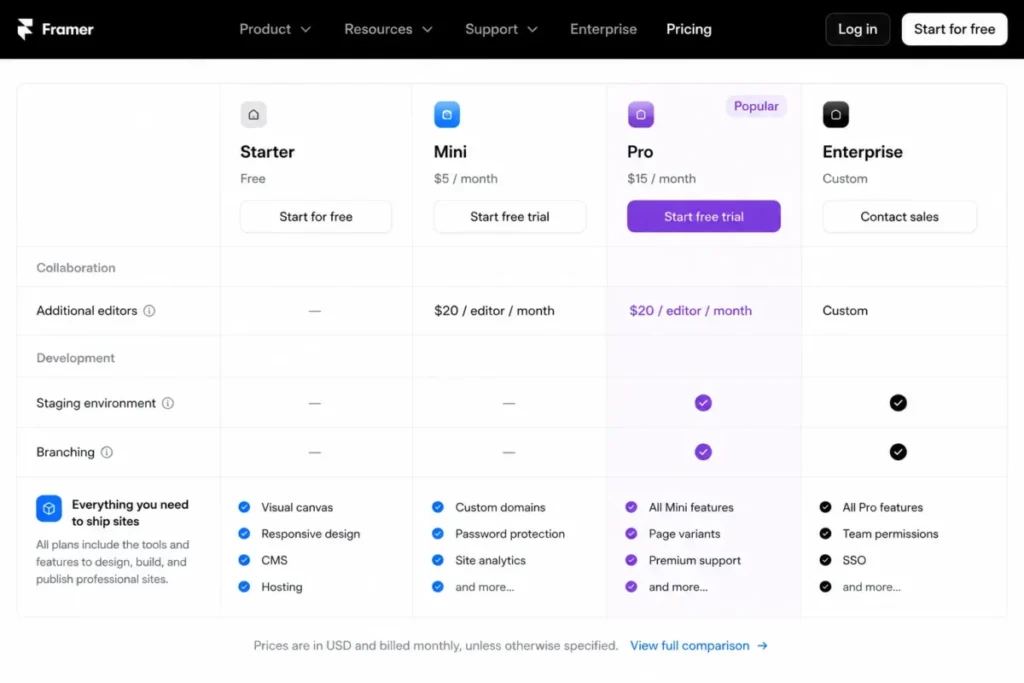
- $10/month on Basic.
- Practical tier:
- Pro, at $30/month, because staging and branching live there.
- Free plan:
- Yes, on a Framer domain with 1 GB of bandwidth.
- First limit that bites:
- The absence of a staging environment and branching on Basic, which forces edits to happen against the live site.
- Better than Canva:
- The design output is the production website, not an asset that someone else has to implement.
- Worse than Miro:
- There is no ideation surface, so the thinking still happens elsewhere.
- Setup difficulty:
- Medium. Layout, breakpoints, and CMS structure all need decisions up front.
- Hidden costs:
- Additional editors are $20/month each, localisation is $20 per locale, and advanced hosting is $200/month on Basic.
- Evidence status:
- Plan prices, editor charges, and add-on rates were read from the official Framer pricing page on August 13, 2026.
The $10 Basic plan is a site plan, not a team plan, and reading it as a collaboration budget is the trap here. Editors are billed separately at $20 per month each, which means a three-editor team on Pro is looking at the $30 plan plus $40 in editor charges before a single add-on.
Pro is the real starting point for collaborative work because staging and branching with previews are Pro features. Without them, review happens on the published site.
| Pros | Cons |
|---|---|
| Design and production live in the same environment | Additional editors cost $20/ |
| Staging and branching with previews on Pro | Staging is unavailable on the $10 Basic plan |
| Viewers are free, so stakeholders review at no cost | Localisation and advanced hosting are separate add-ons |
| Source: Framer official plan page, checked August 13, 2026. |
- Verdict:
- Choose Framer if the same people design and ship the website, and price the editors before the plan.
10. Lucidspark: Best for Lucid-Centered Whiteboarding

- Best for:
- Cross-functional teams already standardised on Lucid who want brainstorming, research, and planning on one canvas.
- Avoid if:
- You need interface authoring, specialist proofing, or a published price you can compare before a sales conversation.
- Starting price:
- Free.
- Practical tier:
- Not determinable from the official pages checked, because no numeric Lucidspark subscription price is published there.
- Free plan:
- Yes, described as limited access to basic features.
- First limit that bites:
- The Free tier’s basic-feature restriction, with revision history and passcode protection held at Team level or above.
- Better than Zeplin:
- It is a genuine ideation surface rather than a delivery layer.
- Worse than Miro:
- Miro publishes a US price at every tier, so a Lucidspark budget cannot be approved the same way.
- Setup difficulty:
- Low, particularly for teams already using Lucidchart.
- Hidden costs:
- Unquantified, because the paid tiers are not priced publicly on the pages checked.
- Evidence status:
- Positioning came from the Lucidspark product page and the plan taxonomy from Lucid’s plan documentation, both checked August 13, 2026.
Lucidspark is an infinite virtual whiteboard aimed at brainstorming, user research, meeting facilitation, agile ceremonies, project planning, and strategic visioning. On capability it sits squarely alongside Miro and Mural.
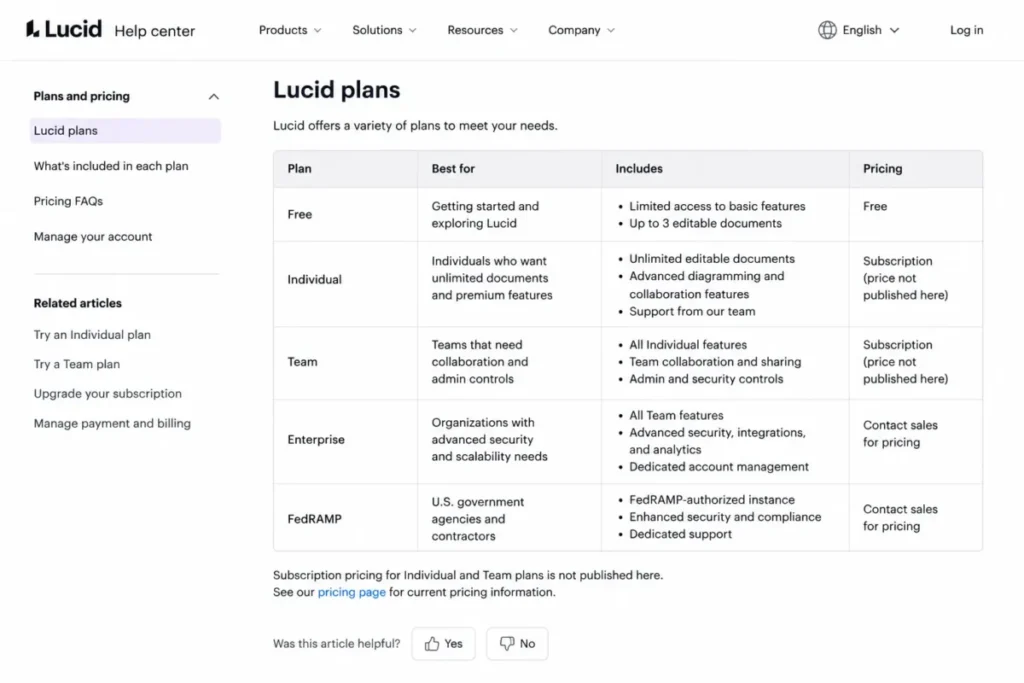
It ranks tenth for one reason, and that reason is commercial rather than technical. Lucid’s published plan list lists Free, Individual, Team, Enterprise, and FedRAMP tiers without exposing a numeric price for a paid Lucidspark subscription.
| Pros | Cons |
|---|---|
| Infinite canvas covering ideation through planning | No public numeric paid price on the pages checked |
| Connects to the wider Lucid Suite including Lucidchart | Free access is limited to basic features |
| Facilitator controls and voting for meeting formats | Revision history is held at Team level or above |
| Source: Lucidspark official plan page, checked August 13, 2026. |
- Verdict:
- Choose Lucidspark if your organisation is already inside Lucid, and get a written quote before comparing it on cost against anything else on this list.
Pricing and Collaboration Limits
Six of these ten tools price in a way that supports a like-for-like team calculation. The other four do not, and printing an estimate for them would be a guess dressed as a number.
| Tool | Practical tier | Price basis | Cost at 5 collaborators | Cost at 25 collaborators |
|---|---|---|---|---|
| Figma | Professional Full seat | $16 per Full seat/ | $80/ | $400/ |
| Miro | Starter | $8 per member/ | $40/ | $200/ |
| Canva | Business | $20 per person/ | $100/ | $500/ |
| Mural | Team+ | $9.99 per member/ | $49.95/ | $249.75/ |
| Penpot | Unlimited | $7 per user/ | $35/ | $175/ |
| Sketch | Standard | $12 per Editor/ | $60/ | $300/ |
| Zeplin | Basic | From $13.75/ | Not comparable | Not comparable |
| Ziflow | Standard | $199/ | $199/ | Not published |
| Framer | Pro | $30/ | Not comparable | Not comparable |
| Lucidspark | Free | No numeric paid price on the pages checked | Not available | Not available |
Sources, all checked August 13, 2026: the official pricing pages for Figma, Miro, Mural, Penpot.
Also Sketch, Zeplin, Ziflow, Framer, and the Canva Business announcement.
Costs are list prices before tax, add-ons, and seat-mix optimisation.
Read that table by column, not by row. The cheapest entry price belongs to Framer at $10, and Framer is also the tool whose team cost is hardest to predict, because editors and add-ons stack on top of a site plan.
The most interesting number is Penpot’s second column. Twenty-five users at $7 each is $175, which is exactly the published monthly cap, so 25 is the point where per-user billing stops mattering entirely.
Above that line the comparison inverts. A 40-person authoring team pays $175 on Penpot Unlimited.
The same 40 people on Figma Professional Full seats cost $640, and no feature-list comparison will surface that.
Two of the “not comparable” cells deserve a note rather than a shrug. Zeplin bills by project on its entry tier, so its cost tracks how many bodies of work you deliver rather than how many people you employ.
Ziflow publishes $199 per month with 15 users included but does not publish the incremental price beyond those 15, so a 25-person rollout needs a quote.
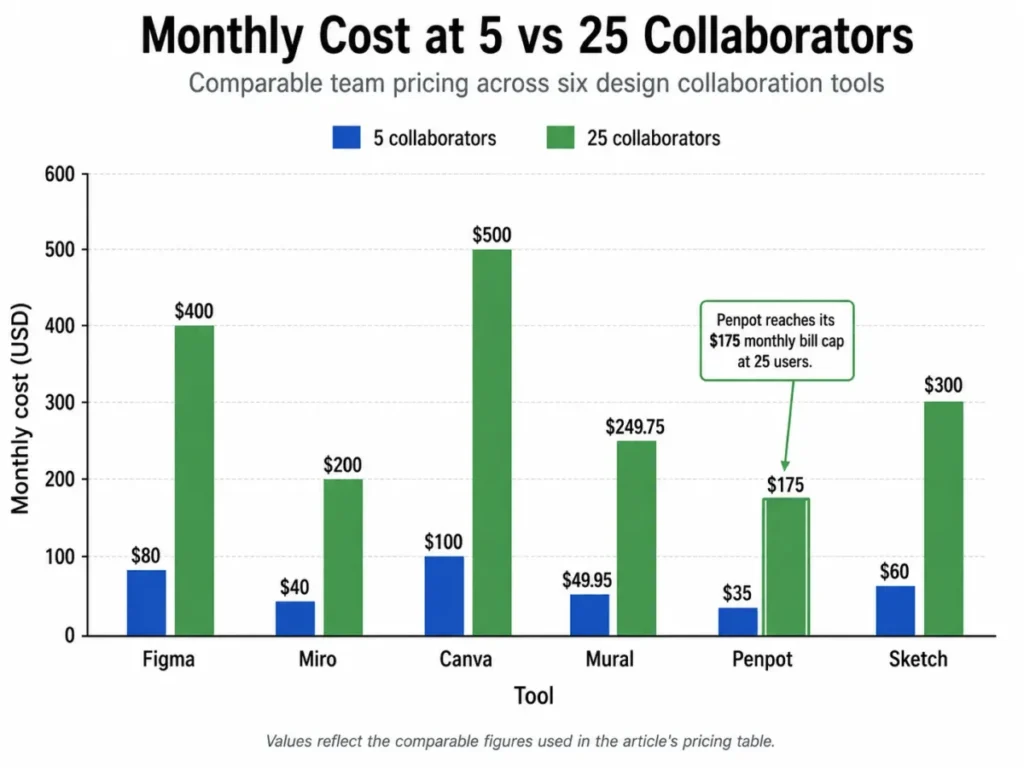
The chart above carries no data that is not already in the pricing table, so the table remains the accessible version of the same comparison. If you are stress-testing the cheap end of the market, our guide to free collaboration tools covers the wider set.
What Actually Ends the Free Plan
| Tool | Free tier | Where it stops | Retention window | Upgrade trigger |
|---|---|---|---|---|
| Figma | Starter, with unlimited drafts | 30-day version history | 30 days | A rollback older than a month |
| Miro | Free, with unlimited members | 3 editable boards, no Guest role | Not published for Free | A second live project or an outside contributor |
| Canva | Free, individually oriented | Below the team collaboration tier | Not published | Any shared workspace or approval need |
| Mural | Free, with unlimited members | 3 editable murals at a time | Not published for Free | A second workshop series, or a visitor who must edit |
| Penpot | Professional, up to 8 members | 8 team members and 10GB storage | 7 days of versions and deleted-file recovery | A ninth member, or a rollback past one week |
| Sketch | 30-day trial only | No permanent free tier | Not applicable | Day 31 |
| Zeplin | Free | 1 project and 100 screens | Screen versioning included | A second project |
| Ziflow | Personal, free forever | 2 users and 1 workflow stage | 60 days of review history | A second approval round |
| Framer | Free, on a Framer domain | 1 GB bandwidth | Not published | A custom domain or real traffic |
| Lucidspark | Free | Limited access to basic features | Revision history sits at Team level or above | Revision history or passcode protection |
Sources: the same official pricing and plan-documentation pages listed above, checked August 13, 2026. Cells reading “not published” mean the vendor does not state that value on the pages checked.
Notice how rarely headcount is the thing that ends a free plan. Miro and Mural both allow unlimited members and still stop you at three boards, while Penpot inverts that and caps members at eight while leaving file counts alone.
Retention is the quietest of these limits and the one that hurts most in a real incident. Figma Starter holds 30 days of version history, Penpot Professional holds 7 days of autosaved versions and 7 days of deleted-file recovery, and Ziflow Personal holds 60 days of review history.
A team that discovers a bad merge five weeks later finds out which of those windows it bought. That is an operational risk, not a feature preference.
The Reviewer Economics Nobody Prices
Count the people in your organisation who need to see design work and never need to edit it. In most companies that group outnumbers the design team three or four to one.
Four tools here let that group participate at zero cost. Figma and Sketch both document unlimited free viewers, Penpot includes unlimited viewers on every tier including the free one, and Ziflow states that a user licence is only required to create and manage proofs.
Figma goes one step further by pricing partial participation. A Collab seat at $3 per month sits between a free viewer and a $16 Full seat, which gives a product manager who runs review sessions somewhere sensible to live.
Miro sits at the other end of that range. Its Free plan has no Guest role at all, and its own plan documentation states that anyone invited to collaborate becomes a Member and consumes a paid seat.
Guests arrive on Business, two tiers above Free. Mural splits the difference instead, holding visitors at view-only on Free and granting them editing rights on Team+ at $9.99 per member/month.
That single difference is the clearest reason a facilitator picks Mural over Miro at a comparable price. Run the reviewer maths before the feature comparison, because a team of six designers with twenty reviewers pays nothing extra on Sketch and pays for twenty-six members on Miro Starter.
Where Governance Forces an Upgrade
| Tool | Single sign-on unlocks at | Directory provisioning | Practical effect |
|---|---|---|---|
| Miro | Business | SCIM on Enterprise | A security review moves you two tiers above Free |
| Mural | Business | SCIM on Enterprise | Team+ covers facilitation but not IT sign-off |
| Sketch | Professional, at $24 per Editor/ | SCIM on Enterprise | Doubles the editor price versus Standard |
| Penpot | Enterprise | SCIM on the self-hosted tier | Cloud Unlimited is not the governance tier |
| Framer | Enterprise | SCIM on Enterprise | Custom pricing replaces the published plans |
| Ziflow | Enterprise | SCIM on Enterprise | Guest multi-factor authentication arrives at the same tier |
Source: the official pricing pages for Miro, Mural, Sketch, Penpot, Framer, and Ziflow, checked August 13, 2026.
Figma documents enforced and SAML-based single sign-on on its organisation-level plans. The Canva and Lucid tiers were not confirmed at this level of detail on the pages checked.
Single sign-on is the most common reason a design tool budget doubles between the shortlist and the purchase order. Sketch is the clearest example, because Professional costs twice what Standard costs and the only reason most teams move is the sign-on requirement.
AI capacity behaves the same way, as a metered resource rather than a yes-or-no feature. Miro Starter includes 25 AI credits per member each month and 500 MCP calls per day.
Figma varies its AI credit allowance by plan and by seat type. Check the Figma pricing guide before assuming automation is included.
Feature Gate Comparison
| Tool | Multiplayer editing | External participation | Developer handoff | Admin gate |
|---|---|---|---|---|
| Figma | Included | Unlimited free viewers, $3 Collab seats | Documented, with Dev seats at $12/ | Organisation-level plans |
| Miro | Included | Visitor editing on Starter, Guests on Business | Not a handoff tool | Business for single sign-on |
| Canva | Included on the team tier | Team capabilities on Business | Not applicable | Business and Enterprise |
| Mural | Included | Visitor editing on Team+ | Not a handoff tool | Business for single sign-on |
| Penpot | Included | Unlimited viewers on every tier | Code inspection included | Enterprise |
| Sketch | Included from Standard | Unlimited free viewers | Free developer handoff from Standard | Professional |
| Zeplin | Not an authoring tool | Reviewer role on Advanced | This is the product | Enterprise |
| Ziflow | Not an authoring tool | Unlimited reviewers on all editions | Not a handoff tool | Enterprise |
| Framer | Included | Free viewers, editors at $20/ | Publishes rather than hands off | Enterprise |
| Lucidspark | Included | Not published at a numeric price | Not a handoff tool | Team level and above |
Sources: the official pricing and plan pages cited earlier in this article, all checked August 13, 2026.
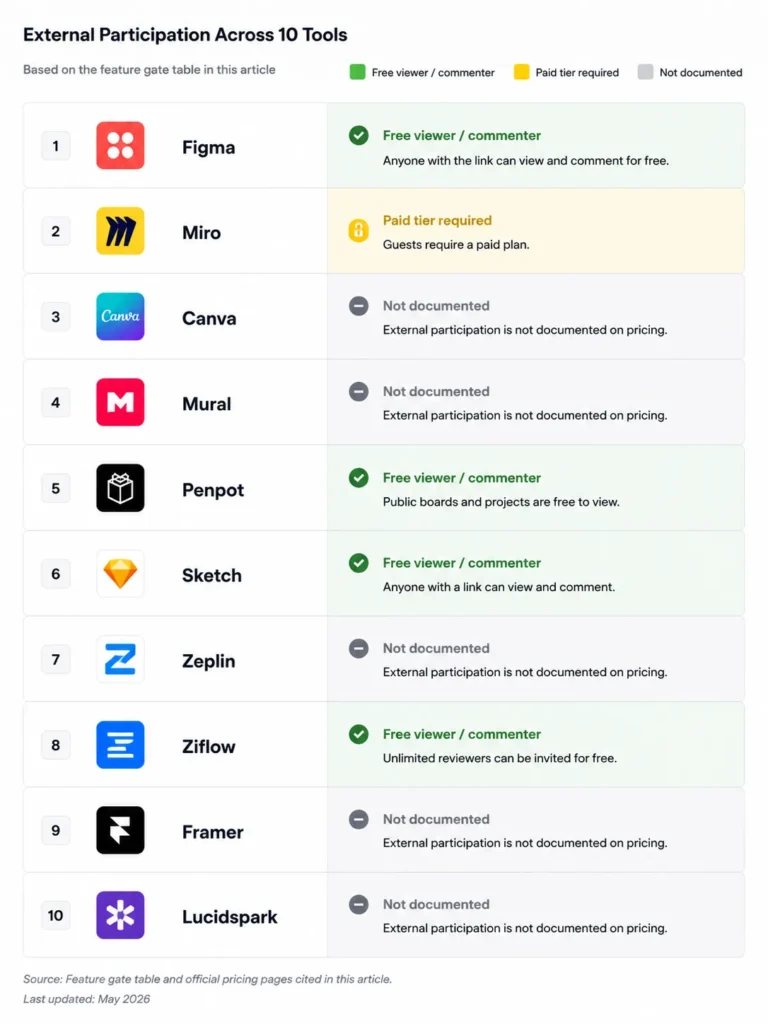
Two columns in that table decide most shortlists. External participation tells you whether a client or an executive costs money, and the answer ranges from free on Figma, Sketch, Penpot, and Ziflow to a paid Business tier on Miro.
Developer handoff splits the list cleanly in half. Figma, Penpot, Sketch, and Zeplin document a real handoff path, and the whiteboards and proofing tools do not pretend to.
A third pattern is easy to miss on a first read. The three authoring tools that document code inspection or handoff also include free viewing, so the engineering side of a design workflow rarely adds cost on those platforms.
Zeplin is the exception that proves the point, because handoff is its entire product rather than a feature inside an editor. Paying separately for it makes sense only when the volume of delivered work justifies a dedicated layer, and that threshold arrives sooner for design-system teams than for a single squad.
Setup and Migration Difficulty
| Tool | Setup difficulty | Why |
|---|---|---|
| Canva | Low | Templates and brand assets carry the configuration |
| Miro | Low | Session templates work without configuration |
| Mural | Low to medium | Facilitation structure and room setup need decisions |
| Lucidspark | Low | Familiar to any team already using Lucidchart |
| Figma | Low to medium | Rises sharply once shared libraries and permissions are involved |
| Penpot | Low on cloud, high self-hosted | Self-hosting adds infrastructure ownership |
| Sketch | Low to medium | App install is trivial, workspace permissions are not |
| Framer | Medium | Breakpoints and CMS structure are up-front decisions |
| Zeplin | Medium | Projects and flows only pay off with a deliberate structure |
| Ziflow | Medium to high | Workflow stages and templates are configuration, not defaults |
Difficulty here is mostly a function of how much structure a tool expects you to design before it pays off. Canva, Miro, and Lucidspark are usable in an afternoon because their templates encode that structure for you.
Ziflow and Zeplin sit at the other end for the same reason in reverse. Both are configuration-first products, and a workflow stage or project taxonomy that nobody agreed on produces a tool that technically works and nobody trusts.
Penpot is the only entry with two different answers. The hosted cloud version installs like any other web app, while a self-hosted deployment moves the burden onto whoever owns your infrastructure.
Migration between these tools is not evenly documented, so treat any promise of a clean import with suspicion until you have tested it with your own files. The safest assumption is that boards and design files move poorly and that libraries move worst of all.
Which Tool Is Best for Your Workflow?
Work through these six questions in order. The first three eliminate more of the shortlist than any feature comparison will.
- Which job is blocked? Name whether the failure is authoring, ideation, handoff, approval, or publishing. Each has a different winner, and buying across lanes is how teams end up with three tools that overlap and one gap that stays open.
- Who needs to see the work but never edit it? Count them honestly. If that number is large, Figma, Sketch, Penpot, and Ziflow all let those people participate without a paid seat, and Miro Free does not.
- What ends your free tier first? Match your real usage against board counts, project counts, member caps, and retention windows rather than against price.
- When does security review start? If single sign-on is mandatory, price Mural at Business, Sketch at Professional, and Miro at Business rather than at their entry tiers.
- What does month 12 look like? Multiply your expected headcount by the per-unit price, then check whether a cap or a bundled-user allowance changes the answer, as it does for Penpot at 25 users.
- What has to move? Existing design files, libraries, and board archives are the real switching cost, and no tool on this list makes that free.
If your answer to the first question is that nothing is blocked and you want a shared canvas for a small team, look at small business collaboration software before spending anything here. If the blocked job is early-stage interface exploration, AI prototyping tools solve a different part of the same problem.
Common Mistakes When Choosing Design Collaboration Software
- Comparing starting prices across different billing units. A per-seat price, a per-project price, and a flat fee with bundled users are three different things, and lining them up in one column produces a false ranking.
- Assuming the free plan ends at a headcount. It usually ends at a board, project, or screen limit that has nothing to do with team size.
- Forgetting to count reviewers. Stakeholders who only comment are the largest group in most organisations and the one most likely to be priced wrong.
- Buying a whiteboard to do interface design. Miro, Mural, and Lucidspark are strong thinking surfaces and none of them holds a production design system.
- Treating a one-time licence as the cheap subscription. The Sketch Mac-only licence excludes collaborative features entirely, which is a specific and expensive misunderstanding.
- Leaving governance until procurement. Single sign-on requirements move the budget more reliably than headcount does.
- Ignoring retention windows. Version history and review history are the limits nobody checks until they need them.
Final Verdict
Figma is the strongest pick for most product-design teams, and the seat structure is the reason. Full seats at $16, Dev seats at $12, and Collab seats at $3 mean the people who only review cost almost nothing, which is the exact economics a cross-functional team needs.
For teams whose real job is thinking together rather than drawing interfaces, Miro is the stronger fit at $8 per member/month, and Mural takes it if outside participants must edit rather than watch. Compare those two against each other on visitor rights first, not on template libraries, and use the Miro pricing breakdown to sanity-check the annual commitment.
Penpot is the pick that most shortlists miss. Below eight people it is free, and above 25 users the $175 monthly cap makes it structurally cheaper than every per-seat competitor here.
Canva wins where the people producing assets are not designers, and Business at $20 per person is the honest comparison tier rather than Pro. Sketch remains a strong Mac-native choice at $12 per Editor with free viewers, provided nobody confuses the subscription with the $120 licence.
Zeplin, Ziflow, and Framer are specialists and should be bought as such. Add Zeplin when handoff is the bottleneck, Ziflow when approvals are, and Framer when the design and the live website are the same artefact.
Lucidspark is a capable whiteboard for teams already inside Lucid, and it sits last here only because a paid price is not published on the official pages checked. Get a quote before you compare it on cost.
Frequently Asked Questions
What is the best design collaboration tool in 2026?
Figma leads for product-design teams because it covers authoring, prototyping, review, and developer handoff in one place, and because its Collab seat costs $3 per month. Teams whose main job is workshops or brand production should pick Miro, Mural, or Canva instead, since those solve a different problem and rank first in their own lane.
Which design collaboration tool has the best free plan?
Ziflow Personal is the strongest free tier for external review, because it allows unlimited proofs and unlimited reviewers across 1,200+ file types without charging for a reviewer. Penpot Professional is the strongest free tier for actual design work, covering up to eight team members with unlimited viewers and 10GB of storage.
Can clients review our work without paying for a seat?
Yes, if you pick the right tool. Figma and Sketch both include unlimited free viewers, Penpot includes unlimited viewers on every tier, and Ziflow never charges for a reviewer on any edition.
Miro is the exception to watch, because its Free plan has no Guest role and anyone you invite becomes a paid member.
Is Figma or Miro better for design collaboration?
They answer different questions. Figma is better when the deliverable is an interface that engineers will build, because it holds design systems, prototypes, and handoff context.
Miro is better when the deliverable is alignment, because a board handles research synthesis, journey maps, and workshop output that a design file handles badly.
What is the cheapest design collaboration tool for a 25-person team?
Penpot Unlimited, at $175 per month for the whole team, because the monthly bill is capped there regardless of headcount. Miro Starter is next at $200 per month for 25 members, followed by Mural Team+ at $249.75.
Figma Professional reaches $400 per month at 25 Full seats, though a realistic mix of Full, Dev, and Collab seats lowers that.
Do we need a separate proofing tool if we already comment in Figma?
No, unless you need an approval record. Comments handle iteration well, but they do not stage a file through named review rounds or retain a decision trail.
Once a legal, brand, or compliance reviewer has to sign off in a specific order, Ziflow does something a design canvas does not attempt.
Which design collaboration tool is open source?
Penpot is the open-source option on this list, and it backs that up with multiplayer editing, comments, prototyping, code inspection, a REST API, and webhooks included across its plans. The cloud Professional tier is free for up to eight team members, and self-hosting is available for teams that want to own the deployment.
How much does design collaboration software cost for 5 or 25 users?
At five collaborators, expect roughly $35 on Penpot, $40 on Miro, $49.95 on Mural, $60 on Sketch, $80 on Figma, and $100 on Canva per month. At 25 collaborators those become $175, $200, $249.75, $300, $400, and $500.
Zeplin, Ziflow, Framer, and Lucidspark do not price on a comparable per-user basis.
Which of these tools support single sign-on, and on which plan?
Miro and Mural both place single sign-on on their Business plans, and Sketch places it on Professional at $24 per Editor/month. Penpot, Framer, and Ziflow hold it for Enterprise, and Figma documents enforced and SAML-based sign-on at organisation level.
Budget the governance tier, not the entry tier, whenever IT is involved.
Is Canva good enough for a product design team?
Not for interface work. Canva has no design system model, no prototype states, and no developer handoff, so a product team would lose the entire downstream half of its workflow.
It is the right answer for marketing and brand production, where non-designers publish on-brand assets without waiting on a designer, and where what SaaS pricing means for per-person billing matters more than editor depth.
Whichever way your shortlist lands, choose the design collaboration tool that matches your team’s dominant workflow. Then buy the minimum practical plan that clears your first binding limit.