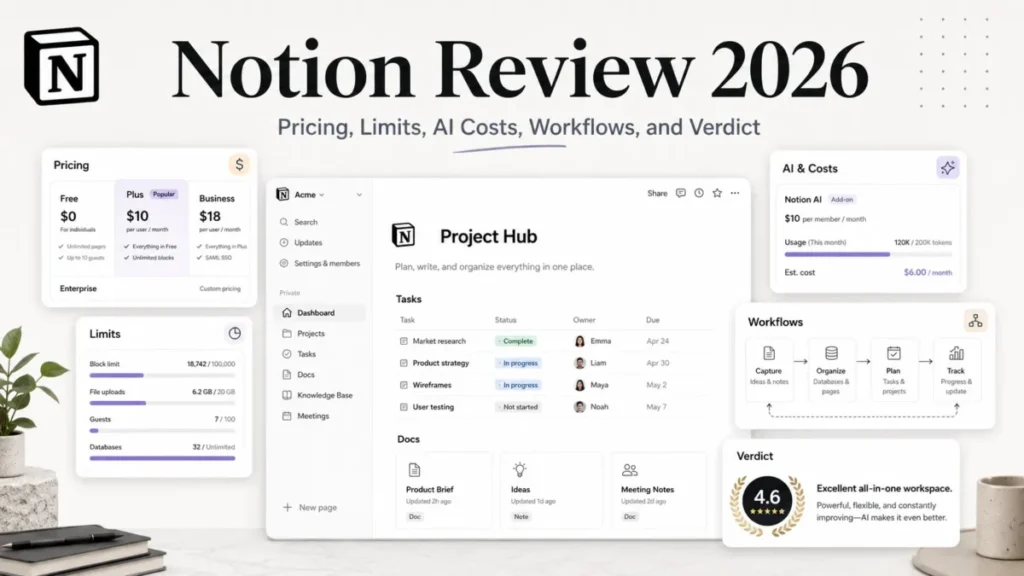
Picking the best second brain app comes down to one practical test: will your notes stay usable, searchable, and exportable after a pricing tier changes or a credit meter runs dry. That question separates these ten tools once you hit a free-plan limit or usage quota.
For most individual researchers and writers, Obsidian is the safer pick because the core app is free and every note lives on your device as a plain file. Notion fits a small team’s shared databases, Tana suits meeting-heavy calendars, and RemNote is built for students who need spaced repetition.
For a shared company wiki rather than a personal knowledge base, the how to choose knowledge base software guide covers a different set of tools.
In This Article (10 sections)
Quick Verdict: Best Second Brain App by Use Case
| Use case | Best pick | Why it fits |
|---|---|---|
| Best long-term pick for solo users who want ownership | Obsidian | Free core app, local Markdown files, no forced subscription |
| Best for small team collaboration | Notion | Shared databases, docs, and calendars with per-seat collaboration |
| Best for meeting-heavy workflows | Tana | Botless meeting capture plus AI-assisted search on Pro |
| Best durable free plan | Obsidian | No forced content ceiling; Sync is the only paid add-on |
| Best for visual, spatial researchers | Heptabase | Whiteboard canvas for mapping concepts across a reading project |
| Best object-based alternative to folders | Capacities | Typed objects, such as people and books, instead of pages |
| Best minimalist option | Reflect | One paid plan, no tier ladder, backlinks and encrypted sync |
| Best for turning notes into scheduled action | Amplenote | Notes, tasks, and calendar share one graph |
| Best for Apple-centered daily planners | NotePlan | Calendar-first daily notes for Mac, iPad, iPhone, web |
| Best for students and exam prep | RemNote | Flashcards and spaced repetition inside the same notes |
A free plan that looks generous can turn restrictive the moment you upload a real PDF library or run a real meeting schedule through it. The picks above assume you already know your primary use case; the rest of this article covers the more common case, where two or three jobs overlap.
Second Brain Apps at a Glance: Coverage and Workflow Fit
Not every tool on this list competes for the same job: some are personal knowledge stores that happen to allow sync, while others are built for teams from the start.
| Tool | Local-first storage | Team seats | Meeting capture | AI included | Flashcards/study |
|---|---|---|---|---|---|
| Obsidian | Yes | Limited | No | No | No |
| Notion | No | Yes | No | By plan | No |
| Tana | No | By plan | By plan | By plan | No |
| Capacities | No | No | No | By plan | No |
| Heptabase | No | No | No | By plan | No |
| Reflect | No | No | No | Not documented | No |
| Craft | No | No | No | By plan | No |
| Amplenote | No | No | No | Not documented | No |
| NotePlan | Conditional | No | No | No | No |
| RemNote | No | No | No | By plan | Yes |
Each column above traces to that product’s own official pricing and documentation pages, all checked 2026-08-07 and cited individually in the product sections below. Only Notion and Tana genuinely compete for a shared team knowledge base; the other eight are priced and designed around a single user. If the actual requirement is broader team coordination, not just shared notes, the best team collaboration tools list covers that adjacent category directly.
How We Chose the Best Second Brain Apps
This analysis is based on each product’s official pricing page, product documentation, and help center guidance, checked on 2026-08-07. Where a paid US dollar price could not be confirmed from an official source, that gap is stated in the relevant section rather than estimated.
Every tool was assessed against the same buyer-focused criteria: data ownership and export format, free-plan durability, AI and meeting quotas, collaboration support, and documented migration paths. Greater weight went to factors that change a long-term ownership decision, such as local storage and post-quota workflow cost; promotional pricing and brand popularity carried no weight. Unverifiable claims were excluded rather than estimated, and temporary pricing, such as Tana’s promotional Pro rate, is labeled separately from the standard price used throughout.
10 Best Second Brain Apps for 2026
1. Obsidian: Best for Local-First Note Ownership

- Best for: Solo researchers, writers, and technical users who want linked Markdown notes stored as files they control.
- Avoid if: You need built-in team permissions or automatic cross-device sync without adding a separate paid product.
- Starting price: Free, with no seat fee or usage fee for the core app.
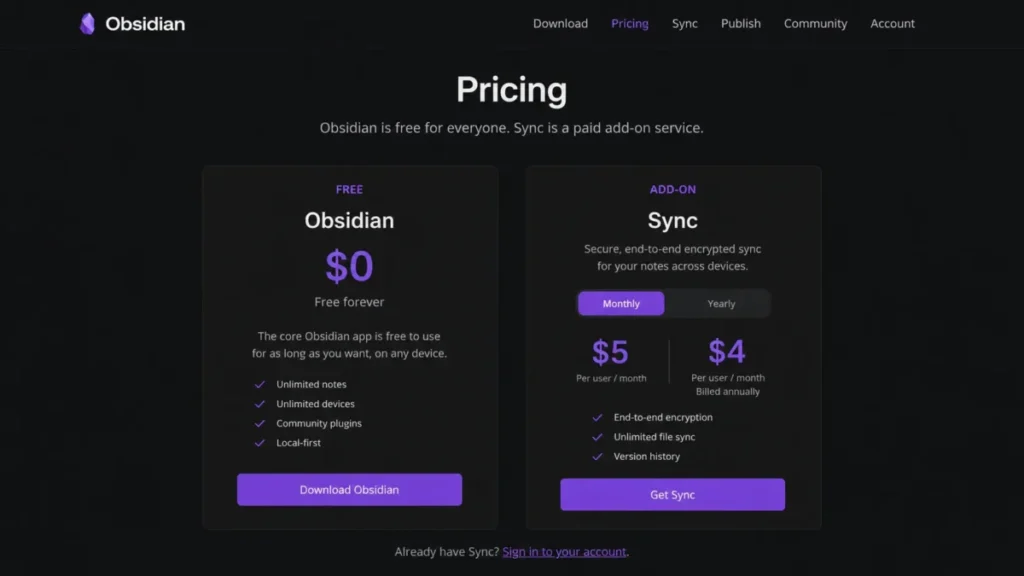
- Practical tier: Obsidian Sync, $4 per user per month billed annually or $5 per user per month billed monthly, once encrypted multi-device sync matters.
- Free plan: The core app carries no published content ceiling. Sync is the only paid product Obsidian sells.
- First limit that bites: Sync and version history are not included by default, so a lost or damaged device without a personal backup plan means lost notes.
- Better than Notion: Notes exist as portable Markdown files on your own disk instead of records inside a proprietary cloud database.
- Worse than Notion: No built-in databases, shared team permissions, or browser-based collaboration.
- Setup difficulty: Low to start, Medium once community plugins get added for automation.
- Hidden costs: Sync at roughly $48 a year per user is the main add-on.
- Evidence status: Verified against Obsidian’s official pricing page for pricing and the Sync feature set.
According to Obsidian’s official pricing page, checked 2026-08-07, every note is stored as a local Markdown file, and the only paid product is Sync, which adds encrypted multi-device synchronization and shared vault access.
| Pros | Cons |
|---|---|
| Core app is free with no forced content ceiling | No first-party team permissions or shared editing |
| Notes are stored as local Markdown files, so a future switch does not require a full export | Sync and version history are a separate paid add-on |
| Sync offers AES-256 end-to-end encryption when purchased | No built-in database, calendar, or task board without third-party plugins |
| No AI-credit meter or usage-based pricing to track | Backup responsibility falls entirely on the user unless Sync is purchased |
- Verdict:
- I would default to Obsidian for anyone building a personal knowledge base they expect to use in five years, provided they budget for Sync or set up an independent backup routine.
2. Notion: Best for Structured Team Collaboration

- Best for: Individuals and small teams who want documents, databases, and calendars inside one shared cloud workspace.
- Avoid if: Local file ownership matters more to you than collaboration, or your notes include files regularly over 5 MB on the Free plan.
- Starting price: Free for individual use.
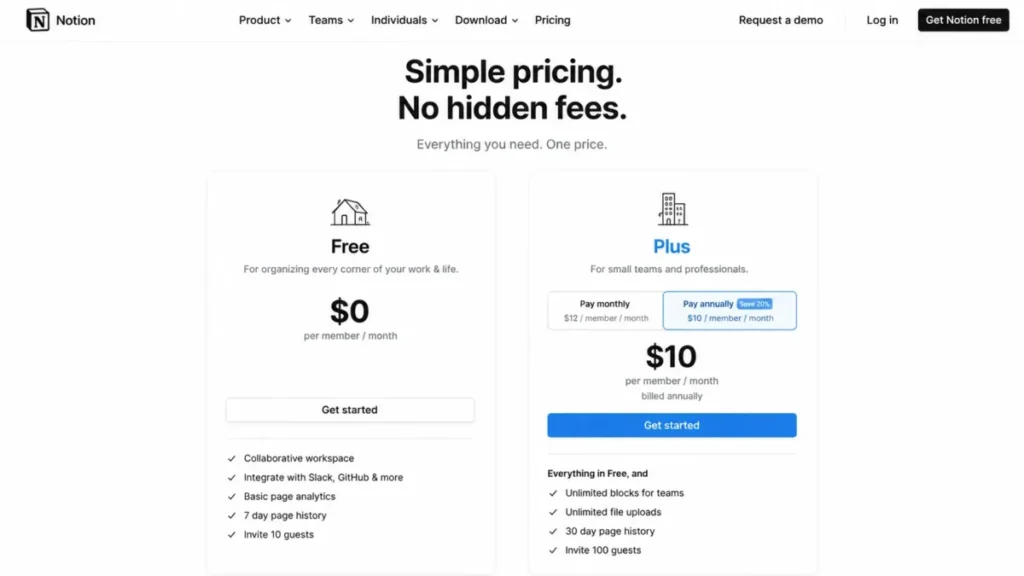
- Practical tier: Plus at $10 per member per month on annual billing, or $12 per member per month on monthly billing.
- Free plan: Free supports pages and databases but caps individual file uploads at 5 MB and limits offline availability to manually selected pages.
- First limit that bites: The 5 MB per-file cap on Free turns any document-heavy or media-heavy workflow into an upgrade decision almost immediately.
- Better than Obsidian: Real multi-user permissions, shared databases, and collaborative editing without a third-party sync layer.
- Worse than Obsidian: No local file storage. Losing access to the workspace or the subscription means losing direct access to the underlying data.
- Setup difficulty: Medium. Databases and views take longer to configure than a simple notes app, and team adoption adds overhead.
- Hidden costs: Plus costs $12 instead of $10 per member per month when billed monthly rather than annually, which compounds quickly at team scale.
- Evidence status: Verified against Notion’s US pricing page and Notion’s official Plus pricing update for the annual versus monthly rate.
According to Notion’s official US pricing page, checked 2026-08-07, Free costs nothing per member and Plus runs $10 per member per month annually, or $12 monthly. Offline access on Free depends on manually selected pages rather than automatic caching, so a team storing PDFs will hit the 5 MB file cap long before any seat-count concern. The full Notion review and Notion pricing breakdown cover the per-seat math in more depth than a single section here can.
| Pros | Cons |
|---|---|
| Real per-seat collaboration with shared databases, not just shared documents | Free plan caps individual file uploads at 5 MB |
| Combines notes, wikis, and lightweight project databases in one workspace | Per-seat pricing on Plus scales linearly with headcount, unlike flat-fee competitors |
| Official import and export tooling exists for moving data in and out | Offline access on Free requires manually selecting pages, not automatic caching |
| Plus adds expanded file size, version history, and offline automation | Enterprise-grade admin controls sit behind higher tiers not covered by Plus alone |
- Verdict:
- I would choose Notion over Obsidian when a team needs to share the same knowledge base. Budget for Plus from the start rather than discovering the 5 MB file cap mid-project.
3. Tana: Best for Meeting-Heavy AI Workflows

- Best for: Managers and consultants whose calendars are full enough that meeting notes need to become searchable knowledge automatically.
- Avoid if: Your meeting volume is light, or you are not ready to pay a per-user Pro price to remove Free’s meeting and AI ceilings.
- Starting price: Free.
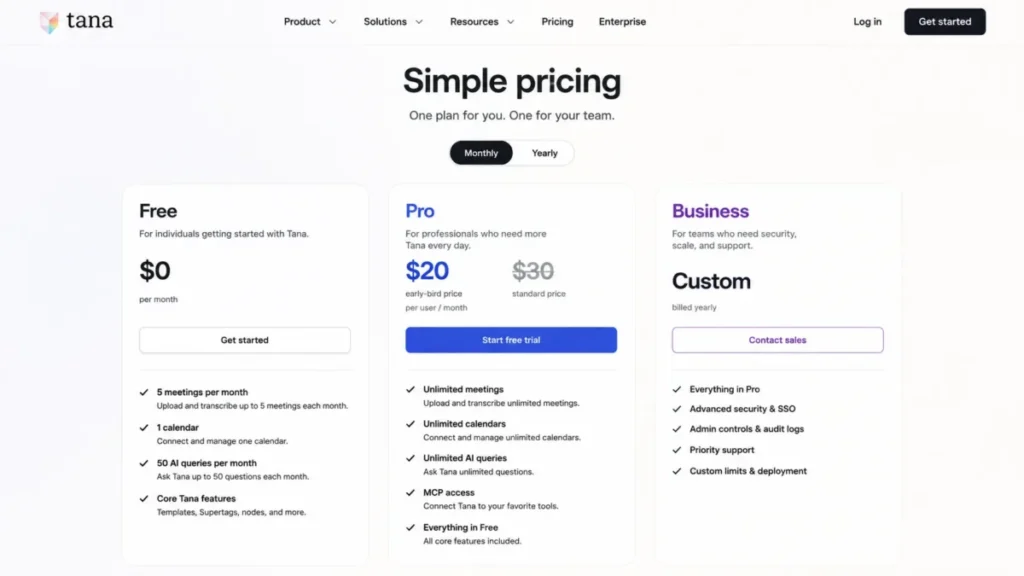
- Practical tier: Pro, listed at $20 per user per month as an early-bird promotion against a $30 per user per month standard price. Business is custom, billed yearly.
- Free plan: Free includes 5 meetings per month, 1 calendar connection, and 50 AI queries.
- First limit that bites: The 5-meetings-per-month cap on Free is trivial for anyone in daily standups or client calls, making Pro a near-immediate requirement for the exact workflow Tana is built for.
- Better than Notion: A dedicated, botless meeting agent for Zoom, Teams, and Google Meet, plus substantially higher AI query capacity on Pro.
- Worse than Obsidian: No free local-file ownership model, and the standard Pro price of $30 per user per month is the highest recurring cost on this list among single-user-oriented tools.
- Setup difficulty: Medium to High. Getting value from Tana’s node-based structure and AI queries takes more configuration than a flat notes app.
- Hidden costs: AI top-ups exist for heavier usage, but a unit price for those top-ups was not verified on Tana’s official pricing page as of this check.
- Evidence status: Verified against Tana’s official pricing page for Free and Pro limits.
Tana’s official pricing page, checked 2026-08-07, states that Free includes 5 meetings per month, 1 calendar, and 50 AI queries. Pro is priced at a $20 per user per month early-bird rate next to the $30 per user per month standard price used for every Tana cost calculation here, and the promotion’s duration was not stated on the page checked. That Pro standard rate works out to $360 a year, easier to justify for a consultant billing client hours than for a student or casual note-taker.
| Pros | Cons |
|---|---|
| Botless meeting agent connects directly to Zoom, Teams, and Google Meet | Free plan’s 5-meetings-per-month cap does not fit the meeting-heavy workflow the product targets |
| Pro’s AI capacity and full MCP access support real automation, not just chat | Standard Pro price of $30 per user per month is the highest recurring cost among reviewed tools |
| Node-based structure connects meeting notes, tasks, and reference material in one graph | Early-bird pricing is not guaranteed to remain available, and no expiration date is published |
| Business tier scales to team-wide knowledge capture | Node-based learning curve is steeper than a flat document or Markdown app |
- Verdict:
- I would only pay Tana’s standard Pro rate if meetings are a genuine daily bottleneck, budgeting from the $30 standard price rather than the early-bird rate.
4. Capacities: Best for Object-Based Personal Knowledge

- Best for: Solo PKM users who organize people, books, and projects as connected objects, rather than pages inside folders.
- Avoid if: You need a confirmed US dollar price for Pro, or you regularly upload media past Basic’s monthly quota.
- Starting price: Free (Basic).
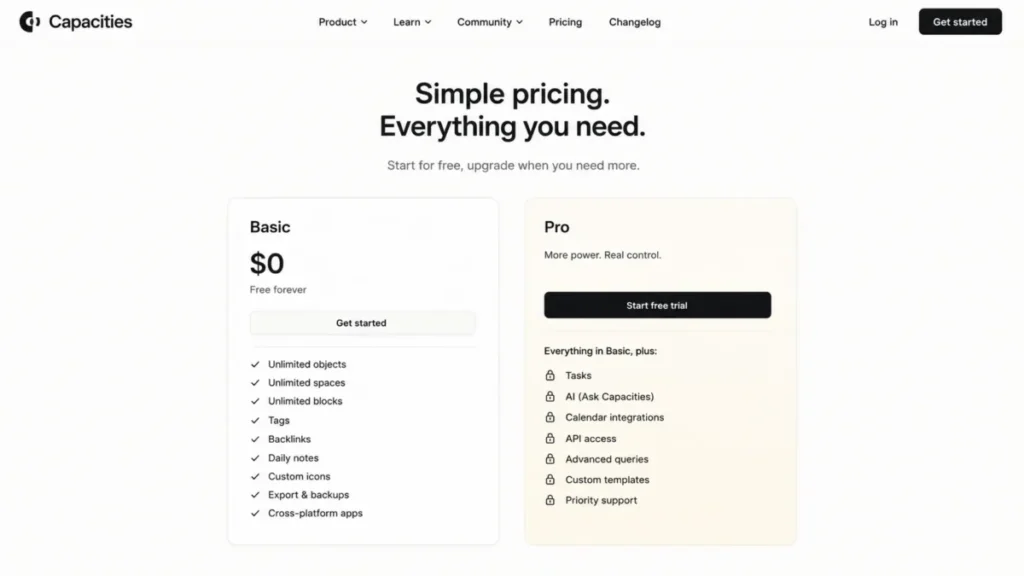
- Practical tier: Pro exists and unlocks tasks, AI, calendar integrations, and API access, but a verified US dollar amount was not available on the page checked for this article.
- Free plan: Basic includes unlimited objects, spaces, and blocks, along with sync, search, import and export, and offline use.
- First limit that bites: Basic caps media uploads at 100 MB per month and 5 GB total, and Capacities’ own documentation states that uploads fail once those caps are exceeded.
- Better than Notion: Native object types, such as people, books, and projects, replace generic pages and database rows with structured, queryable entities.
- Worse than Obsidian: No free local-file storage model, and Pro’s exact US price could not be confirmed at the time of this check.
- Setup difficulty: Medium. Adopting an object-based mental model takes longer than starting a folder-and-page notebook, even though Basic itself is easy to open and use.
- Hidden costs: Media overage is the main documented cost risk on Basic.
- Evidence status: Verified against Capacities’ official pricing page and its Media Upload documentation.
Capacities’ official pricing page, checked 2026-08-07, confirms that Basic, the free tier, includes unlimited objects, spaces, and blocks, plus sync, search, import and export, and offline access, while Pro adds tasks, AI, calendar integrations, and API access. Capacities’ own Media Upload documentation sets a 100 MB per-file cap across all tiers, plus a 100 MB monthly and 5 GB total allowance on Basic, with uploads failing once either quota is exceeded.
| Pros | Cons |
|---|---|
| Object types (people, books, projects) create structure without manual folder discipline | Pro’s exact US dollar price is not confirmed from the official page checked here |
| Basic includes unlimited objects, sync, search, and offline use at no cost | Media upload fails outright once the 100 MB monthly or 5 GB total Basic quota is exceeded |
| Import and export tooling exists, including a documented Notion migration path | No local-file storage model comparable to Obsidian |
| API access and smart queries on Pro support automation once unlocked | Object-based mental model requires more upfront learning than a flat notebook app |
- Verdict:
- I would recommend Capacities to a solo user who wants structure without databases, but confirm Pro’s current US price directly on Capacities’ pricing page before budgeting.
5. Heptabase: Best for Visual, Whiteboard-Based Research

- Best for: Researchers and visual thinkers who need to spread reading, PDFs, and concepts across a spatial canvas instead of a linear document.
- Avoid if: You need heavy multi-model AI usage on the cheapest paid tier, or you have no use for whiteboard-style organization.
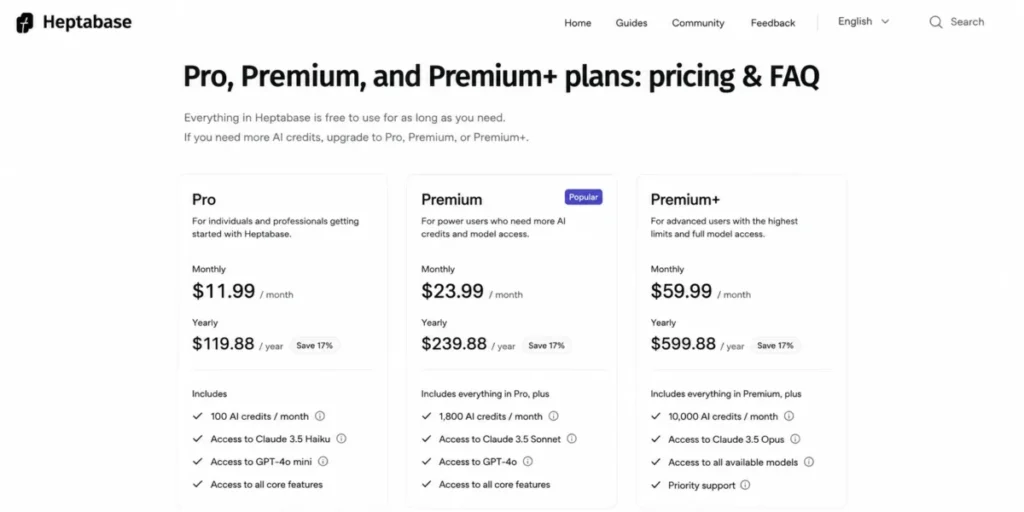
- Starting price: Pro at $11.99 per month, or $107.88 billed yearly.
- Practical tier: Premium at $23.99 per month, or $215.88 billed yearly, once Gemini-only AI access on Pro is not enough.
- Free plan: Not documented as a permanent free tier in the official pricing and FAQ page checked for this article; Pro is the entry paid tier.
- First limit that bites: Pro’s 100 monthly AI credits and Gemini-only model access run out quickly for anyone using AI for daily research synthesis, not occasional questions.
- Better than Notion: Purpose-built whiteboards for spatial concept mapping, plus unlimited PDF upload and parsing on Premium.
- Worse than Obsidian: No free core tier, and AI credit exhaustion on lower tiers restricts creation and editing, not just extra features. <br>
- Setup difficulty: Medium. The whiteboard-and-card model takes adjustment for anyone used to linear notebooks, even though the interface itself is not complex.
- Hidden costs: Once Premium’s AI credits are exhausted, basic models can still read, search, and answer, but not create or edit.
- Evidence status: Verified against Heptabase’s official Pro, Premium, and Premium+ pricing and FAQ documentation, including the documented post-credit behavior.
Heptabase’s official pricing and FAQ documentation, checked 2026-08-07, lists Pro at $11.99 monthly or $107.88 yearly and Premium at $23.99 monthly or $215.88 yearly. Premium+ costs $71.99 monthly or $647.88 yearly. Each tier scales AI credits rather than the whiteboard features, and Heptabase documents that basic models can still read, search, and answer after credits run out, but cannot create or edit content.
| Pros | Cons |
|---|---|
| Whiteboard canvas supports genuine spatial concept mapping, not just card lists | No permanent free tier; Pro is the entry price |
| Premium and above support unlimited PDF upload and parsing | Pro’s 100 monthly AI credits and Gemini-only access are thin for daily AI-assisted research |
| Documented post-credit behavior (read/search/answer, not create/edit) avoids a hard AI cutoff | Standard Pro price, before any promotion, still requires a subscription from day one |
| Model access expands meaningfully at Premium (Gemini, OpenAI, and Anthropic) | Learning the whiteboard-and-card model takes longer than opening a blank document |
- Verdict:
- I would choose Heptabase over Notion for visual research work, and budget for Premium rather than Pro if AI-assisted synthesis is a daily habit.
6. Reflect: Best for a Minimalist, Single-Plan Setup
- Best for: Solo professionals who want networked notes with backlinks, encrypted sync, and integrations, without managing a multi-tier pricing ladder.
- Avoid if: You need a permanent free plan, or you want multiple paid tiers to optimize spending around a narrower feature set.
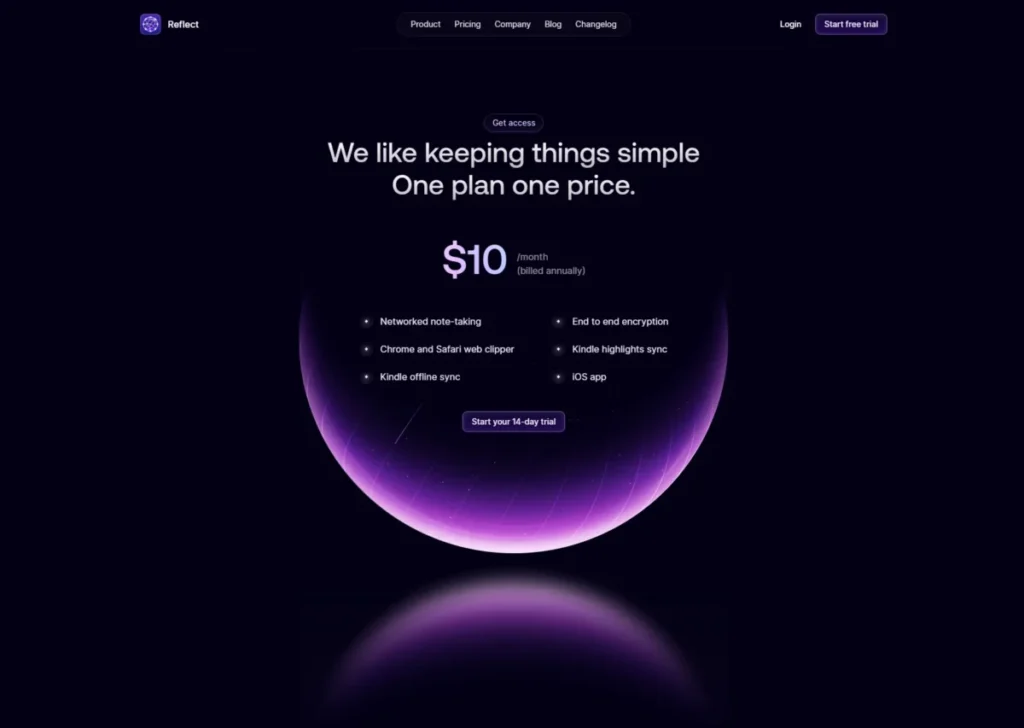
- Starting price: Reflect’s one paid plan costs $10 per month billed annually, after a 14-day trial.
- Practical tier: The single plan is also the practical tier. There is no higher tier to grow into.
- Free plan: No permanent free tier is presented on Reflect’s official page; a 14-day trial precedes the paid subscription.
- First limit that bites: There is no lower-cost tier to fall back to if Reflect’s $10-a-month plan feels like more than a light note-taker needs.
- Better than Notion: One price, no feature-gating decisions to make, and backlinks plus end-to-end encryption included by default.
- Worse than Obsidian: No free tier at all, and no local-file storage model comparable to Obsidian’s Markdown vault.
- Setup difficulty: Low. A single plan removes the tier-selection step entirely, and the feature set is intentionally focused.
- Hidden costs: None documented beyond Reflect’s standard $10 monthly-equivalent annual price; there is no add-on ecosystem to budget around.
- Evidence status: Verified against Reflect’s official product and pricing page for the trial length and the single-plan price.
Reflect’s official product page, checked 2026-08-07, confirms one paid plan at $10 per month billed annually, following a 14-day trial. Backlinks, multi-device sync, end-to-end encryption, and export and API access are included rather than upsold. That simplicity favors a buyer who does not want to weigh gated tiers, but it also means no permanent free fallback once the trial ends.
| Pros | Cons |
|---|---|
| One plan means no feature-gating decisions between tiers | No permanent free plan; only a 14-day trial precedes payment |
| End-to-end encryption and backlinks are included by default, not an upsell | No lower-cost tier for a lighter note-taking need |
| Export and API access support a real exit path if priorities change | No local-file storage model; notes live in Reflect’s synced cloud |
| Calendar, Zapier, and Readwise integrations are included without an add-on fee | Feature set is intentionally narrower than an documented workspace like Notion |
- Verdict:
- I would pick Reflect over Notion when the goal is a focused, backlink-driven notes app with no pricing decisions to manage, using the 14-day trial fully since there is no free fallback afterward.
7. Craft: Best for Polished Writing and Daily Notes

- Best for: Writers and creators who want documents, daily notes, whiteboards, and tasks that look and read well, across a broad range of devices.
- Avoid if: You need an indefinitely spacious free knowledge base, or you need a confirmed US dollar paid price before committing.
- Starting price: Free.
- Practical tier: A paid plan exists, but the pricing view opened for this research rendered in Brazilian reais, so no US dollar amount is asserted here.
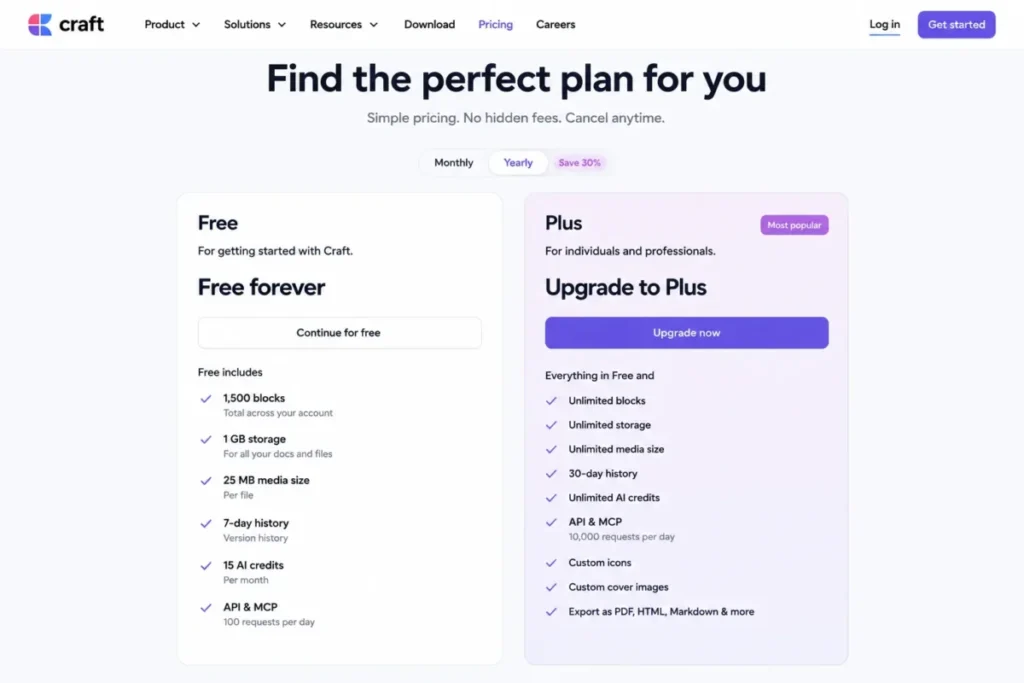
- Free plan: Free is capped at 1,500 blocks, 1 GB storage, 25 MB per media file, 7-day version history, and 15 AI credits.
- First limit that bites: The 1,500-block ceiling on Free is easy to reach for anyone using Craft as a genuine daily-notes and documentation habit, not a one-off writing tool.
- Better than Notion: Cleaner document design and whiteboard support in the same app, with listed apps across iPhone, iPad, Mac, Windows, Vision Pro, and Android.
- Worse than Obsidian: No free core tier without limits, and the exact US paid price could not be confirmed in this research pass.
- Setup difficulty: Low. Craft’s document-first design is close to a word processor, which keeps onboarding simple compared with database-first tools.
- Hidden costs: Craft’s pricing material also publishes API and MCP throughput limits: 100 requests per minute and 20,000 blocks per minute.
- Evidence status: Verified against Craft’s official pricing page for Free-plan limits and API throughput.
Craft’s official product page, checked 2026-08-07, confirms it combines documents, tasks, calendars, whiteboards, and daily notes across iPhone, iPad, Mac, Windows, Vision Pro, and Android. The Free plan’s limits are unusually specific: 1,500 blocks, 1 GB storage, a 25 MB per-media-file cap, 7-day version history, and 15 AI credits, all confirmed on Craft’s official pricing page. Craft’s actual US paid price remains unconfirmed, since the pricing view accessible during this research rendered in Brazilian reais rather than US dollars.
| Pros | Cons |
|---|---|
| Documents, whiteboards, tasks, and calendar live in one app with genuinely polished design | Free plan’s 1,500-block cap is easy to outgrow within months of daily use |
| Listed apps span iPhone, iPad, Mac, Windows, Vision Pro, and Android | Paid US dollar price is not confirmed from the page checked for this article |
| API and MCP throughput limits are explicitly published for automation planning | 25 MB media cap on Free is restrictive for image- or video-heavy notes |
| Markdown, TextBundle, PDF, and CSV import/export are documented | 15 AI credits on Free covers only light, occasional AI use |
- Verdict:
- I would try Craft for its writing experience over Notion’s database-first design, confirm the current US price on Craft’s pricing page, and plan to outgrow the 1,500-block Free tier within a year.
8. Amplenote: Best for Turning Notes Into Scheduled Action

- Best for: Task-driven professionals who want notes, tasks, and calendar commitments to flow through one connected graph instead of three disconnected apps.
- Avoid if: You plan commercial use on the free Personal tier, or you regularly upload files larger than 5 MB.
- Starting price: Free (Personal).
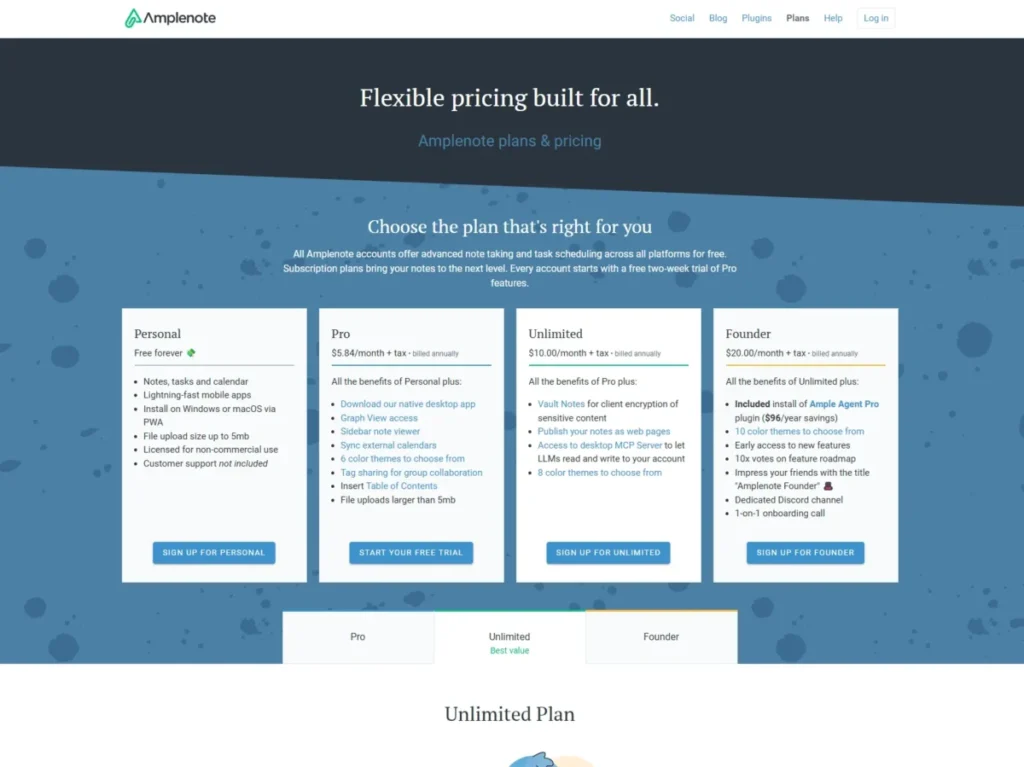
- Practical tier: Pro at $5.84 per month plus tax, billed annually. Unlimited is $10 a month and Founder is $20 a month for buyers who want higher tiers.
- Free plan: Personal is explicitly non-commercial, includes no official support, and caps uploads at 5 MB.
- First limit that bites: The non-commercial restriction on Personal, not a feature gate, is the first wall a professional user hits, since Personal is not licensed for work use at all.
- Better than Notion: Notes convert directly into tasks and calendar entries inside the same graph, instead of requiring a separate task app synced on top.
- Worse than Tana: No documented AI-assisted meeting capture comparable to Tana’s botless meeting agent.
- Setup difficulty: Low to Medium. The notes-to-tasks workflow is documented, but graph view and advanced calendar sync take more configuration on Pro.
- Hidden costs: Moving from Personal to Pro is about licensing, not features: a freelancer using Personal for paid work is outside its stated terms.
- Evidence status: Verified against Amplenote’s official subscription plans page for pricing and the Personal tier’s non-commercial and support terms.
Amplenote’s official subscription page, checked 2026-08-07, confirms that Personal is free, Pro is $5.84 a month plus tax, Unlimited is $10 a month, and Founder is $20 a month. Amplenote’s official page states Personal is explicitly for non-commercial use, so a freelancer using it for paid work is outside its intended terms even if every feature needed is technically present. At roughly $70.08 a year before tax, Pro is one of the cheapest paid tiers in this entire list.
| Pros | Cons |
|---|---|
| Notes, tasks, and calendar share one graph instead of three separate apps | Personal is explicitly non-commercial, which disqualifies it for most professional use |
| Pro’s annual price (about $70.08 a year before tax) undercuts most paid competitors here | No official support on the free Personal tier |
| Graph view surfaces connections between notes and tasks automatically | 5 MB upload cap on Personal is restrictive for document-heavy professional use |
| Official migration resources cover Markdown, Obsidian, Evernote, Notion, and Roam | No AI-assisted meeting capture comparable to Tana |
- Verdict:
- I would move a professional user off Personal and onto Pro immediately, since Personal’s non-commercial license already makes paid work a documented licensing problem, not just a missing feature.
9. NotePlan: Best for Apple-Centered Calendar Planning

- Best for: Apple-centered professionals who want daily notes, time blocking, tasks, and projects organized directly around their calendar.
- Avoid if: Android is a required platform, since NotePlan’s official pricing page lists only Mac, iPad, iPhone, and Web.
- Starting price: NotePlan’s Annual plan costs $99 a year, shown as an $8.33-a-month effective rate.
- Practical tier: The annual plan is also the practical tier; the monthly alternative costs $12 a month, noticeably more over a year.
- Free plan: Not documented as a permanent free tier on the pricing page checked for this article.
- First limit that bites: Platform coverage, not a usage limit, is the first wall for anyone who needs Android support that is not listed on NotePlan’s official pricing page.
- Better than Amplenote: Deeper native time-blocking and calendar integration built specifically around daily and calendar notes.
- Worse than Notion: No team collaboration model, and platform coverage is narrower, Apple devices and web only, per the official page reviewed.
- Setup difficulty: Low to Medium. Daily-note and calendar-linked workflows are quick to start, though time-blocking habits take longer to stick than the software setup itself.
- Hidden costs: Paying monthly instead of the annual plan means $12 a month rather than the $99 annual total, a real premium for the same feature set.
- Evidence status: Verified against NotePlan’s official pricing page for cost, billing cadence, and the platform list shown there.
NotePlan’s official pricing page, checked 2026-08-07, confirms an annual plan at $99 a year, shown as an $8.33-a-month effective rate, against a $12-a-month plan for monthly billing. That page lists daily notes, time blocking, and calendar integration as core features, with a platform list of Mac, iPad, iPhone, and Web, but no Android.
| Pros | Cons |
|---|---|
| Daily notes, time blocking, and calendar sit inside one workflow, not separate apps | Platform list on the official pricing page covers only Mac, iPad, iPhone, and Web, no Android |
| Annual pricing at $99 a year is competitive against Reflect’s $120 and Tana’s $360 | No permanent free tier documented |
| Backlinks and Kanban views add PKM-style structure on top of the calendar model | Monthly billing costs $12 a month instead of the $99 annual total for the same features |
| Offline use and local/cloud storage options are documented | No team collaboration model comparable to Notion |
- Verdict:
- I would recommend NotePlan to an Apple-centered user whose main organizing question is “what happens this week,” confirming Android support directly first if that platform is a requirement.

10. RemNote: Best for Students and Active Recall

- Best for: Students, exam learners, and researchers who want flashcards, spaced repetition, and PDF annotation living inside the same notes they already take.
- Avoid if: You are a general business user with no study workflow, or you plan to annotate more than 3 documents a month on Free.
- Starting price: Free.
- Practical tier: Pro at $8 a month, billed as $96 a year; Pro with AI at $18 a month, billed as $216 a year, for heavier AI-assisted study.
- Free plan: Free is capped at 3 annotated documents, 100 monthly AI credits, 20 file uploads per day, and an 8 MB maximum file size.
- First limit that bites: The 3-annotated-document cap on Free is the fastest wall for anyone using RemNote for real coursework or research reading, not casual notes.
- Better than Notion: Flashcards and spaced repetition are native to the notes themselves, not a bolted-on plugin or separate app.
- Worse than Obsidian: No free local-file ownership model, and Free’s document, file, and AI ceilings are tighter than Obsidian’s unrestricted core app.
- Setup difficulty: Low. Turning notes into flashcards is a built-in action, not a separate configuration step, which keeps onboarding fast for students.
- Hidden costs: Moving from Pro to Pro with AI more than doubles the annual cost, from $96 to $216 a year, specifically for expanded AI-assisted study features.
- Evidence status: Verified against RemNote’s official pricing page for Free-plan limits and both paid tiers’ pricing.
RemNote’s official pricing page, checked 2026-08-07, confirms Free includes unlimited notes and flashcards but caps annotated documents at 3, AI credits at 100 a month, file uploads at 20 a day, and file size at 8 MB. Pro at $96 a year and Pro with AI at $216 a year expand those ceilings. A student working through even a single semester’s readings will exceed the 3-document cap almost immediately, making Pro a near-certain upgrade rather than an edge case.
| Pros | Cons |
|---|---|
| Flashcards and spaced repetition are built into the note-taking flow itself | Free plan’s 3-annotated-document cap is restrictive for real coursework |
| Pro’s $96-a-year price is competitive against Amplenote and Reflect | 8 MB maximum file size on Free is tight for scanned textbook chapters or large PDFs |
| Pro with AI adds AI-assisted study on top of the same flashcard system | Pro with AI more than doubles the annual cost versus plain Pro |
| Official import/export documentation covers migration from other note and flashcard apps | No local-file ownership model comparable to Obsidian |
- Verdict:
- I would start a student on RemNote’s Free plan for a single course, then move to Pro once a second course’s reading load pushes past the 3-document annotation cap.

Pricing, Limits, and Upgrade Triggers
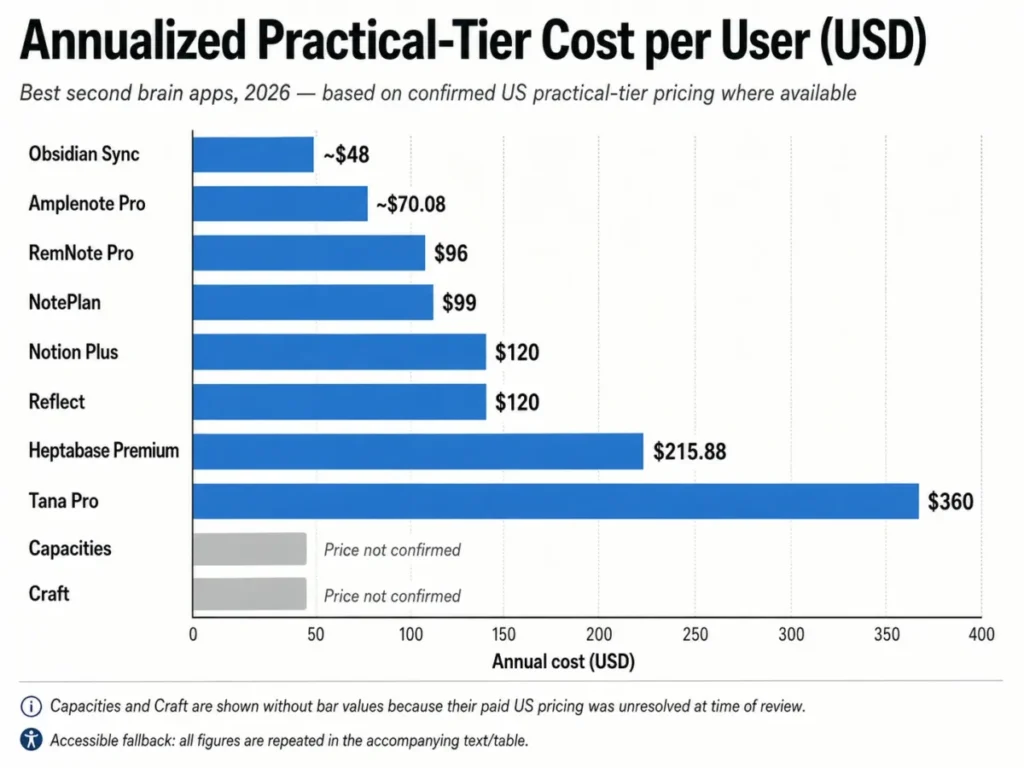
Starting price is the least useful number on any of these pricing pages. The practical tier, the one that removes the limit you will hit in practice, is what determines the real annual cost.
| Tool | Starting price | Practical tier (annualized) | Free plan | Key usage limit | Hidden costs |
|---|---|---|---|---|---|
| Obsidian | Free | Sync, about $48/year | Unlimited core app | No forced ceiling on the core app | Sync add-on; backups are the user’s responsibility without it |
| Notion | Free | Plus, $120/year per member | 5 MB per file, manual offline pages | 5 MB per-file cap on Free | $12 vs. $10 per member per month for monthly vs. annual billing |
| Tana | Free | Pro, $360/year per user (standard) | 5 meetings, 1 calendar, 50 AI queries/month | 5 meetings/month on Free | Early-bird rate is not guaranteed to persist; AI top-up price unverified |
| Capacities | Free | Pro, US price unresolved | Unlimited objects/blocks; media capped | 100 MB/month, 5 GB total media on Basic | Media overage fails to upload rather than downgrading |
| Heptabase | Pro, $107.88/year | Premium, $215.88/year | Not documented as permanent free | 100 AI credits/month on Pro | Post-credit basic models can’t create/edit on Premium once exhausted |
Prices above come from each product’s own official pricing page, all checked 2026-08-07, including Obsidian’s and Notion’s.
| Tool | Starting price | Practical tier (annualized) | Free plan | Key usage limit | Hidden costs |
|---|---|---|---|---|---|
| Reflect | $120/year | Same single plan | 14-day trial only | No lower tier available | None documented beyond the single price |
| Craft | Free | Paid tier, US price unresolved | 1,500 blocks, 1 GB, 25 MB media, 15 AI credits | 1,500-block cap on Free | API/MCP throughput limits (100 req/min, 20,000 blocks/min) |
| Amplenote | Free | Pro, about $70.08/year | Non-commercial, 5 MB uploads, no support | 5 MB upload cap on Personal | Personal’s non-commercial license, not a feature gate |
| NotePlan | $99/year | Same annual plan | Not documented as permanent free | Platform list excludes Android | Monthly billing costs $12 versus the $99 annual total for the year |
| RemNote | Free | Pro, $96/year | 3 annotated documents, 100 AI credits/month | 3-document annotation cap on Free | Pro with AI more than doubles cost to $216/year |
Prices above come from each product’s own official pricing page, all checked 2026-08-07, including Reflect’s and RemNote’s.
Feature Gate Comparison
| Tool | AI features | Team seats | Meeting capture | Local/offline storage | Migration/export |
|---|---|---|---|---|---|
| Obsidian | Not built into the core app | Limited (paid Sync only) | Not offered | Full local Markdown files | No forced export step |
| Notion | By plan (expanded on paid tiers) | Yes, per-member pricing | Not offered | Selected pages only on Free | Official tools, database-view limits |
| Tana | By plan (Free: 50 queries/month) | By plan (Business) | By plan (Pro adds botless agent) | Not offered | Notion importer, up to 1,500 files, relations excluded |
| Capacities | By plan (Pro adds AI) | Not documented | Not offered | Offline use on Basic | Notion path; relations and formulas can flatten |
| Heptabase | By plan (credits scale with tier) | Not documented | Not offered | Not offered | Import from Notion, Obsidian, Roam, Logseq; partial fidelity |
Feature and migration details above come from each product’s own documentation, all checked 2026-08-07, including Notion’s and Tana’s.
| Tool | AI features | Team seats | Meeting capture | Local/offline storage | Migration/export |
|---|---|---|---|---|---|
| Reflect | Not documented | Not documented | Not offered | Not offered (cloud sync) | Export and API access documented |
| Craft | By plan (Free: 15 credits) | Not documented | Not offered | Not offered | Markdown, TextBundle, PDF, CSV import/export |
| Amplenote | Not documented | Not documented | Not offered | Not offered | Covers Markdown, Obsidian, Evernote, Notion, Roam |
| NotePlan | Not documented | Not documented | Not offered | Documented local/cloud storage option | Evernote, Markdown, Notion paths; filename rules |
| RemNote | By plan (Free: 100 credits/month) | Not documented | Not offered | Not offered | Official import/export docs exist |
Feature and migration details above come from each product’s own documentation, all checked 2026-08-07, including Craft’s and RemNote’s.
Setup and Migration Difficulty
| Tool | Setup difficulty | Why |
|---|---|---|
| Obsidian | Low to Medium | Immediate to start; plugins add complexity |
| Notion | Medium | Databases and views need real configuration |
| Tana | Medium to High | Node-based structure needs deliberate setup |
| Capacities | Medium | Object-based model is a mental shift |
| Heptabase | Medium | Whiteboard-and-card model takes adjustment |
| Reflect | Low | Single plan, no tier decisions |
| Craft | Low | Document-first, close to a word processor |
| Amplenote | Low to Medium | Notes-to-tasks documented; graph view takes longer |
| NotePlan | Low to Medium | Daily notes start fast; habits take longer |
| RemNote | Low | Flashcards are a built-in action |
Migration, Ownership, and Exit Risk
Every one of these products publishes some kind of import or export path, but “supports migration” and “migrates without losing structure” are different claims, and the second is where most buyers get surprised.
Obsidian needs no forced export step, since notes are already local Markdown files. Reflect and Amplenote both publish export and API access as a documented exit path. Notion’s documentation is broad but has real boundaries: not every database view can be exported at once, and Enterprise admins can disable export entirely.
Notion is the most common source migration here, and that path carries fidelity risk. Tana’s Notion importer supports up to 1,500 Markdown files but does not preserve relational links or automations. Capacities’ Notion path is similar, with relations flattening and formulas importing values rather than logic. Heptabase and NotePlan both document import support with partial fidelity or filename requirements attached.
In practice, migration between structured tools carries real fidelity risk for relations, formulas, and automations, while migration into a plain-file tool like Obsidian mostly just needs Markdown source content. Budget time to manually verify relations rather than assume a one-click import preserves everything.
How to Choose a Second Brain App
Start with these questions before comparing feature lists:
- Does the data need to stay on my own device, or is a cloud-synced workspace acceptable?
- Is this a solo tool, or does a team need shared access to the same notes?
- How often will I use AI inside the app: daily, occasionally, or never?
- Does my workflow revolve around meetings, calendar time, visual research, or exam-style study?
- What is the real annual cost once I account for the practical tier, not the starting price?
- What happens to my notes if I stop paying, or if I want to switch tools in two years?
- How much setup time can I realistically commit in the first month?
Once those seven answers are on paper, most of the ten products above eliminate themselves quickly: “own device, solo, occasional AI” points to Obsidian, while “cloud is fine, team, daily AI for meetings” points to Tana or Notion.
Common Mistakes When Choosing a Second Brain App
Buyers repeat the same handful of mistakes, each avoidable with the data already in this article. Choosing by starting price alone is common: a $0 Free plan on Tana or RemNote can become the most expensive product here once real usage starts. Ignoring the free-plan ceiling until it is hit is another mistake: Notion’s 5 MB cap and Craft’s 1,500-block limit are documented, not vague. Skipping the migration check is a third: relations and automations do not always survive an import.
Picking a team-oriented tool for a solo workflow, or the reverse, is another mistake: Notion’s per-seat pricing is wasted on one user, and Obsidian’s lack of built-in permissions creates team friction. A buyer who outgrows Notion’s cost should check the Notion alternatives roundup; a team needing a wiki should start from the knowledge base software picks. The remaining two mistakes are underestimating setup time for structured tools and not testing the AI credit ceiling. Heptabase’s and RemNote’s 100 monthly credits look generous until a heavy week burns through them.
Final Verdict
For most individual users building a durable, long-term personal knowledge base, I would choose Obsidian first. The core app costs nothing, notes are stored as files the user controls, and the only real budget decision is whether to add Sync for about $48 a year. That is not a universal answer. If the workflow needs shared team databases, Notion is the stronger choice despite its per-seat cost and 5 MB Free-plan file cap. A team with no budget for per-seat pricing should look at the best free collaboration tools list first.
If the calendar is full of meetings that need to become searchable knowledge, Tana’s $360-a-year standard Pro price is easier to justify than the pricing page alone suggests. Heptabase is the right call for visual, whiteboard-driven research. Amplenote and NotePlan both fit a notes-into-action or notes-into-calendar workflow better than a general-purpose PKM tool, and RemNote is the clear pick for a student whose primary need is spaced repetition, not general storage.
Choose Obsidian if data ownership and a permanent free tier matter more than built-in collaboration; choose Notion if a team needs one shared workspace for notes and structured data. Choose Tana if meeting volume alone justifies the highest recurring price in this list, and choose RemNote if the core job is studying for exams, not general knowledge work. Whichever product fits, verify the specific price and limit numbers directly on the vendor’s own pricing page before subscribing, since plan pricing and free-tier limits change without much notice.
Each recommendation above maps to a specific reader micro-cohort rather than one universal “best overall” pick. The ranking reason behind each pick is documented in that product’s section: Obsidian wins by scenario for ownership and cost, Notion for team databases, Tana for meeting-heavy calendars, and RemNote for spaced-repetition study. The clearest disqualifier is a hard plan gate: a solo user should treat Notion’s per-seat pricing as a disqualifier for a one-person budget, and a team that needs built-in permissions should treat Obsidian’s lack of native collaboration as its own plan gate. If your cohort and workflow do not match any single winner cleanly, shortlist two candidates and recheck their current pricing pages before committing.
Frequently Asked Questions
What is the best second brain app overall?
Obsidian is the strongest overall pick for most individual users because the core app is free and every note is stored as a local file. A team needing shared databases is usually better served by Notion instead.
What is the best free second brain app?
Obsidian’s free core app has no forced content ceiling, making it the most durable free option here. The other free tiers each cap a specific limit, such as file size or meetings, that a real workflow will eventually hit.
What is the cheapest paid second brain app?
Amplenote’s Pro plan, at about $70.08 a year before tax, is the cheapest paid tier among the products reviewed here. RemNote’s Pro plan at $96 a year and NotePlan at $99 a year are close behind.
Is Notion or Obsidian better for a second brain?
Notion is the better fit when collaboration matters more than ownership; otherwise Obsidian’s free core app and local file storage make it the safer long-term choice for a solo user. If the comparison is really about team wikis, see the Notion vs Confluence comparison.
Which second brain app is best for a small team, not just one individual?
Notion is the clearest fit, since Plus pricing is per member and the workspace supports shared databases and calendars. Tana’s Business tier is the other team-oriented option, though custom-priced.
Which second brain app is best for someone whose calendar is full of meetings?
Tana is built around meeting-heavy workflows, with a botless meeting agent for Zoom, Teams, and Google Meet on Pro. Free’s 5-meetings-a-month cap makes Pro a near-immediate requirement.
How much does a second brain app cost per year?
Costs range from $0 on Obsidian’s Free core app up to roughly $360 a year for Tana’s standard Pro plan. Most paid single-user tools land between Amplenote’s $70.08 and Heptabase’s $215.88 once the practical tier is factored in.
Can I export my notes if I switch apps later?
For Obsidian, exporting is unnecessary since notes are already local files. For structured tools like Notion and Tana, export exists but can flatten relations or formulas, so verify migration fidelity first.
Which second brain app is best for students?
RemNote is purpose-built for students, combining notes, flashcards, and spaced repetition in one workflow. Its 3-annotated-document Free cap is tight for a full course load, so most students will need Pro at $96 a year within a semester or two.
What should I look for before choosing a second brain app?
Look at data ownership and export format first, then check the free plan’s actual limits, not just its existence. After that, confirm the AI or meeting quota against realistic usage, and calculate the practical annual cost from the tier that removes your specific limit.
In practice, select one of these ten ranked products based on your own workflow, data ownership needs, pricing, plan limits, platform requirements, and switching risk.