The live chat market hides its real price behind the plan you end up buying, not the plan on the pricing card. A five-agent team can start on a $19 tier and find routing, automation, social channels, and unlimited history two tiers up.
That gap is why this ranking is built around three things vendors rarely put side by side: the cheapest tier that runs a real support workflow, the unit your bill scales on, and the first limit that stops you.
For a dedicated live chat product with published per-seat pricing, LiveChat is the strongest start for most 3 to 50 agent teams. Intercom fits better when AI resolution matters more than a predictable invoice, and Zendesk when chat must join an existing omnichannel service desk.
If you are still scoping the wider category, the best help desk software comparison covers the ticketing side of the same decision.
All pricing below is US list pricing from each vendor’s official pages, checked 2026-08-03.
In This Article (14 sections)
Quick Verdict: Best Live Chat Software by Use Case
| Use case | Best pick | Why it fits |
|---|---|---|
| Dedicated live chat for a 3 to 50 agent team | LiveChat | Published per-user seat pricing with no conversation meter attached |
| AI-first SaaS support | Intercom | Fin resolves conversations and hands off to a human in the same inbox |
| Omnichannel service operations | Zendesk | Chat lands in the same agent workspace as email, voice, and tickets |
| Ecommerce stores with modest chat volume | Tidio | Flows and the Lyro agent absorb repeat order and shipping questions |
| Flat monthly bill for a 2 to 20 person team | Crisp | Workspace pricing bundles seats and unlimited conversations |
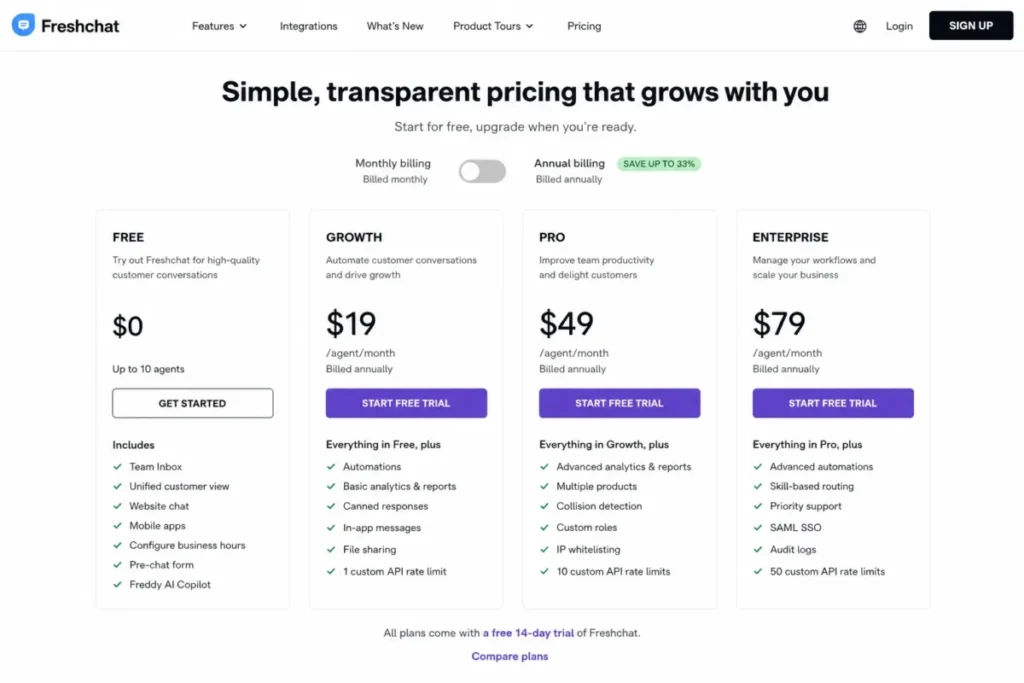
| Largest free agent allowance | Freshchat | The free plan supports up to 10 agents |
| Chat tied directly to CRM records | HubSpot Service Hub | Every conversation attaches to a contact, ticket, and pipeline |
| Tightest per-agent budget | LiveAgent | Lowest published per-agent list price in this set |
| Teams already standardized on Zoho | Zoho SalesIQ | Visitor tracking and proactive chat inside the Zoho stack |
| Human-only chat with no AI spend | Olark | One flat per-agent price, with the AI agent sold as a separate plan |
The fit reasons above draw on each vendor’s official pricing and product pages, checked 2026-08-03. The two load-bearing allowances are the Freshchat free agent allowance and the Crisp included-seat counts.
Five of these ten picks are not competing for the same buyer. LiveChat, Crisp, and Olark sell chat, while Zendesk, Freshchat, LiveAgent, and HubSpot sell customer service software that happens to include chat, and Intercom and Tidio sell AI resolution with a human fallback behind it.
That distinction decides more purchases than any feature table, so the coverage matrix below comes before the rankings rather than after them.
What Each Platform Actually Covers
| Product | Product type | Native ticketing | Native AI agent | Omnichannel inbox | Pricing shape |
|---|---|---|---|---|---|
| LiveChat | Chat-first | Not applicable | Not applicable | Limited | Per seat |
| Intercom | AI-first support platform | Yes | Yes | Yes | Per seat plus AI outcomes |
| Zendesk | Help-desk-first suite | Yes | Yes | Yes | Per agent |
| Tidio | Chat plus metered AI | Yes | Yes | By plan | Per billable conversation |
| Crisp | Chat-first shared inbox | Not applicable | By plan | By plan | Per workspace |
| Freshchat | Messaging-first suite | Yes | Add-on | By plan | Per agent plus add-ons |
| HubSpot Service Hub | CRM-first service suite | Yes | Yes | Yes | Per seat plus onboarding |
| LiveAgent | Help-desk-first | Yes | Not applicable | By plan | Per agent |
| Zoho SalesIQ | Visitor-tracking-first chat | Not applicable | By plan | By plan | Per operator, qualified |
| Olark | Chat-first | Not applicable | Separate plan | Limited | Per agent, AI separate |
Pricing-shape sources for this matrix: Crisp workspace pricing, Tidio conversation pricing, and Intercom seat and outcome pricing, all checked 2026-08-03.
This matrix is an editorial assessment of documented feature scope on each vendor’s official product and pricing pages, not a test result. Cells read Yes, Limited, By plan, Not applicable, or Separate plan, and “Not applicable” means the vendor sells the capability as a different product rather than withholding it.
The direct competitors inside this list are LiveChat against Crisp and Olark, Intercom against Zendesk and Freshchat, and Tidio against Zoho SalesIQ. HubSpot Service Hub and LiveAgent compete mostly with tools outside this ranking.
How We Chose and Evaluated the Best Live Chat Software
This is a documentation-based comparison of published plans. The rankings rest on official US pricing pages, official product and plan-comparison documentation, and vendor help-center guidance, with pricing, plan gates, and usage limits checked on 2026-08-03.
Each tool was assessed against the same buyer-focused criteria: live chat workflow fit, agent-side operations, AI and automation reach, omnichannel coverage, plan restrictions, cost structure, and documented limitations.
Greater weight was given to factors that change a purchase decision: the cheapest tier that runs the workflow, the unit the bill scales on, the first limit a growing team hits, and the cost of adding agents. Brand popularity and affiliate relationships did not influence the ranking.
Claims that lacked reliable evidence were excluded from the ranking rather than softened. Temporary offers are labeled separately from standard pricing and rechecked on the publication date.
The Three Problems Every Live Chat Buyer Faces
Ten vendors, five pricing shapes, and about thirty plan names produce one recurring outcome: a team buys the tier it read about and operates on a tier it did not budget for. Three problems cause almost all of that drift.
Problem 1: The advertised tier is rarely the tier that runs your workflow
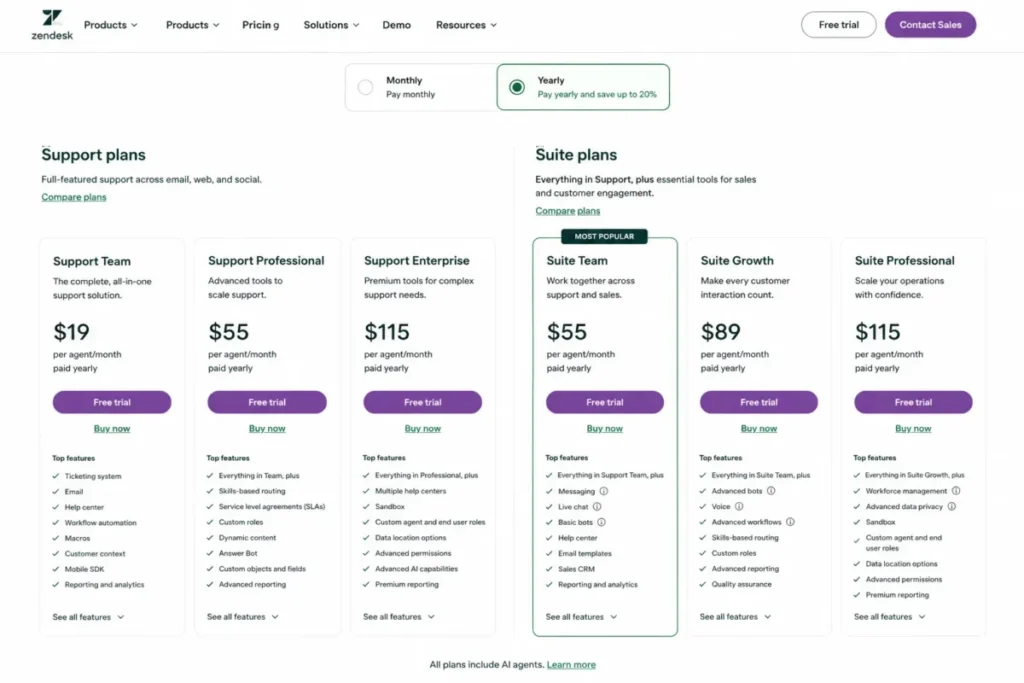
Zendesk is the cleanest example. Support Team is listed at $19 per agent per month paid yearly, and that tier does not list messaging or live chat at all; live chat starts with Suite Team at $55 per agent per month paid yearly.
A buyer who budgets $19 per agent for Zendesk chat is short by 189 percent before a single conversation arrives.
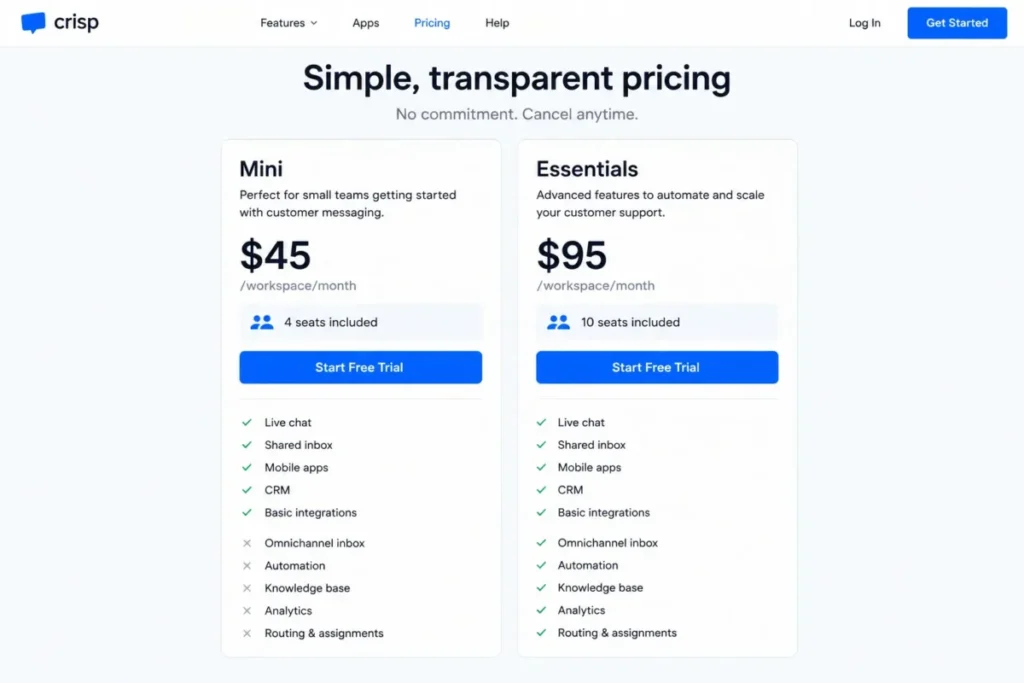
The same pattern repeats with softer edges elsewhere. Crisp Mini at $45 per workspace per month is a real product, but the omnichannel inbox, workflow automation, AI chatbot, knowledge base, analytics, and routing all begin on Essentials at $95.
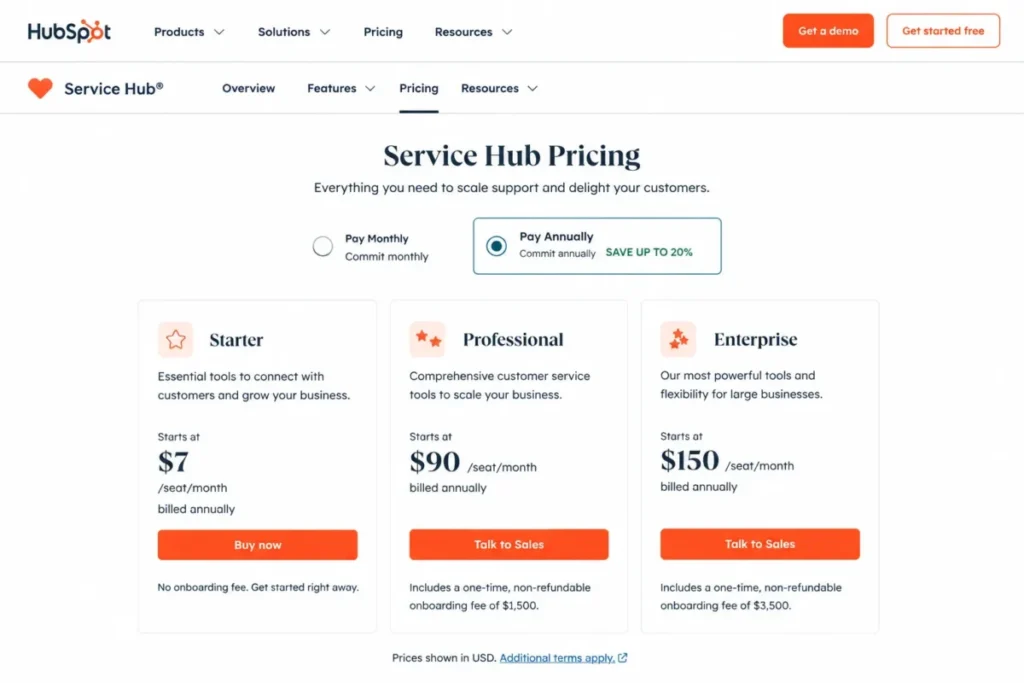
Freshchat Growth at $19 per agent per month opens social messengers, while intelligent routing and multiple SLA policies wait for Pro. HubSpot Service Hub Starter at $7 per seat per month is genuinely cheap, and the advanced service automation most support teams describe as table stakes sits on Professional at $90 per seat with a required $1,500 onboarding fee.
The practical move is to write down the four or five behaviors your team cannot operate without, then find the lowest tier at every vendor that lists all of them. That tier, not the entry tier, is your comparison point.
Problem 2: The bill scales on a unit you did not choose
Five different scaling units appear across these ten products, and they are not interchangeable.
| Scaling unit | Products | What makes the bill grow | Where it bites |
|---|---|---|---|
| Per seat or agent | LiveChat, Zendesk, Freshchat, HubSpot Service Hub, LiveAgent, Olark | Adding a person | Seasonal or part-time coverage |
| Per workspace with included seats | Crisp | Crossing the included-seat count | Growing past 4 seats, then past 10 |
| Per billable conversation | Tidio | Inbound volume, not headcount | A traffic spike or a product recall |
| Per AI outcome or AI conversation | Intercom, Tidio | Successful automated resolutions | Deflection working better than forecast |
| Per operator with a bundled minimum | Zoho SalesIQ | Adding operators above the bundle | Unclear until the checkout confirms it |
Billing-unit sources: Crisp pricing for workspace billing, Tidio pricing for conversation billing, and Olark pricing for flat per-agent billing, checked 2026-08-03.
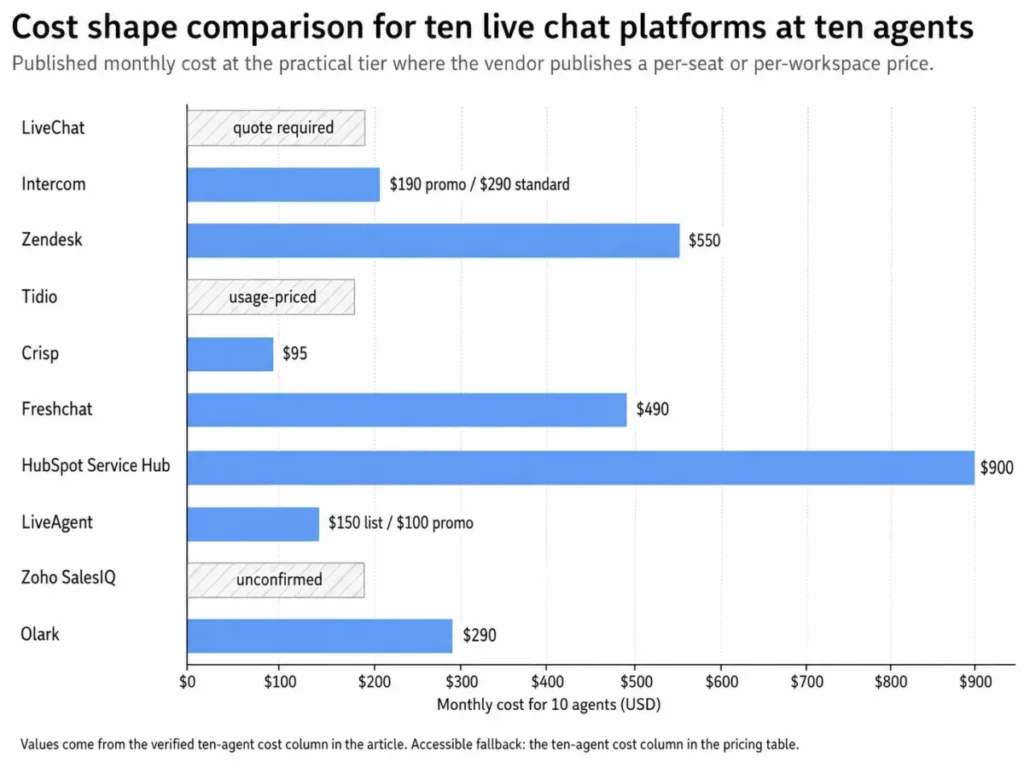
The chart above restates the ten-agent figures in the pricing section, and the table there remains the accessible source for every number.
A per-seat tool punishes headcount and rewards deflection. A per-conversation tool does the opposite, which is why a five-agent ecommerce team with 3,000 monthly chats can pay more on a $24.17 plan than a fifteen-agent team pays on a $19 seat.
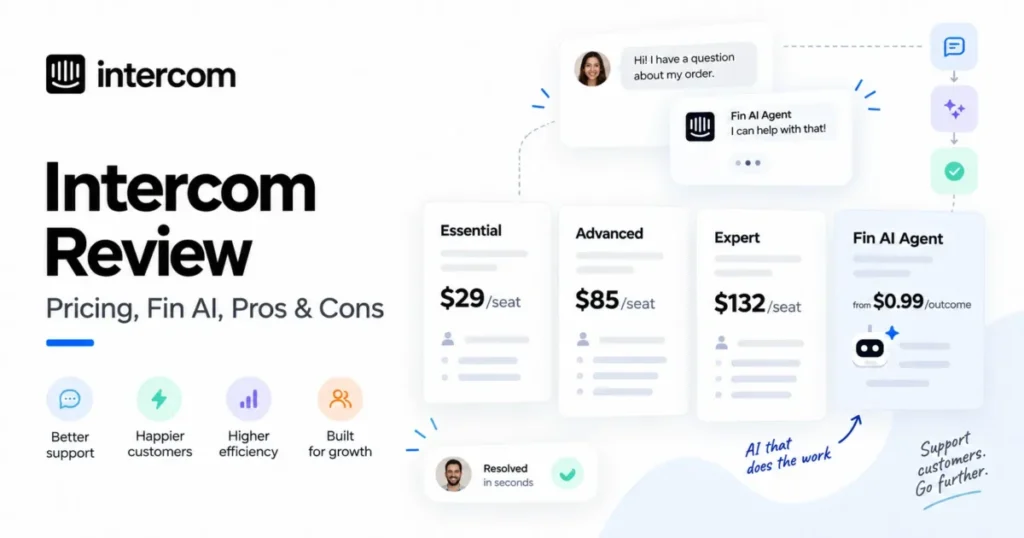
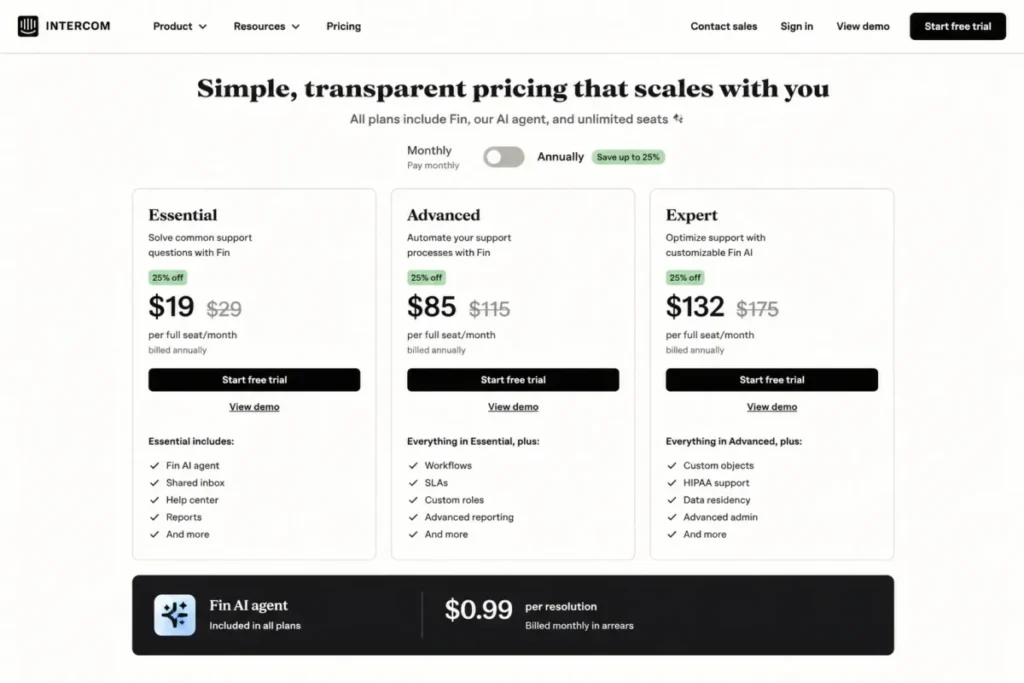
Intercom sits in the awkward middle. Essential seats are promoted at $19 per full seat per month on annual billing against a $29 annual standard price. Fin then charges $0.99 per resolution on top, so the invoice grows when the AI succeeds rather than when the team grows.
Problem 3: Free and entry tiers hide a ceiling, not a feature list
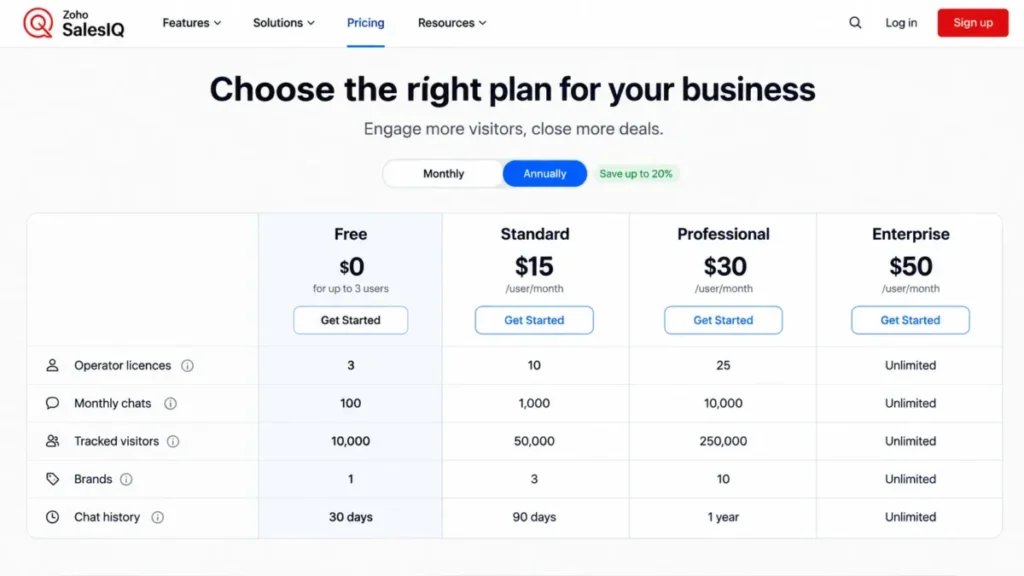
Free plans in this category fail on volume far more often than on features. Zoho SalesIQ Free includes three operator licences, one brand, and 30-day chat history, and it stops at 100 chats and 10,000 tracked visitors per month.
That is roughly three chats a day. A single Black Friday afternoon can exhaust a month of allowance.
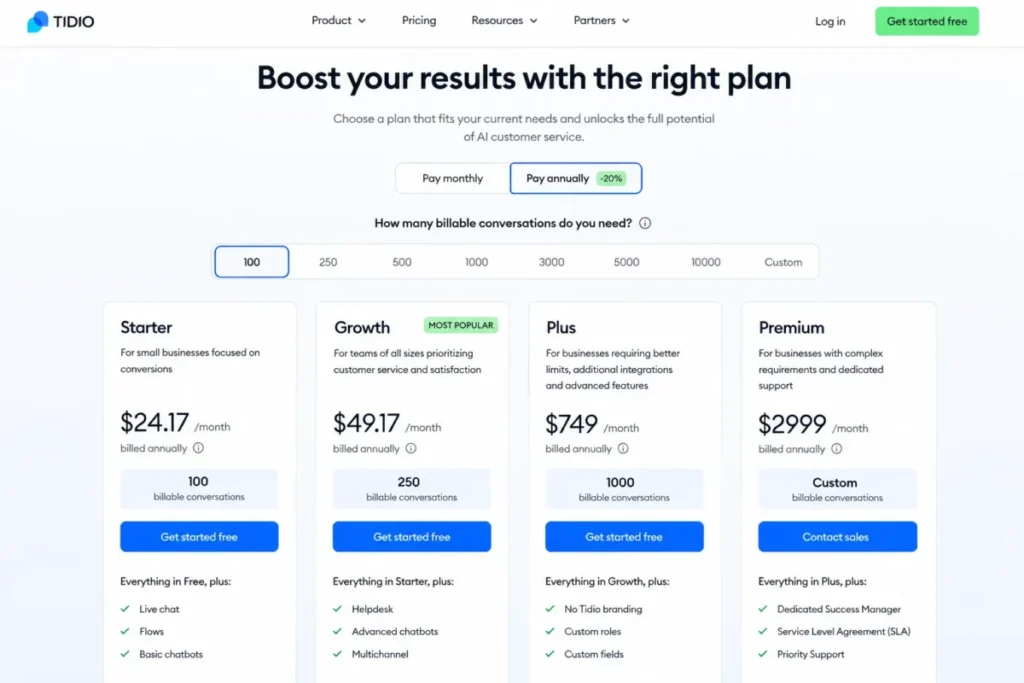
Tidio Starter includes 100 billable conversations at $24.17 per month on annual billing, and Growth starts at $49.17 for 250. Freshchat is the outlier that gives away headcount instead of volume, supporting up to 10 agents on its free plan.
HubSpot free live chat carries HubSpot branding and limited bots, which makes it a lead-capture widget rather than a support desk. LiveChat Starter is capped at one user with 60-day chat history, so a second agent is an upgrade, not an add-on.
Best Live Chat Software Comparison
| Product | Starting price | Practical tier | Free plan | Best-fit team size | First limit that bites |
|---|---|---|---|---|---|
| LiveChat | $19 per user/month annual | Team, for multi-agent use and unlimited history | No | 3 to 50 agents | One user and 60-day history on Starter |
| Intercom | $19 per full seat/month promotional | Advanced, for workflows and multiple team inboxes | No | 5 to 100 seats | Workflows and round-robin sit above Essential |
| Zendesk | $55 per agent/month yearly for Suite Team | Suite Team, the first tier that includes chat | No | 10 agents and up | Support Team at $19 does not include chat |
| Tidio | $24.17 per month annual | Growth, from $49.17 for 250 conversations | Yes | 1 to 10 agents | 100 billable conversations on Starter |
| Crisp | $45 per workspace/month with 4 seats | Essentials at $95 with 10 seats | No | 2 to 20 people | Automation and routing start on Essentials |
| Freshchat | $19 per agent/month annual | Pro at $49 for routing and multiple SLAs | Yes, up to 10 agents | 5 to 200 agents | Social channels start on Growth |
| HubSpot Service Hub | $7 per seat/month annual | Professional at $90 plus $1,500 onboarding | Yes, with branding | Existing HubSpot accounts | Free chat carries HubSpot branding |
| LiveAgent | $15 per agent/month annual list | Small Business for chat, higher tiers for social | No | 2 to 25 agents | Two chat buttons on Small Business |
| Zoho SalesIQ | $19 per month for three agents per the official FAQ | Basic, pending a confirmed billing basis | Yes | Zoho-native teams | 100 chats per month on Free |
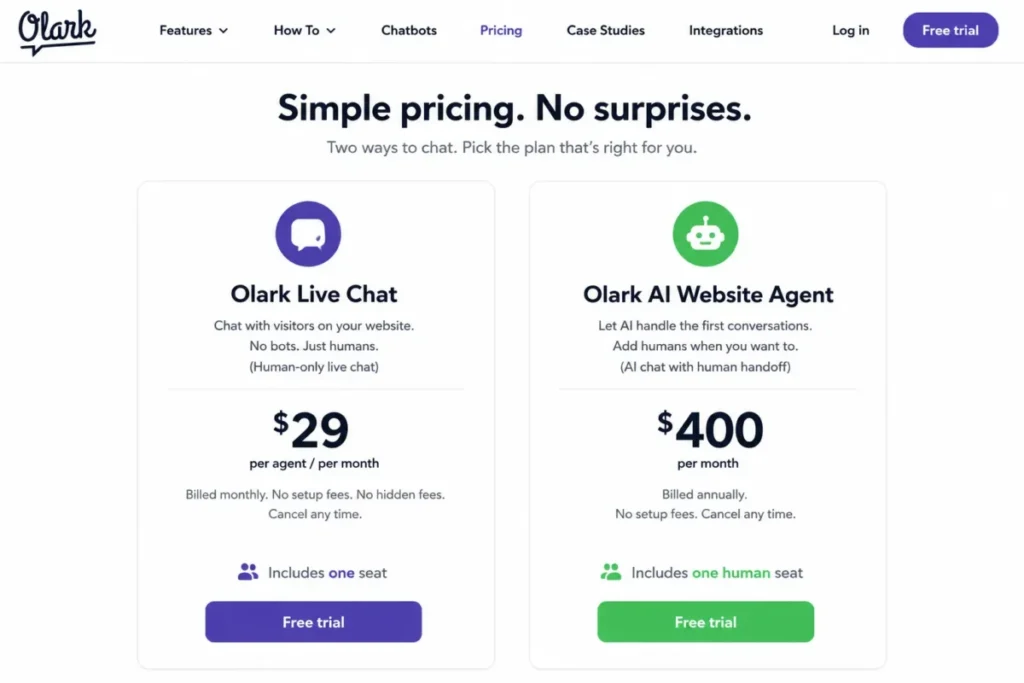
| Olark | $29 per agent/month | Olark Standard, with AI as a separate plan | No | 1 to 15 agents | AI is a $400 per month plan, not an add-on |
Sources for the three pricing shapes above: LiveChat per-user pricing, Zendesk per-agent pricing, and Crisp per-workspace pricing, checked 2026-08-03. Every remaining figure is linked in that product’s own section below.
Every price comes from an official vendor source. Most come from vendor pricing pages, and the one qualified figure, Zoho SalesIQ Basic, comes from Zoho’s official FAQ rather than its plan-comparison page.
Two cells are deliberately qualified rather than filled: LiveChat’s Team price and Intercom’s Advanced price are not in this evidence set, so both practical tiers are named without a number instead of estimated.
Read the “first limit that bites” column before the price column. In eight of these ten products the limit, not the seat price, is what forces the next invoice.
The 10 Best Live Chat Tools, Grouped by the Problem They Solve
Ranks 1 to 3 solve the depth problem: they are the tools that still work when chat becomes a staffed operation rather than a widget. Ranks 4 to 7 solve the cost-shape problem, where the question is which unit you want your invoice tied to.
Ranks 8 to 10 solve the budget and simplicity problem for teams that want chat handled without buying a platform.
Every block below states the same four things: the buyer cohort it fits, the workflow it runs, the plan gate that disqualifies it, and the ranking reason behind its position.
1. LiveChat: Best for Dedicated Chat Operations at 3 to 50 Agents

- Best for:
- Support and sales teams that want live chat as a product in its own right, with per-seat pricing that does not move when conversation volume does.
- Avoid if:
- You have no budget at all, or a free forever plan is a hard requirement.
- Starting price:
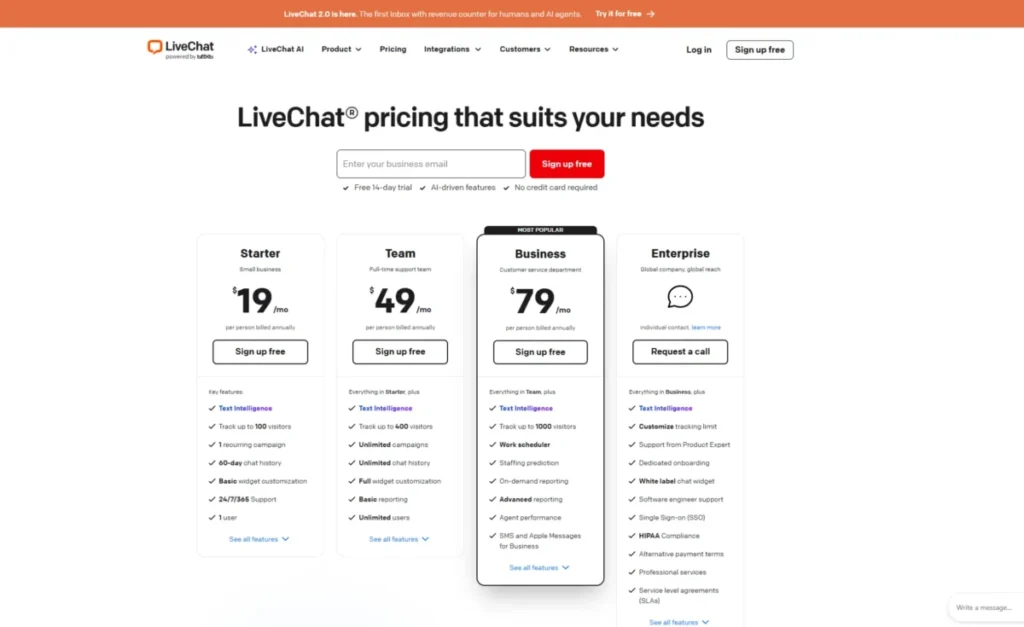
- $19 per user per month billed annually; $25 on monthly billing.
- Practical tier:
- Team, which adds unlimited users and unlimited chat history. The Team price is not in this evidence set, so treat it as a quote to confirm before committing.
- Free plan:
- No.
- First limit that bites:
- Starter is capped at one user with 60-day chat history, so the second agent forces an upgrade rather than an add-on.
- Better than Crisp:
- Seat pricing is explicit and per person, which makes forecasting simple when headcount changes mid-year.
- Worse than Intercom:
- No native AI resolution agent is priced on the same page, so deflection is a separate build rather than a plan feature.
Documentation-based setup estimate: low for the widget and availability, medium once campaigns and staffing reports are configured.
- Hidden costs:
- The jump from one user to a multi-agent tier, plus any add-ons listed alongside the core plans.
- Evidence status:
- Starter price, monthly price, user cap, and history window are documented on the official pricing page; the Team price is not.
Ranking LiveChat first is a judgment about scope discipline rather than feature count. It is the only product in the top three that does not require you to buy a service platform to get a chat window, and that keeps both the invoice and the admin surface small.
The one-user Starter cap is the most consequential line on its pricing page, and it is easy to misread as a trial restriction. It is a plan boundary: a two-person team is a Team-tier customer from day one, which means the $19 figure is a solo operator price, not a small-team price.
Sixty-day history compounds that. Support teams that run quarterly quality reviews or handle disputes that surface weeks later need conversation records that outlive a single quarter, and unlimited history is a Team feature.
I would budget LiveChat from the Team tier and treat Starter as a proof of concept. On the documentation alone, LiveChat describes the shortest path in this ranking from widget install to agent availability to transfer to reporting, with no ticketing layer in between.
The gap shows up against Intercom and Zendesk when a conversation needs to become a ticket. LiveChat keeps the conversation in chat history rather than converting it into a tracked case with an SLA, so teams that need escalation should price a help desk alongside it.
| Pros | Cons |
|---|---|
| Per-user pricing that does not move with conversation volume | Starter is a single-user plan, so team use starts one tier higher |
| Unlimited chat history on Team, which supports quality review and disputes | Team pricing is not published in the evidence set used here |
| Campaigns, visitor tracking, and staffing reports in the core product | No free plan for teams testing chat before budgeting |
| Narrow product scope keeps admin overhead low | Escalation to a tracked ticket needs a separate help desk |
Source: LiveChat official pricing page, checked 2026-08-03.
- Verdict:
- Choose LiveChat if chat is a staffed channel you want to run without buying a service suite, and price it from Team rather than Starter.
2. Intercom: Best for AI-First SaaS Support Teams

- Best for:
- SaaS support teams that want AI resolution, in-app messaging, a shared inbox, and workflow automation from one vendor.
- Avoid if:
- Finance needs a flat invoice, because seats and AI outcomes are billed on separate meters.
- Starting price:
- Essential is promoted at $19 per full seat per month on annual billing against a $29 annual standard price.
- Practical tier:
- Advanced, which is where multiple team inboxes, workflow automation, and round-robin assignment begin. The Advanced price is not in this evidence set.
- Free plan:
- No.
- First limit that bites:
- Essential holds a single team inbox and manual assignment, so the second support pod triggers the upgrade.
- Better than LiveChat:
- Fin can close a conversation without an agent, and the handoff to a human stays inside the same thread.
- Worse than Crisp:
- Two meters running at once make the monthly bill harder to forecast than a flat workspace fee.
Documentation-based setup estimate: low to publish the Messenger, high once routing rules, knowledge sources, and AI guardrails are tuned.
- Hidden costs:
- Fin at $0.99 per resolution, plus usage charges on additional channels and the step from Essential to Advanced.
- Evidence status:
- Seat promotion, standard seat price, Fin outcome price, and the Advanced and Expert feature gates are documented on the official pricing page.
Fin is the reason Intercom is second rather than fourth, and also the reason its total cost is the hardest to model in this ranking. Paying $0.99 per resolution means the invoice rises exactly when automation works, which inverts the usual software incentive.
Run the arithmetic before the trial. At 500 automated resolutions a month, Fin adds 500 x $0.99 = $495 to the bill, which is more than ten Essential seats cost at the promotional rate.
That is not an argument against it. A resolution that would have taken an agent eight minutes is cheap at ninety-nine cents, and the honest comparison is against loaded agent cost rather than against zero.
The plan gates are the second thing to model. Multiple team inboxes, workflow automation, and round-robin assignment sit on Advanced, while SSO, HIPAA support, and SLAs sit on Expert, so a regulated buyer is an Expert customer before the first conversation.
Where Intercom earns its position is the single surface. The Messenger, the shared inbox, ticketing, the help center, and the AI agent are documented as one product rather than four integrations, which removes the handoff seams that break during a volume spike.
The trade-off is that leaving later means moving all five at once, and the full Intercom review covers that lock-in in more depth.
| Pros | Cons |
|---|---|
| Fin resolves conversations and hands off to a human without leaving the thread | Fin bills $0.99 per resolution, so success raises the invoice |
| Messenger, inbox, ticketing, and help center are one product, not four integrations | Multiple team inboxes and workflow automation require Advanced |
| In-app messaging fits product-led SaaS support better than a website-only widget | SSO, HIPAA support, and SLAs are held back to Expert |
| The promoted seat rate sits below the standard annual seat price | Two meters make monthly cost harder to forecast than flat pricing |
Source: Intercom official pricing page.
- Verdict:
- Choose Intercom if deflection is the goal and finance can accept a usage line, and model Fin volume before you model seats.
3. Zendesk: Best for Chat Inside an Established Service Operation

- Best for:
- Multichannel support organizations that need chat, ticketing, routing, knowledge, and telephony governed as one queue.
- Avoid if:
- You want a standalone website chat widget and nothing else.
- Starting price:
- Suite Team at $55 per agent per month paid yearly, which is the lowest displayed tier that includes messaging and live chat.
- Practical tier:
- Suite Team, because chat is not available below it.
- Free plan:
- No.
- First limit that bites:
- Support Team at $19 per agent per month paid yearly does not list messaging or live chat, so the cheap tier is not a chat tier.
- Better than Freshchat:
- Chat, tickets, knowledge, and voice already share one agent workspace and one routing model rather than being assembled per plan.
- Worse than LiveChat:
- Entry cost per agent is roughly three times higher for teams that only need chat.
Documentation-based setup estimate: medium to high; messaging, routing, and escalation paths are documented as admin tasks rather than marketer tasks.
- Hidden costs:
- The Support-to-Suite jump itself, which is the single largest plan-gate delta in this ranking.
- Evidence status:
- Suite Team pricing and the absence of messaging on Support Team are documented on the official pricing page.
The $19 Zendesk figure that circulates in category roundups is real, and it is the wrong number for this article’s search intent. Support Team is a ticketing plan; live chat begins at Suite Team.
That single correction changes a ten-agent budget from $190 a month to $550 a month, which is a difference most shortlists never surface.
Whether the higher figure is justified depends entirely on whether chat is your only channel. For a team already fielding email and phone, Suite Team is not a chat purchase at all, it is a consolidation purchase, and the chat window is the cheapest part of it.
For a team that only wants a widget on a marketing site, Suite Team is the most expensive way in this ranking to buy one.
Setup follows the same shape. Enabling the messaging channel is documented as a short configuration, but routing, escalation, and the knowledge base need an owner, and teams without an admin tend to run Zendesk at a fraction of what they paid for.
The honest test is whether you will retire another tool. If chat replaces a widget and nothing else changes, this is the wrong tier, and if it collapses a widget, a shared mailbox, and a phone queue, the arithmetic reverses.
The Zendesk review goes further into the admin burden that assumption creates.
| Pros | Cons |
|---|---|
| Chat, tickets, knowledge, voice, and AI agents share one agent workspace | Live chat requires Suite Team, so the $19 Support tier is not an option |
| Omnichannel routing is native rather than assembled from add-ons | Entry cost per agent is the highest of the ten products here |
| Governance and analytics scale to organizations rather than small teams | Configuration realistically needs a dedicated admin |
| Consolidation can retire a widget, a shared mailbox, and a phone queue at once | Overkill and overpriced for a marketing-site chat widget |
Source: Zendesk official pricing page.
- Verdict:
- Choose Zendesk if chat has to join an existing multichannel queue, and budget Suite Team from the start because the $19 tier does not carry chat.
4. Tidio: Best for Ecommerce Teams That Want Flows and AI Before Headcount

- Best for:
- Small ecommerce and support teams that want a widget live quickly, with flows and a metered AI agent absorbing repeat questions.
- Avoid if:
- Volume is high and unpredictable, because human and AI conversations are both metered.
- Starting price:
- Starter at $24.17 per month on annual billing, which includes 100 billable conversations.
- Practical tier:
- Growth, which starts at $49.17 per month for 250 billable conversations.
- Free plan:
- Yes.
- First limit that bites:
- The 100 billable conversations on Starter, which a single promotion or shipping delay can exhaust in days.
- Better than Olark:
- Flows, ticketing, and the Lyro AI agent are in the same product rather than sold as separate plans.
- Worse than Crisp:
- There is no flat-fee option, so a busy month costs more than a quiet one at identical headcount.
Documentation-based setup estimate: low. Widget install, operating hours, and a first flow are documented as self-serve steps with no admin role required.
- Hidden costs:
- Additional conversation blocks, Lyro AI conversations, and the step to Plus, which starts at $300 per month plus usage.
- Evidence status:
- Starter and Growth prices, conversation quotas, and the usage-based Plus entry point are documented on the official pricing page.
Tidio is the clearest illustration of why seat count is the wrong lens for this category. Its meter is the billable conversation, so a solo founder handling 400 chats a month pays more than a four-person team handling 200.
Work out your monthly conversation count before you compare anything else. If that number is stable and under 250, Tidio is among the cheapest genuinely capable options here; if it swings with campaigns, the same plan becomes the least predictable.
Lyro adds a second meter on top. AI conversations are counted separately from human ones, so a deflection strategy that works well moves you up the pricing table rather than down it.
The Plus tier is where that becomes a budget conversation rather than a plan choice, starting at $300 per month before usage. That is a large step from $49.17, and teams tend to hit it through volume growth rather than through a feature they wanted.
| Pros | Cons |
|---|---|
| Human chat, tickets, flows, and the Lyro AI agent ship as one product | Both human and AI conversations are metered separately |
| Free plan and a low annual entry price suit small ecommerce stores | Starter includes only 100 billable conversations |
| Widget, operating hours, and a first flow are documented self-serve steps | Plus starts at $300 per month before usage is added |
| Live visitor list and automatic assignment are in the core product | Cost rises with a good month rather than with headcount |
Source: Tidio official pricing page.
- Verdict:
- Choose Tidio if your monthly conversation count is known and stable, and re-price it the moment traffic becomes seasonal.
5. Crisp: Best for Small Teams That Want a Flat Monthly Bill

- Best for:
- Teams of roughly 2 to 20 people that would rather buy a workspace than a seat count, with unlimited conversations included.
- Avoid if:
- Enterprise governance is a requirement and the top tier or a custom contract is out of scope.
- Starting price:
- Mini at $45 per workspace per month, which includes four seats.
- Practical tier:
- Essentials at $95 per workspace per month, which includes ten seats.
- Free plan:
- No.
- First limit that bites:
- Mini has the seats but not the operations; omnichannel inbox, workflow automation, AI chatbot, knowledge base, analytics, and routing all begin on Essentials.
- Better than LiveChat:
- Four included seats at $45 makes a small support pod cheaper than four individual licences anywhere else in this ranking.
- Worse than Zendesk:
- Governance, audit depth, and enterprise admin controls are thinner until the highest tier.
Documentation-based setup estimate: low. A workspace, a widget, and invited operators are documented as a short self-serve sequence.
- Hidden costs:
- The Mini-to-Essentials step, which is the point where Crisp stops being the cheap option and starts being the capable one.
- Evidence status:
- Workspace prices, included seat counts, unlimited conversations, and the Essentials feature gate are documented on the official pricing page.
Flat workspace pricing changes the break-even arithmetic in a way per-seat comparisons hide. Four seats at $45 works out to $11.25 per person, and ten seats at $95 works out to $9.50, so Crisp gets cheaper per head as the team grows rather than more expensive.
Against a $19 per-seat product, Essentials at ten seats is $95 versus $190. That is the single largest structural saving available in this ranking, and it is the reason Crisp ranks fifth despite a thinner enterprise story than the four products above it.
The catch is which tier delivers it. Mini includes four seats and unlimited conversations, and that is close to the whole feature set; the omnichannel inbox, routing, automation, knowledge base, and analytics that make chat an operation rather than a mailbox all sit on Essentials.
So the honest Crisp comparison is $95 against a competitor’s ten-seat total, not $45 against a competitor’s entry price. On that basis it still wins on cost for most teams under twenty people.
Unlimited conversations matter more than the seat maths for a seasonal business. A Crisp workspace costs the same in November as in February, which no metered competitor in this list can say.
| Pros | Cons |
|---|---|
| Flat workspace pricing with four seats on Mini and ten on Essentials | The features that make chat an operation start on Essentials |
| Unlimited conversations, so a busy month costs the same as a quiet one | Enterprise governance is thin until the highest tier |
| Cost per person falls as the team grows rather than rising | No free plan for teams that want to trial before budgeting |
| Shared inbox, mobile apps, and workflow builder in one workspace | Ticketing depth is lighter than the help-desk-first products here |
Source: Crisp official pricing page, checked 2026-08-03.
- Verdict:
- Choose Crisp if headcount is between four and twenty and conversation volume is uneven, and compare Essentials rather than Mini against per-seat rivals.
6. Freshchat: Best Free Agent Allowance With a Clear Paid Path

- Best for:
- Teams that want up to ten agents on a free plan, then a documented route into social messaging, routing, and SLAs.
- Avoid if:
- You expect AI sessions and connector automation to be included in the seat price.
- Starting price:
- Growth at $19 per agent per month billed annually; Pro is $49 and Enterprise is $79.
- Practical tier:
- Pro at $49, because intelligent routing and multiple SLA policies begin there.
- Free plan:
- Yes, supporting up to 10 agents.
- First limit that bites:
- Social messengers start on Growth, and the routing and SLA controls that make a queue predictable start on Pro.
- Better than LiveChat:
- The free plan covers a full ten-person team, which no other product in this ranking matches.
- Worse than Intercom:
- The AI agent is a priced add-on rather than a core plan feature, so deflection is a second negotiation.
Documentation-based setup estimate: low for the widget, medium once inbox channels, routing rules, and SLA policies are configured.
- Hidden costs:
- Freddy AI Agent sessions and connector automation tasks, both separately priced.
- Evidence status:
- Free agent allowance, Growth, Pro, and Enterprise seat prices, the social and routing gates, and the add-on structure are documented on the official pricing page.
The free ten-agent allowance is the most generous entry point in this ranking, and it is a full plan rather than a time-limited trial. A ten-person team can field web chat at no licence cost, which is a real answer for a support function that has not yet earned a budget line.
The upgrade trigger is predictable, and that is a virtue. Social channels arrive on Growth at $19, and the two controls that turn a shared inbox into a managed queue, intelligent routing and multiple SLA policies, arrive on Pro at $49.
That $49 figure is the number to compare, not $19. A ten-agent team running SLAs is at $490 a month, which lands between Crisp Essentials and Zendesk Suite Team.
Where the model gets murky is AI. Freddy AI Agent sessions and connector automation tasks are priced separately from seats, so two teams on identical Pro plans can receive materially different invoices.
| Pros | Cons |
|---|---|
| Free plan supports up to 10 agents rather than one or two | Social messengers require Growth at minimum |
| Growth at $19 per agent is competitive against every seat-priced rival here | Intelligent routing and multiple SLA policies wait for Pro at $49 |
| Documented path from free to Enterprise controls without changing product | Freddy AI Agent sessions are a separately priced add-on |
| Web, mobile, email, and social share one team inbox on paid tiers | Connector automation tasks add a second usage meter |
Source: Freshchat official pricing page, checked 2026-08-03.
- Verdict:
- Choose Freshchat if you need ten agents on chat before you have a budget, and plan the move to Pro the month routing becomes a real requirement.
7. HubSpot Service Hub: Best When Chat Must Live Inside the CRM

- Best for:
- Teams already running HubSpot that want every conversation attached to a contact, ticket, and pipeline without an integration.
- Avoid if:
- Chat is all you need, because the automation tiers carry seat prices and a mandatory onboarding fee.
- Starting price:
- Starter from $7 per seat per month billed annually; Professional starts at $90 and Enterprise at $150.
- Practical tier:
- Professional at $90 per seat, which is where advanced service operations live.
- Free plan:
- Yes, with HubSpot branding on the chat widget and limited bots.
- First limit that bites:
- The branding and bot restrictions on free chat, which make it a lead-capture widget rather than a support desk.
- Better than LiveChat:
- Chat context is a CRM record rather than a transcript, so sales and service see the same history.
- Worse than Crisp:
- First-year cost is far higher once onboarding and Professional seats are added.
Documentation-based setup estimate: low for a chatflow, high for the routing, ticketing, and reporting configuration that Professional assumes.
- Hidden costs:
- A required one-time $1,500 onboarding fee on Professional and $3,500 on Enterprise, plus credits for AI features.
- Evidence status:
- Seat prices, onboarding fees, free-chat branding, and bot limits are documented on the official Service Hub pricing page.
The onboarding fee is the number that reorders this decision, and it is the one most roundups leave out. A five-seat Professional team pays 5 x $90 x 12 = $5,400 in licences in year one, plus $1,500 in onboarding, for a first-year total of $6,900.
That works out to $115 per seat per month across the first twelve months rather than $90, and the premium disappears in year two. Committing for one year and leaving is the expensive path; committing for three is where the arithmetic recovers.
Starter at $7 per seat is a genuinely low entry price and it is not the tier that carries advanced service automation. Buyers who compare $7 against a $19 seat elsewhere are comparing a widget against a workflow.
What HubSpot buys that nothing else here does is a single customer record. When the chat, the ticket, the deal, and the marketing email share one contact, the handoff problem between sales and support disappears, and that is structural rather than a feature.
The HubSpot CRM review sets out the wider platform trade-offs behind that record model.
| Pros | Cons |
|---|---|
| Every chat attaches to a CRM contact, ticket, and pipeline automatically | Professional requires a one-time $1,500 onboarding fee |
| Starter at $7 per seat is the lowest paid entry price in this ranking | Free chat carries HubSpot branding and limited bots |
| Sales, marketing, and service work from one customer record | Advanced service automation is a $90 per seat tier |
| Breeze customer agent operates on the same record model | AI features draw on credits rather than being flat-rated |
Source: HubSpot Service Hub official pricing page, checked 2026-08-03.
- Verdict:
- Choose HubSpot Service Hub if you are already on HubSpot and the CRM record is the point, and budget the onboarding fee as part of year one rather than as an extra.
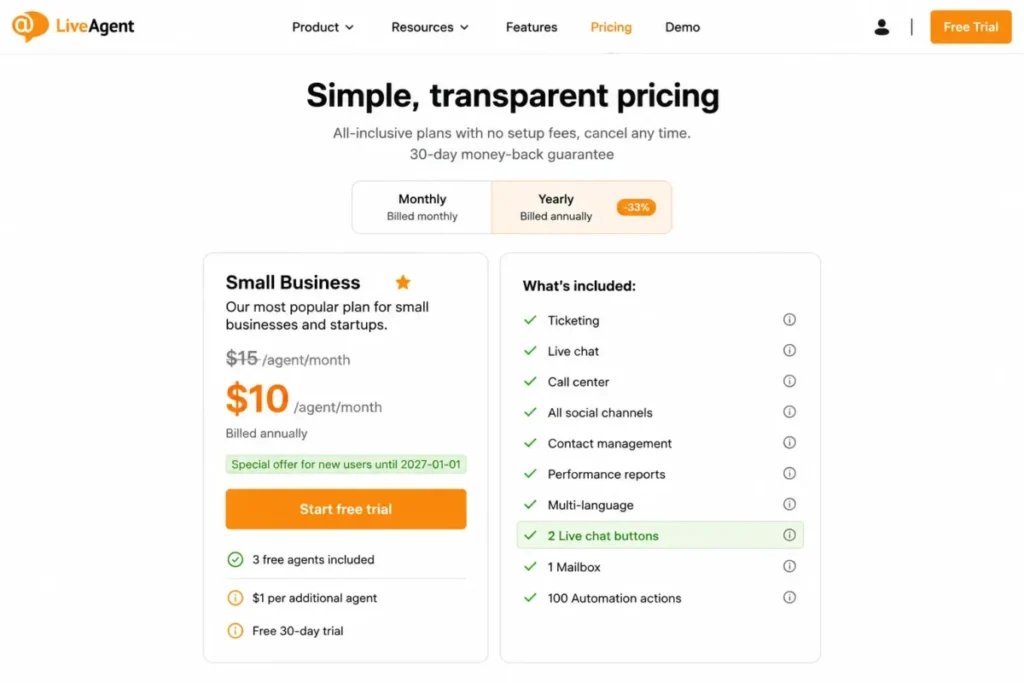
8. LiveAgent: Best for Feature Density on a Small Budget

- Best for:
- Budget-conscious teams that want ticketing, live chat, a knowledge base, and optional call-center functions from one vendor.
- Avoid if:
- Social channels are core to your support mix and you intend to stay on the lowest tier.
- Starting price:
- Small Business lists at $15 per agent per month billed annually, promoted at $10 for new users until 2027-01-01.
- Practical tier:
- Small Business for chat and ticketing; social channels and advanced controls require higher tiers or listed add-ons.
- Free plan:
- No.
- First limit that bites:
- Two live-chat buttons on Small Business, which constrains multi-brand or multi-region deployments.
- Better than Olark:
- Chat, email, tickets, and a customer portal are in the base product at half the per-agent price.
- Worse than Zendesk:
- Routing, governance, and analytics depth are shallower once volume passes a few thousand tickets a month.
Documentation-based setup estimate: medium. Chat buttons, departments, and channel routing are each documented as separate pre-launch configuration steps.
- Hidden costs:
- Add-on fees for social integrations and advanced controls, plus the tier step once two chat buttons stop being enough.
- Evidence status:
- List and promotional prices, the chat-button limit, and the add-on structure are documented on the official pricing page.
The two-chat-button limit is a sharper constraint than it looks. A button is effectively a deployment target, so one site and one help center already consumes the allowance, and a second brand or a second language site does not fit.
Treat the promoted $10 rate as a first-term price rather than a budget baseline. The standard price of $15 per agent per month is what renewal looks like, and the offer is scheduled to end on 2027-01-01.
Even at the standard rate, ten agents cost $150 a month for chat plus ticketing plus a knowledge base, which is the cheapest capable bundle in this ranking.
| Pros | Cons |
|---|---|
| Ticketing, live chat, knowledge base, and customer portal in the base plan | Small Business includes only two live-chat buttons |
| Lowest per-agent list price of the ten products compared here | Social integrations sit behind higher tiers or add-on fees |
| Optional call-center functions avoid a separate telephony purchase | Routing and analytics depth trail the enterprise suites |
| Promotional rate materially lowers first-term cost | The promoted rate ends 2027-01-01 and reverts to list |
Source: LiveAgent official pricing page, checked 2026-08-03.
- Verdict:
- Choose LiveAgent if you want the widest feature set per dollar and can live inside two chat buttons, and budget from $15 rather than $10.
9. Zoho SalesIQ: Best for Teams Already Standardized on Zoho

- Best for:
- Sales and support teams inside the Zoho stack that value visitor tracking, proactive chat, routing, and optional bots.
- Avoid if:
- You need an unambiguous published US price table for every paid tier before you will shortlist a vendor.
- Starting price:
- Zoho states in its official FAQ that paid plans start with Basic at $19 per month for three agents.
- Practical tier:
- Basic, pending a confirmed billing basis at checkout.
- Free plan:
- Yes.
- First limit that bites:
- Free is capped at 100 chats and 10,000 tracked visitors per month, with three operator licences, one brand, and 30-day chat history.
- Better than Tidio:
- Visitor tracking and proactive triggering are deeper, and the data lands next to Zoho CRM records.
- Worse than LiveChat:
- Public paid pricing is presented inconsistently across official pages, which slows procurement.
Documentation-based setup estimate: low to medium. A brand, a widget, and operator routing are documented as quick steps; bots and multi-brand setups are documented as larger projects.
- Hidden costs:
- Bot purchases, additional operator licences, and the upgrade forced by the 100-chat free ceiling.
- Evidence status:
- Free-plan limits are documented on the official plan-comparison page; the $19 Basic figure comes from the official FAQ and is treated as a qualified claim here.
The pricing ambiguity is a real procurement cost, so this entry is deliberately conservative. Zoho’s FAQ states $19 per month for three agents, while its plan-comparison page describes paid pricing per operator without rendering the amounts, and those two statements do not reconcile cleanly.
Confirm the billing basis in checkout or with Zoho sales before you build a business case on either figure.
The free ceiling is the more actionable number. One hundred chats a month is roughly three a day, so any site with real traffic converts to a paid plan within weeks, and 30-day history means a dispute from last quarter has already aged out.
For teams already inside the Zoho suite, SalesIQ is the natural chat layer because visitor data lands next to records the sales team already works in. The Zoho CRM review covers what that wider commitment involves.
| Pros | Cons |
|---|---|
| Visitor tracking and proactive chat feed the wider Zoho stack | Public paid pricing is presented inconsistently across official pages |
| Free plan includes three operator licences and one brand | Free is capped at 100 chats and 10,000 tracked visitors per month |
| Routing, queues, and chatbots are available without leaving Zoho | 30-day chat history on Free is short for dispute handling |
| Low setup effort for a single brand and a small operator pool | Bots and extra operator licences are separate purchases |
Sources: Zoho SalesIQ plan comparison for the free-plan limits and Zoho SalesIQ FAQ for the Basic price, both checked 2026-08-03.
- Verdict:
- Choose Zoho SalesIQ if the rest of your stack is already Zoho, and get the paid billing basis in writing before you sign.
10. Olark: Best for Straightforward Human Chat Without AI Spend

- Best for:
- Small teams that want plain human live chat, accessibility-minded design, and unlimited website installs on one per-agent price.
- Avoid if:
- You want broad native omnichannel coverage or low-cost AI automation.
- Starting price:
- $29 per agent per month for human-only live chat.
- Practical tier:
- Olark Standard at $29 per agent, with the AI website agent sold as a separate plan.
- Free plan:
- No.
- First limit that bites:
- AI is not an add-on to the $29 plan; the Standard AI Website Agent is $400 per month billed annually and includes one human seat.
- Better than Zendesk:
- The documented configuration surface is limited to agents, targeting, and integrations, with no routing or escalation model to design.
- Worse than Tidio:
- No metered AI option, so there is no cheap way to test deflection before committing $400 a month.
Documentation-based setup estimate: low. Install the chatbox, set availability and targeted messages, connect integrations.
- Hidden costs:
- PowerUps priced from $29 to $99 per month, and $29 for each additional human seat on the AI plan.
- Evidence status:
- Human seat price, AI plan price and inclusions, PowerUp price range, and additional-seat pricing are documented on the official pricing and pricing-tiers pages.
Olark is the most narrowly scoped product in this ranking, and its position at ten reflects scope rather than quality. It does human website chat and it does not pretend to do a service desk.
The pricing architecture is the thing to understand before shortlisting. Human chat is $29 per agent per month. The AI website agent is a separate plan at $400 per month billed annually that includes one human seat, so moving to AI is a plan migration rather than an upgrade toggle.
PowerUps between $29 and $99 per month sit on top of both. A two-agent team wanting one PowerUp is at $58 plus the PowerUp fee, which is still competitive against the metered products above it.
| Pros | Cons |
|---|---|
| One flat per-agent price with no conversation or AI meter | AI is a $400 per month plan rather than an add-on |
| Unlimited website installs suit multi-domain small businesses | Native omnichannel coverage is thin against the suites here |
| Accessibility-oriented chatbox design is a documented product focus | PowerUps add $29 to $99 per month each |
| Configuration is limited to agents, targeting, and integrations | Extra human seats on the AI plan cost $29 each |
Sources: Olark official pricing page for the human and AI plan prices and the Olark pricing tiers page for PowerUps and extra seats, both checked 2026-08-03.
- Verdict:
- Choose Olark if you want human chat with a predictable invoice, and treat its AI plan as a separate purchase decision rather than an upgrade.
Pricing, Limits, and Hidden Costs
The table below pairs each product’s entry price with the tier that genuinely runs a staffed chat workflow, then adds the cost of putting ten agents on it.
| Product | Starting price | Practical tier | Ten-agent monthly cost | Free plan | Hidden costs |
|---|---|---|---|---|---|
| LiveChat | $19 per user/month annual | Team | Team pricing is not in this evidence set | No | Multi-agent tier step, plan add-ons |
| Intercom | $19 per full seat/month promotional | Advanced | $190 promotional, $290 at the standard seat price | No | $0.99 per Fin resolution, channel usage |
| Zendesk | $55 per agent/month yearly | Suite Team | $550 | No | The Support-to-Suite tier jump |
| Tidio | $24.17 per month annual | Growth from $49.17 | Not seat-based; cost follows conversation volume | Yes | Extra conversation blocks, Lyro AI conversations |
| Crisp | $45 per workspace/month | Essentials $95 | $95, because ten seats are included | No | The Mini-to-Essentials step |
| Freshchat | $19 per agent/month annual | Pro $49 | $0 on Free, $190 on Growth, $490 on Pro | Yes, 10 agents | Freddy AI sessions, connector tasks |
| HubSpot Service Hub | $7 per seat/month annual | Professional $90 | $70 on Starter, $900 on Professional | Yes, branded | $1,500 Professional onboarding, AI credits |
| LiveAgent | $15 per agent/month annual | Small Business | $150 at list, $100 at the promoted rate | No | Social add-ons, chat-button tier step |
| Zoho SalesIQ | $19 per month for three agents per the official FAQ | Basic | Requires a confirmed per-operator basis | Yes | Bot purchases, extra operator licences |
| Olark | $29 per agent/month | Olark Standard | $290 | No | PowerUps at $29 to $99, $29 per extra AI-plan seat |
Sources for every price above, all checked 2026-08-03. Nine come from vendor pricing pages: LiveChat, Intercom, Zendesk, Tidio, Crisp, Freshchat, HubSpot Service Hub, LiveAgent, and Olark. The qualified Zoho SalesIQ figure comes from the Zoho SalesIQ FAQ, not from a pricing page.
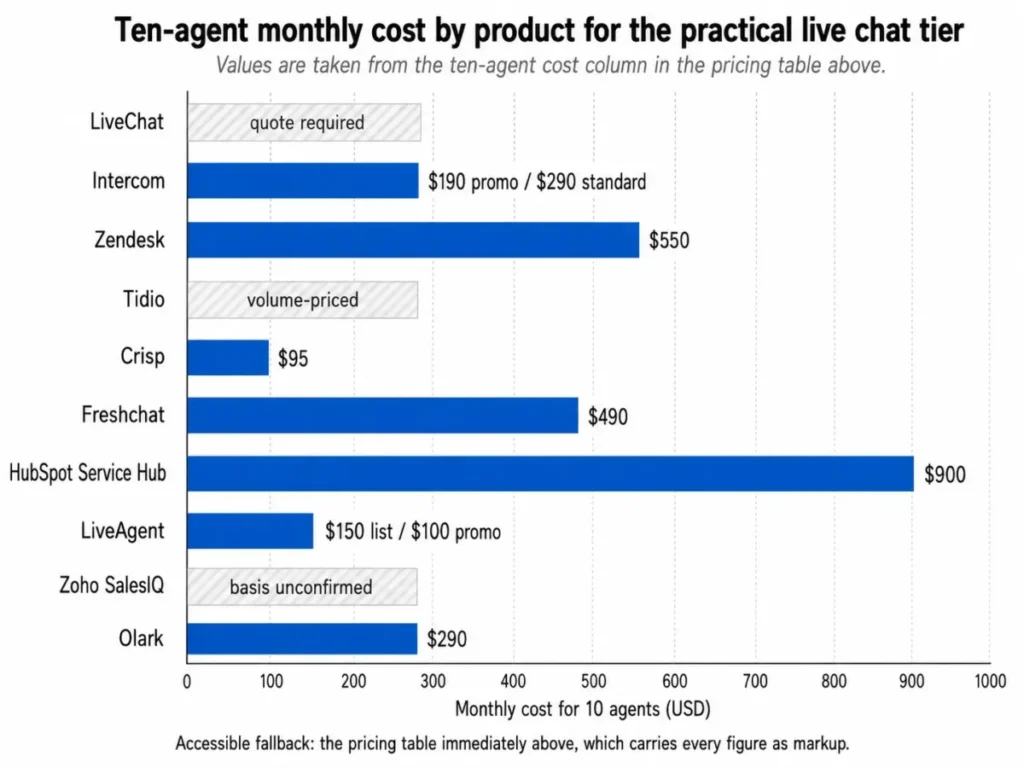
Every ten-agent figure above is arithmetic on those published seat prices, not a vendor quote. The formula is seat price multiplied by ten agents, so Zendesk is 10 x $55 = $550 per month and Olark is 10 x $29 = $290 per month, with the same method applied to every seat-priced product in the table.
Teams comparing Zendesk pricing plans against a chat-only product should hold that $550 next to a widget-only budget rather than next to another suite.
Three products cannot be priced this way, and saying so is more useful than filling the cell. LiveChat’s Team price is absent from the evidence set, Tidio bills conversations rather than seats, and Zoho’s two official pages describe paid pricing differently.
Intercom’s promotional seat rate carries a time boundary that most comparisons ignore. Essential is promoted at $19 per full seat per month on annual billing while the standard price is $29, and the promotion was re-verified on the publish date: 2026-08-03.
LiveAgent’s promoted $10 rate behaves the same way and is scheduled to end on 2027-01-01, after which the standard $15 per agent applies. Budget both products at their standard prices and treat the offer as first-term relief.
The First-Year Cost Nobody Puts in the Table
HubSpot Service Hub is the one product here where year one and year two are materially different purchases. A ten-seat Professional deployment is 10 x $90 x 12 = $10,800 in licences, plus a required one-time $1,500 onboarding fee, for a first-year total of $12,300.
Averaged across twelve months, that total is $1,025 per month for the whole team, or $102.50 per seat per month, which is 13.9 percent above the advertised $90 seat price. The premium disappears entirely in year two.
Enterprise raises the same fee to $3,500, which changes the shape of the decision rather than the direction. The fee rewards commitment and punishes short pilots, so a six-month HubSpot trial is the most expensive way to evaluate it. Anyone modelling HubSpot pricing on a one-year horizon should carry the fee in full.
AI and Automation Costs
Five of these vendors sell AI, and no two of them meter it the same way. Comparing the headline AI story without normalizing the meter is how teams end up surprised.
| Product | AI billing model | What one unit is | What raises the bill |
|---|---|---|---|
| Intercom | Per outcome | One resolution attributed to Fin | Deflection working better than forecast |
| Tidio | Per AI conversation | One conversation handled by Lyro | Traffic volume, independent of headcount |
| Freshchat | Add-on sessions | One Freddy AI Agent session | Session volume plus connector tasks |
| HubSpot Service Hub | Credits | One credit against an AI action | Feature adoption across the CRM |
| Olark | Flat plan | One monthly AI plan at $400 billed annually | Adding human seats at $29 each |
AI meter sources: Intercom outcome pricing and Olark AI plan pricing, checked 2026-08-03. The Freshchat, Tidio, and HubSpot meters are described on the pricing pages linked in their product sections.
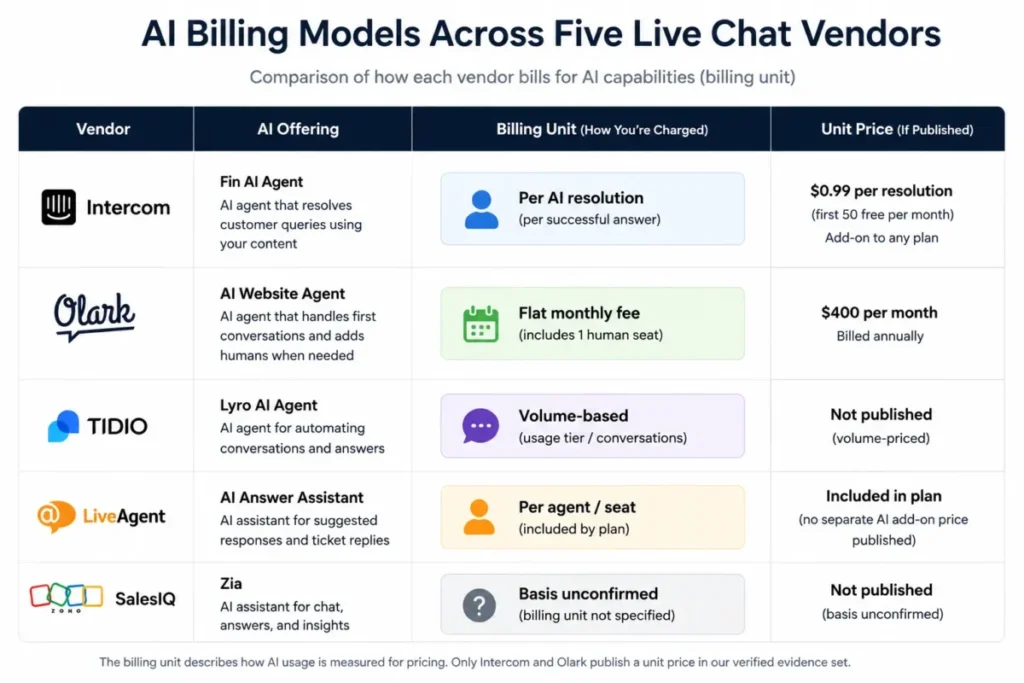
The chart repeats the table above and adds no figures of its own, because only two of the five vendors publish a unit price in the evidence used here.
Only two of these models let you forecast before you deploy. Olark’s $400 monthly AI plan is knowable on day one, and Intercom’s $0.99 per resolution is knowable once you can estimate deflection volume.
The other three depend on adoption patterns you will not know until the tool is live. That is not a reason to avoid them, but it is a reason to run a one-month pilot before signing an annual term, and to ask the vendor for a usage cap or an alert threshold in writing.
There is a second-order effect worth naming. In our view, this creates an incentive to maximize successful automated resolutions, although actual bot behavior depends on product configuration and guardrails.
If you are evaluating deflection quality alongside cost, the best AI chatbots roundup covers the behavior side of that trade-off.
Feature Gate Comparison
Plan gates are where a live chat purchase quietly becomes a different purchase. This table lists the lowest tier at which each capability appears, based on each vendor’s published plan documentation.
| Product | Automation | Routing | AI agent | Omnichannel | Admin and governance |
|---|---|---|---|---|---|
| LiveChat | Core plans | Core plans | Not offered natively | Limited | Higher tiers |
| Intercom | Advanced | Advanced round-robin | Fin, usage-priced | Core, some channels metered | Expert for SSO, HIPAA, SLAs |
| Zendesk | Suite Team and up | Suite Team and up | Suite plans | Suite Team and up | Higher Suite tiers |
| Tidio | Flows on paid plans | Automatic assignment | Lyro, usage-priced | By plan | Higher tiers |
| Crisp | Essentials | Essentials | Essentials | Essentials | Highest tier or custom |
| Freshchat | Growth and up | Pro for intelligent routing | Freddy add-on | Growth for social | Enterprise |
| HubSpot Service Hub | Professional | Professional | Breeze, credit-based | Core plans | Enterprise |
| LiveAgent | Automation rules on paid plans | Departments on paid plans | Not offered natively | Higher tiers or add-ons | Higher tiers |
| Zoho SalesIQ | Paid plans | Paid plans | Bot purchase | By plan | Higher tiers |
| Olark | Targeted messages | Agent groups | Separate AI plan | Limited | Higher tiers |
Gate sources: Zendesk plan documentation, Crisp plan comparison, Freshchat plan comparison, and Intercom plan comparison, checked 2026-08-03.
Four gates account for most of the unplanned upgrades in this category: routing, SLAs, social channels, and unlimited history. If those four are on your must-have list, the cheapest qualifying tier is Crisp Essentials at $95 per workspace for ten seats, and the most expensive is Zendesk Suite Team at $550 for the same headcount.
The gates that look identical across vendors are not. Zendesk routing is omnichannel queue management, Freshchat intelligent routing is skills-based assignment on Pro, and Olark agent groups are a simpler distribution model, so treating “routing” as one checkbox will produce a wrong shortlist.
Understanding what a ticketing system is helps separate genuine queue management from simple assignment.
Usage Limits and Free-Tier Constraints
Free plans in this category are constrained by volume far more often than by features, and the ceilings are not comparable to each other.
| Product | Free plan | Agent or seat allowance | Volume ceiling | History retained |
|---|---|---|---|---|
| Freshchat | Yes | Up to 10 agents | Not published as a chat cap | Per plan |
| Zoho SalesIQ | Yes | Three operator licences | 100 chats and 10,000 tracked visitors per month | 30 days |
| Tidio | Yes | Not the limiting factor | Billable conversations per plan, 100 on Starter | Per plan |
| HubSpot Service Hub | Yes, branded | Free tooling | Not published as a chat cap | Per plan |
| LiveChat | No | One user on Starter | Not published as a chat cap | 60 days on Starter |
| Crisp | No | Four seats on Mini | Unlimited conversations | Per plan |
| Intercom | No | Per seat | Fin outcomes are metered | Per plan |
| Zendesk | No | Per agent | Not published as a chat cap | Per plan |
| LiveAgent | No | Per agent, two chat buttons | Not published as a chat cap | Per plan |
| Olark | No | Per agent | Not published as a chat cap | Per plan |
Limit sources: Zoho SalesIQ plan comparison, Tidio pricing, LiveChat pricing, and Freshchat pricing, checked 2026-08-03.
Cells reading “not published as a chat cap” mean the vendor’s pricing page does not state a monthly conversation ceiling for that plan, not that the product is unlimited. Overflow behavior at the ceiling is undocumented for every metered plan in this set, so confirm with the vendor whether the widget queues, blocks, or auto-upgrades.
Ranked by how quickly a real site hits the wall, Zoho SalesIQ Free is first at roughly three chats a day. Tidio Starter is second at 100 billable conversations, and LiveChat Starter is third because the second agent is the trigger rather than the volume.
Freshchat is the only free plan here that a ten-person team can staff properly, which is why it carries the free-plan recommendation despite ranking sixth overall.
Retention deserves a separate look. Sixty days on LiveChat Starter and thirty days on Zoho SalesIQ Free are both shorter than a standard chargeback window, so any team handling payment disputes should treat unlimited history as a requirement rather than a nice-to-have.
Setup and Migration Difficulty
These ratings are documentation-based estimates of configuration effort, not measured setup times. Each one reflects how many distinct configuration steps the vendor’s own onboarding documentation describes before the channel is production-ready.
| Product | Documentation-based setup estimate | Why |
|---|---|---|
| Tidio | Low | Widget, operating hours, and a first flow are documented self-serve steps |
| Crisp | Low | Workspace, widget, and invited operators, with little configuration |
| Olark | Low | Chatbox, availability, targeted messages, integrations |
| LiveChat | Low to medium | Widget is simple; campaigns and staffing reports need thought |
| Zoho SalesIQ | Low to medium | Single brand is quick; bots and multi-brand setups are documented as larger projects |
| Freshchat | Medium | Channel connections, routing rules, and SLA policies each need owners |
| HubSpot Service Hub | Medium to high | A chatflow is easy; Professional assumes routing and reporting design |
| LiveAgent | Medium | Chat buttons, departments, and channel routing before go-live |
| Intercom | Medium to high | Messenger publishes fast; routing, knowledge sources, and AI guardrails do not |
| Zendesk | High | Messaging, routing, and escalation are documented as admin work |
Basis: the configuration surface each vendor’s plan documentation describes. The two most configuration-heavy rows rest on the HubSpot Service Hub plan scope and the Zoho SalesIQ plan comparison, checked 2026-08-03.
Setup difficulty and migration risk are different problems, and the second one is worse. Conversation history, attachments, automation logic, and user mapping do not move between these products in any documented, uniform way, so treat any switch as a fresh build with an archived export rather than a migration.
The practical consequence is that a wrong choice costs more in month twelve than in month one. A team that outgrows a metered plan can upgrade in an afternoon. A team that leaves a platform loses its conversation history as searchable context, and rebuilding a knowledge base software layer on the new vendor is usually the longest task in the project.
Run the 30 and 90 day test before you commit. At 30 days the widget should be live, routing should be correct, and agents should not be copying conversations into another tool.
At 90 days reporting should be trusted enough that a manager makes a staffing decision from it, and if either milestone slips the problem is usually the tier rather than the product.
How to Choose Live Chat Software
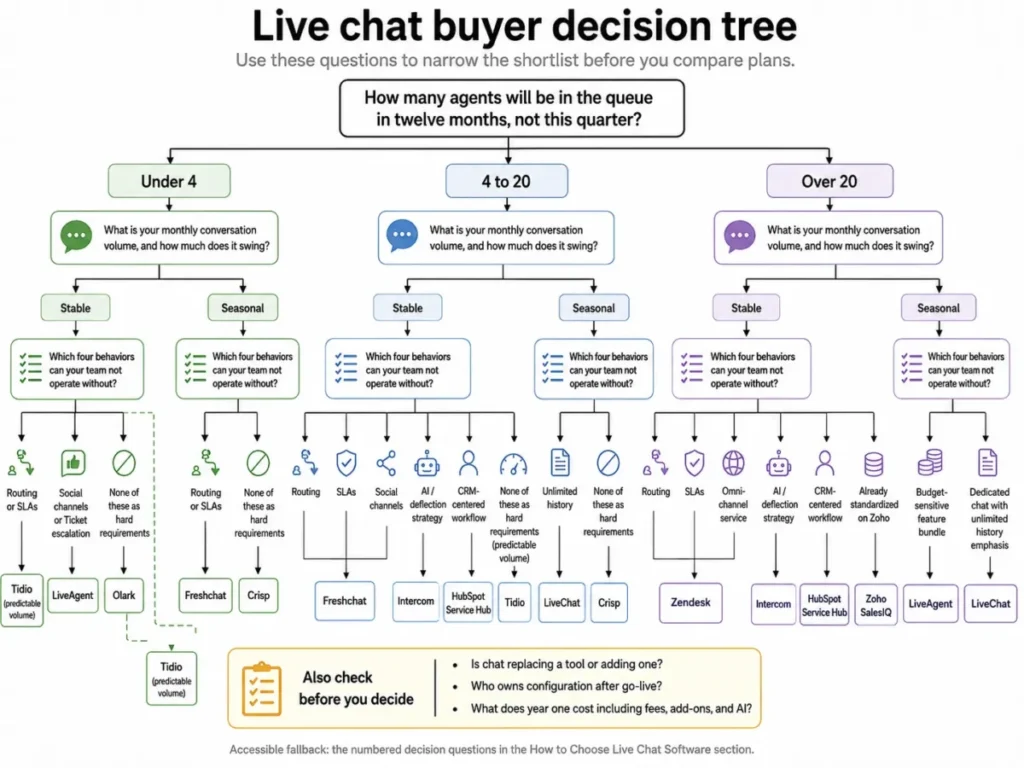
Work through these six questions in order. The order matters, because answering price first is what produces the wrong tier.
- How many agents will be in the queue in twelve months, not this quarter? Headcount decides whether a per-seat, per-workspace, or per-conversation model wins, and it is the only input that changes every other answer.
- What is your monthly conversation volume, and how much does it swing? Stable volume favors metered products; seasonal volume favors flat workspace or per-seat pricing.
- Which four behaviors can your team not operate without? Routing, SLAs, social channels, unlimited history, and ticket escalation are the usual answers, and each one has a different gate at each vendor.
- Is chat replacing a tool or adding one? A consolidation buy justifies suite pricing; a widget buy does not.
- Who owns configuration after go-live? Zendesk, Intercom, and HubSpot Professional assume an admin; Crisp, Tidio, and Olark do not.
- What does year one cost including fees, add-ons, and AI? Add onboarding, PowerUps, AI meters, and the tier step you already know is coming.
Mapped to answers: pick Crisp if headcount is four to twenty and volume swings, and pick LiveChat if chat is staffed and you want per-seat clarity. Pick Freshchat if you need ten agents before you have a budget, Intercom if deflection is the strategy, and Zendesk if chat is joining an existing multichannel queue.
If the shortlist has narrowed to the two AI-forward suites, the Zendesk vs Intercom comparison runs the same dimensions head to head.
Common Mistakes When Choosing Live Chat Software
Budgeting from the entry tier. Six of the ten products here gate a core support behavior above their cheapest plan, and Zendesk gates chat itself. The entry price tells you the vendor’s floor, not your cost.
Comparing a per-seat price against a per-workspace price. Crisp Essentials at $95 for ten seats and Freshchat Growth at $19 per agent are not comparable numbers until both are expressed at your actual headcount.
Treating a promotional rate as the budget. Intercom’s $19 seat and LiveAgent’s $10 seat both sit against higher standard prices, and renewal arrives faster than most teams plan for.
Ignoring the conversation ceiling. A hundred chats a month sounds generous until a product launch or an outage produces a hundred in an afternoon.
Assuming AI is an add-on. Olark sells AI as a separate $400 plan, Intercom charges per resolution, and Freshchat charges per session, so there is no single “turn on AI” line item across this market.
Forgetting who configures it after launch. A product that needs an admin and does not get one runs at a fraction of its licence cost, which is the most expensive outcome in this category.
Skipping the history question. Sixty and thirty day retention windows are shorter than most dispute cycles, and history is the one thing that does not survive a migration.
Final Verdict
LiveChat is the pick for the largest share of buyers reading this: teams of roughly three to fifty agents that want chat as a product rather than a module, with per-seat pricing that does not move when a campaign lands. The condition attached is real, because Starter is a single-user plan and the Team price is not published in the evidence used here, so treat it as a quote before you commit.
Intercom is the stronger choice when the goal is deflection rather than staffing, and the trade-off is a bill with two meters on it. Zendesk is the stronger choice when chat is the fourth channel in an existing service desk, and the trade-off is $550 a month at ten agents before a single ticket is deflected.
Two products need a question answered before they belong on a shortlist at all. Zoho SalesIQ needs its paid billing basis confirmed in writing, and LiveChat needs a Team quote, and neither gap is a reason to exclude them.
Pick two, not five. Run both for thirty days on the tier you would sign for, not the tier you would like to buy, and make the decision on whether routing and reporting held up rather than on which widget looked better.
Frequently Asked Questions
These answers repeat the figures used above and add no new prices.
What is the best live chat software in 2026?
For most teams of three to fifty agents, LiveChat is the strongest starting point because it sells chat as a product with published per-user pricing and no conversation meter. Intercom is the better fit for AI-led SaaS support, and Zendesk is the better fit when chat has to join an existing omnichannel queue.
Which live chat software has the best free plan?
Freshchat, because its free plan supports up to 10 agents rather than one or two. Zoho SalesIQ also offers a free plan with three operator licences, but it stops at 100 chats and 10,000 tracked visitors per month.
HubSpot’s free chat is the third option, and its branding and bot limits make it a lead-capture widget rather than a support desk.
How much does live chat software cost in 2026?
Published entry prices in this ranking run from $7 per seat per month to $55 per agent per month, all on annual billing. The more useful number is the tier that runs your workflow, which lands most ten-agent teams between $95 and $550 a month.
Is live chat priced per agent or per conversation?
Both models exist, and they behave very differently. Six of these ten products price per seat, Crisp prices per workspace with seats included, and Tidio prices per billable conversation, while Intercom adds a per-resolution AI charge on top of seats.
Which live chat tool is best for a small business?
Crisp is usually the best fit for businesses with fewer than twenty team members, because Essentials includes ten seats and unlimited conversations for one flat monthly price. An ecommerce store with steady volume should look at Tidio instead, and a two-person team that wants nothing more than a chatbox should look at Olark.
Does Zendesk include live chat on its cheapest plan?
No, unless you buy a Suite plan. Zendesk Support Team at $19 per agent per month paid yearly does not list messaging or live chat. Chat begins with Suite Team at $55 per agent per month paid yearly, and that gap is the most common budgeting error in this category.
What is the difference between live chat and help desk software?
Live chat handles a real-time conversation on your site or in your app, while help desk software tracks that conversation as a case with an owner, a status, and an SLA. LiveChat, Crisp, and Olark are chat-first products, and Zendesk, Freshchat, LiveAgent, and HubSpot Service Hub are help-desk-first products that include chat.
Which live chat platform has the best AI agent?
On documented scope, Intercom’s Fin is the only one that resolves conversations and hands off to a human inside the same inbox, and it is priced at $0.99 per resolution. Tidio’s Lyro is the cheaper way to test deflection at low volume, and Olark’s AI website agent is a separate plan rather than an upgrade.
How many agents can use a free live chat plan?
Freshchat allows up to 10 agents on its free plan, which is the highest allowance in this comparison. Zoho SalesIQ Free includes three operator licences, LiveChat caps Starter at one user, and Crisp, Intercom, Zendesk, LiveAgent, and Olark do not offer free tiers at all.
Which live chat tool integrates best with a CRM?
HubSpot Service Hub, because chat is not integrated with the CRM so much as built inside it, and every conversation attaches to a contact, ticket, and pipeline automatically. Zoho SalesIQ plays the same role inside the Zoho stack, and the rest of this list connects to a CRM rather than living in one.