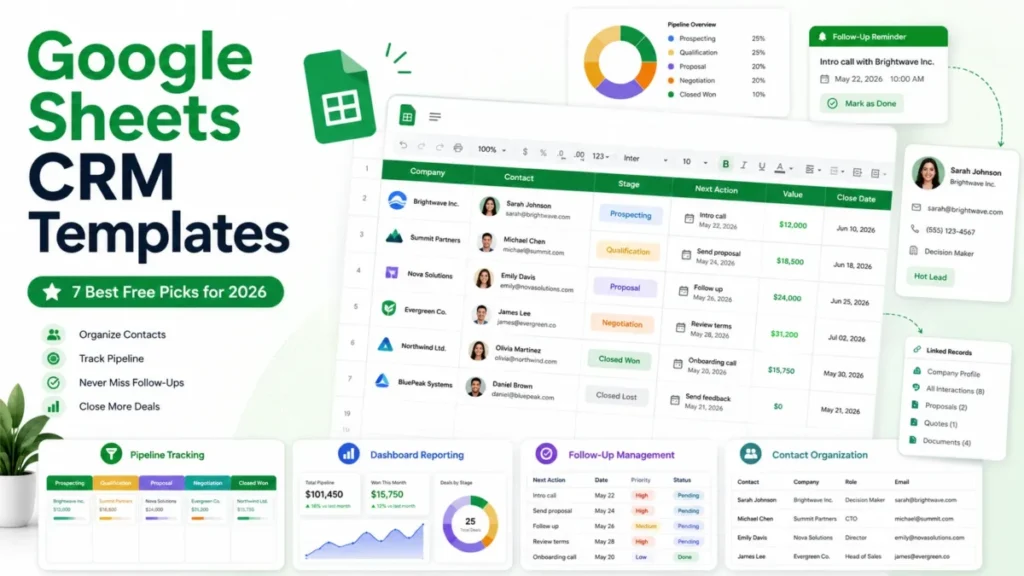
Every free Google Sheets CRM template looks equally good on a landing page. The differences only appear once your own leads are in it, usually in week three, when one template is quietly reminding you who to call and another has become a spreadsheet nobody opens.
That gap is what this comparison is about. I looked at what each template actually structures, whether it links companies to contacts to deals or flattens everything into one row, whether the follow-up mechanism survives a busy week, and what happens to your data when the spreadsheet stops being enough.
Seven templates made the list, all free. Three of them come with enough published detail to judge closely, and I have said so where the evidence is thinner rather than filling the gap with adjectives.
In This Article (19 sections)
Quick Verdict: The Best Google Sheets CRM Template by Use Case
| Use case | Best pick | Why it fits |
|---|---|---|
| Daily follow-up discipline | OnePageCRM template | One editable tab, four saved views, overdue rows turn red, plus an optional Gmail reminder add-on |
| Learning what a CRM actually stores | HubSpot CRM spreadsheet | Separate Organizations, Contacts, Opportunities, and Interactions tabs with a guided Start Here tab |
| Pipeline forecasting | Salesflare sales funnel | Stage probabilities and targets in a settings sheet feed an Insights sheet that recalculates itself |
| Dashboards and reporting | Smartsheet monthly CRM dashboard | Built around charts rather than record keeping |
| Linked people, companies, and deals | Softr CRM template | Four connected views where each opportunity ties back to a company and a contact |
| Contact log plus sales log | Vertex42 CRM template | Separate logs for conversations and revenue, with follow-up highlighting |
| A wider workbook and an honest upgrade case | Pipeline CRM sales template | A multi-tab workbook whose own page sets out where spreadsheet CRM stops working |
| Zero budget, no signup | OnePageCRM or Salesflare | Both open straight from a link with no email form |
| Teams of two to five sharing one file | HubSpot CRM spreadsheet | The multi-tab structure survives more than one person editing |
| Planning to migrate later | HubSpot or Salesflare | Both vendors document an import path into their own CRM |
Two picks earn most of the attention below. OnePageCRM wins on the thing that actually breaks first, which is follow-up, and HubSpot wins on structure, which is what makes the data worth keeping.
How These Templates Were Chosen and Ranked
This comparison is based on each template’s official page, the publicly documented structure of each workbook, Google’s own Sheets documentation for the features these templates depend on, and clearly attributed third-party coverage. Every page was checked on July 26, 2026.
Each template was assessed against the same buyer-focused criteria: how records are structured and linked, whether follow-up is enforced or merely possible, what the dashboard calculates, how much manual upkeep the design implies, whether the file is gated behind a form, and how cleanly the data could leave for CRM software.
Greater weight was given to factors that change how a template performs after the first fortnight, including record relationships, protected formulas, and the visibility of overdue work. Brand size, download counts, and affiliate relationships did not affect the ranking.
Where a template’s published detail is limited, its section is shorter and says so. Claims that could not be traced to a named source were excluded.
Best Google Sheets CRM Templates at a Glance
| Template | Structure | Follow-up mechanism | Dashboard | Gated |
|---|---|---|---|---|
| OnePageCRM | One editable tab plus four saved views | Next action per contact, overdue rows highlighted, optional Gmail add-on | Auto-updating graphs for workload, revenue, pipeline | No |
| HubSpot | Start Here, Dropdowns, Organizations, Contacts, Opportunities, Interactions, Dashboard | Manual task and due date per record | Summarises opportunity pipeline and interaction activity | Yes, form required |
| Salesflare | Settings and Instructions, Sales Funnel, Insights | Configurable follow-up day count in settings | Revenue forecast, conversion rates, rep performance | No |
| Smartsheet | Dashboard-led with a hidden chart data tab | Not the focus of the template | Auto-populating charts for leads, revenue, stages | No |
| Softr | People, Companies, Opportunities, Dashboard, Settings | Not documented as a core feature | Static but readable stage and revenue breakdown | No |
| Vertex42 | CRM, Contact Log, Sales Log, Contact Details, Team | Next action and last contact with colour highlighting | None built in | No |
| Pipeline CRM | Multi-tab sales workbook | Manual | Included per the vendor’s description | Varies by download |
One pattern runs through the whole table. Templates that separate companies, contacts, and deals into linked tabs cost more effort to fill in and are worth far more in month three, while single-sheet templates start faster and hit a wall the moment one company has two stakeholders or a second deal.
Best for Daily Follow-Up Discipline: OnePageCRM Google Sheets CRM Template
OnePageCRM built its whole product around one idea, which is that a contact without a next action is a contact you have already lost. The template inherits that idea, and it is the reason I would hand this one to a solo consultant before anything else on the list.
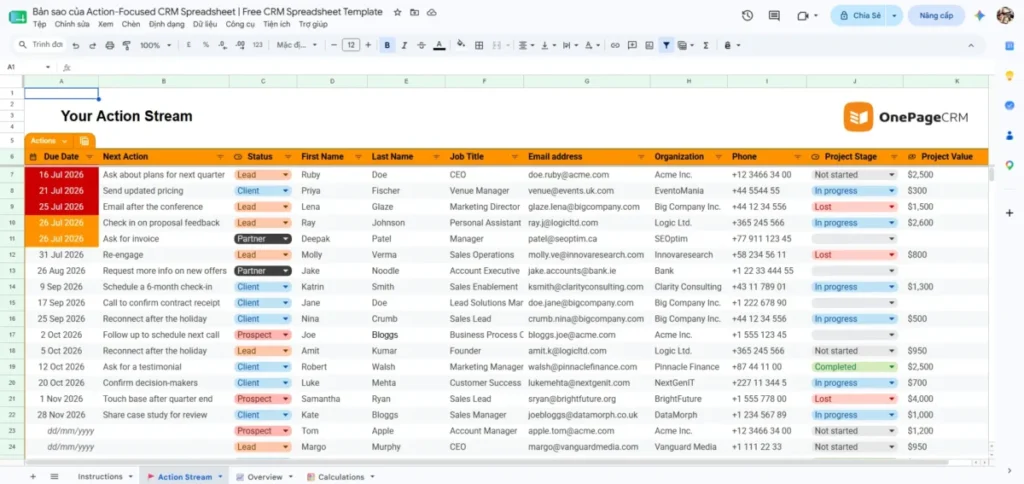
The design is deliberately small. There is one tab to fill in, and the vendor states plainly that the template asks for no email address and works in Google Sheets (OnePageCRM Google Sheets CRM template). Contacts sort by the due date of their follow-up reminder, overdue and urgent items are highlighted red automatically, and four saved views ship with the file, including a Focus Mode, a list of contacts with no action assigned, and a view for unassigned leads.
That third view matters more than it sounds. A contact with no next action is invisible in most templates, and here it has its own screen.
Two extras go beyond what a spreadsheet normally does. A free Google Sheets add-on sends follow-up reminders to Gmail, so the sheet does not have to be open for the work to surface, and a set of graphs updates itself to show workload and outstanding tasks, earned against lost revenue, and the pipeline. There are German and Spanish versions with matching video tutorials.
| Pros | Cons |
|---|---|
| No email gate, opens straight from a copy link | One tab means no separate company or deal records |
| Four pre-built views including a no-action-assigned list | Pipeline customisation is limited by the built-in formulas |
| Overdue follow-ups highlight automatically | Reminder emails depend on an add-on you have to install |
| Optional Gmail reminders through a free add-on | The vendor caps its own recommendation at roughly 100 contacts |
| Graphs update without manual work | No place for a durable interaction history per deal |
- Setup difficulty:
- low. Copy the file, replace the sample rows, and the views already exist.
Hidden cost: the add-on is a second moving part. If it stops running you are back to opening the sheet daily, so treat the reminder email as a convenience rather than the control.
- Avoid if
- you sell to organisations with several stakeholders, or you need to keep two open deals for the same client apart. The single-tab design cannot express either without repeating the company on every row.
- Verdict:
- the best free Google Sheets CRM template for one person who lives or dies by follow-up. OnePageCRM’s own FAQ puts the practical ceiling at about 100 contacts and says the template cannot replace CRM software, which is an unusually honest thing for a vendor to publish.
Best for Learning What a CRM Stores: HubSpot CRM Spreadsheet Template
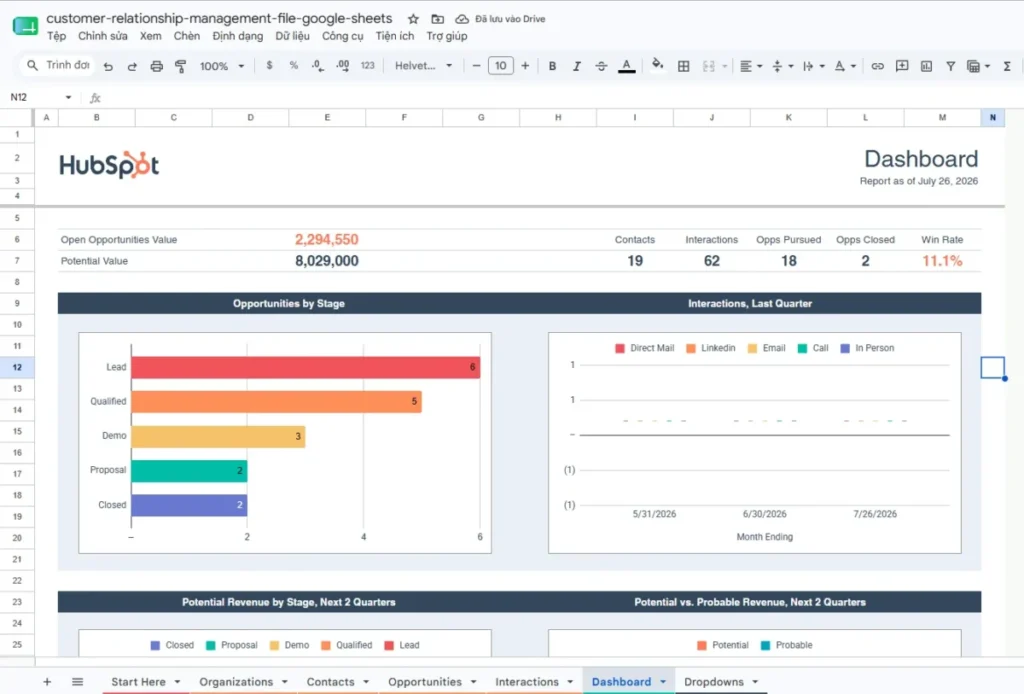
HubSpot’s template is the structural opposite of OnePageCRM’s, and for a team rather than a soloist it is the better starting point.
Seven tabs ship with the file: Start Here, Dropdowns, Organizations, Contacts, Opportunities, Interactions, and a Dashboard. HubSpot’s instructions tell you to read Start Here, customise the Dropdowns tab to match your sales process, fill the four record tabs, then read the Dashboard for pipeline, open opportunities, and contact counts (HubSpot CRM spreadsheet template).
That separation is the whole value. An organisation exists once, several contacts can belong to it, opportunities sit apart from the people, and interactions accumulate as rows instead of overwriting a notes cell. Learning to think in those four objects is most of what you need before you ever buy CRM software, and this guide to lead management covers the process those objects support.
The positioning is specific and worth quoting back to yourself before you commit. HubSpot describes the template as suiting a company’s first 25 to 50 customers and its first two to six months, with setup in 15 minutes and one to two hours of manual updating per week.
Read that last figure carefully. One to two hours weekly is the honest cost of a manual CRM, and it is the number most template pages leave out.
| Pros | Cons |
|---|---|
| Four separate record types rather than one flat list | The download sits behind a form asking for your details |
| A guided Start Here tab aimed at first-time CRM users | Every path on the page leads toward HubSpot’s own products |
| A Dropdowns control tab so stage names stay consistent | Follow-up is a manual field, with no overdue mechanism described |
| Dashboard summarises pipeline and interaction activity | Vendor’s own estimate is one to two hours of upkeep weekly |
| A documented import route into HubSpot’s free CRM | Suitability is framed around HubSpot’s upgrade path, not yours |
- Setup difficulty:
- low to medium. The tabs are pre-built, but four record types take longer to populate honestly than one.
Hidden cost: your contact details, and a marketing relationship. The template is a lead magnet, which is a fair trade if you are genuinely considering HubSpot and an unnecessary one if you are not. Their free CRM tier and what it covers are worth reading before you accept the trade.
Better than every single-sheet template on this list at representing a real B2B relationship. Worse than OnePageCRM at making sure you actually call anybody today.
- Verdict:
- the template I would pick to teach a small team what customer data matters. Its ceiling is the follow-up gap, so pair it with a saved filter view on the Opportunities tab for anything with a due date in the past.
Best for Pipeline Forecasting: Salesflare Sales Funnel Template
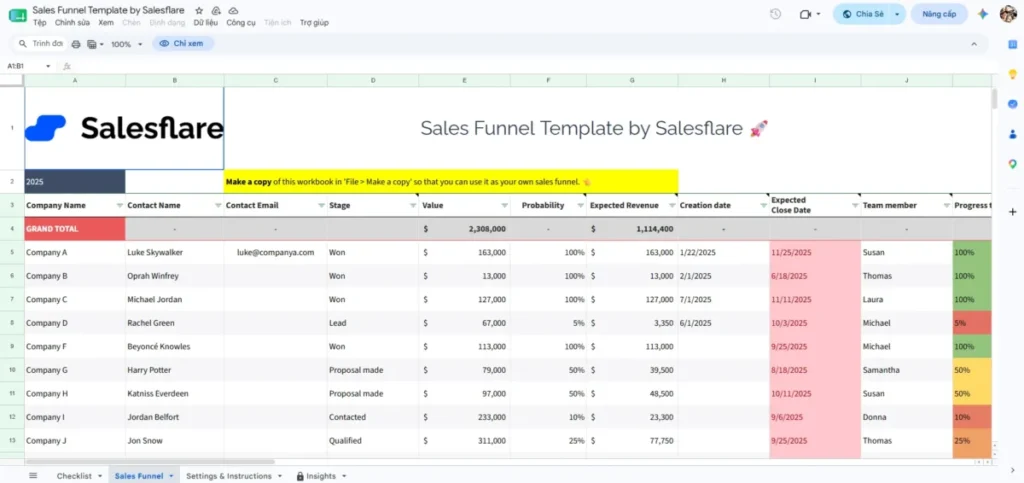
Salesflare’s template answers a narrower question than the other two, and answers it better: what will this pipeline close, and which rep is behind.
Three sheets do the work. Settings and Instructions holds your custom stages, team members, targets, and the number of days after which you want a follow-up reminder. Sales Funnel is where leads go, with stage, deal size, expected closing date, and the rep on the deal. Insights then updates itself, forecasting revenue and reporting conversion rates and rep performance (Salesflare Google Sheets CRM template).
Putting the follow-up day count in settings rather than in a formula is a genuinely good decision. It means the definition of “gone quiet” is a number a manager can change, not something buried three sheets away.
What you give up is relationship depth. Third-party review coverage of this template notes that it stays on pipeline metrics, carries contact names and emails but not phone numbers, job titles, or detailed notes, and that the file is protected by default so editing takes an extra step (CRM.org’s Google Sheets CRM template review).
| Pros | Cons |
|---|---|
| Stage probabilities and targets live in a settings sheet | No contact-level or company-level tabs |
| Insights sheet recalculates forecast, conversion, and rep performance | Skips phone numbers, job titles, and notes |
| Follow-up interval is a setting rather than a hardcoded formula | Protected structure makes deeper customisation awkward |
| Opens directly from a link with no form | Forecast quality depends entirely on your own probability guesses |
- Setup difficulty:
- low. Set the stages and targets once, then it is data entry.
Hidden cost: none in money. The cost is analytical, because a weighted forecast built on stage probabilities you invented reads as precision when it is an assumption.
- Avoid if
- you need one place for the whole relationship. This is a forecasting instrument, and pairing it with a separate contact sheet defeats the point of a single file.
- Verdict:
- the strongest pick when the question is revenue rather than relationships. I would use it in a team where someone already reports a number upward every month.
Best for Dashboards and Reporting: Smartsheet Monthly CRM Dashboard
Smartsheet publishes a library rather than one file, covering contact templates, action and status trackers, pipeline sheets, and dashboards, with communication logs, stage dropdowns, and sales metrics across the set (Smartsheet free CRM templates).
The monthly CRM dashboard is the one worth taking into Google Sheets. Third-party coverage describes it as populating charts for lead breakdowns, potential revenue, and outreach activity as soon as it opens, with dropdowns controlling deal stages and a hidden tab feeding the charts, while offering little room for contact notes, deal history, or custom fields.
Treat it as a reporting layer, not a CRM. If you already keep records somewhere workable and what you lack is a picture of the month, this fills that hole faster than building pivot tables yourself. Smartsheet’s own platform is a different proposition, and the Smartsheet review covers where that fits.
| Pros | Cons |
|---|---|
| Charts populate on open with no setup | Thin on contact and deal detail |
| Dropdowns already control the stage values | A hidden chart data tab is easy to break unknowingly |
| Works natively once opened in Google Sheets | No automation or integration built in |
| A wide library to pick other sheets from | The library is a collection rather than one linked workbook |
- Setup difficulty:
- low for the dashboard, medium if you try to make the library behave as one system.
- Avoid if
- you want a single file that holds both the records and the reporting. Combining several Smartsheet templates means duplicating the same customer facts in more than one place.
Better than every other template here at answering “how did this month go” without you building a single chart. Worse than all six of them at answering “who do I call next”, because that is not what it was designed for.
Hidden cost: the hidden chart data tab. It is easy to reorganise the visible sheet and break the charts without realising, so protect that tab before anyone else opens the file.
- Verdict:
- the best free option for visibility, the weakest for record keeping. Evidence here is third-party and the vendor’s own library description rather than a published field list, so judge the fit by opening it.
Best for Linked People, Companies, and Deals: Softr CRM Template
Softr’s template organises four connected views, People, Companies, Opportunities, and a Dashboard, with a Settings tab controlling dropdowns for status, stage, and loss reasons. Each opportunity ties back to a company and a contact, and the dashboard reports both the count and the value of deals per stage.
Loss reasons in the settings tab are a small detail with real consequences. A template that asks why a deal died is a template that can tell you something in six months, and most free files skip the field entirely.
The gaps are equally clear. There is no built-in duplicate detection or contact validation, and the dashboard is static rather than dynamic. Everything above comes from CRM.org’s review of the file rather than a detailed published field list, so treat the specifics as attributed rather than confirmed.
| Pros | Cons |
|---|---|
| People, companies, and opportunities are genuinely linked | No duplicate detection or contact validation |
| Loss reasons are a first-class dropdown | The dashboard is static |
| Settings tab controls status, stage, and loss reason values | Documentation is thinner than the vendor templates above |
| No signup needed to use the sheet | Manual entry unless you connect other tools |
- Setup difficulty:
- low. Replace the sample data and adjust the settings sheet.
Better than the single-sheet templates at holding a real B2B account, because a company exists once and the people attach to it. Worse than OnePageCRM at getting you to act today, since no overdue mechanism is documented.
- Avoid if
- you are importing an existing list of any size. With no duplicate detection and no validation, a paste of a few hundred rows arrives unchecked, and cleaning it afterwards costs more than the template saved.
- Verdict:
- the closest thing on this list to the relational structure I would build myself, and the reason it sits fifth rather than first is evidence rather than design. Worth twenty minutes of your own inspection.
Best for Separate Contact and Sales Logs: Vertex42 CRM Template
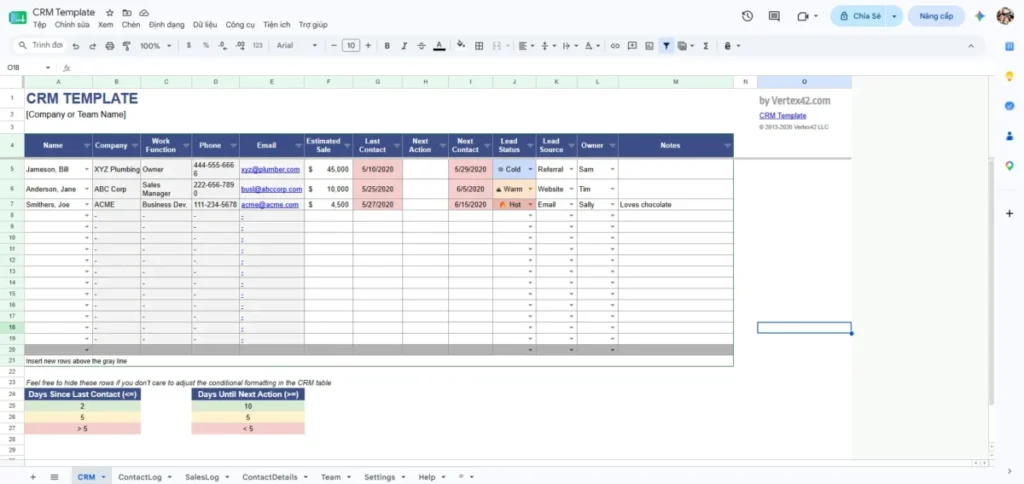
Vertex42’s file splits the work across linked tabs for the CRM view, a contact log, a sales log, contact details, and a team sheet. The CRM tab is where most of the time goes, showing next actions, lead status, and last contact with colour coding, and it highlights rows when follow-ups slip.
Splitting the conversation history from the revenue history is a defensible choice. It keeps a call log readable without the deal maths in the way, which is closer to how a services business actually works than a single pipeline row.
There are no charts or dashboards, so pipeline metrics need building yourself, and data entry gets heavier as volume grows. As with Softr, this description rests on CRM.org’s review rather than a published field dictionary from the vendor.
| Pros | Cons |
|---|---|
| Separate contact log and sales log | No built-in charts or dashboard |
| Next action, lead status, and last contact visible together | Entry effort grows quickly with volume |
| Follow-up highlighting is already configured | Reporting has to be built from scratch |
| Settings tab for dropdown values | Published detail is limited to third-party coverage |
- Setup difficulty:
- low, with no scripts to configure.
- Avoid if
- you need a pipeline number this week without building it.
Better than the dashboard-led templates at keeping a readable history of what was actually said. Worse than Salesflare at turning that history into a number anyone will report upward.
- Verdict:
- a solid manual tracker for a consultant who logs conversations more often than deals, and the right pick only if you accept doing your own reporting.
Best for a Wider Workbook and an Honest Upgrade Case: Pipeline CRM Sales Template
Pipeline CRM offers a multi-tab sales workbook for Excel and Google Sheets, and its page does something unusual: it argues against itself. The vendor lists manual data entry, collaboration conflict, limited mobility, scalability concerns, and missing integrations as the limitations of spreadsheet templates (Pipeline CRM sales template).
That list is accurate, and reading it is free even if you never download the file. Every item on it becomes true eventually, and knowing the order they arrive in is more useful than another feature bullet.
The trade-off is depth of tabs against depth of guidance. A wider workbook gives you somewhere to put everything and asks more of whoever maintains it, and the page stops short of an operating threshold, a data-quality checklist, or an export contract for a target CRM.
| Pros | Cons |
|---|---|
| A wider tab structure than most free files | Manual entry across more tabs means more upkeep |
| The vendor states spreadsheet limitations plainly | No published threshold for when to stop using it |
| Available for both Excel and Google Sheets | No documented export mapping for a target CRM |
| Useful as a checklist of what breaks first | Detail on formulas and validation is limited publicly |
- Setup difficulty:
- medium, driven by tab count rather than complexity.
Better than the narrow templates at giving every kind of record somewhere to live. Worse than OnePageCRM and Salesflare at doing one job properly, which is what a two-person team usually needs first.
- Avoid if
- nobody owns the workbook. More tabs with no named maintainer is the fastest route to a file that everyone distrusts by the second month.
- Verdict:
- worth it for the honesty as much as the workbook. If you are weighing spreadsheet against software, their limitation list is a better decision input than most comparison tables.
What These Free Templates Actually Cost You
All seven are free to obtain, so the money comparison is short and the real comparison is what each one asks of you afterwards.
| Template | Money | What you hand over | Ongoing upkeep implied |
|---|---|---|---|
| OnePageCRM | Free | Nothing, no form | Daily glance at the action list |
| HubSpot | Free | Your contact details through a form | One to two hours weekly, by the vendor’s own estimate |
| Salesflare | Free | Nothing, opens from a link | Weekly stage and probability review |
| Smartsheet | Free | Nothing for the sheet | Whatever feeds the charts, kept elsewhere |
| Softr | Free | Nothing for the sheet | Manual entry plus your own duplicate checks |
| Vertex42 | Free | Nothing for the sheet | Manual entry plus building your own reporting |
| Pipeline CRM | Free | Varies by download route | Higher, proportional to tab count |
Source: the seven vendor template pages, checked 2026-07-26
HubSpot’s one-to-two-hours-per-week figure is the number to plan around, because nothing about the other six suggests they are cheaper to run. At a consultant’s billing rate, a manual CRM costs more per year in attention than most entry-tier CRM seats cost in money, which is the real argument for moving on when the time comes.
The second cost is directional. Five of these seven templates are published by CRM vendors, and each one is a doorway into that vendor’s product. That is not a reason to avoid them, but it does explain why every “when you outgrow this” section on those pages points at exactly one destination.
What Each Template Can and Cannot Do
| Capability | OnePageCRM | HubSpot | Salesflare | Smartsheet | Softr | Vertex42 | Pipeline CRM |
|---|---|---|---|---|---|---|---|
| Separate company records | No | Yes | No | Limited | Yes | Yes | Yes |
| Deal records apart from contacts | No | Yes | Yes | Limited | Yes | Yes | Yes |
| Interaction history as rows | No | Yes | No | No | Not documented | Yes | Not documented |
| Overdue follow-up highlighting | Yes | Not documented | Yes | No | Not documented | Yes | Not documented |
| Email reminders | Optional add-on | No | No | No | No | No | No |
| Self-updating dashboard | Yes | Yes | Yes | Yes | Static | No | Yes |
| Stage list controlled centrally | Yes | Yes | Yes | Yes | Yes | Yes | Yes |
| Loss reason field | Not documented | Not documented | Not documented | No | Yes | Not documented | Not documented |
| Duplicate prevention | No | No | No | No | No | No | No |
The bottom row is the one worth pausing on. Not one of these seven templates prevents you from entering the same customer twice, which means every one of them will accumulate duplicates unless you add a check yourself.
Google Sheets can do that check natively. A helper column running LOWER(TRIM()) on the email plus a COUNTIF against the same column tells you whether a row is new before you commit it, and that single formula is the highest-value addition you can make to any template on this list.
Setup and Migration Difficulty
| Template | Setup | Why | Migration out |
|---|---|---|---|
| OnePageCRM | Low | Views and formatting already exist | Harder, because one flat tab has to be split into objects |
| HubSpot | Low to medium | Seven tabs to populate honestly | Easiest, four object types map to most CRM imports |
| Salesflare | Low | Configure settings once | Medium, pipeline exports cleanly but contacts are thin |
| Smartsheet | Low | Charts populate on open | Not applicable, it holds little record data |
| Softr | Low | Replace sample data | Medium to easy, the linked structure exports sensibly |
| Vertex42 | Low | No scripts involved | Medium, two logs need reconciling |
| Pipeline CRM | Medium | More tabs to fill | Medium, depends how far you customised |
Migration difficulty tracks structure, not size. A flat single-sheet template with 400 rows is harder to move than a linked four-object workbook with 4,000, because splitting one row into a company, a person, and a deal is manual work that nobody enjoys doing twice.
Whatever you pick, keep dates in YYYY-MM-DD format and amounts as plain numbers with no currency symbols typed in. Those two habits cost nothing now and save a rejected import later, and the CRM migration guide covers the rest of the sequence.
Which Google Sheets CRM Template Should You Avoid?
Avoid the Smartsheet dashboard if you expected a CRM. It is a reporting sheet, and using it as your record store means the customer detail has nowhere to live.
Avoid any single-tab template, OnePageCRM included, the moment your average account has more than one contact. The workaround is retyping the company name on every row, which is how duplicates and disagreements start.
Avoid the gated download if you have already decided against that vendor. Handing over your email for a spreadsheet you could rebuild in an afternoon buys you a marketing sequence you did not want.
And avoid any template as your system of record if you handle data that needs real access control. File-level sharing in Google Drive gives you viewer, commenter, and editor roles, and none of them restrict access to a specific row.
How to Choose the Right Google Sheets CRM Template
Six questions, in this order. The order matters, because most people start at the dashboard and work backwards.
1. Does one customer ever mean more than one person? If yes, you need separate company and contact tabs, which rules out the single-sheet options immediately.
2. Does one customer ever mean more than one deal? If yes, deals need their own tab with a company reference, or your history will overwrite itself.
3. What breaks first if you get busy? For almost everyone the honest answer is follow-up, which is the argument for OnePageCRM’s design over a prettier dashboard.
4. Who else edits this file? More than one editor means you need a controlled stage list and protected formulas before you need anything else.
5. What number will you be asked for? If someone asks monthly for a forecast, Salesflare’s Insights sheet saves you building it. If nobody asks, skip the forecasting entirely.
6. Where are you going next? If HubSpot is the likely destination, their template plus their documented import path is the shortest road. If you have no idea yet, pick the most structured template you will actually maintain, and compare options properly in the best CRM software comparison when the time comes.
Common Mistakes When Using a Google Sheets CRM Template
Judging templates by the dashboard. The dashboard is the easiest part to make attractive and the least predictive of whether the system survives. Look at the record structure and the follow-up mechanism first.
Deleting the sample rows by deleting the rows. Formulas, dropdown validation, and conditional formatting often live in those rows. Clear the cell contents instead, and the logic survives.
Typing a new stage straight into a deal cell. Every template on this list drives its dropdowns and its dashboard from a central list, so a value typed locally disappears from every count without warning you.
Leaving every collaborator as an editor with nothing protected. Protect the formula columns, the dashboard, and the list tab through Data and then Protect sheets and ranges before you invite anyone.
Using a shared filter instead of a filter view. A plain filter changes what everyone sees. Saved filter views are per person, and they are the correct way to give each rep a daily queue.
Treating a weighted forecast as revenue. Weighted pipeline is your own stage probability multiplied by the deal amount, so it is a planning input, not a number to promise anyone.
Storing what should never be in a spreadsheet. Business contact and pipeline data, yes. Passwords, payment card details, government ID numbers, and medical information, no.
The Four Things No Template on This List Includes
Every file here leaves the same four gaps, and closing them takes about an hour in whichever template you chose. This is the part that decides whether the spreadsheet is still trustworthy in month three.
A duplicate check. Add two helper columns beside your contact email. The first normalises it with =IF(A2="","",LOWER(TRIM(A2))), and the second flags a repeat with =IF(B2="","",IF(COUNTIF($B$2:$B$500,B2)>1,"Check duplicate","New")). Sort by that flag before you add anyone, and the most common cause of disputed numbers never gets in.
A personal daily queue. Do not filter a shared tab. Google documents that a plain filter is visible to collaborators while a saved filter view can be created and reopened without changing what anyone else sees (Google sort and filter documentation). Create one filter view per person, filtered to that owner’s open rows with a next action date on or before today, and include the blanks so records with no next step surface as exceptions.
Newer table views can hold their own sort and filter configuration independently as well (Google tables documentation), so use those if your account offers them.
Protection on anything calculated. Google Sheets can protect a sheet or a range and either restrict editing or warn first (Google protection documentation). Protect three things in any template: the columns holding formulas, the dashboard tab, and the tab that feeds the dropdowns. Leave the data-entry columns open, because that is where the work happens.
Sharing deserves the same deliberation. Drive supports viewer, commenter, and editor roles per file (Google Drive sharing documentation), so give commenter access to anyone who reads the numbers without needing to change records.
A recovery habit. Before any structural change, name a version. Google’s version history lets you inspect what changed in a file and restore an earlier copy (Google version history documentation), which turns a deleted formula column from a rebuild into a two-minute fix.
One more note on colour. Conditional formatting supports custom formula rules (Google conditional formatting documentation), so a rule such as AND($H2="Open",$G2<>"",$G2<TODAY()) shades overdue rows red in templates that do not already do it, with AND($H2="Open",$G2="") catching the open rows that have no next step at all.
That combination, a duplicate flag, a filter view per person, protected formulas, and a named version before each change, is the difference between the templates on this list and a system. None of the seven ships with all four, and every one of them supports all four.
Final Verdict
For one person, take the OnePageCRM template. Follow-up is the failure mode that ends most spreadsheet CRMs, and it is the only template here built around making overdue work impossible to ignore, with no form standing between you and the file.
For a team of two to five, take HubSpot’s. The four-object structure is what makes your data worth keeping, and the price is a form and a marketing relationship you can ignore.
For a manager who reports a number every month, add Salesflare’s alongside whichever record-keeping template you chose. It is the only file here that turns stage assumptions into a forecast without you building the maths.
For everyone, add the duplicate-check formula on day one, protect the formula columns before the second person arrives, and write dates as YYYY-MM-DD. Those three habits cost an hour and decide whether the spreadsheet is an asset or a liability the day you migrate. If you would rather work offline in Excel, the CRM Excel template follows the same structural logic, and the CRM implementation guide covers the rollout once you graduate.
FAQ
Which is the best free Google Sheets CRM template?
For daily follow-up, OnePageCRM’s, because it sorts contacts by follow-up due date, highlights overdue rows, and ships four saved views including a list of contacts with no action assigned.
For structure, HubSpot’s, because it separates organisations, contacts, opportunities, and interactions instead of flattening them into one sheet. Choose by which failure you fear more, forgetting to call someone or losing track of who is who.
Does Google offer its own CRM template?
Google’s template gallery carries general business spreadsheets rather than a CRM built around contacts, deals, and activities. The recognisable free options come from CRM vendors and from spreadsheet publishers, which is why almost every list on this topic is a list of other companies’ files.
Can a Google Sheets CRM template replace CRM software?
For a small contact list and a simple pipeline, it covers the basics. OnePageCRM’s own FAQ says the template cannot replace CRM software and is useful for up to roughly 100 contacts, and HubSpot frames its version around a first 25 to 50 customers.
Those figures are vendor guidance rather than platform behaviour, and no universal ceiling is published anywhere. The practical trigger is behavioural: follow-ups slipping, duplicates recurring, or two people bringing different numbers to the same meeting.
How do I stop duplicate contacts in a spreadsheet CRM?
Add a helper column that normalises the email with LOWER(TRIM()), then a second column running COUNTIF over that normalised column to flag any value that already appears. Check the flag before you accept a new row.
None of the seven templates here does this for you, so it is the first thing worth adding to whichever one you pick.
Which template has follow-up reminders?
OnePageCRM’s is the only one on this list that documents email reminders, through a free Google Sheets add-on that sends follow-up notifications to Gmail. Salesflare lets you set the number of days after which a lead counts as needing follow-up, in its settings sheet.
Everything else relies on you opening the file, which is why a saved filter view for overdue work matters more than any chart.
Can several people use the same Google Sheets CRM template?
Yes, with two rules. Each person uses a saved filter view rather than a plain filter, because a plain filter changes the view for everyone, and the formula columns plus the stage list are protected so an accidental paste cannot break the dashboard.
Bear in mind that Google Drive shares access at the file level, so every editor can see every record.
Are these templates gated behind an email form?
HubSpot’s requires a form. OnePageCRM states plainly that it asks for no email address, and Salesflare’s opens straight from a link.
What should I check before importing a template’s data into a real CRM?
Confirm dates are stored as dates in YYYY-MM-DD format, amounts are plain numbers without currency symbols, and every contact row identifies its company in a dedicated column rather than only in a name field.
Export each object as its own CSV, then run a small test batch and check the counts and a few relationships by hand before the full import.
Do any of these templates work properly on a phone?
You can update fields and pick from existing dropdowns on mobile. Creating a filter view needs a desktop, and on iPhone or iPad you need a computer to create or edit a dropdown list, so treat the phone as an updating device and do configuration on a computer.
What is the single most useful change to make to any of these templates?
Give every open deal a concrete next action and a next action date, then save a filter view showing your own open deals dated on or before today plus the ones with no date at all. That one view does more for revenue than any dashboard on this list.