Slack pricing determines how much your team pays for one of the most widely used team collaboration tools in business today. Whether you’re evaluating Slack for a five-person startup or a 5,000-seat enterprise, understanding the current Slack pricing plans — and the recent changes Salesforce made to them — is essential to avoiding overspend and picking the right tier.
Who this guide is for: IT buyers, ops leads, finance teams, and founders comparing Slack plans in 2026. Prices change — always verify current rates on Slack’s official pricing page before purchasing.
Last verified: February 21, 2026
Pricing data cross-referenced against Slack’s official pricing page, the Slack Help Center’s feature availability update, and the June 2025 pricing and packaging announcement on the Slack blog. Third-party benchmarks from CostBench were used to validate real-world transaction data.
Slack Pricing at a Glance
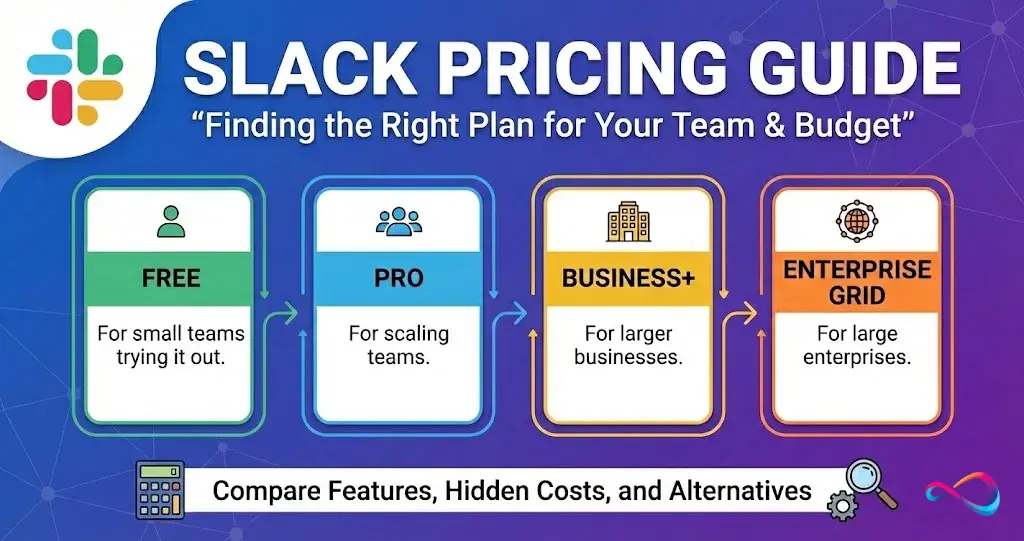
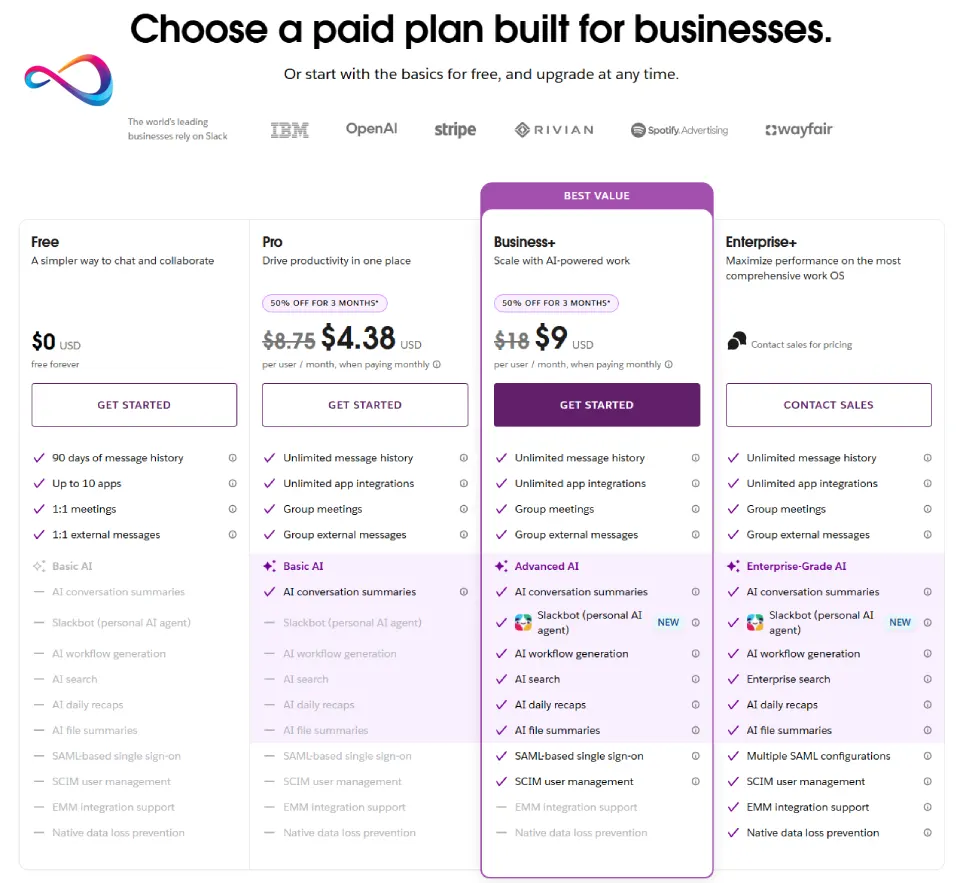
Slack offers four plans.
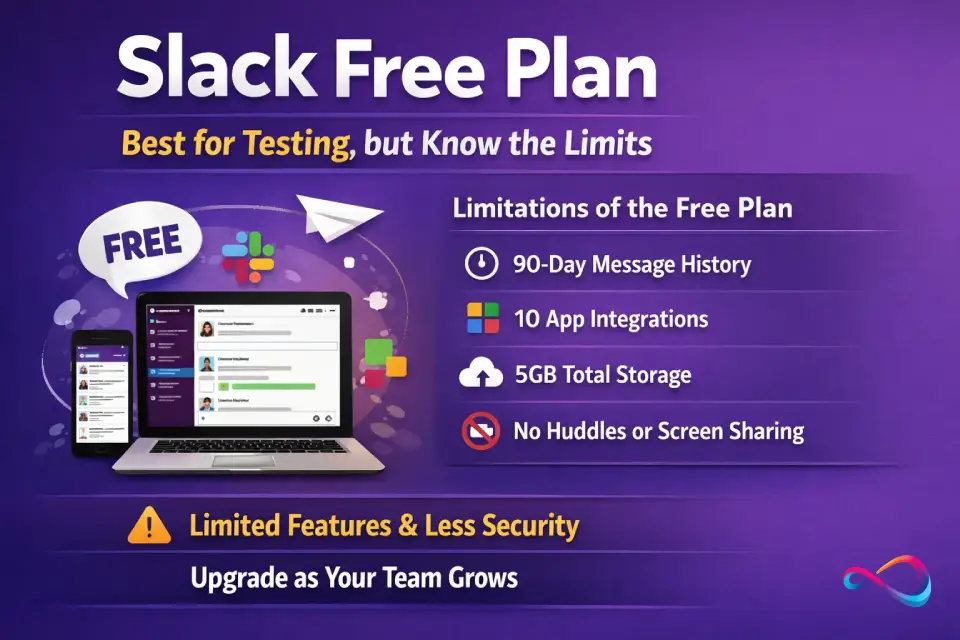
- Free plan costs $0 but limits message history to 90 days and caps app integrations at 10.
- Slack Pro pricing is $8.75/user/month (billed annually) and includes unlimited history, basic AI features, and group huddles.
- Slack Business+ pricing is $15/user/month (billed annually) and adds advanced AI, SAML SSO, SCIM provisioning, and compliance exports.
- Enterprise+ is custom-priced for large organizations needing multi-org governance, enterprise search, and HIPAA compliance.
Plan Comparison Table
| Feature | Free | Pro | Business+ | Enterprise+ |
|---|---|---|---|---|
| Monthly price (billed annually) | $0 | $8.75/user | $15/user | Custom |
| Monthly price (billed monthly) | $0 | ~$10.50/user | ~$18/user | Custom |
| Message history | 90 days | Unlimited | Unlimited | Unlimited |
| App integrations | 10 | Unlimited | Unlimited | Unlimited |
| File storage | 5 GB total | 10 GB/user | 20 GB/user | 1 TB/user |
| Huddles (audio/video) | 1:1 only | Group | Group | Group |
| Slack Connect (external collab) | 1:1 DMs only | Channels + DMs | Channels + DMs | Channels + DMs |
| Workflow Builder | Limited | Yes | Yes (+ AI generation) | Yes (+ AI generation) |
| AI: Conversation summaries | No | ✅ | ✅ | ✅ |
| AI: Huddle notes | No | ✅ | ✅ | ✅ |
| AI: Search, recaps, translations | No | No | ✅ | ✅ |
| AI: Enterprise search | No | No | No | ✅ |
| Agentforce / AI agents | No | ✅ | ✅ | ✅ |
| SAML SSO | No* | No* | ✅ | ✅ (multiple configs) |
| SCIM provisioning | No | No | ✅ | ✅ |
| Data exports (compliance) | No | No | ✅ | ✅ |
| DLP / eDiscovery / legal holds | No | No | No | ✅ |
| Enterprise Key Management | No | No | No | ✅ |
| HIPAA compliance | No | No | No | ✅ (with BAA) |
| Uptime SLA | None | None | 99.99% | 99.99% |
| Support | Standard | Standard | 24/7 priority | Dedicated CSM |
* SAML SSO is available on Free and Pro only for organizations that have connected a Salesforce org to Slack.
What Changed Recently (2025–2026) and Why It Matters
In June 2025, Salesforce announced a significant restructuring of Slack’s pricing and packaging. Here’s what changed and what it means for your next purchase or renewal:
Key Changes
- AI features bundled into all paid plans. The standalone Slack AI add-on (previously ~$10/user/month) was discontinued. Basic AI features (conversation summaries, huddle notes) are now included in Pro. Advanced AI (search, recaps, translations, file summaries, AI workflow generation) is included in Business+.
- Business+ price increased. The annual rate went from $12.50/user/month to $15/user/month (and from ~$15 billed monthly to ~$18 billed monthly) to reflect the added AI and Salesforce integration capabilities.
- Enterprise+ introduced. A new top-tier plan replaced the former Enterprise Grid positioning, adding enterprise search across third-party apps (Google Drive, Confluence, Jira, OneDrive, SharePoint, GitHub, Asana, Box), advanced governance, and Agentforce capabilities.
- Salesforce integrations expanded. All plans (including Free) now get Salesforce Channels. Premium Salesforce features (automations, list views, Sales Home) require Business+ or Enterprise+.
- Security features expanded. Session duration controls, device management, and the ability to block file downloads are now available on Free and Pro plans.
Renewal Timing Matters
⚠️ Important: If you purchased Business+ before August 17, 2025, you were on the legacy pricing ($12.50/user/month annual). At your first renewal after that date, you automatically moved to the new Business+ plan at $15/user/month — with advanced AI and Salesforce features included. If you had the Slack AI add-on, it was absorbed into your plan at renewal. Check your renewal date at
my.slack.com/admin/billing.
Slack Free Plan: Best for Testing, but Know the Limits
Who It’s For
- Early-stage startups still validating product-market fit
- Internal hobby or side projects
- Teams evaluating Slack before committing budget
- Small volunteer or community groups
Who Should Avoid It
- Any team relying on message history beyond 90 days
- Teams needing more than 10 app integrations (Google Drive, Jira, Asana, etc.)
- Groups requiring group huddles (audio/video calls with 3+ people)
- Organizations with any compliance or admin control requirements
Key Limits
| Constraint | Free Plan Limit |
|---|---|
| Message retention | 90 days (older messages become inaccessible) |
| App integrations | 10 total |
| Huddles | 1:1 only |
| Slack Connect | 1:1 DMs only |
| File storage | 5 GB for entire workspace |
| AI features | None |
| SSO / SCIM | No (unless connected to Salesforce org) |
| Support | Standard (no SLA) |
When You “Hit the Wall”
You’ll know it’s time to upgrade when:
- Important conversations disappear after 90 days and team members can’t search old threads
- You’ve maxed out 10 app integrations and can’t connect critical tools
- You need group huddles for standups or working sessions
- External partners need to collaborate in shared channels (not just 1:1 DMs)
Best for: Teams under 10 people with no compliance needs and short-term project communication. Upgrade to Pro the moment message history or integrations become a blocker.
Slack Pro Pricing: The Default Paid Tier for SMBs
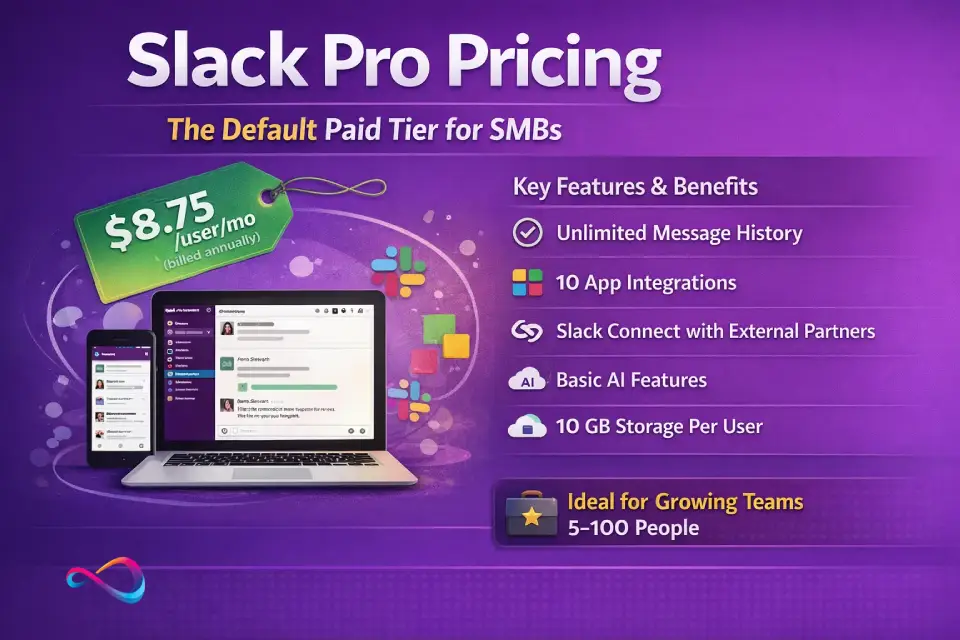
Slack Pro pricing is $8.75/user/month billed annually (~$10.50 billed monthly). This is the most popular tier for small and mid-sized businesses that need full-featured channel-based messaging without enterprise-grade compliance requirements.
What You Get
- Unlimited message history — no 90-day cliff
- Unlimited app integrations — connect Google Drive, Jira, Asana, Salesforce, and hundreds more
- Group huddles — real-time audio/video calls with screen sharing
- Slack Connect — collaborate with external partners, vendors, and clients in shared channels
- Basic AI features — conversation summaries and huddle notes (new as of mid-2025)
- Workflow Builder — automate routine tasks (onboarding, approvals, status updates)
- 10 GB storage per user
Who Pro Is For
- Startups and SMBs (5–100 users) without heavy compliance needs
- Product, engineering, and marketing teams that rely on integrations
- Teams doing cross-company collaboration via Slack Connect
- Organizations that don’t require SAML SSO, SCIM, or data exports
Who Pro Is NOT For
- Regulated industries (finance, healthcare, legal) needing compliance exports or SSO
- IT-managed organizations requiring SCIM provisioning or DLP
- Teams needing advanced AI features (search, recaps, translations)
Cost Examples — Slack Pro
| Team Size | Annual Billing (per month) | Monthly Billing (per month) | Annual Total (annual billing) |
|---|---|---|---|
| 10 users | $87.50/mo | ~$105/mo | $1,050/yr |
| 25 users | $218.75/mo | ~$262.50/mo | $2,625/yr |
| 50 users | $437.50/mo | ~$525/mo | $5,250/yr |
Best for: The majority of SMBs. If you have no compliance mandates and no SSO requirement, Pro gives you everything you need at a reasonable Slack cost per user.
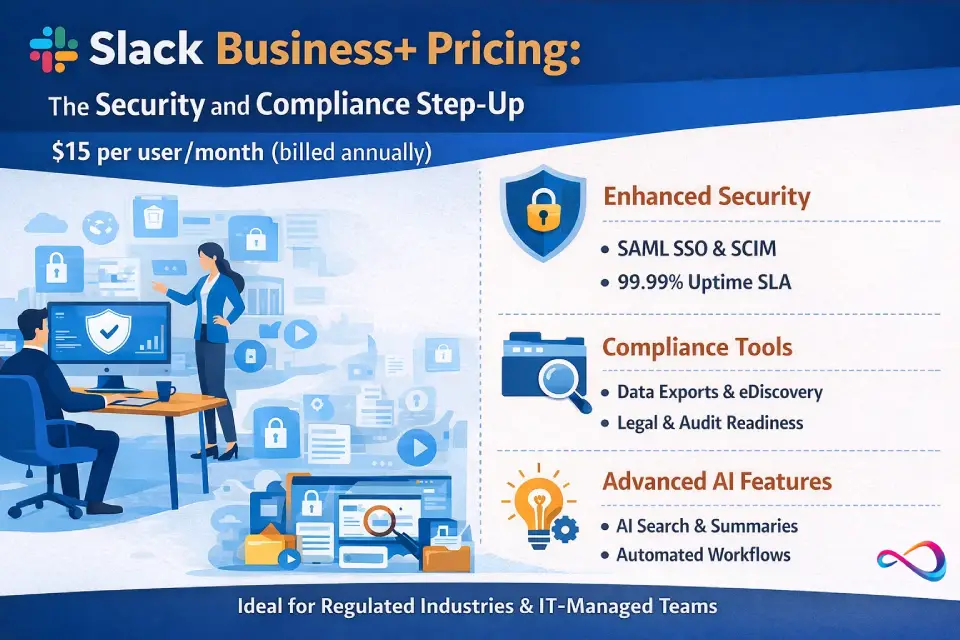
Slack Business+ Pricing: The Security and Compliance Step-Up
Slack Business+ pricing is $15/user/month billed annually (~$18 billed monthly). This tier is designed for organizations that need enterprise-grade identity management, compliance tools, and advanced AI — without the complexity of a fully custom enterprise deal.
What Business+ Adds Over Pro
- SAML SSO — integrate with Okta, Microsoft Entra ID (formerly Azure AD), OneLogin, or any SAML 2.0 provider
- SCIM provisioning — automate user provisioning and deprovisioning from your identity provider
- Compliance data exports — export all messages and files for audit, legal, or regulatory purposes
- 99.99% uptime SLA — contractual availability guarantee
- 24/7 priority support with 4-hour response time
- 20 GB storage per user (vs. 10 GB on Pro)
- Advanced AI features — AI-powered search, daily recaps, message translations, file summaries, and AI-generated workflows
- Premium Salesforce integrations — automations, list views, Sales Home
Who Business+ Is For
- Organizations in regulated industries (finance, legal, insurance) needing data exports
- IT-managed companies requiring SSO and SCIM for user lifecycle management
- Teams over 50 users where admin controls become essential
- Companies wanting the full Slack AI suite without an enterprise deal
Cost Examples — Slack Business+
| Team Size | Annual Billing (per month) | Monthly Billing (per month) | Annual Total (annual billing) |
|---|---|---|---|
| 10 users | $150/mo | $180/mo | $1,800/yr |
| 50 users | $750/mo | $900/mo | $9,000/yr |
| 200 users | $3,000/mo | $3,600/mo | $36,000/yr |
⚠️ Common Buyer Mistake: Many teams upgrade to Business+ solely for SSO. Before you jump, check whether Google Workspace SSO (available on all plans at no extra cost) meets your needs. SAML SSO is only required if you use an identity provider like Okta or Microsoft Entra ID. If Google Workspace is your IdP, you may not need Business+ at all.
Best for: Mid-market companies (50–500 users) with compliance, security, or advanced AI requirements. The Slack Pro vs Business+ price difference ($6.25/user/month on annual billing) is justified if you need even one of: SAML SSO, SCIM, compliance exports, or advanced AI.
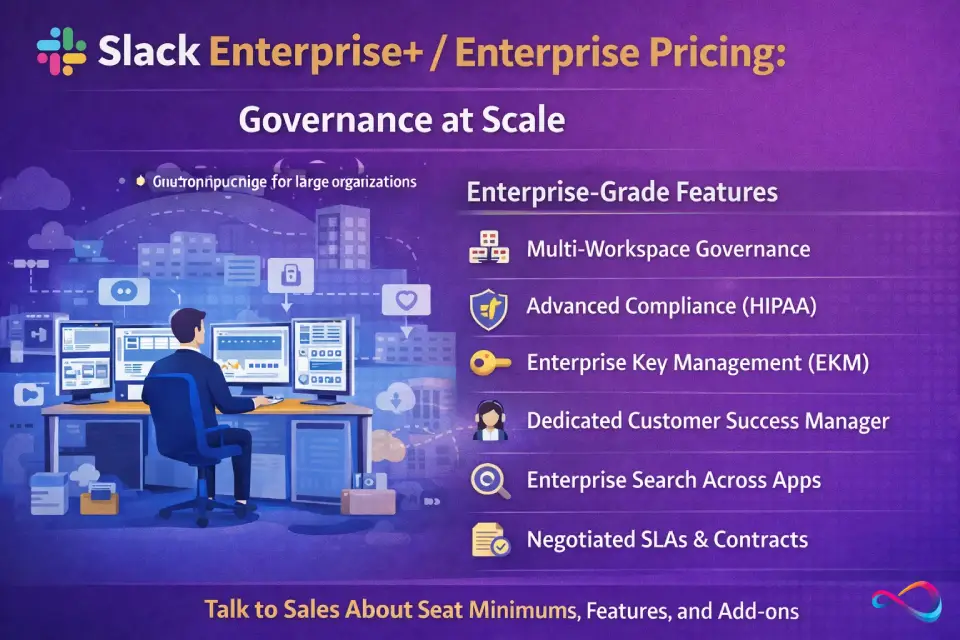
Slack Enterprise+ / Enterprise Pricing: Governance at Scale
Slack Enterprise+ pricing is custom — there is no self-serve purchase. This tier is designed for large organizations (typically 500+ users) that need multi-workspace governance, cross-application enterprise search, HIPAA compliance, and dedicated support.
What Triggers Enterprise+
- You need to manage multiple Slack workspaces under a single organization umbrella
- Your compliance team requires DLP (data loss prevention), eDiscovery, or legal holds
- HIPAA compliance is mandatory (requires a signed Business Associate Agreement)
- Enterprise Key Management (EKM) — you need to control your own encryption keys
- Enterprise search across Google Drive, Confluence, Jira, OneDrive, SharePoint, GitHub, Asana, and Box
- You require a dedicated Customer Success Manager and custom SLAs
What to Ask Sales Before Signing
| Question | Why It Matters |
|---|---|
| What is the minimum seat commitment? | Enterprise+ often requires 250–500+ seat minimums |
| What’s included vs. add-on? | Verify which AI, Salesforce, and compliance features are in-scope |
| What is the SLA and support response time? | Get contractual guarantees in writing |
| Can you provide security documentation (SOC 2, penetration test reports)? | Essential for your vendor risk assessment |
| What are the renewal and exit terms? | Understand auto-renewal windows (typically 30–90 days notice) |
| Are multi-year discounts available? | 2–3 year commitments often unlock 15–30% off list |
| How does pricing change if headcount grows mid-contract? | Clarify true-up terms for seat additions during the contract |
Best for: Organizations with 500+ users, multi-org governance needs, or strict compliance mandates (HIPAA, FedRAMP, eDiscovery). Expect Slack enterprise pricing estimates in the $20–$35+/user/month range depending on volume and commitment length.
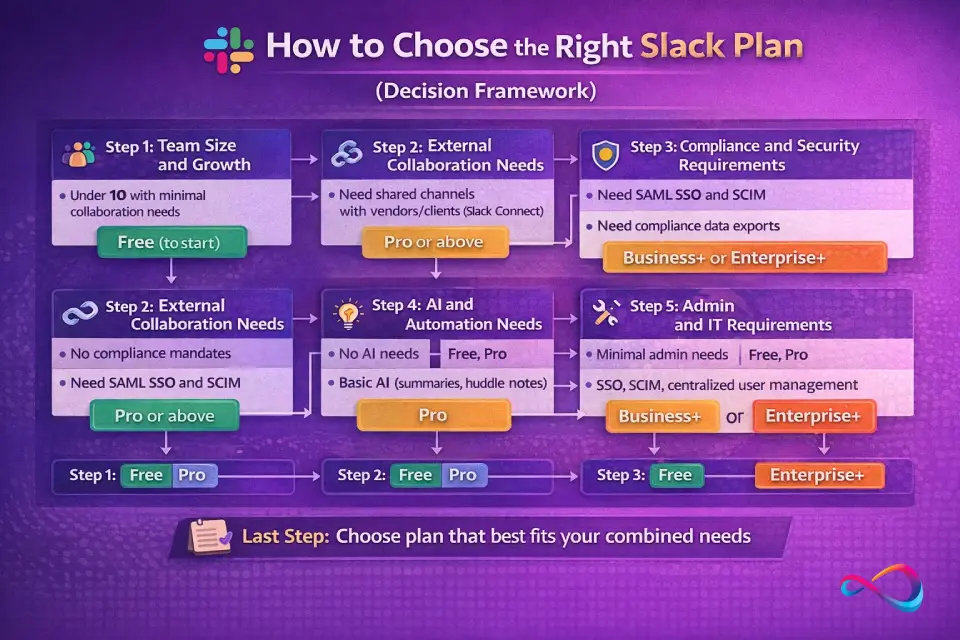
How to Choose the Right Slack Plan (Decision Framework)
Use this five-question decision flow to identify the right tier:
Step 1: Team Size and Growth
- Under 10 with minimal collaboration needs → Free (to start)
- 10–100 users, stable or moderate growth → Pro
- 100–500 users, growing headcount → Business+ or Enterprise+
- 500+ users, multi-department org → Enterprise+
Step 2: External Collaboration Needs
- No external collaboration → Any plan works
- Need shared channels with vendors/clients (Slack Connect) → Pro or above
- High volume of external partners, need governance controls → Business+ or Enterprise+
Step 3: Compliance and Security Requirements
- No compliance mandates → Free or Pro
- Need SAML SSO and SCIM → Business+
- Need compliance data exports → Business+
- Need DLP, eDiscovery, legal holds, HIPAA, or EKM → Enterprise+
Step 4: AI and Automation Needs
- No AI needs → Free or Pro
- Basic AI (summaries, huddle notes) → Pro
- Full AI suite (search, recaps, translations, file summaries) → Business+
- Enterprise search across third-party apps → Enterprise+
Step 5: Admin and IT Requirements
- Minimal admin needs → Free or Pro
- SSO, SCIM, centralized user management → Business+
- Multi-workspace governance, custom policies, EKM → Enterprise+
Recommended Plan by Persona
| Persona | Recommended Plan | Rationale |
|---|---|---|
| Startup Ops (5–20 users, lean budget) | Pro | Full history + integrations at the lowest paid tier. Upgrade when you need SSO. |
| Support / Customer Success (20–100 users) | Pro or Business+ | Pro if no SSO needed; Business+ if AI-powered search and recaps help ticket triage. |
| Legal / IT / Compliance (any size) | Business+ or Enterprise+ | Data exports, SSO, SCIM are non-negotiable. DLP/eDiscovery → Enterprise+. |
| Enterprise / Multi-Division (500+ users) | Enterprise+ | Multi-org governance, enterprise search, EKM, and dedicated support. |
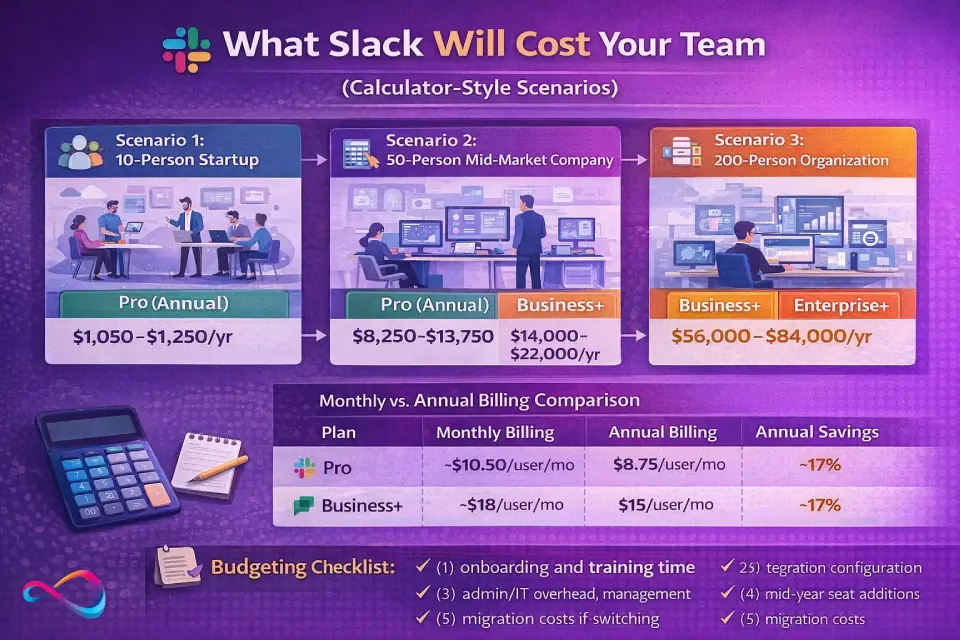
What Slack Will Cost Your Team (Calculator-Style Scenarios)
Scenario 1: 10-Person Startup
| Item | Pro (Annual) | Business+ (Annual) |
|---|---|---|
| License cost | $1,050/yr | $1,800/yr |
| Onboarding/training | ~$0 (self-serve) | ~$0–$500 |
| Integration setup | ~$0–$200 | ~$200–$500 |
| Estimated Year 1 total | ~$1,050–$1,250 | ~$2,000–$2,800 |
Scenario 2: 50-Person Mid-Market Company
| Item | Pro (Annual) | Business+ (Annual) |
|---|---|---|
| License cost | $5,250/yr | $9,000/yr |
| Onboarding/training | ~$500–$1,500 | ~$1,000–$3,000 |
| Integration setup (5–10 tools) | ~$500–$2,000 | ~$1,000–$3,000 |
| Admin overhead (partial FTE) | ~$2,000–$5,000 | ~$3,000–$7,000 |
| Estimated Year 1 total | ~$8,250–$13,750 | ~$14,000–$22,000 |
Scenario 3: 200-Person Organization
| Item | Business+ (Annual) | Enterprise+ (Estimated) |
|---|---|---|
| License cost | $36,000/yr | ~$48,000–$84,000/yr |
| Implementation / migration | ~$5,000–$15,000 | ~$10,000–$30,000 |
| Training (by department) | ~$3,000–$8,000 | ~$5,000–$15,000 |
| SSO/SCIM/IdP integration | ~$2,000–$5,000 | ~$3,000–$8,000 |
| Admin overhead (dedicated team) | ~$10,000–$20,000 | ~$15,000–$30,000 |
| Estimated Year 1 total | ~$56,000–$84,000 | ~$81,000–$167,000 |
Monthly vs Annual Billing Comparison
| Plan | Monthly Billing | Annual Billing | Annual Savings |
|---|---|---|---|
| Pro | ~$10.50/user/mo | $8.75/user/mo | ~17% |
| Business+ | ~$18/user/mo | $15/user/mo | ~17% |
Budgeting Checklist: Don’t just budget for license costs. Factor in: (1) onboarding and training time, (2) integration configuration, (3) admin/IT overhead for managing the workspace, (4) potential mid-year seat additions, and (5) migration costs if switching from another platform.
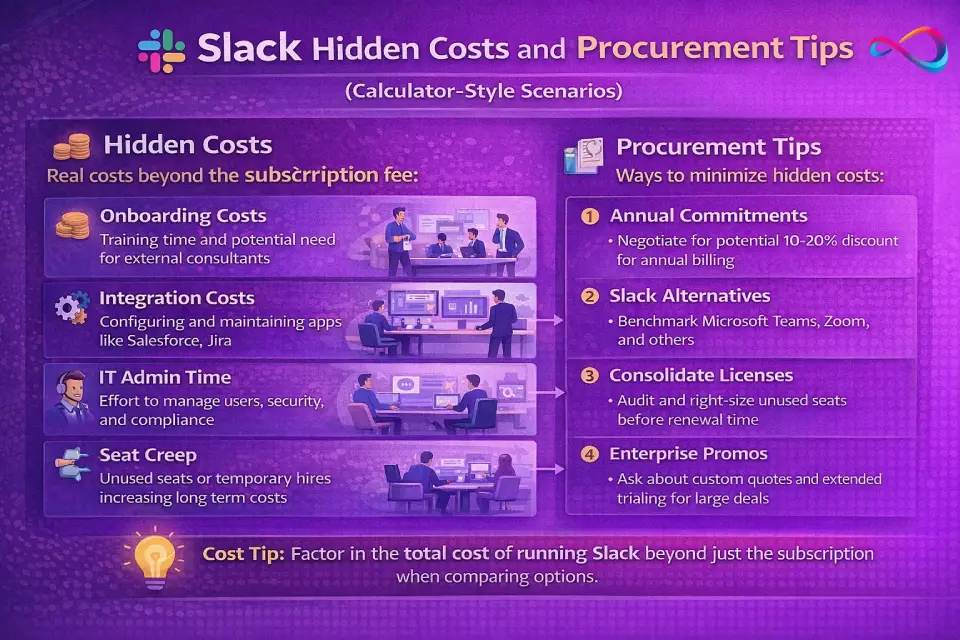
Hidden Costs and Procurement Tips
Hidden Costs to Watch
- Per-user pricing at scale. Slack’s per-seat model means costs climb linearly. A 200-person team on Business+ pays $36,000/yr in licenses alone. Evaluate whether all users need paid seats.
- SSO gate. SAML SSO requires Business+ ($15/user/month). If you use Okta or Microsoft Entra ID, this is the price of entry. Google Workspace SSO is available on all plans — check if it’s sufficient before upgrading.
- Message history loss on Free. Messages older than 90 days become inaccessible. If your team references past conversations frequently, the cost of lost context (rework, repeated questions) often exceeds the cost of Pro.
- Guest seat billing. External collaborators on Slack Connect may count toward paid seats. Verify guest policies for your plan to avoid surprise charges.
- Admin and governance overhead. Larger deployments require dedicated admin time for channel management, permissions, compliance exports, and user provisioning. Budget partial-to-full FTE time for teams over 100 users.
- Integration and migration costs. Connecting tools like Salesforce CRM, Jira, ServiceNow, or Confluence may require configuration time or consulting fees. Migrations from Microsoft Teams or other platforms add project management and adoption costs.
- Support responsiveness. Free and Pro plans include standard support only. If your team depends on Slack for critical operations, the 24/7 priority support on Business+ may be worth the premium.
Negotiation Levers
| Lever | How to Use It |
|---|---|
| Annual commitment | Annual billing saves ~17% over monthly. Always commit annually if budget allows. |
| Volume discounts | Teams over 250 users can negotiate 15–30% off list. Contact Slack sales directly. |
| Multi-year deals | 2–3 year commitments unlock deeper discounts, especially on Enterprise+. |
| Timing | Salesforce’s fiscal year ends January 31. Negotiate in Q4 (Nov–Jan) for best concessions. |
| Competitive pressure | Reference Microsoft Teams (included free with M365) as your alternative. Slack reps are familiar with this objection. |
| Nonprofit/education discounts | Eligible nonprofits get up to 85% off. Educational institutions get free or discounted plans. Apply through Slack’s official programs. |
| Renewal negotiation | Don’t auto-renew. Use the 30–90 day notice window to renegotiate terms, lock in discounts, or right-size your seat count. |
CostBench data from verified transactions shows the median Slack buyer pays ~14% below list price. You should not pay full list, especially for deals over $10K/year.
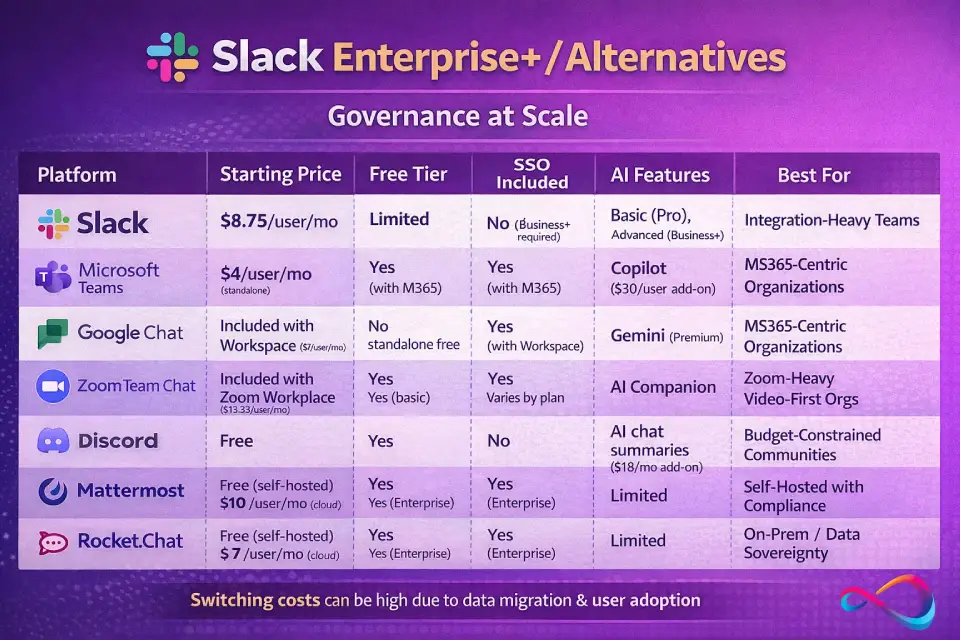
Slack Pricing vs Alternatives
When Slack isn’t the best fit — or you need to benchmark its value — here’s how it compares to other collaboration platforms:
Comparison Table
| Platform | Starting Price | Free Tier | SSO Included | AI Features | Best For |
|---|---|---|---|---|---|
| Slack Pro | $8.75/user/mo | Yes (limited) | No (Business+ required) | Basic (Pro), Advanced (Business+) | Teams prioritizing integrations & UX |
| Microsoft Teams | $4/user/mo (standalone) | Yes (with M365) | Yes (with M365) | Copilot ($30/user add-on) | M365-heavy orgs; bundled value |
| Google Chat | Included with Workspace ($7/user/mo) | No standalone free | Yes (with Workspace) | Gemini (included in some tiers) | Google Workspace shops |
| Zoom Team Chat | Included with Zoom Workplace ($13.33/user/mo) | Yes (basic) | Varies by plan | AI Companion (included) | Zoom-centric video-first teams |
| Mattermost | Free (self-hosted), $10/user/mo (cloud) | Yes (self-hosted) | Yes (Enterprise) | Limited | Compliance-driven, self-hosted needs |
| Rocket.Chat | Free (self-hosted), $7/user/mo (cloud) | Yes (self-hosted) | Yes (Enterprise) | Limited | On-prem / data sovereignty requirements |
When to Choose an Alternative
- You already pay for Microsoft 365: Teams is included free. Unless your team strongly prefers Slack’s UX and integration ecosystem, the Microsoft Teams collaboration suite is hard to beat on cost.
- Google Workspace is your primary suite: Google Chat is included. It’s simpler than Slack, but covers basic channel-based messaging without additional cost.
- Data sovereignty or self-hosting is mandatory: Mattermost or Rocket.Chat offer on-premise deployment. Slack is cloud-only (hosted on AWS).
- Budget is extremely tight: Discord is free for communities but lacks enterprise features. Not recommended for business-critical communication.
- You need project management built in: Tools like ClickUp, monday.com, and Notion combine collaboration with project and task management, potentially replacing Slack and a separate project management platform in one.
Switching Cost Considerations
Don’t underestimate migration costs. Moving from Slack to another platform (or vice versa) involves:
- Data export and import: Slack allows data exports on Business+ and Enterprise+ only. Free and Pro users cannot export full history.
- Integration reconfiguration: Every workflow, bot, and integration needs to be rebuilt on the new platform.
- User adoption: Expect 2–4 weeks of reduced productivity during transition. Change management and training are essential.
- Slack Connect disruption: If you use Slack Connect with external partners, migrating to another platform means rebuilding those relationships on a new tool.
Slack Pricing Plans – FAQs
How much does Slack cost per user in 2026?
Slack Pro costs $8.75/user/month (billed annually) or ~$10.50/user/month (billed monthly). Business+ costs$15/user/month (billed annually) or ~$18/user/month (billed monthly). Enterprise+ uses custom pricing — contact Slack sales for a quote. There is also a free plan with limited features.
Is Slack free?
Yes, Slack has a free plan. However, it limits message history to 90 days (older messages become inaccessible), caps app integrations at 10, restricts huddles to 1:1 calls, and provides only 5 GB of total storage. Most business teams outgrow the free plan within a few months.
Can I upgrade only some users?
No. Slack uses workspace-level pricing — all members of a paid workspace are on the same plan. You cannot mix Pro and Business+ users in the same workspace. However, Slack’s fair billing model means you only pay for active users (those who take an action within a 28-day period). Inactive users are automatically credited.
Which Slack plan includes SSO and SCIM?
SAML SSO and SCIM provisioning are included in Business+ and Enterprise+. Free and Pro plans support SAML SSO only if your organization has connected a Salesforce org to Slack. Google Workspace SSO (OAuth-based, not SAML) is available on all plans at no extra cost.
Is Slack AI included?
As of mid-2025, Slack AI is bundled into all paid plans — it is no longer sold as a separate add-on. Pro includes basic AI (conversation summaries and huddle notes). Business+ includes advanced AI (search, daily recaps, translations, file summaries, and AI workflow generation). Enterprise+ adds enterprise search across third-party applications. Admins can control which AI features are enabled in their workspace.
What happens to old messages on Free?
Messages older than 90 days become inaccessible — you cannot search for or view them. They are not permanently deleted; if you upgrade to a paid plan, your full message history is restored. This is the single biggest limitation that drives teams from Free to Pro.
Does Slack offer discounts?
Yes. Annual billing saves ~17% over monthly. Eligible nonprofits receive up to 85% off paid plans. Educational institutions can access free or heavily discounted plans. Volume discounts (15–30% off) are available for teams over 250 users. Multi-year commitments on Enterprise+ unlock the deepest discounts. Negotiate at Salesforce’s fiscal quarter-end for the best leverage.
What is Slack Enterprise+?
Enterprise+ is Slack’s top-tier plan, introduced in mid-2025. It is designed for large organizations and includes everything in Business+ plus: enterprise search across third-party apps (Google Drive, Confluence, Jira, OneDrive, SharePoint, GitHub, Asana, Box), multi-org governance, DLP, eDiscovery, legal holds, Enterprise Key Management (EKM), HIPAA compliance (with BAA), and a dedicated Customer Success Manager. Pricing is custom and requires a conversation with Slack sales.
Conclusion
Choosing the right Slack plan comes down to four variables: team size, compliance needs, AI requirements, and budget.
- Free works for testing and tiny teams — but you’ll outgrow it fast.
- Pro ($8.75/user/month) is the right starting point for most SMBs that need full message history, integrations, and basic AI.
- Business+ ($15/user/month) is the answer when your IT or compliance team needs SSO, SCIM, data exports, or advanced AI capabilities.
- Enterprise+ (custom) is for large organizations with governance, security, and cross-platform search requirements that no other tier can meet.
Slack pricing has shifted significantly since the June 2025 changes — the bundling of AI features, the Business+ price increase, and the introduction of Enterprise+ mean that the plan you chose last year may no longer be the right one. Review your current plan against this guide, verify the latest rates on Slack’s pricing page, and negotiate before your next renewal. You should not be paying list price for deals above $10K/year.
About the author

I’m Macedona, an independent reviewer covering SaaS platforms, CRM systems, and AI tools. My work focuses on hands-on testing, structured feature analysis, pricing evaluation, and real-world business use cases.
All reviews are created using transparent comparison criteria and are updated regularly to reflect changes in features, pricing, and performance.