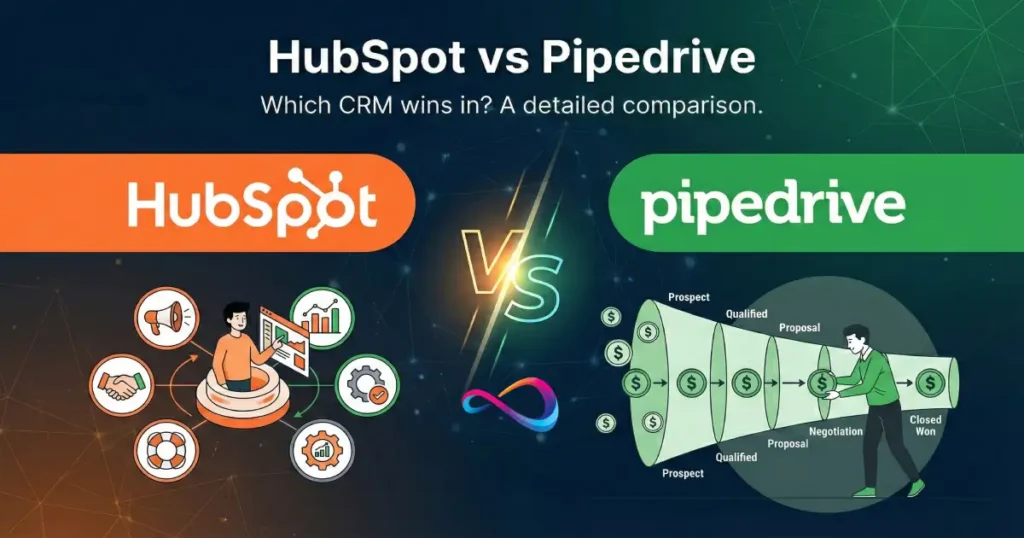
If you’re weighing HubSpot vs Pipedrive in 2026, you’re comparing two fundamentally different philosophies of customer relationship management software. HubSpot has evolved into a full-suite revenue platform—sales, marketing, service, and operations under one roof. Pipedrive remains laser-focused on what it does best: helping sales teams close deals faster through intuitive pipeline management.
This guide is built for decision-makers at US-based companies with 10–200 employees—founders, sales leaders, RevOps managers, and marketing directors who need a CRM that fits their budget, adoption capacity, and growth trajectory.
By the end, you’ll have a clear framework—complete with a decision tree, pricing reality checks, a rollout plan, and use-case verdicts—to make a confident choice between HubSpot CRM and Pipedrive CRM. If you’re exploring the broader CRM landscape first, our best CRM software review ranks the top platforms across all categories.
Quick Answer
Choose HubSpot if you need sales and marketing automation in one platform, plan to scale beyond 50 users, or want native content, email marketing, and service tools without stitching together point solutions.
Choose Pipedrive if your primary job is managing a sales pipeline, you want fast time-to-value, your team is under 50 reps, and you’d rather pay less per seat for a tool your salespeople will actually use every day.
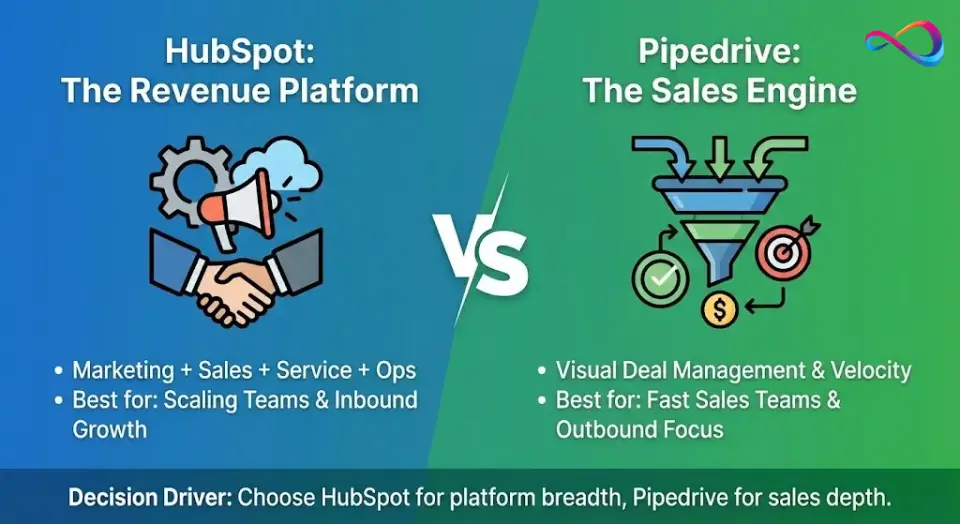
One-sentence difference: HubSpot is an all-in-one revenue platform; Pipedrive is a sales-execution engine.
Fast Decision Checklist
- ✅ Do you need marketing automation, landing pages, or a blog CMS? → HubSpot.
- ✅ Is your #1 pain point pipeline visibility and sales velocity? → Pipedrive.
- ✅ Are you scaling past 100 users and need granular permissions, forecasting, and RevOps tooling? → HubSpot (or evaluate Salesforce).
Evaluation Methodology
To ensure this CRM comparison is practical, evidence-based, and trustworthy, we applied a structured evaluation framework with weighted scoring.
Criteria and Weighting
| Criterion | Weight | What We Measured |
|---|---|---|
| Total cost of ownership (TCO) | 20% | Base pricing, seat costs, add-on fees, onboarding, and 12-month projected spend for 10/25/50-seat teams |
| Ease of use and adoption | 20% | Time-to-first-deal, training hours needed, UI intuitiveness (G2/Capterra scores), and observed onboarding friction |
| Pipeline management | 15% | Visual pipeline UX, multiple pipeline support, deal rotting, custom stages, and pipeline velocity tracking |
| Automation and workflows | 15% | Workflow complexity ceiling, trigger types, cross-object logic, and tier-gating of automation features |
| Reporting and forecasting | 10% | Custom report builder depth, attribution, AI forecasting, cross-object analytics, and dashboard flexibility |
| AI features (2026) | 10% | AI email generation, predictive scoring, deal insights, conversation intelligence, and roadmap trajectory |
| Integrations and scalability | 10% | Marketplace size, API/webhook maturity, Zapier connectivity, and enterprise readiness (permissions, business units) |
What We Tested and Validated
- Hands-on configuration of both platforms’ current free/trial tiers: pipeline setup, email integration, workflow builder, and reporting dashboards.
- Pricing page audits at HubSpot Sales Hub pricing and Pipedrive pricing, including add-on calculators and bundle simulators.
- Feature documentation review through official release notes and knowledge bases (January 2025–February 2026).
- Third-party validation via G2, Capterra, and TrustRadius user feedback patterns (thousands of reviews analyzed per platform).
- Consultant perspective: Recommendations account for real-world adoption patterns and implementation failure modes, not just feature checklists.
📌 Key takeaways:
- Our weighting prioritizes TCO and adoption equally (20% each)—because the best CRM is the one your team actually uses.
- We penalize “feature-on-paper” advantages that are locked behind high tiers most mid-market buyers won’t purchase.
- This review is written from the standpoint of a CRM consultant advising US businesses with 10–200 employees.
Comparing HubSpot and Pipedrive at a Glance
| Category | HubSpot | Pipedrive | Who Wins | Notes (2026 Context) |
|---|---|---|---|---|
| Ideal customer | Growth-stage companies needing sales + marketing alignment | SMBs with dedicated sales teams focused on deal flow | Tie—different audiences | HubSpot skews marketing-heavy; Pipedrive skews sales-heavy |
| Ease of use | Moderate—powerful but learning curve increases with Hubs | High—built for salespeople, minimal training needed | Pipedrive | Pipedrive’s UI is consistently rated more intuitive for reps |
| Pipeline management | Solid, multiple pipelines, deal stages, automation | Excellent—core strength, visual Kanban, drag-and-drop | Pipedrive | Pipedrive’s pipeline UX is best-in-class for velocity teams |
| Marketing automation | Native, full-featured (email, workflows, ads, attribution) | Basic email campaigns; relies on integrations for more | HubSpot | Not close—HubSpot Marketing Hub is a standalone product |
| Email + sequences | Sequences in Sales Hub; full email marketing in Marketing Hub | Email sync, templates, tracking; sequences via add-on | HubSpot | HubSpot’s sequences are more deeply integrated with workflows |
| Reporting / analytics | Advanced dashboards, custom reports, attribution, forecasting | Solid sales reporting, deal insights, revenue forecasting | HubSpot | HubSpot’s cross-object reporting is significantly deeper |
| AI features | Breeze AI, AI content writer, predictive lead scoring, AI forecasting | AI Sales Assistant, AI email writer, deal recommendations | HubSpot | HubSpot invests more heavily in AI across the entire platform |
| Integrations ecosystem | 1,500+ apps in App Marketplace (verify on HubSpot Marketplace); native Slack, Google, Microsoft | 400+ apps in Pipedrive Marketplace; strong Zapier support | HubSpot | HubSpot’s ecosystem is broader; Pipedrive covers core needs |
| Customization | Custom objects, calculated fields, programmable automation | Custom fields, flexible pipelines, API access | HubSpot | HubSpot’s custom objects unlock enterprise-grade data modeling |
| Implementation / onboarding | Longer setup (especially multi-Hub); mandatory onboarding for Pro+ | Fast setup—most teams live in days, not weeks | Pipedrive | Pipedrive’s time-to-value is dramatically shorter |
| Total cost of ownership | Free tier available; paid plans escalate quickly with seats + Hubs | Lower per-seat cost; add-ons increase TCO moderately | Pipedrive | HubSpot’s TCO is often 2–5× higher depending on configuration |
| Support | Knowledge base, community, chat/email; phone on Pro+ | Email/chat on all plans; phone on Power+ | Tie | HubSpot Academy is a differentiator for self-serve learning |
| Scalability | Enterprise-grade—supports complex orgs, business units, partitioning | Good for teams up to ~100; can strain at enterprise scale | HubSpot | If you foresee 200+ users or multi-BU ops, HubSpot or Salesforce |
📌 Key takeaways:
- HubSpot wins on breadth (marketing, reporting, AI, integrations, scalability).
- Pipedrive wins on focus (pipeline UX, ease of use, time-to-value, TCO).
- Neither is universally “better”—the winner depends on your team’s primary job-to-be-done.
Final Scorecard (Weighted)
Based on the methodology above, here is our weighted final scoring. Scores are out of 10 per criterion, then multiplied by the criterion weight to produce a weighted total out of 100.
| Criterion | Weight | HubSpot (raw /10) | Pipedrive (raw /10) |
|---|---|---|---|
| Total cost of ownership | 20% | 6 | 9 |
| Ease of use and adoption | 20% | 7 | 9 |
| Pipeline management | 15% | 8 | 9.5 |
| Automation and workflows | 15% | 9 | 7 |
| Reporting and forecasting | 10% | 9 | 7 |
| AI features (2026) | 10% | 8.5 | 7 |
| Integrations and scalability | 10% | 9 | 7 |
| HubSpot | Pipedrive | |
|---|---|---|
| Weighted total | 77.8 / 100 | 82.3 / 100 |
Why Pipedrive scores higher overall: The two highest-weighted criteria—TCO (20%) and ease of use (20%)—are Pipedrive’s strongest categories. When cost-efficiency and adoption speed carry the most weight (as they should for most mid-market buyers), Pipedrive’s advantage in those areas outweighs HubSpot’s superior automation, reporting, and AI capabilities.
When HubSpot’s score effectively exceeds Pipedrive’s: If you re-weight the criteria to prioritize automation + reporting + integrations (i.e., you need a multi-department platform, not just a sales tool), HubSpot pulls ahead. The raw scores reflect this: HubSpot outscores Pipedrive in 4 of 7 categories. The “right” CRM depends on which criteria matter most to your team.
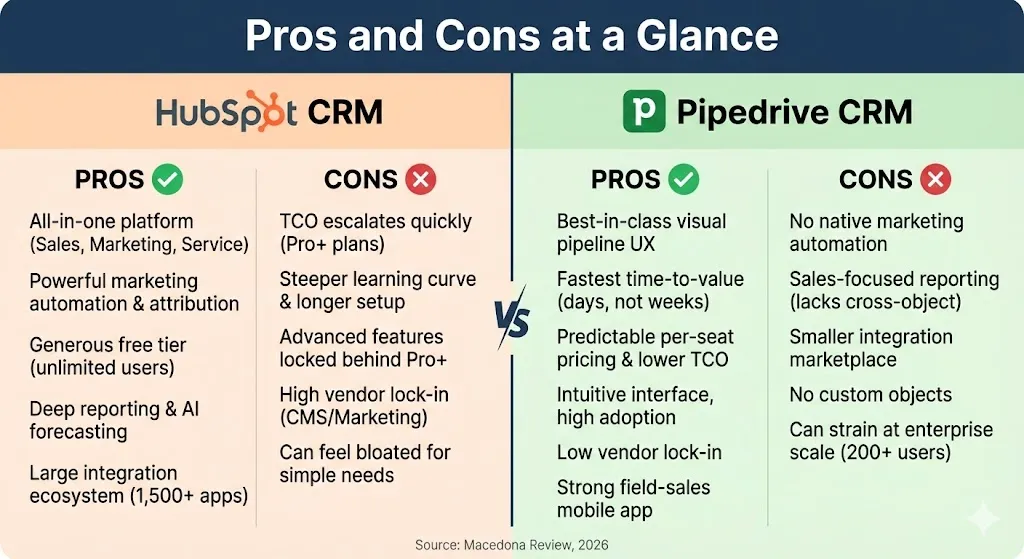
Pros and Cons at a Glance
HubSpot CRM: Pros
- ✅ All-in-one platform—sales, marketing, service, and operations share a single database
- ✅ Powerful marketing automation with native attribution, lead scoring, and nurture workflows
- ✅ Generous free tier for early-stage teams (unlimited users, up to 1M contacts)
- ✅ Deep reporting and cross-object analytics with AI-powered forecasting
- ✅ Large integration ecosystem (1,500+ apps) and robust API
- ✅ HubSpot Academy provides free, high-quality training and certifications
HubSpot CRM: Cons
- ❌ TCO escalates quickly—Professional+ plans, mandatory onboarding fees, and contact-tier pricing add up fast
- ❌ Steeper learning curve; full deployment typically takes weeks to months
- ❌ Advanced automation and reporting locked behind Professional+ tier ($$$)
- ❌ High vendor lock-in when using CMS Hub, custom objects, and marketing workflows
- ❌ Can feel bloated for teams that only need pipeline management
Pipedrive CRM: Pros
- ✅ Best-in-class visual pipeline and deal management UX
- ✅ Fastest time-to-value—most teams are productive within days, not weeks
- ✅ Predictable per-seat pricing with lower TCO for sales-focused teams
- ✅ Intuitive interface that salespeople actually enjoy using (high adoption rates)
- ✅ Low vendor lock-in—simpler data model makes switching easier
- ✅ Strong mobile app with field-sales-friendly features (geo-location, nearby contacts)
Pipedrive CRM: Cons
- ❌ No native marketing automation—requires third-party tools for lead nurture, attribution, and scoring
- ❌ Reporting is sales-focused; lacks cross-object analytics and multi-touch attribution
- ❌ Smaller integration marketplace compared to HubSpot
- ❌ No custom objects—data modeling is limited to deals, contacts, and organizations
- ❌ Can strain at enterprise scale (200+ users, complex permission structures)
- ❌ No built-in service desk, CMS, or operations tooling
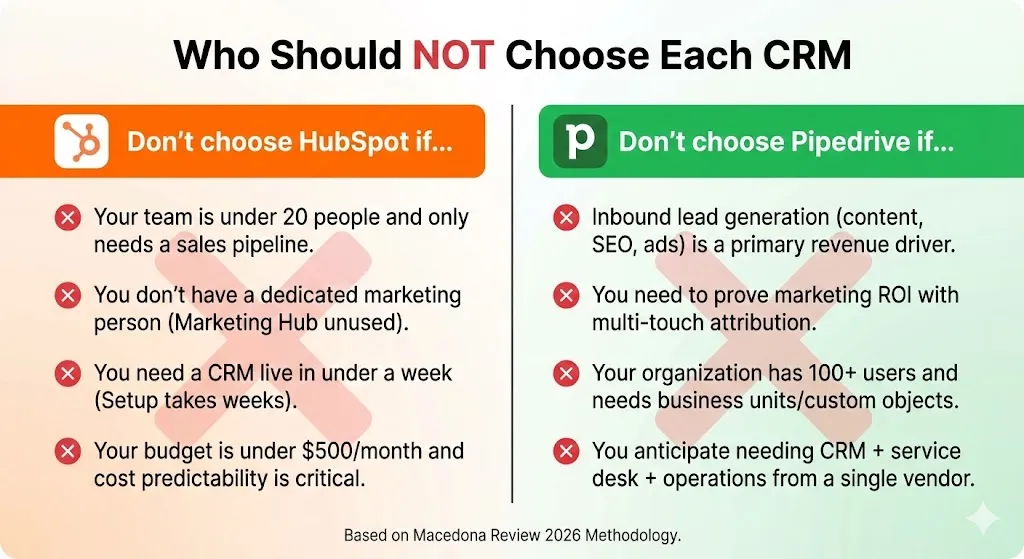
Who Should NOT Choose Each CRM
Don’t choose HubSpot if…
- Your team is under 20 people and only needs a sales pipeline. You’ll pay for features you never touch.
- You don’t have a dedicated marketing person—Marketing Hub capabilities will sit unused.
- You need a CRM live in under a week. HubSpot’s multi-Hub setup typically takes weeks.
- Your budget is under $500/month and cost predictability is critical. HubSpot’s pricing tiers and contact-based scaling create surprises.
Don’t choose Pipedrive if…
- Inbound lead generation (content, SEO, ads) is a primary revenue driver. You’ll end up bolting on marketing tools that fragment your data.
- You need to prove marketing ROI with multi-touch attribution. Pipedrive simply doesn’t do this.
- Your organization has 100+ users and needs business units, granular permissions, or custom objects.
- You anticipate needing CRM + service desk + operations from a single vendor within 12–18 months.
Core Positioning in 2026
Understanding what each platform is really built for prevents the most common CRM selection mistake: choosing a tool for what it can do rather than what it’s designed to do.
HubSpot: The All-in-One Revenue Platform
HubSpot CRM has grown from a marketing tool into a full customer platform. In 2026, HubSpot Sales Hub, Marketing Hub, Service Hub, and Operations Hub share a single database, meaning your marketing team’s lead scoring, your sales team’s deal stages, and your support team’s tickets all live in one unified record.
Key jobs-to-be-done:
- Align sales and marketing around a shared funnel with attribution, lead scoring, and lifecycle stages.
- Automate the full buyer journey—from ad click → form fill → nurture sequence → deal creation → onboarding workflow.
- Scale operations with custom objects, permissions, business units, and forecasting for RevOps teams.
Example scenario: A B2B SaaS company with 80 employees runs Google Ads and LinkedIn campaigns, captures inbound leads via landing pages, scores them with behavioral data, routes them to SDRs via round-robin, and tracks revenue attribution back to campaign spend—all inside HubSpot, no third-party glue required.
Pipedrive: The Sales Pipeline Execution Engine
Pipedrive CRM was built by salespeople, for salespeople. Its philosophy is simple: every action should drive pipeline velocity. The UI is organized around visual deal boards, activity-based selling, and minimal administrative friction. If you’re evaluating the broader landscape of best CRM platforms for sales teams, Pipedrive consistently ranks at or near the top for velocity-focused selling.
Key jobs-to-be-done:
- Manage deals visually with drag-and-drop pipelines, activity reminders, and deal rotting alerts.
- Execute outbound sales cadences with email tracking, templates, and scheduling.
- Get reps selling faster with an interface that requires almost no training and focuses on next actions.
Example scenario: A 15-person commercial real estate brokerage needs each agent to track 40–60 active deals across different stages (prospecting, site visits, LOI, closing). Pipedrive’s Kanban view gives instant pipeline visibility, and automated activity reminders ensure no deal goes cold—all set up in under a week.
📌 Key takeaways:
- HubSpot = platform play: build your entire revenue engine in one place.
- Pipedrive = point solution play: provide a best-in-class deal management tool your sales team will actually adopt.
- If you’re pre-revenue or under 20 employees, start with Pipedrive; if you’re building cross-functional GTM motions, start with HubSpot.
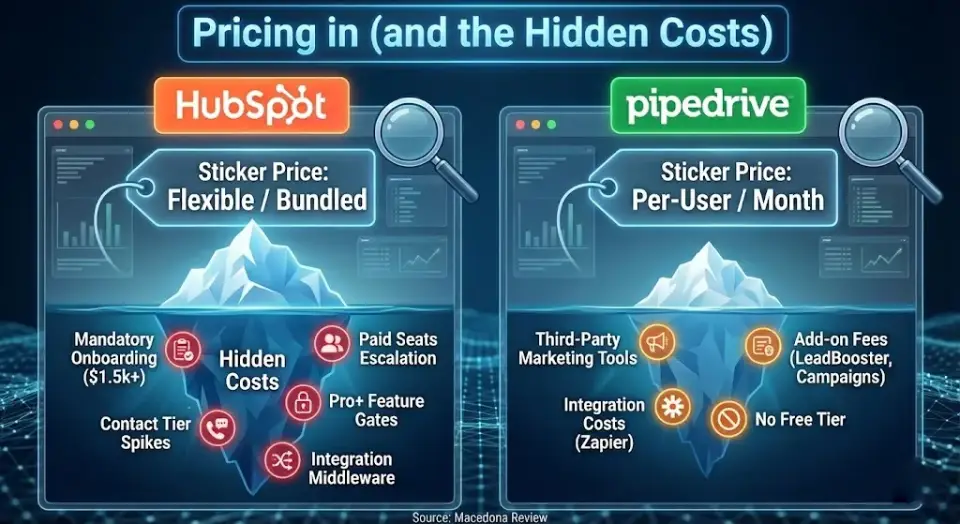
Pricing in 2026 (and the Hidden Costs)
Pricing is where the HubSpot or Pipedrive decision gets most nuanced. Sticker prices tell only half the story—total cost of ownership (TCO) is what actually hits your budget.
Pricing Structure Overview
HubSpot uses a Hub-based model. You can start with the free CRM (generous for basic contact management), then layer on Sales Hub, Marketing Hub, Service Hub, or bundle them. Pricing scales by tier (Starter, Professional, Enterprise) and by the number of paid seats. Marketing Hub pricing also scales by marketing contact volume. Check the latest figures on the HubSpot Sales Hub pricing page.
Pipedrive uses a simpler per-seat, per-month model across five tiers: Essential, Advanced, Professional, Power, and Enterprise. Add-ons (LeadBooster, Campaigns, Smart Docs, Projects, Pulse) layer on additional costs. See current pricing on the Pipedrive pricing page. For a deeper look at Pipedrive’s plan structure, see our Pipedrive pricing breakdown.
Hidden Cost Checklist
Before you compare headline prices, audit these frequently overlooked cost drivers:
| Cost Driver | HubSpot Consideration | Pipedrive Consideration |
|---|---|---|
| Paid seats | Only “Sales Hub seats” cost extra; free users get limited CRM access | Every user needs a paid seat; no free tier |
| Marketing contacts | Marketing Hub charges by contact tier—costs spike as your database grows | N/A (no native marketing hub) |
| Add-ons | Reporting add-on, API limit increases, ads add-on, transactional email | LeadBooster, Campaigns, Smart Docs, Projects |
| Onboarding fees | Mandatory onboarding for Professional+ (typically $1,500–$3,000+;verify on HubSpot’s onboarding page) | No mandatory onboarding |
| Automation tier gates | Workflows limited to Professional+; Starter only gets basic automation | Advanced automations available from Advanced tier |
| Email sending limits | Vary by plan and marketing contact tier | Vary by plan; bulk email is a Campaigns add-on |
| Data migration | Complex migrations (Salesforce, custom CRMs) may need a partner | Simpler data model = simpler migration |
| Integration costs | Most native integrations free; Zapier or custom API may add cost | Core integrations free; Zapier usage may add cost |
| Training | HubSpot Academy is free; custom training adds cost | Pipedrive Academy is free; less complex = less training needed |
Budget-Fit Summary
| Team Profile | Likely Better Fit | Why |
|---|---|---|
| Lean team (5–15 users, sales-only) | Pipedrive | Lower per-seat cost, faster setup, no onboarding fee |
| Growing team (15–50 users, sales + marketing) | HubSpot | Bundled Marketing Hub avoids the cost of separate marketing tools |
| Multi-team org (50–200 users, RevOps) | HubSpot (or Salesforce) | Custom objects, business units, advanced permissions, forecasting |
Consultant’s note: For a 20-seat sales team that doesn’t need marketing automation, Pipedrive’s TCO is typically 50–70% lower than HubSpot Sales Hub Professional over a 12-month period. But if you later add marketing, you’ll pay separately for tools like Mailchimp or ActiveCampaign—potentially erasing the savings.
📌 Key takeaways:
- HubSpot’s free tier is generous but most teams outgrow it within 6–12 months; the jump to Professional is steep.
- Pipedrive’s per-seat pricing is predictable; hidden costs come from add-ons and third-party marketing tools.
- Always model 12-month TCO with your actual team size, not the sticker price of a single seat.
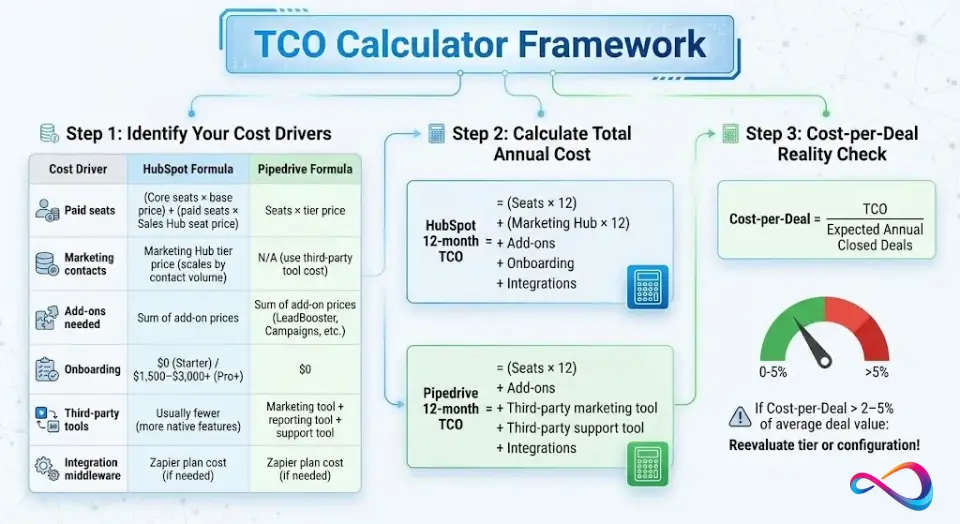
TCO Calculator Framework
Use this framework to estimate your 12-month total cost of ownership. Plug in your own numbers—this isn’t about exact prices (which change frequently), but about identifying which cost drivers matter for your team.
Step 1: Identify Your Cost Drivers
| Cost Driver | Your Number | HubSpot Formula | Pipedrive Formula |
|---|---|---|---|
| Paid seats | _ users | (Core seats × base price) + (paid seats × Sales Hub seat price) | Seats × tier price |
| Marketing contacts | _ contacts | Marketing Hub tier price (scales by contact volume) | N/A (use third-party tool cost) |
| Add-ons needed | List: _ | Sum of add-on prices | Sum of add-on prices (LeadBooster, Campaigns, etc.) |
| Onboarding | One-time | $0 (Starter) / $1,500–$3,000+ (Pro+) | $0 |
| Third-party tools | List: _ | Usually fewer (more native features) | Marketing tool + reporting tool + support tool |
| Integration middleware | Yes / No | Zapier plan cost (if needed) | Zapier plan cost (if needed) |
Step 2: Calculate Total Annual Cost
HubSpot 12-month TCO = (Seats × 12) + (Marketing Hub × 12) + Add-ons + Onboarding + Integrations
Pipedrive 12-month TCO = (Seats × 12) + Add-ons + Third-party marketing tool + Third-party support tool + Integrations
Step 3: Cost-per-Deal Reality Check
Divide your TCO by your expected annual closed deals. If cost-per-deal exceeds 2–5% of average deal value, reevaluate your tier or consider a less expensive configuration.
📌 Key takeaways:
- The biggest hidden cost for HubSpot is the Pro+ onboarding fee and marketing contact scaling.
- The biggest hidden cost for Pipedrive is the stack of third-party tools needed to replicate HubSpot’s native capabilities.
- Teams that need marketing automation should model the combined cost of Pipedrive + a dedicated email platform vs. a HubSpot bundle.
Marketing Automation Needs: When HubSpot Is Overkill vs When It’s Essential
This is the single most important “depends on” when you compare HubSpot and Pipedrive. Marketing automation is HubSpot’s core differentiator—and the main source of its higher cost.
When HubSpot Marketing Hub Is Overkill
You likely don’t need HubSpot’s marketing automation if:
- Your sales team generates leads through outbound prospecting, referrals, or partnerships—not inbound content.
- You send fewer than 2,000 marketing emails per month and don’t need nurture sequences.
- Your marketing stack is one tool (e.g., basic Mailchimp newsletters) and doesn’t need attribution, lead scoring, or ad tracking.
- You have no dedicated marketing person or team.
- Your website is built on WordPress/Webflow and you’re not planning to move to HubSpot’s CMS.
In this case: Pipedrive + a lightweight email marketing tool is the more cost-effective setup.
When HubSpot Marketing Hub Is Essential
You need HubSpot’s marketing automation if:
- Inbound leads from content, SEO, ads, or social are a primary revenue driver.
- You need multi-touch attribution to prove marketing ROI to leadership.
- Your sales and marketing teams fight over lead quality and need shared lifecycle stages.
- You run 5+ automated nurture sequences or drip campaigns.
- You need landing pages, A/B testing, smart content, or blog CMS natively in your CRM.
- You plan to connect Google Ads, Meta Ads, or LinkedIn Ads to closed-loop revenue reporting.
In this case: HubSpot’s bundled Marketing + Sales Hub is almost always cheaper than Pipedrive + a separate marketing automation platform at scale.
The In-Between: Pipedrive + Marketing Tool Stack
For teams that need some marketing automation but not HubSpot’s full suite:
| Marketing Need | Pipedrive Add-on / Integration | Estimated Additional Monthly Cost |
|---|---|---|
| Email newsletters and drip campaigns | Pipedrive Campaigns add-on or Mailchimp Standard | $20–$100/mo |
| Landing pages | Unbounce, Carrd, or WordPress plugins | $0–$100/mo |
| Lead scoring | Manual (custom fields) or Zapier automation | $0–$50/mo |
| Ad attribution | Google Analytics 4 + UTM tracking | $0 |
| Form builder | Typeform, Tally, or Pipedrive LeadBooster | $0–$35/mo |
📌 Key takeaways:
- If you have no full-time marketer, HubSpot Marketing Hub is likely overkill—and an unnecessary expense.
- If inbound leads represent >30% of your revenue, the attribution and automation capabilities in HubSpot typically pay for themselves.
- The “in-between” stack (Pipedrive + lightweight tools) works for teams with <15 reps and simple marketing needs, but becomes increasingly fragile as you scale.
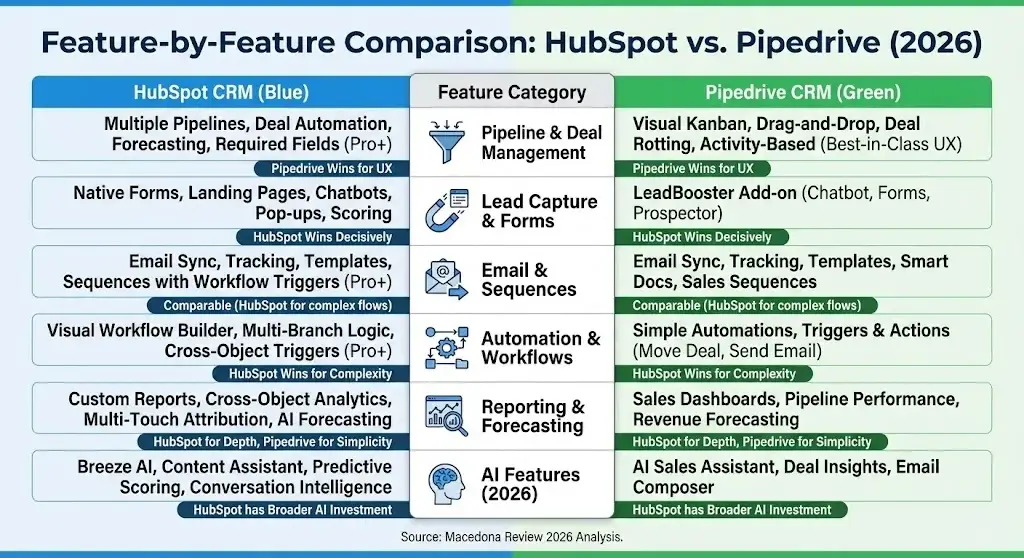
Feature-by-Feature Comparison
Pipeline & Deal Management
What matters: Visual deal tracking, multiple pipeline support, deal rotting alerts, custom deal stages, and pipeline velocity metrics.
- HubSpot: Multiple pipelines, deal automation, required fields per stage, weighted pipeline forecasting. Strong but slightly more admin-heavy to configure.
- Pipedrive: Best-in-class Kanban pipeline. Drag-and-drop, deal rotting indicators, activity-based selling prompts. Pipeline management is Pipedrive’s core identity.
- Verdict: Pipedrive for pure pipeline UX. HubSpot for pipeline + forecasting + automation depth.
Who should care: Sales managers, founders running their own pipeline, RevOps leads.
Lead Capture & Forms
What matters: Web forms, landing pages, chatbots, lead routing, and lead scoring.
- HubSpot: Native forms, landing page builder, chatbot/live chat (free tier), pop-ups, lead scoring (Professional+). Full lead capture without third-party tools.
- Pipedrive: LeadBooster add-on includes a chatbot, web forms, and a Prospector tool. Functional but not as deep as HubSpot’s native suite.
- Verdict: HubSpot wins decisively—especially for inbound-heavy teams.
Who should care: Marketing leads, demand gen managers, founders building an inbound flywheel.
Email Integration + Sequences
What matters: Two-way email sync, email tracking, templates, and automated sales cadences (sequences).
- HubSpot: Gmail and Outlook integration, email tracking and notifications, sales sequences in Sales Hub (Starter+ with limits, full power in Professional+). Email templates with personalization tokens.
- Pipedrive: Gmail and Outlook sync, email tracking, templates, and Smart Docs. Sales sequences available natively. Clean and functional.
- Verdict: Comparable for basic email. HubSpot edges ahead when sequences need to trigger multi-step workflows.
Who should care: SDRs, AEs running outbound, sales ops.
Automation / Workflows
What matters: Workflow automation (deal-triggered, contact-triggered, time-based), complexity ceiling, and maintenance burden.
- HubSpot: Powerful visual workflow builder. Multi-branch logic, if/then, delays, internal notifications, task creation, lead rotation. Available at Professional+ tier.
- Pipedrive: Workflow automation with triggers and actions (move deal, send email, create activity). Simpler interface, adequate for common sales automations.
- Verdict: HubSpot has a significantly higher automation ceiling. If your workflows involve cross-object logic (deals + tickets + marketing events), HubSpot is the clear choice. Teams needing middleware beyond either platform often use Zapier or Make to bridge gaps.
Who should care: RevOps, marketing ops, sales ops, anyone building multi-step automated processes.
Reporting & Forecasting
What matters: Sales dashboards, pipeline reports, activity analytics, deal velocity, revenue forecasting, and attribution.
- HubSpot: Custom report builder, cross-object reporting (contacts + deals + companies + tickets), attribution reporting, AI-powered forecasting, goal tracking. Reporting depth scales with tier.
- Pipedrive: Revenue forecasting, deal and activity reports, custom dashboards, pipeline performance insights. Solid for sales-specific analytics.
- Verdict: HubSpot for multi-department reporting and attribution. Pipedrive for clean, sales-focused dashboards that reps actually use.
Who should care: Sales managers, VP of Sales, RevOps, C-suite tracking revenue KPIs.
AI Assistants & Productivity (2026 Expectations)
What matters: AI-generated emails, deal recommendations, predictive scoring, conversation intelligence, and productivity copilots.
- HubSpot: Breeze AI (unified platform AI layer for CRM actions), AI content assistant (emails, blogs, social), predictive lead scoring, AI-powered forecasting, and conversation intelligence in Sales Hub.
- Pipedrive: AI Sales Assistant provides deal insights and recommendations, AI-powered email composer, and performance tips based on pipeline data.
- Verdict: HubSpot’s AI investment is broader and deeper. Expect both platforms to ship rapidly through 2026, but HubSpot has more surface area for AI integration.
Who should care: Every user—AI productivity features are becoming table stakes.
Integrations & App Marketplace
What matters: Native integrations with your existing stack (Gmail, Outlook, Slack, Google Workspace, Microsoft 365, QuickBooks, Xero, Shopify, WooCommerce, LinkedIn), Zapier connectivity, API access, and webhooks.
- HubSpot: 1,500+ integrations in the App Marketplace (per HubSpot’s Marketplace). Deep native integrations with Salesforce (for migration), Slack, Shopify, WordPress, Zoom, and more. Robust API and webhooks.
- Pipedrive: 400+ integrations per Pipedrive’s Marketplace. Strong Zapier connectivity. Good API and webhooks. Covers core business tools well, including accounting platforms like QuickBooks and Xero via marketplace apps.
- Verdict: HubSpot has a broader ecosystem. Pipedrive covers the essentials—evaluate whether your specific stack is supported before deciding.
Who should care: IT leads, RevOps, anyone integrating CRM into a broader tech stack.
Data Model / Custom Fields + Permissions
What matters: Custom fields, custom objects, user roles, team-based permissions, record ownership, and audit logs.
- HubSpot: Custom objects (Enterprise), extensive custom properties, team-based permissions, field-level permissions (Enterprise), partitioning by business unit. Full audit logs.
- Pipedrive: Custom fields, visibility groups, permission sets, and user management. No custom objects—data model is deal/contact/organization-centric.
- Verdict: HubSpot for complex data models and enterprise permissions. Pipedrive for straightforward customization without over-engineering.
Who should care: CRM admins, RevOps architects, compliance officers.
Mobile App & Field Sales
What matters: Mobile deal management, activity logging, calling, check-ins, and offline access.
- HubSpot: Full-featured mobile app—contacts, deals, tasks, email, calling, meeting scheduler. Business card scanner.
- Pipedrive: Excellent mobile app—pipeline view, activity updates, call logging, nearby contacts (location-based). Designed for field reps.
- Verdict: Both are strong. Pipedrive’s mobile experience slightly edges out for field sales teams due to its geo-location features and sales-first UX.
Who should care: Field sales reps, outside sales managers, distributed teams.
Security, Compliance, and Admin Controls
What matters: SSO, 2FA, GDPR tools, SOC 2 compliance, data residency, IP restrictions, and audit logs.
- HubSpot: SOC 2 Type II compliant (per HubSpot’s Trust Center), GDPR tools, SSO (Enterprise), 2FA, IP restrictions, data residency options, advanced audit logs.
- Pipedrive: SOC 2 compliant (per Pipedrive’s Security page), GDPR tools, SSO (Enterprise), 2FA, security dashboards, audit logs.
- Verdict: Comparable for most mid-market needs. HubSpot has a slight edge in granular admin controls and compliance certifications at the Enterprise tier.
Who should care: IT security, compliance teams, regulated industries.
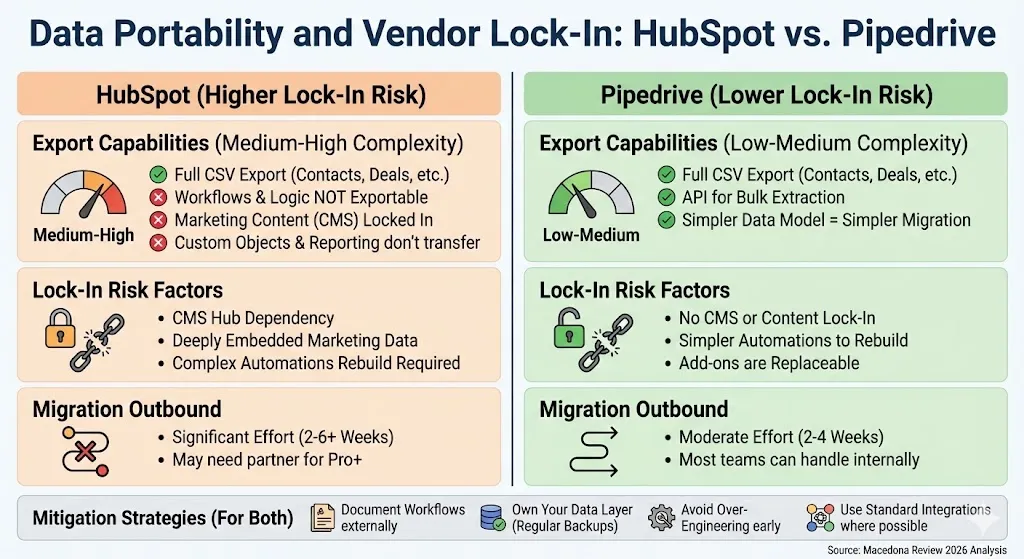
Data Portability and Vendor Lock-In
Vendor lock-in is an underrated risk in CRM selection. The harder it is to leave, the more pricing leverage your vendor has at renewal.
HubSpot: Data Portability Considerations
- Export capabilities: Full CSV export of contacts, companies, deals, tickets, and activities. Workflow logic and templates are not exportable in a portable format.
- Lock-in risk factors: Marketing Hub content (blog, landing pages, emails) is tightly coupled to HubSpot’s CMS. Custom objects, workflow automations, and reporting dashboards don’t transfer to other platforms. Marketing contact data + behavioral history is deeply embedded.
- Migration outbound complexity: Medium to High. Simple contact/deal exports are straightforward, but recreating marketing automations, lead scoring models, and attribution configurations in a new platform takes significant effort.
Pipedrive: Data Portability Considerations
- Export capabilities: Full CSV export of contacts, deals, organizations, activities, and notes. API allows bulk extraction. Simpler data model = simpler migration.
- Lock-in risk factors: Lower overall lock-in. Automations are simpler and can be rebuilt quickly. No CMS, blog, or content lock-in. Add-ons (LeadBooster, Campaigns) create moderate lock-in but are replaceable.
- Migration outbound complexity: Low to Medium. Most teams can extract and rebuild their Pipedrive setup in a new CRM within 2–4 weeks.
Mitigation Strategies
- Document your workflows. Keep a living document of all automation rules, email templates, and lead scoring criteria outside of your CRM.
- Own your data layer. Export contacts and deal data quarterly as a backup, regardless of which CRM you use.
- Avoid building your entire website on HubSpot CMS unless you’re prepared for the migration cost if you switch.
- Use standard integrations (Zapier, native connectors) rather than deeply custom API work that’s hard to replicate.
📌 Key takeaways:
- Pipedrive has lower vendor lock-in risk due to its simpler data model and no CMS dependency.
- HubSpot’s lock-in risk increases dramatically if you use Marketing Hub, CMS Hub, and custom objects extensively.
- Budget 2–6 weeks and potentially a migration partner fee if migrating away from HubSpot Professional+ with marketing automation.
Implementation Reality Check
Time-to-value is the most underrated CRM selection criterion. A perfectly featured CRM that sits half-configured for six months delivers zero ROI.
30/60/90-Day Rollout Plan
| Phase | HubSpot | Pipedrive |
|---|---|---|
| Days 1–30 | Account setup, import contacts/deals, configure pipelines, connect email and calendar, complete HubSpot Academy Sales Software certification, set up basic sequences | Account setup, import contacts/deals, configure pipelines, connect email and calendar, set up templates, begin selling |
| Days 31–60 | Build first 3–5 workflows, configure lead scoring (if Pro+), set up dashboards and reports, integrate marketing tools, train team on sequences and tasks | Refine automations, set up custom reports, integrate additional tools (Slack, QuickBooks), train on advanced features |
| Days 61–90 | Launch marketing campaigns (if Marketing Hub), optimize workflows, refine reporting, review adoption metrics, build second-wave automations | Optimize pipeline stages based on data, review and refine automations, set team goals, assess add-on needs |
Common Migration Pitfalls + Mitigation
- Dirty data import: Clean and deduplicate before migration, not after. Map fields carefully.
- Broken automations: Document existing workflows in your old CRM; rebuild intentionally, don’t replicate blindly.
- Low adoption: Involve end users in configuration. “Built by IT, ignored by sales” is a real failure pattern.
- Feature overload: Don’t activate every feature on day one. Start with pipeline + email, then layer in automation.
- Integration gaps: Test every critical integration before committing. Use Zapier as a bridge if needed.
Training Approach
- HubSpot: Leverage HubSpot Academy (free certifications). Run a mandatory 2-hour onboarding session, then weekly office hours for 30 days. Assign a CRM champion per team.
- Pipedrive: Run a 45-minute live walkthrough. Pipedrive Academy complements. Most reps are self-sufficient within a week. Assign a power user for ongoing support.
If You Only Do 5 Things…
- Import clean data. Deduplicate and standardize before loading.
- Configure pipelines to match your actual sales process. Don’t use defaults.
- Set up email sync and templates. This is the fastest adoption driver.
- Build one automation. Just one—like “move deal to next stage when meeting is completed.”
- Create a single dashboard with pipeline value, activities completed, and win rate.
📌 Key takeaways:
- Pipedrive’s time-to-value is measured in days; HubSpot’s in weeks (or months for multi-Hub).
- The #1 CRM implementation failure is over-engineering on day one. Start simple, iterate.
- Mandatory: assign a CRM champion who is not IT—ideally a sales manager or ops lead who uses the tool daily.
Decision Tree: Which CRM Should You Pick?
Use this 7-question decision tree to arrive at a recommendation. Follow each branch.
Q1: Does your team need marketing automation (email nurture, lead scoring, attribution, landing pages)?
- Yes → Go to Q2.
- No → Go to Q5.
Q2: Do you have a dedicated marketing person or team?
- Yes → Go to Q3.
- No → ⚠️ HubSpot Marketing Hub is likely overkill. Consider Pipedrive + a lightweight email tool. → Pipedrive
Q3: Is your team more than 50 users, or do you need multi-pipeline / multi-region support?
- Yes → HubSpot Professional+ or Enterprise. Consider Salesforce if >200 users.
- No → Go to Q4.
Q4: Is your primary revenue source inbound leads (content, SEO, ads)?
- Yes → HubSpot (Sales Hub + Marketing Hub bundle).
- No (mostly outbound or referral) → Consider Pipedrive + a standalone marketing tool. Run a TCO comparison before committing. → Either (depends on TCO modeling).
Q5: Is your main priority getting a sales team productive as quickly and cheaply as possible?
- Yes → Go to Q6.
- No → Go to Q7.
Q6: Is your team under 50 reps?
- Yes → Pipedrive. Fast setup, low cost, high adoption.
- No → HubSpot (for enterprise permissions, business units, and forecasting) or Salesforce.
Q7: Do you anticipate needing CRM + service desk + operations tools from a single platform within the next 18 months?
- Yes → HubSpot (all-in-one platform play).
- No → Pipedrive + best-of-breed tools for service and operations.
Which CRM Is Best for Your Situation?
Each verdict below is scored against three measurable criteria: time-to-value (how fast the team is productive), admin overhead (ongoing configuration and maintenance burden), and required integrations (how many third-party tools are needed).
| Use Case | Verdict | Time-to-Value | Admin Overhead | Required Integrations | Rationale |
|---|---|---|---|---|---|
| First CRM for a small sales team (5–15 reps) | Pipedrive | Days | Low | 0–2 | Fastest setup, lowest cost, highest adoption |
| B2B outbound sales team | Pipedrive | Days | Low | 1–3 | Activity-based selling, outbound sequences, simple pricing |
| Inbound-heavy lead generation | HubSpot | 2–4 weeks | Medium | 0–1 | Native forms, landing pages, lead scoring, attribution |
| Sales + marketing alignment | HubSpot | 3–6 weeks | Medium-High | 0–2 | Shared data, lifecycle stages, cross-team workflows |
| High-volume pipeline with simple stages | Pipedrive | Days | Low | 1–2 | Best-in-class pipeline UX, deal-rotting alerts |
| Multi-pipeline / multi-region orgs | HubSpot | 4–8 weeks | High | 1–3 | Business units, permissions, custom objects |
| Ecommerce or subscriptions | HubSpot | 2–4 weeks | Medium | 1–2 | Shopify/WooCommerce integrations, lifecycle tracking |
| Agencies managing client work | Pipedrive | Days | Low | 2–3 | Multi-pipeline, lower cost per seat, simpler |
| B2B SaaS with product-led growth | HubSpot | 2–4 weeks | Medium | 0–2 | Free tier + upgrade path aligns with PLG |
| Real estate or field sales | Pipedrive | Days | Low | 1–2 | Mobile-first, location features, minimal admin |
If you’re a startup evaluating your first CRM, our guide to the best CRM for startups in 2026 covers both platforms along with other strong options.
📌 Key takeaways:
- Pipedrive dominates use cases where speed, simplicity, and cost matter most.
- HubSpot dominates use cases where cross-functional alignment, inbound marketing, and scale are priorities.
- Admin overhead is the sleeper criterion: HubSpot Professional+ requires ongoing configuration capacity that Pipedrive doesn’t.
Illustrative Scenarios (Composite Cases)
The following scenarios are composites based on common implementation patterns we’ve observed across engagements. Company names and specific metrics are illustrative, not drawn from a single identifiable client.
Scenario 1: B2B Staffing Agency → Pipedrive
- Profile: Staffing / recruiting firm, ~20 employees (14 sales reps, 3 account managers, 5 operations)
- Challenge: Replace spreadsheets with a CRM that reps would actually use; track 200+ active deals across 3 regional pipelines.
- Why Pipedrive fit: The team needed instant adoption with minimal training. Reps had abandoned a previous CRM implementation due to complexity. Pipedrive’s visual pipeline and activity reminders matched their workflow: call, email, schedule interview, close.
- Typical outcome in this profile: Teams this size often report going live within 10 days and seeing 90%+ adoption within the first quarter. Annual CRM cost for ~20 seats on the Professional tier is typically under $6,000 (annual billing).
Scenario 2: SaaS Company Scaling Inbound → HubSpot
- Profile: B2B SaaS (HR tech), ~60 employees (8 SDRs, 10 AEs, 4 marketing, 3 CS, RevOps lead)
- Challenge: Unify marketing attribution, sales pipeline, and customer onboarding in a single platform. Replace a fragmented stack of a standalone CRM + an email tool + spreadsheet reporting.
- Why HubSpot fit: Marketing was generating 400+ inbound leads/month from content and paid ads but couldn’t prove ROI to leadership. The marketing → sales handoff leaked leads. HubSpot’s multi-touch attribution, shared lifecycle stages, and unified database solved the core data silo problem.
- Typical outcome in this profile: Full implementation (Sales Hub Pro + Marketing Hub Pro) typically takes 6–10 weeks including data migration and workflow rebuilding. Teams in this profile often see attributable pipeline clarity by month 2. Year-one TCO (including onboarding) typically ranges from $35,000–$55,000 depending on contact volume and add-ons.
Alternatives (When Neither Fits)
Sometimes the Pipedrive vs HubSpot comparison isn’t the right frame. Here are alternatives worth evaluating. We’ve published dedicated guides for alternatives to HubSpot CRM and alternatives to Pipedrive.
| Alternative | Why Consider It | What You Give Up |
|---|---|---|
| Salesforce | Enterprise-grade customization, AppExchange ecosystem, and complex org support | Steep learning curve, high TCO, requires admin or consultant |
| Zoho CRM | Affordable, full-featured suite with marketing, support, and analytics built in | UX is less polished; ecosystem is strong but Zoho-centric |
| Freshsales (Freshworks) | Clean UI, built-in phone, good for SMBs wanting a simple all-in-one | Smaller integration marketplace; less brand recognition |
| monday Sales CRM | Part of the monday.com work OS—great if your team already uses monday for PM | CRM-specific features are less mature than dedicated platforms |
| Close CRM | Built for inside sales teams; native calling, SMS, and email in one view | Limited marketing features; primarily US-focused |
| Copper CRM | Deep Google Workspace integration; lives inside Gmail | Limited outside the Google ecosystem; fewer automation features |
| Insightly | Combines CRM + project management; good for service-based businesses | Smaller ecosystem; reporting is less advanced |
| Microsoft Dynamics 365 | Enterprise option for Microsoft-heavy orgs; deep Office 365 integration | Complex, expensive, and requires significant implementation effort |
For additional third-party perspective, Forbes Advisor’s HubSpot vs Pipedrive comparison provides useful context.
📌 Key takeaways:
- Salesforce is the right escalation path if you outgrow both HubSpot and Pipedrive (200+ users, complex data models). See our Pipedrive vs Salesforce analysis for a detailed comparison of the two.
- Zoho CRM is often the best value alternative if you want an all-in-one suite at a lower price than HubSpot. See how it stacks up against Pipedrive in our Pipedrive vs Zoho CRM comparison.
- Close CRM is worth evaluating if you’re a pure inside sales team (heavy calling + SMS) and don’t need marketing tools.
HubSpot CRM vs Pipedrive CRM – FAQs
Is HubSpot better than Pipedrive for small business?
It depends on what “small business” means for you. If you’re a sales-focused team under 20 people, Pipedrive is typically better—it’s cheaper, faster to set up, and easier to adopt. If your small business relies heavily on inbound marketing, content, and lead nurture, HubSpot’s free CRM plus Starter bundle offers more long-term value despite a steeper learning curve. Our best CRM for small business guide covers both platforms in more detail.
Which CRM is easier to use?
Pipedrive is consistently rated as more intuitive for salespeople. Its UI is purpose-built for pipeline management with minimal clicks. HubSpot is powerful but can feel overwhelming for new users who don’t need all its features. Training time for Pipedrive is typically measured in hours; for HubSpot, in days to weeks.
Which is cheaper long-term?
For sales-only teams, Pipedrive is almost always cheaper on a per-seat basis over 1–3 years. However, if you eventually need marketing automation, a service desk, or advanced reporting, HubSpot’s bundled pricing can be more economical than cobbling together Pipedrive + Mailchimp + Zendesk + a reporting tool.
Do I need HubSpot if I only want a sales pipeline?
No. If your only requirement is sales pipeline management, Pipedrive is a more focused and cost-effective choice. HubSpot’s value proposition is strongest when you use multiple Hubs. Paying for HubSpot Sales Hub Professional just for pipeline management means you’re paying for capabilities you’re not using.
Can Pipedrive replace HubSpot marketing automation?
Not fully. Pipedrive’s Campaigns add-on handles basic email marketing (newsletters, simple drip campaigns), but it cannot replicate HubSpot Marketing Hub’s lead scoring, multi-touch attribution, smart content, blog CMS, ad management, or advanced workflow automation. If marketing automation is mission-critical, HubSpot or a dedicated platform like ActiveCampaign is necessary.
What is the difference between HubSpot and Pipedrive?
The core difference is scope. HubSpot is an all-in-one customer platform covering sales, marketing, service, and operations. Pipedrive is a dedicated sales CRM focused on pipeline management and deal execution. HubSpot is broader; Pipedrive is deeper on the sales-specific workflow.
Which CRM has better AI features in 2026?
HubSpot currently has a broader AI feature set—Breeze AI for conversational CRM actions, AI content generation, predictive lead scoring, and AI-assisted forecasting. Pipedrive’s AI Sales Assistant provides useful deal insights and email drafting. Both are investing heavily, but HubSpot has more AI surface area across its platform.
Can I migrate from Pipedrive to HubSpot (or vice versa)?
Yes. Both platforms offer import tools and data migration guides. Moving from Pipedrive to HubSpot is more common as companies scale and need marketing tools. The reverse happens when teams decide they’re over-paying for features they don’t use. Plan 2–4 weeks for migration, including data cleanup, field mapping, and workflow rebuilding.
Can I migrate without losing deal history and activity logs?
Yes, but with caveats. Both platforms allow CSV import of contacts, deals, and notes with timestamps preserved. However, email conversation history (thread-level data from Gmail/Outlook sync) does not transfer between CRMs—it stays in your email client. Activity logs (calls, meetings, tasks) can be migrated as notes or custom fields, but lose their native formatting. Workflow automations must be rebuilt manually in the new platform. The migration is data-preserving but not experience-preserving.
HubSpot free CRM vs Pipedrive trial: which should I start with?
They serve different purposes. HubSpot’s free CRM is a permanent free tier—unlimited users, up to 1 million contacts, basic deal tracking, email templates, and live chat. It’s an excellent starting point but is limited in automation, reporting, and sequences. Pipedrive’s 14-day trial gives full access to a paid tier (usually Professional) so you can test advanced features like automations, AI assistant, and deep reporting—but it expires. Start with HubSpot Free if you need a long-term free option; start with Pipedrive’s trial if you want to test-drive sales pipeline features before committing.
Which CRM integrates better with Gmail and Outlook?
Both offer strong Gmail and Outlook integrations for two-way email sync, tracking, and templates. HubSpot’s integration extends deeper into calendar scheduling, meeting links, and workflow triggers. Pipedrive’s email integration is clean and simple. For Google Workspace-native teams, both work well; HubSpot has a slight edge for Microsoft 365 environments.
Is HubSpot free CRM really free?
Yes, HubSpot’s free CRM tier is genuinely free—unlimited users, up to 1 million contacts, basic deal tracking, email templates, and live chat. The limitations are in automation (very basic), reporting (pre-built only), and sequences (not available). It’s an excellent starting point, but most growing teams will hit the free tier’s ceiling within 6–12 months.
Conclusion
Choosing between HubSpot vs Pipedrive ultimately comes down to scope vs. focus. If your business needs a unified revenue platform that aligns marketing, sales, and service teams—and you have the budget and bandwidth to implement it—HubSpot is the stronger long-term play. If your priority is getting a sales team productive on a pipeline CRM quickly, affordably, and with minimal friction, Pipedrive delivers exactly that.
Your next step: Trial Checklist
- Start free trials of both. HubSpot Free CRM (permanent) + Pipedrive 14-day trial (Professional tier).
- In HubSpot: Set up one pipeline, connect your email, and try building a simple workflow.
- In Pipedrive: Import 50 deals, configure your stages, and see how quickly your team adopts it.
- After 7 days: Use the Decision Tree and TCO Calculator in this guide to compare side-by-side.
- Decide within 14 days. The right CRM is the one your team actually uses—and hands-on testing will tell you more than any comparison article ever could.
About the author

I’m Macedona, an independent reviewer covering SaaS platforms, CRM systems, and AI tools. My work focuses on hands-on testing, structured feature analysis, pricing evaluation, and real-world business use cases.
All reviews are created using transparent comparison criteria and are updated regularly to reflect changes in features, pricing, and performance.