Bitrix24 CRM is an all-in-one platform with a rare pricing model: a free plan that supports unlimited users and paid tiers priced per organization (with user caps). That can be a cost advantage for mid-sized teams, but it also comes with a real tradeoff—complexity.
In this Bitrix24 CRM review (2026), we verify pricing and plan limits from official vendor docs and cross-check recurring user feedback patterns on G2 and Capterra to explain who it fits best, where it shines, and when simpler CRMs are the better choice.
Bitrix24 CRM Review 2026 – Quick Verdict
Bitrix24 is an all-in-one CRM and collaboration platform that combines customer relationship management, project management, telephony, and team communication in a single workspace.
Best suited for cost-conscious teams of 20-250 users who need flat-fee pricing and don’t mind a steep learning curve. The Free plan offers unlimited users (rare among competitors), but paid plans have strict user caps that force expensive tier jumps. Key differentiator: AI-powered CoPilot for call transcription and auto-filling CRM fields.
Bitrix24 delivers unbeatable value for technical teams willing to invest 4-8 weeks in setup, but non-technical users should choose simpler alternatives like Pipedrive or HubSpot.
Our Rating: 4.0/5 | Capterra: 4.2/5 (978 reviews) | G2: 4.1/5 (591 reviews) as of Jan 2026
How We Evaluated Bitrix24 (Methodology)
We evaluated Bitrix24 CRM with a practical buyer framework focused on fit, cost, and adoption risk—not just feature counts.
- Verified pricing & plan limits (flat-fee model, user caps, annual vs monthly) using Bitrix24’s official pricing page.
- Reviewed core CRM setup choices (Classic CRM with leads vs Simple CRM without leads) using Bitrix24 helpdesk documentation.
- Checked automation capabilities (rules, triggers, CRM automation) using Bitrix24’s automation documentation.
- Validated AI scope (CoPilot) (call summaries, field auto-fill behavior) using Bitrix24 helpdesk documentation.
- Referenced GDPR materials for privacy/compliance posture using Bitrix24’s GDPR resources.
- Cross-checked user sentiment patterns using G2 and Capterra reviews to identify consistent pros/cons (used as supporting context, not proof).
We prioritize vendor documentation for facts, and use third-party reviews for recurring themes. When outcomes depend on configuration or implementation quality, we state that dependency rather than presenting it as universal.

What Is Bitrix24 CRM?
Product Overview
Bitrix24 is a cloud-based and on-premise all-in-one business platform that combines CRM, project management, collaboration, telephony, and HR tools in a single workspace. Bitrix24 launched in 2012 as a cloud service by Bitrix, Inc, it now serves over 12 million businesses globally with data centers in the US, EU, and other regions.
Unlike traditional CRMs that focus solely on managing customer relationships, Bitrix24 bundles multiple business functions into one platform. This makes it appealing to small and mid-sized businesses that want to consolidate tools and avoid paying for separate subscriptions to project management software (e.g., Asana), video conferencing (e.g., Zoom), and CRM (e.g., Salesforce).
Bitrix24 offers two CRM modes to fit different business workflows:
- Classic CRM with Leads: Separates new inquiries (Leads) from ongoing sales opportunities (Deals). When a potential customer shows interest, a Lead is created first, then converted to a Contact/Company and Deal once qualified. This mode is ideal for B2B sales teams and high-volume lead generation businesses like real estate or insurance.
- Simple CRM without Leads: Skips the Lead stage entirely. Every inquiry—whether from a website form, phone call, or email—becomes a Deal and Contact/Company immediately. This streamlined approach works well for small businesses, service providers, and B2C companies with shorter sales cycles.
Core Value Proposition
Bitrix24’s primary selling point is its flat-fee pricing model. Instead of charging per user like most SaaS competitors, Bitrix24 charges a single monthly or annual fee per organization with a defined user cap. This creates massive savings for teams at the high end of a pricing tier. For example:
- A 45-person team on the Standard plan pays $99/month annually = ~$2.20/user/month
- The same team on Salesforce Starter ($25/user/month) would pay $1,125/month = 11x more expensive
Other key advantages include:
- Unlimited users on the Free plan (vs. 2-5 on HubSpot, Zoho, Freshsales)
- Built-in AI (CoPilot) for call transcription, summaries, and auto-filling CRM fields
- Native integrations for telephony, live chat, social media (WhatsApp, Facebook, Telegram), and email
- Self-hosted option for enterprises requiring full data control and compliance
For a deeper understanding of how CRM software works, see our What is CRM software guide.
Bitrix24 CRM Pricing 2026
Cloud Pricing Plans
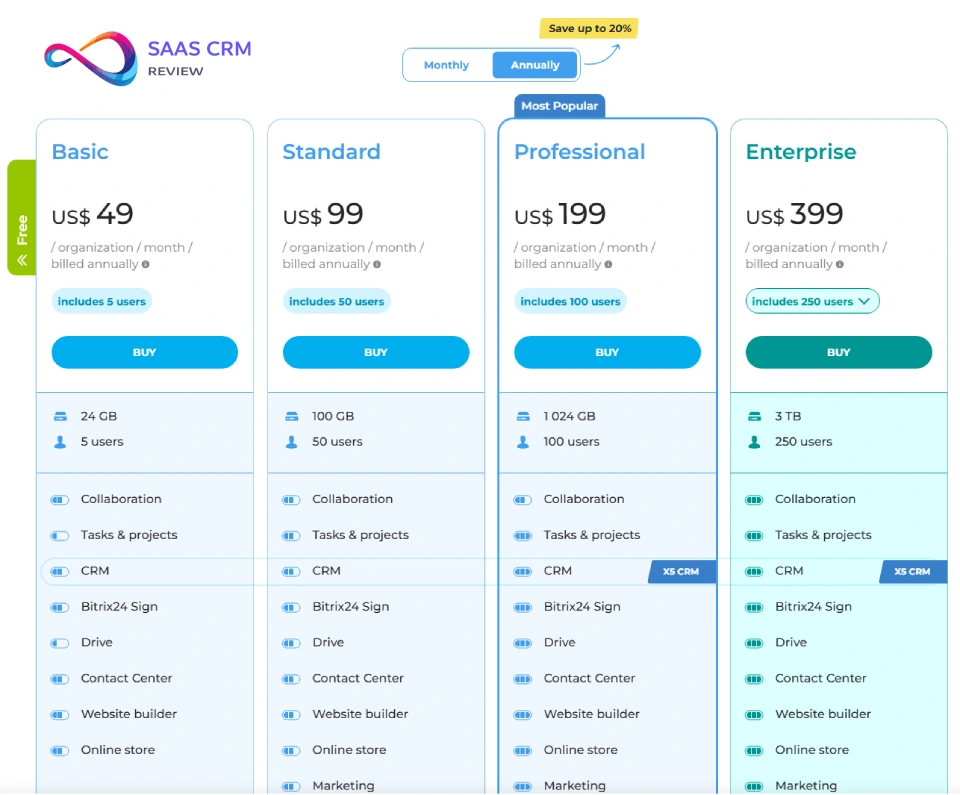
Bitrix24 uses a flat-fee subscription model where you pay for a plan that supports a specific number of users, rather than paying per seat. All plans include CRM, tasks, calendar, and collaboration tools. Here’s the full breakdown:
| Plan | Annual Price | Monthly Price | User Limit | Storage | Key Features |
|---|---|---|---|---|---|
| Free | $0 | $0 | Unlimited* | 5GB | Basic CRM, tasks, calendar, video calls, mobile app |
| Basic | $49/mo | $61/mo | Up to 5 | 24GB | CRM automation, basic workflows, email marketing |
| Standard | $99/mo | $124/mo | Up to 50 | 100GB | Marketing tools, advanced CRM, sales funnels |
| Professional | $199/mo | $249/mo | Up to 100 | 1TB | CoPilot AI, full automation, HR tools, webhooks |
| Enterprise 250 | $399/mo | $499/mo | Up to 250 | 3TB | Multi-branch, advanced security, dedicated support consultation |
| Enterprise 500 | $799/mo | $999/mo | Up to 500 | Custom | Scalable infrastructure, custom workflows |
| Enterprise 1000 | $1,599/mo | $1,999/mo | Up to 1,000 | Custom | Enterprise-grade security, unlimited storage, custom user limits available |
Sources: Pricing Bitrix24 as of Jan 2026
*The Free plan technically supports unlimited users, but 5GB storage fills quickly with email attachments and documents, forcing most teams over 10 users to upgrade.
On-Premise (Self-Hosted) Pricing
For companies requiring full data control, compliance, or extensive customization, Bitrix24 offers perpetual on-premise licenses:
- Business 50: ~$3,590 (50 users)
- Business 100: ~$5,990 (100 users)
- Business 250: ~$10,990 (250 users)
- Business 500: ~$17,990 (500 users)
- Enterprise 1000: ~$24,990 (1,000 users)
These are one-time fees for the license, plus an optional annual support renewal (typically 25-50% of the initial license cost). Self-hosting requires server management expertise and ongoing maintenance.
What You Actually Pay
Let’s break down the real economics:
Annual Discount: Bitrix24 offers a standard 20% discount when you pay annually vs monthly. For example, the Standard plan costs $99/month annually ($1,188/year) vs $124/month on a month-to-month basis ($1,488/year).
Flat-Fee Advantage: This is where Bitrix24 shines. Consider these scenarios:
- 10-person team on Basic: $49/month = $4.90/user/month
- 45-person team on Standard: $99/month = $2.20/user/month
- 90-person team on Professional: $199/month = $2.21/user/month
Compare this to per-user competitors:
- Salesforce Starter: $25/user/month → $2,250/month for 90 users
- HubSpot Sales Hub Professional: $90/user/month → $8,100/month for 90 users
The Gotcha: User caps create forced upgrades. If your 51st employee joins, you must jump from Standard ($99/month for 50 users) to Professional ($199/month for 100 users)—a 100% price increase for one additional user. Plan your growth accordingly.
Promotional Pricing: Bitrix24 frequently offers 20% discounts for new accounts or during holiday promotions. Check their pricing page for current offers before committing.
For a broader look at CRM costs, see our CRM pricing comparison guide.

Bitrix24 CRM Features Deep-Dive
Contact & Lead Management
Bitrix24 provides robust tools for organizing customers and prospects:
- Leads: Capture inquiries from website forms, phone calls, emails, and social media. Leads can be automatically created via CRM forms embedded on your site or through the Bitrix24 website widget.
- Contacts & Companies: Store individual contact details (name, email, phone) and link them to parent Companies. Custom fields allow you to track industry-specific data (e.g., property type for real estate, policy number for insurance).
- Duplicate Detection: Automatic deduplication prevents creating multiple records for the same customer.
- Import & Migration: Bulk import contacts from CSV files or migrate from other CRMs (though Bitrix24 doesn’t offer native Salesforce/HubSpot import—you’ll need manual CSV export/import or hire a migration partner).
Best for: Teams with high-volume inbound leads needing multi-channel lead capture.
Sales Pipeline & Deal Management
Bitrix24’s pipeline management is highly customizable:
- Unlimited Custom Pipelines: Create separate pipelines for different business units (e.g., Retail Sales, B2B Sales, Subscription Renewals). Each pipeline can have its own stages, fields, and automation rules.
- Sales Tunnels: Automatically move deals between pipelines based on triggers. For example, a deal in “Retail Sales” that exceeds $10,000 can auto-transfer to “Enterprise Sales” pipeline for specialized handling.
- Kanban View: Drag-and-drop deals between stages with visual progress tracking.
- Recurring Deals: Set up subscriptions and recurring revenue tracking.
- Product Catalog: Maintain a catalog with product names, SKUs, pricing, variants, and photos. Add products to deals, estimates, and invoices directly from the catalog.
CRM Automation & Workflows
This is where Bitrix24’s complexity becomes a competitive advantage for power users:
1. Automation Rules: Stage-based actions that trigger automatically when a deal moves to a specific stage. Examples:
- When deal reaches “Proposal Sent,” send email template to customer
- When deal moves to “Contract Signed,” create task for fulfillment team
- When deal is won, add commission record to sales rep’s account
2. Triggers: Event-based automation that monitors external customer actions:
- When customer opens email → move deal to “Hot Lead”
- When customer clicks proposal link → create task for sales rep to follow up
- When customer submits payment → move deal to “Paid” stage
3. Business Process Designer: A visual drag-and-drop tool for creating multi-step workflows (e.g., multi-level document approvals, onboarding sequences). Supports conditional logic (if/then), parallel tasks, and delays.
4. Smart Process Automation (SPA): Create custom CRM entities beyond standard Leads/Deals/Contacts. Examples include Service Orders, Rental Agreements, Warranty Claims, or Event Registrations. Each SPA can have its own fields, stages, automation rules, and integrations with the main CRM.
5. Robotic Process Automation (RPA): Task-based kanban workflows for internal processes like HR leave requests, procurement approvals, or IT ticket management.
Availability: Basic automation rules are available on Basic plans and above. Advanced workflows (Business Process Designer, SPA, RPA) require Standard or higher.
Source: Bitrix24 CRM Automation Documentation
AI-Powered Features (CoPilot)
Bitrix24’s CoPilot AI is available on Professional plans and above and provides three core capabilities:
- Call Transcription: Automatically converts phone call recordings to text (supports calls from 10 seconds to 1 hour). The transcript is searchable, allowing managers to review conversations without listening to full recordings.
- Call Summaries: AI generates a brief summary highlighting key discussion points (e.g., “Customer requested delivery change to March 15. Agreed to 10% discount for bulk order.”).
- Automatic Field Completion: CoPilot extracts data from call transcripts (names, dates, product interests, addresses) and auto-fills empty fields in the Lead or Deal form. If a field already has data, CoPilot prompts you to keep or replace it.
Limitations:
- Only works on calls made via Bitrix24 telephony integration (cloud PBX or connected office phone system)
- Requires users to have “Edit” permissions for the CRM item (Lead/Deal)
- Must be enabled in account settings by admin
Source: Bitrix24 CoPilot in CRM Helpdesk
Communication Channels
Bitrix24 consolidates customer communication into one interface:
- Telephony: Built-in cloud PBX or integrate existing office phone systems. Call tracking, recording, and click-to-call from CRM.
- Live Chat: Website widget for real-time customer support. Chat transcripts auto-save to CRM.
- Email Integration: Connect Gmail, Outlook, or custom IMAP/SMTP mailboxes. All email threads are logged in customer timeline.
- Social Media & Messengers: Connect WhatsApp, Facebook Messenger, Instagram, Telegram, Viber, and more via the Contact Center.
- Video Conferencing: HD video calls with unlimited duration (even on Free plan). Screen sharing and call recording on paid plans.
- Mobile App: Full-featured iOS and Android apps with offline mode and push notifications.
Reporting & Analytics
Bitrix24 offers pre-built and custom reporting:
- Pre-Built Reports: Sales funnel conversion rates, deal win/loss rates, pipeline velocity, revenue forecasting, and activity tracking (calls, emails, meetings).
- Custom Reports: Build reports with SQL-like filters (e.g., “Show all deals > $5,000 in ‘Proposal’ stage for Northeast region”).
- Sales Forecasting: Predict future revenue based on pipeline stages and historical win rates.
Limitations: Advanced analytics and custom dashboards are restricted to Standard plans and above. Free plan users get basic list views only.

Integrations & Extensibility
Native Integrations
The Bitrix24 Marketplace offers 600+ native apps across categories:
- Accounting: QuickBooks, Xero, FreshBooks
- Telephony: Twilio, RingCentral, Vonage
- E-Signature: DocuSign, PandaDoc
- Marketing: Mailchimp, SendGrid, Constant Contact
- Productivity: Google Workspace, Microsoft 365, Dropbox
Third-Party Platforms
- Zapier: Connect Bitrix24 to 5,000+ apps (available on Standard plans and above)
- Make (Integromat): Advanced multi-step workflow automation with conditional logic
- API: Comprehensive REST API for custom integrations and app development
Developer Friendliness
- Well-documented API with code samples in PHP, Python, JavaScript
- Webhook support for real-time event notifications
- Self-hosted version allows complete source code customization
Read our full: Nuclino Review 2026
User Experience & Implementation
Learning Curve
Straight talk: Bitrix24 is not easy to use. Per 1,500+ user reviews, the most common complaint is the steep learning curve. Here’s why:
- Feature Overload: The platform includes 35+ modules (CRM, Projects, HR, Drive, Sites, etc.). New users struggle to find settings buried in sub-menus.
- Setup Complexity: Configuring pipelines, automation rules, user permissions, and integrations requires technical expertise. Most successful implementations involve hiring a Bitrix24 partner ($1,000-$5,000 for setup).
- Time to Value: Expect 2-4 weeks for basic CRM setup and 1-3 months for full platform customization with automation and integrations.
Training Resources:
- Bitrix24 Academy: Free video tutorials covering core features
- Helpdesk: 1,000+ articles (though navigation can be cumbersome)
- Implementation Partners: Global network of certified consultants
Interface & Usability
Pros:
- Customizable dashboards with drag-and-drop widgets
- Mobile apps are robust with offline mode and push notifications
Cons:
- Cluttered UI: Too many icons, buttons, and menu items create visual noise
- Dated Design: Compared to modern SaaS tools like Monday or ClickUp, Bitrix24’s interface feels older
- “Too Many Clicks”: Common user complaint (from G2 reviews) about needing 3-5 clicks to perform simple tasks
User Sentiment: Capterra reviews praise Bitrix24’s depth but criticize its “overwhelming” UX for non-technical teams.
Implementation Support
- DIY: Free helpdesk articles and community forum (slow response times)
- Email Support: Available on paid plans with 24-48 hour response times (per review feedback)
- Implementation Partners: Recommended for teams over 20 users or complex workflows
- Migration: No native import tools for Salesforce or HubSpot. Manual CSV export/import or hire specialist.
For best practices, see our CRM implementation checklist.
Security & Compliance
Data Security
- Encryption: Bitrix24 states it uses TLS-encrypted connections and offers security layers such as 2FA and backups.
- Hosting: Cloud plans hosted on AWS with data centers in US, EU, and other regions. Choose your region for data residency compliance.
- Backups: Automatic daily backups on all cloud plans
- Access Control: Role-based permissions with granular control over who can view/edit/delete CRM records
- Two-Factor Authentication (2FA): Available on all plans
Compliance
- GDPR Compliant: Data processing agreements, right-to-erasure tools, and data portability features. See Bitrix24 GDPR page.
- HIPAA: Not certified. Not recommended for healthcare providers managing protected health information (PHI).
- SOC 2: Bitrix24 states it provides protections to operate in compliance with HIPAA/GDPR frameworks; confirm BAA/SOC2 needs with vendor during procurement.
- Regional Considerations: Bitrix24’s Russian origin may raise compliance concerns for US government contractors or highly regulated industries (defense, finance). Consult your legal team if this applies.
For more on CRM security, see our CRM data security best practices guide.
Customer Support & Resources
Support Channels
- Free Plan: Community forum and helpdesk articles only (no email support)
- Paid Plans (Basic/Standard/Professional): Email support with 24-48 hour average response times (per G2 and Capterra reviews)
- No Phone Support on plans below Enterprise
- Enterprise Plans: Dedicated account manager and priority support consultation
Self-Service Resources
- Bitrix24 Helpdesk: Comprehensive knowledge base with 1,000+ articles covering features, troubleshooting, and best practices
- Bitrix24 Academy: Free video tutorials and certification courses
- Community Forum: Active user community for peer support
User Sentiment
Common Complaints (from G2 reviews):
- Slow email response times (24-48 hours is too long for urgent issues)
- Support staff sometimes refers users to documentation instead of providing direct answers
- Lack of phone support frustrates teams needing real-time troubleshooting
Praise:
- Documentation is detailed and helpful for self-starters
- Community forum has experienced users who provide practical advice
G2 Support Rating: 4.0/5 (below average for enterprise CRM platforms)
Bitrix24 CRM Pros & Cons
Pros ✓
- Flat-fee pricing saves 10x vs per-user competitors for teams of 20-250 users (e.g., 90-person team pays $199/month vs $2,250/month on Salesforce)
- Unlimited users on Free plan (vs 2-5 on HubSpot, Zoho, Freshsales)—ideal for startups and small businesses
- All-in-one platform eliminates need for separate subscriptions to project management, video conferencing, and team chat tools
- Deep automation capabilities (automation rules, triggers, workflows, SPA) rival enterprise platforms like Salesforce
- AI-powered CoPilot for call transcription, summaries, and auto-filling CRM fields (Professional+ plans)
- Self-hosted option for enterprises requiring full data control, compliance, or custom code
- Robust mobile apps (iOS/Android) with offline mode for managing CRM on the go
- No long-term contracts on cloud plans (cancel anytime)
Cons ✗
- Steep learning curve and overwhelming UI for non-technical teams (2-4 weeks minimum setup time)
- Slow customer support (24-48 hour email response; no phone support below Enterprise tier)
- Feature bloat: All-in-one approach creates clutter—many teams only use 30-40% of available tools
- 5GB storage on Free plan fills quickly with email attachments and call recordings
- User caps on paid plans force expensive tier jumps (e.g., 51st user requires $100/month price increase from Standard to Professional)
- Setup complexity requires hiring implementation partner ($1,000-$5,000) for most teams over 20 users
- Dated UI design compared to modern SaaS competitors like Monday, ClickUp, or Pipedrive
- Russian origin may raise compliance concerns for US government contractors or regulated industries
User Ratings
- Capterra: 4.2/5 stars (978 reviews)
- G2: 4.1/5 stars (591 reviews)
Common User Praise: “Best value for money,” “All-in-one platform,” “Powerful automation”
Common User Complaints: “Too complex,” “Slow support,” “Cluttered interface”
Sources: Capterra Bitrix24 Reviews | G2 Bitrix24 Reviews as of Jan 2026
Who Should Use Bitrix24 CRM?
Best For ✓
- Cost-conscious teams of 20-250 users wanting flat-fee savings (especially if you’re near the top of a pricing tier, e.g., 45 users on Standard plan)
- Remote teams needing CRM + video conferencing + team chat in one platform (avoid paying for Zoom, Slack, and Salesforce separately)
- Project-based businesses (agencies, construction, consulting) that need integrated CRM and task management
- High-volume lead generation teams (real estate, insurance, automotive, B2C sales) needing multi-channel lead capture
- Technical teams comfortable with complex setup and willing to invest 4-8 weeks in configuration and training
- Regulated industries requiring self-hosted CRM for compliance (finance, legal, industrial)
Not Ideal For ✗
- Non-technical teams wanting plug-and-play CRM with minimal setup (choose HubSpot or Pipedrive instead)
- Enterprise sales teams needing Salesforce-level reporting, CPQ (Configure-Price-Quote), and AI forecasting
- Healthcare providers requiring HIPAA-compliant CRM (Bitrix24 is not HIPAA certified)
- Teams needing 24/7 phone support (Bitrix24 offers email-only support below Enterprise tier)
- Single-purpose CRM users who don’t need project management, HR, or document collaboration features (the all-in-one approach creates unnecessary complexity)
Best Alternatives to Bitrix24 CRM
If Bitrix24’s complexity or learning curve doesn’t fit your needs, here are five alternatives based on your primary requirement:
Alternative Comparison Table
| CRM | Starting Price | Best For | Key Advantage vs Bitrix24 |
|---|---|---|---|
| HubSpot CRM | Free (forever); paid from $20/user/month | Marketing automation + CRM | Easier UI, superior email marketing, better onboarding |
| Pipedrive | $14/user/month | Sales-focused simplicity | Pipeline-only focus, 1-week setup vs 1-month |
| Zoho CRM | $14/user/month | Budget + customization balance | Similar feature depth, cleaner interface, better mobile UX |
| Monday Sales CRM | $12/user/month | Visual project-CRM hybrid | Modern UI, color-coded boards, faster team adoption |
| Salesforce Sales Cloud | $25/user/month | Enterprise sales teams | Best-in-class reporting, AppExchange (3,000+ apps), dedicated support |
1. HubSpot CRM
Price: Free (forever); Sales Hub Professional from $90/user/month
Best for: Marketing automation + CRM integration
Advantages over Bitrix24:
- Easier to use: 1-week onboarding vs 4-week for Bitrix24
- Superior email marketing: Drag-and-drop email builder, A/B testing, advanced segmentation
- Marketing-sales alignment: Seamless handoff from marketing campaigns to sales pipelines
Tradeoffs:
- Per-user pricing becomes expensive at scale (50 users = $4,500/month on Professional vs $199/month on Bitrix24)
- Free plan limited to 2 users (vs unlimited on Bitrix24)
Choose HubSpot if: You prioritize marketing automation, inbound sales, and ease of use over cost savings. Read our full HubSpot CRM review
2. Pipedrive
Price: $14/user/month (Essential plan)
Best for: Sales teams wanting simplicity and pipeline-centric workflows
Advantages over Bitrix24:
- Pipeline-only focus: No feature bloat—just leads, deals, activities, and reports
- Faster onboarding: 1-week setup vs 1-month for Bitrix24
- Intuitive UI: Consistently rated “easiest to use” CRM on G2
Tradeoffs:
- No built-in project management, video conferencing, or HR tools
- Per-user pricing (vs flat-fee on Bitrix24)
Choose Pipedrive if: You only need CRM (not all-in-one platform) and prioritize speed-to-value.
3. Zoho CRM
Price: $14/user/month (Standard plan)
Best for: Customization + budget balance
Advantages over Bitrix24:
- Similar feature depth (automation, workflows, AI) but cleaner interface
- Better mobile UX (4.5/5 on app stores vs 4.0/5 for Bitrix24)
- Stronger third-party ecosystem (Zoho Marketplace + Zapier)
Tradeoffs:
- Per-user pricing scales linearly (100 users = $1,400/month vs $199/month on Bitrix24)
Choose Zoho if: You want Bitrix24’s customization power without the overwhelming UI.
4. Monday Sales CRM
Price: $12/user/month (Basic CRM plan)
Best for: Visual, project-CRM hybrid teams
Advantages over Bitrix24:
- Modern UI: Color-coded boards, drag-and-drop simplicity
- Faster team adoption: Non-technical users get up to speed in days, not weeks
- Project-CRM integration: Native task management with CRM workflows
Tradeoffs:
- Less mature automation vs Bitrix24’s Business Process Designer
- Per-user pricing
Choose Monday if: Team prefers visual kanban boards over traditional CRM layouts.
5. Salesforce Sales Cloud
Price: $25/user/month (Starter); $165/user/month (Enterprise)
Best for: Enterprise sales teams needing best-in-class reporting and scalability
Advantages over Bitrix24:
- Superior reporting: Customizable dashboards, AI forecasting (Einstein), revenue intelligence
- AppExchange: 3,000+ third-party apps vs 500 on Bitrix24 Marketplace
- Dedicated support: 24/7 phone support, success managers, consulting ecosystem
Tradeoffs:
- 10x more expensive for large teams (100 users = $2,500-$16,500/month vs $199/month on Bitrix24)
- Steeper learning curve (though better documentation and training)
Choose Salesforce if: You’re an enterprise sales team needing CPQ, territory management, and advanced forecasting—and cost isn’t a constraint.
Source: TechRadar Best Free CRM ComparisonSee our full Salesforce vs HubSpot comparison

Frequently Asked Questions (FAQs)
Is Bitrix24 really free?
Yes. The Free plan supports unlimited users with access to basic CRM, task management, calendar, and HD video conferencing. However, there are significant limitations: 5GB storage (fills quickly with email attachments and call recordings), no automation rules or triggers, no AI CoPilot, and no Zapier integration. The Free plan works well for teams under 10 users with simple CRM needs, but most businesses outgrow it within 6-12 months.
How much does Bitrix24 cost for 20 users?
For 20 users, you’d use the Standard plan (supports up to 50 users):
- Annual billing: $99/month = $4.95/user/month
- Monthly billing: $124/month = $6.20/user/month
This is significantly cheaper than per-user competitors. For comparison, the same 20 users on Salesforce Starter ($25/user/month) would cost $500/month—5x more expensive.
What is CoPilot in Bitrix24?
CoPilot is Bitrix24’s AI assistant (available on Professional plans and above) that:
- Transcribes phone calls from speech to text (supports 10 seconds to 1-hour calls)
- Generates call summaries highlighting key discussion points
- Auto-fills CRM fields by extracting data (names, dates, product interests) from call transcripts
Limitation: CoPilot only works on calls made via Bitrix24 telephony integration (cloud PBX or connected phone system). It won’t transcribe calls from external phone systems unless integrated.
Learn more about CoPilot features
Can I self-host Bitrix24?
Yes. Bitrix24 offers on-premise licenses for companies requiring full data control, compliance, or extensive customization. Pricing starts at $3,590 for 50 users (perpetual license). Self-hosting requires:
- Server infrastructure (Linux or Windows)
- IT staff for installation, updates, and maintenance
- Optional annual support renewal (25-50% of license cost)
Self-hosted Bitrix24 is ideal for regulated industries (finance, legal, healthcare) or companies needing complete source code access.
Does Bitrix24 integrate with Zapier?
Yes, but only on Standard plans and above. Bitrix24’s Zapier integration unlocks 5,000+ app connections (Google Sheets, Slack, Trello, Stripe, etc.). The Free and Basic plans don’t include Zapier access—you’re limited to native integrations from the Bitrix24 Marketplace.
Is Bitrix24 better than HubSpot?
It depends on your priorities:
Choose Bitrix24 if:
- You want flat-fee pricing (vs per-user on HubSpot)
- You need CRM + project management + collaboration in one platform
- You have 20+ users (cost savings become significant)
Choose HubSpot if:
- You prioritize marketing automation and email campaigns
- You want plug-and-play setup (1 week vs 4 weeks for Bitrix24)
- You need superior customer support (HubSpot offers phone support, Bitrix24 email only)
Bottom line: Bitrix24 is more cost-effective for mid-sized teams; HubSpot is easier to use and better for marketing-first workflows. Read our full HubSpot vs Bitrix24 comparison
Is Bitrix24 easy to use?
No. Per 1,500+ user reviews, Bitrix24 has a steep learning curve. The platform includes 35+ modules (CRM, Projects, HR, Sites, etc.), creating decision fatigue for new users. Setup requires 2-4 weeks minimum, and many teams hire implementation partners ($1,000-$5,000) to configure pipelines, automation, and permissions correctly. The UI is cluttered and dated compared to modern SaaS tools like Monday or ClickUp.
Best for: Technical teams or those willing to invest in training.
Not ideal for: Non-technical teams wanting fast onboarding.
What are the limitations of Bitrix24 free plan?
- 5GB storage (fills quickly with email attachments, call recordings, and documents)
- No automation rules or triggers (manual workflows only)
- No AI CoPilot (call transcription and summaries unavailable)
- No Zapier integration (limited to native Bitrix24 Marketplace apps)
- Basic reporting only (no custom dashboards or advanced analytics)
- Community support only (no email or phone support)
Most teams with 10+ users or growing sales operations outgrow the Free plan within 6-12 months.
Can Bitrix24 replace Salesforce?
For small and mid-sized businesses, yes. Bitrix24 covers 80% of Salesforce’s core CRM features (contact management, pipelines, automation, reporting) at 10% of the cost. However, Salesforce wins for:
- Enterprise-grade reporting and forecasting (Einstein AI, custom dashboards)
- CPQ (Configure-Price-Quote) for complex product configurations
- Dedicated support ecosystem (24/7 phone support, success managers, consulting partners)
- AppExchange depth (3,000+ apps vs 500 on Bitrix24 Marketplace)
Choose Bitrix24 if: You’re an SMB (under 250 employees) focused on cost efficiency.
Choose Salesforce if: You’re an enterprise sales team needing advanced forecasting and territory management.
Is Bitrix24 GDPR compliant?
Yes. Bitrix24 provides:
- GDPR-compliant data processing agreements
- Data portability (export customer data in standard formats)
- Right-to-erasure tools (delete customer records on request)
- EU data centers for regional data residency
Read Bitrix24’s GDPR compliance page
Note: Bitrix24 is not HIPAA certified, so it’s not recommended for healthcare providers managing protected health information (PHI).
Does Bitrix24 have good customer support?
Mixed reviews. Here’s the breakdown:
- Free plan: Community forum and helpdesk articles only (no direct support)
- Paid plans: Email support with 24-48 hour response times (per G2 and Capterra reviews)
- No phone support on Standard and below (Enterprise plans get priority consultation)
User sentiment:
- Complaints: Slow response times, support staff often refers users to documentation instead of solving issues directly
- Praise: Comprehensive helpdesk knowledge base (1,000+ articles) helps self-starters troubleshoot independently
G2 Support Rating: 4.0/5 (below average for enterprise CRM platforms)
What is Smart Process Automation (SPA) in Bitrix24?
Smart Process Automation (SPA) allows you to create custom CRM entities beyond standard Leads, Deals, and Contacts. Examples:
- Service Orders (for field service businesses)
- Rental Agreements (for equipment leasing)
- Warranty Claims (for product returns)
- Event Registrations (for conference organizers)
Each SPA can have:
- Custom fields and forms
- Unique stages and pipelines
- Dedicated automation rules and triggers
- Integration with main CRM (link SPAs to Contacts, Companies, or Deals)
Available on: Standard plans and above.
SPA is a powerful feature for businesses with specialized workflows that don’t fit standard CRM models.
Is Bitrix24 suitable for small businesses?
Yes, with caveats. The Free plan is excellent for startups and micro-businesses (under 10 users) needing basic CRM, task management, and collaboration tools. However:
Challenges for small businesses:
- Setup complexity may require hiring a consultant ($1,000-$5,000)
- Learning curve is steep—non-technical teams struggle with configuration
- Limited support on Free plan (community forum only)
Better alternatives for non-technical small businesses:
- HubSpot CRM (easier onboarding, free forever)
- Pipedrive (simple pipeline-centric CRM at $14/user/month)
Choose Bitrix24 if: Your small business has a technical team member or budget for implementation support.
Final Recommendation: Is Bitrix24 CRM Worth It in 2026?
Direct answer: Bitrix24 CRM is worth it in 2026 if you:
- Have 20-250 users and want flat-fee savings (5-10x cheaper than Salesforce/HubSpot)
- Need CRM + project management + collaboration in one platform (avoid paying for Asana, Zoom, and Salesforce separately)
- Have technical resources or budget for implementation partners ($1,000-$5,000 setup cost)
- Value deep automation capabilities (automation rules, triggers, workflows, Smart Process Automation)
Skip Bitrix24 if you need plug-and-play simplicity, 24/7 phone support, or HIPAA compliance.
Final Verdict
Our Rating: 4.0/5
Strengths:
- Unbeatable flat-fee pricing for mid-sized teams (e.g., 90 users pay $199/month vs $2,250/month on Salesforce)
- Unlimited users on Free plan (vs 2-5 on competitors)
- Deep automation and AI (CoPilot, Business Process Designer, Smart Process Automation)
- Self-hosted option for compliance-driven industries
Weaknesses:
- Steep learning curve (2-4 weeks setup minimum) and cluttered UI
- Slow customer support (24-48 hour email response; no phone support below Enterprise)
- Feature bloat overwhelms teams needing simple CRM
- 5GB storage on Free plan limits growth potential
Who Wins?
- Bitrix24 wins vs Salesforce/HubSpot on cost (10x cheaper for 50+ users)
- Pipedrive/Monday win vs Bitrix24 on ease of use (1-week onboarding vs 4 weeks)
- HubSpot wins vs Bitrix24 on marketing automation and email campaigns
Next Steps
- Try the Free plan (no credit card required) — Sign up for Bitrix24 Free
- Test with 5-10 users first before full team rollout
- Budget for implementation partner ($1,000-$5,000) if your team has 20+ users or complex workflows
- Compare alternatives:
- HubSpot (if you prioritize marketing automation)
- Pipedrive (if you need simplicity)
- Salesforce (if you’re an enterprise sales team)
Call-to-Action: Ready to explore Bitrix24? Start with the Free plan or compare CRM alternatives to find your best fit.
About the author

I’m Macedona, an independent reviewer covering SaaS platforms, CRM systems, and AI tools. My work focuses on hands-on testing, structured feature analysis, pricing evaluation, and real-world business use cases.
All reviews are created using transparent comparison criteria and are updated regularly to reflect changes in features, pricing, and performance.