Picking the best wireframing tool is rarely a drawing problem.
It is a fidelity problem, a plan-gate problem, and a handoff problem, and the wrong answer surfaces two months later when a free board cap lands or a prototype cannot express a simple condition.
Figma takes the top position because one file carries a rough wireframe through to a clickable prototype and developer handoff without a tool change.
Balsamiq is the better buy when the point of the exercise is to stop a team from designing too early. Miro is the cheaper answer when wireframes belong inside a workshop rather than a design file.
Every price, cap, and plan gate below was read from official vendor pages on August 14, 2026. Each tool is judged as one part of the wider stack of AI prototyping tools a product team already runs.
In This Article (18 sections)
Quick Verdict: Best Wireframing Tool by Use Case
| Use case | Best pick | Why it fits |
|---|---|---|
| One tool from wireframe to prototype and handoff | Figma | Professional adds unlimited files and folders, advanced prototyping, and developer handoff |
| Deliberately low-fidelity stakeholder review | Balsamiq | Structure-first wireframes with unlimited reviewers who cannot edit |
| Fast product-trio flows | Whimsical | Wireframe mode connects screens into lightweight flows |
| Code-backed design-system work | UXPin | Core carries conditional logic, variables and expressions, and coded libraries |
| Logic-heavy application specifications | Axure RP | Wireframes sit beside functional prototypes and cloud review |
| A first draft without a designer | Visily | Prompts and screenshots produce an editable starting screen |
| Tightest per-seat budget | Miro | Starter is the lowest per-member paid entry in this ranking |
| Wireframe-first agency delivery | MockFlow WireframePro | A dedicated wireframe workspace with handoff and Figma export |
| Forms and data-rich interaction | Justinmind | Forms, interactive preview, and a large UI-element library |
| Sketch to editable screen on a free plan | Uizard | The wireframe scanner turns a hand drawing into editable UI |
Source: every reason in the right-hand column is documented on the official pages cited in each tool’s section below, including Axure RP wireframe overview and MockFlow WireframePro workspace, checked August 14, 2026.
Two of those rows carry the whole decision. If the wireframe has to survive contact with engineering, buy for the handoff path, and if it only has to survive a stakeholder meeting, buy for the constraint.
Teams that also need administrative identity controls should read the collaboration section before shortlisting, because that gate sits on a different tier for every vendor here.
Which Job Each Wireframing Tool Covers
Ten products in one ranking does not mean ten products competing for the same job. This matrix is an editorial assessment of documented feature scope, not a test result, and every cell is limited to what the vendor publishes.
| Tool | Structure-first wireframing | Clickable flow | Conditional or data logic | Code-backed components | Documented downstream path |
|---|---|---|---|---|---|
| Figma | Yes | Yes | Not documented | Not documented | By plan |
| Balsamiq | Yes | Yes | Not documented | Not documented | Not documented |
| Whimsical | Yes | Limited | Not documented | Not documented | Not documented |
| UXPin | Yes | Yes | Yes | Yes | Not documented |
| Axure RP | Yes | Yes | Yes | Not documented | Yes |
| Visily | Yes | Yes | Not documented | Not documented | By plan |
| Miro | Yes | Yes | Not documented | Not documented | Not documented |
| MockFlow WireframePro | Yes | Limited | Not documented | Not documented | Yes |
| Justinmind | Yes | Yes | Yes | Not documented | By plan |
| Uizard | Yes | Yes | Not documented | Not documented | Yes |
Source: these capability judgements are an editorial reading of the official product and documentation pages cited inside each tool’s own section below. Two examples are Figma wireframe kit templates and MockFlow prototyping documentation, both checked August 14, 2026.
Balsamiq, Whimsical, Visily, MockFlow WireframePro, and Uizard compete directly for the same early screen. UXPin, Axure RP, and Justinmind compete on behavior instead, and Figma and Miro are the two that also own a job much larger than wireframing.
How We Chose and Ranked These Tools
These rankings are based on official pricing pages, official product and documentation pages, and the plan limits published on them. Pricing and plan limits were checked on August 14, 2026.
Each tool was assessed against the same buyer-focused criteria: wireframing speed, collaboration model, prototype depth, downstream handoff, plan restrictions, administrative controls, and cost structure.
Greater weight was given to factors that change a purchase decision, including the cheapest plan that supports the required workflow, the first hard cap a team meets, and the tier where identity controls begin. Brand popularity and affiliate relationships did not influence the ranking.
Claims that could not be verified from official evidence were excluded rather than softened. Temporary pricing offers are separated from standard pricing and re-checked on the publication date.
Best Wireframing Tools Compared: Price, Cap, Depth, and Disqualifier
| Tool | Best micro-cohort | Paid entry (US) | First hard cap | Prototype depth | Main disqualifier |
|---|---|---|---|---|---|
| Figma | 3 to 15 person product-design squads | $16 per full seat, monthly view | Starter limits file and folder access | Clickable, plus advanced prototyping on Professional | A team that wants polish blocked during discovery |
| Balsamiq | PM, analyst, founder, and consultant workflows | $16 per editor, billed annually | Starter allows up to 10 projects | Sketch-level interactive flows | Production-grade visual design in the same tool |
| Whimsical | Product trios and engineering squads | $10 per editor, billed annually | Free allows 3 team boards | Lightweight connected flows | Conditional logic or coded components |
| UXPin | 5 to 50 person design-system teams | $29 per seat, annual-price view | Core keeps 7-day version history | Conditional logic, variables, expressions | Fast sketching as the only requirement |
| Axure RP | Enterprise UX and business-analyst teams | $29 per user per month | Co-authoring sits on the Team plan | Functional prototypes with states and conditions | Browser-first lightweight collaboration |
| Visily | Founders, PMs, and analysts without designers | $11 per editor, billed annually | Starter allows 2 editable boards | Editable AI-generated screens with linking | Identity controls demanded on a low-cost tier |
| Miro | Distributed workshop and discovery teams | $8 per member, billed annually | Free allows 3 editable boards | Board-level wireframe and prototyping components | Logic-heavy prototyping or production UI |
| MockFlow WireframePro | Agencies delivering wireframes to clients | $14 per user, starting annual rate | Free allows 1 project with 3 pages | Vendor-described lightweight prototyping | Advanced conditional behavior |
| Justinmind | UX teams validating forms and data | $19 per editor per month | Free allows 1 project | Forms, variables, and device preview | A browser whiteboard is all that is needed |
| Uizard | Founders and consultants converting sketches | $12 per month, billed annually | Free allows 2 projects and 5 screens | Editable screens linked into a prototype | Deep component governance on lower tiers |
Source: Figma plan tiers, Balsamiq plan tiers, and Whimsical plan tiers. Then UXPin plan tiers and Axure plan tiers. Also Visily plan tiers, Miro plan tiers, and MockFlow plan tiers. Finally Justinmind plan tiers and Uizard plan tiers, all checked August 14, 2026.
Read that table by column, not by row. The paid-entry column spreads from $8 to $29 per person, the prototype-depth column splits the field into two groups that barely compete, and the disqualifier column is the one that removes tools from a shortlist fastest.
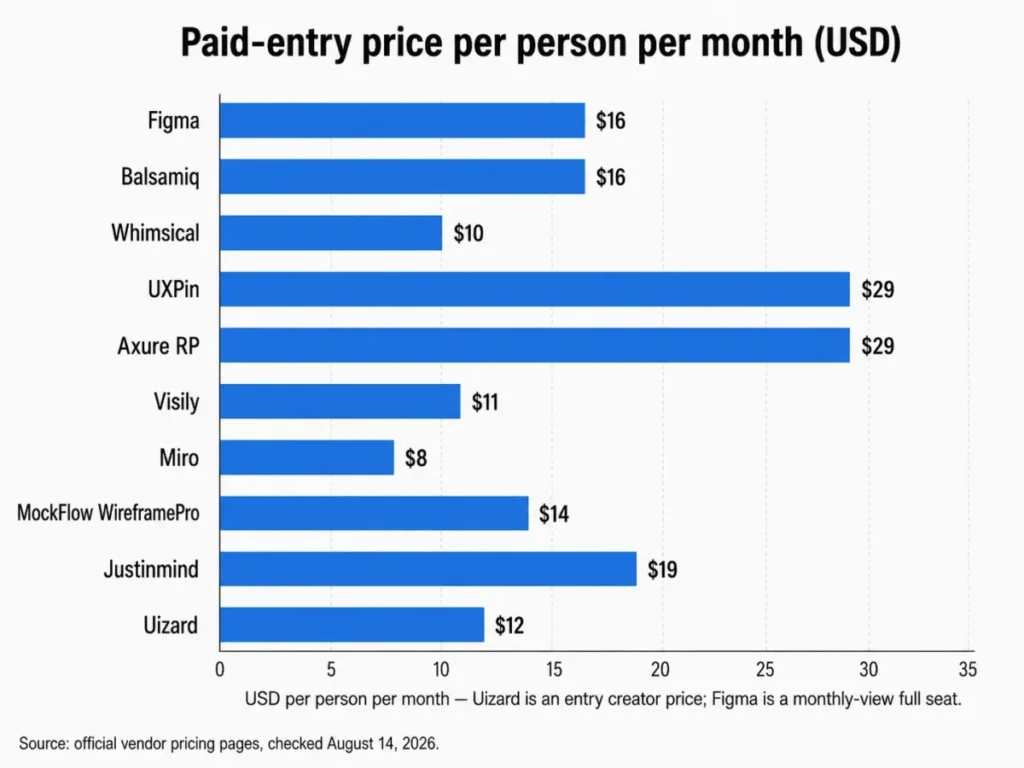
The spread matters less than the billing basis behind it. Four of these prices assume annual billing, one is a monthly-view seat price, and one is an entry creator price whose multi-seat behavior is not published, so a straight price ranking would mislead a buyer comparing five editors.
The Three Problems Every Wireframing Buyer Faces
Most shortlists collapse when a buyer treats wireframing as one capability. It is three separate decisions, and each one eliminates different tools.
The first is fidelity. A wireframe exists to argue about structure, so a tool that makes visual polish easy can quietly turn a structure review into a color review.
The second is behavior. Linking screen A to screen B is a different engineering problem from simulating a form that validates input, branches on a condition, and remembers state.
The third is origin and destination. Somebody has to make the first screen, and something has to happen to it after approval, and those two ends decide switching cost more than the drawing experience does.
Fidelity and interactivity are separate axes, and the common mistake is to compare tools on one line.
Balsamiq sits low on fidelity and low on interactivity by design. UXPin and Axure RP sit high on interactivity while still supporting low fidelity, and Figma sits mid on both with room to climb in either direction.
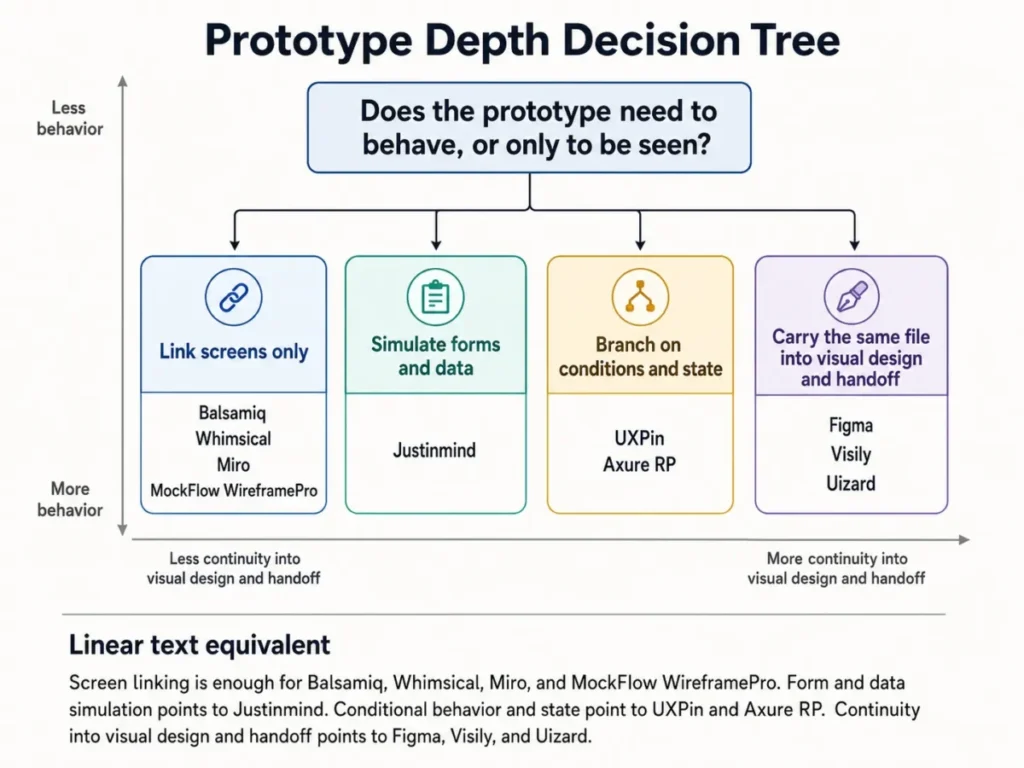
In reading order, that tree says four things. Screen linking is enough for Balsamiq, Whimsical, Miro, and MockFlow WireframePro; form and data simulation points to Justinmind; conditional behavior and state point to UXPin and Axure RP; and continuity into visual design and handoff points to Figma, Visily, and Uizard.
Buying one branch higher than the requirement is the expensive mistake. The tools that simulate behavior cost $29 per person at entry, against $8 to $16 for the tools that link screens, and that gap compounds across every editor a team adds.
Teams that already standardize on shared boards should also weigh how much of this work belongs in their existing small business collaboration software before adding another seat-based subscription.
Tools That Solve the Fidelity Problem Best
Fidelity is where the first three tools separate. One keeps the door open to higher fidelity, one closes it deliberately, and one keeps the whole exercise short.
1. Figma: Best Overall for Wireframe-to-Prototype Continuity
- Best for:
- 3 to 15 person product-design squads that want one file to carry a wireframe through to an interactive prototype and developer handoff.
- Avoid if:
- the team needs a deliberately constrained sketch environment that discourages visual detail work during discovery.
- Starting price:
- Starter is free with limited access.
- Practical tier:
- Professional at $16 per full seat per month on the monthly view.
- Free plan:
- Yes. Starter, with limited access rather than unlimited files and folders.
- First limit that bites:
- Starter’s limited file and folder access, which Professional replaces with unlimited files and folders.
- Better than Balsamiq:
- the approved wireframe keeps working in the same workspace through advanced prototyping and developer handoff.
- Worse than Balsamiq:
- nothing in the environment discourages a reviewer from arguing about spacing while the structure is still unsettled.
- Setup difficulty:
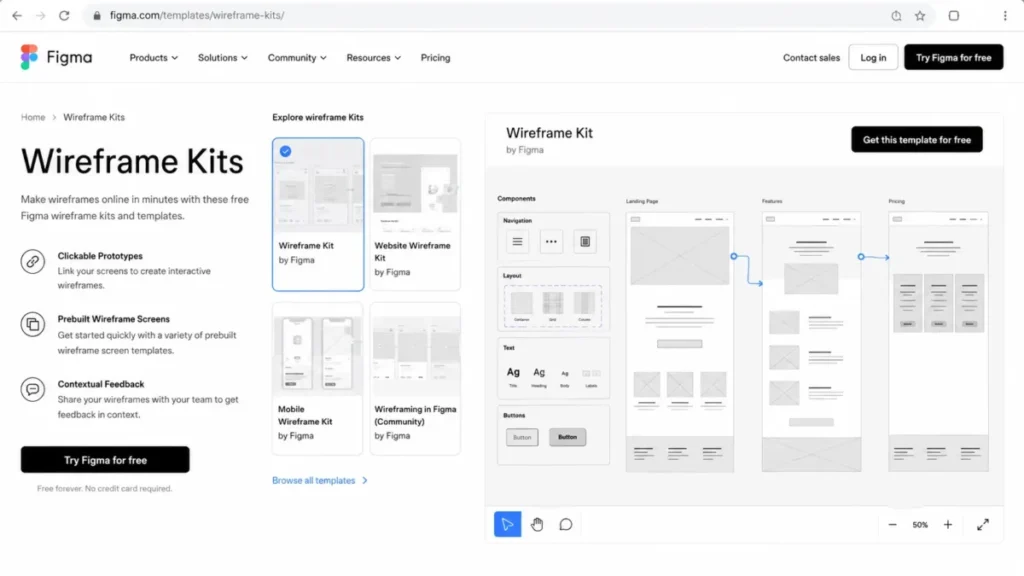
- Low. The workflow runs in the browser and a wireframe kit supplies reusable components.
- Hidden costs:
- every contributor who edits needs a full seat, so the bill tracks the number of people who touch the file rather than the number of designers.
- Evidence status:
- Professional full-seat price, plan scope, and the kit-based wireframing workflow were verified on Figma’s own pricing and wireframe-kit pages, checked August 14, 2026.
The reason Figma ranks first is not drawing quality. It is that the documented path from a grey-box screen to a shared clickable link to a developer handoff never leaves the file, which removes the export step where most wireframing tools lose fidelity and comments.
Figma’s wireframe kits supply reusable components, and screens connect into a prototype link that a stakeholder opens in a browser. That combination is what makes a wireframe survive the meeting it was drawn for.
The tradeoff is real and it is the opposite of Balsamiq’s. Nothing about the canvas signals “this is a draft”, so a discovery review can drift into a visual review unless the team sets that rule itself.
Professional is the tier that matters for a working squad, because unlimited files and folders plus advanced prototyping and developer handoff are what Starter does not carry. Budget five paid editors at $80 per month before add-ons, and note that the $16 figure is the monthly view rather than an annual-equivalent rate.
Teams weighing the wider platform against wireframing alone should read the full Figma review before committing seats.
| Pros | Cons |
|---|---|
| Professional carries unlimited files and folders, advanced prototyping, and developer handoff | Starter’s limited access stops a real multi-project workflow quickly |
| Wireframe kits provide reusable components instead of redrawn boxes | The canvas gives no signal that a screen is meant to stay rough |
| Screens connect into a clickable prototype link inside the same file | Every editing contributor consumes a full seat |
| The approved wireframe does not need an export to continue into visual design | The $16 figure is a monthly-view seat price, not an annual-equivalent rate |
| Browser-based access keeps reviewers out of an install cycle | Conditional prototype logic is not part of the evidence set here |
Source: Figma pricing and Figma wireframe kits, checked August 14, 2026.
- Verdict:
- Choose Figma if the wireframe is the first step of a design process that ends in engineering handoff, and skip it if the team needs an environment that actively refuses to look finished.
2. Balsamiq: Best for Low-Fidelity Clarity

- Best for:
- PM-led teams, founders, consultants, and business analysts who need fast structure-first wireframes and free reviewers.
- Avoid if:
- the same tool is expected to produce polished visual design and production-grade high-fidelity UI.
- Starting price:
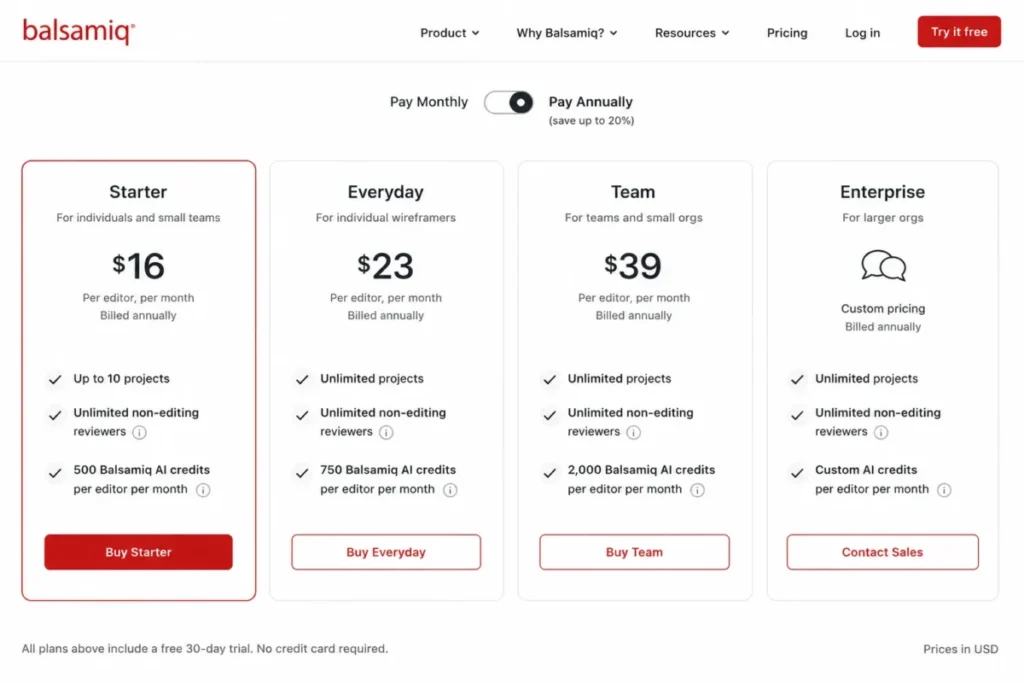
- $16 per editor per month on the Starter plan when billed annually, which is $192 per year per editor.
- Practical tier:
- Starter, until the tenth project is reached.
- Free plan:
- Not published as an editor tier in this pricing evidence. Reviewer access is free, editor access is not.
- First limit that bites:
- Starter supports up to 10 projects.
- Better than Whimsical:
- unlimited reviewers can comment without an editor seat, which keeps stakeholder cost at zero.
- Worse than Whimsical:
- the deliberately rough aesthetic is harder to reuse when a screen eventually needs to look real.
- Setup difficulty:
- Low. Controls are dragged onto a board and screens link into a sketch-level interactive concept.
- Hidden costs:
- Balsamiq AI is metered at 500 credits per editor per month on Starter, so heavy generation is a consumption question rather than a flat one.
- Evidence status:
- Starter price, the 10-project cap, the reviewer model, the AI credit allowance, and the Desktop availability window were verified on Balsamiq’s pricing page and its Desktop product page, checked August 14, 2026.
Balsamiq is the only tool in this ranking whose main feature is a refusal. The sketch aesthetic is a governance mechanism: it makes a spacing argument feel out of place, which is exactly what a requirements conversation needs.
The reviewer model is the underrated part of the economics. Unlimited reviewers who cannot edit means a 5-person squad pays for 5 editors at $80 per month while an entire stakeholder group reads and comments for nothing.
There is a dated switching risk that most roundups omit. Balsamiq for Desktop is available only through December 31, 2026, and it does not include Balsamiq AI, so a new long-lived workflow belongs in Cloud rather than Desktop.
The 10-project ceiling on Starter is the first thing an agency hits. Client work tends to open a project per engagement, and that arithmetic arrives faster than seat growth does.
| Pros | Cons |
|---|---|
| The low-fidelity constraint keeps early reviews on structure rather than styling | Starter stops at 10 projects, which agencies reach on engagement count |
| Unlimited reviewers comment without consuming an editor seat | Polished visual design has to move to another tool |
| Screens link into a sketch-level interactive concept for early walkthroughs | Balsamiq AI is metered per editor per month rather than unlimited |
| Starter includes 500 Balsamiq AI credits per editor per month | The Desktop edition is available only through December 31, 2026 |
Source: Balsamiq pricing, Balsamiq for Desktop, and Balsamiq on wireframes and design systems, checked August 14, 2026.
- Verdict:
- Choose Balsamiq if the hardest part of the job is getting non-designers to argue about structure, and skip it if the same license is expected to deliver finished UI.
3. Whimsical: Best for Fast Product-Team Wireframes

- Best for:
- product trios and engineering squads that want quick wireframes next to flows and lightweight documentation.
- Avoid if:
- the prototype needs deep conditional logic, code-backed components, or state simulation.
- Starting price:
- $10 per editor per month on Pro when billed annually.
- Practical tier:
- Pro, once a team passes three shared boards.
- Free plan:
- Yes. Three team boards with 7-day version history.
- First limit that bites:
- the free plan’s three team boards, followed by the 7-day version-history window.
- Better than Balsamiq:
- wireframes live beside flows and notes, so a squad does not switch tools to document the decision it just made.
- Worse than Balsamiq:
- reviewers are not free in the same way, so stakeholder access is a seat question.
- Setup difficulty:
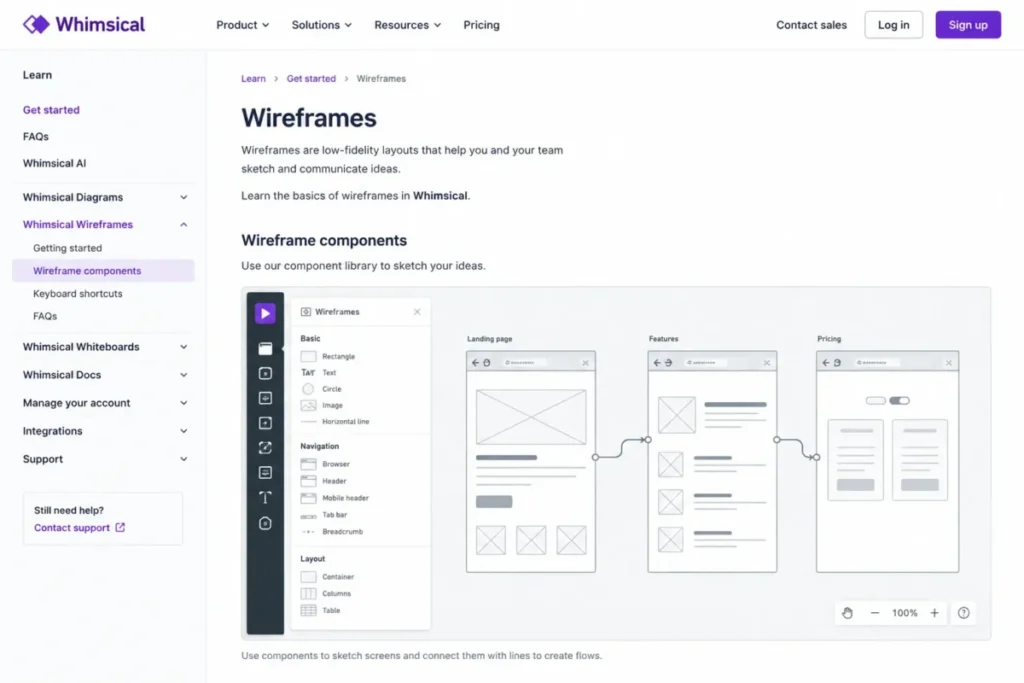
- Low. Wireframe mode supplies components and screens connect into a flow in the same board.
- Hidden costs:
- SSO with SAML and SCIM provisioning sit on the Business plan, so an IT-reviewed rollout costs more than the Pro price implies.
- Evidence status:
- Pro pricing, the three-board free cap, the 7-day history window, and the Business-tier identity controls were verified on Whimsical’s pricing page and its wireframes documentation, checked August 14, 2026.
Whimsical earns third place on speed and adjacency rather than depth. Wireframe mode is built for sketching interfaces quickly and connecting screens into lightweight flows, which suits a trio that needs a shared picture before the next standup.
The 7-day version history is the quiet constraint. A team that reworks a flow over a two-week sprint can lose the ability to recover the version it started from, and that recovery window only widens on higher plans.
Identity controls are the other gate. SSO with SAML and SCIM provisioning arrive on Business, which turns a $10 decision into a procurement conversation the moment IT reviews it.
At five editors the annual-equivalent bill is $50 per month, the second cheapest in this ranking. That is the strongest argument for Whimsical: it is close to Miro on price while being purpose-built for screens rather than for a canvas that happens to include screens.
| Pros | Cons |
|---|---|
| Pro is $10 per editor per month on annual billing, the second cheapest paid entry here | The free plan stops at three team boards |
| Wireframes sit beside flows and notes in the same workspace | Version history on the free plan reaches back only 7 days |
| Wireframe mode is designed for speed rather than pixel control | SSO with SAML and SCIM require the Business plan |
| Screens connect into lightweight flows without a separate prototyping step | Conditional logic and coded components are outside its documented scope |
Source: Whimsical pricing and Whimsical wireframes documentation, checked August 14, 2026.
- Verdict:
- Choose Whimsical if the team needs a shared screen sketch inside the hour and the prototype never has to branch, and skip it if enterprise identity controls are required at the entry price.
Tools That Solve the Behavior Problem Best
The two tools in this group cost the most per person and justify it in one way only: the prototype has to do something, not just show something.
4. UXPin: Best for Code-Backed Design Systems

- Best for:
- 5 to 50 person design-system teams that need interactive logic and alignment with production components.
- Avoid if:
- the requirement is fast low-fidelity sketching and nothing else.
- Starting price:
- $29 per seat per month for Core on the annual-price view.
- Practical tier:
- Core for interaction logic, Growth once a design system or Storybook enters the picture.
- Free plan:
- Not published in this pricing evidence.
- First limit that bites:
- Core keeps 7 days of version history, and Growth extends that window to 30 days.
- Better than Axure RP:
- built-in coded libraries mean a prototype component can behave like the component engineering will ship.
- Worse than Axure RP:
- the entry seat buys logic but not the co-authoring and revision history an enterprise review cycle expects.
- Setup difficulty:
- Medium. Conditional logic, variables, and expressions are configuration work, not drawing.
- Hidden costs:
- Storybook integration, design-system features, SSO, and two-factor authentication all sit on Growth, so the security review and the design-system project land on the same upgrade.
- Evidence status:
- the Core seat price, the conditional-logic and coded-library scope, the 7-day and 30-day history windows, and the Growth-tier controls were verified on UXPin’s pricing page and its getting-started documentation, checked August 14, 2026.
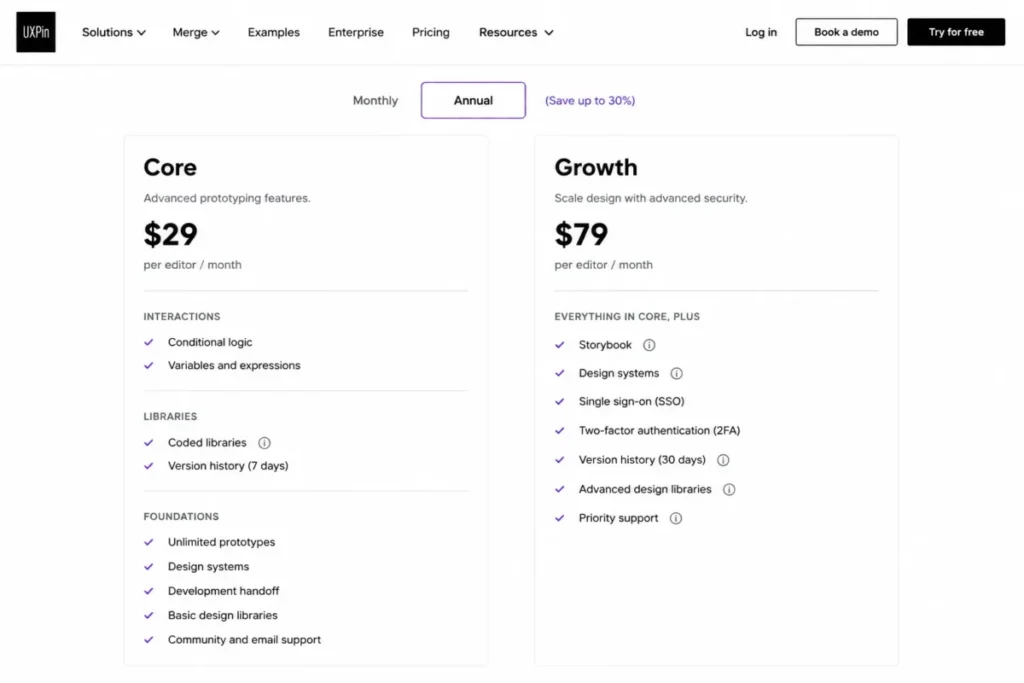
UXPin answers a narrow question well. When a wireframe has to prove that a component behaves the way the shipped component behaves, a drawing of that component is not evidence, and Core carries conditional logic, variables, and expressions to close that gap.
The pricing structure is the thing to plan around. Core at $29 per seat is $145 per month for five seats, and the features a design-system team usually wants next, Storybook and design-system management, are on Growth rather than Core.
That split has a practical consequence for procurement sequencing. SSO and two-factor authentication also live on Growth, so the tier that satisfies IT is the same tier that satisfies the design-system lead, which makes the upgrade easier to justify in one request rather than two.
The 7-day history window on Core is the risk to name out loud. Design-system work is iterative by nature, and a week of recoverable history is short for a team that revisits a component pattern across sprints.
| Pros | Cons |
|---|---|
| Core includes conditional logic, variables, and expressions rather than gating them | Core keeps only 7 days of version history |
| Built-in coded libraries align prototype behavior with production components | Storybook and design-system features require Growth |
| One upgrade satisfies both the design-system lead and the security review | $29 per seat is $145 per month at five seats |
| Interaction depth removes the need for a separate specification tool | Casual sketching is slower here than in a sketch-first tool |
Source: UXPin pricing and UXPin getting-started documentation, checked August 14, 2026.
- Verdict:
- Choose UXPin if prototype components must behave like production components, and skip it if the team’s real bottleneck is producing rough screens quickly.
5. Axure RP: Best for Complex Conditional Prototypes

- Best for:
- enterprise UX, business-analyst, and product teams specifying logic-heavy applications with states and conditions.
- Avoid if:
- the team prefers lightweight browser-first collaboration over deep interaction logic.
- Starting price:
- $29 per user per month for Axure RP 11 Pro.
- Practical tier:
- Team at $49 per user per month once more than one person authors the same file.
- Free plan:
- No free editor tier appears in the Axure pricing evidence used here.
- First limit that bites:
- co-authoring and revision history are Team features, not Pro features.
- Better than UXPin:
- wireframes, functional prototypes, and the specification all live in one artifact that reviewers open in Axure Cloud.
- Worse than UXPin:
- coded component libraries are not part of the documented scope, so production alignment stays a manual translation.
- Setup difficulty:
- High. States, conditions, and interaction cases are a modeling exercise before they are a design exercise.
- Hidden costs:
- the jump from Pro to Team is $20 per user per month, which is the largest single-step tier increase in this ranking.
- Evidence status:
- the Pro and Team per-user prices, the co-authoring and revision-history gate, and the wireframe-plus-functional-prototype scope were verified on Axure’s pricing page and its wireframe page, checked August 14, 2026.
Axure RP is the tool a business analyst reaches for when the specification is the deliverable. Wireframes sit beside rich functional prototypes and cloud review, which means the artifact that describes behavior is the same artifact stakeholders click through.
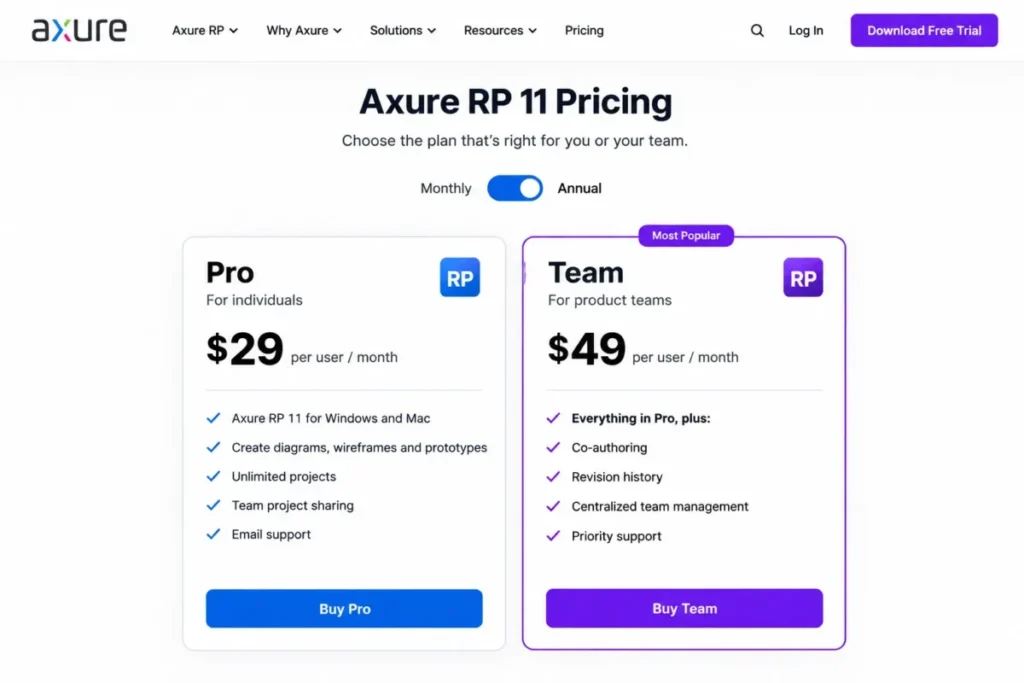
The collaboration gate is the budget trap. Pro at $29 is a single-author license in practice, and the moment two people need to author the same file, revision history and co-authoring push the real price to $49 per user per month.
For a five-person team that difference is $145 versus $245 per month, and the second number is the honest one for any team that shares authorship. A buyer who budgets from the Pro price and then discovers the co-authoring requirement in month two has a conversation with finance that nobody enjoys.
Setup difficulty is the other reason this is a specialist purchase. Conditions and states reward people who think in flows and punish people who wanted a faster whiteboard.
| Pros | Cons |
|---|---|
| Functional prototypes with states and conditions replace a separate specification document | Co-authoring and revision history require the $49 Team plan |
| Axure Cloud gives reviewers a link rather than a file transfer | Pro to Team is a $20 per user per month step, the steepest here |
| Wireframes and behavior live in one artifact for enterprise review | Setup is a modeling exercise, not a sketching exercise |
| Interaction depth suits regulated or workflow-heavy applications | Coded component libraries are outside the documented scope |
Source: Axure pricing and Axure wireframe documentation, checked August 14, 2026.
- Verdict:
- Choose Axure RP if behavior specification is the decision-critical deliverable, and skip it if two people will never need to author the same file at once, because the Pro-only price is the only version of this tool that looks cheap.
Tools That Solve Where the Wireframe Starts and Where It Goes
The last five tools are not weaker versions of the first five. They answer a different question: who produces the first screen, and what the screen becomes after somebody approves it.
That question is where AI generation, workshop context, client handoff, usability testing, and sketch conversion all belong, and it is the reason this group looks mixed. Buyers who evaluate generation quality alone tend to overweight it, because generation speed is the easiest part of this to get right and the least useful in isolation.
6. Visily: Best for AI-Assisted Non-Designers

- Best for:
- founders, product managers, and business analysts without dedicated design capacity who want an editable first draft.
- Avoid if:
- enterprise identity controls are required on a low-cost tier, or the team prefers a fully manual workflow.
- Starting price:
- $11 per editor per month on Pro when billed annually.
- Practical tier:
- Pro, because Starter’s two editable boards do not survive a second project.
- Free plan:
- Yes. Starter, with 2 editable boards and 300 AI credits per month.
- First limit that bites:
- the two editable boards on Starter, well before the AI credit allowance runs out.
- Better than Uizard:
- Pro adds Figma import and export, so the generated wireframe has a documented route into a design file.
- Worse than Uizard:
- the entry paid price is higher per editor than Uizard’s entry creator price.
- Setup difficulty:
- Low. A prompt or a screenshot produces a starting screen that stays editable.
- Hidden costs:
- AI credits are metered monthly on Starter, and continued board growth is the reason most teams pass through Pro rather than sitting on the free tier.
- Evidence status:
- Pro pricing, the two-board Starter cap, the 300-credit monthly allowance, and the Pro-tier Figma import and export were verified on Visily’s pricing page and its wireframe-tool page, checked August 14, 2026.
Visily is the strongest answer in this ranking to a specific organizational problem: a team with a product decision to make and no designer available this week. Prompts and screenshots produce a wireframe that remains editable, which matters more than generation quality, because a draft nobody can change is a picture rather than a wireframe.
The two-board Starter cap is the honest evaluation limit. It is enough to judge whether the generated output is usable and not enough to run a second project, so treat the free tier as an assessment and Pro as the working plan.
Figma import and export on Pro is the feature that separates Visily from tools that generate and stop. A wireframe that can move into a design file keeps its value after the founder hands the project to a designer.
Five editors at Pro is $55 per month on annual billing, which is inexpensive for a capability that removes a blank canvas from a non-designer’s week.
| Pros | Cons |
|---|---|
| Prompts and screenshots produce an editable wireframe rather than a flat image | Starter allows only 2 editable boards |
| Pro adds Figma import and export as a documented downstream route | AI generation on Starter is capped at 300 credits per month |
| $11 per editor on annual billing keeps a five-editor team at $55 per month | Enterprise identity controls are not offered at the entry price point |
Source: Visily pricing and Visily wireframe tool, checked August 14, 2026.
- Verdict:
- Choose Visily if the constraint is design capacity rather than design skill, and skip it if the wireframing tool has to clear an identity-controls review at the lowest tier.
7. Miro: Best for Workshop-Centered Teams

- Best for:
- distributed cross-functional teams already running discovery workshops, flows, and planning inside Miro.
- Avoid if:
- the work needs dedicated logic-heavy prototyping or production UI design.
- Starting price:
- $8 per member per month on Starter when billed annually.
- Practical tier:
- Starter, which is also the cheapest paid entry in this ranking.
- Free plan:
- Yes. Three editable boards.
- First limit that bites:
- the three editable boards on Free, which Starter replaces with unlimited and private boards.
- Better than Whimsical:
- the wireframe never leaves the board that already holds the research, the flow, and the workshop output.
- Worse than Whimsical:
- a general canvas gives fewer screen-specific affordances than a purpose-built wireframe mode.
- Setup difficulty:
- Low for a team already on Miro, medium for a team adopting a canvas tool for the first time.
- Hidden costs:
- private boards arrive with Starter, so a free-plan team that needs confidentiality is upgrading for governance rather than for capacity.
- Evidence status:
- Starter per-member pricing, the three-board free cap, the unlimited and private board upgrade, and the wireframing and prototyping component scope were verified on Miro’s pricing page and its wireframe page, checked August 14, 2026.
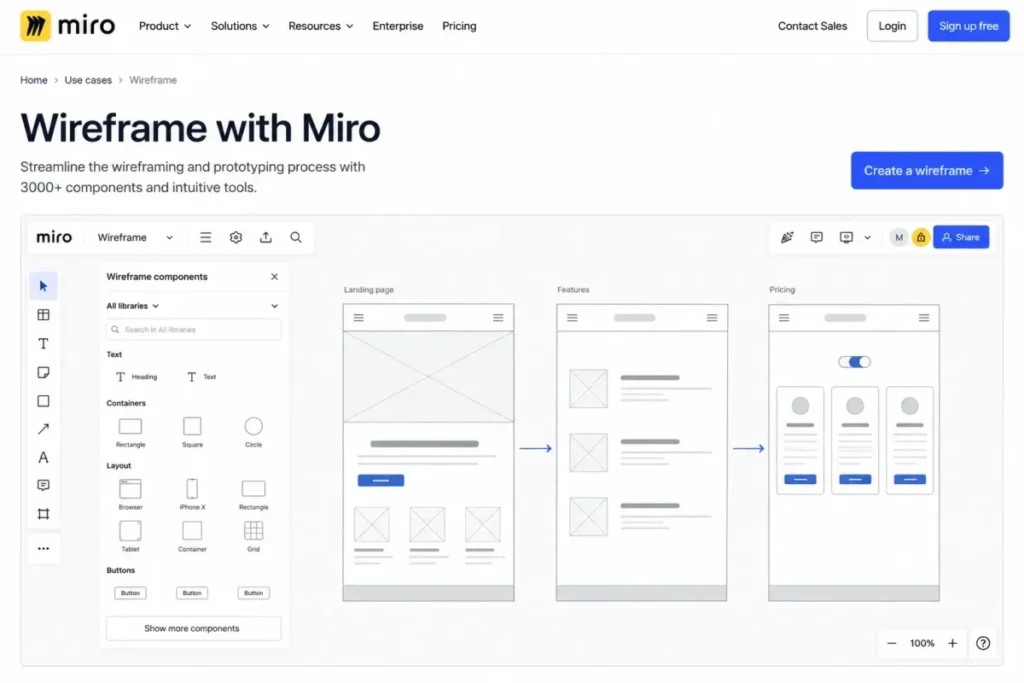
Miro is on this list for adjacency, not for wireframing depth. When the wireframe is one artifact in a workshop that also contains interview notes, a journey map, and a prioritization grid, moving that one artifact into a design tool costs more context than it saves.
At $8 per member per month on annual billing, Miro is the cheapest paid entry here, and a five-member team lands at $40 per month. That is roughly half the five-editor cost of Figma or Balsamiq.
The free plan’s three editable boards is a sharper limit than it sounds for workshop teams, because workshops generate boards faster than projects generate files. Private boards are the second reason teams upgrade, and that reason is governance rather than volume.
The line to hold is prototype depth. Board-level wireframe and prototyping components support review and discussion, and they are not a substitute for the conditional behavior that UXPin or Axure RP document.
Teams comparing platform breadth rather than wireframing alone should read the full Miro review.
| Pros | Cons |
|---|---|
| $8 per member per month is the lowest paid entry in this ranking | The free plan allows only 3 editable boards |
| Wireframes stay beside research, flows, and workshop artifacts | Screen-specific affordances are thinner than a dedicated wireframe mode |
| Starter adds unlimited and private boards in the same step | Conditional prototype behavior is outside its documented scope |
Source: Miro pricing and Miro wireframe tool, checked August 14, 2026.
- Verdict:
- Choose Miro if the wireframe belongs inside a discovery workshop the team already runs there, and skip it if the next step after the wireframe is behavior modeling.
8. MockFlow WireframePro: Best Dedicated Wireframe-to-Handoff Workflow

- Best for:
- agencies and product teams that want a dedicated wireframe workspace with review, handoff, and export options.
- Avoid if:
- the requirement is advanced conditional or data-driven prototype logic.
- Starting price:
- $14 per user per month as the starting annual-billing rate.
- Practical tier:
- the paid WireframePro plan, because the free tier is a single project.
- Free plan:
- Yes. One Wireframe project with 3 pages.
- First limit that bites:
- the three-page ceiling on the free project, which arrives before the project count does.
- Better than Balsamiq:
- the documented workflow continues into developer handoff and Figma export rather than stopping at the wireframe.
- Worse than Axure RP:
- the vendor describes its wireframe prototyping as lightweight, so conditional behavior is not the job.
- Setup difficulty:
- Low. A wireframe-first workspace with screens, collaboration, and export in one place.
- Hidden costs:
- pricing on the vendor page renders dynamically, so the $14 figure is a starting annual rate and confirmation at checkout matters more here than elsewhere.
- Evidence status:
- the starting per-user rate, the one-project and three-page free cap, the handoff and Figma export scope, and the vendor’s own lightweight-prototyping description were verified on MockFlow’s pricing, WireframePro, and prototyping pages, checked August 14, 2026.
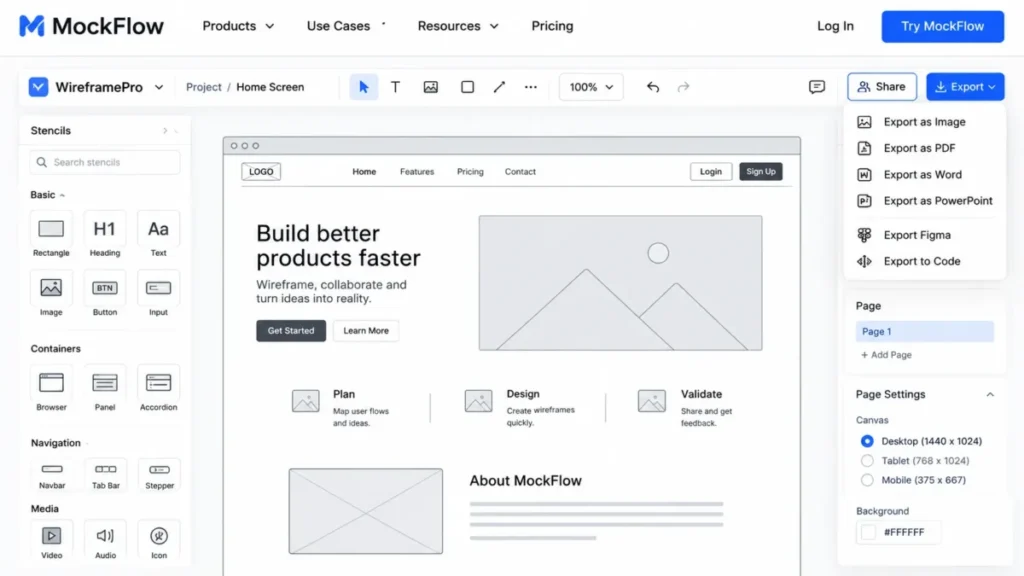
MockFlow WireframePro is the clearest example in this ranking of a tool that treats wireframing as the product rather than as a mode. Collaboration, developer handoff, code-oriented export options, and Figma export sit around a wireframe project instead of around a design file.
The prototype-depth boundary is stated by the vendor, which is unusual and useful. Lightweight prototyping is the documented scope, so a buyer who needs branching behavior should read that as a disqualifier rather than as marketing modesty.
| Pros | Cons |
|---|---|
| Wireframing, collaboration, and handoff sit in one dedicated workspace | The free plan is capped at 1 project with 3 pages |
| Figma export and code-oriented export options are documented, not implied | The vendor describes its prototyping as lightweight |
| $14 per user is a mid-range entry for a wireframe-first product | Pricing renders dynamically, so the starting rate needs confirmation at checkout |
Source: MockFlow pricing, MockFlow WireframePro, and MockFlow prototyping, checked August 14, 2026.
- Verdict:
- Choose MockFlow WireframePro if the deliverable is a wireframe package a client or a developer receives, and skip it if the prototype has to branch on a condition.
9. Justinmind: Best for Forms and Data-Rich Interaction Simulation
- Best for:
- UX teams prototyping forms, variables, data simulation, mobile interactions, and testing scenarios.
- Avoid if:
- a lightweight browser whiteboard or a quick low-fidelity sketch is the whole requirement.
- Starting price:
- $19 per editor per month on Standard.
- Practical tier:
- Standard, because the free plan holds a single project.
- Free plan:
- Yes. One project.
- First limit that bites:
- the single free project, which ends the moment a second piece of work starts.
- Better than Whimsical:
- forms, interactive preview, and a large UI-element library make a prototype testable rather than merely clickable.
- Worse than Figma:
- the path from an approved prototype into a shared design and handoff workspace is narrower.
- Setup difficulty:
- Medium. Interaction design and form behavior are configured, not sketched.
- Hidden costs:
- collaboration itself is a Standard feature, so a second contributor is a plan decision rather than an invitation.
- Evidence status:
- the Standard editor price, the one-project free cap, the advanced-interaction and collaboration gate, and the low and high-fidelity wireframing scope were verified on Justinmind’s pricing page and its free wireframe tool page, checked August 14, 2026.
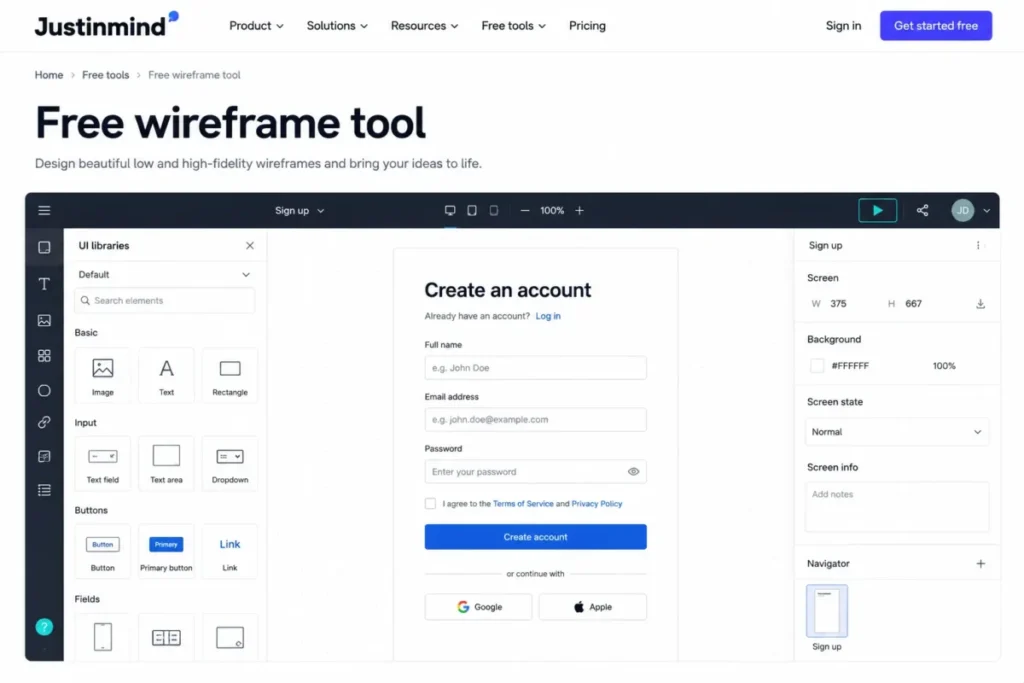
Justinmind earns its place on a narrow but expensive problem. Form behavior is where wireframes usually fail a usability session, because a static screen cannot show validation, state, or what a data-heavy table does when it fills up.
Standard at $19 per editor is $95 per month for five editors, which sits between the sketch tools and the logic specialists. That is the right price band for a research-led team that needs realistic prototypes without an enterprise specification workflow.
| Pros | Cons |
|---|---|
| Forms, variables, and data simulation make prototypes testable with real users | The free plan supports a single project |
| Low and high-fidelity wireframing live in the same editor | Collaboration is a Standard-plan feature, not a free one |
| Device preview supports mobile interaction validation | Configuration effort is higher than any sketch-first tool here |
Source: Justinmind pricing and Justinmind free wireframe tool, checked August 14, 2026.
- Verdict:
- Choose Justinmind if the wireframe has to survive a usability session with real form input, and skip it if nobody will ever test it with a participant.
10. Uizard: Best for Text-or-Sketch-to-Wireframe Ideation

- Best for:
- startup founders and consultants turning text prompts or hand-drawn concepts into editable screens quickly.
- Avoid if:
- a large mature design-system team needs deep component governance on lower tiers.
- Starting price:
- $12 per month on Pro when billed annually, as the entry creator price.
- Practical tier:
- Pro, once the free plan’s screen ceiling is reached.
- Free plan:
- Yes. Two projects, up to 5 screens per project, and 3 AI generations per month.
- First limit that bites:
- the five screens per project, which a single onboarding flow consumes.
- Better than Visily:
- the wireframe scanner converts a hand-drawn concept into an editable digital design, which suits whiteboard-first teams.
- Worse than Visily:
- multi-creator billing is not published in the same per-editor form, so a five-seat budget cannot be calculated on the same basis.
- Setup difficulty:
- Low. Wireframe Mode and the scanner both start from something that already exists.
- Hidden costs:
- three AI generations per month on the free plan is an evaluation allowance rather than a working one.
- Evidence status:
- the Pro entry price, the two-project and five-screen free caps, the three monthly AI generations, and the sketch-to-editable-design and Wireframe Mode scope were verified on Uizard’s pricing, wireframing, and wireframe scanner pages, checked August 14, 2026.
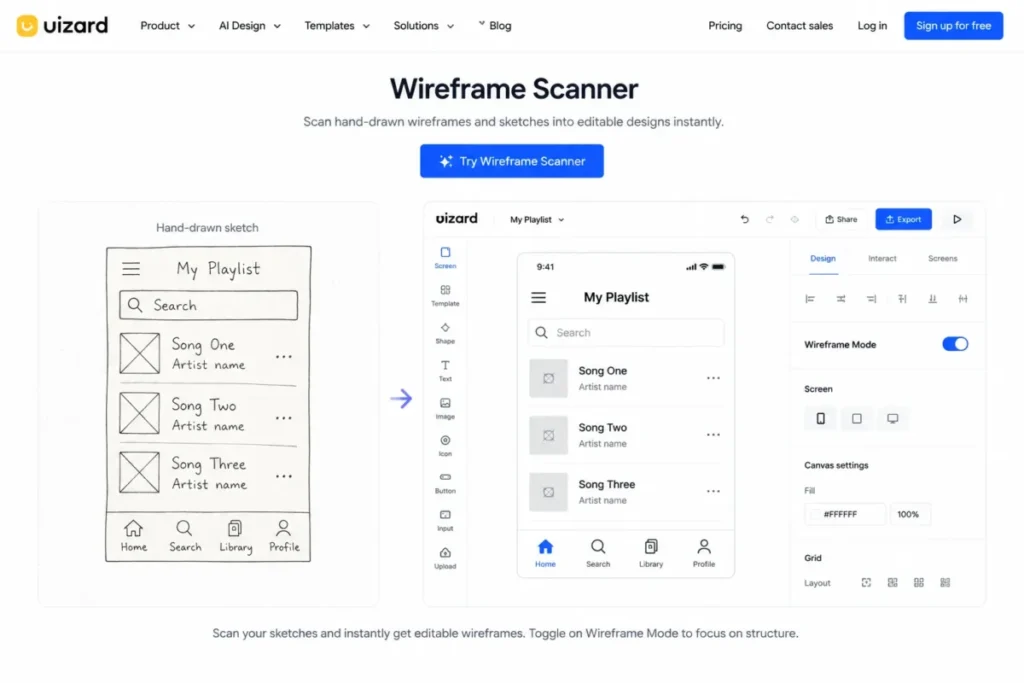
Uizard’s differentiator is the starting point. A team that already sketches on a whiteboard can photograph that sketch and get an editable digital screen, which shortens the least enjoyable part of the process.
One budgeting caveat belongs on the record. The $12 figure is an entry creator price, and multi-creator billing is not published in the same per-editor form as the other nine tools, so this guide does not calculate a five-seat cost for Uizard rather than guess at one.
| Pros | Cons |
|---|---|
| The wireframe scanner turns an existing hand drawing into editable UI | The free plan allows 5 screens per project across 2 projects |
| Wireframe Mode keeps early screens deliberately rough | Three AI generations per month suits evaluation, not production |
| $12 per month on annual billing is a low entry for solo work | Multi-creator billing is not published on a comparable per-editor basis |
Source: Uizard pricing, Uizard wireframing, and Uizard wireframe scanner, checked August 14, 2026.
- Verdict:
- Choose Uizard if the fastest route to a digital screen runs through a whiteboard photograph, and skip it if the finance team needs a predictable multi-seat cost before approval.
Pricing Comparison and Feature Gates
Starting price is the least useful number in this category, because the plan that supports a real workflow is rarely the plan on the left of the pricing page. The table below pairs each starting price with the tier a working team lands on and with the five-editor arithmetic behind it.
| Tool | Starting paid price | Billing basis | Practical tier | Five-editor monthly | Hidden cost to watch |
|---|---|---|---|---|---|
| Figma | $16 | Per full seat, monthly view | Professional | $80 | Every editing contributor consumes a full seat |
| Balsamiq | $16 | Per editor, billed annually | Starter | $80 | AI credits are metered per editor per month |
| Whimsical | $10 | Per editor, billed annually | Pro | $50 | Identity controls sit on the Business plan |
| UXPin | $29 | Per seat, annual-price view | Core, then Growth | $145 | Storybook and design systems require Growth |
| Axure RP | $29 | Per user per month | Team at $49 for shared authoring | $145 at Pro | Co-authoring moves the real price to the Team plan |
| Visily | $11 | Per editor, billed annually | Pro | $55 | Board growth, not credits, drives the upgrade |
| Miro | $8 | Per member, billed annually | Starter | $40 | Private boards arrive only with the paid plan |
| MockFlow WireframePro | $14 | Per user, starting annual rate | WireframePro | $70 | Pricing renders dynamically and needs checkout confirmation |
| Justinmind | $19 | Per editor per month | Standard | $95 | Collaboration itself is a paid-tier feature |
| Uizard | $12 | Entry creator price, billed annually | Pro | Not published on a comparable basis | Multi-creator billing is not published per editor |
Source: Figma’s published plans, Balsamiq plan pricing, and Whimsical plan pricing. Then UXPin plan pricing and Axure plan pricing. Also Visily plan pricing, Miro plan pricing, and MockFlow plan pricing. Finally Justinmind plan pricing and Uizard plan pricing, all checked August 14, 2026.
Every five-editor figure is editorial arithmetic, five multiplied by the published per-person price, and it excludes tax, add-ons, and any consumption beyond the included allowance. Uizard is deliberately absent from that column because its multi-creator billing basis is not published in the same per-editor form, and multiplying an entry creator price by five would invent a plan that may not exist.
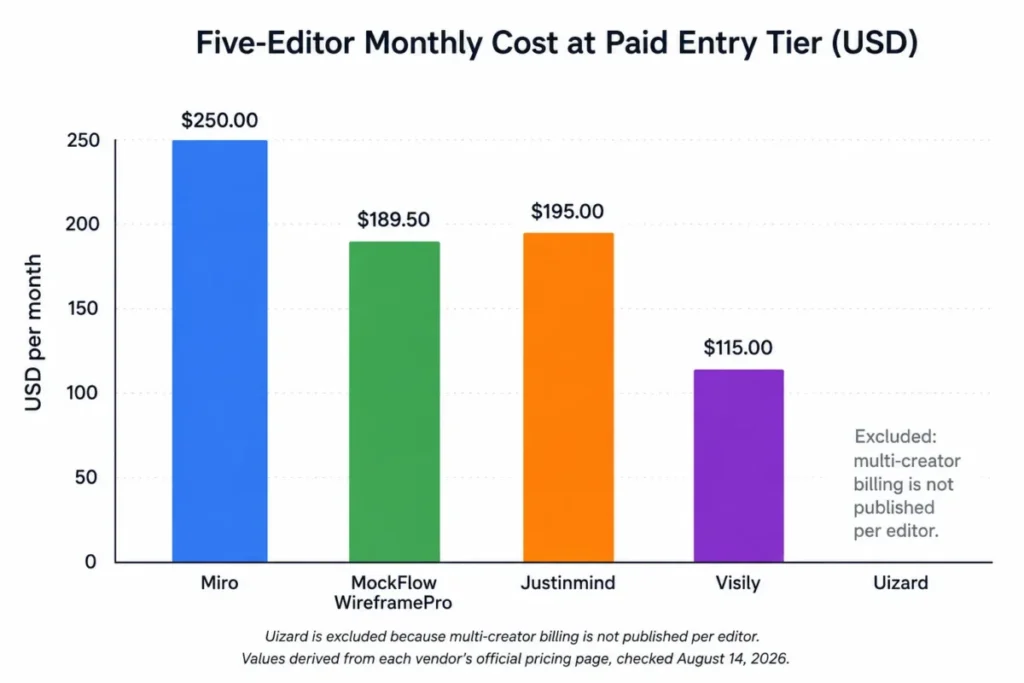
The distribution matters more than any single bar. Seven of the nine calculable teams land under $100 per month, and the two that do not are the two that simulate behavior, which makes prototype depth the single largest cost driver in this category.
Teams pricing the platform rather than the wireframing module should compare against the full Figma pricing plans and the equivalent Miro pricing guide before signing an annual term.
The Gate That Decides Which Tier You Buy
| Tool | The gate that decides the tier | Plan where it opens | Buyer consequence |
|---|---|---|---|
| Figma | Unlimited files and folders, advanced prototyping, developer handoff | Professional | A multi-project squad cannot stay on the free tier |
| Balsamiq | Project count | Starter, capped at 10 projects | Agencies hit the ceiling on engagement count |
| Whimsical | SSO with SAML and SCIM provisioning | Business | An IT-reviewed rollout costs more than Pro |
| UXPin | Storybook, design systems, SSO, two-factor authentication | Growth | The design-system project and the security review share one upgrade |
| Axure RP | Co-authoring and revision history | Team | Shared authoring, not features, sets the real price |
| Visily | Unlimited boards and Figma import and export | Pro | The route into a design file is a paid route |
| Miro | Unlimited and private boards | Starter | Confidentiality is a paid-plan property |
| MockFlow WireframePro | Project and page capacity | Paid WireframePro | A single three-page project ends fast |
| Justinmind | Advanced interaction design, collaboration, unlimited projects | Standard | A second contributor triggers the upgrade |
| Uizard | Project and screen capacity plus AI generations | Pro | Five screens per project ends at one flow |
Source: every gate in this table is published on the official pricing pages cited in each tool’s section above, including Whimsical’s Business-tier controls and UXPin’s Growth-tier controls, checked August 14, 2026.
Read the middle column as a purchase trigger rather than a feature list. In four of these ten products the trigger is not a design capability at all: it is governance, collaboration, or capacity, which is why a feature-led shortlist usually picks the wrong tier.
Free Plans: Where Each One Stops Working
Free-tier mentions are common in this category and free-tier arithmetic is not. Each row below names the published cap and the concrete event that ends the free plan for a working team.
| Tool | Free-plan hard cap | Event that forces the first upgrade |
|---|---|---|
| Figma | Starter offers limited access rather than unlimited files and folders | A second parallel project needs its own file structure |
| Whimsical | 3 team boards, 7-day version history | A fourth board, or a need to recover a two-week-old version |
| UXPin | Not published in this pricing evidence | Version history beyond 7 days on Core |
| Visily | 2 editable boards, 300 AI credits per month | A second project opens while the first stays live |
| Miro | 3 editable boards | A fourth workshop, or the first board that must stay private |
| MockFlow WireframePro | 1 Wireframe project with 3 pages | A fourth screen in the same flow |
| Justinmind | 1 project | A second piece of client or product work |
| Uizard | 2 projects, 5 screens per project, 3 AI generations per month | A sixth screen in one flow |
Source: the same official pricing pages cited in the pricing comparison above, checked August 14, 2026.
Balsamiq and Axure RP are absent from that table because a free editor tier is not part of the pricing evidence used here, and Balsamiq’s free access is a reviewer role rather than an editor plan. Published caps describe what a plan includes, and none of these vendors documents what happens at the moment a cap is reached, so treat each number as a planning threshold rather than as a description of overflow behavior.
The pattern across the rows is consistent. Screen and board capacity, not feature gating, ends the free plan first in six of the eight cases, which means a realistic evaluation should count screens before it compares features.
AI Allowances Without False Equivalence
Three vendors in this ranking publish a numeric AI allowance, and those three numbers are not measured in the same unit. A credit is not a generation, and no honest comparison converts one into the other.
| Tool | Published AI allowance | Plan it applies to |
|---|---|---|
| Balsamiq | 500 Balsamiq AI credits per editor per month | Starter |
| Visily | 300 AI credits per month | Starter |
| Uizard | 3 AI generations per month | Free |
Source: the Balsamiq, Visily, and Uizard pricing pages cited in each tool’s section above, checked August 14, 2026.
Balsamiq’s allowance is per editor, which scales with the team; Visily’s is per account on the free tier, which does not. Uizard’s three generations are an evaluation budget, and any team planning to generate iteratively should read that row as a reason to start on Pro.
The rest of the field is not listed here because a numeric allowance is not published in this evidence set. Absence of a number is not absence of a feature, and inventing a comparable figure would be worse than leaving the row out.
Collaboration, Version History, and Identity Controls
This is the section most roundups skip, and it is the one that decides whether a purchase survives an IT review.
| Tool | Version history | Identity controls | Collaboration gate |
|---|---|---|---|
| Whimsical | 7 days on the free plan | SSO with SAML and SCIM on Business | Editor seats, with no free reviewer role documented |
| UXPin | 7 days on Core, 30 days on Growth | SSO and two-factor authentication on Growth | Included at Core for seat holders |
| Axure RP | Revision history on Team | Not published in this evidence set | Co-authoring requires the Team plan |
| Justinmind | Not published in this evidence set | Not published in this evidence set | Collaboration is a Standard-plan feature |
| Balsamiq | Not published in this evidence set | Not published in this evidence set | Unlimited reviewers who cannot edit |
Source: the Whimsical, UXPin, Axure, Justinmind, and Balsamiq pricing pages cited in each tool’s section above, checked August 14, 2026.
Five products are listed because five publish something checkable on these dimensions. Leaving the other five out is the honest option, and a buyer whose security review depends on SSO should ask each remaining vendor for the tier in writing before signing.
Two rows carry most of the buying advice. Balsamiq’s unlimited non-editing reviewers keep stakeholder cost at zero, and Axure RP’s co-authoring gate does the opposite by making shared authorship a $20 per user per month decision.
Buyer Risk Ledger: What Breaks First
| Risk | Who it hits | How to defuse it before signing |
|---|---|---|
| Budgeting from the entry price | Any team that adds a second editor | Price the tier that carries the required workflow, then multiply by real editor count |
| Discovering the identity-control tier during security review | Teams at companies with an IT approval step | Confirm the SSO and provisioning tier in writing before the trial ends |
| Buying prototype depth that nobody uses | Squads that only link screens | Match the branch of the depth tree to the actual deliverable |
| Buying too little prototype depth | Teams running usability sessions on forms | Test one real form flow during evaluation, not a static screen |
| A short version-history window | Teams that rework a flow across sprints | Check the recovery window on the exact plan being purchased |
| Starting a long-lived workflow on a winding-down edition | Balsamiq Desktop adopters | Start new work in Cloud, because Desktop is available only through December 31, 2026 |
| An entry price with unpublished multi-seat behavior | Finance approvers | Ask for written multi-creator pricing where it is not published, as with Uizard |
The Balsamiq row is the one with a date attached, and dates age faster than features. Desktop is available only through December 31, 2026 and does not include Balsamiq AI, so a team starting a two-year documentation habit belongs in Cloud from day one.
Wireframe-to-Handoff Paths
What happens after approval decides switching cost more than the drawing experience does.
| Tool | Documented next step after approval | What it means for switching cost |
|---|---|---|
| Figma | Advanced prototyping and developer handoff on Professional | No export step, so nothing is lost in translation |
| Visily | Figma import and export on Pro | The generated wireframe continues into a design file |
| Uizard | Prototype sharing and developer handoff | The converted sketch keeps moving without a redraw |
| MockFlow WireframePro | Developer handoff, code-oriented export options, and Figma export | A wireframe-first workspace still lands in a design or code path |
| Axure RP | Cloud review of the functional prototype and specification | Reviewers receive a link rather than a file |
| Justinmind | Interactive preview on browser and device | The prototype is the research artifact |
| Balsamiq | Reviewer comment and approval | Visual design continues in another tool |
| Whimsical | Shared board for flows and documentation | Higher-fidelity work moves elsewhere |
| Miro | Board-level review beside the workshop artifacts | The wireframe stays where the discovery lives |
| UXPin | Storybook and design-system workflows on Growth | Alignment with production components is the handoff |
Source: every documented next step comes from the official product and documentation pages cited in each tool’s section above, including Axure’s cloud review page and MockFlow’s WireframePro page, checked August 14, 2026.
Cross-tool import fidelity is a different question and it is not documented consistently across these ten products, so this guide makes no claim about how faithfully any file survives a move between vendors. The safe reading is that the tools with a documented Figma path carry the lowest translation risk, and the tools whose documented next step is a comment thread carry the highest.
Setup and Migration Difficulty
| Tool | Setup difficulty | Why |
|---|---|---|
| Figma | Low | Browser-based, and a wireframe kit supplies the components |
| Balsamiq | Low | Drag controls onto a board, then link screens |
| Whimsical | Low | Wireframe mode supplies components inside an existing board |
| UXPin | Medium | Conditional logic, variables, and expressions are configuration work |
| Axure RP | High | States and conditions are a modeling exercise before a design one |
| Visily | Low | A prompt or screenshot produces the first editable screen |
| Miro | Low for existing users, Medium for a first canvas rollout | Board conventions matter more than the wireframe components |
| MockFlow WireframePro | Low | A wireframe-first workspace with screens and export in one place |
| Justinmind | Medium | Form behavior and interactions are configured, not sketched |
| Uizard | Low | Wireframe Mode and the scanner both start from existing material |
Source: these ratings are an editorial assessment of the configuration depth described on each vendor’s official pages cited above. Two examples are Axure’s wireframe and prototype documentation and MockFlow’s prototyping scope page, both checked August 14, 2026.
Setup difficulty here describes configuration depth, not an implementation timeline, because no timeline is published for these products. The reliable signal is that every tool rated Medium or High earns that rating for interaction behavior rather than for onboarding friction.
How to Choose the Right Wireframing Tool for Your Team
Work these six questions in order. Each one removes tools, and the order matters because a later answer cannot rescue an earlier mistake.
- How rough does the wireframe have to stay, and who enforces that? If the answer is “very rough, and nobody enforces it”, the constraint has to come from the tool, which points at Balsamiq.
- Does the prototype need to behave, or only to be seen? Screen linking keeps the budget at $8 to $16 per person; conditions and state move it to $29.
- Who creates the first screen? A team without design capacity this week should weigh Visily or Uizard against the cost of waiting for a designer.
- Where does the wireframe live after approval? A documented Figma or handoff path lowers translation risk, and a comment thread raises it.
- How many people edit, and how many only comment? Balsamiq’s free reviewers and Axure RP’s paid co-authoring sit at opposite ends of that answer.
- What does IT need to approve? Confirm the tier that carries SSO and provisioning before the trial ends, because that tier is rarely the entry tier.
Map the answers straight onto a shortlist. A squad answering “rough, linked, designer-led, Figma path, five editors, SSO later” lands on Figma. A squad answering “rough, linked, PM-led, comment thread, two editors, many reviewers” lands on Balsamiq.
A team answering “behavior, conditions, shared authorship” lands on Axure RP, and it should budget the Team plan from the start.
Common Mistakes When Choosing Wireframing Software
Choosing on the starting price is the most expensive one. The Axure RP Pro price looks competitive with UXPin Core until shared authorship forces the Team plan, and the five-user gap between those two positions is $100 per month.
Treating every prototype as equivalent is the second. Four tools here link screens, three simulate behavior, and a shortlist that mixes both groups is comparing products that do not compete.
Assuming the free plan scales is the third. Six of the eight documented free tiers end on capacity rather than on features, so a two-week evaluation that only builds one flow will not reveal the limit a real project meets.
Ignoring the reviewer model is the fourth. A team of five editors and twenty stakeholders pays very differently across these products, and Balsamiq is the only one in this ranking that documents unlimited non-editing reviewers.
Leaving identity controls to procurement is the fifth. Whimsical puts SSO with SAML and SCIM on Business and UXPin puts SSO and two-factor authentication on Growth, so an approval that lands in month two can reprice the whole subscription.
Starting a long-lived workflow on a winding-down edition is the sixth, and it is specific. Balsamiq for Desktop is available only through December 31, 2026 and does not include Balsamiq AI, which makes Cloud the correct starting point for any new documentation habit.
Buying AI on a headline claim is the seventh. Balsamiq publishes 500 credits per editor per month, Visily publishes 300 credits per month on Starter, and Uizard publishes 3 generations per month on Free, and those units are not interchangeable.
Final Verdict: Which Wireframing Tool to Buy
The ranking reason is the same in every row of this guide, so it is worth stating plainly. It is the documented workflow a tool supports, the plan gate that decides which tier a buyer needs, and the micro-cohort it fits, all read from each vendor’s official pricing and product pages.
Figma takes first place because the evidence supports the widest continuous path: browser-based wireframing with reusable kit components, a clickable prototype link, and a Professional tier that carries unlimited files and folders plus advanced prototyping and developer handoff. For a five-editor squad that is $80 per month, and it removes the export step where most wireframing workflows lose fidelity.
I would still buy Balsamiq over Figma in one specific situation, and it is more common than the ranking implies: a PM-led or analyst-led team whose real problem is that stakeholders keep arguing about color. The sketch constraint is the feature, unlimited reviewers make the stakeholder group free, and the 10-project Starter cap is the number to watch.
By buyer type, the shortlist is short. Product-design squads take Figma, requirements-led teams take Balsamiq, and product trios on a budget take Whimsical at $50 per month for five editors. Design-system teams take UXPin and plan for Growth, while enterprise specification work takes Axure RP and budgets the Team plan on day one.
For the remaining five, the fit is narrower and clearer. Visily suits a founder without design capacity, and Miro suits teams whose wireframes belong in the workshop they already run. MockFlow WireframePro suits agencies delivering a wireframe package, Justinmind suits research teams testing forms, and Uizard suits whiteboard-first ideation.
The check I would run at 30 and 90 days is the same for all ten. At 30 days, has the team stopped arguing about fidelity; at 90 days, has anything the tool produced reached engineering, and if the honest answer is no, the problem is the workflow rather than the license.
Teams standardizing tools across several functions at once should weigh this decision alongside their wider team collaboration tools, because a second canvas subscription is often harder to justify than a second design seat.
FAQ
What is the best wireframing tool in 2026?
Figma leads this ranking for most collaborative product-design squads, because Professional at $16 per full seat carries unlimited files and folders, advanced prototyping, and developer handoff in one place. Balsamiq is the stronger pick for structure-first stakeholder work, and Axure RP is the stronger pick when the prototype has to model conditions and state.
What is the best free wireframing tool?
Miro and Whimsical both offer three free boards, which makes them the most usable free tiers here for a small team.
Uizard’s free plan allows two projects with five screens each and three AI generations per month, and Visily’s allows two editable boards with 300 AI credits per month. Free plans in this category end on capacity, not features.
Which wireframing tool is cheapest for a five-person team?
Miro at $40 per month is the cheapest five-member option on annual billing, followed by Whimsical at $50 and Visily at $55.
Figma and Balsamiq both land at $80, Justinmind at $95, and UXPin and Axure RP at $145 on their entry tiers. Those figures are simple arithmetic on published per-person prices.
Is Figma good for low-fidelity wireframes?
Yes, if the team can enforce its own fidelity discipline. Figma’s wireframe kits supply reusable low-fidelity components and screens link into a clickable prototype, so the capability is there.
What is missing is any friction that stops a reviewer from arguing about spacing, which is precisely the friction Balsamiq sells.
Which wireframing tool is easiest for non-designers?
Visily and Uizard are built for that buyer. Visily turns a prompt or a screenshot into an editable screen, and Uizard’s wireframe scanner converts a hand drawing into editable UI.
Both keep the output editable, which matters more than generation quality, because a draft nobody can change is not a wireframe.
Can AI create a usable wireframe that a team can edit?
It can create a usable starting point. Visily generates from prompts and screenshots and leaves the result editable, and Uizard converts sketches into editable screens.
The allowances differ in kind: 500 Balsamiq credits per editor per month, 300 Visily credits per month on Starter, and three Uizard generations per month on Free are not the same unit.
Do I need Axure RP or UXPin for conditional prototype logic?
No, unless the prototype has to branch, hold state, or behave like a production component. UXPin Core carries conditional logic, variables, and expressions plus coded libraries, and Axure RP carries states and conditions with cloud review.
Both cost $29 per person at entry against $8 to $16 for tools that only link screens.
What is the difference between a wireframe, a mockup, and a prototype?
A wireframe argues about structure, a mockup argues about visual design, and a prototype argues about behavior.
Fidelity and interactivity are separate axes, which is why Balsamiq can be low on both while UXPin is low on fidelity and high on interactivity. Buying on one axis is the most common shortlist error.
Is Miro good enough for wireframes, or is a dedicated tool better?
Miro is good enough when the wireframe belongs inside a workshop that already holds the research and the flow, and it is the cheapest paid entry here at $8 per member. It stops being enough when the next step is conditional behavior or production UI.
Teams that run planning in the same canvas should also compare their project management software options before adding seats.
How much does wireframing software cost in 2026?
Paid entry across these ten products runs from $8 to $29 per person per month, and five-editor cost runs from $40 to $145 on entry tiers. The number that matters is the tier that carries the workflow: version history, identity controls, co-authoring, and project capacity all sit above the entry plan for at least one vendor here.