

The best AI note taker depends on how your meetings let a tool record. Fathom is the pick for a free plan with unlimited recordings, Granola for bot-free notes, Avoma for CRM logging on its entry plan, and tl;dv for EU data handling.
This list ranks 12 meeting note-takers for sales, support and ops leads choosing for a small team, one job within my AI tools for small business roundup. I built it from each vendor’s pricing, security and help pages, read in October 2026, and priced five seats for a year.
Notebook apps such as Evernote do a different job, covered in my list of the best note-taking apps.
Quick verdict
On a zero budget, start with Fathom: its free plan records and transcribes every call and writes instant summaries.
Pick Granola when clients object to a bot, Avoma when every call must land on a Salesforce, HubSpot or Pipedrive record, and tl;dv when recordings must stay in the EU.
Teams already on Google Workspace Business Standard, Microsoft 365 Copilot, ZoomMate or Notion Business get a note-taker for that one platform.
The trade-off: most vendors here gate CRM sync behind a paid plan or a user cap.

Fathom
Best for: a free AI note taker with unlimited recordings
The free plan records, transcribes and summarizes calls with no recording cap.
Limit: field-level CRM updates wait for Business

Granola
Best for: bot-free notes on your own device
It captures device audio on every plan and never adds a bot to the call.
Limit: Salesforce only on Enterprise
Avoma
Best for: sales teams that log calls to the CRM
Startup auto-saves notes to five named CRMs, Pipedrive and Zoho included.
Limit: a 14-day trial instead of a free plan

tl;dv
Best for: EU data residency and GDPR teams
Meeting data is processed and stored in the EU and never trains AI models.
Limit: free AI notes cover 10 meetings
| Software | Best for | Capture | Free plan or trial | Starting price | CRM sync (plan) |
|---|---|---|---|---|---|
| Fathom | Free unlimited recordings | Bot, or Mac bot-free beta | Free forever | Premium $16/ | Salesforce, HubSpot; 3 users/ |
| Granola | Bot-free notes | Device audio | Basic $0, 30-day history | Business $14/ | Business: HubSpot; Enterprise: Salesforce |
| Avoma | CRM logging | Bot or bot-less | 14-day trial | Startup $19/ | Startup |
| tl;dv | EU data | Bot or bot-free | Free, AI notes for 10 meetings | Pro $18/ | Pro personal; Business team |
| Fireflies.ai | Many languages | Bot, or Chrome extension | Free forever | Pro $10/ | Integrations: Pro, unlimited |
| Otter.ai | Live transcripts | Bot; mobile apps | Basic, 300 minutes a month | Pro $8.33/ | Pro 1 user; Business 5 users |
| Read AI | Coaching metrics | Assistant joins; apps | 5 meeting transcripts a month | Pro $15/ | Pro |
| Krisp | Noisy calls | Bot-free or bot | 7-day trial | Core $8/mo/user, Annually view | Core: HubSpot; Advanced: Salesforce |
| Notion AI Meeting Notes | Notion teams | No bot | Limited Trial | Business $20/ | Not listed |
| Gemini in Google Meet | Workspace teams | Built into Meet | 14-day trial | Business Standard $14/ | Not listed |
| Microsoft Copilot in Teams | Microsoft 365 teams | Built into Teams | None listed | $18/ | Not listed |
| ZoomMate | Zoom-first teams | Built into Zoom | ZoomMate Basic | $16.67/ | Salesforce updates |
Sources: Fathom, Granola, Avoma, tl;dv, Fireflies, Otter, Read AI, Krisp, Notion, Google Workspace, Microsoft and Zoom pricing pages, checked October 2026.
Read the last column before the price column: the cheapest seat often caps CRM sync or leaves out field sync.
In This Article (19 sections)
How I Chose These AI Note Takers
Every pick captures, transcribes or summarizes business calls, and its vendor publishes a USD price or a free tier. Seventeen tools passed: the 12 picks below and the 5 under Also Considered.
I ranked them on seven criteria, in this order:
- Capture method: a bot, bot-free capture, or a note-taker built into the platform.
- Free allowance: minutes, meetings and history.
- CRM sync and the plan that includes it.
- Privacy: model training, retention, SOC 2 and the HIPAA plan.
- Yearly cost for five seats on the plan that does the job.
- Platform and in-person coverage.
- AI output: summaries, action items and chat over past meetings.
| Software | What the AI produces | Free or entry limit |
|---|---|---|
| Fathom | Call summaries; action items and a conversational assistant from Premium | Free: instant AI call summaries |
| Granola | AI meeting notes, Recipes, AI chat within and across meetings | Follow-up emails from Business |
| Avoma | Key takeaways, action items, AI follow-up emails | 14-day trial |
| tl;dv | AI notes, Ask AI, follow-up email drafting | Free: AI notes for 10 meetings, 10 Ask AI queries |
| Fireflies.ai | AI summaries, AskFred assistant; action items on Pro | Free: limited AI summaries, 20 AI credits |
| Otter.ai | Summaries with action items and outlines, AI Chat, live notes | Basic: 300 minutes a month |
| Read AI | Summary, topics, action items, key questions; Ask Read search | Free: 5 meetings a month |
| Krisp | AI notes and action items, AI Chat on Core | 7-day trial |
| Notion AI Meeting Notes | Transcript with a summary | Limited Trial on Free and Plus |
| Gemini in Google Meet | Quick notes and Full notes with action items; recap to the organizer | Business Standard and up |
| Microsoft Copilot in Teams | Meeting recaps; Facilitator agent | Paid add-on |
| ZoomMate | Meeting summaries, follow-up emails, Salesforce updates | Basic: summaries for 3 hosted meetings a month |
Sources: the twelve pricing pages under the table above and Google Meet Help, checked October 2026.
Each monthly or annual price comes from the page view that prints it. The judgments are mine, and I used no third-party ratings.
The vendor pages I read use no shared accuracy benchmark, and your accents and jargon decide it. Record one real meeting through the free tiers of your top two before you pay.
Bot, Bot-Free or Built In: The Three Ways These Tools Record
These tools record in one of three ways: a bot joins the call, an app captures audio on your device, or the meeting platform takes notes itself.
| Capture method | Picks | What you give up |
|---|---|---|
| A bot joins | Fireflies.ai, Otter.ai, Read AI, tl;dv, Fathom’s bot mode | An extra attendee guests can see |
| Bot-free capture | Granola, Krisp, Notion, Fathom’s Mac beta, Fireflies’ Chrome extension, Avoma’s bot-less mode | The app must run on the recorder’s device |
| Built into the platform | Gemini in Google Meet, Copilot in Teams, ZoomMate | An account on that vendor’s suite |
A bot suits a team because it joins from the calendar. Granola takes the opposite design: you start it yourself, and it adds no bot to the call.
Built-in tools cost nothing extra when the suite plan includes them. If the meeting could be an async video instead, my Loom review covers that route.
1. Fathom: Best Free AI Note Taker for Unlimited Recordings

- Free plan: unlimited recordings and transcriptions, instant AI call summaries
- Capture: bot, or bot-free as a beta feature for Mac
- Compliance: SOC 2 Type II, HIPAA and GDPR
Fathom gives away the part most vendors meter. Its free plan records and transcribes every call and writes an instant summary, while tl;dv’s free plan stops AI notes at 10 meetings.
Fathom works across Zoom, Google Meet and Microsoft Teams. The bot-free mode is a “Beta feature for Mac”, so a Windows team still sends a bot.
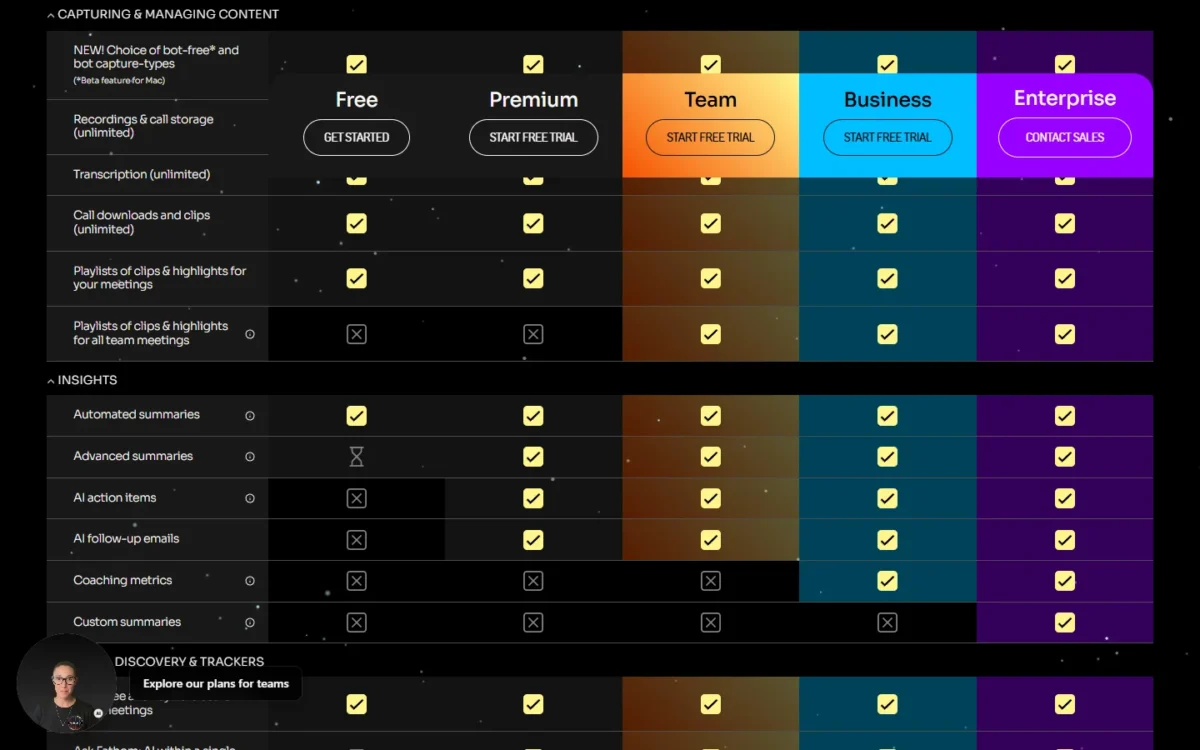
CRM sync is where sales teams pay. Fathom syncs notes into Salesforce and HubSpot; “CRM syncs” carry a “Max 3 users/ domain” note on the lower tiers, and Business adds CRM Field sync into specific CRM fields. A five-rep team should plan on Business.
Fathom “may use de-identified customer data” to improve its own models, with an opt-out at any time.
Business, the plan with CRM field sync, costs $25 per user per month in the Annually view and $34 in the Monthly view, with a 2-user minimum.

| Plan | Annually view | Monthly view |
|---|---|---|
| Premium | $16/ | $20/ |
| Team | $15/ | $19/ |
| Business | $25/ | $34/ |
Sources: Fathom pricing page, Monthly and Annually views, checked October 2026.
Pros
- No recording or transcription cap on Free
- Bot and bot-free capture in one account
- Claude and ChatGPT integrations
Cons
- Bot-free capture is a Mac beta
- Three-user CRM sync note on lower tiers
- De-identified data may train its models unless you opt out
- Skip it if:
- you need Pipedrive or Zoho notes from the entry plan; Avoma’s Startup plan names both.
2. Granola: Best for Bot-Free Notes on Your Own Device

- Capture: bot-free, device-audio capture on every plan
- Apps: desktop, iOS, Android and Apple Watch
- Free plan: Basic $0 with 30 days of meeting history
Granola never puts a bot in the meeting, on any plan, which is the reason to pick it over every bot-based tool here. You start it on your computer or phone, and notes stay private until you share them. The cost is reach: Salesforce waits for Enterprise.
The desktop app works with Zoom, Meet and Teams, and the mobile app is built for in-person meetings. Granola transcribes in real time on macOS and Windows, while Fathom’s bot-free mode is a Mac beta, so Granola is safer for a mixed Windows and Mac team.
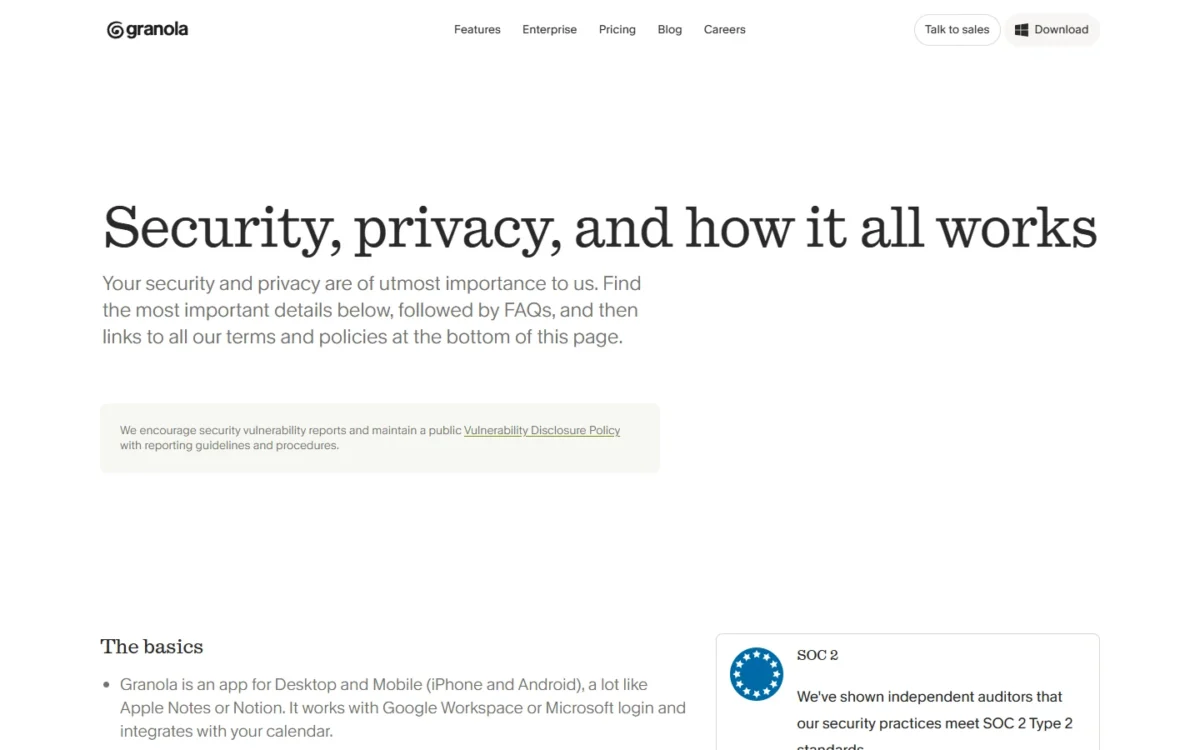
Granola trains on anonymized data unless each user opts out; Enterprise has training off by default. Audio is deleted after transcription, SOC 2 Type II covers every plan, and HIPAA-compliant workspaces are Enterprise only.
Business costs $14 per user per month and Enterprise $35; Granola prints no monthly or annual billing basis for either. HubSpot, Attio, Notion, Affinity and Zapier integrations start on Business.
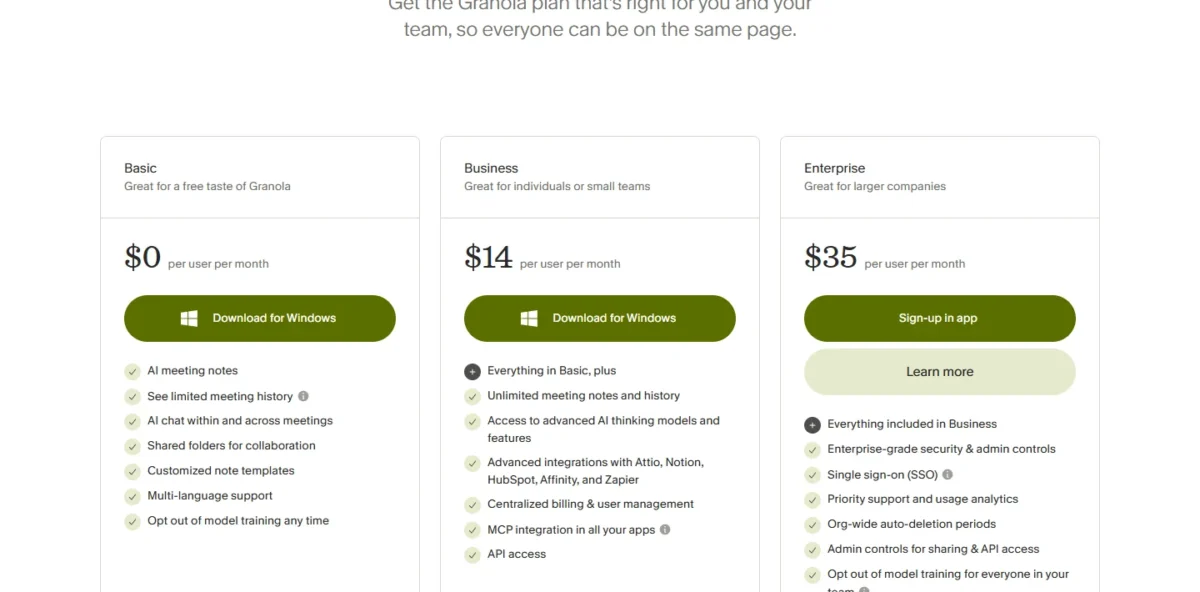
| Plan | Price | Key limit |
|---|---|---|
| Basic | $0 per user per month | 30 days of meeting history |
| Business | $14 per user per month | No Salesforce |
| Enterprise | $35 per user per month | Salesforce, HIPAA, SSO |
Sources: Granola pricing page, checked October 2026.
Pros
- No bot on any plan or device
- Mobile app for in-person meetings
- Audio deleted after transcription
Cons
- 30 days of history on Basic
- Salesforce at $35 per user per month
- Admin-enforced notice only on Enterprise
- Skip it if:
- every call goes to Salesforce on a mid-tier budget; Avoma’s Startup plan syncs Salesforce for $19 per recorder seat per month, billed annually.
3. Avoma: Best for Sales Teams That Log Calls to the CRM
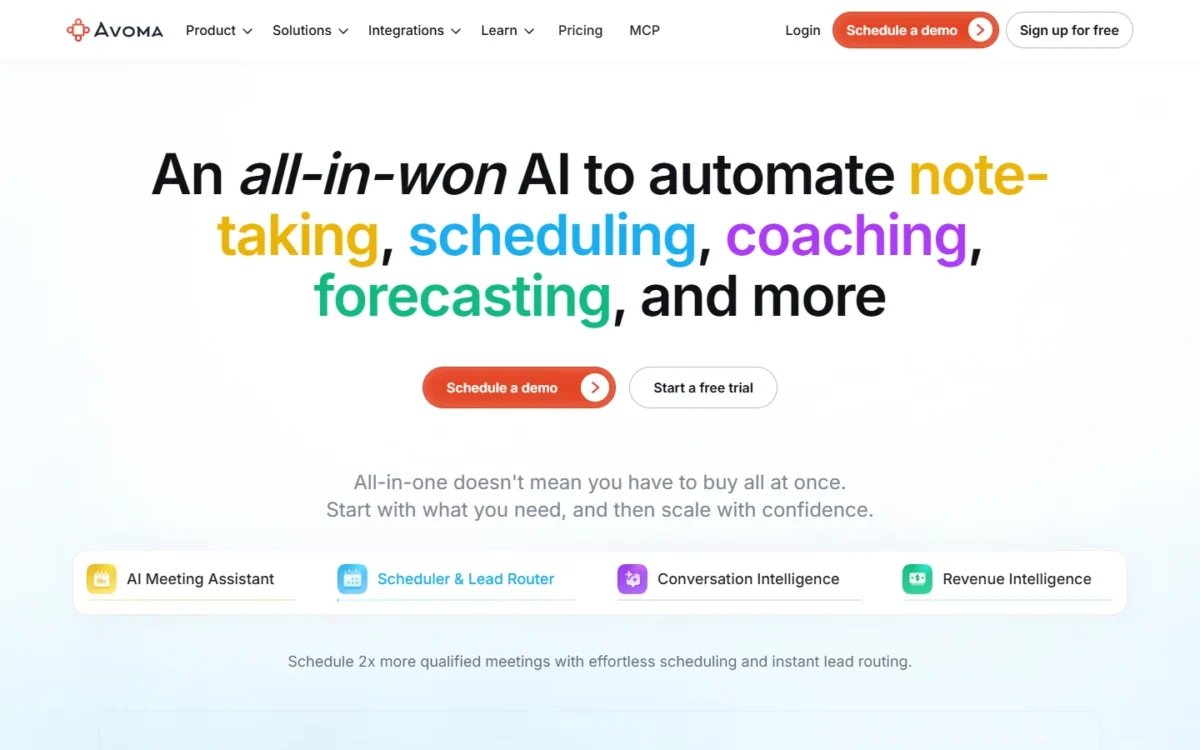
- CRM: auto-saves notes to Account, Opportunity and Contact records on Startup
- Capture: bot-less native or bot-based recording
- Trial: 14 days of the Organization plan, no credit card
For a sales team, the question is whether notes reach the CRM without a rep pasting them. Avoma answers it on the entry plan, naming Salesforce, HubSpot, Zoho, Pipedrive and Copper. The trade-off is commitment: no free plan, and the account turns into a viewer role when the trial ends.
A Pipedrive or Zoho shop gets automatic logging from the first paid seat; Granola’s pricing page names neither CRM. If you are still choosing the CRM itself, my guide to the CRM for sales teams compares the options.
Only recorders pay: viewers and collaborators are free, so a manager who reads notes needs no seat. Two-way CRM field updates cost the Revenue Intelligence add-on at $29 per seat per month, billed annually.
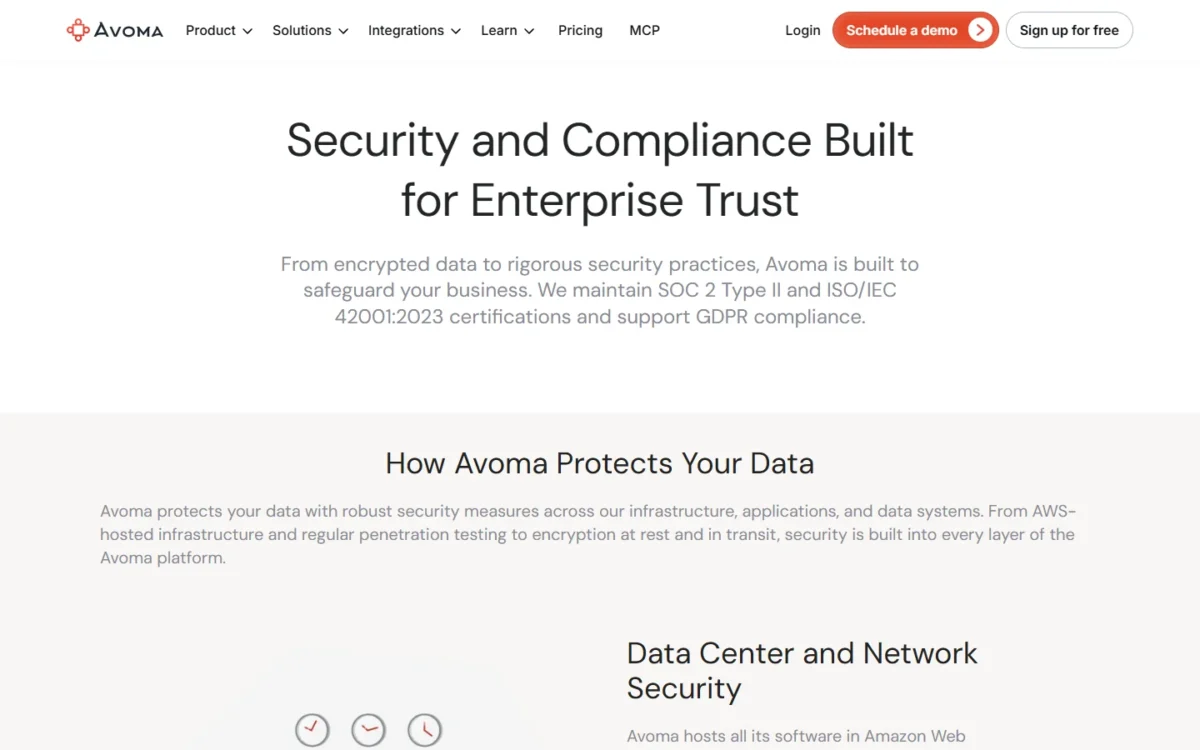
Avoma holds SOC 2 Type II and ISO/IEC 42001:2023 certifications and lists HIPAA Compliance on Enterprise. Its pricing and security pages state no model-training policy, so ask before signing.
Startup costs $19 per recorder seat per month billed annually, or $29 billed monthly, for up to 25 paid seats.
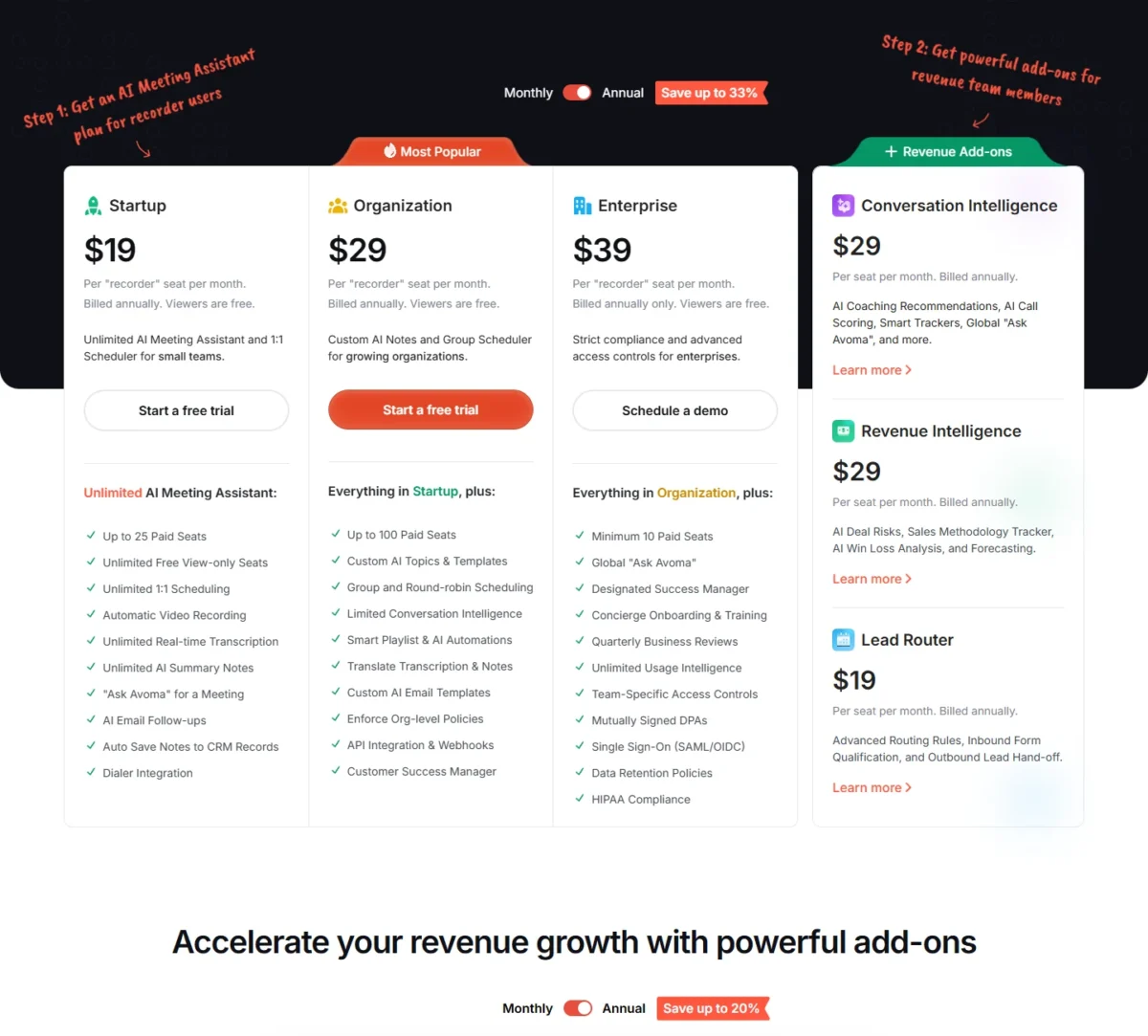
| Plan | Billed annually | Billed monthly | Seats |
|---|---|---|---|
| Startup | $19/ | $29 | Up to 25 |
| Organization | $29/ | $39 | Up to 100 |
| Enterprise | $39/ | Annual only | Minimum 10 |
Sources: Avoma pricing page, checked October 2026.
Pros
- Pipedrive, Zoho and Copper logging on Startup
- Free seats for viewers and collaborators
- ISO/IEC 42001:2023 certified
Cons
- No free plan
- Two-way field updates are an add-on
- HIPAA needs Enterprise, 10 seats minimum
- Skip it if:
- you want months of use at no cost; Fathom’s free plan has no recording cap.
4. tl;dv: Best for EU Data Residency and GDPR Teams

- Data location: processed and stored in the EU, on AWS Frankfurt and Google Cloud
- Model training: never used to train AI models
- Free plan: unlimited recordings, AI notes for 10 meetings
Where a recording lives matters more to some buyers than the summary. tl;dv is incorporated in Germany, keeps meeting data in the EU and does not train AI models on it. The trade-off: AI notes on the free plan cover only 10 meetings.
tl;dv records with a bot or bot-free, on Zoom, Meet, Teams and in person. It is SOC 2 Type II certified, and GDPR compliance covers all plans.
Fireflies also refuses training by default, but its Private Storage at a chosen location is Enterprise only. tl;dv gives a GDPR reviewer the data-location answer on every plan.
CRM integrations are personal on Pro and team-wide on Business, so a manager who wants shared automations needs Business.
Pro costs $18 per seat per month billed annually or $29 billed monthly. Business costs $29 billed annually or $39 billed monthly.
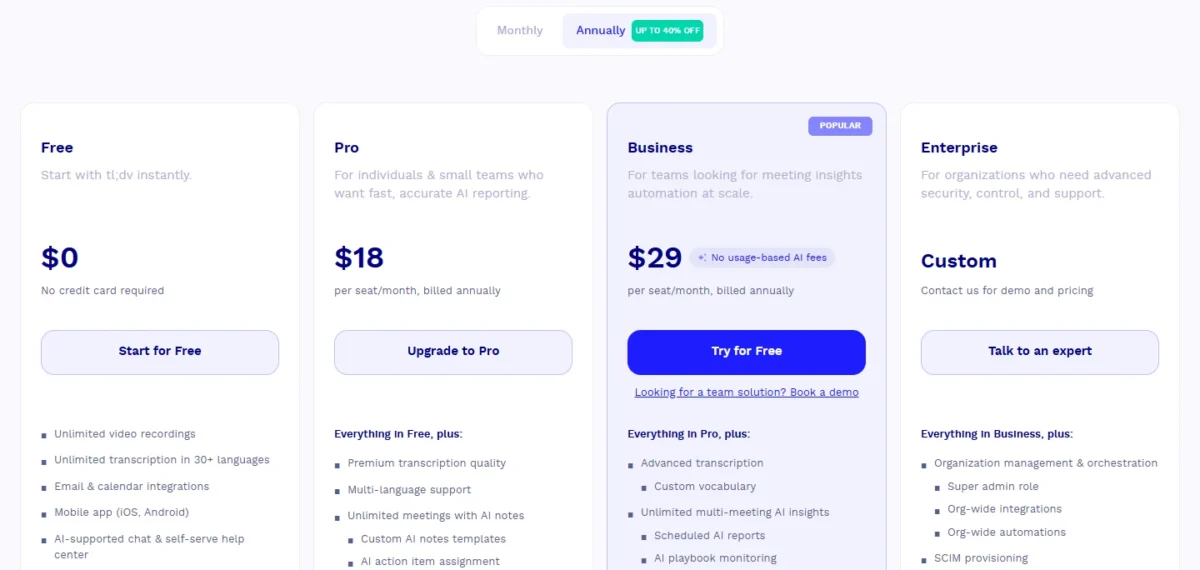
| Plan | Billed annually | Billed monthly |
|---|---|---|
| Pro | $18/ | $29/ |
| Business | $29/ | $39/ |
Sources: tl;dv pricing page, Annually and Monthly views, checked October 2026.
Pros
- EU processing and storage
- No model training on calls
- Unlimited free recordings
Cons
- Free data retention up to 3 months
- 3h recording limit on every plan
- Team-wide CRM integrations need Business
- Skip it if:
- you need HIPAA cover; Fireflies offers a BAA on Enterprise with Private Storage.
5. Fireflies.ai: Best for Multilingual Teams and Wide Integrations

- Languages: transcription in 100+ languages
- Capture: the Fireflies bot, or the Chrome extension without it
- Free plan: limited AI summaries, 400 mins of storage per team
A team that meets in several languages gets wide coverage for a low seat price from Fireflies.ai. Transcription runs in 100+ languages even on Free, and Pro adds unlimited integrations. The weak spot is the free tier, with limited AI summaries and 400 minutes of storage per team.
Fireflies joins as a bot you invite by email or from the calendar. Where a bot is unwelcome, the Chrome extension records without it.
Fireflies says “We don’t train on it by default” and keeps a 0-day retention policy with its vendors. SOC 2 Type II, GDPR and ISO 42001 are listed; the HIPAA BAA is Enterprise only, with Private Storage.
Pro costs $10 per seat per month, billed annually, below tl;dv Pro at $18 and Read AI Pro at $15. Business costs $19 per seat per month, billed annually.
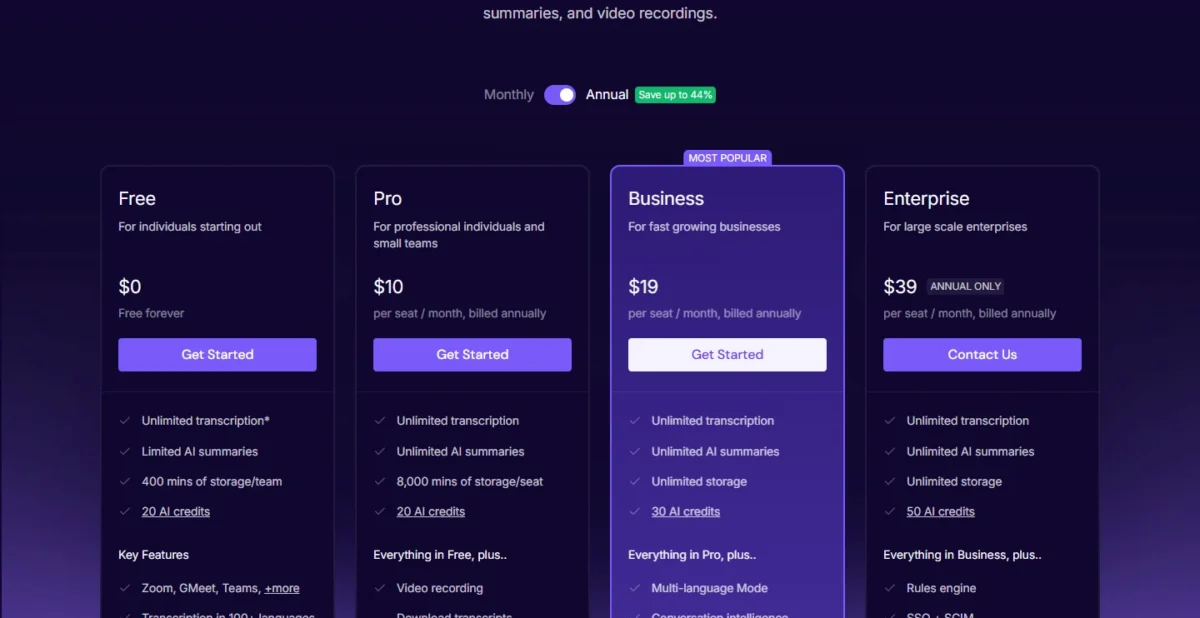
| Plan | Billed annually | Storage |
|---|---|---|
| Pro | $10/ | 8,000 mins/ |
| Business | $19/ | Unlimited |
Sources: Fireflies.ai pricing page, checked October 2026.
Pros
- 100+ transcription languages on Free
- Bot or extension recording
- 0-day retention with vendors
Cons
- Limited AI summaries on Free
- Pro storage capped at 8,000 mins per seat
- BAA only on Enterprise
- Skip it if:
- you keep hours of recordings without paying; the Fireflies Free plan holds 400 minutes of storage per team, while Fathom’s free plan lists unlimited recordings and transcriptions.
6. Otter.ai: Best for Live Transcription and In-Person Recording
- Live features: live transcription; live notes and captioning for Google Meet and Zoom
- Apps: iOS and Android, with built-in mic, Bluetooth and AirPods input
- Free plan: 300 monthly transcription minutes, 30 minutes per conversation
Otter.ai is the pick when the words must appear while people are still talking. Live transcription, live captions and phone apps suit interviews and in-person meetings. The catch is the free plan: conversations stop at 30 minutes, and only the 25 most recent stay.
A field rep can record a client meeting on a phone through Bluetooth or AirPods. Online, Otter’s assistant joins Zoom, MS Teams and Google Meet.
CRM sync counts users: Salesforce or HubSpot sync covers 1 user on Pro and 5 on Business. A five-rep team needs Business, while Read AI puts both CRMs on Pro.
Otter de-identifies user data before training its models, holds a SOC 2 Type 2 report, and sells HIPAA as an Enterprise add-on.
Pro costs $8.33 per user per month and Business $19.99, both billed annually.
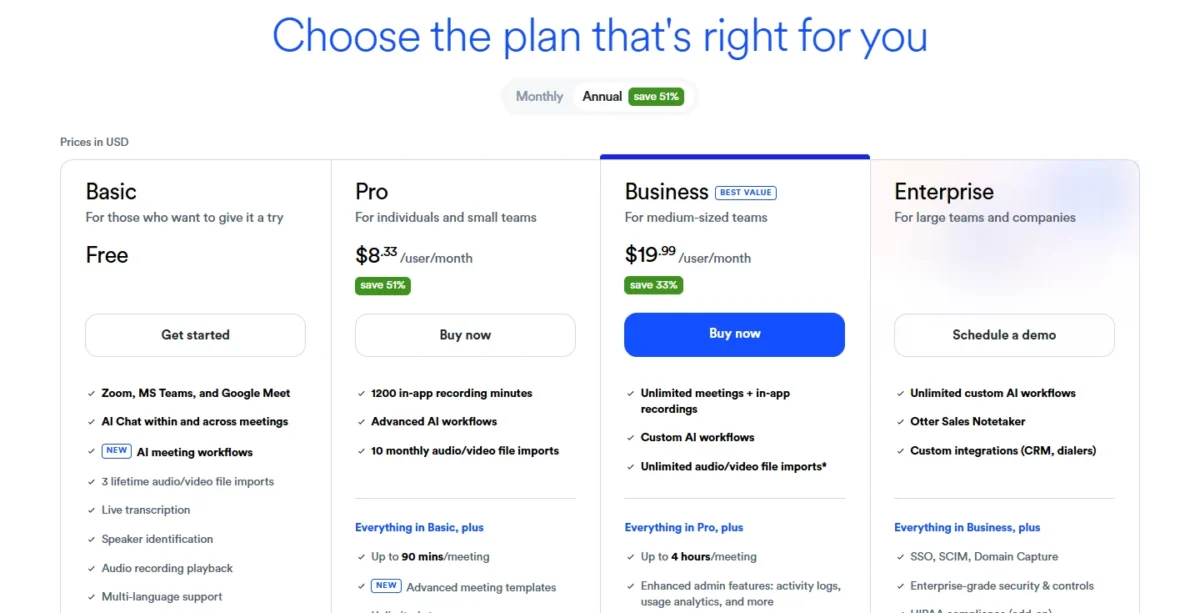
| Plan | Billed annually | Per conversation | CRM sync |
|---|---|---|---|
| Pro | $8.33/ | 90 minutes | 1 user |
| Business | $19.99/ | 4 hours | 5 users |
Sources: Otter.ai pricing page, checked October 2026.
Pros
- Live captions for Meet and Zoom
- Phone recording with AirPods input
- Third-party AI providers do not train on its customer data
Cons
- 25 most recent conversations on Basic
- CRM sync for one user on Pro
- De-identified user data trains Otter’s own models
- SSO needs a 100-user license
- Skip it if:
- five reps need Salesforce or HubSpot sync on a small budget; Read AI Pro lists both at $15 per user per month, billed annually.
7. Read AI: Best for Meeting Coaching Metrics and Cross-App Search

- Meeting coach: talking speed, filler words, bias and charisma
- Free plan: 5 meeting transcripts a month, meetings up to 1 hour
- Model training: opt-in, off by default
Read AI measures the meeting as well as recording it: its coach reports talking speed, filler words, bias and charisma. The trade-off is a free plan of 5 meeting transcripts a month.
Ask Read searches meetings, email and messages. Fathom keeps coaching metrics for Business, while Read AI lists its coach on Free.
Read joins Zoom, Teams or Meet, announces itself, and needs host approval first. Desktop and mobile apps also record from your own devices, including in-person meetings.
AI training is opt-in, and a participant who opts out has the meeting data deleted. Read AI is audited against SOC 2 Type II yearly and puts HIPAA compliance on Enterprise+, which requires 5+ licenses.
Pro costs $15 per user per month when billed annually and adds Salesforce, HubSpot, Notion, Jira and Zapier integrations.
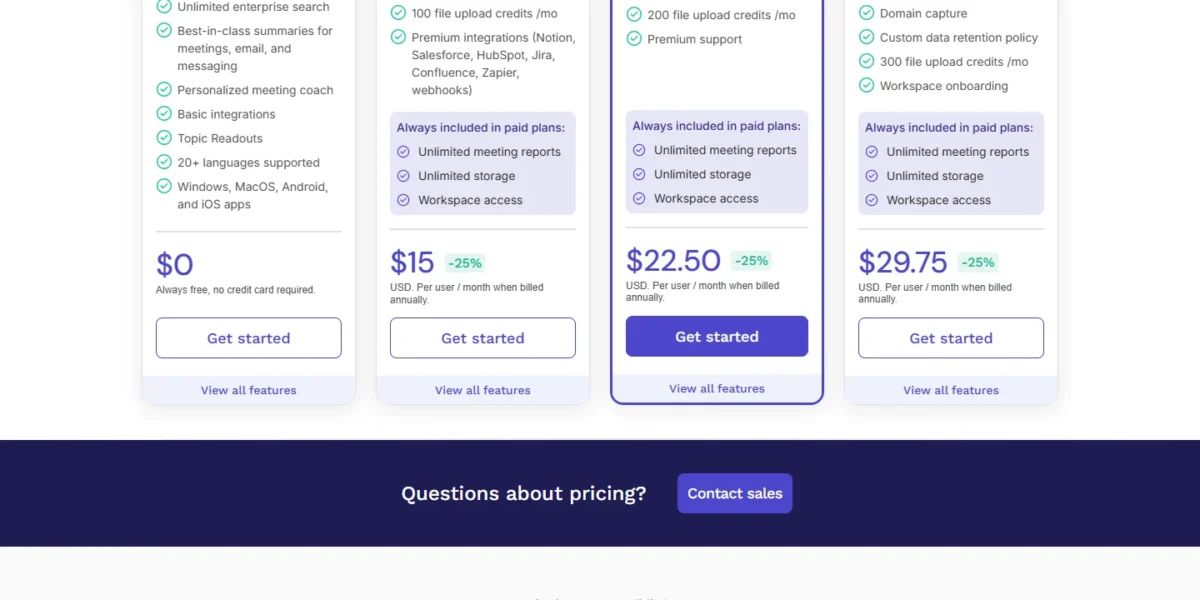
| Plan | Billed annually | Key limit |
|---|---|---|
| Pro | $15/ | Meetings up to 4 hours |
| Enterprise | $22.50/ | Adds audio and video playback |
Sources: Read AI pricing page, checked October 2026.
Pros
- Coaching report on every plan
- Salesforce and HubSpot on Pro
- Host approval before it joins
Cons
- 1-hour meetings on Free
- Playback only from Enterprise
- HIPAA needs 5+ Enterprise+ licenses
- Skip it if:
- your calls happen on bad lines or in loud rooms; Krisp cleans the audio and takes notes in one app.
8. Krisp: Best for Noisy Calls and Bot-Free Notes Together
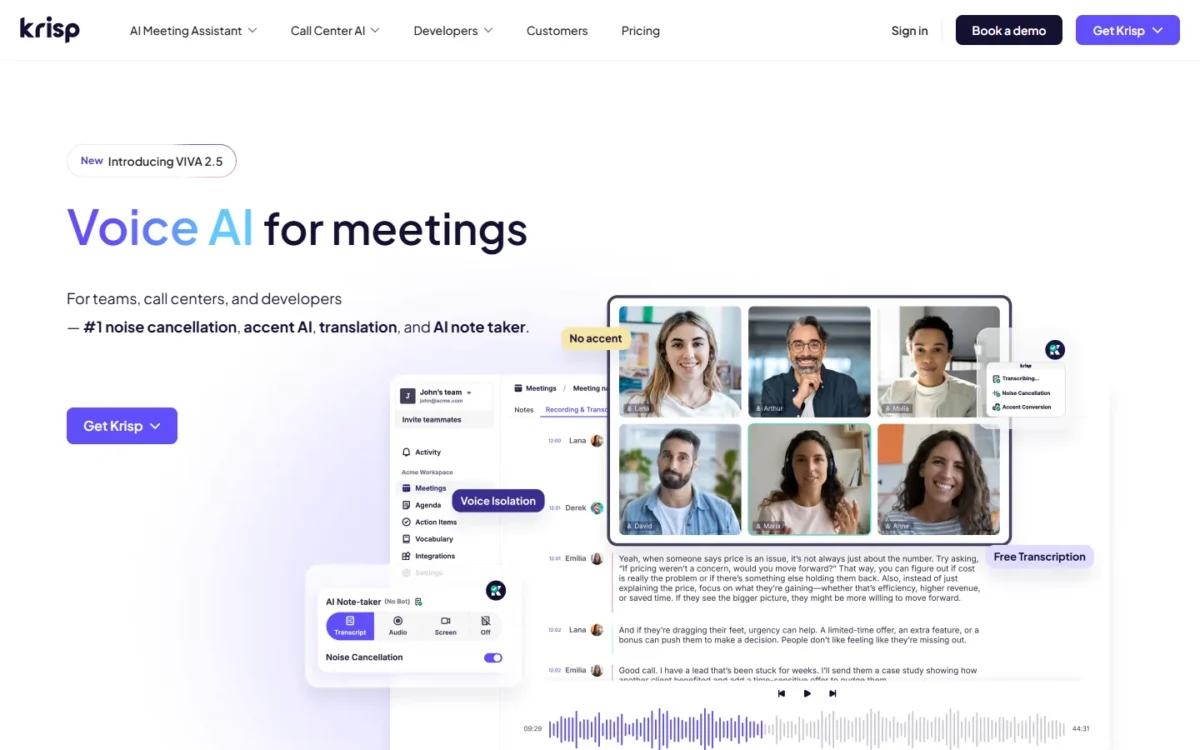
- Capture: bot-free note-taker, in-person notes, or record with bot
- Trial: free for 7 days, no credit card
- Model training: meeting data never trains Krisp’s models
Krisp starts from the audio: noise cancellation is built into every plan, and Core adds an unlimited bot-free AI note-taker. That pairing suits calls from a home office, a car or a shared floor. The trade-off is a 7-day trial instead of a free plan.
Core also lists in-person notes and an outbound phone call recorder. Transcripts come in 16+ languages, far fewer than Fireflies’ 100+.
HubSpot, Pipedrive and Affinity appear in Krisp’s integration list, while Salesforce sits in Advanced. Krisp lists SOC 2 Type II, GDPR and HIPAA; a BAA needs 100+ seats.
Core costs $8 per user per month in the Annually view and $16 in the Monthly view; Advanced costs $15 and $30.
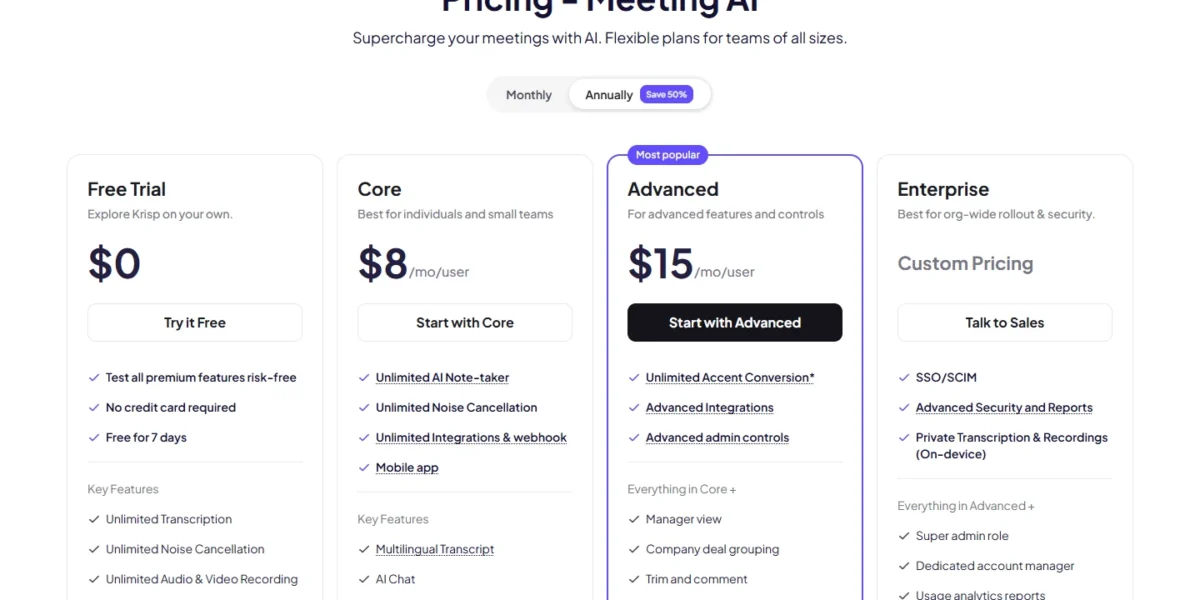
| Plan | Annually view | Monthly view |
|---|---|---|
| Core | $8/mo/user | $16/mo/user |
| Advanced | $15/mo/user | $30/mo/user |
Sources: Krisp pricing page, Monthly and Annually views, checked October 2026.
Pros
- Noise cancellation and notes in one subscription
- Pipedrive in the integration list
- No model training on meeting data
Cons
- No free plan
- Salesforce needs Advanced
- 16+ transcript languages
- Skip it if:
- you want free use with no end date; Fathom’s free plan is free forever.
9. Notion AI Meeting Notes: Best for Teams Already Working in Notion

- Plan gate: AI Meeting Notes in Business; Limited Trial on Free and Plus
- Capture: no bot needed
- Model training: none on your data unless you opt in
If your team already writes specs and tasks in Notion Business, a separate note-taker may be a cost you do not need. Notes are captured without a bot and stay next to the projects and docs they led to. The trade-off: no CRM sync is listed.
Granola keeps notes in its own app; here a note becomes a Notion page. That suits product and ops teams more than sales.
Notion AI does not train on your data unless you opt in. Transcript retention is configurable, consent disclosures are built in, and SOC2 Type 2 is listed. Zero data retention with LLM providers is Enterprise only.
Business costs $20 per seat per month on Pay yearly and $24 on Pay monthly. My Notion pricing guide covers the full plan.

| Plan | Pay yearly | Pay monthly | Meeting notes |
|---|---|---|---|
| Plus | $10/ | $12/ | Limited Trial |
| Business | $20/ | $24/ | Included |
Sources: Notion pricing page, Pay yearly and Pay monthly views, checked October 2026.
Pros
- No bot; notes sit beside docs
- Opt-in training only
- Configurable transcript retention
Cons
- Meeting notes need Business
- No CRM sync listed
- Zero data retention only on Enterprise
- Skip it if:
- your notes must reach a CRM; Read AI Pro lists Salesforce and HubSpot.
10. Gemini in Google Meet: Best for Google Workspace Teams

- Plan gate: Gemini in Meet from Business Standard, not on Starter
- Output: notes in Google Docs, recap emailed to the organizer
- Languages: 8 spoken languages, one per meeting
Google Workspace Business Standard teams already pay for a note-taker. “Take notes for me” writes notes into Google Docs and emails the organizer a recap link. The limits are Meet only and one of 8 spoken languages per meeting.
Google recommends it for meetings of 15 minutes to 8 hours, and it also works in person. Notes follow the Meet retention policy your admin set.
An admin can require every participant’s explicit consent first, but that setting is off by default. Business Starter lacks Gemini in Meet; my Google Workspace pricing guide compares Starter and Standard.
Business Standard costs $14 per user per month with a 1-year commitment; the page also says all plans are billed monthly. New customers see $8.40 for the first 20 users for 12 months.
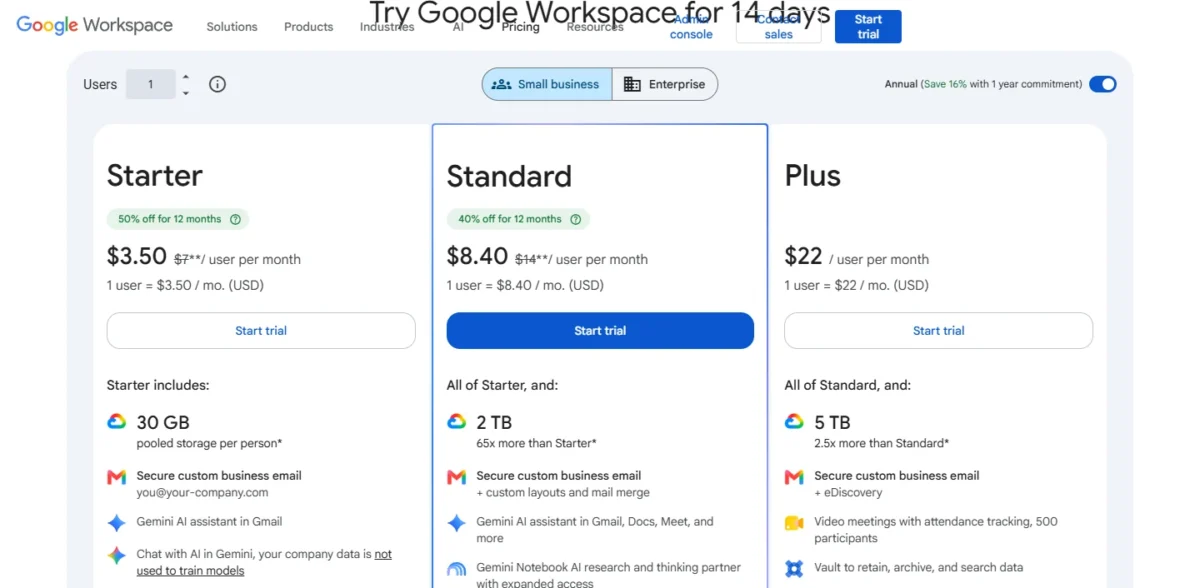
| Plan | 1-year commitment | Gemini in Meet |
|---|---|---|
| Business Starter | $7/user/ | Not included |
| Business Standard | $14/ | Included |
Sources: Google Workspace pricing page and Google Meet Help, checked October 2026.
Pros
- No extra seat on Business Standard
- Notes attach to the Calendar event
- Works for in-person meetings
Cons
- Google Meet only
- One language per meeting
- Consent prompt off by default
- Skip it if:
- clients invite you to Zoom or Teams; Otter’s assistant joins Zoom, MS Teams and Google Meet.
11. Microsoft Copilot in Teams: Best for Microsoft 365 Teams
- In Teams: recaps meetings and highlights action items from chats
- Agents: Facilitator, Researcher and Analyst with a Copilot license
- Model training: prompts and responses do not train the underlying LLMs
Microsoft’s note-taker comes inside a paid add-on, not a separate app. Copilot recaps Teams meetings, highlights action items from chats and keeps prompts and responses inside the Microsoft 365 service boundary. The trade-off is cost on top of a Microsoft 365 plan.
For a regulated team, that boundary is the draw. Prompts and responses follow your retention policies and are available for eDiscovery.
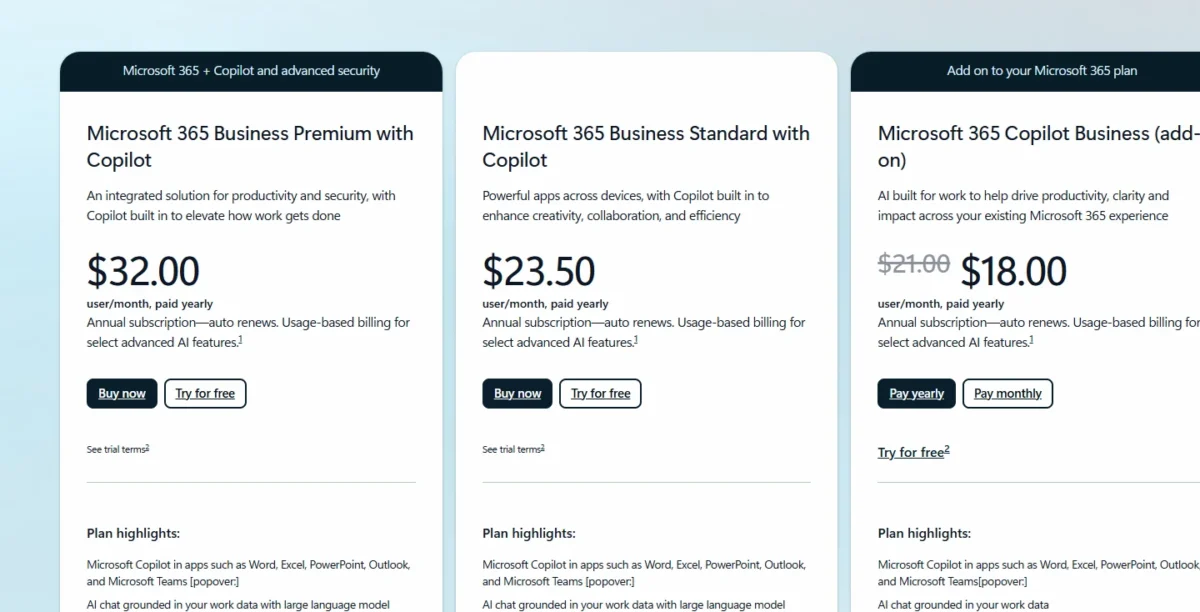
At $18.00 per user per month paid yearly, down from $21.00, Copilot costs more than Fireflies Pro at $10 billed annually and lists no third-party CRM sync. For Teams itself, see my Microsoft Teams review.
Microsoft 365 Copilot Business (add-on) costs $18.00 per user per month, paid yearly, on an annual subscription that auto-renews.
| Plan | Price | Billing |
|---|---|---|
| Microsoft 365 Copilot Business (add-on) | $18.00/ | Paid yearly |
Sources: Microsoft Copilot Business pricing page, checked October 2026.
Pros
- Teams meeting recaps
- Retention policies and eDiscovery apply
- Facilitator agent included
Cons
- Add-on to a Microsoft 365 plan
- Annual subscription
- No CRM sync listed
- Skip it if:
- your meetings span Zoom and Meet too; Otter’s assistant joins all three.
12. ZoomMate (My Notes): Best for Zoom-First Teams

- My Notes: Zoom, in-person, mobile and third-party platform meetings
- Free tier: ZoomMate Basic, 40 minutes per meeting
- Paid plan: unlimited AI note-taking, 2,200 AI credits per user per month
Zoom’s own assistant reaches beyond Zoom. My Notes captures conversations in person, on mobile and on third-party platforms, while Gemini’s note-taker works inside Meet. The free tier is narrow: summaries for 3 hosted meetings a month, capped at 40 minutes.
After a meeting, ZoomMate automates tasks such as Salesforce updates and follow-up emails. A Zoom-first sales team gets a CRM step without a third-party bot. For the rest of the suite, see my Zoom Workplace review.
ZoomMate costs $16.67 per user per month billed annually, or $20 billed monthly, with 2,200 AI credits per user each month.

| Plan | Billed annually | Billed monthly |
|---|---|---|
| ZoomMate | $16.67/ | $20/ |
Sources: ZoomMate plans page, Monthly and Annually views in USD, checked October 2026.
Pros
- My Notes on third-party platforms
- Free tier with Workplace Basic
- Salesforce updates after meetings
Cons
- 40-minute free meetings
- My Notes 3 times a month on Basic
- No training or HIPAA terms on its plans page
- Skip it if:
- you need a stated data-location policy; tl;dv states EU storage.
What a 5-Person Team Pays per Year
Five seats for a year run from $480 on Krisp Core to $1,740 on tl;dv Business, on the plan that does the job.
| Software | Plan | 5 seats x 12 months | What the plan covers |
|---|---|---|---|
| Krisp | Core, Annually view | $8 x 5 x 12 = $480 | HubSpot, Pipedrive |
| Fireflies.ai | Pro | $10 x 5 x 12 = $600 | Unlimited integrations |
| Granola | Business, basis not printed | $14 x 5 x 12 = $840 | HubSpot, Attio, Affinity |
| Gemini in Google Meet | Business Standard | $14 x 5 x 12 = $840 | Whole Workspace suite |
| Read AI | Pro | $15 x 5 x 12 = $900 | Salesforce, HubSpot |
| ZoomMate | ZoomMate | $16.67 x 5 x 12 = $1,000.20 | Salesforce updates |
| Microsoft Copilot in Teams | Copilot Business add-on | $18 x 5 x 12 = $1,080 | Plus a Microsoft 365 plan |
| Avoma | Startup | $19 x 5 x 12 = $1,140 | Five named CRMs |
| Otter.ai | Business | $19.99 x 5 x 12 = $1,199.40 | CRM sync for 5 users |
| Notion AI Meeting Notes | Business, Pay yearly | $20 x 5 x 12 = $1,200 | Whole Notion workspace |
| Fathom | Business, Annually view | $25 x 5 x 12 = $1,500 | CRM Field sync |
| tl;dv | Business | $29 x 5 x 12 = $1,740 | Team-wide integrations |
Sources: Krisp, Fireflies, Granola, Google Workspace, Read AI, Zoom, Microsoft, Avoma, Otter, Notion, Fathom and tl;dv pricing pages, checked October 2026. Excludes tax, add-ons and introductory prices.
The cheapest rows hide a Salesforce gap: Krisp needs Advanced for it, at $15 x 5 x 12 = $900 a year. Paying for Fathom Business monthly costs $34 x 5 x 12 = $2,040 a year. Workspace, Notion and Copilot also buy a suite you may already pay for.
How to Choose an AI Note Taker
Decide in this order: how the tool may record, which plan syncs your CRM, then whose privacy terms your data owner accepts.
| Software | Bot-free capture | CRM sync from | Salesforce | Trains on your data | HIPAA |
|---|---|---|---|---|---|
| Fathom | Mac beta | Lower tiers, 3 users/ | Lower tiers | De-identified, opt-out | Signed BAA listed |
| Granola | Every plan | Business | Enterprise | Anonymized, opt-out | Enterprise |
| Avoma | Bot-less mode | Startup | Startup | Not stated | Enterprise |
| tl;dv | Yes | Pro | Not listed | Never | Not listed |
| Fireflies.ai | Chrome extension | Not listed | Not listed | Not by default | Enterprise |
| Otter.ai | Mobile apps | Pro, 1 user | Pro | De-identified | Enterprise add-on |
| Read AI | Desktop and mobile apps | Pro | Pro | Opt-in | Enterprise+ |
| Krisp | Core | Core | Advanced | Never | BAA at 100+ seats |
| Notion AI Meeting Notes | Yes | Not listed | Not listed | Opt-in | Not listed |
| Microsoft Copilot in Teams | Built in | Not listed | Not listed | Not for the LLMs | Not listed |
| ZoomMate | Built in | ZoomMate | ZoomMate | Not listed | Not listed |
Sources: Fathom for Teams, Granola security, Avoma security, tl;dv about, Fireflies security, Otter privacy, Read AI privacy, Notion AI Meeting Notes and the pricing pages above, checked October 2026.
Recording method comes first. If client policies ban bots, your shortlist is Granola, Krisp, Notion or a built-in tool before price matters.
CRM plan comes second. HubSpot sync appears at Fathom, Granola, Avoma, Otter.ai, Read AI and Krisp, and Pipedrive users find it at Avoma and Krisp. Salesforce costs more on Granola (Enterprise) and Krisp (Advanced).
Privacy terms come third. tl;dv and Krisp rule out training on meeting data, Read AI and Notion make it opt-in, and Fathom, Granola and Otter train on de-identified or anonymized data. Nine picks list SOC 2 Type II or Type 2.
Recording consent tools
Each vendor handles consent with its own feature; the law where you record is your own check. Granola’s notice is per user, or admin-enforced on Enterprise. Otter lists a recording disclaimer email and MS Teams recording permission capture.
Avoma recommends a recording consent disclaimer for external participants. tl;dv has recording consent settings, Notion lists consent disclosures, and Meet lets an admin require explicit consent.
Already paying for a suite?
Yes, the built-in note-taker is enough when every meeting runs on one platform and nobody needs CRM sync. Once clients invite you elsewhere, or sales needs notes on CRM records, a cross-platform pick earns its seat.
Teams that run projects in ClickUp rather than Notion can check each plan in my ClickUp pricing guide before adding a recorder seat.
Also Considered
- Fellow: a meeting manager built around collaborative agendas; Free holds 5 AI notes per user for life.
- MeetGeek: records with or without a bot, but Free stops at 3 hours of transcription a month.
- Jamie: Free has a 30-minute meeting limit, and Team is $37 per seat per month billed annually on the October 2026 archived copy of its pricing page.
- Sembly: prices its plans by clients, brand packages and AI deliverables, a different job from internal meeting notes.
- tactiq: Free includes 5 AI credits a month, and AI features pause at the limit.
FAQ
What is the most accurate AI note taker?
No vendor page I read uses a shared benchmark; tl;dv’s about page claims more than 95% accuracy across 100+ languages, a vendor figure. Record one real meeting with your accents and jargon through two free tiers, then compare names, numbers and action items.
Is an AI note taker worth paying for?
For one person, often not at first: Fathom’s free plan records and summarizes without a cap. Paying makes sense once a team needs CRM sync for everyone.
Can an AI note taker join calls with external clients?
Yes, but the host and the guests should know: Read AI announces itself and needs host approval before joining. Gemini in Meet can share notes with external guests if the organizer chooses that setting. Where a bot is unwelcome, Granola records from your own device.
Do these note-takers work with ChatGPT?
Several do, feeding ChatGPT rather than replacing it. Fathom lists Claude and ChatGPT integrations, Granola’s MCP works with both, and Read AI is available as a ChatGPT app. For ChatGPT as a general assistant, see my ranking of the best AI chatbots.
Final Verdict
No single tool fits every job here; pick by how your meetings let a tool record and where the notes must go.
- Zero budget: Fathom, then Business once five reps need CRM field sync.
- No bots allowed: Granola, or Krisp if noisy audio is the bigger problem.
- CRM on the entry plan: Avoma, whose Startup plan names Pipedrive and Zoho too.
- EU data: tl;dv.
- Many languages, low seat price: Fireflies.ai Pro at $10 per seat per month, billed annually.
- Live captions or in-person interviews: Otter.ai.
- Coaching metrics: Read AI.
- One platform only: Gemini in Google Meet, Copilot in Teams, ZoomMate or Notion, whichever suite you already pay for.
If the job is wider than meetings, my guide to the best AI tools for business covers other categories worth a seat.






Pingback: Notion Pricing 2026: Plans, AI Limits, Credits & True Cost
Pingback: Zoom Workplace Review 2026: Real Cost, Limits & Verdict