Aisma is worth paying for when you need one change inside a short clip you already shot, bought as a credit pack before any weekly plan. It edits your own footage from a plain-words request and keeps the framing, length and original audio. Clips run 2 to 60 seconds, and each second costs 10 credits at 720p or 20 at 1080p.
Quick verdict
- Worth it for: creators and small shops fixing one thing in a 2 to 60 second clip
- Skip it if: you cut whole videos or need 4K, team seats or a free plan
- Main strength: Aisma keeps your framing and audio and prices each edit before rendering
- Biggest limit: a 60-second, 1080p ceiling and no free render
- Price basis: $0.199 per 720p second on the $1.99 pack, about $0.10 on Starter at full use
This Aisma review covers the AI video editor from BeInTouch, not AISMA, the UK association of specialist medical accountants.
In This Article (10 sections)
What Aisma Is and Who It’s For
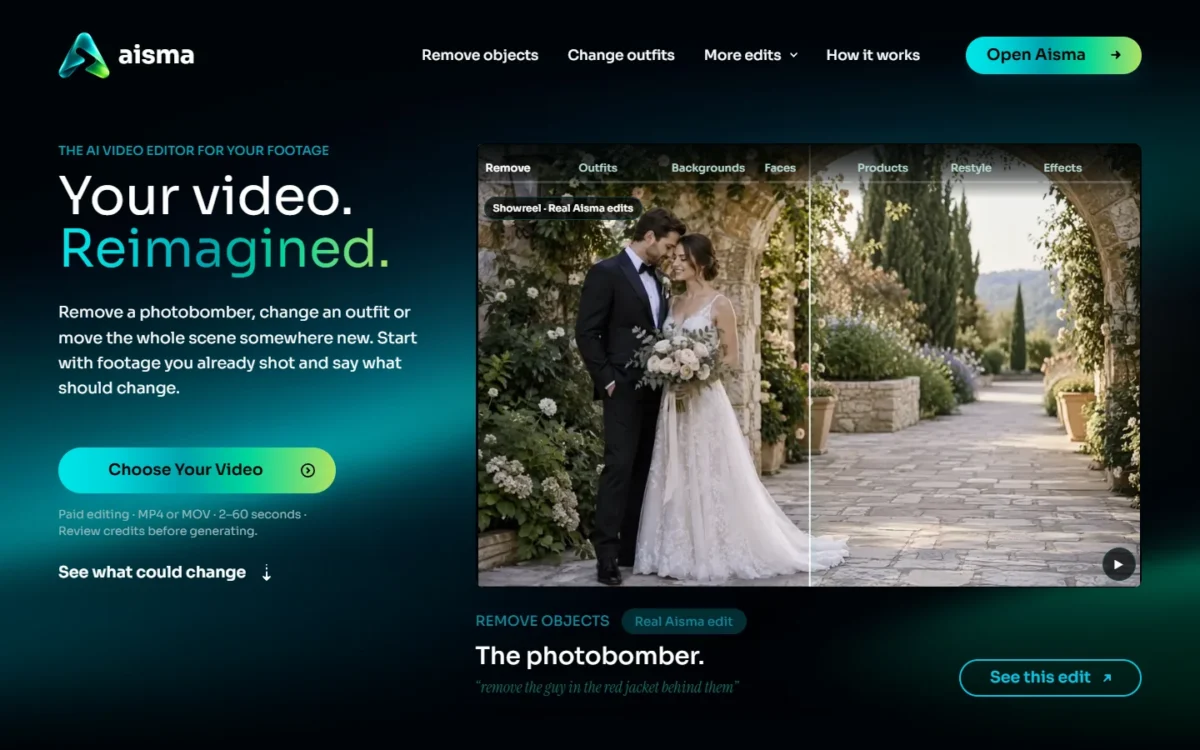
Aisma is an AI video editor that changes what is inside a clip you already filmed, so it suits people fixing one shot, not people cutting a full video. You upload a clip and describe the change in plain words, with no masks or keyframes.
- Starting price: $1.99 one-time for 100 credits; weekly plans from $9.99
- Free plan or trial: none; a new web account can set up three edits before buying credits
- Clip limits: 2 to 60 seconds, up to 500 MB, MP4 or MOV, in any orientation
- Output: MP4 in 720p or 1080p at 24 fps
- Platforms: browser at aisma.ai, iPhone and iPad (iOS 16.4 or later), Android
- Main limitation: no clip over 60 seconds and no 4K
Aisma Features That Matter
Three kinds of edit decide the purchase: removal, swaps from reference photos, and background or style changes. All cost the same per second, whatever you change.
Remove people and objects from a shot
Removal is the edit Aisma leads with: you name what should go by what it looks like and where it is, and Aisma fills the space from the scene around it. The motion and camera work you filmed stay as shot.
Clips work best, the help center says, when the target is easy to see and well lit, so budget for a possible redo on a crowded, dark shot.
Swap a product, outfit or face with reference photos
Aisma accepts up to 10 reference photos per edit. One photo of the item is enough for a product swap, so a small shop can film one shot and reuse it for several products.
A person swap needs two clear portraits of someone who agreed to it. Aisma’s terms of use ban deceptive impersonation, non-consensual intimate content and fabricated evidence.
Change the background or restyle the clip
Aisma moves a scene to a new place from words or a photo, with no green screen, and a restyle turns the clip into a material or art style such as clay. A full restyle changes the subject too, so ask for a background-only change when a person should stay photographic.
Edit part of a clip and redo one part
To change only a stretch of the clip, put the time in the request, for example “from 0:05 to 0:12”. Redoing one part of a finished edit costs that part’s length alone, and credits return only for parts that fail, are declined by the safety check or have nothing to change, so a retry of a result you simply dislike is a paid redo.
API, MCP server and the ChatGPT plugin
Aisma has a public REST API and an MCP server that run the same edits at the app’s prices, and each key can carry its own credit limit. Guest profiles cannot use the API. This route fits a shop that repeats one product swap across many clips, since a key’s credit limit caps what a script can spend. An Aisma plugin in ChatGPT starts when the prompt opens with the word Aisma.
Aisma Ease of Use and Setup
A first edit takes three steps in Aisma’s help center: choose a clip, say what should change, then review the credits and generate. The request is plain words, up to 2,000 characters, in English or another language.
Before any payment, the web version lets a new account set up three edits, and rendering starts once your balance covers the price. In the iPhone and Android apps, you add credits first.
Sign in before you buy
Aisma lets you buy from a guest profile, and I would not. The checkout email is a billing contact, not a sign-in, and a new account created later does not automatically receive the guest profile’s purchases, credits or Library.
Link Apple, Google or email before the first purchase.
Aisma Pricing
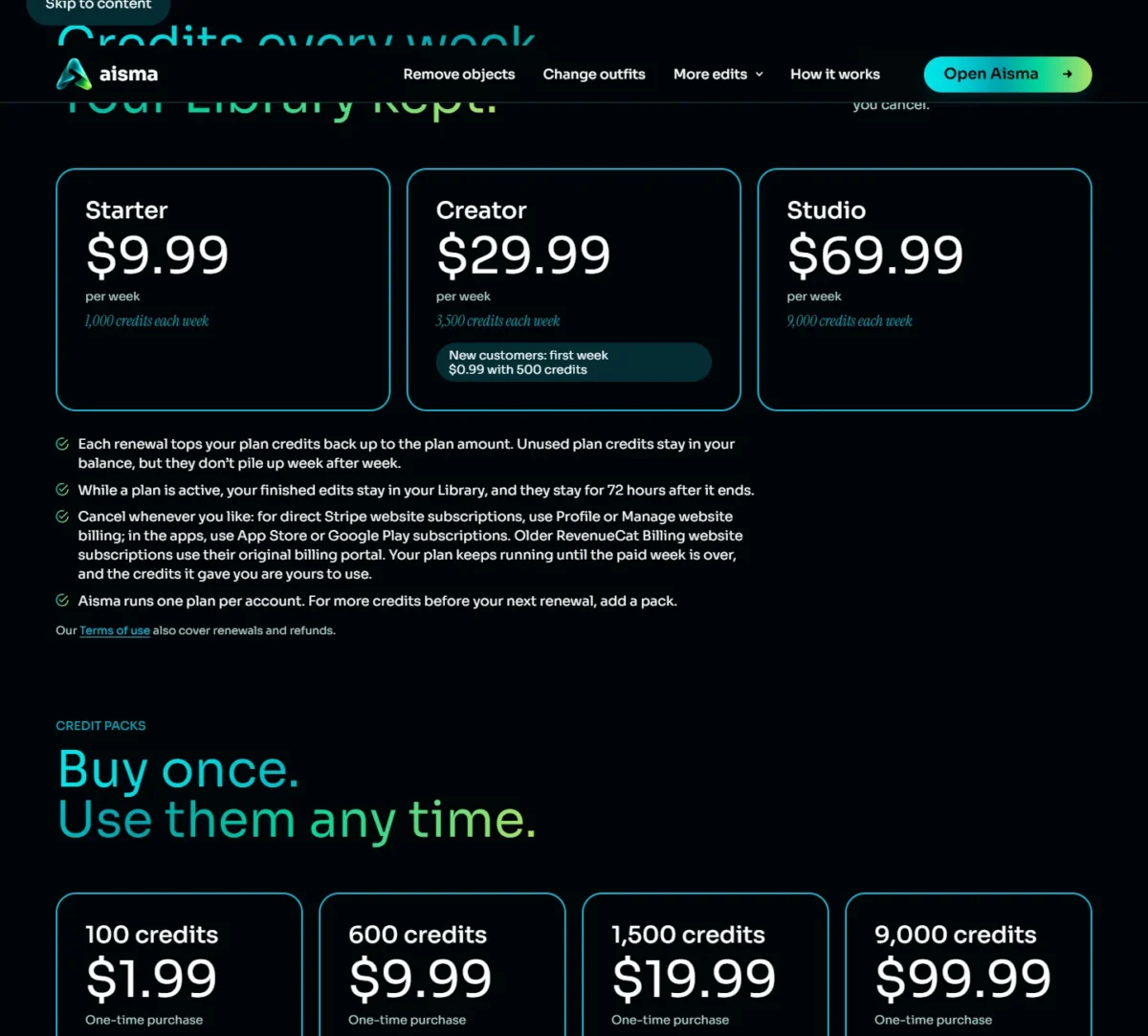
An Aisma edit costs 10 credits per second of video at 720p or 20 at 1080p. Credits come in one-time packs or weekly plans.
| Purchase | Price | Billing | Credits |
|---|---|---|---|
| 100 credits | $1.99 | One-time | Never expire |
| 600 credits | $9.99 | One-time | Never expire |
| 1,500 credits | $19.99 | One-time | Never expire |
| 9,000 credits | $99.99 | One-time | Never expire |
| Starter | $9.99 per week | Renews weekly | 1,000 credits each week |
| Creator | $29.99 per week | Renews weekly | 3,500 credits each week; first week $0.99 with 500 credits for new customers |
| Studio | $69.99 per week | Renews weekly | 9,000 credits each week |
Sources: Aisma pricing page, checked Nov 2026.
Website prices are in US dollars; in the apps, Apple or Google sets the price, which may vary by region. Aisma updated its per-second pricing on October 17, 2026, so an older write-up may quote other rates.
No plan gates quality: every account can pick 720p or 1080p. The difference is storage: without an active plan, each finished edit stays in the Library for 72 hours; with one, the Library stays while the plan is active and for 72 hours after it ends.
What one clip costs, second by second
A single-take clip of 10 seconds uses 100 credits in 720p, or 200 in 1080p. Quick cuts cost more than their length, because Aisma prices each shot (the stretch between two cuts) in whole seconds with a 2-second minimum.
Longer clips land in a range: 60 seconds runs about 630–700 credits at 720p or about 1,250–1,400 at 1080p. That last figure is the upgrade trigger, because a 60-second 1080p clip needs more than Starter’s 1,000 credits a week.
Packs vs weekly plans: cost per second and per year
The plan rates in the table below hold only if you spend every weekly credit, all 1,000 a week on Starter.
| Purchase | Cost per 720p second | Cost per 1080p second |
|---|---|---|
| 100-credit pack | $0.199 | $0.398 |
| 600-credit pack | $0.1665 | $0.333 |
| 1,500-credit pack | $0.1333 | $0.2665 |
| 9,000-credit pack | $0.1111 | $0.2222 |
| Starter, one week | $0.0999 | $0.1998 |
| Creator, one week | $0.0857 | $0.1714 |
| Studio, one week | $0.0778 | $0.1555 |
Sources: Aisma pricing page, checked Nov 2026. Cost per second is the price divided by the seconds its credits buy; plan rows assume every weekly credit is spent.
Each renewal only tops plan credits back up to the plan amount, so unused credits don’t pile up and a quiet week still costs the full price.
| Scenario | Cost |
|---|---|
| Starter for a year | $9.99 x 52 weeks = $519.48 |
| Creator for a year | $29.99 x 52 weeks = $1,559.48 |
| Studio for a year | $69.99 x 52 weeks = $3,639.48 |
| Starter for four weeks | $9.99 x 4 weeks = $39.96 |
Sources: Aisma pricing page, checked Nov 2026; yearly rows assume nothing is cancelled.
Now take four 15-second clips a month at 1080p: 4 x 300 credits = 1,200 credits. One 1,500-credit pack covers that for $19.99, about half the four-week Starter cost above.
My take
I would start on packs and move to Starter only after several weeks in a row of spending close to 1,000 credits. Below that, the plan’s lower rate is a discount on credits you never use.
The $0.99 Creator week and how renewal works
The $0.99 offer is a first week of Creator with 500 credits for new customers; Creator then renews at $29.99 a week, with 3,500 credits each week, until you cancel. A payment method or billing email that already used an intro week gets 50 credits, not 500.
Renewal math
Three renewals after the intro week cost $29.99 x 3 weeks = $89.97, which with the $0.99 first week makes $90.96 for four weeks. Cancelling takes effect at the end of the week you already paid for, and that week is not prorated.
Take the offer only with a cancel date in your calendar: its 500 credits buy 50 seconds of 720p video, enough to judge the output on your own footage.
Aisma Pros and Cons
Aisma’s strength is a priced-before-render edit inside your own footage; its limits are length, resolution and renewal.
Pros
- The exact credit price shows before you generate, and a part that fails costs nothing
- Edits keep your framing, clip length and original audio, so a fixed shot drops back into your usual editor
- Reference photos pin down an exact product, garment or face, which suits shops
- Pack credits never expire, so an occasional editor avoids a subscription
Cons
- No free render: judging the output on your own footage costs at least $0.99 for the Creator intro week, which then renews at $29.99 a week, or $1.99 for the smallest pack, which never renews
- Clips stop at 60 seconds and output at 1080p and 24 fps, which rules out long-form and 4K delivery
- Weekly plans renew automatically until cancelled, which hurts anyone who forgets a subscription
- Finished edits leave the Library after 72 hours without a plan
- Original audio only, and Aisma’s terms warn that output may be unexpected or inaccurate
What Users Say About Aisma
The App Store ratings page for Aisma shows 4.4 out of 5 from 226 ratings, checked Nov 22, 2026, but its written reviews date from 2023 to 2025 and describe an avatar generator, not the video editor.
Those App Store reviews repeat three complaints: avatar batches stuck in the queue after subscribing (02/17/2025), paying per style or per avatar on top of a trial or membership (12/27/2023 and 07/21/2024), and avatars that did not look like the person.
The developer’s replies on the same page say that avatar app has been retired. The app’s version history fits: an August release describes a ground-up rebuild, and an October release added whole-video editing.
My take
I read the 4.4 as a rating of mixed app versions, not of today’s editor, and I would not hold the old queue and billing complaints against it.
Who Should Use Aisma (and Who Should Skip It)
Use Aisma when the job is one change in a short clip. An edit keeps your clip’s length and framing and changes what you describe, so Aisma adds a step to your workflow instead of replacing your editor.
If a full editor with cuts and captions is what you need, the AI video editors ranked by job are the better starting point.
Best for
- A creator removing a photobomber from a 10-second, one-take clip, which costs 100 credits at 720p
- A small shop swapping one product into an existing ad clip from a single photo
- An occasional editor who buys a pack and saves each result within 72 hours
Not ideal for
- A full edit on a multi-track timeline with captions, which Adobe Premiere on mobile does for free
- Footage over 60 seconds or 4K delivery, since output stops at 1080p
- A team sharing one plan, because each plan belongs to one account
- Text-to-video generation, which is only on Aisma’s roadmap
Aisma vs Competitors
Aisma changes what is inside one shot, while CapCut and Adobe Premiere on mobile edit whole videos and start free.
| Software | Best for | Starting price | Key difference | Main trade-off |
|---|---|---|---|---|
| Aisma | One change inside a short clip | $1.99 for 100 credits, one-time | Edits inside the shot and keeps framing and audio | 60-second, 1080p ceiling; no free render |
| CapCut | Editing whole videos with templates | Free plan; Pro $19.99 per month | Free plan with templates and basic editing tools | Pro pricing varies by region, device and promotion |
| Adobe Premiere on mobile | Multi-track editing on a phone | Free app | Unlimited 4K exports with no watermark | Generative AI features use credits and run only on iOS |
| Runway | Generating video, images and audio | Free with 125 one-time credits; Standard $12 per month, billed annually | Generates new video, images and audio, while Aisma edits footage you shot | Standard and Pro credits do not roll over |
Sources: CapCut pricing page (US prices from the Internet Archive’s copy of Nov 16, 2026), Adobe Premiere on mobile and Runway pricing, checked Nov 2026.
The jobs differ: CapCut assembles the video, Aisma repairs a shot inside it. CapCut’s own site lists an AI People Remover among its tools, so a CapCut user who only needs people gone from a shot can look there first. Aisma stays the pick for a removal when you want the credit price shown before rendering and the clip’s framing and original audio kept. My guide to CapCut’s plans and prices covers what Pro adds.
My Runway review covers when generating new footage is worth paying for.
My take
Pick Aisma as an add-on if one shot needs fixing, and keep your current editor for the cut. If you are leaving CapCut for a wider reason, start from my list of CapCut alternatives matched to the reason you’re leaving.
FAQ
Is Aisma legit, and who makes it?
BeInTouch Pte. Ltd., registered in Singapore, builds Aisma and sells purchases on aisma.ai, and its about page names Aleksei Babkin as founder. Frostpixel, Unipessoal LDA publishes the iPhone and Android apps. Aisma says uploads are private to your account.
How do I log in to Aisma?
Sign in with a social account or email, and the same sign-in keeps your Library and credits with you on every device. Do it before you buy, because a guest profile’s purchases do not automatically move to a new account. The minimum age is 13, and a minor needs permission from a parent or guardian.
How do I cancel Aisma and get a refund?
Cancel a website subscription billed by Stripe from Profile or Manage website billing, and an app subscription in the App Store or Google Play. For a refund on an aisma.ai purchase, email support@aisma.ai with your receipt; app purchases follow the store’s refund rules.
Can Aisma make a video from text or add music?
No. Every Aisma edit starts from a clip you already shot and keeps its original sound. Creating video from text or a photo, new voices, music and lip-sync are all on the roadmap. If generation is the job, compare the AI video generators that create clips from text instead.
How I Evaluated Aisma
This Aisma review rests on Aisma’s homepage, pricing page, help center, about page and terms of use (effective November 20, 2026), plus its App Store listing and ratings page, all read on November 22, 2026. I worked out the per-second, yearly and renewal figures myself from those prices.
Aisma does not say which AI model it is built on and publishes no exact edit time. Test one short clip of your own before you buy more credits.
Final Verdict of This Aisma Review
Yes, Aisma is worth paying for if you are a creator or a small shop with one thing to change in a short clip you already shot, and no if you need it to be your only editor.
Start small. Put one 10-second, one-take clip through at 720p on the $1.99 pack; the clip uses all 100 of the pack’s credits. If it holds up, the 600-credit pack covers six such one-take clips at 720p or three at 1080p with no renewal, though a single 60-second clip needs more than this pack.
For cutting whole videos, pick CapCut or Adobe Premiere on mobile instead. Aisma is one specialist in a wider stack, and my roundup of AI tools for content creation covers the rest of it.