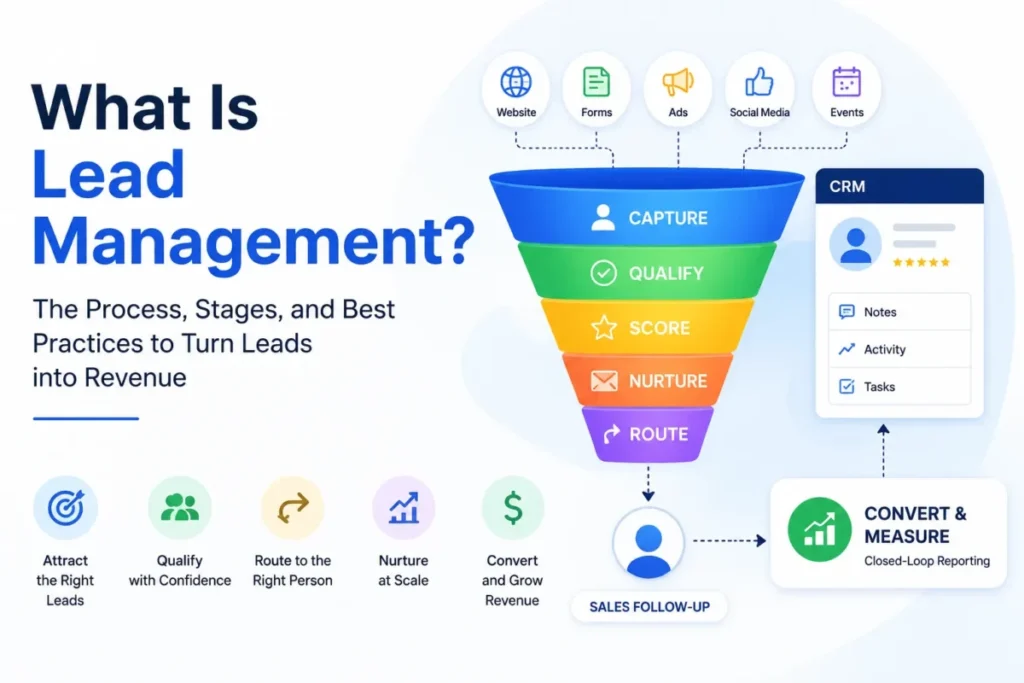
Most teams buy a CRM before they define what is lead management, then wonder why leads still go cold. The tool is rarely the problem.
The gap is ownership, follow-up speed, and data quality that nobody agreed on before the first form went live.
This guide treats lead management the way a revenue-operations buyer would: as an operating system, not a feature. I write under the SaaS CRM Review byline, and my lens is adoption risk, budget pressure, and what breaks first as the team grows.
If you want the tooling side after this, the CRM software roundup covers the product layer.
You will leave with clear boundaries, a field-level record checklist, a handoff SLA, scoring logic, routing fallback rules, and a way to measure whether any of it works.
Methodology note: This is a concept explainer built from official CRM documentation, help-center materials, official privacy pages, SERP competitor analysis, and reputable research. No hands-on CRM testing or trial workflows were performed. Where I describe product behavior, I cite official documentation and label it as a platform-specific example, not a universal rule.
In This Article (20 sections)
Quick Answer: What Is Lead Management?
Lead management is the structured process of capturing, organizing, qualifying, scoring, nurturing, routing, converting, and measuring potential customers from first interest to a clear sales outcome. It is the operating layer that decides which leads deserve attention, who owns each stage, how fast follow-up happens, and how results feed back to marketing. A CRM usually stores it, but lead management is the workflow, not the software.
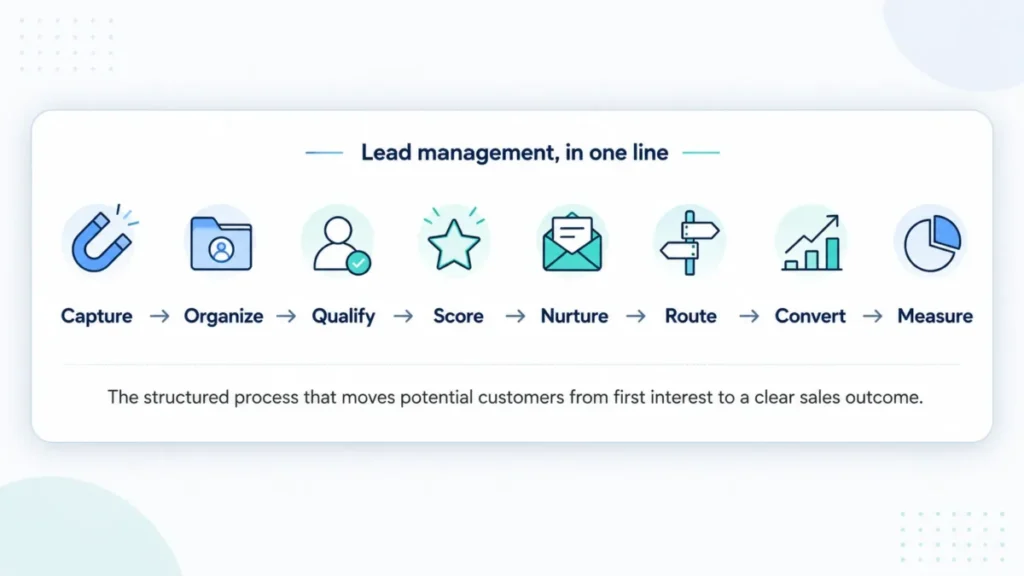
The 60-Second Explanation of Lead Management
At the simple layer, lead management is what happens after someone raises their hand. A form fill, a demo request, a call, or a trial signup becomes a tracked record instead of a sticky note.
At the technical layer, it is a set of CRM records and rules. Each lead carries a source, an owner, a stage, activity history, a qualification status, a consent state, and a next action, and automation moves it based on those fields.
At the business layer, lead management is a revenue-operations control system. It protects speed-to-lead, keeps sales focused on good-fit buyers, and gives finance and marketing a defensible view of where revenue came from.
Here is the boundary that trips people up. Lead management is not the same as what CRM software does as a whole, and it is not lead generation.
Generation creates interest. Management decides what happens to that interest next.
The lead management definition matters because the process, not the product, is what usually fails. I have watched teams blame a CRM for problems that were really undefined ownership and unclear qualification criteria.
How Lead Management Actually Works
The lead management process moves a record through a predictable sequence, even when teams name the steps differently. Vtiger’s documentation lists five stages, while Zapier and ZoomInfo describe seven, so treat any stage count as a convention rather than a law.
A practical model has eight steps: capture, clean and organize, qualify, score, nurture or route, follow up, convert or disqualify, and measure. Each step has an owner and a definition of done, which is where most guides stop short.
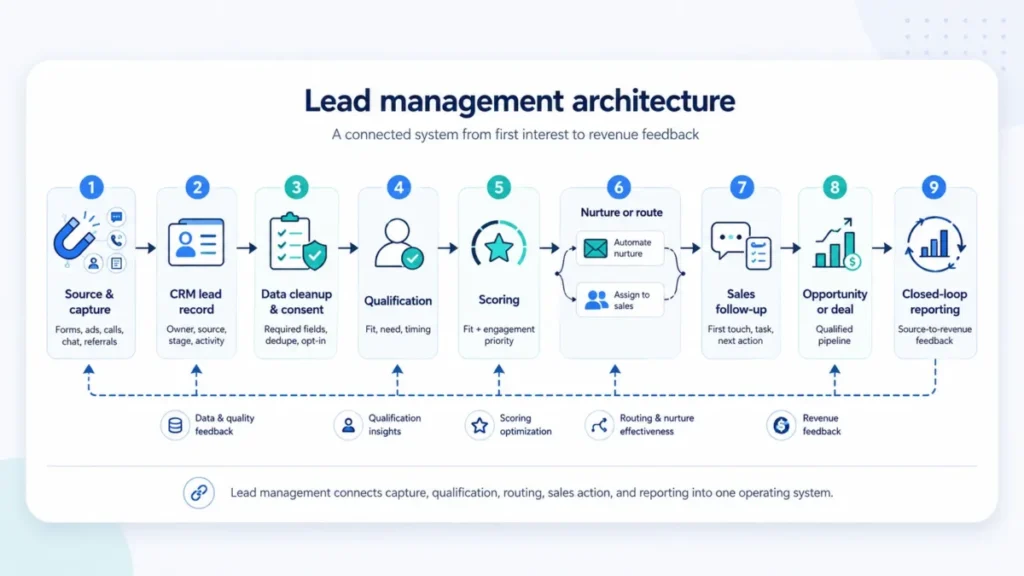
The failure points are usually silent. A lead with no owner sits untouched, a missing source field breaks attribution, and a duplicate record splits activity history across two entries.
Below is the stage-owner matrix I would pin to the wall before configuring any tool. It turns a stage list into accountability.
| Stage | Owner | Done when | CRM action | Failure mode |
|---|---|---|---|---|
| Capture | Marketing / web | Source and consent recorded | Create lead record | Missing source, no opt-in |
| Clean and organize | Ops / admin | No duplicates, required fields set | Dedupe, enrich, assign | Split records, empty fields |
| Qualify | Marketing / SDR | Fit and intent criteria met | Set qualification status | Everyone passes as “qualified” |
| Score | System / ops | Fit and engagement values set | Apply scoring model | Old engagement counts forever |
| Nurture or route | System | Not-ready to nurture, ready to sales | Enroll or assign | Ready leads sit in nurture |
| Follow up | Sales / SDR | First outreach logged with next step | Log activity, set task | No task, no next action |
| Convert or disqualify | Sales | Opportunity created or reason set | Create deal or close-lost | Silent drop, no reason |
| Measure | Ops / RevOps | KPIs updated, rules reviewed | Report, adjust rules | Only conversion rate tracked |
The point of this table is accountability, not bureaucracy. When a lead stalls, you want to know exactly which owner and which “done when” line failed.
Lead Management vs CRM, Lead Generation, and Pipeline Management
Buyers confuse these terms constantly, and the confusion drives premature software purchases. The fastest fix is a boundary table that separates purpose, owner, and output.
| Term | Purpose | Typical owner | Typical output |
|---|---|---|---|
| Lead generation | Create or attract interest | Marketing / demand gen | New raw leads |
| Lead management | Handle leads from interest to outcome | Marketing + sales + ops | Qualified, routed, tracked leads |
| CRM | Store records and relationships | Whole revenue team | System of record |
| Pipeline management | Move active deals to close | Sales | Forecast and won revenue |
| Lead scoring | Prioritize leads by fit and behavior | Ops / marketing | Ranked leads |
| Lead nurturing | Build readiness with relevant touches | Marketing | Sales-ready leads |
The distinction that saves money is CRM versus lead management. Vtiger frames lead management as turning interest into sales-ready opportunities, while the CRM manages broader relationships, so the CRM supports the process but does not replace the decisions.
Pipeline management is the other common overlap. Lead management ends roughly where a qualified lead becomes an opportunity, and pipeline management takes it from there toward a closeable, forecasted deal.
The Lead Lifecycle: Lead, Prospect, Opportunity, Customer
A lead does not stay a lead forever, and teams that never define the boundaries end up with messy reporting. Zapier separates a lead from a prospect, and HubSpot ties lead records to deals and record stages, which gives us a usable ladder.
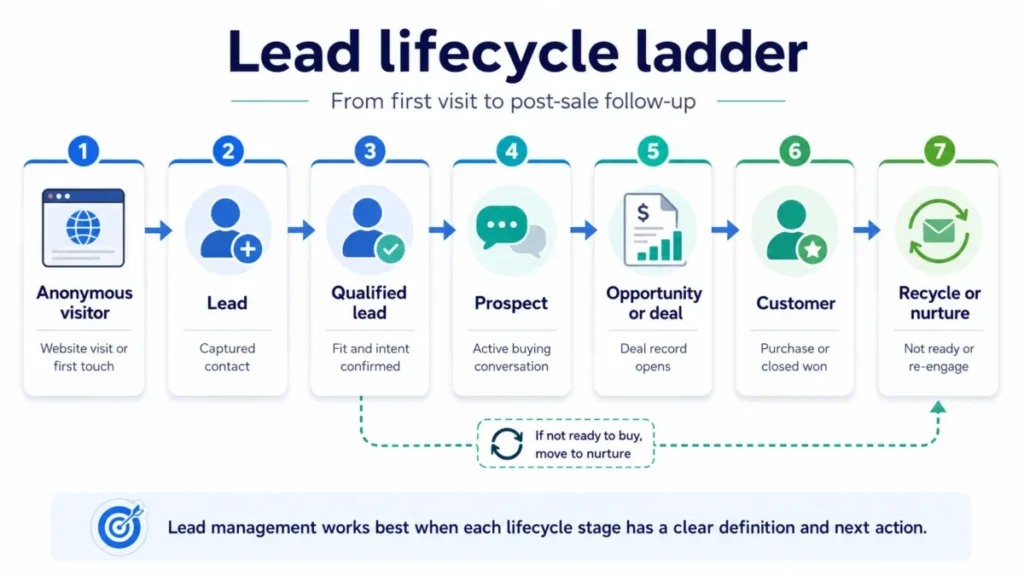
Think of it as rungs. An anonymous visitor becomes a lead at capture, a qualified lead once fit and intent are confirmed, a prospect when a real buying conversation starts, and an opportunity when a deal record opens.
Platforms model these rungs differently, so the label is less important than the agreement. What matters is that everyone knows what changes at each boundary and which record type owns the next action.
The practical warning: when a lead becomes an opportunity, do not leave the old lead record active. Duplicate or orphaned records are one of the first things that pollute win-rate math.
What Data a Lead Record Needs
You cannot automate, route, or measure a process on empty fields. Before any workflow, the lead record needs enough structure to answer who, where from, how ready, and what next.
HubSpot’s default lead properties give a concrete example set: lead owner, lead source, record source details, lead pipeline and stage, first outreach date, time to first touch, outreach activity count, associated deals, and a disqualification reason. Field names vary by CRM, so treat these as categories rather than exact labels.
Here is the readiness checklist I would confirm before turning on automation.
| Field group | Example fields | Why it exists |
|---|---|---|
| Identity | Name, email, company, role | Deduplication and personalization |
| Source | Lead source, record source detail, campaign | Attribution and channel quality |
| Consent | Opt-in status, consent timestamp, lawful basis | Compliant outreach |
| Owner | Lead owner, team, territory | Accountability and routing |
| Lifecycle | Stage, status, entry and exit dates | Workflow automation |
| Activity | First outreach date, time to first touch, activity count | Speed and effort tracking |
| Qualification | Fit score, engagement score, MQL or SQL status | Prioritization |
| Outcome | Associated deal, disqualification reason | Clean reporting |
Missing any of these groups breaks something downstream. Empty source fields kill attribution, and a missing owner field is the classic reason leads sit untouched for days.
Source attribution deserves its own note, because it is where marketing and sales stop arguing. When each record carries lead source and record-source detail, you can trace which campaign produced qualified pipeline instead of just raw volume.
Lead Data and Consent
Lead records hold personal and behavioral data, so consent is part of capture, not an afterthought. Salesforce, HubSpot, and Zoho all publish privacy and GDPR resources, and Zoho documents compliance settings inside the CRM itself.
A 2026 study of the lead marketing ecosystem found real privacy and spam risks when lead data is shared widely, especially in sensitive categories. That is a reason to capture opt-in status, consent timestamp, lawful basis, and suppression state before any nurture or sales outreach.
This is an operational checklist, not legal advice. Confirm your actual obligations with your legal or compliance team, because requirements vary by jurisdiction and data type.
Lead Qualification and Scoring
Qualification asks a yes-or-no question: does this lead deserve sales attention right now? Scoring answers a sharper one: how should we rank the leads that pass?
The mistake I see most often is treating lead scoring as one number. HubSpot’s scoring tool supports engagement scores, fit scores, and combined scores, and the two answer different questions.
Fit measures whether the buyer matches your ideal profile. Engagement measures how active they are.
A single blended score can hide a highly active but poorly matched contact, which is exactly the lead a rep should not call first.
| High fit | Low fit | |
|---|---|---|
| High engagement | Sales priority now | Qualify carefully or suppress |
| Low engagement | Nurture and watch | Low priority or suppress |
Read the matrix before you build a score. High fit with high engagement earns a fast sales touch.
Low fit with high engagement often needs suppression, not a call.
Score Decay and Stale Intent
A webinar attendance from six months ago is not the same signal as a pricing-page visit today. HubSpot’s documentation describes score decay that reduces an event’s score over time, using intervals such as one, three, six, or twelve months.
Not every CRM offers the same decay controls, so treat this as a platform example. The buyer lesson stands regardless: without decay, old engagement crowds out fresh intent and reps chase the wrong leads.
Negative Scoring and Spam
Bad-fit and fake leads distort every conversion metric you report. Salesforce’s lead scoring guidance treats spam, junk, and fake form data as candidates for filtering or negative scoring, and warns against neglecting negative scoring entirely.
Common suppression triggers include competitors, students, job seekers, unsupported geographies, invalid emails, and known spam sources. I would score these down or disqualify them rather than let them inflate MQL counts.
Lead Nurturing: More Than Email
Reducing nurturing to a drip sequence is the fastest way to burn trust. Salesforce defines lead nurturing as delivering relevant, valuable resources that move a prospect through the funnel, and its Trailhead training frames it as personal, repeatable, and timely.
Email is one channel, not the whole practice. Retargeting, a well-timed sales note, a relevant case study, or a product-usage nudge can all be nurture touches.
The useful move is mapping message to stage. A new lead gets a welcome and orientation, a mid-stage lead gets objection handling and proof, and a stalled lead gets re-engagement before anyone writes it off.
For teams that run heavy campaign nurture, this is where the CRM with marketing automation category earns its place, because manual nurture stops scaling fast.
Lead Routing and Ownership
Speed depends on routing, and routing is more than a first assignment. Most guides say “assign leads to reps” and stop, which is why leads get orphaned when the obvious owner is unavailable.
HubSpot Academy describes advanced routing that can consider rep expertise, performance, historical data, workload, and availability. That is the difference between a rule that works on paper and one that survives a rep being out sick.
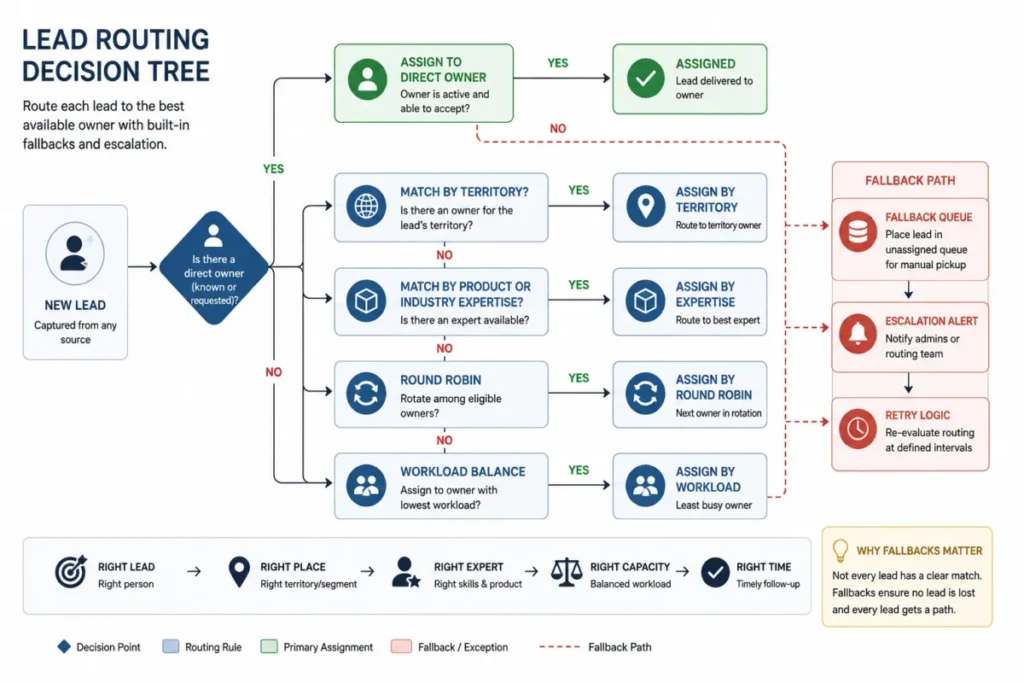
Build the tree with a fallback in mind. Route by territory or expertise first, balance by workload, and always define a fallback queue plus an escalation alert when no rule matches.
Routing exists to protect follow-up speed. Classic lead-response research from MIT and InsideSales found the odds of contacting and qualifying a lead dropped sharply between a five-minute and a thirty-minute response, and Harvard Business Review documented slow responses to online queries years ago.
Treat those as classic context, not a fresh 2026 benchmark. A recent Workato lead response study reported an average B2B phone response time of 14 hours and 29 minutes, with no studied company calling within five minutes and only 42% calling within an hour, so the gap between best practice and reality is still wide.
Fast routing is where a purpose-built CRM for sales teams pays off, since manual assignment adds minutes that inbound leads do not forgive.
The MQL-to-SQL Handoff
“Align sales and marketing” is advice, not a process. A working handoff is a small service-level agreement with criteria, owners, response times, and reject reasons.
ZoomInfo’s guidance stresses shared definitions and a feedback loop, and HubSpot’s lead fields support owner, outreach, and disqualification tracking. Together they let you write the handoff down instead of hoping.
| Handoff element | What to define |
|---|---|
| MQL entry criteria | Fit and engagement threshold that qualifies a lead |
| SQL acceptance criteria | What sales must confirm to accept |
| Required fields | Owner, source, consent, activity, score |
| Response-time target | How fast sales must act after acceptance |
| Reject reasons | Bad fit, bad timing, no consent, duplicate |
| Feedback cadence | How rejected leads return to nurture and inform scoring |
Do not copy someone else’s thresholds. The value is agreeing on your own numbers, then routing rejected leads back to nurture with a reason attached instead of dropping them.
Step-by-Step: Building a Lead Management Process
You do not need every capability on day one. Start with the smallest process that gives you ownership, speed, and clean data, then add sophistication as volume grows.
Step 1: Define stages and owners
Write the stage-owner matrix from earlier for your own motion. Agree on what “qualified” means before you touch a single automation.
Step 2: Set required fields and consent capture
Lock the lead record fields you cannot operate without. Capture source, owner, and consent state at the moment of capture, not later.
Step 3: Add qualification and a simple score
Begin with fit and engagement as separate signals. A basic points model beats a blended black box for a first version.
Step 4: Route with a fallback
Assign by territory or expertise, then define the fallback queue and escalation. Test what happens when the primary owner is unavailable.
Step 5: Build nurture for not-ready leads
Map two or three nurture tracks to stage, not to a single blast. Keep an easy exit into sales the moment intent spikes.
Step 6: Measure and adjust
Report speed, acceptance, conversion, and source quality. Review scoring and routing rules monthly for the first quarter.
This is where my 30- and 90-day adoption test applies. By day 30, every new lead needs an owner, a source, and a logged first touch, and by day 90 the MQL-to-SQL acceptance rate is trustworthy enough to change a campaign.
Process maturity should track team size, not ambition. Here is how I would scale it.
| Team stage | Minimum process | Next upgrade |
|---|---|---|
| Solo founder | One list, source and owner fields, fast follow-up | Add basic qualification |
| Small inbound team | Stages, simple score, manual routing | Add nurture tracks |
| Outbound SDR team | Consent discipline, routing rules, SLA | Add score decay and suppression |
| RevOps-led B2B team | Automated stages, fit and engagement scoring | Add closed-loop reporting |
| Multi-territory enterprise | Advanced routing, fallback, attribution | Add data enrichment where justified |
Match the process to the row you are in. Overbuilding kills adoption for a small team, and underbuilding breaks reporting for a scaled one.
The Mistakes That Waste Your First Month
The expensive mistakes are rarely dramatic. They are small configuration and ownership gaps that compound quietly.
My buyer risk ledger for a new lead management process starts with three risks: unclear ownership, dirty data, and unmanaged exits. Each one has a specific consequence and a cheap fix.
Unclear ownership means leads sit untouched, and the fix is a required owner field plus a fallback queue. Dirty data means duplicates and empty sources, and the fix is deduplication rules and required fields at capture.
Unmanaged exits are the sneaky one. Bad-fit, spam, duplicate, and not-ready leads need a defined exit, or they pollute reports and keep reps busy on low-value work.
| Exit reason | Safe next action |
|---|---|
| Converted | Create opportunity, keep source attribution |
| Unqualified (bad fit) | Disqualify with reason, suppress outreach |
| Bad timing | Recycle to nurture, set revisit date |
| Duplicate | Merge into the primary record |
| No consent | Suppress until consent is captured |
| Spam or fake | Disqualify and block source |
Every exit needs a reason code, not a silent delete. Reason codes are what let you fix the source of bad leads instead of guessing.
Automation Is Not Magic
Automation depends on clean stage rules, and manual overrides can break it. HubSpot’s documentation notes that if a lead is manually moved to a previous stage, it may not update automatically again in the example described.
That is a platform-specific caveat, but the lesson generalizes. Document your manual-override rules, because a well-meaning rep changing a stage by hand can quietly stop future automation from firing.
Common Misconceptions About Lead Management
A few beliefs cause most of the wasted effort. Naming them directly is faster than debunking them one buyer at a time.
Misconception: Lead management is the same as lead generation. Reality: generation creates interest, and management decides what happens to that interest after capture.
Misconception: Lead management is just CRM software. Reality: the CRM is usually the system of record, but the process, ownership, and governance are the actual work.
Misconception: A high score always means sales-ready. Reality: a score can reflect engagement, fit, or both, and high engagement with low fit often needs suppression, not a call.
Misconception: Nurturing means sending more email. Reality: nurturing is timely, relevant relationship-building across the journey, and email is only one channel.
Misconception: Every lead should go to sales. Reality: bad-fit, spam, no-consent, duplicate, and not-ready leads belong in disqualification or nurture.
When to Use Lead Management Software and When Not To
You can manage leads in a spreadsheet at very low volume. The moment ownership, speed, and reporting start slipping, a system pays for itself.
Signals you need software: leads arrive from more than one channel, multiple people touch the same lead, follow-up speed is inconsistent, you cannot report lead source, duplicates are common, or you need consent and suppression tracking. Any two of these together is usually enough.
Signals you are not there yet: a single owner handles every lead, volume is low, and a shared list still gives everyone the same view. Adding a heavy system too early creates admin overhead without adoption.
Software categories do different jobs, and buying the wrong one wastes budget. This is my stack-fit map for the category.
| Category | Role in lead management | Example role |
|---|---|---|
| CRM | System of record for leads and deals | Store, route, report |
| Marketing automation | Nurture and campaign scoring | Enroll and score engagement |
| Sales engagement | Outreach sequences and tasks | Speed and follow-up cadence |
| Routing / RevOps automation | Advanced assignment and workflows | Fallback and SLA enforcement |
| Data enrichment | Fill in firmographic gaps | Enrich records for scoring |
| Forms / scheduler | Capture and consent | Create clean lead records |
| Analytics | Closed-loop reporting | Source-to-revenue tracking |
Most small teams need the CRM column and little else at first. Enrichment and dedicated routing tools earn their place at higher volume, especially for outbound-heavy B2B lead management.
A Budget Pressure Note on Plan Gates
Advanced automation is often plan-gated, which changes the budget math. HubSpot’s documentation places lead pipeline automation on Sales Hub Professional and Enterprise, and its AI contact scores require Marketing Hub Enterprise with enough sample data.
Pricing is outside the scope of this concept explainer, so treat those as feature-gate examples rather than quotes. The buyer takeaway is simple: confirm which lead management workflows sit behind a higher tier before you assume your plan includes them.
Data enrichment is optional, not mandatory. It helps high-volume outbound and account-based motions, but a low-volume inbound team can run clean lead management on first-party source and engagement fields alone, and adding brokered data can raise privacy risk.
How to Measure Lead Management
A single conversion rate hides most of what is going wrong. Speed, data quality, and handoff health each need their own number.
HubSpot lead fields such as time to first touch and first outreach date make several of these measurable, and Zapier notes sales cycle length and percent closed as useful outcome metrics. Build a small dashboard rather than one headline stat.
| Metric | What it tells you | Why it matters |
|---|---|---|
| Speed-to-lead | Time from capture to first touch | Protects contact and qualify odds |
| Lead-to-MQL rate | Share of leads that qualify | Marketing lead quality |
| MQL-to-SQL acceptance | Share sales accepts | Handoff health |
| SQL-to-opportunity | Share that opens a deal | Sales qualification accuracy |
| Disqualification mix | Reasons leads exit | Source and targeting quality |
| Source-to-revenue | Which sources produce won deals | Budget allocation |
Read these together, not in isolation. A strong conversion rate with a slow speed-to-lead and a low acceptance rate usually means marketing is passing volume that sales does not trust.
Real-World Lead Management Examples
Definitions make more sense against concrete motions. Here are four common patterns and how the process changes for each.
| Scenario | Source and capture | Qualify and score | Next action | Exit |
|---|---|---|---|---|
| B2B SaaS demo request | Demo form, role, consent | High fit and engagement | Route to AE, first-touch task | Opportunity created |
| Content download lead | Guide download | High engagement, unproven fit | Nurture, watch for intent | Recycle or convert |
| Product-qualified trial | Trial usage signal | Fit plus activation behavior | Route with usage context | Opportunity or nurture |
| Low-fit active lead | Newsletter and downloads | High engagement, no buyer fit | Negative score or disqualify | Suppress |
The scenarios share a spine and differ in emphasis. Inbound demos live or die on speed, content leads live on nurture patience, and product-qualified leads depend on getting usage data into the CRM record.
How to Choose the Right Lead Management Tool
The right tool matches your process, not the loudest feature list. I would judge candidates against six criteria before a demo.
First, does it model your lifecycle stages and lead fields cleanly? Second, can it route with fallback and enforce a response-time SLA?
Third, does scoring separate fit from engagement, and can it decay stale signals? Fourth, are consent and suppression fields native, not bolted on?
Fifth, which lead management workflows sit behind a higher plan? Sixth, does it report source-to-revenue without a data-science project?
Pipeline-first tools and full CRMs weight these differently, so compare against your own priorities. A Pipedrive CRM review is a useful reference point for pipeline-led teams, while a Zoho CRM review suits teams that want scoring and cadences inside one suite.
Lead Management Beginner Checklist
Use this as a copy-ready starting point. It covers the minimum that turns scattered inquiries into a managed process.
- Define lifecycle stages and assign an owner to each.
- Agree on what “qualified” means before configuring anything.
- Require source, owner, and consent fields at capture.
- Set deduplication rules for incoming leads.
- Separate fit and engagement in your first scoring model.
- Write routing rules with a fallback queue and escalation.
- Set a speed-to-lead target and a first-touch task.
- Map two or three nurture tracks to lead stage.
- Add reason codes for every disqualification.
- Track speed, acceptance, conversion, and source-to-revenue.
Work top to bottom and stop where your volume no longer needs the next line. Adoption beats sophistication for any team new to lead management.
Tools That Support Lead Management
No product replaces the process, but a CRM is where most teams run it. Salesforce, HubSpot, Zoho, Vtiger, and Pipedrive all publish lead management documentation, and they weight capture, scoring, routing, and nurture differently.
For a scoring and automation-heavy motion, a HubSpot CRM review shows how lead properties, lifecycle stages, and rotation fit together. For enterprise scoring and forecasting depth, a Salesforce CRM review covers how leads, scoring, and nurturing map onto its objects.
Pick the tool after you have written the process, not before. The record fields, routing rules, and scoring logic in this guide are what a good tool should make easier, not the reason to buy one.
Get the lead management process right first, and choosing software becomes the easy part.
FAQ
What is lead management in simple terms?
Lead management is how a team handles potential customers after they show interest. It captures each lead, adds source and owner details, qualifies and scores it, nurtures or routes it, and tracks the outcome. The goal is fast, organized follow-up so good-fit leads reach sales and weak leads are filtered out, instead of inquiries getting lost.
What is the difference between lead management and CRM?
A CRM is the software that stores records and relationships. Lead management is the process and set of rules that decide which leads matter, who owns each stage, and how fast follow-up happens. The CRM usually supports lead management, but it does not replace the decisions about qualification, routing, and ownership that make the process work.
What is the difference between lead generation and lead management?
Lead generation creates or attracts interest through ads, content, events, or outbound activity. Lead management is everything that happens after that interest is captured: qualification, scoring, nurturing, routing, conversion, and measurement. Generation fills the top of the funnel, while management decides what happens to each lead once it arrives, so both are needed but they are not the same job.
What are the main stages of lead management?
Most lead management processes include capture, qualification, scoring, nurturing or routing, follow-up, conversion or disqualification, and measurement. Some sources list five stages and others list seven, so the exact count varies. What matters more than the number is that each stage has a clear owner and a definition of done, so leads do not stall between steps.
What is the difference between MQL and SQL?
An MQL, or marketing qualified lead, meets marketing’s fit and engagement criteria but has not been accepted by sales. An SQL, or sales qualified lead, is one that sales has reviewed and agreed to work based on fit, intent, and timing. The handoff between them should be a written agreement with criteria, response times, and reject reasons, not an informal pass.
What is lead scoring in lead management?
Lead scoring assigns values to leads so teams can prioritize. Fit scores measure how well a lead matches your ideal customer, and engagement scores measure activity such as opens, visits, or form fills. Keeping them separate is useful, because a highly engaged but low-fit lead is not the same priority as a high-fit buyer, and some platforms also decay stale scores over time.
What is lead routing?
Lead routing assigns incoming leads to the right rep, team, or queue. Rules can use territory, product, industry, expertise, workload, or availability. Good routing also includes fallback logic, so a lead is not orphaned when the usual owner is unavailable. Because follow-up speed strongly affects contact and qualify odds, routing is closely tied to speed-to-lead and notification design.
What data should a lead record include?
At minimum, a lead record needs identity, source, consent state, owner, lifecycle stage, activity history, a qualification or score, and an outcome field. HubSpot’s default lead properties, such as lead source, lead owner, time to first touch, and disqualification reason, are a useful example set. Field names vary by CRM, but missing any of these groups breaks routing, scoring, or reporting downstream.
What are common lead management mistakes?
The frequent mistakes are unclear ownership, dirty data, and unmanaged exits. Leads without an owner sit untouched, duplicates and empty source fields break attribution, and bad-fit or spam leads pollute reports when they lack a disqualification path. Relying on one blended score and assuming automation works after manual overrides are two more issues that quietly damage follow-up quality.
Is lead management the same as pipeline management?
No. Lead management handles potential customers from first interest through qualification, roughly up to the point a lead becomes an opportunity. Pipeline management takes over from there and moves active deals toward a close and a forecast. They connect at the lead-to-opportunity boundary, but they use different records, owners, and metrics, so treating them as one process usually causes reporting confusion.