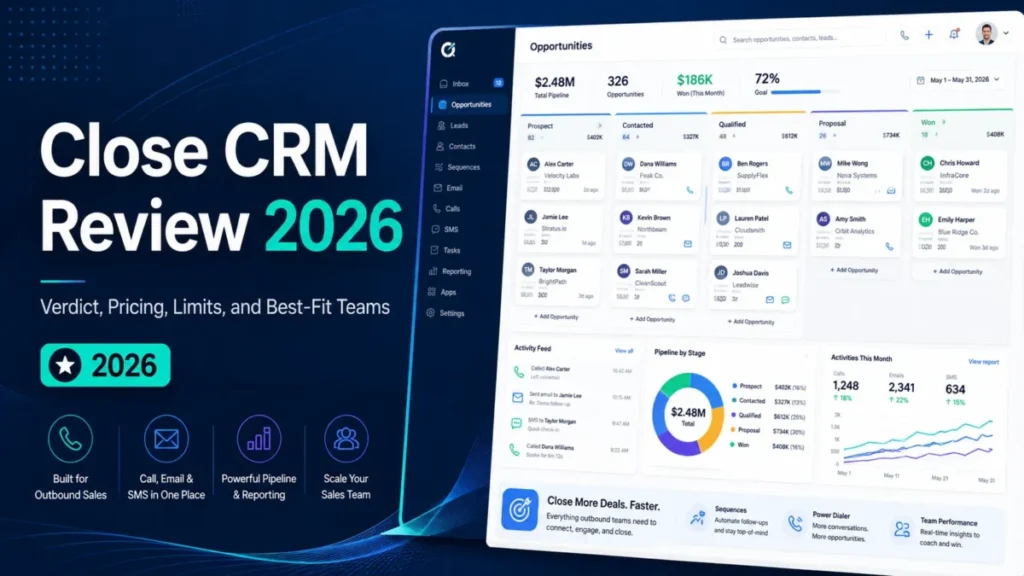
Close is a calling-first CRM, and its list price is the least interesting number on the invoice. For a team, the plan that matters is Growth at $99 per user per month, billed annually, where workflows and the Power Dialer start.
This Close CRM review decides whether a 1 to 50 seat outbound team should run pipeline, dialer and sequences in one system, and at what cost.
In This Article (15 sections)
Quick Verdict
Quick verdict
Close CRM is worth it for outbound teams that call and text daily, on Growth, the first plan with workflows and the Power Dialer.
Skip Close CRM if you need Okta or Auth0 single sign-on, workflows for $35 a seat, one fixed bill for calls and texts, or mostly customer-success work.
Strength: calling, SMS and email built in, with each completed call logged to the Lead page. Limit: no workflows below Growth, and calls, texts and AI credits are billed on top of seats.
Price basis: $9 (Solo, one user) to $139 per user per month billed annually; $19 to $149 billed monthly.
That three-part bill follows from what Close is: a CRM that also places the calls.
What Is Close CRM?
Close is a sales CRM that combines pipeline management with built-in calling, email, SMS, reporting and an AI sales agent named Chloe, according to Close’s product site.
It sits closer to a sales-engagement platform with a CRM attached than to a general record system. Readers new to the category can start with what CRM software does.
Close prices on seats, actual calling and SMS usage, and the AI credits Chloe uses, and its help center calls these three separate billing areas.
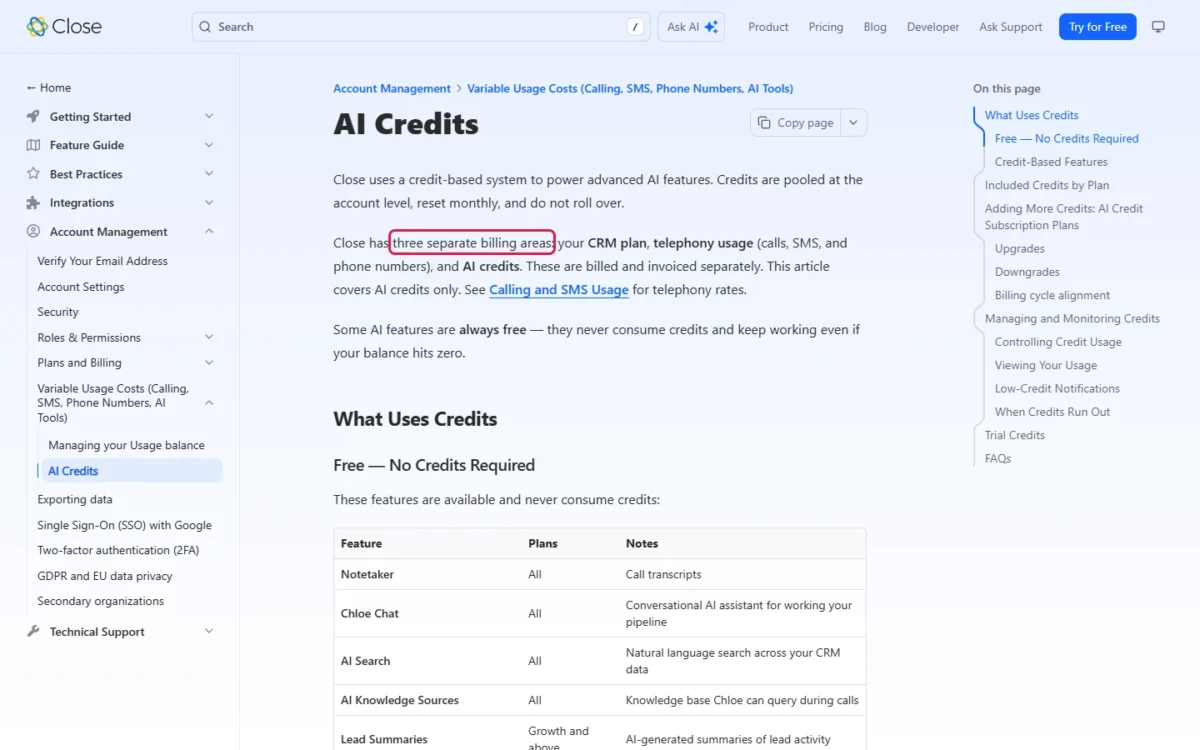
- Category: sales CRM with built-in calling, SMS, email and an AI agent named Chloe
- Best for: outbound inside-sales teams that work the phone daily
- Starting price: $9 per user per month billed annually, or $19 monthly (Solo: 1 user, 10,000 leads)
- Team plans: from $35 per user per month billed annually (Essentials)
- Free plan or trial: no free plan; 14-day trial with no credit card and $5 of calling and enrichment credits; 30-day money-back guarantee
- Setup: self-serve spreadsheet import; CRM migration through Import2, started by an Admin
- Main limitation: workflows only on Growth and Scale; calls, texts and AI credits billed on top
Close’s AI credits page lists other plan names beside the current ones: Base or Starter (Solo), Startup or Basic (Essentials), Professional (Growth), Enterprise or Business (Scale).
Close CRM Pros and Cons
Close puts the phone, SMS and email in the lead record on every plan; the cost is that automation starts at Growth and usage is billed on top.
Pros
- Calling and SMS on every plan, Solo included, logged to the lead page
- Growth adds workflows and the Power Dialer, the pair a 3-10 rep SDR team needs
- Calls and SMS passed through at cost, most outbound calls around $0.02 a minute
- Chloe on every plan (in workflows only on Growth and Scale), with Notetaker, Chloe Chat and AI Search free of credits
- Scale adds custom roles, lead visibility and unlimited recording retention for governance-heavy teams
- A 14-day no-card trial plus a 30-day money-back guarantee lowers the cost of a wrong pick
Cons
- Essentials at $35 has no workflows or Power Dialer, so the cheapest team plan is a shared record system
- Plan, telephony and AI credits are three bills, and calls round up to the minute, so finance never gets one fixed number
- Google is the only single sign-on, and custom roles need Scale for every seat
- Included AI credits stop growing at 10 users and do not roll over
- Recordings last 30 days on Solo and Essentials and 90 on Growth, short for regulated or coaching-heavy teams
- Standard support is email only, weekdays 9AM to 7PM ET
For an Okta or Auth0 shop and a finance owner who needs one fixed bill, the identity and billing limits end the evaluation before price does; the other cons are plan gates.
Core Workflows and Feature Gates
Four features decide a Close purchase: calling (Power Dialer from Growth), workflows (Growth), Chloe and metered AI credits (every plan), and the Lead-centered data model.
| Capability | Solo | Essentials | Growth | Scale |
|---|---|---|---|---|
| Workflows and bulk email | No | No | Included | Included |
| Power Dialer | No | No | Included | Included |
| Predictive Dialer, call coaching | No | No | No | Included |
| Lead Summaries (AI) | No | No | Included | Included |
| Custom roles, lead visibility | No | No | No | Included |
| Recording retention | 30 days | 30 days | 90 days | Unlimited |
| Connected email accounts | 3 | 3 | 10 | 10 |
| Included AI credits a month | 500 | 1,000 per user, up to 10,000 | 1,500 per user, up to 15,000 | 2,000 per user, up to 20,000 |
Sources: Close pricing page and Close AI credits, checked October 2026.
Two rows outweigh the price column. With 30-day retention on Essentials, a disputed call from six weeks ago is gone; with custom roles and lead visibility rules only on Scale, a team that needs either buys Scale for every seat.
Calling, Power Dialer, Predictive Dialer and where the money goes
On every plan, calls and texts run inside Close, and each completed call logs to the lead page with its time and duration.
Growth adds the Power Dialer, which calls through any list hands-free, including from a workflow’s call step. Scale adds the Predictive Dialer, which dials several numbers at once, plus listen, whisper and barge coaching.
That makes the dialer a two-step budget. Ten reps on Growth pay $99 x 10 x 12 = $11,880 a year; Scale raises it to $139 x 10 x 12 = $16,680, before telephony.
Workflows and the timing reality
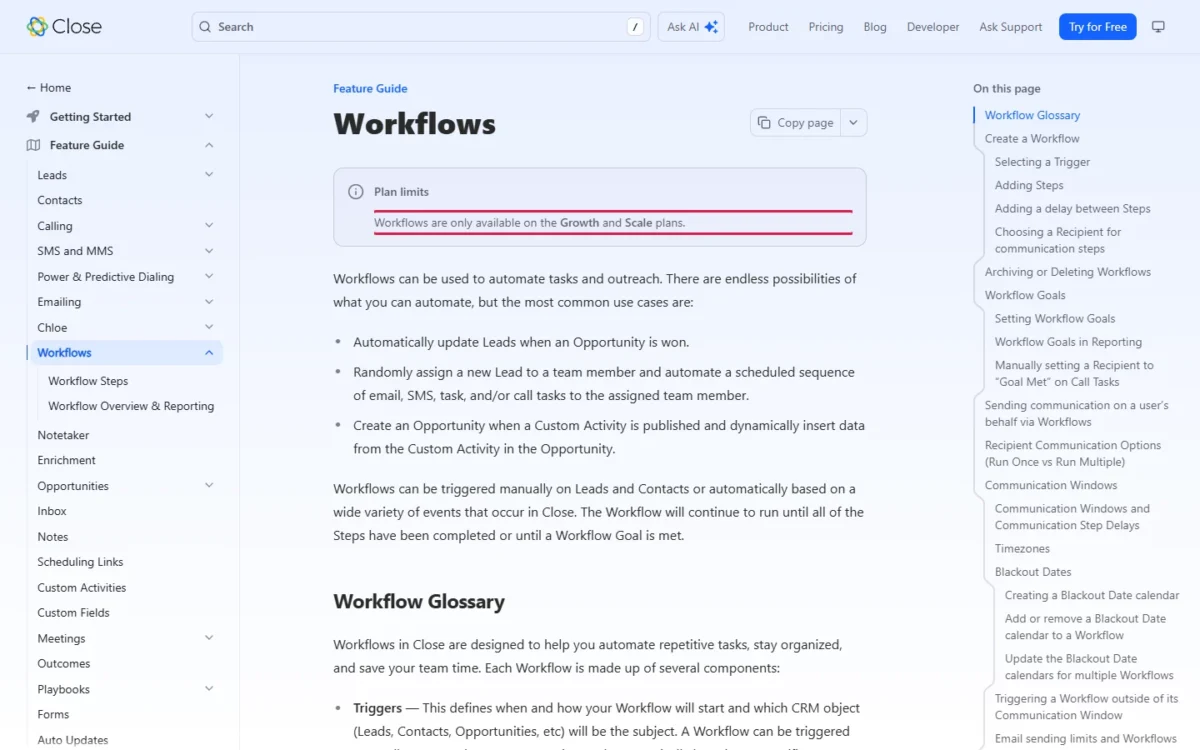
Workflows run only on Growth and Scale. A workflow starts manually or on an event, then sends email or SMS, creates tasks or updates leads.
A scheduled send is a queue position, not a promise. Delays run from 1 minute to 365 days and count weekends, and email and SMS steps default to Monday to Friday, 9AM to 4PM in the contact’s time zone.
Sends also wait on sending limits, and Close can rate-limit a workflow that fires too often, per the Close workflows documentation. A draft-for-review step holds the run until a rep sends, per Close’s workflow step documentation.
So build buffer into promised follow-ups, split large Smart Views into batches, and watch sending capacity when campaigns overlap.
Chloe, AI credits, and what stops at zero
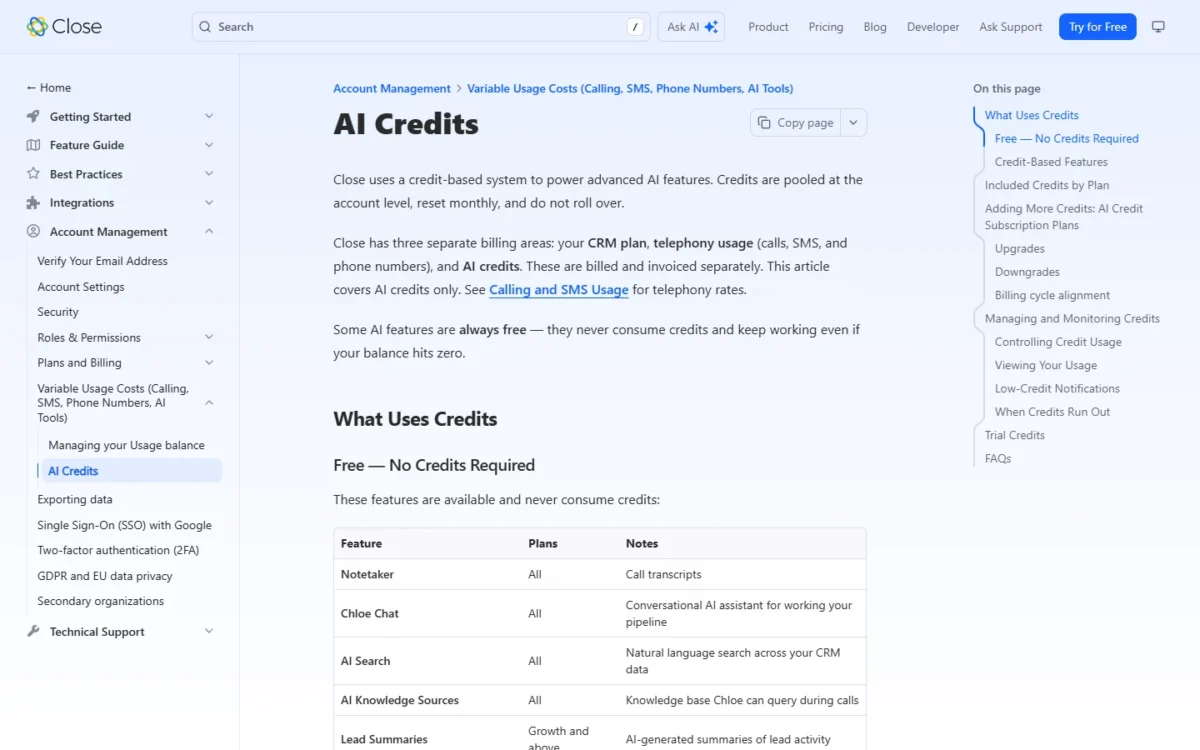
Chloe, Close’s AI sales agent, is on every plan, but its work is paid through AI credits plus telephony, and Chloe in workflows needs Growth or Scale.
The included pool stops growing at 10 users: a 15-seat Growth team gets 15,000 / 15 = 1,000 credits per user, and an 11th Essentials seat adds no credits. Nothing rolls over.
At zero, Voice Agents, Enrichment and Auto Updates pause, while free AI features keep working and calls in progress finish. A warning appears at 75% used, per Close’s AI credits page.
Voice Agents bill for the full connected time, dead air included. Top-ups run from $20 a month for 1,200 credits to $10,000 for 1,000,000, and an upgrade charges the full new price with no proration, so buy for a normal month, not a peak.
Buyers comparing credit models can weigh AI CRM software on pricing and limits.
Leads, Smart Views and custom data
Close is Lead-centered: a Contact or Opportunity cannot exist without a Lead. The custom-field cap is 250 on every plan, and a lead holds up to 300 opportunities, so an account with many deals fits one record.
Smart Views are saved, shareable searches that reps work as call lists. Close’s plan comparison also lists Custom objects, your own CRM objects associated with Leads.
Setup, Onboarding, and Ease of Use
Setup takes one of two paths: a self-serve spreadsheet import, or a CRM migration only an Admin can start. Close claims a team can “sign up, import leads, and start selling within an hour”; I did not test the interface.
Close’s site names built-in importers for other CRMs, plus spreadsheet imports. The spreadsheet path carries the sharper risk.
The Lead Importer matches existing leads on one or more comparison fields, then adds only the missing information, replaces the lead entirely, or skips it.
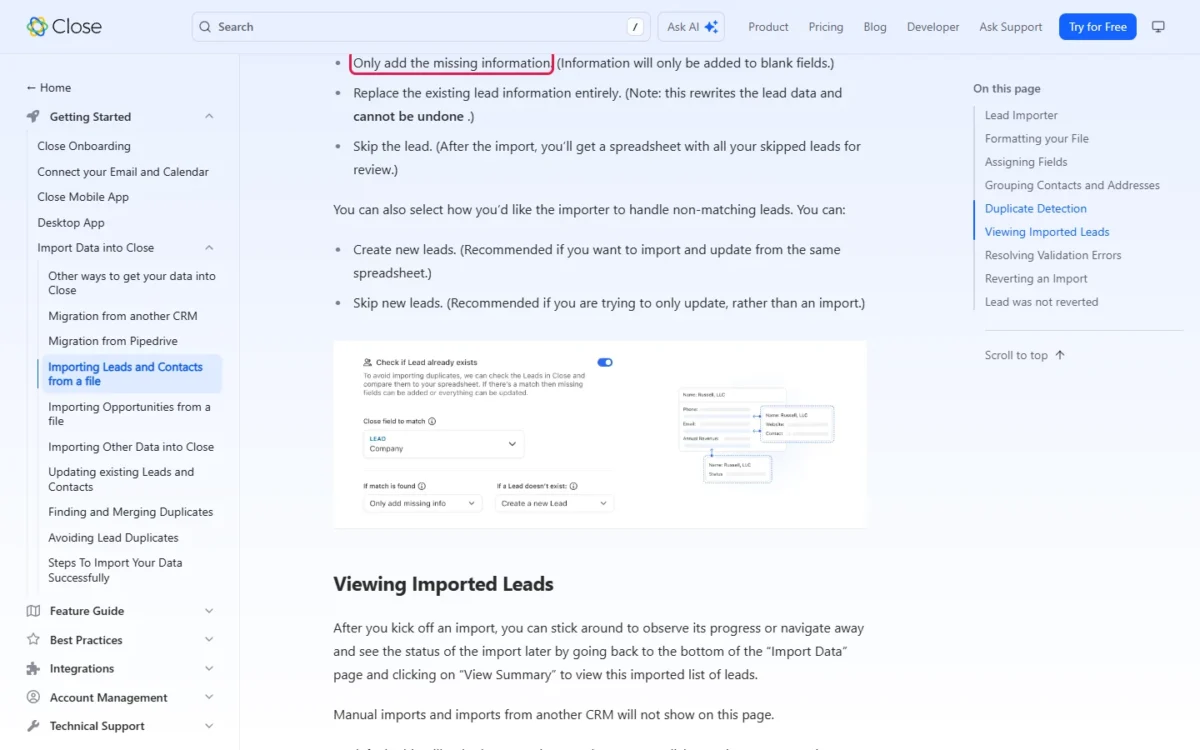
Replace rewrites the lead data and cannot be undone. The import summary counts leads created, skipped and failed, and Undo deletes only the leads the import created.
A safe first week: back up the source, import a small sample with add-missing or skip, and read the skipped and failed files (kept 30 days). Then load the full list.
Migration Risks and Data Portability
Migration into Close is a source-specific validation project, not a one-click transfer. Close’s partner Import2 runs it, only an Admin can start it, and in most cases it costs nothing.
The Close migration guide lists automatic imports from other CRMs. Each move runs through connecting the source, field mappings, a sample migration that can take a few hours, an error check and the full import.
Coverage varies: from SalesforceIQ only Accounts and Contacts move, the Lead Importer takes no notes, calls, emails or SMS, and the guide does not say workflows move. Plan to rebuild automation by hand. The email-message export in Close’s support tools leaves attachments out.
Leaving is documented: a Leads search exports Leads, Contacts or Opportunities as CSV or JSON, and only JSON carries all activities. The link expires after 7 days, per Close’s export guide, and an event log export covers only the last 30 days and up to 100,000 events.
A safe migration plan covers six checks:
- Inventory every object and automation in the source.
- Keep a full source export.
- Compare sample-migration record counts field by field.
- Avoid replace on the first pass.
- Test attachments and activity history.
- Rebuild automation before cutover.
The steps any CRM move shares are in this CRM migration checklist.
Close CRM Pricing and True Cost
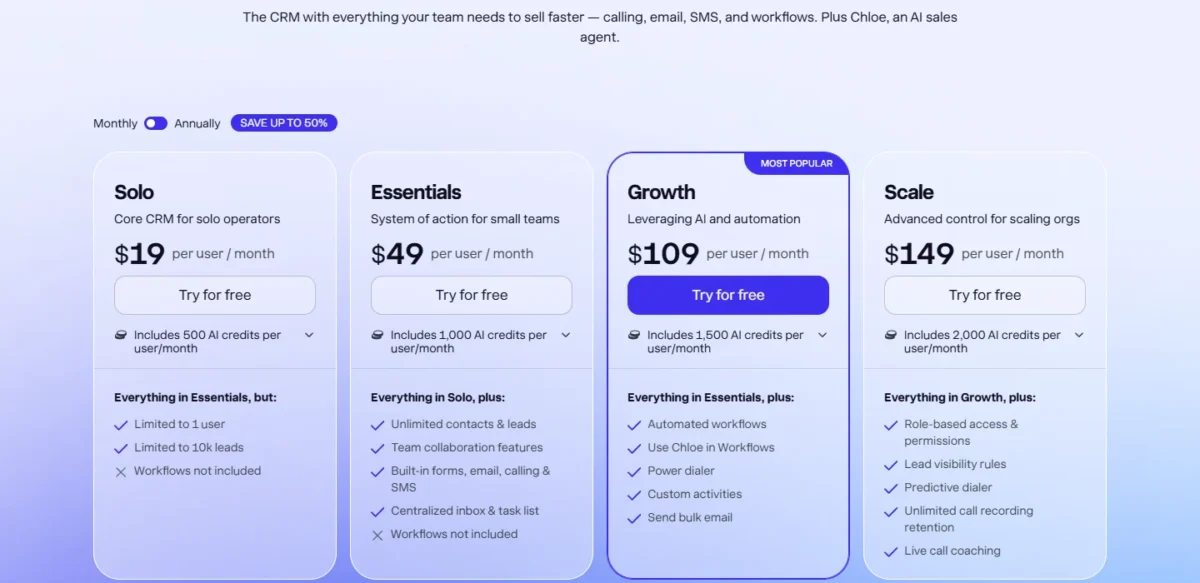
Close sells four per-user plans: Solo, Essentials, Growth and Scale at $9, $35, $99 and $139 per user per month billed annually, or $19, $49, $109 and $149 billed monthly. Calling and SMS are charged separately. The limit that forces a team’s first upgrade is workflows: Essentials has none, so sequences mean Growth.
On annual billing Essentials costs $35 per user per month, and the step to Growth at $99 buys workflows and the Power Dialer.
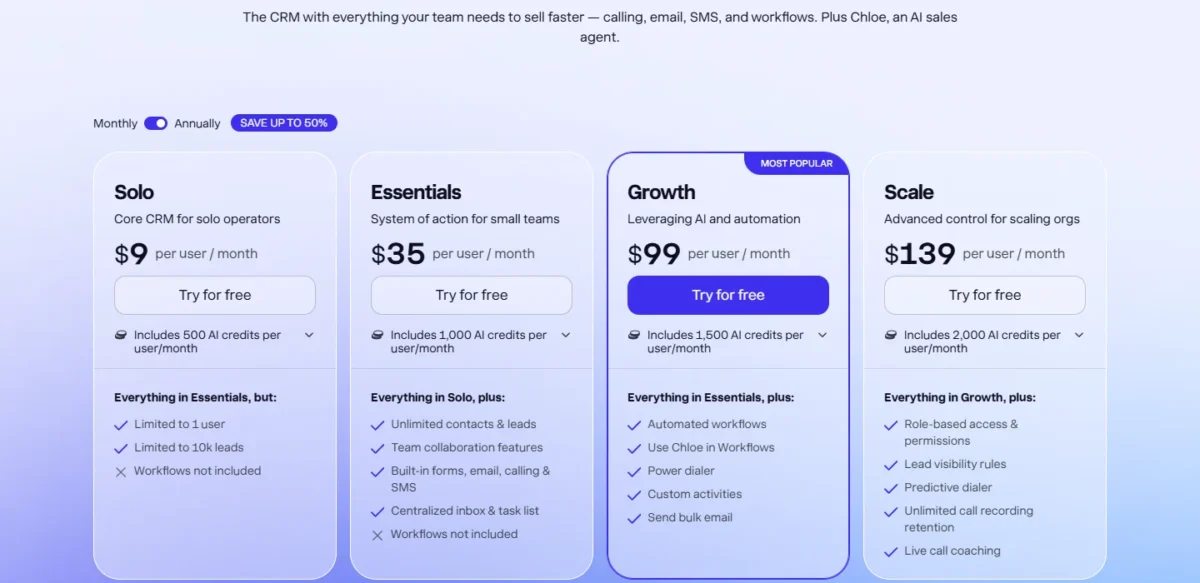
| Plan | Annual billing | Monthly billing | Key limit | Practical verdict |
|---|---|---|---|---|
| Solo | $9 per user/ | $19 per user/ | 1 user, 10,000 leads, no workflows | One founder only |
| Essentials | $35 per user/ | $49 per user/ | No workflows, 30-day recordings | A shared record system |
| Growth | $99 per user/ | $109 per user/ | Workflows, Power Dialer, 90-day recordings | First plan for automated outbound |
| Scale | $139 per user/ | $149 per user/ | Custom roles, Predictive Dialer, unlimited recordings | Governance and parallel dialing |
| Custom pricing | Not published | Not published | Quoted after a custom demo | Complex sales needs |
Sources: Close pricing page and Close plans and billing, checked October 2026.
Monthly billing adds $10 per seat on Growth ($109 minus $99) and $14 on Essentials ($49 minus $35). Annual plans downgrade or cancel only at the end of the term, so commit after the trial.
Pricing note
Close offers discounts to teams with 10 or more seats that commit for 12 months or longer, but does not publish the amount. Get a written quote before budgeting 10 or 25 seats from list prices.
After an unpaid trial, the account pauses and the data stays available for a limited period before deletion.
What Close costs at 1, 5, 10, and 25 seats
Growth on annual billing runs from $99 x 1 x 12 = $1,188 a year for one seat to $99 x 25 x 12 = $29,700 for 25.
| Plan and billing, per year | 1 seat | 5 seats | 10 seats | 25 seats |
|---|---|---|---|---|
| Essentials, annual | $35 x 1 x 12 = $420 | $35 x 5 x 12 = $2,100 | $35 x 10 x 12 = $4,200 | $35 x 25 x 12 = $10,500 |
| Growth, annual | $99 x 1 x 12 = $1,188 | $99 x 5 x 12 = $5,940 | $99 x 10 x 12 = $11,880 | $99 x 25 x 12 = $29,700 |
| Growth, monthly | $109 x 1 x 12 = $1,308 | $109 x 5 x 12 = $6,540 | $109 x 10 x 12 = $13,080 | $109 x 25 x 12 = $32,700 |
| Scale, annual | $139 x 1 x 12 = $1,668 | $139 x 5 x 12 = $8,340 | $139 x 10 x 12 = $16,680 | $139 x 25 x 12 = $41,700 |
Sources: Close pricing page, checked October 2026. List prices before usage, add-ons and any 10+ seat discount.
Solo stops at one user: $9 x 1 x 12 = $108 a year. These totals leave out calls, texts and AI top-ups; to model your own, use this CRM cost calculator template.
The charges that sit outside the seat price
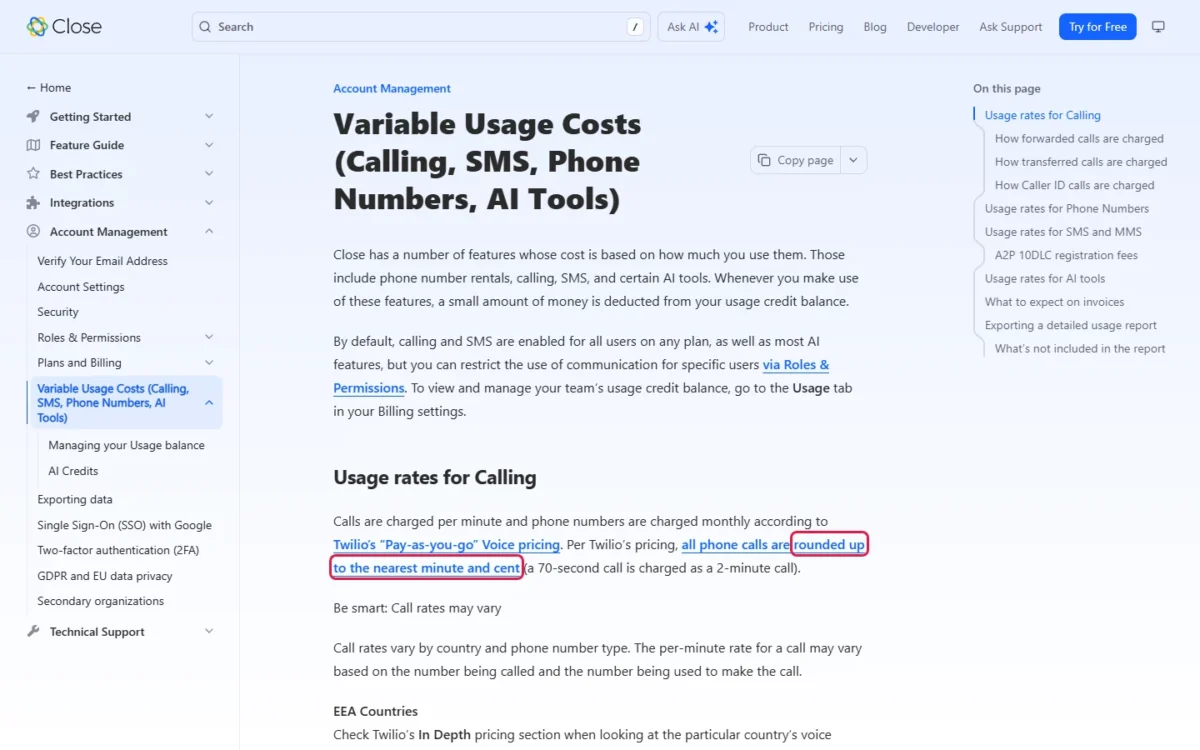
Calls, texts, phone numbers, Call Assistant and Enrichment draw on a usage credit balance and arrive on separate invoices. Calling and SMS are on for every user by default, so the meter runs from day one.
As of October 2026, the monthly add-on charge for Premium Phone Numbers has ended.
| Charge | Published rate | What it does to the bill | Hits hardest |
|---|---|---|---|
| Outbound calls | Around $0.02 per minute | Rounded up: 70 seconds bills as 2 minutes | Call-heavy teams |
| Transfers, forwarding | At least three calls per internal transfer; two per forward | Repeats with every transfer | Teams handing calls to closers |
| Phone numbers | From about $1 per month | Charged when added | A line per rep |
| SMS, MMS | Twilio rates per unit; US MMS $0.03 out, $0.01 in | 140 English characters a unit, as few as 33 with emojis | SMS-heavy outbound |
| A2P 10DLC | $4 or $44 registration, $15 verification, $1.50 a month | $10 a month above 6,000 segments a month | Any US team that texts |
| Call Assistant | $50 a month per billing account plus $0.02 per transcribed minute | Calls over 30 seconds only | Teams wanting transcripts |
| Enrichment | $0.05 per field, each time | Bulk enrichment adds up | Prospecting work |
| Extra organization | $50 a month | One free on Growth and Scale | Agencies |
| Premium Support | From $750 a month | Fixed add-on | Teams needing fast response |
Sources: Close variable usage costs, Close support plans and Close secondary organizations, checked October 2026.
Take an illustrative team: each rep makes 50 calls a day, each billed at 2 minutes, over 21 working days. Five reps bill 50 x 2 x 21 x 5 = 10,500 minutes a month; ten bill 50 x 2 x 21 x 10 = 21,000.
| Line | 5 reps on Growth | 10 reps on Growth |
|---|---|---|
| Seats, annual billing | $99 x 5 x 12 = $5,940 | $99 x 10 x 12 = $11,880 |
| Calls per year | $0.02 x 10,500 x 12 = $2,520 | $0.02 x 21,000 x 12 = $5,040 |
| Year total | $99 x 5 x 12 = $5,940 plus $0.02 x 10,500 x 12 = $2,520, which is $8,460 | $99 x 10 x 12 = $11,880 plus $0.02 x 21,000 x 12 = $5,040, which is $16,920 |
Sources: illustrative example team; rates from the Close pricing page, checked October 2026.
Volume and rounding move the bill, not the rate, and every warm transfer adds legs. An emoji or foreign character can shrink an SMS unit from 140 to as little as 33 characters, so test the exact production copy first.
Call Assistant’s $50 a month is charged once per billing account, not for each user. Five Growth seats pay $99 x 5 x 12 = $5,940 plus $50 x 12 = $600, which is $6,540 a year before any transcribed minute.
Premium Support costs at least $750 x 12 = $9,000 a year, more than ten Essentials seats at $35 x 10 x 12 = $4,200. Buy it as insurance for a team whose pipeline stops when the CRM does.
Which Close Plan Is Practical?
Growth is the practical plan for any team that runs repeatable outbound, because the gate is workflow automation: below Growth there are no workflow sequences.
Essentials holds unlimited leads, forms, email, calling and SMS, but no workflows, so buying it to save money removes what sets Close apart. The gap is $99 minus $35 = $64 per user per month, and five reps pay $64 x 5 x 12 = $3,840 a year more for Growth.
My five-person rule: buy Growth if the reps dial daily and run sequences; stay on Essentials if they mostly move inbound deals through stages.
Scale is a governance and parallel-dialing purchase, not a volume one. It costs $139 minus $99 = $40 more per user, so ten reps pay $40 x 10 x 12 = $4,800 a year more than on Growth.
Plan changes are asymmetric. Upgrades apply at once, prorated; downgrades wait for the period’s end and need usage under the lower plan’s limits.
Leaving Scale removes custom roles and moves their users to Admin or Restricted User. I would treat a Scale trial as a decision for the whole billing period.
What forces an upgrade
Each move has one trigger that forces it.
| Move | Trigger that forces it | Added cost, annual billing |
|---|---|---|
| Solo to Essentials | A second user, more than 10,000 leads, or email open tracking, which is not on Solo and starts on Essentials | $35 minus $9 = $26 per user/ |
| Essentials to Growth | Workflows, Power Dialer, bulk email, Lead Summaries, more than 3 email accounts | $99 minus $35 = $64 per user/ |
| Growth to Scale | Predictive Dialer, coaching, custom roles, lead visibility, recordings past 90 days | $139 minus $99 = $40 per user/ |
| AI credit subscription | Credit features pause at zero | From $20 a month for 1,200 credits |
| Premium Support | A 2-hour first response, dedicated queue, screen share | From $750 a month |
Sources: Close pricing page and Close plans and billing, checked October 2026.
Integrations, API, Security, and Support
Close connects to over 100 apps through three routes with three reliability profiles. Close’s integrations guide lists built-in Meetings, email sync, Zoom and Slack, plus OAuth or API keys and Zapier (2,000+ apps) or Make.
A native integration is Close’s to fix, an API connection is yours to maintain, and Zapier or Make adds a vendor and a failure point, a trade-off my Make review covers. That split decides who gets paged when a sync breaks.
API rate limits apply per endpoint group, per organization and, lower, per API key; after a 429 a client pauses for the rate_reset seconds, per Close’s rate-limit docs. Build a nightly sync for backoff from the first sprint.
Security and admin controls
For an Okta or Auth0 shop, the identity stack, not certification, is the limit to check first. Close’s security page states SOC 2 Type 2 compliance, a vendor statement, so request the report.
Its GDPR statement describes encryption in transit and at rest and annually tested incident response.
Google is the only single sign-on, and the Google SSO page says Auth0 and Okta are not supported “at the moment”, which ends an Okta shop’s evaluation.
Two-factor authentication uses an authenticator app, not SMS, and admins see who enabled it, per Close’s 2FA guide.
Team plans include four predefined roles; custom roles take Scale and an Admin, per Close’s roles documentation. Custom roles and lead visibility rules therefore mean Scale for the whole team.
Support terms
Standard support is email, Monday to Friday 9AM to 7PM ET, excluding major US holidays.
Premium Support starts at $750 a month with a customizable SLA, a first response within 2 hours in business hours, a dedicated queue and screen-share appointments. The target is first response, not resolution.
Who Should and Should Not Buy Close
Fit is decided by daily dialing and identity policy, not company size.
Best for
- A solo founder under 10,000 leads, on Solo
- A 3-10 rep SDR team running call and email sequences, on Growth
- A call floor that needs coaching, lead visibility and unlimited recordings, on Scale
- An agency running two brands, with Growth’s free secondary organization
Not ideal for
- A company whose IT policy requires Okta or Auth0
- A customer-success-heavy team
- A team that needs workflows on a small budget
- A finance owner who needs one fixed bill for calls and texts
- A team on Essentials that keeps recordings past 30 days
- A buyer who needs every note, attachment and automation to transfer
Who should use Close CRM
Solo fits a founder until a second person joins; Growth fits a 3-10 rep SDR team, since sequences and the Power Dialer start there.
Ten- to fifty-rep phone floors earn Scale’s premium once parallel dialing, coaching or lead visibility is required; ask for the 10+ seat quote first.
Agencies get 10 connected email accounts on Growth and Scale and one completely separate secondary organization. Teams still deciding on the category can compare the best CRM for small business shortlist.
Who should avoid Close CRM
Customer-success-heavy teams should skip Close: what it charges more for is dialers and sequences, not lifecycle management. Okta or Auth0 shops hit a procurement stop.
A finance owner who needs a fixed communications budget will not get one from metered calls, A2P fees and credits.
Close CRM vs Competitors
Close builds calling, SMS and two dialers into its plans, while Pipedrive and Zoho CRM put automation on cheaper seats than Close Growth at $99.
| Software | Best for | Starting price | Key difference | Main trade-off |
|---|---|---|---|---|
| Close CRM | Outbound teams that call daily | $9 per user/ | Calling, SMS and dialers built in | Workflows start at $99; usage on top |
| Pipedrive | Pipeline-first small teams | $14 per seat/ | Growth at $24 automates emails and follow-ups | Full-cycle tools start on Premium at US$49 |
| HubSpot Sales Hub | Teams pairing marketing and sales | Free for up to 2 users; paid seats not verified | Professional adds sequences | Required one-time $1,500 onboarding on Professional |
| Zoho CRM | Budget teams that need workflows | Free for 3 users; Standard US$14 per user/ | Workflows and cadences on Standard | Process automation and CPQ start on Professional |
Sources: Pipedrive pricing, HubSpot Sales Hub pricing and Zoho CRM pricing, checked October 2026.
Pipedrive suits teams that live in deal stages, not dial lists; my Pipedrive review covers its plan gates.
HubSpot fits when sales and marketing share one funnel; the HubSpot CRM review covers its seat and onboarding costs.
Zoho CRM fits a budget that needs workflows on its first paid plan; the Zoho CRM review sets out its edition gates.
Readers torn between those two rivals can weigh them in the HubSpot vs Pipedrive comparison.
Close CRM Alternatives
Pick the alternative by your reason for leaving. Metered calls or low call volume point to Pipedrive (check its dialer options); a leaky marketing-to-sales handoff points to HubSpot Sales Hub (check paid seats and the $1,500 Professional onboarding).
A budget-first team that can rebuild outbound elsewhere fits Zoho CRM (check its edition gates and calling). Before an Okta-driven switch, confirm identity support with each vendor.
My ranking of the best CRM for sales teams widens the field.
If the per-seat model is the issue rather than the calling, the best CRM software ranked by plan gates shows where each rival puts automation.
How I Researched and Evaluated Close CRM for This Review
This review rests on Close’s pricing page, help center, developer docs and security and GDPR pages, saved on October 16, 2026, plus each rival’s pricing page. I did not run a hands-on test; the cost tables and fit calls are my analysis.
I judged Close on my usual CRM criteria: workflow fit, plan gates, usage cost, limits, portability, security, support and cost by team size. Unsupported claims were left out.
Not checked: call quality, deliverability, Chloe’s accuracy, support response times, which plans include Custom objects and API access, and HubSpot’s paid seat prices.
Frequently Asked Questions
Can Close CRM work with Okta or Auth0 SSO?
No. Close supports Google single sign-on only, and Auth0 and Okta are not supported at the moment. An account created through Google SSO has no Close password by default; a user can set one under Settings > Account and then log in either way.
Does Close CRM have a mobile app?
Yes. The iOS and Android apps manage the CRM, make and receive calls and texts, and show reports. They support operating systems no more than one version out of date.
They do not run the Power or Predictive Dialer, so dialing sessions still need the desktop app.
Final Verdict: Is Close CRM Worth It?
Yes, Close is worth it for an outbound-led team whose main motion is calls, on Growth. Five reps pay $99 x 5 x 12 = $5,940 a year on annual billing for workflows and the Power Dialer.
In the illustrative 50-calls-a-day example above, that year is $99 x 5 x 12 = $5,940 plus $0.02 x 10,500 x 12 = $2,520, which is $8,460 with calls.
It is not worth it for a customer-success-heavy team, an Okta or Auth0 shop, or a finance owner who needs one fixed bill. Choose a pipeline-first CRM if calls are occasional and the dialer would sit idle.
In the 14-day trial, watch the $5 of calling credits burn at real volume and ask for a 10-seat, 12-month quote. Within the first month, every rep should dial from a Smart View; within the first quarter, one workflow should run unattended and the telephony invoice should match the forecast.