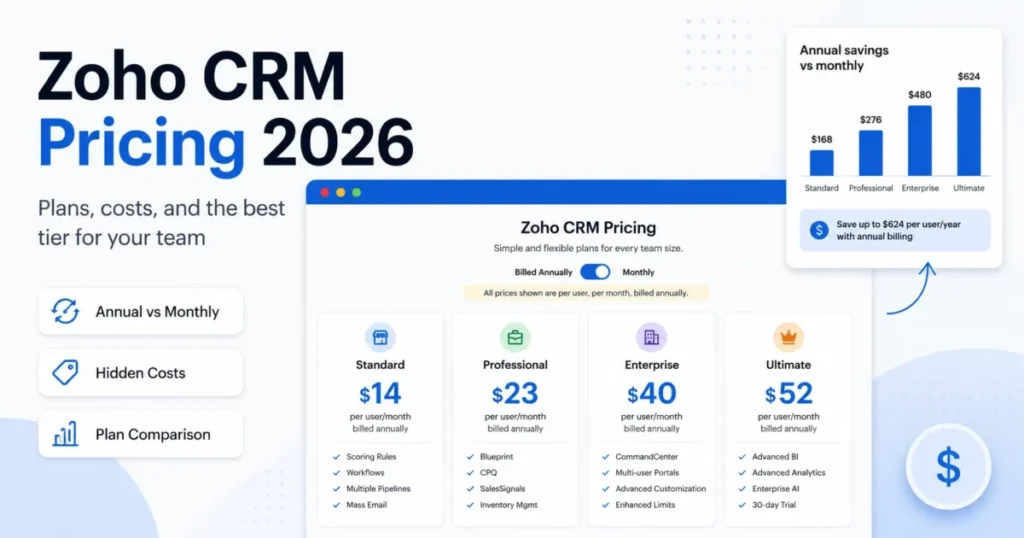
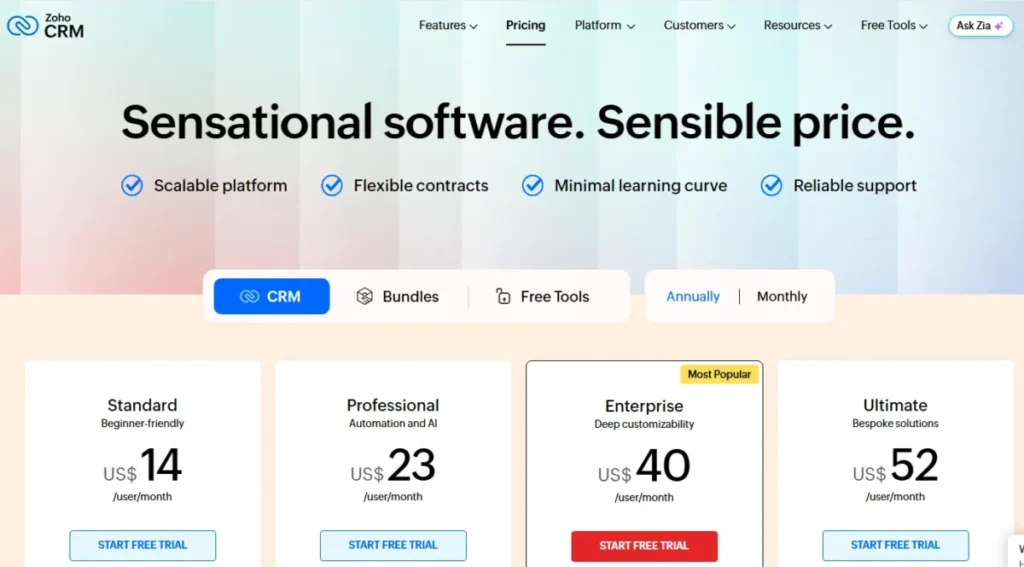
Zoho CRM pricing starts at $14 per user per month on annual billing, and that number is a poor budget anchor. Teams running a real sales process land on Professional at $23 per user per month, and process-heavy teams land on Enterprise at $40.
The gap between the sticker price and the invoice comes from four places: billing cadence, data storage, paid support, and the plan gates that force an upgrade before your seat count does.
This guide breaks down every Zoho CRM edition, the annual-versus-monthly math, the add-ons that never appear on the plan cards, and the team sizes where each tier stops making sense. All figures are US dollars, checked against Zoho’s official pricing sources on July 9, 2026, before local taxes.
I write CRM buying memos for saascrmreview.com, and Zoho CRM is the tool buyers underbudget most often. If your shortlist is still open, scan the wider set of best CRM software options before you commit to a seat count.
Plan pricing only becomes meaningful once you know what CRM software does inside a daily sales workflow. Zoho sells five editions, and three of them are decisions rather than defaults.
In This Article (21 sections)
Quick Pricing Verdict
The short version: Zoho CRM pricing looks cheap at the entry tier and behaves like a mid-market CRM budget once storage, support, and plan gates are added.
| Question | Answer |
|---|---|
| Starting price | $14/ |
| Free plan | Yes, free forever for up to 3 users |
| Best plan for most teams | Professional, $23/ |
| Plan to avoid | Ultimate, unless you need enhanced limits, migration help, or custom AI/ML |
| Biggest hidden cost | Extra data storage at $4 per 100 MB per month, followed by paid support at 20-25% of your license fee |
| Best alternative if too expensive | Pipedrive or Freshsales for pipeline-only sales teams |
| Monthly billing penalty | Up to $156 per user per year on Ultimate |
| Pricing verified | July 9, 2026, US/USD, before taxes |
Standard is the cheapest paid entry, but Professional is where Zoho stops being a contact database and starts behaving like a sales system. The rest of this guide explains the specific gates that push buyers across that line.
The Advertised Zoho CRM Price vs the Real Price
The advertised $14 figure is real, and it describes one edition on one billing cadence with no add-ons. It does not describe what a 10-person sales team pays in month one.
Below is the same 10-user team modeled three ways, using Zoho’s published rates from the Zoho CRM official pricing page checked July 9, 2026.
| Cost line | Advertised story | Realistic 10-user planning number |
|---|---|---|
| Edition | Standard | Professional |
| List rate | $14/ | $23/ |
| Monthly license total | $140 | $230 |
| If billed month-to-month | not mentioned | $350 |
| 1 GB of extra data storage | not mentioned | +$40/ |
| Premium support at 20% of license | not mentioned | +$46/ |
| Local sales tax | excluded from list price | added at checkout |
| Implementation and admin time | not a Zoho line item | real, and paid in salary |
A 10-user team that buys Professional annually, adds 1 GB of data storage, and takes Premium support pays roughly $316 per month before tax. That is more than double the $140 the entry price implies, and none of it involves a surprise fee.
This is the Budget Pressure Point for Zoho CRM: the license is cheap, the operating envelope around it is not. Every number below traces back to an official Zoho page, and I have flagged the ones Zoho does not publish in USD.
Zoho CRM Pricing Plans Compared
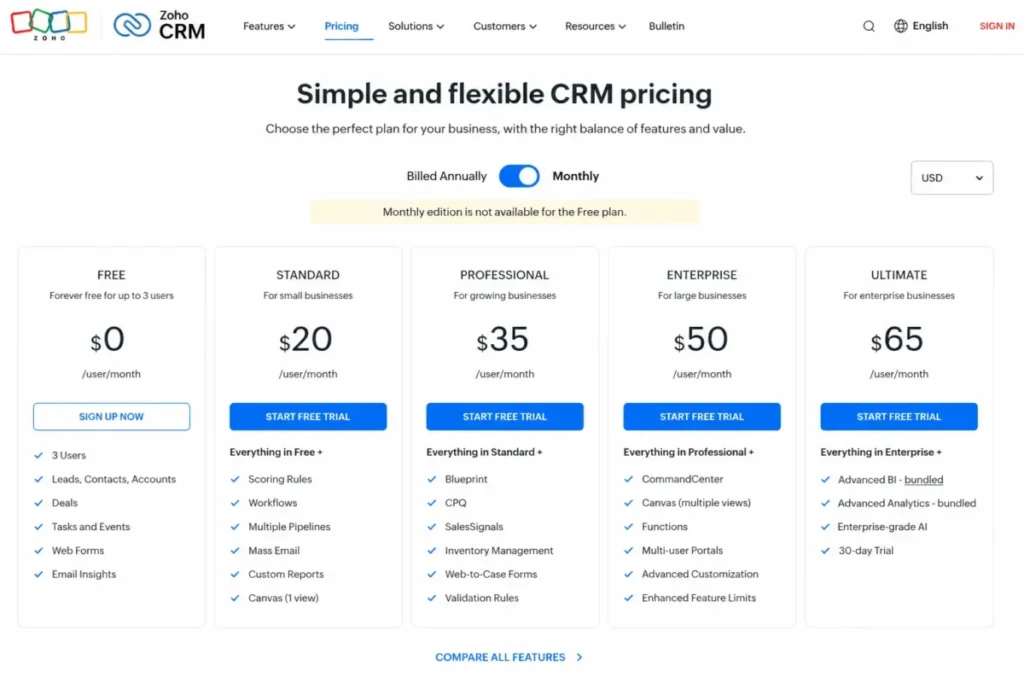
Zoho sells one free edition and four paid editions of Zoho CRM, all priced per user per month. Annual billing is the default in every plan card, and monthly billing carries a separate, higher rate.
| Edition | Annual rate | Annual cost per user | Monthly rate | Billing basis | Best for | Key limits |
|---|---|---|---|---|---|---|
| Free | $0 | $0 | $0 | per user | Founders validating a pipeline | 3 users, 5,000 records, 10 MB data storage, 5,000 API calls/ |
| Standard | $14/ | $168 | $20/ | per user | 2-8 rep teams with a simple pipeline | 100,000 records, 200 MB data storage, 10 custom modules, 15 active workflow rules per module |
| Professional | $23/ | $276 | $35/ | per user | 5-30 rep teams needing process automation | 10 GB data storage under 200 users, 25 custom modules, 40 active workflow rules per module |
| Enterprise | $40/ | $480 | $50/ | per user | 20-100 rep teams with territories and portals | 200 custom modules, API ceiling of 5,000,000 credits/ |
| Ultimate | $52/ | $624 | $65/ | per user | Bespoke deployments needing migration help | 500 custom modules, no published API ceiling |
Zoho CRM pricing scales cleanly on paper, and the real jumps sit between Standard and Professional, then between Professional and Enterprise. Those two steps are where feature gates, not seat counts, decide the invoice.
Zoho states that customers are not bound by contracts or commitments and can pay monthly or yearly. That flexibility is useful during a pilot, and it is expensive if you forget to switch.
Annual vs Monthly Billing: the Real Savings Math
Every competitor page says annual billing saves money. Almost none of them show the twelve-month dollar difference per seat, which is the number a finance approver asks for.
Zoho’s annual rates and monthly rates were cross-checked against Zoho’s official pricing calculator on July 9, 2026.
| Edition | Annual-billed rate | True cost per user per year | Month-to-month rate | Annualized month-to-month cost | 12-month penalty per user | Saving from annual billing |
|---|---|---|---|---|---|---|
| Standard | $14/mo | $168 | $20/mo | $240 | $72 | 30% |
| Professional | $23/mo | $276 | $35/mo | $420 | $144 | 34% |
| Enterprise | $40/mo | $480 | $50/mo | $600 | $120 | 20% |
| Ultimate | $52/mo | $624 | $65/mo | $780 | $156 | 20% |
Professional carries the harshest penalty, because month-to-month billing costs 52% more than its annual rate. Professional is also the only edition that reaches the “up to 34%” annual saving Zoho advertises, while Enterprise and Ultimate save 20%.
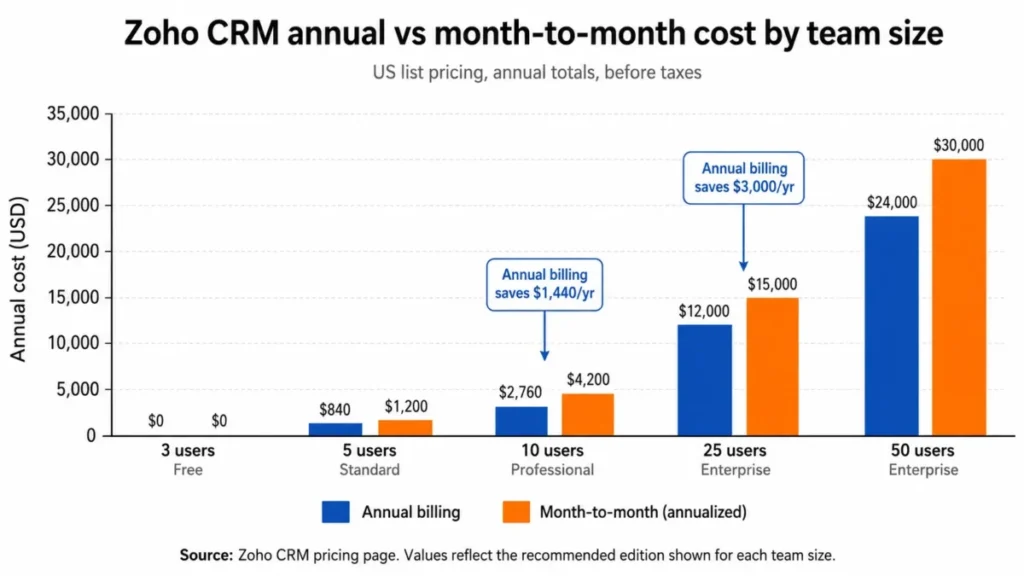
A 10-person Professional team that stays month-to-month for a year hands Zoho CRM an extra $1,440.
At 25 seats on Enterprise, the same habit costs $3,000 per year, which is close to the price of six additional Enterprise licenses. I would run a 30-day pilot on monthly billing, then convert before the second invoice.
There is a caveat, though. Zoho’s pricing page can render a different currency based on visitor region, and local taxes such as VAT, GST, or US sales tax are charged on top of the listed price.
The Six Hidden Costs Nobody Puts in the Plan Table
Zoho CRM plan cards describe licenses. They do not describe storage, support, messaging credits, backups, taxes, or the seat types that behave differently from a regular user.
Here is the full add-on picture, with confidence levels. I have marked every figure Zoho does not publish cleanly in USD, because fake precision on an add-on price is worse than an honest gap.
| Add-on or cost | Published price | What triggers it | Evidence confidence |
|---|---|---|---|
| Extra data storage | $4 per 100 MB per month | Record volume passes the edition’s included data storage | High, official help docs |
| Premium support | 20% of license fee | You want 24×5 phone and live chat with a 3-hour first response | Medium-high, official support FAQ |
| Enterprise support | 25% of license fee | You want 24×7 coverage and a 1-hour first response | Medium-high, eligibility unclear |
| One-time data backup | US$12 per unit | You need a downloadable backup beyond standard export behavior | Medium, surfaced via official calculator |
| WhatsApp Business sending | Credit-based, price not published in USD | Sending WhatsApp messages from Zoho CRM | Requirement confirmed, price not confirmed |
| Team users | Price not published in USD | Adding limited-access non-sales collaborators in the CRM For Everyone UI | Availability confirmed, price not confirmed |
| Local taxes | Varies | Checkout in a taxed jurisdiction | Confirmed, amount varies |
| Extra API credits | Price not published in USD | Exceeding the edition’s daily credit allocation | Requirement confirmed, price not confirmed |
Four of these eight lines have no public USD price, which tells you something about how Zoho expects a large buyer to arrive at a final number. Get every add-on quoted in writing before you sign, and treat any blog that publishes exact WhatsApp or team-user pricing with suspicion.
Hidden Cost 1: Data Storage at $4 per 100 MB per Month
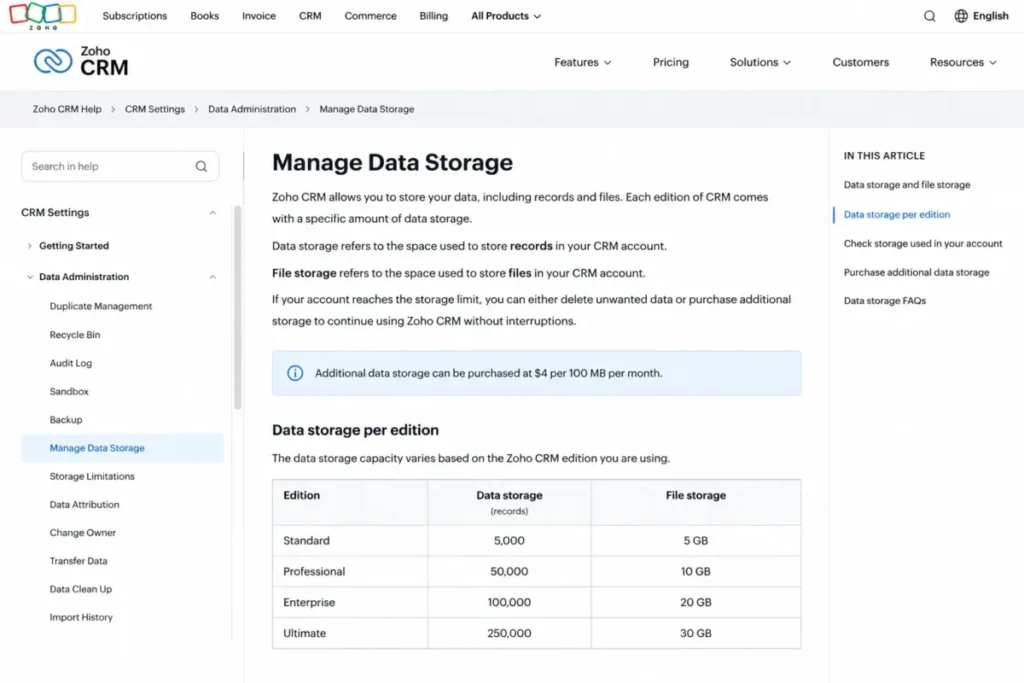
Zoho separates data storage from file storage, and buyers routinely conflate them. Data storage holds records, and file storage holds attachments, and only the data ceiling shows up in the edition table above.
According to Zoho’s data storage documentation checked July 9, 2026, extra data storage costs $4 per 100 MB per month. That works out to $40 per gigabyte per month, or $480 per gigabyte per year.
Standard includes 100,000 records and 200 MB of data storage. Professional jumps to 10 GB below 200 users, which is roughly a fiftyfold increase for a $9 per user monthly step.
That ratio creates a break-even most buyers never calculate. For a 5-user Standard team, the Professional upgrade costs $540 more per year, and 100 MB of add-on storage costs $48 per year.
Buying more than about 1.1 GB of extra storage on Standard therefore costs more than moving all five seats to Professional. At 10 users the break-even moves to roughly 2.2 GB, because the upgrade premium doubles while the storage price does not.
If your CRM will hold marketing lists, imported historical deals, or a legacy contact database, model storage before you model seats. This is the single most common reason a Zoho invoice grows without anyone adding a user.
Hidden Cost 2: Paid Support at 20% to 25% of Your License Fee
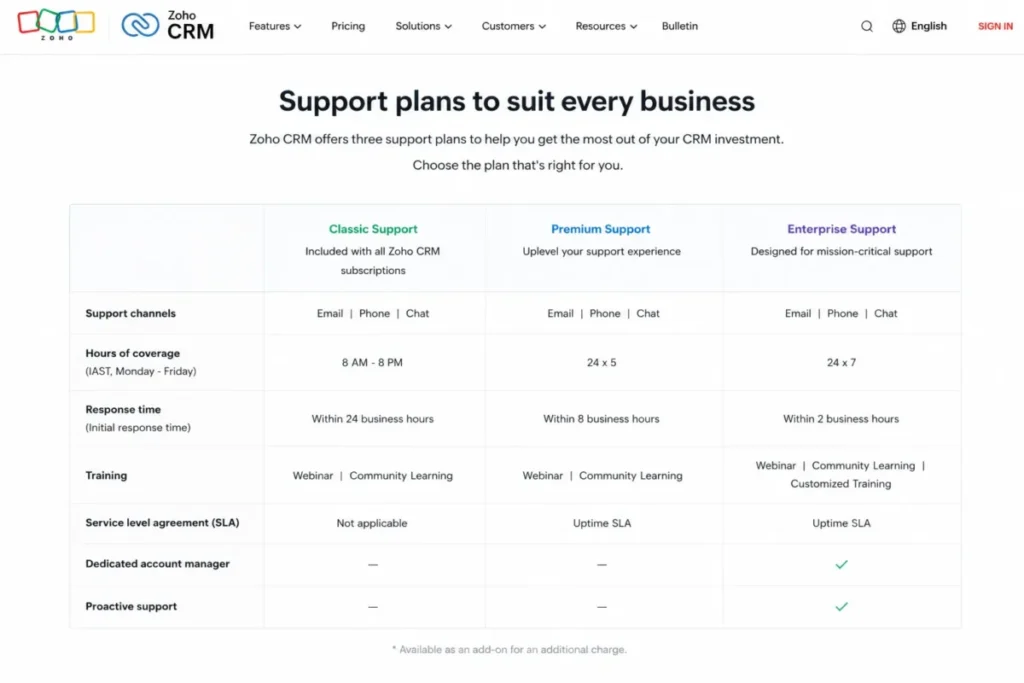
Classic support is included with paid Zoho CRM subscriptions, and it covers email, call, chat, or remote assistance. Faster response times and round-the-clock coverage sit behind paid tiers.
Zoho’s published support FAQ prices Premium support at 20% of the license fee, with 24×5 phone and live chat and a three-hour first response. Enterprise support is priced at 25% of the license fee, with 24×7 coverage, a one-hour first response, onboarding assistance, and a relationship manager.
| Support tier | Surcharge | Hours | Stated first response | Buyer fit |
|---|---|---|---|---|
| Classic | Included | Business hours | Not published as an SLA | Teams with an internal Zoho admin |
| Premium | 20% of license fee | 24×5 phone and live chat | 3 hours | Sales teams where a broken workflow blocks revenue |
| Enterprise | 25% of license fee | 24×7 phone and live chat | 1 hour | Mission-critical CRM with complex integrations |
Run that against real license totals and the surcharge stops looking small. A 25-user Enterprise team pays $12,000 per year in licenses, so Premium support adds $2,400 and Enterprise support adds $3,000.
At 50 users on Enterprise, the license bill is $24,000 and Enterprise support pushes the total to $30,000 per year. Compare the Zoho CRM support plans page against your incident history before you assume you need it.
Review patterns on G2, Capterra, and TechRadar consistently mention slow or inconsistent support responses on the included tier. That sentiment is the strongest practical argument for budgeting Premium support if your CRM sits on the revenue path.
There is one conflict worth naming. Zoho’s public sources surfaced different eligibility language for Enterprise support during research, with a 50-user minimum in one calculator note and a 25-user threshold in a support FAQ covering Zoho CRM, CRM Plus, and Desk.
I would not put Enterprise support in a formal budget until a Zoho sales rep confirms eligibility for standalone Zoho CRM in writing. Vendors rarely correct a threshold in your favor after the purchase order is signed.
Hidden Cost 3: WhatsApp Business and Messaging Credits
Zoho’s official feature comparison states that sending WhatsApp Business messages from Zoho CRM requires credits. The feature appears on the plan card, and the sending cost does not.
No public USD credit rate surfaced during research on July 9, 2026. Budget for usage-based messaging and confirm the rate at checkout if outbound WhatsApp is part of your sales motion.
Hidden Cost 4: Data Backup and Export
A one-time Zoho CRM data backup surfaced at US$12 per unit through the official pricing calculator. Weekly backup pricing did not surface cleanly in USD and should be confirmed in the Zoho Store before purchase.
Regulated teams and anyone running off-platform reporting need a backup policy on day one. Treat backup as a compliance line item, not a nice-to-have.
Hidden Cost 5: Local Taxes and Regional Price Rendering
Zoho states that VAT, GST, and other local taxes are charged on top of the listed price. Zoho pages also localize currency by visitor region, and the pricing page rendered a non-US currency during research despite a US target.
Use the USD selector on the pricing page and confirm the final figure at checkout. Any guide quoting Zoho prices without naming a currency and a checked date is guessing.
Hidden Cost 6: Team Users Are Not Regular Users
Zoho offers team users as limited-access seats for non-sales collaborators inside the newer CRM For Everyone interface. Their capabilities and data access differ from a regular CRM user.
No reliable USD price for team users surfaced during research. Verify pricing and permissions in the Zoho Store before you model team users as a cheaper way to give finance or delivery staff access.
Plan-by-Plan Breakdown and Feature Gates
Zoho CRM gates features by edition rather than by seat count, so a 4-person team can need Enterprise while a 40-person team stays on Professional. The table below maps the gates that change buying decisions.
Every row was checked against Zoho’s complete feature list on July 9, 2026.
| Capability | Free | Standard | Professional | Enterprise | Ultimate |
|---|---|---|---|---|---|
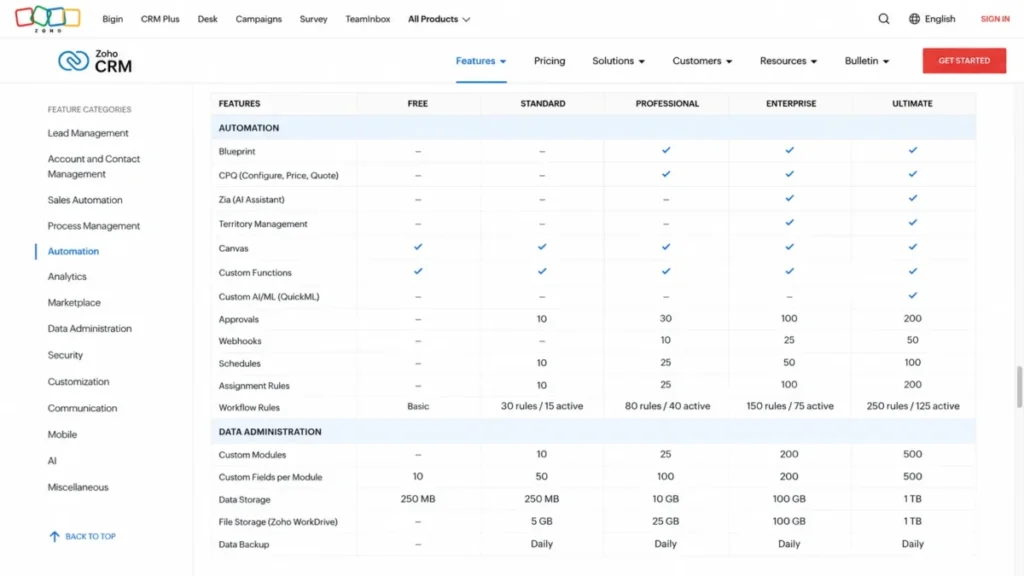
| Workflow rules per module | Basic automation | 30 rules, 15 active | 80 rules, 40 active | Raised, see feature list | Enhanced limits, see feature list |
| Custom modules | Not published | 10 | 25 | 200 | 500 |
| CPQ, Blueprint, inventory, widgets, Google Ads | No | No | Yes | Yes | Yes |
| Zia AI sales assistant | No | No | No | Yes | Yes |
| Territory management, custom functions, wizards, portals | No | No | No | Yes | Yes |
| Custom AI/ML via QuickML, data preparation | No | No | No | No | Yes |
| Consulting and migration assistance | No | No | No | No | Yes |
| Daily API credits allowed | 5,000 calls | 50,000 + 250 per user | 50,000 + 500 per user | 50,000 + 1,000 per user | 50,000 + 2,000 per user |
| Daily API credit ceiling | 5,000 | 100,000 | 3,000,000 | 5,000,000 | No published ceiling |
| Included data storage | 5,000 records, 10 MB | 100,000 records, 200 MB | 10 GB under 200 users | 10 GB under 200 users, 15 GB above | 10 GB under 200 users, 30 GB above |
| Mobile apps | Yes | Yes | Yes | Yes | Yes |
| Support tier included | Not applicable | Classic | Classic | Classic | Classic |
Three gates decide almost every Zoho CRM purchase: process automation sits behind Professional, Zia and territories sit behind Enterprise, and expert services sit behind Ultimate. Storage and API ceilings do the rest of the work.
Zoho CRM Free: $0 for Up to 3 Users
The free edition covers contact management, follow-up reminders, workflow automation, email templates, tasks, meetings, calls, import and export, reports, APIs, and mobile apps. Zoho publishes it as free forever for up to 3 users.
Best for: a founder, a first sales hire, and an office manager sharing one pipeline.
Not best for: any team expecting a fourth user, or anyone importing more than 5,000 records.
What is missing: paid-tier automation depth, Zia, territory management, portals, and the storage and API headroom that real integrations need.
Avoid if: your CRM must sync with billing, support, or a data warehouse, because 5,000 API calls per day is a hard daily ceiling.
Free is a legitimate starting point, not a permanent home.
Zoho CRM Standard: $14 per User per Month
Standard adds workflows, assignment rules, AI agents, cadences, reports, forecasting, and kiosks on top of the free feature set. It also raises included records to 100,000.
Best for: a 2-8 rep team with one pipeline, one currency, and one sales process.
Not best for: teams that need quoting, approval routing, or inventory tied to deals.
What is missing: CPQ, Blueprint process automation, widgets, inventory management, and Google Ads integration.
Avoid if: your data volume will pass 200 MB within a year, because storage add-ons erase the price advantage fast.
Standard is the right answer for teams whose sales process fits in a pipeline and a task list.
Zoho CRM Professional: $23 per User per Month
Professional is the practical floor for most SMB sales teams, and the reason is process rather than polish. It adds CPQ, email intelligence, Blueprint process automation, widgets, inventory management, and Google Ads integration.
Best for: a 5-30 rep team with quoting, stage-gated deals, and marketing attribution needs.
Not best for: two-person teams that will never build a Blueprint or issue a quote.
What is missing: Zia, journey orchestration, territory management, custom functions, wizards, and customer portals.
Avoid if: your buying reason is API headroom alone, because at 10 seats Professional adds only 2,500 daily API credits over Standard.
The $9 per user monthly step from Standard buys process control, a fiftyfold storage increase, and double the active workflow rules.
Zoho CRM Enterprise: $40 per User per Month
Enterprise is where Zoho CRM stops being a sales CRM and starts behaving like a revenue-operations platform. It adds the Zia AI sales assistant, journey orchestration, territory management, custom functions, wizards, and customer portals.
Best for: a 20-100 rep organization with named territories, partner or customer portals, and custom server-side logic.
Not best for: a flat 12-rep team with a single territory and no portal requirement.
What is missing: enhanced feature limits, custom AI/ML, data preparation, consulting, and migration assistance.
Avoid if: you want Zia only for lead scoring and have no other Enterprise trigger, because the $17 per user monthly jump from Professional is $2,040 per year at 10 seats.
Upgrade to Enterprise when at least two of these apply: territories, portals, custom functions, wizards, or journey orchestration.
Zoho CRM Ultimate: $52 per User per Month
Ultimate adds enhanced feature limits, consulting, migration assistance, custom AI/ML through QuickML calls, and data preparation. It is a services-and-limits tier, not a feature-discovery tier.
Best for: a 50-plus seat deployment migrating from another CRM with bespoke model requirements.
Not best for: a 15-person team that reads “Ultimate” as “best”.
What is missing: nothing material, which is exactly why it is easy to overbuy.
Avoid if: you cannot name a specific limit you are hitting or a specific migration you need help with.
Ultimate costs $12 more per user per month than Enterprise, or $7,200 per year at 50 seats, and I would only sign that for enhanced limits or migration support.
API, Automation, and Customization Limits by Plan
Plan-table competitors say “automation” and stop. The limits below are where an integration project quietly dies.
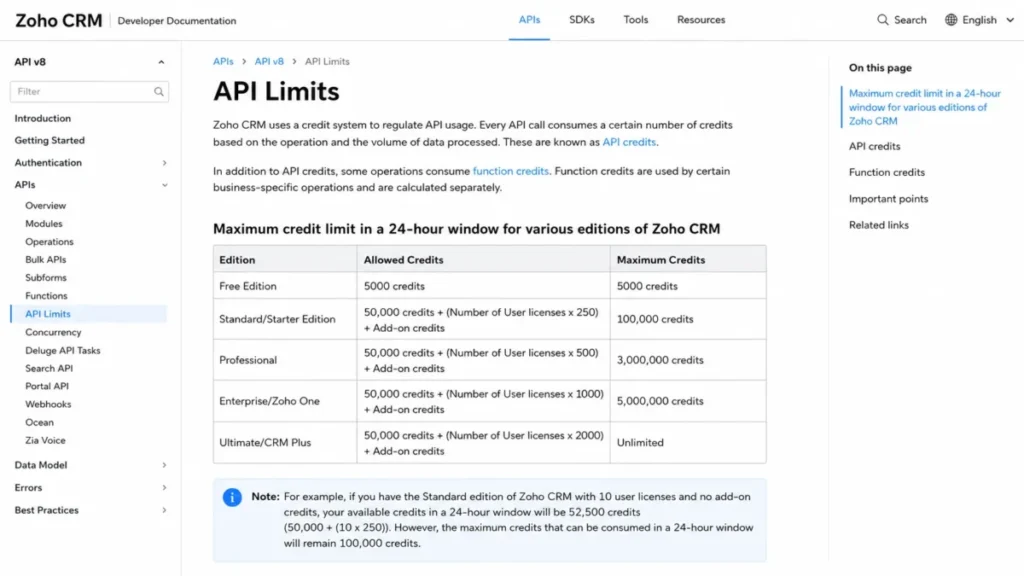
Zoho publishes daily API credits by edition on its Zoho CRM API limits documentation, checked July 9, 2026.
| Edition | Daily credit formula | Ceiling | 10-user daily credits | 25-user daily credits |
|---|---|---|---|---|
| Free | 5,000 calls per day | 5,000 | 5,000 | Not applicable |
| Standard | 50,000 + 250 per user | 100,000 | 52,500 | 56,250 |
| Professional | 50,000 + 500 per user | 3,000,000 | 55,000 | 62,500 |
| Enterprise | 50,000 + 1,000 per user | 5,000,000 | 60,000 | 75,000 |
| Ultimate | 50,000 + 2,000 per user | No published ceiling | 70,000 | 100,000 |
Small teams gain almost nothing from an API perspective by upgrading. At 10 users, Professional adds 2,500 daily credits over Standard, which is a 4.8% increase, while the ceiling rises from 100,000 to 3,000,000.
The ceiling is the real gate. A Standard org cannot exceed 100,000 daily credits at any seat count, and it reaches that ceiling at 200 users.
Function credits are allocated separately from API credits, so a custom-function-heavy build consumes two budgets at once. Model both before you promise a two-way sync to finance.
Automation limits behave the same way. Standard allows 30 workflow rules per module with 15 active, and Professional allows 80 with 40 active, so a rules-heavy team can hit a configuration wall long before a seat wall.
Custom modules scale on a steeper curve than anything else in the plan table. Standard allows 10, Professional 25, Enterprise 200, and Ultimate 500, according to Zoho’s feature comparison checked July 9, 2026.
Count the custom objects your process needs before you count seats. A team modeling contracts, subscriptions, assets, and partner accounts as first-class records can exhaust Standard’s ten modules inside two quarters.
That is the customization threshold nobody warns you about. Ten modules sounds generous until renewals, onboarding, and inventory each want a record type of their own.
One more misconception is worth clearing. Zoho CRM enforces individual email send limits and is not a marketing automation platform, so campaign volume belongs in Zoho Campaigns or a dedicated email tool.
When the Zoho CRM Free Plan Stops Working
The free edition is usable in production, and its limits are narrow in exactly the places that matter to a growing team. Mobile apps are included, which is more than several free competitors offer.
Free works if: you have 3 or fewer users, under 5,000 records, no billing or support integration, and a pipeline that fits in stages and tasks.
Upgrade when: you add a fourth seat, cross 10 MB of data storage, need more than 5,000 API calls per day, or need automation beyond the starter workflow set.
The three-user cap is the hard stop, and it arrives sooner than the record cap for most teams. If you want to compare Zoho against other zero-cost options first, the wider set of free CRM software options is a better starting point than a Zoho trial.
Free is not a trap, and it is not a business plan. Treat it as a two-quarter evaluation window.
Real Cost Scenarios: 3, 5, 10, 25, and 50 Users
Zoho CRM pricing becomes a decision only when it is run against a real seat count. Every number below was derived from the annual and monthly rates checked on July 9, 2026.
All figures assume US/USD list pricing, annual billing, regular users only, no taxes, no add-ons, and no implementation services.
| Team size | Recommended plan | Monthly cost, annual billing | Annual cost | Annualized month-to-month cost | Planning note |
|---|---|---|---|---|---|
| 3 users | Free, or Standard for an active pipeline | $0 or $42 | $0 or $504 | $720 on Standard | Free caps at 3 users with 10 MB data storage |
| 5 users | Standard, or Professional if quoting or Blueprint matters | $70 or $115 | $840 or $1,380 | $1,200 or $2,100 | Extra storage above 1.1 GB makes Professional cheaper |
| 10 users | Professional | $230 | $2,760 | $4,200 | Each extra GB of data storage adds $480 per year |
| 25 users | Enterprise | $1,000 | $12,000 | $15,000 | Premium support adds $2,400 per year |
| 50 users | Enterprise, or Ultimate only if limits demand it | $2,000 or $2,600 | $24,000 or $31,200 | $30,000 or $39,000 | Enterprise support adds $6,000 per year |
The 25-user row is the one finance teams misread most. A $12,000 license line can become a $14,400 or $15,000 line once support is added, and neither figure appears on any plan card.
License Price Is Not Rollout Cost
Zoho CRM licenses are cheap relative to Salesforce, and the configuration work is not. Review patterns on G2 and TechRadar repeatedly describe advanced customization and workflow setup as time-consuming and expertise-dependent.
None of that appears on an invoice. It appears in an admin’s calendar, a delayed pipeline report, and a sales team that keeps updating deals in a spreadsheet.
Here is the 30/90-day adoption test I would write into the purchase decision.
After 30 days, every rep should be logging deals in Zoho without a reminder, one pipeline report should be trusted by the sales lead, and one workflow rule should be firing correctly. If any of those fail, the problem is adoption, not edition.
After 90 days, forecast accuracy should be measurable, at least one integration should be running without manual fixes, and the CRM admin should be spending under four hours per week on maintenance. If maintenance is still consuming a day per week, the configuration is too clever for the team.
Budget for a named CRM owner, not a committee. That role costs more than any Zoho add-on and prevents most of them.
Which Zoho CRM Plan Should You Choose?
Pick the edition by trigger, not by team size. The triggers below are drawn from Zoho’s own feature gates.
Choose Free if: you have 3 or fewer users, fewer than 5,000 records, and no integration requirements. Expect to leave within two quarters.
Choose Standard if: you run one pipeline, need workflow rules and forecasting, and will stay under 200 MB of data. Skip it if quoting or approval routing is in scope.
Choose Professional if: you need CPQ, Blueprint process automation, inventory tied to deals, widgets, or Google Ads attribution. This is the practical floor for most 5-30 rep teams and the plan I recommend by default.
Choose Enterprise if: you need Zia, journey orchestration, territory management, custom functions, wizards, or customer portals. Two or more triggers justify the $17 per user monthly step.
Choose Ultimate if: you are hitting published limits, migrating from another CRM with vendor help, or building custom AI/ML through QuickML. One trigger is not enough.
For a deeper look at how the product behaves once configured, the full Zoho CRM review covers usability, reporting, and integration depth rather than price.
Smaller teams weighing category options rather than Zoho editions will get more from a shortlist of CRM picks for small business before committing to a per-seat contract.
Which Zoho CRM Plan Should You Avoid?
Ultimate is the plan most teams should skip, and the reason is structural rather than qualitative. Its value sits in enhanced limits, consulting, migration assistance, data preparation, and custom AI/ML, and none of those are features a mid-sized sales team consumes.
At 50 seats, Ultimate costs $31,200 per year against $24,000 for Enterprise. That $7,200 gap buys services, not sales capability.
Ultimate is still correct in one case. If you are migrating hundreds of thousands of records with vendor assistance, or you need QuickML model calls inside CRM workflows, the services are cheaper bundled than bought separately.
Standard deserves a smaller warning. It is the right plan for a truly simple sales process, and it is the wrong plan for a team that already knows it needs quoting or approval routing within six months.
Security and Compliance That Affects the Plan Decision
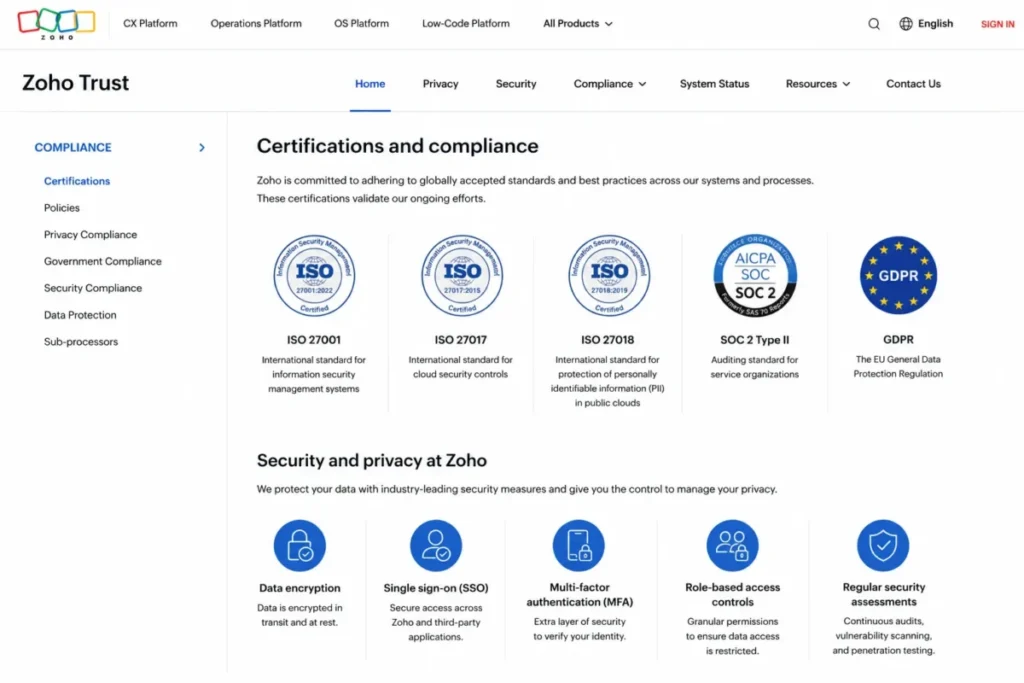
Security posture is a plan-selection input for regulated teams, and most pricing guides omit it entirely. Zoho publishes encryption at rest and in transit, SSO, multi-factor authentication, role-based access control, and logging, auditing, and monitoring.
Certifications listed on Zoho’s trust and compliance page include ISO 27001, ISO 27017, ISO 27018, SOC 2 Type II, and GDPR alignment. The Zoho CRM pricing page lists HIPAA compliance within the Standard feature section.
None of that guarantees your organization’s compliance. Vendor certification is a prerequisite, and your configuration, business associate agreement, and data-handling process do the rest.
Ask Zoho for the current SOC 2 report and the signed BAA before a healthcare or financial-services deployment. Ask in writing, and ask before the annual invoice.
Zoho CRM or Zoho CRM Plus: the Bundle Fork
Buyers often ask whether the CRM Plus bundle beats standalone Zoho CRM. The answer depends on how many of the bundled apps your team will open in a normal week.
Standalone Zoho CRM is correct for sales-only teams whose support, marketing, and analytics live elsewhere or barely exist. Paying for bundled apps you never configure is the most expensive kind of saving.
CRM Plus becomes the better economics when sales, customer support, campaigns, analytics, and customer engagement tools are all in weekly use. The switch point is app usage, not headcount.
Ask one question before you fork. If you removed the bundled marketing and support apps tomorrow, would anyone notice within a week?
How Zoho CRM Compares to Salesforce, HubSpot, Pipedrive, and Freshsales
These are scope-adjusted price anchors, not a full alternatives analysis. Each vendor sells a different bundle at its entry tier, and a $9 seat and a $75 seat rarely do the same job.
| Vendor | Published entry price | Practical tier for a 10-rep sales team | 10-user annual cost at that tier | Best for |
|---|---|---|---|---|
| Zoho CRM | $14/ | Professional at $23 | $2,760 | Configuration-heavy SMB sales operations |
| Salesforce | Starter Suite at $25/ | Starter Suite | $3,000 | Teams committed to the Salesforce ecosystem |
| HubSpot | Smart CRM Enterprise from $75/ | Sales Hub Professional promotional rate at $57/ | $6,840 at the promotional rate | Marketing-led revenue teams |
| Pipedrive | $14/ | Entry tier | $1,680 | Pipeline-only sales teams |
| Freshsales | From $9/user/ | Entry tier | $1,080 | Cost-sensitive teams wanting built-in AI |
Zoho Professional lands roughly 8% below Salesforce Starter Suite at 10 seats, and roughly 60% below HubSpot’s promotional Sales Hub Professional rate. It costs 64% more than Pipedrive’s entry seat and 155% more than Freshsales’ entry seat.
Compare scope before comparing rates. Every vendor bundles a different feature set at its entry tier, and each figure above is a published list price rather than a quoted contract.
Zoho CRM sells configuration depth rather than the cheapest seat, which is why its entry rate is a weak comparison point. Buyers comparing entry rates should check the Salesforce pricing breakdown for how quickly Starter Suite gives way to higher editions.
HubSpot’s promotional rates and seat-type structure make direct comparison harder than the table suggests, and the HubSpot pricing tiers explain why the entry number rarely survives contact with a real revenue team.
Is Zoho CRM Worth the Price?
Worth it if: you have a named CRM owner, a sales process worth encoding, and a stack that already includes two or more Zoho apps. Professional at $2,760 per year for 10 seats is strong value against anything in its configuration class.
Worth it if: you need territories, portals, or custom server-side functions and cannot justify Salesforce. Enterprise at $480 per user per year buys revenue-operations depth that costs multiples elsewhere.
Not worth it if: you want a pipeline, a task list, and nothing else. Pipedrive pricing plans start at the same $14 seat and deliver a simpler product with less to configure.
Not worth it if: your budget is the binding constraint and AI features matter more than customization. Freshsales pricing details start at $9 per user with a free tier and an enterprise option.
Not worth it if: nobody owns the CRM. Zoho’s configurability turns into technical debt without an owner, and no edition fixes that.
Who Should Not Buy Zoho CRM
A G2 reviewer described the “paradox of choice” that arrives when too much customization produces over-engineered processes. That single sentence predicts more failed Zoho rollouts than any pricing table.
Skip Zoho CRM if your team wants a CRM that works on day one with no configuration decisions. The flexibility that makes Zoho good value is the same flexibility that will stall your rollout.
Skip it if you have no internal admin, no process documentation, and no appetite to write one. Sentiment across Zoho CRM reviews on G2 praises the flexibility and warns about the setup burden in the same breath.
Skip it if your reporting requirements are already met and your only complaint is price. A cheaper CRM that nobody adopts costs more than an expensive one that everybody uses.
Teams that reach this conclusion should compare the field of Zoho CRM alternatives rather than downgrade to Standard and hope.
If Salesforce is the incumbent and the debate is switch-or-stay, the Zoho CRM vs Salesforce comparison sets out the migration cost against the license saving.
The Zoho CRM Buyer Risk Ledger
| Risk | Buyer consequence | Mitigation |
|---|---|---|
| Storage creep | Data storage add-ons at $480 per GB per year outpace seat growth | Audit record and attachment volume before choosing an edition |
| Support gap | Slow first response on Classic support during a pipeline outage | Price Premium support at 20% into year-one budget, then decide |
| Support eligibility conflict | Enterprise support thresholds differ across Zoho’s public pages | Get eligibility for standalone Zoho CRM confirmed in writing |
| Monthly billing drift | Up to $156 per user per year in avoidable spend | Convert to annual billing after the pilot, before invoice two |
| Configuration debt | Over-engineered workflows nobody maintains after month three | Name a CRM owner and cap active workflow rules deliberately |
| Currency and tax surprise | Checkout total exceeds the researched USD figure | Confirm USD selector and local tax treatment before purchase |
| Unpriced add-ons | WhatsApp credits, team users, backups, and API credits lack public USD rates | Request written quotes for every add-on before signing |
Three of these seven risks are pricing risks that no plan card discloses. That is the case for reading a Zoho invoice like a contract, which is how I read every CRM invoice.
How to Avoid Overpaying for Zoho CRM
Seven habits keep a Zoho CRM pricing plan honest across a full renewal cycle. Each one is drawn from a gate or add-on already covered above.
- Start on the free edition for 30 days and count records, not features. The 5,000-record and 10 MB ceilings tell you more about your true edition than any feature checklist.
- Buy annually once the pilot ends. Month-to-month costs an extra $72 to $156 per user per year depending on edition.
- Audit data storage before you audit seats. Anything past 1.1 GB of add-on storage at 5 seats means Professional is already cheaper.
- Do not buy Professional for API headroom. At 10 users it adds 2,500 daily credits, and the ceiling matters only above roughly 100,000 daily calls.
- Buy Enterprise only when two or more triggers apply. Zia alone rarely justifies $2,040 per year at 10 seats.
- Get every add-on quoted in writing. WhatsApp credits, team users, weekly backups, and extra API credits have no public USD price.
- Confirm support eligibility and surcharge before renewal, not after. A 25% support line on a $24,000 license is a $6,000 decision.
The Final Call on Zoho CRM Pricing
Zoho CRM pricing rewards teams that know their process and punishes teams that hope the software will supply one. Professional at $23 per user per month is the plan I recommend for most sales teams, Enterprise is a trigger-based upgrade, and Ultimate is a services purchase wearing a plan name.
This guide is built on Zoho’s official pricing, feature comparison, data storage, API limit, support, and trust pages, all checked on July 9, 2026, plus review sentiment from G2, Capterra, and TechRadar. No hands-on Zoho CRM trial was performed, and every figure here is traceable to a published source.
Macedona writes CRM buying guides for SaaS CRM Review, and the same rule applies to every vendor on this site. Verify the invoice, not the plan card.
Before renewal, answer one question: can you name the workflow, report, or integration that justifies your current edition? If not, you are paying for optionality, and optionality is the most expensive line item in CRM.
FAQ
How much does Zoho CRM cost in 2026?
Zoho CRM costs $14 per user per month on Standard, $23 on Professional, $40 on Enterprise, and $52 on Ultimate, all billed annually. Month-to-month rates are $20, $35, $50, and $65 respectively. A free edition covers up to 3 users. Prices are US dollars checked on July 9, 2026, before local taxes and add-ons.
Is Zoho CRM free forever?
Yes, Zoho publishes a free-forever edition for up to 3 users. It includes contact management, follow-up reminders, workflow automation, email templates, tasks, meetings, calls, reports, APIs, and mobile apps. The ceilings are 5,000 records, 10 MB of data storage, and 5,000 API calls per day. Most teams outgrow the three-user cap before the record cap.
What is included in Zoho CRM Standard?
Standard includes workflow rules, assignment rules, AI agents, cadences, reports, sales forecasting, and kiosks, plus 100,000 records and 200 MB of data storage. It allows 10 custom modules and 30 workflow rules per module with 15 active. It does not include CPQ, Blueprint process automation, inventory management, widgets, or Google Ads integration.
Is Zoho CRM billed monthly or annually?
Both. Zoho states that customers are not bound by contracts or commitments and can pay monthly or yearly. Annual billing is cheaper on every edition, saving $72 per user per year on Standard and $156 per user per year on Ultimate. A 10-user Professional team that stays month-to-month for twelve months pays $1,440 more.
Which Zoho CRM plan includes Zia?
Zia, the AI sales assistant, is gated at Enterprise and above. Standard includes AI agents, Professional adds email intelligence, and neither capability is Zia. Ultimate goes further with custom AI/ML through QuickML calls and data preparation. If Zia is your only Enterprise trigger, the $17 per user monthly step is hard to justify.
What is the difference between Zoho CRM Professional and Enterprise?
Professional adds CPQ, Blueprint process automation, widgets, inventory management, and Google Ads integration over Standard. Enterprise adds Zia, journey orchestration, territory management, custom functions, wizards, and customer portals over Professional. The Enterprise API ceiling also rises to 5,000,000 daily credits. Enterprise costs $17 more per user per month, or $2,040 per year at 10 seats.
Does Zoho CRM charge extra for support?
Classic support is included with paid subscriptions. Premium support is priced at 20% of the license fee with 24×5 phone and live chat and a three-hour first response. Enterprise support is priced at 25% with 24×7 coverage and a one-hour first response. Eligibility thresholds differed across Zoho’s public pages, so confirm with Zoho sales.
Does Zoho CRM charge for extra storage?
Yes. Additional data storage costs $4 per 100 MB per month, which is $480 per gigabyte per year. Included data storage runs from 10 MB on Free and 200 MB on Standard to 10 GB on Professional under 200 users. Data storage and file storage are separate ceilings, and only data storage drives this add-on.
Is Zoho CRM cheaper than Salesforce?
At entry level, yes. Zoho Standard starts at $14 per user per month against Salesforce Starter Suite at $25. At 10 seats, Zoho Professional costs $2,760 per year against $3,000 for Starter Suite. The gap narrows at higher Zoho editions, and total cost depends on storage, support, and implementation rather than the license rate.
Is Zoho CRM Plus better value than Zoho CRM?
Only if you will use the bundled apps. Standalone Zoho CRM suits sales-only teams whose support, marketing, and analytics live elsewhere. CRM Plus makes sense when sales, support, campaigns, analytics, and customer engagement are all in weekly use. Bundled apps nobody opens are the most expensive line on any Zoho invoice.