Document360 is an AI-powered knowledge base platform for customer help centers, internal wikis, and technical documentation. Built by Kovai.co, it targets mid-market to enterprise teams who treat documentation as a strategic asset.
Quick Verdict: Document360 scores 8.2/10—excellent for teams needing governance + AI search.
- Best for: 10+ contributors, customer-facing docs, governance-focused teams
- Not for: Solopreneurs, <5 people, basic FAQ needs
- Cost model: Quote-based, per-project pricing (each KB = separate subscription)
- Top alternatives: Zendesk Guide, GitBook, Nuclino, Slite
In This Article (16 sections)
TL;DR: Is Document360 Worth It in 2026?
| Criterion | Assessment |
|---|---|
| Best For | Mid-market to enterprise SaaS, 10+ contributors |
| Not For | Solopreneurs, <5 people, basic FAQ needs |
| Cost Model | Quote-based, per-project (each KB = separate quote) |
| AI Reality | Eddy AI search useful (Business+); AI Writing needs oversight |
| Setup Time | MVP: 3–10 days; Production rollout: 4–8 weeks |
| Standout | Version control + approval workflows |
| Limitation | Per-project pricing scales fast for multi-site |
| Our Score | 8.2/10 |
Decision in 30 seconds:
- ✅ Choose Document360 if: Customer-facing KB at scale, governance matters, AI search critical
- ❌ Look elsewhere if: <5 contributors, need lightweight wiki, quote-based pricing doesn’t fit
About the Reviewer & Disclosure
About the reviewer: B2B SaaS analyst specializing in support operations and documentation platforms. Evaluated 30+ knowledge base and help desk solutions for teams from startups to enterprises.
How this review was produced: Feature + governance rubric, documentation workflow assessment, AI evaluation framework, buyer-scenario fit analysis. Cross-referenced with G2/Capterra reviews and vendor documentation.
Disclosure: No paid sponsorship. No affiliate links. Independent evaluation.
What Is Document360?
Definition: Document360 is an AI-powered knowledge base platform that centralizes documentation for customer self-service, internal teams, and developer documentation—with enterprise-grade version control and governance.
Document360 focuses exclusively on documentation—unlike all-in-one tools like Coda or Notion. Competes with Zendesk Guide, Intercom Articles, and Confluence.
Primary use cases:
- Customer-facing help centers (SaaS, software companies)
- Internal employee knowledge bases
- Technical/API documentation
- SOPs and compliance documentation
Key Takeaways
- Dedicated documentation platform (not all-in-one)
- Mid-market to enterprise focus
- Governance-first design
Scoring & Final Recommendation
Our Scoring Rubric (Out of 10)
| Category | Score | Justification |
|---|---|---|
| Features | 9.0 | Comprehensive AI suite, three editors, robust content management |
| User Experience | 8.0 | Clean interface; learning curve for advanced governance |
| Admin/ | 9.5 | Best-in-class workflows, version control, RBAC, audit trails |
| Integrations | 8.5 | 30+ pre-built + API; SSO only in Enterprise |
| Security/ | 9.0 | SOC 2, SSL, audit trails, data residency options |
| Analytics | 9.0 | Pro Dashboard actionable; failed search tracking valuable |
| Value for Money | 7.0 | Good ROI for right fit; per-project pricing expensive at scale |
| Support | 9.0 | 24/5, guided setup, strong G2 ratings |
| OVERALL | 8.2/10 | Excellent for mid-market+ teams serious about documentation |
Key Takeaways
- Version control + approval workflows are genuinely best-in-class
- AI search (Business+) delivers real value—test in trial
- Per-project pricing is the main cost concern for multi-site needs

Document360 Features
Content Creation & Editing
| Editor | Best For | Trade-off |
|---|---|---|
| Markdown | Technical writers, API docs | Steeper learning curve |
| WYSIWYG | Non-technical content creators | Less precision |
| Block Editor | Modern teams (Notion-style) | Newest, evolving |
Additional: snippets/variables, Word import, article templates, bulk actions.
Eddy AI Suite
Definition: Eddy AI is Document360’s AI suite combining search, content generation, chatbot, and glossary automation.
| AI Feature | Tier | Assessment |
|---|---|---|
| AI Search & Answer | Business+ | ChatGPT-style responses; test accuracy in trial |
| AI Writing Agent | Professional+ | Generates drafts; needs heavy editing |
| AI Chatbot | Business+ | 24/7 widget; effective for FAQ |
| AI Glossary | Enterprise+ | Auto-generates definitions; requires review |
How to evaluate AI: In trial, run 10–20 real user queries. Measure: answer accuracy, source traceability, behavior when articles don’t exist.
Collaboration & Governance
Definition: Docs governance = workflows, permissions, and audit trails that ensure documentation accuracy and compliance.
- Version control: Granular revision history with easy rollback
- Approval workflows: Multi-stage review before publishing (Professional+)
- Custom workflow builder: Define complex approval chains (Business+)
- RBAC: Role-based permissions down to category level
- Sandbox environment: Test changes before pushing live (Enterprise)
- Security audit trail: Full activity logging (Enterprise)
Search & Analytics
Definition: Zero-result searches = queries where users found no matching articles—critical for identifying content gaps.
Search: Standard keyword (all tiers), AI-powered semantic (Business+), search analytics.
Analytics (Business+): Article performance, failed search tracking, feedback analytics, link status monitoring.
Key Takeaways
- Three editor types accommodate different team preferences
- AI Search (Business+) is the most impactful AI feature—test in trial
- Governance layer justifies premium for regulated industries
Document360 Pricing
How Pricing Works
Document360 organizes sites as projects (each project = one full knowledge base). Pricing is quote-based and commonly scoped by:
- Project count (primary cost driver)
- Plan tier (Professional → Business → Enterprise)
- Add-ons (AI suite, SSO, audit trails)
WARNING
2 knowledge bases = 2 projects = higher cost. Budget accordingly for multi-site needs.
14-day free trial available (no credit card). Startups may qualify for special pricing.
Tier Overview
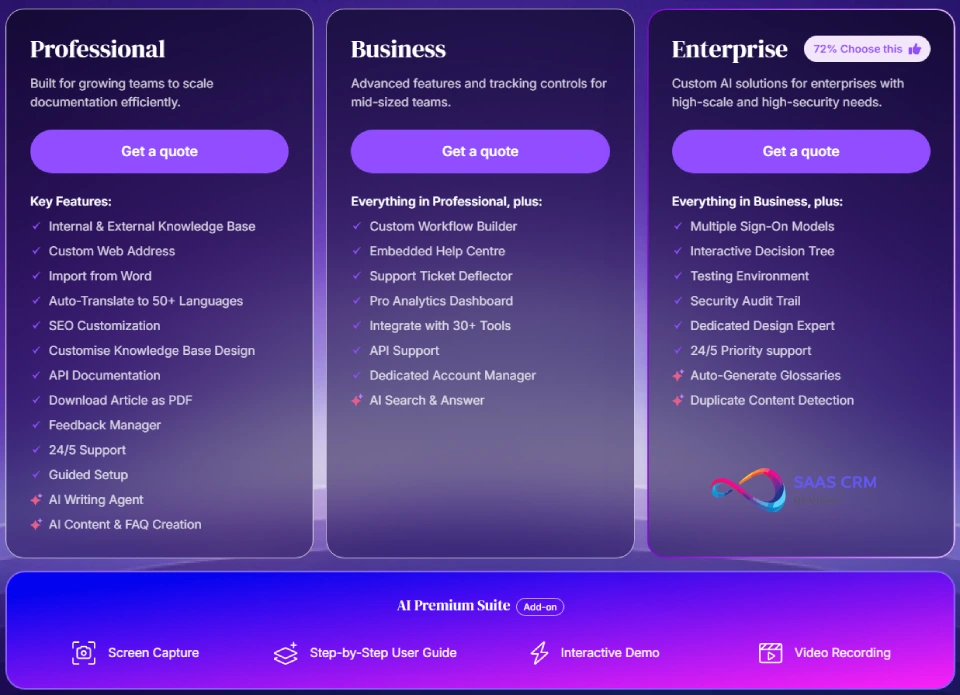
| Tier | Best For | Key Additions |
|---|---|---|
| Professional | 5–15 contributors, single KB | Custom domain, Word import, AI Writing Agent |
| Business ⭐ | 15–50 contributors | AI Search, Pro Analytics, Custom workflows, API |
| Enterprise | 50+ contributors, compliance needs | SSO/ |
| Enterprise+ | Very large orgs | Data residency, Private hosting |
Cost Drivers Table
| Cost Driver | Impact | Notes |
|---|---|---|
| Number of projects | High | Each KB = separate quote |
| Team seats | Medium | Limits vary by tier |
| AI Premium Suite | Medium | Add-on for Enterprise |
| SSO/ | High | Forces Enterprise tier |
| Staging environment | Medium | Enterprise only |
How to Estimate Your Cost
Formula: Base plan × project count + add-ons (AI suite, SSO) + services
Scenario guidance:
| Scenario | Setup | Tier Guidance |
|---|---|---|
| Small SaaS (1 help center, <10 editors) | Single KB | Professional |
| Mid-market (customer KB + internal wiki) | 2 projects | Business × 2 |
| Enterprise (3+ product docs, SSO required) | 3+ projects | Enterprise |
Always verify current pricing: Document360 Pricing Page
Key Takeaways
- Per-project model = multi-site significantly higher costs
- Business tier is the value sweet spot (AI Search + Analytics)
- SSO requirement forces Enterprise tier
- Get custom quote—pricing is negotiable
Document360 Pros & Cons
✅ Pros
- Effective AI Search (Business+): ChatGPT-style answers. Test accuracy with 10–20 queries in trial.
- Best-in-class version control: Granular history, easy rollback, change attribution. Superior to most competitors.
- Strong content governance: Custom workflows + RBAC + audit trails.
- Excellent support: 24/5 availability, guided setup, strong G2 ratings.
- Focused feature set: Documentation-only (not all-in-one bloat).
- Actionable analytics (Business+): Failed search tracking identifies content gaps.
- Flexible editors: Markdown, WYSIWYG, Block—accommodates different teams.
- Strong integrations: 30+ pre-built + API.
❌ Cons
- Pricing scales fast: Per-project model expensive for multi-site needs.
- AI Search locked behind Business: Professional tier lacks the main value driver.
- Learning curve: Advanced workflows/governance take time to master.
- Overkill for small teams: <5 contributors? See Trello or lightweight wikis.
- Custom design needs developer: CSS/JS customization required.
- Not a true wiki replacement: Structured for polished docs, not freeform collaboration.
- Mobile limitations: Web-first; mobile editing not optimized.
- Migration takes planning: Production rollout = 4–8 weeks.
Red Flags: When NOT to Buy Document360
CAUTION
Don’t buy Document360 if:
- ❌ Your team has no dedicated docs owner—requires governance discipline
- ❌ Your helpdesk suite KB is sufficient (Zendesk Guide, Freshdesk)
- ❌ You need SSO but can’t afford Enterprise tier
- ❌ Team is <5 people—too much tool for your needs
- ❌ You need freeform wiki more than structured documentation
Document360 Use Cases
✅ Excellent Fit
| Use Case | Why Document360 Works |
|---|---|
| SaaS customer help centers | AI search, ticket deflection widget, SEO optimization |
| Mid-market/ | Approval workflows, RBAC, audit trails, SSO |
| Technical/ | Markdown support, code blocks, versioning |
| Multi-audience docs | Internal/ |
⚠️ Questionable Fit
| Situation | Better Alternative |
|---|---|
| Startup <5 people | Notion, Help Scout Docs |
| Lightweight internal wiki | Slab, Guru |
| Developer-first / Git workflow | GitBook |
| All-in-one workspace | ClickUp, Wrike |
❌ Not Designed For
- CRM/ticketing (use Zendesk Sell, HubSpot)
- Project management (use Asana, Monday)
- Freeform collaboration (use Notion)
Key Takeaways
- Best for 10+ contributors with customer-facing documentation
- Governance features justify premium for regulated industries
- Overkill for small teams or basic FAQ needs
Implementation: The Reality Check
Realistic Timeline
| Phase | MVP (Simple Setup) | Production (Full Rollout) |
|---|---|---|
| Duration | 3–10 days | 4–8 weeks |
| Scope | Single KB, <50 articles, basic workflow | Migration, IA structure, workflows, branding, analytics |
| Who | 1–2 editors | 10+ contributors, IT, design |
| Conditions | No migration, no SSO, minimal customization | Multiple sources, SSO, redirect plan, training |
Migration Checklist
Before migrating to Document360:
- IA mapping: Current structure → Document360 categories
- Redirect plan: Document URL changes for SEO preservation
- Content freeze: Set cutover date to avoid parallel editing
- Analytics baseline: Capture current metrics pre-migration
- Permissions audit: Map existing roles → RBAC
- Integration inventory: List tools to connect
- Training plan: Schedule team onboarding
Migration Difficulty by Platform
| From | Difficulty | Notes |
|---|---|---|
| Zendesk Guide | Medium | API available; URL redirects critical |
| Confluence | Medium-High | Export to Word → import; restructure hierarchy |
| Intercom | Medium | CSV export + cleanup |
| Google Docs | Easy | Word import works well |
| GitBook | Medium | Markdown export; API for volume |
Key Takeaways
- MVP launch: 3–10 days with minimal content
- Production rollout: 4–8 weeks with migration + workflows
- Use guided setup—reviews consistently praise onboarding team
What to Verify in a Demo (10 Questions)
- AI Search accuracy: Run 10–20 real queries. Measure accuracy + source traceability.
- AI source citation: Does Eddy cite articles? What happens with no match?
- Dataset scoping: Can AI be limited by workspace/collection?
- Zero-result export: How to export failed searches? Alerts available?
- Audit trail retention: How long are logs kept? Export for compliance?
- SSO specifics: Confirm your provider works. SCIM supported?
- Workflow complexity: Test your actual approval chain.
- Analytics depth: Review dashboard with your data. Actionable?
- Migration support: What’s included? What costs extra?
- Multi-site pricing: Get exact quotes for your project count.

Experience Artifacts: What We Recommend Testing
1. AI Test Plan (12 Queries)
Setup: Create test set of 12 common support queries.
| Query Type | Example | Pass Criteria |
|---|---|---|
| FAQ (article exists) | “How do I reset password?” | Correct answer + cites article |
| Edge case (no article) | “Billing for discontinued product?” | Graceful failure, suggests contact |
| Multi-step process | “How to set up SSO with Okta?” | Complete steps or links to guide |
| Semantic variation | “Change my email” vs “Update account email” | Both return same result |
Measure: Pass rate, source traceability, failure behavior.
2. Analytics Loop (Content Gap Workflow)
Workflow to test:
- Export zero-result searches (weekly)
- Identify top 5 gaps → create 3 new articles
- Track reduction in zero-results over 30 days
- Monitor ticket deflection change
Validate: Dashboard exports correctly, data is actionable.
3. Approval Workflow Setup
Sample chain: Support Writer → Team Lead → Legal Review → Publish
Test:
- Can you set conditional approvals (e.g., legal only for compliance topics)?
- How are reviewers notified?
- Can you bypass in emergencies?
- Audit trail captures all steps?
Read our more: Helpjuice Review 2026: Features, Pricing, Pros & Cons & Best Alternatives
Document360 Alternatives & Comparisons
Deep Comparison Table
| Criteria | Document360 | Zendesk Guide | GitBook | Confluence | Nuclino | Slite |
|---|---|---|---|---|---|---|
| Governance | ⭐⭐⭐ Best-in-class | ⭐⭐ Basic | ⭐⭐ Limited | ⭐⭐⭐ Strong | ⭐ Minimal | ⭐ Minimal |
| AI Search | ⭐⭐⭐ Business+ | ⭐⭐ Suite-wide | ⭐⭐ Basic | ⭐ Limited | ⭐ Basic | ⭐⭐ “Ask” feature |
| Analytics Depth | ⭐⭐⭐ Pro Dashboard | ⭐⭐ Explore add-on | ⭐ Basic | ⭐⭐ Moderate | ⭐ Basic | ⭐⭐ Knowledge panel |
| Dev Docs Fit | ⭐⭐⭐ Markdown + API | ⭐ Not focus | ⭐⭐⭐ Best-in-class | ⭐⭐ Macro-based | ⭐ Limited | ⭐ Limited |
| Helpdesk Coupling | ⭐ Standalone | ⭐⭐⭐ Native | ⭐ Standalone | ⭐ Standalone | ⭐ Standalone | ⭐ Standalone |
| Customization | ⭐⭐ CSS/JS | ⭐⭐ Theme-based | ⭐⭐ Limited | ⭐⭐⭐ Extensive | ⭐ Minimal | ⭐ Minimal |
| Pricing Model | Quote/ | Per-agent | Per-site + user | Flat-rate | Per-user | Per-user |
Choose X If / Avoid X If
Document360
- ✅ Choose if: 10+ contributors, governance critical, AI search priority
- ❌ Avoid if: <5 people, budget-constrained, need freeform wiki
Zendesk Guide
- ✅ Choose if: Already in Zendesk ecosystem, support team efficiency #1
- ❌ Avoid if: Need best-of-breed KB, standalone documentation
GitBook
- ✅ Choose if: Developer-first, Git workflow native, open-source docs
- ❌ Avoid if: Non-technical team, need strong governance
Confluence
- ✅ Choose if: Deep Atlassian ecosystem, flat-rate scaling matters
- ❌ Avoid if: Starting fresh, want modern UX
Nuclino (see full review)
- ✅ Choose if: Small team (<25), visual/graph view, lightweight wiki
- ❌ Avoid if: Enterprise governance, customer-facing KB
Slite (see full review)
- ✅ Choose if: Internal wiki only, AI “Ask” feature, 10–200 people
- ❌ Avoid if: External KB needed, advanced workflows
Key Takeaways
- Document360 excels in governance + AI search
- Zendesk Guide best for Zendesk-native teams
- GitBook best for developers with Git workflows
- Lightweight alternatives: Nuclino, Slite
Read full review: Tettra Review 2026
Methodology: How We Evaluated
What We Evaluated
| Dimension | Approach |
|---|---|
| Authoring UX | Editor flexibility, content reuse, templates |
| Governance workflows | Approval chains, version control, RBAC |
| Search findability | Navigation, search accuracy, AI quality |
| Analytics depth | Metric actionability, gap identification |
| AI performance | Test 10–20 queries; measure accuracy + failure behavior |
| Integrations | Ecosystem breadth, API robustness, SSO |
| Enterprise controls | SSO/ |
Limitations
- Observations cross-referenced with vendor docs and third-party reviews
- Pricing is quote-based—verify on official page
- AI performance varies by content quality and query complexity
Who This Review Is For
SaaS companies, support leaders, documentation managers evaluating knowledge base platforms. Best suited for teams with 10+ contributors and governance requirements.
Document360 Review – FAQ
What is Document360?
AI-powered knowledge base platform by Kovai.co. Designed for customer help centers, internal wikis, and technical documentation with enterprise-grade governance.
How much does Document360 cost?
Quote-based, per-project pricing. Cost scales by project count + tier + add-ons. Verify on Document360 pricing page.
Does Document360 have a free trial?
Yes. 14-day trial, no credit card required. Startups may qualify for special pricing.
Is Document360 worth it?
Yes, if governance + AI search matter. Worth it for 10+ contributors with customer-facing documentation. Not worth it for <5 people or basic FAQ needs.
Is Document360 good for internal knowledge bases?
Yes, but consider simpler alternatives. Supports internal/external/mixed modes. For internal-only, Slite or Nuclino may be simpler.
What are the best Document360 alternatives?
- Zendesk ecosystem: Zendesk Guide
- Developers: GitBook
- Lightweight wiki: Nuclino
- Internal teams: Slite
Does Document360 support AI search?
Yes, Business tier and above. Test accuracy with 10–20 queries in trial.
Does Document360 support SSO?
Yes, Enterprise tier only. Supports Okta, Microsoft Entra ID, Google, Auth0.
How long does Document360 setup take?
MVP: 3–10 days. Production rollout (migration + workflows): 4–8 weeks.
What is ticket deflection?
Definition: Ticket deflection = reducing support ticket volume by surfacing self-service answers before users submit requests.
Is Document360 SOC 2 compliant?
Yes. SOC 2 compliant with SSL, data residency (Enterprise), audit trails (Enterprise).
Final Recommendation
✅ Buy Document360 If:
- 10+ contributors managing documentation at scale
- Content governance is a priority
- AI search + analytics are priorities
- Customer-facing help center is strategic
❌ Skip Document360 If:
- Small team (<5 people)
- Need lightweight wiki
- Quote-based pricing doesn’t fit budget
- Freeform wiki needed
Next Steps
- Start free trial: Document360 14-day trial (no credit card)
- Test AI search: Run 10–20 real user queries
- Get custom quote: Pricing is negotiable for annual commits
Sources:
- Document360 Official Pricing
- G2 Document360 Reviews
- Vendor feature documentation (accessed January 2026)
Update Policy: Last updated January 2026. Pricing and features may change—verify on official vendor pages.