
Most teams do not leave Zapier because it stops working. They leave when the monthly task bill outgrows the value of the workflows, when a five-step automation needs branching the linear builder makes awkward, or when finance asks why an automation tool costs more than the CRM it feeds.
In This Article (15 sections)
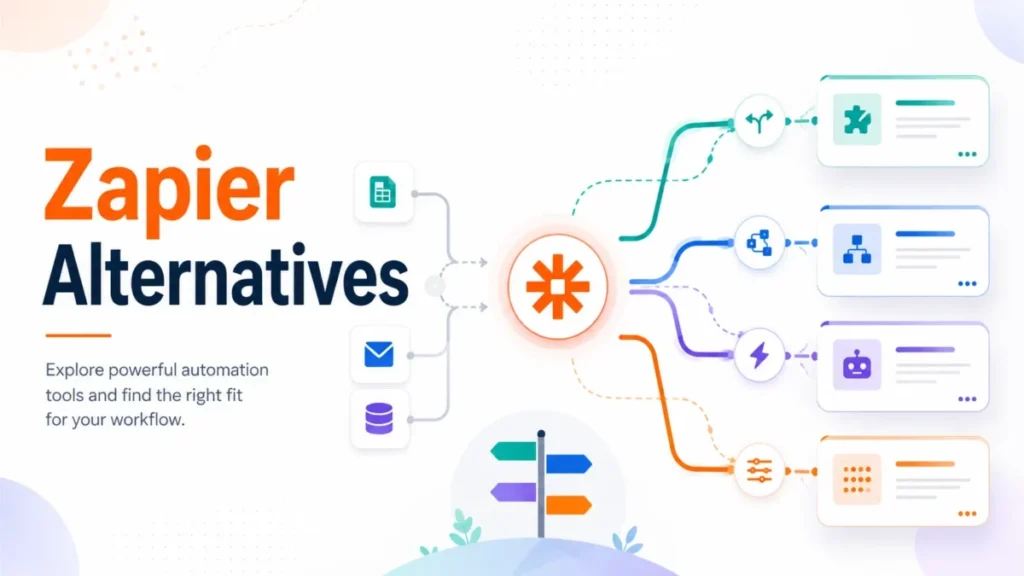
Zapier is still the widest on-ramp in automation, with more than 9,000 app connections on its official pricing page, checked July 17, 2026. The reason to read past that number is that the best Zapier alternatives do not bill the way Zapier bills, and comparing them by sticker price alone produces the wrong answer.
This guide ranks 10 Zapier alternatives by the reason a team is switching and by the size of that team. A solo founder escaping the task ceiling wants something very different from a 200-person company that needs SAML SSO, audit logs, and desktop RPA.
The core trap is unit confusion. Zapier bills a task, Make bills a credit per module action, n8n bills a full workflow execution, Activepieces bills an active flow, Pipedream bills compute credits by the second, and Workato and Tray.ai bill recipe or platform credits.
Those are not the same thing, and a plan that looks four times larger can charge at four times as many points in the workflow.
I evaluated every platform on billing unit, price transparency, branching depth, self-hosting, governance, migration friction, and one disqualifier each. All prices are US/USD and were checked against official pages on July 17, 2026.
This is a research-only review built from official documentation and pricing pages, not an account-level trial, so the language throughout is “the pricing page lists” and “the documentation shows,” never a claim of first-hand use.
Quick Verdict: Best Zapier Alternative by Switching Trigger
If you only read one section, read this table. It maps the reason you are leaving Zapier to the platform that answers it, not to a generic “best overall” pick.
| If you are leaving Zapier because… | Best alternative | Why it fits |
|---|---|---|
| Tasks get expensive at volume | Make | 10,000 credits from $12/month, and internal logic is cheaper than Zapier tasks |
| You need visual branching and data transforms | Make | Scenario canvas with routers, iterators, and filters instead of a linear Zap |
| You want self-hosting and full data control | n8n | Free source-available Community Edition you host yourself; paid billing is per execution, not per step |
| You live in Microsoft 365 and need desktop RPA | Microsoft Power Automate | Cloud flows plus attended and unattended Windows RPA under one license family |
| You want one-click setup with human help | Integrately | Millions of ready automations and free expert setup on paid tiers |
| You want to stop paying monthly | Pabbly Connect | One-time lifetime plans, and triggers plus internal steps do not consume tasks |
| You run a few very high-volume workflows | Activepieces | Per-active-flow pricing with unlimited runs after 10 free flows |
| You are a developer who wants code and serverless | Pipedream | Node, Python, Go, and Bash steps billed by compute time, not by app action |
| You need enterprise governance and recipe reuse | Workato | Recipe-based iPaaS with a public self-service credit path and enterprise governance |
| You need AI orchestration and regional hosting at scale | Tray.ai | Enterprise iPaaS with 700+ connectors, governance, and embedded options |
Source: each vendor’s official pricing and documentation pages, checked July 17, 2026.
Make wins the most common exit, which is cost and branching, so it earns the overall recommendation for teams that want a visual builder. n8n is the pick the moment self-hosting or code control enters the requirement. Everything after that is a fit decision, not a quality ranking, and the sections below show exactly where each one breaks.
Why Teams Look for Zapier Alternatives
Zapier’s strength and its problem are the same thing. It makes the first automation trivial, and it charges for every successful action once you scale past a hobby project.
Task cost climbs faster than workflow value. Every standard action in a multi-step Zap consumes a task, so a five-step lead-routing Zap running 1,000 times a month can burn 5,000 tasks before you count retries. Reviewer patterns on G2, where Zapier holds a 4.5 rating across roughly 2,050 reviews, repeatedly describe pricing as expensive at scale.
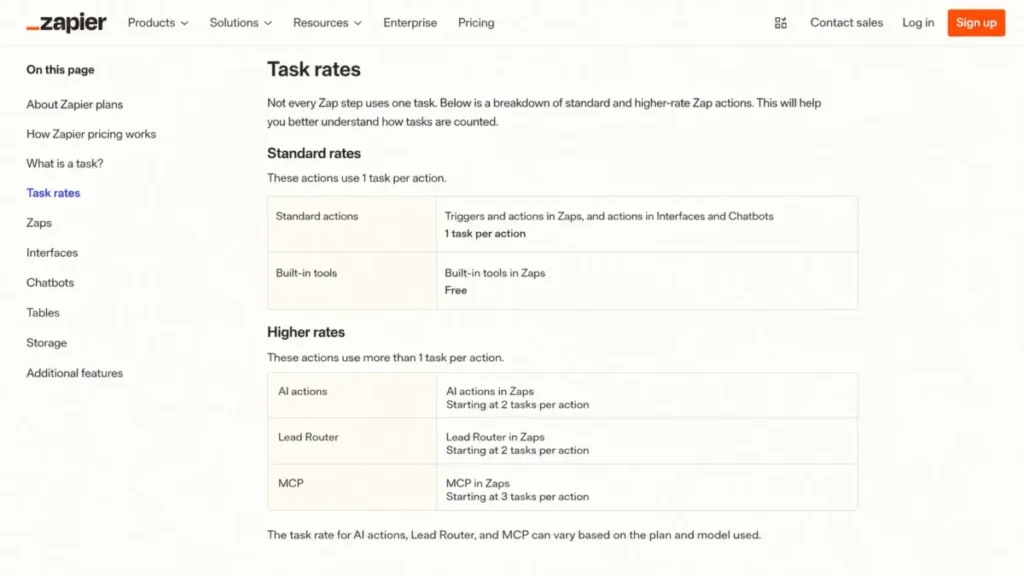
AI and routing steps no longer cost one task each. Zapier’s task-rate documentation, checked July 17, 2026, shows that standard actions consume one task, some built-in steps are free, and AI, Lead Router, and MCP tool-call steps can consume more than one task depending on the model or action. Older cost examples that assume one step equals one task now understate an AI-heavy workflow.
The linear builder fights complex logic. Zapier added Paths and Filters, but the editor is still a top-to-bottom list, and teams that need heavy branching, iteration, or data reshaping often find a visual canvas easier to reason about.
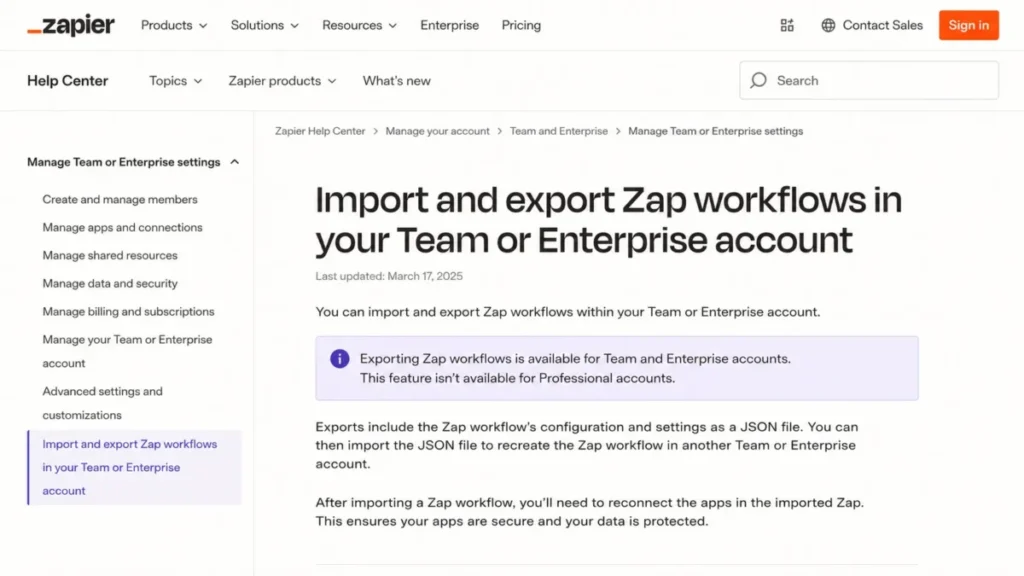
Export is gated and is not a migration button. Zapier’s own help documentation on Zap export, checked July 17, 2026, states that Zap workflow import and export is available only on Team and Enterprise accounts, uses JSON, and requires app accounts to be reconnected after import. A team on Free or Professional has no bulk export, and even the JSON export does not carry live credentials.
Polling latency is plan-gated. The Zapier feature comparison shows 15-minute polling on Free, 2-minute on Professional, and 1-minute on Team and Enterprise, so time-sensitive automations effectively require a higher tier.
Some buyers want a model Zapier does not sell. Self-hosting, one-time pricing, per-execution billing, unlimited-run active flows, and desktop RPA are all outside Zapier’s product, and each maps to a specific alternative below.
None of this makes Zapier a bad tool. It makes Zapier the wrong tool for specific cost, control, and complexity profiles, which is exactly what the rest of this guide sorts out.
Zapier Pricing and Feature Gates

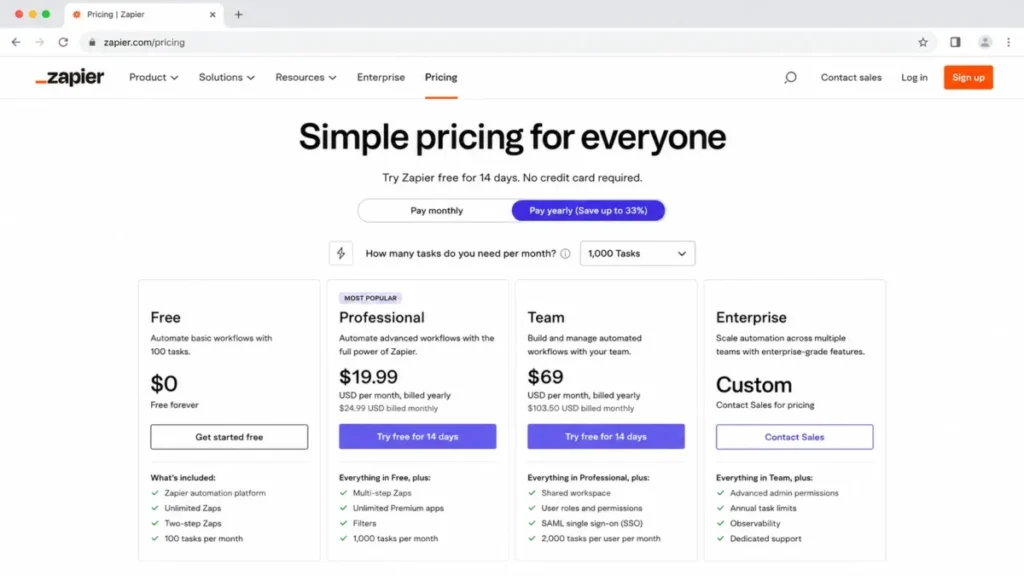
Before comparing alternatives, it helps to see what you are leaving. Zapier’s US pricing, checked July 17, 2026, is a task-based subscription with four tiers.
| Zapier plan | Price (billed yearly) | Billing unit | Key limits and gates |
|---|---|---|---|
| Free | $0/month | Tasks | 100 tasks/month, two-step Zaps, 1 seat, 15-minute polling |
| Professional | From $19.99/month | Tasks | Entry selector around 750 tasks, multi-step Zaps, premium apps, webhooks, 2-minute polling |
| Team | From $69/month | Tasks | 25 users, shared connections, SAML SSO, priority support, 1-minute polling |
| Enterprise | Custom | Tasks | Unlimited users, advanced admin, SCIM, annual task pooling, observability |
Source: Zapier official pricing page, checked July 17, 2026.
The Free plan is genuinely useful for one or two simple Zaps, but its two-step ceiling means any workflow with a filter plus two actions already pushes you toward Professional. Live chat support does not start at the bottom of Professional either; it begins around the 2,000-task tier, so the cheapest paid plan is email-support only.
The practical switching comparison is almost never Free versus Free. It is your real Zapier tier, usually Professional at a task volume that matches your workflows, against the alternative’s equivalent usage tier.
Zapier’s real advantages survive this whole guide. The 9,000-plus app count is one of the broadest app ecosystems, the templates and Copilot make the first automation fast, and nontechnical owners rarely need help to build a basic Zap, whether that Zap is a CRM integration or a simple notification.
If those advantages describe your situation, the honest answer may be to stay, and the “When to Stay with Zapier” section makes that case in full.
Best Zapier Alternatives for Small Teams (1-10 Users)
Small teams switch to fix a bill or a logic wall, not to build a governance program. These five keep entry cost low and put visual branching, one-time pricing, or unlimited runs within reach of a founder or a five-person ops team running sales and marketing automation.
Make: Best for Visual Branching Without the Task Bill

Make is the strongest Zapier alternative for teams that want branching, iteration, and data reshaping in a builder they can see. Where Zapier stacks steps in a list, Make’s visual builder lays them out as a scenario canvas with routers, filters, and iterators, which is can be easier to reason about once a workflow forks.
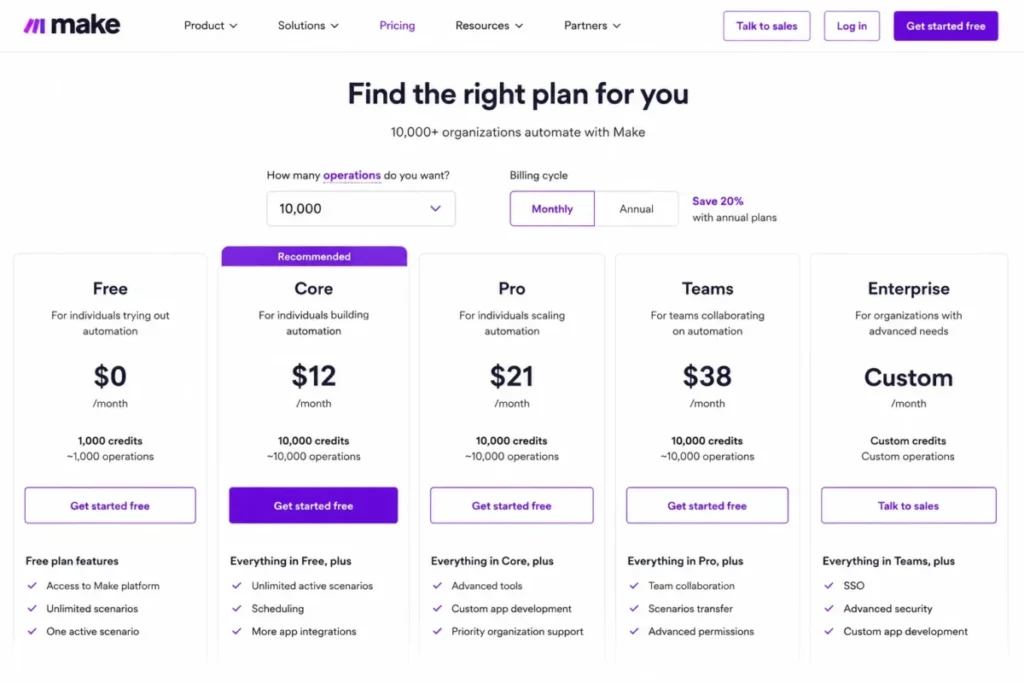
Make’s US pricing page, checked July 17, 2026, starts with a Free plan at 1,000 credits per month. At the 10,000-credit selector, Core is $12/month, Pro is $21/month, and Teams is $38/month, with each module action consuming a credit.
Several 2026 comparison pages still quote $9 for 10,000 operations, and that figure is out of date against the official page.
The billing unit is the thing to understand before you celebrate the low price. A Make credit is consumed per module action, so a workflow that calls six modules per run uses roughly six credits per run, and credits expire at the end of the cycle rather than rolling over.
That is still often cheaper than Zapier tasks for the same workflow, but it is not a one-to-one substitution, and I would model your real module count before assuming a fixed savings.
For a small team, Core at $12 is usually the practical tier because it adds minute-level scheduling and higher operation ceilings than Free. Teams at $38 is the switching target once you need roles, shared templates, and more than a couple of builders.
| Pros | Cons |
|---|---|
| Visual scenario canvas with routers, iterators, and filters | Credits expire monthly and do not roll over |
| 10,000 credits from $12/month, cheaper than equivalent Zapier tasks for many workflows | Each module action consumes a credit, so complex scenarios burn faster |
| Strong data transformation and array handling built in | Steeper learning curve than Zapier for a simple two-step automation |
| 3,000+ apps plus a capable HTTP module for anything missing | Fewer native apps than Zapier’s 9,000-plus |
- Best for:
- Operations and marketing teams that need branching, not just linear steps
- Founders comfortable debugging a visual canvas
- Workflows with heavy data mapping or array iteration
- Avoid if:
- You want the absolute simplest two-step automation with no learning curve
- Your team will not maintain a canvas when a scenario breaks at month two
- Migration difficulty:
- Medium. Common SaaS apps map well, but every Zap becomes a scenario you rebuild by hand, credentials reconnect one by one, and you recount operations as credits.
- Verdict:
- Choose Make if branching and task cost are your two exit reasons, because it answers both in one tool.
Integrately: Best for One-Click Setup With Human Help

If the reason you are leaving Zapier is that building automations still feels like work, Integrately is built for you. It leads with millions of ready-made one-click automations and free expert setup on paid plans, which lowers the build burden more than any other tool here.
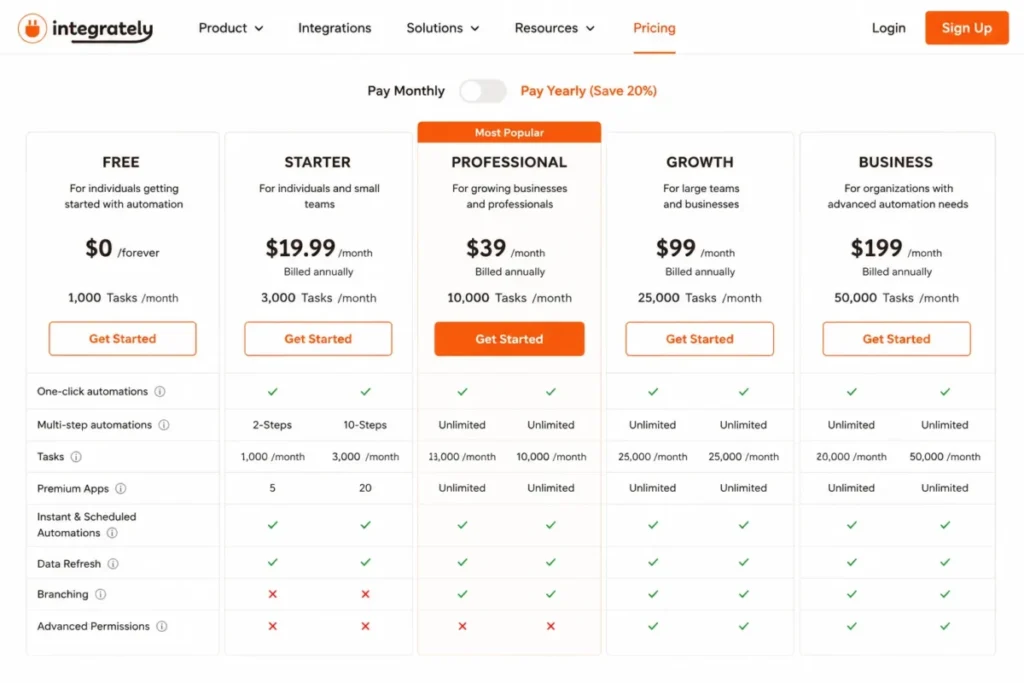
Integrately’s official pricing page, checked July 17, 2026, runs Free at 100 tasks per month, Starter at $19.99/month billed annually for 2,000 tasks, Professional at $39/month for 10,000 tasks, Growth at $99, and Business at $239. The entry price looks close to Zapier, but the feature gates are where a switcher gets surprised.
Starter is deliberately thin. Branching, the iterator, auto-retry, unlimited premium apps, and team permissions arrive on Professional and above, so a multi-step Zap with conditional logic needs Professional at $39, not the $19.99 headline.
Tasks are consumed by successful actions, conditions, branching, data modifications, and searches, and when the allowance runs out actions stop or queue.
Professional at $39 for 10,000 tasks is the practical tier for most switchers who need real logic. The free expert setup is the genuine differentiator: for a nontechnical team, having someone build the first automations removes the exact friction that made Zapier feel heavy.
| Pros | Cons |
|---|---|
| Millions of ready one-click automations shorten setup | Branching and iterator are gated to Professional and above |
| Free expert setup help on paid plans | Conditions, searches, and branching all consume tasks |
| Professional at $39 for 10,000 tasks undercuts many rivals | 1,500-plus apps, fewer than Zapier and Make |
| Simple interface close to Zapier’s familiarity | Starter lacks team permissions and auto-retry |
- Best for:
- Small teams that want automations built for them
- Nontechnical owners escaping Zapier’s build effort
- Straightforward multi-step workflows on common apps
- Avoid if:
- You need deep custom logic or code steps
- You expect the $19.99 Starter to include branching, because it does not
- Migration difficulty:
- Low to Medium. Common recipes rebuild quickly with assisted setup, but you still reconnect apps, verify field mappings, and upgrade to Professional when branching matters.
Pabbly Connect: Best for Escaping the Monthly Subscription

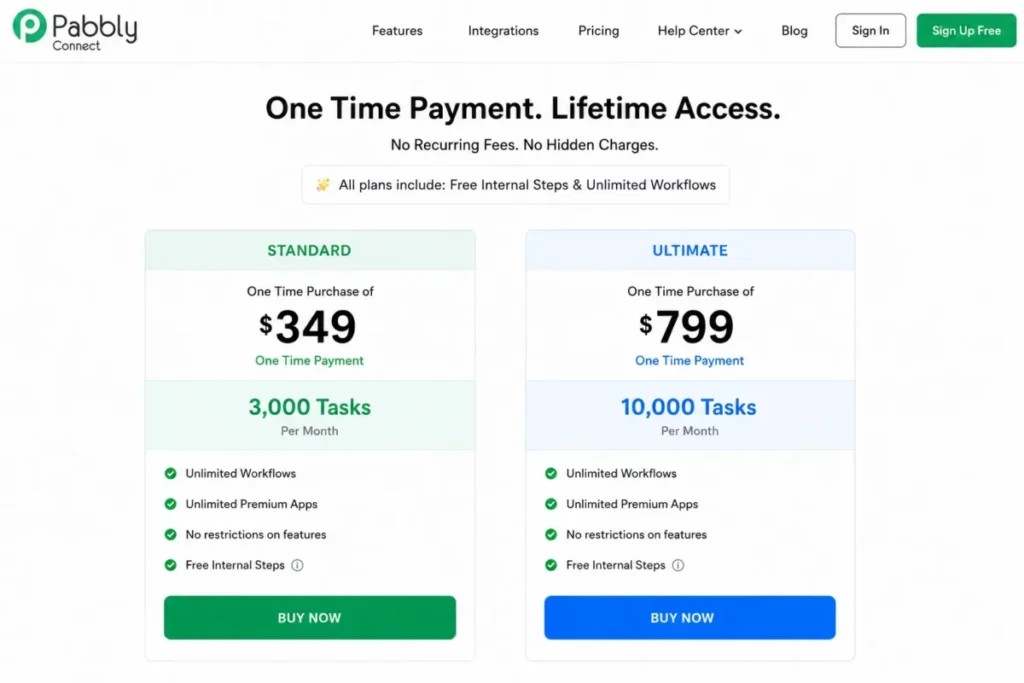
Pabbly Connect answers a very specific frustration: paying a recurring bill for automations that rarely change. Its headline is a one-time lifetime plan, and its billing model spares you from paying for internal logic.
The limited-time lifetime offer page, checked July 17, 2026, lists Standard at $349 one-time for 3,000 tasks per month and Ultimate at $799 one-time for 10,000 tasks per month. This is a promotional lifetime price, not Pabbly’s standard price, and its ongoing plans otherwise renew at a monthly rate.
Because the offer window can close, this figure was re-verified on the publish date: 2026-07-17.
Triggers and internal steps such as filters, routers, formatters, and schedulers do not consume tasks, so only external actions draw down the allowance.
That free-internal-step model is the real economic difference from Zapier, where most steps are billable. For a stable set of workflows, a one-time payment against a monthly Zapier subscription can pay for itself within a year, and I would run that math against your current Zapier tier before dismissing it.
The caveats matter. Standard is limited to 10 two-step workflows, so a switcher who needs multi-step automations should budget for Ultimate at $799.
The offer is explicitly time-limited, lifetime pricing can change, and support is self-service with plan-selection constraints, so confirm the live offer and the support terms before buying.
| Pros | Cons |
|---|---|
| One-time lifetime pricing instead of a monthly subscription | Standard is capped at 10 two-step workflows |
| Triggers and internal steps do not consume tasks | Lifetime offer is time-limited and can change |
| 2,000-plus integrations with multi-step, routers, and iterator on Ultimate | Support is largely self-service |
| JavaScript, Python, and human-in-the-loop steps available | Upgrade and plan-change rules need checking before purchase |
- Best for:
- Budget-conscious founders with stable, slow-changing workflows
- Teams that want to stop renewing an automation subscription
- Workflows heavy on internal formatting and filtering
- Avoid if:
- You need dedicated, fast support for revenue-critical automations
- Your workflows change constantly and may outgrow the plan you bought
- Migration difficulty:
- Medium. Multi-step logic and common apps are available, but every workflow is rebuilt by hand, apps reconnect individually, and you should plan support before you rely on it.
- Verdict:
- Choose Pabbly Connect if a predictable one-time cost matters more than premium support.
Activepieces: Best for a Few High-Volume Workflows

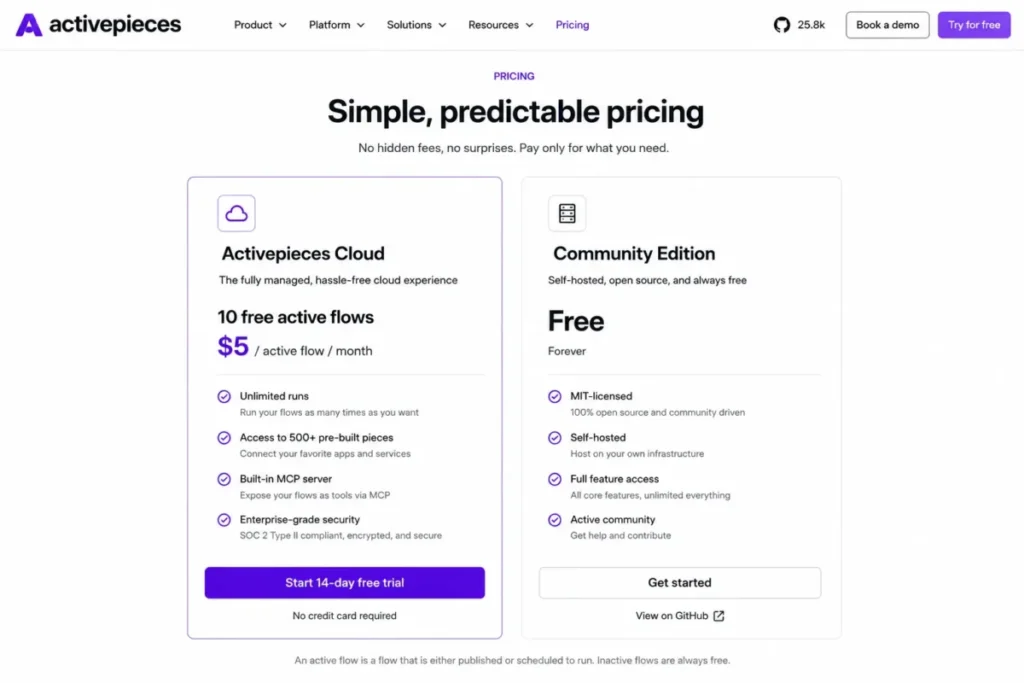
Activepieces changed its pricing model in a way most 2026 comparison pages missed, and that change is the reason it belongs here. Instead of billing per task or per run, its cloud plan bills per active flow and lets those flows run without a run cap.
The current Activepieces pricing, checked July 17, 2026, gives you 10 active flows free, then charges $5 per active flow per month with unlimited runs, while the Ultimate tier is custom annual pricing and the Community Edition is a free MIT-licensed self-hosted core. That MIT license is a real distinction from n8n’s more restrictive Community license, which matters if you plan to modify and redistribute.
The break-even is straightforward once you see the unit. A team with a handful of workflows each firing tens of thousands of times a month gets exceptional value, because you pay per flow, not per run.
A team with dozens of low-frequency flows pays $5 each and may find a task-based tool cheaper.
Cloud limits are the disqualifier to check. The Activepieces limits documentation lists a 10-minute flow runtime cap plus file, payload, and log limits, and Standard support is community-based, so long-running jobs and dedicated support are not its strength.
| Pros | Cons |
|---|---|
| Per-active-flow pricing with unlimited runs after 10 free flows | 10-minute flow runtime cap on cloud |
| MIT-licensed Community Edition you can self-host freely | Many low-volume flows can cost more than task-based tools |
| AI agents, unlimited MCP servers, and tables included | Standard plan support is community-only |
| 754-plus integrations on the current page | Payload and log caps limit heavy data jobs |
- Best for:
- Teams with a small number of very high-volume workflows
- Developers who want an MIT-licensed self-hosted core
- AI agent and MCP-server use cases
- Avoid if:
- You run many low-frequency workflows that would each cost $5
- You need long-running jobs beyond the 10-minute cloud cap
- Migration difficulty:
- Medium to High. You rebuild flows, reconnect pieces, validate the runtime and payload limits, and choose between managed cloud, self-hosted Community, or custom governance.
IFTTT: Best for Consumer and Smart-Home Applets

IFTTT earns a place for a narrow reason, and it is important to name the boundary before recommending it. It is the cheapest option here and the best for personal, smart-home, and social automations, but it is not an iPaaS replacement for governed business workflows.
Its official plans page, checked July 17, 2026, lists Free at $0 for 2 Applets, Pro at $2.99/month billed annually, and Pro+ at $8.99/month billed annually, spanning 1,000-plus brands and services. The Free plan is limited to two Applets with single-action behavior, while multi-action Applets, queries, and filter code arrive on Pro and Pro+.
The reason to disqualify it for business use is structural, not price. IFTTT is optimized for one-trigger, one-action Applets across consumer apps and IoT devices, and it lacks the governance, observability, and business-integration depth that a revenue-critical workflow needs.
| Pros | Cons |
|---|---|
| Lowest entry cost of any option here | Free plan is capped at 2 single-action Applets |
| Strong consumer, smart-home, and social coverage | Weak business governance and observability |
| Fast setup for simple personal automations | Limited multi-step and branching logic |
- Best for:
- Individuals automating smart-home, social, and mobile actions
- Very simple single-trigger, single-action automations
- Avoid if:
- You run multi-step, governed, or revenue-critical business processes
- You need audit logs, roles, or production monitoring
- Migration difficulty:
- Low for a personal Applet, but IFTTT is usually the wrong destination for a real business Zap rather than a hard migration.
Best Zapier Alternatives for Growing Teams (10-50 Users)
Growing teams have two new problems the small-team tools do not fully solve: technical control and ecosystem fit. These three add self-hosting, Microsoft-native RPA, and developer-grade compute for teams that have outgrown a pure no-code builder.
n8n: Best for Technical Teams That Want Self-Hosting

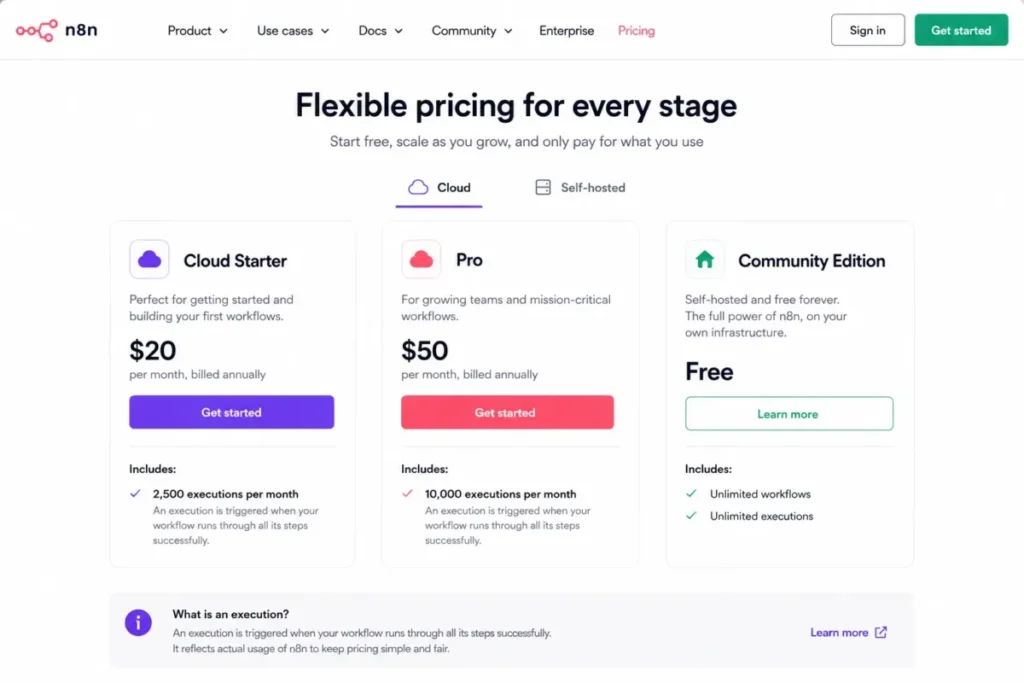
n8n is the alternative I would shortlist the moment self-hosting, code, or full data control appears in the requirement. It bills one complete workflow run as a single execution regardless of how many steps that workflow contains, which is a fundamentally different economics from Zapier’s per-task model.
Two misconceptions follow n8n around, and both change the decision. First, n8n Community Edition is source-available under n8n’s Sustainable Use License, not an unqualified OSI open-source license, so calling it “open source” without qualification is wrong and matters for redistribution rights.
Second, an execution is the whole workflow, so comparing 2,500 n8n executions to 2,500 Zapier tasks is comparing a workflow to a step.
The Community Edition is free to self-host, and the official n8n pricing page, checked July 17, 2026, listed Cloud Starter at $24/month for 2,500 executions and Pro at $60/month for 10,000 executions, with the canonical pricing page sometimes rendering in euros. Paid plans include unlimited steps, workflows, and users, and Starter allows five concurrent executions, so a growing team is not billed per seat.
Self-hosting is where the honest tradeoff lives. Running Community Edition yourself means you own security, uptime, backups, scaling, and upgrades, and the managed Cloud is hosted in Frankfurt in the EU, which is a data-residency fact to confirm against your requirements.
For a growing team, Cloud Pro at $60 for 10,000 executions is the practical tier if you want managed hosting, and Community self-hosting is the path if you have the engineering capacity and want zero per-execution fees.
| Pros | Cons |
|---|---|
| Full workflow run bills as one execution, not per step | Community license is source-available, not unrestricted open source |
| Free self-hosted Community Edition | Self-hosting shifts security, uptime, and upgrades to you |
| Unlimited steps, workflows, and users on paid plans | Cloud data is hosted in the EU (Frankfurt), a residency consideration |
| JavaScript and Python code steps for custom logic | Steeper for nontechnical owners than Zapier |
- Best for:
- Technical teams that value self-hosting and code extensibility
- Workflows with many steps where per-execution billing wins
- Teams needing unlimited users without per-seat cost
- Avoid if:
- No one on the team can own a self-hosted deployment
- You need a nontechnical, fully managed, click-only experience
- Migration difficulty:
- High for nontechnical teams, Medium for developers. Workflows, credentials, error handling, hosting, and monitoring are rebuilt rather than imported, because Zapier JSON does not port into n8n.
Microsoft Power Automate: Best for Microsoft 365 and Desktop RPA

For a team already standardized on Microsoft 365 or Dynamics, Power Automate is often the cheapest capable path, because it combines cloud automation with attended and unattended Windows desktop RPA that Zapier does not offer. The catch is that its licensing is materially more complex than the single per-user price competitors quote.
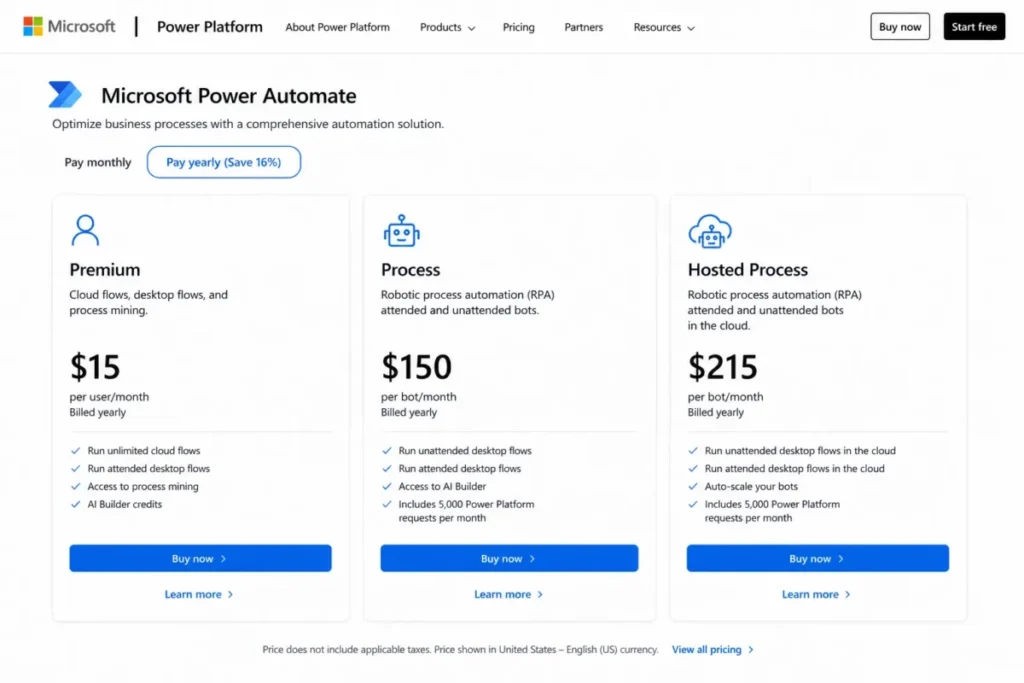
The official Power Automate pricing, checked July 17, 2026, is Premium at $15/user/month billed yearly, Process at $150/bot/month, Hosted Process at $215/bot/month, and a Process Mining add-on at $5,000/tenant/month, with a 30-day trial. The right license depends on who runs the flow and whether desktop automation is attended, unattended, or Microsoft-hosted.
This is the one platform here where per-user billing genuinely bites. Ten users on Premium is $150/month, which is the seat-cost math a switcher must run, whereas an unattended bot scenario needs the Process or Hosted Process license instead.
The second hidden mechanic is request counting. Microsoft’s Power Automate licensing FAQ states that every trigger and action counts as a Power Platform request, and loops multiply those requests, so a high-volume looped flow consumes far more than the flow count suggests.
Persistent overage can throttle or suspend flows, so a Microsoft shop should model request volume, not just seat count.
The practical decision is a license route, not a plan pick. Choose Premium for per-user cloud and attended flows, Process for unattended bots, and Hosted Process when Microsoft hosts the bot, and budget Process Mining only if you genuinely need it.
| Pros | Cons |
|---|---|
| Cloud flows plus attended and unattended Windows RPA | Licensing spans per-user, per-bot, and hosted-bot models |
| Deep Microsoft 365 and Dynamics integration | $15/user/month means real seat cost at scale ($150 for 10 users) |
| Premium at $15/user/month is competitive for Microsoft shops | Triggers, actions, and loops consume Power Platform requests |
| Process Mining and Copilot-assisted building available | Premium and custom connectors and RPA add cost and setup |
- Best for:
- Microsoft 365 and Dynamics organizations
- Teams that need desktop RPA alongside API automation
- IT-governed environments already inside the Power Platform
- Avoid if:
- Your stack is mostly non-Microsoft SaaS
- You want simple, transparent, single-number pricing
- Migration difficulty:
- Medium to High. Microsoft-native connectors simplify some flows, but premium and custom connectors, environments, gateways, desktop bots, and licensing require redesign.
- Verdict:
- Choose Power Automate if you are a Microsoft-first team that also needs RPA, and price the correct license before you commit.
Pipedream: Best for Developers Who Want Code and Serverless

Pipedream is the destination for developers who find no-code builders limiting and want to drop into Node, Python, Go, or Bash whenever a step needs it. It bills compute credits rather than successful app actions, which rewards short, efficient workflows and penalizes heavy ones in a way task-based tools do not.
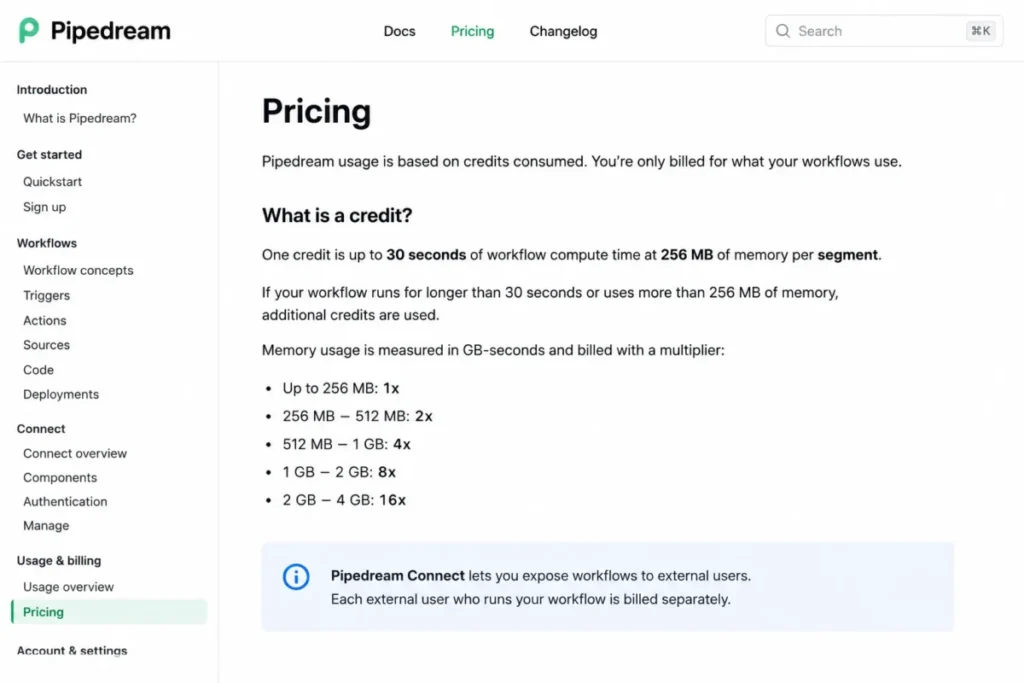
The pricing model is the part general alternatives lists skip. The Pipedream pricing documentation, checked July 17, 2026, defines one credit as up to 30 seconds of compute at 256 MB per workflow segment, with memory multipliers increasing the cost.
A Free plan exists, exact paid dollar amounts are shown in the live account and billing interface rather than a public table, and public registry sources can run free.
A short linear workflow and a high-memory branched workflow can consume very different credits despite the same trigger count, so I would estimate credits from compute time and memory, not from step count. That is a mental model shift for anyone used to counting tasks.
Pipedream Connect adds a second billing axis that matters if you embed integrations for your own customers or AI-agent users. Connect bills by unique external users, and a single user can hold multiple connected accounts, so you model both API usage and user count.
| Pros | Cons |
|---|---|
| Code steps in Node, Python, Go, and Bash inside a serverless runtime | Credits scale with compute time and memory, not step count |
| Free development and testing plus a public component registry | Exact paid plan pricing is account-visible, not a public table |
| Compute-based billing rewards efficient workflows | Steep for nontechnical users leaving Zapier |
| Connect SDK and API for embedded integrations | Connect adds separate external-user billing to model |
- Best for:
- Developers who want serverless workflows with real code
- Teams embedding integrations into their own product or AI agent
- Efficient, short-running automations
- Avoid if:
- Your team is nontechnical and wants a pure click builder
- You need a fixed, predictable monthly price you can see upfront
- Migration difficulty:
- High for no-code teams, Medium for developers. Logic often moves into code, secrets and accounts reconnect, and compute and memory behavior needs testing before you trust the bill.
Best Zapier Alternatives for Enterprise (50+ Users)
Enterprise buyers are not shopping on sticker price. They need connector breadth, governance, regional hosting, and a support model that answers when a revenue-critical integration breaks.
These two are built for that, and both price by quote.
Workato: Best for Recipe Governance and iPaaS Scale

Workato is the enterprise integration platform for teams that want recipe reuse, governance, and a path from prototype to managed iPaaS. Most alternatives lists describe it as custom-only, which understates the picture, because it has a public self-service path alongside enterprise contracts.
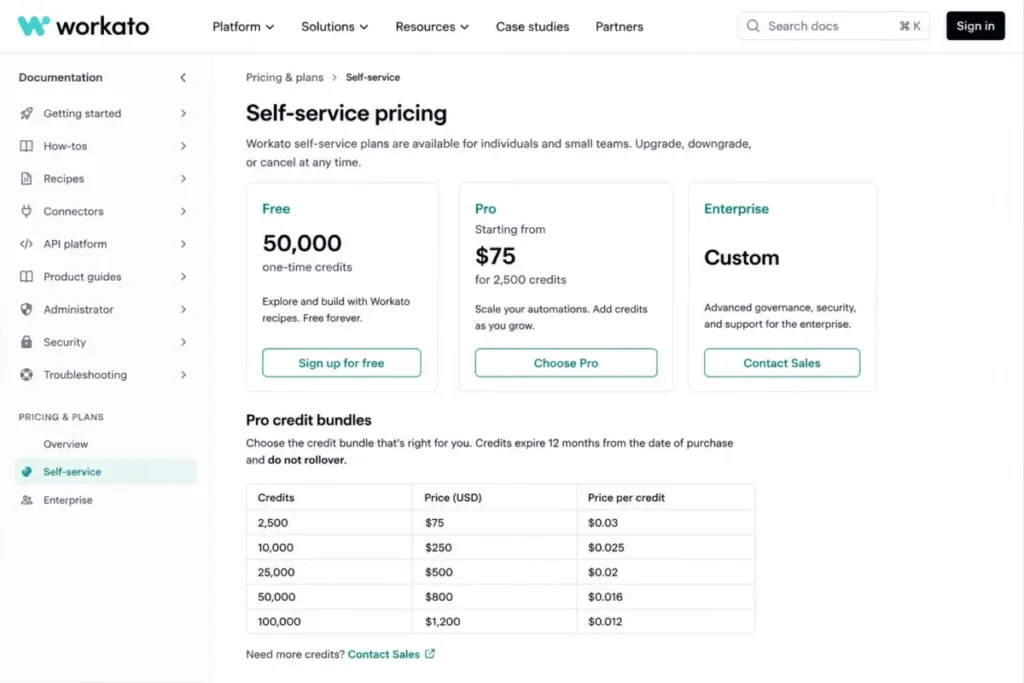
The Workato self-service pricing documentation, checked July 17, 2026, shows a Free account with 50,000 one-time credits and a self-service Pro plan beginning at $75/month for 2,500 credits, with higher selectable bundles, while enterprise pricing stays custom. Credits do not roll over, and eligible actions, API calls, and rows all consume credits, so a Workato credit is not a Zapier task.
The self-service tier is genuinely useful for a small technical team or a prototype, but the credit accounting is multidimensional, which makes cost modeling harder than a task quota. I would map your real action, API, and row volume before assuming a bundle size.
Workato’s strength at scale is governance and connector depth, along with recipe reuse across an organization. The switching cost is correspondingly high: connector parity, recipes, environments, governance, credentials, and batch logic all require redesign and specialist ownership.
| Pros | Cons |
|---|---|
| Enterprise governance, recipe reuse, and deep connector library | Credits do not roll over and expire |
| Public self-service Free and Pro path, not only custom quotes | Actions, API calls, and rows all consume credits |
| Usage dashboard and mature iPaaS operating model | Enterprise pricing and implementation are sales-led |
| Scales from prototype to managed integration program | High migration effort and specialist ownership required |
- Best for:
- Integration teams needing enterprise governance and recipe reuse
- Organizations moving from prototype to managed iPaaS
- Complex, multi-system data workflows
- Avoid if:
- You are a small no-code team that wants simple, transparent pricing
- You cannot staff an integration specialist to own recipes
- Migration difficulty:
- High. Connectors, recipes, environments, governance, and batch or row logic are redesigned, and the enterprise operating model needs an owner.
Tray.ai: Best for AI Orchestration and Regional Hosting

Tray.ai is the enterprise iPaaS to evaluate when the requirement includes AI agents, MCP, governed APIs, and regional or hybrid connectivity. It positions around 700-plus connectors, governance, and embedded options, and its pricing is entirely sales-led.
There is no public USD entry price to verify, so the honest recommendation is to treat Tray.ai as a quote-driven decision and to scope entitlements before signing. The Tray.ai usage and billing documentation describes task and AI usage entitlements, embedded capabilities, regional hosting, and file or storage constraints, all of which vary by contract.
The specific risks to raise with sales are price opacity and AI conversion. Task-to-AI-token conversion varies, Embedded may be a separate add-on, and regional instances and on-prem connectivity are configuration decisions, not universal inclusions.
Because pricing and entitlements are not public, the useful asset for a buyer is a scoping checklist, which the “How to Choose” section provides. For a large enterprise with genuine AI-orchestration needs, Tray.ai is a credible platform, provided the contract is scoped carefully.
| Pros | Cons |
|---|---|
| 700-plus connectors with AI agents and MCP orchestration | Pricing is custom and not publicly disclosed |
| Enterprise governance, regional hosting, and embedded options | Task-to-AI-token conversion varies by contract |
| SOC 2 Type II, HIPAA, and GDPR claims on the official site | Embedded may be a separate add-on |
| On-prem connectivity for hybrid environments | File storage and payload constraints apply |
- Best for:
- Large enterprises orchestrating complex, AI-driven integrations
- Teams needing regional hosting or hybrid connectivity
- Embedded integration inside a product you sell
- Avoid if:
- You are a small team that needs transparent, self-service pricing
- You cannot run a procurement process to scope a quote
- Migration difficulty:
- High. Architecture discovery, connector and API mapping, governance design, and testing are required, and implementation help is often part of the engagement.
How I Evaluated These Zapier Alternatives
This is a research-only comparison. I built it from official pricing pages, product documentation, help-center limits, and licensing FAQs, each checked on July 17, 2026, plus paraphrased reviewer patterns from G2 and Capterra for sentiment only.
This comparison is documentation-based, so the analysis relies on official pages rather than on a paid account of each platform. Where an official page and a competitor page disagreed on price, I relied on the official page and flagged the stale figure, and where a paid price was not publicly disclosed, such as Pipedream’s paid tiers and Tray.ai, I marked it account-visible or quote-required rather than guessing.
Every platform was scored on the same criteria: billing unit and price transparency, branching depth, integration breadth, self-hosting, governance, migration friction, and one clear disqualifier.
Full Feature and Pricing Matrix
The single most useful thing you can do before comparing prices is to stop comparing quotas as if they were the same unit. This glossary is the fix.
| Platform | Billing unit | What consumes one unit | Free or non-billable steps |
|---|---|---|---|
| Zapier | Task | Each successful action step (AI, Lead Router, and MCP steps can cost more than one) | Some built-in steps are free; triggers included |
| Make | Credit (operation) | Each module action in a scenario | Credits expire monthly; no rollover |
| n8n | Execution | One full workflow run, regardless of step count | Unlimited steps per execution |
| Integrately | Task | Successful actions, conditions, branching, searches, and data changes | Triggers included |
| Pabbly Connect | Task | External actions only | Triggers and internal steps (filters, routers, formatters) are free |
| Activepieces | Active flow | Each enabled flow per month, with unlimited runs | Runs are not billed; 10 active flows free |
| Pipedream | Compute credit | Up to 30 seconds at 256 MB per workflow segment; memory multiplies it | Free development and testing; public sources can be free |
| Workato | Recipe credit | Eligible actions, API calls, and rows | Credits do not roll over |
| Power Automate | Power Platform request | Each trigger and action; loops multiply requests | Standard connectors included in some Microsoft 365 plans |
| IFTTT | Applet | Each enabled Applet (2 free) | Applet runs are not metered like tasks |
A quota that looks four times larger can charge at four times as many points in the workflow, which is why “runs per dollar” comparisons across these platforms are unreliable. Model your specific workflow against each unit before you trust any headline number.
Now the prices, all US/USD and checked July 17, 2026. Read the billing unit column above alongside this table, because a lower entry price on a unit that drains faster is not automatically cheaper.
| Platform | Starting price | Billing basis | Practical switching tier | Cost driver at 10 users | Free option |
|---|---|---|---|---|---|
| Make | $12/month | Per credit, monthly or annual | Core $12 or Teams $38 | Usage, not seats | Free, 1,000 credits |
| n8n | $24/month (Cloud) | Per execution; self-host free | Cloud Pro $60 or self-hosted | Usage; users unlimited | Free self-hosted Community |
| Power Automate | $15/user/month | Per user, per bot, billed yearly | Premium, plus Process for RPA | $150/month at 10 seats | 30-day trial |
| Integrately | $19.99/month | Per task, billed annually | Professional $39 | Growth $99 for unlimited users | Free, 100 tasks |
| Pabbly Connect | $349 one-time | One-time lifetime | Ultimate $799 one-time | Flat, not per seat | Free plan available |
| Activepieces | $5/active flow | Per active flow, monthly | Cloud Standard or self-hosted | Usage, not seats | 10 free active flows |
| Pipedream | Account-visible | Compute credits plus platform fee | Shown in live billing interface | Usage, not seats | Free plan available |
| Workato | $75/month (self-service) | Per recipe credit | Pro bundles or Enterprise | Usage, not seats | Free, 50,000 one-time credits |
| IFTTT | $2.99/month | Per user, billed annually | Pro or Pro+ | Consumer, single-user | Free, 2 Applets |
| Tray.ai | Custom quote | Task and AI usage entitlements | Quote-scoped | Quote-scoped | Not publicly disclosed |
| Zapier (baseline) | $19.99/month | Per task, billed yearly | Professional or Team $69 | Team flat to 25 users | Free, 100 tasks |
Source: each platform’s official pricing and documentation pages, checked July 17, 2026.
The 10-user column exposes an insight most comparison tables bury: almost every automation platform here bills by usage, not by seat, so adding users rarely changes the bill. Power Automate is the exception at $15 per user, and Zapier’s Team plan is a flat $69 for up to 25 users, so if seat count is your pain, most of these tools already solve it.
Feature gates decide whether a cheap tier can truly replace your Zaps. This matrix maps the capabilities switchers most often assume are included.
| Platform | Visual branching | Self-hosting | Code steps | SSO / governance | Native app count (vendor figure) |
|---|---|---|---|---|---|
| Make | Yes, on canvas | Not offered | JS and functions | Teams and Enterprise | 3,000+ |
| n8n | Yes | Yes (Community, Business) | JS and Python | Enterprise / self-host | Broad, plus HTTP |
| Power Automate | Yes | Not offered (cloud) | Expressions, connectors | Enterprise (Microsoft) | Standard + premium connectors |
| Integrately | Professional and up | Not offered | Limited | Growth and Business | 1,500+ |
| Pabbly Connect | Ultimate | Not offered | JS and Python | Not published | 2,000+ |
| Activepieces | Yes | Yes (MIT Community) | Code pieces | Ultimate | 754+ |
| Pipedream | Via code | Not the primary model | JS, Python, Go, Bash | Account-visible | Broad registry |
| Workato | Yes | Not offered | Recipe functions | Enterprise | Large connector library |
| IFTTT | Limited | Not offered | Filter code (Pro+) | Not for business governance | 1,000+ brands |
| Tray.ai | Yes | Regional / hybrid options | Yes | Enterprise, SOC 2 Type II | 700+ |
Source: each vendor’s official product, pricing, and security documentation, checked July 17, 2026.
Vendor app counts use each vendor’s own terminology and are ecosystem indicators, not directly comparable connector depth. The governance column is the one that reverses a small-team recommendation for an enterprise buyer, because SSO, audit logs, and regional hosting usually sit on the top tier or a custom contract.
A Five-Step Workflow Costs a Different Number on Every Platform
Headline quotas hide the real question, so here is one defined workflow priced by unit. Assume a lead-routing workflow with one trigger, one filter, and three external actions, running 1,000 times a month, and treat these counts as an example you should replace with your own numbers.
On Zapier, the trigger and the built-in filter are typically free, so roughly 3,000 tasks are billable at 1,000 runs, which sits above the entry Professional selector and pushes you up the task tiers. On Make, if each run touches four billable modules, that is about 4,000 credits a month, which fits inside the 10,000-credit Core plan at $12.
On n8n, the same workflow is 1,000 executions no matter how many steps it holds, because one full run is one execution, which is why step-heavy workflows favor its model. On Activepieces, it is a single active flow with unlimited runs, so 1,000 or 100,000 runs cost the same $5 after the free tier.
On Pipedream, cost depends on compute time and memory rather than step count, so a fast workflow can stay near the free or low-credit range while a heavy one climbs. These are illustrative counts, not a savings guarantee, and the unit is the point: the same five steps bill as tasks, credits, executions, an active flow, or compute seconds depending on where they run.
How to Choose the Right Zapier Alternative
The fastest way to choose is to answer five questions in order, because the first one that returns a hard requirement usually decides the tool.
1. Do you need self-hosting or full data control? If yes, the shortlist is n8n or Activepieces Community Edition, and price becomes a secondary question. If no, stay on managed cloud and keep all ten in play.
2. Are you a Microsoft 365 or Dynamics organization that needs desktop RPA? If yes, Power Automate is usually the strongest shortlist candidate, and the real work is pricing the correct license. If no, skip it, because its licensing complexity is not worth it for a non-Microsoft stack.
3. Is your exit reason cost at volume? Compare the practical tier, not the lowest tier, and read the billing unit. Make at Core, Activepieces per active flow for a few high-volume workflows, or Pabbly’s one-time plan for stable workflows are the strongest cost answers.
4. Do you need real branching and data transformation? If yes, Make’s canvas is the cleanest no-code answer, and Integrately requires Professional to enable branching. If your logic is genuinely simple, a cheaper task tool is fine.
5. Do you need enterprise governance, SSO, and support? If yes, the shortlist narrows to Workato, Tray.ai, or Power Automate in a Microsoft shop, and you should budget for a quote and an implementation owner.
If you are switching from spreadsheets or a single simple Zap, solve adoption before feature depth, because the most capable platform is worthless if the team will not maintain it after month two.
For an enterprise quote from Tray.ai or Workato, scope these before the first sales call: task and credit entitlement, overage price, AI token conversion, regional or on-prem hosting, embedded scope, support SLA, connector coverage for your stack, and non-production billing. That checklist turns “contact sales” into a comparable proposal.
Which Zapier Alternative Should You Avoid?
Anti-recommendations build trust, so here is where each tool is the wrong choice, stated plainly.
| Platform | Avoid it if… |
|---|---|
| Make | You want the simplest possible two-step automation with zero learning curve |
| n8n | No one on the team can own security, uptime, and upgrades for a self-hosted deployment |
| Power Automate | Your stack is mostly non-Microsoft and you want one transparent price |
| Integrately | You expect the $19.99 Starter to include branching, iterator, or team permissions |
| Pabbly Connect | You need fast, dedicated support for revenue-critical automations |
| Activepieces | You run many low-frequency flows that would each cost $5, or need jobs over 10 minutes |
| Pipedream | Your team is nontechnical and wants a fixed price it can see before signing up |
| Workato | You are a small no-code team that wants simple, predictable pricing |
| IFTTT | You run governed, multi-step, or revenue-critical business workflows |
| Tray.ai | You cannot run a procurement process and need transparent self-service pricing |
The pattern across this table is that the cheapest or most capable option is rarely the safest for a given team. A tool you cannot operate, cannot afford at your real usage, or cannot get support for is a false saving.
Migration Complexity by Alternative
Switching cost is the barrier the top search results almost entirely ignore, so treat this as the section that changes your timeline expectation. No JSON export from Zapier ports directly into any of these platforms, and even Zapier’s own export is gated to Team and Enterprise.
| Platform | Migration difficulty | Main risk |
|---|---|---|
| Integrately | Low to Medium | Rebuild recipes and reconnect apps; branching needs Professional |
| Make | Medium | Rebuild each Zap as a scenario; recount operations as credits |
| Pabbly Connect | Medium | Manual rebuild and self-service support planning |
| Power Automate | Medium to High | Connector, environment, gateway, and license redesign |
| Activepieces | Medium to High | Rebuild flows; validate runtime and payload limits |
| n8n | High (nontechnical) / Medium (dev) | Rebuild plus hosting, secrets, and monitoring ownership |
| Pipedream | High (no-code) / Medium (dev) | Logic moves into code; compute and memory need testing |
| Workato | High | Recipes, environments, governance, and specialist ownership |
| Tray.ai | High | Architecture discovery, governance design, and implementation |
Migration difficulty here is an editorial estimate based on data-model complexity, builder change, credential reconnection, code needs, and governance setup, not a measured implementation time. I deliberately avoid promising calendar durations, because the real timeline depends on your app parity, custom code, and team.
One operational detail buyers miss: what happens when you hit a limit. Zapier’s documented Zap limits hold runs at the task ceiling and can move to pay-per-task or an upgrade prompt, Integrately stops or queues actions, Make stops when credits are exhausted, Workato credits simply run out with no rollover, and Power Automate can throttle or suspend flows on persistent overage.
Knowing the failure mode matters more than the nominal quota for any customer-facing workflow.
When to Stay with Zapier
Switching is not free, and for some teams the migration cost outweighs the savings. Here is where staying is the smarter call.
Stay if niche app coverage is critical to you. Zapier’s 9,000-plus connections are one of the broadest app ecosystems, and if one of your core workflows depends on an app that Make, n8n, or Power Automate does not support natively, rebuilding it as a custom HTTP call can erase any savings.
Stay if your workflows are low volume. On a small number of automations firing a few hundred times a month, Zapier’s task cost is modest, and the migration effort buys you very little.
Stay if a nontechnical owner runs your automations. Zapier’s guided builder, templates, and Copilot make it the easiest platform for someone who does not want to learn a canvas, a license matrix, or a self-hosted deployment.
Stay if you already have Team-tier governance that fits. If SAML SSO on the $69 Team plan, shared connections, and priority support already meet your needs, the case to move weakens considerably.
The honest switching signal is the opposite of all four: high task volume, complex branching, a technical owner, and a governance or hosting requirement Zapier cannot meet on your budget.
When most of those are true, one of the ten alternatives above will serve you better. When most are false, I would keep Zapier and revisit the decision at your next renewal.
Final Verdict: Best Zapier Alternative for Most Teams
For most teams leaving Zapier over cost and complexity, Make is the best overall alternative. It answers the two most common exit reasons at once, with a visual canvas that handles branching Zapier makes awkward and a credit model that is usually cheaper than tasks for the same workflow, starting at $12/month for 10,000 credits.
The moment self-hosting, code, or full data control enters the requirement, n8n is the better pick, because per-execution billing and a source-available Community Edition change the economics for technical teams.
By buyer type, the shortlist is clear:
- Best for visual no-code teams: Make
- Best for technical and self-hosted teams: n8n
- Best for Microsoft 365 and desktop RPA: Power Automate
- Best for assisted setup: Integrately
- Best one-time price: Pabbly Connect
- Best for a few high-volume workflows: Activepieces
- Best for developers: Pipedream
- Best for enterprise governance: Workato
- Best for enterprise AI orchestration: Tray.ai
- Best for consumer and smart-home use: IFTTT
The stay-versus-switch signal is simple. Switch when task cost, branching limits, self-hosting, or governance push you past what Zapier can do on your budget, and stay when your workflows are low volume, depend on a niche app only Zapier supports, or are owned by someone who wants the simplest possible builder.
Frequently Asked Questions
What is the best alternative to Zapier?
For most teams, Make is the best Zapier alternative, because it fixes the two most common exit reasons, cost at volume and weak branching, in one visual builder starting at $12/month for 10,000 credits. Technical teams that need self-hosting or code should choose n8n instead, and Microsoft-first teams that need desktop RPA should look at Power Automate.
Is there a free Zapier alternative?
Yes. Make offers a free plan with 1,000 credits per month, Activepieces gives you 10 active flows free with unlimited runs, and n8n’s Community Edition is free to self-host.
IFTTT has a free plan too, though it is limited to two Applets and suits consumer automations rather than business workflows.
Which is cheaper, Make or Zapier?
Make is usually cheaper for the same workflow, starting at $12/month for 10,000 credits, but the comparison is not one-to-one. Make bills a credit per module action while Zapier bills a task per step, so you should model your real module count.
Older articles quoting $9 for Make are out of date as of July 17, 2026.
Is n8n better than Zapier?
It depends on your team. n8n is better for technical teams that want self-hosting, code steps, and per-execution billing, where one full workflow run costs a single execution regardless of steps. Zapier is better for nontechnical owners who want the widest app library and a guided builder with no infrastructure to manage.
Can Zapier workflows be exported?
Only partly. Zapier’s help documentation shows that Zap workflow export and import is available on Team and Enterprise accounts, uses JSON, and requires reconnecting app accounts after import.
That JSON does not carry live credentials and does not import into competing platforms, so switching still means rebuilding each workflow by hand.
What is the best self-hosted Zapier alternative?
n8n and Activepieces are the two strongest self-hosted options. n8n’s Community Edition is source-available under its Sustainable Use License, and Activepieces offers an MIT-licensed Community Edition, which is the more permissive license if you plan to modify and redistribute. Both shift security, uptime, and upgrades to you.
Does Microsoft 365 include Power Automate?
Some Microsoft 365 plans include basic Power Automate with standard connectors, but premium connectors, unattended RPA, and advanced flows require paid licensing. Premium is $15/user/month, unattended bots need the Process license at $150/bot/month, and Microsoft-hosted bots use Hosted Process at $215/bot/month, all checked July 17, 2026.
Which Zapier alternative has unlimited runs?
Activepieces bills per active flow with unlimited runs after 10 free flows, and n8n’s paid plans allow unlimited steps within each execution. These models suit high-volume workflows far better than task-based billing, but Activepieces caps individual cloud runs at 10 minutes, so long-running jobs need a different approach.
What is the easiest Zapier alternative to migrate to?
Integrately is usually the easiest, because its interface is close to Zapier’s and its paid plans include free expert setup, which offloads the rebuild. You still reconnect apps and verify field mappings, and you need Professional at $39/month for branching, but the assisted setup removes the friction that makes most migrations slow.
Which Zapier alternative is best for enterprise governance?
Workato and Tray.ai are the enterprise picks, with recipe governance, deep connector libraries, and regional hosting, both priced by quote. Power Automate is the third option inside a Microsoft-governed environment.
All three require an implementation owner and a scoped contract, so budget for procurement rather than a self-service signup. Teams whose automation mostly feeds sales and marketing systems may also want to weigh CRM platforms with built-in marketing automation that reduce the number of separate connections to maintain.
About the author

Macedona is the founder and lead reviewer at SaaS CRM Review, where he has published 175+ in-depth reviews, pricing guides, and comparisons of CRM and SaaS tools. Each review is based on hands-on testing or verified documentation, and every article states clearly which method was used. Pricing and features are checked against official vendor sources, with the verification date noted in the article. Macedona follows a published review methodology and editorial policy. SaaS CRM Review earns affiliate commissions from some links, which never influence ratings or rankings. Read the full affiliate disclosure.