Leonardo.Ai is worth paying for in 2026 if the work is mostly first-party image generation and confidentiality matters. Premium at the annual rate is the plan I would default to for an active solo creator, and Essential is the cheapest tier that makes client work private at all.
The catch sits in three places most reviews skip. Relaxed generation is gated by model, not by plan name.
Essential at $12, Premium at $30, and Ultimate at $60 are the monthly figures the Leonardo pricing page shows while the 12-month billing toggle is selected.
A trained custom model cannot be downloaded either, which makes the platform harder to leave than to join.
This Leonardo AI review works through each of those gates in the order a buyer hits them.
In This Article (23 sections)
Quick Verdict
| Question | Answer |
|---|---|
| Best for | Solo designers, marketers, and 3-plus person creative teams producing image-led assets |
| Not ideal for | Anyone who needs to download a trained fine-tune, or whose workload runs mainly on hosted third-party models |
| Starting price | $0 on Free; $12 monthly on Essential |
| Practical plan | Premium at $30 monthly, or Essential when volume is modest |
| Free plan or trial | Free plan yes; no consumer free trial of paid features |
| Setup difficulty | Low for generation, moderate for Elements training and API work |
| Main strength | Multi-model image and video generation with private mode, team roles, and published API limits |
| Main limitation | Trained custom models cannot be exported, and relaxed generation excludes many third-party models |
| Best alternative | Midjourney for aesthetic-led image work, Adobe Firefly for Adobe-stack alignment |
Those figures come from the Leonardo pricing page and Leonardo’s Help Center documentation, checked 2026-08-10.
Methodology: How This Leonardo AI Review Was Built
This review is based on Leonardo.Ai’s public pricing page, its current Help Center articles on tokens, privacy, video, teams, and collections, its API reference, and Canva’s acquisition announcement. Pricing and plan limits were checked on 2026-08-10.
The platform was assessed against the same buyer criteria applied to every AI tool on this site: workflow fit, plan gates, token and credit economics, privacy and ownership terms, collaboration controls, API capacity, and switching cost.
Greater weight went to factors that change a purchase decision, including the lowest tier that supports confidential work, the point at which token allowances stop being sufficient, and the constraints that appear only when a buyer tries to leave.
Claims that could not be verified from reliable evidence were excluded. Output-quality and generation-speed statements require reproducible benchmarks, and prices displayed under a specific billing state are labeled with that state.
The First Decision Is Not Which Plan, It Is Free or Paid
Leonardo’s Free tier gives 150 Fast Tokens per day, and those tokens reset daily rather than accumulating. That is enough to learn the interface and test a prompt style.
It is not enough to run client work, for reasons that have nothing to do with volume.
On Free, generations are public. Anything created without Private Mode is visible in the public feed.
Per the Private and Public Images guide, images left public grant Leonardo.Ai a broad license to use, reproduce, adapt, publish, and distribute both the prompts and the assets.
There is a second consequence buried in the general FAQ that almost no review covers. Deleting a generated image requires a paid subscription.
A free user who generates something off-brief for a named client cannot remove it. That is a confidentiality problem before it is a licensing problem.
Free accounts also sit under stricter prompt filtering, and Leonardo says the only reliable way to check whether a specific use case survives moderation is to test it on the lowest paid tier.
My read: treat Free as an evaluation sandbox with a hard ceiling, not a starter plan for professional work.
How Leonardo AI Generation Works in Practice
Leonardo is closer to a multi-model production surface than a single generator. Understanding which tool consumes which budget is the difference between a predictable month and a surprise top-up purchase.
The underlying mechanics are shared across the category, and the primer on generative AI models covers the vocabulary used below.
Image generation
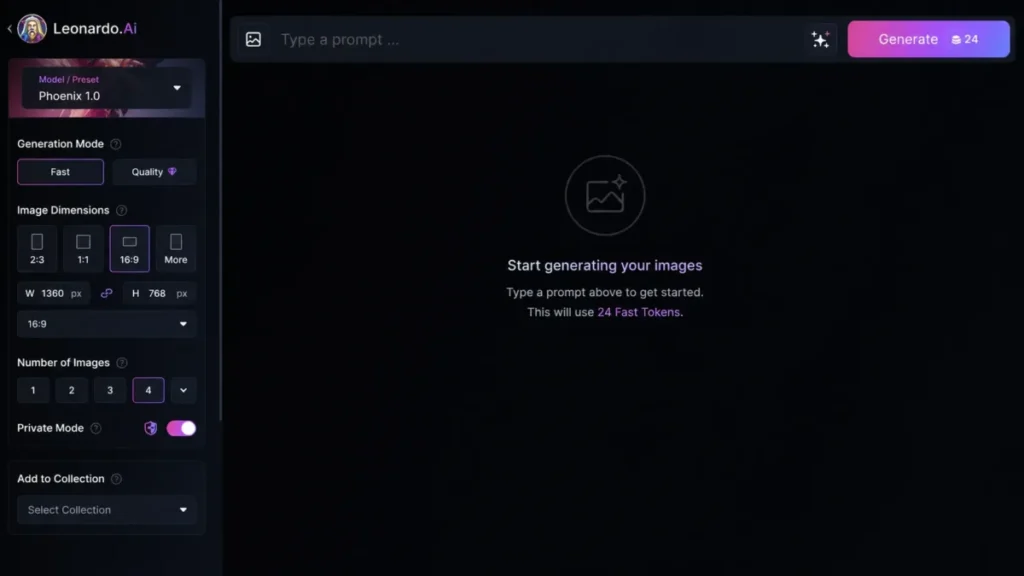
Generation starts either from the home prompt bar, which selects a model automatically, or from AI Image Creation for manual control. The image generation guide documents controls for model, Fast or Ultra mode, dimensions, image count, reference images, Private Mode, and Collection placement.
The token cost appears on the Generate button before the job runs. That is the single most useful cost-control feature on the platform, and it matters because token cost is variable rather than fixed per image.
Results land in the AI Creation feed and the Library, where upscale, download, edit, and Generate Video are available as follow-up actions.
Video generation
Video is a separate tool with its own model list. The video documentation covers text-to-video and image-to-video, with start and end frames, duration, quality, dimensions, and audio exposed only where the selected model supports them.
Motion Controls and Motion Elements are tied to Motion 2.0.
Uploading a personal still to drive a video requires a paid plan, and removing the watermark on video output requires a paid plan. Downloads come out as MP4 only.
Leonardo states plainly that not every video model is available to free users, and that paid users can hit usage limits on the expensive third-party models.
Editing, and where continuity breaks
The Canvas Editor covers uploads, masking, erase, inpainting, and outpainting through a generation frame, per the Canvas Editor guide. For stills, that is a real correction workflow.
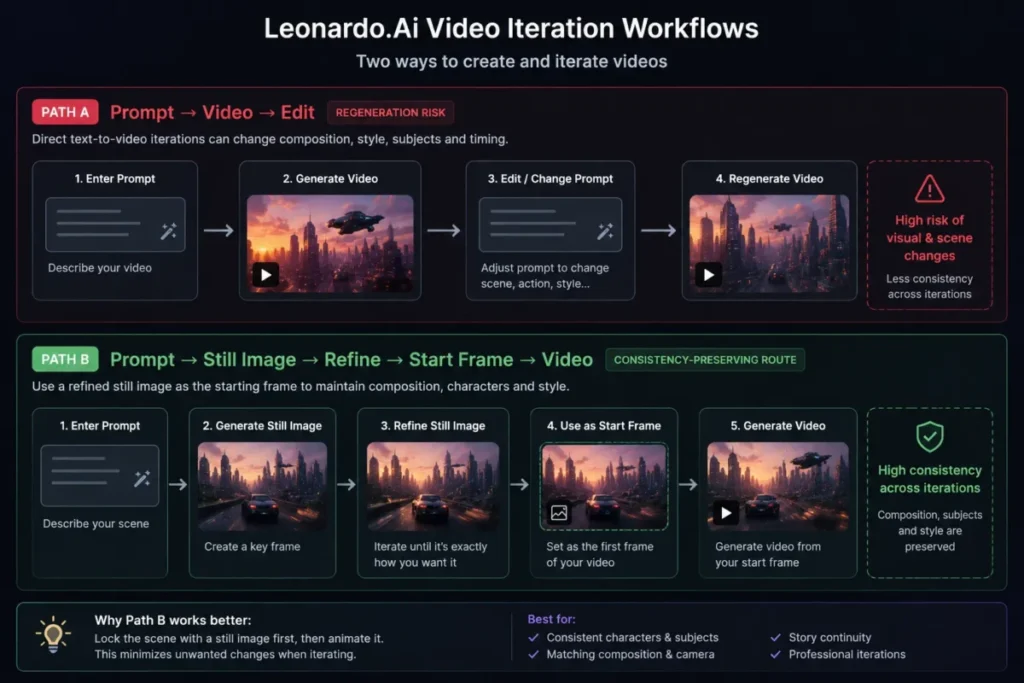
Video editing is different, and Leonardo says so. The documentation warns that editing may regenerate the clip rather than modify it, and that it is not the most reliable route for holding a scene consistent.
The documented workaround is the right one: fix the still first, then feed it in as a start frame.
Camera direction is best-effort in the same way. Pan directions may be ignored, and Leonardo states that Tilt does not work in most cases.
Reference images and style training
Image Guidance is the reference-image system. Current documentation and the pricing feature table support up to six references in the live workflow, while older text further down the same Image Guidance page still describes a four-reference premium ControlNet behavior.
Six is the current number. The four-reference material is legacy, and any 2026 article repeating it as a live limit copied stale text.
Elements and Datasets go further. The Elements training guide documents curating a dataset and training a reusable style, object, or character that can then be called during generation.
That is the feature that creates the strongest lock-in on the platform, which is covered further down.
What “Unlimited” Means on Leonardo AI
Premium and Ultimate are marketed with unlimited relaxed generation. The word applies to eligible models only.
Leonardo’s own pricing page lists exclusions, and they are not obscure models. GPT-Image-1, Ideogram, Nano Banana variants, Veo variants, Kling variants, Sora variants, and Seedream variants sit outside relaxed generation.
Flow State keeps consuming tokens as well.
The practical rule is simple. Relaxed generation covers eligible first-party models once the token pool is empty.
Everything hosted from a third party stays metered at full token cost, on every plan.
A Reddit thread in r/leonardoai shows exactly the buyer confusion this creates, with a subscriber expecting hosted frontier video models to fall under the unlimited label. The complaint is anecdotal, but the underlying exclusion is confirmed by Leonardo’s own pricing page.
| Workload | Token behavior after the monthly pool is empty |
|---|---|
| Eligible first-party image models, Premium or Ultimate | Relaxed generation continues without consuming tokens |
| Eligible first-party video models, Ultimate | Relaxed video generation continues without consuming tokens |
| Third-party image models such as GPT-Image-1, Ideogram, Nano Banana | Tokens or top-ups still required |
| Third-party video models such as Veo, Kling, Sora | Tokens or top-ups still required |
| Flow State | Tokens still required on every plan |
Model eligibility is set out on the Leonardo pricing page, checked 2026-08-10.
If a workflow is built on Sora or Kling, the unlimited label buys nothing. Budget those months from token consumption, not from the plan price.
Leonardo AI Pricing and Plans
The public pricing page was visible with Pay Yearly selected and a Pay Monthly button offered but not exercised. Every figure below is therefore an annual-billing monthly equivalent, not a verified month-to-month rate.
That distinction matters because several 2026 review pages publish Essential at $12, Premium at $30, and Ultimate at $60 as generic monthly prices, without the billing state shown on the Leonardo pricing page.
A buyer who signs up expecting month-to-month flexibility at those numbers is reading a billing state that was never verified.
| Plan | Displayed monthly figure | Cost across 12 months | Fast Tokens per month | Rollover bank | Concurrent generations | Private generations |
|---|---|---|---|---|---|---|
| Free | $0 | $0 | 150 per day | None | Not stated | No |
| Essential | $12 | $144 | 8,500 | 25,500 | Two | Yes |
| Premium | $30 | $360 | 25,000 | 75,000 | Three, queue 10 | Yes |
| Ultimate | $60 | $720 | 60,000 | 180,000 | Six, queue 20 | Yes |
Every figure in that table comes from the Leonardo pricing page and the Token Rollover documentation, checked 2026-08-10. The right-hand column multiplies the displayed figure by 12 and excludes tax.
Two more plan facts deserve attention before anyone budgets from the sticker price.
Personal AI model training is quota-based, not unlimited. Essential includes 10 personal AI models, Premium 20 per month, and Ultimate 50 per month.
Cost per usable asset cannot be derived from these allowances. Token cost varies by model, generation mode, dimensions, reference count, and output count, which is why Leonardo displays the price on the button instead of publishing a per-image rate.
Any review that converts a 25,000 token allowance into a fixed image count is guessing.
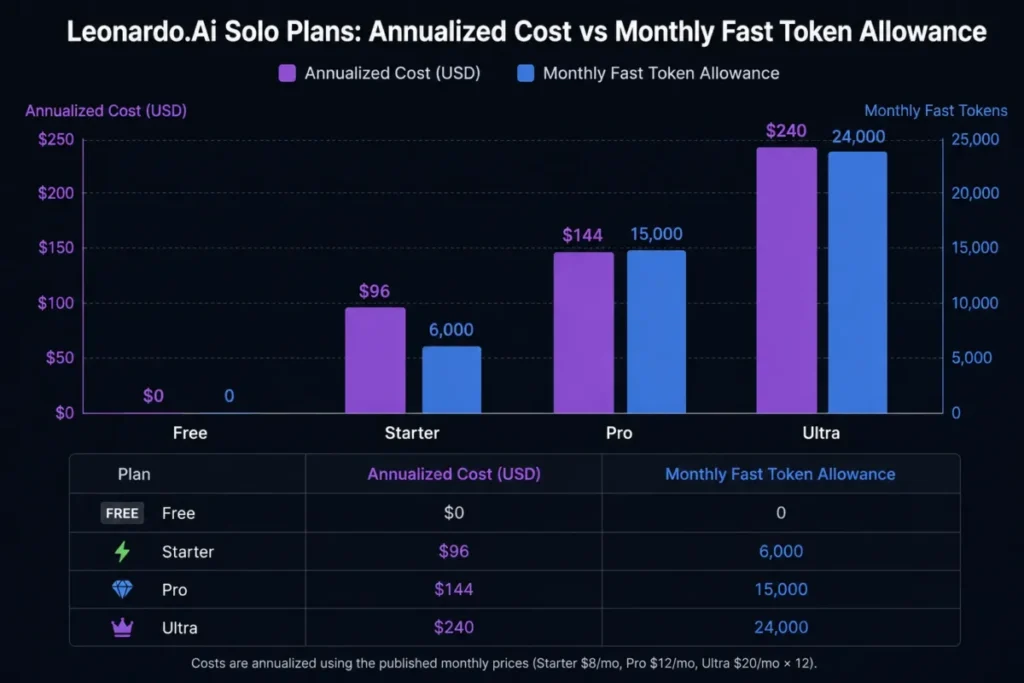
Accessible data for the chart above:
| Plan | Annualized cost | Monthly Fast Tokens |
|---|---|---|
| Free | $0 | 150 per day |
| Essential | $144 | 8,500 |
| Premium | $360 | 25,000 |
| Ultimate | $720 | 60,000 |
Those cost figures again trace to the Leonardo pricing page, checked 2026-08-10.
A note on stale plan names
Some review pages still publish Apprentice, Artisan, and Maestro tiers. Those names are not on the current pricing page.
The live consumer plans are Free, Essential, Premium, and Ultimate. Team plans are Starter and Growth, with a custom option, alongside API pay-as-you-go and a custom API plan.
There is no consumer trial
Leonardo does not offer a free trial of paid consumer plans. The documented advice is to buy the lowest paid tier, test the use case, and cancel if it does not fit.
Team plans are different. Leonardo may grant a Team trial case by case through its business contact process.
Feature Gates: What You Get on Each Plan
| Capability | Free | Essential | Premium | Ultimate |
|---|---|---|---|---|
| Private generations | No | Yes | Yes | Yes |
| Delete generated images | No | Yes | Yes | Yes |
| Upload own image for video | No | Yes | Yes | Yes |
| Watermark-free video | No | Yes | Yes | Yes |
| Personal AI model training | No | 10 models | 20 per month | 50 per month |
| Relaxed image generation, eligible models | No | No | Yes | Yes |
| Relaxed video generation, eligible models | No | No | No | Yes |
| Top-up token purchases | No | Yes | Yes | Yes |
| Rollover bank | No | 25,500 | 75,000 | 180,000 |
The gates above are documented on the Leonardo pricing page and in the Help Center FAQ, checked 2026-08-10.
The upgrade triggers fall out of that table cleanly. Free to Essential is a privacy and asset-control decision.
Essential to Premium is a volume decision plus relaxed image generation. Premium to Ultimate is mostly a video and concurrency decision.
I would not move to Ultimate for output quality. The plan does not change which models exist, only how much of them a subscription absorbs.
Token Economics: Fast, Rollover, and Top-Up
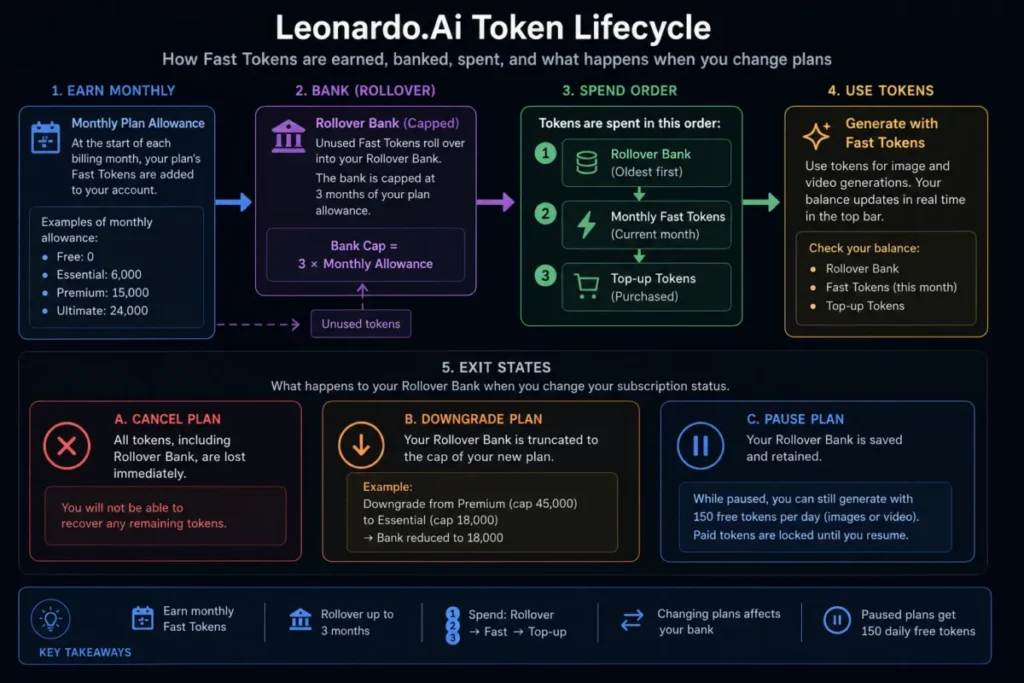
Leonardo runs three token pools on paid plans, and they are spent in a fixed order: rollover first, then Fast Tokens, then top-ups.
Unused monthly tokens flow into a Rollover Bank that accumulates up to three months of the plan allowance. Essential banks 25,500, Premium 75,000, and Ultimate 180,000.
The conditions attached to that bank are where the value can evaporate.
Cancel a paid plan and the entire rollover balance is cancelled with it. Downgrade to a lower plan and any banked tokens above the new plan’s cap expire.
Pause a subscription and the bank is retained, but access drops to the 150 daily free tokens with no premium features.
Top-up Tokens behave differently. According to the Top-up Tokens documentation, they never expire, are not capped by rollover limits, and can be bought repeatedly.
The qualifier is the part reviews leave out. Top-ups can only be purchased and used with an active paid subscription, and they are locked the moment a subscriber drops to Free.
They reappear on resubscription.
Delete the account and every token balance, top-ups included, is permanently lost.
Public pack sizes and prices for top-ups were not verified from a public source, so budget them by checking the in-app purchase modal rather than trusting a third-party figure.
The Real Cost of a Leonardo AI Team
Leonardo Teams start at three seats. A solo buyer cannot purchase a single-seat Team plan through the documented setup path, which makes the entry cost higher than the per-seat price suggests.
| Team plan | Per seat | Three-seat total | Cost across 12 months | Shared tokens | Rollover bank |
|---|---|---|---|---|---|
| Team Starter | $24 | $72 | $864 | 75,000 | 225,000 |
| Team Growth | $48 | $144 | $1,728 | 180,000 | 540,000 |
Those seat and total figures come from the Leonardo pricing page and the team setup documentation, checked 2026-08-10. The 12-month column assumes the displayed billing cadence holds and excludes tax.
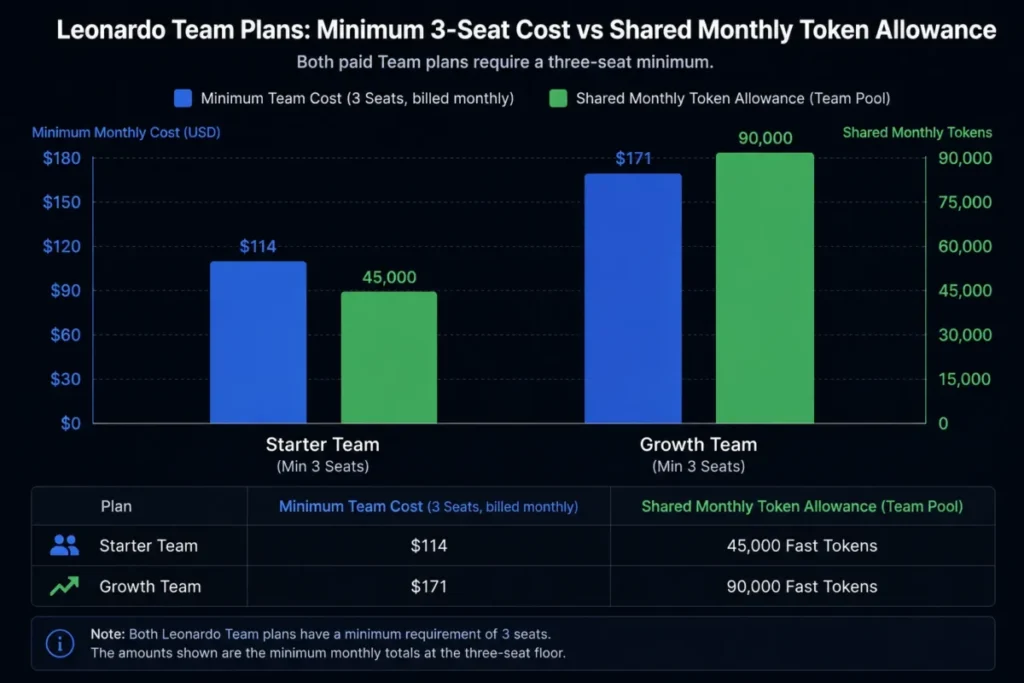
Scaling to ten paid seats is arithmetic on the displayed per-seat rate published on the Leonardo pricing page.
Team Starter holds the same $24 monthly per seat rate, so ten seats total $240 a month, or $2,880 across 12 months.
Team Growth holds $48 monthly per seat, so ten seats total $480 a month, or $5,760 across 12 months.
Two mechanics soften that. View Only members do not consume a paid seat, so stakeholders who only need to review work cost nothing.
When a member is removed, the vacated seat can be reassigned at no additional cost.
There is a countervailing rule worth knowing before payroll changes. If a seat sits unused at the end of a billing cycle, Leonardo may remove it to prevent charges, which means a team holding a seat open for a planned hire can lose it.
Teams, Roles, and Model Governance
Team functionality goes beyond shared billing, which is where most reviews stop. The Teams admin guide documents five roles with distinct permissions.
| Permission | Owner | Super Admin | Admin | Editor | View Only |
|---|---|---|---|---|---|
| Delete team, cancel subscription | Yes | No | No | No | No |
| Receive assets on member removal | Yes | No | No | No | No |
| Manage billing and invoicing | Yes | Yes | No | No | No |
| Manage Feature Access | Yes | Yes | Yes | No | No |
| Generate content | Yes | Yes | Yes | Yes | No |
| View team feed and shared generations | Yes | Yes | Yes | Yes | Yes |
That permission matrix is published in Leonardo’s Teams administration documentation, checked 2026-08-10.
Feature Access is the control that matters for anyone running vendor approval. An Owner, Super Admin, or Admin can toggle individual generation models on or off for the whole workspace, and new third-party models arrive switched off by default.
That default is a genuine governance win. A creative operations lead does not have to police which frontier model staff experiment with, and the token exposure from an expensive new third-party model cannot appear without an admin enabling it.
Asset continuity is handled too. Every asset created by a removed member transfers automatically to the Team Owner, so a departing contractor does not take the workspace history with them.
What the Teams documentation does not cover is per-seat usage reporting. If finance needs to attribute token spend to individuals, confirm that with Leonardo before signing rather than assuming it exists.
Leonardo API: A Second Meter, Not a Bigger Bucket
The most expensive misunderstanding in Leonardo procurement is treating a web subscription as API budget. It is not.
The web app spends Tokens and the API spends API Credits. Leonardo states directly in its FAQ documentation that the two are calculated differently, and that Tokens expire while API Credits do not.
API Pay as you go starts with $5 of credit on the Leonardo pricing page, carries no commitment, supports automatic top-ups, and allows up to 10 concurrent generations.
Provisioning happens through API Access, and the API quick start covers key creation, webhooks for completion callbacks, and dollar-denominated billing visibility.
For per-model cost, Leonardo publishes an in-app pricing calculator and a matching API endpoint. Use those for a defined workload instead of any fixed per-generation figure quoted in a review.
The default capacity ceilings are published, which is more than most creative platforms do.
| Limit type | Default |
|---|---|
| Concurrent image generation jobs | 10 |
| Concurrent Blueprints execution jobs | 10 |
| Concurrent model training generation jobs | 5 |
| Concurrent 3D generation jobs | 10 |
| All request types | 2,000 per minute |
| Create a Generation of Images, and other create endpoints | 100 per minute |
| Image generations pending or queued | 200 |
| Upscaling jobs pending or queued | 100 |
Those ceilings are published in Leonardo’s API concurrency and rate-limit documentation, checked 2026-08-10.
One concurrency unit maps to 10 generation requests and 20 pending image generations, so capacity scales in blocks rather than smoothly. Leonardo says default concurrency can be raised on a custom API plan, and does not publish the price of that plan.
For a team building generation into a product, that is a reasonable starting envelope. For a batch pipeline pushing thousands of assets in a burst, the 100-per-minute create ceiling is the number to model against first.
If API capacity planning is new territory, this primer on what an API is covers the vocabulary.
Privacy, Ownership, and Commercial Use
“Commercial use allowed” is true on Leonardo and it answers less than buyers think. Free users can use generated images commercially.
That permission sits alongside three other facts that change the risk profile completely.
| Dimension | Free | Paid |
|---|---|---|
| Commercial use | Permitted | Permitted |
| Default visibility | Public feed | Private Mode available |
| Leonardo’s rights over public creations | Broad license to use, adapt, publish, distribute prompts and assets | Same, only while an asset is public |
| Rights in private paid generations | Not applicable | Leonardo assigns rights, title, and interest in outputs |
| Use for model training | Public content usable for service improvement | Private content is not used for Leonardo.Ai model training |
| Delete generated images | Not available | Available |
Those rights differences are set out across the Leonardo pricing page and the general FAQ.
The Private and Public Images guide and the privacy policy carry the visibility and training terms, all checked 2026-08-10.
Two details are worth pulling out because they change practice.
First, ownership assigned on private paid generations survives a downgrade. Leonardo’s FAQ states that content generated privately as a paid subscriber keeps its assigned rights even if the account later moves to Free.
Second, the public license is time-scoped rather than permanent. An image generated publicly and later switched to private stops being usable by the public, but the license applied for the period it was public.
Retroactive privacy is damage control, not a reset.
None of this establishes whether AI-generated output is protectable by copyright in a given jurisdiction. That is a legal question separate from what Leonardo contractually assigns, and a client contract that promises exclusivity needs its own review.
My rule for client work is blunt. Private Mode on before the first generation, every time, and never on a Free account.
Security, Support, and Admin Controls
Leonardo states publicly that it holds SOC 2 Type I and Type II accreditation. That is the vendor’s claim and it is a reasonable baseline signal.
It is not a complete procurement answer. SCIM provisioning, enterprise identity-provider configuration, configurable data retention, and any contractual response-time SLA were not verified from public documentation and belong on the questions list for a sales conversation.
Support runs through an in-app chat with an AI bot and an escalation path to a human agent, plus email and a contact form. Refunds are assessed manually by a human agent rather than through an automated flow.
The language constraint is real and rarely mentioned. Leonardo states that both its AI support bot and its human agents answer only in English, and that the interface itself is optimized for English with no multi-language support at present.
For a distributed team outside English-speaking markets, that is an adoption cost, not a footnote.
One account-management gap is worth flagging for admins. Password reset only works for email-and-password accounts, so members who signed up through Google, Apple, or Microsoft have no self-serve password path.
Leonardo AI Limitations
These are standalone constraints, verified from Leonardo’s own documentation rather than inferred from the feature list.
Trained custom models cannot be downloaded. Leonardo’s FAQ says this directly and points users to a feature request instead.
There is no general bulk-download interface for the library. The FAQ states there is no UI feature to download many images in bulk.
Video editing may regenerate rather than edit. Leonardo’s own documentation calls it unreliable for maintaining scene consistency.
Camera direction is probabilistic. Pan directions may not be followed, and Tilt is documented as not working in most cases.
Relaxed generation excludes a long list of third-party models. Plan marketing and model eligibility are two different things.
Support and interface are English-only. Both the AI bot and human agents answer in English, and Leonardo has not committed to multi-language support.
Exit and Portability Risk
Every buyer evaluating a creative platform should price the exit. Leonardo’s is more expensive than average, and the cost lands on the accounts that invested most.
The trained Element or custom model is the problem. A studio that spends months building a proprietary character or brand style inside Leonardo owns the outputs but cannot take the trained artifact to local inference or a competing platform.
Library export is partial rather than absent, which is the nuance the FAQ alone does not give. There is no general bulk-download UI, but the Collections documentation confirms that an individual Collection can be downloaded as a ZIP file.
That turns organization into an exit strategy. A library sorted into Collections from day one is exportable in batches, while an unsorted library of thousands of generations is a manual job.
| Asset | Portable? | Practical action |
|---|---|---|
| Individual images and videos | Yes | Download from the Library |
| Organized Collection | Yes | Download the Collection as a ZIP |
| Unorganized library at scale | Partially | Sort into Collections before exporting |
| Trained Element or custom model | No | Keep the source dataset outside Leonardo |
| Prompt history and metadata | Unverified | Confirm with Leonardo before it matters |
Export behavior above is documented in Leonardo’s Help Center FAQ and its Collections guide, checked 2026-08-10.
The mitigation that costs nothing: keep every training dataset in the studio’s own storage. The trained model is trapped, but the inputs that produced it are not, and that is the difference between rebuilding a style elsewhere in a week and rebuilding it from memory.
Ninety days in, a healthy Leonardo deployment looks like this. Production assets live in named Collections, training datasets are archived outside the platform, Private Mode is the default rather than a reminder, and the team knows which models sit outside relaxed generation before a deadline reveals it.
Integrations, Mobile Apps, and the Canva Relationship
Leonardo ships official Android and iOS apps, and its documentation recommends the app over mobile web. For approval workflows where a client reviews work on a phone, that is useful.
Canva acquired Leonardo.Ai in July 2024, and Canva’s announcement said Leonardo would continue developing its own web platform. Leonardo Interactive Pty Ltd remains the operating entity.
Two years on, that has held. Leonardo still sells its own plans, runs its own API, and maintains its own model roster.
The relationship does not create entitlement transfer. A Leonardo web subscription is not a Canva AI creative suite subscription, and neither one funds API Credits.
Treat all three as separate purchases.
Beyond the API and the mobile apps, Leonardo’s public documentation does not describe a broad native integration directory of the kind a CRM or project tool would publish. Teams that need generation triggered from an existing stack are pointed at the API rather than at prebuilt connectors.
Automation and Batch Work
Automation on Leonardo runs through three distinct mechanisms, and only one of them is free of token cost on any plan.
Flow State generates rapid variations from a prompt and consumes tokens on every plan, including plans that advertise unlimited generation. It is an ideation accelerator with a running meter attached.
Blueprints are executable generation workflows exposed through the API, with their own concurrency ceiling of 10 concurrent executions and a queue limit of 10.
The API itself is the real automation surface for anything scheduled or batched, with webhooks available for completion callbacks rather than polling.
For a marketing team producing variant sets at volume, the honest sequence is to prototype in Flow State, settle the prompt, then move repetitive production to the API where cost is dollar-denominated and traceable.
Teams new to structuring prompts for repeatable output will get more from prompt engineering fundamentals than from another model comparison, and the content creation tool roundup covers where generation sits in a wider stack.
Leonardo AI Pros and Cons
| Pros | Cons |
|---|---|
| Token cost is displayed before generation, which makes spend controllable | Relaxed generation excludes many third-party models, so “unlimited” is conditional |
| Rollover banks up to three months of unused allowance on paid plans | Rollover is cancelled on cancellation and truncated on downgrade |
| Private Mode plus a documented no-training commitment for private content | Free tier is public by default and cannot delete generated images |
| Team roles, per-model Feature Access, and default-off third-party models | Teams require a three-seat minimum, so a solo buyer cannot enter at one seat |
| API publishes concurrency, rate, and queue limits openly | Trained custom models cannot be downloaded |
| Official Android and iOS apps | Support and interface are English-only |
Who Should Use Leonardo AI
Solo marketing designers producing confidential client imagery. Essential is the cheapest plan on the Leonardo pricing page that makes Private Mode, image deletion, and paid ownership terms available. Its 8,500 tokens per month cover moderate campaign work.
Active solo image creators on first-party models. Premium combines 25,000 monthly tokens, a 75,000 bank, and relaxed generation on eligible models, which removes the mid-month stall that Essential users hit.
Small production teams doing volume video. Ultimate is the only plan with relaxed eligible video generation, plus six concurrent generations and a queue of 20.
Three-to-ten person creative teams needing governance. Shared token pools, five roles, per-model access control, and automatic asset transfer on member removal make Starter or Growth a real workspace rather than shared billing.
Developers embedding generation in a product. Published concurrency and rate limits plus a pricing calculator make capacity and cost modelling possible before writing code.
Who Should Avoid Leonardo AI
Anyone who needs a downloadable, self-hostable fine-tune. The trained model stays on the platform. Stable Diffusion and its ecosystem exist for this exact requirement.
Buyers whose workload is mainly hosted third-party models. If production runs on Sora, Kling, Veo, Ideogram, or Seedream, an expensive plan buys a bigger token pool and nothing else, because relaxed generation does not apply.
Teams needing deterministic, timeline-based video editing. Leonardo’s video editing regenerates. A conventional editor, or a dedicated video generation platform, fits that brief better.
Organizations with strict procurement requirements. SCIM, enterprise identity provisioning, configurable retention, and contractual SLA terms are unconfirmed publicly and must come from sales.
Non-English-speaking teams without an English-fluent admin. Interface and support are both English-only.
Leonardo AI Alternatives
| Alternative | Choose it if | Pricing note |
|---|---|---|
| Midjourney | Aesthetic quality on stills outweighs breadth of workflow tooling | Subscription tiers with GPU-time allowances |
| Adobe Firefly | Deep Adobe editing integration and enterprise creative-stack alignment matter more than model choice | Sold as part of and alongside Adobe subscriptions |
| DALL-E and ChatGPT Images | Generation lives inside an existing assistant workflow rather than a dedicated studio | Bundled with ChatGPT plan access |
| Stable Diffusion | Self-hosting and owning the model weights is a requirement, not a preference | Open weights, infrastructure cost is the real bill |
| Runway | Video is the primary deliverable rather than a companion to stills | Credit-based subscription tiers |
Each of those has a fuller write-up worth reading before switching. Start with the Midjourney subscription review if aesthetics lead the brief.
If the studio already lives in Creative Cloud, the Adobe Firefly platform review is the closer fit.
When generation belongs inside an assistant rather than a studio, read the DALL-E and ChatGPT Images review.
When motion is the actual deliverable, the Runway video generation review covers a credit model built for it.
Pricing and feature details for these alternatives were not verified to the same depth in this review. Treat the table as routing to a fuller comparison rather than as a head-to-head verdict, and check the wider AI image generator roundup for a side-by-side.
Final Verdict: Is Leonardo AI Worth It in 2026?
Yes for image-led creative work with a privacy requirement, with two conditions attached.
The decision chain runs in one line. Private Mode is a supported feature gated to paid plans in Leonardo’s official documentation, so the operating consequence for any buyer handling unreleased client work is that Free is off the table before volume is even discussed.
Because that plan gate is the binding limitation for this team profile, I recommend starting at the cheapest paid tier that clears it and moving up only when token volume forces the issue.
The first condition is model alignment. Leonardo’s value case rests on eligible first-party models entering relaxed generation once tokens run out, so a workflow anchored to hosted third-party models never collects the benefit that justifies Premium or Ultimate.
The second is portability tolerance. Trained Elements are the platform’s strongest creative feature and its hardest lock-in, and a studio that builds proprietary brand styles inside Leonardo accepts that the trained artifact stays there.
Working through the decision chain against the Leonardo pricing page gives a clean answer by buyer type.
Where confidentiality is required and volume is moderate, I recommend Essential at $144 across 12 months.
Where confidentiality meets heavy first-party image work, choose Premium at $360, and where video volume and concurrency lead, choose Ultimate at $720.
For three or more collaborators needing shared assets and model governance, Team Starter at $864 is the entry floor. For programmatic generation, choose API Pay as you go, funded separately.
Free stays where it belongs, which is evaluation. Public generations, no deletion, and stricter filtering make it unsuitable for anything a client has not already seen.
The renewal question to answer twelve months in: has the workflow moved onto models that relaxed generation covers, or is the plan being renewed for a benefit the team never collects? If it is the second, downgrade to Essential and buy top-ups against real usage instead.
Frequently Asked Questions
Is Leonardo AI free?
There is a Free plan with 150 Fast Tokens per day, and those tokens reset daily rather than banking. Generations are public, deleting a generated image requires a paid subscription, and Free is therefore unsuitable for confidential client work.
How much does Leonardo AI cost in 2026?
The Leonardo pricing page displays Essential at $12, Premium at $30, and Ultimate at $60 as monthly figures while the 12-month billing toggle is selected.
Across 12 months that is Essential at $144, Premium at $360, and Ultimate at $720 before tax. Month-to-month rates were not verified from the public page state, so confirm those at checkout before assuming they match.
Does Leonardo AI have unlimited generations?
Premium and Ultimate include relaxed generation for eligible models, and Ultimate extends that to eligible video. Third-party models such as GPT-Image-1, Ideogram, Nano Banana, Veo, Kling, Sora, and Seedream are excluded, and Flow State keeps consuming tokens on every plan.
Can Leonardo AI images be used commercially?
Yes, including on the Free plan. Commercial permission is separate from visibility and ownership terms, so a free user’s public generations still carry a broad license to Leonardo while private paid generations do not.
Who owns images made with Leonardo AI?
For private generations made as a paid subscriber, Leonardo assigns rights, title, and interest in the outputs, and its FAQ says that assignment survives a later switch to a free account. Whether AI output is protectable by copyright in a given jurisdiction is a separate legal question that Leonardo’s terms do not settle.
What happens to my tokens if I cancel Leonardo AI?
Cancelling a paid plan cancels the entire Rollover Bank balance. Top-up Tokens stay visible in the account but cannot be spent until the subscription is reactivated, and deleting the account destroys every balance permanently.
Can I train my own model in Leonardo AI, and can I download it?
Elements and custom models can be trained from a curated dataset on paid plans, with quotas of 10 models on Essential, 20 per month on Premium, and 50 per month on Ultimate. Leonardo’s FAQ states that downloading a trained custom model is not supported.
Do my Leonardo subscription tokens pay for API generations?
No, because the web app runs on Tokens while the API runs on API Credits, which Leonardo calculates differently and which do not expire.
API Pay as you go starts with $5 of credit on the Leonardo pricing page and is billed separately from any web plan.
How many seats does a Leonardo AI team plan require?
Three is the minimum. Across 12 months at the rates shown on the Leonardo pricing page, that is Team Starter at $864 and Team Growth at $1,728.
View Only members do not consume a paid seat, so reviewers and stakeholders can be added at no extra cost.
Can I bulk export my Leonardo AI library?
There is no general bulk-download interface for the whole library, but an individual Collection can be downloaded as a ZIP file. Organizing production assets into Collections while working is the practical way to keep an exit route open.