The Spun WhatsApp CRM is worth it for professionals and small businesses that sell on the WhatsApp number they already use. It adds a sales pipeline, tasks, two-way translation and AI, and ChatGPT, Claude and other assistants can search the chats through MCP, including, on paid plans, the text read from photos and voice notes. It connects by QR code as a linked device, with no WhatsApp Business API or per-message fees, and Starter is $49 a month per number for one person or a team of twenty.
In my November 17, 2026 trial, two Weave AI questions used 78K tokens, so Starter’s $5 credit covers about 25 such questions, against Spun’s estimate of about 35.
Quick verdict
Worth it for: professionals and small teams who sell by conversation on the WhatsApp number they already use, since Spun’s one monthly price per number covers one person or unlimited teammates.
- Skip it if:
- you need bulk sending, official-API message templates, or Salesforce or Pipedrive sync today.
Biggest limit: automated sending is capped at 50 first messages to new contacts a day in a number’s first 30 days, 150 after; hand-typed messages are never limited. Campaigns, chatflows and the REST API wait for the $100 Pro plan.
In This Article (10 sections)
What Spun Is and Who It’s For
Spun is a CRM for WhatsApp that adds a sales pipeline, tasks, a shared team inbox, translation and AI to the number a business already uses. It suits professionals who run their business on that number, alone or with a small team: Starter is priced per number with unlimited teammates, so one person pays the same Starter price as a team of twenty.
- Category: CRM for WhatsApp
- Best for: a professional or a small team running the business on one existing WhatsApp number
- Starting price: $49 a month per WhatsApp number, billed monthly, unlimited team members
- Free trial: 7 days, every feature, no credit card
- Main limitation: not the official API, so not for bulk sending
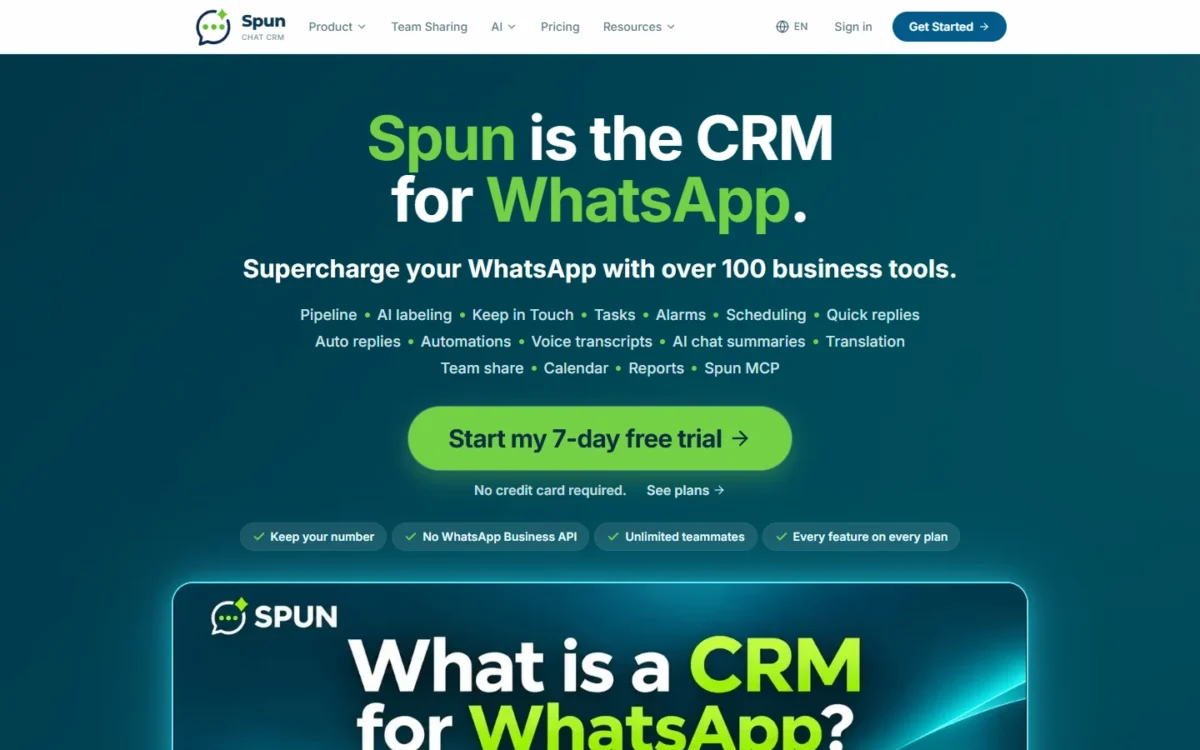
You scan a QR code the way WhatsApp Web connects, with regular WhatsApp or the WhatsApp Business app. Each chat then carries a stage, tasks, notes and history, which is what a CRM does for any sales channel.
What My Spun Trial Measured
On November 17, 2026 I connected one WhatsApp line to Spun’s 7-day trial: chats appeared about a minute after the QR scan, and 84 WhatsApp messages across 7 chats came in.
| Test | Result | What it means |
|---|---|---|
| First import (Message History) | 84 messages across 7 chats; search index at 0% for about 9 minutes | Search lags the chat list |
| Weave question on waiting chats | About 42 seconds; 21 open chats waiting for a reply | Triage, not instant |
| AI cost, 2 questions | Meter at 78K of 500K tokens; 154K raw tokens in the Usage Report | About 39K counted tokens each |
| Dashboard, 7 days | 22 messages sent, 63 received, 8 active contacts | Reporting fills in after the import |
Sources: my test account, November 17, 2026, and the Spun pricing page, checked November 2026.
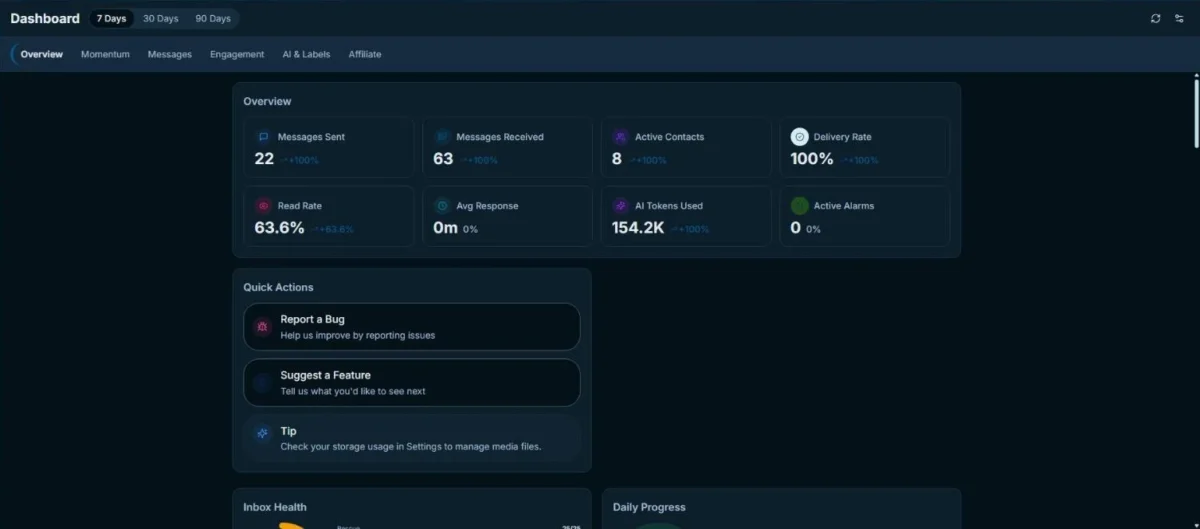
The counters differ: Message History counted 7 chats with imported messages, while Weave listed 21 open chats waiting for a reply and dated each wait from that chat’s latest inbound message.
My math uses the plan meter, which counted 78K tokens against the trial’s 500K-token allowance, not the Usage Report’s 154K raw total, since the allowance is what a plan’s credit buys. Two questions counted 78K tokens together, about 39K each on average (78K / 2), roughly 1.4 times Spun’s estimate of about 28,600 tokens per Weave question at Advanced quality (39,000 / 28,600).
At that rate Starter’s 1M tokens cover about 25 Weave questions a month (1,000,000 / 39,000), against Spun’s estimate of about 35 on Starter, 105 on Pro and 280 on Max.
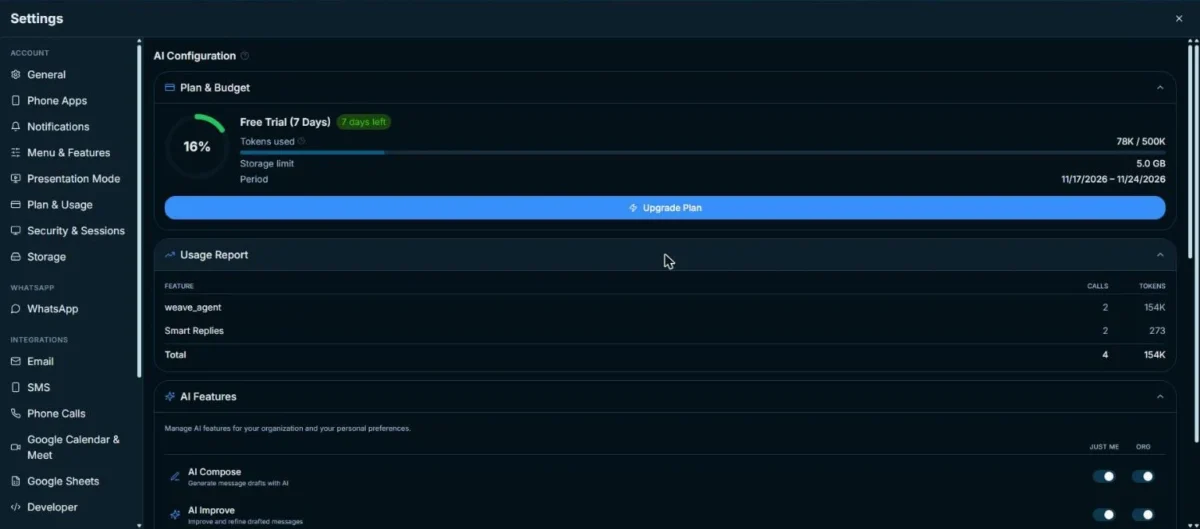
This is a sample of 2 questions in Advanced mode, asked during the first import on a light inbox, so ask your usual questions in the trial and read the Usage Report before choosing a plan.
My take
Pick Pro, or budget for AI credit packs, if you plan to ask Weave every day. Starter’s credit is enough if you mostly reply by hand: my two Smart Replies used 273 tokens together.
Spun Features That Matter
Six features decide the purchase: the pipeline and tasks on each chat, Weave AI, auto-labeling, sending safety, team sharing and the AI you connect from outside.
Pipeline and tasks inside each chat
Yes, you can track a lead without leaving the chat. In my trial, 3 clicks (right-click the chat, Labels, New) put a chat on the Sales pipeline, and a move to Contacted came with an Undo. The board’s banner says nothing is sent to the contact when a stage changes.
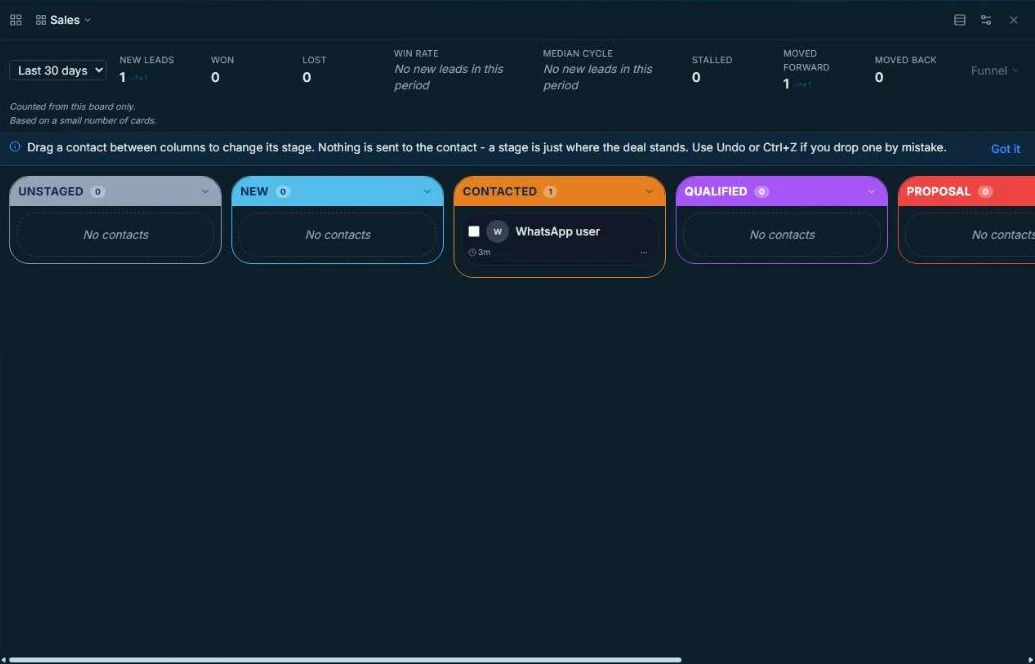
Dragging the card did not register in my test, so I used the label menu and do not judge drag-and-drop.
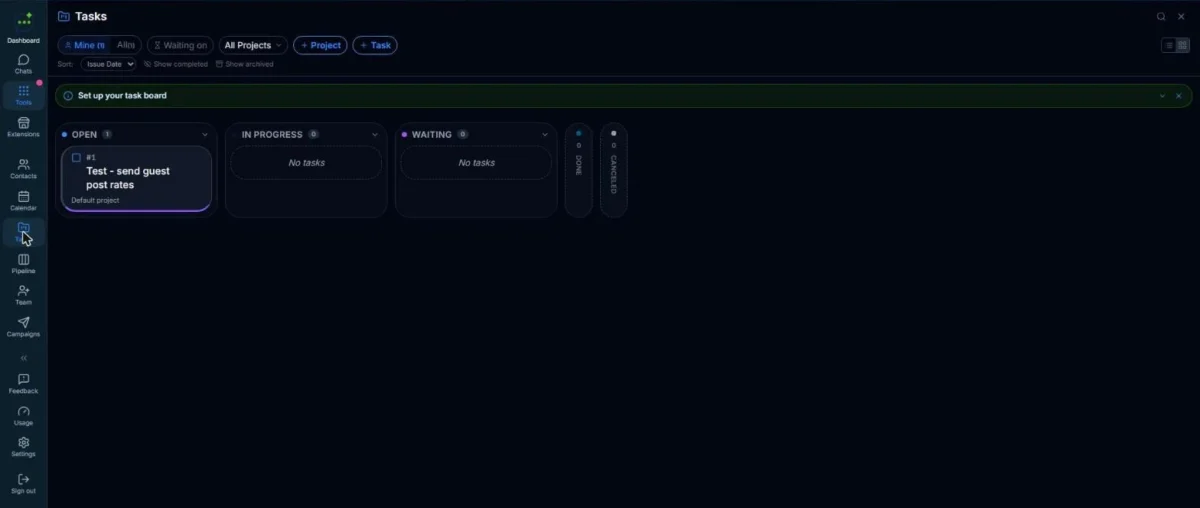
Creating a task from a chat opened a form with that chat already linked, and the task board then showed 1 task in Open.
Weave AI and the token meter
Weave answers questions from your own chats, and in my trial it was useful but slow and heavy on credit. Its list of 21 open chats, each with the days it had waited, is the triage a busy seller needs, yet it took about 42 seconds.
Weave is worth its credit for a weekly sweep of who is waiting, not for dozens of daily questions on Starter. A buyer who wants AI at the center of the sales process should compare CRMs built around AI.
Outside Weave, Spun’s AI drafts replies and summarizes chats, and translation runs both ways, voice notes included.
AI auto-labeling
Spun sorts chats on its own only after you set it up. AI Auto-Labeling was off by default in my account, and a label needs an AI description before the AI uses it.
With one test label and the master switch off, a backfill scanned for over 80 seconds and left 0 suggestions, so I can report the setup work, not the labeling accuracy.
Sending safety and number protection
The risk is WhatsApp restricting your line. Spun’s ban protection pairs Self Proxy and Human cadence with built-in sending limits meant to keep your number’s rating high: a slow start for new numbers and a daily cap on first messages to people who have not written to you, 50 a day in a number’s first 30 days and 150 after. Messages over the cap wait for the next day instead of being dropped, and if WhatsApp restricts the number, Spun pauses automated sending until the restriction ends.
The same limits are a ceiling on outreach: Spun’s CRM page says it “is not the official API, so it fits conversations with customers, not bulk sending.”
My new line’s Sending safety started in preview mode (limits counted, not enforced) with these defaults:
- 50 first messages to new contacts a day
- 3 automated messages per contact a day, at least 60 minutes apart
- Automations held 30 minutes after a person chats
- Quiet hours from 22:00 to 08:00
- Group posts: 50 a day, 5,000 people a day, 60 to 120 seconds apart
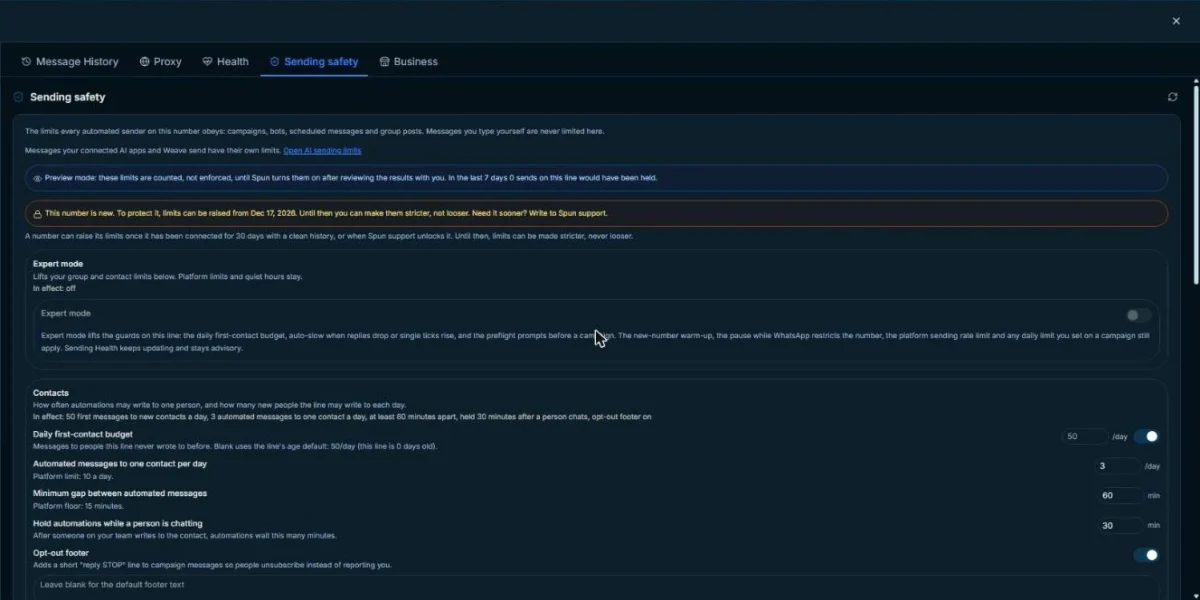
The limits could be raised only from December 17, 2026, 30 days after connecting, unless support lifts the lock. No message went out in my trial, and preview mode counted the 50-a-day default without enforcing it.
These limits govern automated sending only, such as group posts, campaigns, bots and scheduled messages; hand-typed messages are never limited. Self Proxy, free on every plan, routes the session through your own home or office internet, with an approved backup computer taking over if the first goes offline. My line ran on Spun’s own connection.
Your phone keeps working as before, Spun’s homepage says, so I would treat the phone as the fallback if Spun is unreachable.
My take
Spun is worth it when your team answers inquiries and follows up one by one. Pick an official-API tool such as WATI if you plan to message hundreds of new contacts a day. Chatflows and bots need Pro, so a bot-first buyer should compare WhatsApp chatbot builders.
Shared inbox, team access and security claims
Yes, several people can answer from one number without seeing everything. Each teammate gets a login, and Share Access assigns one of four roles (Viewer, Team Member, Manager, Full Control) plus the saved filters that person may see.
Spun warns when a colleague is already typing, and personal chats stay private. A shop where sales and support share one phone gets handoffs without a per-seat fee.
Spun’s homepage lists encryption in transit, role-based access and audit logs, not end-to-end encryption. Its encryption page says traffic between your browser, Spun’s servers and its sub-processors runs over TLS, while stored messages stay readable to Spun, walled off per organization, so search and the AI features you enable can work on them.
A regulated business should ask Spun which certifications back those claims before connecting.
Integrations and extensions
HubSpot is the CRM that syncs today. On Spun’s features page, CRM Sync sends contacts and conversation notes to HubSpot, and Salesforce, GoHighLevel and Pipedrive are coming soon.
My trial’s CRM Sync card named “HubSpot, Salesforce and more,” so test Salesforce in the trial before you count on it.
The marketplace listed 10 extensions in 6 categories, all by Spun Life. Spun also connects Google Sheets, Google Calendar and Google Drive.
Spun MCP links Claude, ChatGPT or Gemini to your chats.
Your own AI through MCP, translation and AI Compose
ChatGPT, Claude and other assistants reach your chats through Spun MCP. Starter includes 2,000 Connected AI reads a month, then $25 a month buys unlimited reads; Pro and Max include Connected AI. By default, every message your AI wants to send waits in a queue until a teammate with send permission approves it. On paid plans, Spun can turn photos, voice notes and documents into text as they arrive in the chats you choose, which draws on your AI credit.
When your AI looks something up, it sends one search, and Spun runs it across your messages, the transcripts of your voice notes and, if Media reading is switched on, the text pulled from your photos. Spun returns just the matching results, so the AI never has to open photos one at a time to find something like an invoice.
Spun’s own measurement on live accounts in November 2026 puts a search across chats and photos at about 2 seconds. ChatGPT’s Plugin directory lists a Spun Inbox plugin that connects in one click, but it carries a shorter tool list than adding Spun yourself as a custom plugin.
Inside each chat, two-way translation shows incoming messages in your language and sends your replies in the customer’s, and voice notes are transcribed and translated too. AI Compose turns a rough note into a full reply from the conversation and can rewrite a saved reply for one customer, and you still review and send it yourself.
For a seller who already works in ChatGPT or Claude, the 2,000-read Starter allowance is the figure to watch before choosing a plan.
Spun Ease of Use and Setup
Setup took one QR scan and about a minute until the line’s chats showed. The import reached back to October 20, 2026, because the trial keeps 1 month of message history.
Search took longer: the “Building search index” bar stayed at 0% for about 9 minutes, and Weave’s first answer was incomplete for the same reason. I would start the trial on a quiet afternoon, because search and AI are not fair to judge until the import finishes.
Spun Pricing
Spun costs $49 a month on Starter, from $100 on Pro and $200 on Max, per WhatsApp number, renewed monthly; prices are shown in USD and billed in the currency of your country. Every paid plan includes unlimited team members and a 7-day trial with no credit card.
Spun charges per WhatsApp number, not per person, with no per-message fees.
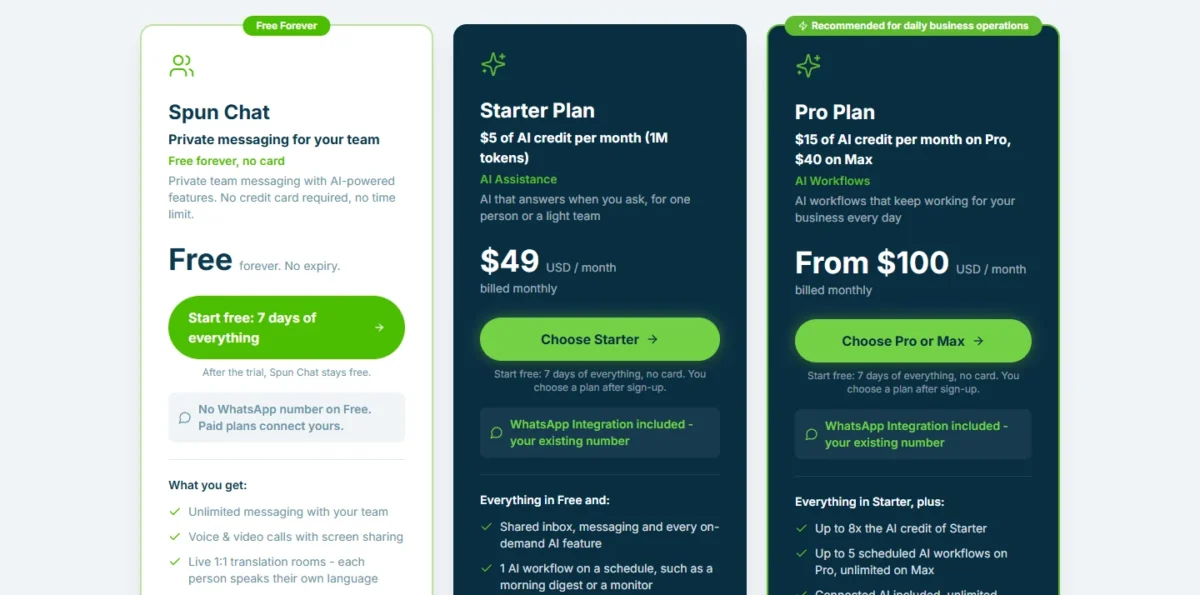
| Plan | Price | AI credit | Storage and history | Key gate |
|---|---|---|---|---|
| Starter | $49 a month, billed monthly | $5 (1M tokens) | 10 GB, 90 days | No business automation or REST API |
| Pro | From $100 a month, billed monthly | $15 (3M tokens) | 100 GB, 1 year | Up to 5 scheduled AI workflows |
| Max | $200 a month | $40 (8M tokens) | 500 GB, unlimited | Unlimited scheduled AI workflows |
Sources: Spun pricing page, checked November 2026.
A year of Starter is $49 x 12 months = $588 for a team of any size. Pro is $100 x 12 = $1,200 a year and Max is $200 x 12 = $2,400, with no annual option and no long-term contract.
Automation, not headcount, forces the move to Pro. Starter’s column reads “Not included” for business automation (chatflows, webhooks, recurring Google Sheets sync, the proactive bot builder and campaigns) and for the general REST API.
Pro costs $51 more a month ($100 – $49), or $612 a year ($51 x 12), and adds priority support, 1 year of history and Connected AI. Starter includes 2,000 Connected AI reads a month, then reads pause after a one-time 7-day grace period unless you add Connected AI for $25 a month.
After the trial, Spun’s Free MCP plan costs $0 for an account that only plugs its own AI app into the number. That AI gets 100 reads and up to 200 contacts per month and sees 7 days of message history, and nothing it sends goes out until you approve it.
Plan-gate caveat
Spun’s homepage says plans differ only by AI usage, storage and message history, but the pricing table marks business automation and the REST API as not included on Starter. The same page’s FAQ and Spun’s features page say every paid plan includes broadcasts, so confirm with Spun before you choose Starter for campaigns. Budget for Pro if you need campaigns or chatflows.
A second number on Starter adds $49 a month ($98 x 12 = $1,176 a year for two). AI credit packs start at $5 for 1M tokens and never expire; at my test rate of about 39K tokens a question, a $5 pack buys about 25 more Weave questions (1,000,000 / 39,000).
My take
I would stay on Starter if the team replies by hand, tracks deals on the pipeline and asks Weave a few times a week. Pick Pro when a campaign, a chatflow or a webhook is in the plan from day one, or when chats older than 90 days matter.
Spun Pros and Cons
Pros
- Flat $49 a month per number for any team size, so 10 people pay $4.90 a head
- Connects to your existing number by QR code; my chats appeared about a minute after the scan
- No Meta conversation fees and no per-message charges from Spun
- Four roles limit each teammate to the chats you share
- Ban protection is built in: Self Proxy is free on every plan, Human cadence is on by default, and new numbers get a slow start
- ChatGPT, Claude and other assistants connect through MCP, and chats and voice notes translate both ways
Cons
- Weave AI is heavy on credit: daily questions at my test rate would outrun Starter’s $5 credit within the month
- Campaigns, chatflows, webhooks and the REST API need Pro at $100 a month
- Automated first messages to new contacts are capped at 50 a day in a number’s first 30 days and 150 after, so bulk senders hit the limit; hand-typed messages are never limited
- CRM Sync works with HubSpot today; Salesforce, GoHighLevel and Pipedrive are coming soon
- Starter keeps 90 days of message history, and 1 year needs Pro
My take
Spun is worth it when one person or a small team replies by hand on one existing number. Pick another tool if you need a Salesforce sync now, since Spun lists it as coming soon.
Who Should Use Spun (and Who Should Skip It)
Spun fits a professional or a small business that sells by conversation on the WhatsApp number it already uses, whether one person answers that number or a whole team does.
Best for
- A professional who runs the business alone on their own number and may add teammates, since the price stays $49 a month per number as the team grows
- A 2 to 10 person shop sharing one number, since $49 a month covers every teammate
- A HubSpot team that wants WhatsApp contacts and notes synced
Not ideal for
- Bulk broadcasters: Spun is not for bulk sending, and WATI runs on the official API
- Teams on Salesforce or Pipedrive today: those syncs are coming soon, and TimelinesAI lists both
- A business that needs chats older than 90 days on a $49 budget: 1 year of history needs Pro
A small business whose deals run across email, phone and web forms more than WhatsApp will get more from broader small-business CRM options.
Spun vs Competitors
From four people up on one number, Spun has the lowest yearly list price of the four tools below, but two rivals cover what it lacks: more CRM syncs and the official WhatsApp Business API.
| Software | Best for | Starting price | Key difference | Main trade-off |
|---|---|---|---|---|
| Spun | Small teams sharing one existing number | $49 a month per number, billed monthly, unlimited users | Flat price on a linked device | Automation and the REST API need Pro |
| TimelinesAI | Teams on Pipedrive, Salesforce or Zoho | $35 per seat a month, or $28 billed yearly | QR code or the official API | Cost grows with every seat |
| Kommo | Teams that want a CRM priced per user | $25 per user a month, billed $150 per user for 6 months | 1 WhatsApp number included on Base | No monthly payment; 6-month minimum |
| WATI | Broadcast-heavy teams | $39 a month billed annually, 3 users included | Official API, up to 15K broadcasts a month | Template message charges; no additional users on Growth |
Sources: Spun pricing, TimelinesAI pricing, Kommo pricing and WATI pricing, checked November 2026.
For 5 people on one number, a year of Spun Starter is $49 x 12 = $588. TimelinesAI Starter is $28 x 5 seats x 12 = $1,680 billed yearly, Kommo Base is $25 x 5 users x 12 = $1,500, and WATI Pro, which includes 5 users, is $79 x 12 = $948 before template message charges.
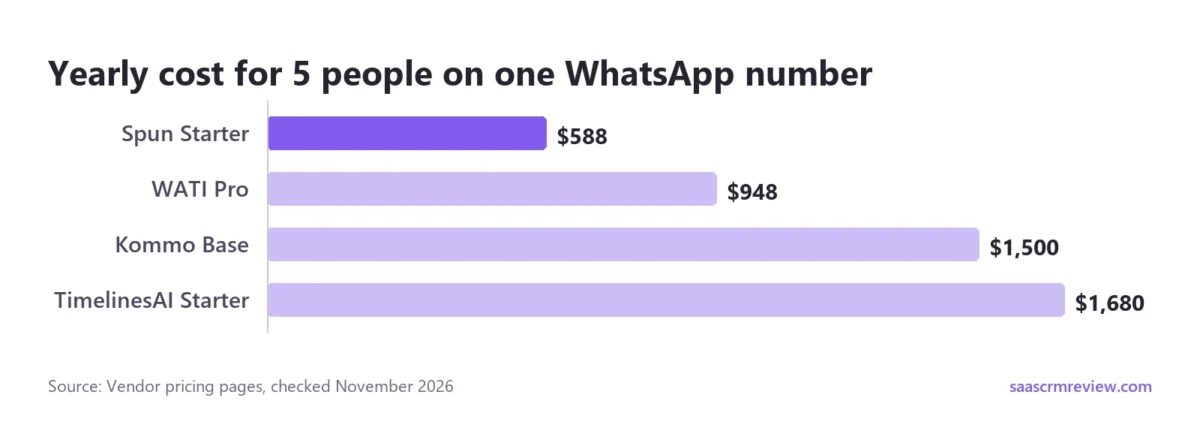
At 10 people Spun stays at $588, while TimelinesAI reaches $28 x 10 seats x 12 = $3,360, Kommo $25 x 10 users x 12 = $3,000, and WATI Pro ($79 + 5 additional users x $24) x 12 = $2,388, with the Pro base billed annually.
Under four people the order changes: WATI Growth covers up to 3 users for $39 x 12 = $468 a year, and one person also pays less on TimelinesAI ($28 x 12 = $336) and Kommo ($25 x 12 = $300).
Pick TimelinesAI when your CRM is Pipedrive, Salesforce or Zoho, and WATI when official-API broadcasts are the job. If none fits, my ranking of WhatsApp CRM tools covers more options by how each connects.
FAQ
Does Spun use the WhatsApp Business API?
No. Spun connects by QR code as a linked device, which avoids Meta’s approval step, message templates and per-message fees but rules out bulk sending.
Does Spun have user reviews?
Not on G2 yet. G2’s Spun profile, checked November 17, 2026, says “Spun hasn’t been reviewed yet.”
Does the WhatsApp Business app have a CRM built in?
Not a full one. The WhatsApp Business app gives you labels, quick replies and a catalog, but, as Spun’s homepage points out, no deal stages, no tasks and no way to choose which chats each teammate sees.
What does Spun add to the WhatsApp Business app?
Spun’s homepage counts over 100 business tools on the same number: a sales pipeline, tasks, reminders, scheduled messages, a Google Sheets connection and teammates sharing one number with the chats you choose. Spun’s features page adds Weave, an AI that searches your conversations and drafts replies. Starter costs $49 a month per number.
Final Verdict: Is the Spun WhatsApp CRM Worth It?
Yes, for a professional or a small team that sells by conversation on the WhatsApp number they already use. Start the trial, plan on Starter at $49 a month, and move to Pro only for campaigns, chatflows, the REST API or history past 90 days.
How I Tested Spun
I tested Spun on November 17, 2026 in my own account on the 7-day trial, with one WhatsApp line holding 84 messages in 7 chats. I connected the line, watched the import, asked Weave 2 questions in Advanced mode, staged a chat on the pipeline, created a task, ran an auto-labeling backfill and read the sending-safety defaults, extensions and dashboard.
No message went to any contact. Prices and plan limits come from spun.com and the rivals’ pricing pages, read in November 2026.
Use the 7 days to check three things: what Weave costs on your inbox, whether the default limits on automated sends fit your daily volume of new contacts, and, on HubSpot, whether CRM Sync moves your contacts and notes.
The trade-off is a low flat price for a linked-device connection with capped automated sending. If that cap blocks you, choose WATI.