Square Free costs $0, Square Plus $49 and Square Premium $149 per location per month, billed monthly, and every card payment adds a processing fee from 2.4% + 15¢ to 3.5% + 15¢, set by the plan and the payment method. That is Square pricing in full: a plan fee, a fee per payment and optional hardware.
The plan moves the fee. On Square’s US pricing page, checked in November 2026, a tapped, dipped or swiped card costs 2.6% + 15¢ on Free, 2.5% + 15¢ on Plus and 2.4% + 15¢ on Premium, and online or invoice card payments drop from 3.3% + 30¢ on Free to 2.9% + 30¢ on the two paid plans. Plus and Premium each have a free 30-day trial.
On fees alone, Square Plus pays for itself once a location’s in-person card revenue passes $49,000 a month or its online and invoice card revenue passes $12,250 a month, and Square Premium beats Plus once in-person card revenue passes $100,000 a month. Below those lines, a single location pays least on Square Free unless it needs a Plus tool such as the Square KDS app or Kiosk software.
Quick pricing answer
Square Free is $0, Square Plus is $49 and Square Premium is $149 per location per month, billed monthly; Square Pro is custom pricing for sellers above $250,000 a year.
The in-person card fee is 2.6%, 2.5% or 2.4% + 15¢ by plan. Free is a plan, not a trial, and Plus and Premium have a free 30-day trial.
My pick for most single-location shops, cafes and service businesses is Free; upgrade to Plus for its tools, or once online or invoice card revenue passes $12,250 a month. The caveat: a keyed-in card costs a 3.5% + 15¢ fee on every plan. Prices checked November 2026.

In This Article (14 sections)
Square Pricing at a Glance
Square’s plans differ in the fee per location, the card fee per payment and paid-plan tools such as the Square KDS app; Square Pro is a custom quote.
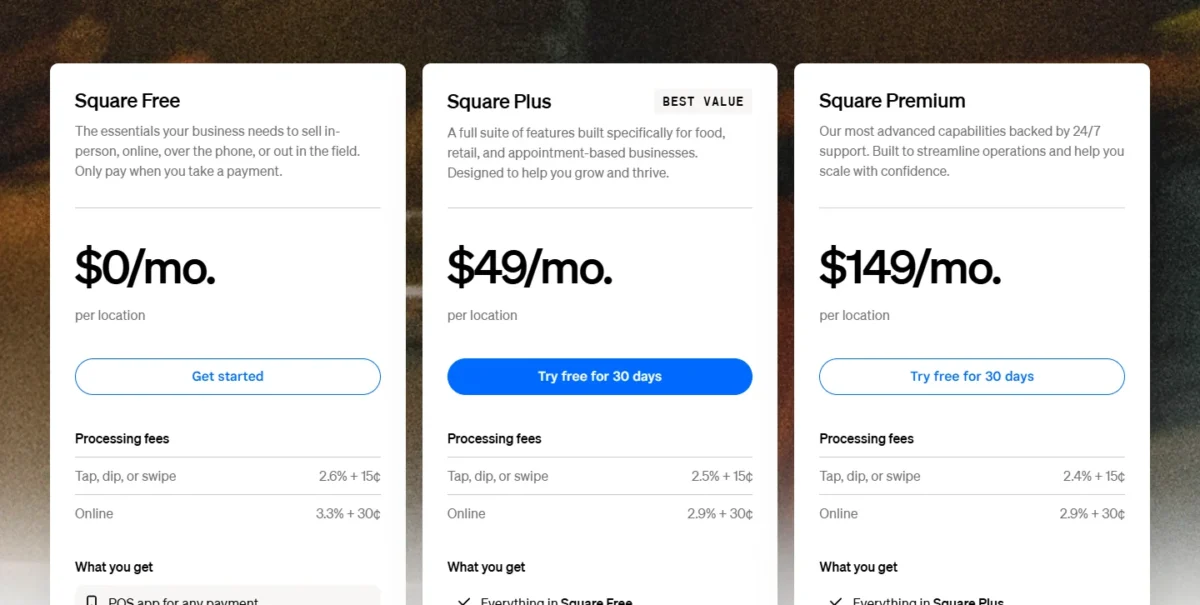
| Plan | Monthly fee | In person | Online or invoice | Best for | Main limitation |
|---|---|---|---|---|---|
| Square Free | $0 per location | 2.6% + 15¢ | 3.3% + 30¢ | One location with no need for KDS, Kiosk or texts | No KDS app, Kiosk or text marketing; phone support for the first 90 days |
| Square Plus | $49 per location | 2.5% + 15¢ | 2.9% + 30¢ | Restaurants and shops that need KDS, Kiosk, loyalty or staff tools | Fee is charged again for each location |
| Square Premium | $149 per location | 2.4% + 15¢ | 2.9% + 30¢ | High in-person volume, heavy gift card sales, 24/7 phone support | Online fee is the same as Plus |
| Square Pro | Custom quote | Custom | Custom | Sellers processing over $250,000 a year | No published price |
Sources: Square pricing page (US), checked Nov 2026.
The in-person gap from Square Free to Square Plus is 0.1 point and the online gap 0.4 point, so the next question is what the $49 fee buys.
Square Plans Explained: Free, Plus, Premium and Pro
Each step up from Square Free adds a fixed fee per location in return for a lower card fee and a set of tools, so the right plan depends more on the tools you need than on the fee cut.
Square Free
Square Free costs $0 per location per month; its cost is the per-payment fee: 2.6% + 15¢ on each in-person card, 3.3% + 30¢ on each online or invoice card and 3.5% + 15¢ on each keyed-in or saved card. The plan card lists the POS app, an online site (an ordering profile, a basic store or a booking site), an item library that tracks inventory and sales, invoicing with estimates and contracts, and booking with staff calendars.
Phone support on Free runs 6am–6pm PT, Monday through Friday, for the first 90 days only. For a food truck or a one-chair salon, that covers the daily job. Free stops short of kitchens: the Square KDS app, Kiosk software and text message marketing are not available in Square Free, so a kitchen that runs tickets on screens has to leave this plan whatever its volume.
Square Plus
Square Plus costs $49 per location per month and cuts the in-person card fee to 2.5% + 15¢ and the online fee to 2.9% + 30¢. Its plan card adds advanced POS features for food and beverage, retail, appointments and invoicing, a loyalty rewards program, staff management for shifts and attendance, and unlimited email marketing with 500 texts a month included, then 3¢ per text.
Phone support on Plus runs 6am–6pm PT, Monday through Friday, with no 90-day cutoff listed, so a Free seller who relies on calling Square keeps that line by moving to Plus.
Plus is also the entry ticket for paid add-ons: the Square KDS app at $30 a month per device, and Square Kiosk at $99 a month per device or Kiosk Lite, its iOS app, at $50. The 0.4-point cut on the online fee is the bigger saving here, so a business that bills clients by invoice gets more from Plus than a counter-service cafe does.
Square Premium
Square Premium costs $149 per location per month and cuts the in-person card fee to 2.4% + 15¢, but its online fee stays at 2.9% + 30¢, the same as Plus. Its plan card adds 24/7 phone support, advanced reporting, 2,500 texts a month (then 1.5¢ per text) and no load fee on physical or eGift cards.
Some add-ons cost less on Premium: the Square KDS app is $20 a month per device instead of $30, and Kiosk Lite $30 instead of $50, while Square Kiosk stays $99 a month per device.
Square Pro (custom pricing)
Square Pro has no published price. It is Square’s custom tier for sellers that process over $250,000 per year, who can talk to Square’s team to see if they are eligible for custom pricing. The same conversation can cover hardware discounts, onboarding and implementation support, technical specialists and account management.
My take
An in-person seller who would upgrade for Plus’s fee cut alone sells over $49 / 0.001 = $49,000 a month, and $49,000 x 12 = $588,000 a year is past the $250,000 line, so I would ask about custom pricing before paying $149 per location for Premium.
Square Processing Fees by Payment Method
A card-present payment is the cheapest card payment on every Square plan, and a keyed-in or saved card is the most expensive at a 3.5% + 15¢ fee whatever you pay for the plan. Three methods change with the plan:
| Payment method | Square Free | Square Plus | Square Premium |
|---|---|---|---|
| Tap, dip or swipe with the card present | 2.6% + 15¢ | 2.5% + 15¢ | 2.4% + 15¢ |
| Card paid online or through an invoice | 3.3% + 30¢ | 2.9% + 30¢ | 2.9% + 30¢ |
| ACH bank transfer on an invoice | 1%, $1 minimum, no cap | 1%, $1 minimum, $10 fee cap | 1%, $1 minimum, $10 fee cap |
Sources: Square pricing page (US), checked Nov 2026.
Every other method costs the same on all three plans:
| Payment method | Fee on every plan |
|---|---|
| Keyed-in card or saved card on file | 3.5% + 15¢ |
| Card paid inside your own app through the payments API | 2.9% + 30¢ |
| ACH transfer through the API | 1% with a $1 minimum, capped at $5 |
| Afterpay (customer pays in four installments) | 6% + 30¢ |
| EBT card for SNAP-eligible items | 1.8% + 5¢ |
| Bitcoin paid by QR code in person | 0% until 2027 |
| Cash or check | No fee |
Sources: Square pricing page (US), checked Nov 2026.
The ACH cap is the quiet difference between plans: on Plus and Premium a bank-transfer invoice stops costing more at $10 / 0.01 = $1,000, while Free keeps charging a 1% fee on the whole amount. Square also charges the same fee for Visa, Mastercard, American Express and Discover, so the card brand does not change what a sale costs.
What Square takes from a hundred-dollar sale
Take an illustrative card sale worth $100. Tapped in person, it costs $100 x 0.026 + 0.15 = $2.75 at the 2.6% + 15¢ rate, $100 x 0.025 + 0.15 = $2.65 at 2.5% + 15¢ and $100 x 0.024 + 0.15 = $2.55 at 2.4% + 15¢.
Paid online or by invoice, a sale worth $100 costs $100 x 0.033 + 0.30 = $3.60 at 3.3% + 30¢ and $100 x 0.029 + 0.30 = $3.20 at 2.9% + 30¢; keyed in at 3.5% + 15¢, it costs $100 x 0.035 + 0.15 = $3.65.
The gap between a tapped and a keyed-in card on Free is 0.9 points, wider than the 0.1-point or 0.4-point cut any upgrade buys, so steering customers to tap saves more than switching plans does.
Does Square Have a Free Plan or Trial?
Yes: Square Free has no monthly subscription fee, and Square Plus and Square Premium each come with a free 30-day trial; you can cancel or switch plans at any time. On Free you pay only the processing fee when you take a payment.
Square Hardware Costs
You do not need to buy hardware to take payments with Square: invoices, payment links, the virtual terminal and Tap to Pay on iPhone and Android all work without it. When you want devices, the US hardware shop lists them from $59 for the contactless and chip reader to $1,999 for Square Kiosk.
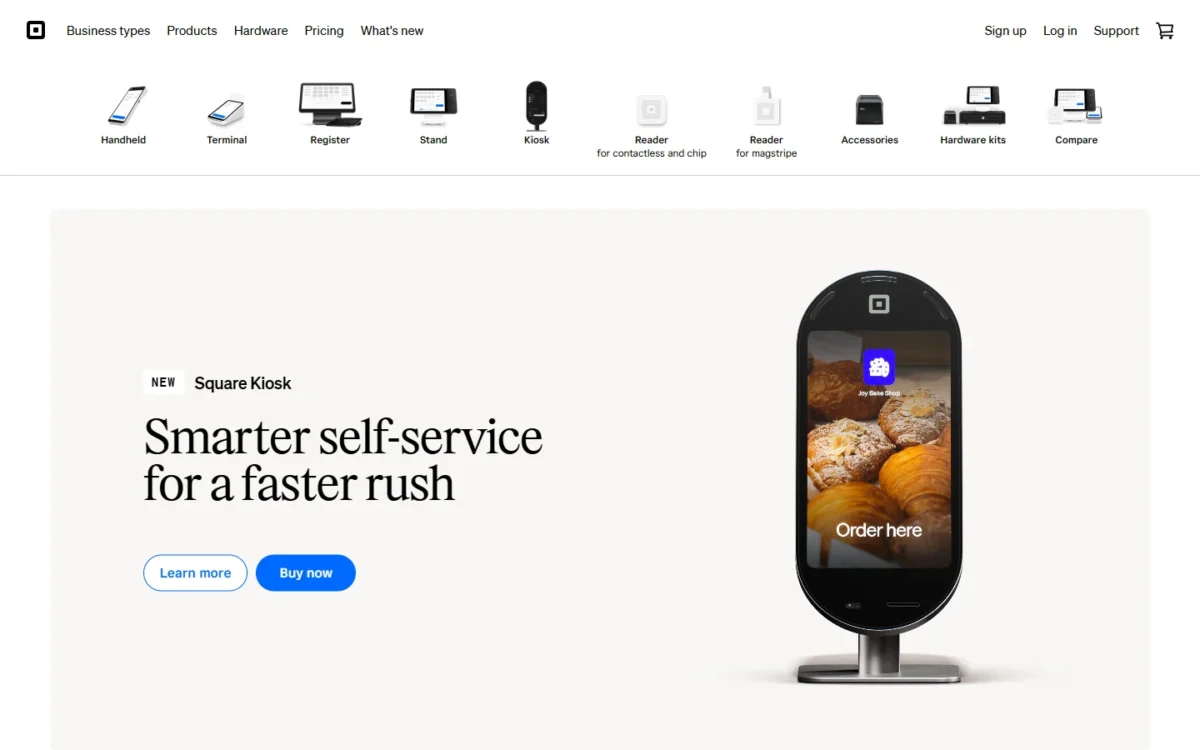
| Device | Price | Financing | Notes |
|---|---|---|---|
| Square Reader for magstripe | First reader free | None listed | One per Square account |
| Square Reader for contactless and chip | $59 | None listed | Connects to a phone or tablet by Bluetooth |
| Square Stand | $149 | $14/mo over 12 months | Needs a compatible iPad |
| Square Terminal | $299 | $27/mo over 12 months | Built-in receipt printer |
| Square Handheld | $399 | $37/mo over 12 months | Built-in barcode scanner |
| Square Register | $899 | $44/mo over 24 months | Two screens, no other device needed |
| Square Kiosk | $1,999 including counter stand | $97/mo over 24 months | Needs Square Plus or Premium |
Sources: Square hardware shop (US), checked Nov 2026.
Financing costs more than paying up front: Square Register at $44 x 24 months = $1,056 is $157 more than its $899 price. These hardware financing plans carry a 15% APR, cover purchases from $49 to $10,000, need credit approval and are not offered in AL, DE, MO, MS, NH and TN.
Kiosk is where hardware and software stack: a Kiosk on Plus costs $1,999 + $99 x 12 + $49 x 12 = $3,775 in year one (the device, a year of Kiosk software and a year of Plus). Free 30-day returns give a seller a month to decide whether a device earns its place.
Additional Square Costs to Consider
Beyond the plan fee and the card fee, Square charges per extra location, per add-on device, for texts over the allowance, a load fee on gift cards on Free and Plus, and a 1.5% fee on cards issued outside the US.
| Cost | Square Free | Square Plus | Square Premium |
|---|---|---|---|
| Plan fee for each location you run, per month | $0 | $49 | $149 |
| Square KDS app, per device per month | Not available | $30 | $20 |
| Kiosk software, per device per month | Not available | $99 Square Kiosk; $50 Kiosk Lite | $99 Square Kiosk; $30 Kiosk Lite |
| Text message marketing, per account per month | Not available | First 500 free, 3¢ each after | First 2,500 free, 1.5¢ each after |
| Gift card load | 2.5% load fee | 2.5% load fee | 0% load fee |
| Card issued outside the US, added per payment | 1.5% | 1.5% | 1.5% |
Sources: Square pricing page (US), checked Nov 2026.
Per-device fees grow quietly: a kitchen with three KDS screens on Plus pays $30 x 3 = $90 a month on top of the plan fee.
Square Restaurant Inventory by MarketMan, which tracks stock at the ingredient level, costs $99 per location per month for customers new to MarketMan. The pricing page’s plan grid lists it for Square Plus and Square Premium and shows a dash for Square Free. Instant transfers to your bank carry a fee whose amount the pricing page does not list. Square Payroll is a separate product, priced from $35 per month plus $6 per person paid.
Pricing note
Plus and Premium fees apply to each location you run. Three locations on Plus cost $49 x 3 = $147 a month before any card fee, and three on Premium cost $149 x 3 = $447 a month.
How Much Does Square Cost for Your Business?
A Square location’s monthly cost is its plan fee ($0, $49 or $149), plus each card fee’s percentage times card sales, plus its fixed 15¢ or 30¢ times the number of payments.
Square plan fee calculator
This calculator needs JavaScript. The scenario table below gives the same estimate for typical workloads.
Enter what you need. The calculator prices it on every plan at list prices and names the cheapest plan that covers it.
- List prices in USD from Square’s official pricing pages, checked Nov 7, 2026. Tax and regional prices are not included.
- 12-month figures are 12 times the monthly cost at the billing you choose.
- A planning estimate at list prices, not a quote.
The calculator compares plan fees for the number of locations you run and the features you need: enter your locations, tick the Square KDS app, Kiosk software, text message marketing or 24/7 phone support, and it shows Square Free, Square Plus and Square Premium side by side with the cheapest plan that covers them. It leaves out card fees, per-device fees, hardware and tax.
| Illustrative team and locations | Plan | Billing | Monthly equivalent | Annual total | Assumptions |
|---|---|---|---|---|---|
| Food truck: 1 location, no kitchen screens or kiosks | Square Free | Monthly plan fee | $0 x 1 = $0 | $0 x 1 x 12 = $0 | Card fees on top |
| Restaurant with kitchen screens: 1 location, 1 KDS screen | Square Plus | Monthly plan fee | $49 + $30 = $79 | $79 x 12 = $948 | Card fees on top |
| Counter-service cafe with a kiosk: 1 location, 1 Square Kiosk | Square Plus | Monthly plan fee | $49 x 1 + $99 x 1 = $148 | $148 x 12 = $1,776 | Card fees on top; Kiosk device not included |
| Three-store retailer: 3 locations, text marketing | Square Plus | Monthly plan fee | $49 x 3 = $147 | $147 x 12 = $1,764 | Card fees on top; texts within the monthly allowance |
| Late-night restaurant: 1 location, 24/7 phone support, 1 KDS screen | Square Premium | Monthly plan fee | $149 + $20 = $169 | $169 x 12 = $2,028 | Card fees on top |
Sources: Square pricing page (US) and Square restaurant pricing page (US), checked Nov 2026; estimates from list prices, not quotes.
Adding Card Fees at Illustrative Sales Levels
Take four illustrative businesses with one location each: a market stall, a cafe and a restaurant that take cards in person, and an online store, with the monthly sales and payment counts below. The formulas write each rate as a decimal (2.6% as 0.026, 15¢ as 0.15).
| Illustrative business and sales | At 2.6% + 15¢ | At 2.5% + 15¢ plus a $49 fee |
|---|---|---|
| Market stall: card sales worth $4,000, 160 payments | $4,000 x 0.026 + 160 x 0.15 = $128 | $4,000 x 0.025 + 160 x 0.15 + $49 = $173 |
| Cafe: card sales worth $25,000, 1,250 payments | $25,000 x 0.026 + 1,250 x 0.15 = $837.50 | $25,000 x 0.025 + 1,250 x 0.15 + $49 = $861.50 |
| Restaurant: card sales worth $80,000, 3,200 payments | $80,000 x 0.026 + 3,200 x 0.15 = $2,560 | $80,000 x 0.025 + 3,200 x 0.15 + $49 = $2,529 |
Sources: card rates from the US pricing page, checked Nov 2026; illustrative businesses, estimates from list prices, not quotes.
On online card sales worth $15,000 from 300 payments, the online store pays $15,000 x 0.033 + 300 x 0.30 = $585 a month at 3.3% + 30¢, and $15,000 x 0.029 + 300 x 0.30 + $49 = $574 at 2.9% + 30¢ plus a $49 fee.
Only the restaurant and the online store come out ahead at the lower rate plus the $49 fee, the same all-in cost test my best POS system ranking applies. On the restaurant’s sales worth $80,000, the gain is $80,000 x 0.001 – $49 = $31 a month; on the online store’s sales worth $15,000, it is $15,000 x 0.004 – $49 = $11.
The cafe’s monthly sales worth $25,000 come to $25,000 x 12 = $300,000 a year, and the restaurant’s sales worth $80,000 come to $80,000 x 12 = $960,000.
Sellers that process over $250,000 per year can talk to Square’s team about custom pricing and processing fees. That line works out to $250,000 / 12 = $20,833 a month, so a seller above it should ask before choosing a plan.
When Does Square Plus or Premium Pay for Itself?
An upgrade covers its own cost at the card volume where its fee cut equals its extra plan fee, so the break-even is that fee divided by the cut, and it differs by channel: Premium never catches Plus on online sales.
| Upgrade | Channel | Fee cut | Extra monthly fee | Break-even monthly volume |
|---|---|---|---|---|
| Free to Plus | In person | 0.1 point | $49 | $49 / 0.001 = $49,000 |
| Free to Plus | Online or invoice | 0.4 point | $49 | $49 / 0.004 = $12,250 |
| Plus to Premium | In person | 0.1 point | $149 – $49 = $100 | $100 / 0.001 = $100,000 |
| Plus to Premium | Online or invoice | None | $149 – $49 = $100 | Never |
| Plus to Premium | Gift card loads | 2.5 points | $149 – $49 = $100 | $100 / 0.025 = $4,000 of loads |
Sources: Square pricing page (US), checked Nov 2026.
The fixed 15¢ and 30¢ parts are the same on every plan, so the number of payments never moves the break-even; only card volume does. A business with both channels adds the two savings, as the example below shows.
Take an illustrative shop with in-person card sales worth $20,000 and online card sales worth $8,000 a month. Moving from the 2.6% and 3.3% rates to the 2.5% and 2.9% rates saves it $20,000 x 0.001 + $8,000 x 0.004 = $52 a month in fees, just above the $49 fee that comes with them.
Premium has other ways to cover its extra $149 – $49 = $100: a store that loads $100 / 0.025 = $4,000 of gift cards a month saves $100 in load fees, Premium’s full extra fee, a kitchen saves $30 – $20 = $10 per KDS device, and a counter saves $50 – $30 = $20 per Kiosk Lite device.
My take
I would not upgrade for the fee cut unless the math clears with room to spare, because one slow month erases a thin saving. Pay for tools instead: KDS, Kiosk, loyalty or staff scheduling for Plus, 24/7 phone support or heavy gift card sales for Premium.
Which Square Plan Should You Choose?
Start on Square Free if you sell mostly in person at one location and need no kitchen screens, kiosks or staff tools; every other case points to a specific plan below.
| Your needs | Plan to consider | Why | Main limitation |
|---|---|---|---|
| One location, mostly in person, no add-ons | Square Free | No plan fee, and Plus’s 0.1-point cut is worth less than $49 until card revenue passes $49,000 a month | Phone support only for the first 90 days |
| Restaurant that needs kitchen screens or self-order kiosks | Square Plus | The KDS app and Kiosk software are not available in Square Free | $30 per KDS device and $99 per Kiosk device each month |
| In-person card revenue above $49,000 a month | Square Plus | The 0.1-point fee cut covers the $49 plan fee from there | That volume is over $250,000 a year: ask about custom pricing first |
| In-person card revenue above $100,000 a month, heavy gift card loads or late-night service | Square Premium | Lowest in-person fee, 0% gift card loads, 24/7 phone support | $149 per location; online fee no lower than Plus |
| Online or invoice card revenue above $12,250 a month | Square Plus | Online fee drops from 3.3% to 2.9% + 30¢ | Premium adds nothing on online fees |
| Above $250,000 a year in card sales | Square Pro | Square offers custom pricing and processing fees to eligible sellers | No published price |
Sources: Square pricing page (US), checked Nov 2026.
Is Square Worth the Price?
Square is worth it for small sellers who want $0 software and published, flat card fees they can budget without a sales call; it is a weaker deal for businesses that key in most cards.
The case rests on predictability: the plan fee is fixed, and a seller can start with Tap to Pay on a phone and add a $59 reader later.
The downside is specific. A keyed-in or saved card costs a 3.5% + 15¢ fee on every plan, so a membership business or phone-order shop cannot buy its way to a lower fee.
My take
I would skip Square if most payments are keyed in. If stock control rather than checkout is the center of the business, compare Square’s item library against dedicated inventory management software before committing. For an in-person seller below the Plus break-even, Square Free charges no plan fee at all.
Billing, Custom Rates and Cancellation
Square bills plan fees monthly per location, the US pricing page lists no annual plan or annual discount, and you can cancel Plus or Premium or switch plans at any time.
Two notes for existing sellers. Square’s FAQ says current users’ pricing may change depending on their plan, with notice ahead of time. And subscribers on legacy plans such as Restaurants POS Plus or Premium must switch to a current Square plan to use Square Kiosk.
How I Verified Square Pricing
I took every price on this page from Square’s US pricing page and US hardware shop on squareup.com, read in November 2026. The pricing region is the United States and every amount is in US dollars, with plan fees per location per month on monthly billing.
I calculated the scenario and break-even totals from those list prices; they are estimates, not quotes.
Square does not publish an annual plan price or Square Pro rates, and the pricing page does not list the instant-transfer fee amount or say whether plan fees include sales tax. Existing accounts on older plans and sellers on custom rates can pay different fees.
Frequently Asked Questions
How much does Square charge for Tap to Pay?
Square prints no separate Tap to Pay rate on its US pricing page. Its tap, dip or swipe fee applies to in-person payments when a card is present: 2.6% + 15¢ on Free, 2.5% + 15¢ on Plus and 2.4% + 15¢ on Premium. Check the rate your Square account shows before you plan around it.
What is Square’s fee for a payment link?
Square’s US pricing page has no payment-link line; its online fee covers card payments made online or through an invoice, at 3.3% + 30¢ on Free and 2.9% + 30¢ on Plus or Premium.
How fast does Square pay out?
Payouts reach your bank the next business day at no charge on every plan, or instantly for a fee. The pricing page does not list that fee’s amount, so check it in your Square account before you plan cash flow around it.
Is this guide about Squarespace pricing?
No. This guide covers Square’s plan fees and card fees as squareup.com lists them for the US. If you meant Squarespace, my guide to Squarespace pricing covers its plans.
Final Pricing Verdict
Start on Square Free if you sell at one location, mostly in person, with monthly card revenue under $49,000: $0 for the software and a 2.6% + 15¢ fee per tapped card. Move to Plus for the KDS app, Kiosk, loyalty or staff scheduling, or once online card revenue passes $12,250 a month. Choose Premium for 24/7 phone support, heavy gift card loads or in-person card revenue above $100,000 a month, and above $250,000 a year ask about custom pricing first.
- Skip it if:
- most of your card payments are keyed in or charged to saved cards, since that 3.5% + 15¢ fee never falls on any plan.