Webflow pricing starts free: the Starter Site plan publishes to a webflow.io address at no cost, and the paid Site plans, which add a custom domain, cost $15 (Basic) or $25 (Premium) per site per month billed yearly, or $25 and $39 per site per month billed monthly. Basic’s features are a custom domain, 300 static pages, 10 GB of bandwidth and unlimited form submissions; Premium adds the Webflow CMS, site search and code components.
Webflow bills sites and people separately: a solo owner pays only the Site plan, while a team adds a Workspace plan (Core is $19 per month billed yearly, with one full seat) and $39 per month for each extra Full seat. Prices are in USD with taxes added at checkout, and stores use Ecommerce plans from $29 per site per month billed yearly.
A five-person team on Premium and Core with one extra Full seat and three Limited seats pays $25 + $19 + $39 + $15 x 3 = $128 a month on yearly billing, or $128 x 12 = $1,536 a year. Basic fits one simple site with a custom domain and no blog; Premium fits any site that needs the CMS.
Basic has no CMS at all, and two consecutive months over a plan’s bandwidth limit trigger an automatic upgrade. The tables below price every plan in both billing views, checked November 7, 2026.
Quick pricing answer
Starter is free on a webflow.io address. Basic costs $15 and Premium $25 per site per month billed yearly ($25 and $39 billed monthly); Ecommerce plans start at $29 per site per month billed yearly.
A team adds a Workspace plan, such as Core at $19 per month billed yearly with one full seat, plus $39 per extra Full seat or $15 per Limited seat per month, billed yearly.
Start on Premium unless the site will never need a blog. The caveat: Basic has no CMS. Checked November 2026, USD, taxes added at checkout.
In This Article (15 sections)
Webflow Pricing at a Glance
Webflow lists three Site plans, three Ecommerce plans and two Platform plans, and every self-serve plan is priced in USD per site per month.
| Plan | Monthly billing | Annual billing | Best for | Main limitation |
|---|---|---|---|---|
| Starter | Free | Free | Prototypes on a webflow.io address | 2 static pages, 1 GB bandwidth, no custom domain |
| Basic | $25 per site per month | $15 per site per month, billed yearly | One simple site with no blog | No CMS; 10 GB bandwidth a month |
| Premium | $39 per site per month | $25 per site per month, billed yearly | Blogs and content sites | Bandwidth above 50 GB costs extra |
| Standard | $42 per site per month | $29 per site per month, billed yearly | New stores | 2% transaction fee; 500 ecommerce items |
| Plus | $84 per site per month | $74 per site per month, billed yearly | Stores selling more than about $2,250 a month | 5,000 ecommerce items |
| Advanced | $235 per site per month | $212 per site per month, billed yearly | Large catalogs | 15,000 ecommerce items |
| Team | Annual contract only | $2,500 per month, annual contract required | Teams that need publishing workflows | Annual contract required |
| Enterprise | Custom quote | Custom quote | Custom roles, SLAs and governance | Price only through sales |
Sources: Webflow pricing page, Yearly and Monthly views, checked November 2026.
Price history: Basic cost $14 in January 2024, January 2025 and January 2026, and $15 today (a month, billed annually). Earlier prices come from archived copies of Webflow’s pricing page, and my SaaS and AI price index tracks the same entry-plan prices across other tools.
These are the US prices on webflow.com/pricing on November 7, 2026, in USD per site per month, “plus applicable taxes added at checkout.” A yearly price is a monthly equivalent: Basic at $15 billed yearly is a $15 x 12 = $180 yearly bill.
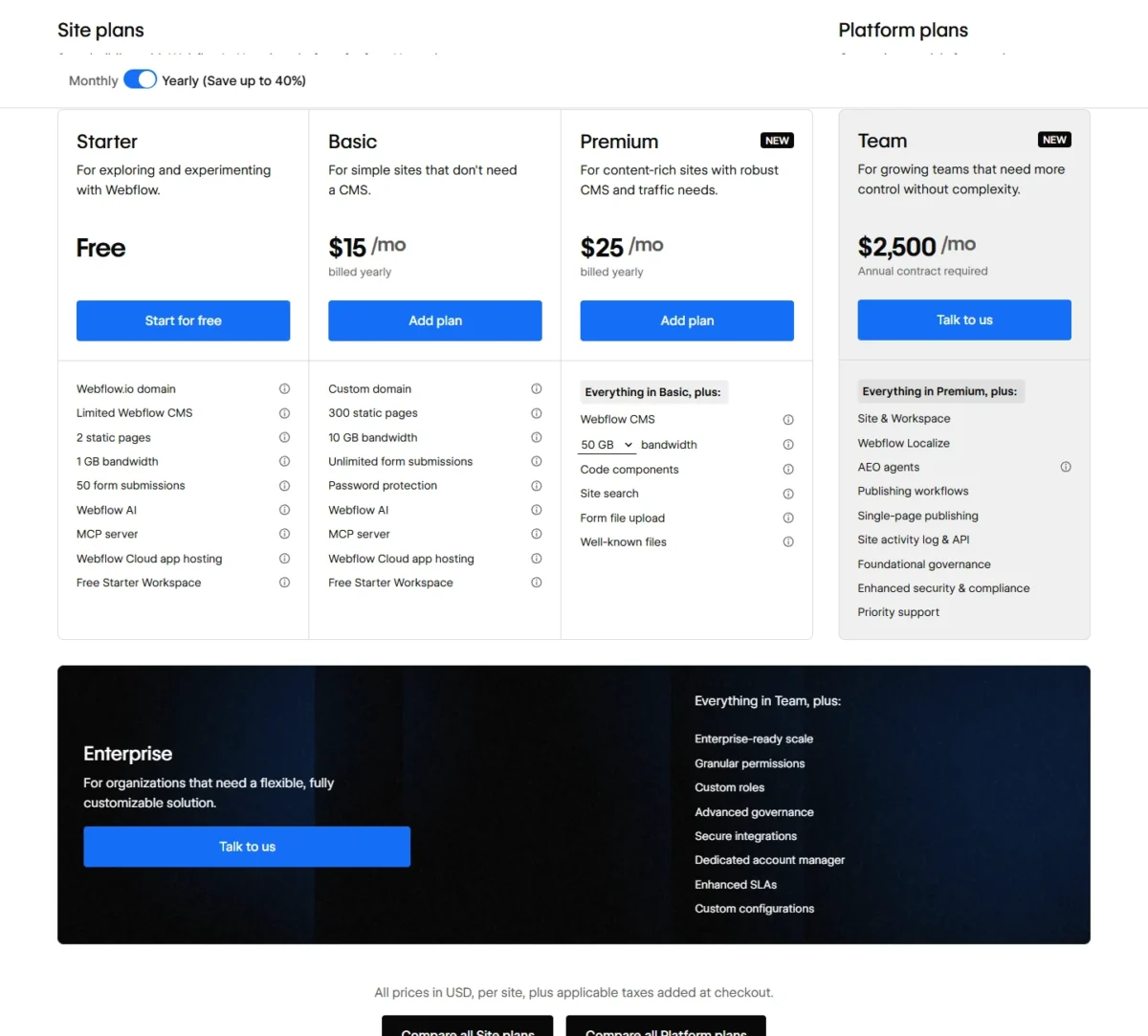
Basic is the cheapest custom-domain plan, but Premium is the plan for most business sites because Basic has no CMS. The table prices one site, though; a team also pays for the Workspace its people work in.
How Webflow Bills You: Site Plans vs Workspace Plans
A Site plan is billed per site and is what puts that site on a custom domain; a Workspace plan is billed per Workspace and adds staging and collaboration tools for every site inside it. A solo owner with one site needs only a Site plan, while a team or a freelancer usually pays for both.
Every account starts on a free Starter Workspace, one per customer. Any Workspace tier supports an unlimited number of paid Site plans, so the Workspace bill does not grow with the number of sites. Platform plans (Team and Enterprise) bundle a site, a Workspace and add-ons.
Which bills apply to your setup:
- Solo owner with one site: one Site plan (Basic or Premium) on the free Starter Workspace, which includes 1 full seat.
- In-house team: a Site plan per site, a Core or Growth Workspace plan, and a paid seat for each extra person.
- Freelancer or agency: a Freelancer or Agency Workspace plan, with Site plans per client site that clients can pay for themselves through client payments.
Sources: Webflow Help Center, Workspace and Site plans overview, checked November 2026.
Webflow Site Plans Explained
Basic is the cheapest plan that publishes to a custom domain, but it has no CMS; Premium adds the CMS and scalable bandwidth for $25 – $15 = $10 more per site per month on yearly billing, or $39 – $25 = $14 more billed monthly.
Starter
Starter publishes a site to a webflow.io address with 2 static pages, 1 GB of bandwidth a month, 50 form submissions and 50 CMS items, for free and with no custom domain.
The 50 CMS items are not a typo: the plan table lists 50 for free Starter and none for Basic, so collections built on a Starter site have no place on Basic. Sitemap controls and schema markup support on a Starter site need a paid Workspace plan. That makes Starter a sandbox for a two-page concept, not a business site.
Basic
Basic is enough for a small business site of up to 300 static pages with no blog: it costs $15 per site per month billed yearly ($180 a year) or $25 billed monthly, and adds a custom domain, 10 GB of bandwidth a month, unlimited form submissions and password protection.
Basic lists no CMS items, so the first blog post or case study collection pushes the site to Premium; traffic past 10 GB a month is the second trigger. If a blog is on this year’s plan, start on Premium.
Premium
Premium adds the Webflow CMS (20,000 CMS items in 40 Collections), code components, site search, form file upload and well-known files, plus bandwidth you set from 50 GB up to 2.5 TB a month. The $25 yearly and $39 monthly prices are for the lowest bandwidth setting, 50 GB.
Bandwidth is where Premium’s bill grows: +50 GB costs +$20 a month billed annually or +$30 billed monthly, and the largest step, +2.450 TB, costs +$974 billed annually or +$1,460 billed monthly. A site that needs 100 GB a month pays $25 + $20 = $45 per month on yearly billing.
My take
Pick Premium if the site publishes content: $10 more per month than Basic on yearly billing buys the CMS that Basic lacks. Pick Basic only for a fixed brochure that will never carry a blog.
Team and Enterprise (Platform plans)
Team costs $2,500 a month with an annual contract required, which is $2,500 x 12 = $30,000 a year. It bundles the site and Workspace with 5 full and 5 limited seats, Webflow Localize with 2 locales, 100,000 AI credits a year, publishing workflows and 24/7 priority support, with 500 static pages, 20,000 CMS items and up to 30 TB of bandwidth a year.
Enterprise is a custom quote (“Talk to us”) that adds custom roles, granular permissions and a dedicated account manager. Hosting uptime in the SLA table is 99.00% on Team and 99.99% on Enterprise.
The jump to Team is a different budget class. On yearly billing, Premium plus a Growth Workspace (the Workspace plan priced below) costs $25 + $49 = $74 a month. Adding four extra Full seats and five Limited seats to match Team’s seat count brings the self-serve total to $25 + $49 + $39 x 4 + $15 x 5 = $305 a month billed yearly, against Team’s $2,500.
Team makes sense when publishing workflows and governance are the requirement, not more seats.
Webflow Ecommerce Plans Explained
Standard costs $29 per site per month billed yearly but takes a 2% transaction fee on top of Stripe or PayPal processing fees; Plus costs $74 and charges 0%, so Plus is the cheaper plan once a store sells more than about $2,250 a month on yearly billing.
An Ecommerce plan is the store’s Site plan (“an ecommerce site plan”), so it already includes a custom domain and CMS items. Plus costs $74 – $29 = $45 more a month on yearly billing, and a 2% fee is one-fiftieth of sales, so the fee matches that gap at $45 x 50 = $2,250 in monthly sales. On monthly billing the gap is $84 – $42 = $42, and the break-even is $42 x 50 = $2,100.
Standard
Standard fits a new store with fewer than 500 ecommerce items and sales below that break-even. It costs $29 per site per month billed yearly or $42 billed monthly, and includes 500 ecommerce items, 2,000 CMS items, 50 GB of bandwidth, 3 staff accounts and a custom shopping cart and checkout.
Plus
Plus is worth $45 more a month on yearly billing once sales pass the break-even or the catalog passes 500 ecommerce items. It costs $74 per site per month billed yearly or $84 billed monthly, drops the transaction fee to 0%, and raises the limits to 5,000 ecommerce items, up to 10,000 CMS items, 100 GB of bandwidth and 10 staff accounts.
Advanced
Advanced is for stores past 5,000 ecommerce items or teams that need 15 staff accounts. It costs $212 per site per month billed yearly or $235 billed monthly, with 15,000 ecommerce items and the same 0% fee and 100 GB of bandwidth as Plus. The $212 – $74 = $138 a month on yearly billing buys catalog room and staff accounts, not a fee saving.
My take
Pick Standard if the store is new and sells less than the break-even; pick Plus once sales pass it, because Plus then costs less than the fee it removes. Advanced is worth it only when the catalog passes 5,000 items or more than 10 people need staff accounts.
Webflow Workspace Plans and Seat Pricing
Core costs $19 and Growth $49 per Workspace per month billed yearly ($28 and $60 billed monthly), and Freelancer costs $16 and Agency $35 ($24 and $42 billed monthly). Each includes one full seat; every extra Full seat costs $39 and every Limited seat $15 per seat per month, billed yearly.
| Plan or seat | Monthly billing | Annual billing | Included | Main limitation |
|---|---|---|---|---|
| Starter Workspace | Free | Free | 1 full seat, 2 staging sites, 200 AI credits a month | 2 pages per staged site |
| Core | $28 per month | $19 per month, billed yearly | 1 full seat, 10 staging sites, custom code, code export, 300 AI credits a month | No site-level roles or publishing permissions |
| Growth | $60 per month | $49 per month, billed yearly | 1 full seat, unlimited staging sites, site-level roles, publishing permissions, 400 AI credits a month | Extra seats billed per person |
| Freelancer | $24 per month | $16 per month, billed yearly | 1 full seat, 10 staging sites, 1 free client seat per site, client payments | No publishing permissions |
| Agency | $42 per month | $35 per month, billed yearly | 1 full seat, unlimited staging sites, 3 free client seats per site, 400 AI credits a month | Extra seats billed per person |
| Full seat | $45 per seat per month | $39 per seat per month, billed yearly | Design full sites or manage admin settings | Billed per person |
| Limited seat | $19 per seat per month | $15 per seat per month, billed yearly | Edit content or build pages with components | No full design access |
| Free seat | $0 | $0 | Reviewers and commenters | No edit access |
Sources: Webflow pricing page, Workspace plans and Add seats, Yearly and Monthly views, checked November 2026.
For a team, the seats cost more than the plan: one extra Full seat at $39 a month billed yearly costs more than twice the whole Core plan at $19.
Core and Growth for in-house teams
Core suits a team that stages up to 10 sites and needs custom code and code export; Growth adds unlimited staging, site-level roles and publishing permissions for $49 – $19 = $30 more a month on yearly billing. Pay for Growth when you need to control which teammates can publish which sites.
Freelancer and Agency
Freelancer fits a small client roster: 10 staging sites, 1 free client seat per site and client payments, which let clients put their own credit card on file for a new Site plan or site add-ons.
Agency adds unlimited staging sites, 3 free client seats per site, site-level roles and publishing permissions for $35 – $16 = $19 more a month on yearly billing. With client payments, the Workspace plan is your cost and each client can carry their own Site plan.
Seats and AI credits
Full seats ($39 per seat per month billed yearly, $45 billed monthly) design full sites or manage admin settings. Limited seats ($15 billed yearly, $19 billed monthly) edit content or build pages with components. Free seats invite reviewers and commenters.
Each Workspace includes AI credits: 200 a month on Starter, 300 on Core and Freelancer, 400 on Growth and Agency. Extra packs of 2,000 credits a month cost $20 a month billed yearly or $25 billed monthly.
My take
Pick Core with Limited seats if most of the team writes rather than designs, and keep Full seats for the people who design or manage the site. Three editors on Limited instead of Full seats save $24 x 3 = $72 a month on yearly billing, more than the $30 between Core and Growth.
Does Webflow Have a Free Plan or Trial?
Yes: the Starter Site plan and the Starter Workspace cost nothing, with no end date given (“Try Webflow for as long as you like”), but a Starter site publishes only to webflow.io with 2 static pages. The pricing page lists no free trial of the paid plans.
The free Starter Workspace holds 2 Starter sites of 2 pages each, so a 10-page site cannot be finished for free. For a single site, buying the Site plan early is the cheaper route: Basic at $15 a month billed yearly lifts that site to 300 static pages, while Core at $19 pays off only when you stage several sites.
Monthly vs Annual Webflow Pricing
Yearly billing saves 40% on Basic but under 10% on Advanced, so the discount shrinks as the plans get bigger. Basic costs $25 x 12 = $300 a year billed monthly against $15 x 12 = $180 billed yearly, a $120 saving; Advanced costs $235 x 12 = $2,820 against $212 x 12 = $2,544, a $276 saving on the Webflow pricing page’s list prices.
| Plan | Billed monthly, 12 months | Billed yearly, 12 months | Saving per year | Saving |
|---|---|---|---|---|
| Basic | $25 x 12 = $300 | $15 x 12 = $180 | $120 | 40.0% |
| Premium | $39 x 12 = $468 | $25 x 12 = $300 | $168 | 35.9% |
| Standard | $42 x 12 = $504 | $29 x 12 = $348 | $156 | 31.0% |
| Plus | $84 x 12 = $1,008 | $74 x 12 = $888 | $120 | 11.9% |
| Advanced | $235 x 12 = $2,820 | $212 x 12 = $2,544 | $276 | 9.8% |
| Core | $28 x 12 = $336 | $19 x 12 = $228 | $108 | 32.1% |
| Growth | $60 x 12 = $720 | $49 x 12 = $588 | $132 | 18.3% |
| Freelancer | $24 x 12 = $288 | $16 x 12 = $192 | $96 | 33.3% |
| Agency | $42 x 12 = $504 | $35 x 12 = $420 | $84 | 16.7% |
| Full seat | $45 x 12 = $540 | $39 x 12 = $468 | $72 | 13.3% |
| Limited seat | $19 x 12 = $228 | $15 x 12 = $180 | $48 | 21.1% |
Sources: Webflow pricing page, Yearly and Monthly views, checked November 2026.
Of the plans above, only Basic reaches the full 40% in the pricing page’s “Save up to 40%” line. Basic billed monthly is $25 a month before tax, so the $15 headline price applies only to buyers who take the yearly term.
Commitment cuts the other way: Webflow’s pricing FAQ says you can cancel at any time, “but you’ll still pay the remainder of the term for the plan you signed up for.” A yearly plan dropped in month three is still a full year of cost.
My take
Pick yearly billing for Basic, Premium, Standard and Core or Freelancer once the site is live, since each saves about a third or more. Monthly billing is worth it on Plus and Advanced while a store proves itself, because the yearly saving there is small.
Additional Webflow Costs to Consider
Premium bandwidth steps, the 2% Standard fee, extra seats, the Localize, Optimize and Analyze add-ons, AI credit packs, Webflow Cloud usage and sales tax can each push the bill above the plan price.
| Cost type | When it applies | Pricing basis | Notes |
|---|---|---|---|
| Premium bandwidth steps | Premium site over 50 GB a month | From +$20 a month billed annually (+$30 billed monthly) per +50 GB, up to +$974 (+$1,460) for +2.450 TB | Two consecutive months over the limit trigger an automatic plan upgrade |
| Transaction fee | Standard Ecommerce plan | 2% per sale | In addition to Stripe or PayPal processing fees |
| Extra seats | Each person after the one included full seat | Full $39, Limited $15 per seat per month, billed yearly | Free seats for reviewers |
| Localize | Translated sites | Essential from $9 a month billed yearly ($12 monthly); Advanced from $29 ($35 monthly) | Up to 3 or 10 locales; 10K or 50K translated words per locale per month |
| Optimize | A/B testing and personalization | From $299 a month billed yearly ($379 monthly) | Priced by page views; up to 5 concurrent optimizations |
| Analyze | Built-in site analytics | From $9 a month billed yearly ($12 monthly) | Priced by sessions |
| AI credit packs | Use beyond the 200-400 monthly Workspace credits | 2,000 credits a month for $20 a month billed yearly ($25 monthly) | Shared across the Workspace |
| Webflow Cloud usage | Web apps past their included capacity | $2 per million requests; $2 per 5 hours of CPU usage | At least 30 days notice before overage charges |
| Sales tax | Every plan | Added at checkout | Not in the list prices |
Sources: Webflow pricing page, add-ons and FAQ, Yearly and Monthly views, checked November 2026.
For a small site, the two that apply first are seats, once a second person joins, and bandwidth, once a Premium site passes 50 GB. The add-ons are “from” prices because the page sets them by page views, sessions or locales. Webflow Campaigns, a separate product for landing pages and ads, is listed as “Starting at $2k/mo” and sits outside every plan here.
How Much Does Webflow Cost for Your Team?
A Webflow setup costs from $15 x 12 = $180 a year for one Basic site to a five-person team on Premium and Core at $25 + $19 + $39 + $15 x 3 = $128 a month, or $128 x 12 = $1,536 a year, at yearly list prices.
Webflow site plan cost calculator
This calculator needs JavaScript. The scenario table below gives the same estimate for typical workloads.
Enter what you need. The calculator prices it on every plan at list prices and names the cheapest plan that covers it.
- List prices in USD from Webflow’s official pricing pages, checked Nov 7, 2026. Tax and regional prices are not included.
- 12-month figures are 12 times the monthly cost at the billing you choose.
- A planning estimate at list prices, not a quote.
The calculator prices the Site or Ecommerce plan for the number of sites you enter, on monthly or yearly billing, with boxes for what you need: a CMS, a store, no transaction fee, or more than 500 or 5,000 ecommerce items (products, variants and categories). It lists every plan side by side with its yearly price and marks the plan that fits those needs. It leaves out the Workspace plan, seats, tax, fees and add-ons; add those from the table below.
| Team size | Plan | Billing | Monthly equivalent | Annual total | Assumptions |
|---|---|---|---|---|---|
| 1 brochure site | Basic | Yearly | $15 | $15 x 12 = $180 | Free Starter Workspace; no blog |
| 1 blog or content site | Premium (50 GB) | Yearly | $25 | $25 x 12 = $300 | Free Starter Workspace; bandwidth steps excluded |
| 1 small store | Standard | Yearly | $29 | $29 x 12 = $348 | 2% transaction fee and Stripe or PayPal fees excluded |
| 5-person in-house team | Premium + Core Workspace + 1 Full + 3 Limited seats | Yearly | $25 + $19 + $39 + $15 x 3 = $128 | $128 x 12 = $1,536 | Holds the Core Workspace and seats; Core includes 1 full seat; tax and add-ons excluded |
| Freelancer with 5 client sites | Freelancer Workspace + 5 Basic sites | Yearly | $16 + $15 x 5 = $91 | $91 x 12 = $1,092 | Holds the Freelancer Workspace; the freelancer pays all 5 Site plans |
Sources: Webflow pricing page, checked November 2026. Totals are estimates from list prices, not quotes.
Seats drive the team row: on yearly billing, $39 + $15 x 3 = $84 a month goes to seats, more than the $25 + $19 = $44 for the site and the Workspace together. On monthly billing the same team pays $39 + $28 + $45 + $19 x 3 = $169 a month, or $169 x 12 = $2,028 a year.
The freelancer row shrinks if clients pay their own Site plans through client payments: the freelancer’s cost then falls to the Freelancer Workspace, $16 x 12 = $192 a year.
Which Webflow Plan Should You Choose?
Start on Basic only if the site has no blog or collections; otherwise buy Premium, and a team adds Core with Limited seats for its editors.
| Your needs | Plan to consider | Why | Main limitation |
|---|---|---|---|
| Testing Webflow or building a prototype | Starter, free | No upgrade needed until you connect a domain | 2 static pages, webflow.io address only |
| One simple site with a custom domain and no blog | Basic, $15 per site per month billed yearly | Cheapest plan with a custom domain | No CMS; 10 GB bandwidth |
| A blog, case studies or any CMS content | Premium, $25 per site per month billed yearly | 20,000 CMS items in 40 Collections | Bandwidth above 50 GB costs extra |
| A store under about $2,250 a month in sales | Standard, $29 per site per month billed yearly | Lowest store price | 2% transaction fee; 500 ecommerce items |
| A store above about $2,250 a month or over 500 ecommerce items | Plus, $74 per site per month billed yearly | 0% transaction fee and 5,000 ecommerce items | $45 a month more than Standard |
| A team of designers and editors | Core with Full and Limited seats; Growth for publishing permissions | Limited seats at $15 cover editors | Every extra designer or editor is billed |
| A freelancer building client sites | Freelancer, or Agency for a large roster | Client payments and free client seats | Site plans still billed per site |
| Publishing workflows and governance | Team, $2,500 a month on an annual contract | Bundles 5 full and 5 limited seats | $30,000 a year commitment |
Sources: Webflow pricing page, checked November 2026.
A two-page concept on webflow.io costs nothing and can stay that way. For everyone else, the first fork is the CMS (Basic or Premium), the second is sales volume (Standard or Plus), and the third is headcount (Core and seats, or Team).
Is Webflow Worth the Price?
Webflow is worth its price when a site needs the CMS: Premium on yearly billing costs $25 x 12 = $300 a year per site, and a solo owner pays nothing more. It is a weak fit for a budget-first store or a large group of editors who would each need a paid seat.
The disadvantages of Webflow’s pricing, from the cost side:
- Two bills for a team: a Workspace plan and seats on top of every Site plan.
- No CMS on Basic: the $15 plan stops fitting the day the site needs a blog.
- The Standard fee: 2% of every sale, in addition to Stripe or PayPal processing fees.
- Forced upgrades: a site that stays over its bandwidth limit for a second month moves up a plan, so traffic growth sets part of the bill.
- No way back in: sites and exported code cannot be imported into Webflow.
- Support: customer support is by email, with a stated aim to reply within 48 hours; 24/7 priority support starts with Team.
For a small store, Standard at $29 a month billed yearly covers products and a blog but adds a transaction fee to each sale, so it is worth pricing Squarespace plans and fees on sales for the same catalog before you commit.
My take
Webflow is worth it when a designer maintains the site and writers feed it: Premium covers the site, and Limited seats at $15 per seat per month billed yearly cover the writers. Skip it if you run a budget-first store or have a large group of editors who would each need a paid seat.
If you are still choosing a builder, my ranking of the best website builders for small business covers the alternatives by the job each one fits.
Billing, Cancellation and Leaving Webflow
You can cancel a Site or Workspace plan at any time, but you still pay the remainder of the term you signed up for; leaving means exporting the code from a paid Workspace plan, because Webflow cannot import a site or exported code back in.
The code export gives you HTML and CSS, but CMS items and pages are not part of it: dynamic content has to be exported collection by collection, and forms stop working. A CMS-heavy Premium site is the hardest to move, which is a reason to buy it monthly until you are sure.
Self-serve plans are paid by credit card; Enterprise customers can get custom billing and invoicing. A freelancer handing a finished site to a client can use site transfer to move it to another Workspace.
How I Verified Webflow Pricing
I read webflow.com/pricing on November 7, 2026 in both its Yearly and Monthly views as a US visitor, in USD, plus Webflow’s Help Center article on Workspace and Site plans. Each monthly price comes from the Monthly view itself, not from the yearly one.
Every total is list price x quantity x 12 months, an estimate rather than a quote, excluding tax, fees, add-ons, bandwidth steps and AI credit packs. Add-on prices are the figures the page prints for each add-on, which it sets by page views, sessions or locales. Webflow does not publish a monthly-billing option for Team or any Enterprise price. The prices are published figures; the break-even points, savings and recommendations are my analysis.
Frequently Asked Questions
Do Webflow prices include sales tax?
No. The pricing page lists every plan in USD “plus applicable taxes added at checkout,” so your card charge will be higher than the list price. Separately, the Ecommerce plans include automatic tax calculation, which works out sales tax and VAT for your own customers at checkout.
Is Wix or Webflow cheaper?
Webflow gets more expensive as people join, because its Workspace plan and seats are billed on top of each Site plan: a five-person team pays $19 + $39 + $15 x 3 = $103 a month on yearly billing before any site. Set that against what Wix costs in year one and year two for the same team.
How many sites can one Workspace hold?
Any Workspace plan supports an unlimited number of paid Site plans. The main difference in site limits between tiers is the number of free Starter sites: 2 on Starter, 10 on Core and unlimited on Growth. A Starter site stops counting against that limit as soon as you upgrade it to a paid Site plan.
What happens if my site goes over its bandwidth?
Webflow says it will let you know, and surge protection absorbs a short spike; a second month in a row over the limit moves the site to a bigger plan automatically. On Premium you can choose a larger bandwidth setting in advance, from +50 GB at +$20 a month billed annually, before that happens.
Final Pricing Verdict
Buy Premium on yearly billing ($25 per site per month, $25 x 12 = $300 a year) for most small-business sites; every other pick follows from three facts: whether the site has a blog, what the store sells each month, and how many people edit it.
Final recommendation
- Most business sites: Premium, billed yearly, because Basic, the cheaper paid Site plan, has no CMS.
- A fixed brochure site: Basic at $15 per site per month billed yearly.
- Stores: Standard under about $2,250 a month in sales, Plus above it, Advanced past 5,000 ecommerce items or when you need 15 staff accounts.
- Teams: Core with Limited seats for editors; Growth when publishing permissions matter; Team only for publishing workflows on a $30,000 yearly contract.
- Skip yearly billing until the site is ready to launch, since a cancelled plan still runs out its term.