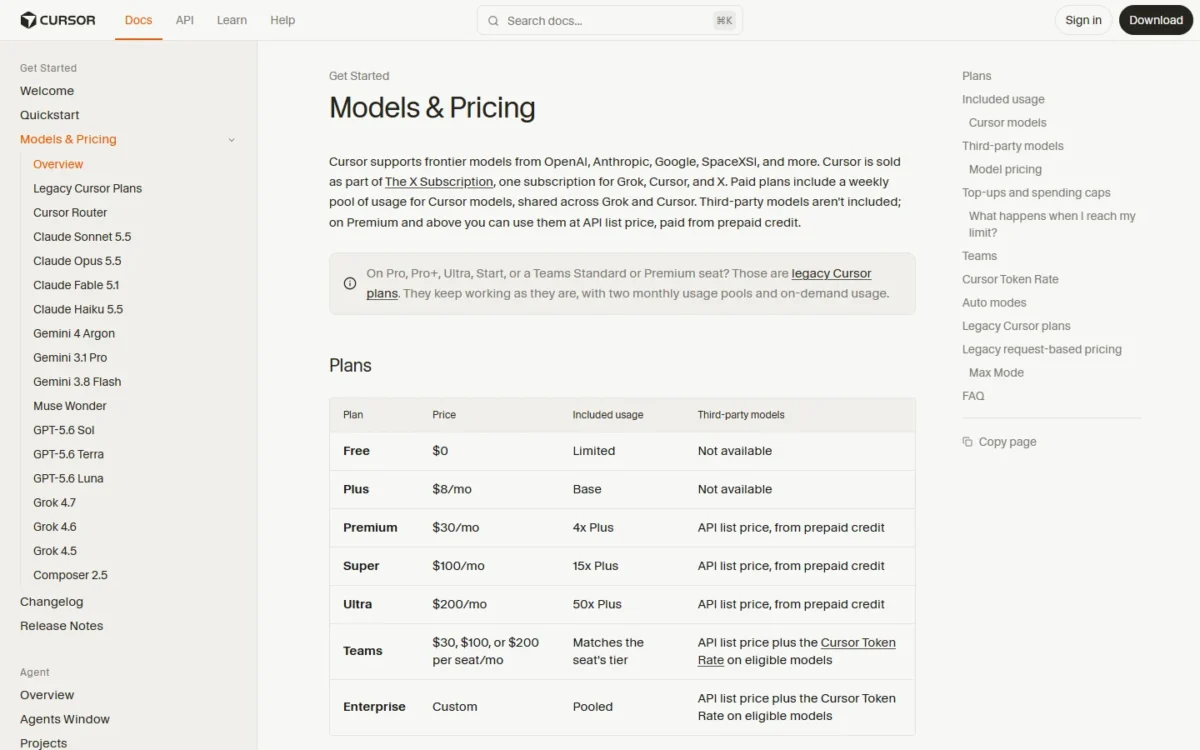
Cursor pricing starts with a Free plan at $0. On monthly billing, Plus costs $8 per month, Premium costs $30 per month, Super costs $100 per month and Ultra costs $200 per month, and Teams seats start at $30 per user per month (checked November 2026). None of those fees covers Claude, GPT or Gemini: on Premium and above, third-party models bill at API list price from prepaid credit, from the first request.
Each paid plan includes a weekly pool for Cursor’s own models that it shares with Grok. Cursor is now sold as part of The X Subscription. Billed monthly, five developers pay $30 x 5 = $150 a month on five Premium plans or five Teams Premium seats, but only Teams adds a $0.25 per million token rate on eligible third-party usage.
Premium is the floor for coding with third-party models or Cloud Agents; Plus suits light work on Cursor’s own models. A quote for Pro, Pro+ or a Teams Standard seat ($40) describes a legacy plan. Current prices are below, in USD before tax.
Quick pricing answer
Cursor sells Free ($0), Plus ($8 per month, billed monthly), Premium ($30 per month), Super ($100 per month), Ultra ($200 per month), Teams (from $30 per user per month) and Enterprise (custom quote). On annual billing, Plus costs $80 a year, Premium $300 a year, Super $1,000 a year and Ultra $2,000 a year.
Free covers Agent and Chat with limited usage; no paid-plan trial is listed.
My pick for most coders is Premium, the first plan with Claude, GPT, Gemini, Cloud Agents and Bugbot. The caveat: third-party usage sits outside every plan’s included usage and bills on top. Checked November 2026, USD, before tax.
In This Article (14 sections)
Cursor Pricing at a Glance
Every self-serve Cursor plan has a monthly price, the four paid individual plans also have a yearly price, Teams is priced per seat per month and Enterprise is a custom quote.
| Plan | Monthly billing | Annual billing | Best for | Main limitation |
|---|---|---|---|---|
| Free | $0 per month | Not listed on the pricing page | Trying Agent and Chat | Limited agent and Chat requests |
| Plus | $8 per month | $80 per year | Light work on Cursor’s own models | No third-party models, Cloud Agents or Bugbot |
| Premium | $30 per month | $300 per year | Coders who need Claude, GPT or Cloud Agents | Third-party usage billed on top |
| Super | $100 per month | $1,000 per year | Daily agent users | More usage, no new coding features |
| Ultra | $200 per month | $2,000 per year | Several agents or Automations | Pays off only if the pool is used |
| Teams | $30, $100 or $200 per user per month | Not published | Teams that need SSO and central billing | Cursor Token Rate on eligible third-party usage |
| Enterprise | Contact Sales | Contact Sales | Pooled usage, invoicing or SCIM | Custom quote only |
Sources: Cursor pricing page, Cursor Models & Pricing docs and Cursor Team Pricing docs, checked November 2026.
These are US-dollar list prices, checked in November 2026. The pricing page states that they do not include applicable taxes or fees such as VAT, and that prices are subject to change.
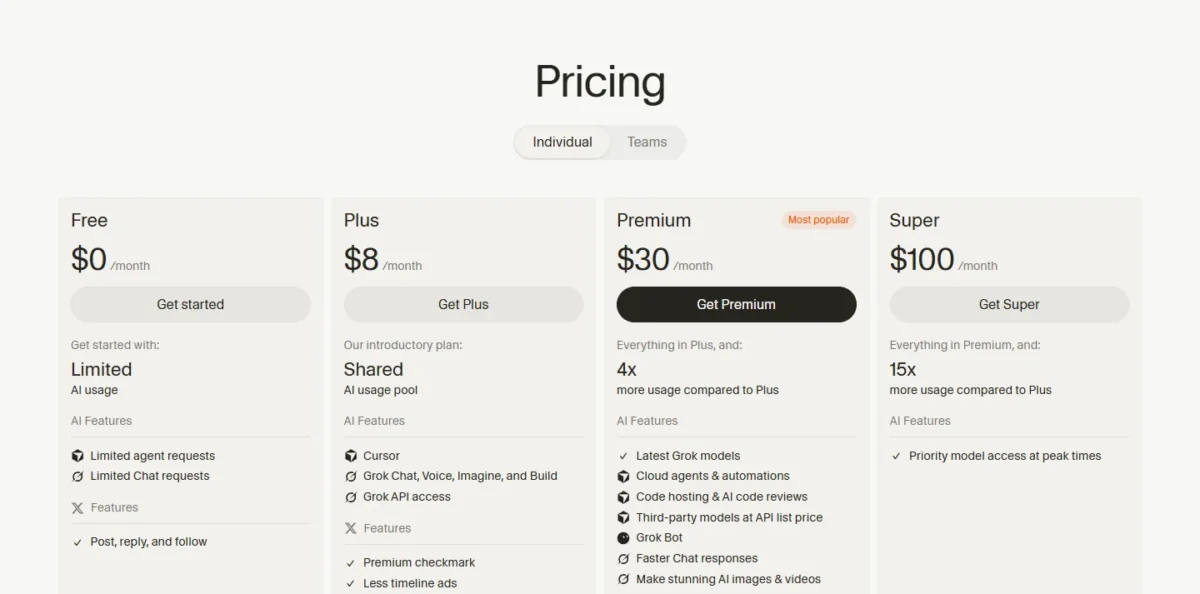
The sticker prices are simple. The bill is not, because the fee buys a pool that covers only some models.
How Cursor Bills Usage: The Weekly Pool and Prepaid Credit
Each paid Cursor plan includes one weekly usage pool for Cursor’s own models, shared with Grok; Claude, GPT and Gemini, plus any Cursor-model usage after the pool runs out, are paid from prepaid credit. The fee is fixed, while the credit moves with your model choices.
What the weekly pool covers
The pool pays for Grok 4.7, 4.6 and 4.5 plus Composer 2.5, whether you use them in the editor’s Agent, the CLI, Cloud Agents, Grok Bot or the Grok apps. It refreshes weekly, apart from your billing cycle, and each model draws on it at its own rate.
So a developer who also chats in Grok spends the coding allowance. On Teams, each paid seat has its own pool and seats can’t share usage. If you also pay for Grok, my Grok pricing guide covers that side of the allowance.
Cursor states the Premium, Super and Ultra pools as 4x, 15x and 50x Plus usage, and the Team Pricing docs give Super and Ultra as multiples of Premium; neither page states a pool in requests or tokens. Size your plan from the remaining-usage view in editor settings after a normal week.
Third-party models bill from the first request
No plan includes Claude, GPT or Gemini in its pool. On Premium, Super and Ultra they run at the model’s API list price from the first request, paid from prepaid credit; Plus and Free can’t use them.
A $30 Premium plan is really $30 plus your third-party usage. Credit can be bought by hand or refilled by Auto Top-up, and a monthly additional usage limit caps paid usage however much credit you hold. A Claude-heavy coder should weigh what Claude’s own plans cost against that API bill.
What happens when the pool runs out
You keep working: wait for the weekly reset, pay from prepaid credit at the same per-model rates, or upgrade to a larger pool. Cursor says requests are never downgraded in quality or speed. Cover an occasional heavy week with credit; running dry most weeks is the signal to move up a tier.
What Happened to Pro, Pro+ and the Teams Standard Seat ($40)?
They belong to Cursor’s legacy plan set: Hobby, Start, Pro, Pro+, Ultra and the Teams Standard and Premium seats continue for existing customers, with two monthly usage pools (Cursor Models and Other Models) and on-demand usage instead of top-ups.
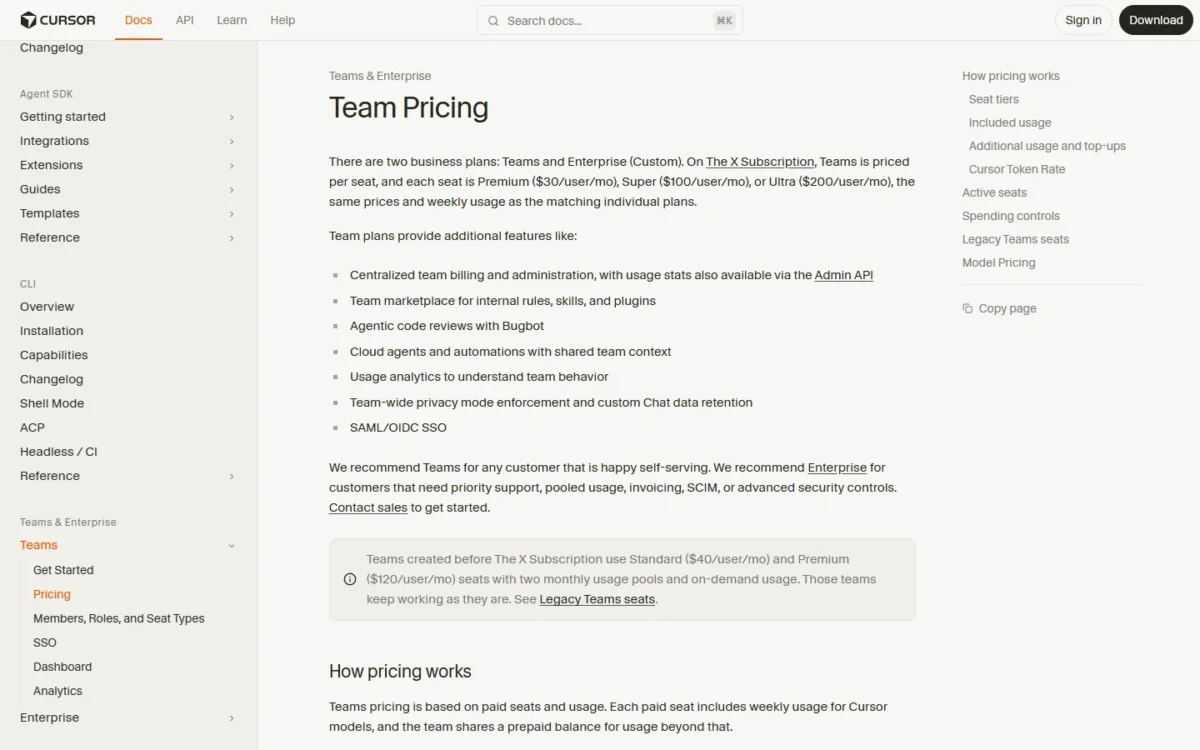
Teams created before The X Subscription have two paid seat types: a Standard seat ($40 per user per month) and a legacy Premium seat ($120 per user per month, with 5x the Standard allowance). An owner or admin can move such a team to The X Subscription at cursor.com/unify/team.
The legacy list even includes an Ultra plan, so read which pool a quote describes: monthly pools and on-demand usage mean legacy, a weekly pool and prepaid credit mean current.
Cursor Pricing Plans Explained
Each step up adds a main thing over the plan below: Plus a paid weekly pool, Premium third-party models, Cloud Agents and Bugbot, Super more usage and priority model access at peak times, and Ultra the largest pool and earliest access to new products and models. Teams adds administration, and Enterprise adds pooled usage and procurement terms.
Free
Free costs $0 a month for Agent and Chat with limited usage and no third-party models. Cursor publishes no Free limits in numbers, so use it to judge the editor, not for regular work. Move up once you need Claude, GPT or Cloud Agents.
Plus ($8 per month)
Plus is narrower than its price suggests. At $8 a month or $80 a year, it runs Agent only on Cursor’s own models, with Fast mode off, effort fixed at medium and Grok 4.7 held to its 256k context window. Auto, Cloud Agents, Automations, Bugbot, Origin, third-party models and your own API keys are all excluded.
Cursor’s pricing page recommends Plus for “social creators with limited AI usage,” and much of what it adds is X features. Skip it if you need Claude, GPT, Fast mode or effort levels: Cursor’s FAQ sends those users to Premium.
Premium ($30 per month)
Premium is the first plan with Cloud Agents, Origin, Bugbot and third-party models. For $30 a month, or $300 a year billed annually, it has 4x the Plus pool plus Bugbot code review, Origin code hosting, Cloud Agents, Automations, Grok Bot and third-party models at API list price.
The trade-off: the fee holds no third-party allowance, so Premium’s real cost depends on your model mix more than on the $30.
My take
I would start most developers on Premium with annual billing, a $25 monthly equivalent ($300 / 12 = $25), because it is the cheapest plan with Bugbot, Cloud Agents and third-party models. Move up only if the pool empties most weeks.
Super ($100 per month)
Super costs $70 more than Premium each month ($100 – $30 = $70) and buys mostly volume: 15x the Plus pool, which the Team Pricing docs put at 3.75x Premium, plus priority model access at peak times. Annual billing makes it $1,000 a year. Cursor aims it at daily Agent users; upgrade when the Premium pool runs dry most weeks, or when you need peak-time priority.
Ultra ($200 per month)
Ultra has Cursor’s largest individual pool, 50x the Plus usage, and earliest access to new products and models; Ultra costs $200 a month or $2,000 a year. The Team Pricing docs put that pool at 12.5x Premium. Against Super it costs twice as much ($200 / $100 = 2) for about 3.3 times the pool (50 / 15 = 3.33). That only pays off for the power user running several agents or Automations who actually consumes it.
Teams (from $30 per user per month)
Teams seats cost the same as the matching individual plans: Premium at $30, Super at $100 and Ultra at $200 per user per month, with the same weekly usage. One team can mix tiers, such as three Premium seats and one Super seat. Plus isn’t available for teams, and a $0 Free seat carries no team usage allowance.
What the seat adds is administration: SAML/OIDC SSO, centralized billing, usage analytics, a shared marketplace for the team’s rules, skills and plugins, enforced privacy mode and custom Chat data retention. Teams also opens Cursor Router’s Balance and Intelligence modes; when either routes to a third-party model, that request bills as third-party usage with the Token Rate.
Billing follows active paid seats. A mid-cycle addition is pro-rated, an upgrade applies at once, a downgrade at period end, and the renewal date stays put. Removing a member who used credits keeps the seat occupied until the cycle ends. The real team premium is the Token Rate and the missing annual price, not the seat.
Enterprise (Contact Sales)
Enterprise is a custom quote that a team needs for specific requirements: pooled usage across Grok and Cursor, Invoice/PO billing, SCIM seat management, granular spend controls, audit logs and service accounts, or priority support. If none of those is on your list, stay on Teams: Cursor recommends it for any customer that is happy self-serving.
Does Cursor Have a Free Plan or Trial?
Yes, Cursor has a Free plan at $0 a month with limited agent and Chat requests, though the pricing page shows no paid-plan trial and no student price.
Cursor’s students page says anyone can start for free and points students to promotions at on-campus and online events starting this fall. It names no discount amount, so students should budget on regular prices.
Monthly vs Annual Cursor Pricing
Annual billing on the four paid individual plans costs two months’ price less than a year of monthly billing; Cursor publishes no annual Teams price.
| Plan | 12 months billed monthly | Annual billing | Monthly equivalent, billed annually | Saving per year |
|---|---|---|---|---|
| Plus | $8 x 12 = $96 | $80 per year | $80 / 12 = $6.67 | $96 – $80 = $16 |
| Premium | $30 x 12 = $360 | $300 per year | $300 / 12 = $25 | $360 – $300 = $60 |
| Super | $100 x 12 = $1,200 | $1,000 per year | $1,000 / 12 = $83.33 | $1,200 – $1,000 = $200 |
| Ultra | $200 x 12 = $2,400 | $2,000 per year | $2,000 / 12 = $166.67 | $2,400 – $2,000 = $400 |
| Teams seats | $30, $100 or $200 per user per month | Not published | Not published | Not published |
Sources: Cursor Models & Pricing docs and Cursor pricing page, checked November 2026.
On Premium the saving is $60 of $360, about 17%. An annual plan renews yearly on your signup date, and Cursor’s terms of service call fees non-refundable except as required by law, so pay annually once Cursor is your main editor.
Additional Cursor Costs to Consider
Beyond the plan fee, a Cursor bill can include third-party model usage, Cursor-model usage past the pool, the Teams and Enterprise Token Rate, a data residency uplift, Grok API calls and tax.
| Cost type | When it applies | Pricing basis | Notes |
|---|---|---|---|
| Third-party models (Claude, GPT, Gemini) | Premium and above, from the first request | The model’s API list price, from prepaid credit | Not in any plan’s pool |
| Cursor models past the pool | Any paid plan after the weekly pool runs out | Per-model token rates, from prepaid credit | Or wait for the weekly reset |
| Cursor Token Rate | Teams and Enterprise, eligible third-party requests | $0.25 per million tokens | Input, output and cached tokens, own API keys included |
| Regional data residency | Opt-in, eligible models | 10% uplift on model pricing | Only if you choose a region |
| Grok API | Paid plans that call the API | Standard model rates, billed separately | Outside the pool |
| Tax | All plans | Not included in list prices | VAT and similar fees |
Sources: Cursor Models & Pricing docs, Cursor Team Pricing docs and Cursor pricing page, checked November 2026.
The Token Rate skips Cursor models, Cost mode requests and any third-party model priced under $0.10 per million tokens for cache reads on all of its tiers. Individual plans never pay it.
Take an illustrative team that sends 20 million eligible third-party tokens a month. The Token Rate adds 20 x $0.25 = $5.00 that month, on top of the models’ API list price for the same tokens.
To cap the variable part, set the monthly additional usage limit; on Teams, admins add a default limit per member with overrides, and paid usage pauses at the team limit even if credit remains. Prepaid credit currently expires 365 days after purchase, so buy only what you will use within a year.
How Much Does Cursor Cost for Your Team?
On list prices, one developer on Plus pays $80 a year billed annually or $96 a year billed monthly, and ten Teams Premium seats cost $3,600 a year, before any third-party usage.
Cursor cost calculator
This calculator needs JavaScript. The scenario table below gives the same estimate for typical workloads.
Enter what you need. The calculator prices it on every plan at list prices and names the cheapest plan that covers it.
- List prices in USD from Cursor’s official pricing pages, checked Nov 7, 2026. Tax and regional prices are not included.
- 12-month figures are 12 times the monthly cost at the billing you choose.
- A planning estimate at list prices, not a quote.
Enter the number of developers, pick monthly or annual billing, and tick what you need: third-party models, Cloud Agents and Bugbot, SSO, or peak-time priority. The calculator shows every plan’s monthly and 12-month cost side by side and names the cheapest plan that fits. It leaves out tax, third-party usage, the Token Rate and usage past the pool.
| Team size | Plan | Billing | Monthly equivalent | Annual total | Assumptions |
|---|---|---|---|---|---|
| Solo on Cursor models: 1 developer | Plus | Monthly | $8 x 1 = $8 | $8 x 1 x 12 = $96 | Cursor models only, within the weekly pool |
| Solo using Claude or GPT: 1 developer | Premium | Annual | $300 / 12 = $25 | $300 x 1 = $300 | Third-party usage at API list price is extra |
| Small team with SSO: 5 developers | Teams Premium seats | Monthly | $30 x 5 = $150 | $30 x 5 x 12 = $1,800 | Excludes third-party usage and the Token Rate |
| Growing team with SSO: 10 developers | Teams Premium seats | Monthly | $30 x 10 = $300 | $30 x 10 x 12 = $3,600 | Excludes third-party usage and the Token Rate |
Sources: Cursor pricing page, Cursor Models & Pricing docs and Cursor Team Pricing docs, checked November 2026. These are estimates from list prices, not quotes.
A five-person team that does not need SSO can skip Teams: five annual Premium plans cost $1,500 a year, $1,800 – $1,500 = $300 less than five Teams Premium seats. On published prices, that $300 buys SSO and admin controls, and Teams also adds the Token Rate on eligible Claude or GPT usage.
Mixed tiers handle uneven usage.
Take an illustrative ten-person team where two developers use far more than the rest: eight Premium seats at $30 plus two Super seats at $100 cost $30 x 8 + $100 x 2 = $440 a month, so only the two heaviest users get the bigger pool.
Which Cursor Plan Should You Choose?
Premium fits most developers who code with Claude, GPT or Cloud Agents; Free and Plus fit light work on Cursor’s own models, and Teams seats fit once SSO or central billing is required.
| Your needs | Plan to consider | Why | Main limitation |
|---|---|---|---|
| Trying Cursor or coding occasionally | Free | $0 and no commitment | Limited agent and Chat requests |
| Light work on Cursor’s own models | Plus | $8 a month | No third-party models, Cloud Agents or Bugbot |
| Coding with Claude, GPT or Cloud Agents | Premium | Cheapest plan with third-party models and Bugbot | Third-party usage billed on top |
| Daily agent use that empties Premium | Super | 3.75x the Premium pool | $100 a month before third-party usage |
| Several agents or Automations at once | Ultra | 50x Plus usage | $200 a month, wasted if the pool sits unused |
| A team that needs SSO and central billing | Teams seats, mixed tiers | Same seat prices as individual plans | Token Rate, no annual price published |
| Pooled usage, invoicing or SCIM | Enterprise | The plan with pooled usage and Invoice/PO billing | Custom quote through sales |
Sources: Cursor pricing page and Cursor Team Pricing docs, checked November 2026.
My take
Pick by model mix. If you code mostly on Grok and Composer models, Premium’s pool does the work and the yearly fee covers it. If Claude or GPT does most of your work, every plan becomes a fee plus an API bill, so pick Premium for its features and cap the credit.
Is Cursor Worth the Price?
Cursor is worth it at Premium for a developer whose work fits the weekly pool and who wants Cloud Agents and Bugbot in the editor. Skip it if you code mostly with Claude or GPT and don’t need those agents, because every such request bills on top at API list price.
That also explains why Cursor can feel more expensive now: the legacy plans carried an Other Models pool, while the current plans include usage for Cursor’s own models only. Larger plans do cut the price per unit of pool:
| Plan | Monthly price | Weekly pool | Price per Plus-sized pool |
|---|---|---|---|
| Plus | $8 | Base (1x) | $8 / 1 = $8.00 |
| Premium | $30 | 4x Plus | $30 / 4 = $7.50 |
| Super | $100 | 15x Plus | $100 / 15 = $6.67 |
| Ultra | $200 | 50x Plus | $200 / 50 = $4.00 |
Sources: Cursor Models & Pricing docs, checked November 2026.
The table rewards heavy users, not hopeful ones: an unused Ultra pool is a sunk $200, and models draw at different rates, so the multiples compare allowances, not tasks.
My take
For a Claude-first developer, I would price the whole route first: the Premium fee plus expected API usage. My ranking of the best AI coding tools by job compares the other routes.
Billing, Discounts and Cancellation
Self-serve Cursor plans are paid by card and can be cancelled at least 24 hours before renewal; invoicing, wire transfers and volume discounts go through sales.
- Payment: all major credit and debit cards on self-serve plans; invoices and wire transfers on Enterprise.
- Where to buy: only directly through X Subscription Corp, with no authorized resellers.
- Renewal: monthly or yearly on your signup date; Teams on the team signup date.
- Cancellation: at least 24 hours before renewal to avoid additional charges.
- Refunds: Cursor’s terms of service say fees are in U.S. dollars and non-refundable, except as required by law.
- Discounts: larger teams can ask enterprise@cursor.com about volume discounts; no percentage is published.
How I Verified Cursor Pricing
I read Cursor’s pricing page, Models & Pricing and Team Pricing docs, billing docs, API keys docs, terms of service and students page in November 2026. Region and currency: US list prices in US dollars, before tax; the pricing page showed dollars and the docs state the same amounts.
Published prices come from those pages. Totals are my calculations (price x seats x months; saving = monthly price x 12 minus the annual price; monthly equivalent = annual price / 12), and the plan picks are my analysis of them. Cursor does not publish an annual Teams price, pool sizes in requests or tokens, Free limits in numbers, or an Enterprise price.
Frequently Asked Questions
Is Cursor’s Pro plan unlimited?
No. Pro is a legacy plan with two monthly usage pools and on-demand usage after them. The current plans each include a weekly pool; once it is used, you wait for the reset, pay from prepaid credit or upgrade.
Can I use my own API key in Cursor?
Yes on Premium, Super and Ultra, and no on Plus, which excludes your own API keys. On those three individual plans, your provider bills the model cost, and own-key requests don’t draw from your included usage or prepaid credit. On Teams and Enterprise, own-key usage still pays the $0.25 per million token Token Rate on eligible models; models under $0.10 per million tokens for cache reads on all tiers are exempt.
Does Cursor charge for Bugbot separately?
The pricing page lists AI code reviews via Bugbot under Premium, Super, Ultra, Teams and Enterprise; Plus and Free exclude it. The cheapest route to Bugbot is Premium on annual billing.
Final Pricing Verdict
Buy Premium on annual billing if you are a solo developer who wants Claude or GPT, Cloud Agents and Bugbot in one editor. Move a team to Teams Premium seats at $30 per user per month once SSO or central billing becomes a requirement, and give Super seats only to the people who empty the Premium pool most weeks.
Plus at $8 a month makes sense only on Cursor’s own models.
Skip Cursor if: most of your coding runs through Claude or GPT and you don’t need Cloud Agents or Bugbot, since the plan fee then becomes the smaller part of the bill.