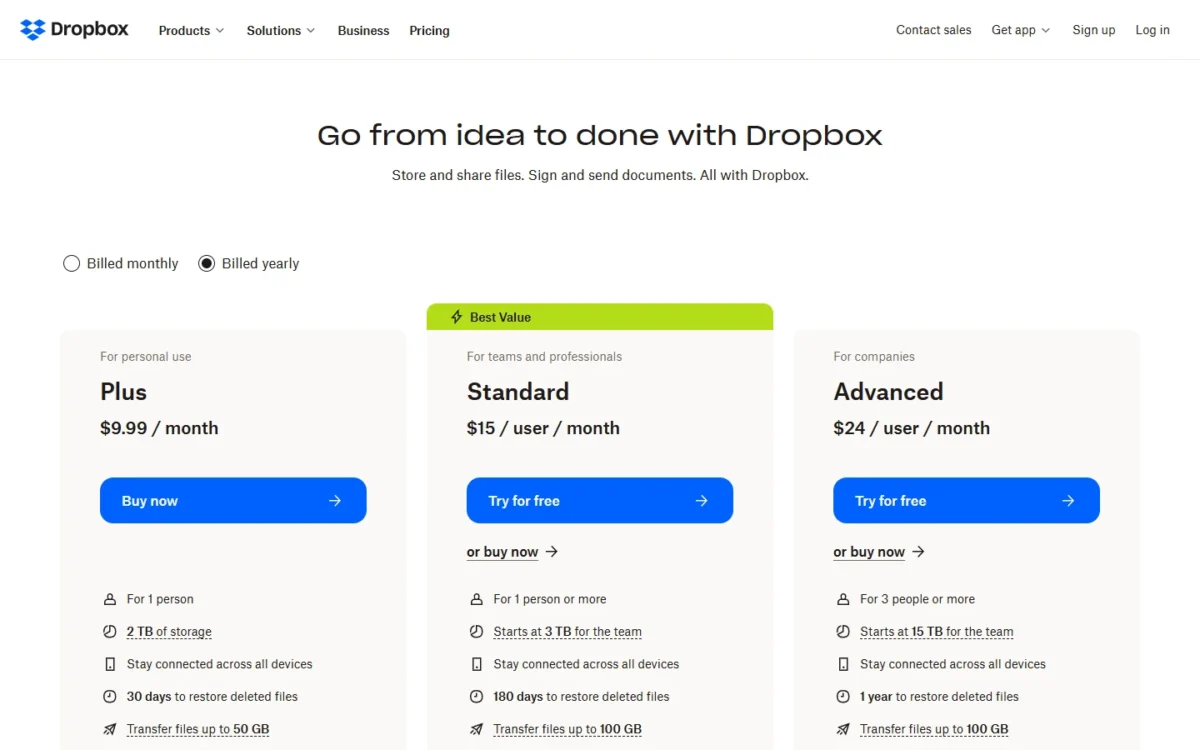
Dropbox pricing starts with Plus at $9.99 a month billed yearly, or $11.99 billed monthly, for one person with 2 TB. Standard costs $15 per user per month billed yearly, or $18 billed monthly. Basic stays free with 2 GB. These are the US list prices on Dropbox’s plans page.
The real decision is how many people need their own login. One person who has outgrown 2 GB should buy Plus. A team that shares work files should price Standard first, because its storage grows with every active license. Advanced is for teams that need single sign-on or end-to-end encryption.
Quick pricing answer
- Dropbox Basic: free, 2 GB, up to 3 devices.
- Plus: $9.99 per month billed yearly ($11.99 billed monthly), 1 person, 2 TB.
- Standard: $15 per user per month billed yearly ($18 billed monthly), from 1 user.
- Advanced: $24 per user per month billed yearly ($30 billed monthly), 3-license minimum.
- Enterprise: contact sales.
- For a 2-10 person team: Standard. Caveat: team storage grows only with licenses people actually use. Checked November 2026.
In This Article (13 sections)
Dropbox Pricing at a Glance
Dropbox’s US plans page lists five plans, from the free Basic plan to Enterprise, which is quoted by sales. Plus costs $9.99 a month on yearly billing. Standard costs $15 per user per month on yearly billing. Advanced costs $24 per user per month on yearly billing.
| Plan | Monthly billing | Annual billing | Best for | Main limitation |
|---|---|---|---|---|
| Basic | Free | Free | Light personal use | 2 GB, up to 3 devices |
| Plus | $11.99 per month | $9.99 per month, billed yearly | One person | For 1 person, 2 TB |
| Standard | $18 per user per month | $15 per user per month, billed yearly | Teams from 1 user | 3 TB plus 1 TB per extra active license |
| Advanced | $30 per user per month | $24 per user per month, billed yearly | Teams with security rules | 3-license minimum |
| Enterprise | Contact sales | Contact sales | Large organizations | Quote only |
Sources: Dropbox plans page, Dropbox business pricing and Dropbox Basic, checked Nov 2026.
Prices are in US dollars from the US pages, read in both billing views; yearly figures are monthly equivalents of a yearly bill. Dropbox says Standard and Advanced cost depends on team size and geographic location, so buyers outside the US may see other numbers.
Dropbox Pricing Plans Explained
Moving from Plus to Standard is moving from one person to a managed team, and moving on to Advanced buys security controls and more storage per license. Sync, sharing and the apps are covered in my Dropbox review. Plan names that still appear in the help center, such as Essentials, Business, Business Plus and Professional, are not on the US plans page and are left out.
Basic: free, 2 GB
Basic is enough only if your files fit in 2 GB on 3 devices or fewer; it keeps 30 days of version history. An account over the limit can stop syncing and uploading, so treat Basic as a way to try the apps, not a home for a photo library.
Plus: $9.99 a month billed yearly
Plus gives one person 2 TB, 30 days to restore deleted files and transfers up to 50 GB, for $9.99 x 12 = $119.88 a year billed yearly, or $11.99 billed monthly. The ceiling is the login count: Plus is “For 1 person”, so a freelancer who hires an assistant needs a second account or Standard.
Family: 2 TB shared by up to six people
Family puts up to six members on one plan with 2 TB of shared storage; each keeps a private account, and everyone gets a shared Family Room folder. In the US, members must be 13 or older.
Family suits a household, not a business: only the Family manager sees billing, and members who run short of space free it up or leave the plan. At checkout, compare Family’s charge with two Plus accounts at $9.99 x 2 x 12 = $239.76 a year billed yearly.
Standard: $15 per user per month billed yearly
Standard costs $15 per user per month billed yearly or $18 billed monthly, with no user minimum. The team gets 3 TB for the first member plus 1 TB for each additional actively-used license, up to 1,000 TB.
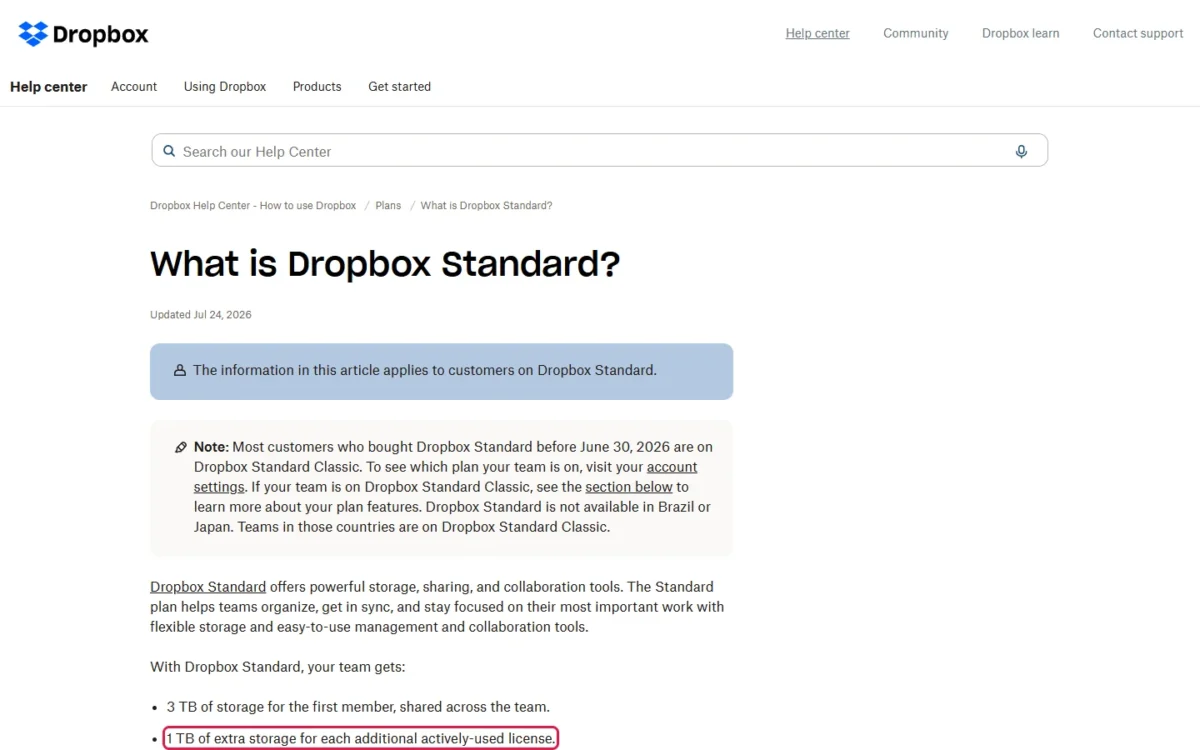
Over Plus, Standard adds 180 days of version history, 100 GB transfers, password-protected links, team folders, an admin console and phone support during business hours. A solo professional pays ($15 – $9.99) x 12 = $60.12 a year more than Plus for 1 TB more and six times the restore window.
Most customers who bought Standard before June 30, 2026 are on Standard Classic, the previous version of the plan. Standard Classic requires a minimum of 3 team members.
Advanced: $24 per user per month, 3 licenses minimum
Advanced earns its $24 – $15 = $9 extra per user per month only when the team needs single sign-on, end-to-end encryption, tiered admins or ransomware detection, or more than 1 TB per added person. The 3-license minimum sets the smallest bill at $24 x 3 = $72 a month on yearly billing, or $30 x 3 = $90 billed monthly.
A HIPAA requirement alone does not force Advanced: the plans page comparison table marks “Enable HIPAA compliance” as Included on Standard and on Advanced, and as Not included on Plus. Dropbox words that row as helping customers subject to HIPAA/HITECH regulations, so a regulated team should confirm the exact setup with Dropbox before it signs.
Storage is 5 TB per actively-used license (15 TB for three people), and restores reach back one year. Inactive licenses aren’t removed automatically, so cut unused seats before renewal.
Enterprise: contact sales
Dropbox publishes no Enterprise price (“Contact sales for pricing”). The page lists a custom number of users, custom storage, transfers up to 250 GB and 24/7 phone support. Ask for a quote once 24/7 support or more than 1,000 TB is a requirement.
Does Dropbox Have a Free Plan or Trial?
Yes: Basic is free with 2 GB, and Standard and Advanced carry a “Try for free” button, with Dropbox’s personal plans page offering Standard “Try free for 30 days”. Plus shows only “Buy now”.
The trial’s exact length and terms arrive in the sign-up email, and Dropbox charges the billing details you gave if you don’t cancel before it ends, so start it when you have real files to move.
Monthly vs Annual Dropbox Pricing
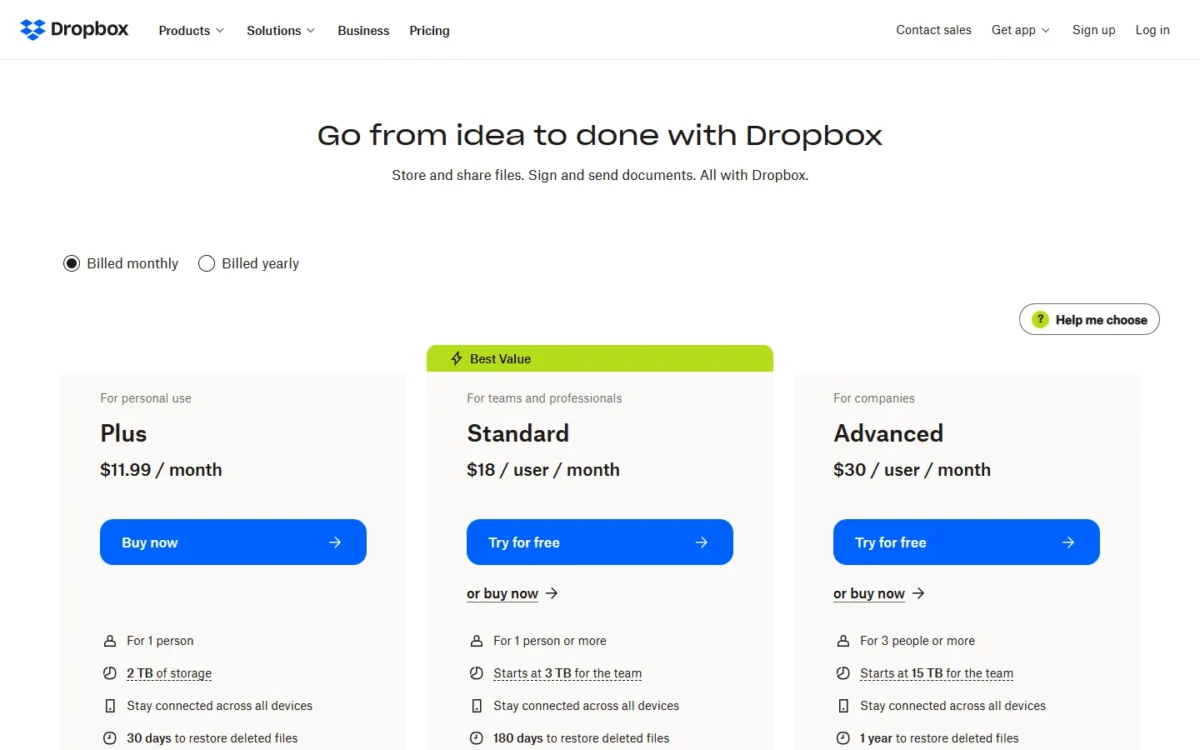
On Plus, yearly billing saves ($11.99 – $9.99) x 12 = $24 a year. On Standard, yearly billing saves ($18 – $15) x 12 = $36 per user a year. On Advanced, yearly billing saves ($30 – $24) x 12 = $72 per user a year.
| Plan | Monthly billing | Annual billing | Year billed monthly | Year billed yearly |
|---|---|---|---|---|
| Plus | $11.99 per month | $9.99 per month | $11.99 x 12 = $143.88 | $9.99 x 12 = $119.88 |
| Standard | $18 per user per month | $15 per user per month | $18 x 12 = $216 | $15 x 12 = $180 |
| Advanced | $30 per user per month | $24 per user per month | $30 x 12 = $360 | $24 x 12 = $288 |
Sources: Dropbox plans page, Billed monthly and Billed yearly views, checked Nov 2026.
The catch is the commitment. A canceled plan runs to the end of its billing cycle, and in most cases Dropbox doesn’t issue refunds. Pay monthly while the team size is still moving, then switch to yearly, because the saving multiplies with every seat.
Additional Dropbox Costs to Consider
Beyond the plan price, a Dropbox bill grows through storage add-ons, extra licenses and the move to Advanced that a security requirement forces.
| Cost type | When it applies | Pricing basis | Notes |
|---|---|---|---|
| 1 TB storage add-on | Plus, Standard or Advanced runs out of space | Per 1 TB, billed on your subscription period | Price shown on your billing page; team maximum 1,000 TB |
| Extra Standard license | Each new member of a Standard team | $15 per user per month, billed yearly | Adds 1 TB of team storage |
| Extra Advanced license | Each new member of an Advanced team | $24 per user per month, billed yearly | Adds 5 TB of team storage |
| Upgrade to Advanced | SSO or end-to-end encryption needed | $24 – $15 = $9 more per user per month, billed yearly | Prorated charge on upgrade |
| Signature requests | A team on Plus, Standard or Advanced sends e-signature requests | 3 requests per month included | Allowance listed on the Dropbox plans page |
Sources: Dropbox help on getting more storage, Dropbox Advanced help and the Dropbox plans page, checked Nov 2026.
A 1 TB add-on bought mid-cycle is charged pro rata until the next bill, and a Plus or Standard subscriber on yearly billing can only buy yearly add-ons.
How Much Does Dropbox Cost for Your Team?
A 5-person team on Standard billed yearly pays $15 x 5 x 12 = $900 a year and gets 3 TB + 4 TB = 7 TB. A 3-person team that needs single sign-on pays, on Advanced billed yearly, $24 x 3 x 12 = $864 a year for 15 TB.
Dropbox cost calculator
This calculator needs JavaScript. The scenario table below gives the same estimate for typical workloads.
Enter what you need. The calculator prices it on every plan at list prices and names the cheapest plan that covers it.
- List prices in USD from Dropbox’s official pricing pages, checked Nov 4, 2026. Tax and regional prices are not included.
- 12-month figures are 12 times the monthly cost at the billing you choose.
- A planning estimate at list prices, not a quote.
Enter the number of people, pick monthly or yearly billing and tick the controls you need. The calculator shows Plus, Standard and Advanced side by side with monthly and yearly costs and names the cheapest plan that covers the need. It leaves out sales tax, regional prices, storage add-ons and Enterprise.
| Team size | Plan | Billing | Monthly equivalent | Annual total | Assumptions |
|---|---|---|---|---|---|
| 1 person | Plus | Annual | $9.99 | $9.99 x 12 = $119.88 | 2 TB for one login |
| 5 users | Standard | Annual | $15 x 5 = $75 | $15 x 5 x 12 = $900 | All 5 licenses active; 3 TB plus 1 TB per added license |
| 10 users | Standard | Annual | $15 x 10 = $150 | $15 x 10 x 12 = $1,800 | All 10 licenses active; 3 TB plus 1 TB per added license |
| 3 users with SSO | Advanced | Annual | $24 x 3 = $72 | $24 x 3 x 12 = $864 | 15 TB, 3-license minimum |
Sources: Dropbox plans page and Dropbox Standard help, checked Nov 2026. Totals are estimates from list prices, not quotes.
Storage counts only actively-used licenses, meaning a unique person who logs in, so a license reserved for a contractor who never signs in adds cost but no space. The same 10-person team billed monthly pays $18 x 10 x 12 = $2,160, or $360 more than yearly.
Which Dropbox Plan Should You Choose?
Basic fits light personal use, Plus one person, Family a household, Standard most teams of 1-10, and Advanced only a team with security rules.
| Your needs | Plan to consider | Why | Main limitation |
|---|---|---|---|
| One person, under 2 GB | Basic | Costs nothing | Over 2 GB, syncing and uploads can stop |
| One person, up to 2 TB | Plus | $9.99 per month, billed yearly | One login; 30-day restore |
| A household of 2-6 people | Family | 2 TB shared, private accounts | 2 TB for everyone |
| A 1-10 person team sharing work files | Standard | Admin console, team folders, 180-day restore, HIPAA compliance enablement | No SSO or end-to-end encryption |
| SSO, encryption or 1-year recovery rules | Advanced | 5 TB per license, from 15 TB | $24 x 3 = $72 per month minimum, billed yearly |
| Custom storage or 24/7 phone support | Enterprise | Custom users and storage | Quote only |
Sources: Dropbox plans page and Dropbox Family FAQs, checked Nov 2026.
The usual upgrade trigger is the second person. Two Plus accounts cost $9.99 x 2 x 12 = $239.76 a year, billed yearly. Standard for two costs $15 x 2 x 12 = $360 a year, billed yearly, for 3 TB + 1 TB = 4 TB of shared space and an admin console. The $360 – $239.76 = $120.24 difference buys control over who sees which folder; skip it if the two of you never share files.
Is Dropbox Worth the Price?
Dropbox is worth paying for when a team shares large files and needs recovery and admin control. It is not worth it for someone whose files fit in 2 GB, or for a team that wants storage bundled with email and office apps.
At five users, Advanced costs $24 x 5 x 12 = $1,440 a year, billed yearly. Standard for the same five costs $15 x 5 x 12 = $900 a year, billed yearly. The $1,440 – $900 = $540 difference buys Advanced’s 5 x 5 TB = 25 TB, single sign-on and one-year recovery. The storage add-on price is shown on your billing page, so a Standard team that needs much more space per person should read it there before ruling out Advanced.
- Skip it if:
- your files fit in Basic’s 2 GB, or your team already pays for storage inside an office suite and only needs a shared folder.
Cheaper Ways to Pay for Dropbox
The cheapest Dropbox routes are billing yearly and matching the plan to your headcount; past that, price a rival.
- Bill yearly. The saving per plan is worked out in the monthly vs annual section above.
- Buy Plus, not Standard, when you work alone. You give up Standard’s extra storage, its 180-day restore window and team folders for the smaller bill.
The usual alternative to Dropbox for a team that already lives in Google apps is Google Drive, and my Google Drive review covers its storage limits.
A team that also needs email and docs can check my Google Workspace pricing guide.
Billing, Discounts and Cancellation
A canceled individual plan drops to Basic at the end of the billing cycle. Your files stay, but above 2 GB you may not be able to sync, upload, share, move or preview them, and Dropbox may delete files you own to get under the limit.
Before deleting, Dropbox sends several email notices and starts with your least recently modified files; deleted files sit in the Deleted files tab for 30 days. The real exit cost of a full 2 TB Plus account is downloading or trimming it to 2 GB, and the over-quota rules spell out the steps.
When a Family manager cancels, every member gets their own 2 GB Basic account. A team that cancels a paid Standard or Advanced subscription goes into a locked state at the end of the cycle, and the team trial help page says it won’t lose any files.
Discounts are narrow: nonprofits and educational institutions get one through sales with a copy of their 501(c)3, and the plans page lists no student tier. A Plus user who moves to a team plan gets remaining credit back as a pro-rated refund.
How I Verified Dropbox Pricing
I read Dropbox’s US plans and business pricing pages in both the Billed monthly and Billed yearly views, plus its help center pages on Standard, Advanced, Family, storage add-ons, trials and cancellation. The region is the US and the currency is US dollars; every price is a published list price, and the team totals are my own math (price x users x months) assuming every license is active.
Enterprise is quoted by sales, and the storage add-on price is shown on your billing page.
Frequently Asked Questions
Is Dropbox Plus billed per user?
No. Plus is a single-person plan at $9.99 a month billed yearly, so it cannot be stretched across a team. A second person needs their own account, a Family invite or a Standard license, and a Plus user who moves to a team plan gets unused credit back as a pro-rated refund.
Can I buy more storage on Dropbox Plus?
Yes. Plus users can buy one or several 1 TB add-ons from the Add-ons tab of dropbox.com/manage. An account billed through the Apple App Store or Google Play can’t buy storage add-ons until it switches to direct Dropbox billing, and a reseller’s customers buy storage packs through that reseller.
Final Pricing Verdict
Buy Plus at $9.99 a month billed yearly if you work alone and need more than 2 GB. Buy Standard at $15 per user per month billed yearly for most teams of 2-10 people, because it adds an admin console from the first license and 1 TB with each person who joins. Move to Advanced only when single sign-on, end-to-end encryption or one-year recovery is a requirement, and budget at least $864 a year for its three licenses.
Bill monthly while you test, then switch to yearly. If file storage is only part of what your team needs, the team collaboration tools I compared show what else the same budget buys.