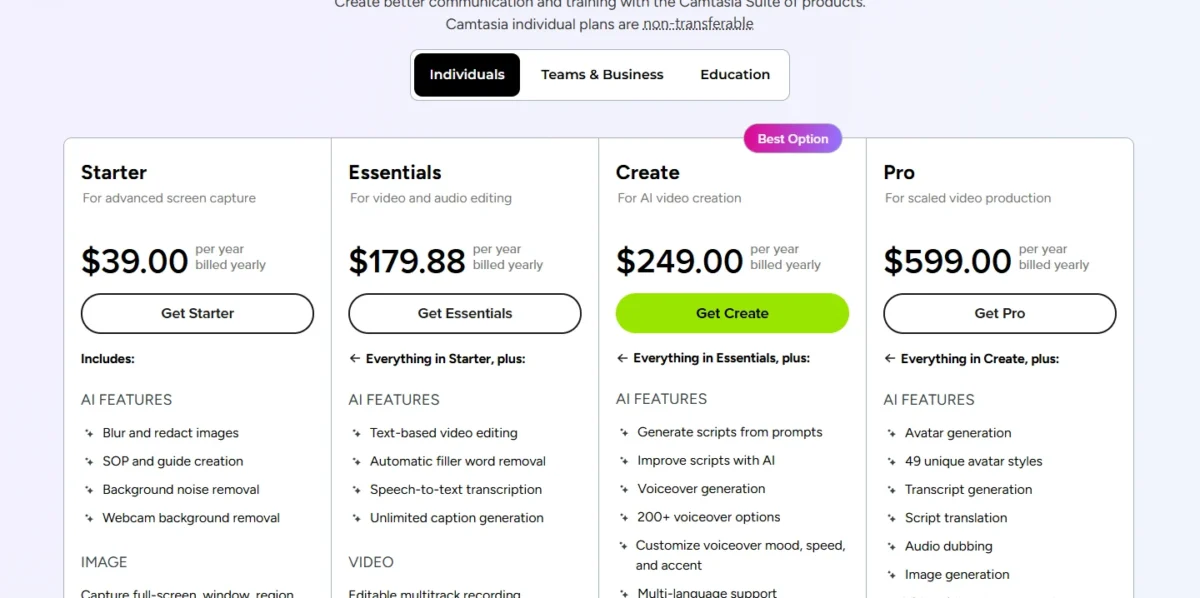
Camtasia pricing starts at $39 per person per year for Starter, then $179.88 for Essentials, $249 for Create and $599 for Pro, in US dollars. TechSmith bills every Camtasia plan yearly, and Essentials is the cheapest one that exports video without a watermark.
This guide is for creators and team leads budgeting Camtasia: what each plan adds, what 1 to 10 people pay, and when a Business License fits better.
Quick pricing answer
TechSmith’s US-dollar list prices, before sales tax, checked October 2026:
- Plans: Starter $39, Essentials $179.88, Create $249 and Pro $599, each per person per year, billed yearly.
- No monthly plan: a monthly figure here is the yearly price divided by 12.
- Free option: Camtasia Online costs $0, and the desktop editor has no time limit but watermarks every export.
- My pick for most solo creators: Essentials, the first plan without the watermark.
- The catch: Starter keeps the watermark, so it is not a plan for publishing video.
- Teams: the Business License is licensed per user and billed yearly, with its price on the Teams & Business tab of TechSmith’s store.
In This Article (13 sections)
Camtasia Pricing at a Glance
Camtasia’s four individual plans cost $39 for Starter, $179.88 for Essentials, $249 for Create and $599 for Pro, per person per year and billed yearly only, and Camtasia Online costs $0.
The table adds the Business License and the site license; Audiate, Camtasia Assets and Screencast Pro bought separately sit under additional costs.
| Plan | Annual billing (USD) | Monthly equivalent | Best for | Main limitation |
|---|---|---|---|---|
| Camtasia Online | $0 | $0 | Recording and simple edits in a browser | Simple editing only, in 1080p |
| Starter | $39 per year | $39 / 12 = $3.25 | Snagit screenshots and step guides | Editor exports carry a watermark |
| Essentials | $179.88 per year | $179.88 / 12 = $14.99 | Solo tutorial and course creators | No AI scripts or voiceover |
| Create | $249 per year | $249 / 12 = $20.75 | Creators who want AI voiceover | No avatars, dubbing or translation |
| Pro | $599 per year | $599 / 12 = $49.92 | Translated or avatar-led video | Highest per-person price of the four |
| Business License | Per user, on the store’s Teams & Business tab | Billed yearly | Teams that reassign seats | Covers Camtasia Editor and Snagit only |
| Enterprise site license | Custom quote | Custom quote | Organizations of about 100 or more | Price only through sales |
Sources: Camtasia plan prices on TechSmith’s education page, Camtasia store, Teams & Business tab, TechSmith on monthly subscriptions, checked October 2026.
These are the US-dollar list prices in the price data TechSmith embeds in its own Camtasia pages, read on Oct 28, 2026. TechSmith sells no monthly Camtasia plan, and US online orders add sales tax. Since June 11, 2026, older Legacy License renewals cost more, which the perpetual-license section explains.
Camtasia Pricing Plans Explained
Each Camtasia plan unlocks one job the plan below cannot do:
- Starter pairs Snagit with a watermarked editor.
- Essentials removes the watermark and adds transcript editing.
- Create adds AI scripts and 200+ voices.
- Pro adds avatars, translation, dubbing, premium assets and unlimited Screencast sharing.
| Feature | Starter | Essentials | Create | Pro |
|---|---|---|---|---|
| Snagit Individual | Included | Included | Included | Included |
| Video export without watermark | Not available | Included | Included | Included |
| Text-based video editing (Audiate) | Higher plan: Essentials | Included | Included | Included |
| Filler-word removal and transcription | Higher plan: Essentials | Included | Included | Included |
| AI scripts from a prompt | Higher plan: Create | Higher plan: Create | Included | Included |
| AI voiceover, 200+ voices | Higher plan: Create | Higher plan: Create | Included | Included |
| Avatars, script translation, dubbing | Higher plan: Pro | Higher plan: Pro | Higher plan: Pro | Included |
| Premium assets | Limited: starter assets | Limited: starter assets | Limited: starter assets | Included: 100M+ |
| Screencast hosting | Limited: 25 videos | Limited: 25 videos | Limited: 25 videos | Included: unlimited sharing |
Sources: TechSmith’s plan articles for Starter, Essentials, Create and Pro, and its plan differences article, checked October 2026.
Camtasia Starter ($39 per year)
Starter is a screenshot plan, not a video-publishing plan: it pairs Snagit Individual with a Camtasia Editor that still adds a watermark. On Starter, the editor appears as “Camtasia Editor – Free” and needs no activation.
That makes the $39 mostly a Snagit purchase: anyone can try the watermarked editor free, while Snagit’s free trial lasts only 15 days. Starter also carries what every plan includes: starter assets, up to 25 hosted videos on Screencast and Camtasia Online.
Starter fits a support writer or trainer who builds step guides in Snagit and records the odd internal clip. Upgrade the day you publish a video for customers or students, because watermark-free export starts at Essentials.
Camtasia Essentials ($179.88 per year)
Essentials is the cheapest Camtasia plan that exports without a watermark. It also adds part of Audiate: transcript-based editing, automatic removal of filler words, speech-to-text, unlimited captions and advanced audio effects.
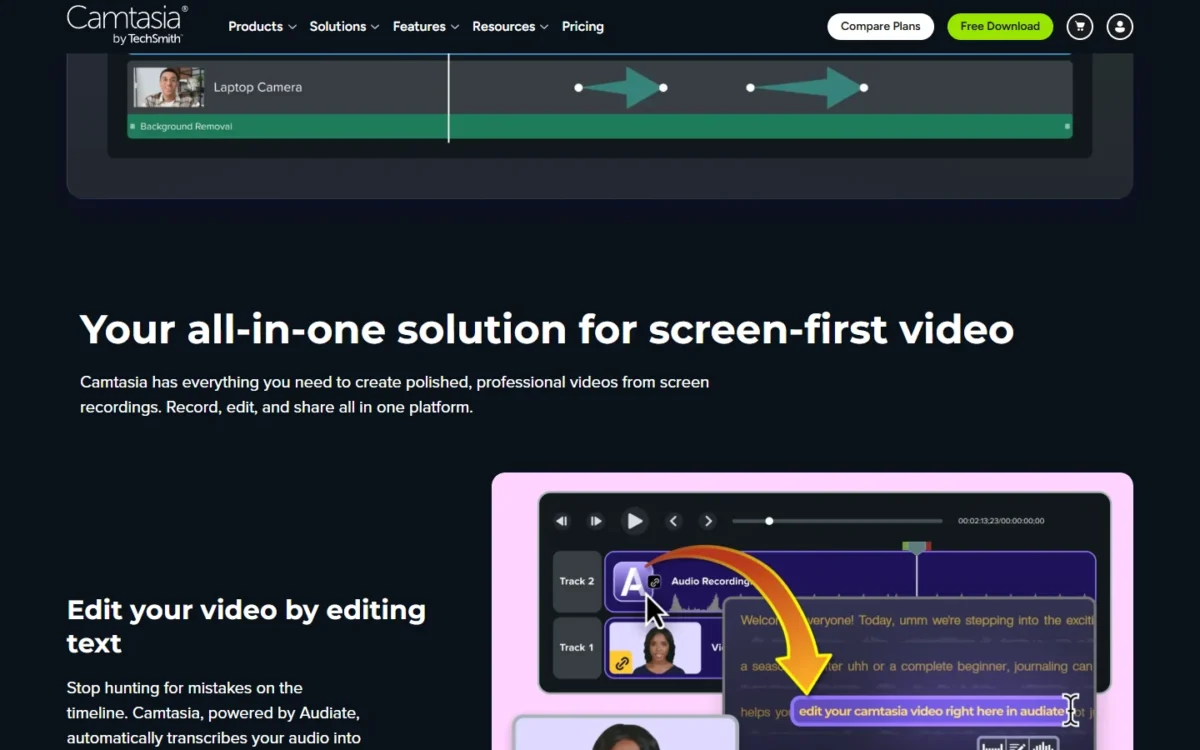
For a course creator who records their own narration, transcript editing changes the workflow: you edit the video by deleting or changing text in a generated transcript. Audiate is a separate download from Camtasia, so plan one extra install per creator. To compare another editor, see my Descript pricing guide.
Essentials costs $179.88 – $39 = $140.88 a year more than Starter, and that gap buys the watermark removal plus the Audiate tools. Move up when you want Camtasia to write or voice the script, because AI scripts and generated voiceover start on Create.
Camtasia Create ($249 per year)
Create adds AI scripts from a prompt and voiceover generation with 200+ voices, for $249 – $179.88 = $69.12 a year more than Essentials. It also cleans up recorded audio by removing background noise, on top of the filler-word removal Essentials already has.
Create suits a creator who would rather type narration than record it, or who reworks scripts often enough that re-recording becomes the bottleneck. The limit is fixed by plan: Create excludes stock avatars, audio dubbing and script translation.
A team that ships the same tutorial in a second language outgrows Create on its first translated video.
Camtasia Pro ($599 per year)
Pro is the plan for localized or avatar-led video, and it costs $599 – $249 = $350 a year more than Create. It adds avatar generation with 49 avatar styles, script translation and audio dubbing. TechSmith states that Pro’s AI features are unlimited and not based on credits.
Pro also includes Camtasia Assets and Snagit Assets, with over 100 million premium royalty-free assets, plus Screencast Pro for unlimited video sharing. Audiate’s translation covers 7 languages and 13 dialects.
The no-credit model matters at volume: a team dubbing a whole course library pays the same per-person price as one translating a single video. Skip Pro if you publish in one language with your own voice, because Essentials or Create already covers that job.
If avatars are your only reason to consider Pro, price that job in a dedicated tool first. My comparison of AI video generators by cost per clip covers that route.
Camtasia Business License for teams
The Teams & Business tab of the Camtasia store sells the Business License per user, billed yearly, for teams of up to 99 users. For more than 99, TechSmith asks you to contact sales.
The license covers Camtasia Editor and Camtasia Snagit, and you receive a software key when you buy.
Its advantages over individual plans are practical. Licenses transfer when your team changes, offline activation works for Snagit and Camtasia, and support adds phone. Individual plans require each user to sign in, cannot be transferred and come with email and chat support.
The trade-off is scope. Audiate, Camtasia Assets and Screencast Pro are sold to Business License holders as separate add-ons, so a team that wants AI voiceover buys Audiate on top. TechSmith lists volume discounts starting at 10 seats without publishing their size.
Enterprise site license
A site license fits organizations of about 100 employees or more, and TechSmith says it can be the more affordable option for teams of 50 or more. One key covers every user for a flat annual fee, and a dedicated success manager handles deployment.
The site license is also the only way to lock a Camtasia price: it holds pricing for 3 years, while every other order is priced at the time of purchase. Prices come only as a custom quote from TechSmith’s sales team.
Is Camtasia Free? Camtasia Online, the Watermarked Editor and Trials
Yes, with limits: Camtasia Online costs $0 and edits in the browser at 1080p, and the desktop Camtasia Editor runs with no time limit but watermarks its exports. Every other app in the plans starts as a trial with a limit, and the table shows which paid plan removes it.
| App | Free limit | Limit removed on |
|---|---|---|
| Camtasia Editor | No time limit; watermark on exports | Essentials, Create, Pro |
| Camtasia Audiate | 7-day trial | Create, Pro |
| Camtasia Snagit | 15-day trial | Starter, Essentials, Create, Pro |
| Camtasia Assets and Snagit Assets | Starter assets only | Pro |
| Screencast | 25 videos; 12-month limit on inactive content | Pro |
Sources: TechSmith: Can I try for free before purchasing a Camtasia plan?, checked October 2026.
The Audiate row lists Create and Pro because Essentials unlocks only select Audiate features. TechSmith requires no credit card to start a Camtasia trial.
The free editor is the right first step: export a real tutorial with the watermark, and pay for Essentials once the timeline fits how you work. Once you do pay, the billing cycle is the next thing to plan for.
Monthly vs Annual Camtasia Pricing: Yearly Billing Only
No, you cannot pay for Camtasia monthly: TechSmith bills Camtasia Editor, Audiate and Assets annually, and sells a monthly subscription only for Screencast.
Pricing note
Every monthly figure on this page is an equivalent, not a bill, and there is no monthly-versus-annual saving to compute. Budget each seat as a single yearly payment.
| Situation | What TechSmith’s terms say |
|---|---|
| You cancel | Access continues until the current subscription period ends |
| You want a refund | Returns within 14 days of purchase; resellers handle their own returns |
| You renew | The yearly fee keeps access to future updates and versions |
| You want to lock today’s price | Prices are set at purchase; only the site license locks them for 3 years |
Sources: TechSmith: Is this a one-time fee?, return policy, price lock, checked October 2026.
The 14-day refund window is your real trial of a paid plan, so test the features you paid for in the first two weeks. Yearly billing replaced the one-time license TechSmith used to sell, which matters if you still own one.
What Happened to the Camtasia Perpetual License?
You can no longer buy Camtasia once: TechSmith moved to an annual subscription-only model with Camtasia 2025, in January 2025. Owners with active maintenance agreements moved automatically to Legacy License subscriptions on February 12, 2025.
Those Legacy renewals rose on June 11, 2026, for subscriptions bought before February 12, 2025, and TechSmith does not publish the size of the increase. Its Legacy License update says Legacy pricing still sits at least 50% below new subscription rates.
The Legacy model is closed to new customers, and any lapse moves you to current subscription pricing. If you hold one, renew on time: a lapse trades a discounted rate for list price.
Owners of older versions get no standard upgrade discount, though TechSmith’s sales team may offer a loyalty discount. Seat extensions on a Legacy License go through sales, TechSmith’s order team or a reseller. Beyond the subscription itself, a few costs land on the invoice separately.
Additional Camtasia Costs to Consider
Two costs sit outside the plan price: sales tax on US online orders, and the add-ons a Business License team buys separately.
| Cost | When it applies | Pricing basis | Notes |
|---|---|---|---|
| Sales tax | Online orders placed in the US | Added at checkout | Tax-exempt buyers enter a Tax ID at checkout |
| Camtasia Audiate | Business License teams that want text editing or AI voices | Separate subscription | Bundled at different levels in Essentials, Create and Pro |
| Camtasia Assets | Business License teams that want premium stock | Separate subscription | Bundled only in Pro among individual plans |
| Screencast Pro | Sharing more than 25 hosted videos | Separate subscription, monthly or yearly | Bundled in Pro |
| Legacy renewal increase | Legacy License holders, from June 11, 2026 | Amount: not stated in TechSmith’s announcement | Applies to subscriptions bought before February 12, 2025 |
Sources: TechSmith on sales tax, Business License add-ons, Legacy License update, checked October 2026.
For a solo buyer, tax is the only extra unless you share more than 25 videos or want premium assets below Pro. For a Business License team, the add-ons are where the budget grows.
How Much Does Camtasia Cost for Your Team?
On individual plans, where each person holds one subscription, three Create users cost $249 x 3 = $747 a year and five Pro users cost $599 x 5 = $2,995. Ten Essentials users cost $179.88 x 10 = $1,798.80 a year.
Camtasia cost calculator
This calculator needs JavaScript. The scenario table below gives the same estimate for typical workloads.
Enter what you need. The calculator prices it on every plan at list prices and names the cheapest plan that covers it.
- List prices in USD from Camtasia’s official pricing pages, checked Oct 28, 2026. Tax and regional prices are not included.
- 12-month figures are 12 times the monthly cost at the billing you choose.
- A planning estimate at list prices, not a quote.
Enter how many creators you have and tick the jobs you need: watermark-free export, AI voiceover, or avatars and translation. The calculator prices the four individual plans side by side and names the cheapest one that covers the need.
It leaves out sales tax, discounts, add-ons and the Business License. Its 12-month line multiplies a rounded monthly equivalent, so Pro can read a few cents above its list price.
| Team size | Plan | Billing | Monthly equivalent | Annual total | Assumptions |
|---|---|---|---|---|---|
| 1 creator | Essentials | Annual | $179.88 / 12 = $14.99 | $179.88 x 1 = $179.88 | Needs watermark-free export and records their own voice |
| 1 creator, AI voiceover | Create | Annual | $249 / 12 = $20.75 | $249 x 1 = $249 | Needs generated narration, no avatars |
| Three creators | Create | Annual | $249 x 3 / 12 = $62.25 | $249 x 3 = $747 | Each creator holds a non-transferable seat |
| Five creators | Pro | Annual | $599 x 5 / 12 = $249.58 | $599 x 5 = $2,995 | Needs avatars or translated video |
| 10 creators | Essentials | Annual | $179.88 x 10 / 12 = $149.90 | $179.88 x 10 = $1,798.80 | Watermark-free export only; no volume discount on individual plans is listed |
Sources: Camtasia plan prices on TechSmith’s education page, checked October 2026. Totals exclude sales tax, group or volume discounts and add-ons.
Ask for a Business License quote instead once seats must move between people, you need a software key or offline activation, or you want phone support. TechSmith lists a Business License discount from 10 users, so the 10-creator row is the point to compare both routes.
Above 99 users, where the store’s Business License stops, TechSmith asks you to contact sales. From about 100 employees, it points organizations to a site license priced by sales.
Camtasia Discounts: Education, Government, Groups and Volume
Students pay $45 USD for Camtasia (a value of $179.88 USD), and educators, healthcare workers, charity workers, military personnel and first responders get 30% off through TechSmith’s group discounts. Government and nonprofit buyers get no discount on the new Business License.
| Buyer | Price or discount | Conditions |
|---|---|---|
| Students | $45 USD (a value of $179.88 USD) | Qualified students verified through StudentBeans in the US, UK and Canada |
| Educators, healthcare, charity, military, first responders | 30% off | Verified through Pion; US, UK and Canada; personal use only |
| Education discount on Camtasia Business | Priced on the store’s Education tab | Full-time students, staff and faculty of K-12 and higher-education institutions; educational use only |
| Government and nonprofit | No discount on the new Business License | Legacy part numbers keep a government tier |
| Business License, 10+ seats | Volume discount; size: not stated on TechSmith’s pages | Contact TechSmith sales or a reseller |
Sources: Camtasia for students, TechSmith discounts, TechSmith: Am I eligible for the education discount?, Individual vs Business License, TechSmith part numbers, checked October 2026.
A student pays $179.88 – $45 = $134.88 less than the value TechSmith quotes.
Group discounts cannot be combined with other promotions and register the license to the verified person, so they suit individuals, not team purchases. TechSmith also partners with StudentBeans for an education discount on individual Snagit and Camtasia subscriptions in the US, UK and Canada.
Which Camtasia Plan Should You Choose?
Essentials fits most solo tutorial makers; choose Create only for AI voiceover, Pro only for avatars or translation, and a Business License when seats must move between people.
| Your needs | Plan to consider | Why | Main limitation |
|---|---|---|---|
| Record and trim short videos in a browser | Camtasia Online, free | Costs $0 and shares videos in 1080p | Simple editing only |
| Screenshots and step guides, rare internal video | Starter, $39 per year | Includes Snagit Individual | Every exported video is watermarked |
| Publish tutorials without a watermark, edit by transcript | Essentials, $179.88 per year | First plan with clean exports and Audiate editing | No AI voiceover |
| Narration you type instead of record | Create, $249 per year | AI scripts and 200+ voices | No avatars, dubbing or translation |
| Videos in other languages or with an avatar presenter | Pro, $599 per year | Translation, dubbing and avatars, not credit-based | The highest individual price |
| Seats that move between people, phone support | Business License | Transferable key and offline activation | Audiate, Assets and Screencast Pro cost extra |
| 100+ people or a 3-year price lock | Enterprise site license | One flat annual fee covers every user | Custom quote only |
Sources: Camtasia plan prices on TechSmith’s education page, Camtasia store, Teams & Business tab, checked October 2026.
Is Camtasia Worth the Price?
Camtasia is worth Essentials for a creator who publishes screen tutorials every week, and worth Pro only for multilingual or avatar-led production. At one tutorial a week, Essentials works out to $179.88 / 52 = $3.46 per published video. For how the editor works day to day, read my Camtasia review.
Skip the video plans (Essentials and up) if: you mainly take screenshots, because Starter’s $39 buys Snagit and its editor is the same watermarked one anyone can use free.
Skip every paid plan if: you only record and make simple edits, which free Camtasia Online, a screen recorder with simple editing, already covers.
AI voice and avatar quality is the question a price list cannot settle. Run your own script through the 7-day Audiate trial before paying the Create or Pro premium.
If a yearly bill does not match how often you record, my ranking of the best screen recording software compares cheaper and free recorders.
How I Verified Camtasia Pricing
I checked every price on this page against TechSmith’s own pages in October 2026, as the US-dollar (USD) list prices in the price data TechSmith embeds in its own Camtasia pages. The four plan prices and free Camtasia Online come from the US-dollar plan offers on TechSmith’s Camtasia education page, and the student price from its student page.
Plan contents come from TechSmith’s help article for each plan. Billing, refund, tax, Legacy License and site-license terms come from its help center, and Business License and education terms from its help articles on license types and education eligibility. The per-user Business License and education prices sit on the store’s Teams & Business and Education tabs.
Totals are list price x people for one year, and monthly equivalents are the yearly price divided by 12.
TechSmith does not publish the size of its 10+ user volume discount, the size of the June 2026 Legacy increase or any Enterprise price. For the Business License and Educators per-user prices, I point you to TechSmith’s store tabs.
Frequently Asked Questions
Is Snagit included with Camtasia?
Yes. Starter, Essentials, Create and Pro all include Snagit Individual, and the Business License includes Camtasia Snagit alongside Camtasia Editor. On Pro, Snagit also gets premium Snagit Assets with unlimited downloads from a royalty-free library, which the other plans keep at starter assets.
Can I upgrade from Essentials to Create mid-year?
Yes. You upgrade from your TechSmith account dashboard, and the cost may be pro-rated from your original purchase date. Within 15 days of renewal, the order can total USD 0.00: you get the new plan only on the renewal date, when its full price is charged.
Can I move my Camtasia plan to a colleague?
No. Individual Camtasia plans are non-transferable and tied to the buyer’s sign-in. If seats must change hands, a Business License key can be reassigned as your team changes, though each license runs on one machine at a time.
Final Pricing Verdict
Buy Essentials if you are a solo creator publishing screen tutorials: it is the first plan without a watermark and it includes transcript editing.
Step up to Create only when you want AI to write or voice your scripts, and to Pro only when translation, dubbing or avatars are part of the job. Stay on free Camtasia Online if you only record and make simple edits in a browser. If you only need quick screen messages, see my Loom pricing guide.
Teams that rotate people should price a Business License on TechSmith’s Teams & Business tab before buying several individual plans. Organizations near 100 employees should ask for a site license and its 3-year price lock.