Loom pricing starts with a free Starter plan; Business costs $18 per user per month and Business + AI $24 per user per month on monthly billing, and Enterprise is quote only. Those are US prices in USD, checked in October 2026.
The real decision is billing. Loom’s Annually view prints a yearly total for your team size, and at 30, 50 and 100 users that total carries a “User tier” label.
Quick pricing answer
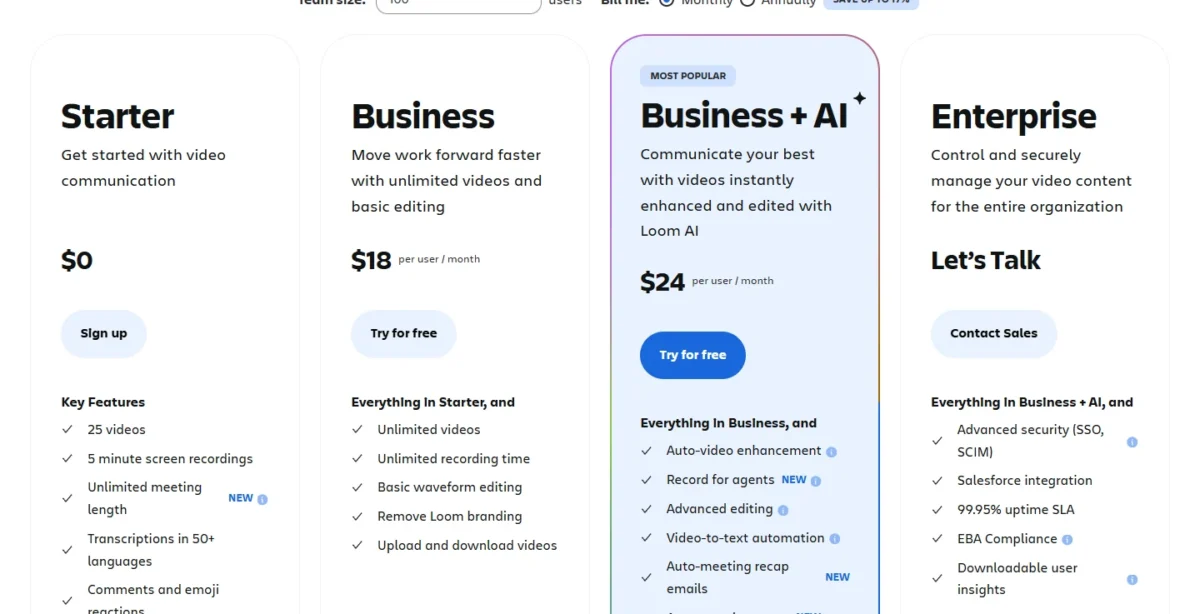
Loom has four plans: Starter ($0), Business ($18 per user per month, billed monthly), Business + AI ($24 per user per month, billed monthly) and Enterprise (Contact sales, annual only).
Starter stops at 25 videos per person and 5-minute screen recordings. Business + AI comes with a 14-day free trial.
For one light user, Starter at $0 is enough. For a team of 5 to 10 that records past 5 minutes, I would put the workspace on Business and choose Business + AI only if the team will use summaries or meeting notes every week.
The caveat: annual prices are yearly totals, printed with a user tier at 30, 50 and 100 users. Checked October 2026, USD.
In This Article (13 sections)
Loom Pricing at a Glance
Loom charges $0 for Starter, $18 per user per month for Business and $24 per user per month for Business + AI on monthly billing, while Enterprise is priced by quote. The annual price is a yearly total that grows with the team.
| Plan | Monthly billing | Annual billing | Best for | Main limitation |
|---|---|---|---|---|
| Starter | $0 | $0 | One person sending short updates | 25 videos per person, 5-minute screen recordings, up to 720p |
| Business | $18 per user per month | $180 per year for 1 user; $18,000 per year at User tier: 91 – 100 | Long walkthroughs and branded videos without AI | No AI summaries, chapters or meeting notes |
| Business + AI | $24 per user per month | $240 per year for 1 user; $24,000 per year at User tier: 91 – 100 | Teams that turn videos into notes, docs and recaps | $24 – $18 = $6 more per user per month than Business |
| Enterprise | Contact sales | Contact sales, annual subscriptions only | Companies that must enforce SSO, SCIM or retention rules | No published price |
Sources: Loom’s pricing page (Monthly and Annually views) and Loom plans on atlassian.com, checked October 2026.
Prices are in USD as both pages served them on October 27, 2026. Monthly prices are per user; annual prices are the yearly totals the page prints for the team size entered. Neither page says whether tax is included.
Loom Pricing Plans Explained
Teams leave Starter because of its 5-minute and 25-video caps, and move to Business + AI for summaries, editing and meeting notes. Enterprise is worth a quote only for SSO, SCIM or retention rules. For the verdict on the product itself, see my Loom review with its pros, cons and limits.
Starter (free)
Starter costs $0 and gives each person 25 videos, 5-minute screen recordings, video quality up to 720p and transcriptions in 50+ languages. Meeting recordings have no length limit on Starter, a line loom.com marks as new.
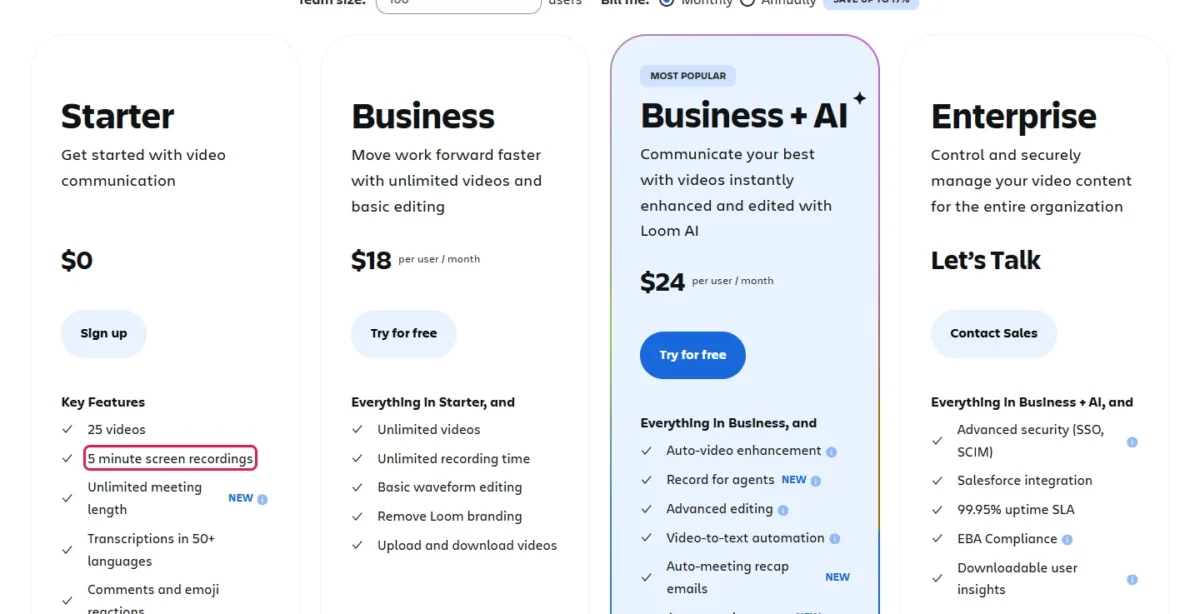
The 5-minute cap is the first limit a long walkthrough hits. A product demo or a code walkthrough rarely fits, and the 26th video needs a paid plan too. If you edit long tutorials, see my Camtasia pricing guide.
The member cap depends on the account. Loom.com lists up to 50 members on Starter, while atlassian.com allows up to 10 users. Accounts created after February 2026 run on Atlassian systems, which limit Free plans to 10 creators, so a new team should plan for 10.
Business ($18 per user per month, billed monthly)
Business costs $18 per user per month on monthly billing and removes Starter’s caps: unlimited videos, unlimited recording length and video up to 4K. It adds trim and stitch, Loom branding removal, uploads and downloads, password-protected videos, engagement insights and priority support.
The trigger to buy is the first video over 5 minutes or the 26th video. Branding removal matters to sales teams, since prospects see the video page. Business has no auto summaries, chapters or meeting notes, so a Business team writes those by hand.
Business + AI ($24 per user per month, billed monthly)
Business + AI costs $24 per user per month on monthly billing, $24 – $18 = $6 more than Business. It adds the Loom AI set, broken down by job in the AI section below.
Loom says the AI suite reduces time spent packaging and sharing Looms after recording and reduces the need to re-record. A team that records long videos but never shares written summaries gets less from it, in my reading. Business + AI also carries the 14-day free trial, the cheapest way to test the AI.
Enterprise (Contact sales)
Enterprise has no published price: it is sold through sales, on annual subscriptions only. It adds Atlassian Guard Standard (enforced SSO, SCIM provisioning, an organization audit log), custom data retention policies, a Salesforce integration, Zoom import, a 99.95% uptime SLA and a dedicated account manager.
A team needs Enterprise when IT must control sign-in and offboarding, not because it is large. Without those rules, Business + AI already holds the same Loom AI set.
Does Loom Have a Free Plan or Free Trial?
Yes, both. Starter is a $0 plan, not a trial, and Business + AI has a 14-day free trial; the Enterprise trial (also 14 days) is arranged through sales.
The trial and the free plan solve different problems. Starter tells you whether 5-minute videos are enough; the trial tells you whether the AI features save enough time to justify $24 per user.
If your team needs more than Starter allows but has no budget, my list of free collaboration tools covers other free options. A team that pays next chooses between monthly and annual billing.
Monthly vs Annual Loom Pricing
Annual billing saves up to 17%: the Annually view prints $1,800 a year for 10 Business users, against $18 x 10 x 12 = $2,160 on monthly billing, 16.7% less.
| Team size | Business, monthly billing x 12 | Business, annual (printed) | Business + AI, monthly billing x 12 | Business + AI, annual (printed) | User tier printed |
|---|---|---|---|---|---|
| 1 user | $18 x 1 x 12 = $216 | $180 | $24 x 1 x 12 = $288 | $240 | None |
| 5 users | $18 x 5 x 12 = $1,080 | $900 | $24 x 5 x 12 = $1,440 | $1,200 | None |
| 10 users | $18 x 10 x 12 = $2,160 | $1,800 | $24 x 10 x 12 = $2,880 | $2,400 | None |
| 25 users | $18 x 25 x 12 = $5,400 | $4,500 | $24 x 25 x 12 = $7,200 | $6,000 | None |
| 30 users | $18 x 30 x 12 = $6,480 | $5,400 | $24 x 30 x 12 = $8,640 | $7,200 | 26 – 30 |
| 50 users | $18 x 50 x 12 = $10,800 | $9,000 | $24 x 50 x 12 = $14,400 | $12,000 | 46 – 50 |
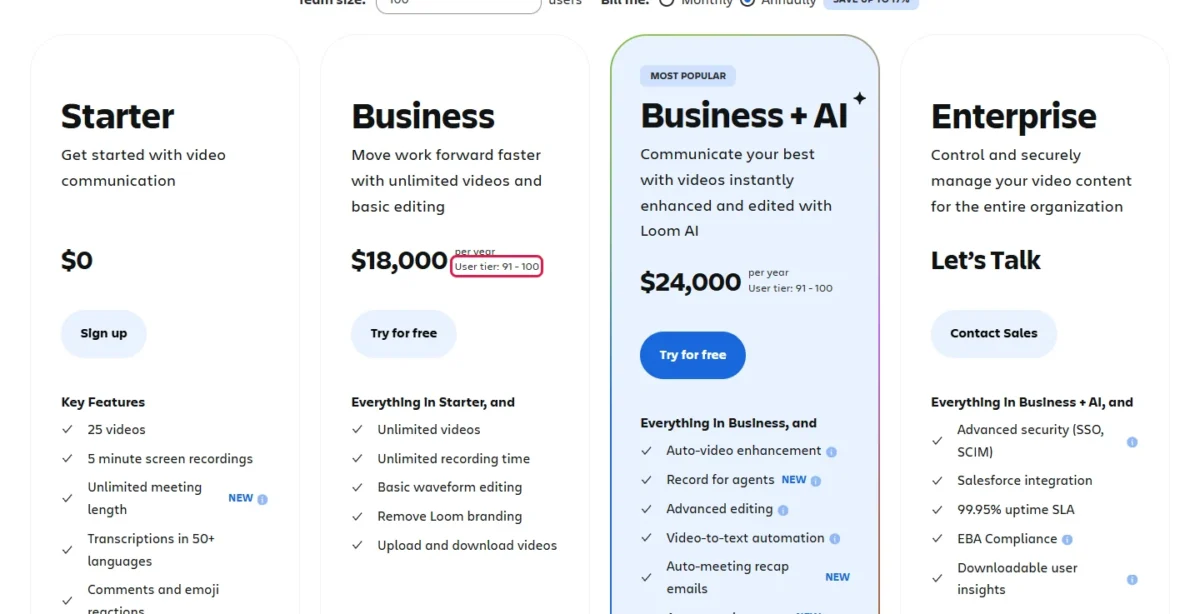
| 100 users | $18 x 100 x 12 = $21,600 | $18,000 | $24 x 100 x 12 = $28,800 | $24,000 | 91 – 100 |
Sources: Loom’s pricing page, Annually view read at team sizes 1, 5, 10, 25, 30, 50 and 100, checked October 2026.
Every annual total equals the page’s one-user price times the team size or the top of its tier. One Business user pays $18 x 1 x 12 = $216 a year on monthly billing against $180 on annual.
At each team size I read, the printed annual total sat below twelve monthly payments, so annual wins for a team that knows its head count for a year.
How Loom annual user tiers work
At 30, 50 and 100 users, the Annually view prints the yearly price for a user tier: 26 – 30 at $5,400 for Business, 46 – 50 at $9,000 and 91 – 100 at $18,000. On atlassian.com, annual subscriptions are charged for the tier that most closely matches your user count.
The practical effect lands on teams just past a tier’s lower bound. A 26-person team sits in the 26 – 30 tier; if checkout bills that tier, it pays $5,400 for 30 seats. That is still below $18 x 26 x 12 = $5,616 on monthly billing, so annual stays cheaper even at the bottom of a tier.
The rule differs by account age. Legacy Loom.com annual plans are charged by the distinct number of users, while accounts on Atlassian systems pay by tier. Confirm which tier your quote uses before you pay.
What Does Loom AI Add to the Bill?
The pricing pages list no separate Loom AI add-on: summaries, chapters and meeting notes come with Business + AI (and Enterprise), at $24 – $18 = $6 more per user per month on monthly billing. On annual billing the gap at the 91 – 100 tier is $24,000 – $18,000 = $6,000 a year.
On monthly billing, 5 users pay $24 x 5 = $120 a month on Business + AI against $18 x 5 = $90 on Business. At 10 users it is $24 x 10 = $240 against $18 x 10 = $180, and at 25 users $24 x 25 = $600 against $18 x 25 = $450.
At the same sizes, the Annually view puts the AI premium at $1,200 – $900 = $300 a year for 5 users, $2,400 – $1,800 = $600 for 10 users and $6,000 – $4,500 = $1,500 for 25 users.
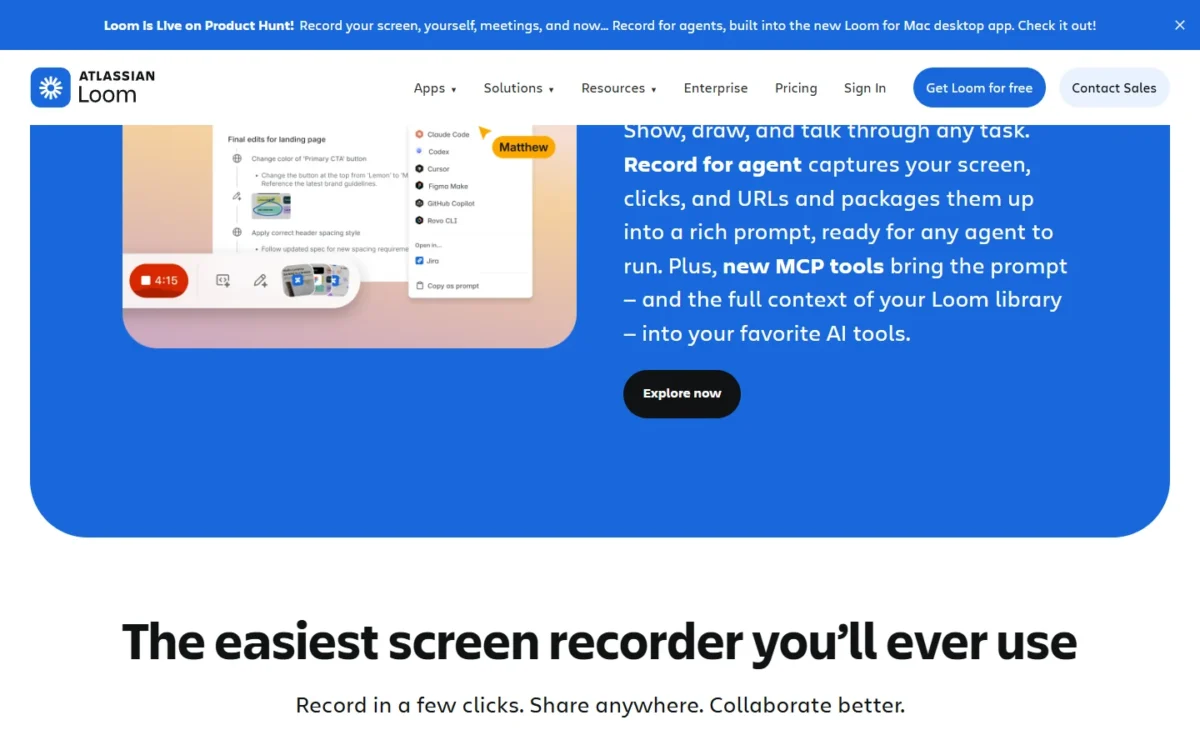
What the premium buys, grouped by the job it replaces:
- Writing after recording: auto summaries and chapters, and video-to-text automation that drafts docs, issues and messages from a video.
- Re-recording: filler word and silence removal and edit by transcript, so a stumble no longer means a second take.
- Meeting follow-up: auto meeting notes and recap emails.
- Agent work: record for agents, a line the pricing page marks as new.
- Visibility: admin insights on top users and total Looms created.
One condition belongs in the budget talk. OpenAI receives transcript text to generate titles and summaries, not full videos or audio, so a team whose policy bars that should stay on Business.
Additional Loom Costs to Consider
Beyond the list price, the bill moves with annual tiers, seats added mid-term, seats removed without refund and the Enterprise quote. The pricing pages do not state whether prices include tax.
| Cost type | When it applies | Pricing basis | Notes |
|---|---|---|---|
| Annual user tier | Annual billing on accounts run on Atlassian systems | The tier that most closely matches your user count | Tiers printed at 30, 50 and 100 users |
| Seats added mid-term | A self-serve team adds a member | Prorated cost, billed in the next month’s cycle | Contract customers get true-up bills above their contracted minimum |
| Deactivated member | An admin removes someone mid-cycle | No refund; the seat forfeits fees for the rest of the cycle | A downgraded Creator keeps access until the cycle ends |
| Loom AI | A team that needs summaries, chapters or meeting notes | $24 – $18 = $6 per user per month, billed monthly | No separate AI add-on listed |
| Enterprise | SSO, SCIM or retention rules | Contact sales, annual subscriptions only | Atlassian Guard Standard included |
| Tax | Every paid plan | The pricing pages do not state whether prices include tax | Check your invoice |
Sources: Loom’s pricing page, Loom plans on atlassian.com, Loom’s billing policy for paid plans and How true-up billing works, checked October 2026.
Under the deactivation rule, removing a contractor mid-cycle does not shrink the current bill. With the rules known, you can price your own team.
How Much Does Loom Cost for Your Team?
A 10-person Business team pays $18 x 10 = $180 a month on monthly billing ($2,160 a year) or $1,800 a year on annual billing. A 25-person Business + AI team pays $24 x 25 = $600 a month ($7,200 a year) or $6,000 a year annually.
Loom cost calculator
This calculator needs JavaScript. The scenario table below gives the same estimate for typical workloads.
Enter what you need. The calculator prices it on every plan at list prices and names the cheapest plan that covers it.
- List prices in USD from Loom’s official pricing pages, checked Oct 27, 2026. Tax and regional prices are not included.
- 12-month figures are 12 times the monthly cost at the billing you choose.
- A planning estimate at list prices, not a quote.
Enter your users and what you need: long videos, no Loom branding or Loom AI. The calculator shows Starter, Business and Business + AI side by side at the monthly list prices and names the cheapest plan that covers the need.
Tax, annual tier quotes, Enterprise and the lower per-user price loom.com shows at 150 users stay out.
| Team size | Plan | Monthly billing | Annual billing, per year | Assumptions |
|---|---|---|---|---|
| Solo light user: 1 user | Starter | $0 | $0 | Under 25 videos, each screen recording under 5 minutes |
| Solo creator: 1 user | Business | $18 x 1 = $18 a month; $18 x 1 x 12 = $216 a year | $180 | Videos over 5 minutes, no AI |
| Small AI team: 5 users | Business + AI | $24 x 5 = $120 a month; $24 x 5 x 12 = $1,440 a year | $1,200 | Summaries and meeting notes every week |
| Ten-person team: 10 users | Business | $18 x 10 = $180 a month; $18 x 10 x 12 = $2,160 a year | $1,800 | Long videos and no Loom branding, no AI |
| AI-first team: 25 users | Business + AI | $24 x 25 = $600 a month; $24 x 25 x 12 = $7,200 a year | $6,000 | Every user on AI |
| 100-user company: 100 users | Business | $18 x 100 = $1,800 a month; $18 x 100 x 12 = $21,600 a year | $18,000 at User tier: 91 – 100 | Long videos, no AI |
Sources: Loom’s pricing page, Monthly and Annually views, checked October 2026.
Each total is a list-price estimate, not a quote: tax, seats added mid-term and Enterprise are excluded. Annual figures are the totals the page prints at that team size.
At a team size of 150, loom.com’s Monthly view prints a lower per-user price: $16.50 per user per month for Business and $22 for Business + AI, billed monthly.
For 150 Business users that is $16.50 x 150 = $2,475 a month, or $16.50 x 150 x 12 = $29,700 a year. The page does not say at which team size the lower price starts.
Which Loom Plan Should You Choose?
Starter fits one person under 25 short videos, Business fits long videos without AI, and Business + AI fits a team that wants summaries and meeting notes. Enterprise fits only a company that must enforce SSO, SCIM or retention rules.
| Your needs | Plan to consider | Why | Main limitation |
|---|---|---|---|
| Fewer than 25 short videos per person | Starter, no upgrade | $0 covers it | 5-minute screen recordings, 720p |
| Videos over 5 minutes or no Loom branding | Business | Unlimited length and branding removal | No AI summaries, chapters or meeting notes |
| Summaries, chapters, filler removal or meeting notes | Business + AI | These come only with this plan and Enterprise | $24 against $18 per user per month on Business |
| Testing AI before paying | Business + AI trial | 14-day free trial | Self-serve trial covers Business + AI; an Enterprise trial goes through sales |
| A head count stable for a year | Annual billing | Every annual total printed sat below twelve monthly payments; at 26 users the 26 – 30 tier’s $5,400 is below $18 x 26 x 12 = $5,616 | From 26 users, the price follows the user tier |
| Enforced SSO, SCIM or data retention | Enterprise | Atlassian Guard Standard and retention policies | Annual only, price by quote |
Sources: Loom’s pricing page, checked October 2026.
The plan is chosen; whether it is worth its price for your team is the last check.
Is Loom Worth the Price?
Loom is worth $18 or $24 per user for a team that replaces meetings or written walkthroughs with async video communication longer than 5 minutes every week. It is not worth paying for a light user under 25 short clips: Starter covers that person at $0.
The price is paid per seat, so the test is usage: count the videos over 5 minutes your team sends in a month before you buy seats for everyone. If Loom’s plans do not fit, compare my Loom alternatives.
- Skip it if:
- you record occasionally or only need meeting notes; skip Business + AI if your policy bars sending transcripts to an AI vendor.
If you are weighing a Loom alternative, my comparison of team collaboration tools widens the choice.
Billing, Discounts and Refunds
On atlassian.com, monthly plans are paid by credit card (MasterCard, Visa or American Express) or PayPal, and annual plans by credit card, bank transfer or check. Loom.com accepts credit cards, with ACH through its sales team.
On atlassian.com, monthly plans can be refunded within the first paid month after the trial, and annual plans within 30 days of payment. Under Loom’s billing policy, legacy Loom.com plans without a contract cancel at the next renewal, with no prorated refund. Confirm the refund terms before an annual commitment.
Loom has an Education plan for verified teachers and students, and Atlassian lists a discount for nonprofits. Neither page publishes the discount amount.
Where you buy also changes the tools you get. For now, only atlassian.com purchases get Atlassian’s Administration hub, recording entry points in Confluence and Jira, and SSO/SCIM through Atlassian Guard.
How I Verified Loom Pricing
I read loom.com/pricing and atlassian.com/software/loom/pricing on October 27, 2026, in the Monthly and Annually views, for the US region in USD. On loom.com I read the Annually view at team sizes of 1, 5, 10, 25, 30, 50 and 100, and the Monthly view at 150.
Billing rules come from both pages’ FAQs and two Atlassian Support billing pages. Monthly totals are price x users x months; annual figures are the totals the page prints.
Loom does not publish the Enterprise price, the Education or nonprofit discount amounts, whether prices include tax, or where the lower monthly price begins. The tables hold published prices and calculated totals; the plan advice is my reading of them.
Frequently Asked Questions
Is Loom limited to 5 minutes?
Only Starter screen recordings stop at 5 minutes. Meeting recordings on Starter have no length limit, and the paid plans list unlimited recording length. A team on Starter that records demos hits the cap first; on a newer account, budget the Business upgrade for every member, as the last question explains.
Can Loom record for 1 hour?
Yes, on Business, Business + AI and Enterprise, which list unlimited video recording length. On Starter, only a meeting recording can run that long. A one-hour screen recording therefore needs at least one Business seat, at $18 per user per month on monthly billing or $180 a year for one user on annual billing.
Does Loom charge for every workspace member?
Monthly plans bill the exact number of Loom users. On legacy Loom.com accounts, Creator Lite members are free and do not change the price. Accounts run on Atlassian systems do not support Creator Lite roles on paid plans, so on a newer account I would budget every member you add as a paid user.
Final Pricing Verdict
One light user should stay on Starter at $0. A team of 5 to 10 that records past 5 minutes should put the workspace on Business at $18 per user per month, billed monthly.
Choose Business + AI at $24 per user per month, billed monthly, only if the team will use summaries or meeting notes each week. On a newer account, price every member as a paid user. For the full field, see my list of the best screen recording software.
Once the head count is stable for a year, switch to annual billing: every total the Annually view printed is below twelve monthly payments. The first user tier it printed is 26 – 30, so from 26 users confirm the tier on the quote. Ask for Enterprise only when IT must enforce SSO, SCIM or retention rules.