

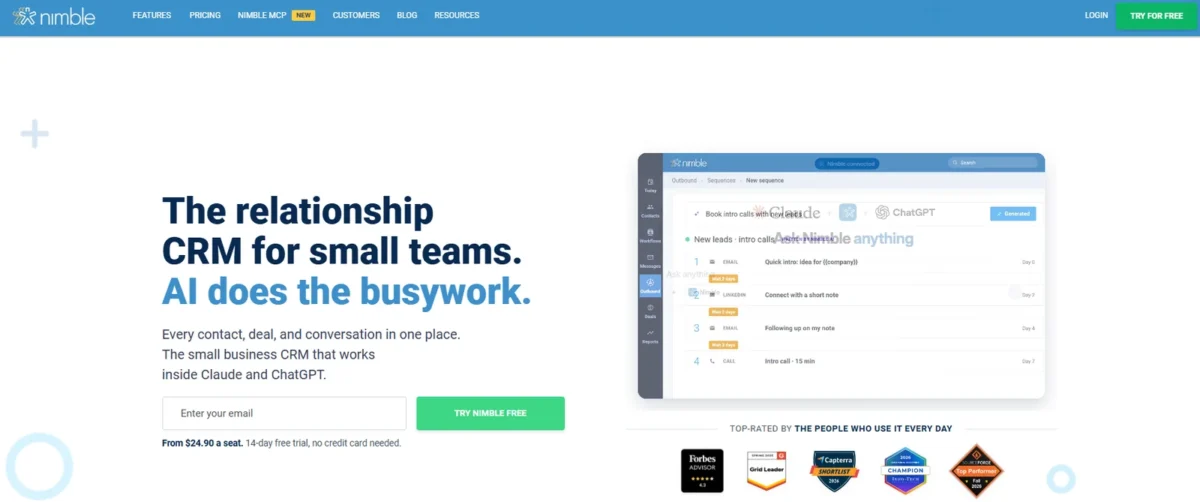
Nimble vs Copper comes down to your inbox and the plan gate you accept. Nimble fits a Microsoft 365 or mixed-inbox team that wants workflows, sequences and reports on one plan at $24.90 per seat per month, billed annually.
Copper fits a Google Workspace team that turns won deals into projects, and its first tier with workflow automation, Professional, costs $59 per seat per month, billed annually.
Quick verdict
The deciding difference is where each vendor puts its plan gates. Nimble sells one plan with Microsoft 365 and Google sync, Workflows, sequences, reports and API access. Copper works inside Google Workspace and holds workflow automation, reports and its API for Professional, and email series for Business.
Ten seats on annual billing cost $2,988 a year on Nimble ($24.90 x 10 x 12) and $7,080 on Copper Professional ($59 x 10 x 12).
The trade-off: Nimble caps outreach at 1,000 emails per license per month and storage at 2 GB per seat. Copper’s cheaper Basic seat stops at 2,500 contacts with no workflow automation.
In This Article (10 sections)
Nimble vs Copper at a Glance
Nimble sells one plan, Nimble Business, while Copper sells three tiers from $23 to $99 per seat per month billed annually and starts workflow automation at Professional.
| Attribute | Nimble | Copper |
|---|---|---|
| Best for | Microsoft 365 or mixed-inbox teams that run outreach | Google Workspace teams that deliver projects |
| Plans | One: Nimble Business | Three: Basic, Professional, Business |
| Starting price | $24.90 | $23 (Basic) |
| Plan with workflow automation | Nimble Business | Professional at $59 |
| Email and calendar | Microsoft 365 and Google Workspace | Google Workspace; Microsoft 365 not listed on copper.com/ |
| Contacts | 25,000 per account | 2,500 / 15,000 / Unlimited by plan |
| Main limitation | 1,000 emails per license per month; 2 GB per seat | Workflows, reports and API start at Professional |
Sources: Nimble pricing page, Nimble Pricing Details, Copper pricing page, Copper integrations FAQ, checked October 2026.
Entry prices look close; they split once a team needs automation, which Copper prices at more than twice Nimble’s seat.
Key Differences Between Nimble and Copper
Nimble syncs Microsoft 365 and Google and lists workflows, sequences and reports on its one $24.90 plan. Copper runs inside Gmail and Google Calendar and has project pipelines on every plan.
- Email platform: Nimble syncs Microsoft 365 both ways and adds an Outlook add-in and Teams. Copper lists Google Workspace integrations, and copper.com/pricing lists no Outlook or Microsoft integration.
- One plan vs three tiers: Nimble’s single plan holds workflows, sequences, reports and API access. Copper splits them across three tiers, so the job you need sets the Copper price.
- Projects: Copper puts project pipelines on every plan for delivering won work. Nimble’s Workflows are kanban boards for any process, which a service team shapes into delivery stages itself.
- Capture: Nimble Prospector runs in Chrome, Firefox, Safari and Edge and inside Outlook and Gmail. Copper captures contacts through its Chrome extension in Gmail.
- Enrichment: Every Nimble account has enrichment credits for finding emails, phones and job titles, and add-on plans share extra credits across the team. Copper lists contact enrichment on Basic.
A team leaning toward Nimble can weigh its caps in my full Nimble CRM review before a trial.
Copper’s Google-first design and its weak spots get the same treatment in the Copper CRM review.
Nimble vs Copper: Features Compared
Nimble puts each job on its one plan, while Copper ties most of them to Professional or Business.
| Feature | Nimble | Copper |
|---|---|---|
| Microsoft 365 and Outlook sync | Included | Not listed on copper.com/ |
| Gmail and Google Calendar sync | Included | All plans |
| Google Sheets and Looker Studio | Not listed on nimble.com/ | Professional |
| Workflow automation | Included | Professional |
| Email sequences (Copper: email series) | Limited: 1,000 emails per license per month | Business |
| Bulk email with open tracking | Included | Professional |
| Project pipelines | Not listed on nimble.com/ | All plans |
| Deal and pipeline reports | Included | Professional |
| Custom reports | Not listed on nimble.com/ | Business |
| Team permissions | Included | Professional |
| Okta SSO | Not listed on nimble.com/ | Business |
| API access | Included | Professional |
Sources: Nimble pricing page, Copper pricing page, checked October 2026.
Inbox and calendar: Microsoft 365 vs Google Workspace
Nimble works with both Microsoft 365 and Google Workspace, while Copper groups its email and calendar integrations under Google Workspace alone.
Nimble runs an automatic two-way Microsoft 365 contact sync, syncs Outlook email and calendar, and adds an Outlook add-in for desktop, browser and mobile. On Google, it syncs Gmail interaction history and runs two-way sync with multiple Google Calendars, while Google Contacts sync runs one way.
Copper puts its Chrome extension, Gmail email, contact and file sync, Calendar, Contacts and Drive on every plan, Basic included. Professional adds Google Sheets and Looker Studio, and Copper also brings Gemini quick replies into Gmail.
Verdict: Inbox and calendar
Depends on your stack. Pick Nimble for a Microsoft 365 or mixed team, since copper.com/pricing lists no Outlook or Microsoft integration; pick Copper for a team that lives in Gmail and Google Calendar. Connect your own mailbox during the 14-day trial before you pay.
Contacts, fields and limits
Copper’s contact cap is the limit a growing team meets first: Basic stops at 2,500 contacts and Professional at 15,000, while Nimble allows 25,000 per account.
Nimble’s cap belongs to the account, so two seats and ten seats share the same 25,000. Past it, 10,000 more contacts cost $10 a month, or $10 x 12 = $120 a year for the whole account.
Copper’s route past 15,000 is Business, with unlimited contacts at $99 per seat per month, billed annually. Storage runs the other way: Nimble gives 2 GB per seat, while copper.com/pricing lists no storage limit.
Custom fields split the same way: 1,000 on Nimble, against 25 on Copper Basic, 50 on Professional and unlimited on Business.
Automation and email outreach
Nimble includes Workflows with triggers, group messages and email sequences on its one plan, while Copper needs Professional for workflow automation and bulk email and Business for email series.
Nimble’s triggers create an activity, send a message, add notes, send notifications or assign a tag as a contact moves through a Workflow. Each license gets 1,000 emails a month, shared by group messages and sequences and sent through your own email provider.
A five-seat account therefore sends 1,000 x 5 = 5,000 emails a month before buying a pack. Copper Basic automates tasks only; Professional adds email automation and open tracking, and Business adds click tracking.
Verdict: Automation and outreach
Nimble fits better for a small team that runs sequences on a budget. Sequences come with its one plan, while Copper’s email series need Business at $99 per seat per month, billed annually. Past 1,000 emails per license a month, Nimble sells a 2,000-email pack for $15 a month.
Pipelines, deals and projects
Both products give customizable deal pipelines, but Copper adds project pipelines and project templates on every plan, while Nimble offers Workflows boards instead.
Nimble includes unlimited pipelines with industry templates and kanban or list views. Its Workflows templates cover hiring, PR and fundraising, so they suit any people process rather than client delivery alone.
Copper turns a closed opportunity into a project. Basic, however, lacks sales opportunities and leads, so I would treat Professional as the real starting tier for that handoff.
Verdict: Projects
Copper fits better for agencies and consultancies that deliver what they sell: project pipelines are on every plan, and Professional adds the opportunities that feed them. Nimble can track delivery stages on a Workflows board, but it does not sell Workflows as project management.
Reporting and team permissions
Nimble includes team reports and team permissions on its one plan, while Copper starts reports and permissions at Professional and keeps custom reports, multi-currency and Okta SSO for Business.
Nimble’s reports chart conversion rate, deals won and lost and revenue forecast. Admins can let a member view and edit all deals, view all deals, or view only their own.
Copper’s reports also feed Google Sheets and Looker Studio, which suits a manager who builds dashboards in Sheets. Build one real report in each trial if dashboards drive the choice.
Nimble vs Copper Pricing
Nimble Business costs $24.90 per seat per month billed annually or $29.90 billed monthly, while Copper Professional, the comparable tier, costs $59 billed annually or $69 billed monthly.
| Plan tier | Nimble, billed annually | Nimble, billed monthly | Copper, billed annually | Copper, billed monthly |
|---|---|---|---|---|
| Entry seat | $24.90 (Nimble Business) | $29.90 (Nimble Business) | $23 (Basic) | $29 (Basic) |
| Workflows, reports and API | Nimble Business | Nimble Business | $59 (Professional) | $69 (Professional) |
| Email sequences or series | Nimble Business | Nimble Business | $99 (Business) | $134 (Business) |
Sources: Nimble pricing page, Nimble Pricing Details, Copper pricing page, checked October 2026.
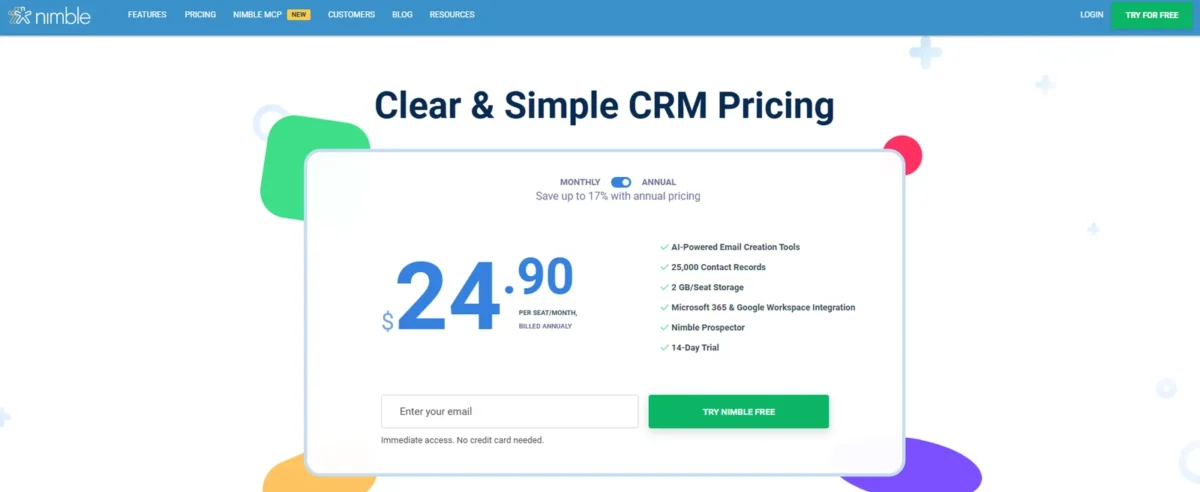
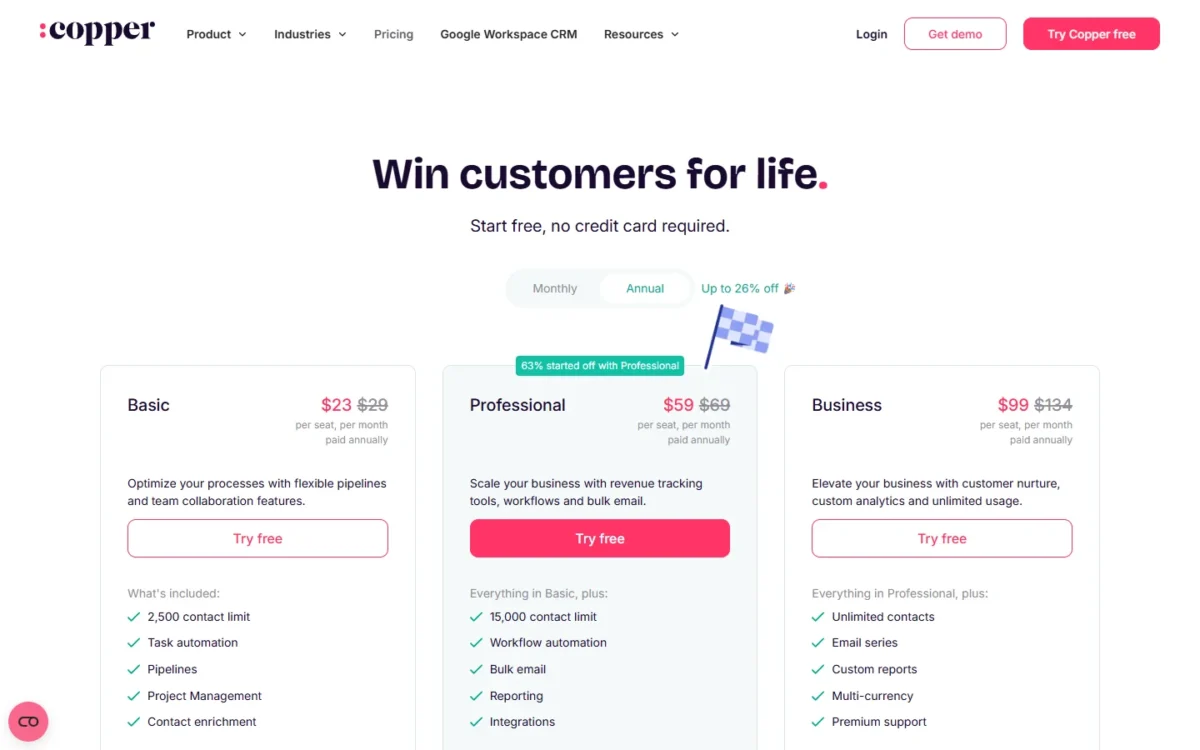
Neither lists a free plan, and both offer a 14-day trial without a card. Copper’s trial runs on Business, so a team that tests email series there loses them on Professional.
Copper’s annual billing takes up to 26% off, while Nimble offers annual subscribers a discount. Copper’s prices exclude taxes and fees where applicable.
Nimble bills every license on the account, not active users, and gives no refunds on cancellation. An annual plan can drop to monthly only in its last month, so annual billing is a 12-month commitment.
Every Copper plan, fee and limit beyond this pair is in Copper’s plans and fees in detail.
Cost for a 5-person and a 10-person team
A five-person team on annual billing pays $24.90 x 5 x 12 = $1,494 a year on Nimble and $59 x 5 x 12 = $3,540 on Copper Professional.
| Plan and billing | 5 seats a year | 10 seats a year |
|---|---|---|
| Nimble Business, annual | $24.90 x 5 x 12 = $1,494 | $24.90 x 10 x 12 = $2,988 |
| Nimble Business, monthly | $29.90 x 5 x 12 = $1,794 | $29.90 x 10 x 12 = $3,588 |
| Copper Basic, annual | $23 x 5 x 12 = $1,380 | $23 x 10 x 12 = $2,760 |
| Copper Professional, annual | $59 x 5 x 12 = $3,540 | $59 x 10 x 12 = $7,080 |
| Copper Professional, monthly | $69 x 5 x 12 = $4,140 | $69 x 10 x 12 = $8,280 |
| Copper Business, annual | $99 x 5 x 12 = $5,940 | $99 x 10 x 12 = $11,880 |
Sources: Nimble Pricing Details, Copper pricing page, checked October 2026.
Assumptions: list prices per seat in USD for 12 months; no tax, no add-ons and no extra contact, storage or email packs.
Copper Basic undercuts Nimble by $1.90 per seat per month ($24.90 – $23), but that saving buys a 2,500-contact plan with no workflow automation, leads or reports. A CRM cost calculator template adds onboarding and add-ons to this seat math.
Costs beyond the seat price
Nimble’s extras are add-ons and packs, while Copper’s extra cost is the tier jump a limit forces.
On Nimble:
- Email Marketing add-on: $15 per company per month
- Web Forms and Web Chat: free for 30 days, then $12 per month per team
- 10,000 more contacts or 10 GB more storage: $10 a month each
- Email packs: 2,000 emails for $15, 10,000 for $69, 25,000 for $99 per month
A team that adds both email marketing and web forms pays $15 + $12 = $27 a month for the account.
On Copper, Basic to Professional adds $36 per seat per month ($59 – $23), and Professional to Business adds $40 ($99 – $59), both billed annually. Basic breaks at 2,500 contacts or the first workflow; Professional breaks at 15,000 contacts, email series, custom reports or SSO.
Integrations, Support and Security
Both connect through Zapier, but Copper holds its native apps and API for Professional, while Nimble lists 100+ integration partners and API access on its one plan.
Copper connects to 5,000+ apps through Zapier and to LinkedIn on every plan. Mailchimp, DocuSign, QuickBooks, PandaDoc, Slack, Zendesk and the API start at Professional, and select integrations need Business.
Nimble adds a PhoneBurner power dialer and a native Mailchimp integration. Check your three to five daily apps against each list; a bigger count does not help if your billing tool is missing.
Nimble offers email support, daily live Q&A sessions, weekly webinars and free 1:1 calls. Copper offers live chat, a help center, office hours and webinars on every plan.
Copper says it encrypts data in transit and at rest and runs outside penetration tests. Nimble states it is GDPR compliant; ask it for security documentation if a questionnaire is part of your purchase.
Nimble vs Copper: Pros and Cons
Nimble’s strengths come from its single plan, and its weak spots are caps and paid add-ons.
Pros
- Workflows, sequences, reports and API on one plan
- Outlook add-in and Teams support beside Gmail sync
- Prospector captures contacts in four browsers
- 25,000 contacts per account, with 10,000 more for $10 a month
Cons
- 1,000 emails per license per month before paid packs
- 2 GB of storage per seat
- Email marketing and web forms are paid add-ons
- Exports leave notes and email correspondence behind
- No refunds on cancellation
Copper’s strengths are Google Workspace depth and project delivery, and its weak spots are the tier gates.
Pros
- Gmail, Calendar, Contacts and Drive integration on Basic too
- Project pipelines and templates on every plan
- Business adds unlimited contacts, custom reports, multi-currency and Okta SSO
- Zapier and LinkedIn on every plan
Cons
- Workflow automation, reports and API start at Professional ($59, annual)
- Email series wait for Business ($99, annual)
- Basic caps contacts at 2,500 and lacks sales opportunities
- No Microsoft 365 or Outlook integration listed
- Activity history leaves only through a Support export
Which Is Better for Your Needs?
Pick by your inbox first and your outreach second.
| Your priority | Better fit | Reason | Trade-off |
|---|---|---|---|
| Outlook or Microsoft 365 inbox | Nimble | Two-way Microsoft 365 sync and an Outlook add-in | Google Contacts sync is one way |
| Gmail and Google Calendar all day | Copper | Google integration on every plan | Workflows need Professional at $59 |
| Sequences on a budget | Nimble | Included in its one plan | 1,000 emails per license per month |
| Lowest seat for contacts and pipelines | Depends | Copper Basic is $23, Nimble $24.90 | Basic stops at 2,500 contacts |
| Delivering won work as projects | Copper | Project pipelines on every plan | Basic lacks sales opportunities |
| More than 25,000 contacts | Depends | Nimble adds 10,000 for $10 a month; Copper Business is unlimited | Copper Business is $99 per seat, billed annually |
| Okta SSO or multi-currency | Copper | Both included on Business | $99 per seat on Business, billed annually |
Sources: Nimble pricing page, Nimble Pricing Details, Copper pricing page, checked October 2026.
A three-person consultancy on Microsoft 365 that sends follow-up sequences should take Nimble. A Google Workspace agency that hands won deals to a delivery team should take Copper Professional, unless sequences are its main job. A team that also has Salesforce on its list can open Salesforce vs Copper before deciding.
Switching Between Nimble and Copper
Both directions travel by spreadsheet: Copper’s importer names Salesforce, Pipedrive and Zendesk Sell but not Nimble, and Nimble imports through a CSV Import Wizard.
From Copper to Nimble:
- Export people, companies, opportunities, projects, tasks and leads; Copper emails a link to an .xlsx file.
- Ask Copper Support for the one-time activity export.
- Save the files as CSV and load the contacts with Nimble’s CSV Import Wizard.
- Rebuild projects as Workflows boards and recreate automations.
From Nimble to Copper:
- Export contacts, deals and activities to CSV; notes and email correspondence stay behind.
- Set up Copper’s custom fields before the import.
- Import companies, then people, then opportunities, starting with a small test file.
- Revert any import that maps wrong, then rebuild sequences and workflows.
Sources: Nimble import guide, Nimble export guide, Copper import guide, Copper export guide, checked October 2026.
Keep the old account until the team has checked its key records, because neither export carries everything. If HubSpot is the other name on your Nimble shortlist, see HubSpot vs Nimble.
How I Compared Nimble and Copper
I compared Nimble Business with Copper Basic, Professional and Business on the pricing pages and help centers read in October 2026.
Nimble’s prices come from its Nimble Pricing Details article, which prints $24.90 per license per month when purchased annually and $29.90 when billed month-to-month. Copper publishes no storage limit, and Nimble lists no SSO or custom report builder. Each verdict is my reading of those plan facts.
Final Verdict: Nimble or Copper?
Choose Nimble if your team runs on Microsoft 365 or needs sequences without a top-tier price; choose Copper if your team lives in Google Workspace and delivers won deals as projects.
Choose Nimble if
- Your team reads mail in Outlook or mixes Microsoft and Google accounts
- Workflows and sequences must sit in one plan, without a $99 tier
- Reps prospect on LinkedIn and the web with a browser extension
- You will pass 15,000 contacts but stay under 25,000
Choose Copper if
- Gmail and Google Calendar are where your team works
- Won deals turn into projects with their own pipelines
- Reports should flow into Google Sheets and Looker Studio
- You need Okta SSO and can pay for Business
Skip Nimble if your team sends well over 1,000 emails per seat a month and will not buy packs. Skip Copper if your team works in Outlook or needs automation at a Basic budget.
Still weighing Copper against Streak? Read Copper vs Streak next.
A team that fits neither can compare other Copper alternatives built for teams leaving Copper.
For a wider shortlist, my ranking of the best CRM software for small teams widens the choice beyond these two.





