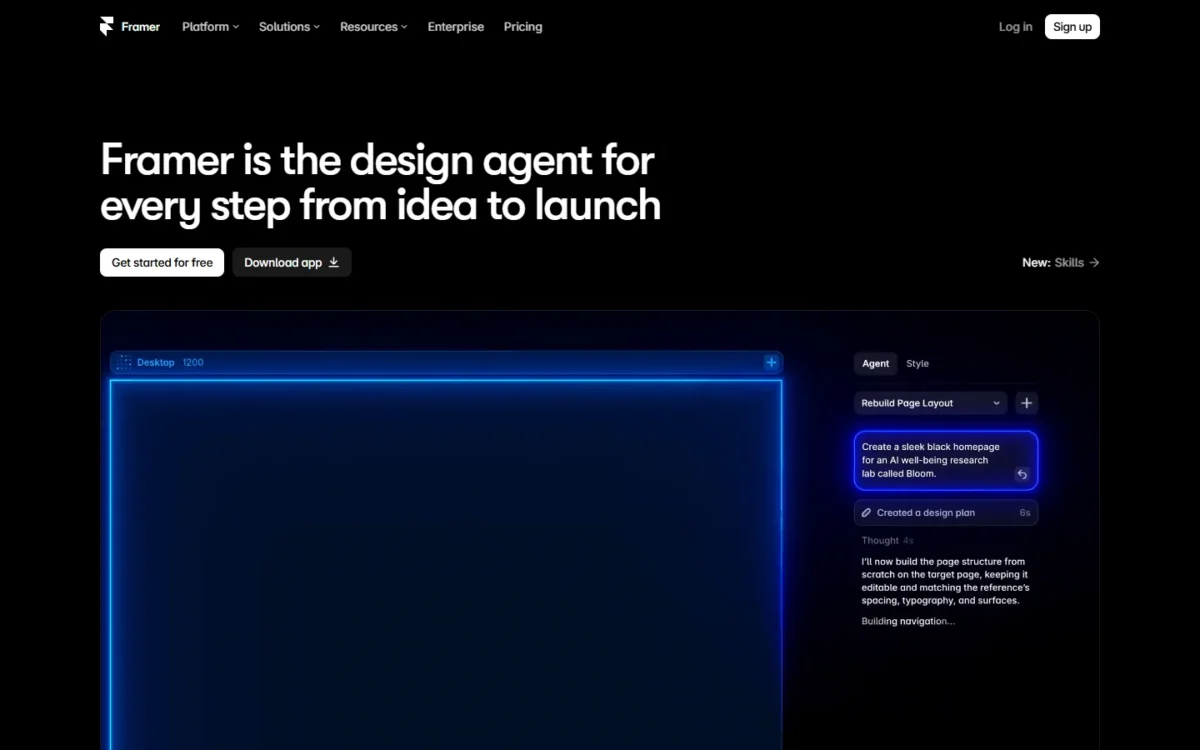
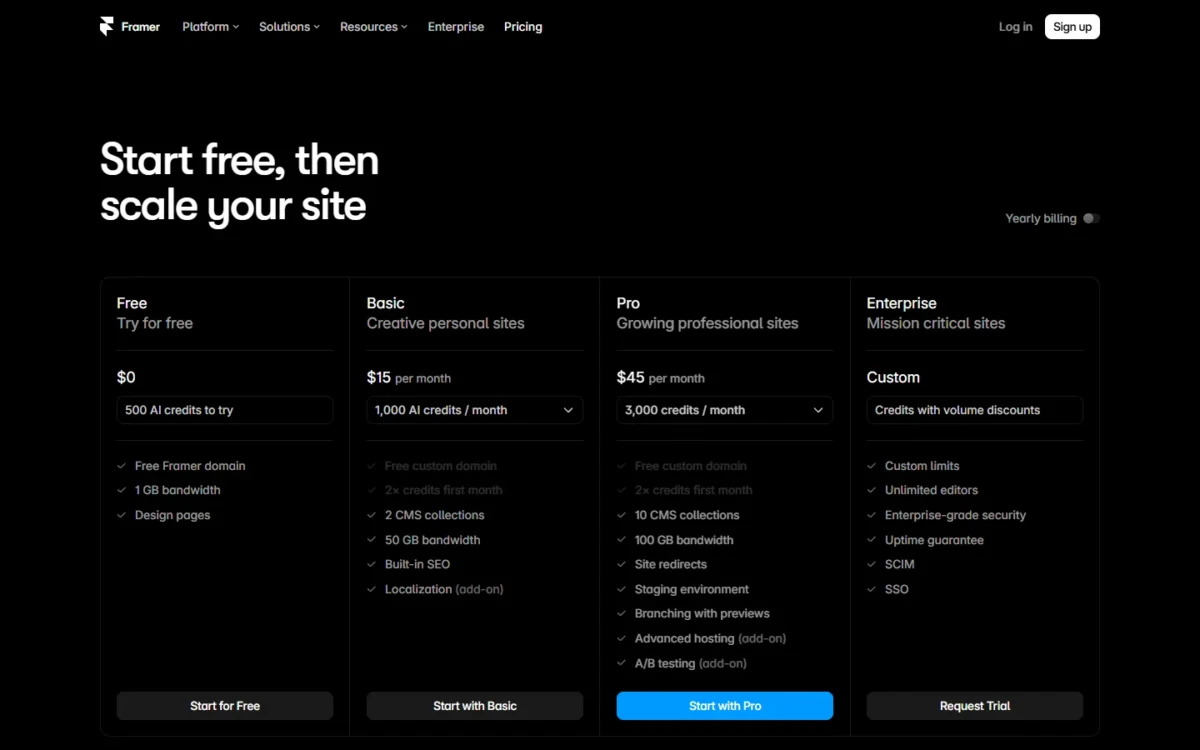
Framer pricing starts at $0 and runs $10 to $30 per site a month on yearly billing: Basic is $10 and Pro is $30, or $15 and $45 billed monthly. Enterprise has custom pricing.
Each additional editor adds $20 a month on yearly billing. A 5-person team on one Basic site pays $120 for the site plus 4 × $20 × 12 = $960 for editors, or $120 + $960 = $1,080 a year.
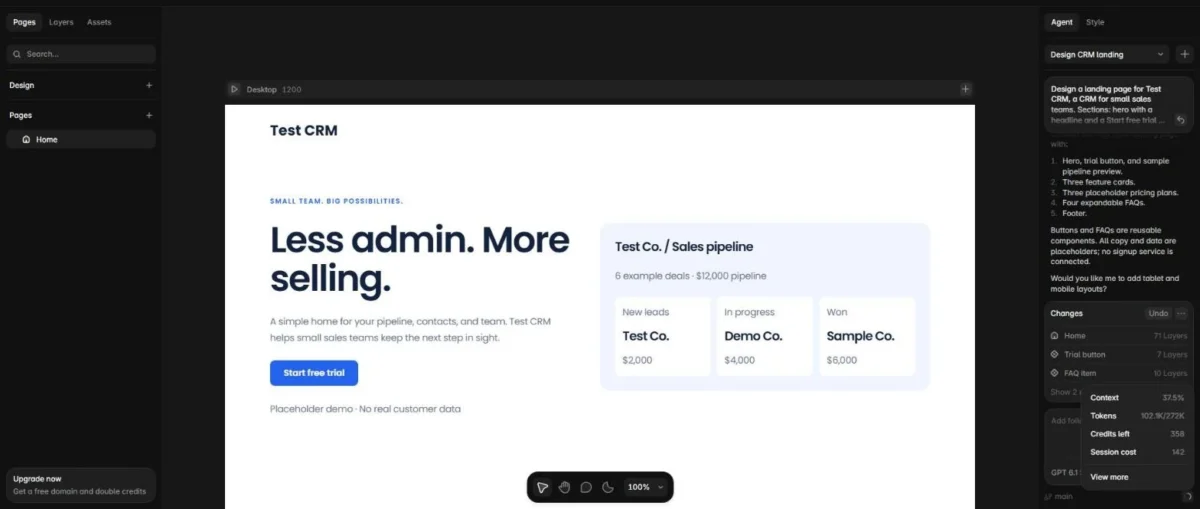
I measured the AI side in my Framer Free account on October 10, 2026. One Framer Agent landing-page build cost 142 of the 500 starting credits (“Session cost 142”), leaving 358. At that rate, Basic’s 1,000 monthly credits cover about 7 such builds and Pro’s 3,000 about 21.
My pick: Basic for a solo personal site, Pro once a business site needs redirects, staging or a third CMS collection. For a team, the editor count moves the bill more than the plan does.
Evidence basis: hands-on test in my Framer Free account on October 10, 2026 (one Framer Agent landing-page build), plus Framer’s pricing page in both billing views and its help articles, checked October 2026. How I review
In This Article (11 sections)
How Much Does Framer Cost in 2026?
Framer’s Free plan costs $0, Basic $10 and Pro $30 per site a month billed yearly ($15 and $45 billed monthly), and Enterprise is custom with annual billing. Sales tax is added at checkout.
| Plan | Per site per month, billed yearly | Per site per month, billed monthly | AI credits | Users with edit access | Framer’s stated fit |
|---|---|---|---|---|---|
| Free | $0 | $0 | 500 to try, once | 3 editors, no subscription | Non-commercial use |
| Basic | $10 | $15 | 1,000 a month | 10 | Creative personal sites |
| Pro | $30 | $45 | 3,000 a month | 10 | Growing professional sites |
| Enterprise | Custom, annual billing | Custom | Credits with volume discounts | Unlimited editors | Mission critical sites |
Sources: Framer’s pricing page, both billing views, and How AI credits and Agent pricing work, checked October 2026.
The table prices one site, not a team. Articles quoting Mini, Scale or a $40 editor seat describe plans Framer has since changed.
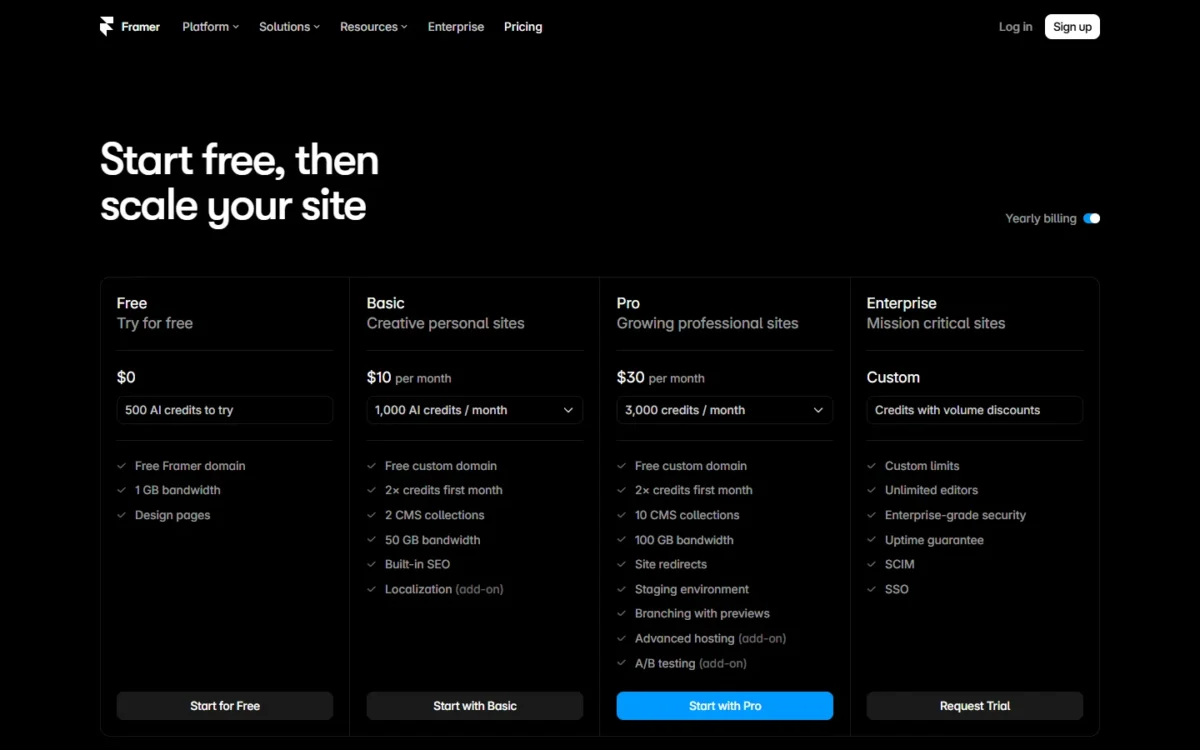
Framer’s plan table says the complimentary domain is “included on yearly”.
Site Plans vs Editor Charges: What You Pay Per Site and Per Person
Framer charges both ways: each site needs its own site plan, and the workspace pays for each additional editor on top.
An editor costs $20 a month on yearly billing or $30 on monthly billing, on Basic and Pro alike. A content editor, who updates the CMS, localization and on-page content, costs $10 or $15. The owner and viewers are free.
Framer’s billing help says editor seats “are billed separately from Site plans”. The pricing page FAQ adds that you will be charged within 24 hours of an editor being added to your billing.
On one Basic site with five people, the four editors cost 4 × $20 × 12 = $960 a year, eight times the $120 site plan.
Basic vs Pro vs Enterprise: Which Limits Decide the Plan?
Pro costs $30 − $10 = $20 a month more than Basic per site on yearly billing, and the premium buys room plus release controls. Basic is fixed at 30 pages, 2 CMS collections, 1,000 CMS items and 50 GB of bandwidth, which suits a personal site. Enterprise is for SSO, SCIM or an 11th user with edit access.
| Plan | Site pages | CMS collections | CMS items | Bandwidth per month | Users with edit access |
|---|---|---|---|---|---|
| Basic | 30 | 2 | 1,000 | 50 GB | 10 |
| Pro | 150, up to 700 with add-ons | 10, up to 40 | 2,500, up to 40,000 | 100 GB, up to 2 TB | 10 |
| Enterprise | Custom | Custom | Custom | Custom | Unlimited |
Sources: Framer’s pricing page, checked October 2026.
The collection cap is the Basic limit I would check first. A blog that stores posts, authors and categories as separate collections needs three, one more than Basic allows.
The Pro card lists site redirects, a staging environment and branching with previews; Basic’s card does not. Redirects matter when you move an existing site, since Framer pitches them to “maintain search engine rankings”.
Pro also serves sites from 300+ CDN locations against Basic’s 20 and keeps 90 days of analytics against 30. Its limits are “pay what you use”, so the next cost is going past them.
What Do Framer’s Add-Ons Cost?
Framer’s add-ons cost $20 a month per translation locale on Basic or Pro, and $50 per 500,000 events for Convert or $200 for Advanced hosting on Pro. Pro’s limit packs start at $20 per 100 pages. Monthly billing raises every one of these.
| Add-on | Plans | Per month, billed yearly | Per month, billed monthly | Cap |
|---|---|---|---|---|
| Translation locales | Basic, Pro | $20 per locale | $25 per locale | 20 locales |
| Convert (A/B tests, funnels) | Pro | $50 per 500,000 events | $60 per 500,000 events | 1.5M events |
| Advanced hosting | Pro; included on Enterprise | $200 | $250 | 6 rewrites |
| Extra pages | Pro | $20 per 100 | $30 per 100 | 700 pages |
| Extra CMS collections | Pro | $40 per 10 | $50 per 10 | 40 collections |
| Extra CMS items | Pro | $20 per 10,000 | $30 per 10,000 | 40,000 items |
| Extra bandwidth | Pro | $40 per 100 GB | $50 per 100 GB | 2 TB |
Sources: Framer’s pricing page, both billing views, checked October 2026.
The locale, page and CMS-item packs are $20 each, small next to a $30 Pro site: 10,000 more CMS items add $20 a month. The collection and bandwidth packs ($40 each), Convert ($50) and Advanced hosting ($200) each cost more than a Pro site. $200 a month buys more than six Pro sites at $30 each.
A site past Pro’s add-on caps has outgrown Pro and moves to Enterprise’s custom limits. Add-ons cost dollars; Agent work costs credits, with a ceiling of its own.
How Far Do Framer’s AI Credits Go? One Agent Build Cost 142
Framer’s Free plan includes 500 AI credits once, Basic 1,000 a month and Pro 3,000 a month, and the Basic and Pro cards add 2× credits in the first month. One Framer Agent landing-page build in my Free account on October 10, 2026 cost 142 credits, leaving 358.
At 142 a build, Free covers about 3 builds, Basic about 7 a month and Pro about 21.
| Plan | AI credits | Builds at my 142 credits | Builds at Framer’s ~300 estimate | First-month builds at 142 (2× credits on the Basic and Pro cards) |
|---|---|---|---|---|
| Free | 500, once | 3 (500 ÷ 142 = 3.5) | 1 (500 ÷ 300 = 1.7) | No 2× offer listed |
| Basic | 1,000 a month | 7 (1,000 ÷ 142 = 7.0) | 3 (1,000 ÷ 300 = 3.3) | 14 (2,000 ÷ 142 = 14.1) |
| Pro | 3,000 a month | 21 (3,000 ÷ 142 = 21.1) | 10 (3,000 ÷ 300 = 10) | 42 (6,000 ÷ 142 = 42.3) |
Sources: Framer’s pricing page, How AI credits and Agent pricing work and Framer’s AI credits launch post, checked October 2026; 142 from my one build on October 10, 2026.
My 142 is less than half the roughly 300 credits that Framer’s June 2026 launch post gives for generating a landing page on its base model. Framer’s model guide says credit use depends on the model, its settings, the context and the work, so 142 is one data point, not a rate.
The Agent offered tablet and mobile layouts after my build, which I did not run; Framer’s launch post puts making a page responsive at about 150 credits. If you iterate, budget nearer Framer’s column.
Credits are a spending cap, not a page count, the usage model explained in how AI prototyping tools bill in credits. Framer shares them across the workspace and its editors, and unused credits do not roll over.
Credits stack per site plan, so two Basic sites give a workspace 2,000 a month. A second Basic site at $10 a month on yearly billing is therefore also 1,000 more credits. The pricing page’s credit selector runs to 15,000 a month on Basic and 100,000 on Pro.
At the limit, Agent chat pauses until credits reset or you buy more. Framer’s launch post adds two savers: “Mark as Bad” refunds a missed result’s credits, and External Agents use your own Claude or OpenAI subscription.
Relume ran the same prompt, and the other tools’ results from the same Free-plan test put the 142 in context. How it was measured decides how far to trust it.
How I Tested Framer’s Credit Use
I ran one prompt once in Framer Agent on my Free account on October 10, 2026, as part of the same Free-plan test across four tools. I read the credits from the Agent’s usage panel.
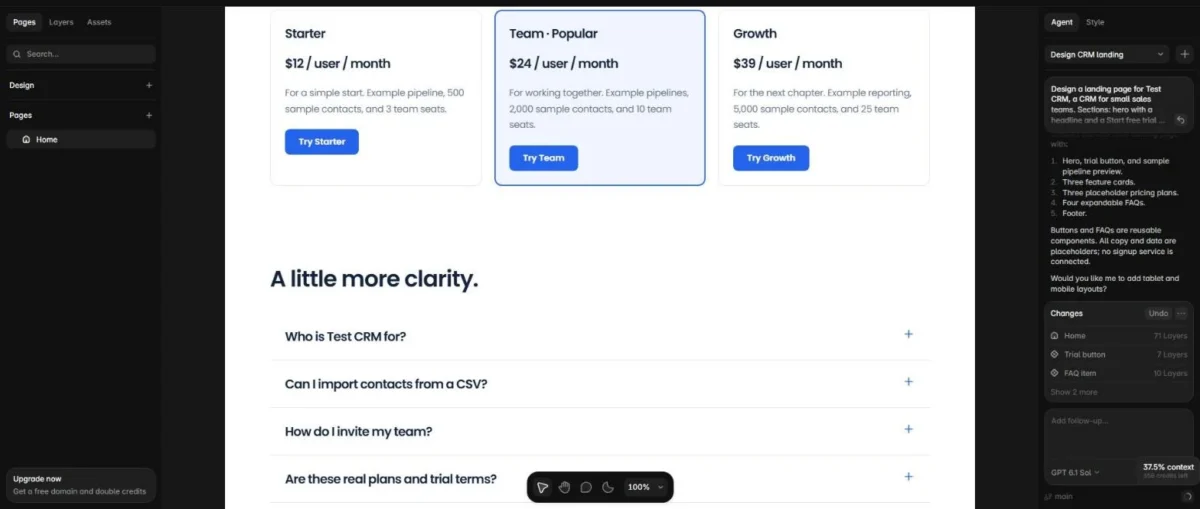
- Prompt: a landing page for “Test CRM, a CRM for small sales teams”. It asked for a hero with a Start free trial button, three feature cards, three placeholder pricing plans, a four-question FAQ and a footer.
- Run: the Agent asked 2 questions first (visual direction, and reusable components for repeated buttons and FAQs); I picked the first option for each.
- Time: about 3 minutes 17 seconds from sending the prompt to the Agent reporting the page done, questions included.
- Output: every requested section and 71 layers on Home. One flaw: the pipeline card said “6 example deals” but showed 3.
- Credits: the usage panel showed “Session cost 142” and “Credits left 358”.
The test covers one prompt, one run and one Free account, with no follow-up edits, publishing or team features. The finish time was read at intervals, so 3 minutes 17 seconds is an upper bound within about a minute.
Credits are pooled across the workspace, but editors are billed one by one, and each seat costs $20 × 12 = $240 a year, more than the $120 Basic site plan.
What Framer Costs a Team of 1, 5 or 10 People
One site billed yearly costs $120 a year on Basic or $360 on Pro for the owner alone. Each additional person adds $20 × 12 = $240 a year on either plan.
| People on one site | Editor seats per year | Basic total per year | Pro total per year |
|---|---|---|---|
| 1 (owner only) | $0 | $120 | $360 |
| 5 (owner + 4 editors) | 4 × $20 × 12 = $960 | $120 + $960 = $1,080 | $360 + $960 = $1,320 |
| 10 (owner + 9 editors) | 9 × $20 × 12 = $2,160 | $120 + $2,160 = $2,280 | $360 + $2,160 = $2,520 |
Sources: Framer’s pricing page, yearly view, checked October 2026. Totals leave out add-ons, credit purchases and sales tax.
The gap between Basic and Pro stays $30 × 12 − $10 × 12 = $240 a year per site at every team size, because editors cost the same on both. At ten people that is about a tenth of the bill, so pick the plan by its limits, not its price.
Editors outweigh the site fee from the second person on Basic ($240 against $120) and from the third on Pro (2 × $20 × 12 = $480 against $360).
Another Basic site costs $10 × 12 = $120 a year, less than another editor at $20 × 12 = $240, and editors are billed once per workspace, not once per site.
Three Pro sites cost 3 × $30 × 12 = $1,080 and four editors 4 × $20 × 12 = $960, so five people across all three sites pay $1,080 + $960 = $2,040 a year.
Content editor seats help with people who touch only the CMS: making two of four editors content editors saves 2 × $10 × 12 = $240 a year. The 10-person row assumes the owner is one of the 10 users with edit access; the pricing page does not say whether the owner counts toward the 10.
Monthly vs Yearly Billing: Is the Annual Subscription Worth It?
Yes, for any site that will run 8 months or more. Yearly billing makes sites and seats a third cheaper and breaks even at 8 months: $10 × 12 ÷ $15 = 8 for Basic and $30 × 12 ÷ $45 = 8 for Pro. Monthly billing suits a short campaign site or a test.
Paying monthly for a year costs $15 × 12 − $10 × 12 = $60 more per Basic site and $45 × 12 − $30 × 12 = $180 more per Pro site. Each editor costs $10 a month more, so a 5-person team pays 4 × $10 × 12 = $480 more for seats.
A short monthly site also forgoes the complimentary domain, which Framer’s plan table lists as “included on yearly”.
Yearly plans are billed upfront and renew on the anniversary date, but added editors are billed monthly even on annual plans. The upfront commitment covers the site plan, while the seat count can still change month to month.
A cancelled plan runs to the end of the paid term, and a downgrade turns the unused value into non-refundable account credit. If even Basic’s $10 a month is more than a site needs, the question is what Free can carry.
Is Framer’s Free Plan Enough?
No, not for a business site. Free costs $0 and publishes on a Framer domain with a “Made in Framer” banner, and a custom domain needs a paid plan. With 500 credits that come once, Free fits learning and non-commercial pages.
Free projects get 10 CMS collections, 1,000 pages, 5 MB file uploads, one free locale and 1 GB of bandwidth, and a workspace without a subscription can have three editors.
That is enough room to build a whole site before paying; what Free mainly holds back is the custom domain, plus the “Made in Framer” banner and 1 GB of bandwidth against Basic’s 50 GB.
The 500 credits cover 3 builds at my 142, or one at Framer’s ~300 estimate. The pricing page lists a trial for Enterprise (“Request Trial”) and none for Basic or Pro, so Free is the trial before you pick one.
Is Framer Worth the Money? Which Plan to Buy
Framer is worth the money when the goal is a published site, and the plan follows the site. Buy Basic for a personal site within 30 pages and 2 collections, and Pro for a team’s marketing site with a blog, redirects or staging. Enterprise is for SSO, SCIM, an 11th user with edit access or limits past Pro’s caps.
Basic is the cheapest way onto your own domain, and for a freelancer’s portfolio its $10 × 12 = $120 a year is the whole bill. Its limits are fixed, so the 31st page means moving to Pro, not buying a pack. Students can get Basic free (see the FAQ).
Pro earns its premium on business sites. Redirects protect old URLs in a migration, staging checks changes before they go live, and 10 collections fit a blog with authors and categories.
Enterprise answers hard requirements, not size: SSO, SCIM and the uptime guarantee sit on its card, not Pro’s, so a 10-person team without them fits Pro.
The plan I would avoid is Basic billed monthly for a site you will keep: by month 9 it has cost more than a year paid upfront.
What Forces an Upgrade
The first limit a site hits decides the upgrade. Basic moves to Pro at:
- the 31st page or a third CMS collection
- the 1,001st CMS item
- a need for redirects, staging or branching
- bandwidth past 50 GB a month, which Framer lets run over for one month with an email notice
Pro moves to Enterprise at:
- an 11th user with edit access (the pricing page does not say whether the owner counts toward the 10)
- a need for SSO or SCIM
- needs past Pro’s add-on caps of 700 pages, 40 collections, 40,000 CMS items or 2 TB
Running out of credits forces no plan change. Framer’s answer is to “Upgrade a site or add an add-on for more.”
Who Should Skip Framer
Skip Framer if you need a clickable prototype rather than a published site, or if a large team edits a small site. Framer prices the live site, a plan per site and a seat per editor, which buys little for a prototype nobody publishes.
Ten people on one Basic site pay 9 × $20 × 12 = $2,160 a year for seats against $120 for the site, and an 11th user with edit access means Enterprise.
Cheaper or Different Alternatives to Framer
The cheaper alternative depends on the job. For a prototype, a tool that does not bill per published site and per editor can cost a team less. For a live site, compare per-editor charges, because that is where Framer’s team cost grows.
My ranking shows where Framer fits among AI prototyping tools, which is the place to weigh it against the alternatives.
If your designers already pay for Figma, check what your current design tool already charges, in my Figma pricing guide, before buying Framer seats for the same people. What remains are discounts, refunds and old plans.
Framer Pricing FAQ
Does Framer have a student discount?
Yes: Framer’s student program gives students a free Basic plan, which Framer values at $120 a year, plus 1,000 free AI credits a month. Applicants must be enrolled in a certified in-person or online program. Framer aims to review applications within 5 working days, and students can re-apply every 11 months.
Can I get a refund on a Framer subscription?
Usually only right after buying. Framer’s refund policy allows refunds within 7 days of the initial purchase worldwide and within 14 days in the European Union and Turkey. Later, cancelling brings no refund for unused time, and credit or bandwidth add-ons are non-refundable once any part is used.
What happened to Framer’s Mini and Scale plans?
Framer dropped both. In its October 2025 pricing update, Framer removed Mini, cut Basic to $10 from $15 and listed Scale at $100.
In its June 2026 launch post, Framer says it retired Scale and cut editor seats from $40 to $20. Existing Framer subscribers keep their plan unless they switch, which is why older articles quote other prices.