
Relume suits freelancers and small agencies who build marketing sites and want a complete first draft fast. For one site that lives on Relume, its Publish track is the cheaper way to pay from two people up, because editors cost nothing per seat there.
For one person, Launch hosting alone ($144 a year) and Pro AI usage alone ($168 a year) each cost less than Export Starter ($216 a year). Launch plus Pro ($312) costs more. This Relume review rests on one Free-plan test and Relume’s own pricing page.
I tested Relume’s Free plan on October 10, 2026, with one prompt and one run. It returned a styled one-page design with 6 sections and two themes in under 4 minutes, without asking a single question.
Skip it for app prototypes or for free Webflow or React export; in my test the first draft had no images and left the logo slots empty.
Evidence basis: hands-on test in my Relume Free account on October 10, 2026 (one prompt, one run), plus Relume’s official pricing page and homepage, checked October 2026. How I review
In This Article (10 sections)
Relume at a Glance
Relume earns a closer look if you build marketing sites, and the right plan depends on where each site will live.
| Question | My answer |
|---|---|
| Best for | Freelancers and small agencies building client or company marketing sites |
| Skip it if | You need an app prototype or free Webflow or React export; in my test the first draft had no images and left the logo slots empty |
| Starting price | $12 per site per month (Launch hosting), $14 a month (Pro AI usage) or $18 per user per month (Export Starter), all billed yearly |
| Practical plan | Publish: Free to draft, Launch for each live site. Export: Starter for one site of up to 5 pages, Team from 3 people |
| Main strength | A styled one-page design from one prompt in under 4 minutes, in my test |
| Main limitation | Free export stops at 1 project, 1 page and Figma only |
| Same-prompt comparison | Framer, which got the same prompt in my test |
Sources: Relume pricing page, checked October 2026; my Relume Free-plan test, October 10, 2026.
The test-based rows rest on one Free-plan run and the price rows on Relume’s pricing page, so the method comes first.
How I Tested Relume’s AI Site Builder
I ran one prompt, once, on Relume’s Free plan on October 10, 2026, in my own account and a workspace labeled Relume 2.0 beta. I made no edits and ran no publishing, exports or team features.
- Account: my own Relume Free account, with no sites in it before the test.
- Method: Claude in Chrome, an AI browser agent, ran the steps in my signed-in browser while I watched.
- Timing: wall-clock times (UTC+7) read at intervals, so each finish time is an upper bound within about a minute.
- Readings: every value comes from Relume’s own screens.
- Task: prompt B, sent once:
Design a landing page for Test CRM, a CRM for small sales teams. Sections: hero with a headline and a Start free trial button, three feature cards (pipeline view, contact import from CSV, team invites), a pricing section with three placeholder plans, an FAQ with four questions, and a footer. Use placeholder copy and data only, such as Test Co.
The method is the one behind the same Free-plan test across four AI prototyping tools, where Framer got this same prompt.
One run cannot show whether a second run gives the same page, or how custom domains and GitHub or Figma connections behave.
What Relume Built From One Prompt
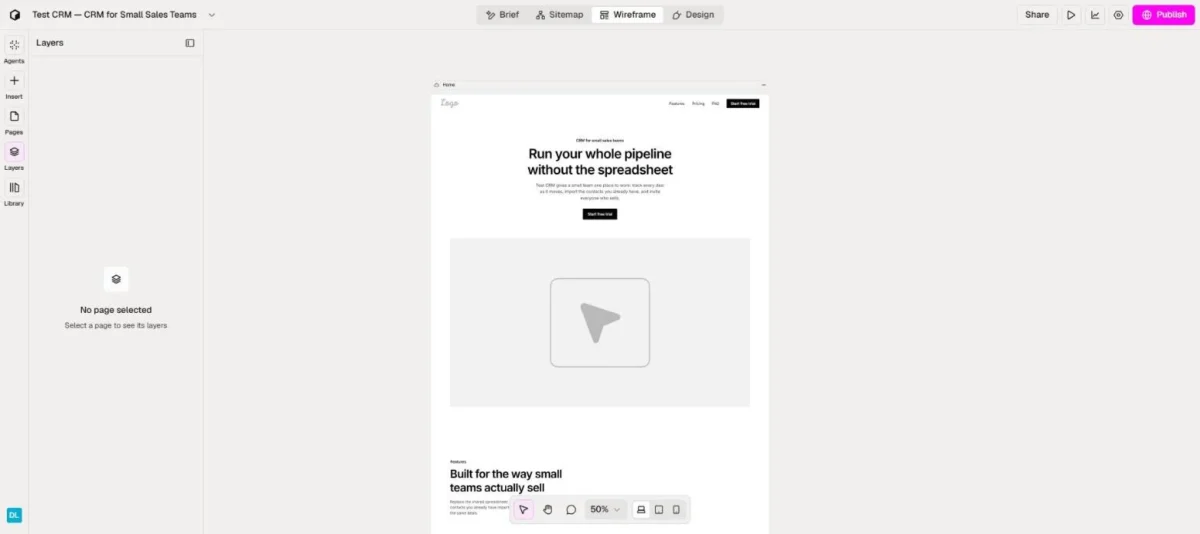
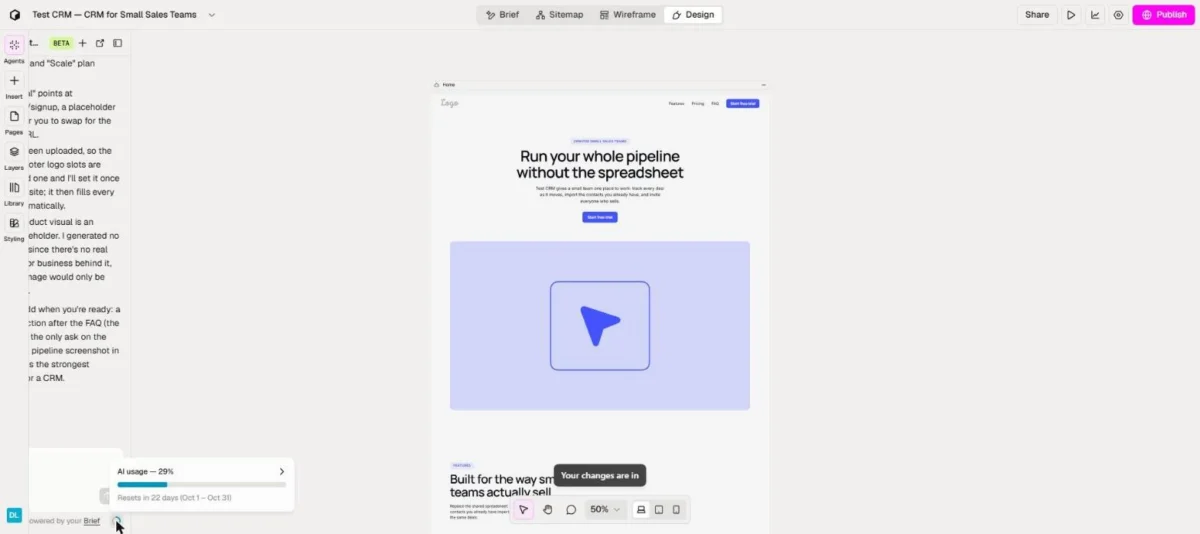
In my run, prompt B came back as one styled page with 6 sections and two themes in under 4 minutes, with no question asked. Its AI usage meter then read 29%, a share of a monthly allowance that Relume’s pricing page states in websites, not percentages.
I did not read the meter before the build, so this build’s own share of the allowance is unknown; the after-build reading is only its ceiling. My AI prototyping tools test results list it beside Framer’s run on the same prompt.
- Flow: Relume ran a brief, a 1-page sitemap, wireframes and the design on its own.
- Speed: I sent the prompt at about 20:29:42; at about 20:32:10 I still saw the Home page being written, and by 20:33:42 the build had finished.
- Design: two fully styled themes, Indigo Daylight and Midnight Grid.
- Content: placeholder plan prices of $0, $20 and $45 per user a month, and 4 FAQs.
- Gaps: no images generated, and the logo slots left empty.
- Self-review: Relume listed its own placeholders and suggested adding a closing call to action.
- Meter period: October 1 to 31, resetting in 22 days.
The draft is something a client can react to, not a page to publish: the visuals and the logo still have to come from elsewhere. What decides Relume’s value after that first page is the component system underneath it.
Relume Pros: What It Does Well
Relume is an AI site builder that assembles marketing sites from designer-built components. Three strengths follow, each for its own buyer: a full first draft for freelancers, export formats for Webflow and Figma agencies, and optional hosting for small teams.
A complete first draft without a questionnaire
Relume took my prompt through brief, sitemap, wireframes and design in one flow, which covers most of the work before a first client review. Build with Relume also generates a style guide of colours, typography and spacing tokens.
In my run, the two styled themes gave me a choice to show a client, and the placeholder list showed what still needed real content. The trade-off is that Relume asked no questions, so the prompt has to carry every requirement.
Components, not generated code
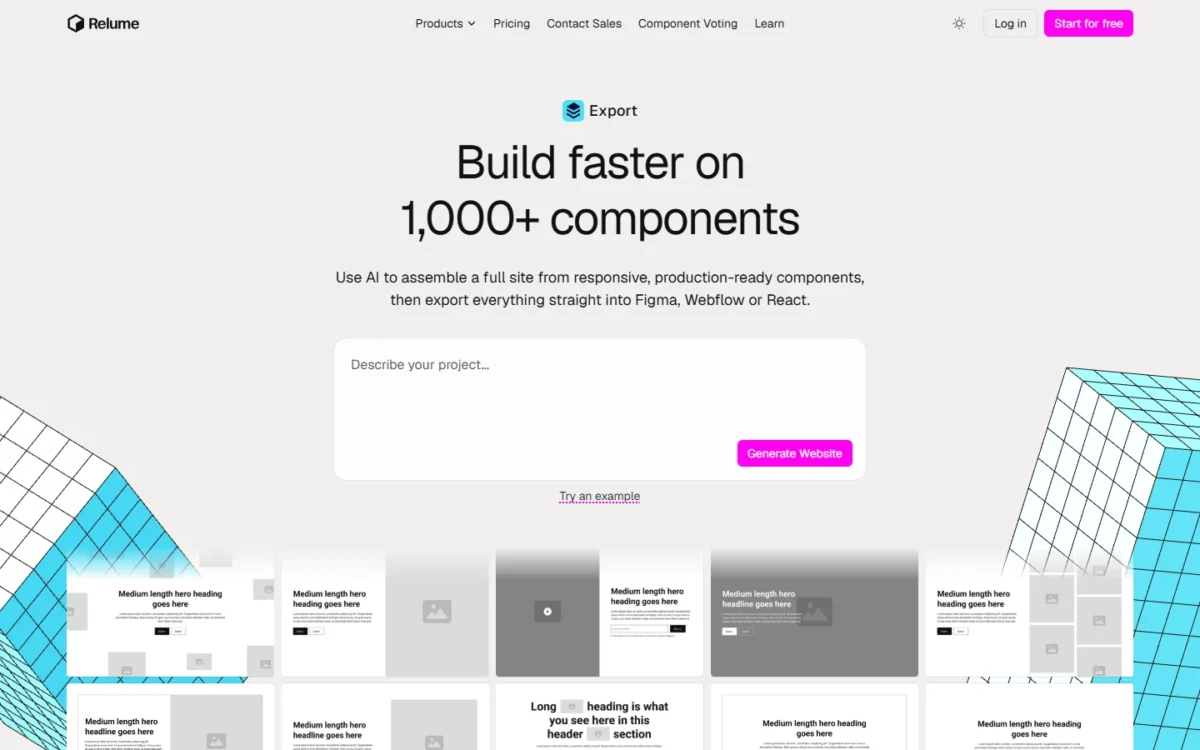
By Relume’s own description on its homepage, its AI “does not write raw code”: it selects from 1,000+ responsive components that Relume’s designers built and maintain. Relume promises three handoff formats:
- Webflow, with “clean client-first classes”
- Figma, with “editable auto-layout with real variables and variants”
- React, “coded with Tailwind CSS and shadcn/ui components”
I ran no export, so these are Relume’s descriptions, not results. For a Webflow agency already on Finsweet’s Client-First system, which Relume’s library supports, drafts would arrive in a class system the team already maintains.
Publish on Relume or take the site elsewhere
You do not have to host on Relume: publishing and exporting start from the same component system. Launch hosting adds a custom domain with SSL, unlimited forms and white label. Export Starter and Pro add the Relume Library MCP and “Export Design System to Claude”, which bring the components into AI tools.
A small marketing team without a developer can keep the whole site in Relume, while an agency that delivers on Webflow keeps its handoff. Each strength sits behind a plan gate, and the gates are where Relume starts to cost money.
Relume Cons: Where It Falls Short
Six limits matter, and each one hurts a specific buyer.
- Free export is one page, to Figma only. Export Free caps you at 1 project and 1 page and exports to Figma only. A freelancer who hands over Webflow or React sites pays for Starter before the first client handoff.
- The AI allowance has no fixed unit. One pricing page describes Free’s allowance three ways: “Enough AI usage to build a landing page”, “enough AI usage to build 1 small website per month” and “Enough for one full website”. Anyone budgeting builds gets a percentage meter instead of a number.
- My draft had no images. My run generated no images and left the logo slots empty, although Relume lists Standard AI images on Free (Premium on Publish Pro, the AI usage plan). It is one run, but a marketer who needs a client-ready draft should budget time for visuals.
- Free publishing suits a test site, not a business. Free hosting keeps the Relume badge, caps traffic at 1,500 page views a month and takes 20 form submissions a month. A business wanting a free live site gets a branded page with room for 20 enquiries.
- The trial terms contradict each other. The Pro AI usage card and all three paid Export cards say “Start a 7-day free trial”. Relume’s FAQ says Pro has no 7-day trial and a Free sign-up ends the Starter trial, so a Free sign-up may cost you the Starter trial that the Starter card still offers.
- SOC 2 is still pending. SSL and DDoS protection are in place, but Relume’s SOC 2 compliance is still pending. An agency whose clients run vendor security reviews has no SOC 2 report to hand over yet.
Most of these limits end in an upgrade, which makes the price track the next decision.
Relume Pricing: Publish vs Export, and What a Team Really Pays
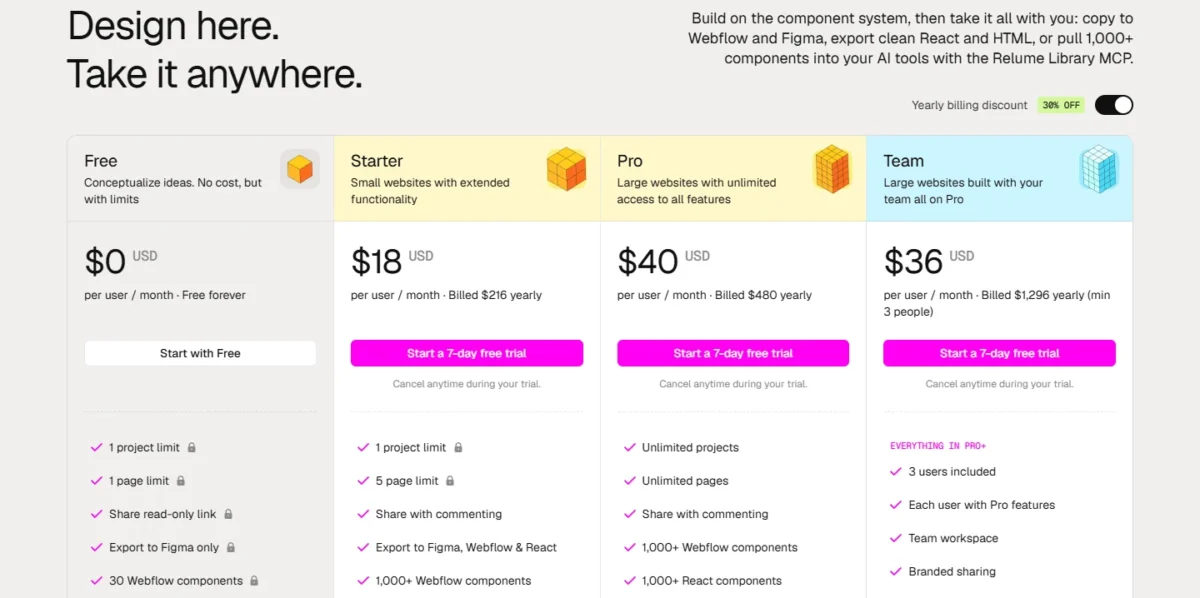
Relume is free to start on both tracks. Among its published fixed prices, paid plans run from $12 per site per month (Launch hosting) to $40 per user per month (Export Pro), billed yearly, while the 20x usage tier and Enterprise have no published price.
| Track and plan | Price, billed yearly | Yearly bill | What it adds or caps |
|---|---|---|---|
| Publish: Free hosting | $0 | $0 | Relume badge, 1,500 page views, 20 form submissions a month |
| Publish: Launch hosting | $12 per site per month | $144 per site | Custom domain + SSL, white label, unlimited forms, 6,000 page views |
| Publish: Pro (AI usage) | From $14 a month | $168 | “5x or 20x more usage”, premium AI models |
| Export: Free | $0 | $0 | 1 project, 1 page, export to Figma only |
| Export: Starter | $18 per user per month | $216 per user | 1 project, 5 pages, export to Figma, Webflow and React |
| Export: Pro | $40 per user per month | $480 per user | Unlimited projects and pages |
| Export: Team | $36 per user per month, min 3 people | $1,296 for 3 people | Pro features for each user, team workspace, branded sharing |
Sources: Relume pricing page, Publish and Export views, checked October 2026.
Both tracks have a plan called Pro: on Publish it buys AI usage for the account, on Export it buys unlimited projects for one user. Pay per site on Publish when the site will live on Relume, and per user on Export when it goes to Webflow, Figma or React.
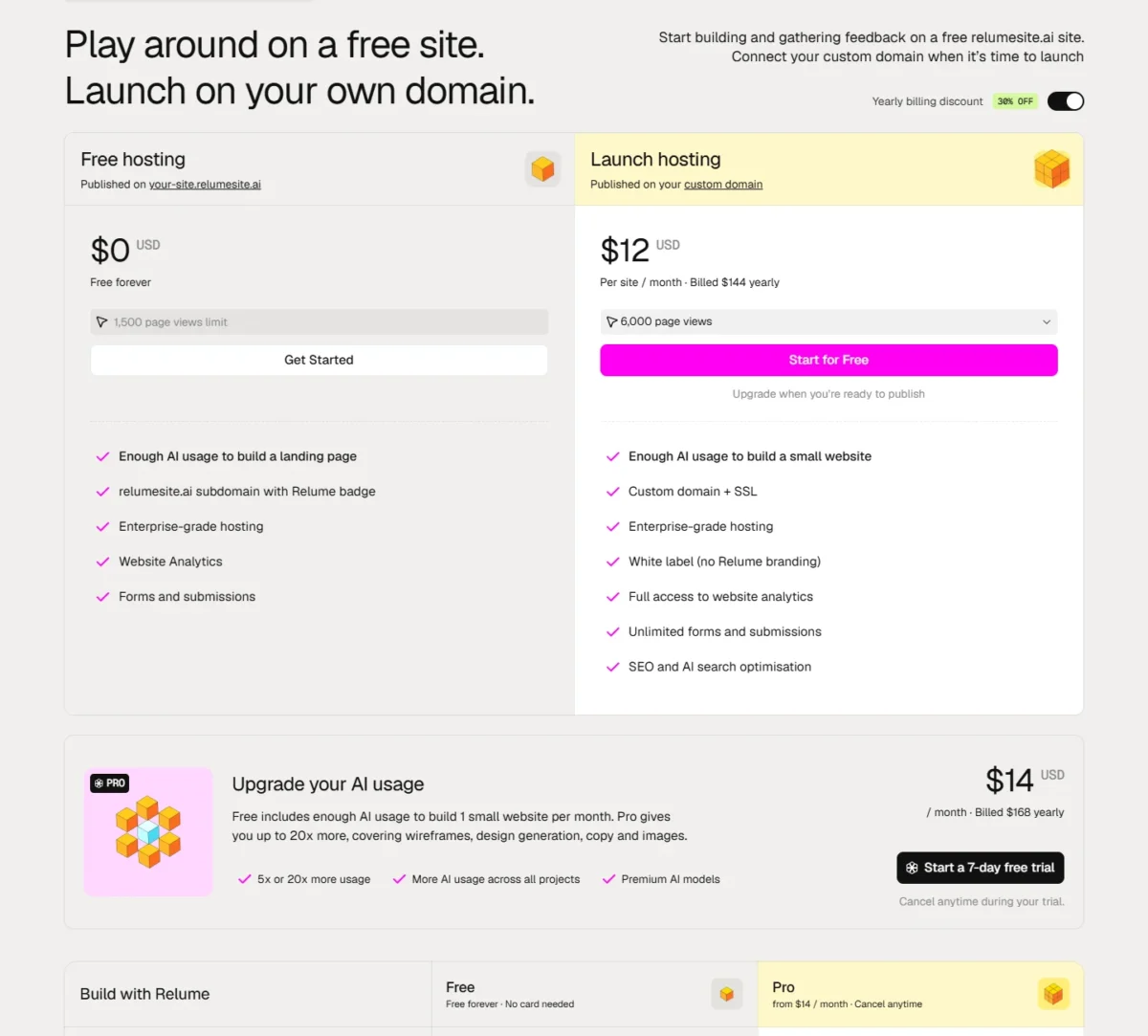
Publish adds nothing for extra people, because Relume invites anyone into the workspace as an editor with “No per-seat charge”. Every price here is the yearly rate, which Relume marks “30% OFF”.
Relume does not publish the price of its 20x usage tier, or whether Export plans raise the AI allowance. Enterprise is quoted on request, with “Custom AI usage & volume pricing”.
What a freelancer, a 3-person agency and a 5-person team pay
One live site on Relume costs $144 a year on Launch, or $312 with Pro AI usage ($144 + $168), whether one person works on it or five. On Export, the bill grows with every seat.
| Team | Publish: one site, Launch + Pro usage | Export track |
|---|---|---|
| Freelancer, 1 person | $312 ($144 + $168) | $216 on Starter ($18 x 12 months) or $480 on Pro ($40 x 12 months) |
| Studio, 2 people | $312 ($144 + $168) | $432 on two Starter seats ($18 x 2 users x 12 months) or $960 on two Pro seats ($40 x 2 users x 12 months); Team needs 3 people |
| Agency, 3 people | $312 ($144 + $168) | $648 on three Starter seats ($18 x 3 users x 12 months), $1,296 on Team ($36 x 3 users x 12 months), or $1,440 on three Pro seats ($40 x 3 users x 12 months) |
| Team, 5 people | $312 ($144 + $168) | $1,080 on five Starter seats ($18 x 5 users x 12 months), $2,160 on Team ($36 x 5 users x 12 months), or $2,400 on five Pro seats ($40 x 5 users x 12 months) |
| Each extra live site | +$144 a year on Launch | Pro and Team: unlimited projects |
Sources: Relume pricing page, yearly billing, checked October 2026; totals are my arithmetic.
Headcount separates the tracks. A 5-person team hosting one site on Relume pays $312 a year ($144 + $168); exporting on Team costs that team $2,160 ($36 x 5 users x 12 months), or $1,848 more. Five Starter seats for one small site cost $1,080 ($18 x 5 users x 12 months), still $768 more.
Team only undercuts Pro seats from its 3-person minimum. A two-person studio that needs more than one project or five pages should buy two Pro seats ($40 x 2 users x 12 months = $960). Team would bill at least 3 users ($36 x 3 users x 12 months = $1,296).
With one small site of up to 5 pages, two Starter seats cost $432 ($18 x 2 users x 12 months).
A freelancer can stay on Starter at $216 a year until a second project or a sixth page forces Pro at $480. On Publish, a site past 6,000 monthly page views, or heavier AI use, moves to a higher tier.
Whether Relume fits at all depends on the kind of site you build.
Who Should Use Relume, and Who Should Skip It
Four factors decide it: where the site will live, whether you need a marketing site or an app, how many people need export seats, and what the first draft and security review must cover.
- Where the site will live. Use Relume if the site will live on Relume, or in Webflow on Client-First. Skip it if you need Webflow or React export without paying.
- Marketing site or app. Use it for marketing sites and landing pages, the job Relume’s homepage pitches. Skip it for an app prototype; the output types AI prototyping tools produce show which tools build those.
- Export seats. Use Starter or Pro seats for one or two people and Team from three. Skip Export if a larger team can host on Relume instead, where seats cost nothing.
- Draft and security needs. Skip Relume if you need a SOC 2 report now, which Relume lists as pending. Budget time for images and a logo as well: in my test the first draft had no images and left the logo slots empty.
If you landed on the skip side, the next question is where to look instead.
Relume Alternatives
The right alternative depends on why Relume missed: you want a different AI site builder, or you need an app prototype rather than a marketing site. My ranking shows where Relume sits among AI prototyping tools for website work.
- Framer, for a second AI site builder. Framer got the same prompt B in my test, so its result is the closest like-for-like check on Relume’s draft.
- An app or product prototyping tool, for screens rather than pages. The same ranking covers those tools by role.
If Relume is the fit, two decisions remain: which plan to start on, and what to check first.
Relume Review Verdict: Is It Worth It?
Yes, for a freelancer or small agency drafting marketing sites, as long as you choose the price track before you sign up.
If the site will live on Relume, buy Publish: Launch at $12 per site per month, billed yearly, for each live site, and Pro AI usage only once the Free allowance runs out.
If the site goes to Webflow or React, Export follows headcount and site size. Use Starter ($18 per user per month) for one site of up to 5 pages. Use Pro for more projects or pages, and Team from three people who need Pro.
Pick the track before creating an account, because Relume’s FAQ says signing up to Free first ends the 7-day Starter trial, although its Starter card still offers one. Then read the AI usage meter before and after your first build.
My test covered one draft, not exports or publishing, so use a trial to export one real page before you commit a client project to Relume.
FAQ
Do I need Webflow to use Relume?
Not if you publish on Relume, which hosts the site itself. You do if you export to Webflow, where knowing how to work with Webflow is needed. Copying Relume Library components is not supported on Safari, so that Webflow workflow runs in Chrome, Firefox or Edge.
Can clients review a Relume project without paying?
Yes, through a share link: read-only on Free, view and comment on Starter and Pro, and custom branded on Team. Private sharing covers up to 3 users on Free and 5 on Starter, and clients need a Free plan account to copy components from a privately shared folder.
What happens to an older Relume Library plan?
Relume moved existing customers to its new Starter plan at their original pricing. Cancel and rejoin, and you pay the new pricing, so a legacy customer who cancels to change plans gives up the original price. An unsatisfied Relume Library customer can also get a full refund by emailing support within 10 days.