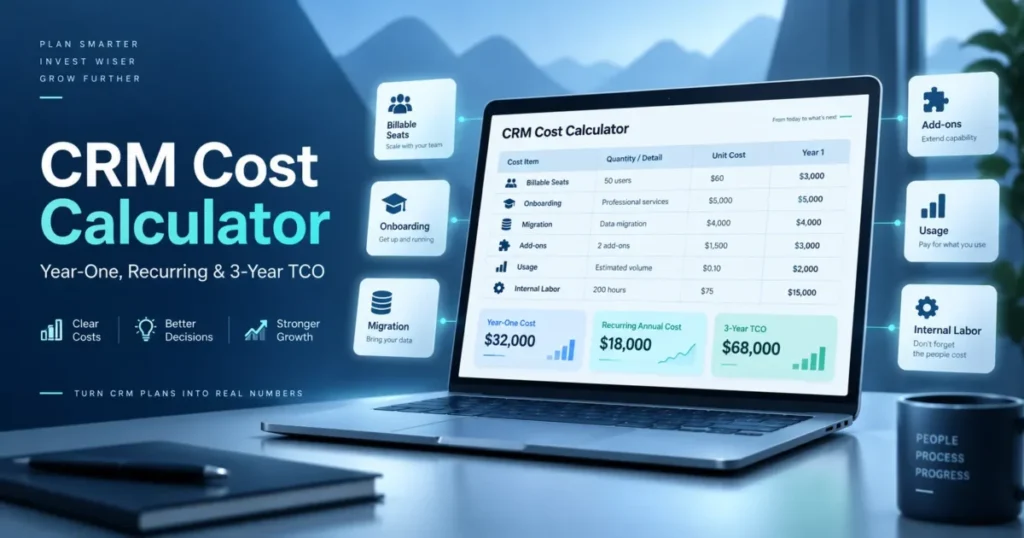
Every CRM quote starts with a seat price, and almost no CRM budget ends there. A CRM cost calculator is only useful if it forces the parts that arrive later into the same ledger.
That means the seats you are billed for rather than the people you employ, the onboarding fee attached to a tier, the credits that grow while headcount stays flat, the migration weekend, and the admin hours nobody costed.
The model below is built for that. It separates first-year cash from the steady-state run rate, it makes every input declare where its number came from, and it refuses to let a blank cell quietly become a zero.
Fill it once per shortlisted configuration, then compare.
In This Article (23 sections)
CRM Cost Calculator
The calculator runs directly in this page. Enter billable seats, recurring charges, and one-time implementation costs; the year-one figure, recurring run rate, effective cost per seat, and three-year total update as you type.
Use the advanced ledger when you need vendor presets, provenance codes, unknown handling, and side-by-side scenarios. There, a line marked UNK is excluded from every total rather than counted as zero.
Prefer a spreadsheet? Paste these two tables into one, with a tab per vendor configuration.
Calculate first-year cost and three-year TCO
Enter one shortlisted CRM configuration. The calculator applies the largest verified seat count and separates recurring costs from one-time implementation costs.
Recurring cost lines (they repeat every year)
| Line item | Basis | Quantity | Rate | Annual amount | Provenance |
|---|---|---|---|---|---|
| Seat licence | per billable seat per month | billable_ | seat rate | quantity times rate times 12 | VV / VQ / IA / CZ / UNK |
| Platform or base fee | flat per month or per year | 1 | flat fee | monthly fee times 12 plus annual fee | VV / VQ / IA / CZ / UNK |
| Recurring add-on modules | per seat or per account | units | add-on rate | units times rate times 12 | VV / VQ / IA / CZ / UNK |
| Usage lane 1 (contacts or records) | per tier or per unit above included | overage units | unit price | units times price per cycle | VV / VQ / IA / CZ / UNK |
| Usage lane 2 (AI credits or sessions) | per credit block or per session block | blocks | block price | blocks times price per cycle | VV / VQ / IA / CZ / UNK |
| Usage lane 3 (calls, messages, API, storage, automations) | per top-up or per unit | units | unit price | units times price per cycle | VV / VQ / IA / CZ / UNK |
| Integration or middleware subscription | per month | 1 | rate | rate times 12 | VV / VQ / IA / CZ / UNK |
| Premium support or SLA | per year or percent of licence | 1 | rate | rate | VV / VQ / IA / CZ / UNK |
| Recurring admin labor | hours per month | admin_ | loaded hourly rate | hours times rate times 12 | IA / UNK |
One-time cost lines (they hit year one only)
| Line item | Basis | Quantity | Rate | One-time amount | Provenance |
|---|---|---|---|---|---|
| Mandatory vendor onboarding | fixed fee attached to a tier | 1 | fee | fee | VV / VQ / CZ / UNK |
| External implementation services | fixed fee or day rate | days | day rate | days times rate | VQ / IA / UNK |
| Data extraction and migration | fixed fee or hours | hours | rate | hours times rate | VQ / IA / UNK |
| Data cleanup and deduplication | hours | hours | rate | hours times rate | IA / UNK |
| Integration build and testing | fixed fee or hours | hours | rate | hours times rate | VQ / IA / UNK |
| Initial training | per head or per session | heads | rate | heads times rate | VQ / IA / UNK |
| Internal implementation labor | project hours | project_ | loaded hourly rate | hours times rate | IA / UNK |
Provenance codes
| Code | Meaning | What it obliges you to record |
|---|---|---|
| VV | Vendor verified from a public page | Exact plan name, currency, billing cadence, source URL, checked date |
| VQ | Vendor quote | Quote reference, date, validity window, named contact |
| IA | Internal assumption | Assumption owner, basis, review date |
| CZ | Confirmed zero | Where the absence was confirmed, and by whom |
| UNK | Unknown, not yet researched | The named person who owns closing it |
A model whose one-time block is entirely UNK is not a budget. It is a licence request with a total attached.
How To Use This Model In Seven Steps
The use case is narrow on purpose: one shortlisted CRM configuration, priced end to end, for a team of roughly five to a hundred paid seats. Apply the template once per configuration and compare the outputs, rather than filling one sheet and editing it.
The required input for every line is the same triple: a number, the basis it is measured on, and where the number came from.
- Name the exact configuration first: vendor, product, edition, currency, billing cadence, and contract term. A cost model that says “HubSpot” rather than a named tier cannot be reconciled against anything later.
- Convert headcount into billable seats using the vendor’s own billing rule, not your org chart.
- Enter seat rate and any flat platform fee as separate lines, even when the vendor bundles them on one invoice.
- Open one usage lane per metric that can grow without hiring anybody.
- Map every decision-critical capability to the lowest plan or add-on that carries it, and price that, not the cheapest plan.
- Tag every one-time line as one-time, so the year-two run rate falls out of the model automatically.
- Set the year-two and year-three change explicitly. Leave it
UNKuntil the contract says otherwise.
The example output is three figures rather than one: first-year cost, recurring annual cost, and a three-year total that names its own assumptions. If any of the three moves when you change a single input, the model is doing its job.
Customize the row list freely, because no two CRM configurations bill the same way. The common error is deleting a row that looked irrelevant, so mark a line CZ when the official pricing page confirms it does not apply and UNK when nobody has checked.
Steps two through seven each have a section below, because each one is where a real model usually breaks.
What Official CRM Pricing Pages Actually Show
These figures come from public vendor pages checked on September 5, 2026. They sit here to show the cost shapes a model has to handle, not to rank the products.
| Vendor and plan | Price shown | Cost mechanic the model must carry |
|---|---|---|
| HubSpot Sales Hub Starter | $7 per seat per month, annual payment state | Same plan shows $20 per seat per month in the monthly payment state |
| HubSpot Sales Hub Professional | $90 per seat per month, annual commitment | Required one-time Professional Onboarding of $1,500 |
| HubSpot Sales Hub Enterprise | $150 per seat per month | Required one-time Enterprise Onboarding of $3,500 |
| HubSpot Credits | $9.00 per 1,000 credits when paid annually | Consumption cost that rises without a headcount change |
| Freshsales Growth | $9 per user per month, billed annually | Entry seat rate with separately priced add-ons above it |
| Freshsales Branded Documents | $19 per user per month | A per-seat add-on that scales with the seat count, not with the account |
| Freshsales Freddy AI Agent | $49 per 100 sessions | Session-metered charge sitting on top of per-user licensing |
| monday CRM Basic | $12 per seat per month billed annually | Same plan shows $18 per seat per month in the monthly price state |
| monday CRM Basic limits | 1,000 active contacts and deals | A capacity ceiling that forces a tier change before a seat change |
| Salesforce Sales editions | $25 Starter Suite, $100 Pro Suite, $195 Core, $395 Advanced, $550 Max per user per month | A long edition ladder where one required capability moves the whole team |
Source: official HubSpot Sales Hub pricing page and official Freshsales pricing page, checked September 5, 2026. Source: official monday CRM pricing page and official Salesforce Sales pricing page, checked September 5, 2026.
Two structural facts sit behind that table. The monday CRM pricing page states that plans start from three users, that an annual purchase is paid in one upfront installment, that prices exclude tax, and that price is determined by the billing country.
Pipedrive’s billing documentation was checked on September 5, 2026. It states plainly that “You’re charged per seat, whether it’s assigned to a user or not.” The same page lists purchasable top-ups for API tokens, leads and deals, reports, and automations on top of its named add-ons.
Neither of those is a price. Both change a total.
Step 1: Turn Headcount Into Billable Seats
Employee count is the wrong input, and it is the single most common reason a model comes in under the invoice. Three separate vendor rules can pull the billable number away from the headcount you started with.
A minimum-seat rule sets a floor. A two-person team on a plan that starts from three users buys three seats, so the entry cost is fifty percent above the arithmetic.
A purchased-seat rule sets a different floor. Where a vendor bills every seat you bought rather than every seat you filled, three empty seats left over from a hiring plan cost exactly the same as three working ones.
A role rule pulls the other way. Read-only viewers, finance approvers, and occasional managers sometimes need a cheaper seat type or no seat at all, and that distinction is worth confirming before you multiply anything.
So the model needs four fields rather than one: actual_users, minimum_billable_seats, purchased_seats, and the billable_seats figure the formula actually uses.
| Field | What it records | Common error it prevents |
|---|---|---|
| actual_ | People expected to log in | None on its own; it is context |
| minimum_ | The vendor’s stated floor | Pricing a two-person team below the vendor’s minimum |
| purchased_ | Seats under contract | Forgetting that unassigned seats still bill |
| billable_ | The greater of the three, after role rules | Multiplying the org chart by the seat rate |
Set billable_seats from the vendor’s rule and record which rule decided it. If nobody has read the billing terms yet, the field is UNK, not the headcount.
Step 2: Split Platform Fees From Seat Fees
A flat platform fee and a per-seat fee behave differently as the team grows, and folding them into one blended number destroys the only useful thing the model tells you about scale. Keep monthly_seat_rate, monthly_platform_fee, and annual_platform_fee as three fields, and let the formula add them.
Billing cadence needs the same treatment. A monthly-equivalent annual price and a monthly cash payment are different facts, and several CRM pricing pages display the first while charging the second.
Store billing_commitment and invoice_frequency separately, then record upfront_cash_due on its own. Finance cares about the annual figure; treasury cares about whether the whole year lands in one invoice.
Taxes belong outside the licence line. Where a vendor states that displayed prices exclude tax, the model carries a tax_rate field that stays UNK until finance supplies a buyer-specific rate.
Step 3: Give Usage Its Own Cost Lane
Seat-based thinking hides the costs that rise while the team stays the same size. Modern CRM pricing attaches money to consumption in at least four shapes, and each needs its own row rather than a single “add-ons” cell.
Credit blocks are the first shape. A published rate per thousand credits, against a per-tier included allowance, means a team that leans into AI features pays more than an identical team that does not.
Session metering is the second. A per-hundred-session charge scales with conversation volume, which is a support and marketing variable rather than a sales-headcount variable.
Capacity top-ups are the third. Where a vendor sells increments of API tokens, records, reports, or automations, a growing team can buy capacity without moving plans, and that spend never appears in a seat-count forecast.
Record ceilings are the fourth, and they are the sharpest. A plan capped at a stated number of active contacts and deals does not get more expensive gradually; it stops, and the next step is a tier change.
Each usage row carries six fields: the metric, the included quantity, the forecast quantity, the overage or top-up quantity, the unit price, and the reset cycle. Annual usage cost is the sum of those rows, and it never touches the seat line.
Step 4: Price The Plan Gate Before You Compare Plans
Most cost calculators start by asking which plan you chose. That is backwards, because the plan is an output of your requirements, not an input to them.
Work the other way. List the capabilities the workflow cannot run without, then find the lowest edition or add-on that carries each one, then price that.
Two mechanics make this expensive. An edition ladder can move a whole team several hundred dollars per user per month for one gated capability, and a capability marked as available for purchase adds cost outside the base edition entirely.
| Requirement field | What to record | Why it changes the total |
|---|---|---|
| required_ | The workflow that fails without it | Anchors the check to a decision, not a feature list |
| minimum_ | Lowest edition carrying it | Sets the real seat rate for every seat, not just the users who need it |
| separate_ | Yes, no, or unknown | A capability sold separately never appears in the plan price |
| incremental_ | The delta against the plan you assumed | Makes the gate visible as money |
| requirement_ | Met, unmet, unknown | An unmet mandatory requirement makes the whole scenario non-comparable |
A scenario with an unmet mandatory requirement is invalid, not cheap. Mark it and move on rather than letting it win the comparison.
Step 5: Separate One-Time Costs From Recurring Costs
Year one and year two are different budgets, and a model that reports one annual total serves neither. Every row needs a recurrence type before any total is calculated.
Mandatory vendor onboarding is the clearest case. A tier that attaches a required onboarding fee makes year one materially higher than the renewal year, and a model that averages the two misstates both.
Implementation deserves the same discipline, broken into parts rather than entered as one number. Data extraction, cleanup, mapping, import, validation, integration build, workflow rebuild, testing, and training are separate workstreams with separate owners, and merging them into a single “setup” figure removes every lever you have to negotiate it down.
One rule prevents the most expensive double-count: when an implementation partner’s quote already covers migration, migration is CZ, not a second estimate. The same applies to internal labor already priced inside a managed-service fee.
Step 6: Put Internal Labor In The Model
Work done by your own team is not free, and leaving it out is how a CRM that looked cheaper wins a comparison it should have lost. Two lines cover it.
Implementation labor is internal_implementation_hours multiplied by a loaded hourly rate. Recurring administration is recurring_admin_hours_per_month multiplied by the same rate, annualised.
Both rates are internal assumptions, and both must be tagged IA with a named owner. A loaded hourly rate that nobody owns is the fastest way for a defensible model to become an argument.
The point of the line is not precision. It is that a CRM demanding a half-time administrator and one demanding two hours a month stop looking identical the moment the hours are visible.
Step 7: Make Future-Year Assumptions Explicit
A three-year total is only as defensible as the two numbers nobody looked up: the year-two change and the year-three change. Both fields default to UNK, and neither gets a market average.
No vendor-independent renewal figure survives verification, so this model asserts none. What it does instead is force the assumption into the open, with an owner and a basis attached.
Three legitimate values exist. A contractual rate from the agreement is the strongest, a rate the vendor stated in writing during negotiation is second, and zero percent as a declared scenario assumption is third, provided the model labels it as an assumption rather than a finding.
What is not legitimate is a percentage borrowed from an industry article, applied silently, and then reported to finance as a projection.
| Field | Default | Acceptable replacement |
|---|---|---|
| year_2_price_ | UNK | Contract clause, written vendor statement, or a labelled buyer assumption |
| year_3_price_ | UNK | Contract clause, written vendor statement, or a labelled buyer assumption |
| tax_ | UNK | A rate confirmed by finance for the buying entity and jurisdiction |
| renewal_ | UNK | The renewal term stated in the agreement |
Run the three-year figure twice, once at zero percent and once at whatever rate you fear, and note the spread. That spread, not the point estimate, is the number worth taking into a negotiation.
The Formulas Behind Every Output
Nine formulas produce every number the model reports. Each one is written so a finance reviewer can reproduce it from the inputs.
| Output | Formula | Boundary |
|---|---|---|
| annual_ | billable_ | Only after the vendor’s seat rule has set billable_ |
| annual_ | monthly_ | Never combine with the seat rate unless the vendor bills both |
| annual_ | sum of monthly usage charges times 12, plus annual usage charges | Keeps contacts, credits, sessions, API, storage and top-ups out of the seat line |
| internal_ | internal_ | The rate is a planning assumption, never a vendor fact |
| recurring_ | annual_ | Excludes every one-time line |
| one_ | onboarding plus external implementation plus migration plus cleanup plus integration setup plus initial training plus internal implementation labor | Year one only |
| first_ | recurring_ | Taxes and renewal changes stay outside unless a verified rate exists |
| three_ | year one cost plus year two recurring cost plus year three recurring cost | Each future-year change is an explicit assumption or a contract value |
| effective_ | recurring_ | A normalisation metric only; it hides flat fees and usage by design |
Quote variance is the tenth number and the one most worth calculating: vendor quote total minus the model’s reconstructed total. A non-zero variance is a question, not a verdict on either figure.
Provenance: Why Zero And Unknown Are Different Values
A blank cell and a confirmed zero look identical in a total, and that single collapse is what lets a model understate a budget by thousands. The fix is a four-state discipline on every cost line, plus a count of how many decision-critical inputs are still open.
| Rule | What it enforces |
|---|---|
| Every monetary input is non-negative | Prevents a negative “credit” line from masking a real cost |
| Zero means confirmed zero or a declared assumption | An unresearched line stays UNK and never sums as nothing |
| Every vendor-derived price records plan, cadence, source and checked date | Makes the number reproducible six months later |
| No annual reduction is applied to a price that is already the annual-billing rate | Prevents double-counting the annual cadence |
| No licence reduction is applied to onboarding, implementation, add-ons or usage | Those items are discounted only when a quote says so |
| Migration is not counted twice inside implementation | The most common double-count in a switching budget |
| Internal labor inside a managed-service fee is not counted again | The second most common |
| Billable seats respect any verified minimum or purchased-seat rule | Stops the org chart from setting the licence total |
| Platform, seat, record and usage pricing stay separate dimensions | Preserves the model’s ability to answer “what changes as the team grows” |
| An annual monthly-equivalent is never described as monthly billing | Protects cash-flow planning |
| A scenario with an unmet mandatory requirement is invalid | Stops a cheap plan winning a comparison it cannot serve |
| Future-year change defaults to unknown | No universal renewal increase is asserted |
| Taxes stay unknown or separately modelled | Buyer-specific and jurisdiction-specific |
| A model with open decision-critical unknowns is provisional | It informs a shortlist, it does not approve a purchase |
| No generic hidden-cost percentage substitutes for a researched line | Named rows or nothing |
That last rule is the one I would defend hardest. A flat uplift labelled hidden costs turns up on competing CRM calculators, set at twenty percent on one page and forty on the next, with no stated basis on either.
If you want a contingency, add it as its own labelled line and keep it outside the verified total.
Worked Example: A Twenty-Five-Seat Model
Every figure below is invented to demonstrate the formulas. None of it comes from a vendor, and none of it is a benchmark.
A team of twenty-five billable seats, on a hypothetical plan at thirty-nine dollars per seat per month, with six hundred dollars a month of recurring add-ons:
| Line | Recurrence | Amount |
|---|---|---|
| Seat licence | Recurring | 11,700 dollars per year |
| Recurring add-ons | Recurring | 7,200 dollars per year |
| Recurring annual cost | Recurring | 18,900 dollars per year |
| Mandatory onboarding | One-time | 2,500 dollars |
| Migration and data cleanup | One-time | 4,000 dollars |
| Integration setup | One-time | 3,000 dollars |
| Initial training | One-time | 1,500 dollars |
| Internal implementation labor, one hundred and twenty hours at seventy-five dollars | One-time | 9,000 dollars |
| One-time total | One-time | 20,000 dollars |
| First-year cost | Year one | 38,900 dollars |
| Three-year TCO, no assumed change in years two and three | Three years | 76,700 dollars |
The first-year figure is more than double the run rate, and the effective recurring cost lands at sixty-three dollars per seat per month against a thirty-nine dollar headline. That gap is the entire argument for the model.
The chart above plots the same three totals stated in the table: 38,900 dollars in year one, then 18,900 dollars in each of years two and three, with the 20,000 dollar one-time block present only in the first bar.
Five Test Cases For Checking Your Own Model
A cost model is a small piece of software, and it deserves the same treatment. Run these five cases through your sheet before you trust a total.
| Test case | Input | Expected output | What a failure reveals |
|---|---|---|---|
| Minimum-seat floor | Two actual users against a vendor floor of three seats | Seat cost is calculated on three seats | The model is multiplying headcount instead of billable seats |
| Unassigned seat | Ten purchased seats with seven assigned | Seat cost is calculated on ten seats | The model is reading the user list, not the contract |
| Unknown propagation | Onboarding left as UNK | First-year cost is flagged provisional, not reduced | The model is treating unknown as zero |
| Usage without hiring | Seat count held flat, usage forecast doubled | Recurring annual cost rises, effective cost per seat rises | Usage is buried inside the seat line |
| Recurrence split | One-time block set to zero | Year one equals the recurring annual cost exactly | A one-time line is wrongly tagged recurring |
The unknown-propagation case is the one that fails by default. A blank cell sums as nothing in every spreadsheet application, and no formula raises a hand when it does.
Base, Expected Growth, And Stress Scenarios
One point estimate hides every cliff in the pricing structure. Build three, using identical formulas and different assumption sets.
Base is the configuration as filled: the billable seats, usage forecast and plan already entered in the model.
Expected growth moves the variables you already believe will move: the hiring plan, the contact database as marketing scales, the automation count as processes get built.
Stress is the useful one. It pushes each variable past the nearest threshold rather than up by a comfortable percentage: one seat past a tier boundary, one record past a stated capacity ceiling, one requirement into an edition the team is not on.
| Scenario | What changes | What it answers |
|---|---|---|
| Base | Nothing; the model as filled | Is this affordable now |
| Expected growth | Seats, usage and records on the current plan | Does the run rate stay proportional |
| Stress | Each variable pushed just past its nearest threshold | Where is the next cost cliff, and how far away is it |
The useful output of the stress case is a distance rather than a total: how many months of the entered growth rate sit between the base scenario and the next forced upgrade.
Reconcile The Model Against The Vendor Quote
The model is not the purchase document. Once a quote arrives, calculate the variance and explain it line by line, because the explanation is usually where the missing cost lives.
Material variance nearly always traces to one of six things: a seat minimum the model missed, an add-on nobody listed, a required service fee, tax, a negotiated rate on some lines but not others, or a term length that changes the rate. Record vendor_quote_total, quote_variance, and a written variance_explanation for every material difference.
An unexplained variance is a reason to go back to the vendor, not a reason to adjust the model until it matches.
Common Mistakes That Understate CRM Cost
- Multiplying employee headcount by the advertised seat rate, with no billable-seat rule applied.
- Treating a monthly-equivalent annual price as a monthly cash payment, then being surprised by a full-year invoice.
- Entering zero for onboarding because nobody checked whether the tier attaches a mandatory fee.
- Folding contacts, credits, sessions and API capacity into one add-on cell, so nothing can be forecast independently.
- Comparing the cheapest plans of two vendors when only one of them carries a mandatory capability.
- Counting migration inside an implementation quote and again as its own line.
- Costing external services carefully and internal hours not at all.
- Applying a generic hidden-cost percentage instead of researching the named lines.
- Assuming a renewal increase with no contract language, or assuming none at all with equally little basis.
- Comparing a first-year total against another vendor’s steady-state total.
Red Flags In A CRM Quote
- A quote that states a total without a per-line breakdown by recurrence type.
- Onboarding or implementation described as included, with no scope attached.
- A seat count on the quote that differs from the seat count you asked for.
- Usage allowances quoted per month in one place and per year in another.
- A renewal rate the quote declines to state.
- A discount applied to licence lines only, presented as an overall reduction.
- Capabilities in the proposal that the named edition does not carry.
- Data export terms that are absent from the contract entirely.
- A term length longer than your confidence in the vendor.
- Tax treatment left to “as applicable” with no rate and no jurisdiction.
Each of those is answerable before signature, and each is materially harder to fix afterwards.
When Not To Use This Model
This is a planning and comparison instrument. It is not a quote, and it does not become one by being detailed.
Do not present its output as a final procurement figure while negotiated pricing, multi-product bundles, taxes, or required professional services are still open. Do not compare two CRMs on total cost alone when they do not satisfy the same mandatory requirements.
Do not repurpose it as a return-on-investment model. Benefit assumptions need their own evidence, and blending them into a cost total produces a number that proves whatever the assumptions were set to prove.
And do not rely on a saved scenario built from prices checked months ago. Re-verify every vendor-derived line before the approval meeting, because a stale preset is how a careful model produces a confidently wrong answer.
How The Pricing Mechanics Were Verified
This model is built from official vendor pricing pages and official billing documentation, with volatile figures checked on September 5, 2026.
Each vendor page was assessed against the same criteria. Those were the displayed seat or user rate, the gap between the annual and monthly billing states, any stated minimum or billed-seat rule, any mandatory one-time fee, any consumption charge, and any plan limit that forces a tier change.
Greater weight was given to mechanics that change a buyer’s total rather than to headline prices, because a billing rule or a capacity ceiling moves a budget further than a two-dollar difference in a seat rate. Vendor marketing claims and third-party price aggregators were excluded from the figures above.
Claims that could not be verified against a vendor’s own page were left out. Where a pricing page rendered in a currency other than the dollar from the research location, no dollar figure was recorded for that vendor rather than an inferred one.
What To Do After You Fill The Model
If the licence total is the problem, the fix is usually the plan gate rather than the seat count, and the CRM implementation guide covers how requirements get over-specified in the first place.
If the one-time block is the problem, most of it is migration, and the CRM migration guide is the better place to attack it.
If the model says the shortlist is unaffordable at this team size, the shortlist is wrong rather than the budget. Start again from the best CRM for small business shortlist, or check a single vendor’s own page such as HubSpot pricing or Pipedrive pricing before rebuilding the scenario.
If you would rather start from a spreadsheet than a blank tab, the CRM Excel template gives you a structure to paste these rows into.
FAQ
Five questions come up after the model is filled but before the vendor call. Each answer below points back to the section that does the work.
How Much Does CRM Software Cost Per User?
The evidence table above shows the spread across the five vendors checked: a single-figure entry seat rate at one end, and an enterprise edition several hundred dollars per seat at the other, all on annual billing. That spread is why a per-user figure is a starting point rather than an answer, and why the model prices a configuration rather than a category.
What Is The Difference Between First-Year And Recurring CRM Cost?
First-year cost includes every one-time item: mandatory onboarding, implementation, migration, cleanup, integration build, initial training, and the internal hours spent on all of it. Recurring annual cost is what remains once those are done, and it is the number your renewal conversation will be about.
Should I Compare CRM Prices Monthly Or Annually?
Compare both, in separate fields. Several CRM pricing pages display a monthly-equivalent rate that is only available on an annual commitment.
One vendor states that an annual purchase is paid in a single upfront installment, which is a cash-flow fact rather than a pricing one.
How Do I Model CRM Costs That Are Not Based On Seats?
Open one row per metric that can grow independently of headcount, with its included quantity, forecast quantity, overage quantity, unit price and reset cycle. Credit blocks, session charges, capacity top-ups and record ceilings all behave this way, and none of them belongs in the seat line.
What Renewal Increase Should I Assume For Years Two And Three?
None, unless the contract or the quote states one. No vendor-independent renewal figure was verifiable for this model, so the year-two and year-three change fields default to unknown, and a scenario that sets them to zero should say so as an explicit assumption rather than as a finding.
Take The Model Into The Vendor Conversation
Fill the reusable CRM cost model once per shortlisted configuration, with vendor-verified prices on the licence lines and internal assumptions everywhere else, each one tagged and owned.
Then compare multiple scenarios rather than a single point estimate, and take the resulting year-one, recurring and three-year TCO figures into the vendor discussion and the budget discussion as two separate numbers.
The variance between the model and the quote is the agenda for that call. Everything still marked unknown is the agenda for the one before it.