
Picking the best wireframing tool is rarely a drawing problem.
It is a fidelity problem, a plan-gate problem, and a handoff problem, and the wrong answer surfaces two months later when a free board cap lands or a prototype cannot express a simple condition.
Figma takes the top position because its Professional plan lists advanced prototyping tools and easier dev handoff, and its feature table lists sharing prototypes with stakeholders without sharing the design file, so my judgment is that one plan can carry a wireframe through to a prototype and handoff.
Balsamiq is the better buy when the point of the exercise is to stop a team from designing too early. Miro is the cheaper answer when wireframes belong inside a workshop rather than a design file.
Every price, cap, and plan gate below was read from official vendor pages on the dates given in each tool’s section. Each tool is judged as one part of the wider stack of AI prototyping tools a product team already runs.
In This Article (18 sections)
Quick Verdict: Best Wireframing Tool by Use Case
| Use case | Best pick | Why it fits |
|---|---|---|
| One tool from wireframe to prototype and handoff | Figma | Professional adds unlimited files and projects, advanced prototyping tools, and easier dev handoff |
| Deliberately low-fidelity stakeholder review | Balsamiq | Structure-first wireframes with unlimited reviewers who cannot edit |
| Fast product-trio flows | Whimsical | Drag-and-drop wireframe components next to flowcharts and docs |
| Code-backed design-system work | UXPin | Core carries conditional logic, variables and expressions, and coded libraries |
| Logic-heavy application specifications | Axure RP | Wireframes sit beside functional prototypes and cloud review |
| A first draft without a designer | UX Pilot | A prompt, a sketch, or a PRD import produces editable screens from low to high fidelity |
| Tightest per-seat budget | Miro | Starter is the lowest per-member paid entry in this ranking |
| Wireframe-first agency delivery | MockFlow WireframePro | A dedicated wireframe workspace with handoff and Figma export |
| Forms and data-rich interaction | Justinmind | Forms, interactive preview, and a large UI-element library |
| Sketch to editable screen on a free plan | Uizard | The wireframe scanner turns a hand drawing into editable UI |
Source: every reason in the right-hand column is documented on the official pages cited in each tool’s section below, including Axure RP wireframe overview and MockFlow WireframePro workspace, each checked on the date given in that tool’s section.
Two of those rows carry the whole decision. If the wireframe has to survive contact with engineering, buy for the handoff path, and if it only has to survive a stakeholder meeting, buy for the constraint.
Teams that also need administrative identity controls should read the collaboration section before shortlisting, because that gate sits on a different tier for every vendor here.
Which Job Each Wireframing Tool Covers
Ten products in one ranking does not mean ten products competing for the same job. This matrix is an editorial assessment of documented feature scope, not a test result, and every cell is limited to what the vendor publishes.
| Tool | Structure-first wireframing | Clickable flow | Conditional or data logic | Code-backed components | Documented downstream path |
|---|---|---|---|---|---|
| Figma | Yes | Yes | By plan | By plan | By plan |
| Balsamiq | Yes | Yes | Not documented | Not documented | Not documented |
| Whimsical | Yes | Limited | Not documented | Not documented | Not documented |
| UXPin | Yes | Yes | Yes | Yes | Not documented |
| Axure RP | Yes | Yes | Yes | Not documented | Yes |
| UX Pilot | Yes | Yes | Not documented | Not documented | By plan |
| Miro | Yes | Yes | Not documented | Not documented | Not documented |
| MockFlow WireframePro | Yes | Limited | Not documented | Not documented | Yes |
| Justinmind | Yes | Yes | Yes | Not documented | By plan |
| Uizard | Yes | Yes | Not documented | Not documented | Yes |
Source: these capability judgements are an editorial reading of the official product and documentation pages cited inside each tool’s own section below. Two examples are Figma wireframe kit templates and MockFlow prototyping documentation, each checked on the date given in that tool’s section.
Balsamiq, Whimsical, UX Pilot, MockFlow WireframePro, and Uizard compete directly for the same early screen. UXPin, Axure RP, and Justinmind compete on behavior instead, and Figma and Miro are the two that also own a job much larger than wireframing.
How We Chose and Ranked These Tools
These rankings are based on official pricing pages, official product and documentation pages, and the plan limits published on them. Pricing and plan limits were checked on the dates given in each tool’s section.
Visily, which held the sixth slot, shut down on October 31, 2026, so UX Pilot replaced it in this update.
Each tool was assessed against the same buyer-focused criteria: wireframing speed, collaboration model, prototype depth, downstream handoff, plan restrictions, administrative controls, and cost structure.
Greater weight was given to factors that change a purchase decision, including the cheapest plan that supports the required workflow, the first hard cap a team meets, and the tier where identity controls begin. Brand popularity and affiliate relationships did not influence the ranking.
Claims that could not be verified from official evidence were excluded rather than softened. Temporary pricing offers are separated from standard pricing and re-checked on the publication date.
Best Wireframing Tools Compared: Price, Cap, Depth, and Disqualifier
| Tool | Best micro-cohort | Paid entry (US) | First hard cap | Prototype depth | Main disqualifier |
|---|---|---|---|---|---|
| Figma | 3 to 15 person product-design squads | $16 per full seat, default view ($20 on Monthly) | Starter is free with limited access to Figma products | Clickable, plus advanced prototyping on Professional | A team that wants polish blocked during discovery |
| Balsamiq | PM, analyst, founder, and consultant workflows | $16 per editor, billed annually | Starter allows up to 10 projects | Drag-and-drop wireframing; a project holds the wireframes and prototypes for one flow or major feature | Production-grade visual design in the same tool |
| Whimsical | Product trios and engineering squads | $10 per editor, billed annually | Free allows 50 board objects per month | Prototyping not listed on the pricing page | SAML single sign-on is not included below Business |
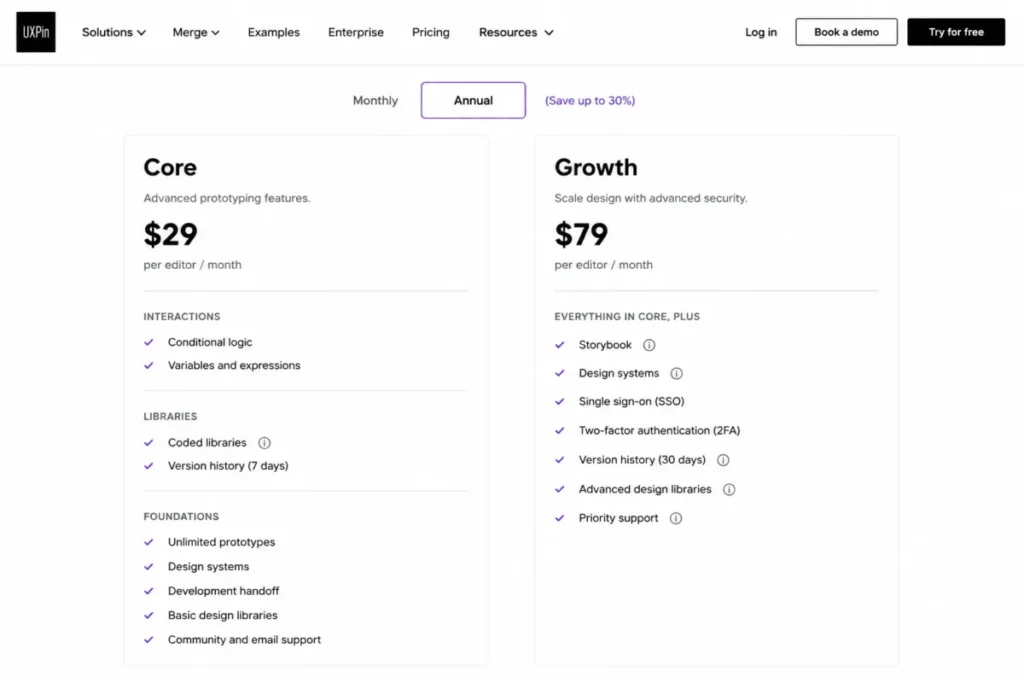
| UXPin | 5 to 50 person design-system teams | $29 per seat, annual-price view | Core keeps 7-day version history | Conditional logic, variables, expressions | Fast sketching as the only requirement |
| Axure RP | Enterprise UX and business-analyst teams | $29 per user per month | Co-authoring sits on the Team plan | Functional prototypes with states and conditions | Browser-first lightweight collaboration |
| UX Pilot | Founders, PMs, and analysts without designers | $19 per month on Pro, billed annually | Free allows 1 project and 80 credits per day | Editable AI-generated screens, flows, and prototyping | Real-time co-editing needed below the Teams plan |
| Miro | Distributed workshop and discovery teams | $8 per member, billed annually | Free allows 3 editable boards | Board-level wireframe and prototyping components | Logic-heavy prototyping or production UI |
| MockFlow WireframePro | Agencies delivering wireframes to clients | $9 per editor on Plus, billed yearly | Free Basic allows 1 editor and up to 4 projects | Click-through prototyping on every plan | Conditional logic is not listed on the pricing page |
| Justinmind | UX teams validating forms and data | $19 per editor per month | Free allows 1 project | Forms, variables, and device preview | A browser whiteboard is all that is needed |
| Uizard | Founders and consultants converting sketches | $12 per month, billed annually | Free allows 2 projects and 5 screens | Editable screens linked into a prototype | Deep component governance on lower tiers |
Source: Figma plan tiers, Balsamiq plan tiers, and Whimsical plan tiers. Then UXPin plan tiers and Axure plan tiers. Also Miro plan tiers and MockFlow plan tiers. Finally Justinmind plan tiers and Uizard plan tiers, each checked on the date given in that tool’s section below, and UX Pilot plan tiers, checked November 16, 2026.
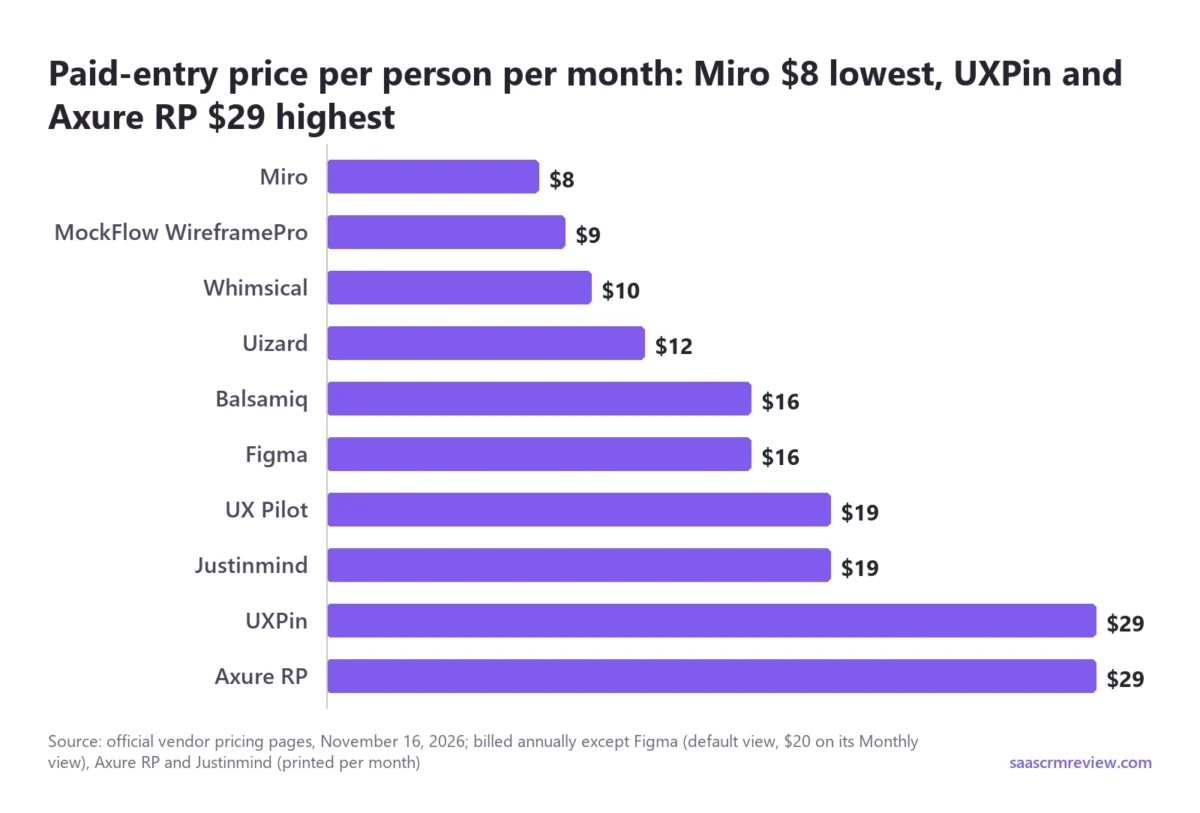
Read that table by column, not by row. The paid-entry column spreads from $8 to $29 per person, the prototype-depth column splits the field into two groups that barely compete, and the disqualifier column is the one that removes tools from a shortlist fastest.
The spread matters less than the billing basis behind it. Figma’s $16 Full seat is what its pricing page shows by default and its Monthly view shows $20, while Axure RP prints $29 per user per month and Justinmind $19 per editor per month, so a straight price ranking would mislead a buyer comparing five editors.
The Three Problems Every Wireframing Buyer Faces
Most shortlists collapse when a buyer treats wireframing as one capability. It is three separate decisions, and each one eliminates different tools.
The first is fidelity. A wireframe exists to argue about structure, so a tool that makes visual polish easy can quietly turn a structure review into a color review.
The second is behavior. Linking screen A to screen B is a different engineering problem from simulating a form that validates input, branches on a condition, and remembers state.
The third is origin and destination. Somebody has to make the first screen, and something has to happen to it after approval, and those two ends decide switching cost more than the drawing experience does.
Fidelity and interactivity are separate axes, and the common mistake is to compare tools on one line.
Balsamiq sits low on fidelity and low on interactivity by design. UXPin and Axure RP sit high on interactivity while still supporting low fidelity, and Figma sits mid on both with room to climb in either direction.
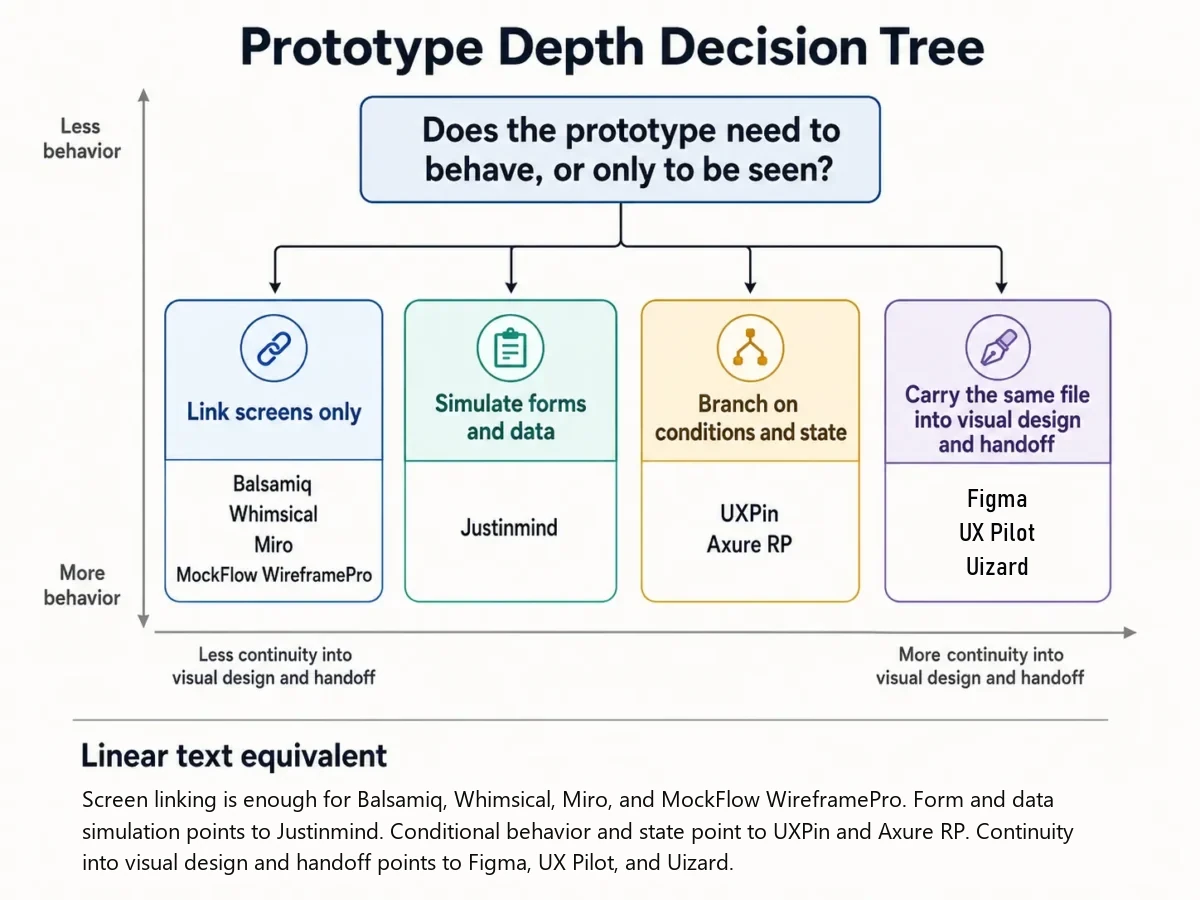
In reading order, that tree says four things. Screen linking is enough for Balsamiq, Whimsical, Miro, and MockFlow WireframePro; form and data simulation points to Justinmind; conditional behavior and state point to UXPin and Axure RP; and continuity into visual design and handoff points to Figma, UX Pilot, and Uizard.
Figma’s help center lists if/else conditionals on Professional and higher plans, so simple branching alone does not require UXPin or Axure RP. In my judgment, the tree’s logic branch is for teams whose deliverable is a behavior specification (Axure RP) or production-component behavior (UXPin coded libraries).
Buying one branch higher than the requirement is the expensive mistake. The tools that simulate behavior cost $29 per person at entry, against $8 to $16 for the tools that link screens, and that gap compounds across every editor a team adds.
Teams that already standardize on shared boards should also weigh how much of this work belongs in their existing small business collaboration software before adding another seat-based subscription.
Tools That Solve the Fidelity Problem Best
Fidelity is where the first three tools separate. One keeps the door open to higher fidelity, one closes it deliberately, and one keeps the whole exercise short.
1. Figma: Best Overall for Wireframe-to-Prototype Continuity
- Best for:
- 3 to 15 person product-design squads that want one file to carry a wireframe through to an interactive prototype and developer handoff.
- Avoid if:
- the team needs a deliberately constrained sketch environment that discourages visual detail work during discovery.
- Starting price:
- Starter is free with limited access.
- Practical tier:
- Professional at $16 per full seat per month on the pricing page’s default view, or $20 on its Monthly view.
- Free plan:
- Yes. Starter, which the pricing page lists as free limited access to Figma products.
- First limit that bites:
- Starter’s limited access to Figma products, while Professional lists unlimited files and projects.
- Better than Balsamiq:
- Figma’s Professional plan lists advanced prototyping tools and easier dev handoff, and its feature table lists sharing prototypes with clients and stakeholders without sharing the underlying design file, so my judgment is that an approved wireframe can keep working in the same workspace.
- Worse than Balsamiq:
- nothing in the environment discourages a reviewer from arguing about spacing while the structure is still unsettled.
- Setup difficulty:
- Low. The workflow runs in the browser and a wireframe kit supplies reusable components.
- Hidden costs:
- every contributor who edits needs a full seat, so the bill tracks the number of people who touch the file rather than the number of designers.
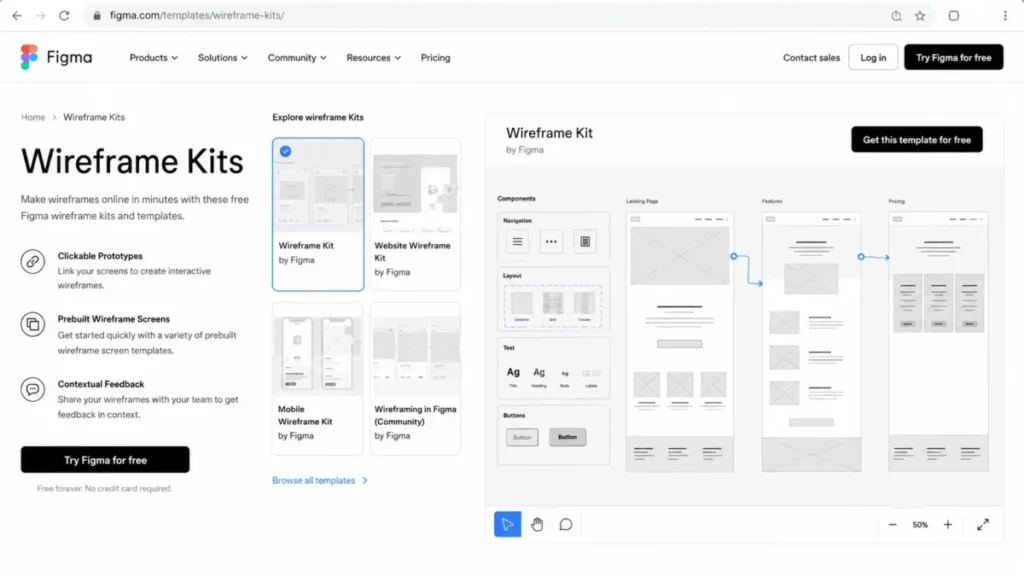
The reason Figma ranks first is not drawing quality. Figma offers advanced prototyping tools and easier dev handoff on Professional. The Figma Community also has wireframe kits with reusable components and templates that help teams move from concept to higher-fidelity design, so my judgment is that a team can take a wireframe from first sketch to handoff on one Figma plan.
Figma Community wireframe kits supply reusable components, and Figma’s feature table lists sharing prototypes with clients and stakeholders without sharing the underlying design file. In my judgment, that combination is what makes a wireframe survive the meeting it was drawn for.
The tradeoff is real and it is the opposite of Balsamiq’s. Nothing about the canvas signals “this is a draft”, so a discovery review can drift into a visual review unless the team sets that rule itself.
Professional is the tier that matters for a working squad, because its page lists unlimited files and projects for a single team plus advanced prototyping tools and easier dev handoff, while Starter is listed as free limited access to Figma products. Budget five paid editors at $16 x 5 = $80 per month before add-ons on the default view, or $20 x 5 = $100 on the Monthly view.
Teams weighing the wider platform against wireframing alone should read the full Figma review before committing seats.
| Pros | Cons |
|---|---|
| Professional lists unlimited files and projects, advanced prototyping tools, and easier dev handoff | Starter is free limited access to Figma products, so a multi-project squad plans on Professional |
| Wireframe kits provide reusable components instead of redrawn boxes | The canvas gives no signal that a screen is meant to stay rough |
| Figma lists sharing prototypes with clients and stakeholders without sharing the underlying design file | Every editing contributor consumes a full seat |
| Figma’s wireframe templates page says templates help teams move from concept to higher-fidelity design | The Monthly view raises the Full seat from the default view’s $16 to $20 |
| Prototype interactions support if/else conditionals, and prototypes can be powered by variables | Conditional prototype logic needs Professional or a higher plan and edit access to the file; Starter is not on the plan list |
Source: Figma pricing and Figma wireframe kits, checked November 16, 2026.
- Verdict:
- Choose Figma if the wireframe is the first step of a design process that ends in engineering handoff, and skip it if the team needs an environment that actively refuses to look finished.
2. Balsamiq: Best for Low-Fidelity Clarity

- Best for:
- PM-led teams, founders, consultants, and business analysts who need fast structure-first wireframes and free reviewers.
- Avoid if:
- the same tool is expected to produce polished visual design and production-grade high-fidelity UI.
- Starting price:
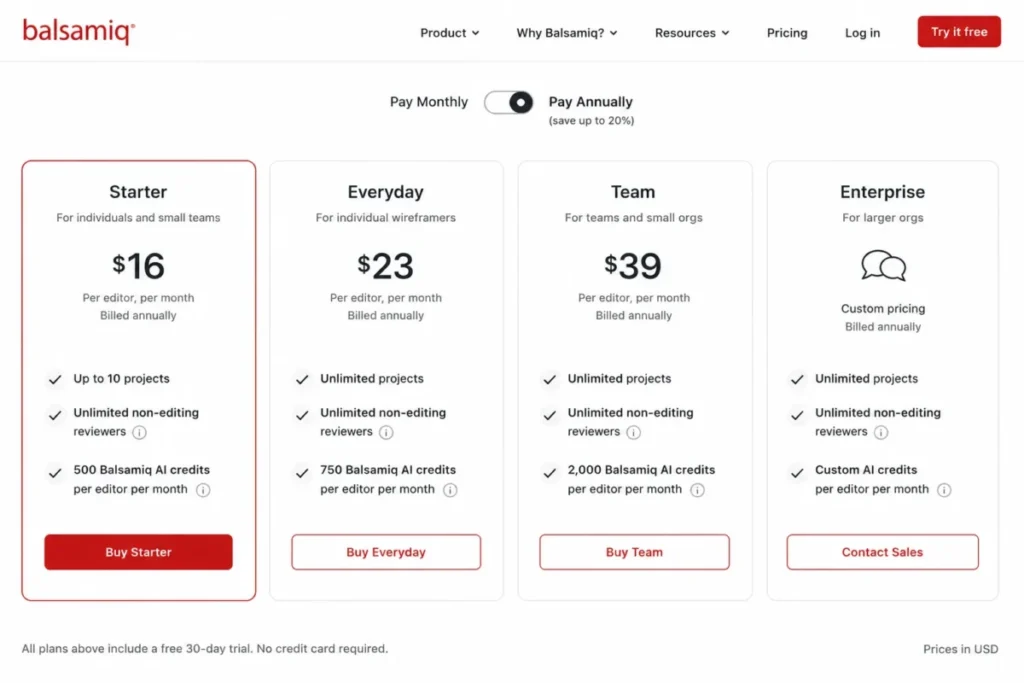
- $16 per editor per month on the Starter plan when billed annually, which is $192 per year per editor.
- Practical tier:
- Starter, until the tenth project is reached.
- Free plan:
- Not published as an editor tier in this pricing evidence. Reviewer access is free, editor access is not.
- First limit that bites:
- Starter supports up to 10 projects.
- Better than Whimsical:
- unlimited reviewers can comment without an editor seat, which keeps stakeholder cost at zero.
- Worse than Whimsical:
- the deliberately rough aesthetic is harder to reuse when a screen eventually needs to look real.
- Setup difficulty:
- Low. Balsamiq’s pricing page lists drag-and-drop wireframing, and a project holds the wireframes and prototypes for one flow or major feature.
- Hidden costs:
- Balsamiq AI is metered at 500 credits per editor per month on Starter, so heavy generation is a consumption question rather than a flat one.
Balsamiq is the only tool in this ranking whose main feature is a refusal. The sketch aesthetic is a governance mechanism: it makes a spacing argument feel out of place, which is exactly what a requirements conversation needs.
The reviewer model is the underrated part of the economics. Unlimited reviewers who cannot edit means a 5-person squad pays for 5 editors at $80 per month while an entire stakeholder group reads and comments for nothing.
There is a dated switching risk that most roundups omit. Balsamiq for Desktop can be bought until December 31, 2026, and it does not include Balsamiq AI, so a new long-lived workflow belongs in Cloud rather than Desktop.
The 10-project ceiling on Starter is the first thing an agency hits. Client work tends to open a project per engagement, and that arithmetic arrives faster than seat growth does.
| Pros | Cons |
|---|---|
| The low-fidelity constraint keeps early reviews on structure rather than styling | Starter stops at 10 projects, which agencies reach on engagement count |
| Unlimited reviewers comment without consuming an editor seat | Polished visual design has to move to another tool |
| Drag-and-drop wireframing, with each project holding the wireframes and prototypes for one flow or major feature | Balsamiq AI is metered per editor per month rather than unlimited |
| Starter includes 500 Balsamiq AI credits per editor per month | The Desktop edition can be bought until December 31, 2026 |
Source: Balsamiq pricing, Balsamiq for Desktop, and Balsamiq on wireframes and design systems, checked November 17, 2026.
- Verdict:
- Choose Balsamiq if the hardest part of the job is getting non-designers to argue about structure, and skip it if the same license is expected to deliver finished UI.
3. Whimsical: Best for Fast Product-Team Wireframes

- Best for:
- product trios and engineering squads that want fast, focused wireframing next to flowcharts and clutter-free docs.
- Avoid if:
- the prototype needs conditional logic or code-backed components, which are not listed on Whimsical’s pricing page or its wireframes page.
- Starting price:
- $10 per editor per month on Pro when billed annually.
- Practical tier:
- Pro, once a team needs more than 50 board objects a month.
- Free plan:
- Yes. Up to 50 board objects and 50 doc blocks per month, with 7-day version history and a watermark on exports.
- First limit that bites:
- the free plan’s 50-board-object monthly cap, followed by the 7-day version-history window.
- Better than Balsamiq:
- wireframes live beside flows and notes, so a squad does not switch tools to document the decision it just made.
- Worse than Balsamiq:
- reviewers are not free in the same way, so stakeholder access is a seat question.
- Setup difficulty:
- Low. Wireframe mode supplies drag-and-drop components, and Whimsical lists flowcharts for exploring and validating interaction flows.
- Hidden costs:
- SSO with SAML and SCIM provisioning sit on the Business plan, so an IT-reviewed rollout costs more than the Pro price implies.
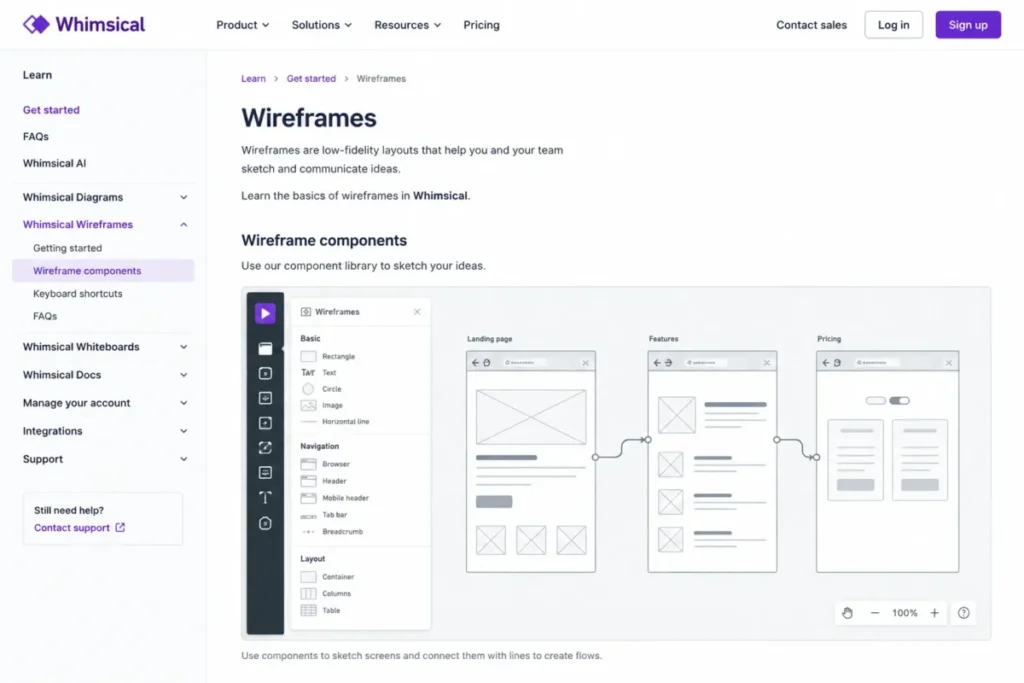
Whimsical earns third place on speed and adjacency rather than depth. Whimsical’s wireframes page describes “Fast, focused wireframing” with drag-and-drop components that have adjustable properties and states, and lists flowcharts for exploring and validating interaction flows, which suits a trio that needs a shared picture before the next standup.
The 7-day version history is the quiet constraint. A team that reworks a flow over a two-week sprint can lose the ability to recover the version it started from, and that recovery window only widens on higher plans.
Identity controls are the other gate. SSO with SAML and SCIM provisioning arrive on Business, which turns a $10 decision into a procurement conversation the moment IT reviews it.
At five editors the annual-equivalent bill is $50 per month, above Miro at $40 ($8 x 5) and MockFlow WireframePro at $45 ($9 x 5). That is the strongest argument for Whimsical: it is close to Miro on price while being purpose-built for screens rather than for a canvas that happens to include screens.
| Pros | Cons |
|---|---|
| Pro is $10 per editor per month on annual billing, the third cheapest paid entry here, after Miro at $8 and MockFlow Plus at $9 | The free plan stops at 50 board objects per month |
| Wireframes sit beside flows and notes in the same workspace | Version history on the free plan reaches back only 7 days |
| Whimsical’s wireframes page describes “Fast, focused wireframing”, which I read as speed over pixel control | SSO with SAML and SCIM require the Business plan |
| Drag-and-drop components come with adjustable properties and states | Conditional logic is not listed on Whimsical’s pricing page or its wireframes page |
Source: Whimsical pricing, Whimsical wireframes, and Whimsical wireframes documentation, all checked November 16, 2026.
- Verdict:
- Choose Whimsical if the team needs a fast, shared screen sketch and can work without conditional logic (it is not listed on Whimsical’s pricing page or its wireframes page), and skip it if enterprise identity controls are required at the entry price.
Tools That Solve the Behavior Problem Best
The two tools in this group cost the most per person and justify it in one way only: the prototype has to do something, not just show something.
4. UXPin: Best for Code-Backed Design Systems

- Best for:
- 5 to 50 person design-system teams that need interactive logic and alignment with production components.
- Avoid if:
- the requirement is fast low-fidelity sketching and nothing else.
- Starting price:
- $29 per seat per month for Core on the annual-price view.
- Practical tier:
- Core for interaction logic, Growth once a design system or Storybook enters the picture.
- Free plan:
- Yes. UXPin’s pricing page says that after the 14-day trial you can continue with a limited Free plan, which lists 50 AI credits and a limit of 2 prototypes.
- First limit that bites:
- Core keeps 7 days of version history, and Growth extends that window to 30 days.
- Better than Axure RP:
- built-in coded libraries mean a prototype component can behave like the component engineering will ship.
- Worse than Axure RP:
- the entry seat keeps 7 days of version history (30 days on Growth), where Axure RP’s Team plan lists revision history with no window printed on its pricing page, so I read Core’s short window as the gap for an enterprise review cycle.
- Setup difficulty:
- Medium. Conditional logic, variables, and expressions are configuration work, not drawing.
- Hidden costs:
- Storybook integration, design-system features, SSO, and two-factor authentication all sit on Growth, so the security review and the design-system project land on the same upgrade.
UXPin answers a narrow question well. When a wireframe has to prove that a component behaves the way the shipped component behaves, a drawing of that component is not evidence, and Core carries conditional logic, variables, and expressions to close that gap.
The pricing structure is the thing to plan around. Core at $29 per seat is $145 per month for five seats, and the features a design-system team usually wants next, Storybook and design-system management, are on Growth rather than Core.
That split has a practical consequence for procurement sequencing. SSO and two-factor authentication also live on Growth, so the tier that satisfies IT is the same tier that satisfies the design-system lead, which makes the upgrade easier to justify in one request rather than two.
The 7-day history window on Core is the risk to name out loud. Design-system work is iterative by nature, and a week of recoverable history is short for a team that revisits a component pattern across sprints.
| Pros | Cons |
|---|---|
| Core includes conditional logic, variables, and expressions rather than gating them | Core keeps only 7 days of version history |
| Built-in coded libraries align prototype behavior with production components | Storybook and design-system features require Growth |
| One upgrade satisfies both the design-system lead and the security review | $29 per seat is $145 per month at five seats |
| Interaction depth removes the need for a separate specification tool | Casual sketching is slower here than in a sketch-first tool |
Source: UXPin pricing and UXPin getting-started documentation, checked November 17, 2026.
- Verdict:
- Choose UXPin if prototype components must behave like production components, and skip it if the team’s real bottleneck is producing rough screens quickly.
5. Axure RP: Best for Complex Conditional Prototypes
- Best for:
- enterprise UX, business-analyst, and product teams specifying logic-heavy applications with states and conditions.
- Avoid if:
- the team prefers lightweight browser-first collaboration over deep interaction logic.
- Starting price:
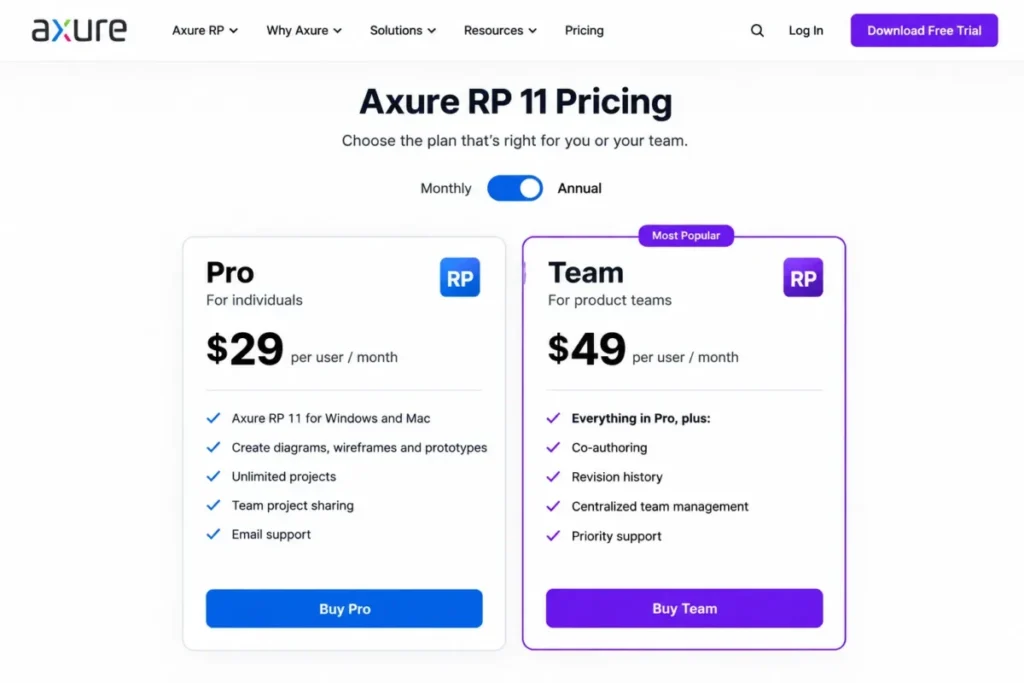
- $29 per user per month for Axure RP 11 Pro.
- Practical tier:
- Team at $49 per user per month once more than one person authors the same file.
- Free plan:
- No free editor tier appears in the Axure pricing evidence used here.
- First limit that bites:
- co-authoring and revision history are Team features, not Pro features.
- Better than UXPin:
- wireframes, functional prototypes, and the specification all live in one artifact that reviewers open in Axure Cloud.
- Worse than UXPin:
- coded component libraries are not part of the documented scope, so production alignment stays a manual translation.
- Setup difficulty:
- High. States, conditions, and interaction cases are a modeling exercise before they are a design exercise.
- Hidden costs:
- the jump from Pro to Team is $20 per user per month ($29 to $49), the price of co-authoring and revision history.
Axure RP is the tool a business analyst reaches for when the specification is the deliverable. Wireframes sit beside rich functional prototypes and cloud review, which means the artifact that describes behavior is the same artifact stakeholders click through.
The collaboration gate is the budget trap. Pro at $29 is a single-author license in practice, and the moment two people need to author the same file, revision history and co-authoring push the real price to $49 per user per month.
For a five-person team that difference is $145 versus $245 per month, and the second number is the honest one for any team that shares authorship. A buyer who budgets from the Pro price and then discovers the co-authoring requirement in month two has a conversation with finance that nobody enjoys.
Setup difficulty is the other reason this is a specialist purchase. Conditions and states reward people who think in flows and punish people who wanted a faster whiteboard.
| Pros | Cons |
|---|---|
| Functional prototypes with states and conditions replace a separate specification document | Co-authoring and revision history require the $49 Team plan |
| Axure Cloud gives reviewers a link rather than a file transfer | Pro to Team is a $20 per user per month step ($29 to $49) |
| Wireframes and behavior live in one artifact for enterprise review | Setup is a modeling exercise, not a sketching exercise |
| Interaction depth suits regulated or workflow-heavy applications | Coded component libraries are outside the documented scope |
Source: Axure pricing, Axure wireframe documentation, Axure conditional logic documentation, and Axure dynamic panels documentation, checked November 17, 2026.
- Verdict:
- Choose Axure RP if behavior specification is the decision-critical deliverable, and skip it if two people will never need to author the same file at once, because the Pro-only price is the only version of this tool that looks cheap.
Tools That Solve Where the Wireframe Starts and Where It Goes
The last five tools are not weaker versions of the first five. They answer a different question: who produces the first screen, and what the screen becomes after somebody approves it.
That question is where AI generation, workshop context, client handoff, usability testing, and sketch conversion all belong, and it is the reason this group looks mixed. Buyers who evaluate generation quality alone tend to overweight it, because generation speed is the easiest part of this to get right and the least useful in isolation.
6. UX Pilot: Best for AI-Generated Wireframes Non-Designers Can Edit
- Best for:
- founders, product managers, and business analysts without design capacity this week who want AI-generated screens they can keep editing.
- Avoid if:
- several people need to co-edit at the entry paid price, or SSO and SCIM are required below an Enterprise contract.
- Starting price:
- $19 per month on Pro when billed annually.
- Practical tier:
- Pro for one creator, then Teams at $31 per user per month, billed annually, once a second person edits.
- Free plan:
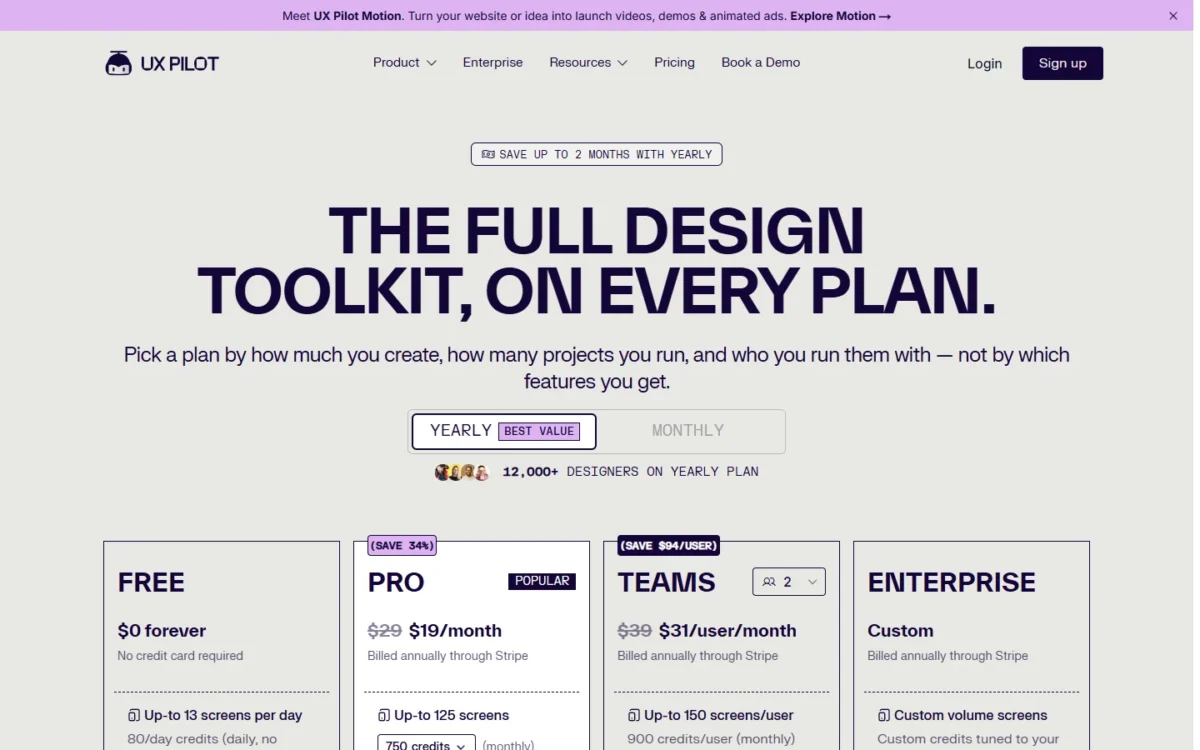
- Yes. $0 forever, with 1 project, up to 13 screens per day, and 80 credits per day that do not roll over.
- First limit that bites:
- the single project on Free, followed closely by export through UX Pilot’s Figma connection and code export, both of which start on Pro.
- Better than Uizard:
- Pro adds export to Figma through UX Pilot’s two-way Figma connection, plus code export, while Uizard’s pricing page lists jpg, png, and pdf export and CSS and React handoff, so of the two only UX Pilot lists a route into a design file.
- Worse than Uizard:
- the $19 Pro price on annual billing sits above Uizard’s $12 entry creator price, also billed annually.
- Setup difficulty:
- no rating here; a project can start from a sketch, a thought, or a PRD import, and the generated designs stay editable.
- Hidden costs:
- seats, roles, and real-time collaboration start on Teams, so a five-editor team pays $155 per month on annual billing rather than five Pro licenses.
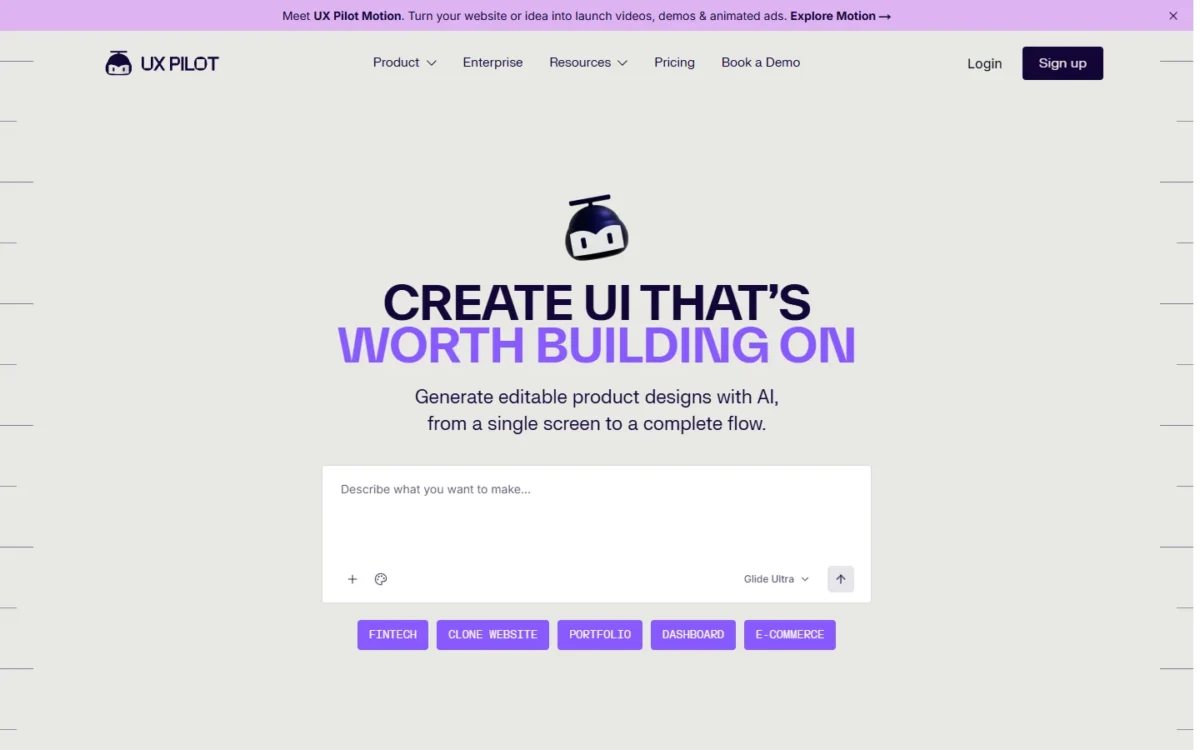
UX Pilot takes this slot for a team with a product decision to make and no designer free this week. It generates editable product designs, from a single screen to a complete flow, and its plans page lists wireframing, prototyping, screen flows, reference image-to-design, and document-to-design on every plan, Free included. Editability is the point, because a generated draft the team can change is a wireframe and one it cannot change is a picture.
Fidelity needs a deliberate rule here. UX Pilot generates structured wireframes from low to high fidelity and turns them into polished high-fidelity screens in the same tool, so nothing in the tool itself keeps a review rough. A PM who wants a stakeholder review to stay on structure should share the wireframe pass and hold the hi-fi pass until the layout is agreed.
Free is an evaluation plan rather than a working one. One project, 80 credits per day with no rollover, and no export through UX Pilot’s Figma connection or to code are enough to judge whether the output holds up on a real screen, and not enough to hand that screen to anyone. Pro removes the project cap and adds export to Figma through that two-way Figma connection, code export, up to 125 screens, and a 750-credit monthly balance.
The collaboration line is the budget trap. Pro is billed to an individual, while seats, roles, a shared credit pool, and real-time collaboration arrive on Teams, and SSO with SCIM sits on Enterprise. Price a five-person squad at $155 per month on Teams, which is $31 multiplied by five on annual billing.
| Pros | Cons |
|---|---|
| Wireframing, prototyping, and screen flows are listed on every plan, Free included | Free allows 1 project and no export through the Figma connection or to code |
| A prompt, a sketch, or a PRD import produces an editable starting screen | Free credits refresh at 80 per day and do not roll over |
| Pro adds export through UX Pilot’s two-way Figma connection, plus code export, at $19 per month on annual billing | Seats and real-time collaboration start on Teams at $31 per user per month |
| Design review and a predictive heatmap are included on every plan, Free included | SSO and SCIM are Enterprise features |
Source: UX Pilot plans and UX Pilot homepage, checked November 16, 2026.
- Verdict:
- Choose UX Pilot if the constraint is design capacity rather than design skill and one person drives the first drafts, and skip it if several editors must co-edit on a small budget, because shared editing starts at Teams.
7. Miro: Best for Workshop-Centered Teams

- Best for:
- distributed cross-functional teams already running discovery workshops, flows, and planning inside Miro.
- Avoid if:
- the work needs dedicated logic-heavy prototyping or production UI design.
- Starting price:
- $8 per member per month on Starter when billed annually.
- Practical tier:
- Starter, which is also the cheapest paid entry in this ranking.
- Free plan:
- Yes. Three editable boards.
- First limit that bites:
- the three editable boards on Free, which Starter replaces with unlimited and private boards.
- Better than Whimsical:
- the wireframe never leaves the board that already holds the research, the flow, and the workshop output.
- Worse than Whimsical:
- a general canvas gives fewer screen-specific affordances than a purpose-built wireframe mode.
- Setup difficulty:
- Low for a team already on Miro, medium for a team adopting a canvas tool for the first time.
- Hidden costs:
- private boards arrive with Starter, so a free-plan team that needs confidentiality is upgrading for governance rather than for capacity.
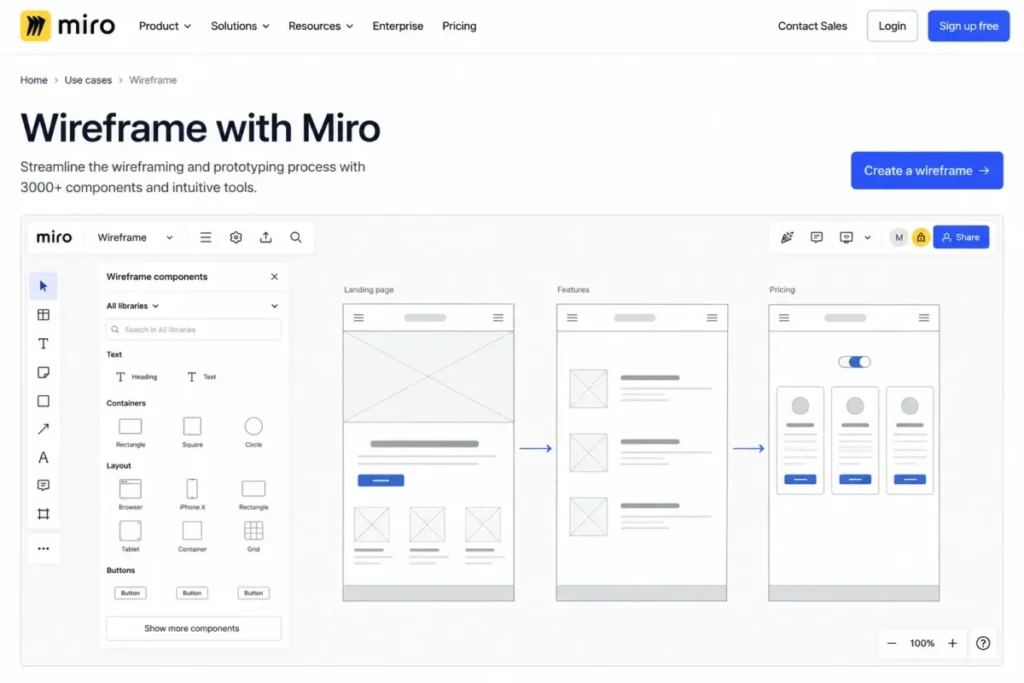
Miro is on this list for adjacency, not for wireframing depth. When the wireframe is one artifact in a workshop that also contains interview notes, a journey map, and a prioritization grid, moving that one artifact into a design tool costs more context than it saves.
At $8 per member per month on annual billing, Miro is the cheapest paid entry here, and a five-member team lands at $40 per month. That is roughly half the five-editor cost of Figma or Balsamiq.
The free plan’s three editable boards is a sharper limit than it sounds for workshop teams, because workshops generate boards faster than projects generate files. Private boards are the second reason teams upgrade, and that reason is governance rather than volume.
The line to hold is prototype depth. Board-level wireframe and prototyping components support review and discussion, and they are not a substitute for the conditional behavior that UXPin or Axure RP document.
Teams comparing platform breadth rather than wireframing alone should read the full Miro review.
| Pros | Cons |
|---|---|
| $8 per member per month is the lowest paid entry in this ranking | The free plan allows only 3 editable boards |
| Wireframes stay beside research, flows, and workshop artifacts | Screen-specific affordances are thinner than a dedicated wireframe mode |
| Starter adds unlimited and private boards in the same step | Conditional logic is not listed on Miro’s pricing page |
Source: Miro pricing and Miro wireframe tool, checked November 17, 2026.
- Verdict:
- Choose Miro if the wireframe belongs inside a discovery workshop the team already runs there, and skip it if the next step after the wireframe is behavior modeling.
8. MockFlow WireframePro: Best Dedicated Wireframe-to-Handoff Workflow

- Best for:
- agencies and product teams that want a dedicated wireframe workspace with review, handoff, and export options.
- Avoid if:
- the requirement is advanced conditional or data-driven prototype logic.
- Starting price:
- $9 per editor per month on Plus, billed yearly; Max, which adds SSO and an offline desktop app, is $14.
- Practical tier:
- Plus for any team that edits together, because the free Basic plan allows 1 editor.
- Free plan:
- Yes. Basic is free forever with 1 editor, up to 5 people invited to review, and up to 4 projects, for personal and nonprofit use.
- First limit that bites:
- for an agency, the commercial-use rule, because commercial work needs a paid plan; for anyone else, the single editor, ahead of the four-project cap.
- Better than Balsamiq:
- the documented workflow continues into developer handoff and Figma export rather than stopping at the wireframe.
- Worse than Axure RP:
- the pricing FAQ puts prototyping on the board, with screens sketched and clicked through, and conditional logic is not listed on the pricing page, so conditional behavior is not the job.
- Setup difficulty:
- Low. A wireframe-first workspace with screens, collaboration, and export in one place.
- Hidden costs:
- code export, MockFlow’s Figma export integration, SSO, and the offline desktop app start on Max at $14 per editor per month, so a five-editor team on Max pays $14 x 5 = $70 per month rather than $9 x 5 = $45 on Plus.
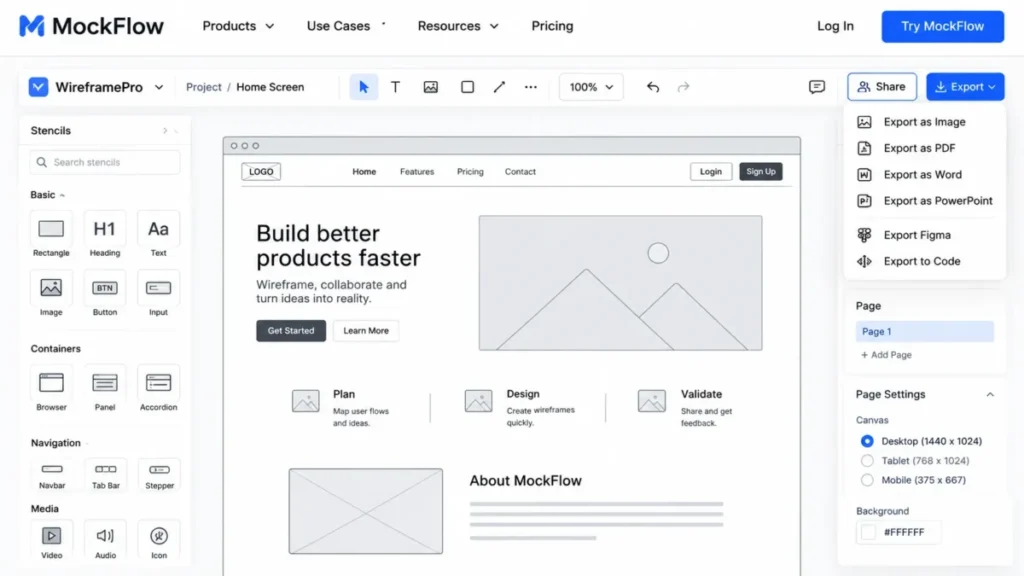
MockFlow WireframePro is the clearest example in this ranking of a tool that treats wireframing as the product rather than as a mode. Collaboration, developer handoff, code-oriented export options, and Figma export sit around a wireframe project instead of around a design file.
MockFlow’s pricing FAQ puts prototyping on the board itself: screens are sketched there and clicked through like a prototype, and WireframePro is built in rather than sold separately.
Conditional logic is not listed on the pricing page, so a buyer who needs branching behavior should confirm it with the vendor before buying rather than assume it is there.
| Pros | Cons |
|---|---|
| Wireframing, collaboration, and handoff sit in one dedicated workspace | Free Basic allows 1 editor and up to 4 projects, and commercial work needs a paid plan |
| The Figma export integration and code-oriented export options are documented, not implied | Prototyping means clicking through screens on the board, and conditional logic is not listed on the pricing page |
| Plus at $9 per editor per month, billed yearly, sits just above Miro’s $8 at the low end of this ranking | Code export and MockFlow’s Figma export integration start on Max at $14 per editor per month |
Source: MockFlow pricing, checked November 16, 2026, with MockFlow WireframePro and MockFlow prototyping.
- Verdict:
- Choose MockFlow WireframePro if the deliverable is a wireframe package a client or a developer receives, and skip it if the prototype has to branch on a condition.
9. Justinmind: Best for Forms and Data-Rich Interaction Simulation

- Best for:
- UX teams prototyping forms, variables, data simulation, mobile interactions, and testing scenarios.
- Avoid if:
- a lightweight browser whiteboard or a quick low-fidelity sketch is the whole requirement.
- Starting price:
- $19 per editor per month on Standard.
- Practical tier:
- Standard, because the free plan holds a single project; Professional ($29 per editor per month) is the tier when data simulation is needed, since Justinmind lists data simulation under “Standard features plus:” on Professional.
- Free plan:
- Yes. One project.
- First limit that bites:
- the single free project, which ends the moment a second piece of work starts.
- Better than Whimsical:
- forms, interactive preview, and a large UI-element library make a prototype testable rather than merely clickable.
- Worse than Figma:
- the path from an approved prototype into a shared design and handoff workspace is narrower.
- Setup difficulty:
- Medium. Interaction design and form behavior are configured, not sketched.
- Hidden costs:
- collaboration itself is a Standard feature, so a second contributor is a plan decision rather than an invitation.
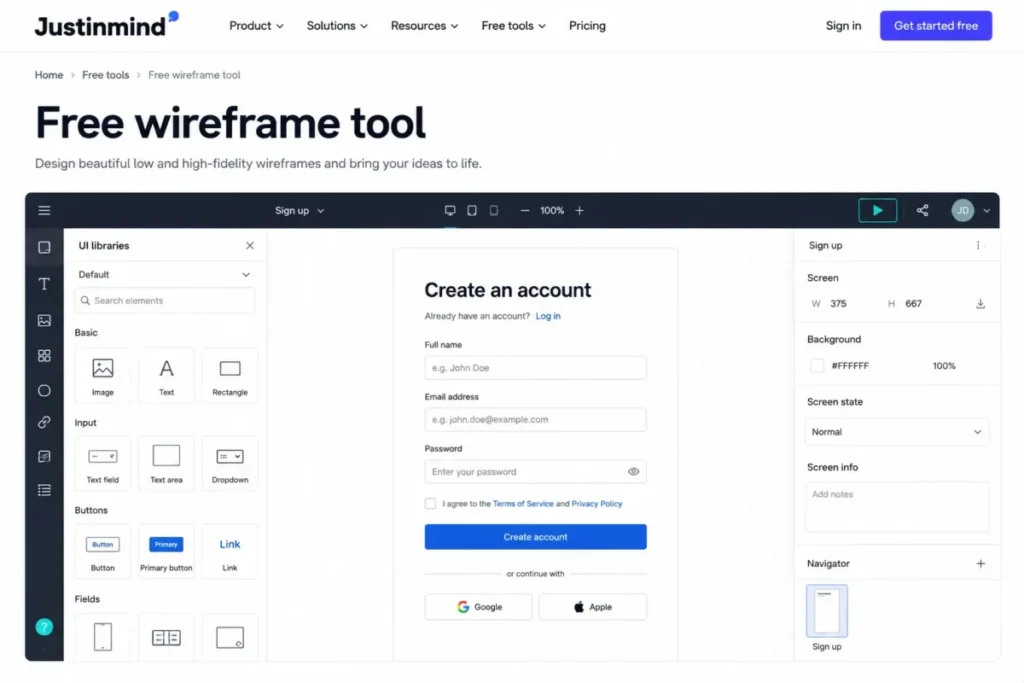
Justinmind earns its place on a narrow but expensive problem. Form behavior is where wireframes usually fail a usability session, because a static screen cannot show validation, state, or what a data-heavy table does when it fills up.
Standard at $19 per editor is $95 per month for five editors, which sits between the sketch tools and the logic specialists. That is the right price band for a research-led team that needs realistic prototypes without an enterprise specification workflow.
| Pros | Cons |
|---|---|
| Standard lists forms design and variables, and Professional ($29 per editor per month) adds data simulation, which together I read as what makes a prototype testable with real users | The free plan supports a single project |
| Low and high-fidelity wireframing live in the same editor | Collaboration is a Standard-plan feature, not a free one |
| Device preview supports mobile interaction validation | Configuration effort is higher than any sketch-first tool here |
Source: Justinmind pricing and Justinmind free wireframe tool, checked November 17, 2026.
- Verdict:
- Choose Justinmind if the wireframe has to survive a usability session with real form input, and skip it if nobody will ever test it with a participant.
10. Uizard: Best for Text-or-Sketch-to-Wireframe Ideation

- Best for:
- startup founders and consultants turning text prompts or hand-drawn concepts into editable screens quickly.
- Avoid if:
- a large mature design-system team needs deep component governance on lower tiers.
- Starting price:
- $12 per month on Pro when billed annually, as the entry creator price.
- Practical tier:
- Pro, once the free plan’s screen ceiling is reached.
- Free plan:
- Yes. Two projects, up to 5 screens per project, and 3 AI generations per month.
- First limit that bites:
- the five screens per project, which a single onboarding flow consumes.
- Better than UX Pilot:
- the $12 entry creator price on annual billing sits below UX Pilot’s $19 Pro price, which suits a solo founder on a tight budget.
- Worse than UX Pilot:
- multi-creator billing is not published in the same per-editor form as UX Pilot’s $31 per user Teams price, so a five-seat budget cannot be calculated on the same basis.
- Setup difficulty:
- Low. Wireframe Mode and the scanner both start from something that already exists.
- Hidden costs:
- three AI generations per month on the free plan is an evaluation allowance rather than a working one.
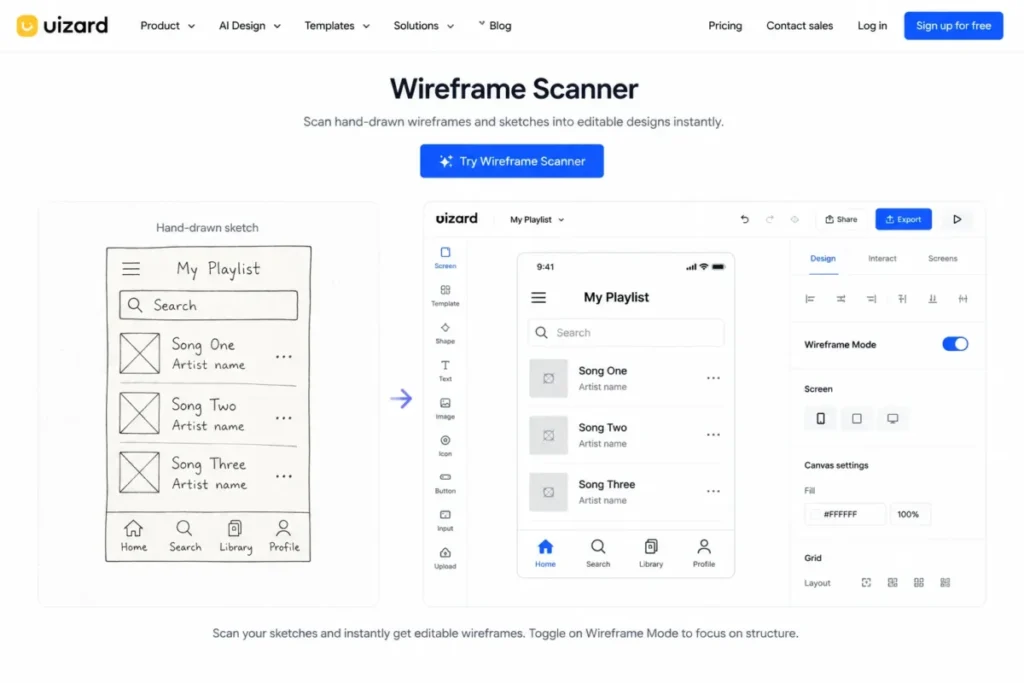
Uizard’s differentiator is the starting point. A team that already sketches on a whiteboard can photograph that sketch and get an editable digital screen, which shortens the least enjoyable part of the process.
One budgeting caveat belongs on the record. The $12 figure is an entry creator price, and multi-creator billing is not published in the same per-editor form as the other nine tools, so this guide does not calculate a five-seat cost for Uizard rather than guess at one.
| Pros | Cons |
|---|---|
| The wireframe scanner turns an existing hand drawing into editable UI | The free plan allows 5 screens per project across 2 projects |
| Wireframe Mode keeps early screens deliberately rough | Three AI generations per month suits evaluation, not production |
| $12 per month on annual billing is a low entry for solo work | Multi-creator billing is not published on a comparable per-editor basis |
Source: Uizard pricing, Uizard wireframing, and Uizard wireframe scanner, checked November 17, 2026.
- Verdict:
- Choose Uizard if the fastest route to a digital screen runs through a whiteboard photograph, and skip it if the finance team needs a predictable multi-seat cost before approval.
Pricing Comparison and Feature Gates
Starting price is the least useful number in this category, because the plan that supports a real workflow is rarely the plan on the left of the pricing page. The table below pairs each starting price with the tier a working team lands on and with the five-editor arithmetic behind it.
| Tool | Starting paid price | Billing basis | Practical tier | Five-editor monthly | Hidden cost to watch |
|---|---|---|---|---|---|
| Figma | $16 | Per full seat, default view ($20 on Monthly) | Professional | $80 ($16 x 5) | Every editing contributor consumes a full seat |
| Balsamiq | $16 | Per editor, billed annually | Starter | $80 | AI credits are metered per editor per month |
| Whimsical | $10 | Per editor, billed annually | Pro | $50 | Identity controls sit on the Business plan |
| UXPin | $29 | Per seat, annual-price view | Core, then Growth | $145 | Storybook and design systems require Growth |
| Axure RP | $29 | Per user per month | Team at $49 for shared authoring | $145 at Pro | Co-authoring moves the real price to the Team plan |
| UX Pilot | $19 | Per month on Pro, billed annually | Pro, then Teams for shared editing | $155 on Teams ($31 x 5) | Seats and real-time collaboration start on Teams |
| Miro | $8 | Per member, billed annually | Starter | $40 | Private boards arrive only with the paid plan |
| MockFlow WireframePro | $9 | Per editor, billed yearly | Plus, then Max for code export and the Figma export integration | $45 on Plus ($9 x 5) | Code export and the Figma export integration start on Max at $14 |
| Justinmind | $19 | Per editor per month | Standard | $95 | Collaboration itself is a paid-tier feature |
| Uizard | $12 | Entry creator price, billed annually | Pro | Not published on a comparable basis | Multi-creator billing is not published per editor |
Source: Figma’s published plans, Balsamiq plan pricing, and Whimsical plan pricing. Then UXPin plan pricing and Axure plan pricing. Also Miro plan pricing and MockFlow plan pricing. Finally Justinmind plan pricing and Uizard plan pricing, each checked on the date given in that tool’s section above, and UX Pilot plan pricing, checked November 16, 2026.
Every five-editor figure is editorial arithmetic, five multiplied by the published per-person price, and it excludes tax, add-ons, and any consumption beyond the included allowance. UX Pilot’s figure uses the Teams price, because seats and real-time collaboration start on that plan. Uizard is deliberately absent from that column because its multi-creator billing basis is not published in the same per-editor form, and multiplying an entry creator price by five would invent a plan that may not exist.
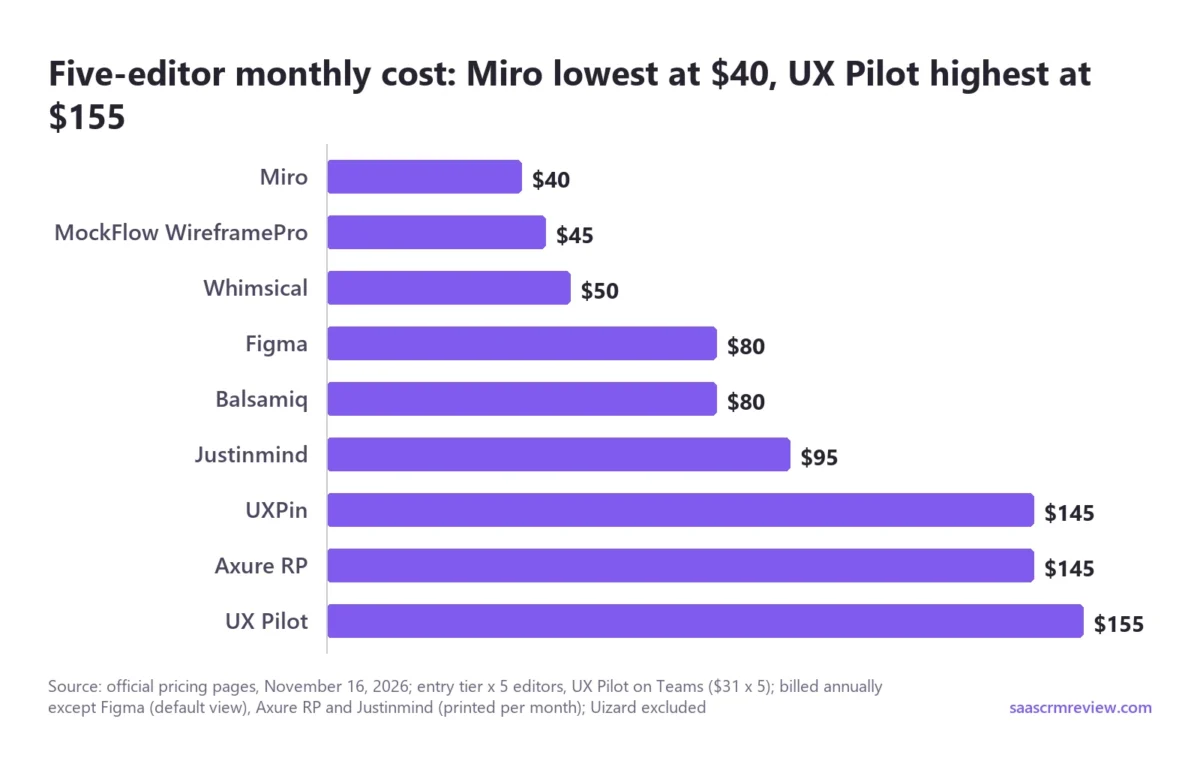
The distribution matters more than any single figure. Six of the nine calculable teams cost less than the two tools that simulate behavior. The one that costs more is UX Pilot, at $31 x 5 = $155 per month on Teams, and that money pays for shared editing rather than prototype depth, so prototype depth and shared editing are the two cost drivers to price first.
Teams pricing the platform rather than the wireframing module should compare against the full Figma pricing plans and the equivalent Miro pricing guide before signing an annual term.
The Gate That Decides Which Tier You Buy
| Tool | The gate that decides the tier | Plan where it opens | Buyer consequence |
|---|---|---|---|
| Figma | Unlimited files and projects, advanced prototyping tools, easier dev handoff | Professional | A multi-project squad plans on Professional rather than the free tier |
| Balsamiq | Project count | Starter, capped at 10 projects | Agencies hit the ceiling on engagement count |
| Whimsical | SSO with SAML and SCIM provisioning | Business | An IT-reviewed rollout costs more than Pro |
| UXPin | Storybook, design systems, SSO, two-factor authentication | Growth | The design-system project and the security review share one upgrade |
| Axure RP | Co-authoring and revision history | Team | Shared authoring, not features, sets the real price |
| UX Pilot | Unlimited projects plus design-tool and code export, then seats and real-time collaboration | Pro, then Teams | The route into a design file is a paid route, and a second editor is a second upgrade |
| Miro | Unlimited and private boards | Starter | Confidentiality is a paid-plan property |
| MockFlow WireframePro | Editor count, project count, and commercial use | Plus | Basic allows 1 editor and up to 4 projects for personal and nonprofit use, so client work starts on Plus |
| Justinmind | Advanced interaction design, collaboration, unlimited projects | Standard | A second contributor triggers the upgrade |
| Uizard | Project and screen capacity plus AI generations | Pro | Five screens per project ends at one flow |
Source: every gate in this table is published on the official pricing pages cited in each tool’s section above, including Whimsical’s Business-tier controls and UXPin’s Growth-tier controls, on the dates given in each tool’s section above.
Read the middle column as a purchase trigger rather than a feature list. In four of these ten products the trigger is not a design capability at all: it is governance, collaboration, or capacity, which is why a feature-led shortlist usually picks the wrong tier.
Free Plans: Where Each One Stops Working
Free-tier mentions are common in this category and free-tier arithmetic is not. Each row below names the published cap and the concrete event that ends the free plan for a working team.
| Tool | Free-plan hard cap | Event that forces the first upgrade |
|---|---|---|
| Figma | Starter is free limited access to Figma products; Professional lists unlimited files and projects | A multi-project squad that needs Professional’s unlimited files and projects |
| Whimsical | Up to 50 board objects and 50 doc blocks per month, 7-day version history | More than 50 board objects in a month, or a need to recover a version older than 7 days |
| UXPin | Limited Free plan: 2 prototypes and 50 AI credits | A third prototype, because Core lists unlimited prototypes |
| UX Pilot | 1 project, up to 13 screens per day, 80 credits per day with no rollover | A second project, or the first design or code export, which starts on Pro |
| Miro | 3 editable boards | A fourth workshop, or the first board that must stay private |
| MockFlow WireframePro | Basic: 1 editor and up to 4 projects, for personal and nonprofit use | A second editor, a fifth project, or the first commercial client job |
| Justinmind | 1 project | A second piece of client or product work |
| Uizard | 2 projects, 5 screens per project, 3 AI generations per month | A sixth screen in one flow |
Source: Figma pricing, Whimsical pricing, UXPin pricing, UX Pilot plans, Miro pricing, MockFlow pricing, Justinmind pricing, and Uizard pricing, on the dates given in each tool’s section above.
Balsamiq and Axure RP are absent from that table because a free editor tier is not part of the pricing evidence used here, and Balsamiq’s free access is a reviewer role rather than an editor plan. Published caps describe what a plan includes, and none of these vendors documents what happens at the moment a cap is reached, so treat each number as a planning threshold rather than as a description of overflow behavior.
The pattern across the rows is consistent. Screen and board capacity, not feature gating, ends the free plan first in most of these rows, which means a realistic evaluation should count screens before it compares features.
AI Allowances Without False Equivalence
Seven of the ten tools in this ranking print a numeric AI allowance on their saved pricing pages, and those numbers are not measured in the same unit or on the same basis. A credit is not a generation, a daily allowance is not a monthly one, and no honest comparison converts one into the other.
| Tool | Published AI allowance | Plan it applies to |
|---|---|---|
| Figma | 150 AI credits per day, up to 500 AI credits per month on Starter; 3,000 AI credits per month on a Professional Full seat | Starter; Professional, Full seat |
| Balsamiq | 500 Balsamiq AI credits per editor per month | Starter |
| UXPin | 50 credits on Free; 250 credits per month plus 100 per seat on Core, shared by the whole account | Free; Core |
| UX Pilot | 80 credits per day, no rollover | Free |
| Miro | 10 credits per month on Free; 25 AI credits per month per member on Starter | Free; Starter |
| MockFlow WireframePro | 100 AI credits per month for the account on Basic; 800 AI credits per month for each editor on Plus | Basic; Plus |
| Uizard | 3 AI generations per month | Free |
Source: the Balsamiq and Uizard pricing pages cited in each tool’s section above, on the dates given there, and the UX Pilot plans page, Figma pricing, MockFlow pricing, Miro pricing and UXPin pricing, checked November 16, 2026.
Figma’s Starter allowance is a daily credit with a monthly ceiling, and its Professional Full seat is listed at 3,000 credits per month. Balsamiq’s allowance is per editor, which scales with the team.
MockFlow’s Basic allowance is one pool for the account, while Plus lists 800 credits for each editor. UXPin’s credits are shared by the whole account, and on Core every editor beyond the first adds 100 credits a month. Miro’s pricing FAQ gives the Free plan 10 credits per month, and its plan table lists 25 per member on Starter.
UX Pilot’s free credits refresh daily and do not roll over, while Pro switches to a 750-credit monthly balance and Teams gives 900 credits per user per month in a shared team pool. Uizard’s three generations are an evaluation budget, and any team planning to generate iteratively should read that row as a reason to start on Pro.
Whimsical, Axure RP, and Justinmind are not listed with a number because their saved pricing pages print no numeric AI allowance. That is a gap in the page, not a statement that the tool has no AI, and inventing a comparable figure would be worse than leaving the row out.
Collaboration, Version History, and Identity Controls
This is the section most roundups skip, and it is the one that decides whether a purchase survives an IT review.
| Tool | Version history | Identity controls | Collaboration gate |
|---|---|---|---|
| Whimsical | 7 days on the free plan | SSO with SAML and SCIM on Business | Editor seats, with no free reviewer role documented |
| UXPin | 7 days on Core, 30 days on Growth | SSO and two-factor authentication on Growth | Included at Core for seat holders |
| Axure RP | Revision history on Team | Not published in this evidence set | Co-authoring requires the Team plan |
| Justinmind | Not published in this evidence set | SAML Single Sign-On on Enterprise | Collaboration is a Standard-plan feature |
| Balsamiq | Not published in this evidence set | SSO with SAML on Enterprise | Unlimited reviewers who cannot edit |
| UX Pilot | Not published on the plans page | SSO and SCIM (SAML) on Enterprise | Seats, roles, and real-time collaboration on Teams |
Source: the Whimsical, UXPin, Axure, Justinmind, and Balsamiq pricing pages cited in each tool’s section above, on the dates given there, and the UX Pilot plans page, checked November 16, 2026.
Six products are listed because each prints a collaboration or version-history gate that decides a tier. Figma, Miro, MockFlow, and Uizard also list SSO on their pricing pages (MockFlow on Max), so a buyer whose security review depends on SSO should confirm the tier that carries it in writing before signing.
Two rows carry most of the buying advice. Balsamiq’s unlimited non-editing reviewers keep stakeholder cost at zero, and Axure RP’s co-authoring gate does the opposite by making shared authorship a $20 per user per month decision.
Buyer Risk Ledger: What Breaks First
| Risk | Who it hits | How to defuse it before signing |
|---|---|---|
| Budgeting from the entry price | Any team that adds a second editor | Price the tier that carries the required workflow, then multiply by real editor count |
| Discovering the identity-control tier during security review | Teams at companies with an IT approval step | Confirm the SSO and provisioning tier in writing before the trial ends |
| Buying prototype depth that nobody uses | Squads that only link screens | Match the branch of the depth tree to the actual deliverable |
| Buying too little prototype depth | Teams running usability sessions on forms | Test one real form flow during evaluation, not a static screen |
| A short version-history window | Teams that rework a flow across sprints | Check the recovery window on the exact plan being purchased |
| Starting a long-lived workflow on a winding-down edition | Balsamiq Desktop adopters | Start new work in Cloud, because Desktop can be bought until December 31, 2026 |
| An entry price with unpublished multi-seat behavior | Finance approvers | Ask for written multi-creator pricing where it is not published, as with Uizard |
The Balsamiq row is the one with a date attached, and dates age faster than features. Desktop can be bought until December 31, 2026 and does not include Balsamiq AI, so a team starting a two-year documentation habit belongs in Cloud from day one.
Wireframe-to-Handoff Paths
What happens after approval decides switching cost more than the drawing experience does.
| Tool | Documented next step after approval | What it means for switching cost |
|---|---|---|
| Figma | Advanced prototyping and developer handoff on Professional | Professional lists both advanced prototyping tools and easier dev handoff, so I read approval as continuing on the same plan |
| UX Pilot | Export to a design file and to code on Pro | The generated wireframe continues into a design file or a codebase |
| Uizard | Prototype sharing and developer handoff | The converted sketch keeps moving without a redraw |
| MockFlow WireframePro | Developer handoff, code-oriented export options, and Figma export | A wireframe-first workspace still lands in a design or code path |
| Axure RP | Cloud review of the functional prototype and specification | Reviewers receive a link rather than a file |
| Justinmind | Interactive preview on browser and device | The prototype is the research artifact |
| Balsamiq | Reviewer comment and approval | Visual design continues in another tool |
| Whimsical | Shared board for flows and documentation | Higher-fidelity work moves elsewhere |
| Miro | Board-level review beside the workshop artifacts | The wireframe stays where the discovery lives |
| UXPin | Storybook and design-system workflows on Growth | Alignment with production components is the handoff |
Source: every documented next step comes from the official product and documentation pages cited in each tool’s section above, including Axure’s cloud review page and MockFlow’s WireframePro page, each checked on the date given in that tool’s section.
Cross-tool import fidelity is a different question and it is not documented consistently across these ten products, so this guide makes no claim about how faithfully any file survives a move between vendors.
Two saved pages do document a route toward Figma: MockFlow’s integrations page describes an Export to Figma flow, and UX Pilot’s plans page lists Export to Figma from Pro. My judgment is that those two carry the lowest translation risk toward a design file, and that the tools whose documented next step is a comment thread carry the highest.
Setup and Migration Difficulty
| Tool | Setup difficulty | Why |
|---|---|---|
| Figma | Low | Browser-based, and a wireframe kit supplies the components |
| Balsamiq | Low | Drag controls onto a board, then link screens |
| Whimsical | Low | Wireframe mode supplies components inside an existing board |
| UXPin | Medium | Conditional logic, variables, and expressions are configuration work |
| Axure RP | High | States and conditions are a modeling exercise before a design one |
| UX Pilot | Not rated | A project can start from a sketch, a thought, or a PRD import, and the designs it generates stay editable |
| Miro | Low for existing users, Medium for a first canvas rollout | Board conventions matter more than the wireframe components |
| MockFlow WireframePro | Low | A wireframe-first workspace with screens and export in one place |
| Justinmind | Medium | Form behavior and interactions are configured, not sketched |
| Uizard | Low | Wireframe Mode and the scanner both start from existing material |
Source: these ratings are an editorial assessment of the configuration depth described on each vendor’s official pages cited above. Two examples are Axure’s wireframe and prototype documentation and MockFlow’s prototyping scope page, each checked on the date given in that tool’s section.
Setup difficulty here describes configuration depth, not an implementation timeline, because no timeline is published for these products. The reliable signal is that every tool rated Medium or High earns that rating for interaction behavior rather than for onboarding friction.
How to Choose the Right Wireframing Tool for Your Team
Work these six questions in order. Each one removes tools, and the order matters because a later answer cannot rescue an earlier mistake.
- How rough does the wireframe have to stay, and who enforces that? If the answer is “very rough, and nobody enforces it”, the constraint has to come from the tool, which points at Balsamiq.
- Does the prototype need to behave, or only to be seen? Screen linking keeps the budget at $8 to $16 per person; conditions and state move it to $29.
- Who creates the first screen? A team without design capacity this week should weigh UX Pilot or Uizard against the cost of waiting for a designer.
- Where does the wireframe live after approval? A documented Figma or handoff path lowers translation risk, and a comment thread raises it.
- How many people edit, and how many only comment? Balsamiq’s free reviewers and Axure RP’s paid co-authoring sit at opposite ends of that answer.
- What does IT need to approve? Confirm the tier that carries SSO and provisioning before the trial ends, because that tier is rarely the entry tier.
Map the answers straight onto a shortlist. A squad answering “rough, linked, designer-led, Figma path, five editors, SSO later” lands on Figma. A squad answering “rough, linked, PM-led, comment thread, two editors, many reviewers” lands on Balsamiq.
A team answering “behavior, conditions, shared authorship” lands on Axure RP, and it should budget the Team plan from the start.
Common Mistakes When Choosing Wireframing Software
Choosing on the starting price is the most expensive one. The Axure RP Pro price looks competitive with UXPin Core until shared authorship forces the Team plan, and the five-user gap between those two positions is $100 per month.
Treating every prototype as equivalent is the second. Four tools here link screens, three simulate behavior, and a shortlist that mixes both groups is comparing products that do not compete.
Assuming the free plan scales is the third. Most of the documented free tiers in the table above end on capacity rather than on features, so a two-week evaluation that only builds one flow will not reveal the limit a real project meets.
Ignoring the reviewer model is the fourth. A team of five editors and twenty stakeholders pays very differently across these products, and Balsamiq is the only one in this ranking that documents unlimited non-editing reviewers.
Leaving identity controls to procurement is the fifth. Whimsical puts SSO with SAML and SCIM on Business and UXPin puts SSO and two-factor authentication on Growth, so an approval that lands in month two can reprice the whole subscription.
Starting a long-lived workflow on a winding-down edition is the sixth, and it is specific. Balsamiq for Desktop can be bought until December 31, 2026 and does not include Balsamiq AI, which makes Cloud the correct starting point for any new documentation habit.
Buying AI on a headline claim is the seventh. Balsamiq publishes 500 credits per editor per month, UX Pilot publishes 80 credits per day on Free, and Uizard publishes 3 generations per month on Free, and those units are not interchangeable.
Final Verdict: Which Wireframing Tool to Buy
The ranking reason is the same in every row of this guide, so it is worth stating plainly. It is the documented workflow a tool supports, the plan gate that decides which tier a buyer needs, and the micro-cohort it fits, all read from each vendor’s official pricing and product pages.
Figma takes first place because the evidence supports the widest continuous path: wireframing with UI kits and templates, prototypes shared by link, and a Professional tier that lists unlimited files and projects plus advanced prototyping tools and easier dev handoff. For a five-editor squad that is $16 x 5 = $80 per month on Figma’s default pricing view ($20 x 5 = $100 on the Monthly view).
I would still buy Balsamiq over Figma in one specific situation, and it is more common than the ranking implies: a PM-led or analyst-led team whose real problem is that stakeholders keep arguing about color. The sketch constraint is the feature, unlimited reviewers make the stakeholder group free, and the 10-project Starter cap is the number to watch.
By buyer type, the shortlist is short. Product-design squads take Figma, requirements-led teams take Balsamiq, and product trios on a budget take Whimsical at $50 per month for five editors. Design-system teams take UXPin and plan for Growth, while enterprise specification work takes Axure RP and budgets the Team plan on day one.
For the remaining five, the fit is narrower and clearer. UX Pilot suits a founder without design capacity, and Miro suits teams whose wireframes belong in the workshop they already run. MockFlow WireframePro suits agencies delivering a wireframe package, Justinmind suits research teams testing forms, and Uizard suits whiteboard-first ideation.
The check I would run at 30 and 90 days is the same for all ten. At 30 days, has the team stopped arguing about fidelity; at 90 days, has anything the tool produced reached engineering, and if the honest answer is no, the problem is the workflow rather than the license.
Teams standardizing tools across several functions at once should weigh this decision alongside their wider team collaboration tools, because a second canvas subscription is often harder to justify than a second design seat.
FAQ
What is the best wireframing tool in 2026?
Figma leads this ranking for most collaborative product-design squads, because Professional at $16 per full seat lists unlimited files and projects, advanced prototyping tools, and easier dev handoff in one place. Balsamiq is the stronger pick for structure-first stakeholder work, and Axure RP is the stronger pick when the prototype has to model conditions and state.
What is the best free wireframing tool?
Miro and Whimsical are the most usable free tiers here for a small team, and their limits differ. Miro’s Free plan lets you create and share unlimited boards, but only the three most recent stay editable. Whimsical’s Free plan allows unlimited boards, with up to 50 board objects and 50 doc blocks per month and a 7-day version history.
Uizard’s free plan allows two projects with five screens each and three AI generations per month, and UX Pilot’s allows one project with up to 13 screens per day and 80 credits per day. Free plans in this category end on capacity, not features.
Which wireframing tool is cheapest for a five-person team?
Miro at $40 per month is the cheapest five-member option on annual billing, followed by MockFlow WireframePro at $45 on Plus ($9 x 5, billed yearly) and Whimsical at $50.
Figma and Balsamiq both land at $80, Justinmind at $95, and UXPin and Axure RP at $145 on their entry tiers, while UX Pilot lands at $155 on Teams ($31 x 5), the plan where its seats start. Those figures are simple arithmetic on published per-person prices.
Is Figma good for low-fidelity wireframes?
Yes, if the team can enforce its own fidelity discipline. Figma’s wireframe kits supply reusable low-fidelity components and its feature table lists sharing prototypes with clients and stakeholders without sharing the underlying design file, so the capability is there.
What is missing is any friction that stops a reviewer from arguing about spacing, which is precisely the friction Balsamiq sells.
Which wireframing tool is easiest for non-designers?
UX Pilot and Uizard are built for that buyer. UX Pilot turns a prompt, a sketch, or a PRD import into editable screens, and Uizard’s wireframe scanner converts a hand drawing into editable UI.
Both keep the output editable, which matters more than generation quality, because a draft nobody can change is not a wireframe.
Can AI create a usable wireframe that a team can edit?
It can create a usable starting point. UX Pilot generates editable designs from a prompt, a sketch, or a PRD import, and Uizard converts sketches into editable screens.
The allowances differ in kind: 500 Balsamiq credits per editor per month, 80 UX Pilot credits per day on Free, and three Uizard generations per month on Free are not the same unit.
Do I need Axure RP or UXPin for conditional prototype logic?
No, not for simple branching, because Figma’s help center lists if/else conditionals on Professional and higher plans. UXPin Core and Axure RP are the deeper picks when the prototype has to behave like a production component or the specification itself is the deliverable. UXPin Core carries conditional logic, variables, and expressions plus coded libraries, and Axure RP’s documentation describes conditional logic that runs from single-interaction conditions to complex branching logic, plus dynamic panels that hold one state or many.
Both cost $29 per person at entry against $8 to $16 for tools that only link screens.
What is the difference between a wireframe, a mockup, and a prototype?
A wireframe argues about structure, a mockup argues about visual design, and a prototype argues about behavior.
Fidelity and interactivity are separate axes, which is why Balsamiq can be low on both while UXPin is low on fidelity and high on interactivity. Buying on one axis is the most common shortlist error.
Is Miro good enough for wireframes, or is a dedicated tool better?
Miro is good enough when the wireframe belongs inside a workshop that already holds the research and the flow, and it is the cheapest paid entry here at $8 per member. It stops being enough when the next step is conditional behavior or production UI.
Teams that run planning in the same canvas should also compare their project management software options before adding seats.
How much does wireframing software cost in 2026?
Paid entry across these ten products runs from $8 to $29 per person per month, and five-editor cost runs from $40 to $145 on entry tiers ($29 x 5 for UXPin and Axure RP), or $155 for UX Pilot ($31 x 5), whose seats start on Teams. The number that matters is the tier that carries the workflow: version history, identity controls, co-authoring, and project capacity all sit above the entry plan for at least one vendor here.