
This Zoho Desk Review is written from a support-operations perspective—focused on what actually drives outcomes: routing accuracy, SLA discipline, automation maintainability, and self-service quality.
Instead of repeating marketing claims, we evaluate Zoho Desk as a customer support platform you’d run day-to-day: setup effort, agent experience, admin overhead, reporting depth, and how well it fits your stack through integrations (including Zoho CRM/Zoho One and common tools like Slack and Jira).
You’ll also get a grounded view of Zoho Desk pricing, where teams commonly get surprised by plan gating or add-ons, plus a clear recommendation based on team size and support model.
Zoho Desk Review 2026 – Quick Verdict
Zoho Desk is a value-packed help desk platform best suited for small to mid-sized teams—especially those already using the Zoho ecosystem.
- Strengths: Affordable pricing, deep Zoho CRM integration, solid automation (Blueprint), and native AI assistant (Zia).
- Weaknesses: Steeper learning curve, advanced features locked behind higher tiers, mobile app limitations.
- Best for: Growing support teams wanting feature depth without Zendesk’s price tag.
- Not ideal for: Enterprise orgs needing advanced reporting, or teams wanting a plug-and-play UI.
Bottom line: If you’re a small business migrating from a shared inbox or a mid-market team seeking SLAs and automation on a budget, Zoho Desk delivers. Larger enterprises or those prioritizing simplicity may prefer Zendesk or Help Scout.
What Is Zoho Desk?
Zoho Desk is a cloud-based customer support platform (also called help desk software) developed by Zoho Corporation. It lets support teams manage customer inquiries via email, chat, phone, and social media from one unified interface.
Who it’s for:
- Small businesses outgrowing shared inboxes
- Mid-market teams needing SLAs, automation, and omnichannel support
- Companies already invested in Zoho CRM, Zoho One, or other Zoho apps
Core capabilities:
- Multi-channel ticketing
- SLA enforcement and escalation
- Knowledge base and self-service portals
- AI-powered assistance (Zia)
- Workflow automation (Blueprint)
- Deep integration with Zoho’s 45+ business apps
How We Tested Zoho Desk
Evaluation Criteria
We evaluated Zoho Desk as if we were a real support ops team considering a switch. Our review methodology included:
| Criterion | Weight | What We Assessed |
|---|---|---|
| Ease of setup | 15% | Time-to-first-ticket, onboarding friction |
| Core ticketing | 20% | Email import, routing, collision detection |
| Automation | 15% | Workflow rules, Blueprint complexity |
| Omnichannel | 15% | Native vs add-on for chat/phone/social |
| Knowledge base | 10% | Editing UX, branding, SEO features |
| Reporting | 10% | Dashboard flexibility, export options |
| Integrations | 10% | Zoho apps, Slack, Jira, ecommerce |
| Value for price | 5% | Feature-to-cost ratio vs competitors |
What We Looked For
- Can a 5-person team set up and run their first workflow within 2 hours?
- How intuitive is the agent experience in day-to-day ticket handling?
- Does Zia AI actually save time, or is it a gimmick?
- Where do “gotchas” appear (hidden costs, feature paywalls, integration gaps)?
Read more: Best Knowledge Base Software 2026
Key Features
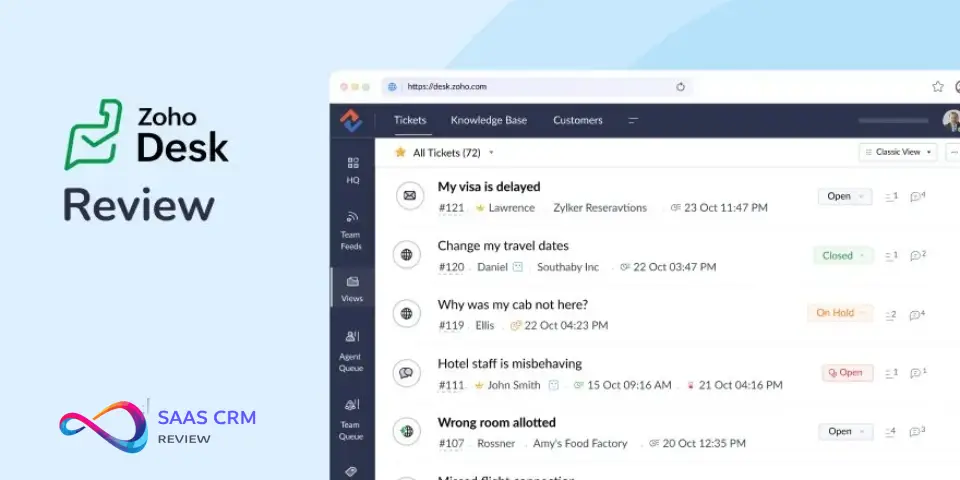
Ticketing & Workflow Automation
- Email-to-ticket: Automatic ticket creation from support@ inboxes.
- Round-robin assignment: Distribute tickets based on agent availability or skill.
- Blueprint: Visual process automation for multi-step workflows (e.g., approval chains, escalations). Available in Professional tier and above.
- Macros: One-click canned responses and field updates.
- Parent-child ticketing: Break complex issues into subtasks (added 2024).
✅ Tip: Blueprint is Zoho Desk’s killer feature for mid-market teams. It lets you enforce process compliance without custom code.
SLA Management
- Define response and resolution SLAs by priority, channel, or customer tier.
- Automatic escalation and alerts before SLA breach.
- SLA dashboards in Standard tier and above.
⚠️ Watch out: SLA targets are powerful—but only if you configure escalation rules correctly. Test before going live.
Knowledge Base & Self-Service
- Create public and private knowledge bases.
- Branded help center with custom domains.
- SEO-friendly article editor.
- Multi-language support (Enterprise tier).
- Employee self-service portal for internal tickets.
Key takeaways:
- KB editor is functional but less polished than HelpScout’s or Intercom’s.
- Multilingual KB and advanced permissions are only in Enterprise.
Omnichannel Support
| Channel | Availability |
|---|---|
| All plans | |
| Web form | All plans |
| Social (Facebook, Twitter/X) | Standard+ |
| Live chat | Enterprise (native) or Zoho SalesIQ add-on |
| Phone (Zoho Voice) | Add-on integration |
| Add-on (Business API) |
⚠️ Watch out: Native live chat is only included in Enterprise. Lower tiers require Zoho SalesIQ (separate product).
AI Features (Zia)
Zia is Zoho’s AI assistant, available primarily in Enterprise tier:
- Sentiment analysis: Flags angry/frustrated tickets.
- Field prediction: Auto-fills ticket fields based on content.
- Answer Bot: Suggests KB articles in chat.
- Generative AI: Helps agents draft replies (introduced 2024–2025).
- Ticket summarization and automated email replies (Q1 2025).
Honest take: Zia works well for high-volume teams. For smaller teams, the AI features may not justify the jump to Enterprise pricing.
Reporting & Analytics
- Pre-built dashboards for ticket volume, response times, agent performance.
- Custom reports and scheduled email reports (Professional+).
- Advanced analytics via Zoho Analytics integration (add-on or bundled in Enterprise).
Limitations:
- Customization options are limited in Standard tier.
- Exporting raw data for BI tools requires workarounds in lower plans.
Integrations
Zoho Ecosystem:
- Zoho CRM (native, bi-directional sync)
- Zoho Books, Inventory, Projects
- Zoho SalesIQ (chat)
- Zoho Analytics (BI)
Third-party:
- Slack, Microsoft Teams
- Jira, Trello
- Shopify, WooCommerce (via Zoho Commerce or Marketplace)
- Salesforce (limited)
✅ Tip: If you’re already using Zoho CRM, the native integration is seamless and adds real value—agent sees full customer context in-ticket.
Ease of Use & Setup
Pros:
- Onboarding wizard guides initial setup.
- Email channel setup takes under 15 minutes.
- Zoho claims 50% faster deployment vs competitors.
Cons:
- UI is feature-dense, which creates a learning curve.
- Newer agents may feel overwhelmed by options.
Onboarding tip: Zoho offers free migration assistance from Zendesk, Freshdesk, and others. Take advantage of this if switching.
Customization & Workflow Depth
- Custom ticket fields, modules, and layouts.
- Blueprint for no-code process automation.
- Developer toolkit (Deluge scripting) for advanced customization.
- Multi-department ticketing with separate workflows.
Trade-off: Flexibility is high—but with flexibility comes complexity. Plan your workflows carefully before building.
Security & Compliance
- Data centers: US, EU, AU, India, China options.
- SOC 2 Type II, ISO 27001 certified. (Verify on Zoho’s security page for latest certifications.)
- GDPR compliance tools: data export, DPA, anonymization.
- Role-based access control (RBAC).
- HIPAA compliance available (verify requirements).
⚠️ Watch out: If you have strict compliance needs (e.g., HIPAA, FedRAMP), confirm Zoho’s current certifications and BAA availability before committing.
Zoho Desk Pricing (2026)
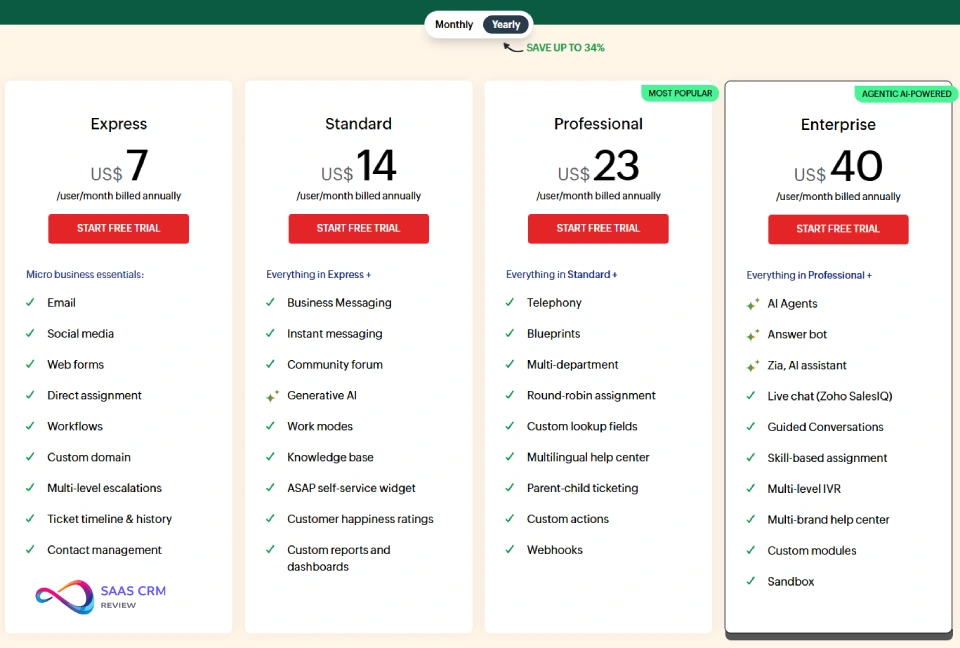
Last verified: January 2026 — Always confirm on Zoho’s pricing page for the latest.
Pricing Table
| Plan | Price (Billed Annually) | Agent Limit | Key Features |
|---|---|---|---|
| Free | $0 | Up to 3 agents | Email ticketing, private KB, basic SLAs |
| Express | ~$7–9/agent/mo | Up to 5 agents | Social channels, basic automation |
| Standard | ~$14–20/agent/mo | Unlimited | Social, community, Zoho CRM integration, workflow rules |
| Professional | ~$23–35/agent/mo | Unlimited | Multi-department, Blueprint, time tracking |
| Enterprise | ~$40–50/agent/mo | Unlimited | Zia AI, live chat, multi-brand, advanced analytics |
Prices vary by monthly vs annual billing. Verify current rates.
Hidden Costs & Add-ons
- Zoho SalesIQ (live chat): Separate subscription for Standard/Professional tiers.
- Zoho Voice (phone): Additional per-minute/phone number costs.
- Light agents: ~$6/mo per user (limited access for collaborators).
- Premium integrations: Some Marketplace apps require paid plans.
- Training/consulting: Zoho offers paid professional services for complex setups.
⚠️ Watch out: Budget for add-ons if you need live chat or phone before Enterprise tier.
Scoring Rubric & Final Score
| Category | Score (1–10) | Notes |
|---|---|---|
| Ease of setup | 7 | Guided onboarding, but UI complexity slows adoption |
| Core ticketing | 8 | Robust; Blueprint is a standout |
| Automation | 9 | Blueprint + workflows are best-in-class for the price |
| Omnichannel | 6 | Live chat/phone require add-ons below Enterprise |
| Knowledge base | 7 | Solid, but lacks polish vs Help Scout/Intercom |
| Reporting | 7 | Good basics; advanced analytics need Zoho Analytics |
| Integrations | 8 | Excellent within Zoho; decent for third-party |
| Value for price | 9 | Strong ROI compared to Zendesk/Freshdesk |
Final Score: 7.6 / 10
Justification: Zoho Desk excels on automation and value, but loses points on omnichannel completeness and initial learning curve.
Zoho Desk Pros and Cons
Pros
- Cost-effective: Significantly cheaper than Zendesk and Freshdesk at comparable tiers.
- Blueprint automation: No-code process builder rivals more expensive tools.
- Zoho ecosystem: Seamless CRM, analytics, and productivity app integration.
- Scalable: Grows from 3 free agents to enterprise deployments.
- AI capabilities: Zia provides real value at Enterprise level.
- Free migration support: Reduces switching friction.
Cons
- Learning curve: Feature depth can overwhelm new users.
- Omnichannel gaps: Native live chat only in Enterprise; phone is always an add-on.
- Mobile app limitations: Not all desktop features translate to mobile.
- UI polish: Functional but not as sleek as Help Scout or Intercom.
- Advanced features paywalled: AI, multilingual KB, and analytics locked to top tiers.
Best For / Not Ideal For
✅ Best For
- Small teams outgrowing Gmail/shared inboxes — The free plan is genuinely usable; Standard tier is a natural step up.
- Mid-market teams needing SLAs and automation — Blueprint is hard to beat at this price.
- Zoho ecosystem users — CRM sync and unified billing make it a no-brainer.
- Budget-conscious orgs — Half the cost of Zendesk for 80% of the features.
❌ Not Ideal For
- Enterprise orgs with complex reporting needs — Zendesk or Salesforce Service Cloud may fit better.
- Teams prioritizing UX simplicity — Help Scout offers a gentler learning curve.
- Orgs needing native phone/chat out of the box — Intercom or Freshdesk may be more bundled.
Real-World Scenarios
Scenario A: Small Business Support Inbox Migration
Situation: A 4-person e-commerce team uses Gmail with labels and a shared inbox. They’re drowning in missed replies and have no SLA tracking.
Zoho Desk Fit:
- Start on Free or Express—covers email, basic automation, and SLAs.
- Migrate inbox with Zoho’s free migration assistance.
- Within 2 weeks, team gains: ticket tracking, canned responses, and visibility into response times.
- Cost: $0–$36/mo.
Verdict: ✅ Strong fit. Simple setup, immediate ROI.
Scenario B: Mid-Market Team Needing SLAs, Omnichannel, and Automation
Situation: A 25-agent B2B SaaS company supports customers via email, chat, and phone. They need SLA enforcement, process automation, and CRM sync.
Zoho Desk Fit:
- Professional tier ($23–35/agent/mo) unlocks Blueprint, multi-department, and Zoho CRM sync.
- Add Zoho SalesIQ for chat (~$10–20/agent/mo).
- Add Zoho Voice for phone (usage-based).
- Total: ~$40–60/agent/mo fully loaded.
Verdict: ✅ Good fit if you budget for add-ons. Zendesk Suite may be simpler (but pricier) if you want everything bundled.
Zoho Desk Alternatives Comparison
Comparison Table
| Platform | Starting Price | Best For | Native Omnichannel | AI Features | Zoho Ecosystem |
|---|---|---|---|---|---|
| Zoho Desk | Free; $14+/agent/mo | Value seekers, Zoho users | Partial (chat/phone add-on) | Zia (Enterprise) | ✅ Deep |
| Freshdesk | Free; $15+/agent/mo | SMBs, ease of use | Yes (Freshcaller, Freshchat) | Freddy AI | ❌ No |
| Zendesk | $19+/agent/mo | Mid-market to enterprise | Yes | Advanced AI | ❌ No |
| Help Scout | $20+/user/mo | Small teams, simplicity | Email-first; chat add-on | Limited | ❌ No |
| Jira Service Management | Free; $20+/agent/mo | IT/dev teams | Limited | Atlassian AI | ❌ No |
| Intercom | $74+/seat/mo | Chat-first, PLG SaaS | Strong chat/bot | Fin AI | ❌ No |
Zoho Desk vs Freshdesk
| Factor | Zoho Desk | Freshdesk |
|---|---|---|
| Pricing | Lower at most tiers | Slightly higher |
| Automation | Blueprint (visual, powerful) | Automations (simpler) |
| Ecosystem | 45+ Zoho apps | Freshworks suite |
| Omnichannel | Add-ons for chat/phone | More bundled |
| AI | Zia (Enterprise) | Freddy (various tiers) |
Choose Freshdesk if: You want simpler setup and bundled omnichannel.
Choose Zoho Desk if: You need advanced automation or use Zoho CRM.
Zoho Desk vs Zendesk
| Factor | Zoho Desk | Zendesk |
|---|---|---|
| Pricing | ~40–60% cheaper | Premium pricing |
| Reporting | Good; advanced via add-on | Best-in-class native |
| Integrations | Zoho-first | Broadest third-party |
| Ease of use | Feature-dense, learning curve | More polished UX |
| AI | Zia (Enterprise only) | Advanced AI across tiers |
Choose Zendesk if: You’re a mid-market/enterprise org with complex reporting needs and budget.
Choose Zoho Desk if: You’re cost-conscious and can invest in learning the platform.
Choose This If…
- Zoho Desk: You’re already in the Zoho ecosystem, want Blueprint automation, and need strong value.
- Freshdesk: You prefer bundled omnichannel and simpler onboarding.
- Zendesk: You need enterprise-grade reporting, integrations, and support.
- Help Scout: You want the easiest learning curve and email-first UX.
- Jira Service Management: Your team is IT/dev-heavy and uses Atlassian tools.
- Intercom: You’re a chat-first, PLG SaaS company.
Buying Advice
Questions to Ask Before Buying
- What channels do we need today vs 12 months from now? (Zoho Desk’s chat/phone are add-ons—factor that into cost.)
- Do we use Zoho CRM or other Zoho apps? (If yes, Zoho Desk is a natural fit.)
- How complex are our workflows? (Blueprint is a differentiator—worth the Professional+ tier.)
- What’s our tolerance for learning curve? (Zoho Desk is powerful but not plug-and-play.)
- Do we need AI features? (Zia is Enterprise-only—decide if the ROI is there.)
Migration Considerations
- Zoho offers free migration from Zendesk, Freshdesk, and others.
- Export ticket history, KB articles, and customer data before switching.
- Plan for 2–4 weeks of parallel running before full cutover.
- Train agents on Blueprint and automations before go-live.
Total Cost of Ownership
Don’t just compare per-seat prices. Factor in:
- Add-ons (chat, phone, AI)
- Training/onboarding time
- Integration buildout (Jira, Slack, ecommerce)
- Potential Zoho Analytics subscription for advanced BI
For a 25-agent team on Professional + SalesIQ + Voice, expect $1,000–$1,500/mo fully loaded.
FAQ
Is Zoho Desk free?
Yes. Zoho Desk offers a free plan for up to 3 agents with email ticketing, a private knowledge base, and basic SLA management. It’s a genuinely usable starting point for small teams.
How does Zoho Desk compare to Zendesk?
Zoho Desk is 40–60% cheaper than Zendesk at comparable tiers. Zendesk offers better native reporting and a broader integration marketplace, while Zoho Desk excels on automation (Blueprint) and Zoho ecosystem integration. Choose Zendesk for enterprise complexity; choose Zoho Desk for value.
Is Zoho Desk good for small businesses?
Yes. The free and Standard tiers cover most small business needs: email ticketing, SLAs, automation, and CRM integration. Blueprint automation is particularly strong for teams wanting to enforce process without expensive tools.
Does Zoho Desk have live chat?
Native live chat is only included in the Enterprise plan. Lower tiers can integrate Zoho SalesIQ (a separate Zoho product) for chat functionality at an additional cost.
What is Zia in Zoho Desk?
Zia is Zoho’s AI assistant. It provides sentiment analysis, field prediction, answer bots, and generative AI for drafting replies. Zia is primarily available in the Enterprise tier.
Can I migrate from Freshdesk or Zendesk to Zoho Desk?
Yes. Zoho offers free migration assistance to help import tickets, knowledge base articles, and customer data from competing platforms.
Does Zoho Desk integrate with Slack and Jira?
Yes. Zoho Desk integrates with Slack, Microsoft Teams, Jira, Trello, and other third-party apps via the Zoho Marketplace and native connectors.
What are the main limitations of Zoho Desk?
The main limitations are: 1) native live chat and phone require add-ons below Enterprise, 2) a steeper learning curve due to feature density, 3) mobile app lacks some desktop features, and 4) advanced AI and analytics are locked to higher tiers.
Is Zoho Desk HIPAA compliant?
Zoho states that Zoho Desk can be configured to support HIPAA compliance, but you must verify current BAA availability and requirements directly with Zoho before use in healthcare contexts.
How long does it take to set up Zoho Desk?
Basic email ticketing can be live within 1–2 hours. More complex setups (multi-department, Blueprint workflows, integrations) may take 1–2 weeks with proper planning.
Is Zoho Desk better than Freshdesk?
It depends. Zoho Desk offers stronger automation (Blueprint) and better value for Zoho ecosystem users. Freshdesk offers simpler onboarding and more bundled omnichannel. Neither is universally “better.”
What’s the best Zoho Desk alternative?
The best alternative depends on your needs:
- Freshdesk for simpler setup and bundled omnichannel
- Zendesk for enterprise reporting and integrations
- Help Scout for ease of use and email-first support
- Jira Service Management for IT/dev teams
Conclusion & Next Steps
Zoho Desk is a strong choice for cost-conscious teams seeking deep automation and Zoho ecosystem integration. It’s not the simplest help desk to learn, but the payoff in workflow automation and value is significant.
Your Next Steps
- Start a free trial: Test core ticketing, SLAs, and automation with your real data.
- Book a demo: Ask Zoho’s team to walk through Blueprint and Zia.
- Shortlist 2–3 alternatives: Compare Freshdesk and Zendesk if omnichannel or simplicity matters more.
- Plan your migration: Use Zoho’s free migration support; export current data early.
- Budget for add-ons: Factor in SalesIQ, Voice, and Analytics if needed.
Ready to evaluate? Start your Zoho Desk free trial or compare pricing tiers.
External Citation Suggestions
- Anchor text: “Zoho Desk pricing page”
URL: https://www.zoho.com/desk/pricing.html
Placement: Pricing section and FAQ - Anchor text: “G2 Zoho Desk reviews”
URL: https://www.g2.com/products/zoho-desk/reviews
Placement: “How We Tested” section or conclusion - Anchor text: “Zoho Desk vs Zendesk comparison (TrustRadius)”
URL: https://www.trustradius.com/compare-products/zendesk-vs-zoho-desk
Placement: Alternatives comparison section
About the author

I’m Macedona, an independent reviewer covering SaaS platforms, CRM systems, and AI tools. My work focuses on hands-on testing, structured feature analysis, pricing evaluation, and real-world business use cases.
All reviews are created using transparent comparison criteria and are updated regularly to reflect changes in features, pricing, and performance.





