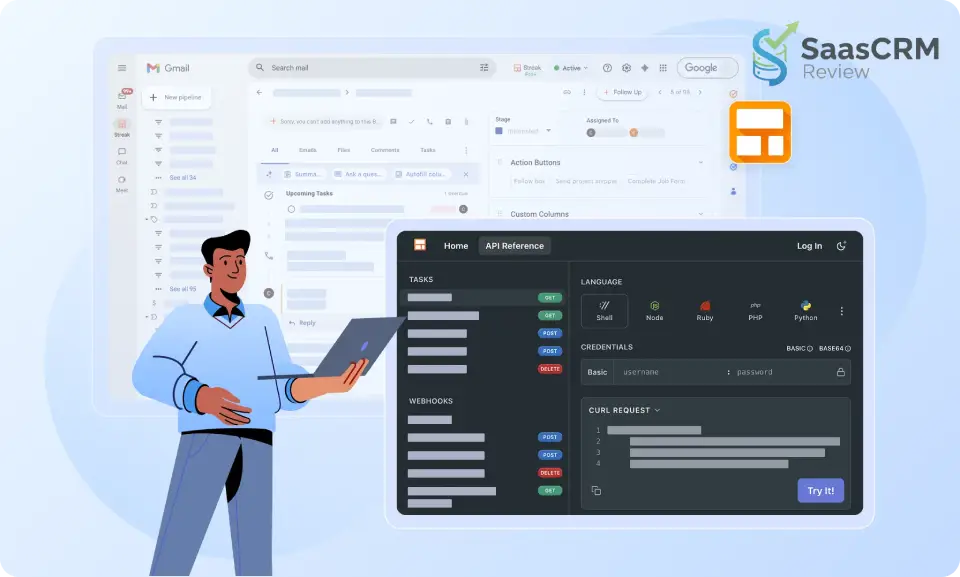
Unlike traditional platforms like Salesforce or HubSpot, Streak is a Gmail-native CRM. Your inbox becomes your pipeline. Deals, contacts, notes, and follow-ups live directly inside Gmail, not in a separate system that requires constant context switching.
For email-driven teams, this approach can dramatically improve adoption and follow-through.
For teams that need advanced automation, deep reporting, or enterprise-grade controls, it can also become a limitation.
This Streak CRM review is written from the perspective of someone who has:
- Implemented CRMs for teams that resisted them
- Advised founders who needed “just enough” deal tracking
- Seen growing companies outgrow lightweight tools
You’ll find a clear, experience-based breakdown of Streak’s features, pricing, pros and cons, real-world use cases, and how it compares to other CRMs—so you can decide whether Streak fits your workflow before you commit.
Quick Summary – Streak CRM Review
| Category | Summary |
|---|---|
| What it is | A lightweight CRM built directly inside Gmail |
| Best for | Freelancers, founders, recruiters, small sales teams |
| Core strength | Gmail-native workflow with minimal context switching |
| Ease of use | Very easy to learn and adopt |
| CRM depth | Basic to moderate (focused on email-driven pipelines) |
| Automation | Limited compared to full-featured CRMs |
| Reporting | Simple pipeline visibility; advanced reports require workarounds |
| Scalability | Best for teams up to ~10–15 users |
| Setup time | 30–60 minutes to get productive |
| Overall verdict | Excellent for Gmail-first teams, limiting for complex sales ops |

- Best CRM For Freelancers 2026: Expert Review & Comparison
- Best CRM Software Review 2026: (Expert Picks + Comparison)
Core Features of Streak CRM
Gmail-Native CRM Experience
Streak installs as a browser extension and integrates seamlessly with Gmail’s interface. Your CRM data appears in sidebar panels, and pipeline views overlay your inbox. This means you’re working in familiar territory rather than learning an entirely new application.
In practice, this feels remarkably natural. When you open an email from a potential client, Streak automatically shows their contact history, previous conversations, and where they sit in your pipeline. You’re not hunting through separate tabs or windows.
Pipelines and Deal Tracking
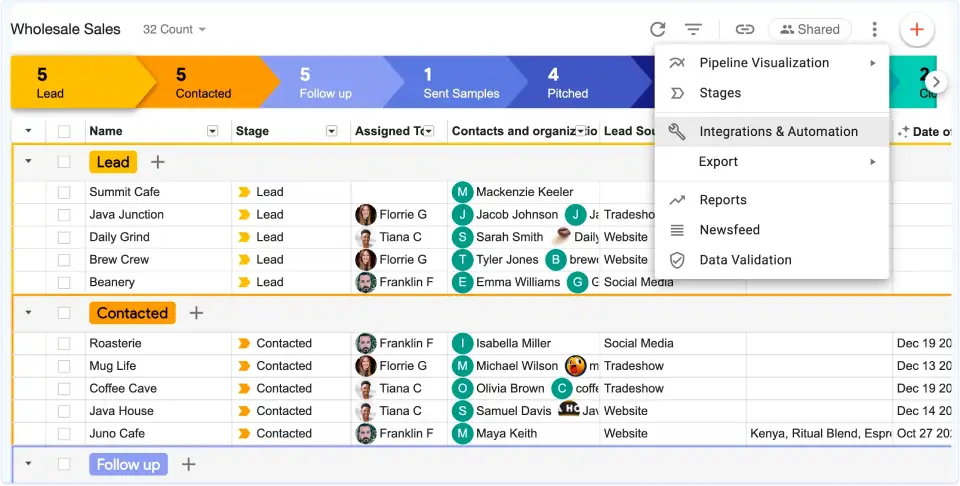
Pipelines are Streak’s core organizing principle. You create custom pipelines for different workflows—sales deals, partnership outreach, customer onboarding, freelance projects, or really anything that moves through stages.
Each pipeline consists of columns representing stages. You drag email threads (which Streak calls “boxes”) between columns as deals progress. A box might be “Initial Contact,” then move to “Proposal Sent,” then “Negotiation,” and finally “Closed Won.”
The system is flexible. I’ve seen recruiters use pipelines to track candidates through interview stages, real estate agents managing property inquiries, and consultants organizing leads. The paradigm works for any process-driven workflow.
Contact and Organization Management
Streak automatically captures contact information from your email conversations. When you exchange emails with someone, they’re added to your CRM with details pulled from email signatures and previous interactions.
You can enrich these profiles with custom fields—budget, company size, industry, lead source, whatever matters to your business. Organization records let you group contacts by company, which helps when you’re managing multiple stakeholders in a single deal.
The limitation here is that data entry still requires some manual work. Streak isn’t as automated as platforms with robust third-party integrations and data enrichment services.
Email Tracking, Reminders, and Notes
Email tracking shows you when recipients open your messages and click links. This feature walks a fine line ethically, but it’s standard in modern sales tools. You’ll get notifications when a prospect engages with your proposal email, giving you timing insights for follow-ups.
Reminders let you schedule follow-up alerts directly from email threads. Notes attach to boxes, so you and your team can document call outcomes, concerns, or next steps without leaving Gmail.
These features reduce the mental overhead of remembering who needs what and when. For solopreneurs juggling dozens of conversations, that’s genuinely valuable.
Task Management and Follow-Ups
Streak includes basic task management tied to pipeline boxes. You can assign tasks to team members, set due dates, and track completion. It’s not as robust as Asana or Monday.com, but it handles the essentials.
The integration with Gmail’s snooze and reminder features creates a cohesive workflow. You can snooze an email until a specific date, and Streak will resurface it with context about where that deal stands.
Team Collaboration
Multiple team members can share pipelines and see the same customer data. You can assign boxes to specific people, leave internal comments, and track who’s handling which deals.
Collaboration features work well for small teams—say, five to fifteen people. Larger organizations might find the permissions system too simplistic. There’s no complex role-based access control or territory management like you’d see in Salesforce.
Integrations
Streak integrates natively with Google Workspace tools—Calendar, Drive, Sheets. You can attach Google Docs to pipeline boxes, schedule meetings from within Streak, and export data to Sheets for custom analysis.
Third-party integrations happen through Zapier, which expands possibilities but adds another layer of complexity and potential cost. Direct integrations are limited compared to platforms like HubSpot CRM that offer hundreds of native connections.
Mobile Usability
Streak offers mobile apps for iOS and Android. They’re functional but clearly secondary to the desktop experience. You can view pipelines, update deal stages, and access contact information on the go.
The mobile experience matters less for Streak than for traditional CRMs because most users already manage email on their phones. You’re not entirely dependent on Streak’s app—you can handle much of your workflow through Gmail’s mobile interface.
How Streak CRM Works in Practice
Getting started with Streak takes about thirty minutes. You install the Chrome extension, grant Gmail permissions, and Streak adds its interface elements to your inbox.
The initial setup prompts you to create your first pipeline. Let’s say you’re tracking sales opportunities. You’d name your pipeline, define stages (Lead, Qualified, Proposal, Negotiation, Closed), and customize fields (deal value, company name, expected close date).
From there, you start adding boxes. You can convert existing email threads into pipeline boxes with a few clicks. Streak suggests potential deals based on your recent emails, which speeds up the initial population.
The learning curve is gentle. If you understand Gmail, you’ll understand Streak. The interface doesn’t introduce radically new concepts—it extends familiar email behaviors into CRM territory.
One challenge: keeping data clean requires discipline. Because Streak makes it so easy to create boxes, teams sometimes end up with cluttered pipelines full of old threads that should have been archived. This is less about Streak’s design and more about human behavior, but it’s worth noting.
Non-technical users adapt quickly. I’ve introduced Streak to clients who were intimidated by Salesforce or even HubSpot, and they felt comfortable within days. The lack of extensive configuration options actually helps—there’s less to learn.
Streak CRM Pricing & Plans (Updated Overview)
Streak CRM uses a per-user pricing model with monthly and annual billing options. Choosing annual billing provides a 20% discount, which can make a meaningful difference for growing teams.
Below is a clean breakdown of the current plans and who they are best suited for.
| Plan | Price | Best for | Key features |
|---|---|---|---|
| Pro | $49 / user / month | Small to mid-sized teams that need a complete, collaborative CRM | Core CRM functionality, mail merge, shared pipelines |
| Pro+ (Most popular) | $69 / user / month | Teams that require automation, reporting, and efficiency at scale | Advanced reports, integrations & automations, AI Co-Pilot |
| Enterprise | $129 / user / month | Larger organizations with governance and data quality requirements | Custom roles, data validation, dedicated support + CEO line |
Billing note: Annual plans are discounted by approximately 20% compared to monthly billing.
Pro Plan – Core CRM for Collaboration
The Pro plan is designed for teams that need a reliable, shared CRM without complexity.
This plan works well if you:
- Are a small sales team, agency, or consulting business
- Need shared visibility across deals and contacts
- Rely heavily on Gmail for communication
- Want CRM structure without automation overhead
For many small businesses, Pro is enough as long as reporting and automation needs remain modest.
Pro+ Plan – Automation and Insight Layer
The Pro+ plan is where Streak starts to feel like a “serious” CRM rather than just an inbox organizer.
It makes sense if you:
- Need automations to reduce manual work
- Want advanced reports to understand pipeline health
- Rely on integrations with other tools
- Benefit from AI-assisted productivity (AI Co-Pilot)
This is typically the best fit for:
- Sales teams scaling beyond founder-led selling
- Teams with repeatable processes
- Managers who need visibility without micromanaging
Notably, Pro+ offers a 14-day free trial, which is useful for validating fit before committing.
Enterprise Plan – Governance and Control
The Enterprise plan is aimed at organizations that care about control, data consistency, and support more than speed alone.
This plan is relevant if you:
- Need custom roles and permissions
- Require data validation to enforce CRM hygiene
- Want dedicated support, including executive-level escalation
- Are rolling Streak out to a large or distributed team
Even at this tier, Streak remains simpler than traditional enterprise CRMs—but it adds enough guardrails to function in more structured environments.
Is Streak CRM Good Value for the Price?
From a consulting perspective, Streak’s pricing is reasonable when adoption is high.
Streak delivers strong value if:
- Gmail is your primary workspace
- Your team actually uses the CRM daily
- You prioritize workflow fit over feature breadth
Value becomes less compelling when:
- You pay higher tiers mainly to approximate features that traditional CRMs include natively
- You need complex automation, forecasting, or multi-channel analytics
In short: you’re paying for reduced friction, not for maximum feature density.
Which Streak CRM Plan Should You Choose?
- Choose Pro if you want structure, collaboration, and visibility without complexity
- Choose Pro+ if you need automation, reporting, and scale efficiency
- Choose Enterprise if governance, permissions, and data quality are non-negotiable
A common and sensible path:
Start with Pro or Pro+, validate adoption, then reassess only when real constraints appear.
Pros and Cons
| Category | Pros (Strengths) | Cons (Limitations) |
|---|---|---|
| Core Concept | Gmail-native CRM that works directly inside your inbox | Fully dependent on Gmail-centric workflows |
| Ease of Use | Extremely easy to adopt, minimal learning curve | Limited configuration for advanced users |
| CRM Adoption | High adoption rate due to low friction and familiarity | Less suitable for teams that want strict CRM discipline |
| Pipeline Management | Simple, visual pipelines tied to real email conversations | Not ideal for complex or multi-layered sales processes |
| Email Productivity | Strong tools: tracking, reminders, snippets, mail merge | Email-first model limits non-email activities |
| Setup Time | Fast time-to-value (hours, not weeks) | Fewer customization options during setup |
| Team Collaboration | Shared pipelines, ownership, internal notes | Permissions and roles are basic compared to enterprise CRMs |
| Automation | Covers basic workflow needs | Lacks advanced automation and routing logic |
| Reporting & Analytics | Clear pipeline visibility for small teams | Reporting depth is limited; exports often needed |
| Scalability | Works well for small teams (1–10 users) | Can be outgrown as sales org complexity increases |
| Administration Overhead | No dedicated CRM admin required | Less control for large, structured organizations |
| Cost Efficiency | Strong value at lower tiers if adoption is high | Higher tiers may feel expensive relative to feature depth |
📊 Real-World Fit by Team Size
| Team Size | Fit with Streak CRM | Why |
|---|---|---|
| Solo / Freelancer | ⭐⭐⭐⭐⭐ Excellent | Inbox-based CRM is fast, simple, and sufficient |
| Small Team (2–5) | ⭐⭐⭐⭐ Very good | Shared pipelines + email workflows work well |
| Growing Team (6–15) | ⭐⭐⭐ Good | Still usable, but automation & reporting limits appear |
| Larger Team (15+) | ⭐⭐ Limited | Governance, analytics, and scalability become constraints |
Best Use Cases
Streak CRM excels for specific personas and situations.
Freelancers and consultants who manage client relationships primarily through email will find Streak nearly perfect. You’re tracking project inquiries, proposals, and ongoing engagements without the overhead of traditional CRM software.
Early-stage founders building their first sales pipeline benefit from Streak’s simplicity. You don’t need Salesforce’s complexity when you’re personally managing every customer conversation. Streak lets you stay organized without becoming a CRM administrator.
Recruiters often use Streak effectively because their workflow maps naturally to pipelines. Candidate sourcing, screening, interviews, and placement flow through email-heavy processes that Streak handles well.
Small sales teams (roughly 2-10 people) selling relatively straightforward products or services find a sweet spot with Streak. You get visibility across your team’s deals without enterprise CRM weight.
Real estate agents, small agencies, and service providers who coordinate through Gmail and need to track opportunities through predictable stages often thrive with Streak’s approach.
Who should avoid Streak? Large sales organizations, companies with complex sales processes requiring extensive automation, businesses that need robust reporting for executive leadership, and teams whose customer interactions happen primarily outside email should look elsewhere.
If you’re managing hundreds of sales reps, need territory assignment and quota tracking, require native integrations with dozens of tools, or want sophisticated marketing automation, Streak isn’t built for your needs.
Streak CRM vs Competitors: Practical Comparison
Choosing a CRM isn’t just about features—it’s about fit. The tool that transforms one team’s workflow can feel like a burden to another. Below is a clear comparison of Streak CRM against the most commonly considered alternatives for small and midsize teams.
We’ll evaluate each competitor on key dimensions that matter in real-world adoption and use:
- Workflow fit (especially Gmail-first workflows)
- Ease of adoption
- Automation & integrations
- Reporting & analytics
- Scalability
- Price-to-value
Competitors Compared
| CRM | Workflow Fit | Gmail Integration | Automation | Reporting | Scalability | Best for |
|---|---|---|---|---|---|---|
| Streak CRM | ⭐⭐⭐⭐ | ⭐⭐⭐⭐⭐ | ⭐⭐ | ⭐⭐⭐ | ⭐⭐ | Gmail-centric teams, small businesses |
| HubSpot CRM | ⭐⭐⭐⭐ | ⭐⭐⭐⭐ | ⭐⭐⭐⭐ | ⭐⭐⭐⭐⭐ | ⭐⭐⭐⭐ | Full sales + marketing organizations |
| Pipedrive | ⭐⭐⭐⭐ | ⭐⭐⭐ | ⭐⭐⭐⭐ | ⭐⭐⭐⭐ | ⭐⭐⭐⭐ | Dedicated sales teams |
| Zoho CRM | ⭐⭐⭐ | ⭐⭐⭐ | ⭐⭐⭐⭐ | ⭐⭐⭐⭐ | ⭐⭐⭐⭐⭐ | Customizable midmarket CRM |
| Salesforce | ⭐⭐ | ⭐⭐⭐ | ⭐⭐⭐⭐⭐ | ⭐⭐⭐⭐⭐ | ⭐⭐⭐⭐⭐ | Large enterprises, complex ops |
Streak CRM vs HubSpot CRM
Core Difference
- Streak: CRM inside Gmail
- HubSpot CRM: Full-featured, standalone CRM + marketing + service suite
Workflow Philosophy
- Streak assumes email is the center of your work.
- HubSpot assumes the CRM is the center of your work.
Practical Impacts
Adoption
- Streak wins easy adoption for Gmail-first teams.
- HubSpot requires process buy-in, training, and sometimes a CRM admin.
Automation
- HubSpot’s workflows are stronger and easier to scale.
- Streak relies on integrations (e.g., Zapier) for automation beyond basic triggers.
Reporting
- HubSpot provides dashboards, funnel analytics, and SQL-level filtering.
- Streak is adequate for pipeline visibility, but basic for executive insights.
✔ Choose Streak if your team lives in Gmail and your process is email-driven
✔ Choose HubSpot if you need full CRM + marketing + reporting
Streak CRM vs Pipedrive
Core Difference
- Streak: Gmail-native, lightweight
- Pipedrive: Pipeline-first, standalone sales CRM
Workflow Philosophy
- Pipedrive is built around opportunities and sales activities.
- Streak wraps pipeline management into Gmail‘s user interface.
Practical Impacts
Ease of Use
- Streak: minimal setup, frictionless adoption if Gmail is the hub
- Pipedrive: intuitive, but it’s a separate workspace
Sales Features
- Pipedrive has call logs, activity scheduling, revenue forecasting, and stronger pipeline tools.
- Streak’s lightweight task and follow-up handling works better for simple workflows.
Multi-channel Engagement
- Pipedrive supports activity types beyond email, such as calls, meetings, and tasks.
✔ Choose Streak if your team stays in Gmail and email is the core channel
✔ Choose Pipedrive if you need multi-channel activity tracking and deeper sales tools
Streak CRM vs Zoho CRM
Core Difference
- Streak: Simple, Gmail-first
- Zoho CRM: Modular, highly customizable midmarket CRM
Workflow Philosophy
- Zoho CRM assumes you want extensive customization and automation.
- Streak assumes minimal configuration and maximum adoption.
Practical Impacts
Customization
- Zoho offers custom modules, logic, and screens.
- Streak offers custom fields and pipelines, but not deep UI/UX customization.
Automation
- Zoho’s process automation and triggers are powerful.
- Streak relies on integrations and external automation tools.
Ecosystem
- Zoho integrates deeply with its suite (Desk, Marketing, Projects).
- Streak integrates primarily with Google Workspace and Zapier.
✔ Choose Streak if simplicity and Gmail fit are top priorities
✔ Choose Zoho if you need CRM extensibility and scalability
Streak CRM vs Salesforce
Core Difference
- Streak: Lightweight inbox CRM
- Salesforce: Enterprise-grade CRM platform
Workflow Philosophy
- Salesforce is a robust ecosystem built for intricate business processes.
- Streak is a CRM that meets you in your inbox with minimal overhead.
Practical Impacts
Enterprise Readiness
- Salesforce has roles, territories, multi-currency, compliance, and platform governance.
- Streak is simpler, without territory management or complex record-level controls.
Customization and Automation
- Salesforce’s automation (Flows, Apex) is extremely powerful.
- Streak’s simplest automation comes via triggers and integrations.
Adoption Cost
- Salesforce implementations are projects—often requiring admins or consultants.
- Streak installs in minutes and shows value immediately.
✔ Choose Streak for simple, email-driven sales workflows
✔ Choose Salesforce for enterprise complexity, deep governance, and extensibility
Security, Privacy, and Trust Signals
Streak operates within Gmail’s security framework, which means you’re essentially trusting Google’s infrastructure. Streak itself must pass Google’s security reviews to maintain its Workspace Marketplace presence.
Data permissions are worth understanding. Streak needs broad access to your Gmail to function—it reads your emails, contacts, and attachments to provide CRM functionality. This is necessary for the product to work, but it does mean you’re granting significant access.
For most small businesses, this trade-off is acceptable. You’re already trusting Gmail with your business communications; extending that trust to a reputable Gmail extension isn’t a massive leap. Enterprises with strict data governance might have different calculations.
Streak has been around since 2011, which provides some longevity assurance. They’re an established player in the Gmail CRM space, not a fly-by-night startup that might disappear. The company is backed by reputable investors and has a track record of continuous development.
Access control works through standard Gmail sharing permissions for free users, with enhanced controls in paid plans. You can limit who sees which pipelines and set view-only versus edit permissions.
For highly regulated industries or companies with stringent security requirements, you’d want to review Streak’s security documentation and potentially discuss specifics with their team. For typical small businesses, the security posture is reasonable.
- Nimble CRM Review 2026: Features, Pricing, Pros & Cons (Expert Analysis)
Frequently Asked Questions
Is Streak CRM free?
Yes, Streak offers a free plan that provides core CRM functionality with limitations on the number of pipelines and boxes you can create. It’s genuinely usable for solo users or very small teams. Paid plans remove these limits and add advanced features like enhanced reporting and automation.
Is Streak CRM suitable for small businesses?
Absolutely. Streak is specifically designed for small businesses, freelancers, and small teams. It shines when you have fewer than 15 people who primarily coordinate through Gmail. The simplicity and quick setup make it ideal for businesses without dedicated IT or CRM administration resources.
Can Streak CRM replace a traditional CRM?
For some businesses, yes. For others, no. If your workflow is email-centric and your CRM needs are straightforward—deal tracking, contact management, basic pipeline visibility—Streak can absolutely replace traditional CRM software. If you need advanced automation, complex reporting, marketing tools, or extensive integrations, you’ll eventually need something more robust.
Does Streak CRM work outside Gmail?
Not really. Streak is fundamentally a Gmail extension. While there are mobile apps and you can access some data through their web interface, the product is designed around Gmail. If you don’t primarily work in Gmail, Streak probably isn’t the right choice.
Is Streak CRM secure?
Streak operates within Google’s security infrastructure and must meet Google Workspace Marketplace security standards. For typical small business use, it’s appropriately secure. The company has been operating since 2011 with a solid reputation. However, as with any tool that accesses your email, you’re granting significant permissions, so enterprises with strict security requirements should conduct their own security review.
What’s the learning curve for Streak CRM?
Very gentle. If you can use Gmail, you can use Streak. Most users become comfortable within a few hours and proficient within a few days. There’s no extensive training required, which is one of Streak’s key advantages over traditional CRM platforms.
Can I migrate from Streak to another CRM later?
Yes, you can export your data from Streak, though the process isn’t as seamless as with some platforms. If you’re worried about future migration, document your data structure and maintain clean records from the start. The bigger challenge is usually workflow adaptation rather than data migration itself.
Final Verdict
Streak CRM succeeds at what it sets out to do: make customer relationship management accessible and friction-free for small teams who live in Gmail.
The question isn’t whether Streak is a “good” CRM in absolute terms—it’s whether Streak’s philosophy aligns with your reality.
If you’re a solo founder closing your first deals, a freelance consultant managing client projects, a small sales team that doesn’t need enterprise features, or anyone who thinks “I just need to organize my inbox better and track where things stand,” Streak is probably an excellent fit.
If you’re building a sales organization that will scale to dozens of reps, need sophisticated automation and reporting, require extensive third-party integrations, or have outgrown email as your primary coordination tool, Streak will feel limiting. You should invest in Pipedrive, HubSpot, or another dedicated CRM platform.
The beauty of Streak’s free plan is that you can find out which category you’re in without financial risk. Install it, create a pipeline, track a few deals. Within a week, you’ll know whether this approach clicks for you.
My general guidance: choose tools that match your current reality, not your aspirational complexity. Many businesses fail at CRM adoption because they implement systems designed for 500-person companies when they’re still a team of five. Streak prevents that mistake by keeping things appropriately simple.
Start here if simplicity and Gmail integration matter more than feature breadth. Upgrade to something more powerful when—and if—you actually need it. That’s a sensible path for most small businesses trying to get organized without drowning in software complexity.
About the author

I’m Macedona, an independent reviewer covering SaaS platforms, CRM systems, and AI tools. My work focuses on hands-on testing, structured feature analysis, pricing evaluation, and real-world business use cases.
All reviews are created using transparent comparison criteria and are updated regularly to reflect changes in features, pricing, and performance.