
QuickBooks Online is one of the most widely used cloud accounting platforms for small businesses—but popularity doesn’t always mean it’s the right fit. This QuickBooks Online Review takes a practical, experience-based look at the software: how it actually performs in day-to-day bookkeeping, where it delivers real value, and where it can become expensive or frustrating as your business grows.
Instead of marketing claims, this review focuses on real workflows—bank reconciliation, invoicing, reporting, inventory, and team collaboration—so you can clearly decide whether QuickBooks Online is worth using in 2026, which plan makes sense, and when a competitor like Xero, FreshBooks, or Wave might be the better choice.
Quick Summary – QuickBooks Online Review
| Category | Summary |
|---|---|
| What it is | Cloud-based accounting software by Intuit for small and growing businesses |
| Best for | Small businesses, service teams, e-commerce sellers, accountants |
| Key strengths | Strong bookkeeping, reliable financial reports, bank reconciliation, wide integrations |
| Main drawbacks | Pricing increases with users/features, automation requires review |
| Ease of use | Moderate – beginner-friendly UI but requires basic accounting knowledge |
| Scalability | High – supports growth from solo founders to 25-user teams |
| Pricing range (US) | ~$38 to $275 per month (discounts often available) |
| Top alternatives | Xero, FreshBooks, Wave Accounting |
| Overall verdict | A safe, professional choice for businesses that want accurate books and room to scale |

Key Features and How They Work in Practice
Invoicing and Payments
QuickBooks Online lets you create professional invoices with your logo, payment terms, and itemized services or products. You can set up recurring invoices for subscription-based businesses, send automatic payment reminders, and accept credit cards or ACH payments directly through QuickBooks Payments (Intuit’s payment processing service).
Real-world use: I’ve used this for consulting clients who need NET-30 terms. The system automatically sends reminders on day 7, 14, and when invoices become overdue. Clients can click “Pay Now” in the email and complete payment without leaving their inbox. The money typically arrives in your bank account within 1-2 business days.
Limitation: QuickBooks Payments isn’t free—you pay 2.9% + $0.25 per credit card transaction, similar to Stripe or Square. This is never mentioned clearly in the base pricing.
Expense Tracking
You connect bank accounts and credit cards, and QuickBooks Online automatically imports and categorizes transactions. You can also photograph receipts with the mobile app, and the system extracts vendor names, amounts, and dates using OCR technology.
The mileage tracking feature uses GPS to log business trips automatically, which saves hours during tax season. For businesses with employees, you can issue corporate cards and track who spent what, where, and on which project.
Real-world use: For a marketing agency I work with, we connected five business credit cards. The system caught duplicate expenses twice—once when an employee submitted a receipt for a transaction that was already imported from the bank feed. This prevented incorrect expense reporting.
Bank Reconciliation
This is where QuickBooks Online excels compared to simpler tools like Wave or FreshBooks. Bank reconciliation matches your bank statement to your QuickBooks records, ensuring every transaction is accounted for. The system highlights discrepancies, missing transactions, or duplicates.
Why it matters: If you ever need a business loan, lenders will ask for reconciled financial statements. Most small business owners using basic invoicing tools can’t produce these. With QuickBooks Online, your accountant can verify your books are clean in under an hour instead of spending days reconstructing transactions.
Financial Reports
QuickBooks Online generates over 60 standard reports, including:
- Profit & Loss (P&L) Statement
- Balance Sheet
- Cash Flow Statement
- Accounts Receivable Aging (who owes you money)
- Accounts Payable Aging (who you owe)
- Sales by Customer, Product, or Location
- Budget vs. Actual comparisons
You can customize date ranges, filter by customer or project, and compare periods (this year vs. last year). Reports export to Excel or PDF and can be scheduled to email automatically.
Real-world use: For quarterly board meetings, I set up automated reports that generate and email every 90 days. The budget comparison feature helped a retail client identify that marketing costs increased 40% year-over-year while revenue only grew 12%—leading to a strategic shift in spending.
Tax and Sales Tax Support
QuickBooks Online tracks sales tax by jurisdiction automatically. You tell it where you have nexus (tax obligations), and it calculates the correct rates for each invoice and transaction. It generates sales tax liability reports and, with QuickBooks Online Advanced, can even file and remit sales tax directly to state agencies.
For income tax, the system tracks deductible expenses by category, generates Schedule C reports for sole proprietors, and creates accountant-ready files. Your CPA can log in during tax season and pull everything they need without requesting documents.
Limitation: Multi-state sales tax compliance gets complicated fast. While QuickBooks Online handles basic scenarios well, businesses selling in 10+ states often need dedicated sales tax software like Avalara or TaxJar, which integrate with QuickBooks but cost extra.
Integrations and App Ecosystem
This is QuickBooks Online’s strongest competitive advantage. It connects with:
- Payment processors: Stripe, Square, PayPal, Authorize.net
- E-commerce: Shopify, WooCommerce, Amazon, Etsy
- Point of Sale: Square POS, Clover, Lightspeed
- Inventory management: Fishbowl, Cin7, DEAR Inventory
- Time tracking: TSheets (now QuickBooks Time), Harvest, Toggl
- CRM: Salesforce, HubSpot, Zoho
- Payroll: QuickBooks Payroll, Gusto, ADP
Real-world use: For an e-commerce business using Shopify, we connected QuickBooks Online to automatically import daily sales, sync inventory levels, and record Shopify fees as expenses. This eliminated 3-4 hours of manual data entry weekly.
Project and Job Costing
Available on Plus and Advanced plans, project tracking lets you assign income and expenses to specific jobs or clients. This is critical for construction companies, agencies, and consultants who need to know profitability per project—not just overall business profitability.
You can track actual costs versus estimates, bill clients based on project progress, and generate project-specific P&L statements.
Real-world use: A construction contractor discovered they were losing money on fixed-price remodeling jobs because material costs exceeded estimates by 18%. Without project tracking, this wouldn’t have been visible in their overall financials.
Pricing and Plans: What You Actually Get
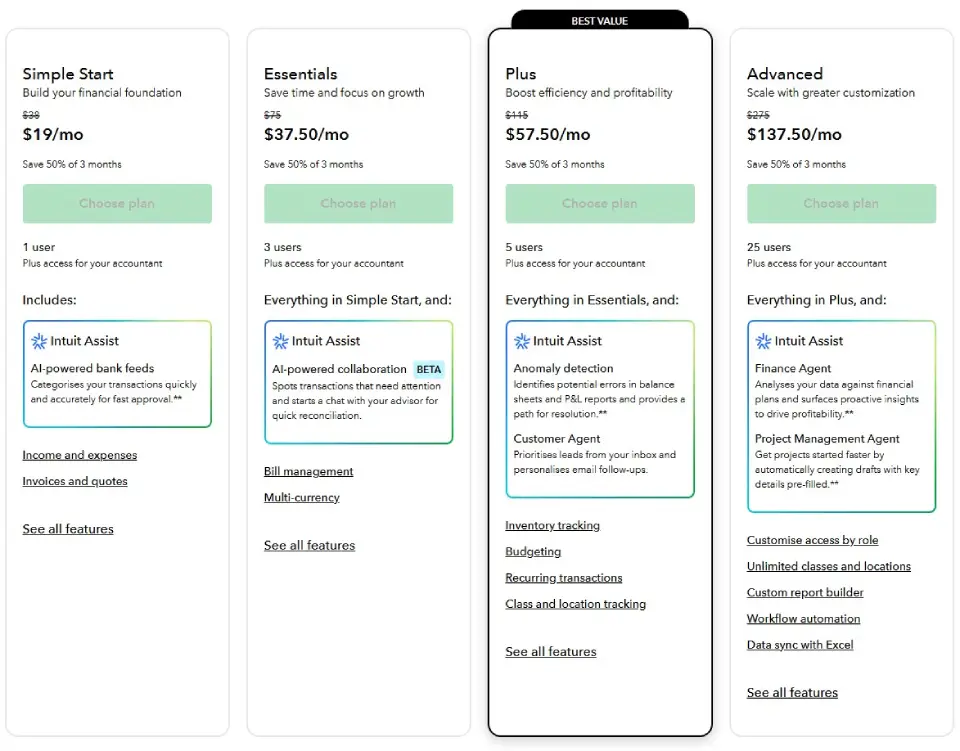
QuickBooks Online offers four main plans with significant feature differences:
| Feature / Plan | Simple Start | Essentials | Plus (Best Value) | Advanced |
|---|---|---|---|---|
| List Price | $38 / month | $75 / month | $115 / month | $275 / month |
| Promo Price (First 3 Months) | $19 / month | $37.50 / month | $57.50 / month | $137.50 / month |
| Maximum Users | 1 | 3 | 5 | 25 |
| Accountant Access | Included | Included | Included | Included |
| Core Accounting (Income & Expenses) | ✔ | ✔ | ✔ | ✔ |
| Invoicing & Quotes | ✔ | ✔ | ✔ | ✔ |
| AI-Powered Bank Feeds | ✔ | ✔ | ✔ | ✔ |
| Bill Management (A/P) | ✖ | ✔ | ✔ | ✔ |
| Multi-Currency Support | ✖ | ✔ | ✔ | ✔ |
| Inventory Tracking | ✖ | ✖ | ✔ | ✔ |
| Budgeting & Forecasting | ✖ | ✖ | ✔ | ✔ |
| Recurring Transactions | ✖ | ✖ | ✔ | ✔ |
| Class & Location Tracking | ✖ | ✖ | Up to 40 | Unlimited |
| Project Profitability | ✖ | ✖ | ✖ | ✔ |
| Custom Report Builder | ✖ | ✖ | ✖ | ✔ |
| Workflow Automation | ✖ | ✖ | ✖ | ✔ |
| Excel Data Sync | ✖ | ✖ | ✖ | ✔ |
| AI Anomaly Detection (P&L & Balance Sheet) | ✖ | ✖ | ✔ | ✖ |
| Finance Agent (AI Insights & Planning) | ✖ | ✖ | ✖ | ✔ |
| Project Management Agent | ✖ | ✖ | ✖ | ✔ |
| Best For | Solo founders & freelancers | Small service teams | Growing businesses, e-commerce, inventory | Larger teams needing control & automation |
Hidden Costs and Limitations
QuickBooks Payroll costs an additional $45-$125/month depending on features. You can’t run payroll through the base subscription.
Payment processing fees apply when customers pay invoices: 2.9% + $0.25 for credit cards, 1% for ACH (capped at $10).
Inventory limitations: Plus and Advanced plans only support 1,000 SKUs. If you exceed this, you need third-party inventory software.
Accountant access is free, which is valuable, but many accountants charge more because QuickBooks Online requires more cleanup than desktop QuickBooks due to bank feed automation errors.
First-year discounts: Intuit offers 50-70% off the first three months, then bills at full price. Always check current promotional pricing before subscribing.
QuickBooks Online – Pros and Cons (Honest, Experience-Based Review)
| Aspect | Pros (Strengths) | Cons (Limitations) |
|---|---|---|
| Accounting Quality | True double-entry accounting with reliable P&L, Balance Sheet, and Cash Flow reports. Suitable for tax filing, financing, and serious financial decisions. | Overkill for very simple side hustles that only need basic income–expense tracking. |
| Bank Feeds & Automation | Automated bank feeds and smart rules significantly reduce manual data entry when reviewed regularly. | Automation can silently misclassify transactions (especially Stripe/PayPal payouts, refunds, owner spending) if not reviewed weekly. |
| Reporting & Insights | Strong reporting depth on Plus and Advanced plans (budgeting, class/location tracking, project & inventory profitability). | Advanced reporting features are locked behind higher-priced plans. |
| Scalability | Scales well from solo businesses to teams (up to 25 users on Advanced) with role-based permissions and workflow controls. | Pricing increases quickly as user count, controls, or inventory needs grow. |
| Integrations | Large ecosystem of integrations (Shopify, Stripe, PayPal, payroll, reporting tools), making QBO a strong accounting hub. | Many integrations are paid add-ons and require proper setup to avoid reconciliation issues. |
| Inventory Management | Adequate inventory tracking for small product and e-commerce businesses (Plus plan). | Not suitable for manufacturing, advanced inventory, or multi-warehouse operations. |
| Sales Tax / VAT Handling | Supports sales tax or VAT tracking across regions when configured correctly. | Sales tax setup is not intuitive for multi-state or multi-country businesses and often requires expert setup. |
| Ease of Use | Clean interface, familiar workflows, and widely supported by accountants and bookkeepers. | Still requires basic accounting knowledge; not fully “hands-off” for non-financial users. |
| Customer Support | Unlimited support included; multiple channels available. | Support quality depends heavily on how specific and informed the question is. |
Real User Experience: What It’s Actually Like
I’ve used QuickBooks Online for my own business and implemented it for 15+ clients across different industries. Here’s what daily use actually feels like:
Initial setup takes 2-4 hours if you follow the guided setup wizard. You’ll connect bank accounts, import customer and vendor lists, set up your chart of accounts, and configure tax settings. Intuit offers free onboarding sessions, which I recommend using—they catch common setup mistakes that cause problems later.
The learning curve depends on your accounting knowledge. If you understand debits and credits, you’ll adapt quickly. If you don’t, expect 2-3 weeks of confusion about where to categorize certain transactions. The built-in help articles are thorough but often too technical for beginners.
Dashboard usability is good but not great. The home screen shows cash flow, profit/loss, expenses, and overdue invoices at a glance. Navigation is logical once you learn it, but Intuit frequently rearranges menu items with updates, which frustrates long-time users.
Performance is generally fast for businesses with under 2,000 monthly transactions. I’ve experienced slowdowns with clients processing 10,000+ transactions monthly—reports take 30-60 seconds to generate, and the interface occasionally freezes.
Customer support is the weakest area. Phone support has long wait times (15-45 minutes), and first-tier representatives often provide incorrect answers about advanced features. The online community and help articles are more reliable. Advanced plan subscribers get priority support, which genuinely improves response times.
Mobile app works well for basic tasks: capturing receipts, sending invoices, checking cash flow. But reconciling bank accounts or creating complex journal entries on a phone is impractical. The app is best used as a companion to the desktop experience, not a replacement.
Bank feed accuracy is about 85-90%. The system learns your categorization preferences over time, but you’ll always need to review and correct some transactions—especially for new vendors or unusual expenses. Budget 30-60 minutes weekly for transaction review.

Who Should Use QuickBooks Online?
QuickBooks Online is the right choice for:
Service-based businesses like consultants, agencies, lawyers, and contractors who need project tracking and detailed client profitability reports.
Retail and e-commerce businesses with inventory under 1,000 SKUs that need sales tax compliance, integration with Shopify or Amazon, and inventory cost tracking.
Growing businesses planning to hire employees, work with investors, or apply for loans—situations requiring proper financial statements and audit trails.
Businesses with accountants or bookkeepers who already use QuickBooks. The collaboration features save time and money during tax season and financial reviews.
Multi-currency operations working with international clients or vendors need QuickBooks Online’s currency conversion and tracking features.
Businesses needing integrations with specific tools they already use. The 750+ app marketplace means you can build a connected financial system.
Project-based companies like construction firms, event planners, or creative agencies that must track costs and profitability by job.
Who Should NOT Use QuickBooks Online?
Consider alternatives if you:
Only send occasional invoices (under 10 per month) and don’t track expenses rigorously. Tools like Wave (free), FreshBooks ($17/month), or Invoice Ninja offer sufficient invoicing without the complexity or cost.
Run a very simple cash business with minimal expenses and no inventory. You might only need a spreadsheet or basic tool like Wave.
Have over 1,000 inventory SKUs without budget for third-party inventory software. QuickBooks Online’s inventory limitations will frustrate you quickly.
Need advanced manufacturing or job shop features. QuickBooks Online isn’t built for manufacturing workflows—you need dedicated ERP software.
Want completely free accounting software. Wave Accounting offers legitimate double-entry bookkeeping at no cost (they monetize through payment processing).
Require nonprofit fund accounting. QuickBooks Online can work for small nonprofts but lacks dedicated fund accounting features that specialized nonprofit software provides.
Process massive transaction volumes (50,000+ monthly). At that scale, you need enterprise accounting software like NetSuite or Sage Intacct.
QuickBooks Online vs. Competitors
| Feature / Capability | QuickBooks Online (QBO) | Xero | FreshBooks | Wave Accounting |
|---|---|---|---|---|
| Target Audience | Small to medium businesses & accountants | Small to medium businesses | Freelancers & service providers | Freelancers & microbusinesses |
| Cloud Accounting | ✔ | ✔ | ✔ | ✔ |
| Double-Entry Accounting | ✔ | ✔ | Partial / simplified | Partial / simplified |
| Invoicing & Estimates | ✔ | ✔ | ✔ (best-in-class for simple invoices) | ✔ |
| Expense Tracking | ✔ | ✔ | ✔ | ✔ |
| Bank Feeds & Reconciliation | ✔ | ✔ | ✔ | ✔ |
| Bills & A/P | ✔ (Essentials+) | ✔ | ✖ | ✖ |
| Inventory Tracking | ✔ (Plus+) | ✔ | ✖ | ✖ |
| Project Profitability | ✔ (Advanced) | ✔ | ✔ (light) | ✖ |
| Payroll Support | Add-on / integrated | Add-on / integrated | Add-on | Add-on |
| Sales Tax / VAT | ✔ | ✔ | Limited | Limited |
| Multi-Currency | ✔ (Essentials+) | ✔ | ✖ | ✖ |
| User Permissions / Roles | Good (Advanced best) | Good | Basic | Basic |
| Integration Ecosystem | Extensive | Extensive | Strong (focus on services) | Moderate |
| Mobile App Experience | Good | Good | Very good | Good |
| Best for | Broad bookkeeping + scaling | Global small business workflows | Simplified service invoicing | Free or low-cost basics |
QuickBooks Online vs. Xero
| Category | QuickBooks Online | Xero |
|---|---|---|
| Best for US small business & tax workflows | ✔ (many US accountants support it) | ✖ (strong globally, but tax specifics vary) |
| Reports & dashboard depth | Strong; improves by tier | Strong; often more intuitive |
| Inventory support | Good (Plus) | Robust |
| Ease of onboarding | Familiar for many accountants | Often praised for clean UI |
| Integration breadth | Very broad | Very broad |
- Choose QBO if you want US-centric workflows, broad accountant familiarity, and a scalable lineup from Simple Start to Advanced.
- Choose Xero if you’re outside the US more often, value intuitive UI, or want integration flexibility with certain global tools.
QuickBooks Online vs. FreshBooks
| Category | QuickBooks Online | FreshBooks |
|---|---|---|
| Accounting depth | Full (double-entry workflows) | Focused on invoicing + simplified accounting |
| Best for freelancers | Good | Excellent |
| Best for service billing | Strong | Strongest |
| Best for team collaboration | Strong (multiple users) | Basic |
| Inventory & A/P | Yes (Plus+) | No |
- FreshBooks feels simpler and faster for freelancers and service providers who don’t need full bookkeeping.
- QuickBooks Online is better when you’re ready to move beyond invoicing into real financial planning, reconciliation, inventory, or multi-user bookkeeping.
QuickBooks Online vs. Wave Accounting
| Category | QuickBooks Online | Wave Accounting |
|---|---|---|
| Upfront cost | Paid | Free (core tools) |
| Accounting depth | Full | Basic bookkeeping |
| Best for tiny businesses | Good | Excellent |
| Payroll / payments | Add-on | Add-on |
| Best for long-term growth | Strong | Limited |
- Wave is attractive if cost is the #1 constraint and you just need core income/expense tracking with simple invoicing.
- If you want clean statements, reconciliation discipline, better reporting, and multi-user workflows, QBO justifies its subscription cost.
Final Verdict: Should You Choose QuickBooks Online?
QuickBooks Online is worth the investment if:
- Your business generates over $100K in annual revenue
- You need proper financial statements for loans, investors, or tax compliance
- You work with an accountant or bookkeeper (they likely already use it)
- You require project tracking, inventory management, or multi-currency support
- You value extensive integrations with other business tools
- You’re planning to scale beyond 5 employees
QuickBooks Online is probably not worth it if:
- You’re a solo freelancer with very simple finances (under 20 invoices yearly)
- Your primary need is just invoicing, not full accounting
- You’re not ready to invest time learning proper bookkeeping practices
- Your budget is extremely limited and you can manage with free tools
My recommendation: Most businesses that gross over $150K annually should use QuickBooks Online or a comparable accounting platform. The tax savings from proper expense categorization, the time saved through automation, and the credibility of professional financial statements typically justify the $90-$180/month cost.
Start with the Plus plan if you need inventory or project tracking. Choose Essentials if you just need solid accounting with bill payment and multiple users. Only choose Simple Start if you’re truly a solo operation with minimal complexity.
Set aside 3-4 hours for initial setup, budget 1-2 hours weekly for transaction review, and consider hiring a bookkeeper for quarterly cleanup if accounting isn’t your strength. The software is powerful when used correctly, but it requires commitment to maintain accurate books.
About the author

I’m Macedona, an independent reviewer covering SaaS platforms, CRM systems, and AI tools. My work focuses on hands-on testing, structured feature analysis, pricing evaluation, and real-world business use cases.
All reviews are created using transparent comparison criteria and are updated regularly to reflect changes in features, pricing, and performance.





