Finding a Gemini couple photo prompt that gives you a usable, realistic couple portrait — instead of a glitchy, uncanny-valley mess — takes more than copying a random template. This article is a review and prompt library in one. You get 50 copy-paste-ready prompts, a prompt formula built on Google’s own framework, and the troubleshooting fixes that matter most when hands look wrong, faces drift off-reference, or lighting comes out flat.
Here’s what this guide covers:
- 50 couple prompt for Gemini AI templates across 10 scene categories
- A prompt formula you can customize for any scenario
- The 5 best prompts to start with — and the 5 most likely to fail
- Fixes for hands, faces, skin, and lighting
- When Gemini is the right tool — and when another option works better
Must-Know Limitations Before You Start
Before you copy any prompt below, set the right expectations:
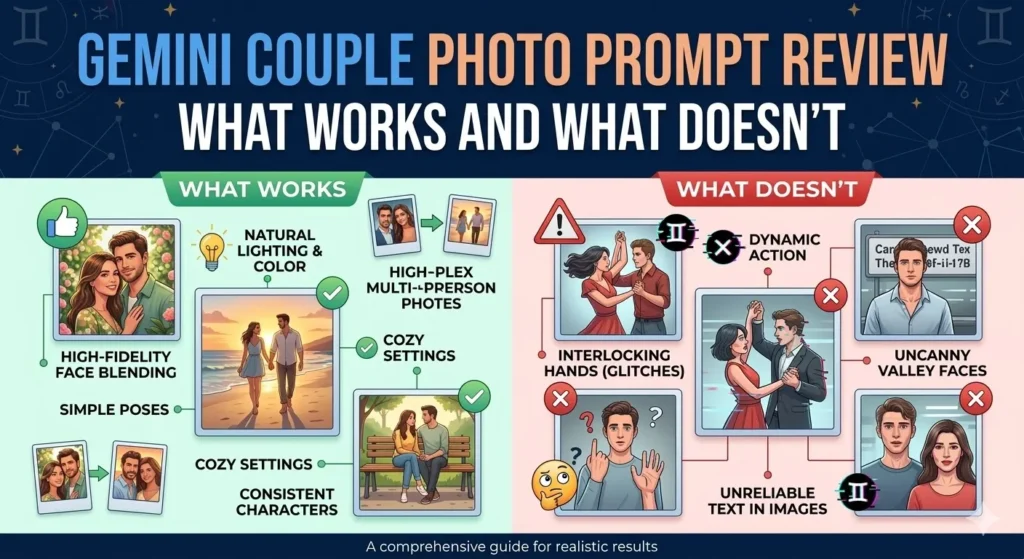
- Character consistency ≠ exact identity. Gemini maintains the general look of a person — hair, skin tone, face shape — but it is not facial recognition software. Do not expect pixel-perfect replicas of your uploaded reference photos.
- Hands still glitch. Extra fingers, merged digits, and anatomically impossible grips are common. Every AI image generator struggles here; Gemini is no exception.
- Text in images is unreliable. If your prompt asks Gemini to write “Save the Date” or add text overlays, expect garbled results. Add text manually in a design tool afterward.
- Complex multi-person scenes are harder. Two people in a simple pose works well. Two people in a dynamic action with multiple hand interactions raises failure rates significantly.
- Output quality depends on reference photo quality. If you upload blurry, heavily filtered, or low-resolution photos, the output will reflect that.
- Image editing is not available to users under 18. Google restricts image editing features in Gemini to adult users, per Gemini Apps Help.
- Download resolution differs by plan. Free Gemini users can download images at approximately 1K resolution. Gemini Advanced (paid) subscribers can download at up to 2K resolution.
Quick Answer: The Best Gemini Couple Photo Prompt Template
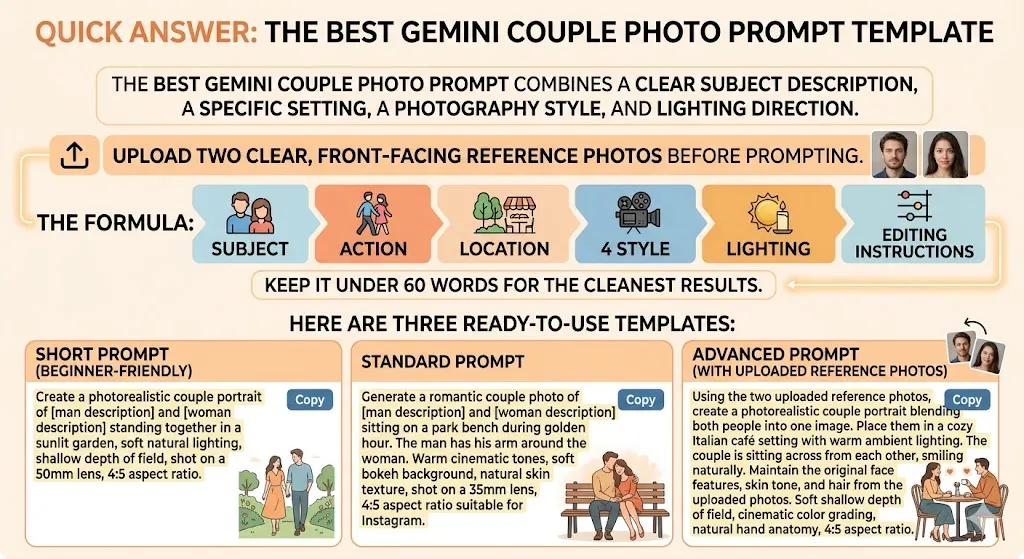
The best Gemini couple photo prompt combines a clear subject description, a specific setting, a photography style, and lighting direction. Upload two clear, front-facing reference photos before prompting. Use the formula: Subject + Action + Location + Style + Lighting + Editing instructions. Keep it under 60 words for the cleanest results.
Here are three ready-to-use templates:
Short prompt (beginner-friendly):
Create a photorealistic couple portrait of [man description] and [woman description] standing together in a sunlit garden, soft natural lighting, shallow depth of field, shot on a 50mm lens, 4:5 aspect ratio.
Standard prompt:
Generate a romantic couple photo of [man description] and [woman description] sitting on a park bench during golden hour. The man has his arm around the woman. Warm cinematic tones, soft bokeh background, natural skin texture, shot on a 35mm lens, 4:5 aspect ratio suitable for Instagram.
Advanced prompt (with uploaded reference photos):
Using the two uploaded reference photos, create a photorealistic couple portrait blending both people into one image. Place them in a cozy Italian café setting with warm ambient lighting. The couple is sitting across from each other, smiling naturally. Maintain the original face features, skin tone, and hair from the uploaded photos. Soft shallow depth of field, cinematic color grading, natural hand anatomy, 4:5 aspect ratio.
Gemini Couple Photo Prompt Review: What Works and What Doesn’t
Google Gemini is a strong option for creating AI couple photos, especially if you want to combine two uploaded selfies into one scene, apply styled edits, or generate romantic portraits from text alone. It’s free for most use cases, it runs directly in the Gemini app or Google AI Studio, and the conversational editing workflow lets you refine outputs without starting over.
That said, Gemini is not a replacement for professional photo editing — and it’s not the best tool for every couple-photo scenario.
Where Gemini Excels for Couple Photos
- Multi-image blending. You can upload two separate selfies and ask Gemini to combine them into a single couple portrait. According to Google’s official documentation, Gemini supports creating new images from multiple uploaded images. This is Gemini’s biggest differentiator.
- Conversational edits. After generating an image, you can say “move them closer,” “change the background to a beach,” or “make the lighting warmer” — and Gemini adjusts the same image without starting over.
- Character consistency. Gemini’s image model is designed to maintain the look of a person across edits. Not perfect, but it generally keeps faces recognizable through multiple rounds of conversational editing.
- Local edits. You can ask Gemini to change a specific part of the image (swap the background, fix one hand, change an outfit) without regenerating the entire image.
- Free tier access. Basic image generation and editing are available on the free Gemini plan with a Google Account. Gemini Advanced (paid) unlocks higher-detail models and 2K downloads.
Where It Falls Short
- Exact face fidelity. Gemini aims for character consistency, not biometric-level accuracy. If you need pixel-perfect likeness, you’ll need to iterate and expect some drift.
- Hand anatomy. Extra fingers, merged hands, and awkward grips happen often across all AI image generators.
- Complex multi-person scenes. More than two people, or two people in dynamic poses, increases failure rates.
- Text in images. Rendering readable text inside generated images remains unreliable.
Pros and Cons at a Glance
| Pros | Cons |
|---|---|
| Free tier available with Google Account | Faces maintain consistency, not pixel-perfect identity |
| Upload and combine two photos into one scene | Hands/fingers still glitch frequently |
| Conversational editing workflow | Text rendering in images is unreliable |
| Character consistency across edits | Complex poses often fail |
| Local (partial) edits without regenerating | Free tier limited to ~1K resolution downloads |
| Works in Gemini app and Google AI Studio | Some features gated behind Gemini Advanced |
| SynthID watermark doesn’t affect visual quality | Image editing unavailable to users under 18 |
How Gemini Handles Couple Photo Prompts
Understanding what Gemini actually supports helps you write better prompts and avoid wasting time on things it can’t do.
Three Core Capabilities
Google’s official documentation confirms Gemini supports three distinct image workflows:
- Generate an image from text. Describe a couple scene in text, and Gemini generates it from scratch. No reference photos required.
- Edit an uploaded image. Upload an existing couple photo and ask Gemini to modify it — change the background, adjust lighting, restyle outfits, or fix specific areas.
- Create a new image from multiple uploaded images. Upload two separate photos (one of each person) and prompt Gemini to combine them into a single couple portrait.
For couple photos, the third capability — multi-image blending — is what makes Gemini particularly valuable. It means you don’t need to be in the same room, at the same time, in the same lighting conditions to create a realistic couple shot. If you’re interested in more about how this tool fits into broader AI photo editing workflows, we’ve covered that separately.
Nano Banana 2 vs. Nano Banana Pro
Google’s image generation models — referenced as Nano Banana 2 and Nano Banana Pro — power Gemini’s output. At a high level:
- Nano Banana 2 is the standard model available to most Gemini users. It handles photorealistic portraits, edits, and basic multi-image tasks.
- Nano Banana Pro is a more capable variant available through Gemini Advanced and Google AI Studio. It tends to produce higher detail, better character consistency, and more accurate responses to complex prompts.
For a deeper look at what Nano Banana Pro can do and how to use it effectively, see our dedicated guide to Nano Banana Pro prompts and capabilities.
Conversational Editing
After Gemini generates or edits an image, you can follow up with natural-language instructions:
- “Move them closer together.”
- “Change the background to a winter forest.”
- “Make the lighting warmer and add a shallow depth of field.”
- “Fix the man’s left hand.”
This conversational loop is what makes Gemini efficient for couple photos — you iterate toward a good result instead of regenerating from scratch every time. This is a significant advantage over tools like Midjourney, which require re-rolling or using remix mode for similar adjustments.
The Prompt Formula That Gets Better Results
Google’s own image generation prompting tips suggest structuring prompts around six core elements. Here’s how that formula maps to couple photos:
Formula: Subject + Composition + Action + Location + Style + Editing Instructions
| Element | What It Means | Example for Couple Photos |
|---|---|---|
| Subject | Who is in the image | “A young couple in their late 20s” |
| Composition | Framing and camera angle | “Close-up portrait,” “Full body shot,” “Over-the-shoulder” |
| Action | What the couple is doing | “Walking hand in hand,” “Sitting on a blanket,” “Leaning foreheads together” |
| Location | Where the scene takes place | “On a cobblestone street in Paris,” “In a sunlit bedroom,” “At a rooftop bar at dusk” |
| Style | Photography or artistic style | “Cinematic color grading,” “Shot on 35mm film,” “Editorial fashion photography” |
| Editing Instructions | Fine-tuning output quality | “Natural skin texture, no airbrushing, soft bokeh, 4:5 aspect ratio” |
Quick-Swap Variable Table
Use these swap-in values to customize any prompt:
| Variable | Options |
|---|---|
| Lighting | Golden hour, blue hour, soft window light, studio rim light, candlelight, overcast natural light |
| Lens | 35mm, 50mm, 85mm, 135mm |
| Aspect Ratio | 4:5 (Instagram / 1080×1350), 3:4 (portrait), 16:9 (cinematic), 1:1 (square) |
| Mood | Romantic, playful, dramatic, intimate, nostalgic, whimsical |
| Outfit | Formal black tie, casual weekend, matching white linen, traditional wedding, cozy sweaters |
| Background | Urban skyline, beach at sunset, autumn forest, café interior, home living room, mountain overlook |
Before You Paste Anything: Upload Checklist for Better Results
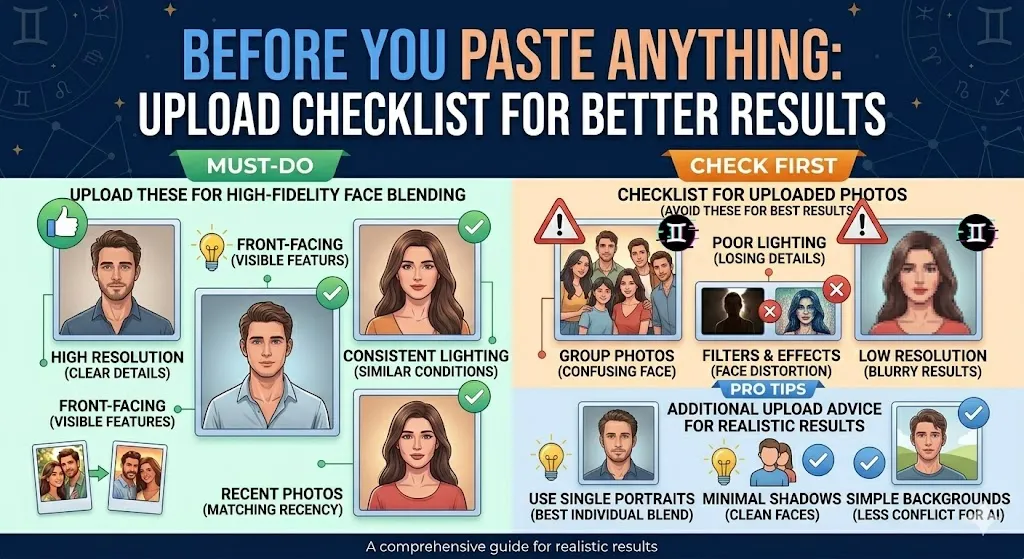
If you’re combining two photos or using reference images, what you upload determines at least half of your output quality.
Upload Checklist
- Resolution. Use the highest-resolution photo you have. Avoid heavily compressed or pixelated images.
- Face visibility. Front-facing or slight three-quarter angle. Avoid sunglasses, heavy shadows across the face, or hair covering most of the face.
- Consistent lighting. If possible, use reference photos with similar lighting conditions. Mixing a harsh outdoor flash photo with a dim indoor selfie makes Gemini’s blending job harder.
- Matching recency. An age mismatch between two reference photos from years apart can create inconsistencies.
- Clean background. Reference photos with cluttered backgrounds can bleed into the generated image. Simple backgrounds give Gemini less to fight against.
What to Avoid Uploading
- Group photos (Gemini can confuse which face to use)
- Photos with heavy filters or face-altering effects
- Very low-light or heavily backlit photos where facial detail is lost
- Photos where hands or arms are prominently visible in unusual positions (these tend to propagate hand-rendering issues)
Text-Only vs Uploaded Reference Photos: When to Use Each
This is a decision many users skip — and it directly affects output quality.
Use text-only prompts when:
- You want a generic or stylized couple image (not based on real people)
- You need rapid iteration on mood, scene, and styling without committing to specific faces
- You’re creating mood boards, concept art, or illustrations where exact likeness doesn’t matter
- You don’t have suitable reference photos available
Upload reference photos when:
- You want the couple to resemble specific people (yourself, your partner, a client)
- You’re creating personalized content like holiday cards, anniversary gifts, or save-the-date graphics
- You want to merge two people from separate photos into one scene
- You need character consistency across multiple generated images
Best practice
Start with a text-only prompt to nail down the scene, composition, and mood. Once you’re happy with the overall look, switch to the reference-photo workflow to lock in the faces. This two-step approach saves time and reduces wasted generations.
Best 5 Gemini Couple Prompts to Start With
If you’re new to Gemini image generation, start with these. They’re selected for high success rate, minimal failure risk, and versatility.
1. The reliable golden hour portrait (Prompt #6) Golden hour lighting forgives a lot of AI imperfections. Warm backlight minimizes weird skin texture, and a wildflower field provides a forgiving, non-specific background. Low failure risk.
2. The cozy café candid (Prompt #11) Seated poses are much safer for AI hand rendering than standing or walking poses. A table hides most hand interactions. Warm natural light is easy for the model.
3. The clean studio portrait (Prompt #16) White background, minimal distractions, professional lighting. This is the safest scenario for accurate face rendering because there’s nothing competing for the model’s attention.
4. The classic wedding portrait (Prompt #21) Formal attire in a garden setting with soft light. Simple standing pose, hands at sides or held gently. One of the most forgiving wedding-style prompts.
5. The autumn park walk (Prompt #33) Soft overcast light, fall colors, walking arm-in-arm. Clothing covers most of the arms and hands, reducing glitchy anatomy. Great for seasonal content.
5 Prompts Most Likely to Fail (and Why)
These prompt types look great on paper but consistently produce problems. Know this before you paste them.
1. Dancing prompts (Prompt #5, #23) Why they fail: Dynamic movement requires complex hand positions, flowing fabric, and motion blur. Gemini struggles with all three simultaneously. Expect extra fingers, stiff poses, and unnatural fabric. Fix: Add slight motion blur on hands and natural body movement to soften the result. Or use a conversational follow-up to fix specific body parts.
2. Interlocking-hands prompts (any prompt with “holding hands”) Why they fail: Hand anatomy is the hardest challenge for AI image generators. Interlocking fingers regularly produce fused digits, extra knuckles, or impossible anatomy. Fix: Reframe to “the couple standing close, arms linked” or “woman resting her hand on the man’s arm” — less anatomically complex contact.
3. Chapel exit with crowd (Prompt #25) Why they fail: Multiple people (guests), dynamic movement (walking), and small objects (flower petals) create too many simultaneous complexity points. Faces in the crowd often look distorted. Fix: Simplify to “the couple exiting the chapel alone” and remove the crowd element entirely.
4. Underwater fantasy (Prompt #47) Why they fail: Underwater physics requires realistic light refraction, flowing fabric, hair suspension, and transparent water — all simultaneously. The model often produces flat, unconvincing results. Fix: If you want this look, generate it and then use Gemini’s conversational editing to fix individual elements (“make the water more transparent,” “add light rays from above”).
5. Sci-fi futuristic scenes (Prompt #50) Why they fail: Complex environments with holographic elements, reflective surfaces, and unusual lighting create lots of visual artifacts. Text on signs is nearly always garbled. Fix: Simplify the environment. Use “a futuristic corridor with soft neon lighting” instead of “holographic billboards.” Fewer complex elements = better output.
50 Gemini Couple Photo Prompts (Copy & Paste Templates)
Every prompt below is designed to be pasted directly into the Gemini app or Google AI Studio. If you’ve uploaded reference photos, add “Using the two uploaded reference photos,” at the beginning of any prompt.
For more Gemini-specific prompts beyond couple photos, see our complete collection of Gemini photo editing prompts.
1. Romantic Indoor (Prompts 1–5)
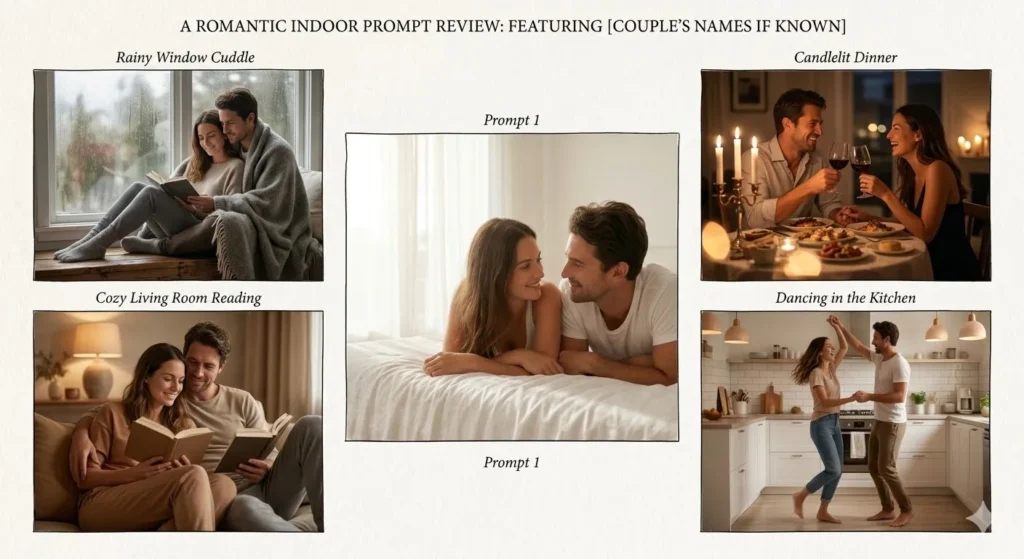
Prompt 1 — Soft morning light bedroom portrait
Create a photorealistic couple portrait in a bright, airy bedroom with white linen sheets. Soft morning light streams through sheer curtains. The couple is lying side by side, facing each other, smiling gently. Warm tones, shallow depth of field, natural skin texture, 4:5 aspect ratio.
Prompt 2 — Rainy window cuddle
Generate a romantic couple photo sitting together on a window seat during a rainy day. Soft overcast light, condensation on the glass, the couple wrapped in a blanket. Warm, intimate mood. Shot on 50mm lens, natural skin texture, slight film grain, 4:5 aspect ratio.
Prompt 3 — Candlelit dinner at home
Create a photorealistic couple having a candlelit dinner at a small table in a dimly lit apartment. Warm amber tones from the candles, wine glasses on the table. The couple is making eye contact and laughing softly. Shallow depth of field, bokeh from candle flames, 4:5 aspect ratio.
Prompt 4 — Cozy living room, couple reading together
Generate a natural-looking couple portrait on a living room sofa. The woman is reading a book while leaning against the man. Soft warm lamp lighting, earth tone decor, casual weekend outfits. Relaxed, candid composition, natural skin texture, shot on 35mm lens, 4:5 aspect ratio.
Prompt 5 — Dancing in the kitchen
Create a photorealistic couple dancing together in a modern kitchen. Soft overhead lighting, the couple is barefoot and laughing. Casual clothes, natural movement, slight motion blur on hands. Warm color grading, full-body composition, 4:5 aspect ratio.
Best for: Anniversary gifts, Instagram stories, couple profile photos.
2. Sunset & Golden Hour (Prompts 6–10)
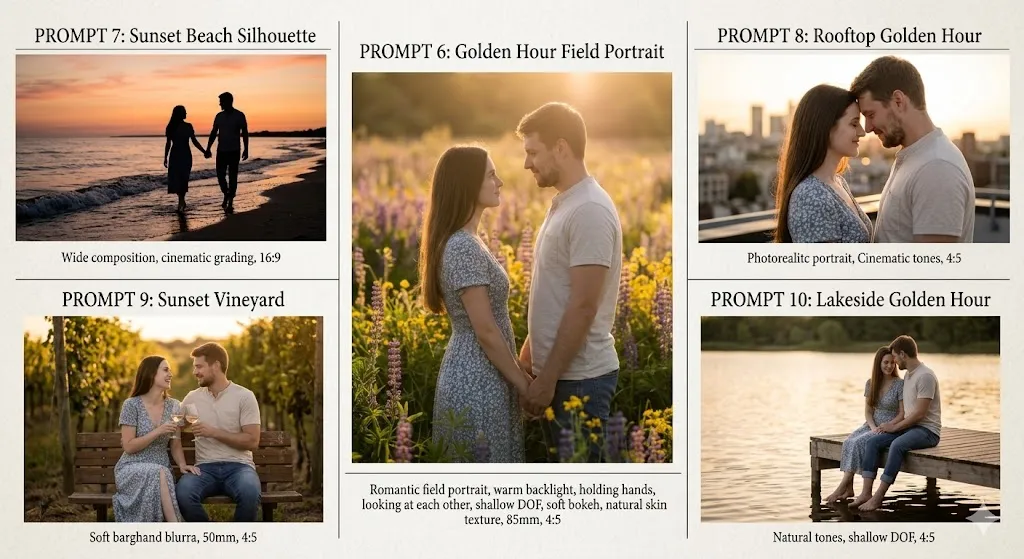
Prompt 6 — Golden hour field portrait
Generate a romantic couple portrait standing in a wildflower field during golden hour. Warm backlight creating a soft glow around them. The couple is holding hands and looking at each other. Shallow depth of field, soft bokeh, natural skin texture, shot on 85mm lens, 4:5 aspect ratio.
Prompt 7 — Sunset beach silhouette
Create a couple photo on a quiet beach at sunset. The couple is walking along the waterline, silhouetted against a warm orange and pink sky. Waves at their feet, wide composition, cinematic color grading, 16:9 aspect ratio.
Prompt 8 — Rooftop golden hour
Generate a photorealistic couple portrait on a city rooftop during golden hour. Urban skyline in the soft background, warm directional sunlight. The couple is standing close, foreheads touching. Shallow depth of field, cinematic tones, 4:5 aspect ratio.
Prompt 9 — Sunset vineyard
Create a romantic couple photo in a vineyard at sunset. Golden light filtering through grapevines, the couple sitting on a rustic wooden bench with wine glasses. Warm earth tones, soft background blur, natural skin texture, shot on 50mm lens, 4:5 aspect ratio.
Prompt 10 — Lakeside golden hour
Generate a couple portrait sitting on a wooden dock at a calm lake during golden hour. Warm reflected light from the water, the couple sitting close with their feet dangling. Peaceful mood, natural tones, shallow depth of field, 4:5 aspect ratio.
Best for: Romantic social media posts, printable wall art, Valentine’s Day content.
3. Café & Candid Lifestyle (Prompts 11–15)
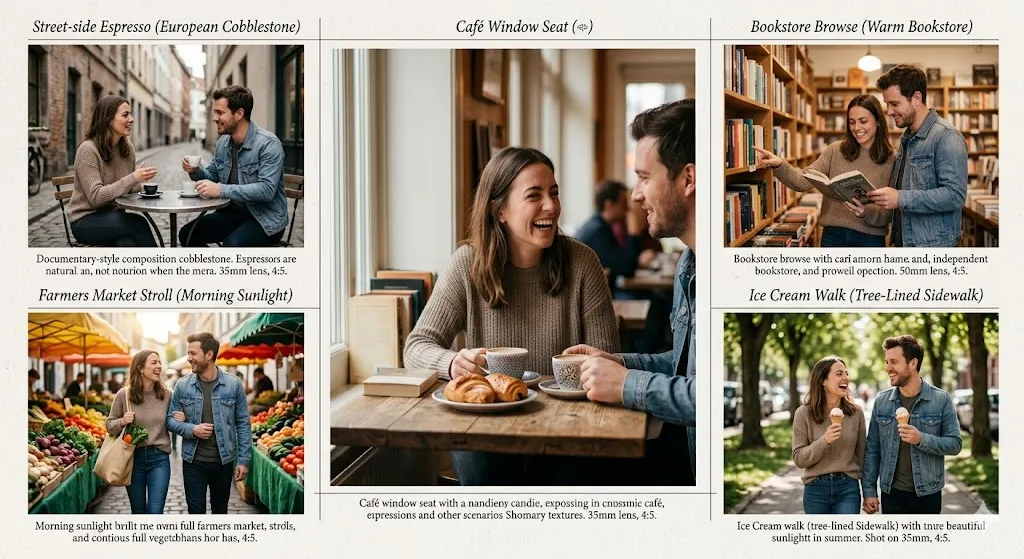
Prompt 11 — Cozy café window seat
Create a photorealistic couple photo at a cozy café. The couple is sitting across from each other at a small table near a window. Coffee cups and pastries on the table. Warm natural light, candid feel, the woman is laughing at something the man said. Shallow depth of field, 4:5 aspect ratio.
Prompt 12 — Street-side espresso
Generate a lifestyle couple photo sitting at a small outdoor café table on a European cobblestone street. Morning light, espresso cups on the table, casual outfits. The couple is talking naturally, not looking at the camera. Documentary-style composition, natural skin texture, 35mm lens, 4:5 aspect ratio.
Prompt 13 — Bookstore browse
Create a candid couple photo browsing shelves in a warm, well-lit independent bookstore. The couple is standing side by side, looking at a book together. Soft overhead lighting, earth tones, relaxed composition, natural poses, shot on 50mm lens, 4:5 aspect ratio.
Prompt 14 — Farmers market stroll
Generate a photorealistic couple photo walking through a colorful farmers market. Morning sunlight, the couple carrying a canvas bag with produce, laughing together. Candid street-photography style, vibrant but natural colors, full-body composition, 4:5 aspect ratio.
Prompt 15 — Ice cream walk
Create a natural couple photo walking down a tree-lined sidewalk in summer, each holding an ice cream cone. Dappled sunlight through the leaves, casual clothes, relaxed candid mood. Shot on 35mm lens, natural skin texture, 4:5 aspect ratio.
Best for: Blog content, lifestyle brand aesthetics, casual couple profile pictures.
4. Studio & Editorial (Prompts 16–20)
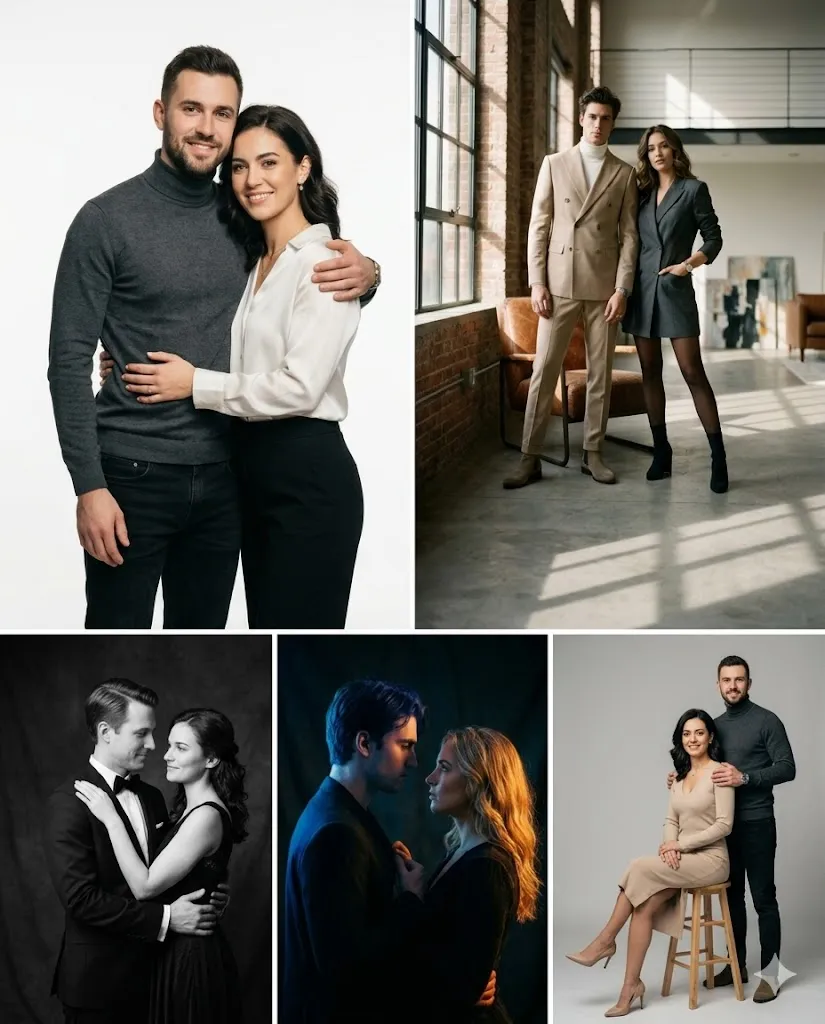
Prompt 16 — Clean white studio portrait
Generate a studio couple portrait against a clean white background. Professional lighting with soft key light and subtle rim light. The couple is standing close, looking at the camera confidently. Minimal styling, sharp focus, natural skin texture, 4:5 aspect ratio.
Prompt 17 — Editorial fashion couple
Create an editorial-style couple portrait in a modern loft studio. Dramatic directional lighting from a large window, strong shadows. Both wearing tailored outfits in neutral tones. Confident, fashion-forward poses. Shot on 85mm lens, shallow depth of field, 4:5 aspect ratio.
Prompt 18 — Black-and-white studio portrait
Generate a classic black-and-white couple portrait in a studio setting. Professional Rembrandt lighting, the couple in formal attire, standing in a close embrace. High contrast, sharp detail, natural skin texture, timeless composition, 4:5 aspect ratio.
Prompt 19 — Moody studio with colored gels
Create a dramatic studio couple portrait with colored gel lighting — blue and warm amber tones. Dark background, the couple facing each other in profile, close together. Strong contrast, cinematic mood, shallow depth of field, 4:5 aspect ratio.
Prompt 20 — Minimalist studio with single chair
Generate a minimalist couple portrait in a studio. The woman is seated on a simple wooden stool, the man standing behind with his hand on her shoulder. Soft, even studio lighting, neutral gray background, clean composition, natural skin texture, 4:5 aspect ratio.
Best for: Professional profiles, printable portraits, anniversary gifts, wall art.
5. Wedding & Engagement (Prompts 21–25)
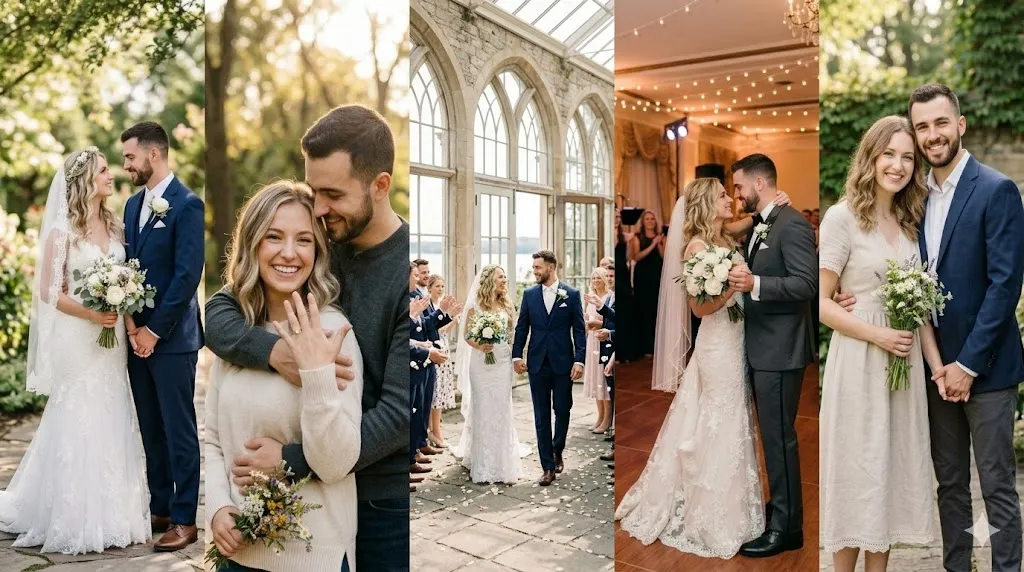
Prompt 21 — Classic wedding portrait
Create a photorealistic wedding couple portrait. The bride in a white gown, the groom in a dark suit, standing in a garden with soft natural light. The couple is looking at each other, holding hands. Romantic, elegant composition, soft bokeh background, natural skin texture, shot on 85mm lens, 4:5 aspect ratio.
Prompt 22 — Engagement announcement photo
Generate an engagement couple portrait in a golden hour park setting. The woman is showing her engagement ring while the man holds her close from behind. Warm backlight, soft tones, joyful expressions. Shallow depth of field, natural skin texture, 4:5 aspect ratio.
Prompt 23 — Wedding first dance
Create a romantic photo of a couple's first dance at a wedding reception. Soft uplighting in a ballroom, the couple in the center of the dance floor, slightly blurred background with fairy lights. Warm cinematic tones, slight motion blur, intimate mood, 4:5 aspect ratio.
Prompt 24 — Save the date portrait
Generate a clean, elegant couple portrait suitable for a save-the-date card. The couple standing together in a simple outdoor setting with soft natural light, dressed in semi-formal coordinating outfits. Warm tones, clean background, sharp focus on faces, 4:5 aspect ratio.
Prompt 25 — Chapel exit moment
Create a photorealistic wedding photo of a couple exiting a stone chapel. Bright natural daylight, the couple laughing as they walk hand in hand. Joyful energy. Shot on 35mm lens, 3:4 aspect ratio.
Best for: Save-the-date graphics, wedding invitations, engagement social posts.
6. Travel & Adventure (Prompts 26–30)
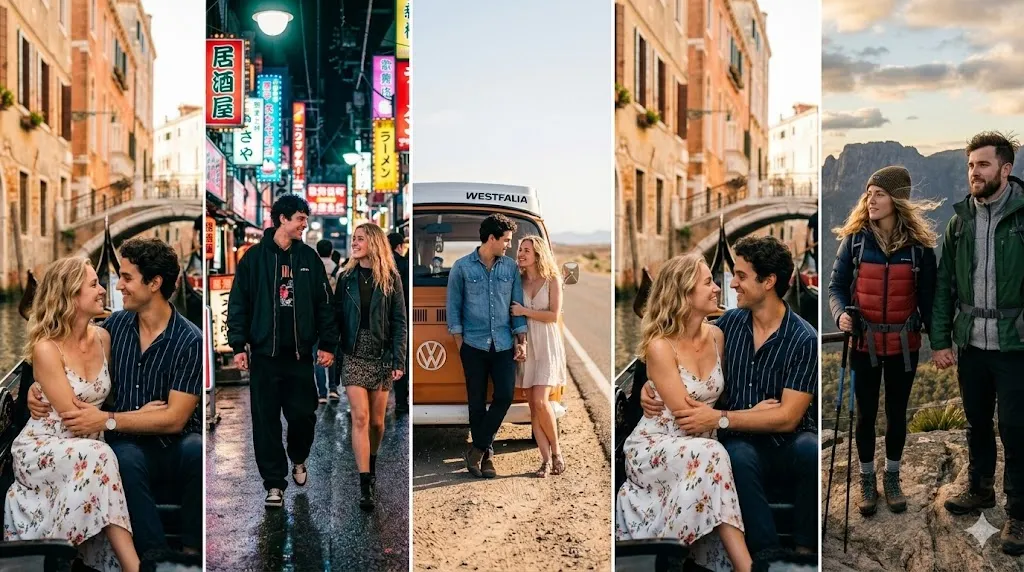
Prompt 26 — Mountain overlook
Generate a photorealistic couple photo standing at a mountain overlook with a panoramic valley view behind them. Hiking gear, golden hour light, wind slightly blowing hair. The couple is standing side by side, looking out at the view. Wide landscape composition, natural tones, 16:9 aspect ratio.
Prompt 27 — Venice canal boat
Create a romantic couple photo riding in a gondola on a Venice canal. Late afternoon light reflecting off the water, old buildings in the background. The couple sitting close together, natural smiles. Warm Mediterranean tones, shot on 50mm lens, 4:5 aspect ratio.
Prompt 28 — Desert road trip
Generate a couple photo standing beside a vintage van on a desert highway. Wide open sky, warm hazy light, casual travel outfits. The couple leaning against the van, relaxed and happy. Cinematic color grading, full-body composition, 16:9 aspect ratio.
Prompt 29 — Tokyo street neon
Create a couple photo walking through a neon-lit Tokyo alley at night. Colorful reflections on wet pavement, the couple holding hands, dressed in modern streetwear. Urban night photography style, vibrant colors, shallow depth of field, 4:5 aspect ratio.
Prompt 30 — Santorini terrace
Generate a couple portrait on a white terrace in Santorini at sunset. Blue domed churches in the background, warm pink and orange sky. The couple standing together, the woman leaning into the man. Natural skin texture, travel photography style, shot on 35mm lens, 4:5 aspect ratio.
Best for: Travel blog content, social media highlights, destination-themed profiles.
7. Festive & Seasonal (Prompts 31–35)
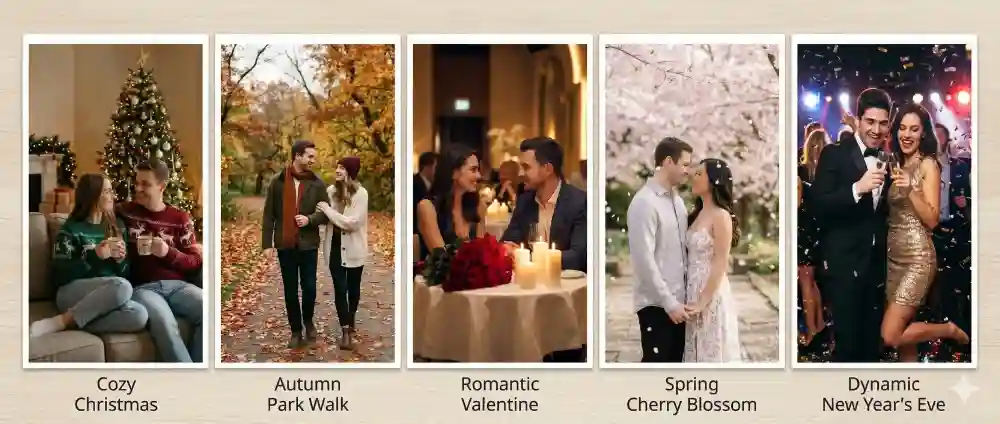
Prompt 31 — Christmas cozy couple
Create a couple photo sitting together on a couch in a cozy living room decorated for Christmas. A lit Christmas tree in the background, warm string lights, the couple in matching holiday sweaters, holding mugs. Warm lamp light, festive mood, natural skin texture, 4:5 aspect ratio.
Prompt 32 — Valentine’s Day portrait
Generate a romantic Valentine's Day couple portrait. The couple in a warmly lit restaurant, red roses on the table, soft candlelight. The couple making eye contact and smiling. Warm color grading, intimate composition, shallow depth of field, 4:5 aspect ratio.
Prompt 33 — Autumn park walk
Create a couple photo walking through a park with fall foliage — red, orange, and golden leaves. Soft overcast light, the couple in cozy fall outfits, arm in arm. Natural earth tones, candid composition, shot on 50mm lens, 4:5 aspect ratio.
Prompt 34 — New Year’s Eve celebration
Generate a couple photo at a New Year's Eve celebration. The couple dressed in elegant evening wear, confetti mid-air, champagne glasses raised. Bright party lighting, dynamic energy. Slightly shallow depth of field, festive mood, 4:5 aspect ratio.
Prompt 35 — Spring cherry blossom
Create a romantic couple portrait under cherry blossom trees in full bloom. Soft pink petals falling gently, the couple standing close together. Soft natural daylight, pastel tones, dreamy mood, shallow depth of field, shot on 85mm lens, 4:5 aspect ratio.
Best for: Holiday cards, seasonal social media posts, Valentine’s Day and anniversary content.
8. Cozy Home & Mirror Selfie (Prompts 36–40)
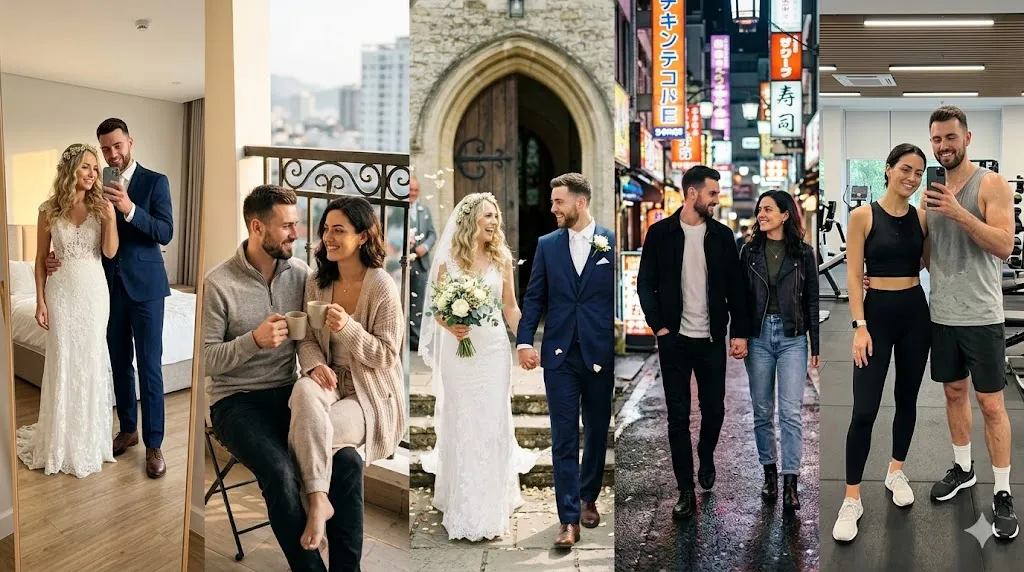
Prompt 36 — Couple mirror selfie
Create a photorealistic couple mirror selfie in a modern bedroom. Full-length mirror, the couple standing side by side in casual home outfits. Soft natural window light, clean room in the background. iPhone-style framing, natural poses, 4:5 aspect ratio.
Prompt 37 — Morning coffee on the balcony
Generate a couple photo sitting on a small apartment balcony having morning coffee. City view in the soft background, both in cozy loungewear. Warm morning light, relaxed mood, candid composition, 4:5 aspect ratio.
Prompt 38 — Cooking together
Create a candid couple photo cooking together in a bright kitchen. Ingredients on the counter, the couple chopping vegetables and laughing. Natural overhead light, warm homey feel, lifestyle photography style, full-body composition, 4:5 aspect ratio.
Prompt 39 — Lazy Sunday in bed
Generate a cozy couple photo lying in bed with white sheets, the couple propped up on pillows looking at each other. Soft morning window light, minimal decor, intimate and relaxed mood. Natural skin texture, warm tones, 4:5 aspect ratio.
Prompt 40 — Couple workout selfie
Create a couple selfie in a clean, modern gym. Both in athletic wear, slightly sweaty, smiling at the camera. Bright gym lighting, mirror in the background, energetic mood. Natural skin texture, iPhone-style selfie framing, 4:5 aspect ratio.
Best for: Casual Instagram stories, couple profile pictures, lifestyle content.
9. Retro, Film & Nostalgic (Prompts 41–45)
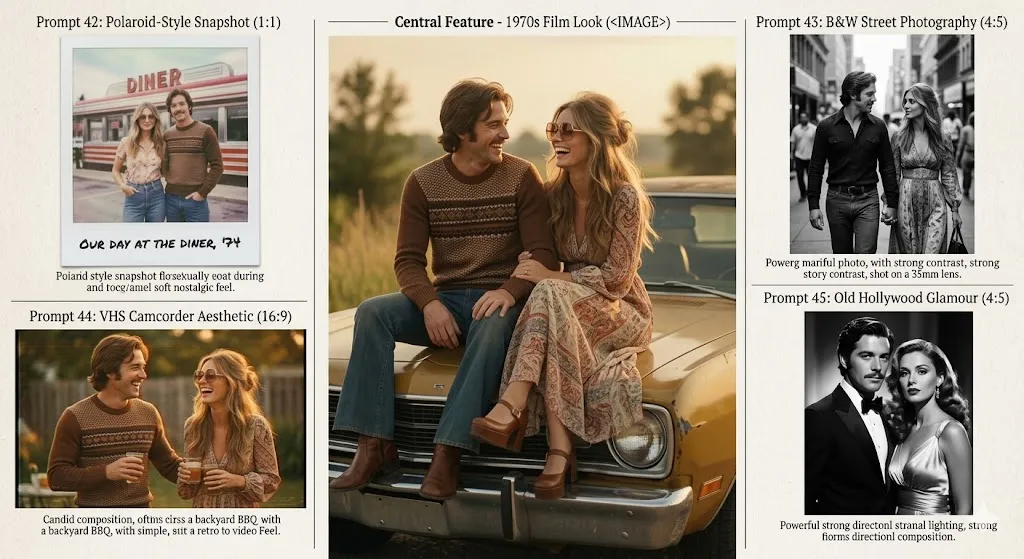
Prompt 41 — 1970s film look
Generate a couple portrait in a 1970s film photography style. Warm faded tones, visible film grain, soft focus. The couple in vintage clothing, sitting on the hood of a classic car. Late afternoon light, nostalgic mood, 4:5 aspect ratio.
Prompt 42 — Polaroid-style snapshot
Create a couple photo that looks like a vintage Polaroid snapshot. Slightly washed-out colors, soft vignette, the couple standing in front of a retro diner. Casual poses, nostalgic feel, square 1:1 aspect ratio.
Prompt 43 — Black-and-white street photography
Generate a black-and-white couple photo on a busy city street. The couple walking hand in hand, slightly blurred passersby in the background. Classic documentary photography style, strong contrast, shot on a 35mm lens, 4:5 aspect ratio.
Prompt 44 — VHS camcorder aesthetic
Create a couple photo with a VHS camcorder aesthetic. Slight color bleed, scan lines, warm amber tint. The couple at a backyard BBQ, laughing and holding drinks. Retro home video feel, candid composition, 16:9 aspect ratio.
Prompt 45 — Old Hollywood glamour
Generate a couple portrait in an Old Hollywood glamour style. Black-and-white, dramatic studio lighting, the couple in classic formal evening wear. The man in a tuxedo, the woman in a satin gown. Timeless, elegant composition, strong directional light, 4:5 aspect ratio.
Best for: Creative social media, nostalgic anniversary projects, themed couple content.
10. Creative, Cinematic & Fantasy (Prompts 46–50)
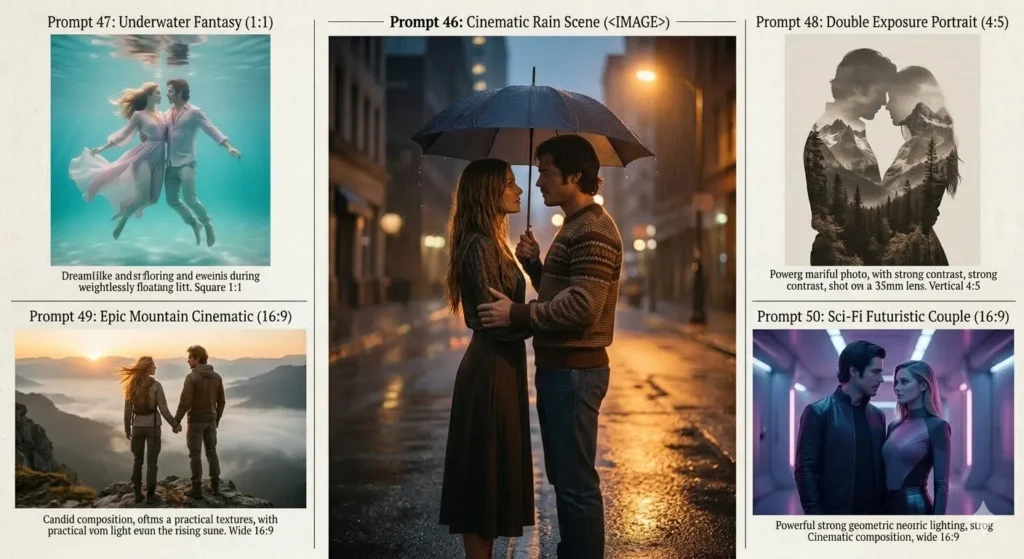
Prompt 46 — Cinematic rain scene
Create a cinematic couple photo in the rain on an empty city street at night. Reflections on wet asphalt, warm streetlight glow, the couple standing close under a shared umbrella. Dramatic lighting, shallow depth of field, cinematic color grading, 16:9 aspect ratio.
Prompt 47 — Underwater fantasy
Generate an artistic couple portrait floating underwater in clear turquoise water. Flowing clothing, soft diffused light filtering from above. Dreamlike, ethereal composition, muted pastel tones, 4:5 aspect ratio.
Prompt 48 — Double exposure portrait
Create a double exposure couple portrait. The couple's silhouettes filled with a mountain landscape and forest. Artistic blending, muted earth tones, vertical composition, 4:5 aspect ratio.
Prompt 49 — Epic mountain cinematic
Generate a dramatic cinematic couple portrait on a cliff edge overlooking a foggy mountain valley at sunrise. Adventure gear, wind-blown hair, golden rim light from the rising sun. Shot on 35mm lens, wide composition, cinematic color grading, 16:9 aspect ratio.
Prompt 50 — Sci-fi futuristic couple
Create a couple portrait in a futuristic corridor with soft neon lighting. The couple in sleek, modern outfits. Cool blue and purple tones, volumetric lighting, cinematic composition, 16:9 aspect ratio.
Best for: Creative projects, cinematic mood boards, artistic social media, print art.
Best Couple Prompt for Gemini AI by Use Case
Different goals need different prompts. Here’s a quick reference:
| Use Case | Recommended Prompt # | Key Modifiers to Include |
|---|---|---|
| Instagram post (4:5) | 6, 11, 33 | 4:5 aspect ratio, shallow depth of field, natural skin texture |
| Anniversary gift | 3, 9, 18 | warm tones, intimate mood, high detail |
| Engagement announcement | 22, 24 | golden hour, joyful expressions, clean background |
| Wedding invitation | 21, 23, 24 | elegant composition, soft bokeh, formal attire |
| Holiday card | 31, 34, 35 | festive mood, matching outfits, seasonal setting |
| Profile picture | 1, 16, 36 | close-up, natural light, sharp focus on faces |
| Printable wall art | 7, 18, 48, 49 | cinematic color grading, artistic composition |
Best Prompt by Scene Complexity
| Complexity | Best Prompts | Why |
|---|---|---|
| Simple (high success) | 1, 4, 16, 20, 33 | Seated or standing pose, minimal hand interaction, clean background |
| Medium | 6, 8, 11, 21, 27 | Moderate scene detail, some hand contact, well-defined environment |
| Complex (higher failure) | 5, 23, 25, 47, 50 | Dynamic poses, multiple subjects, complex environments, underwater/sci-fi |
Best Prompt by Failure Risk
| Risk Level | Prompt Types | Most Common Issue |
|---|---|---|
| Low risk | Studio, seated, close-up | Minor skin texture or lighting issues (easily fixable) |
| Medium risk | Outdoor, walking, golden hour | Hand anatomy, background inconsistencies |
| High risk | Dancing, crowd scenes, fantasy | Multiple anatomy errors, environmental artifacts, face distortion |
If You Only Want Instagram / Wedding / Anniversary Results, Start Here
Instead of reading through all 50 prompts, use these shortcut paths:
For Instagram couple content (4:5, feed-ready): → Start with Prompt #6 (golden hour field) or Prompt #11 (café). Add 4:5 aspect ratio, 1080x1350, suitable for Instagram to any prompt. Use reference photos for personalized content.
For wedding and engagement content: → Start with Prompt #21 (classic wedding) or Prompt #22 (engagement). These have the highest success rate for formal couple photos. For save-the-date graphics, generate the photo first, then add text in Canva or a similar design tool — Gemini’s text rendering is not reliable enough for this.
For anniversary or Valentine’s Day gifts: → Start with Prompt #3 (candlelit dinner) or Prompt #18 (B&W studio portrait). These are intimate, printable, and look good as physical gifts when printed at high resolution (use Gemini Advanced for 2K downloads).
Gemini Couple Photo Prompt Copy Paste Modifiers
Add these modifiers to any prompt to adjust the result. These work like plug-and-play extensions.
Camera and Lens
| Modifier | Effect |
|---|---|
shot on 35mm lens | Wider field of view, good for full-body and environmental context |
shot on 50mm lens | Natural perspective, closest to how the human eye sees |
shot on 85mm lens | Compressed background, flattering for face close-ups |
shallow depth of field | Blurs the background, keeps couple in sharp focus |
deep depth of field | Keeps both couple and background sharp |
Lighting
| Modifier | Effect |
|---|---|
golden hour lighting | Warm, directional sunlight near sunset |
blue hour lighting | Cool, soft ambient light right after sunset |
soft window light | Natural diffused indoor lighting |
studio rim light | Highlights the edge of subjects, separates from background |
candlelight | Warm, low-key, intimate atmosphere |
overcast natural light | Soft, even, shadowless outdoor lighting |
Pose and Composition
| Modifier | Effect |
|---|---|
foreheads touching | Intimate, close-up romantic pose |
arms linked | Natural connection without complex hand interaction |
looking at each other | Emotional connection, romantic feel |
looking at the camera | Direct engagement, works for profile photos |
full-body composition | Shows outfits and environment |
close-up portrait | Focus on faces and expressions |
Realism and Fix-It Modifiers
| Modifier | Effect |
|---|---|
natural skin texture | Reduces AI over-smoothing |
no airbrushing | Prevents plasticky skin render |
natural hand anatomy | Helps (but doesn’t guarantee) correct fingers |
realistic clothing folds | Reduces stiff, painted-looking fabric |
subtle imperfections | Adds realism: freckles, pores, asymmetry |
correct number of fingers | Explicit instruction to avoid extra digits |
Common Problems and How to Fix Them
AI couple photos fail in predictable ways. Here’s how to handle each one.
What to Change First If the Result Looks Wrong
Before re-prompting from scratch, try this order:
- Use a follow-up edit — “Fix the man’s left hand” or “make the skin more natural.”
- Simplify one element — reduce pose complexity, background detail, or number of people.
- Change the lighting modifier — flat results often improve by switching to directional or golden hour light.
- Regenerate — sometimes the same prompt produces a better result on a second attempt.
- Swap the prompt structure — if a full-body prompt keeps failing, try a close-up instead.
Faces Look Wrong or Inconsistent
Problem: Generated faces don’t match the uploaded references, or the two faces look like the same person.
Fixes:
- Upload higher-quality, front-facing reference photos.
- Add
maintain the original face features, skin tone, and hair from the uploaded photosto your prompt. - Use conversational editing: “Make the man’s face match the uploaded reference more closely.”
- Regenerate — sometimes a fresh attempt produces a better result.
Extra Fingers or Merged Hands
Problem: Hands have six fingers, fused digits, or impossible anatomy.
Fixes:
- Add
natural hand anatomy, correct number of fingersto your prompt. - Avoid prompts requiring complex hand interactions (interlocking fingers, holding small objects).
- Use Gemini’s local editing: “Fix the man’s right hand to show five normal fingers.”
- Frame the image so hands are partially out of view or behind the subject.
Flat or Unrealistic Lighting
Problem: The image looks evenly lit with no depth or dimension.
Fixes:
- Specify the light source:
warm directional sunlight from the left,soft window light from behind. - Add a light type:
Rembrandt lighting,rim light,golden hour backlight. - Include
cinematic color gradingfor more dynamic contrast.
Plastic or Over-Smoothed Skin
Problem: Faces look like they’re covered in foundation, or skin has zero texture.
Fixes:
- Add
natural skin texture, visible pores, no airbrushingto your prompt. - Include
subtle imperfectionsorrealistic skinas modifiers. - After generation, use a follow-up: “Add more natural skin texture to both faces.”
Awkward or Stiff Poses
Problem: The couple looks like mannequins — rigid posture, unnatural spacing.
Fixes:
- Be specific about the action:
leaning into each other,mid-laugh,looking at each other naturally. - Add
candid compositionornatural, relaxed body language. - Avoid describing overly complex poses with too many moving parts.
Wrong or Inconsistent Background
Problem: The background doesn’t match what you described, or contains artifacts.
Fixes:
- Be explicit:
background is a blurred autumn forest with warm earth tones. - Use follow-up editing: “Replace the background with a sunset beach.”
- Add
shallow depth of fieldto blur away background problems.
Text Rendering Issues
Problem: You asked for text in the image (like “Save the Date”) and it came out garbled.
Fix: Do not rely on Gemini for text rendering in images. Add text manually in Canva, Photoshop, or any image editor after exporting. This limitation applies to virtually all current AI image generators. If you’re editing images with AI tools more broadly, our guide to the best AI photo editors covers which tools handle text overlays better.
Cropping or Composition Problems
Problem: Heads are cut off, the framing is too tight, or the composition feels unbalanced.
Fixes:
- Specify the framing:
full-body composition,waist-up portrait,close-up on faces. - Add the aspect ratio explicitly:
4:5 aspect ratio,16:9 aspect ratio. - Use follow-up: “Zoom out slightly and center the couple.”
Gemini vs Other AI Image Tools for Couple Photos
The short answer: Gemini is the best free option for combining two uploaded photos into a couple portrait. For raw photorealism in text-to-image generation, Midjourney still leads.
| Feature | Google Gemini | ChatGPT (DALL·E / GPT-4o) | Midjourney | Leonardo AI |
|---|---|---|---|---|
| Multi-image blending | ✅ Upload & combine | ⚠️ Limited upload support | ❌ Text-only (image ref only) | ⚠️ Limited via ControlNet |
| Character consistency | ⚠️ Consistent, not exact | ⚠️ Varies by generation | ✅ Better with --cref | ⚠️ Depends on model |
| Conversational editing | ✅ Natural language follow-ups | ✅ Similar follow-up editing | ❌ Uses remix/vary | ⚠️ Limited |
| Free tier | ✅ Available | ⚠️ Limited free generations | ❌ Paid only | ✅ Free credits |
| Photo upload editing | ✅ Upload & restyle | ⚠️ Limited editing scope | ❌ Reference only | ✅ Upload supported |
| Photorealism | ⚠️ Good, improving | ⚠️ Good, improving | ✅ Excellent | ✅ Very good |
| Ease of use | ✅ Just type naturally | ✅ Conversational | ⚠️ Needs prompt syntax | ⚠️ Technical interface |
| Hand accuracy | ⚠️ Still struggles | ⚠️ Still struggles | ⚠️ Better but imperfect | ⚠️ Model-dependent |
| Download resolution | 1K free / 2K paid | Varies | High-res available | Varies by plan |
If you’re considering ChatGPT for photo editing instead, we’ve tested 50 prompts head-to-head in our ChatGPT photo editing prompts guide. For ChatGPT’s pricing structure, see our ChatGPT pricing breakdown. And for a deeper look at Leonardo AI’s strengths, see our Leonardo AI review.
When Gemini Is the Right Choice
- You want to upload two existing selfies and blend them into one scene.
- You want to iterate on the output through conversation instead of starting from scratch.
- You want a free option that runs directly in the Gemini app with your Google Account.
- You need local edits (swap backgrounds, fix specific areas) without regenerating.
When Another Tool May Be Better
- You need the highest possible photorealism and are willing to pay (Midjourney).
- You need more reliable face reference matching (Midjourney’s
--crefflag is currently stronger for this). - You’re generating artistic or illustrative couple images rather than photorealistic ones (Midjourney leads here).
- You need fine control over composition, poses, and ControlNet-style guidance (Leonardo AI offers more granular control).
Privacy and Copyright Considerations
Before uploading personal photos to any AI tool, understand the basics:
- Review Google’s policy first. Google’s Gemini Apps Privacy Hub explains how uploaded images may be used. Read it before uploading photos you consider sensitive.
- SynthID watermarking. Gemini applies SynthID — an invisible digital watermark developed by Google DeepMind — to AI-generated images. This doesn’t affect visual quality, but it signals the image was AI-generated. This watermark is embedded at the pixel level and can be detected by compatible tools.
- Age restriction. Image editing features are not available to users under 18 in the Gemini app.
- Copyright gray area. AI-generated images exist in an evolving legal landscape. If you plan to use generated couple photos commercially — for print products, advertising, or resale — review Google’s terms of service first.
- Consent. If you’re uploading someone else’s photo as a reference, make sure you have their explicit permission.
- Don’t upload sensitive content. If you are uncomfortable with the possibility of your uploaded images being used to improve Google’s AI models, avoid uploading photos you consider private or sensitive.
How This Guide Was Evaluated
This article is based on:
- Official Google documentation — including Gemini Apps Help, Google’s image generation prompting tips, and their published image editing model updates.
- SERP analysis of top-ranking pages — we reviewed 10+ competitor articles targeting the same keywords to identify gaps in factual accuracy, AEO structure, and editorial depth.
- Common AI image generation failure patterns — drawing from publicly documented limitations of diffusion-based and transformer-based image models (hand anatomy, face drift, text rendering).
We did not fabricate first-hand testing claims, benchmarks, or screenshots. Evaluative claims in this article are grounded in official Gemini capabilities and general AI image generation behavior. This approach to grounding conclusions in verifiable evidence is part of our wider coverage of generative AI tools and concepts.
Gemini couple photo prompt – FAQs
What is the best Gemini couple photo prompt?
The best prompt combines a clear subject description, specific setting, photography style, and lighting direction. Start with: “Create a photorealistic couple portrait of [descriptions] in [setting] with [lighting], shot on [lens], [aspect ratio].” Upload reference photos for best results. See Prompt #6 and #11 for the highest-reliability starting points.
How do I make a couple photo in Gemini?
Open the Gemini app or Google AI Studio, optionally upload one or two reference photos, then type a descriptive prompt specifying the couple, the scene, the style, and the lighting. Gemini generates the image, and you can refine it through follow-up conversational instructions.
Can Gemini combine two photos into one couple picture?
Yes. Google confirms Gemini can create a new image from multiple uploaded images. Upload two separate photos — one of each person — and ask Gemini to blend them into a single scene. For example: “Using the two uploaded photos, create a couple portrait of these two people at a sunset beach.” Results depend on reference photo quality.
How do I keep faces accurate in Gemini couple photos?
Upload high-resolution, front-facing reference photos with clear facial detail. Include maintain the original face features, skin tone, and hair from the uploaded photos in your prompt. Expect character consistency, not pixel-perfect identity — Gemini is designed for visual consistency, not biometric matching.
What should I upload before using a Gemini couple prompt?
Use high-resolution, well-lit, front-facing photos with minimal background clutter. Avoid group photos, heavily filtered selfies, or photos with sunglasses. Both reference photos should have similar lighting conditions and recency for best consistency.
Is Gemini free for couple photo generation?
Yes. Gemini’s free tier (with a Google Account) supports image generation and basic editing. Free users download at approximately 1K resolution. Gemini Advanced (paid) unlocks higher-detail models, better character consistency, and up to 2K downloads.
Can Gemini create wedding or engagement couple photos?
Yes. Gemini handles wedding and engagement prompts well for styled portraits and mood boards. Specify formal attire, romantic settings, and elegant lighting. For save-the-date text, add it manually in a design tool after generating the image.
How do I fix hands in Gemini AI couple images?
Add natural hand anatomy, correct number of fingers to your prompt. If hands still look wrong, use Gemini’s conversational editing: “Fix the right hand to show five normal fingers.” Alternatively, frame the shot so hands are partially hidden or switch to a close-up composition.
What aspect ratio is best for Instagram couple photos?
4:5 (1080×1350 pixels) is the optimal aspect ratio for Instagram feed posts. Include 4:5 aspect ratio in your prompt. For Instagram Stories, use 9:16 aspect ratio.
What’s the difference between Nano Banana 2 and Pro for couple images?
Nano Banana Pro generally produces higher detail, better character consistency, and more accurate multi-image blending than Nano Banana 2. It’s available through Gemini Advanced and Google AI Studio. For basic couple prompts, Nano Banana 2 on the free tier works fine. For complex multi-image blends, the Pro model is noticeably better.
Can Gemini edit an uploaded couple selfie?
Yes. Upload an existing couple photo and ask Gemini to make changes: swap the background, improve lighting, change outfits, adjust composition, or apply a specific photography style. This uses Gemini’s image editing capabilities, not just generation.
How do I write a couple prompt for Gemini AI?
Follow the six-element formula: Subject (who’s in the photo) + Composition (framing) + Action (what they’re doing) + Location (setting) + Style (photography look) + Editing instructions (skin texture, aspect ratio, lens). Keep prompts under 60 words for cleaner results. Upload reference photos whenever possible.
Final Verdict
Google Gemini is one of the most practical free AI tools for creating couple photos — especially when you’re combining uploaded references rather than generating from scratch. The Gemini couple photo prompt workflow of uploading two photos, writing a structured prompt, and refining through conversation gives it an edge that most competing tools don’t offer for this specific use case.
The 50 prompts in this guide cover the most common couple-photo scenarios: romantic, cinematic, wedding, lifestyle, retro, and creative. Copy them, swap in your own details using the variable table, and use the troubleshooting section when outputs go sideways.
Gemini is not perfect. Character consistency is “consistent” not “identical.” Hands are still a gamble. Text rendering is best left to a design tool like Canva. But for the price (free for most use cases), the ease of use (just type naturally), and the editing flexibility (conversational iteration), it’s a strong default choice for personal couple-photo projects.
Who should use Gemini for couple photos:
- Couples who want romantic, stylized, or themed portraits without a photographer for every idea
- Social media creators who need quick, high-quality couple content for Instagram
- People creating wedding invitations, anniversary gifts, or holiday cards on a budget
Who should look elsewhere:
- Commercial users who need absolute face accuracy
- Photographers or designers who need granular composition and pose control (consider Midjourney or Leonardo AI)
- Anyone generating couple images at scale for commercial use (review Google’s terms of service first)
If you’re more interested in written romance scenarios than visual ones — fanfiction prompts, OTP tropes, or dialogue starters for your favorite pairing — see our ship prompt generator review for the best tools and workflows.
For official guidance on Gemini’s image capabilities, see Google’s image generation prompting tips and the updated image editing model overview.
About the author

I’m Macedona, an independent reviewer covering SaaS platforms, CRM systems, and AI tools. My work focuses on hands-on testing, structured feature analysis, pricing evaluation, and real-world business use cases.
All reviews are created using transparent comparison criteria and are updated regularly to reflect changes in features, pricing, and performance.