
Cleaning up an X account usually starts with old standalone posts. If you plan to delete X replies too, they deserve a separate review. X defines a reply as “a response to another person’s post,” and opening a reply in your timeline expands it to show the post it answered. That connection changes how an old comment should be read.
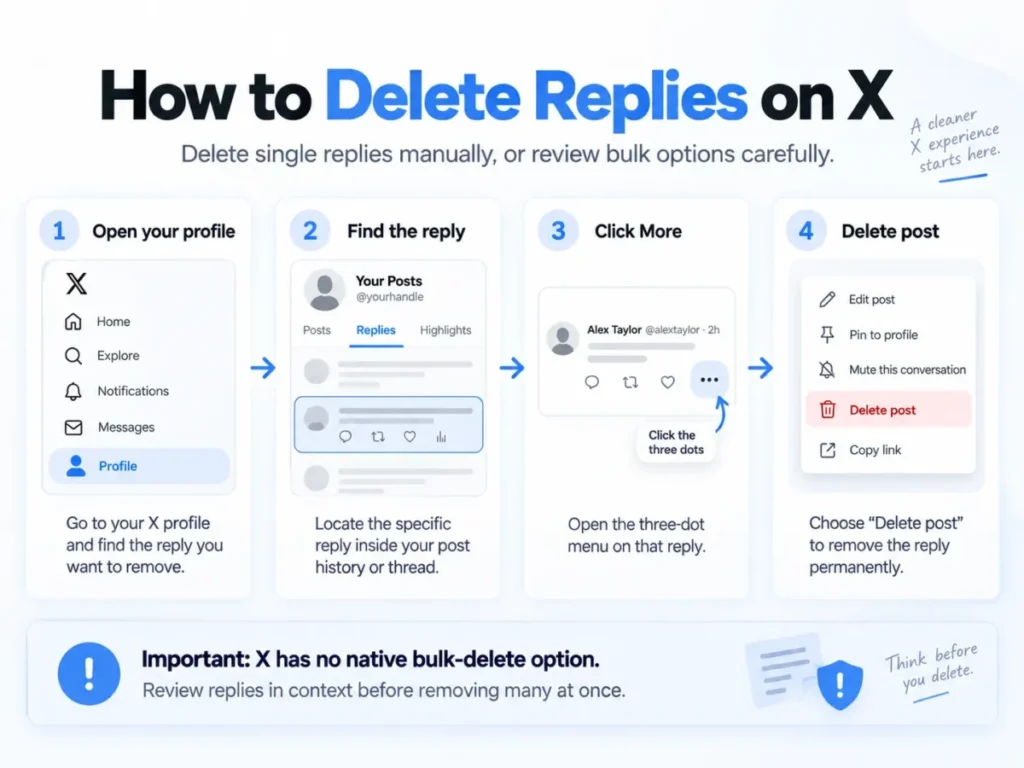
Quick answer: You can delete your own replies on X one at a time. Open your profile, find the reply, click the more icon, and choose “Delete post.” X has no bulk option, so deleting many replies at once needs a third-party tool. Deletion is permanent, so review each reply in its thread first.
A reply that made sense inside an active discussion may look very different years later. The original author may have deleted a post, changed an account, or moved on from the subject. For people reviewing large reply histories, https://xdeleter.io/delete-twitter-replies describes a workflow that separates Reply as a post type and adds filters for dates, keywords, hashtags, and media.
That makes reply cleanup less about deleting everything old and more about finding conversations worth another look. A short answer, joke, correction, or disagreement can depend heavily on the post above it. Reviewing replies as their own category makes those differences easier to notice.
In This Article (11 sections)
How to Delete Replies on X: One at a Time or in Bulk
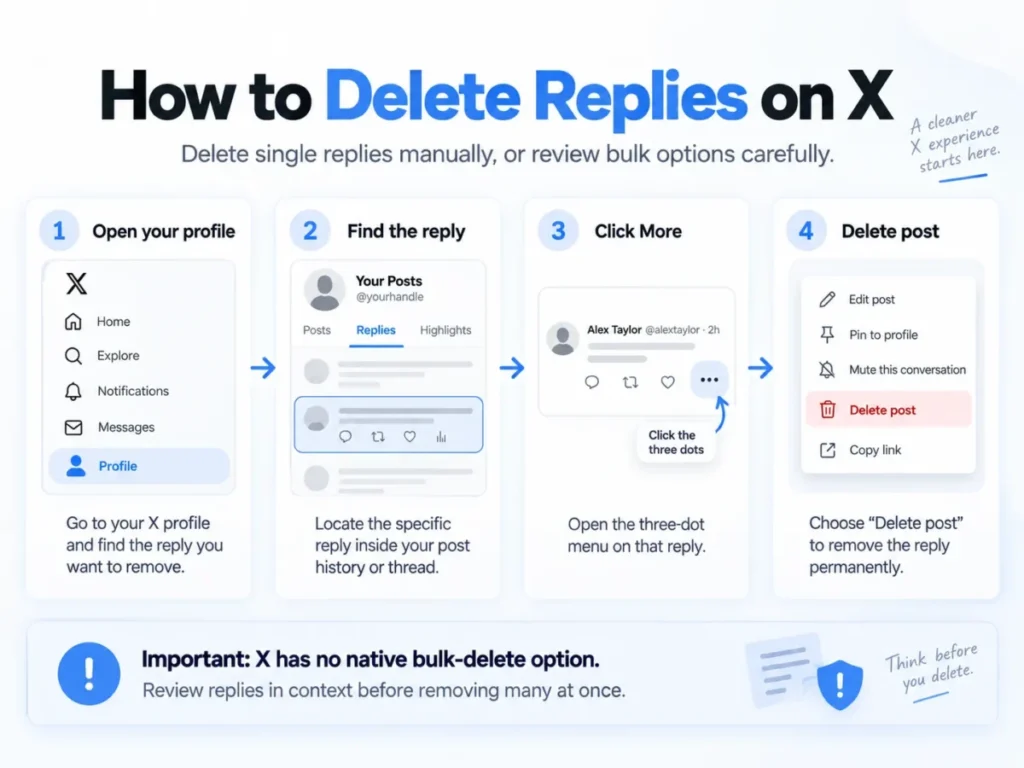
X treats a reply as a post, so you delete it the same way. On the web, X’s guide to deleting posts lists four steps.
- Visit your Profile page.
- Locate the reply you want to delete.
- Click the more icon on the post.
- Click “Delete post.”
That works for a handful of comments. It does not scale, and X says so directly: “We do not provide a way to bulk-delete posts. You can only delete posts manually, one by one.”
That gap is why third-party tools exist. If you want to delete all replies on X at once, a tool like X Deleter runs the deletion through X’s API after you filter the list. Whichever route you pick, neither one can undo a deletion. The six reasons below explain what to review before you delete X replies in either way.
1. Replies Depend on Someone Else’s Context
A regular post usually introduces its own subject. A reply begins inside a conversation someone else started. X’s help page on replies says a reply shows “Replying to…” when it appears on your profile timeline.
The Parent Post Changes the Meaning
Consider a reply that says, “That number is completely wrong.” On its own, it sounds confrontational and carries almost no useful information. Inside a thread about a specific statistic, it may have been a fair correction followed by supporting evidence.
This matters during cleanup because the reply text alone may not explain why it was written. The same X page notes that clicking a reply in your timeline expands it to show the post it answered. Checking that context before deleting keeps an old reply from being judged by one isolated sentence.
Missing Context Creates a Different Problem
Sometimes the original conversation is no longer useful or no longer there. In that case, the reply may make sense only to people who remember the discussion. That makes it a stronger candidate for review than a standalone post that still explains itself.
2. Old Discussions Can Lose Their Purpose Faster
Replies are often written during a specific event, disagreement, announcement, or short-lived discussion. When that moment passes, the response can lose practical value even if the wording itself is harmless.
Relevance Has a Shorter Shelf Life
An answer about a temporary product issue, an event schedule, or an old news story can stay attached to an account long after the subject has changed. This is not always a reputation problem. It is often a relevance problem.
A cleanup plan can therefore weigh reply age differently from post age. An older standalone post may still hold useful information, while an old reply may only make sense inside a conversation that ended years ago.
3. Replies Are Harder to Review Manually
Replies build up quietly. Someone who rarely publishes standalone posts may still join hundreds of conversations over several years.
Profile Scrolling Is a Weak Review Method
Manual scrolling asks the reviewer to inspect posts, replies, and other activity together. It also pushes decisions toward whatever appears next rather than toward a clear rule.
Separating replies first creates a smaller review set. The decision can then focus on three questions. Is the old conversation still relevant? Is its context still clear? Does the response still represent something worth keeping?
Search Criteria Make Large Histories Manageable
Filters turn an open-ended cleanup into a specific task. A date range can isolate an old period. Keywords can locate discussions about one subject, while hashtags and media filters narrow the set further.
X Deleter lists those four filters on its reply page. Its instructions say to click “Posts” in the top menu, select “Change Filters,” and change the Post Type from “All” to “Reply.” You then refine the results with the other filters before selecting anything.
4. Replies Carry Different Reputation Risks
A standalone post normally presents an idea on purpose to an audience. Replies are more conversational. They can hold quick reactions, sarcasm, disagreements, or comments written under time pressure.
Tone Can Look Different Outside the Thread
A brief reply may read harsher once it is separated from the message that prompted it. X structures replies as parts of conversations rather than as independent statements, and that structure is what gets lost when a reply is read alone.
That does not mean every old disagreement needs removal. It means tone should be judged with context. A cleanup based only on certain words can miss the difference between a hostile exchange and a calm response that uses the same vocabulary.
Professional Accounts May Need a Different Threshold
For an account tied to work, public writing, or a business, old replies become part of what a client or recruiter sees when they scroll back. Teams that already run X from a social media CRM tend to treat the account as a brand channel, and replies are part of that channel too.
The useful question is whether a reply still adds something a stranger can follow. A harmless but contextless exchange may add little. A detailed answer that still helps readers may be worth keeping. Treating both as ordinary posts makes that distinction harder.
5. Bulk Reply Deletion Benefits From More Precise Filters
Broad deletion rules are risky when you delete X replies in bulk and your replies and standalone posts are mixed together. One keyword may appear in a valuable original post and in dozens of outdated conversations.
Post Type Should Come First
A practical sequence is to isolate replies first, then narrow the period or subject. This keeps unrelated original posts out of the review set.
Volume also changes the workflow. X Deleter says it can remove more than 3,200 replies if you upload your X data file. That file is the archive X prepares on request, and X’s archive download guide warns that it “may take a few days” to be ready. If your reply history is long, request the archive before you plan the cleanup session.
Deletion Deserves a Final Check
X Deleter’s FAQ states that “deleted replies are permanent and cannot be recovered.” That makes a final review of the selected results important before anything runs.
The goal is not maximum removal. A smaller group chosen with clear criteria is easier to verify than an entire account history selected at once.
6. Replies Should Be Reviewed by Conversation, Not Only by Age
Age is useful, but it does not tell you whether a reply still has value. Some five-year-old answers remain informative. A six-month-old reply may already depend on a discussion nobody can follow anymore.
Use a Simple Review Order
- Start with replies from periods or subjects that no longer matter.
- Check whether the original conversation still gives enough context.
- Review wording, media, and links before deciding what stays.
This approach treats cleanup as editing an old communication record rather than erasing everything before a certain date. It also gives useful replies a reason to remain.
What Deleting a Reply Does Not Remove
Before you delete, it helps to know where a reply can still live afterward. X’s guide to deleting posts sets out three limits that apply to replies as much as to regular posts.
- Quote posts stay up. If someone reposted your words with a comment of their own, X says “their posts will not be removed.”
- Copied text stays up. Posts where other people pasted your text are not removed either.
- Off-platform copies stay up. X says it cannot remove posts that are not on x.com or its apps, including cached copies on third-party sites and search engines.
Two further points come from X Deleter’s FAQ. It says X does not notify anyone when you delete a reply. It also says deleting replies will not change the visibility of your original posts, but it can reduce engagement on threads where your replies were part of the conversation. Weigh that second point if a thread you started still gets traffic.
On access, X Deleter says you sign in with your X account and that it uses X’s own API to delete replies. If you want a plain explanation of what that authorization means, our guide to how APIs work covers the basics.
Reply Review Checklist
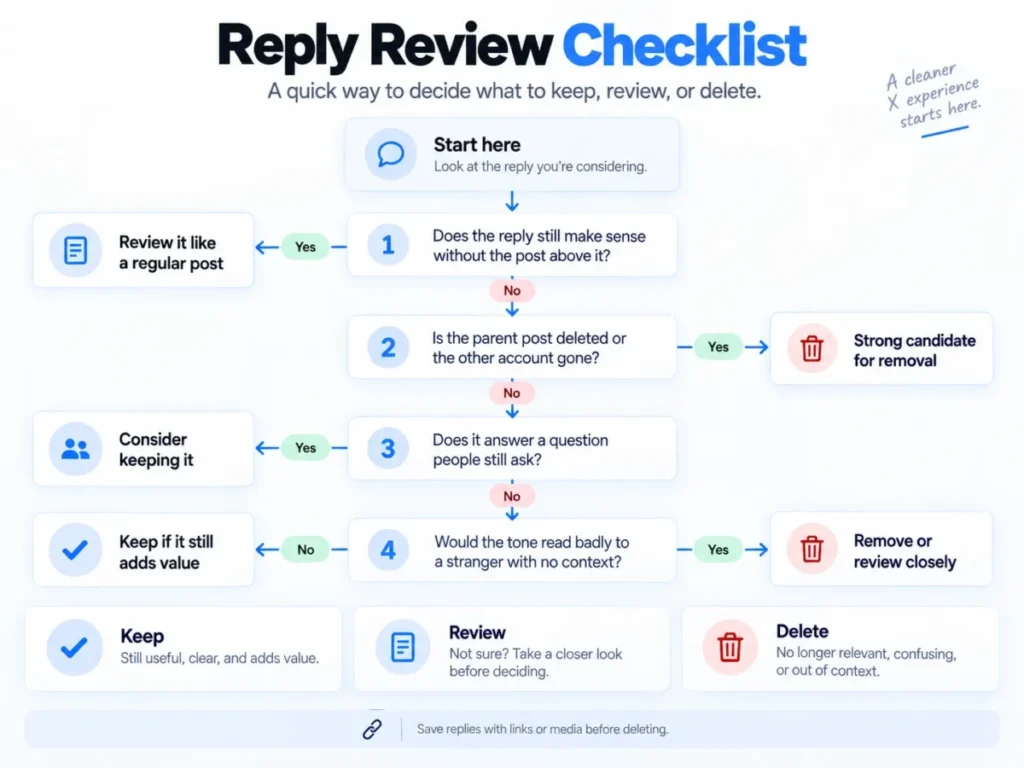
Use this table as a quick pass over any reply before it goes into a deletion batch.
| Question | If yes | If no |
|---|---|---|
| Does the reply still make sense without the post above it? | Review it like a regular post | Open the thread before deciding |
| Is the parent post deleted or the other account gone? | Strong candidate for removal | Judge it inside the live thread |
| Is the subject a past event, outage, or old news story? | Likely safe to remove | Check whether it still helps readers |
| Does it answer a question people still ask? | Consider keeping it | Move on to tone |
| Would the tone read badly to a stranger with no context? | Remove or review closely | Keep if it still adds value |
| Has anyone quote-posted it? | Deleting will not remove the quote | Deletion removes it from X itself |
| Does it hold media or links you still want public? | Save a copy before deleting | No extra step needed |
Source note: the quote-post row follows X’s guide to deleting posts. The other rows are editorial review criteria, not platform rules.
FAQ About Deleting X Replies
Can you delete X replies?
Yes. You can delete any reply you posted, because X treats replies as posts. You cannot delete replies other people left on your posts, though you can hide them.
How do I delete all my replies on X at once?
X itself has no bulk option. Its help center says you can only delete posts “manually, one by one.” Bulk deletion needs a third-party tool that filters your history by post type and then deletes the selected replies through X’s API.
How do I delete old replies on X from years ago?
Filter by date range first, then review each batch in context. X Deleter says you need to upload your X data file to go past 3,200 replies, and X says preparing that archive may take a few days.
Can deleted X replies be recovered?
No. X Deleter’s FAQ says deleted replies “are permanent and cannot be recovered.” Save a copy of any reply with media or links you may want later.
Does X notify people when I delete a reply?
According to X Deleter’s FAQ, no. The reply simply disappears from the thread.
Is deleting Twitter replies free?
Deleting replies one by one inside X costs nothing. X Deleter does not list prices on the public pages we checked, so confirm the cost after you sign in before you plan a large cleanup.
A Reply History Is Really a Conversation History
Regular posts and replies appear under the same account, but they were created for different purposes. Posts often stand on their own, while replies inherit meaning from another person’s message and the discussion around it. X’s own conversation structure reflects that difference.
The Better Cleanup Rule
The strongest reply cleanup strategy separates replies before judging them. Filters for post type, date, keywords, hashtags, and media make a large history easier to examine, while context decides what actually deserves removal. X Deleter offers those filters for people who want a more focused review.
The useful endpoint is not an account with the fewest old replies. It is an account where the conversations that remain can still be understood and still have a reason to be there.
How we checked this guide: we read X Deleter’s reply page, home page and FAQ and three X Help Center pages on September 18, 2026. We did not connect an account or delete replies. Our review methodology explains how we separate vendor claims from tested results.