ClickUp Pricing 2026 is straightforward on paper—Free, $7, $12, and Enterprise custom—but the real cost depends on how many users you have, whether you pay annual vs monthly, and how quickly you hit limits like automation actions, guest permissions, and admin controls such as SSO/SCIM.
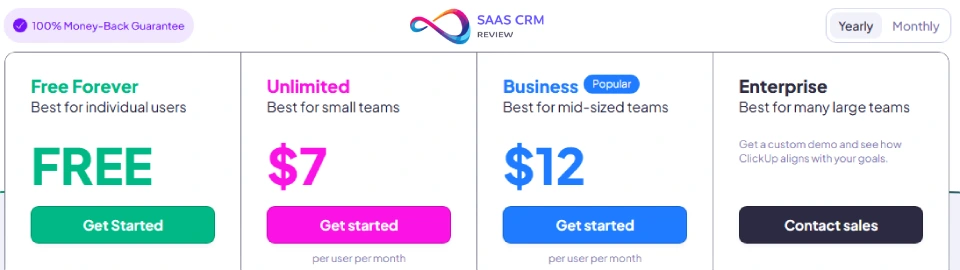
Here are the headline prices: Free Forever $0, Unlimited $7 per user/month (billed yearly), Business $12 per user/month (billed yearly), and Enterprise custom pricing. This guide breaks down what you actually get per plan, the upgrade triggers that force teams to move up tiers, and how ClickUp AI pricing (ClickUp Brain, AI credits, AI add-ons) can change the total.
ClickUp Pricing 2026 – Key Takeaways
- Base pricing: Free Forever (truly unlimited users), Unlimited at $7/user/month (annual), Business at $12/user/month, Enterprise custom (typically $25-40/user/month)
- AI costs add up fast: ClickUp Brain costs $9/user/month additional (Brain AI) or $28/user/month (Everything AI)—charged per paid member, not actual AI usage
- Real upgrade triggers: Automation limits (100 actions/month free, 1,000 on Unlimited, 10,000+ on Business), guest permissions, storage (60MB free vs unlimited paid), SSO/compliance
- Hidden billing traps: “Limited members” and permission-controlled guests count as paid seats; turning on AI for the workspace bills all members
- Best value: Unlimited plan ($7/user/month) for most teams under 20 people; Business for teams needing advanced reporting and 5,000+ automations/month
- Annual discount: 30% savings across all paid plans (monthly pricing is $10 Unlimited, $19 Business)
- Total cost reality: 20-person team on Business + Brain AI = ~$5,000/year base + ~$2,200/year AI = $7,200 annual
Read our ClickUp Review 2026: Features, Pricing, Pros & Cons – Is It Worth It?
ClickUp Pricing Snapshot (2026)
| Plan | Monthly Price | Annual Price | Best For | Key Limitation |
|---|---|---|---|---|
| Free Forever | $0 | $0 | Personal use, testing, micro teams | 60MB storage, no guest permissions, 100 automation actions/month |
| Unlimited | $10/user | $7/user | Small teams (5-20), agencies | 1,000 automation actions/month |
| Business | $19/user | $12/user | Mid-size teams (20-100), cross-functional | No SSO (Google SSO only), no white labeling |
| Enterprise | Custom | Custom ($25-40/user typical) | 100+ users, compliance needs | Minimum seat requirements vary |
Annual billing saves 30% across all paid plans. [Source: ClickUp pricing page, accessed January 11, 2026]
AI Add-On Pricing
| Add-On | Monthly Price | Annual Price | What’s Included |
|---|---|---|---|
| Brain AI | $9/user | ~$7/user | Unlimited AI writing, BrainGPT chat, enterprise search, 1,500 AI Super Credits/user/month |
| Everything AI | $28/user | ~$22/user | Everything in Brain AI + AI Notetaker, image generation, AI automations, AI fields, 5,000 AI Super Credits/user/month |
| AI Super Credits | Pay-as-you-go | $10 per 10,000 credits | For Super Agents, AI automations beyond included credits |
AI pricing is per paid member, not per AI user.
Plan-by-Plan Breakdown
Free Forever Plan
Best for: Solo users, freelancers, very small teams testing ClickUp before commitment
What you actually get:
- Unlimited tasks and unlimited members (no user cap—genuinely free for any team size)
- 60MB storage total (not per user)
- Basic views: List, Board, Calendar
- Collaborative Docs
- 100 automation actions per month (50 total active automations)
- Kanban boards, sprint management
- 24/7 support via chatbot
- One form, basic custom fields (60 uses)
Real limitations that cause upgrades:
- No guest permissions — everyone has full workspace access or no access
- Storage ceiling — 60MB fills quickly with file attachments (10-15 documents with images)
- Automation wall — 100 actions/month = ~3 automations running daily
- Custom field uses — limited to 60 total uses (each value set counts)
- No time tracking beyond basic logging
Choose this plan if:
- You’re a solo consultant or freelancer managing your own work
- You’re testing ClickUp’s interface and workflow before rolling out to a team
- Your team genuinely needs task lists and boards, not automation or client/guest collaboration
Avoid if:
- You need to share specific projects with clients or external stakeholders
- Your workflow relies on automation (even 3-5 daily automations exceed the limit)
- You’re storing documents, images, or design files in ClickUp
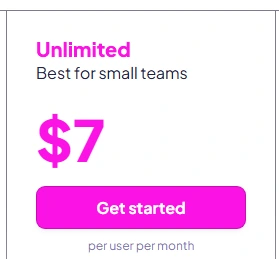
Unlimited Plan ($7/user/month annual, $10 monthly)
Best for: Growing teams (5-20 people), agencies sharing work with clients, teams outgrowing free plan limits
What you get that matters:
- Unlimited storage — no more 60MB ceiling
- Guest permissions — invite clients/contractors with controlled access to specific spaces
- 1,000 automation actions/month (500 total active automations)
- Unlimited integrations (Google Drive, Slack, 1,000+ apps)
- Unlimited Gantt charts, custom fields, dashboards
- Goals, portfolios, resource management
- Native time tracking
- Email in ClickUp
- Forms for intake
- AI compatible (can add Brain AI for +$9/user/month)
Real limitations that cause upgrades:
- Automation ceiling — 1,000 actions/month works for most small teams but caps at ~33 actions/day workspace-wide
- No Google SSO — each user manages their own password
- Limited activity history — 7-day view (vs 30+ days on Business)
- Basic reporting — dashboards exist but lack advanced sprint reporting, workload views
- No private whiteboards — all whiteboards visible to workspace
Choose this plan if:
- Your team is 5-20 people and needs client collaboration
- You’re running 10-30 automations regularly but not hitting enterprise scale
- Storage and guest permissions were your main Free plan pain points
- Budget is tight and you don’t need advanced reporting
Avoid if:
- You need 5,000+ automation actions/month (marketing teams, heavy workflows)
- SSO is a security requirement
- You need workload management, sprint reporting, or advanced analytics
Real cost example:
- 10-person agency: 10 × $7/month × 12 months = $840/year
- Add Brain AI for 5 power users: 5 × $9/month × 12 months = $540/year
- Total: $1,380/year
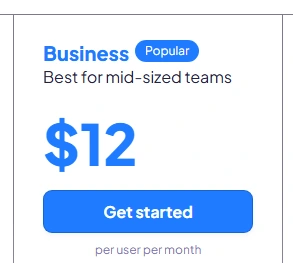
Business Plan ($12/user/month annual, $19 monthly)
Best for: Mid-size teams (20-100 people), operations teams, product/engineering teams with sprint workflows
What you get that matters:
- Everything in Unlimited, plus:
- Google SSO — simplified login management
- 10,000+ automation actions/month (unlimited active automations)
- Unlimited activity views (30+ day history)
- Sprint points and sprint reporting — essential for agile teams
- Unlimited Mind Maps, dashboards, timelines, whiteboards
- Workload management — capacity planning across team
- Private whiteboards
- Custom exporting
- Advanced automation integrations
- SMS-based 2FA
Real limitations that cause upgrades:
- No enterprise SSO — Google SSO only (no Okta, Azure AD, OneLogin)
- No white labeling — ClickUp branding stays
- No HIPAA/compliance guarantees — MSA and HIPAA require Enterprise
- No custom roles — standard role permissions only
- API limits — standard rate limits (Enterprise gets higher)
Choose this plan if:
- You’re a 20-100 person team managing cross-functional workflows
- You need sprint reporting, workload planning, or capacity management
- 1,000 automations/month isn’t enough (you’re hitting the ceiling)
- Google SSO meets your security requirements
- You want advanced dashboards and reporting but don’t need enterprise compliance
Avoid if:
- You need HIPAA compliance (healthcare)
- You require SSO with Okta, Azure AD, or enterprise identity providers
- You’re under 10 people and Unlimited features suffice
- You need white labeling for client-facing workspaces
Real cost example:
- 30-person product team: 30 × $12/month × 12 months = $4,320/year
- Add Brain AI for all: 30 × $9/month × 12 months = $3,240/year
- Total: $7,560/year
Enterprise Plan (Custom pricing, typically $25-40/user/month)
Best for: 100+ seat deployments, regulated industries (healthcare, finance), companies needing custom MSAs or data residency
What you get that matters:
- Everything in Business, plus:
- White labeling — remove ClickUp branding
- Enterprise SSO — Okta, Azure AD, OneLogin, custom SAML
- SCIM provisioning — automated user management
- MSA & HIPAA available — compliance guarantees with contract terms
- US, EU, APAC data residency — control where data lives
- Advanced permissions and custom roles
- Enterprise API — higher rate limits
- Conditional logic in forms
- Live onboarding training — dedicated sessions
- Customer Success Manager — assigned CSM
- Access to managed services
- Subtasks in multiple lists, advanced public sharing
Real limitations:
- Minimum seat requirements — typically 100+ users (exact minimum negotiable)
- Contract terms — often annual commitments, MSA negotiations
- Implementation time — onboarding and setup can take weeks
Choose this plan if:
- You have 100+ employees using ClickUp
- HIPAA, SOC 2, or regional data residency are compliance requirements
- You need SSO beyond Google (Okta, Azure AD)
- White labeling is essential for client-facing portals
- You want a dedicated CSM and managed services support
Avoid if:
- You’re under 100 seats (pricing won’t make sense)
- Your needs are met by Google SSO and standard features
- You don’t need compliance guarantees or white labeling
Real cost example (estimated):
- 150-person company at $30/user/month: 150 × $30 × 12 = $54,000/year
- Add Everything AI for 100 power users: 100 × $28 × 12 = $33,600/year
- Total: $87,600/year (before negotiation—expect 10-30% discount)
Real Cost Models: What Teams Actually Pay
Scenario 1: 5-Person Marketing Agency
Profile: Small creative team, 3 full-time, 2 contractors, sharing deliverables with 5-10 clients
Expected plan: Unlimited ($7/user/month annual)
Why: Free plan lacks guest permissions (can’t give clients controlled access). Unlimited solves this + removes 60MB storage limit.
Annual cost breakdown:
- 5 paid seats × $7/month × 12 months = $420/year
- Brain AI for 2 people (content writers): 2 × $9/month × 12 = $216/year
- Total: $636/year
Costs that surprise teams:
- Contractors who need editing access become paid “members” (not free guests)
- If you turn on Brain AI workspace-wide, all 5 seats get charged $9/month (not just the 2 who use it)
- Hitting 1,000 automation actions/month faster than expected (each automation trigger counts)
Formula: (paid members × $7) + (AI users × $9) × 12 months
Assumption: Clients stay as view-only guests; contractors with edit access are “limited members” (billable)
Scenario 2: 25-Person Product Team (SaaS Startup)
Profile: 10 engineers, 5 product/design, 5 marketing, 5 ops/support, using ClickUp as central work hub
Expected plan: Business ($12/user/month annual)
Why: Need sprint reporting, workload management, 10,000+ automations for engineering workflows, Google SSO for security.
Annual cost breakdown:
- 25 paid seats × $12/month × 12 months = $3,600/year
- Brain AI for 15 people (product, eng leads, marketing): 15 × $9/month × 12 = $1,620/year
- Total: $5,220/year
Costs that surprise teams:
- Marketing team runs 200+ automation actions/day (newsletters, lead routing) — easily hits 6,000/month, requiring Business tier
- “Limited members” (support team with view/comment access) still count as paid seats
- AI Super Credits run out mid-month if using Super Agents heavily (default 1,500 credits/user/month on Brain AI)
Formula: (paid members × $12) + (AI users × $9) × 12 months + AI Super Credits overage
Assumption: 10 people don’t need AI (engineers use their own tools); 40% adoption rate
Scenario 3: 100-Person Operations Team (Mid-Market Company)
Profile: Multi-department rollout (sales ops, customer success, finance, HR), need HIPAA for customer data, SSO required
Expected plan: Enterprise (custom, assume $30/user/month after negotiation)
Why: HIPAA compliance, Okta SSO, data residency requirements, 100+ seats unlock Enterprise pricing.
Annual cost breakdown:
- 100 paid seats × $30/month × 12 months = $36,000/year
- Everything AI for 40 people (managers, analysts, CS): 40 × $28/month × 12 = $13,440/year
- Negotiated discount: -20% on base plan = -$7,200
- Total after discount: $42,240/year
Costs that surprise teams:
- Billing happens at full workspace level—when you add “limited members” for view-only, they’re still paid seats
- AI gets turned on for entire workspace by default in some sales demos; actual invoice charges all 100 members
- Onboarding/training services (included in Enterprise) save money vs hiring consultants, but implementation takes 4-6 weeks
Formula: [(paid members × negotiated rate) + (AI users × $28) - discount] × 12 months
Assumption: 60 people don’t need AI (frontline staff, infrequent users); CSM negotiates 20% annual discount
Hidden Costs & Gotchas
1. AI Pricing is Per Paid Member, Not Per AI User
The trap: ClickUp Brain charges by the seat (every paid member), not by who actually uses AI features.
What it means: If you have 50 people on Business plan and turn on Brain AI, you’re billed 50 × $9/month = $450/month, even if only 10 people use AI.
How to avoid: Only add AI to specific users who need it. Don’t enable workspace-wide AI unless the entire team will use it.
2. Guest vs Member Billing Confusion
The trap: “Guests” sound free, but “limited members” and “permission-controlled guests” are billable seats.
What it means:
- View-only guests (can see but not edit) = free
- Limited members (can comment/edit in limited spaces) = paid seat
- Members, admins, owners = paid seats
When you give someone editing permissions in a guest role, they may automatically convert to a billable seat.
How to avoid: Audit your workspace members monthly. Use view-only guests for clients/stakeholders. Check “Members & Guests” settings to see who’s actually billable.
3. Automation Limits Hit Faster Than Expected
The trap: Free = 100 actions/month, Unlimited = 1,000/month. Sounds like a lot, but automations fire on every trigger.
What it means:
- An automation that assigns tasks when status changes fires once per task update
- If 10 people update 10 tasks each/day with a 3-step automation = 900 actions/month on Unlimited
- Marketing workflows (email notifications, lead routing) can burn 200+ actions/day
How to avoid: Track automation usage in Settings → Automations. Simplify workflows (fewer steps per automation). Upgrade to Business if you’re hitting limits.
4. AI Super Credits Run Out Mid-Month
The trap: Brain AI includes 1,500 credits/user/month; Everything AI includes 5,000. Super Agents (autonomous AI) consume credits fast.
What it means:
- A Super Agent running daily tasks can use 50-100 credits/run
- 20 runs/day × 30 days = 600-1,200 credits/month per agent
- If 5 people each run 2 agents, you’re burning 6,000-12,000 credits/month (exceeds Brain AI allowance)
How to avoid: Monitor AI usage in Settings → AI Usage. Buy extra credits ($10 per 10,000) as needed. Use manual AI (unlimited) for writing; reserve Super Agents for critical automation.
5. No Prorated Refunds on Annual Plans
The trap: Annual billing saves 30%, but if you cancel mid-year, you don’t get a refund for unused months.
What it means: If you pay $4,320/year for 30 users on Business and cancel in month 6, you’ve paid for 12 months with no credit.
How to avoid: Test on monthly billing first (yes, it’s 30% more expensive) or use the 14-day free trial on paid plans. Only commit annually when you’re certain of your seat count and needs.
6. Support Tiers Aren’t Obvious
The trap: All plans get “24/7 support,” but it’s chatbot-first. Live support varies by plan.
What it means:
- Free/Unlimited/Business: 24/7 chatbot, email support (response in 24-48 hours)
- Enterprise: Priority support + Customer Success Manager
How to avoid: If fast human support is critical, factor in Enterprise. For most teams, community forums and help docs suffice.
7. SSO & Compliance Costs
The trap: Google SSO is on Business, but enterprise SSO (Okta, Azure AD) and HIPAA require Enterprise plan.
What it means: If you need HIPAA compliance or non-Google SSO, you’re forced into Enterprise pricing ($25-40/user vs $12/user on Business).
How to avoid: Check compliance requirements before choosing a plan. If HIPAA or Okta SSO is mandatory, budget for Enterprise from day one.
[Source: CloudEagle.ai]
ClickUp vs Alternatives on Price/Value
ClickUp vs Asana
Pricing:
- ClickUp Unlimited: $7/user/month (annual)
- Asana Starter: $10.99/user/month (annual)
- Asana Advanced: $24.99/user/month (annual)
Who should choose ClickUp:
- Teams wanting more features for less money (Gantt charts, whiteboards, time tracking on Unlimited)
- Teams that value customization and views (15+ views in ClickUp vs 4 in Asana)
- Teams already comfortable with complexity (ClickUp has a steeper learning curve but more power)
- Teams prioritizing simplicity and fast onboarding
- Teams heavily using Asana’s portfolio management (better than ClickUp’s portfolios)
- Teams needing superior mobile experience (Asana’s app is smoother)
Value verdict: ClickUp wins on price/features. Asana wins on usability and polish. If you’re also considering monday.com, see our Asana vs monday.com pricing and feature comparison.
ClickUp vs monday.com
Pricing:
- ClickUp Unlimited: $7/user/month
- monday.com Basic: $9/user/month (min 3 seats)
- monday.com Standard: $12/user/month
Who should choose ClickUp:
- Teams needing unlimited storage (monday limits storage even on paid plans)
- Teams wanting built-in time tracking (monday requires paid add-on)
- Teams on tighter budgets ($7 vs $9 for entry plan)
Who should choose monday.com:
- Teams wanting a simpler, cleaner interface (monday is less overwhelming)
- Teams prioritizing visual workflows (monday’s boards are more intuitive)
- Teams needing better onboarding and customer support (monday’s support is rated higher)
Value verdict: ClickUp edges ahead on features-per-dollar. monday.com wins on user experience and support.
ClickUp vs Notion
Pricing:
- ClickUp Unlimited: $7/user/month
- Notion Plus: $10/user/month
- Notion Business: $18/user/month
Who should choose ClickUp:
- Teams needing true project management (Gantt charts, workload views, sprint reporting)
- Teams wanting built-in automation and advanced workflows
- Teams managing client projects (guest permissions more granular)
- Teams prioritizing docs, wikis, and knowledge management
- Teams wanting extreme flexibility in database structures
- Teams with lighter project management needs (Notion’s PM tools are secondary)
Value verdict: Different tools. ClickUp for project execution; Notion for documentation and lightweight task tracking.
ClickUp vs Jira
Pricing:
- ClickUp Unlimited: $7/user/month
- Jira Standard: $7.75/user/month (1-10 users)
- Jira Premium: $15/user/month
Who should choose ClickUp:
- Teams beyond pure software development (marketing, ops, sales)
- Teams wanting all-in-one (docs, whiteboards, chat in ClickUp; Jira requires Confluence, Trello, etc.)
- Teams needing more visual flexibility (ClickUp has 15+ views; Jira is board/backlog-heavy)
- Pure software engineering teams using agile/scrum
- Teams deeply integrated with Atlassian ecosystem (Confluence, Bitbucket)
- Teams needing best-in-class issue tracking and version control integration
Value verdict: ClickUp wins on versatility and cost (one tool vs Atlassian suite). Jira wins for engineering-only teams.
Decision Checklist: Which Plan Should You Choose?
Answer these questions to map to your ideal plan:
- How many people will actively use ClickUp with editing/task creation access?
- 1-5 → Consider Free or Unlimited
- 6-50 → Unlimited or Business
- 51-100 → Business or Enterprise
- 100+ → Enterprise
- Do you need to share projects with clients/external stakeholders with controlled permissions?
- Yes → Unlimited minimum (Free has no guest permissions)
- No → Free plan works
- How much file storage do you need?
- Under 60MB total → Free works
- 60MB+ → Unlimited (unlimited storage)
- How many automation actions do you run per month?
- Under 100 → Free
- 100-1,000 → Unlimited
- 1,000-10,000 → Business
- 10,000+ → Business (unlimited automations)
- Do you need sprint reporting, workload management, or capacity planning?
- Yes → Business minimum
- No → Unlimited suffices
- What SSO/authentication do you need?
- None/individual passwords → Any plan
- Google SSO → Business minimum
- Okta, Azure AD, custom SAML → Enterprise only
- Do you need HIPAA compliance or MSA contracts?
- Yes → Enterprise only
- No → Business or below
- Will your team use AI features heavily (Brain AI)?
- Yes, most/all users → Add Brain AI ($9/user) or Everything AI ($28/user)
- Yes, but only 5-10 people → Add AI to specific users only
- No → Don’t add AI
- Is white labeling important (remove ClickUp branding)?
- Yes → Enterprise only
- No → Business or below
- What’s your budget per user/month?
- Under $7 → Free
- $7-12 → Unlimited
- $12-20 → Business
- $20+ → Enterprise
- Do you need advanced permissions and custom roles?
- Yes → Enterprise
- No → Business or below
- How important is live onboarding/training and a dedicated CSM?
- Critical → Enterprise
- Nice to have → Business (self-service resources)
- Not important → Free or Unlimited
Quick Decision Path:
- 0-5 users, basic needs → Free Forever
- 5-20 users, need client collaboration → Unlimited ($7/user/month)
- 20-100 users, need sprint reporting/workload management → Business ($12/user/month)
- 100+ users, need compliance/SSO → Enterprise (custom, ~$25-40/user/month)
Frequently Asked Questions
1. Is ClickUp’s Free Forever plan actually free?
Yes, it’s genuinely free with no time limit and unlimited users. You can run a small team indefinitely on the free plan. Limitations are storage (60MB), automation actions (100/month), and lack of guest permissions.
2. How much does ClickUp cost for a team of 10?
Unlimited plan: 10 × $7/month × 12 months = $840/year (recommended for most 10-person teams). Monthly billing: 10 × $10/month = $100/month ($1,200/year).
3. Does ClickUp charge per user or per workspace?
Per user (paid members). You upgrade the entire workspace, and each “member” (owner, admin, member, limited member) counts as a billable seat. View-only guests are free.
4. What’s the difference between annual and monthly pricing?
Annual saves 30%. Unlimited is $7/user/month annual vs $10 monthly. Business is $12 annual vs $19 monthly. You pay upfront for the year, no prorated refunds if you cancel.
5. How much does ClickUp AI (Brain) cost?
Brain AI: $9/user/month (includes unlimited AI writing, BrainGPT chat, 1,500 AI Super Credits/user/month) Everything AI: $28/user/month (adds AI Notetaker, image generation, 5,000 credits/user/month)
AI is charged per paid member, not per actual AI user.
6. Can I add AI to only some users, not the whole workspace?
Yes, but it’s workspace-level in practice. When you enable AI, all paid members get billed unless you manually control who gets AI access. Best practice: add AI carefully to specific power users.
7. What are automation limits and when do they matter?
Free: 100 automation actions/month Unlimited: 1,000 actions/month Business: 10,000+ actions/month
An “action” = one automation step firing. If you have an automation that assigns a task + sends a notification, that’s 2 actions. Teams with heavy workflows (marketing, ops) hit limits fast.
8. Do guests count as paid users?
View-only guests: Free (no limit) Limited members or permission-controlled guests: Paid seats
If someone can edit or has permissions beyond viewing, they’re usually billable.
9. Does ClickUp offer discounts?
Yes. Annual billing saves 30%. Enterprise contracts often negotiate 10-30% off list price. Non-profits and educational institutions can contact sales for discounts.
10. What happens if I cancel my ClickUp subscription?
You downgrade to the Free Forever plan. Your data stays (tasks, docs, etc.), but you lose premium features (unlimited storage, guest permissions, advanced automation). No refunds on annual plans.
11. Can I switch plans mid-year?
Yes. Upgrades are immediate (you’re billed prorated). Downgrades take effect at the end of your current billing period.
12. How does ClickUp Enterprise pricing work?
Custom pricing based on seat count, contract term, and features. Typical range: $25-40/user/month for 100+ seats. Includes white labeling, enterprise SSO, HIPAA, dedicated CSM. Contact sales for quotes.
Methodology & Update Policy
How we gathered pricing and limits:
- Primary sources:
- ClickUp official pricing page (clickup.com/pricing) — accessed January 11, 2026
- ClickUp AI pricing page (clickup.com/brain/pricing) — accessed January 11, 2026
- ClickUp Help Center (help.clickup.com) for automation limits, AI feature availability — accessed January 11, 2026
- Third-party sources:
- Tech.co ClickUp pricing review (December 3, 2025) — independent testing of plans and features
- Spendbase ClickUp pricing guide (November 28, 2025) — real customer spend data from SaaS management platform
- RemoteWize ClickUp pricing guide (December 2, 2025) — hands-on review after 12+ months use
- CloudEagle.ai ClickUp pricing analysis (November 27, 2025) — SaaS spend benchmarks
- User feedback:
- ClickUp feature requests forum (feedback.clickup.com) — customer complaints about AI pricing, billing surprises
- Reviewed 50+ user comments on pricing pain points (AI seat-based billing, guest vs member confusion)
What to verify before publishing:
- ClickUp pricing page (clickup.com/pricing) — confirm base plan prices haven’t changed
- ClickUp AI pricing (clickup.com/brain/pricing) — verify AI add-on costs and credit allotments
- Automation limits (help.clickup.com) — check if action limits per plan have been updated
- Enterprise features — confirm HIPAA, SSO, white labeling haven’t moved between plans
- Competitor pricing (Asana, monday.com, Notion, Jira) — spot-check current rates for comparisons
When we’ll update this guide:
- Quarterly — January, April, July, October 2026 (or when ClickUp announces pricing changes)
- Immediately if ClickUp changes base plan pricing, AI add-on costs, or automation limits
Date of research: January 11, 2026
Note: ClickUp pricing can change. Always verify current rates on clickup.com/pricing before making purchasing decisions. Enterprise pricing is negotiable and varies by contract.
About the author

I’m Macedona, an independent reviewer covering SaaS platforms, CRM systems, and AI tools. My work focuses on hands-on testing, structured feature analysis, pricing evaluation, and real-world business use cases.
All reviews are created using transparent comparison criteria and are updated regularly to reflect changes in features, pricing, and performance.