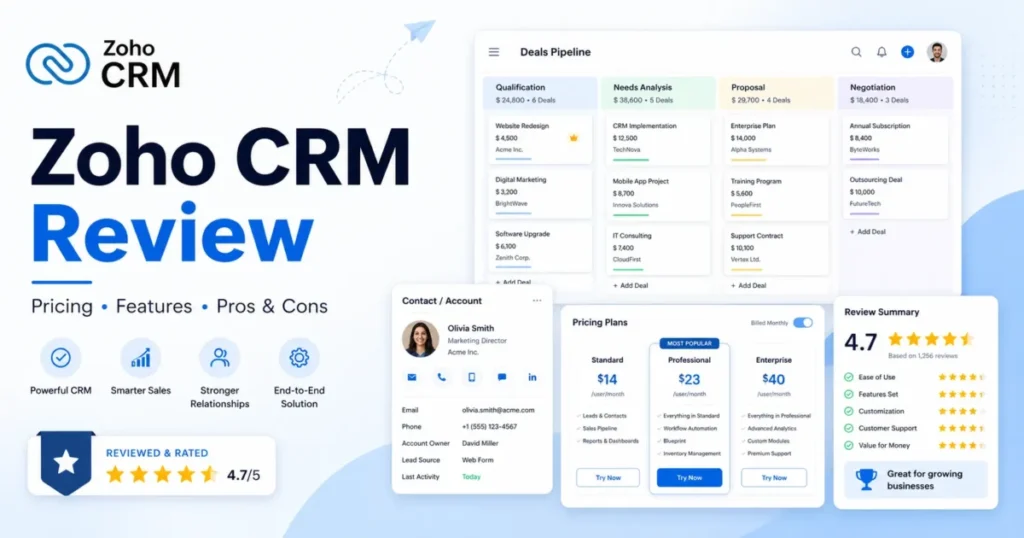
Zoho CRM wins the budget argument almost every time. It loses a surprising number of adoption arguments six weeks later.
The subscription line is small. The configuration bill is not, and that gap is where most Zoho CRM buyers get surprised.
This Zoho CRM review is written for the person who has to defend the purchase at renewal, not for the person who just wants a demo. If you are still building a shortlist, start with the best CRM software options and come back here once Zoho is on it.
Based on official Zoho pricing, feature, API, security, and support documentation checked on July 9, 2026, plus review sentiment from G2, Capterra, and TrustRadius, Zoho CRM is a strong buy for 5 to 30 person B2B sales teams that already have one person willing to own admin work.
It is a poor purchase for a team with nobody to configure it. Paid plans start at $14 per user per month billed annually, and Professional at $23 is the first plan most sales teams find workable.
The rest of this review shows exactly where the price stops being the price.
In This Article (19 sections)
Quick Verdict
| Category | Verdict |
|---|---|
| Best for | 5-30 person B2B sales teams with a named CRM admin |
| Not ideal for | Solo founders and teams with zero configuration capacity |
| Starting price | $14 per user/ |
| Best practical plan | Professional at $23/ |
| Free plan / trial | Free edition for up to 3 users; no custom modules or custom fields |
| Setup difficulty | High relative to pipeline-first CRMs |
| Main strength | Custom modules, fields, and workflow depth at a mid-market price |
| Main limitation | One organization must run one paid edition for all full users |
| Best alternative | Pipedrive for teams that want pipeline speed over configuration depth |
Pricing checked: July 2026. Zoho localizes pricing by region, so confirm the US selector on the official page before you sign anything.
How This Zoho CRM Review Was Built
Nobody at SaaS CRM Review logged into a Zoho CRM trial account for this review. Saying otherwise would be theater, and I would rather tell you what the evidence actually supports.
Testing level: third-party validated and documentation-based. Every pricing figure, plan gate, API ceiling, and support tier in this Zoho CRM review traces to an official Zoho page or help article checked on July 9, 2026.
Buyer sentiment comes from G2, Capterra, and TrustRadius review pages read on the same date. Third-party editorial reviews from TechRadar, Business News Daily, DecisionCircuit, OnePageCRM, and Hackceleration were used to test whether the official story matches what buyers report.
I am Macedona, the CRM buying analyst behind this site, and my bias is toward the cost that shows up after month two. Our full review methodology explains how sources are weighted.
Two limitations you should know before you trust a number here. First, Zoho’s pricing pages render regional currency by visitor location, so the US dollar figures were corroborated against 2026 third-party pricing pages rather than captured from a US-rendered official page.
Second, add-on prices for backup, storage, portals, and training were visible only in search-result context during research. They are flagged as estimates, not verified prices.
No ratings, awards, customer counts, or hands-on test results were invented for this article.
Zoho CRM Pros and Cons
| Pros | Cons |
|---|---|
| Professional at $23/ | Free edition has no custom modules and no custom fields, so it cannot model a real sales process |
| Custom modules scale from 10 on Standard to 200 on Enterprise, which covers most B2B data models without a platform migration | An organization cannot mix paid editions, so one Enterprise-only feature upgrades every full user |
| Team User licenses at $9 per license per month let finance, legal, or support touch CRM data without full seats | Team Users require the CRM for Everyone interface and are not available in Zoho One |
| API credits scale with seat count, reaching a 5,000,000-credit ceiling on Enterprise | API concurrency caps at 10 simultaneous calls on Standard, which throttles data-heavy syncs |
| Mobile apps support offline record changes that sync when connectivity returns | Faster initial response times require paid Premium or Enterprise Support, not the included Classic tier |
| Field-level encryption, audit logs, IP restrictions, and MFA are documented on the official security page | Enterprise Support carries a 50 user license minimum, which excludes most SMB buyers |
The pattern is consistent. Zoho CRM gives you room to build almost anything, then charges for the room in admin hours rather than dollars.
What Is Zoho CRM?
Zoho CRM is a sales-first customer relationship management platform from Zoho Corporation, sold as five editions plus a cheaper Team User license. It handles lead capture, contact and account records, deal pipelines, workflow automation, forecasting, and reporting.
If you are still deciding whether you need a CRM at all, what CRM software does is the better starting point. Zoho CRM assumes you already know.
What separates it from lighter tools is the object model. Custom modules, custom fields, layouts, approval processes, and custom functions let a team encode an unusual sales process instead of bending to a fixed one.
TechRadar’s 2026 review cites more than 250,000 businesses using the product. That scale explains the breadth, and it also explains the setup burden.
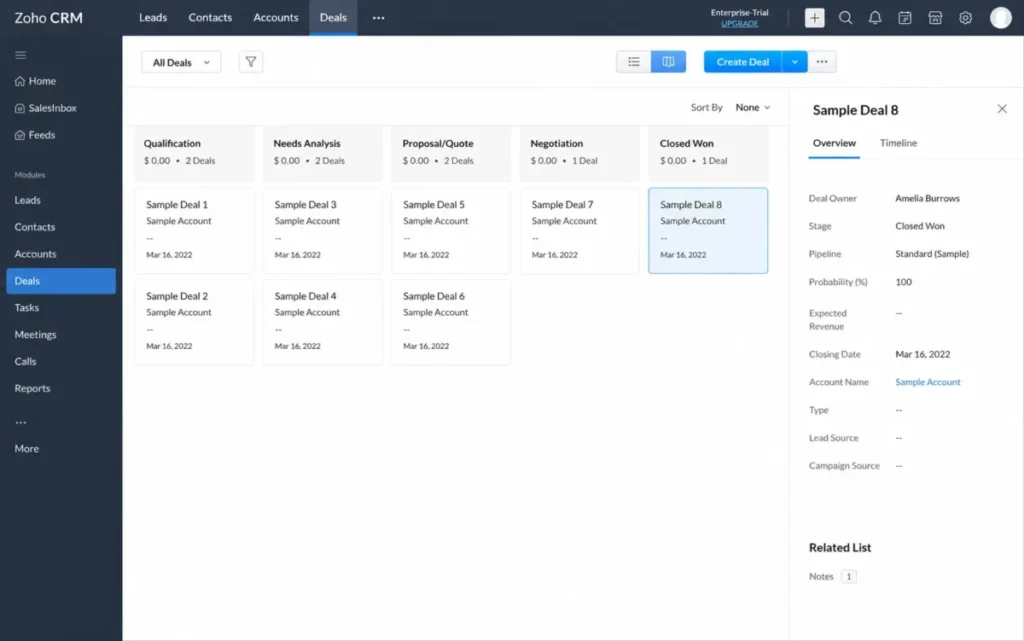
The 2026 story is CRM for Everyone, a newer interface that adds Teamspaces, team modules, and the Team User license. It moves Zoho CRM from a sales tool toward a shared revenue workspace, with the caveats covered below.
The Three Problems Zoho CRM Solves
Problem 1: CRM depth that finance will actually approve
Most CRMs make you choose between configuration depth and a defensible per-seat price. Zoho CRM refuses that trade at the mid-market tiers.
At $23 per user per month billed annually, Professional includes process management, inventory management, CPQ, portals, customer journeys, and web-to-case. Those are the features rivals typically hold for a $60 to $150 tier.
The custom object limits make this concrete. Standard allows 10 custom modules with 10 custom fields per module, Professional allows 25 modules and 155 fields per module, and Enterprise allows 200 modules and 300 fields.
A 12-person B2B sales team modeling territories, partner accounts, renewal records, and product lines will fit inside Professional without a platform conversation.
The buyer impact is a real budget difference. Ten sales seats on Professional cost $2,760 per year before add-ons, which is a rounding error against a single implementation consultant.
My recommendation for this cohort is to buy Professional annually and skip Standard entirely. Standard’s 10-field ceiling per module is the first wall a growing pipeline hits.
Problem 2: Non-sales teams that need CRM data without full seats
Marketing wants campaign context. Finance wants payment status.
Legal wants the contract record, and none of those three roles needs a full sales license.
Zoho CRM’s answer in 2026 is the Team User license at $9 per team license per month billed annually, or $11 billed monthly, per the official CRM for Everyone availability page. Team Users work with team modules and Teamspaces rather than the full sales module set.
For a 10-rep sales team that also needs 5 non-sales viewers, the math changes the deal. Professional for 10 plus 5 Team Users lands near $3,300 per year instead of the $4,140 a full-seat approach would cost.
There are two restrictions competitors rarely mention. Team Users exist only inside the CRM for Everyone interface, and they are not available in Zoho One, per Zoho’s CRM for Everyone availability page.
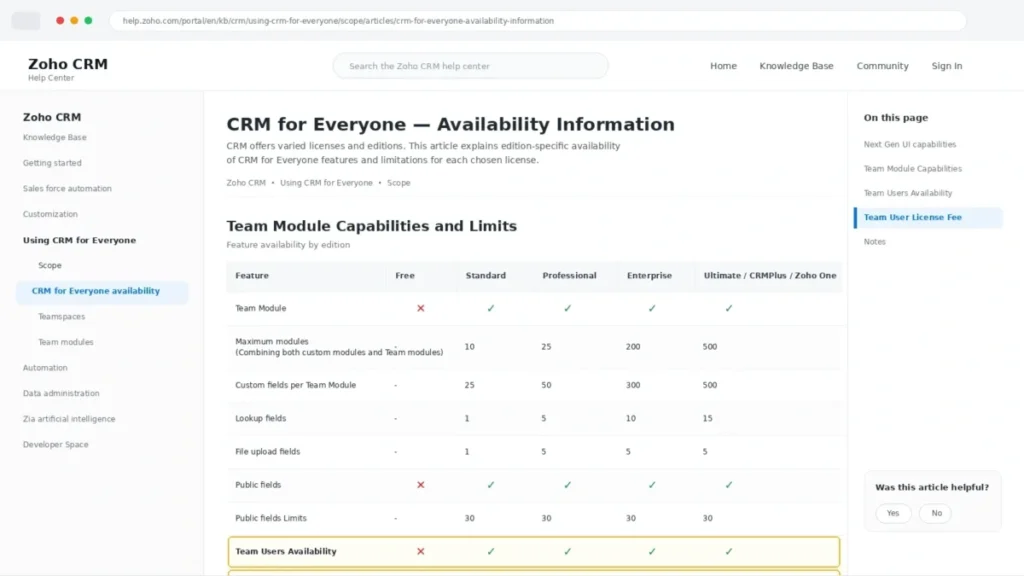
That second restriction matters more than it sounds. A buyer who chooses the Zoho One bundle for its app breadth quietly loses the cheapest way to give non-sales staff CRM access.
Problem 3: Field reps who lose data between visits
Reps who drive between accounts do not update CRM at the desk. They update it in a parking lot, often without a usable signal.
Zoho’s official mobility documentation states that users can view records, log calls, update notes, collaborate, and work offline, with local changes synchronized once the device reconnects. Offline additions, edits, and deletions are held on the device until sync.
For a 15-rep field sales team running four to six visits a day, this removes the end-of-day data entry ritual that kills CRM hygiene. The workflow is simple: open the account, log the visit outcome, set the next step, and let sync handle the rest.
The honest caveat is scope. Offline support covers record work, not every desktop workflow, and Hackceleration’s 2026 review reports the mobile app feels less polished than rivals.
I would treat offline mobile as a real reason to shortlist Zoho CRM, and a poor reason to skip a mobile pilot with your own reps.
The Three Problems Zoho CRM Creates
Problem 1: The setup workload lands on a specific human
Zoho CRM does not ship a sales process. It ships the parts.
DecisionCircuit’s 2026 review puts basic setup at 2 to 4 days and a full deployment at 2 to 4 weeks. Hackceleration reports roughly 10 to 15 hours of active use before the interface stops fighting new users.
Here is the admin readiness checklist I would run before signing:
- A named CRM owner with at least 6 hours a week for the first month
- Field and layout design agreed with sales leadership, not invented in the app
- Pipeline stages with exit criteria, not just names
- A workflow map covering lead assignment, follow-up, and stage rot
- A tested import file with deduplication rules
- A permission model that survives the first new hire
- Three reports the sales manager will actually open on Monday
- A decision on whether paid support is in the budget
If four of those eight are missing, the CRM is not the problem you are solving. A simpler tool such as the one covered in our Pipedrive CRM review will produce cleaner data faster.
Problem 2: One organization, one edition
Buyers assume they can put managers on Enterprise and reps on Standard. Zoho’s official specifications page says otherwise: an organization runs a single paid edition for all users.
The consequence is a step function, not a slope. If one sales operations lead needs the developer sandbox or field-level encryption, every full user moves to Enterprise at $40 per user per month.
For a 20-person team, that single requirement turns a $5,520 annual Professional bill into $9,600. The Team User license softens the edge for non-sales staff, but it does nothing for a rep who needs Enterprise-only functionality.
My rule is blunt. Decide the highest edition-gated feature you truly need before you count seats, because seats are the multiplier.
Problem 3: Support is a budget line during implementation
Classic Support ships with paid subscriptions and covers email, call, chat, and remote assistance. It does not publish an hourly initial response target.
Premium Support adds 24×5 live chat and phone with a maximum 3-hour initial response. Enterprise Support adds 24×7 multichannel coverage, a dedicated technical account manager, quarterly usage reports, and a maximum 1-hour initial response.
Zoho’s pricing calculator notes a minimum of 50 user licenses for Enterprise Support. Most SMB buyers therefore choose between Classic and Premium, not between Classic and the best tier.
Support complaints in G2 and Capterra reviews cluster around response variability, and they cluster hardest during setup. That is exactly the window where Classic Support is the only tier a 12-person team can justify.
Zoho CRM Pricing Reality
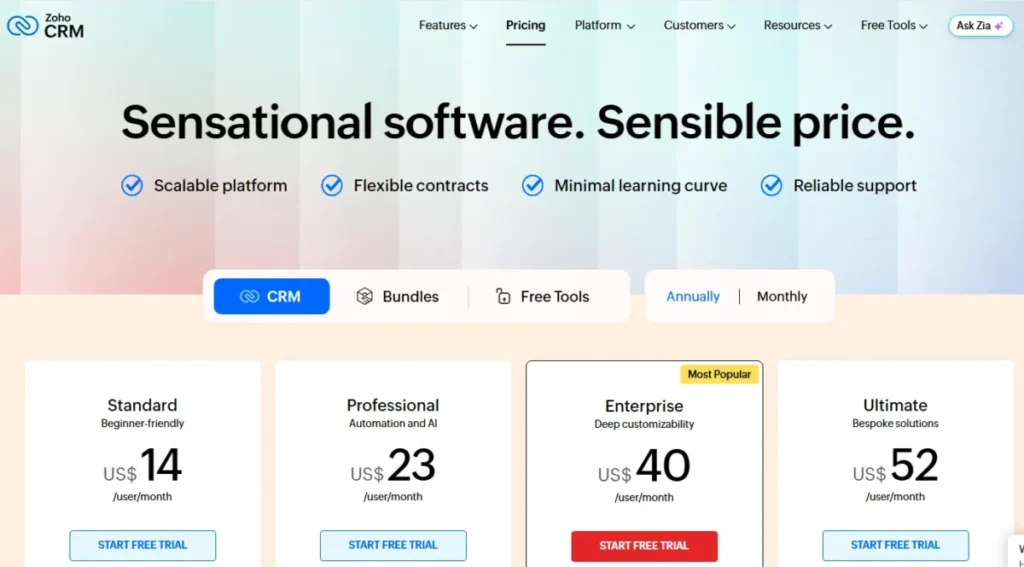
Starting price: $14 per user per month, billed annually, on the Standard edition. Verify the live figure on the Zoho CRM official pricing page before purchase.
Zoho publishes region-specific pricing, and several 2026 review pages mix annual rates, monthly rates, and non-US currency. The table below separates them.
| Plan | Annual (per user/ | Monthly (per user/ | Who it fits | First real limit |
|---|---|---|---|---|
| Free | $0 | $0 | Up to 3 users testing the basics | No custom modules, no custom fields |
| Standard | $14 | $20 | 3-10 reps needing pipelines and email | 10 custom modules, 10 fields per module |
| Professional | $23 | $35 | Most B2B sales teams needing process rules | 25 custom modules, 155 fields per module |
| Enterprise | $40 | $50 | Multi-team orgs needing sandbox and encryption | 200 custom modules, 300 fields |
| Ultimate | $52 | $65 | Large deployments needing the highest ceilings | Highest published limits |
| Team User | $9 | $11 | Non-sales roles on team modules | New UI only, excluded from Zoho One |
Two cautions belong with that table. Taxes are extra, and the Professional monthly figure is where sources disagree: one 2026 review lists $30 while TechRadar and the common US pattern show $35.
Treat annual pricing as the number you budget from, and confirm any monthly figure on the US selector before you commit. Our Zoho CRM pricing breakdown tracks the plan-by-plan detail.
Plan prices in the table above were re-checked against the official Zoho CRM pricing page (US$, annual and monthly billing) on September 26, 2026.
What Ten Users Actually Cost
| Scenario | Plan | Annual cost |
|---|---|---|
| 10 sales users | Standard | $1,680 |
| 10 sales users | Professional | $2,760 |
| 10 sales users | Enterprise | $4,800 |
| 10 sales users + 5 Team Users | Professional | $3,300 |
| 20 sales users forced to Enterprise by one feature | Enterprise | $9,600 |
The jump from row two to row five is the entire Zoho pricing story. A single Enterprise-gated requirement can cost more than the CRM itself did the year before.
Where the Free Plan Stops Working
Free supports up to 3 users with leads, deals, basic workflows, reports, and the mobile app. It is a genuine starting point, and it breaks on schedule.
The upgrade trigger is not user count alone. Free has no custom modules and no custom fields, which means it cannot represent a renewal record, a partner account, or a product line.
You will also hit it on mass email, multiple pipelines, forecasting, data enrichment, and API headroom. The Free edition allows 5,000 API credits per 24 hours and 5 concurrent calls, which stops most real integrations.
Run a 5-person sales team on Free and you get a shared contact list. Run a 5-person sales process on Free and you get a spreadsheet with worse reporting.
Hidden Costs Most Zoho CRM Reviews Skip
Zoho’s pricing calculator lists add-ons beyond seats: data backup, file storage, data storage, portal users, and online training. Reviews almost never price them.
Scheduled weekly backup and one-time backup are add-ons once the included allowances are used. Search-result context during research showed roughly $276 per year for weekly backup and about $12 per one-time backup, but the live calculator rendered non-US currency, so treat both as unverified estimates.
WhatsApp Business messaging requires credits according to the official feature comparison, so an omnichannel promise is not an included cost. Portal access for partners or customers is licensed separately from full users.
Storage is split into data storage and file storage, and they are billed as different add-ons. A team importing years of attachments will notice this before it notices the seat count.
Here is the budget pressure point in one line: assume 15 to 25 percent above the seat subtotal for backup, storage, and a support tier during the first year, then renegotiate at renewal once actual consumption is visible.
Zoho CRM, CRM Plus, or Zoho One
Standalone Zoho CRM stops being the smartest purchase at a predictable moment. That moment is when the team needs two or more sibling Zoho apps.
If the plan includes a support desk, email campaigns, analytics, and books, price CRM Plus and Zoho One before committing to a CRM edition. Teams already routing tickets through the product covered in our Zoho Desk review are usually past the line.
The trap runs the other way too. Zoho One removes the Team User license, so a bundle bought for breadth can raise the marginal cost of giving finance read access to deals.
I would not buy the bundle for a discount. I would buy it only when at least two non-CRM apps have a named owner and a launch date.
Feature Gates: What You Get on Each Plan
| Gate | Free | Standard | Professional | Enterprise | Ultimate |
|---|---|---|---|---|---|
| Custom modules | None | 10 | 25 | 200 | 500 |
| Custom fields per module | None | 10 | 155 | 300 | 500 |
| API credits per 24h | 5,000 | 50,000 + 250/ | 50,000 + 500/ | 50,000 + 1,000/ | 50,000 + 2,000/ |
| Concurrent API calls | 5 | 10 | 15 | 20 | 25 |
| Zia email intelligence | No | No | Yes | Yes | Yes |
| Developer sandbox | No | No | No | Yes | Yes |
| Field-level encryption | No | No | No | Yes | Yes |
| Multi-team management | No | No | No | Yes | Yes |
| Included support tier | n/a | Classic | Classic | Classic | Classic |
Read that table by column, not by row. The Professional column is where a sales process becomes expressible, and the Enterprise column is where governance becomes possible, which is exactly the jump that doubles a 20-seat bill.
Buyers weighing Zoho against a marketing-led platform should also read our HubSpot vs Zoho CRM comparison, because the gate structures are not equivalent.
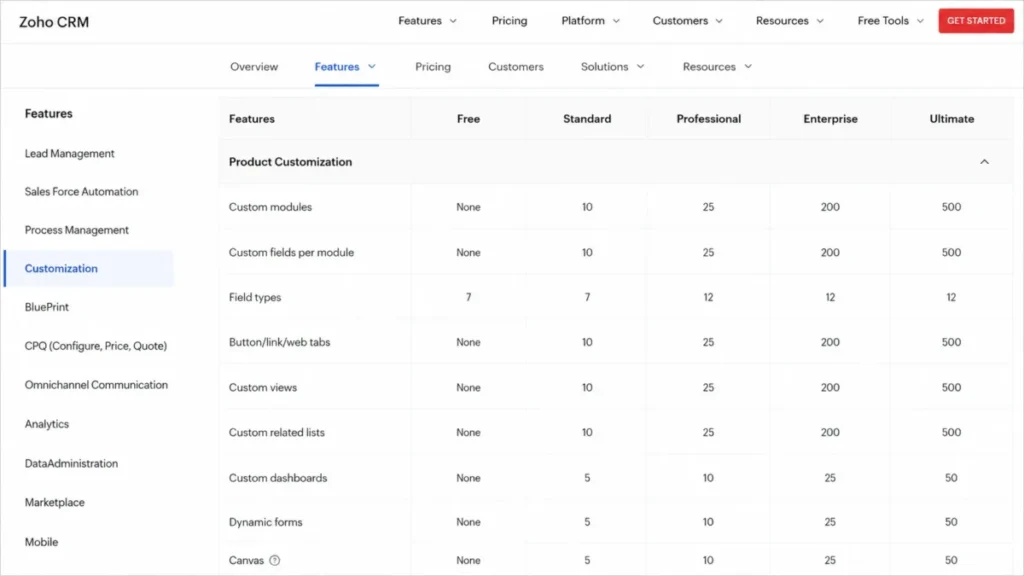
The official Zoho CRM feature comparison page was last updated on May 12, 2026, which makes it the freshest gate reference available for this review.
Sandbox and Change Testing
Teams that edit layouts, workflow rules, or approval processes on a live pipeline need somewhere to break things first. The developer sandbox appears on the official feature comparison as an Enterprise and Ultimate capability.
That turns a testing habit into a licensing decision. If a RevOps lead, a compliance owner, or an auditor will ask how a workflow change was validated, budget Enterprise at $40 per user per month rather than planning to test in production.
Smaller teams can live without it. A 10-rep org running two workflow rules is not the buyer this gate exists for, and paying $19 more per seat to get it would be a poor trade.
Key Features and the Plans That Gate Them
Lead, contact, and deal management
Zoho CRM handles lead capture through web forms, assignment rules, and conversion into contacts, accounts, and deals. Multiple pipelines arrive at Standard, not on Free.
The limitation is representational, not functional. Without custom fields, the Free edition cannot store the one attribute your sales manager actually filters on.
Workflow automation and process management
Workflow rules fire on record events and drive assignment, alerts, tasks, and field updates. Blueprint-style process management, which enforces stage exit criteria, arrives at Professional.
Enterprise adds approval processes and custom functions. A 25-person team with quote approvals and discount thresholds will find that gate before it finds a feature it dislikes.
Zia AI and where each capability lives
Zia is not one switch. Zoho’s official Zia for Emails help page states that email intelligence is available to organizations on Professional and above.
| Zia capability | Earliest plan per official evidence |
|---|---|
| Email intelligence (sentiment, intent, emotion) | Professional |
| Zia email and thread summaries | Professional |
| AI agents and predictive intelligence | Professional |
| Extended AI capabilities | Enterprise |
Zoho’s release notes list Zia Email Summary among May 2026 additions, so the capability is current rather than announced. Buyers choosing a plan for AI should verify the specific capability name against the help center, because “Zia” on a comparison chart is not a single feature.
Reporting, forecasting, and analytics
Unlimited reports arrive at Professional, and reporting hierarchy arrives at Enterprise. Forecasting is available from Standard.
The recurring complaint in G2 and Capterra reviews is not report power. It is the time cost of building the report the first time, which lands on the admin, not the vendor.
Mobile CRM with offline record updates
The mobile apps cover records, calls, notes, and collaboration, with offline changes queued for later sync. Field teams get the most value here.
The limitation is that offline behavior covers record operations. Do not promise reps that every desktop workflow travels with them.
Ease of Use and Setup
Setup difficulty: High compared with pipeline-first CRMs, moderate compared with Salesforce-class platforms.
The friction is not the login. It is the number of decisions Zoho CRM asks you to make before the first deal is entered.
Third-party evidence converges. DecisionCircuit reports 2 to 4 days for a basic build and 2 to 4 weeks for a full deployment, while Hackceleration reports 10 to 15 hours of active use before navigation stops costing time.
Who finds it easy: an operations-minded admin who has configured any CRM before. Who finds it hard: a founder-led sales team where the CRM owner is also the top closer.
Run this 30/90-day adoption test before renewal comes into view.
After 30 days, every open deal has an owner, a stage, and a next-step date, and the sales manager opens the same three reports every Monday. If deals still live in a spreadsheet, the configuration is wrong, not the tool.
After 90 days, workflow rules assign leads without human triage, stage rot is visible in a report, and at least one non-sales role is reading CRM data instead of asking for it. If none of that is true, the admin capacity was the missing input all along.
Integrations, API Limits, and the Ecosystem
Zoho CRM connects natively to Zoho Desk, Books, Campaigns, Analytics, SalesIQ, Projects, and the wider Zoho suite. Outside the family it supports Google Workspace, Microsoft 365, Slack, QuickBooks, WhatsApp Business, and Google Ads.
Zoho Marketplace’s official about page describes over 2,500 ready-to-use extensions. Treat that number as breadth, not entitlement.
Five integration types behave differently at purchase time, and a logo wall hides all five.
| Integration type | Example | What it costs beyond the CRM seat |
|---|---|---|
| Zoho-to-Zoho native | Zoho Desk, Books, Campaigns, Analytics, SalesIQ | A separate subscription to the sibling app |
| Third-party native | Google Workspace, Microsoft 365, Slack, QuickBooks | The other tool’s own plan, nothing extra from Zoho |
| Edition-gated connector | Google Ads integration, listed from Professional | An edition upgrade for every full user |
| Marketplace extension | Listings across Zoho Marketplace | A publisher licence fee wherever the extension is paid |
| Credit-metered channel | WhatsApp Business messaging | Message credits billed outside the seat price |
Price the sibling app, the extension fee, and the message credits before anyone calls an integration free. Rows three to five are where a $2,760 CRM quietly becomes a $4,000 one.
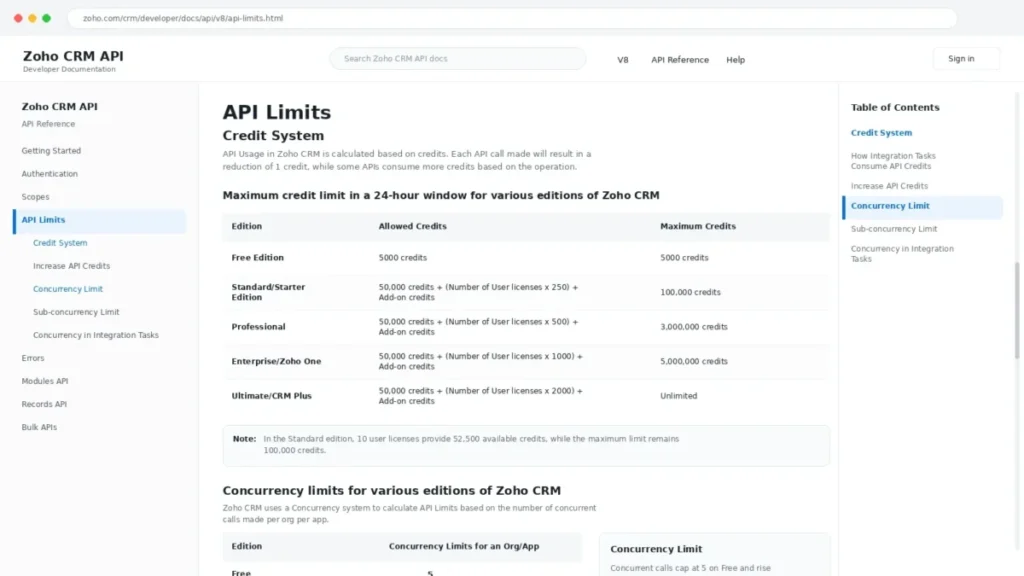
The API is where integration promises meet arithmetic. Zoho CRM API v8 uses a daily credit budget that scales with seat count.
| Edition | Credits per 24 hours | Ceiling | Concurrent calls |
|---|---|---|---|
| Free | 5,000 | 5,000 | 5 |
| Standard | 50,000 + 250 per user | 100,000 | 10 |
| Professional | 50,000 + 500 per user | 3,000,000 | 15 |
| Enterprise | 50,000 + 1,000 per user | 5,000,000 | 20 |
| Ultimate | 50,000 + 2,000 per user | Unlimited | 25 |
Ten users on Standard therefore get 52,500 credits per day and 10 concurrent calls, and that concurrency cap, not the credit total, is what breaks a nightly warehouse sync or a high-volume ecommerce connector. Professional lifts concurrency to 15 and raises the ceiling by a factor of thirty, which is the practical reason data-heavy teams skip Standard.
Verify current figures against the Zoho CRM API v8 limits documentation before you scope an integration.
Email and Sales Engagement Limits
Outbound teams hit a ceiling that most Zoho CRM reviews never mention. The official feature comparison lists individual emails per day and email parser limits as edition-specific values rather than unlimited allowances.
Zoho does not publish those figures in a form this review can quote safely. Treat the ceiling as a pre-purchase question and ask for the exact daily send limit and parser quota on the edition you are pricing.
The buyer consequence is a stack decision, not a feature footnote. A 10-rep team running sequenced outbound at volume will move to Zoho Campaigns, buy a sales engagement tool, or upgrade the edition, and all three change the annual budget.
Mass email sits behind the same gate. A team planning to replace an email platform with CRM-native nurture should confirm the daily limit before it cancels the other subscription.
Security, Support, and Admin Controls
| Control | What it covers | Plan note |
|---|---|---|
| AES and AES-256 encryption | Data at rest and in transit | Documented on the official security page |
| Field-level encryption | Encrypts selected fields | Enterprise and Ultimate |
| Audit logs | Admin and record action history | Verify the edition on the feature comparison page |
| IP restrictions | Restricts sign-in ranges | Verify the edition on the feature comparison page |
| Multi-factor authentication | Account access hardening | Documented on the official security page |
| ISO/ | Cloud service certifications | Zoho compliance page, valid through August 21, 2028 |
| Developer sandbox | Test changes before production | Enterprise and Ultimate |
Language matters here more than feature counts. Zoho’s Zoho CRM data security page describes GDPR-supporting functionality and HIPAA safeguards, which is not the same as a promise that using Zoho CRM makes your organization compliant.
Configuration, data handling, and legal obligations stay with you. Any regulated buyer should route this through counsel rather than a review page, including this one.
Support tiers deserve the same scrutiny as feature gates.
| Support plan | Channels | Initial response target | Practical note |
|---|---|---|---|
| Classic | Email, call, chat, remote assistance | No published hourly target | Included with paid subscriptions |
| Premium | 24×5 live chat and phone | Maximum 3 hours | Paid add-on, the realistic SMB upgrade |
| Enterprise | 24×7 multichannel | Maximum 1 hour | Dedicated TAM, quarterly reports, 50 user license minimum |
A 12-person team cannot buy Enterprise Support, so the real question is whether Premium belongs in the first-year budget. Given that setup friction is the loudest complaint in third-party reviews, I would price Premium into the implementation quarter and drop it afterward if response times stop mattering.
Zoho’s official support plans page lists onboarding and migration services separately, which is worth reading before you assume migration is included.
What Real Users Say About Zoho CRM
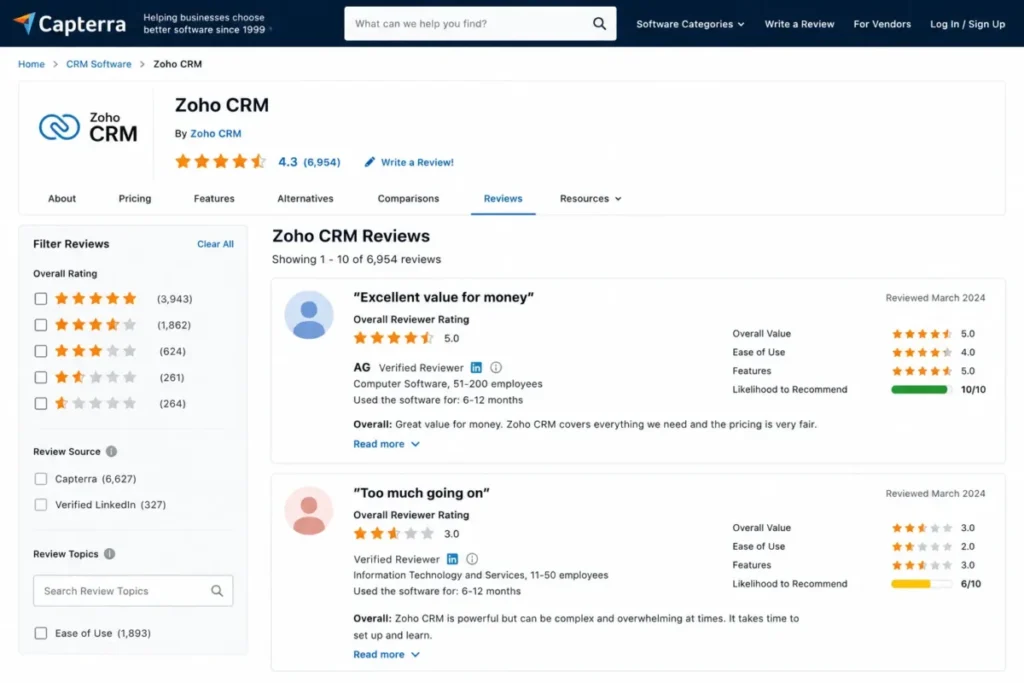
Capterra’s Zoho CRM listing shows a 4.3 rating across 6,954 reviews, read on July 9, 2026. The sentiment pattern across platforms is remarkably stable.
| Theme | Direction | What reviewers report |
|---|---|---|
| Price relative to capability | Positive | Value against Salesforce-class platforms at the same feature depth |
| Customization | Positive | Modules, fields, and workflows adapt to unusual processes |
| Automation and lead management | Positive | Assignment and follow-up rules reduce manual triage |
| Interface density | Critical | Too many modules and settings for new users |
| Learning curve | Critical | Ramp-up measured in weeks, not days |
| Support responsiveness | Critical | Variable, and most painful during setup |
| Occasional slowness | Critical | Reported intermittently on larger record sets |
Praise clusters on economics and flexibility, which are properties of the product. Criticism clusters on the hours between purchase and a working system, which is a property of the buyer.
A 12-person team with one part-time admin should read the bottom four rows as a schedule risk, not a feature complaint.
One reviewer on the G2 Zoho CRM reviews page notes that “Some advanced features can feel complicated at first, especially for new users.”
A Capterra reviewer from December 2025 is blunter: “It had way too many features for my use.”
TrustRadius reviewers describing Zoho CRM Plus report a real ramp-up period before the platform feels routine, alongside praise for unified sales and marketing data.
Read the criticism as a fit signal rather than a defect. Nobody complains that Zoho CRM lacks capability, and everybody complains about the cost of turning capability into a working system.
That pattern is the reason this Zoho CRM review keeps returning to admin capacity instead of feature counts.
Zoho CRM Limitations
Single-edition licensing. One organization runs one paid edition for all full users, so one Enterprise-gated requirement re-prices every seat.
Free edition cannot model a process. No custom modules and no custom fields means Free is a contact list with a pipeline attached.
Standard throttles integrations. A 100,000-credit ceiling and 10 concurrent calls will not carry a nightly warehouse sync or a high-volume storefront connector.
Support speed is a paid feature. Classic Support publishes no hourly response target, Premium promises 3 hours, and Enterprise Support requires 50 licenses.
Add-ons live outside the seat price. Backup, data storage, file storage, portal users, WhatsApp credits, and training are billed separately.
Admin overhead is the real cost. Third-party reviews put full deployment at 2 to 4 weeks, and the interface density complaint is the most repeated criticism across G2, Capterra, and TrustRadius.
Here is the Buyer Risk Ledger in short form. Adoption risk sits with the admin owner, budget risk sits with the edition step function, integration risk sits with concurrency, and renewal risk sits with whether anyone opens the reports.
Who Should Use Zoho CRM
5-30 person B2B sales teams with a named CRM admin. Professional at $23 per user gives them process management, portals, and Zia email intelligence at a price a 12-person company can defend.
Teams already running two or more Zoho apps. Native connections to Desk, Books, Campaigns, and Analytics remove the integration tax that a mixed stack creates.
Field sales teams with 10 or more travelling reps. Offline record updates that sync later turn parking-lot data entry into a workflow rather than a promise.
Revenue operations teams that need custom objects. Territory records, partner accounts, and renewal objects fit inside Professional’s 25-module ceiling without a platform migration.
Multi-department organizations that need cheap read access. Team User licenses at $9 per month bring finance, legal, and support into the record without full seats.
If governance depth is the real requirement, our Zoho CRM vs Salesforce comparison sets the expectation honestly before you sign.
Who Should Avoid Zoho CRM
Solo founders and two-person teams. The configuration effort exceeds the value, and Bigin by Zoho CRM exists precisely for spreadsheet switchers.
Teams with no admin capacity. If the CRM owner is also the top closer, the build will stall in week three and the data will rot in week six.
UX-sensitive sales teams. The most common criticism across every review platform is interface density, and no discount fixes clicks.
Marketing-led organizations. Teams whose CRM is primarily a marketing database will find the ecosystem assumptions inverted, and our HubSpot CRM review explains why that matters.
Enterprises requiring Salesforce-depth governance. Multi-team management and sandboxes arrive at Enterprise, but the partner ecosystem and governance tooling do not match a platform CRM.
Buyers who need advanced AI on an entry plan. Zia email intelligence starts at Professional, so the $14 tier is the wrong place to shop for AI.
Better Alternatives if Zoho CRM Is the Wrong Fit
| Alternative | Better for | Why choose it instead |
|---|---|---|
| Pipedrive | Pipeline-first sales teams | Faster time to first clean pipeline, far fewer setup decisions |
| HubSpot CRM | Marketing-led revenue teams | Native marketing depth and a gentler onboarding path |
| Salesforce Sales Cloud | Enterprise governance requirements | Deeper admin controls and a larger partner ecosystem |
| Freshsales | Teams wanting built-in phone and simpler AI | Lighter configuration burden with sales-focused defaults |
| Bigin by Zoho CRM | Spreadsheet switchers and solo operators | Simple pipeline CRM inside the Zoho family, without modules |
None of these are better products in the abstract. They are better answers to the specific disqualifiers this Zoho CRM review has already named.
Choose Pipedrive if setup speed beats configuration depth
Pipedrive gives a small sales team a working pipeline in an afternoon rather than a fortnight. Stay with Zoho CRM if you need custom modules, approval processes, or an API budget that scales with headcount.
Choose HubSpot CRM if marketing owns the database
HubSpot’s model assumes the contact record serves campaigns first and deals second. Stay with Zoho CRM if sales owns the process and finance owns the budget conversation.
Choose Salesforce if governance is the requirement
Multi-team hierarchies, audit depth, and a partner bench are the reason enterprises pay the premium, as our Salesforce CRM review sets out. Stay with Zoho CRM if you can accept Enterprise-tier governance at $40 per user rather than platform pricing.
Choose Freshsales if you want fewer decisions
Freshsales ships opinionated sales defaults, and our Freshsales review covers where those defaults help. Stay with Zoho CRM if your sales process is unusual enough that defaults become obstacles.
Choose Bigin if you are leaving a spreadsheet
Zoho’s own pricing page points first-time CRM buyers toward Bigin, and that guidance is honest. Stay with Zoho CRM if you already need automation, modules, analytics, or API access.
Final Verdict: Is Zoho CRM Worth It in 2026?
Zoho CRM is worth it for a 5 to 30 person B2B sales team with a named admin owner, a defined sales process, and $2,760 a year for ten Professional seats. That team gets platform-grade configuration at mid-market pricing.
It is not worth it for a team without admin capacity, because the entire value proposition is the freedom to build, and freedom is a cost when nobody has time to spend it.
Buy Professional at $23 per user per month billed annually and treat Standard as a trap for anyone with an integration roadmap. Budget 15 to 25 percent above the seat subtotal for backup, storage, and a support tier in year one.
Skip Zoho CRM and take Pipedrive if your first three weeks need to produce clean pipeline data rather than a configured object model. Compare the full switching set in our Zoho CRM alternatives roundup before you commit.
The renewal question to answer twelve months from now is the one this Zoho CRM review has been building toward. Did the custom modules you paid for change how deals are worked, or did they just change how records are stored?
If it is the second answer, you bought the wrong edition, and probably the wrong CRM.
Pricing checked: July 2026. Zoho localizes pricing by region and taxes are extra, so verify the US selector on the official pricing page before purchase.
FAQ
Is Zoho CRM actually worth it?
Yes, if you have someone who will own configuration for the first month. Zoho CRM delivers custom modules, workflow rules, and process management at $23 per user per month on Professional, which sits well below comparable platform pricing.
No, unless that admin exists, because an unconfigured Zoho CRM is a more expensive contact list.
How much does Zoho CRM cost per user?
US annual pricing is $14 per user per month for Standard, $23 for Professional, $40 for Enterprise, and $52 for Ultimate. Monthly billing runs higher, and a Team User license costs $9 per month billed annually.
Taxes are extra and Zoho localizes pricing by region, so confirm the US pricing selector before purchase. Pricing checked July 2026.
Is Zoho CRM free forever?
The Free edition supports up to three users with leads, deals, basic workflows, reports, and the mobile app. It has no custom modules and no custom fields, and it allows 5,000 API credits per 24 hours with 5 concurrent calls.
Free works as an evaluation environment. It cannot represent a real sales process.
What are the disadvantages of Zoho CRM?
Interface density, setup time, and a step-function pricing model. One organization must run one paid edition for all full users, so a single Enterprise-gated requirement re-prices every seat.
Standard caps API concurrency at 10 calls, faster support response requires a paid tier, and backup, storage, portals, and WhatsApp credits are billed outside the seat price.
Is Zoho CRM good for small business?
It fits a 5 to 30 person sales team with a named CRM admin. It fits poorly for a two-person business, where configuration effort outweighs the value and Bigin by Zoho CRM is the more sensible entry point.
The deciding factor is admin capacity, not company size, and most small-business reviews get that backwards.
Is Zoho CRM better than HubSpot?
For sales-led teams that need custom objects and process rules on a mid-market budget, yes. For marketing-led teams whose contact database drives campaigns first, HubSpot’s model fits better and onboards faster.
Neither wins in the abstract. Pick based on whether sales or marketing owns the record and the reporting.
Is Zoho CRM hard to learn?
Harder than pipeline-first CRMs, easier than platform CRMs. Third-party reviews report 10 to 15 hours of active use before navigation stops costing time, with a basic build taking 2 to 4 days and a full deployment 2 to 4 weeks.
The learning curve lands on the admin far more heavily than on the reps.
Does Zoho CRM work offline?
Yes, on mobile. Zoho’s official mobility documentation states that offline additions, modifications, and deletions are stored on the device and synchronized once connectivity returns.
Reps can view records, log calls, and update notes without signal. Offline support covers record operations, so treat it as a field-visit workflow rather than a full desktop replacement.
Which Zoho CRM plan do I need for Zia AI?
Professional and above, according to Zoho’s official Zia for Emails help page, which is where email intelligence and thread summaries become available.
AI agents and predictive intelligence appear from Professional, and extended AI capabilities sit at Enterprise. Verify the specific capability name in the help center, because Zia on a comparison chart covers several distinct features.
What is the difference between Zoho CRM and Zoho One?
Zoho CRM is a single product with five editions. Zoho One bundles Zoho CRM with dozens of other Zoho applications under one subscription.
One detail changes the math. Team User licenses at $9 per month are available on standalone CRM editions, CRM Plus, and CRM Flex, but not in Zoho One.