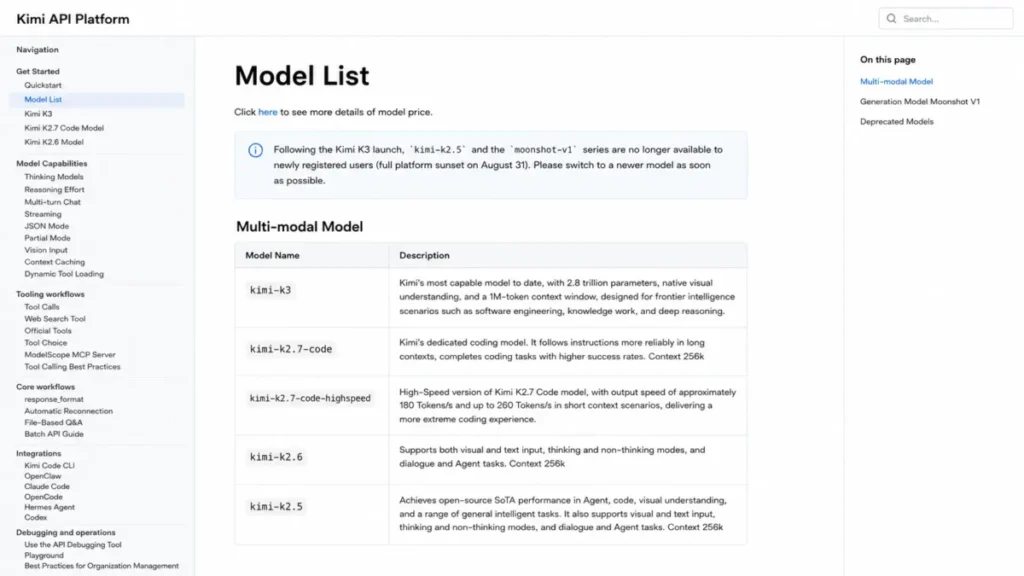
Kimi K2.5 is not the model to build on in August 2026. Kimi’s own API platform documentation says newly registered international users can no longer select kimi-k2.5, and the model is scheduled for full platform sunset on August 31, 2026.
That one date reorganizes this Moonshot AI Kimi K2.5 review.
For a team with a live K2.5 integration, the question is how fast to migrate. For everyone else, the question is which current Kimi model to evaluate instead.
Free access still exists on the consumer side with usage limits Kimi does not quantify, and current Kimi memberships run from $19 to $199 per month. Neither of those funds a single API call.
In This Article (19 sections)
Kimi K2.5 Quick Verdict
| Category | Verdict |
|---|---|
| Best for | Existing K2.5 API integrations that need a controlled migration window |
| Not ideal for | Any new production dependency expected to outlive August 2026 |
| Starting price | Free consumer access with unspecified usage limits, plus Kimi membership from $19 per month |
| Best practical plan | Allegretto at $39 per month, the first tier that includes Kimi Claw and Kimi Code HighSpeed |
| Free plan or trial | Yes, free access with usage limits Kimi does not publish as a number |
| Setup difficulty | Medium for eligible existing accounts, blocked for newly registered API users |
| Main strength | Native text, image, and video input with a 256k-token API context |
| Main limitation | Full platform sunset on August 31, 2026 |
| Best alternative | Kimi K3, described in current Kimi documentation as the most capable overall model |
Every row above comes from the Kimi K2.5 product page and the Kimi API model documentation. Plan prices come from the Kimi membership pricing page, checked August 7, 2026.
Kimi sits in the same buying set as the assistants covered in the best AI chatbots roundup. Its lifecycle position, not its capability ceiling, is what separates it in August 2026.
How Kimi K2.5 Was Evaluated
This review draws on Kimi’s official product pages, API platform documentation, help center articles, membership pricing, and the current terms and privacy documents. Pricing, plan limits, and model availability were checked on August 7, 2026.
Kimi K2.5 was assessed against the same buyer criteria the site review methodology applies to every tool: lifecycle stability, documented capability, usage limits, plan gates, real cost structure, data handling scope, support routes, and migration effort.
Greater weight went to factors that change a purchase or renewal decision. Platform lifecycle dates, credit and concurrency ceilings, feature gates by plan, and the split between consumer billing and API billing outrank benchmark marketing here.
Claims that could not be verified from Kimi’s own documentation were excluded. Launch-era figures are labeled as historical, and Moonshot AI’s performance statements stay attributed to the vendor rather than presented as measured results.
Kimi K2.5 Status in 2026: New-User Restriction and August 31 Sunset
Two facts from Kimi’s API model list decide most of this review. After the K3 launch, kimi-k2.5 became unavailable to newly registered international API users, and the model is scheduled for full platform sunset on August 31, 2026.
A newly registered developer cannot adopt K2.5 at all. An existing developer has a runway measured in weeks from the August 7 verification date.
The rest of Kimi’s product surface has already moved on. Kimi’s Agent overview states the current Agent is K3-powered and dates the progression as K2.5 on January 27, K2.6 on April 20, and K3 on July 16, 2026.
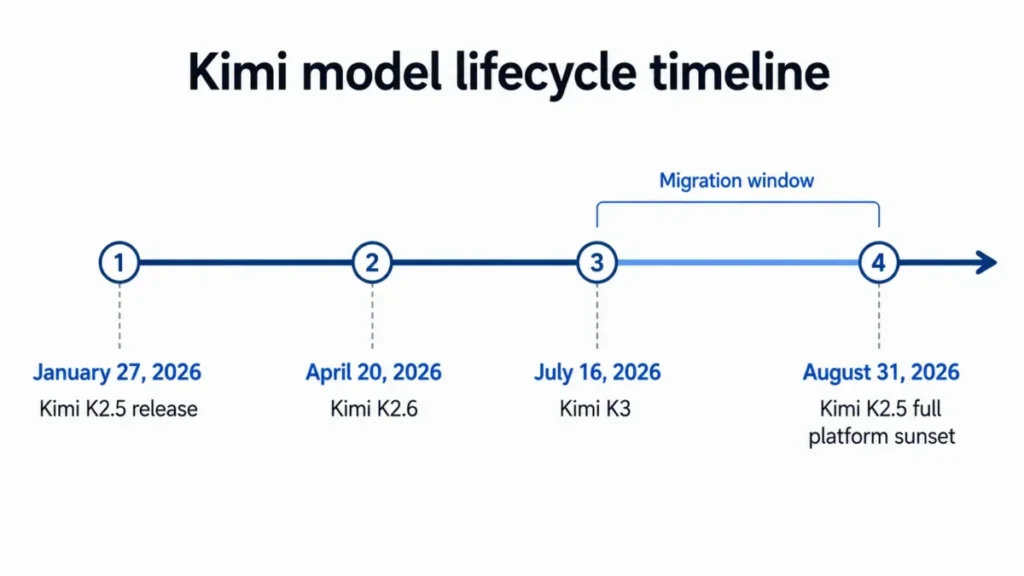
The same four dates in text, so the sequence survives without the image. K2.5 released January 27, 2026, K2.6 followed on April 20, and K3 arrived on July 16.
K2.5 is scheduled to leave the platform on August 31, 2026.
Kimi’s getting-started overview lists K2.6, K3, and K3 Swarm as the current model choices and describes K3 as the most capable overall model. K2.5 is absent from that list.
I would treat K2.5 as a transition asset from here, not a platform. A model that a new account cannot select is not a model a procurement team can standardize on.
What Is Kimi K2.5?
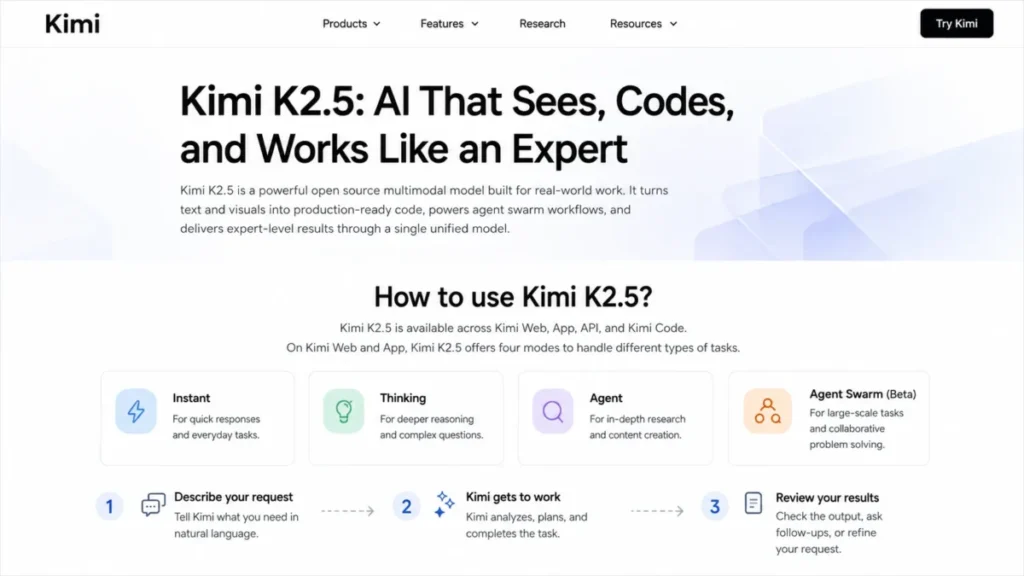
Kimi K2.5 is Moonshot AI’s multimodal reasoning and agentic model, released January 27, 2026. Kimi’s K2.5 product page describes it as an open-source model built for text, image, and video input rather than text alone.
At launch it was reachable through Web, App, API, and Kimi Code, with four modes: Instant, Thinking, Agent, and Agent Swarm. Those four modes are the whole product story, and they map cleanly onto four different buying reasons.
The open-source positioning is a vendor claim on that page, and the exact license terms governing the weights were not established from the sources used here. Teams planning to self-host should read the repository license before assuming any right of use, because “open source” on a marketing page is not a license grant.
For readers newer to this category, the model sits in the same class as other generative AI systems that combine reasoning with tool use. Kimi’s differentiator at launch was parallel agent execution, not raw text quality.
Day One: What Access and Setup Actually Involve
Setup difficulty depends entirely on which door you come through, and the two doors are not connected.
On the developer side, Kimi’s API troubleshooting guide documents https://api.moonshot.ai/v1 as the international endpoint and states that international and mainland account credentials and API keys are regionally isolated. A key issued in the wrong region will not authenticate.
The same guide states that the international API is pay-as-you-go and separate from Kimi Membership and Kimi Code, with balances, benefits, and API keys that are not interchangeable.
That separation is the single most expensive misunderstanding available here. The setup consequence is concrete: buying a $199 Vivace membership funds zero API tokens, and topping up an API balance unlocks zero membership features.
On the consumer side, setup is closer to trivial: sign in and start a session. Kimi’s overview help page documents up to 50 files per session and a 100 MB per-file limit across PDF, Word, Excel, PowerPoint, image, TXT, and video formats.
For a document-heavy workflow, the 50-file session cap is the first constraint worth planning around. A quarterly review pack of 80 supplier PDFs has to be split before it goes anywhere near an Agent task.
Week One: The Workflows Kimi K2.5 Was Built For
Each capability below is drawn from Kimi’s official documentation, paired with its plan gate and the workflow consequence for the team that has to operate it.
Multimodal input and visual-to-code
Kimi’s K2.5 API documentation lists text, image, and video input, thinking and non-thinking modes, dialogue and Agent tasks, and a 256k context length.
The product page positions this at visual-to-code work: hand the model a screenshot, an image, or a video reference and ask for the front-end or structured output that matches it.
Plan gate: this is model capability, so the gate is K2.5 access itself, which newly registered API accounts no longer have. Limitation: Kimi’s current terms, effective August 4, 2026, warn that outputs can be inaccurate, incomplete, or untimely, which puts a human review step in front of anything generated this way.
Thinking and non-thinking modes
The same documentation lists both a thinking and a non-thinking path, so a caller can choose deliberation or latency per request rather than per integration.
Use case: a support-triage endpoint runs non-thinking for classification and switches to thinking for escalation summaries. Limitation: mode selection changes token consumption, and because the numeric K2.5 rate is not exposed in the accessible official rate table, that cost delta cannot be modeled precisely from official evidence.
Agent and Agent Swarm
This is the feature that made K2.5 interesting. Moonshot AI’s K2.5 technical blog states that at launch Agent Swarm could coordinate up to 100 sub-agents and 1,500 tool calls.
Moonshot also claimed up to 4.5x faster execution than a single-agent configuration. That figure stays a vendor claim.
Those are launch-era numbers for K2.5 and they should never be quoted alongside current Swarm figures as if they described one system.
Kimi’s current Agent Swarm documentation documents up to 300 sub-agents and more than 4,000 tool calls, and current Swarm is K3-powered.
| Capability | Kimi K2.5 at launch | Current K3 Swarm |
|---|---|---|
| Maximum sub-agents | Up to 100 | Up to 300 |
| Tool calls per job | 1,500 | More than 4,000 |
| Powering model | Kimi K2.5 | Kimi K3 |
| Evidence type | Vendor claim, K2.5 technical blog | Vendor documentation, current help center |
The left column comes from Moonshot AI’s K2.5 technical blog and the right column from Kimi’s Agent Swarm help documentation, both checked August 7, 2026.
Any review that prints “300 agents” under a K2.5 headline has merged two model generations. The correct K2.5 number is 100, and the gap is a reason to migrate rather than a reason to stay.
Work artifact generation
The K2.5 product page lists Docs, Slides, Sheets, Websites, and reports among its output categories, alongside visual-to-code workflows.
Use case: turning a research folder into a first-draft deck or a costed sheet without leaving the assistant.
Plan gate on the consumer side is credit-based rather than feature-based. Limitation: Kimi’s Agent features and limits page states that standard Agent typically generates one file per task and recommends Swarm when multiple files are required.
A five-deliverable request is therefore a five-task job or a Swarm job, and both consume credits differently.
API integration surface
The K2.5 API documentation lists automatic context caching, ToolCalls, JSON Mode, Partial Mode, and internet-search functionality.
For anyone building on top of it, this is the practical part of the model. JSON Mode and ToolCalls decide whether the model can drive an application, and Partial Mode decides what happens when a long generation runs out of room.
Both matter more than a benchmark table for teams shipping software, and understanding the API basics behind them is the difference between an integration that degrades gracefully and one that silently truncates.
The internet-search piece carries a caveat straight from Kimi: the web_search documentation is marked as being updated and is not recommended for near-term use.
Kimi Code
Kimi’s Code membership guide documents roughly 300 to 1,200 requests per five-hour window depending on membership, up to 30 concurrent streams, and a HighSpeed feature that requires Allegretto or above.
Kimi’s Code error reference documents HTTP 429 responses when either the five-hour rolling quota or the monthly quota is exhausted, with waiting for reset or upgrading as the documented paths.
A two-developer team running heavy agentic coding sessions can hit a five-hour ceiling in an afternoon. That is a throughput constraint on the coding product, not a K2.5 API token limit, and mixing the two produces a wrong budget.
Integrations and the Wider Kimi Ecosystem
Kimi’s current documentation describes an ecosystem rather than a single endpoint, and most of it is not K2.5-specific.
Kimi Code documentation covers compatibility with the Kimi Code CLI, Claude Code, and Roo Code, which means an existing terminal-based coding workflow does not have to be rebuilt to try it.
Kimi Work launched June 3, 2026 in beta as a local agent with local skills, browser operation, scheduled tasks, permission controls, and plugins including Canva, Notion, and WPS.
These are current Kimi ecosystem capabilities. Attributing them to the K2.5 model itself would overstate what a K2.5 API call can do, and that distinction matters when a stakeholder asks whether “Kimi” can open a file on the company file server.
The integration limit that decides enterprise fit sits elsewhere. Kimi’s API troubleshooting documentation states that the managed API is cloud-only and does not provide on-premises private deployment through the standard API service.
Open weights and a hosted API are two different procurement questions.
The first is about what a team can run. The second is about what Kimi will operate for them, and the answer there is cloud only.
Agent Automation, Modes, and Output Handling
Automation on the consumer side runs through Agent and Agent Swarm, and both are governed by credits rather than by a feature switch.
The Agent features page documents a 256K-character context window for the current Agent, 60 to 720 Agent tasks per month depending on plan, and a vendor-stated typical task duration of 5 to 20 minutes.
That character figure is not the same unit as the K2.5 API’s 256k-token context. Tokens and characters do not convert without an official ratio, and Kimi publishes none, so treating the two numbers as equivalent overstates usable context by a wide and unknown margin.
Output handling on the API side needs deliberate engineering. Kimi documents K2.5’s maximum completion output as 256 x 1,024 minus prompt_tokens, and states that when finish_reason returns length, output beyond the completion ceiling is discarded.
Discarded, not queued. A long-form generation that hits the ceiling loses the remainder unless the application implements the documented Partial Mode continuation pattern.
Feature parity between the consumer product and the API is also incomplete. Kimi’s troubleshooting documentation records PPT generation and Deep Research as consumer-product functionality rather than API capabilities, so an application cannot call them as endpoints.
Month One: Feature Gates and What They Cost You
Current Kimi membership gates are not about features at all. Kimi’s membership pricing page prices parallel work, and parallel capacity is what a plan buys.
| Plan | Monthly price | Agent credits per month | Agent concurrency | Swarm uses | Swarm subtask concurrency |
|---|---|---|---|---|---|
| Moderato | $19 | 60 | 2 | 25 | 2 |
| Allegretto | $39 | 150 | 2 | 50 | 4 |
| Allegro | $99 | 360 | 4 | 120 | 4 |
| Vivace | $199 | 720 | 4 | 240 | 8 |
Those values come from Kimi’s membership pricing page, checked August 7, 2026, and they are current consumer membership limits rather than K2.5 API allowances.
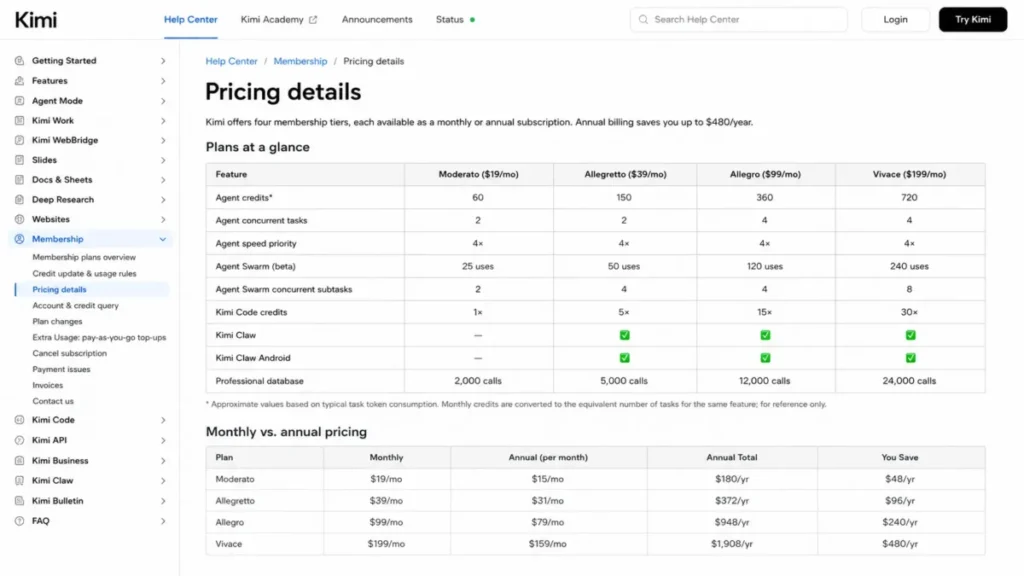
Two gates sit outside that table. Kimi Claw is absent from Moderato and available from Allegretto upward, and Kimi Code HighSpeed also requires Allegretto or above.
That makes Allegretto the practical floor for anyone whose workflow touches local files or fast coding, and it makes the $19 tier a false economy for those buyers rather than a saving.
Concurrency is the gate most buyers miss. A four-person team that runs Agent jobs simultaneously is capped at two concurrent tasks on both Moderato and Allegretto, so the upgrade trigger to Allegro is parallelism, not monthly volume.
When credits run out, Kimi’s Agent quota and billing page states that an already-running task can finish but new tasks show insufficient credits until refresh or upgrade.
A job in flight is safe. The next one is not.
Kimi Pricing and Plans: Two Billing Systems, Not One
Kimi runs consumer membership billing and API billing as separate systems, and conflating them is the most common costing error in this category.
| Plan | Monthly | Annual | Effective monthly on annual | Best for | Worth it? |
|---|---|---|---|---|---|
| Moderato | $19 | $180 | $15 | Individual light Agent use | Only without Claw or HighSpeed needs |
| Allegretto | $39 | $372 | $31 | Solo builders and small teams | Best practical plan |
| Allegro | $99 | $948 | $79 | Teams needing 4 concurrent Agent tasks | Worth it at real parallel load |
| Vivace | $199 | $1,908 | $159 | Heavy Swarm and high parallelism | Only at 8-subtask Swarm demand |
Prices in that table come from Kimi’s published membership pricing, checked August 7, 2026.
Annual billing is a real saving rather than a rounding difference. Twelve monthly payments cost $228, $468, $1,188, and $2,388 across the four tiers, against annual prices of $180, $372, $948, and $1,908, a difference of $48, $96, $240, and $480 per membership per year.
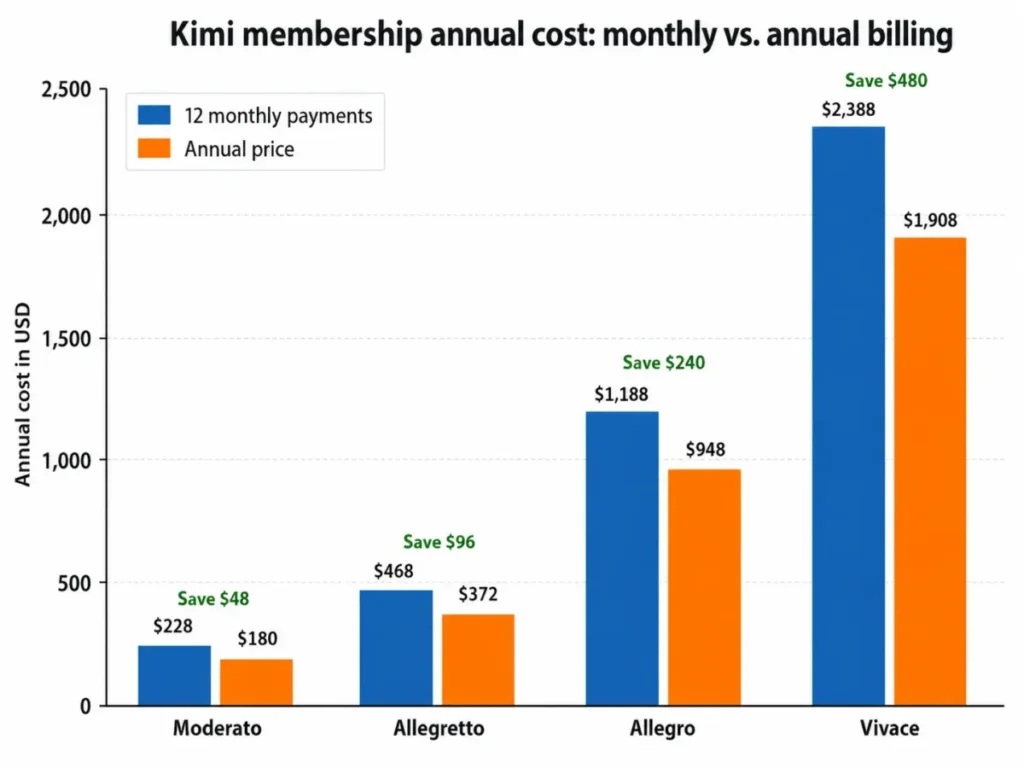
Every figure in that chart also appears in the pricing table and the paragraph above it, so the comparison holds without the image.
The 10-person cost nobody quotes
Kimi membership is billed per account rather than per seat in the pricing documentation, so a ten-person team means ten memberships. That assumption is the whole calculation, and it should be confirmed with Kimi’s sales route before a large purchase.
Editorial calculation, assuming one individual membership per person and no negotiated agreement:
- Moderato: 10 x $19 = $190 per month, or 10 x $180 = $1,800 per year.
- Allegretto: 10 x $39 = $390 per month, or 10 x $372 = $3,720 per year.
- Allegro: 10 x $99 = $990 per month, or 10 x $948 = $9,480 per year.
- Vivace: 10 x $199 = $1,990 per month, or 10 x $1,908 = $19,080 per year.
Inputs are the list prices in the table above from Kimi membership pricing. At ten people, annual billing saves $480 on Moderato, $960 on Allegretto, $2,400 on Allegro, and $4,800 on Vivace.
The number that should end an argument in a finance review is $19,080. Vivace at team scale is enterprise money for a consumer subscription that still does not buy API tokens.
Credits that drain while nobody is working
Kimi documents two ongoing consumption items that sit outside the subscription line. A retained Kimi Claw cloud host uses about 0.6% of membership credits daily, and a published Agent Website uses about 0.08% of membership credits while kept online.
Left running for a 30-day cycle, that Claw host works out to roughly 18% of a month’s credits (0.6% x 30), spent on nothing but keeping the host alive. The documentation does not state a reset basis for the Agent Website figure, so I would not multiply that one out.
Kimi’s own mitigation is direct: save the files you need and delete the host, or unpublish the site. Both are one-time admin actions that recover credits every month afterwards.
K2.5 API pricing
Kimi’s K2.5 API documentation confirms per-million-token billing. A trustworthy numeric rate table was not recoverable from that page during this research, so no per-token figure is published here.
Third-party pages do quote K2.5 token prices. I would not budget from them, because a rate that cannot be confirmed on the vendor’s own current page is a rate that can move without notice, and the model retires in weeks anyway.
Teams comparing hosted model economics will get further from a maintained breakdown like the Claude pricing guide than from an unverified figure for a sunsetting model.
Security, Support, and Data Handling
Kimi’s consumer service and its international API platform publish separately scoped privacy documents, and they do not say the same thing about where data lives.
| Service scope | Governing document | Stated storage location | Model-improvement position |
|---|---|---|---|
| Consumer Kimi | Kimi privacy policy | Personal information stored within the People’s Republic of China | De-identified inputs and outputs may be used for product and model optimization, with a documented opt-out request path |
| International API platform | Kimi OpenPlatform privacy policy | Collected information stored on servers in Singapore | Scoped separately from the consumer policy |
The consumer row comes from Kimi’s consumer privacy policy and the API row from Kimi’s OpenPlatform privacy policy, both checked August 7, 2026.
Collapsing those two rows into one sentence about “Kimi data” is how a data-governance review goes wrong. The consumer statement does not travel to the international API platform, and the API statement does not travel back to the consumer product.
The consumer opt-out is actionable rather than theoretical. Kimi’s consumer privacy policy describes a request path through customer service after identity verification, which means a compliance team can file it as a documented control rather than a hope.
Kimi’s OpenPlatform privacy policy scopes MOONSHOT AI PTE. LTD. and describes retention according to necessity, data type, and settings rather than a single fixed period.
Do not write a fixed retention number into a vendor assessment for this service, because the policy does not supply one.
Kimi’s terms, effective August 4, 2026, identify Beijing Moonshot Technology Co., Ltd. and affiliates as the provider and warn that outputs can be inaccurate, incomplete, or untimely.
On support, Kimi’s contact page lists billing and membership, general product, and API support routes, and states that paid members receive priority response. No numeric response-time commitment appears on that page.
Priority is not an SLA. A team that needs a contractual first-response time has to ask for one in writing before it signs, and no named security certification such as SOC 2 or ISO was verified for this service scope in the sources used here.
Kimi K2.5 Limitations
The lifecycle limitation overrides everything else
New international API registrations cannot select the model, and full platform sunset is dated August 31, 2026. A capability advantage that expires on a known date is a migration project, not a purchase.
Long output is truncated, not continued
Maximum completion output is documented as 256 x 1,024 minus prompt_tokens, and excess output past a length stop is discarded. Applications generating long documents need Partial Mode continuation built in from the start, because the failure is silent from the reader’s point of view.
Cloud Agent cannot reach local or intranet resources
The Agent features page states that standard cloud Agent cannot directly access local files or enterprise intranet systems and directs those use cases toward Kimi Claw. For an internal automation project, that reroutes the whole architecture and lifts the minimum plan from $19 to $39.
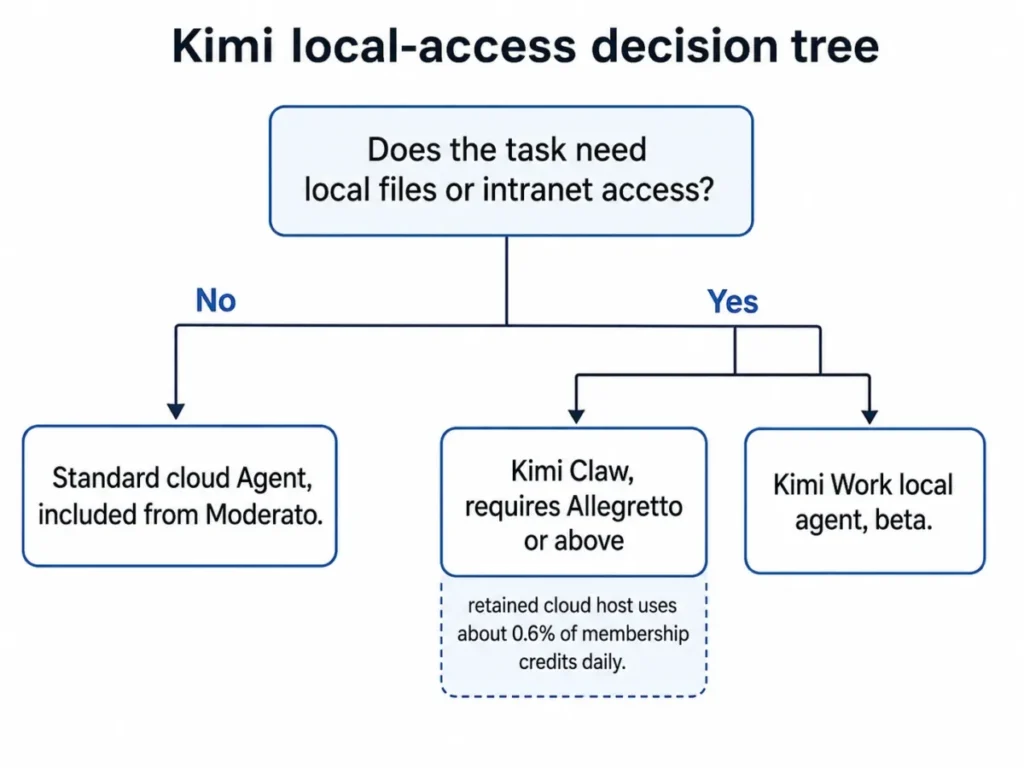
Read as text: cloud Agent handles cloud-only work on any tier, Claw handles local and intranet work from Allegretto upward and keeps consuming credits while its host is retained, and Kimi Work is the beta local-agent route.
Long Agent conversations lose their own beginning
Kimi warns that early details can be forgotten across multiple Agent turns and recommends defining the framework first, making incremental adjustments, and splitting large work into two or three phases or using Swarm. That is a useful admission, and it means an iterative 40-turn build session is the wrong shape for this tool.
One file per task on standard Agent
Standard Agent typically generates one file per task. A deliverable that is genuinely five files is five tasks against a monthly credit budget of 60 to 720, or a Swarm job against a separate allowance of 25 to 240 uses.
No on-premises deployment through the managed API
The standard managed API service is cloud-only. Regulated buyers who need in-house hosting are evaluating a self-hosting project against open weights, not a Kimi service, and that is a different budget and a different risk register. The GLM 5.2 review works through the same decision for an MIT-licensed coding model, setting self-hosting against its hosted Coding Plan and metered API.
Kimi K2.5 Pros and Cons
| Pros | Cons |
|---|---|
| Native text, image, and video input with a documented 256k-token API context | Newly registered international API users cannot select kimi-k2.5 at all |
| Launch Agent Swarm coordinated up to 100 sub-agents and 1,500 tool calls in one job | Full platform sunset dated August 31, 2026 leaves weeks of runway from the August 7 check |
| API surface includes automatic context caching, ToolCalls, JSON Mode, and Partial Mode | The numeric K2.5 per-million-token rate is not exposed in the accessible official rate table |
| Documented output categories cover Docs, Slides, Sheets, Websites, and visual-to-code work | A $19 to $199 membership funds no API usage, because billing systems are separate |
| Free consumer access exists alongside paid tiers | Standard cloud Agent cannot reach local files or intranet systems, and Claw starts at Allegretto |
| Moonshot AI publishes K2.5 as an open-source model rather than a closed endpoint only | Kimi flags its own web_search documentation as being updated and not recommended near term |
Who Should Use Kimi K2.5?
Teams with a live K2.5 API integration. Eligibility survives to the sunset date for existing accounts, so the right move is a planned cutover rather than an emergency one on August 30.
Developers studying multimodal and agentic model design. K2.5 is a documented, published reference point for how a 2026 open model combined vision, tool use, and parallel sub-agents, and that value does not expire when the endpoint does.
Buyers evaluating the current Kimi ecosystem. Reading the K2.5 material is a reasonable way to understand where Kimi Agent, Swarm, Claw, and Kimi Code came from. Check every current capability figure against the current model documentation rather than the launch blog.
Individual knowledge workers on the consumer product. At $19 to $39 per month with 60 to 150 Agent credits, the consumer tiers are a low-commitment way to test agentic document and deck generation. That is a cheaper trial than committing engineering time.
Who Should Avoid Kimi K2.5?
Anyone starting a new production integration. A new international API account cannot select the model, and a dependency with a published end date is a rebuild scheduled in advance.
Teams that need on-premises deployment of a managed service. The standard managed API is cloud-only, so a regulatory requirement for in-house hosting rules it out immediately.
Moderato buyers whose work touches local files or intranet systems. Kimi Claw starts at Allegretto, so the $19 tier cannot do the job those buyers are paying for.
Buyers who assume a subscription includes API usage. Membership, Kimi Code, and API billing are separate systems with non-interchangeable balances and keys, and a budget built on the opposite assumption will be wrong in month one.
Compliance-sensitive organizations that need one global data-residency answer. The consumer policy states PRC storage and the international API policy states Singapore storage, so the assessment has to be done twice, per service scope.
How to Migrate Off Kimi K2.5 Before August 31
No one-click K2.5 migration utility was verified in Kimi’s documentation. Treat this as an application regression project with a fixed deadline.
- Inventory every K2.5 reference. Model identifier strings, config files, environment variables, and any hard-coded fallback that names
kimi-k2.5. - Confirm endpoint and region. International traffic uses
https://api.moonshot.ai/v1, and regional credentials and keys are isolated, so a key issued for one regional account does not authenticate against another. - Select the successor against current documentation. Current Kimi model choices are K2.6, K3, and K3 Swarm, with K3 described as the most capable overall.
- Revalidate the API surface. Context caching, ToolCalls, JSON Mode, and Partial Mode behavior must be confirmed against the successor’s own documentation rather than assumed to carry over.
- Revalidate multimodal inputs. Image and video handling is model-specific and needs its own test pass.
- Rebuild long-output handling. Verify the successor’s completion ceiling and
finish_reasonbehavior, then confirm the continuation pattern still works end to end. - Regression-test prompts. Reasoning behavior differs across model generations, so a prompt engineering pass on the highest-value prompts is cheaper than discovering the drift in production.
- Cut over with a fallback, then remove the K2.5 path. Kimi’s documentation does not state the exact post-sunset API error response, so do not design a fallback that assumes a specific failure mode.
The 30-day question after cutover: are output quality, latency, and cost all inside the range the K2.5 integration produced? If any of the three has moved, that is a tuning project, and it is better found in September than during a December incident.
Kimi K2.5 Alternatives
| Alternative | Better for | Why choose it instead |
|---|---|---|
| Kimi K3 | New Kimi deployments and current agentic work | Current Kimi documentation describes K3 as the most capable overall model, and current Agent is K3-powered |
| Kimi K2.6 | Teams wanting a nearer-generation step from K2.5 | Listed among current Kimi model choices, released April 20, 2026 |
| K3 Swarm | Parallel workloads beyond K2.5’s launch ceiling | Documented for up to 300 sub-agents and more than 4,000 tool calls, against 100 and 1,500 at K2.5 launch |
| Kimi Claw or Kimi Work | Local files and intranet-bound tasks | Standard cloud Agent cannot reach those resources, and Claw is Kimi’s documented alternative from Allegretto upward |
| A non-Kimi current model | Buyers whose deciding criterion is lifecycle commitment | This evidence set covers Kimi’s roadmap only, so a multi-vendor runway comparison has to be run on each vendor’s own current documentation |
Those alternatives are drawn from Kimi’s getting-started overview, the Kimi Agent overview, the Agent Swarm documentation, and the Agent features and limits page, all checked August 7, 2026.
If the deciding factor is a documented multi-year runway rather than capability, the comparison moves outside this evidence package. The separate Claude review and ChatGPT review cover those platforms against their own current sources.
Final Verdict: Is Kimi K2.5 Worth It?
Kimi K2.5 was a strong model and it is a bad 2026 purchase, and both of those statements come from the same evidence.
The capability case still reads well: native text, image, and video input, a 256k-token API context, thinking and non-thinking modes, a real tool-calling surface, and a launch Agent Swarm that coordinated up to 100 sub-agents. None of that is undone by the sunset.
The buying case is undone by it. A model that newly registered API users cannot select, scheduled for full platform sunset on August 31, 2026, cannot carry a production workload past this quarter.
Choose Kimi K2.5 if you already run it in production and need the remaining window to migrate deliberately, or if you are studying its architecture rather than depending on it.
Choose a current Kimi model if you want the ecosystem: K3 for general capability, K3 Swarm for parallel execution at 300 sub-agents, Kimi Claw or Kimi Work when local and intranet access is the requirement.
On plans, Allegretto at $39 per month is the practical membership tier, because it is the first one that includes Kimi Claw and Kimi Code HighSpeed. Moderato at $19 only makes sense for cloud-only Agent work with no local-file requirement and no need for more than 60 tasks a month.
The renewal question I would put in front of any Kimi purchase this year: if this model generation is replaced again in six months, does the workflow survive a model swap, or does it need rebuilding? K2.5 just answered that question for everyone who built on it in January.
Frequently Asked Questions
Is Kimi K2.5 still available in 2026?
Partly. Kimi’s API platform documentation states that kimi-k2.5 is unavailable to newly registered international API users after the K3 launch, so a new account cannot select it.
Existing eligible accounts retain access until the documented sunset date. Consumer model selection for individual accounts was not verified independently here.
When will Kimi K2.5 be discontinued?
Kimi’s API model documentation gives August 31, 2026 as the full platform sunset date for kimi-k2.5, checked August 7, 2026. That leaves a short migration window for any live integration.
Kimi does not document the exact API error response after that date, so do not build a fallback that assumes one specific failure mode.
Is Kimi K2.5 free?
Yes, with limits nobody has published as a number. The K2.5 product page advertises free access subject to usage limits and paid plans with higher usage, but it does not disclose a numeric free quota.
Anyone planning capacity around the free tier is planning around an unpublished ceiling, which is not a plan.
How much does Kimi AI cost?
Current Kimi membership is $19, $39, $99, and $199 per month for Moderato, Allegretto, Allegro, and Vivace, or $180, $372, $948, and $1,908 annually. Those are consumer subscription prices.
The K2.5 API bills per million tokens, and a trustworthy numeric rate was not recoverable from the official rate table during this research.
What is the Kimi K2.5 context window?
The K2.5 API documentation lists a 256k context length, and maximum completion output is documented as 256 x 1,024 minus prompt_tokens. Do not confuse that with the current Agent help page’s 256K-character context window, which is a different unit for a different product surface.
Kimi publishes no conversion between the two.
How many agents can Kimi K2.5 Agent Swarm run?
Up to 100 sub-agents and 1,500 tool calls, according to Moonshot AI’s K2.5 technical blog at launch. The 300-sub-agent and 4,000-plus tool-call figures circulating in newer coverage describe current K3 Swarm, not K2.5.
Quoting the larger numbers under a K2.5 headline overstates the model by a factor of three.
What replaced Kimi K2.5?
Kimi’s current documentation lists K2.6, K3, and K3 Swarm as the model choices and describes K3 as the most capable overall. The Agent overview dates the progression as K2.5 on January 27, K2.6 on April 20, and K3 on July 16, 2026, and states that the current Agent is K3-powered.
Does my Kimi subscription pay for API calls?
No, unless something changes in Kimi’s billing structure. Kimi’s API troubleshooting documentation states that the international API is pay-as-you-go and separate from Kimi Membership and Kimi Code, with balances, benefits, and API keys that are not interchangeable.
A Vivace membership at $199 per month funds zero API tokens.
Can Kimi Agent access files on my company intranet?
No, not the standard cloud Agent. Kimi’s Agent features and limits page states that standard cloud Agent cannot directly access local files or enterprise intranet systems, and directs those use cases toward Kimi Claw.
Claw is unavailable on Moderato and included from Allegretto upward, so intranet work sets a $39 floor.
Where does Kimi store user data?
It depends which Kimi service you mean. The consumer privacy policy states that personal information is stored within the People’s Republic of China.
The separately scoped international OpenPlatform privacy policy states that collected information is stored on servers in Singapore. Neither statement can be generalized to the other service.