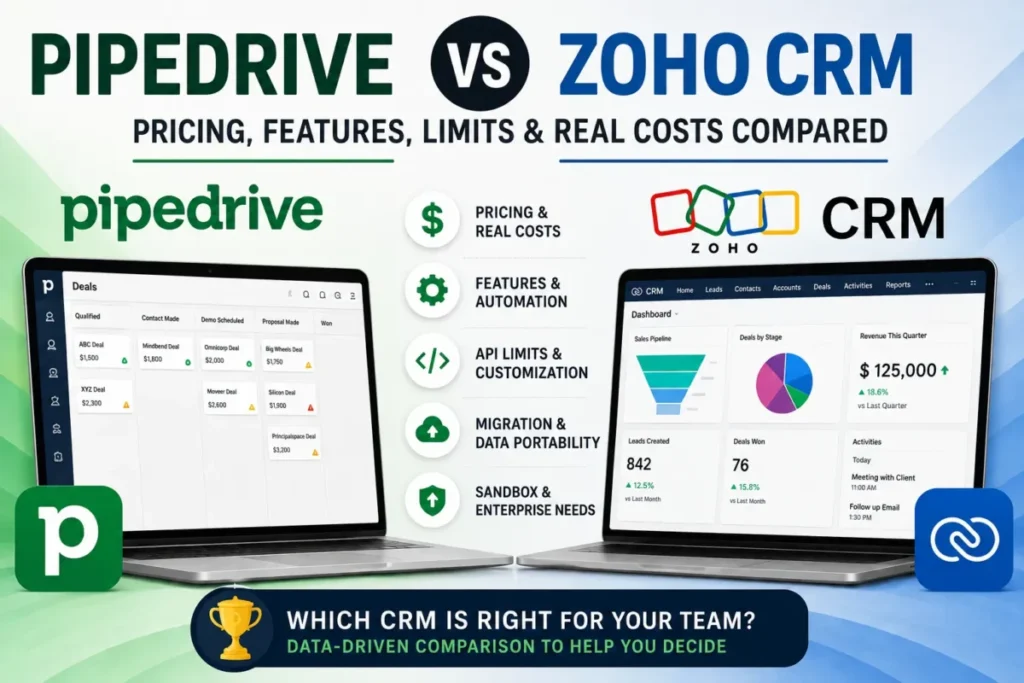
Both CRMs advertise a $14 entry seat, and that coincidence is what makes this decision harder than it looks. Pipedrive vs Zoho CRM stops being a price question the moment a sales team needs email sync and follow-up automation, because the two vendors gate those capabilities at different tiers.
The short version: Zoho CRM reaches most working sales setups at a lower license cost, and Pipedrive earns its premium only when a team deliberately wants a narrower, sales-first system. What follows is the plan gates, the usage ceilings, the migration direction, and the seat counts where that answer flips.
In This Article (23 sections)
Quick Verdict: Pipedrive vs Zoho CRM
| Decision category | Winner | Why |
|---|---|---|
| Permanent free plan for up to 3 users | Zoho CRM | Free is $0 for up to three users. Pipedrive publishes a 14-day trial and no free tier. |
| Headline entry price | Tie | Lite and Standard both list $14 per seat/ |
| Cheapest plan that includes email sync plus automation | Zoho CRM | Pipedrive opens automations at Growth ($39). Zoho Standard already carries workflows and cadences. |
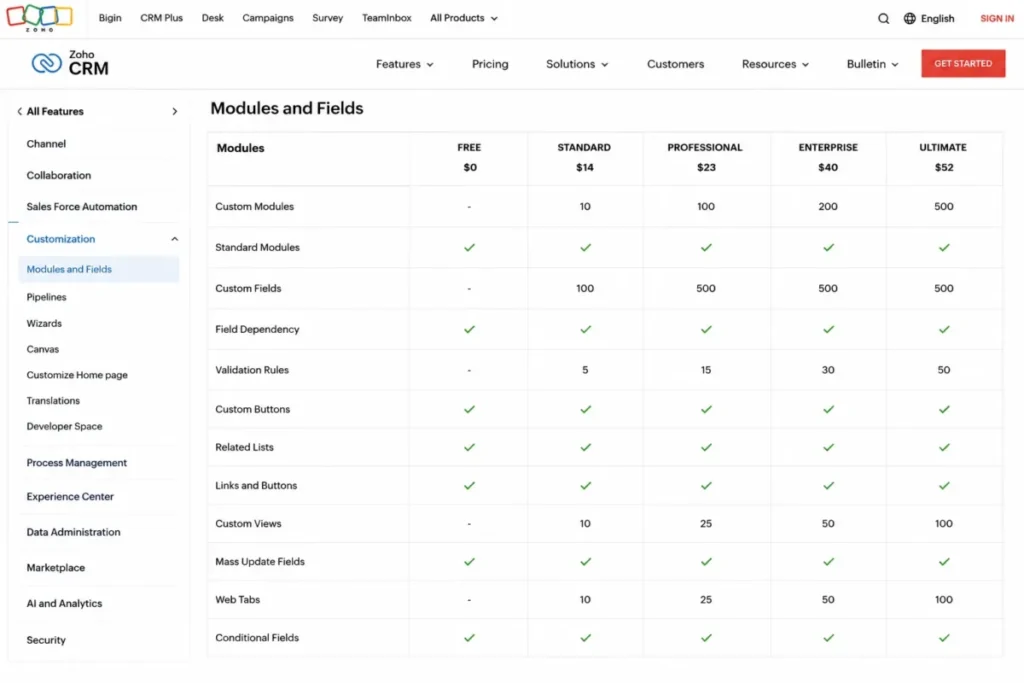
| Customization at the entry paid tier | Zoho CRM | Standard includes custom modules, capped at 10. |
| Enforced, staged process control | Zoho CRM | Blueprint starts at Professional and scales 3 / 50 / 100. |
| Automation capacity | Incomparable | Pipedrive counts active automations and executions. Zoho counts workflow rules per module. |
| Reporting capacity | Depends | Pipedrive Insights scale per user, 15 to 500. Zoho caps custom reports at 100 on Standard, unlimited above it. |
| API capacity model | Incomparable | Pipedrive publishes seat-scaled token budgets. Zoho publishes rolling 24-hour credits plus concurrency. |
| Sandbox at the lowest verified seat price | Zoho CRM | Enterprise at $40 carries sandboxes. The Pipedrive sandbox sits on Ultimate at $79. |
| Documented behavior at the data ceiling | Pipedrive | Waitlists, import skip files, 80% and 100% warnings, and a one-year waitlist deletion boundary are published. |
| Migration into the product | Depends | Pipedrive to Zoho runs on a native API route that excludes custom modules. Zoho to Pipedrive runs through Import2. |
| Support channels included | Depends | Pipedrive gives every user 24/7 chat and gates phone to Premium and Ultimate. Zoho includes Classic Support on paid plans and sells deeper support separately. |
| Mobile apps | Tie | Both publish iOS and Android apps. |
Read that table as thirteen separate decisions rather than a scoreboard. A three-person team that must not pay anything and a twenty-person team that must have a sandbox are answered by different rows, and neither answer generalizes to the other.
Pipedrive vs Zoho CRM at a Glance
| Attribute | Pipedrive | Zoho CRM |
|---|---|---|
| Vendor | Pipedrive | Zoho Corporation Pvt. Ltd. |
| Category | Sales-pipeline CRM | Customer relationship management platform |
| Free plan | Not offered | $0 for up to 3 users |
| Trial | 14 days, no credit card | Not covered by this evidence set |
| Entry paid plan | Lite, $14 per seat/ | Standard, $14 per user/ |
| Plan names | Lite, Growth, Premium, Ultimate | Free, Standard, Professional, Enterprise, Ultimate |
| Top published plan | Ultimate, $79 per seat/ | Ultimate, stated at $52 per user/ |
| Automation entry tier | Growth | Standard |
| Custom modules | Not covered by this evidence set | From Standard, capped at 10 |
| Sandbox from | Ultimate | Enterprise |
| Integrations advertised | 500+ | 1,200+ |
| Mobile | iPhone and Android | Android and iOS with offline sync |
Pipedrive rows: Pipedrive pricing and Pipedrive plan features. Zoho CRM rows: Zoho CRM pricing, Zoho CRM annual USD plan prices and the Zoho CRM edition feature list.
Two rows in that table carry “Not covered by this evidence set” rather than a dash, and the distinction matters. It records that no official page in this research set answered the question, which is a different fact from the capability being absent.
Methodology: How This Comparison Was Built
This comparison draws on official pricing pages, vendor help-center articles, edition feature lists, developer API documentation, migration knowledge-base articles, support-plan pages, and official mobile product pages for both CRMs. Prices and plan limits were checked on 2026-08-19 against US, USD sources.
Both products were assessed against the same buyer-focused criteria: usable entry tier, plan gates on email and automation, published usage ceilings, reporting and export capacity, API capacity, migration route and object coverage, admin and sandbox access, and support scope.
Greater weight went to the factors that change a purchase: the tier where a required workflow first becomes available, the ceiling that forces an upgrade, and the annual cost of the plan a team would actually run. Vendor positioning and marketing integration counts carried no weight in the verdicts.
Claims that could not be resolved to an official US source were excluded rather than estimated, including month-to-month prices for both products. The Zoho Ultimate figure carries its freshness qualification because its official page holds an older comparison note.
The wider SaaS CRM Review methodology covers sourcing and scoring in full.
The Two Products in Buyer Terms
Before the workflow comparisons, here is what each product is for, what it costs, and where it stops. Both profiles use the same decision fields in the same order so they can be read side by side.
Pipedrive: best for a sales team that wants one narrow system
- Best for:
- 5 to 20 person sales teams that run a visual pipeline, sync email, and want follow-up automation without building a platform.
- Avoid if:
- the budget must stay at zero, or the workflow needs deep low-tier customization and enterprise governance without paying for the top plan.
- Starting price:
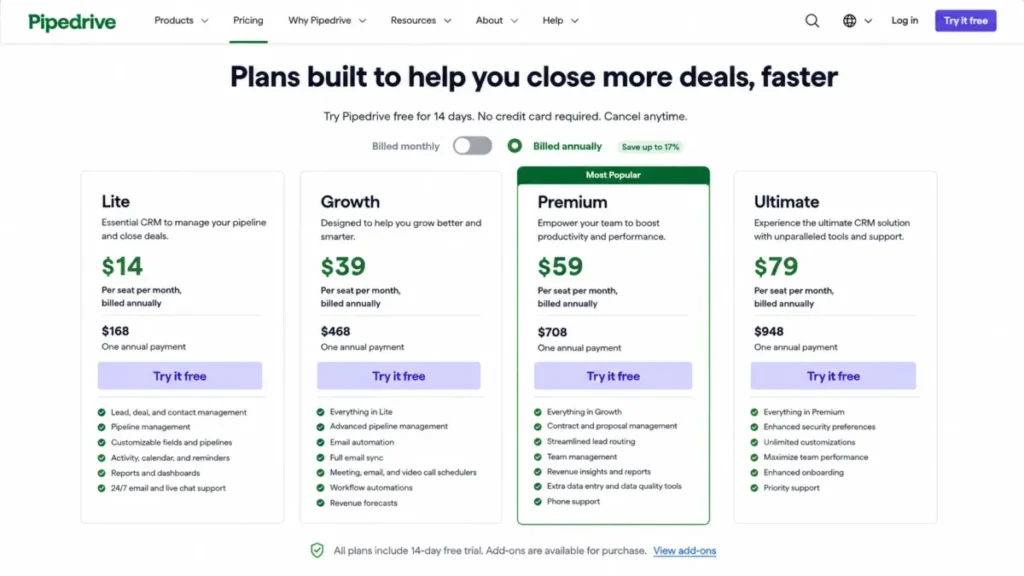
- $14 per seat/month billed annually on Lite, which is $168 per seat per year.
- Practical tier:
- Growth at $39 per seat/month billed annually, because email sync and automations start there.
- Free plan:
- Not offered. Pipedrive publishes a 14-day trial with no credit card required.
- First limit that bites:
- active automations, which are unavailable on Lite and capped at 50 per company on Growth.
Better than Zoho CRM at: publishing exactly what happens at the data ceiling, including waitlist and import skip behavior.
Worse than Zoho CRM at: the cost of reaching sandbox access, process governance, and custom objects.
- Setup difficulty:
- low for a pipeline-only start, medium once automation and enrichment add-ons enter the build.
- Hidden costs:
- the add-on layer. LeadBooster starts at $32.50, Smart Docs at $32.50, Web Visitors at $41, Projects at $16, and Campaigns at $13.33.
- Evidence status:
- plan prices, plan gates, usage ceilings, automation limits, API budgets, support eligibility, and the Import2 migration route all resolve to official Pipedrive pricing and help-center pages.
User sentiment: Not included. The third-party head-to-head evidence available for Pipedrive in this research set was read at snippet depth, which sits below the sampling standard used for sentiment claims.
Pipedrive has described itself as an easy and effective CRM for small and medium-sized companies since it was founded in 2010, and the plan structure follows that positioning closely. Growth is where the product becomes a working sales system rather than a pipeline board.
That concentration is the trade. A team gets email sync, tracking, nurturing sequences, forecasting, a meeting scheduler and automations in one Growth bundle, and pays the Growth premium over Lite for it.
Ownership is worth knowing before a renewal conversation. Pipedrive names Vista Equity Partners as its majority holder, alongside Bessemer Venture Partners, Insight Partners, Atomico and DTCP.
| Pros | Cons |
|---|---|
| Growth bundles email sync, tracking, sequences, forecasting and automation in one tier, so a sales team stops assembling capabilities across plans | No permanent free plan, so a three-person team on a zero budget is disqualified at the trial boundary |
| Lead and deal capacity scales with seats rather than sitting at a flat company number, which suits a team that adds reps before it adds records | Active automations are unavailable on Lite, which makes the $14 tier a pipeline board rather than a working sales system |
| Behavior at the ceiling is documented in detail, including the 80% and 100% admin warnings, so capacity problems are visible before they bite | Sandbox access sits on Ultimate at $79 per seat/ |
| Phone support is available on Premium and Ultimate for users with account-settings access, on top of 24/7 chat for everyone | The add-on layer starts at $13.33 and reaches $41, so the seat price is a floor rather than the budget |
Verdict: the stronger buy when a sales team values one focused system over configurability, and when Growth pricing survives the finance conversation. The full Pipedrive CRM review covers the product outside this head-to-head.
Zoho CRM: best for teams that need configurability early
- Best for:
- three-user teams that need a permanent free CRM, and 5 to 20 person teams that want workflows, custom objects, CPQ or process governance without paying top-tier prices.
- Avoid if:
- the team wants the narrowest possible sales interface and has no appetite for configuration work.
- Starting price:
- $0 on Free for up to three users, then $14 per user/month billed annually on Standard.
- Practical tier:
- Standard for a straightforward sales motion, Professional at $23 once CPQ, field-level security or Blueprint enter the requirement list.
- Free plan:
- Yes, described as forever free for up to three users.
- First limit that bites:
- the 10 custom-module cap on Standard, followed by the 250-per-day mass-email ceiling.
Better than Pipedrive at: delivering workflows, cadences, custom modules and sandbox access at a materially lower annual license cost.
Worse than Pipedrive at: arriving preconfigured. Configurability is the product, and configuration is work.
- Setup difficulty:
- medium on Standard, higher on Professional and Enterprise where Blueprint, portals and security models are the reason to be there.
- Hidden costs:
- deeper support. Classic Support ships with paid subscriptions, while Premium and Enterprise Support are separate paid services, and Jumpstart implementation is separate from onboarding guidance.
- Evidence status:
- annual USD prices, edition limits, API credit formulas, the Pipedrive migration route and its custom-module exclusion, audit-log retention, support tiers and mobile capabilities all resolve to official Zoho pages, with the Ultimate price carrying a freshness qualification.
User sentiment: Not included. The closest third-party head-to-head evidence in this research set compared Pipedrive with Zoho CRM Plus rather than Zoho CRM, and metrics do not transfer between those two products.
The most out-of-date belief on the current results page is that serious Zoho customization begins several editions up. Standard includes workflows and assignment rules, cadences, multiple pipelines and custom modules, which changes the entry-tier comparison entirely.
Professional is where the platform argument starts. CPQ, inventory management, field-level security, custom portals, Zia Agents and predictive intelligence all appear at $23 per user/month billed annually, below the price of Pipedrive Growth.
Enterprise is the governance tier. It carries enterprise security capabilities, account-based marketing, reporting hierarchy, Zia Agents and sandbox capabilities at $40 per user/month billed annually.
| Pros | Cons |
|---|---|
| Free supports up to three users permanently, which is the only zero-license-cost route in this comparison | Edition-specific ceilings are everywhere, so a plan that fits on paper can fail on mass email, exports or extension installs |
| Standard carries workflows, cadences, multiple pipelines and up to 10 custom modules at $14 per user/ | Blueprint, the enforced process engine, is unavailable on Free and Standard, so process governance is a Professional-tier purchase |
| Enterprise includes 3 configuration sandboxes plus 2 configuration-and-data sandboxes at $40 per user/ | The documented Pipedrive migration route does not support custom modules, which penalizes exactly the buyers who value Zoho for custom objects |
| API credits scale per user with published edition ceilings up to 5,000,000 on Enterprise, so integration capacity is knowable before purchase | Deeper support is a separate purchase, and assisted implementation through Jumpstart is separate again from onboarding guidance |
Verdict: the stronger buy for teams that need configurability, process control or sandbox access without paying a top-tier seat price. The standalone Zoho CRM review goes deeper on the product itself.
Workflow 1: Getting From Inbox to Closed Deal
The first workflow any sales team runs is the boring one. A lead arrives, it becomes a person and an organization, an email thread attaches to a deal, activities get scheduled, and the deal moves through stages until it closes.
Both products reconstruct that path from documented behavior in similar ways. The difference is the tier at which the path becomes complete.
Where the workflow becomes complete on each product
On Pipedrive, Lite is a pipeline with contacts on it. Full email sync, email tracking, nurturing sequences, forecasting, the meeting scheduler and the activity timeline all arrive on Growth, which is the tier where the inbox and the pipeline finally become one system.
On Zoho CRM, Standard already carries workflows and assignment rules, cadences and multiple pipelines. A team that wants sequenced outreach and rules-based routing gets it at the entry paid tier rather than the second one.
That single gap is the most consequential fact in this comparison. Matching $14 to $14 compares a pipeline board against a working sales system, and no feature table that lists both as “$14 entry” is telling a buyer the truth.
Ease of use and day-one setup
Pipedrive’s narrower scope is a real advantage for a team that does not want to make decisions. Fewer objects, fewer modules and a sales-first vocabulary mean fewer configuration choices between signup and first deal.
Zoho’s breadth is the mirror image. Custom modules, multiple pipelines, assignment rules and cadences on the entry tier are all things a team can build, and all things a team has to decide about.
Treat this as a staffing question rather than a software question. If nobody on the team owns CRM configuration, Pipedrive’s smaller surface protects the rollout; if someone does own it, Zoho’s entry tier pays that person back immediately.
Ease-of-use judgments here are editorial reads of documented plan scope and product structure, not measured task outcomes. Both vendors publish mobile apps for iPhone and Android, and Zoho also documents offline updates that synchronize later, which matters for field reps working without signal.
Workflow 2: Automation, Sequences, and Process Control
This is where the two products stop being comparable on a single axis, and where most competing comparisons put a checkmark in both columns and move on.
Pipedrive counts automations. Zoho counts workflow rules and, separately, Blueprint processes.
Those are different units measuring different things, and converting between them would be invention rather than analysis.
The published ceilings
| Automation constraint | Pipedrive | Zoho CRM |
|---|---|---|
| Entry tier for automation | Growth | Standard |
| Active automations per company | Not offered on Lite, 50 Growth, 150 Premium, 250 Ultimate | Not applicable; capacity is counted as workflow rules |
| Active workflow rules per module | Not applicable | 5 Free, 15 Standard, 40 Professional, 75 Enterprise, 100 Ultimate |
| Organization-level rule ceiling | Not applicable | 2,500 rules, up to 2,000 active |
| Actions inside one automation | 10 | Not covered by this evidence set |
| Wait conditions per automation | 3 Growth, 10 Premium, 10 Ultimate | Not covered by this evidence set |
| If/else branches per automation | 3 Growth, 10 Premium, 20 Ultimate | Not covered by this evidence set |
| Execution frequency ceiling | 10,000 per company per 10 minutes, 5,000 for a single automation | Not covered by this evidence set |
| Automated email send rate | 40 per minute per company | Not applicable; mass email is capped per day |
| Mass email per day per organization | Not covered by this evidence set | 250 Standard, 500 Professional, 1,000 Enterprise, 2,000 Ultimate |
| Enforced staged process | Not covered by this evidence set | Blueprint: not offered on Free or Standard, 3 Professional, 50 Enterprise, 100 Ultimate |
Source: Pipedrive usage limits, Pipedrive automation limits and the Zoho CRM edition feature list.
Published Automation and Workflow Ceilings by Plan
Pipedrive Active Automations per Company
Zoho CRM Active Workflow Rules per Module
What those numbers do to a real process
Ten actions per automation is generous for a routing rule and tight for a full handoff. A process that assigns an owner, updates two fields, creates a task, posts a notification, waits, checks a condition and then emails is already close to the Pipedrive ceiling. On Growth it also has to fit inside three wait conditions and three if/else branches.
The consequence is architectural. A branching process that would sit in one automation on Ultimate has to be split into several chained automations on Growth, and each split is a place where the process can silently stop.
Zoho’s constraint sits somewhere else. Rules are counted per module and capped per edition, so a team that builds heavily inside Deals hits 15 active rules on Standard while its other modules sit nearly empty.
Blueprint is the capability with no counterpart in this comparison. It is unavailable on Free and Standard, then scales to 3 processes on Professional, 50 on Enterprise and 100 on Ultimate, which makes it a clean upgrade trigger rather than a vague reason to spend more.
If a sales process needs enforced stages, mandatory fields at transitions and a defined path a rep cannot skip, Professional at $23 per user/month billed annually is the entry price for that requirement. No Pipedrive tier in this evidence set offers the same construct, which is an incomparable outcome rather than a loss.
The send-rate difference is easy to miss and expensive to discover late. Pipedrive caps automated email actions at 40 per minute per company, and automation or provider limit failures appear as Failed in automation history, so a launch that fires thousands of emails at once produces visible failures rather than a queue.
Workflow 3: Reporting, Forecasting, and Getting Data Back Out
Reporting is where both vendors put a checkmark and neither publishes the same unit.
Pipedrive limits Insights reports per user. Zoho limits custom reports per organization on its entry tier and then removes the cap.
| Reporting and data-out constraint | Pipedrive | Zoho CRM |
|---|---|---|
| Report ceiling | Insights reports: 15 Lite, 50 Growth, 250 Premium, 500 Ultimate, per user | Custom reports: 100 Standard, unlimited Professional, Enterprise and Ultimate |
| Forecasting | Included from Growth | Not covered by this evidence set |
| Records per module export | Not covered by this evidence set | 200,000 |
| Exports per day | Not covered by this evidence set | 10 Free, 100 Standard, 250 Professional, 500 Enterprise, 1,000 Ultimate |
| Audit history | Not covered by this evidence set | Last 3 years, exportable up to 1,000,000 entries unfiltered |
Pipedrive rows: Pipedrive usage limits and Pipedrive plan features. Zoho CRM rows: the Zoho CRM edition feature list and Zoho CRM audit logs.
Per-user report limits behave differently from per-organization ones as a team grows. Fifteen Insights reports per user on Lite is workable for a rep and thin for an operations owner who builds dashboards for everyone else.
Zoho’s 100-report cap on Standard is the opposite shape. It is a single shared pool, so it is generous for a small team and it becomes the reason a reporting-heavy team moves to Professional, where the cap disappears.
Two Pipedrive rows in that table are unknown rather than absent, and neither reads as a gap in the product. This evidence set did not resolve a Pipedrive audit-retention period or export ceiling from an official page, so no number belongs there.
Forecasting is the one place where the entry-tier advantage flips. Pipedrive includes forecasting from Growth as part of the same bundle that opens automation, so a team buying Growth is not making a second purchase decision to get it.
Matching Plans by Capability, Not by Headline Price
Comparing plans by name or by price is the fastest way to buy the wrong tier. Lite and Standard share a price and do not share a job.
| Buyer requirement | Pipedrive plan | Zoho CRM plan | Annual seat cost gap |
|---|---|---|---|
| Basic pipeline, contact and deal management, no free-plan requirement | Lite, $14 | Standard at $14, or Free when the team is three users or fewer | Level, or $168 per seat in Zoho’s favor on Free |
| Email sync plus workflow automation | Growth, $39 | Standard, $14 | $300 per seat per year in Zoho’s favor |
| Lead capture, scoring and richer permissions, against CPQ, process and customization | Premium, $59 | Professional, $23 | $432 per seat per year in Zoho’s favor |
| Sandbox and advanced administration | Ultimate, $79 | Enterprise, $40 | $468 per seat per year in Zoho’s favor |
Every price in that table is per seat or per user per month, billed annually, in USD for the US market. The gap column is this article’s arithmetic on those figures, not a vendor quote.
No pair in that table is feature-identical, and the mapping is by decision-critical requirement rather than by tier name. Pipedrive Premium and Zoho Professional sit on the same row because both are the tier where a team stops running a basic pipeline, not because they contain the same features.
Capability-Based Plan Ladder
Read the fourth column as the real subject of this comparison. A twenty-person team that needs sandbox access is looking at a $9,360 annual difference before anyone discusses which product they prefer.
Pricing Comparison: Starting Price vs Practical Tier
Every figure below is annual-effective: the per-seat monthly price a buyer pays when billing annually, in USD, for the US market. Month-to-month prices are excluded because this research set did not resolve current US monthly figures for either product from an official page.
| Plan | Pipedrive | Zoho CRM |
|---|---|---|
| Free | Not offered | $0 for up to 3 users |
| Entry | Lite, $14 per seat/ | Standard, $14 per user/ |
| Second tier | Growth, $39 per seat/ | Professional, $23 per user/ |
| Third tier | Premium, $59 per seat/ | Enterprise, $40 per user/ |
| Top tier | Ultimate, $79 per seat/ | Ultimate, stated at $52 per user/ |
Pipedrive plan prices: Pipedrive pricing. Zoho CRM Free and paid tiers: Zoho CRM free plan and Zoho CRM annual USD prices. Zoho CRM Ultimate: the official page stating $52 per user/month. The Ultimate figure sits on a live official page labelling its prices USD valid in the US, but that page holds an older comparison note. Treat the amount as officially stated rather than freshly confirmed.
Annual license cost by team size
| Plan | 3 users | 5 users | 10 users | 20 users |
|---|---|---|---|---|
| Pipedrive Lite | $504 | $840 | $1,680 | $3,360 |
| Pipedrive Growth | $1,404 | $2,340 | $4,680 | $9,360 |
| Pipedrive Premium | $2,124 | $3,540 | $7,080 | $14,160 |
| Pipedrive Ultimate | $2,844 | $4,740 | $9,480 | $18,960 |
| Zoho CRM Standard | $504 | $840 | $1,680 | $3,360 |
| Zoho CRM Professional | $828 | $1,380 | $2,760 | $5,520 |
| Zoho CRM Enterprise | $1,440 | $2,400 | $4,800 | $9,600 |
This table is license-only arithmetic over the annual-effective prices cited above, at seats multiplied by twelve months. It excludes taxes, add-ons, implementation, training and support upgrades.
Zoho Free is not shown because it applies only up to three users, where the cost is $0.
Annual License Cost by Team Size, US List Prices Billed Annually
The ten-user row is the one most buyers should sit with. A ten-person team that needs email sync and automation pays $4,680 a year on Pipedrive Growth against $1,680 on Zoho Standard, and $3,000 a year buys a lot of configuration help.
The comparison narrows at the top. Ten users on Pipedrive Ultimate costs $9,480 against $4,800 for Zoho Enterprise, and the Zoho tier is the one carrying documented sandbox capacity.
The costs that sit outside the seat price
Pipedrive’s add-on layer is published as starting amounts on the pricing page: LeadBooster from $32.50, Smart Docs from $32.50, Web Visitors from $41, Projects from $16 and Campaigns from $13.33. A team that adds lead capture and document signing to Growth is no longer running a $39 stack.
Capacity top-ups are the second line item. Pipedrive documents a top-up as one remedy when a usage ceiling is reached, and this research set did not resolve a current US price for it, so no figure belongs in a budget yet.
On the Zoho side, the outside-the-seat cost is service rather than software. Classic Support ships with paid subscriptions, while Premium and Enterprise Support are separate paid services, and assisted implementation through Jumpstart is separate from onboarding guidance.
Anyone budgeting from the entry seat alone will be wrong on both products. The detailed Pipedrive pricing plans and Zoho CRM pricing breakdowns carry the plan-by-plan cost work behind these figures.
Feature-by-Feature Comparison
Every row below applies one decision criterion to both products on the same basis. The first product column carries Pipedrive evidence from its official pricing and help-centre pages, and the second product column carries Zoho CRM evidence from its official edition feature list and API documentation.
Because the plan difference between the two usually decides the outcome, the winner column names a buyer-specific winner instead of a general one. A reader can therefore choose when a row matches their own constraint, and skip the rows that do not.
| Dimension | Pipedrive | Zoho CRM | Winner |
|---|---|---|---|
| Free tier | 14-day trial, no credit card, no permanent free plan | $0 for up to 3 users, described as forever free | Zoho CRM |
| Entry-tier capability | Pipeline, contacts and deals on Lite | Workflows, cadences, pipelines and custom modules on Standard | Zoho CRM |
| Email sync and tracking | From Growth | Included in the Standard capability set | Zoho CRM |
| Sales sequences | Nurturing sequences from Growth | Cadences from Standard | Zoho CRM |
| Forecasting | From Growth | Not covered by this evidence set | Pipedrive |
| Lead capture and scoring | LeadBooster, lead routing and custom scoring on Premium; LeadBooster also sold as an add-on from $32.50 | Not covered by this evidence set | Incomparable |
| Quote and order management | Not covered by this evidence set | CPQ and inventory management from Professional | Zoho CRM |
| Custom objects | Not covered by this evidence set | Custom modules from Standard: 10 Standard, 25 Professional, 200 Enterprise, 500 Ultimate | Zoho CRM |
| Enforced process stages | Not covered by this evidence set | Blueprint from Professional: 3, 50 and 100 by edition | Zoho CRM |
| Reporting ceiling | 15 to 500 Insights reports per user by plan | 100 custom reports on Standard, unlimited above | Depends |
| Automation ceiling | 50 to 250 active automations per company, 10 actions each | 15 to 100 active workflow rules per module, 2,500 org ceiling | Incomparable |
| API capacity | 30,000 to 210,000 tokens multiplied by seats, 100,000,000 maximum | Rolling 24-hour credits from 50,000 plus 250 to 2,000 per user | Incomparable |
| Sandbox | Ultimate | Enterprise: 3 configuration plus 2 configuration-and-data; Ultimate: 7 plus 3 | Zoho CRM |
| Data enrichment | Company data on Premium, phone and email on Ultimate | Zia data enrichment from Standard | Zoho CRM |
| E-signature | Contracts and e-signatures on Premium; Smart Docs also sold from $32.50 | Not covered by this evidence set | Pipedrive |
| Integrations advertised | 500+ | 1,200+, with installed Marketplace extensions capped by edition | Depends |
| Mobile | iPhone and Android | Android and iOS with documented offline update and sync | Zoho CRM |
Pipedrive rows: Pipedrive pricing, Pipedrive plan features, Pipedrive usage limits and Pipedrive automation limits. Zoho CRM edition rows: the Zoho CRM edition feature list, Zoho CRM Standard and Zoho CRM Professional. Zoho CRM API and mobile rows: Zoho CRM API limits and Zoho CRM mobile.
Counting the winner column would be a mistake, and it is the exact mistake that makes feature tables useless. Zoho takes more rows because it covers more ground, and a team that wants less ground covered is not losing anything by choosing the product that covers it.
The rows to weight are the ones that carry a price. Email sync, sequences, custom objects and sandbox each sit two tiers apart in cost between these products, and forecasting and e-signature sit inside a Pipedrive bundle rather than behind a separate purchase.
Limits at Scale: What Happens When You Reach the Ceiling
Most comparisons publish a capacity number and stop. The number matters less than the behavior, because the behavior decides whether a team notices the problem in a dashboard or in a missing deal.
Pipedrive publishes the more detailed failure model. Leads and deals scale with seats at 2,500 on Lite, 5,000 on Growth, 15,000 on Premium and 20,000 on Ultimate. Each figure multiplies by seat count and is capped at 300,000 per company.
At a general usage ceiling, existing data is retained and further manual creation of the exceeded data type is blocked. Administrators are warned at 80% and again at 100%, so the wall is visible before it arrives.
The part worth reading twice concerns records that arrive through a machine rather than a person. Excess deals created through automation, LeadBooster, the API or an import can be waitlisted or land in an import skip file, waitlisted deals can be deleted automatically after one year, and automatically generated excess leads can be discarded.
That is a data-loss risk with a schedule attached. A high-volume inbound team running near capacity can accumulate waitlisted deals that quietly expire twelve months later, and the remedies are archiving or deleting data, a top-up where available, or an upgrade.
Zoho’s ceilings are shaped differently and there are more of them. Custom modules stop at 10 on Standard, mass email stops at 250 per day per organization on Standard, installed Marketplace extensions stop at 5, and import batches stop at 10,000 records.
Neither model is better in the abstract. Pipedrive concentrates risk into one capacity number with documented overflow behavior, and Zoho spreads it across many edition-specific caps that each need checking against a real workload.
Integrations, API Capacity, and Marketplace Limits
The advertised integration counts are the least useful numbers on either vendor’s site. Pipedrive advertises 500+ and Zoho advertises 1,200+, and those figures use different definitions and prove nothing about what a given plan can install.
The number that binds is the edition cap. Zoho limits installed CRM Marketplace extensions to 0 on Free, 5 on Standard, 10 on Professional, 20 on Enterprise and 50 on Ultimate, and some extensions are unavailable on Standard and Professional.
A team on Standard with five extension slots and a stack that needs telephony, e-signature, accounting, a data warehouse connector and a scheduling tool has already spent them all. That is a plan-selection fact, not a footnote.
| API constraint | Pipedrive | Zoho CRM |
|---|---|---|
| Capacity unit | API tokens per company | API credits on a rolling 24-hour window |
| Entry capacity | 30,000 multiplied by seats on Lite | 5,000 on Free; 50,000 plus 250 per user on Standard, capped at 100,000 |
| Mid capacity | 60,000 multiplied by seats on Growth; 150,000 on Premium | 50,000 plus 500 per user on Professional, capped at 3,000,000 |
| Upper capacity | 210,000 multiplied by seats on Ultimate | 50,000 plus 1,000 per user on Enterprise, capped at 5,000,000 |
| Absolute maximum | 100,000,000 | 50,000 plus 2,000 per user on Ultimate, with no equivalent published maximum |
| Concurrency | Not covered by this evidence set | 5, 10, 15, 20 and 25 per organization or application from Free to Ultimate |
| Sub-concurrency | Not covered by this evidence set | 10 for listed resource-heavy APIs |
Source: Pipedrive usage limits and Zoho CRM API v8 limits.
Tokens and credits are not the same unit and must not be compared numerically. A Pipedrive token budget and a Zoho credit budget are consumed by different operations, and dividing one by the other produces a number with no meaning.
What is comparable is the shape. Pipedrive scales capacity with seat count, which suits a team whose integration load grows with headcount, while Zoho scales with a base plus a per-user increment under a hard edition cap, which suits a small team running a heavy integration.
Concurrency is the constraint most integration projects hit first, and only Zoho publishes it in this evidence set. Twenty concurrent calls on Enterprise with a separate ceiling of 10 for resource-heavy APIs is a real design constraint for a batch synchronization job.
AI Features Compared
Blanket statements that Zoho AI is an enterprise-only capability are out of date, and repeating them leads a buyer to the wrong tier. The accurate version is a capability ladder.
Zia data enrichment appears in the Standard capability set. Zia Agents and predictive intelligence appear on Professional, and Enterprise adds Zia Agents alongside its account-based marketing and reporting hierarchy.
Pipedrive’s AI in this evidence set is narrower and sits higher. AI multi-email tools arrive on Premium, packaged with LeadBooster, lead routing, custom scoring, company data enrichment and contracts with e-signatures.
The buyer consequence is a tier decision rather than a quality judgment. A team that wants AI-assisted enrichment on the cheapest paid plan finds it on Zoho Standard at $14, and a team that wants predictive scoring finds it on Zoho Professional at $23, below the Pipedrive tier where AI email assistance begins.
Nothing in this evidence set supports a claim about which vendor’s AI produces better output. Output quality claims need product evidence or reproducible benchmarks, and neither exists here, so this section stays a plan-gate comparison.
Support, Security, and Admin Controls
Support looks similar on both sides until the question becomes who picks up the phone and who pays for it.
Pipedrive provides 24/7 live chat to all users. Premium and Ultimate users with account-settings access are eligible for phone support, with English phone hours Monday to Friday, 07:00 to 23:00 CET or CEST. Chat coverage for everyone is genuinely unusual at a $14 entry tier.
Zoho includes Classic Support with paid subscriptions, covering email, call, chat and remote assistance, while the Free edition receives Basic Support. Premium and Enterprise Support are separate paid services.
Zoho also draws a line most buyers miss until the project starts. Onboarding specialists guide configuration, and Jumpstart is a separate assisted setup service, so “onboarding is included” and “implementation is included” are two different statements.
Sandbox and administrative depth
| Admin capability | Pipedrive | Zoho CRM |
|---|---|---|
| Sandbox availability | Ultimate | Not offered through Professional; Enterprise and Ultimate |
| Sandbox quantity | Not covered by this evidence set | Enterprise 3 configuration plus 2 configuration-and-data, Ultimate 7 plus 3 |
| Annual seat cost of the sandbox tier | $948 per seat | $480 per user on Enterprise |
| Field-level security | Not covered by this evidence set | From Professional |
| Security rules and alerts | Ultimate | Enterprise security capabilities |
| Audit history | Not covered by this evidence set | Last 3 years, exportable up to 1,000,000 entries |
Pipedrive sandbox and security rows: Pipedrive pricing. Zoho CRM admin rows: the Zoho CRM edition feature list and Zoho CRM Enterprise. Zoho CRM audit retention: Zoho CRM audit logs.
Sandbox economics are the cleanest financial argument in this comparison. If a safe place to test configuration changes is mandatory, the requirement costs $948 per seat per year on Pipedrive Ultimate and $480 per user per year on Zoho Enterprise.
The Pipedrive audit row is unknown rather than empty. No official Pipedrive page in this evidence set established a retention period, so a comparison against Zoho’s documented three-year window cannot be made honestly here, and an administrator who needs that number should confirm it with the vendor before signing.
Older comparisons that say Pipedrive has no sandbox are wrong at the time of writing. The Ultimate plan includes a sandbox testing account alongside security rules and alerts, phone and email data enrichment, and extended phone support.
Migration and Setup Difficulty
Switching direction changes the answer, and treating migration as one symmetric problem is where most comparisons fail their reader.
Leaving Pipedrive for Zoho CRM
Zoho documents a native migration from Pipedrive using a Pipedrive API token with an auto-populated instance URL. The documented mapping covers Organizations to Accounts, Persons to Contacts, Deals to Deals, plus Activities, Products, Users, Pictures and Files and Attachments.
One exclusion carries most of the risk. Custom modules are not supported in that API migration, which penalizes precisely the buyers who chose Zoho for custom objects in the first place.
Import volume is the second planning constraint. Zoho import batches are capped at 1,000 records on Free, 10,000 on Standard, 20,000 on Professional, 30,000 on Enterprise and 50,000 on Ultimate, and import history is retained for 60 days.
Leaving Zoho CRM for Pipedrive
Pipedrive documents migration from a previous CRM through third-party partner Import2, with Zoho CRM among the supported sources, and the process requires a global-admin user.
The cost boundary is published and generous. Import2 migration is documented as free up to 1,000,000 records, with paid migration above that threshold, which puts almost every SMB migration inside the free band.
The friction is dependency rather than price. A third-party partner sits in the middle of the move, and object-level mapping still needs auditing before anyone commits.
Migration Runs Differently in Each Direction
Pipedrive to Zoho CRM
- Organizations → Accounts
- Persons → Contacts
- Deals → Deals
- Activities
- Products
- Users
- Pictures
- Files and Attachments
Zoho CRM to Pipedrive
Paid migration applies above that threshold.
Setup and migration difficulty
| Setup dimension | Pipedrive | Zoho CRM |
|---|---|---|
| Initial configuration effort | Low for a pipeline-first start | Medium, because the entry tier already exposes custom modules and rules |
| Effort to reach the practical tier | Low: Growth arrives preconfigured as a bundle | Medium: Standard capability has to be built into a process |
| Migration difficulty inbound | Medium: third-party Import2 route with a global-admin requirement | Medium: native API route, higher when custom modules exist |
| Data-loss risk during migration | Audit object mapping before committing | Custom modules need a separate plan |
| Overall | Low to medium | Medium |
These difficulty ratings are editorial assessments built from the documented migration routes and plan scope above, not measured implementation times.
The rule for an operations owner is simple. Inventory custom objects, attachments, activity history, record ownership and automation before choosing a direction, because the migration route decides which of those survive automatically and which become a project.
Where Pipedrive Wins
A sales team that wants one system, not a platform. Growth concentrates email sync, tracking, nurturing sequences, forecasting, the meeting scheduler, the timeline and automations into a single purchase, so nobody has to decide what to build first.
Capacity that grows with the team rather than the org chart. Lead and deal limits multiply by seat count, so hiring a rep raises the ceiling instead of consuming it.
Knowing what happens when the ceiling arrives. Admin warnings at 80% and 100%, a documented block on manual creation, a waitlist for excess deals and a named one-year deletion boundary are all published. That is more operational detail than the Zoho ceilings carry in this evidence set.
Chat support at every price point. 24/7 live chat is available to all users, including on the $14 Lite tier, with phone support layered on at Premium and Ultimate.
Forecasting and e-signature inside a tier rather than beside it. Forecasting is part of Growth and contracts with e-signatures are part of Premium, so neither is a separate purchase decision for a team already on that plan.
Where Zoho CRM Wins
The only permanent zero-cost route. Free is $0 for up to three users and is described as forever free, against a 14-day Pipedrive trial.
Capability at the entry paid tier. Standard carries workflows, assignment rules, cadences, multiple pipelines, Zia data enrichment and up to 10 custom modules for the same $14 that buys a Pipedrive pipeline board.
Process governance with a published price. Blueprint starts at Professional with 3 processes, reaching 50 on Enterprise and 100 on Ultimate, and no equivalent construct appears on the Pipedrive side of this evidence set.
Sandbox access at roughly half the seat cost. Enterprise at $480 per user per year carries 3 configuration sandboxes plus 2 configuration-and-data sandboxes, against $948 per seat per year for Pipedrive Ultimate.
Published integration capacity. API credit formulas, edition caps up to 5,000,000 on Enterprise, concurrency limits and a separate sub-concurrency ceiling let an integration be designed before it is bought.
A native inbound migration route. Moving from Pipedrive runs on Zoho’s own documented API path rather than through a third party, provided custom modules are not part of the payload.
Who Should Choose Pipedrive?
A 5 to 20 person sales team that wants adoption more than configurability. The narrower object model and sales-first vocabulary reduce the number of decisions between signup and first closed deal, which is usually where CRM rollouts fail.
A team whose record volume grows with headcount. Seat-multiplied lead and deal capacity fits a business that adds reps before it adds a database.
A team that needs forecasting on the cheapest working tier. Forecasting is included from Growth rather than sitting behind a separate tier decision.
An operations owner who wants the failure mode documented. If capacity planning matters more than feature breadth, the published overflow behavior is worth real money.
A buyer who has priced the add-ons honestly. Growth plus LeadBooster from $32.50 is the shape of the real budget, and Pipedrive is the right call only when that number still works.
Who Should Choose Zoho CRM?
Any team of three or fewer with a hard zero-license budget. Free is the only option in this comparison that does not expire.
A five to twenty person team that needs email, workflow and cadences at the lowest cost. Standard at $840 a year for five users against $2,340 for Pipedrive Growth is a difference large enough to fund implementation help.
A revenue-operations team with real process requirements. CPQ, field-level security, custom portals and Blueprint on Professional at $23 per user/month billed annually is the cheapest route to governed process in this comparison.
An administrator who must test changes safely. Sandbox capacity starts on Enterprise, and the alternative in this comparison costs nearly twice as much per seat.
A team building a heavy integration. Published credit formulas and concurrency ceilings make capacity a design input rather than a discovery.
Who Should Avoid Both?
Teams that need a permanent free plan for more than three people. Zoho Free stops at three users and Pipedrive has no free tier, so a five-person team with a zero budget is not served by either product here.
Buyers who need current month-to-month pricing to make the decision. Neither product’s current US monthly figures were resolvable from an official page in this research set. A buyer who cannot commit to annual billing should get those numbers from the vendor before choosing.
Organizations whose critical data lives in custom objects and who plan to switch products soon. The Zoho migration route excludes custom modules and the Pipedrive route depends on a third-party partner, so a custom-object-heavy switch is a project either way.
Teams whose primary requirement is outside sales CRM entirely. If the real problem is support ticketing, marketing automation volume or a service desk, a sales-pipeline CRM comparison is answering a question that was not asked.
Alternatives to Pipedrive and Zoho CRM
If one of the disqualifiers above applies, the shortlist should change rather than the plan. The routing below is editorial, and this research set carries no verified pricing or limit evidence for any third product, so no figures are quoted for them.
| If the blocker is | Look toward | Why the route makes sense |
|---|---|---|
| A permanent free plan for more than three users | HubSpot | Commonly shortlisted by teams whose first constraint is free-tier headcount rather than feature depth |
| Enterprise governance beyond what Enterprise-tier pricing here supports | Salesforce | Commonly shortlisted when the requirement is a governance and platform model rather than a sales tool |
| A sales-first product at a lower seat cost than Pipedrive Growth | Freshsales | Commonly shortlisted by teams that want Pipedrive’s shape without Pipedrive’s second-tier price |
Treat that table as a direction, not a recommendation. Verify pricing, plan gates and limits on official pages before shortlisting, and the wider Pipedrive alternatives roundup covers the sales-CRM field in more depth.
Final Verdict
The decision in front of most buyers is not which CRM is better. It is whether a narrower, preassembled sales system is worth roughly $300 per seat per year more than a broader, configurable one at the tier where both actually work.
That is the weighting behind every verdict above. Plan gates and the annual cost of the practical tier carried the most weight, published ceilings and migration direction carried the next most, and advertised integration counts and vendor positioning carried none.
For a team of three or fewer that cannot spend, Zoho CRM wins on the only row that matters, because Free is $0 for up to three users and Pipedrive offers a trial.
For a five to twenty person team that needs email sync, cadences and automation, Zoho Standard delivers the requirement at $14 per user/month billed annually where Pipedrive needs Growth at $39. At ten users that is $1,680 against $4,680 a year, and the gap is the whole argument.
For a team that needs CPQ, field-level security, enforced process stages or sandbox access, Zoho Professional and Enterprise reach those requirements below the Pipedrive tier that matches them.
Pipedrive is the right answer in a narrower case, and it is a real one. A sales team that wants a single sales-shaped system, values forecasting and e-signature inside a bundle, needs capacity that scales with headcount and wants documented behavior at the ceiling is buying something Zoho does not sell, and it costs more.
What that choice costs is worth naming. Pipedrive buyers pay a higher seat price, an add-on layer starting at $13.33, and the most expensive route to a sandbox in this comparison. What they get back is a smaller system that a team is more likely to adopt without a configuration owner.
Zoho buyers pay in a different currency. Configurability is the product, edition-specific ceilings sit under most capabilities, deeper support is a separate purchase, and someone has to own the build.
Which CRM Fits, by Constraint
Continue to email sync and automation requirements.
The evidence in this comparison does not resolve one question a buyer may care about, and pretending otherwise would be worse than saying so. Neither vendor’s current US month-to-month price was confirmed here, so a buyer who needs monthly billing should ask for that figure directly before signing.
FAQ
These are the questions the body above leaves genuinely open, mostly at the boundary between a published figure and what a buyer still has to confirm with the vendor.
Which is cheaper, Pipedrive or Zoho CRM?
Zoho CRM, at every tier above the shared $14 entry price. Standard is $14 per user/month billed annually against $39 for Pipedrive Growth, Professional is $23 against $59 for Premium, and Enterprise is $40 against $79 for Ultimate.
Does Pipedrive have a free plan?
No. Pipedrive publishes a 14-day free trial with no credit card required, and no permanent free plan appears on its pricing page.
Can I move my custom modules from Pipedrive into Zoho CRM?
Not through the documented API migration. Zoho’s Pipedrive migration path covers organizations, persons, deals, activities, products, users, pictures and files, and states that custom modules are not supported, so those need a separate plan.
Which CRM has better automation?
Neither, in any way that survives a fair comparison, because the two vendors publish different units. Pipedrive caps active automations per company at 50 to 250 by plan with 10 actions each, and Zoho caps active workflow rules per module at 15 to 100 by edition under a 2,500-rule organization ceiling.
At what point does Pipedrive’s per-seat price stop being competitive?
At the moment email sync and automation become requirements, because that moves the practical tier to Growth at $39 while Zoho covers the same need on Standard at $14. At ten users the annual license gap is $3,000.
What happens if my Pipedrive account reaches its deal limit?
Existing data is retained and manual creation of the exceeded data type is blocked, with admin warnings at 80% and 100%. Deals created by automation, LeadBooster, the API or an import can be waitlisted or skipped, and waitlisted deals can be deleted automatically after one year.
Is Zoho CRM’s $52 Ultimate price current?
It appears on a live official Zoho page that labels its prices as USD valid in the US. That page also holds an older comparison note, so confirm the figure with Zoho before budgeting from it.