

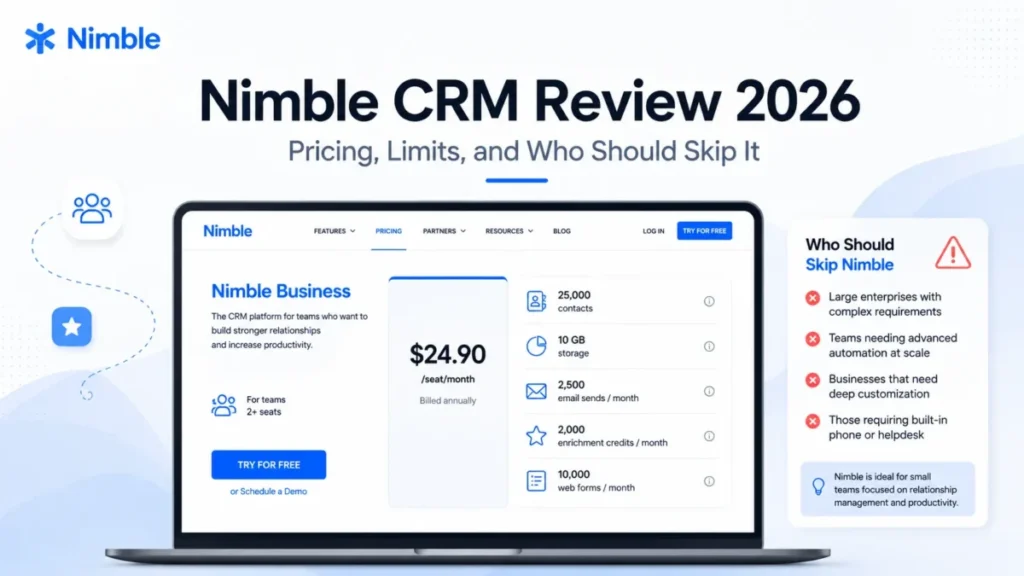
Nimble CRM is worth buying for a one to ten seat relationship-led team that already works out of Gmail or Outlook and wants contact context without running a configuration project. It is the wrong buy for high-volume outbound teams, for anyone who needs full-fidelity notes and email export, and for procurement teams that must see a formal enterprise control set before a trial starts.
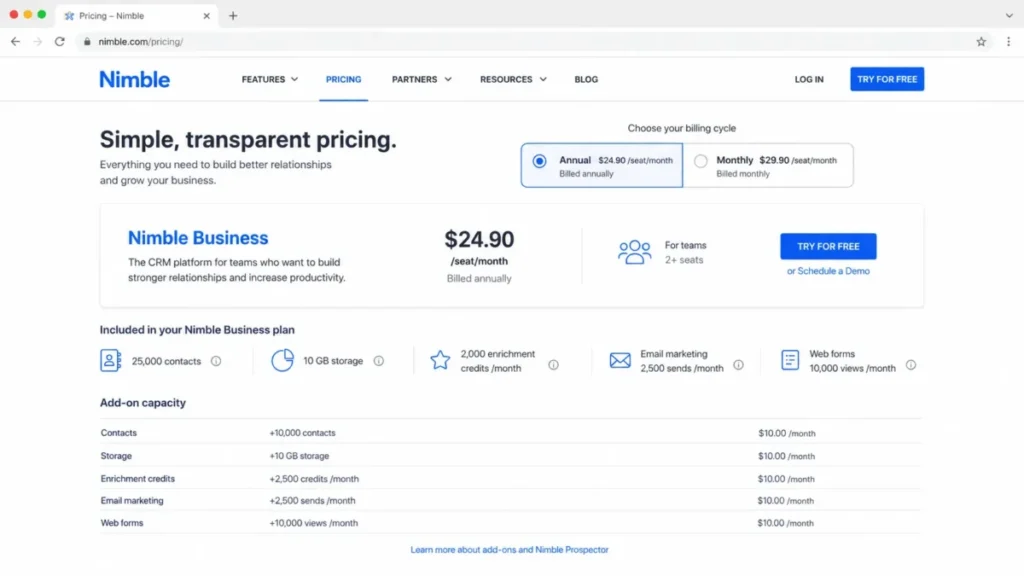
Pricing is simple because there is only one public paid plan. Nimble Business costs $24.90 per seat/month billed annually, or $29.90 per seat/month on monthly billing, according to Nimble’s official pricing page, checked August 3, 2026.
The risk in this purchase is not tier confusion. It sits in five capacity ceilings and two portability gaps that most reviews of this product never quantify.
This Nimble CRM review covers real cost at three, five, and ten seats, what happens at each documented limit, six reconstructed workflows, export exclusions, and the alternatives worth checking first.
In This Article (19 sections)
Quick verdict
| Category | Verdict |
|---|---|
| Best for | 1 to 10 seat consultants, agencies, recruiters, and founder-led B2B teams with moderate outreach volume |
| Not ideal for | High-volume outbound teams, attachment-heavy teams, and buyers who need full notes and email export |
| Starting price | $24.90 per seat/ |
| Best practical plan | Nimble Business on annual billing, chosen only after a trial confirms capacity fit |
| Free plan or trial | No free plan appears in the verified pricing evidence; 14-day trial, no credit card, up to 5 licenses |
| Setup difficulty | Medium. Mailbox connection is guided, but contact sync behavior differs by provider and duplicate cleanup is manual |
| Main strength | Relationship context assembled from the inbox and the browser rather than from manual data entry |
| Main limitation | Notes and email correspondence cannot be exported through the documented export flow |
| Best alternative | Pipedrive when deal execution matters more than relationship enrichment |
Source: Nimble pricing page and Nimble’s export documentation, checked August 3, 2026.
How we evaluated Nimble CRM
This review is based on Nimble’s official US pricing page, its help center articles, its published privacy policy, and labeled third-party evidence from independent reviewers and public user feedback. Pricing, plan allowances, and documented limits were checked on August 3, 2026.
Nimble was assessed against the same buyer-focused criteria applied to every CRM on this site: usable entry cost, plan allowances and their documented failure behavior, workflow fit, integration depth, migration and export completeness, administration controls, and support coverage.
Greater weight was given to the factors that change a decision after the first invoice, including capacity ceilings, per-license add-on cost, data portability, and the conditions that force a platform switch rather than a plan upgrade.
Claims that could not be verified from official documentation were excluded, and workflow descriptions follow documented product behavior. Introductory and time-limited pricing is labeled separately from standard pricing.
What Nimble CRM is, and what the category label hides
Nimble, Inc. operates Nimble, according to the company’s published privacy policy. The vendor positions the product as a relationship-focused CRM for small teams that combines contacts, email, pipeline management, workflow automation, and prospecting, per its official product positioning.
That positioning is accurate as a description of intent. It is misleading if a buyer reads “social CRM” the way the phrase was understood five years ago.
Full integration with most social networks, including Facebook and LinkedIn, is unavailable because of third-party API restrictions, and LinkedIn contacts have to be brought in by CSV instead. Source: Nimble’s email connection guide, checked August 3, 2026.
So the practical product is a contact and communication hub with browser-based enrichment, not a live pipe into social platforms. If you are shortlisting social CRM tools specifically for network synchronization, that distinction decides the purchase before pricing does.
For a team that mainly needs contact management with email history attached, the label matters less than the caps described below.
Nimble CRM pricing and true cost
One paid plan removes the usual tier puzzle. It also means the entire cost decision moves into seats and add-ons.
The published price list
| Item | Price | Billing basis | Buyer note |
|---|---|---|---|
| Nimble Business, annual | $24.90 | Per seat/ | The only public paid plan |
| Nimble Business, monthly | $29.90 | Per seat/ | $5.00 more per seat each month |
| Extra contacts | $10.00 | Per month, per 10,000 records | Base allowance is account-level |
| Extra storage | $10.00 | Per month, per 10 GB | Buy before the ceiling, not after |
| Extra enrichment credits | $10.00 | Per month, per 100 credits | Base is 25 credits per user/ |
| Email Marketing | $15.00 | Per company/ | Not included in the seat price |
| Web forms and web chat | $12.00 | Per team/ | Introductory period, not a permanent inclusion |
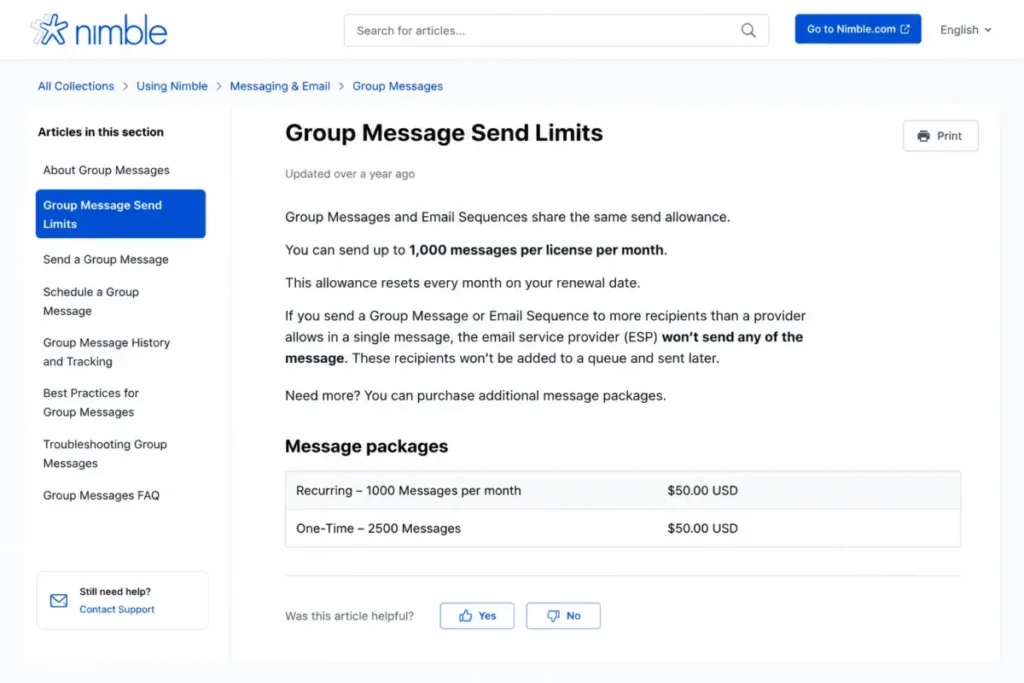
| Recurring message pack, 2,000 | $15.00 | Per license/ | Scales with senders, not with the company |
| Recurring message pack, 10,000 | $69.00 | Per license/ | |
| Recurring message pack, 25,000 | $99.00 | Per license/ | |
| One-time message pack, 2,000 | $19.00 | Per license | For a single campaign spike |
| One-time message pack, 10,000 | $75.00 | Per license | |
| One-time message pack, 25,000 | $110.00 | Per license | |
| Extra workflow automations | $10.00 | Per month, per 25 definitions |
Sources: Nimble pricing, Group Message send limits, and workflow automation documentation, checked August 3, 2026.
The annual discount, calculated
Annual billing saves $5.00 per seat each month. Over twelve months that is $60.00 per seat, or 16.7 percent against the monthly rate.
Formula: $29.90 minus $24.90 equals $5.00; $5.00 times 12 equals $60.00; $5.00 divided by $29.90 equals 16.7 percent. Source: Nimble pricing, checked August 3, 2026.
Sixteen percent is a real saving, not a reason to commit before a trial. Renewal, refund, and cancellation terms were not established in the reviewed billing documentation, so treat the annual commitment as a commitment.
Base cost at scale
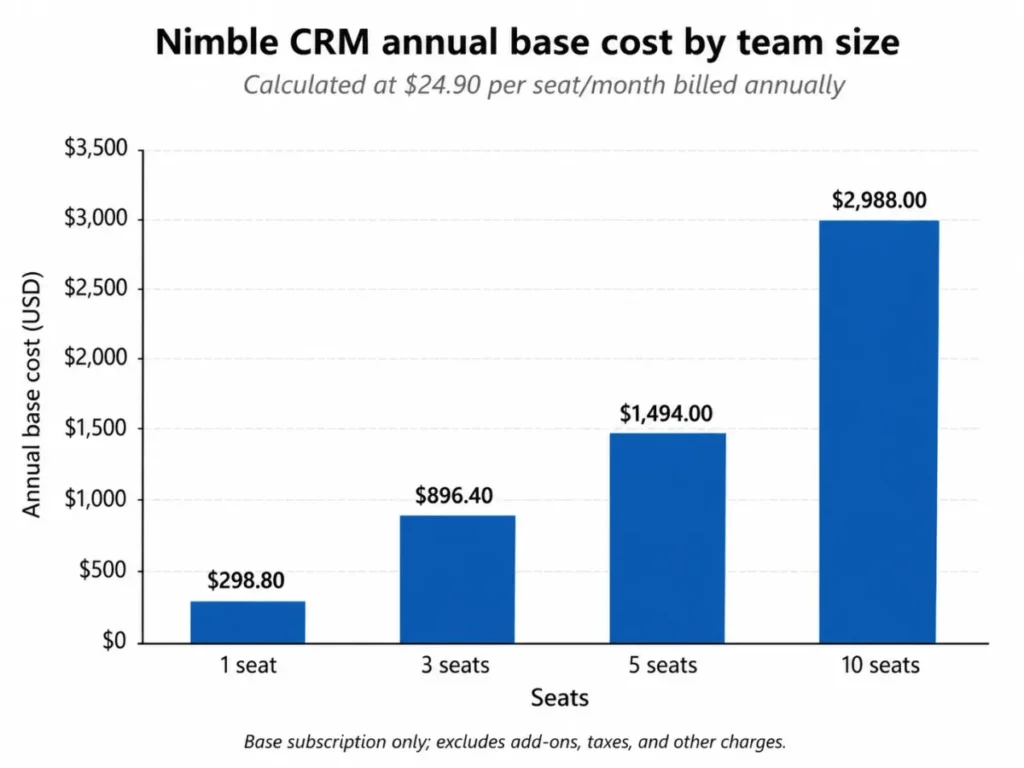
| Seats | Monthly equivalent, annual billing | Annual total |
|---|---|---|
| 1 | $24.90 | $298.80 |
| 3 | $74.70 | $896.40 |
| 5 | $124.50 | $1,494.00 |
| 10 | $249.00 | $2,988.00 |
Formula: $24.90 multiplied by seat count for the monthly equivalent, then multiplied by 12 for the annual total. Seat rate taken from Nimble’s published pricing, checked August 3, 2026.
Where the seat price stops being the budget
Two add-ons attach to the company or the team, and one attaches to every individual license. That third category is what moves a small invoice into a mid-size one.
A three-seat team that wants campaign sending and lead capture pays $74.70 for seats, $15.00 for Email Marketing, and $12.00 for web forms and chat. That is $101.70 per month, or $1,220.40 per year.
Add a recurring 2,000-message pack for each of those three senders and the same team pays $146.70 per month. Formula: $101.70 plus three packs at $15.00 equals $146.70.
At ten seats the pattern is sharper. Base seats plus Email Marketing plus web forms come to $276.00 per month, or $3,312.00 per year.
Give all ten licenses a 2,000-message pack and the monthly figure becomes $426.00, or $5,112.00 per year. Formula: $249.00 plus $15.00 plus $12.00 plus ten packs at $15.00 equals $426.00.
Those message packs alone add $150.00 per month, which is 60.2 percent of the base seat cost. Sources: Nimble pricing and Group Message send limits, checked August 3, 2026.
I would not budget from the $24.90 headline if more than two people on the team send outreach.
One billing rule worth putting in the calendar
Billing follows licenses purchased rather than users who are active, and mid-cycle additions are prorated for the remainder of the cycle. Source: Nimble billing policy, checked August 3, 2026.
A contractor who left in March keeps costing money until someone removes the license. Put a quarterly seat reconciliation in the ops calendar and that leak closes.
Where Nimble CRM limits change the buying decision
Most reviews list Nimble’s allowances. Very few say what happens when a team reaches one.
The buyer risk ledger
| Limit | Documented value | Behavior at the ceiling | Paid workaround | Who hits it first |
|---|---|---|---|---|
| Contact records | 25,000 per account | Upgrade prompt on the pricing page; exact block behavior is not published | $10.00 per month per 10,000 | Agencies, recruiters, network-heavy consultants |
| Storage | 2 GB per paid seat | New email synchronization stops until capacity increases | $10.00 per month per 10 GB | Teams with attachment-heavy threads |
| Outbound messages | 1,000 per license/ | Provider hourly and daily caps apply on top; recipients above the provider ceiling are not queued for later | $15.00 to $99.00 per license/ | Outbound sellers and marketers |
| Enrichment credits | 25 per user/ | Not published | $10.00 per month per 100 | Researchers and recruiters |
| Workflow automations | 25 definitions | Not published | $10.00 per month per 25 | Operations leads with many stages |
| Initial email history | Previous 90 days on first connection | Older mail stays outside Nimble | None published | Teams switching with long histories |
| Manual duplicate merge | 5 records at a time | Blocked beyond five | None published | Migration and data-quality leads |
| Trial | 14 days, up to 5 licenses | Trial ends | Purchase Nimble Business | Buying committees larger than five |
Contact, trial, and enrichment rows: Nimble pricing, checked August 3, 2026.
Storage and messaging rows: storage documentation and Group Message send limits, checked August 3, 2026.
Automation, email-history, and merge rows: workflow automation documentation, email connection guide, and duplicate merge documentation, checked August 3, 2026.
The contact cap is account-level, not per seat
A five-seat account does not get 125,000 contacts. The base allowance of 25,000 records is account-level, per the official pricing page, checked August 3, 2026.
For a recruiting firm importing a decade of candidate records, that ceiling arrives during migration rather than after a year of growth.
Storage exhaustion stops the thing you bought the product for
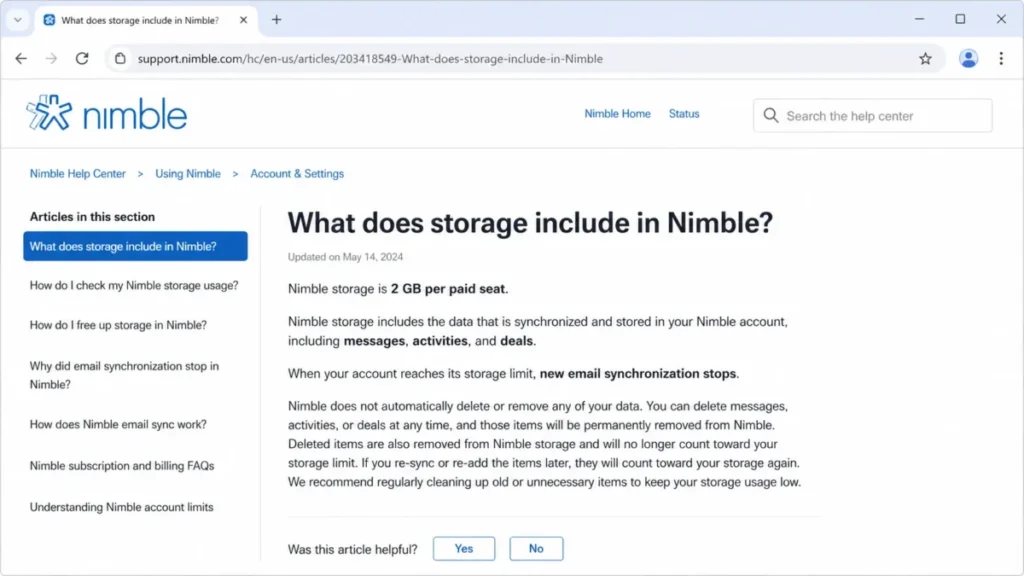
Storage is 2 GB per paid seat and covers messages, activities, and deals. When the account reaches its storage limit, new email synchronization stops until capacity is increased.
Allowance and stop behavior confirmed in Nimble’s storage help article, checked August 3, 2026.
Email context is the reason most buyers choose this product, so a ceiling that pauses email sync is a business-continuity limit rather than a housekeeping detail.
The cheap fix for storage is the dangerous one
Deleting an email in Nimble deletes it in the connected mailbox, and deleting it in the mailbox also removes it from Nimble. Source: Nimble storage documentation, checked August 3, 2026.
Deletion is not neutral cleanup here. It reaches into the system of record that finance, legal, and compliance rely on.
The safe sequence is to buy the 10 GB block first, archive outside Nimble second, and delete only after a signed-off retention decision. Telling a new admin to clear out old mail to free space creates a records problem.
Outbound overflow is skipped, not queued
Group Messages and Email Sequences share one allowance of 1,000 outbound messages per license per month, resetting at midnight in the local time zone. Nimble does not buffer sends above the connected provider’s hourly or daily limit, and recipients beyond that provider ceiling are not sent later automatically.
Source: Group Message send limits, checked August 3, 2026.
Two ceilings constrain the same action, and only one belongs to Nimble. A seller who selects 2,500 recipients against a lower Gmail or Microsoft ceiling does not get a queue and a retry.
That is the clearest scale trigger in the product. Segment lists, keep batches under both limits, and treat planned monthly volume as the trigger for a message pack or a dedicated sending platform.
Twenty-five automations means definitions, not runs
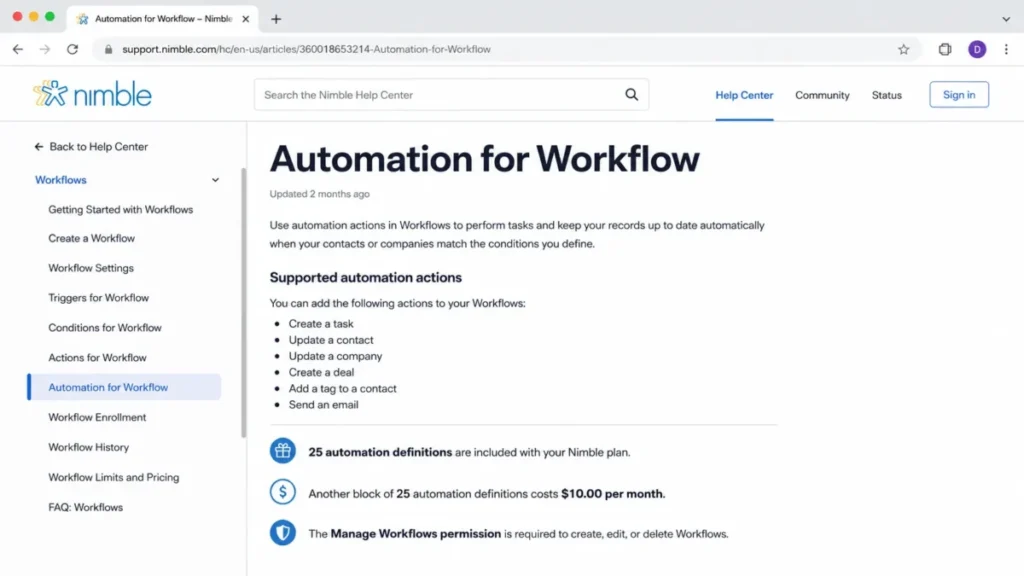
The product includes the ability to create 25 workflow automations, another 25 costs $10.00 per month, and workflow-management permission is required to configure them. Source: automation for workflow documentation, checked August 3, 2026.
Some competing reviews read that number as a monthly execution quota. It caps how many automation definitions exist, and no monthly run quota was verified in the official documentation.
Twenty-five definitions is tight for a team running several parallel processes, though it is not a limit on how often those definitions fire.
Nimble CRM feature gates by plan
| Capability | Included with Nimble Business | Condition or gate | Cost to extend |
|---|---|---|---|
| Workflow automations | 25 definitions | Manage Workflows permission, granted by an administrator | $10.00 per month per 25 |
| Contact records | 25,000 per account | Account-level allowance | $10.00 per month per 10,000 |
| Storage | 2 GB per paid seat | New email sync stops at the ceiling | $10.00 per month per 10 GB |
| Contact enrichment | 25 credits per user/ | Consumed by Nimble Prospector | $10.00 per month per 100 |
| Group Messages and Email Sequences | 1,000 per license/ | Connected provider limits also apply | $15.00 to $99.00 per license/ |
| Email Marketing | Not included | Separate company-level add-on | $15.00 per company/ |
| Web forms and web chat | Free for the first 30 days | Paid after the introductory period | $12.00 per team/ |
| Microsoft 365 contact sync | Automatic and two-way | Provider-dependent | Not purchasable |
| Google Contacts sync | One-way, once or weekly | Provider-dependent | Not purchasable |
| Workflow creation on mobile | Not available | Web application required | Not purchasable |
Sources: Nimble pricing, automation for workflow documentation, and mobile workflow documentation, checked August 3, 2026.
Three of those rows cannot be solved with money. Provider sync behavior and mobile workflow creation are architectural, so they either fit the team or they disqualify the product.
Key Nimble CRM features and the gate attached to each
Five capabilities carry most of the product’s value, and each one has a condition attached that decides whether it holds up at your team size.
Read the gate line in each block before the feature description, because the gate is what changes the budget.
Unified contact and communication record
The core use case is a contact record that carries email history, activities, and deal context in one place, which is what the product’s feature documentation describes as its center of gravity.
The gate is storage. At 2 GB per paid seat, that unified record stops absorbing new mail once the account ceiling is reached, so the feature’s value is bounded by a capacity decision rather than by a plan decision.
Nimble Prospector and contact enrichment
Prospector is the browser-side research tool that pulls contact detail into the CRM while a user is already looking at a profile or a company site. Each user receives 25 enrichment credits per month, and 100 additional credits cost $10.00 per month, per the pricing page, checked August 3, 2026.
Twenty-five credits is roughly one enrichment per working day. A recruiter or an outbound researcher will pass that in the first week, so treat the $10.00 pack as part of the base cost for those roles rather than as an optional extra.
Workflows and stage-triggered automation
Workflows give a shared board for moving contacts through a defined process, and automations can create an activity, add a note, assign a tag, send a browser or mobile notification, or add a contact to an email sequence when a stage changes. Action list taken from Nimble’s workflow automation article, checked August 3, 2026.
The gate here is permission rather than price. A user without Manage Workflows access cannot configure the automation layer at all, which pushes workflow design onto whoever holds the administrator role.
Group Messages and Email Sequences
These are the two outbound tools, and they draw from the same 1,000-message monthly pool per license.
Buyers frequently assume sequences and one-off group sends have separate allowances. They do not, which halves the effective capacity for any team running both at once.
Mobile apps for iPhone and Android
Existing workflows can be used on mobile: a rep can open a board, filter it, edit a contact, and move a record to another stage. Source: mobile workflow documentation, checked August 3, 2026.
Workflows must first be created in the web application, so a mobile-first manager finds the administration half of the job is desktop work.
Six practical Nimble CRM workflows
Each workflow below is reconstructed from Nimble’s official documentation, with the friction point and the operating consequence for the affected buyer named at the end.
Because each documented capability carries its own plan gate or limitation, I recommend reading the friction line first and choosing which workflows a trial has to prove.
1. Connect email, contacts, and calendar
Open Settings, then Email Settings. Choose the provider, authorize the mailbox through the provider flow, then select the available contact and calendar synchronization options and the preferred sending identity.
Supported connections include Gmail, Google Workspace, Microsoft 365, Outlook, and IMAP, and the initial synchronization covers the previous 90 days before continuing forward. Source: Nimble email connection guide, checked August 3, 2026.
Friction: relationship history older than 90 days does not arrive through this flow. Keep the source mailbox archive and record the cutover date, because the context a buyer is paying for starts at the connection, not at the beginning of the relationship.
2. Create a stage-triggered automation
Open the relevant workflow, open automation settings, choose the trigger tied to a stage change, then choose the action and save the definition.
Friction: 25 definitions are included, another 25 costs $10.00 per month, and the Manage Workflows permission controls who can build them at all.
Consolidate before you buy capacity. Several teams discover that four or five broad definitions replace fifteen narrow ones.
3. Send a segmented Group Message or Email Sequence
Build or select the recipient segment, confirm the connected provider’s hourly and daily send limits, compose, then send a batch that stays under both the Nimble monthly allowance and the provider ceiling.
Friction: the two limits are independent, and the provider ceiling is often the lower one. Recipients above it are not automatically queued for a later send.
The operational fix is list segmentation and scheduled batches, decided before the campaign rather than after a partial send.
4. Import contacts and companies from CSV
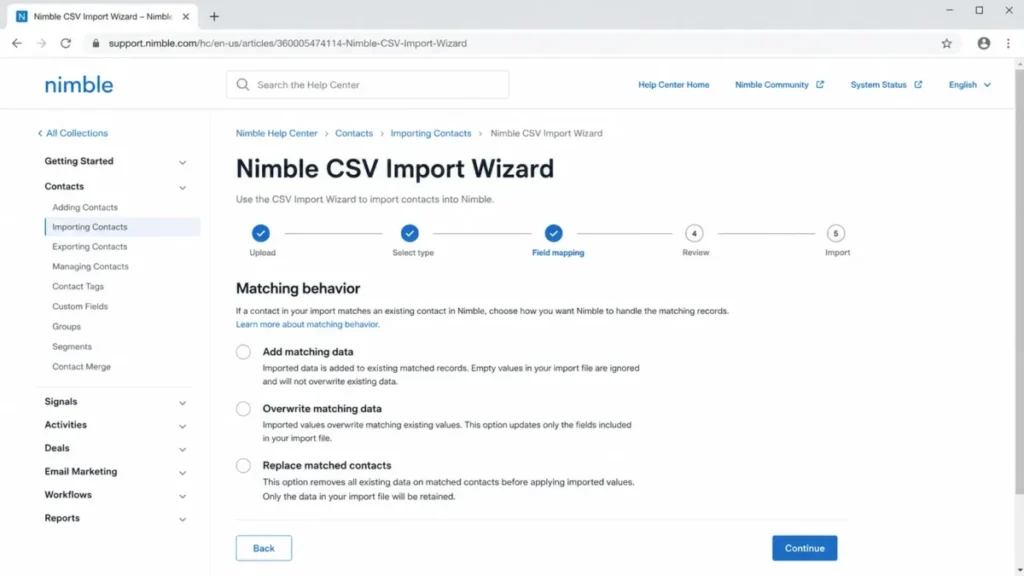
Prepare and deduplicate the file, open the CSV Import Wizard from Settings, upload, map standard and custom fields, then choose add, overwrite, or replace behavior for matching records.
The replace option removes all existing data on matched contacts before applying the imported values. Source: Nimble CSV Import Wizard documentation, checked August 3, 2026.
Friction: that third option is destructive and sits next to two safe ones in the same menu. Run a small validation import first, keep a full backup of the source file, and reconcile record counts before the full run.
5. Export data for reporting or switching
Open the Contacts, Deals, or Activities list, apply the intended filter, request a CSV export, and receive the file by email.
Friction: notes and email correspondence cannot be exported through this flow, per Nimble’s export help article, checked August 3, 2026.
If weekly notes export is part of a sales reporting routine, that requirement is not met here and it should end the evaluation early.
6. Run a workflow from the mobile app
Open Workflows in the app, select a board, filter to the contact, edit supported fields, and move the record to a new stage so any preconfigured automation triggers.
Friction: creation and administration stay in the web application.
Field teams get execution parity, field managers do not get configuration parity, and that is a different answer for a different role.
Setup, ease of use, and the first 90 days
Setup difficulty is medium, and the reason is not the interface. TechRadar’s 2026 evaluation describes the interface and contact enrichment as strengths while qualifying reporting depth, integration controls, storage, and support availability, per its published review.
The work sits in data. Duplicate cleanup is manual beyond five records at a time, per Nimble’s duplicate merge documentation, checked August 3, 2026, which makes pre-import hygiene the difference between a two-day rollout and a two-week one.
Set two checkpoints. At 30 days, every seat should have a connected mailbox, one shared workflow in use, and a documented rule for which system owns contact records.
At 90 days, measure storage per seat and monthly outbound volume against the ceilings in the risk ledger above. If either is above 70 percent, the add-on decision has already been made for you.
Pair the rollout with a written CRM implementation plan, because the failure mode here is data governance rather than software complexity.
Integrations, contact sync, and API coverage
Nimble lists more than 100 integration partners and more than 120 app integrations on its pricing page, checked August 3, 2026. That page does not classify which of them are native, partner-built, or connector-based.
Treat the count as a directional signal. For any integration that a workflow genuinely depends on, verify the connection type individually before purchase, because connector dependence changes cost, reliability, and who owns support when it breaks.
Google and Microsoft do not behave the same way
| Provider | Contact sync direction | Schedule |
|---|---|---|
| Microsoft 365 | Two-way, automatic | Schedule options available |
| Google Contacts | One-way | Once or weekly |
Source: Nimble pricing page, checked August 3, 2026.
A Google Workspace team that edits contacts outside the CRM will produce two diverging records over time. Decide which system is the record of truth before rollout, then enforce it, because the sync asymmetry will not resolve itself.
API coverage is partial, and the rate limit is unpublished
An administrator creates the API token. Documented REST operations cover contact creation, updates and deletion, custom fields, groups, notes, and activity creation, while some read and merge operations are not implemented in the cited documentation.
Source: Nimble API access documentation, checked August 3, 2026.
No official request-rate ceiling appears in that documentation. That is an unknown rather than an absence, so a technical buyer planning a sync service should get written confirmation from the vendor before scoping the build.
Security, support, and admin controls
The privacy policy states participation in the EU-US Data Privacy Framework, the UK Extension, and the Swiss-US Data Privacy Framework, and states that sensitive information is transmitted using SSL. It also documents administrator controls over access restriction and suspension, account information, third-party integrations, and user details.
Framework participation and admin controls appear in Nimble’s published privacy policy, checked August 3, 2026.
That is narrower than many buyers assume from the word “secure”.
| Control | Status in the reviewed official evidence |
|---|---|
| Data Privacy Framework participation | Verified in the privacy policy |
| SSL transmission of sensitive information | Verified in the privacy policy |
| Administrator access and integration controls | Verified in the privacy policy |
| SOC 2, ISO certification, HIPAA eligibility | Not verified; confirm with the vendor |
| SSO, SCIM, audit logs | Not verified; confirm with the vendor |
| Encryption at rest, recovery objectives, backup cadence | Not verified; confirm with the vendor |
Source: Nimble privacy policy, checked August 3, 2026.
Nothing in that table says those controls are missing. It says a procurement team must request a security packet directly rather than documenting them from public sources.
Support runs Monday through Friday, 9:00 a.m. to 5:00 p.m. Pacific Time, with email, webinars, question-and-answer sessions, and guided screenshare sessions, per Nimble’s onboarding documentation.
There is no dedicated support phone number, though appointments and support messaging are available, per the support contact article, both checked August 3, 2026.
For a team whose sales day starts at 8:00 a.m. Eastern, that window covers the afternoon only, so escalation planning matters more here than in a product with round-the-clock chat.
No official first-response or resolution SLA was verified. An East Coast team loses the last two hours of its day, and a European team overlaps by almost nothing.
Migration, export, and offboarding risk
The switching risk in this product is not field mapping. It is that communication history does not travel in both directions.
| Object | Included in the documented CSV export |
|---|---|
| Contacts | Yes |
| Deals | Yes |
| Activities | Yes |
| Notes | No |
| Email correspondence | No |
| Attachments | Not established in the reviewed documentation |
Source: Nimble export documentation, checked August 3, 2026.
A public CRM buyer question raised exactly this point, identifying the inability to export notes as a practical reporting and migration blocker rather than a theoretical one.
Combine that with the 90-day initial sync boundary and the shape of the risk is clear: older history never fully enters, and notes never fully leave.
Offboarding checklist
- Export contacts, deals, and activities to CSV before any cancellation date.
- Reconcile exported row counts against in-product record counts.
- Preserve the connected mailbox archive separately, since email correspondence is outside the export.
- Capture notes through a separate retention plan agreed with whoever owns the account.
- Document the original cutover date so the 90-day history boundary is visible to the next system’s owner.
- Validate the destination import with a small subset before moving the full file.
Read a general CRM migration guide alongside the vendor documentation, because sequencing matters more than tooling here.
Nimble CRM limitations
- Storage stops email sync. At 2 GB per paid seat, reaching the ceiling halts new email synchronization until capacity is added, which interrupts the product’s primary value.
- Bidirectional email deletion. Removing a message in Nimble removes it from the connected mailbox, so storage cleanup carries a records-retention consequence.
- Outbound overflow is not buffered. Recipients above the connected provider’s hourly or daily ceiling are not queued for a later send.
- Notes and email correspondence are not exportable. The documented export covers contacts, deals, and activities only.
- Google Contacts sync is one-way. Microsoft 365 receives automatic two-way contact sync, and Google Workspace teams do not get the same behavior.
- Enterprise controls are undocumented publicly. SOC 2, SSO, SCIM, audit logs, encryption at rest, and recovery objectives were not verified in the official sources reviewed.
Nimble CRM pros and cons
| Pros | Cons |
|---|---|
| One paid plan at $24.90 per seat/ | Per-license message packs can add 60.2 percent to a ten-seat base cost before any other add-on |
| Contact records combine email history, activities, and deals without manual entry | The 25,000-contact allowance is account-level, so a five-seat team does not get 125,000 records |
| Prospector enrichment fits browser-based research rather than requiring a separate tool | 25 enrichment credits per user/ |
| Microsoft 365 users get automatic two-way contact sync with schedule options | Google Contacts users get one-way sync, running once or weekly |
| Mobile apps let field reps move records through existing workflows and trigger automation | Workflow creation is web-only, so a mobile-first manager cannot administer process |
| Documented CSV import maps standard and custom fields for contacts and companies in one file | The replace-matched option removes existing data on matched records and sits alongside two safe options |
Sources for the figures in this table: Nimble pricing and Nimble CSV Import Wizard documentation, checked August 3, 2026.
What independent reviewers and users report
Published sentiment is consistent enough to be useful, and it lines up with the documented limits rather than contradicting them. These are recurring themes from named sources, not a counted review sample.
Reviews on TrustRadius include praise for contact organization and email visibility, alongside criticism of price, setup friction, group-message visibility, and pipeline depth.
TechRadar’s 2026 evaluation praises usability and enrichment while qualifying reporting customization, integration controls, storage, and support availability.
One public forum discussion describes Nimble as useful for managing a consulting network but less relevant for deal and opportunity management. That single account is not representative prevalence, though it matches the product’s documented emphasis on contact context over pipeline depth.
The pattern is consistent: the relationship layer earns praise, and reporting, sending, and pipeline depth attract the complaints.
Who Nimble CRM is best for and who should skip it
Fit here depends on three variables: seat count, monthly outbound volume, and whether communication history has to leave the system intact.
The cohorts below are grouped by how those three variables land, not by company size alone.
Strong fit
One to three person consulting practices. A relationship network maintained from Gmail or Outlook, moderate deal complexity, and record volume comfortably under the account ceiling. Enrichment credits at 25 per user monthly are usually enough at this size.
Three to ten person relationship-led B2B agencies. Shared contacts, pipelines, and workflows earn their keep here, provided the team budgets per-license outreach capacity and reconciles purchased seats quarterly.
Conditional fit
Recruiting and executive-search teams. Prospector and relationship context fit the job, but the account-level contact cap, the enrichment allowance, the export exclusions, and the social API restrictions all need validating during the 14-day trial before an annual commitment.
Real-estate and field-sales teams. Mobile execution works for reps. Verify that web-only workflow creation and weekday Pacific support hours match how the team operates in the field.
Skip it
High-volume outbound sales development teams. Provider limits are not buffered, the included messaging pool is shared across two tools, and per-license packs dominate the total. A dedicated sending platform is the better spend.
Regulated buyers and formal enterprise procurement. If SOC 2, SSO, SCIM, audit logs, or published recovery objectives must be documented before a trial begins, this evaluation cannot proceed from public evidence alone.
Teams that need full-fidelity portability. If notes or email correspondence must be exportable for reporting, compliance, or a planned switch, the documented export does not meet the requirement.
Teams whose primary job is opportunity management. Independent reviewers repeatedly qualify pipeline and reporting depth, and the official research did not establish enterprise-level reporting customization.
Buyers still narrowing the field will get more from a category shortlist of CRM software for small business than from a second look at this product.
Nimble CRM alternatives
| Alternative | Choose it when | Trade-off against Nimble |
|---|---|---|
| Pipedrive | Deal execution, pipeline visibility, and sales-process depth are the primary jobs | Less relationship enrichment and inbox-centered context |
| HubSpot CRM | Inbound marketing and a broader platform ecosystem matter more than single-plan simplicity | A larger surface to administer and a different pricing model |
| Zoho CRM | Customization, module depth, and administrative breadth are required | More configuration work before the first useful workflow |
| Bitrix24 | Flat-fee breadth and team collaboration outweigh a focused CRM | A wider suite with less relationship-specific focus |
Teams that lose Nimble on pipeline depth should read the Pipedrive CRM review first, and teams that lose it on marketing breadth should start with the HubSpot CRM review.
If configuration depth is the requirement, the Zoho CRM review covers the trade-off, and the Bitrix24 review covers the flat-fee route. Current pricing and plan limits for each alternative are verified in its own review rather than imported here.
Final verdict: is Nimble CRM worth it in 2026?
For a one to ten seat consultative team that sells through relationships and works from an inbox, Nimble Business at $24.90 per seat/month on annual billing is a defensible purchase. The single plan removes tier risk, the contact record does genuine work, and the entry cost is modest against most CRM alternatives.
For an outbound team, a regulated buyer, or anyone with a portability requirement, it is not.
I recommend running the 14-day trial as a capacity test rather than a feature tour. Import a representative slice of contacts, connect one mailbox, measure storage consumption per seat, send one realistic batch against the actual provider ceiling, and attempt an export of everything you would need if you left.
If all five of those pass, buy annual and take the $60.00 per seat yearly saving. If storage or outbound volume is already near the ceiling in a two-week trial, the add-ons are not optional and the real budget is the $426.00 per month ten-seat figure, not the $249.00 one.
The question to answer before the first renewal is simple. Can the team reconstruct a customer relationship from what Nimble would hand back on the way out, and if not, is the context worth the lock-in?
Nimble CRM FAQ
These answers cover the questions that decide the purchase: cost, capacity ceilings, integration behavior, portability, and security documentation.
How much does Nimble CRM cost?
Nimble Business costs $24.90 per seat/month billed annually, or $29.90 per seat/month billed monthly, in the US market as of August 3, 2026. There is one public paid plan.
Add-ons for extra contacts, storage, enrichment credits, email marketing, web forms, outbound message packs, and extra automations are priced separately.
Does Nimble CRM have a free plan?
No perpetual free plan appears in the verified pricing evidence. Nimble offers a 14-day trial that requires no credit card and supports up to five licenses.
Teams with a buying committee larger than five will need to limit evaluators or contact the vendor. Buyers who need a permanently free option should compare dedicated free CRM software instead.
Can Nimble CRM export notes and emails?
No. The documented export flow covers contacts, deals, and activities as CSV files delivered by email.
Notes and email correspondence are excluded, and attachment handling was not established in the reviewed documentation. Any team with a weekly notes-export requirement or a planned migration should treat this as a decision-critical gap rather than an inconvenience.
What happens when Nimble CRM storage is full?
New email synchronization stops until capacity is increased, and the allowance that triggers it is the per-seat figure described earlier in this review.
The documented fix is a 10 GB block at $10.00 per month. Deleting email to free space is risky because deletion in Nimble also removes the message from the connected mailbox.
Does Nimble CRM integrate with LinkedIn?
Not as a full integration. Official documentation states that full integration is unavailable for most social networks, including Facebook and LinkedIn, because of third-party API restrictions.
LinkedIn contacts can be imported by CSV instead. Buyers who read “social CRM” as live network synchronization should verify this before shortlisting the product.
Does Google Contacts sync both ways with Nimble?
No. Microsoft 365 contact synchronization is documented as automatic and two-way with schedule options, while Google Contacts synchronization is one-way and runs either once or weekly.
Google Workspace teams that edit contacts outside the CRM should define a single system of record before rollout to avoid diverging duplicate records.
How many workflow automations does Nimble include?
The product includes the ability to create 25 workflow automations, and another 25 definitions cost $10.00 per month. That figure caps how many automation definitions exist rather than how many times they run, and no monthly execution quota was verified in the official documentation.
Configuring them requires the Manage Workflows permission from an administrator.
Will Nimble send the rest of my batch after Gmail hits its send limit?
No. Nimble does not buffer sends above the connected provider’s hourly or daily limit, and recipients beyond that ceiling are not sent later automatically.
The included allowance of 1,000 messages per license per month is shared between Group Messages and Email Sequences. Segment recipient lists and schedule smaller batches that stay under both limits.
Is Nimble CRM secure enough for enterprise procurement?
The privacy policy documents Data Privacy Framework participation, SSL transmission of sensitive information, and administrator controls over access and integrations. It does not document SOC 2, ISO certification, HIPAA eligibility, SSO, SCIM, audit logs, encryption at rest, or recovery objectives.
Procurement teams that require those controls should request a current security packet before starting a trial.
Who is Nimble CRM best for?
One to ten seat relationship-led teams: solo consultants, small B2B agencies, founder-led sales teams, and recruiters with moderate data volume and moderate outreach. It suits teams that live in Gmail or Outlook and want contact context without a configuration project.
It fits poorly for high-volume outbound, regulated procurement, and deep opportunity management.


Pingback: Nimble vs Copper 2026: Pricing, Features and Who Each Fits
Pingback: HubSpot vs Nimble (2026): Pricing, Features & Verdict