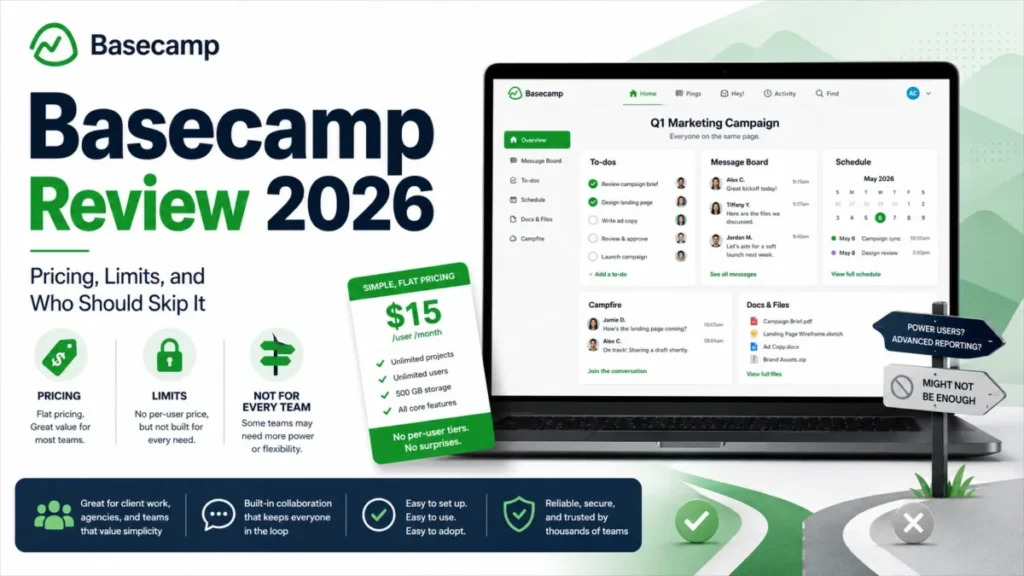
Basecamp’s 2026 buying decision is not a feature argument. It is an arithmetic problem with two hard disqualifiers attached.
The arithmetic: Pro bills $15 per employee per month, Pro Unlimited bills $299 per month on an annual term, and the crossover sits at exactly 20 billed employees. The disqualifiers: there is no SSO or SAML login, and progress reporting is a dot a human drags across a chart.
If either of those ends your evaluation, stop here and look at broader project management software instead. If neither does, Basecamp is one of the few team collaboration tools priced so that client seats cost nothing.
In This Article (15 sections)
Quick Verdict
| Decision field | Verdict |
|---|---|
| Best for | 5 to 25 person client-service and distributed teams that run on written updates instead of meetings |
| Not ideal for | Teams needing SSO, dependency scheduling, capacity planning, or portfolio analytics |
| Starting price | $0 on Free; $15 per billed employee per month on Pro |
| Practical plan | Pro, below 20 billed employees and without both paid add-ons |
| Free plan and trial | Permanent Free plan with 1 active project, 20 users, 1 GB; Pro Unlimited carries a 60-day trial |
| Setup difficulty | Low interface complexity, moderate process design, because new projects start blank |
| Main strength | Client collaborators and contractors are free on Pro, so external headcount never inflates the bill |
| Main limitation | No SSO or SAML, and Hill Chart progress is updated by hand at to-do-list level |
| Best alternative | Any platform that publishes SAML support, if identity governance is the blocker; confirm on that vendor’s own security documentation |
Source: Basecamp official pricing page and Basecamp help documentation, checked August 5, 2026, for the US market in USD, billed per employee per month on Pro and per account per month on an annual term for Pro Unlimited (evidence status: verified).
Basecamp Pros and Cons
| Pros | Cons |
|---|---|
| Invited clients and contractors are free on Pro, so a 5-person agency with 15 client contacts still pays for 5 seats | No SSO or SAML login, which ends the evaluation for most IT-governed buyers |
| Flat $299 Pro Unlimited price removes seat math entirely above 20 employees | Hill Charts never update themselves and track whole to-do lists, not individual tasks |
| Client-facing content is private by default and shared item by item | Account-wide 2FA enforcement covers team users but cannot be forced on clients |
| Automatic Check-ins collect recurring written updates in one place instead of a standing meeting | Only the account owner can export, and the export is an HTML archive rather than a structured file set |
| Pro Unlimited bundles Timesheet, Admin Pro Pack, onboarding, and priority support at no extra line item | Two $50 monthly add-ons on Pro can quietly add $1,200 a year before anyone notices |
| Apps ship for iOS, Android, macOS, Windows, web, and the command line | Basecamp 5 changed the interface enough that recent public feedback from existing users is split |
What Is Basecamp?
Basecamp is a project and team collaboration workspace from 37signals that puts message boards, to-dos, schedules, Docs and Files, chat, Pings, Automatic Check-ins, reports, and cross-project views inside one project container. Its feature documentation frames it as a single place for work communication rather than a configurable work-management engine.
That framing is the product decision, not marketing gloss. Basecamp deliberately ships a fixed vocabulary of tools instead of custom fields, dependency logic, and formula columns.
Basecamp 5 arrived for 2026 with a substantial interface change, documented on the Basecamp 5 product page, checked August 5, 2026:
- Redesigned home screen, notification sidebar, and a personal work bar
- Global and project calendars, with improved search and filtering
- Markdown, tables, voice notes, subtasks, loose to-dos, and Everything pages
- Keyboard shortcuts and simpler project setup
I treat that release as the single biggest adoption variable in this review. A team already on an older version is not evaluating a new tool, it is absorbing a changed one.
How We Evaluated Basecamp
This analysis is based on Basecamp’s official pricing page, the Basecamp 5 help center, the 37signals security overview, developer documentation, official app and support pages, and attributable review-platform and forum evidence. Pricing and plan limits were checked on August 5, 2026 for the US market in USD.
Basecamp was assessed against the same buyer criteria this site applies to every project tool: real cost at team size, plan gates, workflow fit, client and permission control, reporting depth, identity and admin governance, integration burden, and exit readiness.
Greater weight went to factors that change a purchase order: the price crossover between plans, paid add-ons, documented limits, and requirements that disqualify a buyer outright. Vendor positioning and review-platform popularity carried no weight in the verdict.
Claims that could not be verified against reliable evidence were excluded rather than softened. No numeric score is published here, because a defensible score needs published weighting and per-criterion evidence that this evaluation does not have.
Basecamp Pricing and Plans
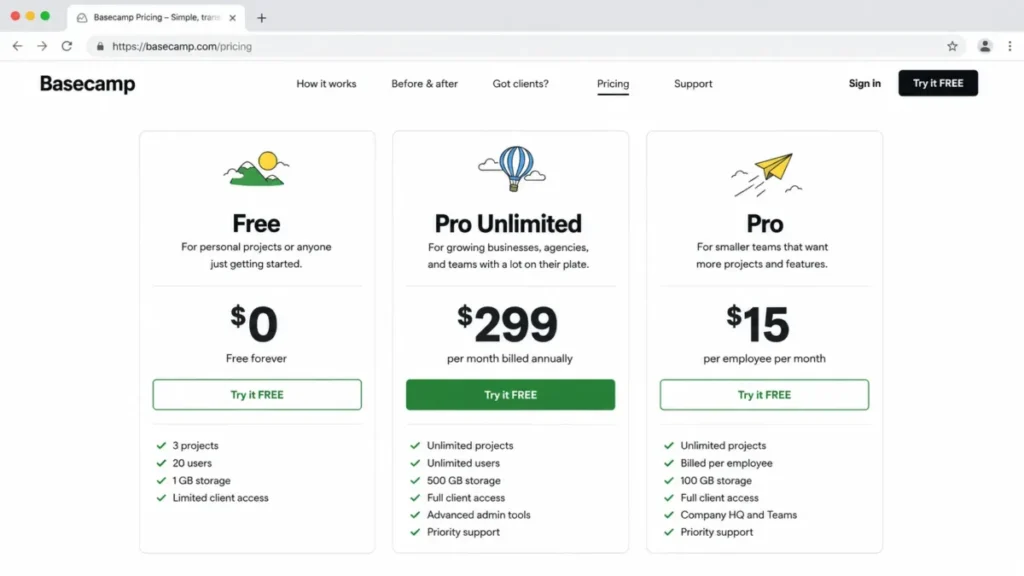
Basecamp publishes three US packages on its official pricing page, checked August 5, 2026: Free at $0, Pro at $15 per billed employee per month on monthly billing, and Pro Unlimited at $299 per month billed annually.
Pro includes unlimited projects and 500 GB of account storage. Pro Unlimited includes unlimited users and projects, 5 TB of storage, Admin Pro Pack, Timesheet, personal onboarding, priority 24/7/365 support, and a 60-day trial.
The billing basis matters more than either number. On Pro, Basecamp bills employees and full users only, while invited clients and contractors cost nothing.
| Plan | Price | Projects | Users | Storage | Included extras |
|---|---|---|---|---|---|
| Free | $0 | 1 active project | Up to 20 including clients and outside collaborators | 1 GB | Pings; no public links, no paid upgrades |
| Pro | $15 per billed employee/ | Unlimited | Billed employees only; clients and contractors free | 500 GB | Timesheet and Admin Pro Pack available at $50/ |
| Pro Unlimited | $299/ | Unlimited | Unlimited | 5 TB | Admin Pro Pack, Timesheet, personal onboarding, priority 24/7/365 support, 60-day trial |
Plan values above are drawn from Basecamp’s pricing page and the Basecamp for Free article, checked August 5, 2026 for the US market in USD.
The break-even is 20 employees, not “a big team”
Competing reviews describe Pro Unlimited as better for larger teams without producing the number. The number is exact.
At $15 per employee, 19 billed employees cost $285 per month and 20 cost $300. Pro Unlimited is $299, so the flat package becomes the cheaper option beginning at 20 billed employees.
Add-ons move that line down.
One $50 add-on makes the crossover 17 employees, because ($299 minus $50) divided by $15 is 16.6. Both add-ons make it 14, because ($299 minus $100) divided by $15 is 13.27.
| Billed employees | Pro monthly | Pro + both $50 add-ons | Pro Unlimited effective monthly | Cheaper without add-ons | Cheaper with both add-ons |
|---|---|---|---|---|---|
| 5 | $75 | $175 | $299 | Pro | Pro |
| 10 | $150 | $250 | $299 | Pro | Pro |
| 14 | $210 | $310 | $299 | Pro | Pro Unlimited |
| 19 | $285 | $385 | $299 | Pro | Pro Unlimited |
| 20 | $300 | $400 | $299 | Pro Unlimited | Pro Unlimited |
| 25 | $375 | $475 | $299 | Pro Unlimited | Pro Unlimited |
| 50 | $750 | $850 | $299 | Pro Unlimited | Pro Unlimited |
| 100 | $1,500 | $1,600 | $299 | Pro Unlimited | Pro Unlimited |
Figures are calculated from Basecamp’s published US list prices, checked August 5, 2026, and exclude taxes. The inputs are $15 per billed employee per month on Pro, $299 per month billed annually on Pro Unlimited, and $50 per month for each add-on.
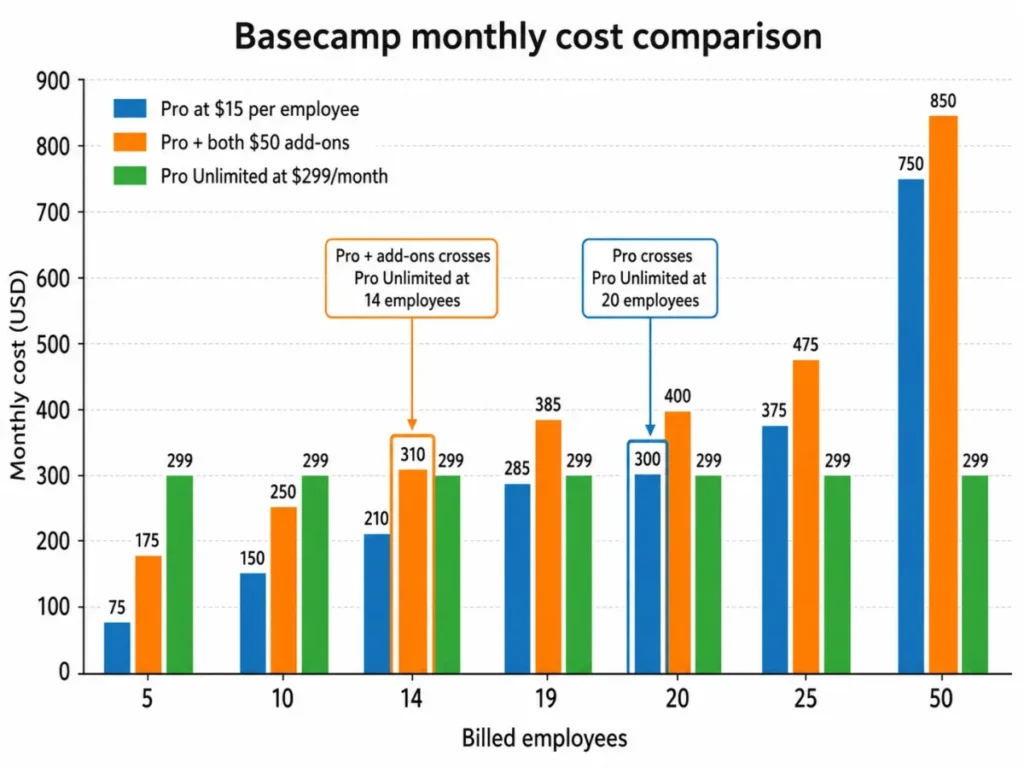
What ten people pay
Ten billed employees on Pro cost $150 per month, or $1,800 per year. Add Timesheet and the year becomes $2,400; add Admin Pro Pack as well and it becomes $3,000.
Pro Unlimited at that headcount costs $3,588 per year. So a ten-person team that needs both governance and time tracking is paying $3,000 against $3,588, and buying the flat plan for $588 more brings 5 TB of storage, onboarding, and priority support.
That is the honest Pro Unlimited pitch at small scale. It is a service and storage upgrade, not a cost saving.
The three costs that move the budget
Timesheet is $50 per month on Pro, and Admin Pro Pack is another $50 per month. Each additional 1 TB of storage costs $50 per month, which is the line item that turns a predictable seat bill into a variable one.
Storage is the one that surprises people. Matching Pro Unlimited’s 5 TB from Pro’s 500 GB baseline takes five 1 TB increments at $50 each, which is $250 per month on top of every seat.
Billing cadence is the second trap. Pro is billed monthly, while the published $299 Pro Unlimited price is an annual commitment of $3,588 with prorated cancellation, so the two plans are not the same commitment even when the monthly numbers look close.
I would not compare $15 and $299 as if they were interchangeable. One is a monthly per-head cost you can stop next month, the other is a year of budget.
Sources: Basecamp official pricing page and the Admin Pro Pack help article. Checked: August 5, 2026.
Feature Gates: What You Get on Each Plan
| Capability | Free | Pro | Pro Unlimited |
|---|---|---|---|
| Concurrent projects | 1 active | Unlimited | Unlimited |
| Public sharing links | Not offered | Included | Included |
| Paid upgrades and add-ons | Not offered | Available at $50/ | Included |
| Timesheet time tracking | Not offered | $50/ | Included |
| Admin Pro Pack governance | Not offered | $50/ | Included |
| Account-wide 2FA enforcement | Not offered | With Admin Pro Pack | Included |
| Account storage | 1 GB | 500 GB, +1 TB at $50/ | 5 TB |
| Priority 24/7/365 support and personal onboarding | Not offered | Not published for this tier | Included |
| SSO or SAML login | Not offered | Not offered | Not offered |
Gate values above come from Basecamp’s pricing page, its Free-plan article, the Admin Pro Pack documentation, and the login documentation, all checked August 5, 2026.
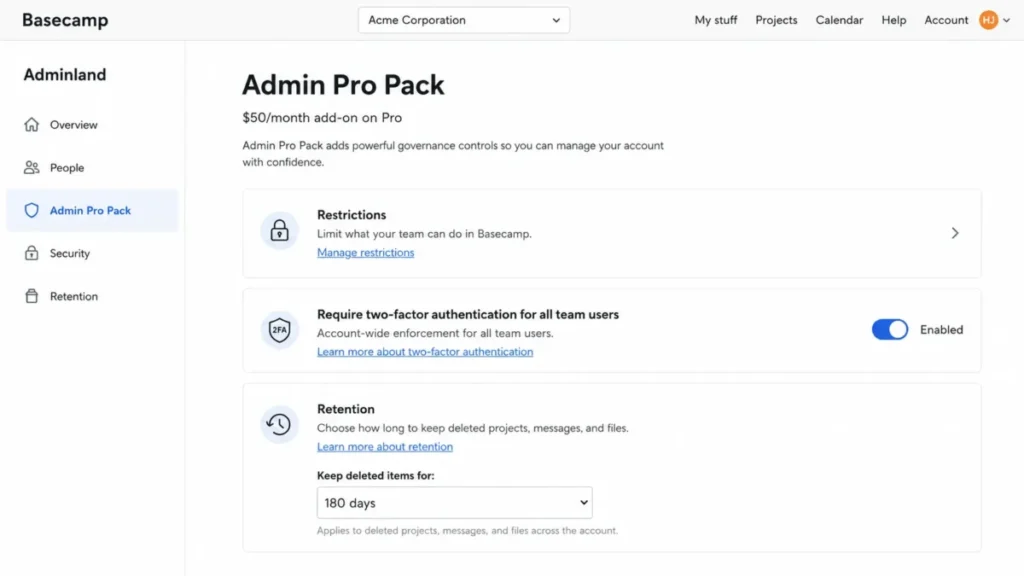
Free is a pilot tier, not an operating tier. One active project, 20 users including clients and outside collaborators, 1 GB of storage, and no access to public links or paid upgrades means the second live client project is the moment Free ends.
That single-project ceiling is the first real upgrade trigger for most teams, and it costs $15 per employee per month to clear. If a permanently free multi-project workspace is the actual requirement, compare free project management tools before committing to a Basecamp pilot.
Basecamp Workflows
Six workflows carry the buying decision. Each one below is reconstructed from Basecamp’s official documentation, so the documented capability is stated first and its workflow consequence second.
That order matters because a supported feature only helps when the affected buyer can live with its plan gate. Where a trade-off changes the answer for a team, the conditional recommendation appears with it.
Creating a project, which starts blank on purpose
The documented path runs from Home, through “Make a new project,” to a blank project by default, after which an authorized creator adds tools, people, access settings, and an optional template, per the project setup documentation.
Tools are chosen per project: Message Board, To-dos, Schedule, Docs and Files, Campfire, Automatic Check-ins, Card Table, and Timesheet where the account is entitled to it.
The catch is governance, not difficulty. Blank-by-default setup pushes process design onto whoever creates projects, so five people creating projects their own way produces five different operating models inside one account.
I would build a project template and a launch checklist before the second client goes in. Naming, enabled tools, client visibility, owner, check-in cadence, and time tracking should be decided once, not per project.
Automatic Check-ins, which replace a meeting only with a reviewer
An authorized user opens Automatic Check-ins, selects “+ New Question,” enters the question, sets frequency and time, picks recipients, and saves. Selected recipients then receive notifications on schedule and answers collect in one place, according to the Automatic Check-ins documentation.
Frequency options are documented as daily, weekly, or monthly. There is no documented escalation when someone skips an answer.
That absence is the whole risk. A check-in with no named reviewer becomes another notification stream rather than a status system, and the meeting it replaced quietly returns.
I would run two or three decision-relevant questions at most, assign one person to read the answers, and set a response deadline outside the tool.
Hill Charts, which are manual and list-level
Hill Charts track to-do lists, not individual to-dos. A user turns on tracking from a list menu, opens the chart, drags the list’s dot to a position, adds a note explaining the move, optionally notifies people, and saves, per the Hill Charts documentation.
Nothing about that position is computed. The dot does not move when tasks complete, and there is no dependency or percentage logic behind it.
Clients can view Hill Charts they have access to but cannot update progress, and Hilltop View excludes clients entirely.
This is the feature most commonly oversold in other reviews. It is a good instrument for communicating uncertainty, which is exactly what a percentage bar hides, and it is not portfolio reporting.
I would name a weekly owner per tracked list and require the note to state evidence, blocker, and next decision. Without that, the chart goes stale and nobody trusts it by month two.
Client visibility, which is a publishing decision every time
Client-facing content starts private and is shared item by item, and visibility can be inherited by comments and attachments on a shared item, per the client visibility documentation.
Clients can post messages, comments, to-dos, and files, answer check-ins assigned to them, and use Pings. They cannot create projects, manage people, administer the account, or use several internal controls.
The operational consequence is that client access is a daily discipline rather than a project-level switch. Every message, file, and to-do carries its own exposure decision, and a comment thread can travel further than the person writing it expected.
I would keep a pre-share checklist, name client-facing areas explicitly, and review the client view on a schedule. This is the workflow where a single careless share costs more than the subscription.
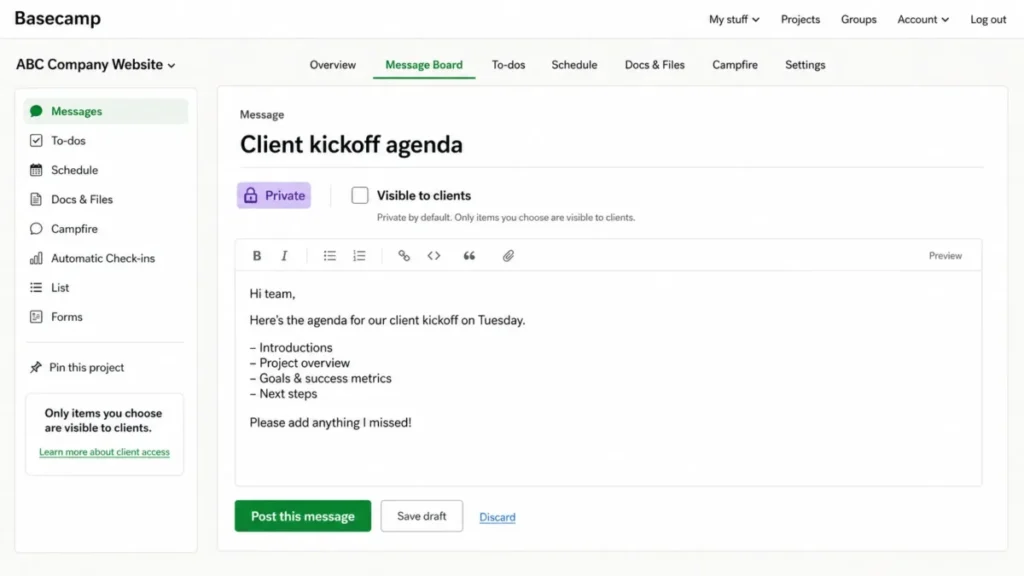
Timesheet, which logs time and does not plan capacity
Timesheet requires Pro plus the $50 monthly add-on, or Pro Unlimited. An owner enables the entitlement, a project administrator turns on time tracking for a project, team members log time against work, managers review and correct entries, and time exports to CSV.
What the documentation supports is time entry and timesheet reporting. It does not establish workload balancing, utilization forecasting, or automatic capacity scheduling.
Agencies buy time tracking expecting the second thing. If profitability and capacity planning are the reason for the purchase, budget for a companion system rather than assuming the add-on covers it.
Exporting before you leave, which only the owner can do
Only account owners can export selected projects or the whole account. Basecamp compiles an HTML copy and emails the owner when the archive is ready, per the data export documentation.
Canceling before the export finishes can interrupt it. Exporting private Pings is a separate decision, because those conversations were not written as project records.
An HTML archive is a readable retention copy. It is not evidence of structured re-import into another platform, and no field mapping, duplicate handling, or import limit is documented for a target system.
Sequence matters more than speed here: export, wait for the email, download completely, open and spot-check representative projects, files, dates, and links, and only then cancel. If a move to another tool is the plan, treat archive retention and platform migration as two separate workstreams and build a proper data migration checklist.
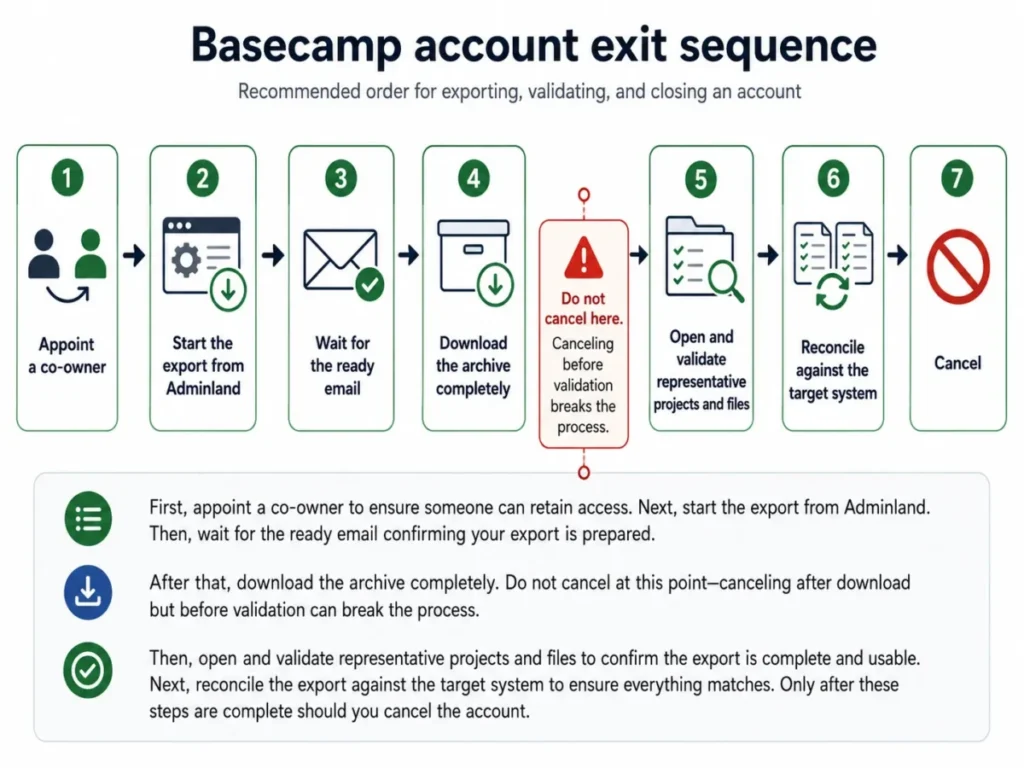
Ease of Use and Setup
Basecamp’s interface complexity is low by design, and its process complexity is not. The tool list per project is short, the vocabulary is fixed, and there are no custom fields to configure before the first project runs.
The setup cost lands somewhere else. Because projects start blank, the administrator decides the operating model, and inconsistent decisions show up two months later as projects nobody can compare.
Basecamp 5 adds a second variable for existing teams. The redesign changed the home screen, notifications, calendars, search, and keyboard behavior, and public reaction from existing users is genuinely split.
Three attributable examples, none of which measures how common the reaction is:
- A 2026 thread on r/projectmanagers records strong negative reactions to the calendar, Pings, menu structure, and notification changes
- An independent write-up published on eidel.io documents friction with wayfinding and keyboard shortcuts
- Recent Apple App Store reviews include complaints about finding projects on mobile
I would not roll Basecamp 5 out account-wide on the strength of a vendor changelog. Pilot the workflows that carry your revenue, on desktop and mobile, and check specifically whether people find their projects and notice their notifications.
A 30-day and 90-day adoption test is the cheapest insurance here. At 30 days, every active project should use the same template and every check-in should have a named reader.
At 90 days, Hill Charts should still be moving weekly and the client view should have been reviewed at least twice.
Integrations, Security, and Support
Integrations and the API
Basecamp offers an API, an SDK, webhooks, chatbots, and a directory of third-party integrations, per the developer documentation. Many connections run through a third-party app or custom development rather than a first-party connector.
Authentication uses OAuth 2.0, and the first rate limit commonly encountered is 50 requests per 10 seconds per IP address, with applications expected to handle throttling rather than assume unlimited throughput. One competing 2026 review publishes a different threshold, which is a useful reminder to design against the vendor’s own documentation and not a secondhand number.
Classify every required connection before purchase as first-party, third-party connector, or custom build, because the third category carries ongoing maintenance and an owner. If your team is new to this distinction, start with what an API does and then price the build.
Apps are published for iOS, Android, macOS, Windows, the web, and the command line, according to the Basecamp apps page. Offline behavior is not documented on that page, so I would test it during a trial rather than assume it.
Security and admin controls
Basecamp’s security overview states that data is protected in transit, uploaded files are encrypted at rest, application databases are generally not encrypted at rest, and backups are encrypted with GPG. That fourth item is the one a security reviewer will ask about, and it is better to bring it to them than to have them find it.
Basecamp does not support SSO or SAML authentication, per its login documentation. For a company that routes every application through an identity provider, that is a binary answer and the evaluation ends there.
Admin Pro Pack is included with Pro Unlimited and sold at $50 per month on Pro. It adds restrictions, account-wide 2FA enforcement, retention controls, and other governance settings, and without its restrictions the documented edit or delete window on a posted item is 15 minutes.
One boundary deserves a security review of its own: enforced 2FA applies to team users and does not force clients to enable it. If clients see project data, their account hygiene sits outside your control, so compensating controls are least-visibility sharing, a periodic client-access review, and a policy for what never goes into a client-visible item.
Account ownership is the last governance item, and the one most teams miss. The original owner controls billing and export, and Basecamp’s own account owners documentation says a common support problem is an account whose only owner is no longer available.
Appointing a co-owner takes a minute during setup. Recovering from a sole owner who left takes a support ticket and time you will not have during a migration.
Support
Basecamp publishes priority 24/7/365 support and personal onboarding for Pro Unlimited. No numerical first-response or resolution SLA appears in the public support materials reviewed on August 5, 2026, so treat “priority” as a queue position rather than a contractual response time and ask for the SLA in writing if it matters.
Where Basecamp Works Best
Basecamp is strongest for teams whose main problem is coordination sprawl, not planning complexity. Four cohorts fit cleanly.
A 5-person creative agency with 15 client collaborators pays $75 per month, because only employees are billed. Item-level client sharing and recurring check-ins map directly to how that team already works.
A 12-person distributed consultancy running repeatable projects pays $180 per month before add-ons. Templates, message boards, check-ins, and shared files reduce meeting load for a team that already writes things down.
A 14-person agency that needs both Timesheet and Admin Pro Pack should skip Pro entirely. Pro plus both add-ons is $310 per month against $299 for Pro Unlimited, and the flat plan also brings storage, onboarding, and priority support.
A 25-person client-service firm would pay $375 per month on Pro against $299 on Pro Unlimited. That is the plainest case in the lineup, provided no one in the room requires SSO.
For teams below this size that are still comparing categories, project management tools for small teams covers the wider shortlist.
A single classroom, community group, or one-project pilot with up to 20 people fits the Free plan as written. Treat it as a scoped pilot, because the second project ends it.
Where Basecamp Falls Short: Six Limitations That Matter
Progress reporting stops at qualitative status
Hill Charts are manual, subjective, and scoped to whole to-do lists. There is no automated dependency scheduling, earned-value calculation, or capacity view behind them.
G2 reviewers praise the interface and centralized organization while returning repeatedly to limited advanced reporting, limited customization, and weak fit for complex project needs. Capterra patterns describe the same shape: easy for general collaboration, less flexible for detailed workflows, analytics, and dependencies.
Identity governance is missing, not gated
SSO and SAML are absent on every plan, including Pro Unlimited. This is not an upsell you can buy your way out of, which makes it different from every other limitation in this list.
The client 2FA gap sits outside your enforcement
Account-wide 2FA enforcement reaches team users only. Clients with access to project content remain outside it, so the strongest identity control you can buy still has a hole where your external users are.
Exit is readable but not proven lossless
Owner-only export, an HTML archive format, and no documented structured re-import path mean switching cost is real and hard to estimate in advance. After cancellation the account becomes inaccessible, Basecamp advises exporting first, data is scheduled for deletion after 30 days, and a frozen account can auto-cancel after six months.
Per-file limits can break a workflow with storage to spare
Standalone uploads are capped at 5 GB per file and files attached inside a document at 10 GB, per the Docs and Files documentation. A video team with 500 GB free can still fail a single upload, which is exactly the kind of limit nobody checks before signing.
Simplicity moves work rather than removing it
Blank projects, manual charts, and item-level sharing are all defensible design choices. Each one converts software configuration into human discipline, and discipline is the thing that decays first when a team gets busy.
Who Should Skip Basecamp
Skip it if SSO or SAML is mandatory. There is no exception path, no add-on, and no enterprise tier that changes the answer.
Skip it if portfolio planning requires automated dependencies, workload balancing, or advanced analytics. Hill Charts and check-ins are communication instruments, and forcing them to act as a program management system produces confident-looking status that nobody can audit.
Teams in that position should look at agile project management tools instead.
Skip it if every external identity must be forced into 2FA. Admin Pro Pack cannot reach clients, so a compliance requirement written that way is unmet on day one.
Skip it if lossless structured migration into another platform is a contractual requirement. Run a permitted migration proof before commitment rather than after.
Skip it if month-to-month flat-rate pricing is mandatory. The published $299 price is an annual commitment, and no monthly equivalent appeared on the official pricing page reviewed on August 5, 2026.
Basecamp Alternatives
Alternatives here are framed by the requirement that disqualifies Basecamp, not by a feature scoreboard. This package verified Basecamp’s own pricing and documentation only, so treat every product below as a shortlist entry to verify on its own official pages rather than a like-for-like quote.
| Your blocker | Choose instead if | Verify before you commit |
|---|---|---|
| SSO or SAML is mandatory | The vendor publishes SAML support on its own security or admin documentation | Which plan gates SSO, and the per-seat cost at that plan |
| You need dependencies, workload views, and portfolio reporting | The tool ships scheduling and capacity features natively | Whether reporting is included or gated, and the seat price at that gate |
| You bill clients and need capacity planning, not just time logs | The platform combines time tracking with utilization and resourcing | Whether client users are billable seats, which is where Basecamp is unusually cheap |
| You want a lighter, cheaper board for a small team | A simple board covers the work | Storage caps, automation limits, and whether external collaborators cost money |
For the reporting-led shortlist, the Asana review and the ClickUp review are reasonable starting points.
The Asana pricing guide works as one example of how reporting depth sits behind a seat tier.
For the billing-and-capacity case, start with the Teamwork review. For a lighter board, the Trello review covers that end of the market.
The one thing to carry into every comparison is Basecamp’s free client and contractor seats. A tool that looks cheaper per seat can cost more once 15 client contacts become billable users.
Final Verdict
Basecamp is worth it for client-service and distributed teams under about 25 people that already communicate in writing and want one place for discussions, tasks, files, and recurring updates. It is not worth it for anyone whose requirements list contains SSO, dependency scheduling, capacity planning, or auditable portfolio reporting.
My plan recommendation splits at a number, not a feeling. Below 20 billed employees, and without both paid add-ons, Pro is the practical plan and keeps monthly flexibility.
At 20 or more billed employees, Pro Unlimited is cheaper outright. At 17 with one $50 add-on, or 14 with both, it is cheaper earlier than the headline math suggests.
Free earns exactly one job: a single scoped pilot project with up to 20 people. It cannot run a portfolio.
Before renewal, a Basecamp buyer should be able to answer three questions. Is there a second account owner?
Has anyone opened the exported archive and confirmed it is readable? Are Hill Charts still moving weekly, or has status quietly moved back into meetings?
If the answer to all three is yes, this is a sound $15-per-employee decision. If not, the tool is fine and the operating discipline is what needs fixing.
The upgrade trigger is mechanical: move to Pro Unlimited once billed employees reach 20, or 14 when both add-ons are required. Teams that outgrow qualitative reporting should shortlist a heavier platform rather than buy more Basecamp.
Next action: count billed employees, decide whether Timesheet and Admin Pro Pack are required, then choose the cheaper side of that threshold and run a pilot before rollout.
FAQ
How much does Basecamp cost per month?
Basecamp Free is $0, Pro is $15 per billed employee per month on monthly billing, and Pro Unlimited is $299 per month billed annually, which is $3,588 per year.
Only employees and full users are billed on Pro. Invited clients and contractors are free.
Prices are US list prices from Basecamp’s official pricing page, checked August 5, 2026.
When is Basecamp Pro Unlimited cheaper than Pro?
At 20 billed employees, where Pro costs $300 per month against $299 for Pro Unlimited. If you need one $50 add-on the crossover drops to 17 employees, and if you need both Timesheet and Admin Pro Pack it drops to 14.
Below those thresholds Pro is cheaper at list price.
Does Basecamp have a free plan?
Yes, and it is permanent. It covers one active project, up to 20 users including clients and outside collaborators, 1 GB of storage, and Pings.
It excludes multiple projects, public links, and paid upgrades, so it works as a scoped pilot rather than an operating tier for a multi-client team.
Does Basecamp support SSO or SAML?
No. Basecamp’s login documentation states that SSO and SAML authentication are not supported, and that applies to every plan including Pro Unlimited.
For organizations that route all applications through an identity provider, this is the point where the evaluation stops.
Can Basecamp clients see private internal work?
Not by default. Client-facing content starts private and is shared item by item, and clients can post messages, comments, to-dos, and files, answer check-ins assigned to them, and use Pings.
The practical risk is human: visibility can be inherited by comments and attachments, so sharing is a decision your team makes repeatedly rather than once.
Does Basecamp include time tracking?
Timesheet is included with Pro Unlimited and costs $50 per month as an add-on on Pro. It supports time entry, timesheet review, and CSV export.
It is not documented as a resource-capacity planning tool, so utilization forecasting and workload balancing need a companion system.
Can you export all your Basecamp data?
Only the account owner can export selected projects or the full account, and Basecamp compiles an HTML copy and emails the owner when it is ready. That archive is a readable retention copy rather than a proven structured import file for another platform.
Complete and validate the download before canceling, because canceling mid-export can interrupt it.
What is Basecamp’s API rate limit?
Basecamp’s developer documentation describes the first limit commonly hit as 50 requests per 10 seconds per IP address, with OAuth 2.0 for authentication. Other dynamic or endpoint-specific limits can also apply, so integrations need retry and backoff logic rather than an assumption of unlimited throughput.
Is Basecamp good for large teams?
It scales on price better than almost anything else, because Pro Unlimited is a flat $299 per month for unlimited users. It scales on governance worse, because there is no SSO, client 2FA cannot be enforced, and reporting stays qualitative.
Large teams that can accept those three constraints get an unusually predictable bill.
Should an existing team upgrade to Basecamp 5 immediately?
Not account-wide, and not on the changelog alone. The 2026 release changed the home screen, notifications, calendars, search, and keyboard behavior, and public reaction from existing users includes both enthusiasm and specific complaints about wayfinding and mobile project discovery.
Pilot your revenue-critical workflows on desktop and mobile first.