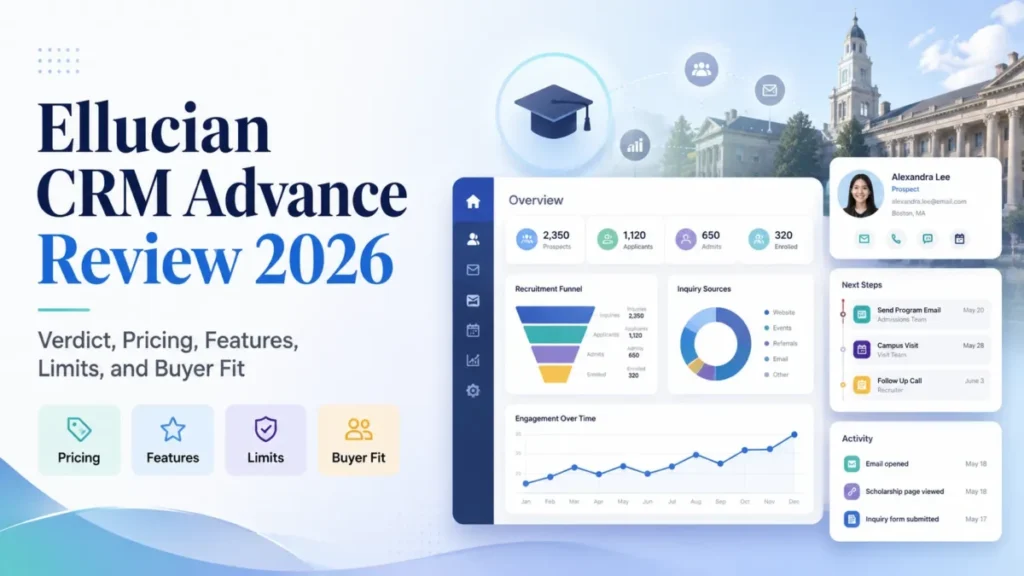
Ellucian CRM Advance is a defensible shortlist candidate for a university advancement office that already runs on institutional data governance, and a poor purchase for a lean fundraising team that needs a published price before it can plan a budget. The naming has moved on too, which changes how much of the older evidence still applies.
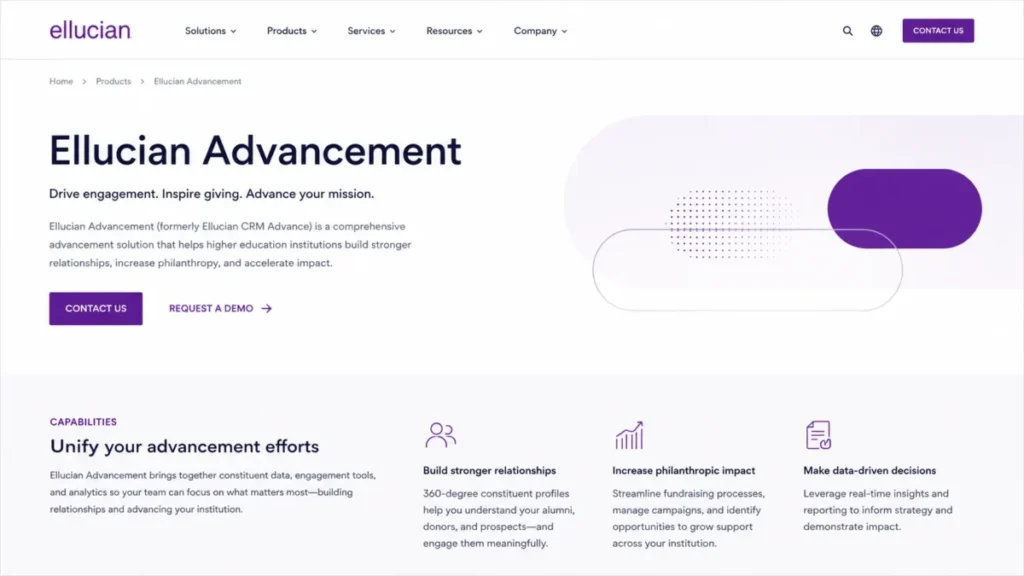
Ellucian’s current US product page presents the product as Ellucian Advancement while still referencing CRM Advance, so a buyer reading a 2019 solution sheet and a 2026 launch note is reading two different generations of the same line.
If the category itself is new to you, start with CRM for higher education or a plain explanation of what CRM software does before you read the quote.
In This Article (20 sections)
Quick Verdict
| Decision field | Where the evidence lands |
|---|---|
| Best for | Centralized university advancement operations with dedicated advancement services, gift processing, and IT integration ownership |
| Not ideal for | Lean fundraising teams that need self-service pricing, a free trial, and minimal administration |
| Starting price | Not publicly disclosed. No plan card, per-user price, or seat minimum appeared on the official product page. Checked: 2026-08-04. Region: US, USD |
| Practical plan | An institution-specific quote with a deliberately designed mix of end-user and administrative licenses |
| Free plan or trial | None listed. TrustRadius shows no free version and no free trial. Checked: 2026-08-04 |
| Setup difficulty | High. The published migration case involved more than 15 feeds, fit-gap analysis, cleansing, semantic remapping, scripts, secure transfer, validation, and role-based training |
| Main strength | A higher-education advancement data model that spans constituents, gifts, events, engagement scoring, stewardship, and pipeline analytics in one system |
| Main limitation | Historical role documentation places workflow, reporting, import, and integration administration behind Premium access, which changes the license mix |
| Best alternative | Blackbaud Raiser’s Edge NXT for fundraising depth outside the Ellucian ecosystem, or Slate for institutions already standardized on Technolutions |
Sources for the table above: the Ellucian Advancement product page and the TrustRadius pricing profile. Checked: 2026-08-04.
Billing basis: custom institutional subscription, amounts not disclosed.
What Ellucian CRM Advance Is in 2026
Ellucian CRM Advance is the advancement CRM in Ellucian’s higher-education product line, covering constituent records, fundraising, gift and pledge processing, campaigns, events, alumni engagement, and advancement analytics. Ellucian Company L.P. sells it to institutions, not to departments shopping on a credit card.
The current official product page is titled Ellucian Advancement and still refers to CRM Advance inside the page, and Gartner Peer Insights lists the product under Ellucian Advancement as well. That is not a cosmetic rename.
In March 2025 Ellucian announced that CRM Advance, CRM Recruit, and CRM Advise were being upgraded using Microsoft Dynamics 365 Sales, Dynamics 365 Customer Service, and Microsoft Power Platform.
Then, on the product side, Ellucian launched Ellucian Advancement in the United Kingdom in July 2026, describing AI assistants, a branded alumni portal, real-time analytics, no-code connectors, and workflow automation.
That announcement is scoped to the United Kingdom, and it does not establish identical entitlements for a US institution.
So the evidence a buyer inherits from search results is split across at least six years. Treating all of it as one current description of the product is the most common mistake in this category.
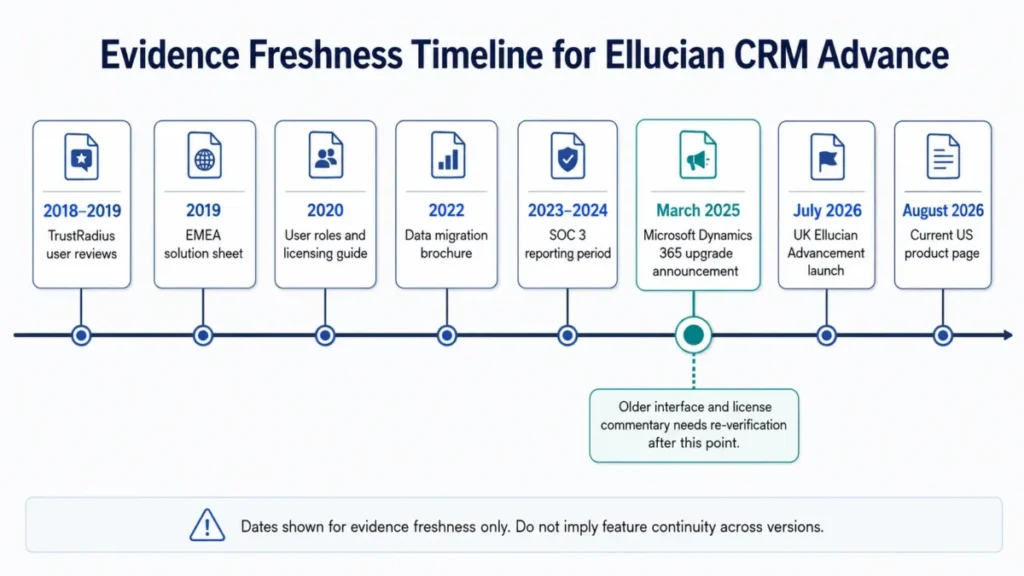
Read that timeline as a weighting rule.
Anything published before the March 2025 platform announcement describes an earlier generation, and anything published after it describes a direction that a specific institution’s environment may not have reached yet.
Where the legacy name still matters
Search intent still runs through the old name, and so does most of the documentation a procurement team will find. The role guide, the migration brochure, and the fundraising eBook all use CRM Advance, and the SOC 3 report for the 2023 to 2024 period names CRM Advance inside the described Ellucian cloud environment.
I treat the two names as one product line at different stages.
The practical rule is to date every piece of evidence in the sentence that uses it, which is what the rest of this review does.
How We Reviewed Ellucian CRM Advance
This review is based on Ellucian’s current product page, the Microsoft collaboration announcement, the published user roles and licensing guide, the data migration brochure, the security and support pages, official customer stories, and labeled third-party evidence from Gartner Peer Insights and TrustRadius.
Volatile facts were checked on 2026-08-04. The product was assessed against the same buyer criteria applied across advancement CRM coverage: workflow fit, license and permission gates, pricing transparency, migration burden, integration scope, security scope, support access, and documented limitations.
Greater weight went to the factors that change a purchase order, including which roles can configure workflows and reporting, which legacy data survives a migration, and which capabilities require a new contract rather than a simple upgrade. Claims that the sources did not support were excluded rather than hedged, and every historical document is dated in the sentence that uses it.
The full standard is published in the site review methodology.
No numeric score appears in this review, because the five scoring conditions this site requires are not met from public evidence alone.
Ellucian CRM Advance Pros and Cons
| Pros | Cons |
|---|---|
| Purpose-built higher-education data model covering constituents, gifts, designations, campaigns, events, and involvements | No public US list price, plan card, seat minimum, or onboarding fee on the official product page as of 2026-08-04 |
| Named advancement capabilities on the current page include engagement scoring, automated stewardship, gift societies, and pipeline analytics | The 2020 role guide places workflow configuration, system reports, imports, integrations, and security administration with Premium users |
| Microsoft Dynamics 365 and Power Platform direction suits institutions already standardized on Microsoft identity, automation, and Power BI | The same guide restricts Standard users from creating mass communications, which centralizes campaign work |
| Published migration guidance is unusually specific about cleansing, fit-gap analysis, semantic mapping, and validation | No free trial and no free version is listed on the TrustRadius profile, so evaluation runs through a sales-led demonstration |
| Corporate security program lists SOC audits, HECVAT, PCI DSS, NIST 800-171, Cyber Essentials, and ISO 27001, 2022 revision | Public sentiment is thin and split, with three ratings on Gartner and detailed TrustRadius reviews mostly from 2018 and 2019 |
| Customer stories from San Diego State University and George Washington University describe cross-unit advancement consolidation | No public CRM Advance-specific API quota, automation cap, support response target, or native mobile app listing was verified |
Ellucian CRM Advance Pricing and What Actually Drives the Quote
No public US list price was found on the reviewed official product page as of 2026-08-04.
The page routes a buyer to contact and demonstration paths instead of a plan card, and it publishes no per-user price, implementation fee, minimum contract value, billing cadence, or add-on price.
Region: US, USD.
Two independent profiles agree on the shape of the model without supplying an amount. Gartner describes pricing as a customized subscription influenced by deployment options, users, modules, and support, and TrustRadius lists no pricing plans, no free version, and no free trial.
That means a ten-user cost cannot be calculated honestly here, and neither can a total cost of ownership.
Any published range for this product is an estimate wearing the clothes of a fact. What I can do is name the variables that decide the number.
The quote worksheet to send before the demonstration
| Quote line | What to ask for in writing | Why it moves the total |
|---|---|---|
| Subscription licenses | Exact count and price for each license type, split between end users and administrators | The administrative license mix is the single largest hidden variable under the documented role model |
| Implementation and consulting | A work breakdown with assumptions, dependencies, and named deliverables | Historical Ellucian material describes consultants, workshops, change leadership, and ongoing learning around the platform |
| Data migration | Object-by-object scope, sample migration, reconciliation reports, and acceptance criteria | The published migration case shows cleansing, mapping, scripts, and validation as separate workstreams |
| Integrations and feeds | Per-feed pricing for each inbound and outbound integration, plus custom fields and custom tables | One documented institution carried more than 15 feeds into the project |
| Support and maintenance | Coverage hours, response targets by priority, escalation path, exclusions, and service credits | Support access depends on an active maintenance agreement |
| Environments and training | Non-production environments, refresh cadence, and role-based training days | Training and business-process review appear as distinct phases in the documented migration |
Source for the underlying workstreams: Ellucian data migration brochure, 2022 and Powering Your Fundraising Programs with CRM Advance. Checked: 2026-08-04.
Evidence status: vendor documentation, amounts not disclosed.
I would not treat the absence of a public price as a red flag on its own.
Institution-scale advancement software is normally quoted, and the more useful signal is whether the vendor will itemize the quote when asked.
The budget pressure point sits somewhere else. It sits in the administrative license count, the feed count, and the volume of legacy data nobody wants to throw away.
Plans, User Roles, and Feature Gates
The most detailed public license documentation for this product is the Ellucian CRM user roles and licensing guide, and it is dated 2020. Everything in this section carries that date, and every line of it belongs in your order form conversation rather than in your assumptions.
Source: Ellucian CRM user roles and licensing guide, 2020. Checked: 2026-08-04.
| Capability in the 2020 guide | Documented Premium user | Documented Standard user |
|---|---|---|
| Workflow configuration | Permitted | Restricted |
| System dashboards, system reports, views, and goals | Permitted | Personal dashboards only |
| Marketing lists and mass communications | Permitted | Individual email only |
| Data imports and integrations | Permitted | Restricted |
| Data-model extension and form or view customization | Permitted | Restricted |
| Security-role management | Permitted | Restricted |
The same document maps the Advance license names across, with Standard mapping to Basic and Premium mapping to Professional, and Light marked unavailable.
It also shows Dynamics API access, desktop and mobile access, Excel export, and Office and email integration across the named license types, with configuration privileges varying by role.
Read that as an operating model, not a price list.
Under it, a development officer can work records and send individual email, while campaign construction, reporting configuration, and integration work concentrate in a smaller Premium-equivalent group.
The upgrade triggers to price before signing
Six situations push a seat toward the higher license under the documented model. Needing central workflow configuration is the first, and needing to create mass communications is the second.
The rest are system dashboards and custom reports, data imports and integrations, data-model extension through custom fields or custom tables, and security-role administration.
Each one is a question for the vendor rather than a settled fact in 2026. The Microsoft platform upgrade announced in 2025 makes it reasonable to ask whether the Standard, Basic, Premium, and Professional model still governs the environment being quoted.
If it does, the license mix is the budget.
If it does not, ask for the current role and permission matrix bound to the order form.
Key Features and What Each One Depends On
The current product page names the capability set.
Ellucian’s own explainer on higher-education CRM systems adds the documented use cases around donor self-service, giving history, event registration, personalized communication, automated outreach, and analytics.
Constituent data and engagement scoring
The page describes centralized constituent data with engagement scoring and real-time engagement analysis, which is the foundation everything else in the platform reads from.
Buyer consequence: engagement scoring is only as good as the feed hygiene behind it.
An institution with disconnected alumni, event, and student systems is buying a scoring model that will inherit its data problems on day one.
Gift processing, online giving, and gift societies
Online giving, gift history, designations, and gift societies are named capabilities, and the documented advancement workflow connects a gift back to the constituent record and forward into stewardship.
The gap worth closing in the demonstration is operational rather than functional.
Payment gateway support, reconciliation behavior, duplicate matching, refunds, and failed-transaction handling are not described in public sources, and finance will ask about all five.
Event management and alumni engagement
Event management sits inside the same constituent model, so registration and attendance feed engagement records rather than living in a separate tool.
The UK launch adds a branded alumni portal to that picture, and that portal is the piece most likely to differ between the UK announcement and a US quote.
Automated stewardship and follow-up
Automated stewardship and automated follow-up are named on the current page, and the documented workflow assigns follow-up activity after a gift or an engagement event.
Under the 2020 role model, the ability to configure those rules belongs to Premium users.
That single dependency decides whether stewardship automation is a distributed capability or a service request queue.
Pipeline analytics and Power BI dashboards
Fundraising dashboards, pipeline analytics, and Power BI references appear on the current product page, which matches the wider Microsoft direction of the product line.
Reporting is also the place where public sentiment splits hardest, which is covered further down. A report-writer scenario belongs in the demonstration script, using your metrics and your data volume rather than a vendor sample set.
Mobile access
The current page describes a mobile-friendly interface with access to unified donor interactions, and the 2019 EMEA solution sheet described mobile cloud access.
Mobile-friendly is not the same claim as a native application, and the difference lands on gift officers working between campus visits.
No public source verified a current native iOS or Android app listing, offline behavior, or push notification support for Ellucian Advancement, so a field-heavy team should treat mobile parity as an open contract question rather than a delivered feature.
Ease of Use, Setup, and the Administrative Model
Setup difficulty for this product is not a UI question.
It is a question about how much advancement-services and IT capacity an institution can commit for the length of an implementation. The documented delivery model around the platform includes implementation consultants, workshops, change leadership, and ongoing learning, which is consistent with an institution-scale rollout rather than a self-serve one.
Document date: historical vendor material.
No public source supports a universal implementation duration or an administrator staffing ratio, so I will not publish one. Ask instead for three customer references with comparable data complexity, feed counts, and staffing.
The 30-day and 90-day adoption test is more useful than a timeline promise.
At 30 days, gift processors and advancement services should be working in the system without a parallel spreadsheet, and constituent search should return the record a fundraiser expects on the first attempt. At 90 days, the test is different.
Development officers should be able to answer a portfolio question from a dashboard rather than an export, and the queue of report and workflow requests waiting on administrators should be shrinking rather than growing.
If that queue is growing at 90 days, the license mix was wrong, not the software.
Migration From Legacy Advancement Systems
The most decision-useful public document Ellucian publishes for this product is its migration brochure, which walks through one institution’s move from Advance Web 9.10 into CRM Advance.
Evidence status: case-specific documentation, not a universal specification.
That project carried more than 15 inbound or outbound feeds.
It also required data cleansing, fit-gap analysis against the target model, semantic mapping, custom migration decisions, transformation scripts, secure file transfer, validation, business-process review, and role-based training. Ten steps is the honest shape of the work.
The documented sequence starts with inventorying source data, customizations, reports, and feeds, then cleansing the data and running fit-gap analysis.
Mapping legacy entities to target objects comes next, followed by deciding how to treat fields that have no destination. From there the project builds migration scripts against a database snapshot, compresses and transfers files through secure FTP, runs transformation and load, and validates records, reports, totals, and relationships.
The last two steps are the ones institutions underfund. Business-process review and role-based day-in-the-life training close the project, and cutover approval should wait on agreed reconciliation and acceptance criteria.
Terminology changes that hide mapping risk
| Legacy concept in the documented case | Target concept in CRM Advance |
|---|---|
| Allocations | Designations |
| Gifts and pledges | Contributions |
| Alumni and student activities | Involvements |
Mobile strategy for this table: stacked cards on narrow viewports, with the legacy term as the card label.
This looks trivial on a slide and expensive in a requirements workshop.
When a business owner validates a report using the legacy word and the system computes the new object, the reconciliation argument that follows can burn weeks.
What happens to fields with no home
The brochure is direct about legacy fields that have no out-of-box destination.
The documented options are a custom field, a custom table, a custom migration, or a decision not to carry the data forward.
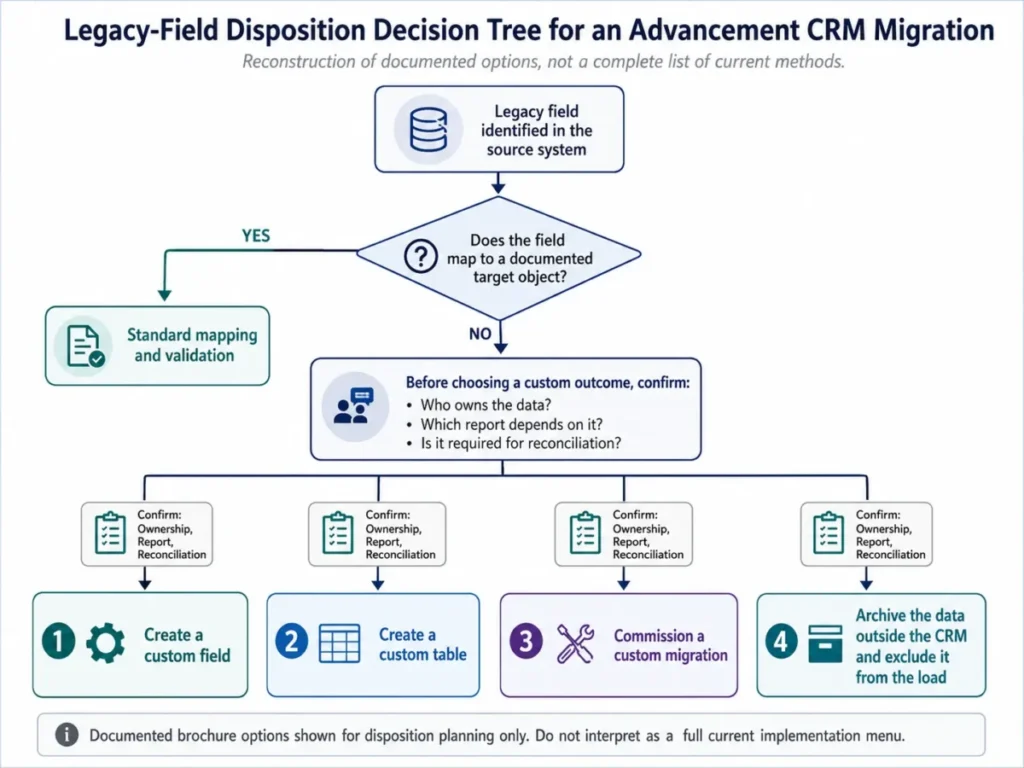
Run that tree before the vendor scopes the project, not after. Every field that survives the exercise becomes a line item, and every field that does not becomes a retention decision for the institution rather than a surprise in month four.
The migration coverage that is still unknown
Public sources do not provide an object-by-object migration guarantee.
Email history, activities, notes, attachments, automations, and payment data are not comprehensively documented, and neither are duplicate handling, failed-record recovery, or rollback. Put all of it in the statement of work.
A useful acceptance matrix names each object, the reconciliation total that proves it landed, the duplicate rule that governs it, and the report that a business owner signs.
If you want the generic version of this exercise first, the CRM migration planning guide and the CRM implementation guide cover the sequence outside the Ellucian context.
Integrations, the Microsoft Platform, and API Limits
The platform direction is the clearest integration signal available. Ellucian announced that CRM Advance was being upgraded using Dynamics 365 Sales, Dynamics 365 Customer Service, and Power Platform, which puts the product inside a Microsoft toolchain that many institutions already run for identity, automation, and reporting.
For an institution standardizing on Microsoft, that alignment is worth real money in governance and analytics reuse.
If your team is evaluating that stack on its own merits, the Microsoft Dynamics 365 Sales review covers the underlying platform.
Historical user sentiment also praises integration with Ellucian’s own student systems.
TrustRadius reviewers highlighted Banner and Colleague integration alongside business-process efficiency, and those detailed reviews are mostly from 2018 and 2019.
The UK launch adds no-code connectors to the picture. That claim is scoped to the United Kingdom, and a US buyer should ask whether connectors, the alumni portal, and the AI assistants are included in the quoted environment or gated behind a version, region, add-on, or migration.
Here is the gap nobody in the search results fills.
No current public CRM Advance-specific API request quota, webhook quota, automation-run cap, reset cycle, warning threshold, or overflow behavior was verified as of 2026-08-04. That is an architecture question, not a footnote.
If nightly synchronization from a student system or a peak giving-day event is part of the design, ask for request rate, daily quota, concurrency, retry behavior, queueing, failed-event recovery, and overage options in writing, then volume-test them in an authorized non-production environment.
The basics of that conversation are covered in CRM integration basics.
Automation, AI, and Reporting
The current product page positions AI-generated insights, Microsoft Copilot, Power BI dashboards, automated stewardship, and real-time engagement analysis.
Advertised capability and contracted entitlement are two different things.
Nothing in the public sources establishes whether an existing US CRM Advance tenant receives Copilot, the new AI assistants, the branded alumni portal, or the no-code connectors without an upgrade, a migration, an add-on, or a new contract. So the AI question belongs in the order form.
Ask which tenant version is being quoted, which region it runs in, and which AI functions are included by name.
Then ask how institutional and donor data is used by those functions, what the usage limits are, and what the rollout schedule looks like for an existing customer.
Reporting deserves the same treatment for a different reason. The 2020 role guide places system dashboards and system reports with Premium users, while public sentiment includes both praise for reporting and export to Excel and older criticism of reporting limitations.
That combination points at a specific failure mode. End users can consume reporting comfortably while the institution’s ability to change reporting stays bottlenecked in a small administrative group.
Security, Support, and Admin Controls
Ellucian publishes a corporate security program that lists annual SOC audits, CSA, HECVAT, PCI DSS, NIST 800-171, Cyber Essentials, security monitoring, incident response, and ISO 27001, 2022 revision.
The same page describes cloud security as a shared responsibility.
That framing matters for a procurement review, because configuration, identity, access, data handling, integration, and compliance obligations sit with the institution.
CRM Advance also appeared within the described Ellucian cloud-service environment in the SOC 3 report covering 2023-04-01 through 2024-03-31.
That is a historical assurance period, not the current report, so request the current application-specific assurance documents by name.
A security review that stops at the certification list is incomplete.
Ask for data-flow diagrams, subprocessors, retention terms, encryption details, identity controls, incident terms, backup and recovery objectives, and data residency, and get the shared-responsibility split written down per control.
How support access works in practice
Ellucian Customer Center access requires an active maintenance agreement, and some support capabilities require approval from the customer institution.
Registration guidance states that processing may take up to five days, and cases use priority levels one through four with response depending on service level and priority.
Two operational consequences follow. Provision eligible support users before go-live rather than during an incident, and confirm who at your institution approves additional access.
No public CRM Advance-specific response-time or resolution-time commitment was verified.
Support targets are contract terms here, so get coverage hours, response targets by priority, the escalation path, named contacts, exclusions, and any service credits into the agreement.
Ellucian CRM Advance Limitations
Pricing opacity blocks early budgeting. The official Ellucian Advancement page, checked 2026-08-04, publishes no US list price, plan card, seat minimum, or onboarding fee. An institution cannot build a defensible budget before the sales cycle starts.
Administrative capability concentrates under the documented role model. Workflow configuration, system reports, dashboards, imports, integrations, data-model extension, and security administration are Premium activities in the 2020 guide, which changes both the license mix and the responsiveness of the operation.
Standard users hit a mass-communication wall. Under the same 2020 documentation, a Standard user sends individual email but does not create mass communications, so decentralized campaign building is not the default operating model.
Migration is a governed program, not an import. The documented case required cleansing, fit-gap analysis, semantic remapping, custom decisions for unmapped fields, scripts, secure transfer, validation, process review, and training.
Key technical ceilings are not public. API request quotas, automation-run caps, overflow behavior, and complete migration-object coverage were not verified from public sources as of 2026-08-04, which pushes real architecture risk into the contract.
Current usability evidence is thin. Gartner displayed a 3.1 out of 5 rating from three ratings on 2026-08-04, which is too small a sample to carry a purchase decision on its own. Source: Gartner Peer Insights. Checked: 2026-08-04.
What Public User Sentiment Does and Does Not Tell You
Sentiment for this product is sparse, split, and version-sensitive, so it should shape your demonstration script rather than your verdict.
On the Gartner Peer Insights profile, the displayed rating was 3.1 out of 5 from three ratings on 2026-08-04, checked that day. A 2025 reviewer there described the product as hard to learn and reported that disconnected databases could require IT involvement or manual correction, while also valuing reporting and export to Excel.
TrustRadius adds depth and age. Its detailed reviews are mostly from 2018 and 2019 and combine praise for Banner and Colleague integration and business-process efficiency with criticism of reporting limitations, navigation, data discoverability, and a steep learning curve.
G2 also lists a review profile for this product, but the page could not be fully read during this review, so no claim here rests on it.
Now put those dates next to the March 2025 Microsoft upgrade announcement. Interface and navigation complaints written six or seven years ago describe a product generation that Ellucian has publicly said is being rebuilt on Dynamics 365 and Power Platform.
That does not make the old criticism worthless.
It makes it a list of questions to reproduce live, with your own roles, your own data volume, and your own reports.
The one thread that survives the version change is the data-quality complaint. Disconnected source databases create manual correction work in any advancement CRM, and no rebuild fixes an institution’s upstream data ownership.
Who Should Use Ellucian CRM Advance
Centralized university advancement operations. An organization with dedicated advancement services, CRM administration, gift processing, analytics, and IT integration ownership matches the operating model this platform documents.
Microsoft-standardized institutions. If Power BI, Power Platform, and Microsoft identity are already the institutional default, the announced product direction reduces the number of new platforms your governance team has to absorb.
Multi-unit advancement organizations. Universities running several schools, campaigns, and portfolios on separate systems are the buyers the customer stories describe, with George Washington University citing silos, higher-education specialization, a Microsoft Dynamics foundation, flexibility, scalability, and integration among its selection considerations. Source: Transforming fundraising together. Checked: 2026-08-04.
Institutions with complex legacy data and funded governance. San Diego State University’s story attributes reduced manual work, stronger data integration, more personalized outreach, and greater scale to its advancement transformation. Source: Empowering philanthropy through technology. Checked: 2026-08-04. Both are vendor-selected accounts rather than independently measured outcomes, so treat them as evidence of fit rather than proof of result.
Who Should Avoid Ellucian CRM Advance
Lean fundraising teams without dedicated CRM administration. When the documented gates concentrate configuration, reporting, imports, and campaign construction in Premium roles, a team without those roles inherits a queue instead of a platform.
Buyers who require public per-user pricing or a free trial. No official US price was verified, and TrustRadius lists no free version and no free trial, so a self-service evaluation path does not exist here.
Institutions unwilling to fund data cleansing, mapping, and validation. The published migration work is real work, and a project that skips it converts a data problem into a go-live problem.
Teams that need a verified native mobile app, published API quotas, or a published support SLA before procurement. None of those were publicly verified, so any of them being a hard requirement means the decision waits on written answers.
Buyers treating current AI marketing as a settled entitlement. Copilot, AI assistants, the alumni portal, and no-code connectors are announced capabilities, and their availability to a specific US tenant is a contract question. If a small fundraising shop is the actual buyer, a CRM for nonprofits shortlist is a more realistic starting point.
Ellucian CRM Advance Alternatives
| Alternative | Choose it if | Evidence boundary |
|---|---|---|
| Blackbaud Raiser’s Edge NXT | Fundraising depth and a large nonprofit ecosystem matter more than alignment with an Ellucian student system | Listed as an alternative on the Gartner profile. No head-to-head feature, price, or performance research was completed for this review |
| Slate for Advancement | The institution already runs Technolutions and wants one platform spanning admissions and advancement | Listed as an alternative on the Gartner profile. Verify advancement-specific scope directly |
| Advancement RM | You want a second higher-education advancement specialist in the shortlist for competitive tension | Listed as an alternative on the Gartner profile |
| A lower-complexity fundraising CRM | Public pricing, a free trial, faster self-service setup, and low administration outrank institution-scale breadth | Category-level recommendation. No named product is declared superior without separate research |
Source for the alternative listings: Gartner Peer Insights. Checked: 2026-08-04.
The Slate by Technolutions review covers that platform on its own terms.
The switch-or-stay call is worth stating plainly. If the current advancement system still supports gift processing and campaign reporting and the institution has no funded data owner, delay the decision and spend a cycle on data ownership first.
If the current system is blocking cross-unit fundraising and the institution has already funded advancement services, the replacement conversation is legitimate.
Run at least two vendors through the same script rather than scoping only the incumbent’s successor.
The Demonstration Scorecard to Run Before You Sign
A generic product tour will not answer any of the open questions in this review. A role-based script will.
| Scenario to demand | Pass condition |
|---|---|
| Standard-user day in the life | A non-administrative user completes record work, individual outreach, and a personal dashboard without an administrator |
| Development officer campaign | The vendor shows exactly which license builds and sends a mass communication in the quoted environment |
| Advancement services configuration | A workflow, a system report, and a security role are changed live, with the license required for each named |
| Report writer scenario | A new report is built on your metrics and exported, with the change process and turnaround stated |
| Integration and API test | Written quotas, retry behavior, and failed-event recovery, plus a volume test in a non-production environment |
| Migration proof | A sample migration of your data with reconciliation totals, duplicate handling, and a failed-record report |
Mobile strategy for this table: horizontal scroll with a pinned first column on narrow viewports.
Two more items belong on the same page as that table.
Ask for the current role and permission matrix bound to the order form, and ask for the named AI, portal, and connector capabilities included in the US environment being quoted.
The renewal question is the last one to answer before signing.
In three years, can the institution show which fundraising decisions changed because of this system, and can it still export its constituent, gift, and engagement data on its own terms?
Final Verdict: Is Ellucian CRM Advance Worth It?
Ellucian CRM Advance is worth shortlisting for a university advancement organization that already has advancement services, data governance, and IT integration ownership, and that wants a higher-education-specific data model rather than a general CRM bent into shape. It is not worth pursuing for a lean team that needs a published price, a trial, and a light administrative footprint.
The strongest arguments for it are the purpose-built advancement model, the named capability set spanning constituents, gifts, events, engagement scoring, stewardship, and pipeline analytics, and the Microsoft platform direction announced in 2025.
The strongest arguments against it are commercial and operational rather than functional. Pricing is not public, the most detailed public license documentation is from 2020, the migration work is substantial, and the technical ceilings that decide integration architecture are not published.
The operating consequence is narrow and testable. Official documentation puts campaign, reporting, and integration configuration behind a plan gate, so the buyer team that cannot staff those seats will feel the limitation as a request queue rather than a feature loss.
My recommendation is conditional and specific.
Proceed to a scoped demonstration and an itemized quote if the institution can name a data owner, fund migration validation, and staff a Premium-equivalent administrative group, and pause the process if any one of those three is missing. Buy the license mix, not the license list.
Under the documented role model, the number of administrative seats is what decides whether this platform feels like a system or a service desk.
And date everything you read about this product before you use it in a business case.
Between a 2019 solution sheet, a 2020 license guide, a 2022 migration brochure, user reviews from 2018 and 2019, a 2025 platform announcement, and a 2026 launch, the version you are budgeting for is the one in the order form. The current starting point for that check is the Ellucian Advancement product page, checked 2026-08-04.
FAQs
These answers cover the questions that decide a shortlist: identity, price, trial access, platform, licensing, migration, mobile, and support.
What is Ellucian CRM Advance?
Ellucian CRM Advance is Ellucian’s advancement CRM for higher education, covering constituent data, fundraising, gift and pledge processing, campaigns, events, alumni engagement, and advancement analytics.
Ellucian’s current US product page presents it under the Ellucian Advancement name while still referencing CRM Advance.
Is Ellucian CRM Advance now called Ellucian Advancement?
Current official and independent materials use Ellucian Advancement, and the current US product page still references CRM Advance inside the page. Treat them as one product line at different stages, and date any documentation you rely on.
How much does Ellucian CRM Advance cost?
No public US list price, plan card, seat minimum, onboarding fee, or add-on price was found on the reviewed official product page as of 2026-08-04.
Gartner describes pricing as a customized subscription influenced by deployment options, users, modules, and support, so the number comes from a quote.
Does Ellucian CRM Advance offer a free trial?
TrustRadius lists no free version and no free trial for the product.
Evaluation runs through a vendor demonstration, which is why a role-based demonstration script matters more here than in a self-service category.
Is Ellucian CRM Advance built on Microsoft Dynamics 365?
Ellucian announced in March 2025 that CRM Advance and related CRM products were being upgraded using Dynamics 365 Sales, Dynamics 365 Customer Service, and Microsoft Power Platform. The announcement states the platform direction, and it does not confirm that every existing customer environment has completed that transition.
Do all users need a Premium license?
Under the 2020 Ellucian CRM user roles and licensing guide, no. Checked: 2026-08-04.
Standard users handle ordinary advancement work, record operations, individual email, and personal dashboards, while workflow configuration, mass communications, system reports, imports, integrations, and security administration are Premium activities. Ask the vendor to map that model to the environment being quoted.
How difficult is an Ellucian CRM Advance migration?
The published case study is substantial.
It involved more than 15 feeds plus cleansing, fit-gap analysis, semantic remapping, custom handling for unmapped fields, scripts, secure transfer, transformation, validation, business-process review, and role-based training.
Checked: 2026-08-04.
Which data objects migrate automatically?
No public source lists every object that moves automatically. The Ellucian migration brochure describes one project rather than a product-wide matrix.
Email history, notes, attachments, activities, automations, payment data, duplicate handling, failed-record recovery, and rollback are not documented in full, so each one belongs in the statement of work with its own acceptance criteria.
Does Ellucian CRM Advance have a native mobile app?
Public sources describe a mobile-friendly interface and documented mobile access, and no current native iOS or Android app listing was verified for Ellucian Advancement.
If field usage, offline access, or push notifications are requirements, ask the vendor to demonstrate them directly.
What support response times does Ellucian commit to?
Ellucian Customer Center documents case priority levels one through four and states that response depends on service level and priority, and it does not publish CRM Advance-specific response or resolution targets.
Registration can take up to five days, so provision support users before go-live.