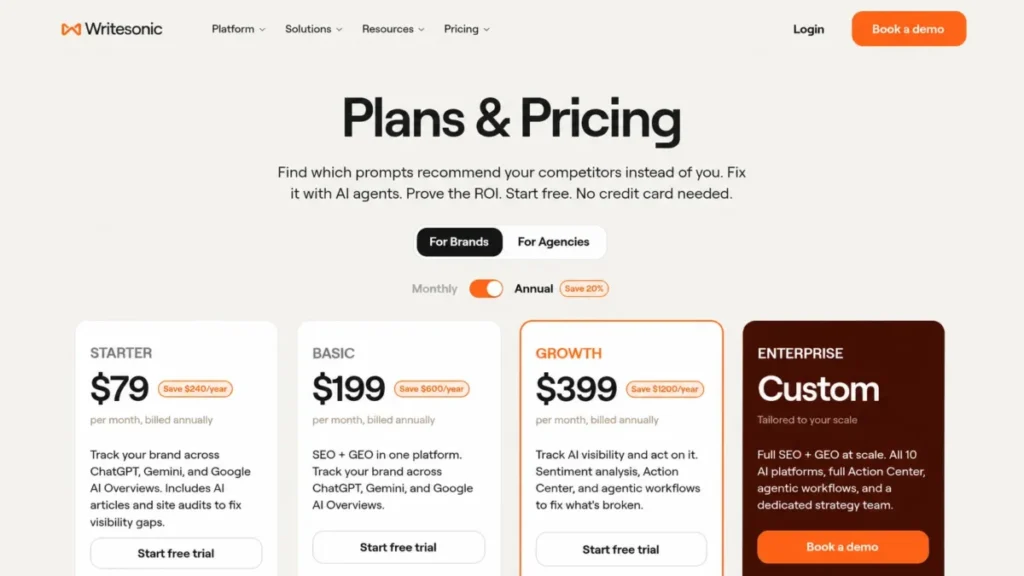
The short version: Writesonic is no longer a cheap AI writer, and buying it as one is the most expensive mistake available here. In the August 2026 United States lineup, Starter is $79 and Growth is $399 per month billed annually on the Writesonic Plans and Pricing page, checked on August 14, 2026.
The feature that justifies that price, the part that turns an AI visibility finding into a published fix, is switched off on the two cheapest plans. Starter and Basic monitor, Growth acts within a small monthly allowance, and Enterprise is where the platform the marketing describes exists in full.
That single gate decides most purchases, so the plan choice below follows the workload rather than the feature list.
In This Article (23 sections)
Quick Verdict: Writesonic at a Glance
| Quick verdict, cost | Writesonic |
|---|---|
| Starting price | Starter $79 per month billed annually, or $99 month to month |
| Practical plan | Basic at $199 per month billed annually for a two-person team |
| Execution plan | Growth at $399 per month billed annually for teams that need Action Center |
| Free plan or trial | Seven-day trial, no card required. No permanent free tier is published |
Those figures come from the Writesonic pricing page, checked on August 14, 2026.
| Quick verdict, fit | Writesonic |
|---|---|
| Best for | Small SEO and growth teams needing AI visibility tracking and article production together |
| Not ideal for | Brand-plan buyers needing more than two projects, teams needing Perplexity or Claude tracking, and buyers who only want drafting |
| Setup difficulty | Moderate. Article Writer 6 runs a documented ten-step setup before generation |
| Main strength | One documented path from visibility tracking through article production to guided fixes |
| Main limitation | Full Action Center, Content Optimization, GA4, Looker Studio, SSO, alerts, and seven of ten AI engines sit behind Enterprise |
Plan availability for each row is published on the plan comparison table.
Writesonic sits in the AI tools for content creation category but competes on generative AI search visibility, which is why the pricing looks unfamiliar next to older AI writers.
The Verdict in Short: Who Should Buy Writesonic and Who Should Not
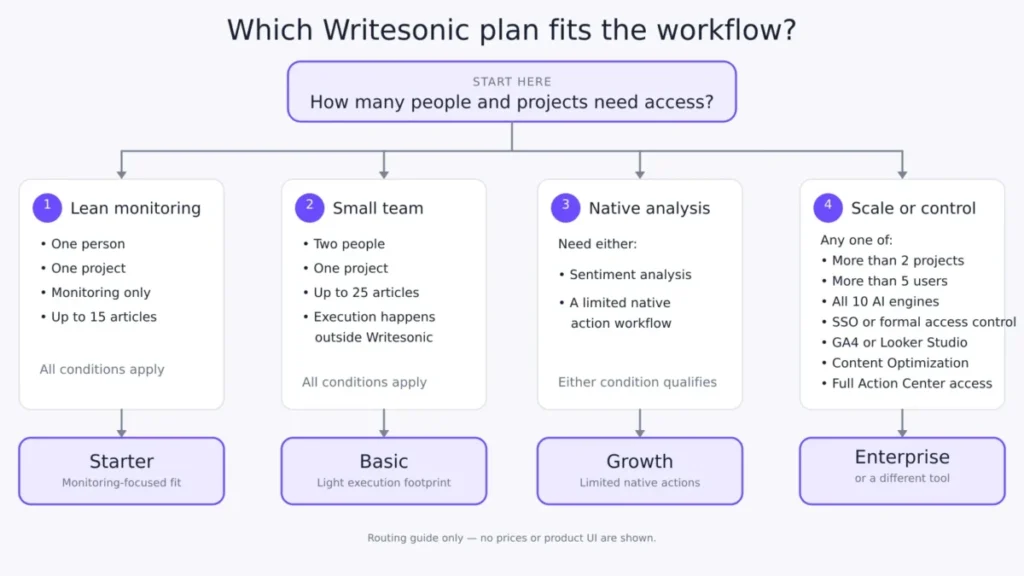
Buy Writesonic when three conditions hold at once. The team publishes between 15 and 50 articles a month, it wants to know how it appears inside ChatGPT, Gemini, and Google AI Overviews, and it can live inside one or two projects.
Those three conditions map cleanly onto Starter, Basic, and Growth, and the plan choice follows the workload rather than the feature list.
Skip Writesonic when any one of these five things is true:
- More than two isolated client projects are needed on a brand plan.
- More than five people need access.
- Perplexity, Claude, Grok, or Copilot tracking is a requirement.
- A security review demands single sign-on and role-based access on a public price.
- The content operation needs the separately gated Content Optimization feature rather than article generation.
Each of those pushes the decision into a sales-led Enterprise conversation, and the published self-serve prices stop being the budget.
My recommendation is blunt about the middle ground.
Starter, at $79 per month billed annually on the published plan list, is not a cheap writing subscription with a bonus tracker attached. It is a monitoring seat for one person, one project, one brand voice, 15 articles, and a 100-page audit ceiling.
If the reason for buying is drafting volume alone, that money buys more elsewhere.
Writesonic Pros and Cons
| Pros | Cons |
|---|---|
| One documented workflow chain from tracked prompts to guided fixes to published articles | Action Center is absent on Starter and Basic, and Growth gets only 5 off-page plus 5 on-page actions per month |
| Annual billing removes $240 to $1,200 per year versus twelve monthly payments | Self-serve tops out at five users and two projects, which disqualifies most agencies |
| Article Writer 6 exposes real editorial control over research method, sources, outline, and enhancements | Only three AI platforms are tracked below Enterprise, out of ten named |
| The May 2026 privacy policy states that Customer Data is not used to train foundation models | Agentic workflow allowances are labeled trial runs with no published reset cycle |
| Site audits scale to 2,500 pages per audit on Growth, and Google Search Console plus WordPress connect on every published plan | Cancellation mid-cycle gives no prorated refund, and GA4, Looker Studio, Content Optimization, and SSO are Enterprise only |
Each row above is drawn from the Writesonic plan and feature comparison, checked on August 14, 2026.
What Is Writesonic?
Writesonic, Inc. sells Writesonic as an AI Search Growth Engine, a platform organized around a loop: track visibility, prioritize the gaps, act on them, measure the result, and repeat. The public product surface covers AI visibility tracking across named AI engines, an article generator called AI Article Writer 6, site audits, an Action Center that turns findings into guided tasks, agentic workflows, and a document editor with import and export.
That positioning matters for a buyer because it changes the comparison set. Writesonic in 2026 is not competing only with drafting tools like the ones covered in the Jasper AI review or the Copy.ai review.
It is competing with generative engine optimization trackers on one side and SEO suites on the other, while charging like a platform that replaces part of both.
The official product domain is writesonic.com, with product documentation on docs.writesonic.com and separate API documentation on apidocs.writesonic.com. Those three sources disagree in places, and the disagreements are useful, so this review flags them where a buyer could be misled.
Source: Writesonic AI Search Growth Engine
Methodology: How This Writesonic Review Was Built
This review is based on Writesonic’s public United States pricing page, the official product, enterprise, and integration pages, and product documentation. It also uses the GEO API reference, the privacy policy dated May 13, 2026, the data processing agreement, and labeled third-party sentiment. Pricing, plan limits, and feature availability were re-verified against the live pricing page on August 14, 2026.
Writesonic was assessed against the same buyer-focused criteria applied to every platform on this site. Those criteria are real cost at the team size that fits, plan-gated workflow viability, documented limits, integration and API entitlement, security and privacy posture, migration and exit terms, and support scope.
Greater weight went to the factors that change a purchase decision rather than a feature count: which tier the decisive workflow starts on, what the price becomes at three and five seats, and which quotas are hard. Vendor positioning, integration logo walls, and review-site star averages carried no weight.
Claims that could not be verified from reliable evidence were excluded, and where two Writesonic sources conflict, the current pricing page governs commercial entitlement while the older page is treated as qualified policy evidence. The site review methodology explains the standard in full.
Writesonic Pricing and Plan Limits
Four plans are published for the United States market: Starter, Basic, Growth, and Enterprise. The first three carry list prices; Enterprise is custom and sales-led.
Prices below were verified on the live pricing page on August 14, 2026, and the annual figures are the effective monthly rate on an annual commitment.
| Plan | Monthly | Annual effective | Billed annually | Users | Projects | AI articles per month |
|---|---|---|---|---|---|---|
| Starter | $99 | $79 | $948 | 1 | 1 | 15 |
| Basic | $249 | $199 | $2,388 | 2 | 1 | 25 |
| Growth | $499 | $399 | $4,788 | 3 | 2 | 50 |
| Enterprise | Custom | Custom | Custom | Custom | Custom | Custom |
Every figure in that table comes from the Writesonic Plans and Pricing page, checked on August 14, 2026.
Two things about this table deserve attention before the feature discussion. Several review pages still price Writesonic in Lite, Standard, Professional, or Advanced tiers. Some also present a $249 figure as the entry price, which is the current Basic monthly rate on the live plan list, not an entry tier.
Those names are gone from the live page. A buyer comparing quotes against an older article will price the wrong product.
What annual billing saves, and what it costs to leave
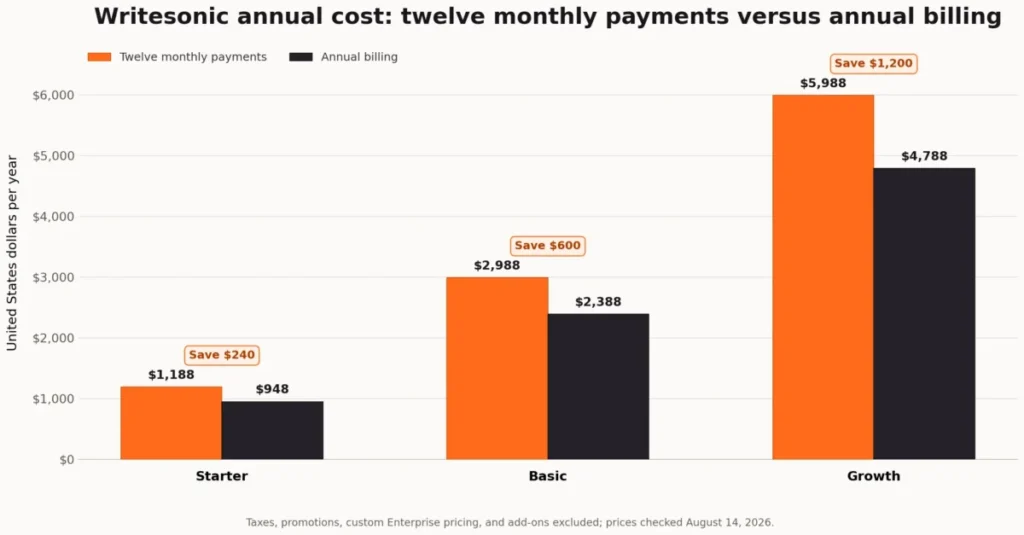
Writesonic’s own July 2026 comparison article states the monthly rates: Starter $99, Basic $249, and Growth $499.
The pricing page states the annual rates: Starter $79, Basic $199, and Growth $399 per month billed annually.
Run both out over a year and the difference is concrete. Starter costs $1,188 against $948, Basic $2,988 against $2,388, and Growth $5,988 against $4,788, which is a saving of $240, $600, and $1,200 respectively.
Taxes, promotions, and add-ons are excluded from those totals.
The discount has an exit condition attached. Writesonic’s help documentation states that a mid-cycle cancellation keeps access until the end of the paid period, issues no prorated refund, and lets unused credits or features expire at cycle end.
Billing-cycle changes take effect at the next cycle, with proration possible on mid-cycle changes. Both of those pages are more than a year old and still use the older credit vocabulary, so I treat them as qualified policy evidence and would ask for the current order form language in writing before committing to twelve months.
Source: Understanding Subscription Cancellation Mid-Cycle
What a three or five person team pays
Seats are where the published headline stops describing the budget.
Basic includes two users and allows up to three more. Growth includes three and allows up to two more.
On Basic and Growth, each additional user costs $50 per month, as listed on the Writesonic plan comparison.
Starter shows no additional-user option at all, so a second person on Starter is not a purchase, it is an upgrade.
| Team size | Basic annual cost | Growth annual cost | Projects included |
|---|---|---|---|
| 2 users | $2,388 | Not applicable | Basic 1 |
| 3 users | $2,988 | $4,788 | Basic 1, Growth 2 |
| 5 users | $4,188 | $5,988 | Basic 1, Growth 2 |
| 10 users | Not available | Not available | Enterprise only, custom |
The seat and project figures behind those totals sit in the Writesonic plan comparison table, checked on August 14, 2026.
Two numbers in that table matter more than the totals. Five users is the published self-serve ceiling across both plans, and a ten-person team has no public price at all.
Basic at five seats also still includes one project, which means five people sharing a single workspace.
The seat math assumes the stated additional-user charge of $50 per month on Basic and Growth applies for each month of an annual term, since annual treatment of the add-on is not published.
Cost per unit of article capacity
Dividing each annual rate on the pricing page by the included article allowance gives $5.27 on Starter, $7.96 on Basic, and $7.98 on Growth. The Growth article add-on, 20 articles for $100 per month, works out to $5.00 per article of added capacity.
This is a capacity ratio and not an article price, because each plan also carries prompt tracking, audits, agent runs, seats, and brand voices.
Read as a ratio, it says something useful: Starter looks cheapest per article and buys the least of everything else, and the Growth add-on is the cheapest incremental capacity on the price list.
The article volume cliff at 26 per month
Only Growth publicly sells more article capacity. Starter and Basic show no article add-on.
A Basic customer who needs 26 articles in a month is looking at the step from the Basic rate to the Growth rate on the pricing page, roughly $2,400 more per year, not a small incremental pack.
That is the clearest upgrade trigger in the lineup, and it is worth modeling before signing an annual Basic term. Buyers comparing incremental costs across drafting tools can check the Jasper AI pricing structure for contrast.
Agency Pricing Is a Separate Track, and It Changes the Agency Answer
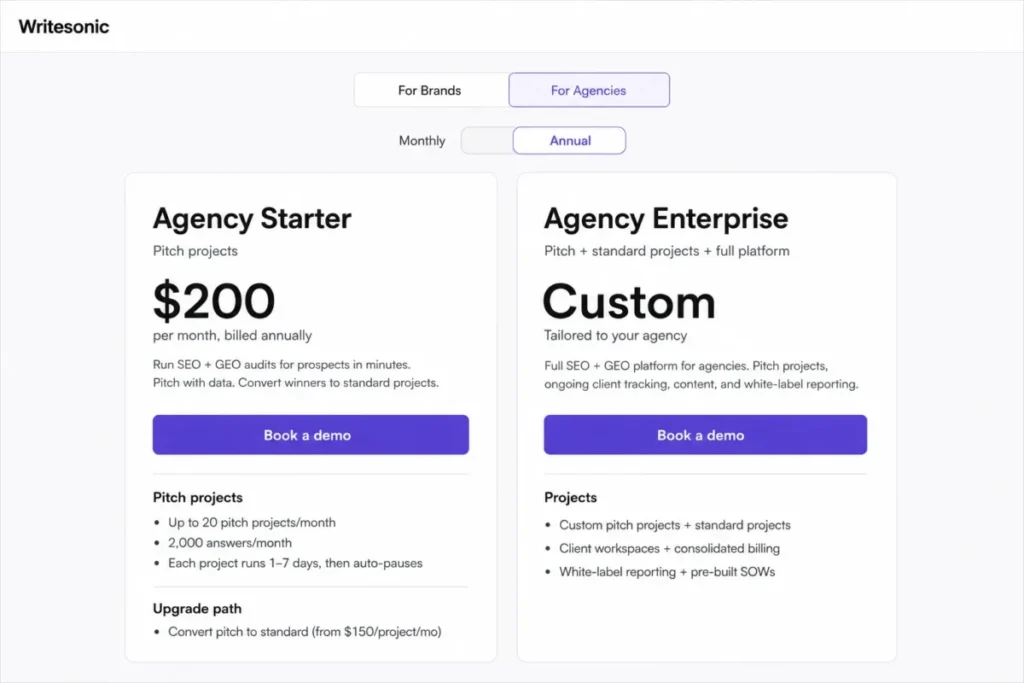
The brand pricing page has a second tab that most reviews of this product ignore. The Writesonic agency pricing page publishes a distinct lineup with two tiers: Agency Starter at $200 per month billed annually, and Agency Enterprise at custom pricing.
Agency Starter is not a cheaper version of Growth. It is a prospecting tool.
| Agency cost and projects | Agency Starter | Agency Enterprise |
|---|---|---|
| Agency Starter price, Agency Enterprise price | $200 per month billed annually | Custom |
| Pitch projects | Up to 20 per month, each running 1 to 7 days before auto-pausing | Custom |
| Standard ongoing client projects | Not included | Custom |
| Answers per month | 2,000 | Custom |
Those figures come from the agency tab of the pricing page, checked on August 14, 2026.
| Agency platform and operations | Agency Starter | Agency Enterprise |
|---|---|---|
| AI models | All models except Claude | All 10 platforms |
| Content, site audit, agentic workflows, Action Center | Not included | Included |
| Users, projects, access control | Unlimited users and projects | Custom, with role-based permissions |
| White-label reporting, pre-built SOWs, client workspaces | Workspaces only | All included, with consolidated billing |
| Support | Slack, Teams, and email |
The same agency plan comparison publishes each of those inclusions.
Read that table as a workflow, not a discount. Agency Starter buys 20 temporary audits a month for new business pitches, with unlimited users and projects, and it deliberately excludes the article writer, site audits, agentic workflows, and Action Center.
Converting a pitch project into an ongoing standard project starts at $150 per project per month, per the agency plan comparison. An agency running five retained clients on standard projects is therefore looking at $750 per month in project fees on top of whatever the contracted tier costs, before content or execution features enter the conversation.
That reframes the agency verdict in a useful way. An agency does not need Enterprise to isolate client work, because Agency Starter already allows unlimited projects.
It needs Agency Enterprise the moment retained delivery, white-label reporting, or execution is the job rather than the pitch.
Source: Writesonic Agency Pricing
Feature Gates: What Each Plan Includes and What It Blocks
| Capability | Starter | Basic | Growth | Enterprise |
|---|---|---|---|---|
| AI platforms tracked | ChatGPT, Gemini, Google AI Overviews | Same three | Same three | All 10 named platforms |
| Tracked prompts | 50 | 100 | 200 | Custom |
| Answers tracked daily | 50 | 300 | 600 | Custom |
| Site audits per month | 10, up to 100 pages | 20, up to 1,200 pages | 50, up to 2,500 pages | Custom |
| Markets, meaning language plus country | 1 | 1 | 1 | Custom |
| Prompt diversification | Not available | Not available | Included | Included |
| AI Search Volume and Brand Explorer | 5 one-time runs | 5 one-time runs | 5 one-time runs | Included |
| Alerts, Page Tracker, Shopping and Agentic Commerce | Not available | Not available | Not available | Included |
| Sentiment Analysis | Not included | Not included | Included | Included |
| Action Center | Not available | Not available | Limited: 5 off-page and 5 on-page actions per month, technical actions listed as available | Full access |
| Agentic workflows | 10 trial runs | 50 trial runs | 100 trial runs | Full, custom |
| Writing Styles or Brand Voice | 1 | 5 | 10 | Custom |
| Content Optimization | Not available | Not available | Not available | Included |
| Google Search Console, WordPress | Included | Included | Included | Included |
| GA4, Looker Studio | Not available | Not available | Not available | Included |
| User access control, SSO or SAML | Not available | Not available | Not available | Included |
| Support | Standard email | Standard email | Priority email | Dedicated Slack, Teams, email, account manager, AI search strategist |
Four rows in that grid do most of the damage to the single-platform story. Action Center, the execution layer, does not exist below Growth.
Content Optimization, despite the platform positioning, is Enterprise only, and it is a separate entitlement from the article generator that every plan includes.
Analytics reporting through GA4 and Looker Studio is Enterprise. Seven of the ten named AI engines are Enterprise, including Perplexity and Claude.
Four more gates on the live comparison table deserve a line each, because they are easy to miss and hard to work around. Every self-serve plan tracks one market, meaning one language and country pair, so an international brand hits a ceiling that has nothing to do with prompt volume.
Prompt diversification starts on Growth. AI Search Volume and Brand Explorer are listed as five one-time runs on all three self-serve tiers rather than a recurring allowance.
Alerts, Portfolios and Page Tracker, and Shopping and Agentic Commerce tracking are Enterprise only. A team that wants to be notified when its visibility drops, rather than logging in to check, is buying an Enterprise contract for that alone.
Source: Writesonic for Enterprise
Tracked Prompts and Daily Answers Are Two Different Units
Writesonic publishes two separate monitoring quotas, and conflating them produces a wrong capacity estimate.
A tracked prompt is a question being monitored. An answer tracked daily is a captured response.
The published ratios are 50 prompts to 50 daily answers on Starter, 100 to 300 on Basic, and 200 to 600 on Growth.
Read that as a sampling ratio. Starter’s listed allocation is one daily answer per tracked prompt.
Basic and Growth both list three daily answers per prompt, which supports repeated sampling of the same question.
How those answers distribute across the three tracked engines is not published, and neither is the reset behavior, so I would confirm both with sales before building a monitoring plan around a specific number.
What happens at the ceiling is also unpublished across every quota in the grid. Writesonic states the allowance but not whether the platform warns, queues, skips, or hard stops on the prompt, answer, article, audit, or action limits.
For a team planning a fixed monthly output, that is a real gap in the purchase information.
Key Features and Where They Stop
AI Article Writer 6
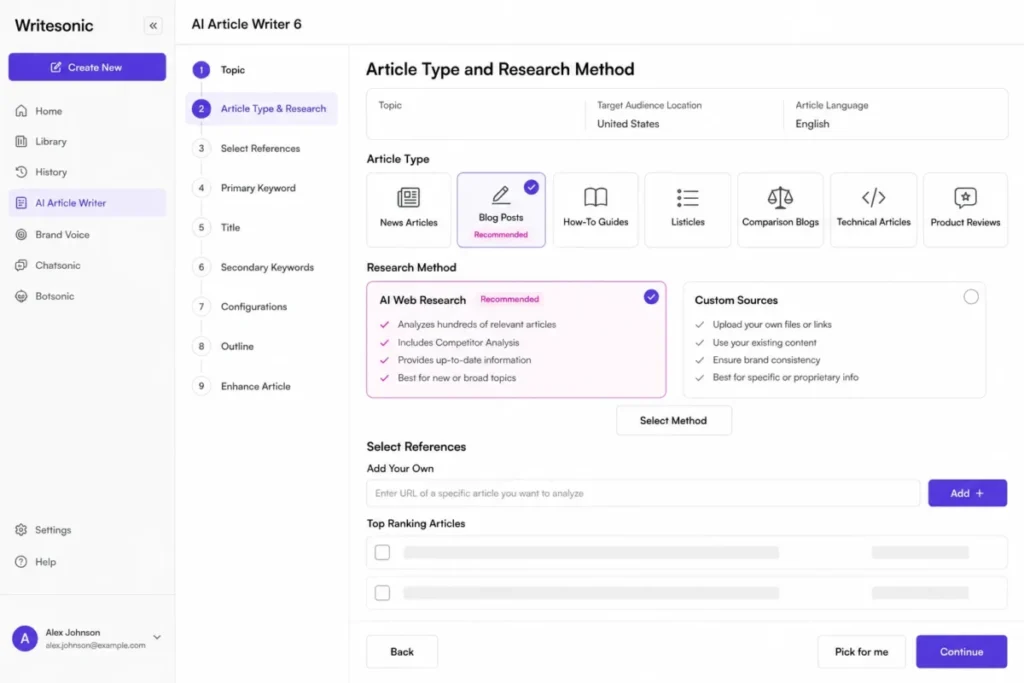
The documented article workflow runs about ten steps. Choose the topic and audience location, then the language and article type, then pick AI Web Research or Custom Sources and select references or competitor pages. Refine focus keywords, title, outline, and enhancements before generating and reviewing in the editor. Enhancement options include tone customization, internal linking, linked or footnoted sources, cover-image generation, FAQ, and calls to action.
That depth is a genuine editorial advantage over one-box generators, and it is also the friction. Ten decisions per article is a real setup cost at 50 articles a month.
Writesonic documents a Pick for me path and recommended defaults for teams that do not want to configure each run. Output quality, generation time, and citation accuracy are not established by the documentation, so this review makes no claim about them.
Source: AI Article Writer 6 ten-step article guide
Bulk article generation
Bulk generation runs from a downloaded template. The documented path is to open the Bulk Generator, select AI Article Writer V6, choose a language, download the template, fill in topic, country or language, and quality fields, save as CSV or Excel, then upload for batch processing.
What the documentation does not publish is the operational envelope. There is no row cap, no validation behavior, no queue description, and no retry rule. It also does not state what happens to a partially failed batch, or how per-row consumption counts against the monthly article quota.
For a content operations team, those are the answers that decide whether bulk is usable. I would run one small batch and keep the source spreadsheet before trusting a large one.
Source: Generate Articles in Bulk with AI Article Writer 6
Action Center
Action Center is the feature that makes Writesonic a platform rather than a tracker, and it is the feature most likely to be missing from a buyer’s plan.
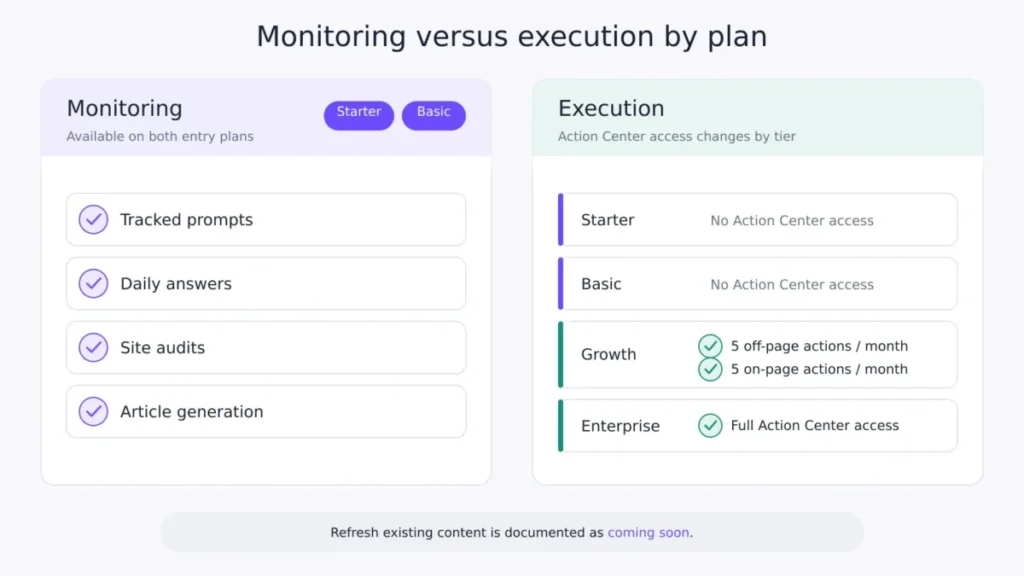
The documented flow shows unresolved, in-progress, and resolved counts, an effort indicator, an impact level, an Address now control that opens an action-specific guide, and a completion state that feeds a later impacts and results review. Refresh-existing-content is documented as coming soon.
Starter and Basic have no access. Growth gets five off-page and five on-page actions per month.
Enterprise gets full access.
Ten actions a month is an evaluation allowance, not an operating capacity, and I would treat Growth as a way to test the loop rather than run it. The documentation describes the intended flow; it does not demonstrate a visibility improvement or a time to impact.
Source: Action Center actionables guide
Site audits and the page ceiling
Audit counts get quoted more often than audit depth, and depth is the constraint that decides fit.
Starter allows 10 audits a month at up to 100 pages each. Basic allows 20 at up to 1,200 pages.
Growth allows 50 at up to 2,500 pages. A 900-page site does not fit on Starter at any audit frequency, which makes the page ceiling the first number a buyer should check against their own sitemap.
Projects, brand voices, and where work lands
Projects are the agency-relevant unit.
Starter and Basic include one, Growth includes two, Enterprise is custom. A Default Project exists for work that does not need a connected domain, and it still provides access to Article Writer, the AI agent, writing styles, research, optimization, and repurposing tools.
Generated content saves automatically into the selected project folder and is retrieved through History.
Brand voice caps sit alongside this: one Writing Style on Starter, five on Basic, ten on Growth. A multi-brand team can hit the style cap well before the article cap, and the practical failure mode is mundane.
Work generated with the wrong project selected lands in the wrong folder, so the selector is the thing to check before generating, not after.
Source: Create and Manage Projects
Automation, AI Agents, and Reporting Limits
Agentic workflows are the least clear line item on the price list. Starter shows 10, Basic 50, and Growth 100, and all three are labeled trial runs.
Enterprise lists full custom access.
No reset cycle is published, which means a buyer cannot tell whether 100 runs arrive every month or once. That distinction changes the automation value of the Growth plan entirely, and modeling those runs as a recurring monthly allowance is not supported by the published page.
Get the answer in writing.
Reporting has its own gate. Google Search Console connects on every published plan, so search-side data is available to self-serve buyers.
GA4 and Looker Studio are marked Enterprise only, which pushes executive reporting and revenue attribution out of reach for a Growth customer.
Sentiment Analysis first appears on Growth, so brand and PR teams that need sentiment segmentation should budget at least that tier.
Ease of Use and Setup
Setup difficulty is moderate rather than heavy, and the friction is front-loaded into configuration rather than installation. A new account can produce content inside the Default Project without connecting a domain, which lowers the first-run barrier.
Visibility tracking requires configured brand tracking before Action Center findings exist, so the monitoring side has a real setup step.
The learning curve concentrates in three places: the ten-step Article Writer setup, the project and folder model that determines where output lands, and the difference between the two monitoring units described earlier. None of those is difficult.
All three are the kind of thing a team gets wrong once and then corrects, which is worth an hour of internal documentation in week one.
Support scope shapes the setup experience by tier. Starter and Basic list standard email support, Growth lists priority email, and Enterprise adds dedicated Slack or Teams channels, an account manager, and an AI search strategist.
No response-time commitment is published for any tier, so priority email is a channel label rather than a service level.
Integrations and Ecosystem
Writesonic advertises more than 20 integrations plus an API. The public catalog names WordPress, Sanity, Contentful, Drupal, Vercel, major CDNs, Google data tools, Ahrefs, AI assistants, LinkedIn, YouTube, MCP, and webhooks.
Treat that catalog as vendor-advertised availability rather than confirmed plan access, because the pricing matrix gates specific connections by tier.
| Integration | Self-serve plans | Enterprise |
|---|---|---|
| Google Search Console | Included | Included |
| WordPress publishing | Included | Included |
| Zapier handoff | Documented in the editor | Documented in the editor |
| GA4 | Not available | Included |
| Looker Studio | Not available | Included |
| API and SDK connectivity | Not confirmed for self-serve | Included |
The Zapier path deserves one specific note. Writesonic’s own guide instructs the user to open the destination and confirm that the content matches after publishing, which tells a buyer something useful about handoff reliability.
A step that exists in official documentation because silent mismatch is possible is a step worth keeping in the publishing checklist.
Teams building automation chains around it can compare the connector depth in the Zapier review.
Source: Writesonic Integrations
API Access and What Is Not Published
The GEO API authenticates with an X-API-KEY header, activated from the dashboard, and documents four error categories: 401, 403, 422, and 429. The 429 confirms that rate limiting exists.
What is not published on the authentication reference is the number behind it: no requests-per-minute figure, no reset window, no retry header, no overage option, and no statement of which plans include API access.
That combination means API suitability cannot be modeled from public information. A team planning production integration needs the plan-specific rate, the reset behavior, and the entitlement in writing before it designs anything against this endpoint.
If the concept of the interface itself is new to a stakeholder in the decision, this explainer on what an API is covers the basics.
Source: GEO API Authentication
Security, Privacy, Support, and Admin Controls
Governance is the cleanest Enterprise gate in the product. Single sign-on or SAML, role-based access control, audit logs, approval workflows, multi-brand controls, and API or SDK connectivity are all presented at the Enterprise tier, along with the stated SOC 2 Type II, HIPAA, and GDPR posture.
The data processing agreement covers GDPR-related processing and states that customers can obtain the most recent SOC 2 Type 2 report and a penetration-test summary under its terms.
There is a documentation conflict worth naming here, because it can cost a buyer money. Writesonic’s role-based access control help page defines Owner, Admin, and Member roles with project-scoped permissions, and it describes availability using a Business plan name that no longer appears on the pricing page.
The current pricing matrix places user access control on Enterprise. Do not map the legacy Business label onto Basic or Growth.
Ask sales to bind roles, seats, and projects to the contract in writing.
Privacy and model routing
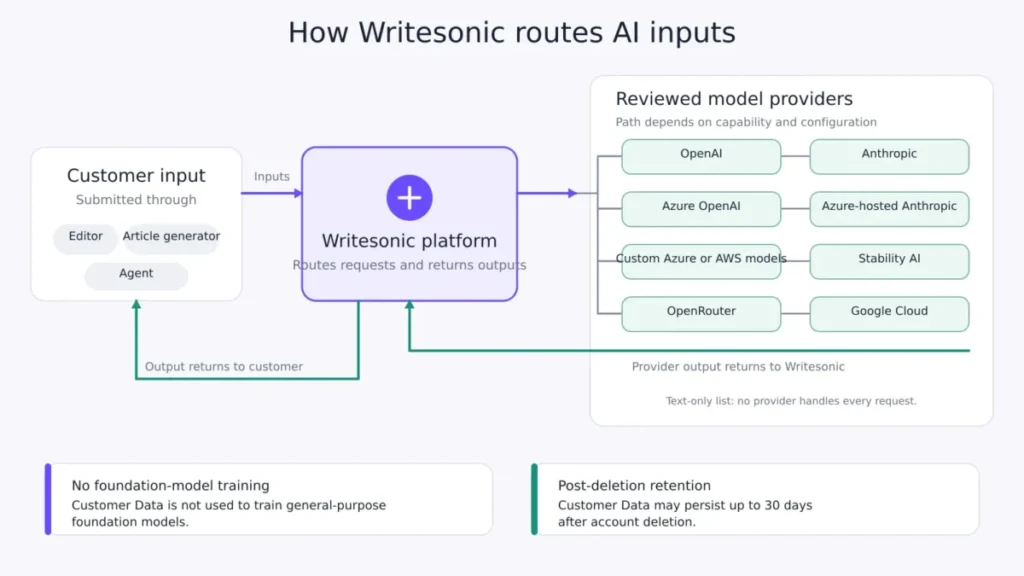
The privacy policy dated May 13, 2026 makes a clear commitment: Customer Data is not used to train or fine-tune Writesonic or model-provider general-purpose foundation models, including on trials and free tiers. That is stronger than the industry default and is the right answer for most content teams.
The routing detail underneath it needs a second look from regulated buyers. AI inputs can be sent to OpenAI, Anthropic, Azure OpenAI, Azure-hosted Anthropic, custom Azure or AWS models, Stability AI, OpenRouter, Google Cloud, and other reviewed providers depending on capability and configuration.
The no-training commitment covers foundation-model training; it does not collapse those providers into one processing environment, and a data protection review has to look at each path it will use.
| Data category | Published retention |
|---|---|
| Customer Data after account deletion | Up to 30 days |
| Billing and tax records | 7 years |
| Support tickets | 3 years |
| Access logs | 90 days |
| Security audit logs | 1 year |
| Error reports | 90 days |
Source: Writesonic Privacy Policy
Fair usage overrides comfortable quotas
One policy sits above every number in this review. Writesonic’s fair usage policy allows the company to limit access, and for unusually high or robotic usage, credential sharing, or abuse, to suspend or delete an account, in some cases without advance notice.
The policy states that more than 95 percent of users stay within limits. Each seat is intended for one individual.
A related help page states that one subscription works on computers, tablets, and smartphones but cannot be used on multiple devices at the same time.
Put those two together and the conclusion is practical: a single seat is not a shared team login, and budgeting it as one invites a restriction rather than a saving. High-volume automation buyers should get contractual quota guarantees rather than relying on published allowances alone.
Source: Fair Usage Policy
Content Import and Export: What Migration Covers
Import in the AI Document Editor accepts PDFs, Word documents, text files, URL content, and WordPress content.
Export from the Share menu produces Microsoft Word, PDF, or HTML. Zapier can hand a document to a destination such as Google Docs.
That is content-level movement, and it is not a workspace migration. Writesonic does not document migration for workspace settings, folders, History, comments, approvals, automations, roles, or analytics.
Field mapping, size limits, duplicate handling, formatting fidelity, and rollback behavior are also not published for imports.
| Migration element | Documented status |
|---|---|
| PDF, Word, text, URL, WordPress content import | Supported |
| Word, PDF, HTML export | Supported |
| Zapier handoff to a destination app | Supported, with a manual verification step |
| Workspace settings, folders, History, comments, approvals, roles, analytics | Not documented as migratable |
| Field mapping, duplicate handling, size limits, rollback | Not published |
The practical exit plan follows from the second half of that table. Keep the original source until the imported copy is verified, keep a versioned export before any cancellation, and treat export as a document backup rather than an account backup.
Source: Import Content into the AI Document Editor
What Users Say, and How Much It Proves
Third-party evidence on Writesonic is thin and mostly historical, so it belongs here as labeled sentiment rather than product fact. TrustRadius reviews emphasize time savings, ease of use, and help getting past a blank page.
The one fully visible vetted review also flags wait time and editing or checking capabilities that were missing at the time it was written.
The sample is small and old enough that it says little about the 2026 platform.
Reddit discussion is mixed and unverified. One detailed commenter described working through the full multi-step article flow, then rejected the output, removed mismatched images and quotes drawn from competitor pages, and reported a GEO outage with no support estimate.
Other comments raise isolated billing concerns.
None of that is a universal product characteristic, and I would not price a purchase on it. It does align with one structural point in this review: the article workflow gives control, and control is not the same thing as a publishable draft.
Writesonic Limitations
- Execution is gated above monitoring. Action Center is unavailable on Starter and Basic and capped at 10 actions per month on Growth, so the advertised track-to-act loop is incomplete on every self-serve plan.
- Engine coverage is narrow below Enterprise. Three named platforms on self-serve versus ten on Enterprise means Perplexity, Claude, Grok, DeepSeek, Copilot, Meta AI, and Google AI Mode tracking requires a sales-led contract.
- Agent run recurrence is unpublished. Trial-labeled allowances of 10, 50, and 100 with no stated reset cycle cannot support an automation business case.
- Overflow behavior is undisclosed across every quota. Prompts, answers, articles, audits, and actions all publish a ceiling without publishing what happens at it.
- Brand-plan scale stops at five users and two projects. Multi-brand teams reach a commercial boundary before they reach a usage limit, and the agency track solves project count only by removing content and execution features.
- Official documentation contradicts the current price list. The RBAC page still uses a Business plan name, and billing help pages still describe a credit model, which makes entitlement verification a manual procurement step.
Buyer risk ledger
| Risk | Buyer consequence | Mitigation |
|---|---|---|
| Buying Basic for the platform story | The execution layer is absent, so findings become a manual task list | Price Growth from the start, or accept Basic as monitoring plus production only |
| Annual commitment with no proration | An early exit forfeits the remaining term with no refund | Confirm order-form terms in writing; consider monthly for the first quarter |
| Seat creep past five users | Brand-plan self-serve ends and procurement becomes sales-led mid-project | Model the 12-month headcount before choosing the tier |
| Agent runs assumed monthly | The automation business case overstates capacity | Get the reset cycle confirmed in writing before signing |
| Legacy plan naming in official docs | RBAC or credit assumptions do not match the contract | Bind roles, seats, projects, and quotas to the order form |
Who Should Use Writesonic?
Each fit below is matched to the plan rates published on the Writesonic pricing page and checked on August 14, 2026.
Solo marketers running one brand. One person, one project, up to 15 articles a month, 50 tracked prompts, and a site under 100 pages per audit fits Starter at $79 per month annually. The value case holds only if AI visibility tracking and audits replace something else in the stack.
Two-person SEO content teams with one domain. Basic at $199 per month annually covers 25 articles, 100 tracked prompts, 300 daily answers, and 20 audits at up to 1,200 pages. This is the practical plan for a team that produces and monitors, and manages its task list in whatever project tool it already uses.
Three-person growth teams that need sentiment and a limited action loop. Growth at $399 per month annually adds Sentiment Analysis, 200 prompts, 600 daily answers, 50 articles, two projects, and the monthly allowance of five off-page and five on-page Action Center items. This is the first plan where the product’s own operating model is testable end to end.
Multi-brand, regulated, or global teams. Ten-engine tracking, SSO, role-based access, audit logs, approvals, GA4, Looker Studio, Content Optimization, and full Action Center access all live on Enterprise. Teams that need those should start with sales rather than a self-serve trial.
Who Should Avoid Writesonic?
Solo writers who only need drafting. At the Starter rate of $79 per month billed annually on the published price list, this is priced as a visibility platform. A buyer who wants text output alone will get more capacity from a dedicated writing tool. The Rytr review and the ChatGPT review cover cheaper drafting paths.
Agencies buying from the brand price list. One project on Basic and two on Growth is the binding constraint, and it arrives long before the article limit does. The agency track is the right entry point instead, and Agency Starter excludes the article writer, site audits, and Action Center.
Teams that must track Perplexity or Claude. Those engines are not on the self-serve matrix. A focused tracker will cover them for less than an Enterprise contract. The Perplexity review covers what that answer engine surfaces.
Organizations with a security review that requires SSO on a published price. Access control, SSO or SAML, and audit logs are Enterprise features here, so a self-serve purchase will not survive procurement.
High-volume automation teams that need contractual throughput commitments. Without a numeric API rate, a published overflow rule, and documented partial-failure handling for bulk jobs, the operating envelope is unknown. Wait for contract terms.
Writesonic Alternatives
| Alternative | Choose it if | Main tradeoff | Pricing reference |
|---|---|---|---|
| A general AI assistant | Drafting and brainstorming are the only requirements and no tracking is needed | No visibility tracking, site audits, or action workflow | Assistant subscription tiers vary; verify current rates on the vendor page |
| Jasper | Brand-voice governed marketing copy at volume matters more than AI search tracking | No integrated AI visibility loop | Verify current tiers on the vendor pricing page |
| Copy.ai | Workflow-driven go-to-market content is the priority | Different feature focus, thinner audit and GEO tooling | Verify current tiers on the vendor pricing page |
| A focused AI-visibility tracker | Broader engine coverage or a lower entry price matters more than execution | Monitoring only, with fixes handled elsewhere | Varies by vendor; verify engine list before buying |
| An established SEO suite | Backlink, keyword, technical, and reporting depth already lives there | Duplication of the parts the suite already covers | Varies by vendor |
Two of those routes have dedicated coverage worth reading before a decision. The head-to-head detail sits in the Copy.ai vs Writesonic comparison, and the general-assistant route is covered in the roundup of AI chatbots.
I would frame the choice this way rather than by feature count. Writesonic earns its premium when a team wants one operating path from tracking through content to a limited set of guided fixes, and can work inside the plan caps.
Any team that wants only one of those three pieces will find a cheaper specialist.
Final Verdict: Is Writesonic Worth It in 2026?
Writesonic is worth it for small SEO and growth teams that want both content production and AI visibility in one platform, and that can accept the caps. Every documented capability here is plan gated, so the workflow consequence follows the tier the buyer picks.
If a team chooses Starter or Basic, the official documentation shows monitoring and article generation but no Action Center, which means execution stays manual for that buyer. If the same team chooses Growth, the plan gate moves to two projects and ten monthly actions, so I recommend it only when sentiment and a native action loop decide the purchase. It is not worth it for buyers who read the platform positioning and assume the whole loop ships at the entry price.
The decision chain runs like this: check the project count first, then the seat count, then the engine list, then whether Action Center is required.
The first of those four that fails decides the plan, and often decides against self-serve entirely.
For a two-person team producing up to 25 articles a month in one project, I recommend Basic at $199 per month billed annually on the official plan list. The task layer stays outside Writesonic on that tier.
If sentiment analysis and a native action workflow are the reason a three-person growth team is buying, choose Growth at $399 per month billed annually. Its ten monthly actions are an evaluation of the operating model rather than the capacity to run it.
Anything requiring governance, ten-engine coverage, analytics integrations, or retained multi-client delivery belongs in an Enterprise or Agency Enterprise quote.
Three questions should be answered before renewal. Did the tracked prompts change a publishing decision, or just produce a dashboard?
Did the article allowance match real output, or did it force overflow into another tool? And did the plan hold as the team grew, or did seat and project caps quietly turn a Basic subscription into a sales-led contract?
A buyer who can answer those in month three is in a strong position at month twelve.
Frequently Asked Questions
How much does Writesonic cost in 2026?
Writesonic’s United States pricing on the official pricing page, verified on August 14, 2026, is Starter $79, Basic $199, and Growth $399 per month billed annually. Month-to-month, Starter is $99, Basic is $249, and Growth is $499.
Enterprise pricing is custom.
Does Writesonic have a free plan or a free trial?
A seven-day trial with no card required is published. No permanent free subscription tier appears on the current pricing page, so treat the free entry point as a trial rather than a free plan.
What is the difference between Starter, Basic, and Growth?
Starter is one user, one project, 15 articles, 50 tracked prompts, and 100-page audits. Basic doubles the users, raises articles to 25, prompts to 100, daily answers to 300, and audits to 1,200 pages.
Growth adds Sentiment Analysis, a limited Action Center, 50 articles, 200 prompts, 600 daily answers, three users, and two projects. Agencies have a separate lineup on the agency pricing page, starting with Agency Starter at $200 per month billed annually for pitch audits.
Which AI platforms does Writesonic track?
Starter, Basic, and Growth track ChatGPT, Gemini, and Google AI Overviews. All ten named platforms, including Perplexity and Claude, are listed on Enterprise only.
How many articles can Writesonic generate per month?
The published allowances on the Writesonic plan comparison are 15 on Starter, 25 on Basic, and 50 on Growth, with custom Enterprise volumes. Only the Growth article add-on extends that, at 20 articles for $100 per month.
Can a team share one Writesonic login?
No. The fair usage policy states that each seat is intended for one individual, and a separate help page states that one subscription cannot be used on multiple devices at the same time.
Extra seats on Basic and Growth cost $50 per user per month, as published on the Writesonic pricing comparison.
Does Writesonic use customer content to train AI models?
The privacy policy dated May 13, 2026 states that Customer Data is not used to train or fine-tune Writesonic or model-provider general-purpose foundation models, including on trials and free tiers. Inputs can still be routed to several named model providers depending on capability and configuration.
Can Writesonic publish directly to WordPress?
Yes. WordPress appears on every published plan, and the document editor’s Share menu includes WordPress publishing alongside Word, PDF, and HTML export plus a Zapier handoff.
The official Zapier guide instructs users to verify the destination copy after publishing.
What happens if a Writesonic annual plan is cancelled early?
Writesonic’s help documentation states that access continues to the end of the paid period, no prorated refund is issued, and unused credits or features expire at the end of the cycle. That page is more than a year old, so the current order form terms should be confirmed in writing.
Does Writesonic have an API, and what are the rate limits?
A GEO API exists, authenticated with an X-API-KEY header, and it documents 401, 403, 422, and 429 responses. The numeric rate limit, reset window, retry behavior, overage option, and plan entitlement are not published on the authentication reference.
Confirm those limits in writing before you select Starter, Basic, Growth, or Enterprise. Buyers who cannot get them can still start the no-card trial to test the monitoring side, or reject Writesonic and buy a narrower, lower-cost tool.