A password manager is a program that generates, stores and fills in your logins from an encrypted vault that one master password opens. In a zero-knowledge design, the vault is encrypted on your own device, so the provider holds no key to read it. You remember only the master password, and for the same reason the provider cannot reset it on a personal account.
Key facts
A business edition adds what a team needs: shared collections the organization owns, admin policies, single sign-on (SSO), SCIM provisioning and a way to remove a leaver’s access.
A personal password manager covers one person’s own accounts; a team that shares even one login needs the business edition.
The trade-off is concentration: the master password and its session timeout settings become the one thing you must protect.
Each part is easier to judge once you see how the vault, the encryption and autofill work together.
In This Article (9 sections)
How a Password Manager Works
A password manager works as a five-step chain: the master password derives a key on your device, the key decrypts the vault, the generator creates new passwords, sync carries changes to your other devices, and the browser extension fills each login where the website matches.
The examples below come from Bitwarden’s and 1Password’s documentation, read in November 2026; they are examples, not picks, and my Bitwarden review judges that product on its own.
The encrypted vault and master password
The vault is the encrypted store that holds your logins, and the master password is the one secret that opens it. Bitwarden, for example, encrypts vault data on your local device with AES-CBC and 256-bit keys before anything is sent to its servers. “AES-256” on a vendor’s security page names that key size, not who holds the key.
A password vault holds more than passwords: Bitwarden stores logins, notes, cards and identities. 1Password can also act as the authenticator for sites with two-factor authentication (2FA), flagging logins that support 2FA but have no one-time password yet. On a device you have already set up, a PIN or biometrics can open the vault, and Bitwarden’s whitepaper describes two-step login as protecting the account even if someone has the master password.
Zero-knowledge encryption
Zero-knowledge encryption means the provider cannot read your vault, because the keys are generated and used only on your devices. Bitwarden’s security whitepaper says the company never stores and cannot access your master password or your cryptographic keys. It stretches the master password with PBKDF2 at 600,000 iterations into a 256-bit master key that is never stored on or transmitted to its servers.
1Password adds a second secret: its Secret Key is 34 letters and numbers created on your own device, and 1Password says it has no record of it. My 1Password review covers the product built on that design.
So ask any vendor who holds the keys in its zero-knowledge architecture: when the answer is “only you,” nobody else can let you back in.
Password generator and autofill
The generator creates each password and the browser extension enters it, so nobody has to invent, remember or type one. Bitwarden’s generator makes random strings of a set length or passphrases of random words. CISA, the US cybersecurity agency, defines a strong password as at least 16 characters, random and unique to each account.
Autofill doubles as a check on where you are. Bitwarden’s extension enters the credentials whose saved address (URI) matches the website, with the base domain as the default match, so a familiar-looking page that brings up no saved username and password deserves a second look.
Sync across devices
Sync puts the same vault on multiple devices by passing encrypted changes through the provider’s server. In Bitwarden, a change in one app is pushed to the server automatically, and your other apps pull it down at login.
Shared items move more slowly: items owned by a Bitwarden organization sync across users every 30 minutes, so a password a colleague just changed can be stale until then.
Breach and password-health alerts
A password manager can tell you which stored passwords are weak, reused or exposed in a known data breach. Bitwarden’s vault health reports cover exposed, reused and weak passwords and run locally on your device. 1Password’s Watchtower flags compromised websites and vulnerable, reused and weak passwords.
Check the plan first: most Bitwarden reports require a premium account or a paid organization, while its Data Breach report is free for all users.
Passkeys in a password manager
A password manager can also act as your passkey provider, creating, storing and syncing passkeys next to passwords. The FIDO Alliance names two kinds of passkey provider: a built-in credential manager such as iCloud Keychain or Google Password Manager, and a third-party app such as 1Password or Dashlane.
1Password saves passkeys as items you can view, move and share, and a 1Password Business administrator can control whether team members may use them. Whether to standardize on passkeys is the subject of my comparison of passkeys and passwords.
What Happens If You Forget the Master Password?
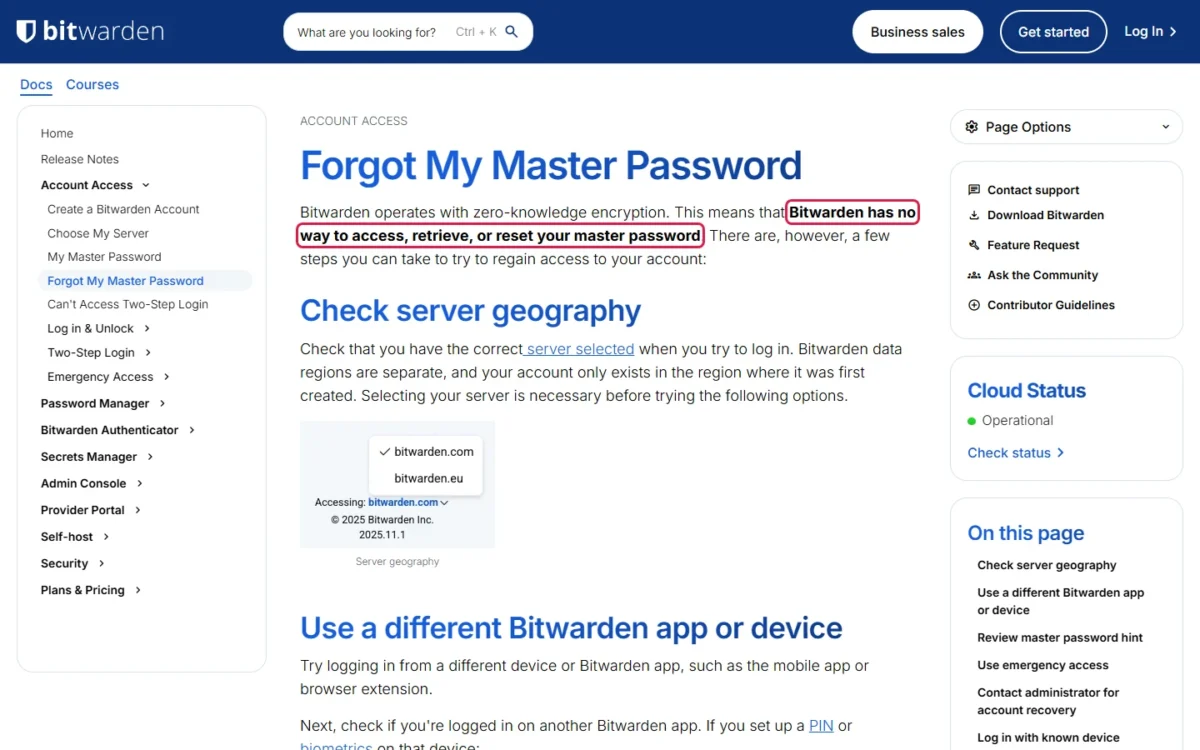
On a personal account, nobody can reset a forgotten master password; in a business organization, an admin can reset it only for members enrolled in account recovery. Bitwarden says the first part plainly: it has no way to access, retrieve or reset your master password.
A 1Password user has a second thing to keep: the Secret Key created on the device, which 1Password has no record of and can’t recover, so save the Emergency Kit that contains it.
| Account | Who can reset it | Condition |
|---|---|---|
| Personal | Nobody, the provider included | Fallbacks: a logged-in device, the password hint, an emergency contact |
| Business organization | An owner or admin | The Account recovery administration policy is on and the member is enrolled |
Sources: Bitwarden’s forgot master password page and Enterprise policies page, checked Nov 2026.
Enrollment is the catch. Bitwarden members must enroll themselves by default, so a member who never did is as locked out as a personal user. Account recovery is one of Bitwarden’s Enterprise policies and can enroll new members automatically when they accept the invitation, so turn it on before the first invitation goes out.
Personal vs Business Password Managers: What a Team Edition Adds
A business password manager adds an organization layer on top of each person’s vault: the company owns the shared logins, sets the rules and decides who keeps access. The table pairs each layer with the problem it solves and the plan Bitwarden documents it on, as one vendor’s example.
| Layer | What it does | Problem it solves | Bitwarden plan (example) |
|---|---|---|---|
| Shared collections | Organization-owned logins, shared per user or group | Company passwords in one person’s vault | Any organization type |
| Admin policies | Enforce master password rules, two-step login and session timeouts | Members choosing their own settings | Enterprise |
| Single sign-on (SSO) | Sign-in through the company identity provider | A separate login outside company sign-in | Enterprise |
| SCIM provisioning | The identity provider adds and removes members | Manual invitations, forgotten removals | Teams and Enterprise |
| Member removal | An admin revokes, removes or deletes a member | A former employee who can still open shared logins | No plan named on the help page |
| Event logs | Timestamped records of activity | No record of who viewed or changed what | Teams and Enterprise |
Sources: Bitwarden’s help pages on collections, policies, single sign-on, SCIM, member management and event logs, checked Nov 2026.
Read as a requirements list, a team that only shares logins needs collections and member removal, while a team with an identity provider should find where SSO and SCIM sit before it compares seat prices.
Shared vaults and collections
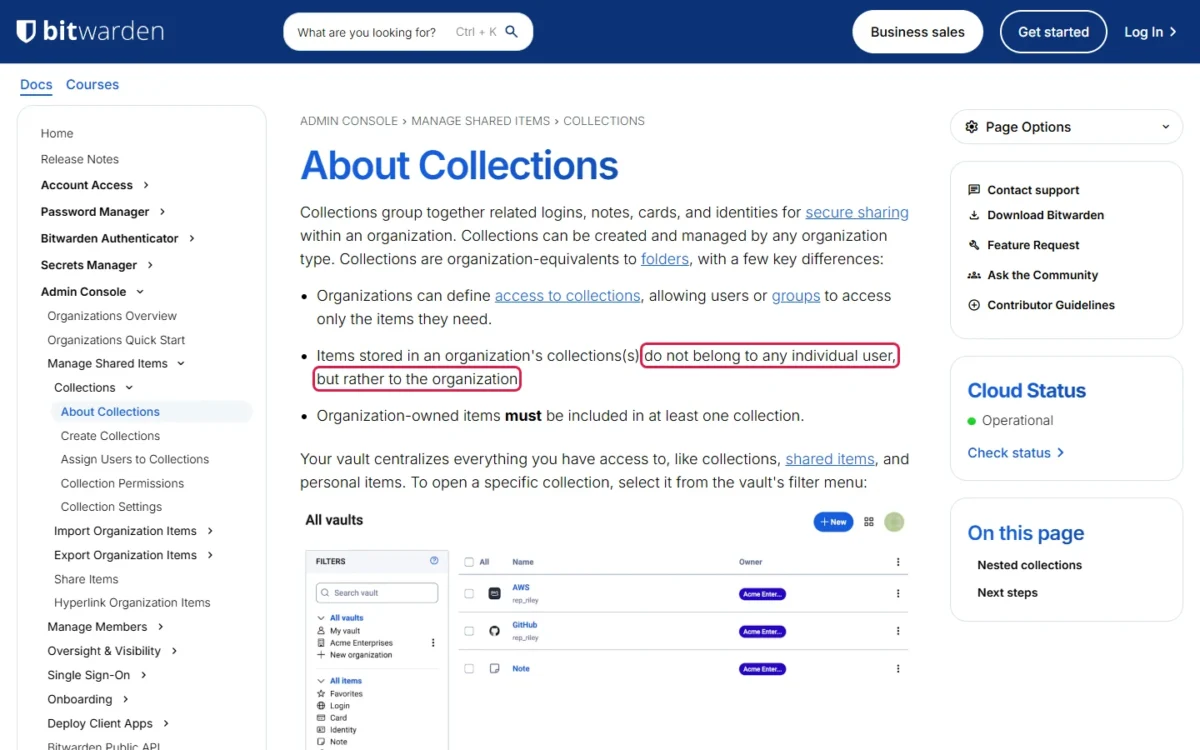
A shared vault, which Bitwarden calls a collection, is a group of logins the organization owns and grants to specific users or groups. Items in a collection do not belong to any individual user, so the login for the company’s bank account stays put when the person who created it leaves. 1Password Business uses the term shared vaults. To set one up and grant it to a group, follow my steps to share passwords with your team.
Admin console and policies
Policies let an admin set security rules once for the whole organization. Bitwarden’s Enterprise policies include master password requirements, required two-step login, required SSO, removal of vault export and a ceiling on session timeout.
Bitwarden recommends setting policies before inviting users, because some revoke members who do not comply and some cannot be enforced retroactively. For a small team I would switch on two-step login and account recovery first.
SSO and directory provisioning (SCIM)
SSO handles how members sign in, and SCIM handles who has an account. With Bitwarden’s SSO, members authenticate through the identity provider over SAML 2.0 or OIDC while decryption stays separate, so the identity provider never has the key that decrypts vault data.
SCIM lets the identity provider provision and de-provision members and groups; Bitwarden documents integrations for JumpCloud, Microsoft Entra ID, Okta, OneLogin and Ping Identity. In this example SCIM sits on Teams and Enterprise and SSO on Enterprise only, and my Bitwarden vs 1Password comparison sets the two vendors’ team features side by side.
Onboarding and offboarding
When someone leaves, the shared passwords stay with the organization and an admin cuts the person’s access from the Members page. Bitwarden offers three options, from mildest to most final: temporarily revoke access, permanently remove the member, or delete the account. A revoked member no longer occupies a license seat.
A leaver routine assembled from Bitwarden’s admin documentation:
- Revoke the member, or let SCIM do it when the identity provider deactivates the account.
- Open the member access report, documented for Enterprise organizations, to see which collections and items the person could reach.
- Review the event logs for what they viewed or exported.
- Change the shared passwords they could see. This step is my addition, because revoking access does not erase what a person has read.
With Bitwarden’s Centralize organization ownership policy on, logins a member saved for themselves sit in an organization-owned location called My Items and stay after removal. Onboarding mirrors this in three steps (invite, accept, confirm), one line of the longer list in my employee onboarding checklist.
Audit logs
Event logs record who did what and when. Bitwarden’s are timestamped records for Teams and Enterprise organizations that cover more than 60 event types, among them a viewed password and a removed user, and the web app shows up to 367 days at a time.
Bitwarden notes that the logs depend on client-reported data that could be modified or suppressed, so they may not suffice for legal forensics or auditing in every organization.
Per-user pricing
Per-user pricing means each member occupies a paid seat, so the bill follows headcount. Bitwarden, for example, charges $4 per user per month for Teams and $6 for Enterprise, both billed annually.
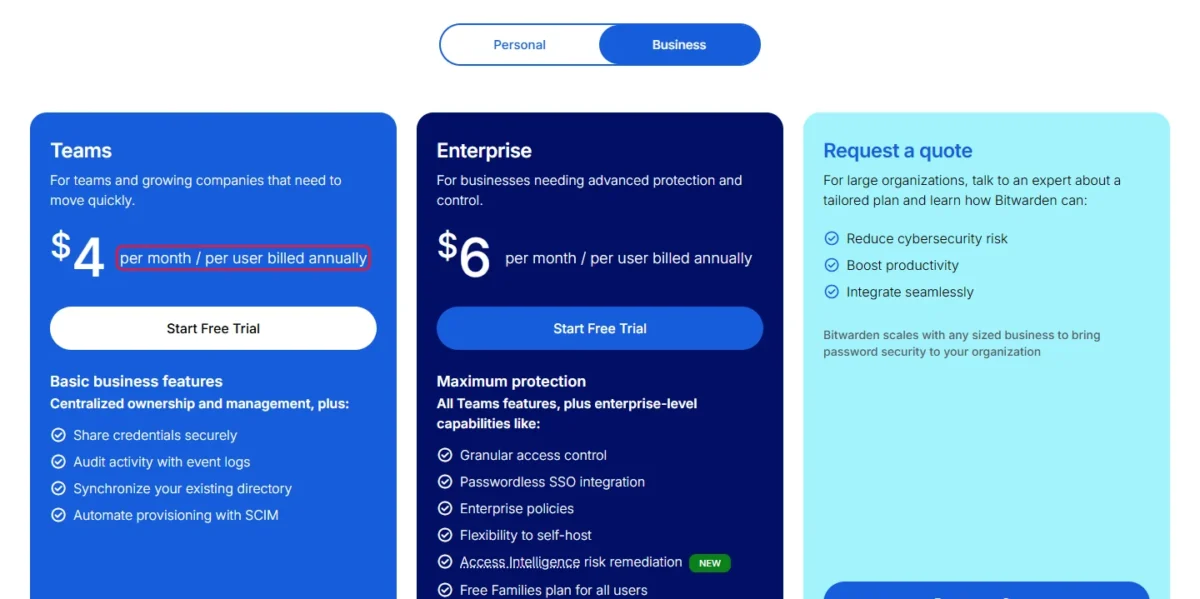
For ten people, Teams costs $4 x 10 users x 12 months = $480 a year, and Enterprise costs $6 x 10 users x 12 months = $720 a year. The gap of $720 – $480 = $240 a year is what SSO and enforced policies cost that team.
A cloud-hosted business edition is sold like other software as a service (SaaS): by subscription, here counted in seats.
Before you budget, read each shortlisted vendor’s full plan table, the way my 1Password pricing guide lays it out for that product.
What a Password Manager Is Not: The Difference from SSO, Passkeys and MFA
A password manager is not single sign-on, a passkey or multifactor authentication, and it is more than a browser’s save-password prompt, although it works alongside all four.
| Tool | What it does | Where it stops |
|---|---|---|
| Browser password manager | A password manager built into a web browser, at no cost | Built around one person’s logins |
| Single sign-on (SSO) | Authenticates a member through the company identity provider | In Bitwarden’s setup, never holds the key that decrypts the vault |
| Passkey | A FIDO credential for passwordless authentication | Needs a passkey provider to store and sync it |
| Multifactor authentication (MFA) | Asks for more than a password, such as a text code or a fingerprint | Does not create or store passwords |
SSO proves who the member is, while the vault still holds the passwords and is decrypted by a separate method. That is why Bitwarden offers SSO as a way into the vault, not a replacement for it. The browser’s own password manager, by contrast, is a real one, the first of three kinds.
Types of Password Managers
Password managers come in three kinds: built into a browser or operating system, a dedicated (standalone) cloud-based app with browser extensions, and a self-hosted server your own organization runs.
| Type | Where the vault lives | Who it fits |
|---|---|---|
| Built into a browser or operating system | In the vendor’s built-in credential manager, such as iCloud Keychain or Google Password Manager | One person’s own accounts |
| Dedicated cloud-based app | Encrypted on the provider’s cloud servers and synced to its apps | A team that needs shared collections, policies and logs |
| Self-hosted | On a server the organization runs | A team with IT staff and a reason to keep data in-house |
Google’s built-in manager is Google Password Manager, which the FIDO Alliance names as a built-in credential manager. Bitwarden covers the other two kinds and lists self-hosting on its Enterprise plan. A separate guide checks whether Google Password Manager is safe enough to rely on.
My take
For a small team, I would shortlist only dedicated cloud-based password managers. A built-in manager suits one person, and self-hosting pays off only for a team with the technical resources and expertise to handle server maintenance, security and updates.
Are Password Managers Safe? Benefits and Limits
Yes: NIST requires services to allow password managers and CISA tells people to use one, provided you protect the master password and pick a vendor that shows its work. NIST SP 800-63B says verifiers shall allow password managers and autofill, and adds that they have been shown to increase the likelihood of stronger passwords, particularly with a generator.
A team gains two things, each with a condition:
- Unique passwords with less effort. The convenience of one master password and autofill removes the main reason people reuse passwords, as long as every login is saved in the vault.
- Company ownership. Shared logins stay with the organization when they are stored in collections, not personal vaults.
The disadvantages of using a password manager come down to three, each with a fix:
- One password guards everything. A weak or forgotten master password is the single point of failure; use a long passphrase, two-step login and, for a team, account recovery.
- A timeout setting can undo the encryption. Bitwarden warns that its Never timeout option stores the encryption key unencrypted on the device; set a session timeout policy.
- The vendor can fail. NIST lists the exploit of an insufficiently secure password manager among the threats to passwords, and 1Password’s Watchtower flags logins imported from LastPass as possibly compromised in a breach LastPass experienced in August 2022. Check the vendor’s security page for outside audits: Bitwarden, for one, lists SOC 2 Type II and ISO 27001.
If that breach is why you are here, my list of LastPass alternatives is the place to compare replacements.
My take
A vendor’s breach is outside your control; lockout and a loose timeout are inside it. I would put a small team’s effort into a session timeout, required two-step login and account recovery before comparing ciphers.
Do You Need a Password Manager for Your Team?
Yes, if the team shares even one login or anyone will ever leave, and then a business edition is the one to get. In Bitwarden’s lineup, Teams gives collections, SCIM and event logs, while SSO, account recovery and required two-step login are Enterprise features, so a team that wants an admin to reset a forgotten master password budgets for the $6 Enterprise tier. A personal password manager is enough only for people who manage nothing but their own accounts.
| Your situation | What to get | Why |
|---|---|---|
| One person, own accounts only | A personal password manager; the browser’s built-in one is the free start | Nothing is shared |
| A team that shares a few logins | A business edition with shared collections | Shared items belong to the organization |
| Staff or contractors come and go | A business edition with member removal; account recovery is an Enterprise policy in Bitwarden | Access ends with one action, and on Enterprise an admin can reset a forgotten master password |
| Sign-in runs through Microsoft Entra ID or Okta | A plan that includes SSO and SCIM | Accounts and sign-in follow the directory |
The next step is a shortlist, and my ranking of the best password managers for business sorts the options by the team job each one fits.
My take
I would move to a business edition the day a team shares its first login. It is worth it when a login has to outlive the person who created it: in Bitwarden, the organization defines who can open each collection, an admin can remove a member, and event logs keep a time-stamped record of what changed.
Single-product reviews go deeper on three of the names you will meet in that ranking:
How to Get Started with a Password Manager as a Small Team
A small team can start in five steps, and the order matters because policies such as Bitwarden’s work best when set before anyone joins.
- Shortlist. Pick two or three business editions that have the layers you need.
- Set policies first. On Bitwarden’s Enterprise plan, turn on account recovery with automatic enrollment and the Require two-step login policy before the first invitation; both are Enterprise policies, so on Teams ask each member to turn on two-step login.
- Build collections. Create one collection per team or function and grant access by group.
- Move the logins in. Save shared passwords in collections, and replace weak or reused ones with generated passwords of at least 16 characters.
- Write the leaver routine. Decide who revokes access and who changes the shared passwords.
FAQ
Are built-in browser password managers good enough?
For one person, usually yes: CISA counts the built-in password managers in web browsers among the free options. For a team, look for shared collections, admin policies, member removal and event logs before relying on one.
Where is the safest place to keep passwords?
In a password manager, according to CISA, which advises against writing passwords down or saving them in a file on a computer.
Where do I find my password manager?
You reach it through its browser extension, its mobile or desktop app, or its web app. With Bitwarden, logging in on a newly installed app pulls your up-to-date vault.
Do I need to pay for a password manager?
Not for personal use: CISA notes that some password managers are free, and Bitwarden describes its basic plan as always free, while my comparison of free password managers shows what each plan limits. A team pays per user for the business layer, which is worth it when even one login is shared.