For a small team choosing NordPass vs Proton Pass, Proton Pass is the right choice for SSO through Entra ID or Okta, and NordPass for audit logs without it. Two features decide it: Pass Professional includes SSO and SCIM at $4.99 per user per month, billed yearly; NordPass puts Entra ID and Okta SSO on Enterprise at $5.99 and audit logs on Business at $3.99.
Quick verdict
NordPass Teams includes Google Workspace SSO but is sold only as a 10-user pack; Proton Pass business plans start at 3 users.
Ten seats with Entra ID or Okta SSO cost $5.99 x 10 x 12 = $718.80 a year on NordPass Enterprise and $4.99 x 10 x 12 = $598.80 on Pass Professional.
Pick NordPass for a Google Workspace team of about 10; pick Proton Pass for a team of 3 to 9.
The trade-off: Pass Essentials’ $1.99 rate carries a 60% off tag with no end date.
In This Article (8 sections)
NordPass vs Proton Pass at a Glance
The two products split on which plan carries SSO and audit logs.
| Attribute | NordPass | Proton Pass |
|---|---|---|
| Best for | Google Workspace teams of about 10; audit logs without Entra ID or Okta SSO | Teams of 3 to 9; Entra ID or Okta SSO with SCIM at the lower seat price |
| Entry business plan, billed yearly | Teams: $1.99 per user per month | Pass Essentials: $1.99 per user per month |
| Plan with Entra ID or Okta SSO, billed yearly | Enterprise: $5.99 per user per month | Pass Professional: $4.99 per user per month |
| Seat rules | Teams: 10 users pack only; Business and Enterprise: 5 users minimum | Minimum 3 users; Pass Essentials: 3 to 30 users |
| Free personal plan | One active session on one device | Unlimited devices, 10 hide-my-email aliases |
| Main limitation | Entra ID and Okta SSO sit on Enterprise | Pass Essentials has no SSO, SCIM or activity log |
Sources: NordPass business plans, NordPass Premium vs Free, Proton Pass business pricing and Proton Pass personal pricing, checked November 2026.
Key Differences: Features Compared
Both autosave and autofill logins, store passkeys, secure notes and credit card details, and include a built-in authenticator for 2FA codes. Four differences decide which plan a team needs.
- SSO placement: NordPass has Google Workspace SSO on Teams and Entra ID and Okta SSO on Enterprise; Proton Pass has SSO and SCIM on Pass Professional
- Seat rules: NordPass sells Teams as a 10-user pack; Proton Pass starts at 3 users and Pass Essentials stops at 30
- Sharing model: NordPass adds Shared Folders on Business; Proton Pass shares vaults on every business plan
- Security proof: NordPass shows ISO 27001 and SOC 2 Type 2 certification; Proton Pass publishes open-source apps
| Feature | NordPass | Proton Pass |
|---|---|---|
| Google Workspace SSO | Teams, Business, Enterprise | Pass Professional |
| Entra ID and Okta SSO | Enterprise | Pass Professional |
| Automatic user provisioning | Enterprise (Entra ID, Okta) | Pass Professional (SCIM) |
| Shared folders or shared vaults | Shared Folders: Business, Enterprise | Vault sharing: every business plan |
| Email aliases | Email Masking, listed for business plans | Unlimited hide-my-email aliases: every business plan |
| Activity or audit log | Teams: user activity monitoring; Business: audit logs | Pass Professional |
| Breach monitoring | Data Breach Scanner: Business (1 domain), Enterprise (up to 10 domains) | Dark Web Monitoring: every business plan |
| Offline access | Teams, Business, Enterprise | Not listed on the pricing page |
| File attachments | Not listed on the business plans page; personal Premium and Family | Pass Professional; personal Pass Plus and up |
| Emergency access | Not listed on the business plans page; listed on the personal plans page, no plan named | Not listed on the business pricing page; personal Pass Plus and up |
| Proton Sentinel account protection | Not listed on the business plans page | Pass Professional; personal Pass Plus and up |
Sources: NordPass business plans, NordPass personal plans, NordPass Premium vs Free, the Proton Pass plan comparison and Proton Pass personal pricing, checked November 2026.
SSO, SCIM and directory sync
NordPass includes Google Workspace SSO on every business plan and holds Entra ID and Okta SSO, plus automatic user provisioning, for Enterprise. Proton Pass puts SSO and SCIM, the protocol that syncs users from your identity provider, on Pass Professional and leaves both out of Pass Essentials and Workspace Standard.
On NordPass, Google SSO is one toggle under Authentication in the Admin Panel. Entra ID provisioning takes 21 steps across Entra and the NordPass Admin Panel, so treat it as an IT project rather than a toggle. Its provisioning cycle runs every 40 minutes, so a new user may wait for the next cycle to get the invitation unless an admin uses “Provision on demand”.
Proton Pass SSO uses SAML with an identity provider such as Okta, Microsoft Entra ID or OneLogin, across up to 5 domains. With SCIM groups, removing someone from a group in the identity provider revokes that group’s shared vaults automatically.
Verdict: SSO and directory sync
For Entra ID or Okta, Proton Pass fits better on cost: Pass Professional is $4.99 per user per month on yearly billing against $5.99 for NordPass Enterprise. For a Google Workspace team of about 10, NordPass fits better: the Teams 10-user pack includes that SSO for $1.99 x 10 x 12 = $238.80 a year, against $4.99 x 5 x 12 = $299.40 for just 5 Pass Professional seats.
The caveat: NordPass Enterprise names Microsoft Sentinel and Splunk integrations; Proton’s plan card lists SIEM integration without a product name.
Sharing: shared folders vs shared vaults
NordPass includes secure password sharing on every business plan and adds Shared Folders on Business and Enterprise. Proton Pass includes vault, item and secure link sharing on every business plan and adds group sharing on Pass Professional.
A NordPass Shared Folder carries one of four permission levels, and the level applies to the whole top folder. You cannot share a single subfolder or item inside it, and subfolders exist only on Enterprise.
So a NordPass team plans one top folder per audience. In Proton Pass the unit is the vault, and on Pass Professional a team policy can block sharing outside the organization or require that admins create every vault.
For a team under 10 that only needs a shared set of logins, Pass Essentials is enough, because vault sharing is on the entry plan. On NordPass I would budget for Business as soon as the team wants folders with group access.
Admin console, policies and activity logs
Audit logs start on NordPass Business and on Pass Professional, which makes NordPass the cheaper route to an audit trail for a team that does not need Entra ID or Okta SSO.
NordPass’s plan FAQ names audit logs, breach monitoring and password health reports as Business features. The Teams card lists user activity monitoring and security settings applied to all users, a lighter set. The feature table also names a Password Policy and Granular Policies, but its text does not tie them to a plan, so check what Teams records and enforces during the trial before you rely on it for an audit.
Proton Pass includes the admin panel and enforced 2FA on every business plan. The activity log, customizable team policies and usage reporting start on Pass Professional, where the usage log shows the time, user, event and IP address.
Verdict: audit logs without SSO
NordPass fits better: 10 seats cost $3.99 x 10 x 12 = $478.80 a year on Business against $4.99 x 10 x 12 = $598.80 on Pass Professional.
The caveat: Pass Professional’s price also includes SSO and SCIM. If Entra ID or Okta is on your roadmap, NordPass means a later move to Enterprise.
Onboarding and offboarding employees
NordPass documents inviting a member, removing one and handing a leaver’s items to a colleague. Proton Pass documents seat changes and SCIM deprovisioning.
To add someone in NordPass, an admin first invites them; with Google SSO on, the invited member logs in with Google Workspace credentials. With Entra ID provisioning on Enterprise, users added in Entra ID receive an email invitation to complete their NordPass registration.
To remove someone in NordPass, an Owner or Admin suspends or deletes the member in the Admin Panel, and an Owner can then transfer the deleted member’s items to another member. Two limits matter: the transfer is unavailable above 2,100 items, and items nobody acts on are deleted automatically after 730 days.
In Proton Pass, an admin can add or remove users at any time, and removing users from the plan earns a prorated credit for the time left on the contract when the Primary Admin makes the change. With SCIM on Pass Professional, removing someone in the identity provider revokes access automatically; without it, Proton says those updates are made manually.
Whichever you pick, put the vault invite and the removal step in your employee onboarding checklist, so access changes on the first and the last day.
Verdict: offboarding
Not enough evidence for a pick. NordPass publishes the transfer steps and their limits. Proton’s add-or-remove-users guide covers seat counts and credit, not where a leaver’s own vaults go, so remove a trial user during the 14-day trial before you commit.
Security model, encryption and privacy
Neither vendor’s pages show a weaker model, so “is Proton Pass more secure than NordPass?” has no yes-or-no answer. NordPass describes a zero-knowledge architecture and Proton Pass zero-knowledge, end-to-end encryption; they differ in how a buyer can check the claim.
NordPass uses XChaCha20 encryption for the vault and derives the master key with Argon2id. Its plans page shows ISO 27001 and SOC 2 Type 2 certification, and its security page lists independent security audits and a bug bounty program.
Proton Pass encrypts vaults with 256-bit AES-GCM and applies end-to-end encryption to all fields, including usernames and web addresses. All Proton Pass apps are open source, and Proton says its independent audit reports are available to the public.
That makes the choice a question of proof. A buyer whose security questionnaire asks for SOC 2 Type 2 finds it named on NordPass’s page. A buyer who wants code anyone can review gets that from Proton Pass; NordPass’s security page does not mention open-source apps.
On privacy and location, Proton says its Swiss base puts it outside US and EU jurisdiction, and NordPass says it stores vault items in AWS data centers across the US and EU.
NordPass and Proton Pass Pricing Compared
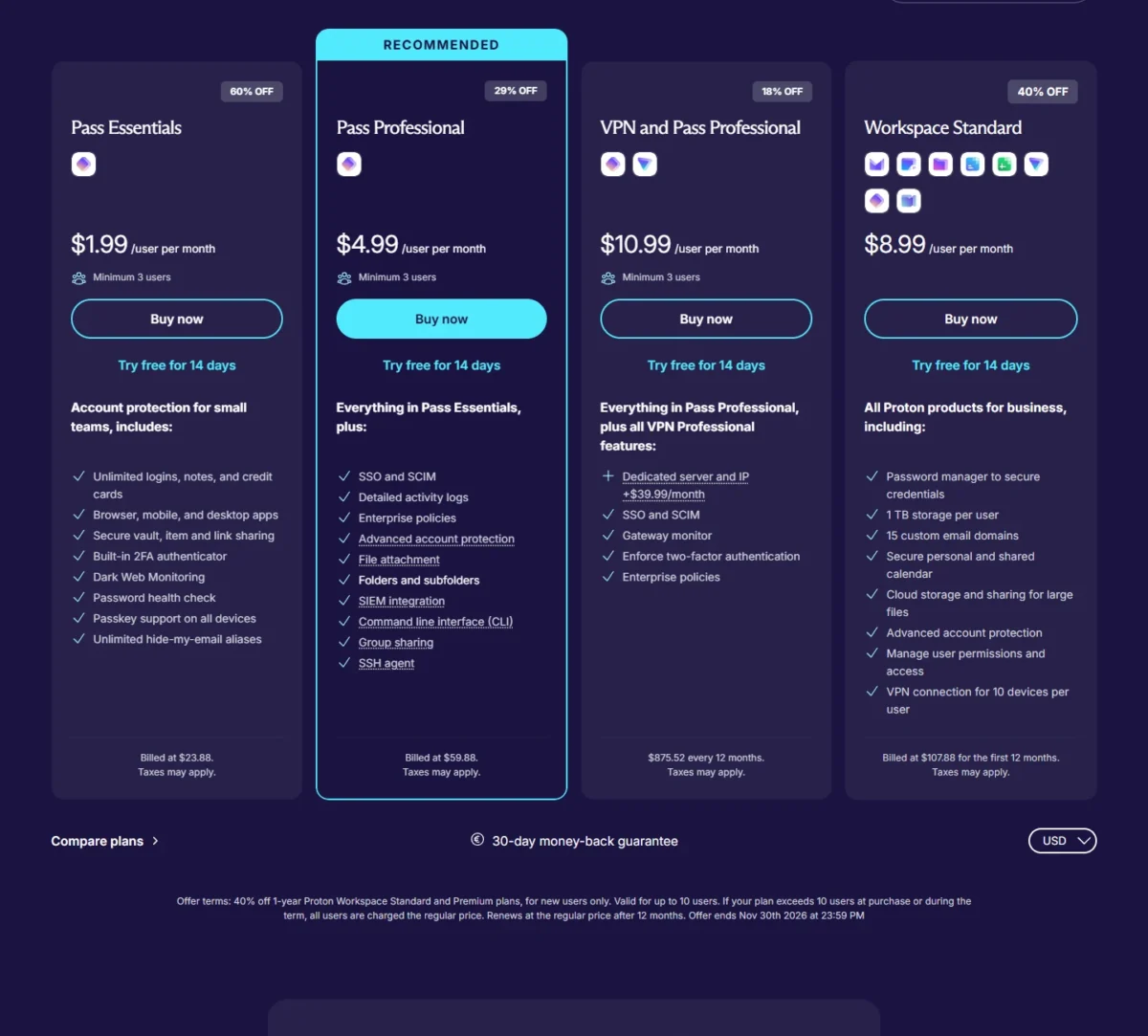
On yearly billing, NordPass Teams costs $1.99, Business $3.99 and Enterprise $5.99 per user per month. Proton’s Pass Essentials costs $1.99 and Pass Professional $4.99 per user per month on yearly billing. Shorter terms cost more on every plan, and the jump is largest on Pass Essentials, which costs $4.99 per user per month on monthly billing.
| Plan tier | NordPass | Proton Pass |
|---|---|---|
| Entry plan | Teams: $1.99 on the 1-year plan; $2.49 on the 1-month plan; $1.79 on the 2-year plan | Pass Essentials: $1.99 billed yearly (60% off tag); $4.99 billed monthly |
| Audit-log plan | Business: $3.99 on the 1-year plan; $5.99 on the 1-month plan; $3.59 on the 2-year plan | Pass Professional: $4.99 billed yearly (29% off tag); $6.99 billed monthly |
| Entra ID or Okta SSO plan | Enterprise: $5.99 on the 1-year plan; $7.99 on the 1-month plan; $5.39 on the 2-year plan | Pass Professional, as above |
| Free trial and refund | 14-day free trial, no credit card; refund within 14 days of purchase | 14-day free trial; 30-day money-back guarantee |
Sources: NordPass business plans, Proton Pass business pricing and the monthly view of Proton Pass for Business, checked November 2026.
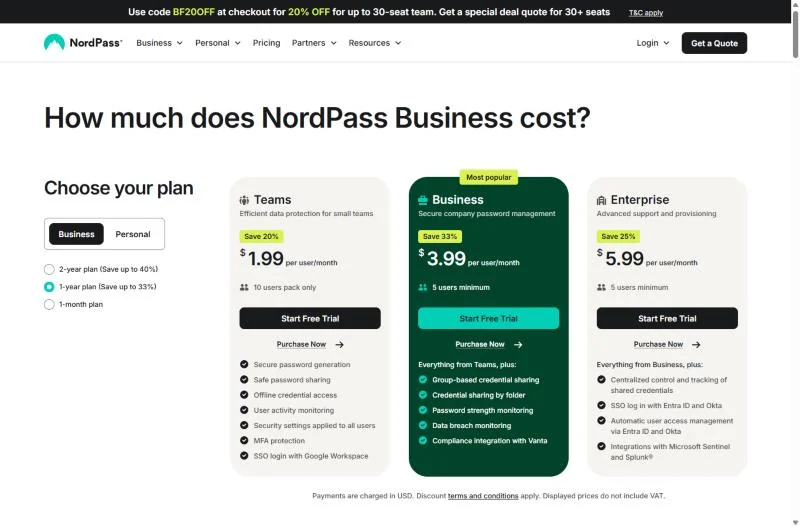
NordPass charges in USD and says its displayed prices do not include VAT; Proton’s plan cards say taxes may apply. Neither the NordPass business cards nor Proton’s Pass Essentials and Pass Professional yearly cards print a renewal price.
Promotions were on both pages on November 20, 2026. NordPass marks its 2-year plans up to 40% off, and Proton’s 60% and 29% off tags carry no end date.
Proton’s Workspace Standard suite includes Proton Pass at $8.99 per user per month in a 40% off first-year promotion ending November 30, 2026, but not SSO. It renews at the regular price after 12 months, which Proton’s business plans page prints as $14.99 next to the $8.99.
My NordPass pricing guide covers the personal tiers too.
What a 5-, 10- and 25-person team pays
A 10-person team on yearly billing pays the same on either entry plan, $1.99 x 10 x 12 = $238.80.
| Team size | NordPass Teams | NordPass Business | NordPass Enterprise | Pass Essentials | Pass Professional |
|---|---|---|---|---|---|
| 5 people | $1.99 x 10 x 12 = $238.80 (10-user pack) | $3.99 x 5 x 12 = $239.40 | $5.99 x 5 x 12 = $359.40 | $1.99 x 5 x 12 = $119.40 | $4.99 x 5 x 12 = $299.40 |
| 10 people | $1.99 x 10 x 12 = $238.80 | $3.99 x 10 x 12 = $478.80 | $5.99 x 10 x 12 = $718.80 | $1.99 x 10 x 12 = $238.80 | $4.99 x 10 x 12 = $598.80 |
| 25 people | Not available: up to 10 members | $3.99 x 25 x 12 = $1,197.00 | $5.99 x 25 x 12 = $1,797.00 | $1.99 x 25 x 12 = $597.00 | $4.99 x 25 x 12 = $1,497.00 |
Sources: NordPass business plans and Proton Pass business pricing, checked November 2026. Assumptions: list prices on November 20, 2026, yearly billing, the monthly rate times 12; tax, add-ons and any renewal change are excluded.
Five people expose NordPass’s seat rules. Teams still bills the 10-user pack, so Business for 5 users costs 60 cents more a year and adds Shared Folders and audit logs. Pass Essentials costs about half of either.
Seat packs and minimums like these are the per-seat pricing traps that inflate a small team’s bill, so count the seats you must buy, not the people you have.
Growth sets the upgrade points. Teams holds up to 10 members and Pass Essentials up to 30 users, so NordPass moves you to Business at an 11th user and Proton Pass moves you to Pass Professional at a 31st.
A team that will not commit to a year breaks the entry-plan tie. Proton’s monthly billing puts ten Pass Essentials seats at $4.99 x 10 x 12 = $598.80 over 12 months. NordPass’s 1-month plan puts ten Teams seats at $2.49 x 10 x 12 = $298.80, half as much.
NordPass also sells a 2-year plan, while Proton’s pricing page lists monthly and yearly billing. Twenty-five Business seats cost $3.59 x 25 x 24 = $2,154.00 over two years, against $3.99 x 25 x 24 = $2,394.00 at the 1-year rate.
My take
For 3 to 9 people who need shared vaults and nothing more, I would buy Pass Essentials and accept that its discounted price has no printed renewal. At exactly 10 people on Google Workspace, NordPass Teams adds SSO for the same yearly bill.
Above 10 with an audit requirement, NordPass Business is the cheaper plan unless you use Entra ID or Okta; then Pass Professional is.
Free and personal plans
Proton Free works on unlimited devices, while NordPass Free allows one active session on one device, so Proton Pass is the better free plan for anyone who uses both a phone and a laptop.
The paid personal plans start level. Pass Plus and NordPass Premium are each $1.99 a month on a 1-year plan, billed $23.88 for the first 12 months. Proton states that Pass Plus then renews at $35.88; NordPass’s Premium card shows $35.88 next to $23.88 for the first 12 months and states no renewal price, so year two is a question to ask NordPass before you buy.
Proton’s family plan costs less in year one: Pass Family is $33.48 for the first 12 months for up to 6 users, then $59.88, against $44.28 for the first 12 months for NordPass Family’s 6 user accounts, whose card shows $71.88 next to that price and no renewal line.
Ease of Use, Integrations and Support
Platform support and rollout
Both run on Windows, macOS, Linux, Android and iOS, with extensions for Chrome, Firefox, Safari and Edge, and both list a biometric option for opening the vault. Autofill behavior on your own sites shows up only in use, so run both 14-day trials with real logins before you sign a yearly plan.
Integrations and support
On integrations, NordPass adds Vanta on Business, which it says helps gather evidence for SOC 2 and ISO 27001 audits, and Microsoft Sentinel and Splunk on Enterprise. Proton Pass adds SIEM integration, a command line interface and an SSH agent on Pass Professional.
On support, NordPass lists 24/7 live support in its business feature table, and its help center puts face-to-face onboarding and a dedicated account manager on Enterprise. Proton Pass scales help by headcount: organizations with 6 or more members can book a phone or video support call, and customized onboarding with a dedicated account manager starts at 20 users on Pass Professional.
My take
I would not move up a plan on either side for support alone. A team that collects audit evidence in Vanta leans to NordPass Business, and a developer team that wants an SSH agent in its password manager leans to Pass Professional.
Who Should Pick NordPass, Who Should Pick Proton Pass
Your identity provider and headcount decide it: NordPass suits Google Workspace teams of about 10 and audit logs below Enterprise, and Proton Pass suits Entra ID or Okta shops and teams of 3 to 9.
NordPass’s case rests on where it puts Google SSO and audit logs:
Pros
- Google Workspace SSO on Teams, the entry plan
- Audit logs and Shared Folders on Business, one tier below Entra ID and Okta SSO
- Documented transfer of a deleted member’s items to another member
Cons
- Teams is sold only as a 10-user pack, so a 4-person team pays for 6 unused seats
- Entra ID and Okta SSO and automatic provisioning need Enterprise
- Shared Folder permissions apply to the whole top folder, never to one subfolder or item
Proton Pass’s case rests on seat flexibility and one plan for SSO:
Pros
- SSO and SCIM together on Pass Professional
- A 3-user minimum on Pass Essentials and Pass Professional
- Vault, item and secure link sharing on every business plan
- Open-source apps and public audit reports
Cons
- Pass Essentials has no SSO, SCIM, activity log or team policies, and stops at 30 users
- The 60% and 29% off tags on the yearly prices carry no end date
- Customized onboarding and a dedicated account manager start at 20 users on Pass Professional
| Your priority | Better fit | Reason | Trade-off |
|---|---|---|---|
| Entra ID or Okta SSO with user provisioning | Proton Pass | Pass Professional is $4.99 per user per month; NordPass Enterprise is $5.99 | No named Splunk or Microsoft Sentinel integration |
| Google Workspace SSO on the entry plan | NordPass | Teams includes it at $1.99 per user per month | Sold only as a 10-user pack |
| Audit logs without Entra ID or Okta SSO | NordPass | Business is $3.99 per user per month; Pass Professional is $4.99 | 5 users minimum |
| A team of 3 to 9 people | Proton Pass | Minimum 3 users on Pass Essentials and Pass Professional | No activity log on Pass Essentials |
| Documented item transfer for leavers | Insufficient evidence | NordPass documents the transfer and its 2,100-item limit; Proton’s guide does not cover a leaver’s vaults | Remove a trial user on both before you buy |
Sources: NordPass business plans and Proton Pass business pricing, checked November 2026.
NordPass: skip it if you have fewer than 10 people and only need the entry plan, or if Entra ID or Okta SSO has to fit a tight budget. Proton Pass: skip it if you need an activity log but not SSO, because among the Pass plans the log starts on Pass Professional, whose $4.99 per user per month includes SSO and SCIM; NordPass Business has audit logs at $3.99.
If you lean toward NordPass, my NordPass review judges it on its own for a small team.
For other password managers, see my NordPass alternatives for teams.
Switching Between NordPass and Proton Pass
Vault items move in both directions by file: Proton Pass imports a NordPass CSV export directly, and NordPass imports a Proton Pass JSON or ZIP export. NordPass passkeys do not export, so those are created again on each site.
From NordPass to Proton Pass
- In the NordPass desktop app or Web Vault, open Settings, select Export under Import and Export and enter your Master Password. NordPass saves a CSV file.
- In the Proton Pass browser extension, open Settings, choose Import, pick NordPass, select the file and choose a vault.
From Proton Pass to NordPass
- Export from the Proton Pass browser extension, web app or Windows app; the mobile apps cannot export. Choose the unencrypted ZIP file, because an encrypted export has to be decrypted before another password manager can read it.
- In the NordPass desktop app, open Settings, select Import items and choose Proton Pass. Delete the export file afterward, as NordPass advises.
Admins on both sides can restrict exports by policy, so check that setting first. Neither import guide mentions shared folders, groups, policies or SSO settings. Plan to set those up again in the new tool, and keep the old subscription until you have checked the import.
FAQ
Is Proton Pass or NordPass better for free users?
Pick Proton Free if you use more than one device: it works on unlimited devices, while NordPass Free keeps one active session at a time. Proton Free leaves out individual item sharing, the integrated 2FA authenticator and Dark Web Monitoring. NordPass Free leaves out Password Health, the Data Breach Scanner and File Attachments.
Do NordPass and Proton Pass store passkeys?
Yes, both do. Proton lists passkey support on every business plan and on Proton Free, and NordPass stores passkeys in the vault beside notes and payment card details. NordPass says its passkeys cannot yet be imported or exported. If passkeys are new to your team, it helps to know how passkeys differ from passwords before you roll them out.
What are the downsides of NordPass for a small team?
Three plan rules: Teams is a 10-user pack for up to 10 members, Business and Enterprise need at least 5 users, and Entra ID or Okta SSO sits on Enterprise. A Business team also cannot downgrade to Teams, so I would skip Teams unless you expect to stay at 10 or fewer.
Final Verdict: NordPass or Proton Pass?
Buy Pass Professional if your team needs SSO and SCIM at the lower seat price, and buy NordPass Business if you want audit logs and Shared Folders with Google Workspace SSO or no SSO at all. At exactly 10 seats the entry plans cost the same per year, so seat flexibility decides: Pass Essentials sells 3 to 30 seats, and NordPass Teams sells a pack of 10.
Treat every figure here as a year-one price, and ask for the renewal rate in writing before you pay.
How I Compared NordPass and Proton Pass
I read both vendors’ US pricing pages on November 20, 2026, in every billing view, with their security pages and their help guides on setting up SSO, user provisioning, sharing, removing members, import and export. I compared like-for-like tiers: NordPass Teams against Pass Essentials, and Business and Enterprise against Pass Professional.
The facts come from those official pages; the cost math and the plan picks are my analysis. NordPass does not publish a renewal price on its business plan cards, and Proton does not publish one on its Pass Essentials or Pass Professional cards. I did not measure autofill accuracy or sync speed, which the 14-day trials settle with your own logins.
Choose NordPass if
- Your team signs in with Google Workspace and has about 10 people: Teams includes that SSO at $1.99 per user per month, billed yearly
- You want audit logs and Shared Folders without Entra ID or Okta SSO: Business costs $3.99 per user per month against $4.99 for Pass Professional
- You need the Vanta, Microsoft Sentinel or Splunk integration its plan cards name, or a 2-year plan
Choose Proton Pass if
- You use Entra ID or Okta and want SSO with SCIM: Pass Professional costs $4.99 per user per month against $5.99 for NordPass Enterprise, billed yearly
- Your team has 3 to 9 people: the minimum is 3 users, with no 10-user pack
- You want app code that anyone can review, or shared vaults on the entry plan
If neither seat model fits your headcount, my Bitwarden review for small teams covers a third option.
To compare more than these three vendors, use my guide to business password managers by team job.