The NordPass vs Bitwarden verdict depends on how your team signs in. NordPass is best for a Google Workspace team: single sign-on (SSO) with Google Workspace comes with its Teams plan. Bitwarden is best for a team that needs directory sync below Enterprise, or self-hosting. Prices are USD per user per month on annual plans, checked November 2026.
Quick verdict
The two vendors gate identity features in opposite places: NordPass puts Google Workspace SSO on Teams and Entra ID and Okta SSO and provisioning on Enterprise; Bitwarden puts SCIM and Directory Connector on Teams and login with SSO on Enterprise.
On matching tiers, price barely separates them: 10 users cost $3.99 x 10 x 12 = $478.80 a year on NordPass Business and $4 x 10 x 12 = $480 on Bitwarden Teams. Two exceptions: under 5 users, Bitwarden bills only the seats you use; from 6 to 10, the NordPass Teams pack costs $238.80 a year, without Shared Folders.
Bitwarden has no SSO below Enterprise, at $6 per user per month.
In This Article (8 sections)
NordPass vs Bitwarden at a Glance
NordPass and Bitwarden are password managers in the same price band with opposite plan gates: each keeps a team’s logins in an encrypted vault and puts a different identity feature on its cheaper tier.
| Attribute | NordPass | Bitwarden |
|---|---|---|
| Best for | Google Workspace teams that want SSO below the top tier | Teams that need SCIM or directory sync on the mid tier, or self-hosting |
| Business tiers, per user per month | Teams $1.99 (10-user pack), Business $3.99, Enterprise $5.99 on the 1-year plan | Teams $4, Enterprise $6, billed annually |
| Seat rules | Teams: up to 10 members; Business and Enterprise: 5 users minimum | Teams and Enterprise: from 1 user, unlimited users |
| SSO | Google Workspace from Teams; Entra ID and Okta on Enterprise | Enterprise only |
| Provisioning and directory sync | Entra ID and Okta, Enterprise only | SCIM and Directory Connector on Teams and Enterprise |
| Self-hosting | Not listed on the NordPass business plans page | Enterprise |
| Main limitation | Entra ID or Okta SSO and provisioning cost the top tier | No SSO, enterprise policies or self-hosting below Enterprise |
Sources: NordPass business plans, NordPass plans for business, Bitwarden business pricing and Bitwarden Password Manager plans, checked Nov 2026.
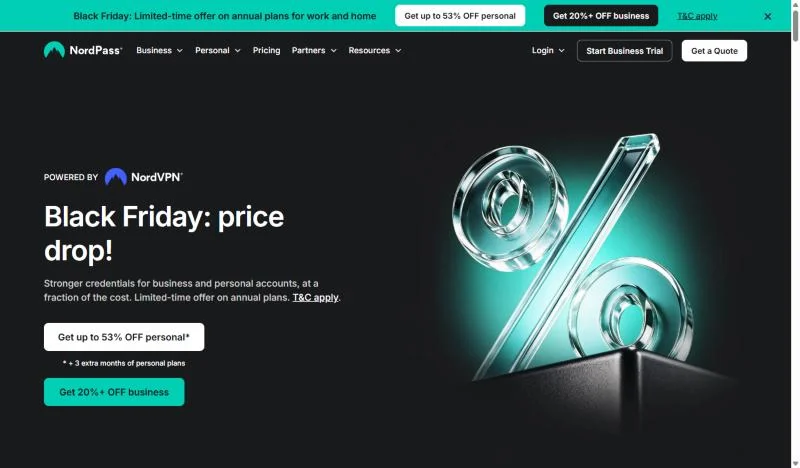
Which gate matters depends on how your team signs in and shares.
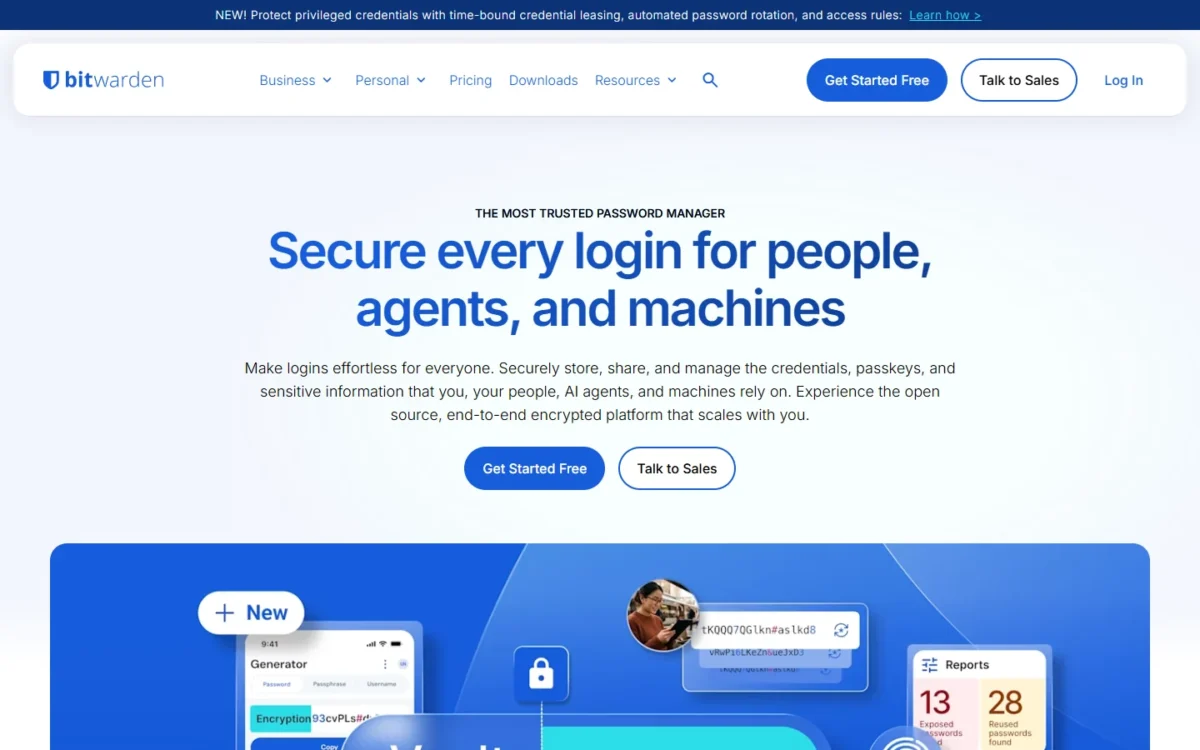
Key Differences: Team Features Compared
NordPass and Bitwarden differ for a team in five places.
- SSO tier: Google Workspace SSO on NordPass Teams; any SSO on Bitwarden needs Enterprise.
- Provisioning tier: SCIM and Directory Connector on Bitwarden Teams; Enterprise only on NordPass.
- Nested sharing: NordPass subfolders inherit the top folder’s permissions; Bitwarden’s nested collections keep their own access.
- Self-hosting: an Enterprise option on Bitwarden; no self-host option among NordPass’s business plans.
- Support channel: 24/7 live support at NordPass; priority 24/7 email support on Bitwarden’s business plans.
The matrix shows the lowest business plan that holds each feature.
| Feature | NordPass | Bitwarden |
|---|---|---|
| Google Workspace SSO | Teams | Enterprise |
| Entra ID and Okta SSO | Enterprise | Enterprise |
| SCIM or directory sync | Enterprise | Teams |
| Groups for sharing | Business | Teams |
| Nested folders or collections | Enterprise (inherited access) | Teams (no inherited access) |
| Activity or event logs | Teams (user activity monitoring) | Teams (event logs) |
| Security settings enforced for all users | Teams | Enterprise (two-step login through Duo on Teams) |
| SIEM integrations | Enterprise (Splunk, Microsoft Sentinel) | Teams (event logs through the Public API) |
| Self-hosting | Not listed on the NordPass business plans page | Enterprise |
Sources: the plan pages above, the NordPass Shared Folders guide and Bitwarden’s collections guide, checked Nov 2026.
SSO and user provisioning
NordPass gives Google Workspace teams SSO from Teams and reserves Entra ID and Okta SSO, plus user and group provisioning, for Enterprise. Bitwarden reverses the order: SCIM and Directory Connector work on Teams, and login with SSO is an Enterprise feature.
SSO signs members in through the company’s identity provider; provisioning, through SCIM or a directory sync, adds and removes members when the directory changes.
On NordPass, Google SSO is one toggle in the Admin Panel, though members must be invited before they can log in with it. Entra ID provisioning runs on a 40-minute cycle, so a hire or a leaver you change in Entra ID reaches NordPass on a later cycle, not at once; for an urgent exit, I would also suspend the member in the Admin Panel. Okta provisioning needs Okta’s Core Essentials plan, or Okta Starter with the Lifecycle Management add-on, and group provisioning requires deploying NordPass’s Encryption service.
Bitwarden’s SCIM endpoint has integration guides for JumpCloud, Microsoft Entra ID, Okta, OneLogin and Ping Identity. Directory Connector syncs from Active Directory, any LDAP-based directory, Entra ID, Google Workspace, Okta and OneLogin. Login with SSO separates authentication from decryption, so the identity provider never holds the vault’s decryption key.
The gap shows up in the bill. A 25-person company on Entra ID that wants automatic provisioning pays $4 x 25 x 12 = $1,200 a year on Bitwarden Teams and $5.99 x 25 x 12 = $1,797 on NordPass Enterprise.
A Google Workspace team gets the reverse deal: Bitwarden Teams can sync the Google Workspace directory, but login with SSO is an Enterprise feature. NordPass Business includes everything in Teams, Google Workspace SSO among it, so 25 users with SSO pay $3.99 x 25 x 12 = $1,197 a year on NordPass Business and $6 x 25 x 12 = $1,800 on Bitwarden Enterprise.
Both products store passkeys beside passwords, so a team weighing passkeys versus passwords for its sign-ins can keep either kind in the same vault.
Verdict: SSO and provisioning
For a Google Workspace team of 4 or more, NordPass fits better: SSO comes with Teams and Business, while Bitwarden needs Enterprise. For a team on Entra ID, Okta or Active Directory that wants automatic provisioning without the top tier, Bitwarden Teams fits better. On Enterprise the two are comparable.
Shared vaults: NordPass Shared Folders vs Bitwarden collections
NordPass shares logins through Shared Folders that members or Groups can open, on Business and Enterprise. Bitwarden shares through collections inside an organization, assigned to members or groups, and Teams and Enterprise allow unlimited collections.
A NordPass Shared Folder carries one of four permission levels, from Can edit down to Can autofill, which is autofill only. Password sharing happens at the top folder: Enterprise adds subfolders up to three layers deep, and they inherit its members and permissions.
Bitwarden’s collections work the other way. Shared items belong to the organization, not to a member, and a nested collection inherits no items, access or permissions from its parent.
So your department structure decides. If finance wants one folder tree where access set at the top flows down, NordPass Enterprise does that, and you cannot share a subfolder separately. If a contractor should see one sub-collection and nothing above it, Bitwarden handles that from Teams, one collection at a time.
Verdict: shared vaults
Depends on your folder structure. One cascading permission tree per department points to NordPass Enterprise; separate access for each sub-collection points to Bitwarden Teams. For flat department folders, NordPass Business and Bitwarden Teams are comparable.
Admin console, policies and reporting
Bitwarden puts event logs and API access on Teams and its enterprise policies on Enterprise only. NordPass includes user activity monitoring and security settings applied to all users from Teams, adds a Vanta integration on Business, and saves its Splunk and Microsoft Sentinel integrations for Enterprise.
Bitwarden’s event logs are retained indefinitely, show up to 367 days at a time and export as .csv or, through the Public API, as JSON. Its enterprise policies include Require two-step login, Master password requirements and Password generator rules.
Both monitor password health: Password Health on NordPass and vault health reports on Bitwarden flag weak, reused or exposed passwords. NordPass’s business password manager adds a Data Breach Scanner, 1 domain on Business and up to 10 domains on Enterprise, and an Activity Log that records every action with advanced filters.
For audit evidence, Bitwarden Teams, at $4 per user per month billed annually, includes event logs and the Public API, so a Teams organization can pull events into the log tool it already runs. NordPass sells ready-made connectors instead, with Vanta on Business for SOC 2 and ISO 27001 evidence. I would choose by the tool your auditor or security team already uses.
Onboarding and offboarding users
Adding a hire is an invitation or a directory sync on both products; removing a leaver is where they differ. NordPass suspends or deletes the member and lets an Owner transfer the leaver’s items, while Bitwarden removes the member and advises updating the credentials that member could reach.
Bitwarden onboards members in three steps, invite, accept and confirm, and an email invitation expires after five days. NordPass admins invite members from the Members tab of the Admin Panel.
Leaver steps on NordPass:
- Suspend or delete the member in the Admin Panel.
- Have an Owner transfer the deleted member’s items; the transfer is unavailable above 2,100 items.
- Act within 730 days, after which the items are deleted automatically.
Leaver steps on Bitwarden:
- Remove the member in the Admin Console, or let SCIM revoke access when the user is suspended in your identity provider.
- Update the credentials the member had access to, because offline devices cache a read-only copy for a short time.
- Expect items in the member’s individual vault to stay with the member, unless the Centralize organization ownership policy is on.
NordPass keeps a leaver’s own items inside the organization, which protects the company and needs an Owner to act. Bitwarden protects what was saved to a collection, and both the ownership policy and account recovery for locked-out members are Enterprise features.
Whichever you choose, add the invite and the leaver steps to your employee onboarding checklist so they happen on the first day and the last.
Self-hosting and where your data lives
Bitwarden Enterprise can be deployed on your own Linux server with Docker, on a minimum of 2 GB of RAM (4 GB recommended); NordPass lists no self-host option among its business plan features.
The default Bitwarden install ships an MSSQL Express database with a 10 GB size cap. NordPass is a hosted service that stores customer vault items in separate AWS data centers across the US and EU.
Self-hosting moves the work to you. Bitwarden says it takes technical resources and expertise to manage server maintenance, security and updates, so the Enterprise seat price is not the whole cost.
Verdict: self-hosting
Bitwarden fits better: a team with an on-premises or data-residency requirement should shortlist Bitwarden Enterprise. A team with no such rule gains nothing from the option, and the server’s running cost is yours to add.
Security model, encryption and audits
Both products use zero-knowledge encryption, state independent security audits and list SOC 2 Type 2, ISO 27001 and HIPAA. They differ in the encryption algorithm, XChaCha20 encryption at NordPass and AES-CBC 256-bit at Bitwarden, and in transparency: Bitwarden is open-source.
NordPass undergoes regular independent third-party audits and runs a bug bounty program. Bitwarden hosts all of its source code on GitHub. Its third-party audits include work by Cure53 and Fracture Labs.
Two-step login guards the vault itself. Bitwarden Teams and Enterprise list two-step login with authenticator apps, email, Yubikey, FIDO2 and Duo, plus Duo for organizations, and Enterprise policies can mandate two-step login for every member. NordPass lists MFA protection among its Teams plan features, and its business page says admins can apply settings such as multi-factor authentication across the team.
For a team that must require a second factor from everyone, Bitwarden’s Require two-step login policy needs Enterprise, and Duo for organizations is the Teams-tier alternative. On NordPass, I would confirm during the trial that the Teams plan’s security settings enforce the MFA method you need.
The cipher should not decide a team purchase: both vendors encrypt data on the device and both name outside reviewers. Open-source code can. If your security lead wants to read the code or commission a review, Bitwarden’s public repositories allow that. On certifications I treat the two as comparable.
Knowing which tier holds your must-have feature raises the next question: what that tier costs at your headcount.
NordPass and Bitwarden Pricing Compared
On annual billing the matching tiers sit one cent apart: NordPass Business costs $3.99 per user per month on the 1-year plan against $4 for Bitwarden Teams, and Enterprise is $5.99 against $6. The only meaningful NordPass savings are its 2-year plan and the Teams pack for 6 to 10 users.
| Plan tier | NordPass | Bitwarden |
|---|---|---|
| Small-team entry | Teams: $1.99 on the 1-year plan, 10-user pack only | Free organization: 2 users, 2 collections |
| Mid tier, annual | Business: $3.99 on the 1-year plan, 5 users minimum | Teams: $4, billed annually |
| Top tier, annual | Enterprise: $5.99 on the 1-year plan, 5 users minimum | Enterprise: $6, billed annually |
| 2-year plan | Teams $1.79, Business $3.59, Enterprise $5.39 | Not listed on the pricing page |
| Monthly billing | Teams $2.49, Business $5.99, Enterprise $7.99 | Offered; price not published on the pricing page |
| Free trial | 14-day Business trial, no credit card required | 14 days for new Teams and Enterprise organizations |
Sources: NordPass business plans, Bitwarden business pricing and Bitwarden’s organizations guide, checked Nov 2026. Both vendors price in USD and exclude tax. The NordPass plans page prints 1-year, 2-year and 1-month prices, and its 1-year and 2-year views carry the note “Discount terms and conditions apply.”
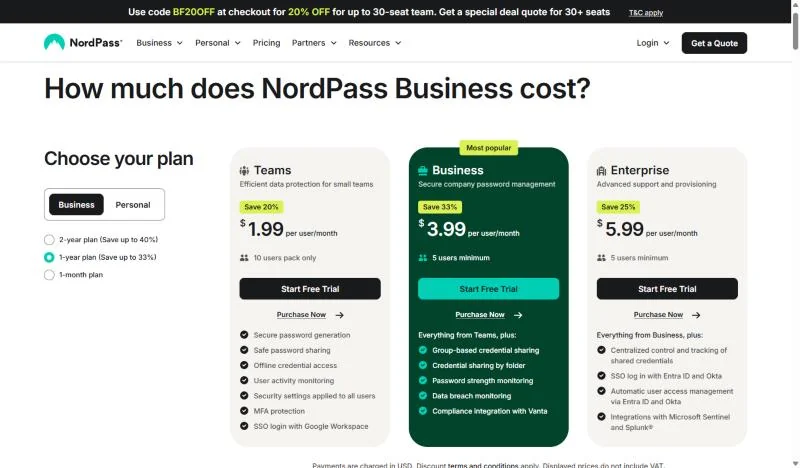
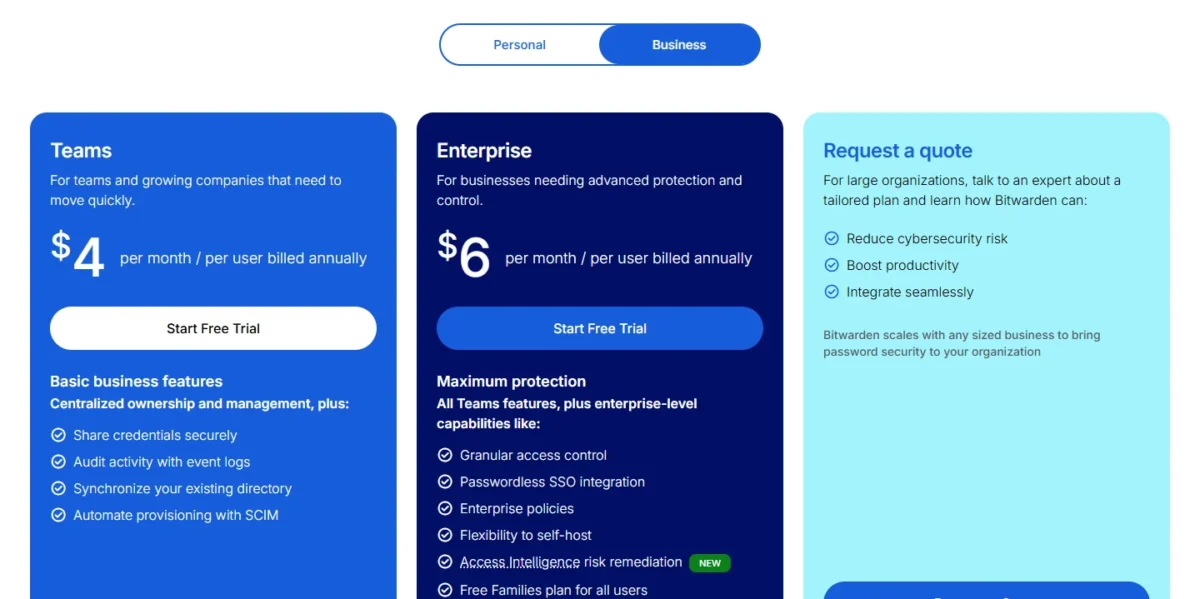
Two billing details change the real bill. NordPass Teams is sold only as a 10-user pack, so a team of 3 pays for 10 seats. Bitwarden adds seats when you exceed your count unless you set a limit, and its file attachments storage, 5 GB per user plus 5 GB shared, grows at $0.33 per GB per month.
The upgrade triggers differ too. NordPass Teams pushes you to Business at the 11th member or the first Shared Folder, and Business pushes you to Enterprise for Entra ID or Okta. Bitwarden Teams pushes you to Enterprise for SSO, enterprise policies or self-hosting.
A buyer leaning NordPass should budget from NordPass pricing by plan before committing to a 2-year term.
Cost for 3, 5, 10 and 25 users
The same team pays almost the same on the matching tiers at 5, 10 and 25 users. The gaps open at 3 users, where Bitwarden is cheaper, and at 6 to 10 users, where the NordPass Teams pack is. Each total is price x users x 12 months.
| Team size | NordPass plan | NordPass per year | Bitwarden plan | Bitwarden per year |
|---|---|---|---|---|
| 3 users | Teams (10-user pack) | $1.99 x 10 x 12 = $238.80 | Teams | $4 x 3 x 12 = $144 |
| 5 users | Business | $3.99 x 5 x 12 = $239.40 | Teams | $4 x 5 x 12 = $240 |
| 10 users | Business | $3.99 x 10 x 12 = $478.80 | Teams | $4 x 10 x 12 = $480 |
| 25 users | Business | $3.99 x 25 x 12 = $1,197 | Teams | $4 x 25 x 12 = $1,200 |
| 10 users, top tier | Enterprise | $5.99 x 10 x 12 = $718.80 | Enterprise | $6 x 10 x 12 = $720 |
| 25 users, top tier | Enterprise | $5.99 x 25 x 12 = $1,797 | Enterprise | $6 x 25 x 12 = $1,800 |
Sources: NordPass business plans and Bitwarden pricing, checked Nov 2026. Assumptions: USD list prices, the NordPass 1-year plan and annual Bitwarden billing, tax and VAT excluded, and no extra storage.
Under 5 users, Bitwarden is the cheaper buy because it bills the seats you use, while NordPass charges a team of 3 for a full 10-user pack on Teams or for 5 seats on Business.
From 6 to 10 users the NordPass Teams pack wins on price: $1.99 x 10 x 12 = $238.80 covers all 10 seats, about half of the $480 that 10 Bitwarden Teams seats cost. The condition is that you can work without Shared Folders and Groups.
A 2-year NordPass Business term lowers 10 users to $3.59 x 10 x 24 = $861.60, against $480 x 2 = $960 for two annual Bitwarden Teams terms. Paying NordPass Business month to month goes the other way: $5.99 x 10 x 12 = $718.80 a year, the price of Enterprise on the 1-year plan.
Pack sizes and seat floors like these are per-seat pricing minimums at work: the smaller the team, the more of the bill pays for seats nobody uses.
My take
For 1 to 4 people I would buy Bitwarden Teams by the seat. For 6 to 10 people on Google Workspace, I would take the NordPass Teams pack. From 11 people up, I would ignore the one-cent gap between matching tiers and choose by the identity feature the team needs first; for Google Workspace SSO, that means NordPass Business, about a third below Bitwarden Enterprise.
Free plans and personal use
Bitwarden gives more away: every Bitwarden account, the free version included, comes with unlimited devices and unlimited passwords, while NordPass Free allows one active session on one device. For sharing at no cost, a Bitwarden Free organization covers two users and two collections; NordPass Free is a single user account.
For one person or a household, Bitwarden Premium is $1.65 per month, billed annually at $19.80, and Families is $3.99 per month for up to six users, billed annually at $47.88. NordPass’s personal plans put Premium at $1.39 per month and the Family plan, with 6 user accounts, at $2.49 per month on a 2-year, limited-time offer with a 30-day money-back guarantee.
Bitwarden’s premium features include encrypted file attachments and emergency access. NordPass Premium also offers File Attachments and Emergency Access. At work, Bitwarden Enterprise also gives every user a free Families plan, a perk worth counting if staff would otherwise buy their own.
With business prices this close at most team sizes, setup effort and the help you get when it stalls carry more of the decision.
Ease of Use, Integrations and Support
NordPass’s rollout is invitations, Groups and Shared Folders; Bitwarden’s adds an organization, collections and, for automation, SCIM or the separate Directory Connector app. Support is live at NordPass and by email at Bitwarden.
Setup effort from the documentation
NordPass’s Google SSO guide has 4 steps, its Entra ID provisioning guide 21 and its Okta guide 27, so the entry-tier setup is short and the Enterprise setups are multi-step projects.
A Bitwarden organization starts in the web app: create the organization, create a collection, invite users. Automation adds a tool: SCIM needs a SCIM URL and API key from the Admin Console, and Directory Connector is a desktop app or CLI installed on a machine that can reach the directory.
NordPass lists autosave and autofill and a cross-platform password manager in its plan comparison, with a desktop app for Windows, macOS and Linux. Bitwarden gives every account browser, mobile and desktop apps, and an Enterprise policy can turn on the browser extension’s autofill on page load for every member. How well autofill handles your own apps depends on those apps, so run both 14-day trials against the logins your team uses most before you sign.
Integrations
NordPass names its integrations, Vanta on Business and Splunk and Microsoft Sentinel on Enterprise, while Bitwarden works by protocol: its SSO accepts any identity provider that uses SAML 2.0 or OpenID Connect, and a Public API comes with Teams.
Both build in an authenticator for time-based codes: the NordPass Authenticator keeps 2FA codes next to shared logins, and Bitwarden’s integrated authenticator (TOTP) is a premium feature included with Teams and Enterprise. NordPass also has Email Masking, and Bitwarden an email alias integration.
A team that wants a third option on the shortlist can weigh how Bitwarden compares with 1Password next.
Support: what independent tests measured
Cybernews‘s comparison, last updated October 27, 2026, could reach Bitwarden support only by email, on a premium plan, and got a reply in 8 hours. Cybernews’s review says NordPass’s 24/7 live chat agents resolved its reviewer’s questions in a few minutes.
That is one contact with each vendor, so read it as an order of magnitude. It does match what the vendors offer: 24/7 live support in NordPass’s plan comparison, and priority 24/7 email support on Bitwarden Teams and Enterprise.
The top tiers add people. NordPass Enterprise comes with face-to-face onboarding and a dedicated account manager; Bitwarden offers a dedicated engagement manager and onboarding to qualified Enterprise customers. Because Cybernews’s email contact was on a premium plan, I would send each vendor one setup question during the trial and time the answer.
My take
Pick NordPass if nobody on the team has set up an identity provider before: live support and a 4-step Google SSO setup lower the risk. Bitwarden is worth it when an IT lead is comfortable with SCIM or a sync agent and can wait for an email reply.
Who Should Pick NordPass, Who Should Pick Bitwarden
Pick NordPass if your team runs on Google Workspace and wants SSO below the top tier, has 6 to 10 people or wants live help. Pick Bitwarden if you need directory sync on the mid tier, self-hosting, open-source code or fewer than 5 seats, and my best password manager for business ranking sorts other setups by team job.
Pros
- Google Workspace SSO on Teams, the $1.99 per user per month tier on the 1-year plan
- 6 to 10 users share one Teams pack: $1.99 x 10 x 12 = $238.80 a year
- 24/7 live support in the plan comparison
- An Owner can transfer a deleted member’s items to a colleague
Cons
- Entra ID and Okta SSO and provisioning only on Enterprise, $5.99 per user per month on the 1-year plan
- Teams stops at 10 members and bills all 10 seats, so 3 users pay the full pack
- Shared Folders and Groups start at Business, subfolders at Enterprise
- A subfolder cannot be shared apart from its top folder
- Skip it if:
- you have fewer than 5 people, or Entra ID or Okta provisioning is a day-one need and Enterprise is over budget; Bitwarden Teams does that job.
The single-product verdict, without the rival in the frame, is in my full NordPass review.
Pros
- SCIM and Directory Connector on Teams, $4 per user per month billed annually
- Self-hosting on Enterprise, with Docker
- Open-source code hosted on GitHub
- Seats from 1 user: 3 users pay $4 x 3 x 12 = $144 a year
Cons
- Login with SSO needs Enterprise at $6 per user per month, even for Google Workspace
- Enterprise policies and account recovery need Enterprise too
- Business support is by email; Cybernews waited 8 hours for one reply on a premium plan
- A removed member keeps individual vault items unless the Centralize organization ownership policy is on
- Skip it if:
- SSO is non-negotiable and Enterprise is out of reach, or nobody on the team wants to wait on email support; NordPass Teams includes SSO with Google Workspace, and NordPass’s plan comparison lists 24/7 live support.
For Bitwarden alone, the Bitwarden review carries the full verdict. The matrix turns both lists into picks.
| Your priority | Better fit | Reason | Trade-off |
|---|---|---|---|
| Google Workspace SSO for 4 to 10 users | NordPass | SSO with Google Workspace is in Teams: $238.80 a year for the pack, against $6 x 4 x 12 = $288 for 4 Bitwarden Enterprise seats | Teams is a 10-user pack without Shared Folders |
| Google Workspace SSO for 11 to 50 users | NordPass | Business includes everything in Teams, Google Workspace SSO among it | Entra ID or Okta SSO still needs Enterprise |
| SCIM or Active Directory sync without the top tier | Bitwarden | SCIM and Directory Connector are in Teams | SSO still needs Enterprise |
| Self-hosting | Bitwarden | Enterprise can be self-hosted | You run and update the server |
| 6 to 10 users at the lowest bill | NordPass | One Teams pack covers 10 seats | An 11th member forces Business |
| 1 to 4 users | Bitwarden | Seats from 1 user; a Free organization covers 2 | No SSO below Enterprise |
| Live help for a non-technical admin | NordPass | 24/7 live support in the plan comparison | Dedicated account manager is Enterprise |
| Named policies on a mid-tier budget | Depends | Bitwarden’s enterprise policies need Enterprise; NordPass applies security settings to all users from Teams | Check NordPass’s plan comparison for the policy you need |
Sources: NordPass plans for business and Bitwarden Password Manager plans, checked Nov 2026.
Switching Between NordPass and Bitwarden
Passwords move in both directions by file: NordPass can import passwords from Bitwarden CSV or JSON exports, and Bitwarden imports from any password manager that can export. NordPass passkeys cannot be imported from or exported to other password managers. Plan to set up groups, sign-in settings and policies again in the new product.
From Bitwarden to NordPass:
- Have an admin or owner export the organization vault as .csv or .json; no export format includes trash items or Sends.
- In the NordPass desktop app, open Settings, choose “Import items” and pick Bitwarden from the import list.
- Recreate Groups and Shared Folders, create new passkeys on each site because NordPass cannot import passkeys from other password managers, then delete the export file.
From NordPass to Bitwarden:
- Confirm that the “Item exporting” setting under Policies in the Admin Panel permits it, then export a .CSV file from the desktop app or WebVault.
- In Bitwarden, import the file from the web app, browser extension, desktop app or CLI, into a collection where you have can manage permission; if NordPass is not in the format list, edit the file to match a supported format.
- Create new passkeys on each site, because NordPass passkeys cannot be exported, and upload file attachments individually.
Weigh that rebuild before you commit to a 2-year NordPass term. If the limit that pushes you out of NordPass is one Bitwarden shares, my list of NordPass alternatives for teams starts from the limit instead of the brand.
FAQ
Is Bitwarden better than NordPass?
Bitwarden is the better fit for a team that needs SCIM or directory sync on its $4 per user per month Teams tier, self-hosting or open-source code. NordPass is the better fit for a Google Workspace team that wants SSO below the top tier, or for an admin who wants 24/7 live support. Paid Bitwarden organizations also include premium features for every enrolled user.
What are the disadvantages of NordPass for a team?
NordPass’s main drawbacks are structural: Teams is a 10-user pack capped at 10 members, Business and Enterprise start at 5 users, and Entra ID or Okta SSO and provisioning need Enterprise. On Business, only a Shared Folder’s owner can stop sharing it or revoke access, which slows cleanup when that owner is away.
What is the safest, most secure password manager: NordPass or Bitwarden?
Neither is clearly the safer one on what the vendors publish: both encrypt vault data on the device under a zero-knowledge architecture and name independent auditors. NordPass derives its Master Key with Argon2id; Bitwarden uses PBKDF2 SHA-256 and offers Argon2 as an alternative. The practical difference is transparency, since Bitwarden’s code is open source.
Can you use NordPass or Bitwarden for free at work?
Only in a small way. A Bitwarden Free organization lets two users share in up to two collections, and any user of any plan can own one. NordPass Free is a single-user plan with one active session, so a team’s free route into NordPass is the 14-day Business trial, which needs no credit card.
Final Verdict: NordPass or Bitwarden?
At 10 users or fewer, headcount sets the cheaper buy; above that, matching tiers cost about the same, so choose by identity setup. NordPass is my pick for a Google Workspace team that wants SSO below the top tier and for an admin who wants live help; Bitwarden is my pick for a team that needs SCIM or directory sync on the mid tier, self-hosting or open-source code.
Choose NordPass if
- Your team signs in with Google Workspace and wants SSO on the Teams tier
- You have 6 to 10 users and want one 10-user pack at $1.99 per user per month on the 1-year plan
- A non-technical admin wants 24/7 live support
- An Owner should be able to hand a leaver’s items to a colleague
Choose Bitwarden if
- You need SCIM or Active Directory sync on the $4 per user per month Teams tier
- Policy requires self-hosting, which Bitwarden Enterprise allows
- Your security lead wants source code that is public on GitHub
- You have 1 to 4 users, or two people starting on a Free organization
How I Compared NordPass and Bitwarden
I compared NordPass Business (Teams, Business, Enterprise) with Bitwarden Password Manager (Teams and Enterprise organizations) from each vendor’s pricing, plan and help-center pages, read in November 2026. The criteria were SSO, provisioning, shared vaults, admin controls, offboarding, self-hosting, security statements and price. Cost totals are my arithmetic on the list prices.
The one published test cited is Cybernews’s support check, named where it appears. Bitwarden’s pricing page shows its prices based on an annual subscription. Autofill behavior and setup time depend on your own apps and directory, so both 14-day trials settle them.