Bitwarden fits teams that need SCIM provisioning or single sign-on (SSO) at the lower per-seat price; 1Password fits a team of 7 to 20 with no identity provider, where its flat pack is the lower yearly bill. The plan gate decides Bitwarden vs 1Password: SCIM comes with Bitwarden Teams at $4 per user per month, while 1Password keeps automated provisioning on Business at $8.99. Both are USD list prices on annual billing, checked November 2026.
Quick verdict
Ten users pay $299.40 a year on 1Password’s Teams Starter Pack against $480 on Bitwarden Teams ($4 x 10 users x 12 months). At 25 users with SSO, Bitwarden Enterprise costs $1,800 a year ($6 x 25 x 12) and 1Password Business $2,697 ($8.99 x 25 x 12).
A household or solo user gets a free plan from Bitwarden; 1Password offers a 14-day free trial instead.
The trade-off: 1Password adds a Secret Key and Travel Mode, which Bitwarden’s pricing page does not list. Bitwarden adds self-hosting on its Enterprise plan.
In This Article (8 sections)
Bitwarden vs 1Password at a Glance
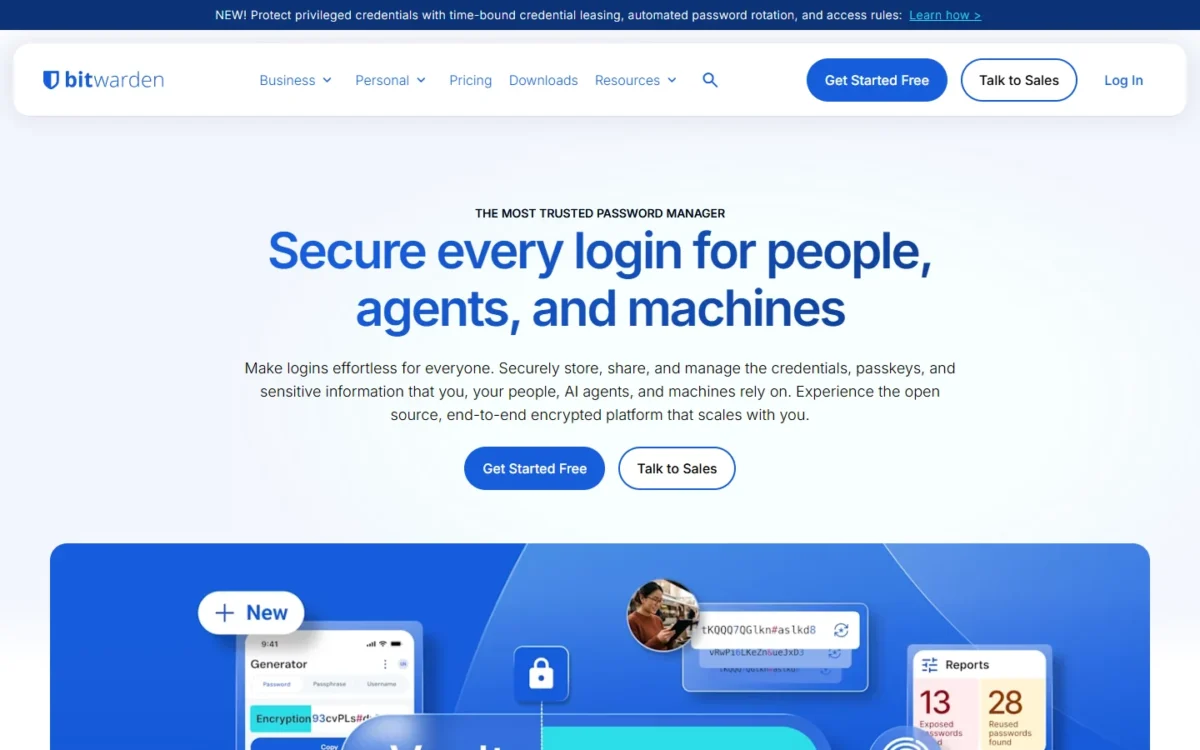
Bitwarden charges every business seat the same rate and puts provisioning on its entry plan, while 1Password sells a flat 10-member pack first and keeps identity-provider features for Business.
| Attribute | Bitwarden | 1Password |
|---|---|---|
| Best for | Teams that provision users from an identity provider, and anyone who wants a free version | Teams of 7 to 20 with no identity provider, and staff who cross borders |
| Entry team plan | Teams: $4 per user per month, billed annually | Teams Starter Pack: $299.40 per year, billed annually, 10 members included |
| First plan with SSO | Enterprise: $6 per user per month, billed annually | Business: $8.99 per user per month, billed annually |
| Free plan or trial | Free plan (“Always free”) | Not listed on 1password.com/ |
| Family plan | Families: $3.99 per month, billed annually at $47.88, up to 6 users | Families: $5.99 per month, billed yearly, 5 users |
| Main strength | SCIM and directory sync on the Teams plan | Travel Mode with every subscription |
| Main limitation | SSO and Enterprise policies need Enterprise | SSO and provisioning need Business; the pack stops at 20 members |
Sources: Bitwarden pricing, 1Password business pricing and 1Password personal pricing, checked November 2026.
Read the two team rows together: 1Password’s cheaper plan is the one without SSO, so your identity setup picks the row before the price does.
Key Differences: Features Compared
Five differences decide this choice for a team, and each one sits on a named plan.
- User provisioning: SCIM is on Bitwarden Teams ($4 per user per month, billed annually) but on 1Password Business ($8.99), which matters to any team that manages staff in Okta or Microsoft Entra ID
- Single sign-on: Bitwarden Enterprise supports SAML 2.0 and OIDC; 1Password Business uses OIDC only, with one identity provider
- Sharing model: Bitwarden shares credentials through collections inside an organization; 1Password shares them through vaults and adds guest accounts
- Hosting and audits: Bitwarden Enterprise can be self-hosted, and Bitwarden holds ISO 27001, SOC 2 Type II and SOC 3 certifications; 1Password holds SOC 2 Type 2
- Extra protection: 1Password adds a 128-bit Secret Key and Travel Mode; Bitwarden supports up to 10 hardware security keys for two-step login
| Feature | Bitwarden | 1Password |
|---|---|---|
| SCIM provisioning | Teams and Enterprise | Business |
| Single sign-on | Enterprise (SAML 2.0, OIDC) | Business (OIDC only) |
| Admin policies | Enterprise | Business |
| Event or audit log | Teams and Enterprise | Business |
| Guest accounts | Not listed on bitwarden.com/ | 5 on Teams Starter Pack, 20 on Business |
| Self-hosting | Enterprise | Not listed on 1password.com/ |
| Travel Mode | Not listed on bitwarden.com/ | Every subscription |
| Emergency access | Premium, Families, Teams and Enterprise | Not listed on 1password.com/ |
Sources: Bitwarden business pricing, 1Password automated provisioning, 1Password Unlock with SSO, 1Password team policies and 1Password’s audit log, checked November 2026.
Sharing: collections vs shared vaults
Bitwarden shares logins through collections that the organization owns, while 1Password shares them through vaults and adds guest accounts for people outside the team.
A Bitwarden collection groups logins, notes, cards and identities, and an admin gives each member or group access to only the collections they need. Teams includes unlimited collections. Items in a collection belong to the organization, not to an individual user, so shared credentials stay put when someone leaves.
One catch for admins who like folders inside folders: nested collections do not inherit access or permissions from their parent, so each level is assigned separately.
On the 1Password side, 1Password Teams has three vault permissions: Allow Viewing, Allow Editing and Allow Managing. 1Password Business has five: View Items, Create Items, Edit Items, Archive Items and Delete Items.
Contractors are where the models part. 1Password includes guest accounts, 5 on the Teams Starter Pack and 20 on Business, and a guest can access only one vault. For one-off password sharing, both can send an item to someone outside the account; Bitwarden Send carries text and files with end-to-end encryption.
My take
Pick Bitwarden if shared logins must stay with the company as staff change: collection items belong to the organization, and Teams includes unlimited collections. Pick 1Password if contractors each need one project vault, because a guest account is limited to one vault.
Single sign-on and user provisioning
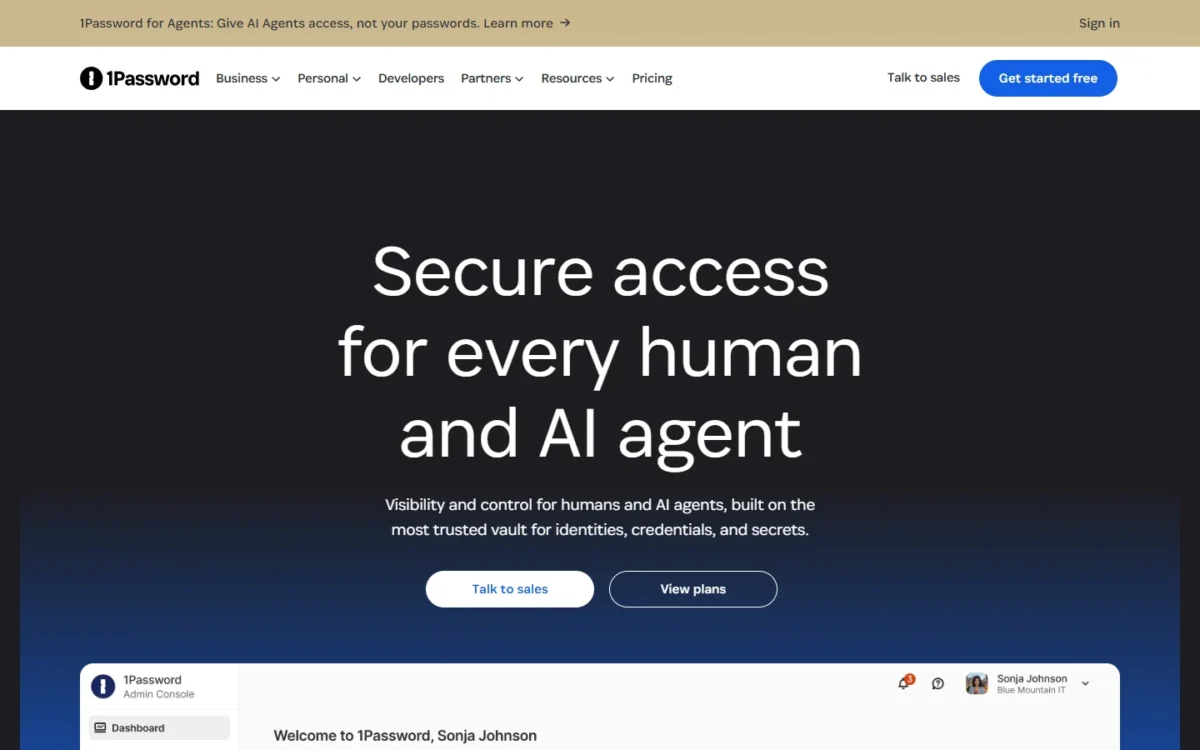
SCIM and Directory Connector come with Bitwarden Teams at $4 per user per month, billed annually, while 1Password puts automated provisioning and Unlock with SSO on Business at $8.99.
SCIM lets your identity provider create and remove members for you. Bitwarden documents SCIM integrations for JumpCloud, Microsoft Entra ID, Okta, OneLogin and Ping Identity. Its Directory Connector app syncs from Active Directory, any LDAP-based directory, Microsoft Entra ID, Google Workspace, Okta and OneLogin.
1Password Business provisions users and groups with Azure AD, Google Workspace, Okta, OneLogin, Rippling and JumpCloud. Provisioning there does not include SSO, which is a separate setup.
The protocols differ once you add SSO. Bitwarden Enterprise, at $6 per user per month billed annually, supports SAML 2.0 and OIDC and can require non-admin members to log in with SSO. 1Password’s Unlock with SSO is available over OIDC only, connects one identity provider, and leaves out the Owners group.
Two details affect rollout. 1Password’s SSO sign-in needs an internet connection unless admins allow biometrics for offline access. On Bitwarden, the identity provider handles sign-in but never the decryption key, so Bitwarden suggests testing member login with master password decryption first, then choosing the decryption option your members will use.
Verdict: user provisioning
Bitwarden fits a team that manages staff in Okta or Entra ID and wants joiners and leavers handled there, because Teams includes SCIM at less than half of 1Password Business’s seat price.
The caveat is SSO: it moves Bitwarden to Enterprise, still the lower price, and an identity provider that speaks SAML only rules out 1Password’s OIDC-only setup.
Admin policies and account recovery
Both vendors hold policy enforcement for the higher plan: Enterprise on Bitwarden, Business on 1Password.
Bitwarden’s Enterprise policies include master password requirements, required two-step login, required SSO, export removal, session timeout and account recovery administration. With account recovery on, owners and admins can reset an enrolled member’s master password.
Set those policies before you invite anyone. Bitwarden warns that some policies revoke non-compliant members the moment they are switched on.
1Password Business policies include account password requirements, two-factor authentication (2FA), failed sign-in attempts, Emergency Kit downloads, item sharing, autofill access, passkey saving and firewall rules. Recovery runs through people: a team administrator can recover a member’s account, and 1Password keeps no copy of the Secret Key.
One exception helps smaller budgets: Bitwarden Teams can enforce organization-wide two-factor authentication through Duo, without the Enterprise plan.
Verdict: admin policies
Comparable. Each product keeps its full policy set on its higher plan, so what separates them is the seat price of that plan.
Security model and compliance
Both encrypt vault data end to end, so the real difference is 1Password’s second key against Bitwarden’s open source code and longer certification list.
1Password secures each account with a password plus a 128-bit Secret Key, which it calls dual-key encryption. A buyer who wants a second secret that the vendor never holds gets it here.
Bitwarden uses zero-knowledge encryption that only the master password can decrypt, so Bitwarden cannot read vault data. It hosts its source code on GitHub, free for anyone to review, and completes annual source code audits and penetration tests.
Bitwarden holds ISO 27001, SOC 2 Type II and SOC 3 certifications and HIPAA compliance, and Enterprise adds self-hosting. A buyer whose security review names ISO 27001, HIPAA or on-premises hosting can shortlist it from those public pages.
1Password is SOC 2 Type 2 certified and publishes the results of independent audits; ISO 27001 is not listed on 1password.com/security. Both products flag weak or reused passwords, through Bitwarden’s vault health reports and 1Password’s Watchtower.
Personal protection: Travel Mode, emergency access and 2FA
Travel Mode comes with every 1Password subscription, while Bitwarden covers a different risk with emergency access on its paid plans.
Travel Mode removes vaults from the 1Password apps and browser extension, except the ones you mark as safe for travel. With 1Password Business, administrators can turn it on and off for team members.
One step is easy to miss: remove the browser extension before a trip, because anyone who gets into it can sign in to 1Password.com and turn Travel Mode off.
Bitwarden’s emergency access is open to premium users, including members of Families, Teams and Enterprise organizations. A trusted contact gets view or takeover access once the account holder approves the request or the wait time expires.
For two-step login, Bitwarden’s paid plans support up to 10 hardware security keys plus Yubico OTP, Duo, email and an authentication app, and Premium adds an integrated authenticator for TOTP codes. 1Password supports two-factor authentication, biometrics and passkeys, and both include a password generator.
Verdict: travel and account protection
1Password fits staff who cross borders: Travel Mode is in every subscription, and Business lets an admin manage it per person. Bitwarden fits an owner or household planning for an emergency, because a trusted contact can take over the vault after a set wait.
Bitwarden and 1Password Pricing Compared
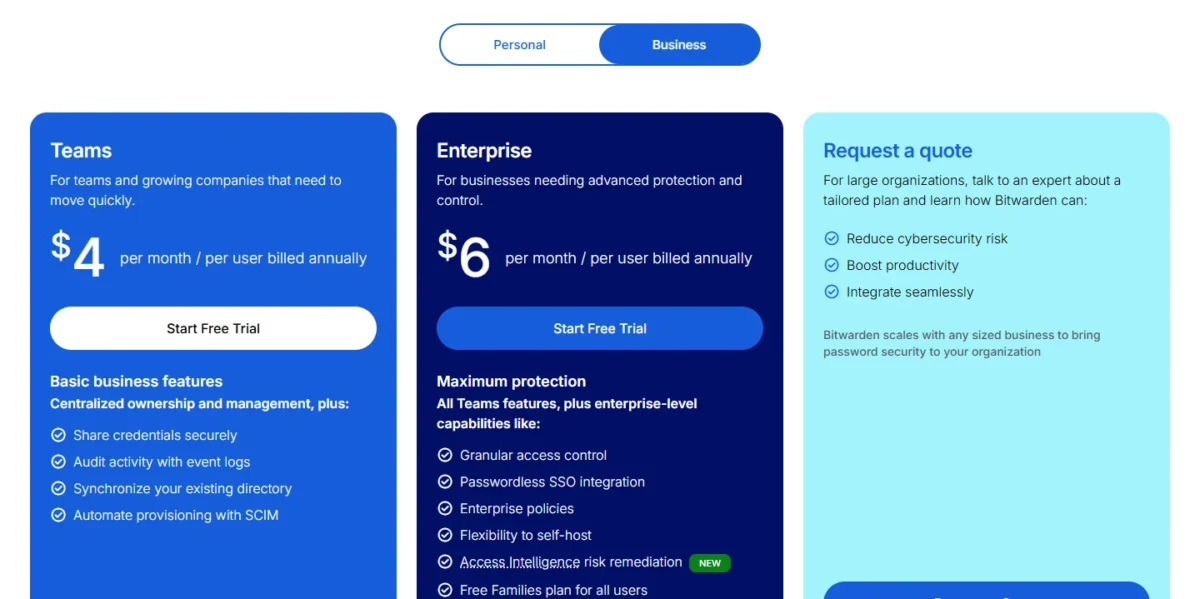
Bitwarden Teams costs $4 and Enterprise $6 per user per month, billed annually; 1Password’s Teams Starter Pack costs $299.40 per year for up to 10 members, and Business costs $8.99 per user per month, billed annually. My Bitwarden review for small teams shows which of those two plans fits.
| Plan tier | Bitwarden | 1Password |
|---|---|---|
| Entry team plan | Teams: $4 per user per month, billed annually | Teams Starter Pack: $24.95 per month when billed annually ($299.40 per year), 10 members included |
| Extra seats on the entry plan | Same $4 rate for every user | $4.99 per seat per month on annual billing, up to 20 members total |
| First plan with SSO | Enterprise: $6 per user per month, billed annually | Business: $8.99 per user per month, billed annually |
| Custom pricing | Request a quote | Customized, volume-based pricing through sales |
Sources: Bitwarden business pricing and 1Password business pricing, checked November 2026.
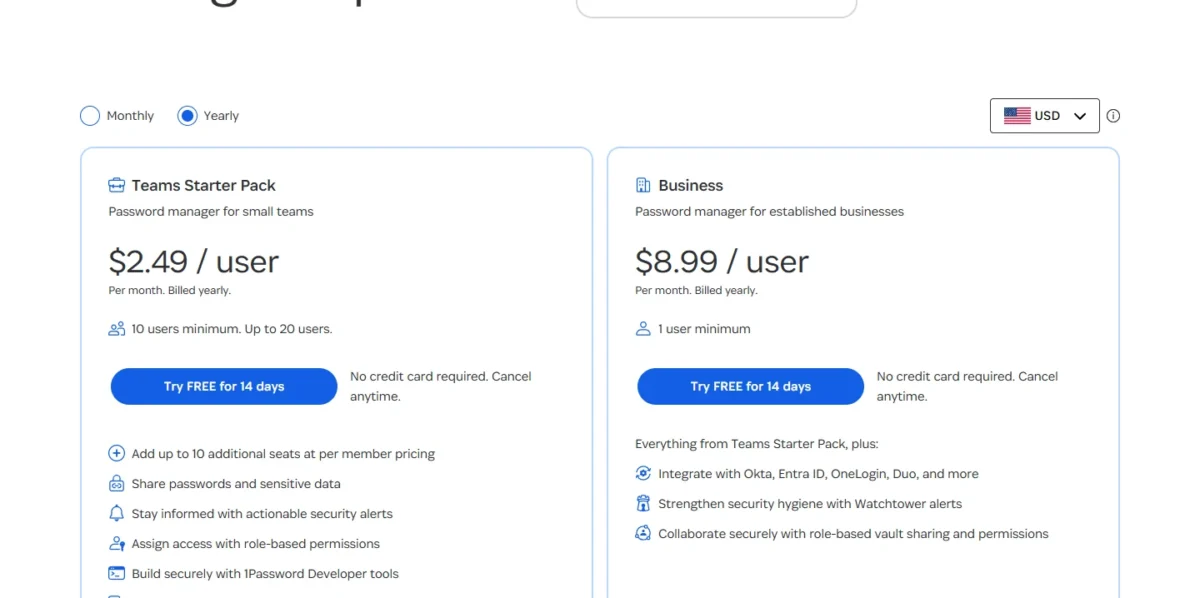
The pack is also a flat price, not a per-user one. Its card shows $2.49 per user per month with a 10-user minimum, so a five-person team still pays for all 10. At that card rate, 10 x $2.49 is $24.90 a month; the tables use the $299.40 yearly total the pricing page states.
Three triggers force an upgrade. On 1Password, it is the 21st member or any need for SCIM, SSO or the audit log, the upgrade path my 1Password review weighs for small teams. On Bitwarden, it is SSO or Enterprise policies, which move a team from $4 to $6 per user per month.
Past 20 members both products bill per seat, so every hire raises the bill. If you are budgeting several per-seat tools at once, my guide to the SaaS seat tax looks at that wider bill.
Cost at 5, 10, 20 and 25 users
With no identity-provider needs, 1Password’s pack is the lower yearly bill from 7 to 20 users; once SCIM or SSO is required, Bitwarden is lower at every size in the table.
| Team size | Bitwarden Teams | Bitwarden Enterprise | 1Password Teams Starter Pack | 1Password Business |
|---|---|---|---|---|
| 5 users | $4 x 5 x 12 = $240 | $6 x 5 x 12 = $360 | $299.40 (flat, 10 members included) | $8.99 x 5 x 12 = $539.40 |
| 10 users | $4 x 10 x 12 = $480 | $6 x 10 x 12 = $720 | $299.40 | $8.99 x 10 x 12 = $1,078.80 |
| 20 users | $4 x 20 x 12 = $960 | $6 x 20 x 12 = $1,440 | $299.40 + 10 x $4.99 x 12 = $898.20 | $8.99 x 20 x 12 = $2,157.60 |
| 25 users | $4 x 25 x 12 = $1,200 | $6 x 25 x 12 = $1,800 | Not available (20 members maximum) | $8.99 x 25 x 12 = $2,697.00 |
Sources: Bitwarden business pricing and 1Password business pricing, checked November 2026. Assumptions: list prices, annual billing, USD; taxes, add-ons and 1Password’s volume discounts are excluded.
The flat pack only wins from the seventh user. Six users on Bitwarden Teams cost $4 x 6 users x 12 months = $288 a year, less than the pack’s $299.40.
The plan a feature forces matters more than the seat price. A 10-person team that needs SCIM pays $4 x 10 users x 12 months = $480 on Bitwarden Teams or $8.99 x 10 users x 12 months = $1,078.80 on 1Password Business, a gap of $598.80 a year.
The steepest step is 1Password’s 21st member. Twenty members cost $299.40 + 10 x $4.99 x 12 = $898.20 a year on the pack; 21 on Business cost $8.99 x 21 users x 12 months = $2,265.48.
My take
I would put a 10-person office with no identity provider on 1Password’s pack and accept the missing SCIM. A team that expects to pass 20 members within a year, or plans to connect Okta, should start on Bitwarden Teams and avoid that jump.
Monthly vs annual billing
Paying monthly adds $240 a year for 10 users on 1Password Business: $10.99 x 10 users x 12 months = $1,318.80, against $8.99 x 10 users x 12 months = $1,078.80 on annual billing.
The pack shows $2.99 per user per month on monthly billing, which is $2.99 x 10 users x 12 months = $358.80 a year.
Bitwarden prices its business plans on an annual subscription and publishes no monthly rate, so only 1Password lets you price a rollout without a yearly commitment.
Free, Premium, Individual and Families plans
For one person, Bitwarden’s free version costs nothing and Premium costs $19.80 a year, against $3.99 per month billed yearly for 1Password Individual, which is $3.99 x 12 months = $47.88.
Bitwarden Free is a real plan, not a trial: unlimited devices, unlimited passwords and sharing with one other user.
1Password currently discounts the first year for new customers who subscribe directly through 1Password.com: Individual is $2.99 per month, billed yearly ($2.99 x 12 months = $35.88), and Families is $4.49 per month, billed yearly. On monthly billing, Individual costs $4.99 and Families $7.99 per month.
The family plan gap is wider per person. Bitwarden Families costs $47.88 a year for up to 6 users, or $47.88 / 6 = $7.98 each. 1Password Families costs $5.99 x 12 months = $71.88 for 5 users, or $71.88 / 5 = $14.38 each.
Storage differs too: Bitwarden Premium includes 5 GB of encrypted file attachments, and 1Password lists 1GB of storage per user.
On price alone, Bitwarden fits a solo user or a household of six: Premium costs less than half of Individual’s regular yearly price. I would pay 1Password’s premium only for Travel Mode or the Secret Key.
Ease of Use, Integrations and Support
For a team, ease of use is best compared on the admin work each vendor documents: adding a member, removing one, auditing activity and covering the team’s devices.
Verdict: ease of use
Not enough evidence. Daily feel depends on your own logins and browsers. Bitwarden offers a 14-day Enterprise free trial and 1Password a 14-day free trial of both business plans, so run both with the same five shared logins, then remove one user, before you pay for a year.
Onboarding and offboarding a team member
Bitwarden adds a member in three steps (invite, accept, confirm) and removes one by revoking, removing or deleting; 1Password Business suspends a member when the identity provider deprovisions them.
In Bitwarden, an administrator must confirm each accepted member, and email invitations expire after five days.
For leavers, Bitwarden separates a temporary revoke from permanent removal and from deleting the account, and revoked users do not occupy a license seat. With SCIM, suspending a user in the identity provider revokes their Bitwarden access automatically.
1Password’s automated provisioning creates users and groups and confirms new users without a delay. Deprovisioning a person in the identity provider suspends them, and an admin can still permanently delete the account on 1Password.com.
Granting and revoking logins is one step of a wider employee onboarding checklist, so decide who owns that step before the next hire starts.
My take
Pick Bitwarden if you want leavers cut off from the identity provider without paying for the top plan, since SCIM comes with Teams. Pick 1Password Business if you would rather have new hires confirmed without a delay.
Apps, browser extensions and developer tools
Both products run as desktop, mobile and browser apps with a command line tool; Bitwarden adds a public API for admins, and 1Password adds developer signing tools.
1Password runs on macOS, iOS, watchOS, Windows, Android and Linux, with a browser extension for Chrome, Safari, Edge, Firefox and Brave. Developers get SSH key signing, Git commit signing, a CLI and SDKs.
Every Bitwarden account includes browser, mobile and desktop apps on unlimited devices, plus passkey management. Bitwarden’s import guide names its web app, browser extension, desktop app and CLI, and its Directory Connector ships for Windows, macOS and Linux. Teams and Enterprise add the Bitwarden Public API to manage members, collections, groups, event logs and policies.
A developer team that wants SSH and Git signing in the same tool has a reason to trial 1Password; a team that scripts its own user management has one to trial Bitwarden.
Support and audit reporting
Bitwarden gives business plans priority 24/7 email support and event logs from Teams up; 1Password lists 24/7 email support plus a support team you can call on weekdays, and keeps its audit log for Business.
Bitwarden’s event and audit logs record more than 50 event types with timestamps and IP addresses, are retained indefinitely and can be exported. 1Password’s audit log is available only in 1Password Business and keeps 365 days of events. An audit trail is part of Bitwarden’s entry plan and a reason to buy Business on 1Password.
For longer retention, 1Password Business streams events to a SIEM such as Splunk, Elastic, Sumo Logic or Panther. You can call 1Password’s support team Monday to Friday, 9 AM to 5 PM EST, and organizations with 101 or more users get a dedicated Customer Success Manager.
Who Should Pick Bitwarden, Who Should Pick 1Password
Pick Bitwarden if your identity provider should manage users, if you need SSO at the lower seat price, or if you want a free plan. Pick 1Password if you have 7 to 20 users with no identity provider and expect to stay at 20 or under, or staff who need Travel Mode.
Bitwarden’s case, with the conditions attached:
Pros
- SCIM and Directory Connector on the Teams plan, so joiners and leavers sync without the top plan
- SSO on Enterprise at $6 per user per month, billed annually, with SAML 2.0 and OIDC
- Self-hosting on Enterprise for teams that must run the server on their own network
- ISO 27001, SOC 2 Type II and SOC 3 certifications, plus HIPAA compliance, for security questionnaires
Cons
- No monthly business price is published, only annual subscriptions
- Policies, SSO and custom roles need Enterprise
- Travel Mode is not listed on its pricing page, which matters to staff who cross borders
- From 7 to 20 users with no identity provider, Teams costs more per year than 1Password’s pack
1Password’s case, on the same terms:
Pros
- One flat price for up to 10 members: $299.40 per year on annual billing
- Travel Mode with every subscription, managed by admins on Business
- A 128-bit Secret Key on top of each account password
- Guest accounts for contractors: 5 on the pack, 20 on Business
Cons
- Provisioning, SSO, policies and the audit log all need Business at $8.99 per user per month, billed annually
- SSO runs over OIDC only, with one identity provider, and Owners cannot use it
- The pack stops at 20 members, and the 21st moves the team to Business pricing
- No free plan, only a 14-day free trial
Who should skip each one? Teams whose staff cross borders routinely should skip Bitwarden, because Travel Mode is the feature they need. Teams that need identity-provider provisioning but cannot budget for the Business seat price should skip 1Password. A team that rules out both can widen the search with my roundup of password managers for business teams. The matrix sorts the rest by priority.
| Your priority | Better fit | Reason | Trade-off |
|---|---|---|---|
| Automate joiners and leavers from Okta or Entra ID | Bitwarden | SCIM is on Teams at $4 per user per month; 1Password needs Business at $8.99 | SSO still needs Enterprise at $6 |
| 7 to 20 users, no identity provider | 1Password | At 10 users the pack costs $299.40 a year against $4 x 10 x 12 = $480 on Bitwarden Teams | No SCIM, SSO or audit log on the pack; the 21st member means Business pricing |
| SSO for 25 users | Bitwarden | $6 x 25 x 12 = $1,800 against $8.99 x 25 x 12 = $2,697 | No Travel Mode listed |
| Staff who cross borders | 1Password | Travel Mode comes with every subscription | Admin control of it needs Business |
| Self-hosting, ISO 27001 or HIPAA paperwork | Bitwarden | Enterprise can be self-hosted; Bitwarden is ISO 27001 certified and HIPAA compliant | Self-hosting needs your own server upkeep |
| Household of 6 | Bitwarden | Families covers up to 6 users at $47.88 a year; 1Password Families includes 5 | No Travel Mode listed |
Sources: Bitwarden pricing and 1Password business pricing, checked November 2026.
Whichever row is yours, start with an inventory: list the shared logins behind your team’s collaboration tools and who needs each one before you import anything.
Switching Between Bitwarden and 1Password
Both directions mostly run through an export file, and each direction drops something specific: file attachments, plus passkeys from a desktop export, going into Bitwarden; passkeys and shared-collection items going into 1Password.
From 1Password to Bitwarden
- In the 1Password 8 desktop app, export your account as a .1pux file. The CSV option exports only Login and Password items.
- In Bitwarden, open Import, choose your vault or an organization collection, and select the file format of your export, as Bitwarden’s 1Password import guide describes.
- Import once, because Bitwarden does not check for duplicates, then upload file attachments to the new vault individually.
- Carry passkeys across on a phone. 1Password exports passkeys only in its iOS and Android apps, and Bitwarden imports from 1Password on iOS 26 or later through the FIDO Credential Exchange Protocol (CXP). After a desktop export, create new passkeys on each site instead.
- Delete the export file. 1Password’s exports are plaintext, not encrypted.
From Bitwarden to 1Password
- In the Bitwarden web app, export the vault as .json (Encrypted) and choose Password protected. 1Password’s Bitwarden import guide does not support unencrypted JSON or account-restricted exports.
- In 1Password, choose Import, select Bitwarden, pick the destination vault and enter the export password.
- If the import shows an error and your Bitwarden KDF algorithm is Argon2id, change it to PBKDF2 and export again.
- Plan manual work for two gaps: passkeys and items in shared collections are not imported.
- Use an organization export as your worklist for those shared items. An individual Bitwarden export leaves out organization-owned data, which admins and owners export separately.
- Note what sits in Bitwarden Send, since no Bitwarden export format includes Sends. Then delete the export file.
FAQ
Which is safer, Bitwarden or 1Password?
Neither vendor’s published design makes one the safer pick for every team. Both use AES 256-bit encryption. 1Password adds a Secret Key and the Secure Remote Password protocol for sign-in, while Bitwarden derives its key with PBKDF2 SHA-256 or Argon2 and opens its code to review. I would decide on plan gates, then enforce two-step login.
Why choose 1Password instead of Bitwarden?
Choose 1Password when a flat price or Travel Mode matters more to you than provisioning. Its Teams Starter Pack covers 10 members on one yearly bill, Travel Mode hides vaults at a border, and it publishes monthly prices.
Can you self-host Bitwarden or 1Password?
Bitwarden can be self-hosted on the Enterprise plan: you run the Bitwarden server application on your own network or server, and it works with all Bitwarden clients. Bitwarden notes that this takes technical resources for server maintenance, security and updates. 1Password’s business pricing page lists no self-hosted option.
Do business users get a free family plan?
Yes, on the higher plan of each product. Bitwarden Enterprise gives every user a complimentary Families plan to share with five friends or family members; Bitwarden Teams does not. With 1Password Business, each team member gets a complimentary Families membership that stays active while it is linked to the business account.
Final Verdict: Bitwarden or 1Password?
Decide by headcount and identity provider. Bitwarden is my pick for a team that provisions users from an identity provider or expects to pass 20 members. 1Password is my pick for an office of 7 to 20 people with no identity provider that will stay at 20 or under, since a 21st member moves the team to Business at $8.99 per user per month.
How I Compared Bitwarden and 1Password
I compared Bitwarden Password Manager (Free, Premium, Families, Teams, Enterprise) with 1Password (Individual, Families, Teams Starter Pack, Business) on provisioning, SSO, policies, sharing, security, yearly cost at 5 to 25 users, and switching. Plan facts and prices come from each vendor’s official pricing pages and help center, checked November 2026; the fit calls are my analysis of them.
Bitwarden does not publish a monthly business price, and 1Password does not publish its volume pricing. Daily ease of use, such as autofill on your own sites, is the one criterion I leave to each vendor’s free trial.
Choose Bitwarden if
- Your identity provider should create and remove users, which SCIM does on the Teams plan
- Your identity provider speaks SAML only, which 1Password’s OIDC-only SSO cannot use
- A security review asks for self-hosting, ISO 27001 or HIPAA compliance
- You expect to pass 20 members, where 1Password’s pack ends
- One person or a household wants a free plan before paying
Choose 1Password if
- You have 7 to 20 users and no identity provider, where the pack is the lower yearly bill, and expect to stay at 20 or under
- Staff cross borders and you want Travel Mode in every subscription
- You want a Secret Key on top of each account password
- Contractors need guest accounts limited to one vault