The NordPass password manager is worth paying for if your small team runs on Google Workspace and needs shared logins and clean offboarding; from 5 users, buy Business. Google Workspace SSO and Item Transfer for leavers are features of every business plan; the limit is that Entra ID and Okta SSO need Enterprise. On the 1-year plan, Teams costs $1.99, Business $3.99 and Enterprise $5.99 per user a month. At 5 users, Business costs $239.40 a year, 60 cents more than the $238.80 Teams 10-user pack.
Quick verdict
NordPass is worth it for Google Workspace teams from 5 users that share logins by folder. Business is the plan to buy, priced per user in USD before VAT, with a 14-day free trial.
Skip it if you need Entra ID or Okta provisioning below Enterprise, or nested folders by department.
Main strength: Google SSO and Item Transfer on every business plan. The biggest limit: Entra ID and Okta SSO and provisioning are Enterprise-only. Teams also shares items one by one.
In This Article (10 sections)
What NordPass Is and Who It’s For
NordPass is Nord Security’s password manager: each person gets an encrypted vault for passwords, passkeys, credit card details and private notes, and a company can store and share its credentials from the same app. It comes in three business plans. Teams is for companies or teams with up to 10 members, while Business and Enterprise both start at 5 users. Free, Premium and Family are the personal plans beside them. My passkey vs password comparison explains how passkeys differ from typed passwords.
- Category: business password manager
- Best for: teams from 5 users on Google Workspace
- Starting price: $1.99 per user per month for Teams on the 1-year plan, sold as a 10-user pack
- Free plan or trial: 14-day Business trial with no credit card; NordPass Free allows one active session on one device
- Main limitation: SSO and user provisioning with Entra ID and Okta are Enterprise-only
- Encryption: XChaCha20 with a zero-knowledge architecture
Which plan you need comes down to four jobs: sharing, sign-in, offboarding and audit.
NordPass Features That Matter
Two gates decide the plan for most teams: Shared Folders and Groups start on Business, and SSO with Entra ID or Okta starts on Enterprise.
| Team job | Teams | Business | Enterprise |
|---|---|---|---|
| Share single items (Secure Sharing) | Included | Included | Included |
| Shared Folders and Group Management | Not included | Included | Included |
| Shared Subfolders | Not included | Not included | Included |
| SSO with Google Workspace | Included | Included | Included |
| SSO and provisioning with Entra ID and Okta | Not included | Not included | Included |
| Item Transfer for leavers | Included | Included | Included |
| Activity Log | Included | Included | Included |
| Activity Log API and Sharing Hub | Not included | Not included | Included |
| Password Health | Not included | Included | Included |
| Data Breach Scanner | Not included | 1 domain | Up to 10 domains |
| Integration with Vanta | Not included | Included | Included |
| Free Premium plan for all users | Not included | Included | Included |
Sources: NordPass business plans, Compare all features, checked Nov 2026.
My take
If your logins belong to roles rather than people (the shared ads account, the billing portal), I would skip Teams: without folders or groups, every new hire means sharing items one at a time. Pay for Enterprise when Entra ID or Okta has to create and remove accounts for you, or when you need Shared Subfolders or the Splunk or Microsoft Sentinel integration.
Password sharing: items on Teams, folders and groups on Business
Teams shares single items only. Business adds Shared Folders and Groups, and Enterprise adds subfolders, to a maximum depth of three layers.
A shared folder goes to a member or a group at one of four permission levels: Can edit, Can share, Can view (view, copy and autofill) and Can autofill (autofill only). The last level is the one for outsiders. Scenario: a freelance bookkeeper gets Can autofill on the Finance folder with an expiry time, so she can fill the bank login without viewing or copying it. Expiry times work only with Can view and Can autofill.
Two limits shape how you lay folders out. Sharing and revoking happen at the top folder, and everything inside inherits its permissions, so you cannot share one subfolder or one item out of it. And on the Business plan, only the owner of a shared folder can stop sharing it or revoke access, so choose that owner with care.
Onboarding and offboarding employees
Owners and Admins invite people from the Members tab of the Admin Panel and remove them from the same list with Delete or Suspend. The invite belongs in the same new-hire routine as the email account, so I would write it into the access steps of your employee onboarding checklist.
What happens after a removal is the part of NordPass I would weigh most, and every business plan has it. With Item Transfer, an Owner hands a deleted member’s items to another member, where they land in a new folder named “Transferred” with the date. A shared folder the leaver owned moves to the new owner without changes.
Three limits come with it:
- Owners cannot see which items the deleted member had or pick specific ones, so the transfer is all or nothing.
- The transfer option is not available when the deleted member had more than 2,100 items.
- If nobody acts, the deleted member’s items are deleted automatically after 730 days.
An offboarding routine built from those help articles:
- On the leaving day, open Members in the Admin Panel and choose Suspend or Delete; an Owner has to be demoted first.
- After Delete, open the Deleted tab, choose a new owner from the list and select Transfer. A leaver with more than 2,100 items gets no Transfer option, and if nobody acts, those items are deleted automatically after 730 days, with no way to recover them.
- Have the new owner open the “Transferred” folder and move what the team still needs into the right shared folder.
- Change the passwords the leaver could view or copy. This step is my advice, not NordPass’s: the transfer changes who owns a login, and rotating it is still your job.
SSO and user provisioning
Google Workspace SSO is on every business plan, Teams included, while SSO and user provisioning with Entra ID and Okta need Enterprise, at $2 more per user a month than Business ($5.99 against $3.99 on the 1-year plan).
The Google setup is four steps: an Owner or Admin opens Authentication in the Admin Panel and enables the Google Workspace toggle under Single sign-on. Members must still be invited to the organization first. If you have not settled on a Google plan yet, my Google Workspace review is the place to start.
On Enterprise, provisioning adds and removes NordPass members from the identity provider. Two details change the timing and the budget:
- Entra ID: the setup guide runs to 21 steps, and the provisioning cycle runs every 40 minutes, so a new hire’s invitation is not instant.
- Okta: provisioning uses SCIM and needs the Okta Core Essentials plan, or Okta Starter with the Lifecycle Management add-on.
An Okta shop therefore pays for two upgrades, NordPass Enterprise and the right Okta plan.
Admin policies, Activity Log and audit integrations
Password Policy, Granular Policies, company-wide settings and the Activity Log come with every business plan. Password Policy sets the length and update frequency of employees’ passwords, and the password generator then creates passwords to that standard. The Activity Log shows who accessed the team’s passwords and when.
The plans split when an auditor arrives. The Vanta integration, which NordPass positions for gathering SOC 2 and ISO 27001 evidence, starts on Business. The Activity Log API, the Sharing Hub (who has access to which credentials, and at which access level), Splunk and Microsoft Sentinel are Enterprise-only.
A team preparing for a first SOC 2 audit can stay on Business. A team that feeds logs into Splunk or Sentinel cannot.
Security model, multi-factor authentication and certifications
NordPass states that it encrypts the vault with XChaCha20 under a 256-bit key and a zero-knowledge architecture: passwords are encrypted on your device, only you hold the decryption key, and NordPass employees cannot read a business vault.
By the same page’s account, NordPass Business is certified to ISO 27001 and SOC 2 Type 2, meets the objectives of the HIPAA Security and Privacy Rule, and went through a security audit by Cure53 in March 2020. Those are the vendor’s claims, and the audit it names dates from 2020. In a security review, I would ask for the current SOC 2 report before trusting the badge.
All three plans include multi-factor authentication (MFA) with authenticator applications, security keys or backup codes, plus biometrics. They also include recovery of locked accounts: in an emergency, admins reset an employee’s login credentials and Recovery Codes. The Admin Panel itself asks for the Business Account password and then the NordPass Master Password. Network Allowlist, like SSO and provisioning with Entra ID and Okta, is Enterprise-only.
Password Health, Data Breach Scanner and Email Masking
Teams gets neither Password Health nor the Data Breach Scanner. Password Health, which scans members’ vaults for exposed, weak, old or reused passwords, starts on Business. The Data Breach Scanner alerts you when company domains, email addresses or credit card details appear in a data breach; it covers 1 domain on Business and up to 10 on Enterprise. A company that runs two email domains gets only one of them monitored on Business.
Email Masking and the NordPass Authenticator are on all three plans. Masks let staff sign up for newsletters or testing platforms without exposing a work email address, and the Authenticator keeps 2FA codes next to the shared login they belong to.
NordPass Ease of Use and Setup
The documented rollout is three jobs: import the old vault, invite members from the Admin Panel and switch on Google SSO. The 14-day Business trial, which needs no credit card, lets a team do all three before paying.
My take
Pick NordPass for a rollout without an IT person if the team signs in with Google: the SSO switch is one toggle. I would budget real setup time for an Entra ID shop, which faces the 21-step provisioning guide. How autofill behaves depends on the sites your team uses, so spend the trial logging in to your ten most-used tools in each browser.
Importing from another password manager
NordPass imports export files from nine password managers. NordPass takes a plain CSV from all of them except ProtonPass, which comes in as JSON or ZIP, and several also import in a second format such as 1PUX, JSON or XML. A CSV from any other tool goes through the Spreadsheet option.
Passkeys are the gap: at the moment they cannot be imported or exported between NordPass and other password managers, so plan to set those logins up again.
Apps, browser extensions and sessions
NordPass has apps for iOS, Android, Windows, macOS and Linux, a web vault and a CLI, and a browser extension for Chrome, Firefox, Safari, Opera and Edge. Offline Mode is included on every business plan.
A Business Account session lasts up to 30 days on the same browser or device, unless your administrator set another length, so staff are not asked to sign in every morning.
Customer support and the free trial
Every business plan includes 24/7 live support and the help center. Customized onboarding and training and a dedicated customer success manager come only with Enterprise, so a Teams or Business buyer rolls out from the help articles.
The trial and the refund window are both 14 days. You can request a refund within 14 calendar days of the initial purchase, shorter than the 30-day money-back guarantee on the personal plans. Cancelling means emailing business support; it takes effect at the end of the current subscription period, and the unused part is not refunded.
NordPass Pricing
On the 1-year plan, Teams costs $1.99, Business $3.99 and Enterprise $5.99 per user per month, in USD before VAT (checked November 2026). Teams is the cheaper plan for any team of up to 10, but at 5 users Business costs about the same, so the Teams saving grows only from the 6th user and suits teams that do not need shared folders.
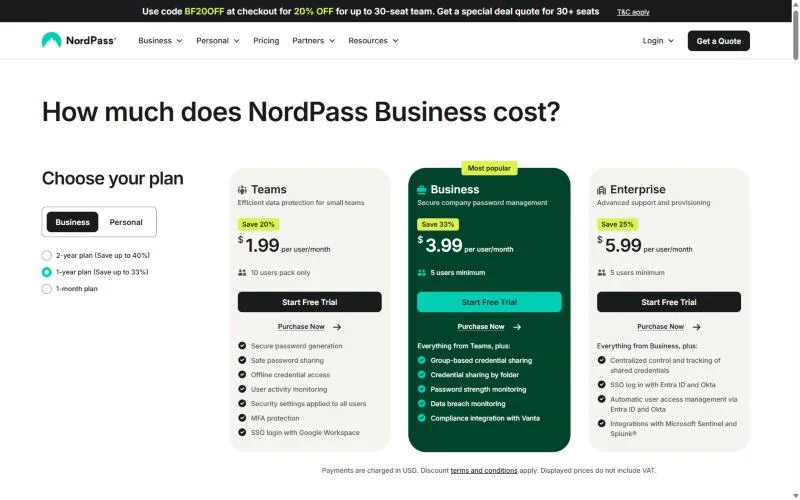
Business plans: Teams, Business and Enterprise
Each business plan is priced per user per month in three terms. Monthly billing is the expensive way in: Business costs $5.99 on the 1-month plan against $3.99 on the 1-year plan, 50% more.
| Plan | 2-year plan, per user/ | 1-year plan, per user/ | 1-month plan, per user/ | Seats | Key limit |
|---|---|---|---|---|---|
| Teams | $1.79 | $1.99 | $2.49 | 10-user pack only | No Shared Folders, Groups, Password Health or Data Breach Scanner |
| Business | $3.59 | $3.99 | $5.99 | 5 users minimum | No SSO or provisioning with Entra ID and Okta |
| Enterprise | $5.39 | $5.99 | $7.99 | 5 users minimum | Needed for Entra ID and Okta, and for Shared Subfolders |
Sources: NordPass business plans, 2-year, 1-year and 1-month views, checked Nov 2026.
Teams seat rule
Teams is sold as a 10-user pack only, for teams of up to 10 members. A team of 6 pays for 10 seats, and an 11th person means moving everyone to Business.
What a team pays per year
A 10-person team on the 1-year plan pays $238.80 a year on Teams, $478.80 on Business or $718.80 on Enterprise. The table applies price x users x 12 months at four headcounts, and a labelled 50-person example follows it.
| Users | Teams | Business | Enterprise |
|---|---|---|---|
| 5 | $1.99 x 10 x 12 = $238.80 (10-user pack) | $3.99 x 5 x 12 = $239.40 | $5.99 x 5 x 12 = $359.40 |
| 10 | $1.99 x 10 x 12 = $238.80 | $3.99 x 10 x 12 = $478.80 | $5.99 x 10 x 12 = $718.80 |
| 11 | Not available (up to 10 members) | $3.99 x 11 x 12 = $526.68 | $5.99 x 11 x 12 = $790.68 |
| 25 | Not available | $3.99 x 25 x 12 = $1,197.00 | $5.99 x 25 x 12 = $1,797.00 |
Sources: NordPass business plans, 1-year view, checked Nov 2026. Assumptions: the Teams pack counted as 10 users at the per-user price, and no VAT or identity-provider fees.
Example: take an illustrative 50-person team, a headcount I chose for this calculation, not a NordPass figure. On the 1-year plan, Business costs $3.99 x 50 x 12 = $2,394.00 a year. Enterprise costs $5.99 x 50 x 12 = $3,594.00 a year, while Teams is not available above 10 members.
At 5 users the choice is already made. Business costs 60 cents a year more than the Teams pack and adds Shared Folders, Groups, Password Health, the Data Breach Scanner and a free Premium plan for every user, so the reason to buy it at 5 is folder sharing and Groups, not cost. On price alone, Teams is cheaper at every size up to 10 users, and the gap grows with each user above 5: at 10, Teams costs half of what Business does.
The 11th hire is the expensive one. Everyone moves to Business, and the annual bill more than doubles, to $3.99 x 11 x 12 = $526.68.
Entra ID or Okta is the second step. Enterprise costs $5.99 against $3.99 for Business, a $2 gap per user a month, or $24 per user a year; at 25 users that is $600 a year. The 10-user pack and the top-tier SSO are the two per-seat pricing traps to model before you sign.
Monthly billing changes the math again. On the 1-month plan, 10 users pay $5.99 x 10 = $59.90 a month on Business. Kept for 12 months, that reaches $59.90 x 12 = $718.80, exactly what Enterprise costs 10 users on the 1-year plan.
My take
I would run the trial, then buy Business on the 1-year plan. The 2-year plan saves $0.40 per user a month ($3.59 against $3.99), which is $48 a year for a 10-person team. That is too little to trade for a two-year commitment with a 14-day refund window.
Free, Premium and Family plans
NordPass Free is one user account with one active session on one device. The free plan includes autosave, autofill and secure storage, and leaves out Password Health, the Data Breach Scanner and file attachments. For a business it is a look at the app, not a plan.
For one person, NordPass Premium costs $1.99 a month on the 1-year plan: $23.88 for the first 12 months, shown beside a crossed-out $35.88. The family plan covers 6 user accounts at $3.69 a month, or $44.28 for the first 12 months beside a crossed-out $71.88. Both personal plans carry a 30-day money-back guarantee, and NordPass Premium adds Emergency Access.
The cards print no renewal amount, so check the renewal price in your account before the first term ends. Teams do not need to buy either plan: Business and Enterprise include a free Premium plan for all users.
NordPass Pros and Cons
The downsides of NordPass are plan gates: what a team needs next usually sits on the plan above. Most of the strengths come with the Business plan, and two of them, Google SSO and Item Transfer, come with Teams too.
Pros
- SSO with Google Workspace on every business plan, Teams included, so a Google shop pays nothing extra for single sign-on
- Item Transfer on every business plan keeps a leaver’s logins and shared folders in the company
- Business and Enterprise give every user a free Premium plan, so staff can use one tool for work and home
- At 5 users, Business costs 60 cents a year more than the Teams pack on the 1-year plan, with folders and groups included
- Four sharing levels, including autofill-only with an expiry time, suit contractor access
Cons
- SSO and provisioning with Entra ID and Okta sit only on Enterprise, the top-priced plan, which hurts Microsoft and Okta shops
- Teams has no Shared Folders, Groups, Password Health or Data Breach Scanner and sells only as a 10-user pack, so a 3-person team pays for 10 seats
- Shared Subfolders are Enterprise-only and permissions apply only at the top folder, which limits multi-department teams on Business
- Offboarding transfer is all or nothing and unavailable above 2,100 items
- The business refund window is 14 calendar days and cancelling needs an email to support, a thin safety net on a 2-year term
- NordPass Free allows one active session on one device, which rules it out for anyone working on a laptop and a phone
Those limits come from documents. People who use the app every day report a different kind of problem.
What Users Say About NordPass
In a Reddit review thread read in November 2026, the original poster describes almost two and a half years of use and plans to extend the subscription, citing autosave, autofill and email masking.
The Reddit replies are split. The highest-scored Reddit reply praises the clean interface, the setup and extras such as passkeys, then calls the browser extension and autofill inconsistent and folder sharing limited. Another Reddit commenter on a paid plan writes that the desktop browser plugins “work about half the time”.
My take
This is one Reddit thread, and no commenter in it describes a business plan, so I read it as a checklist for the trial rather than a verdict. NordPass is worth it when autofill holds up on your own sites in every browser the team uses; I would not buy a multi-year term before checking that. The folder-sharing complaint matches the plan table: Shared Folders exist only on Business and Enterprise.
Who Should Use NordPass (and Who Should Skip It)
NordPass fits a Google Workspace team from 5 users that shares logins by folder and wants to run offboarding itself. Skip it if you need Entra ID or Okta provisioning at a mid-tier price, nested folders by department, or Teams pricing for more than 10 people. If one of those needs rules NordPass out, restart the search from my shortlist of business password managers.
Best for
- Google Workspace teams from 5 users that share by folder: Google SSO, Shared Folders and Groups are all on Business
- Teams of 6 to 10 on a tight budget that share a handful of single items: the Teams pack costs $1.99 x 10 x 12 = $238.80 a year on the 1-year plan
- Teams with turnover or contractors: Item Transfer is on every business plan
- Teams preparing for SOC 2 with Vanta: the integration starts on Business
Not ideal for
- Entra ID or Okta shops that need provisioning below Enterprise: Bitwarden Teams includes SCIM at $4 per user per month, billed annually
- Multi-department teams that need nested folders: Shared Subfolders are Enterprise-only
- Teams of 11 or more that expect Teams pricing: the plan stops at 10 members
- Solo users who want free sync on a laptop and a phone at once: NordPass Free allows one active session on one device
NordPass vs Competitors and Alternatives
Bitwarden is the rival to price first if Entra ID or Okta must provision your users: its Teams plan includes SCIM at $4 per user per month, billed annually, while NordPass holds provisioning for Enterprise. If you need SSO as well, that saving disappears: Bitwarden’s SSO integration sits on its Enterprise plan at $6 per user per month, billed annually, level with NordPass Enterprise at $5.99 on the 1-year plan. My Bitwarden review for small teams covers which of its plans a team should pick.
| Software | Best for | Starting price | Key difference | Main trade-off |
|---|---|---|---|---|
| NordPass | Google Workspace teams from 5 users | $1.99 per user/ | SSO with Google Workspace on every business plan | Entra ID and Okta SSO and provisioning only on Enterprise |
| Bitwarden | Entra ID or Okta shops on a budget | $4 per user/ | Directory sync and SCIM provisioning on Teams | SSO integration sits on Enterprise at $6 per user/ |
| 1Password | Teams of 10 to 20 | $2.49 per user/ | The starter pack takes up to 20 users | Okta and Entra ID integration needs Business at $8.99 per user/ |
| LastPass | Teams of up to 50 that want folders on the entry plan | $4.25 per user/ | Shared folders included on Teams | Groups and directory integrations need Business at $7.00 per user/ |
Sources: NordPass business plans, Bitwarden business pricing, 1Password business pricing and LastPass pricing, checked Nov 2026.
On price alone, NordPass and Bitwarden are level in the middle, and my NordPass pricing guide shows the cost by team size. At 25 users, NordPass Business costs $3.99 x 25 x 12 = $1,197 a year and Bitwarden Teams $4 x 25 x 12 = $1,200. What differs is the content: NordPass Business brings Google SSO, folders and groups, and Bitwarden Teams brings directory sync and SCIM.
1Password answers the 11th-user problem: its Teams Starter Pack accepts up to 20 users where NordPass Teams stops at 10. LastPass is the comparison for a team that wants shared folders on the entry plan, at more than twice NordPass Teams’ per-user price ($4.25 against $1.99). If none of those limits affects your team, these alternatives do not change the verdict on NordPass Business, though my guide to NordPass alternatives for teams lists more of them.
FAQ
Has NordPass ever been compromised?
NordPass’s vault security page answers with certifications rather than an incident record: ISO 27001 and SOC 2 Type 2 for NordPass Business, and a Cure53 audit in March 2020. Before you sign, ask sales for the current SOC 2 report and a written statement on past security incidents.
Can a small team use NordPass Free?
No. Free is 1 user account, and Secure Item Sharing is among the features the help center lists as Premium additions, so two colleagues cannot share a login on it. The no-card route for a team is the 14-day Business trial.
Can you switch from Teams to Business, or back?
Up only. You can upgrade from Teams to Business at any time, during checkout or by writing to the NordPass Sales team, and you are charged the difference based on the number of users and the time left on the Teams subscription. A downgrade from Business to Teams is not possible.
Can a personal NordPass account become a Business account?
Yes. Buy the business plan with your current account and it switches automatically to a NordPass Business account. The items already stored in your personal vault stay, so an owner who started alone on Premium does not have to export and import them.
Does NordPass work offline?
Yes on the business plans: Offline Mode is included in Teams, Business and Enterprise, and the plan cards describe it as offline credential access. Password History is on all three as well, so a member can view a credential’s editing history and restore a previous password version.
How I Evaluated NordPass
I read NordPass’s business and personal plan pages in every billing view, the business feature comparison, the vault security page and the help-center articles on SSO, provisioning, shared folders, member removal, item transfer and import, in November 2026. Rival prices come from each rival’s own pricing page, and the user reports from a named Reddit thread.
The plan-fit calls and the cost math are my analysis of those facts. NordPass does not publish a renewal amount on the personal plan cards, which price only the first 12 months, and the Cure53 audit on its vault security page dates from March 2020.
NordPass Review: The Final Verdict
NordPass is worth getting if your team works in Google Workspace, has 5 or more users and shares logins by folder. Start the 14-day trial on Business, then take the 1-year plan.
Teams is the right call only for 6 to 10 people who share a handful of items and will not grow past 10. If Entra ID or Okta must create and remove accounts, put NordPass Enterprise next to Bitwarden Teams before anything else, which my NordPass vs Bitwarden comparison covers side by side.
Use the trial for three checks: import your real export file, try autofill on your ten most-used logins in each browser, and run one offboarding from Delete to Transfer with a spare member account.