

Wix vs Squarespace is a choice between a free start with bookings built in and a cheaper way to sell. Wix fits owners who want a free plan, bookings on Core ($29 a month, billed yearly) and a phone callback.
Squarespace fits owners who sell on its $19 Basic plan (billed annually), need more than five editors or want domain privacy included. It starts with a 14-day free trial rather than a free plan.
One catch on the Wix side: Wix labels its yearly prices an offer valid only for the initial term and prints no renewal price. I read both vendors’ pricing, help and product pages in October 2026 and did the cost math below.
Quick verdict
Pick Wix if your site takes appointments: Core includes scheduling and payments for $29 a month on yearly billing, and the Free plan lets you build before you pay.
Pick Squarespace if you sell products on a small budget or several people edit the site: Basic sells for $19 a month billed annually, and Core lifts the 2-contributor limit to unlimited.
The trade-off: Wix caps storage and collaborators by plan and keeps payments off Light. Squarespace charges a 2% store fee on Basic and puts bookings in a separate Acuity subscription from $16 a month billed annually.
Choose Wix if
- You take appointments and want them on the same $29 Core plan as payments
- You want to build on a $0 plan before paying anything
- You want a phone callback from a Customer Care Expert
Choose Squarespace if
- You sell a few products on the $19 Basic plan and accept its 2% store fee
- More than five people edit the site (unlimited contributors from Core)
- You want WHOIS privacy included with your domain


In This Article (11 sections)
Wix vs Squarespace at a Glance
The deciding difference is where each builder puts its gates: Wix bundles bookings and offers a free plan, while Squarespace sells on every paid plan and removes the contributor limit from Core.
| Attribute | Wix | Squarespace |
|---|---|---|
| Best for | Service businesses taking bookings; owners who want to start free | Small shops; sites with several editors |
| Free plan or trial | Free plan, $0, no credit card | 14-day free trial, no credit card |
| Starting price | Light, $17/mo billed yearly (initial term) | Basic, $19/mo billed annually or $25/mo billed monthly |
| Plan that takes payments | Core, $29/mo billed yearly | Basic, with a 2% store fee; 0% from Core |
| Bookings | Included from Core | Acuity Scheduling, from $16/mo billed annually |
| Main limitation | 2 GB storage and 2 collaborators on Light | 2 contributors and 30 minutes of video on Basic |
Sources: Wix plans, Squarespace plan guide, Acuity Scheduling pricing, checked October 2026.
The table shows that the plans differ, but not which difference changes your bill or your workload.
Key Differences Between Wix and Squarespace
Four differences change what a small business pays or can do, and each one points to a different kind of owner.
- Free plan vs trial: Wix’s Free plan costs $0 and includes hosting; Squarespace gives 14 days free, then a paid plan. An owner who needs months to build without paying belongs on Wix.
- Payments gate: Wix Light lists no payments, so selling starts on Core; Squarespace sells from Basic but adds a 2% fee on store sales. A shop with a handful of orders saves on Squarespace.
- Bookings: Wix Core includes scheduling and services; Squarespace sends you to Acuity Scheduling, priced separately. A salon or coach pays one bill on Wix.
- Team and media caps: Wix allows 2, 5, 10 or 100 collaborators by plan; Squarespace allows 2 contributors on Basic and unlimited from Core and lists unlimited bandwidth on every plan, but caps video storage by plan. A team of six or more editors fits Squarespace Core.
Each difference sits inside a feature area, so the next question is which builder handles the job your site actually does.
Wix vs Squarespace: Features Compared
The better builder changes with the job, so read the row for the job your site does first.
| Criterion | Wix | Squarespace |
|---|---|---|
| Accept payments | Plan-dependent: Core and above | All plans; Basic adds a 2% store fee |
| Bookings | Plan-dependent: Core and above | Add-on: Acuity Scheduling |
| Custom code | Plan-dependent: developer platform on Business Elite | Limited: HTML, Markdown and CSS on Basic; JavaScript and code injection from Core |
| AI site builder | All plans, Free included | All plans; a paid plan to publish; AI credits: 10 one-time on Basic, then 20, 40 or 120 a month |
| Storage | Limited: 2 GB, 50 GB, 100 GB, unlimited on Business Elite | Limited: video 30 minutes, 5 hours, 50 hours, unlimited on Advanced; unlimited bandwidth on every plan |
| Apps and integrations | App Market of third-party apps, such as QuickBooks Online and TikTok Ads | Extensions on every plan, priced by their makers; Mailchimp and Zapier integrations from Core |
| Email marketing | Email campaigns; marketing suite grows by plan, Light to Advanced | Email Campaigns, a separate subscription; Mailchimp from Core |
| Site editors | Limited: 2, 5, 10 or 100 | Limited: 2 on Basic; unlimited from Core |
| WHOIS privacy | Add-on | Included for eligible domains |
| Phone support | Phone, chat or email with an expert | Not listed on the contact page |
| Business email | Not listed on the plans page | Google Workspace inbox free for the first year from Core |
Sources: Wix plans, Squarespace plan guide, checked October 2026.
Templates, design and customization
Wix publishes a template count and lets you place elements anywhere, while Squarespace puts code access on its cheapest plan. Wix lists 2,000+ website templates, and its editor moves any element with pixel-level precision.
Squarespace’s templates page shows 28 templates under Popular Designs and gives no total for the catalog, so catalog size is not a fact you can compare. Its FAQ says the templates cover industries from health and beauty to restaurants, and that custom CSS and code injection are optional.
Customization beyond the template is where Squarespace is clearer for a small budget. Basic includes HTML, Markdown and CSS in the CSS Editor and code blocks; Core adds JavaScript code blocks and code injection, site-wide and per page.
Wix’s plan cards list an advanced developer platform on Business Elite at $159 a month billed yearly. On Squarespace, a custom style works on Basic at $19 a month, while custom JavaScript or code injection needs Core at $29, the same price as Wix Core.
Verdict: Templates and design
Depends on use. Pick Wix for its 2,000+ templates and the freedom to place elements anywhere; pick Squarespace for CSS on its $19 Basic plan and JavaScript from Core at $29.
Open five templates in your industry on each before deciding; a template count does not tell you which looks right.
Editor and ease of use
For a non-technical owner, the choice is freedom against structure. Wix’s drag-and-drop editor lets you drag a single element freely to where you want it, so placement is your call. For the full picture of Wix, read my Wix review.
Squarespace’s editor drags, drops, resizes and arranges content across desktop and mobile, and you can adjust the mobile layout on its own when a page needs it (Squarespace AI website builder).
Neither vendor publishes a setup time. A beginner gets more room on Wix, because the Free plan costs $0 a month while Squarespace’s trial lasts 14 days. Build the same home page on both, and the editor you finish in first is your answer.
AI site builders
Both builders draft a site from a description; the difference is when you must pay to publish it. Wix’s AI website builder goes from a prompt to a site you refine by hand or with Aria, its built-in AI agent. Wix lists AI creation tools on all plans, and the Free plan includes hosting.
Squarespace’s Blueprint AI turns a description into a multi-page starting point with pages, copy, imagery, colors and fonts. You can explore it during the free trial, but Squarespace needs a paid website plan to publish the site.
Squarespace meters its AI in credits: Basic gets 10 credits one time, Core 20 a month, Plus 40 a month and Advanced 120 a month. An owner who plans to keep drafting copy with AI after launch is better served from Core, since Basic’s credits do not refill.
Verdict: AI site builders
Not enough evidence. Neither vendor publishes how good its drafts are, and the result depends on the description you give. Run the same two-sentence description of your business through both before you pay.
Ecommerce and payments
Squarespace costs less for selling on a budget plan, and the two cost the same at Core. Squarespace Basic sells products, services, content and memberships for $19 a month billed annually.
Basic adds a 2% online store transaction fee and a 7% fee on digital content and memberships; Core drops those to 0% and 5% (Squarespace plan guide). For a course creator, that 7% is the number to watch before the store fee.
Wix keeps payments off Light. “Accept payments” and Basic eCommerce start on Core at $29 a month billed yearly, and Wix lists no commerce transaction fee on its plans. The Wix eCommerce store holds up to 1,000 variants per product and connects PayPal, Stripe and over 70 other payment providers.
Card processing is close. Wix Payments charges 2.9% + 0.30 USD on US credit and debit cards excluding American Express, which costs 3.7% + 0.30 USD (Wix Payments fees).
Squarespace Payments starts at 2.9% + $0.30 on Basic and Core, 2.7% + $0.30 on Plus and 2.5% + $0.30 on Advanced (Squarespace plan guide). So the card fee will not separate the two Core plans; Squarespace builds Advanced for stores with high order volumes, where its lower fees matter most.
Verdict: Ecommerce
Squarespace fits better on the cheapest plan: a shop with a few orders a month pays $19 a month on Basic against $29 on Wix Core, both billed yearly. Above that, compare Core with Core: the same $29 and the same entry card rate, so bookings, editors and media limits decide.
Scheduling and bookings
Wix handles bookings without a second subscription; Squarespace does not. Wix lists Scheduling and services on Core, Business and Business Elite. Wix Bookings covers staff management, Zoom and Google Meet sessions, and automated reminders by email, SMS or WhatsApp.
Squarespace sells bookings through Acuity Scheduling, now run under the Acuity name for everyone, including former Squarespace Scheduling users. Acuity costs $16, $27 or $55 a month billed annually for 1, up to 6, or up to 36 bookable calendars.
Text message reminders start on Acuity Standard, and Premium lets you sign a BAA for HIPAA compliance. You embed Acuity on a Squarespace site with the Scheduling block, and it takes payments through Stripe, Square or PayPal, separate from Squarespace’s own processors.
Verdict: Scheduling and bookings
Wix fits better for bookings on one bill: a coach or salon on Wix Core pays $29 a month billed yearly for the site, payments and bookings. On Squarespace the same owner adds at least $16 a month for Acuity.
A practice that needs a signed HIPAA BAA should look at Acuity Premium, since the Wix Bookings page does not mention one.
Blogging, SEO and marketing
Wix’s SEO page names the technical controls a site move needs, while Squarespace’s blogging page pairs editable SEO titles with blog paywalls. Wix SEO tools let you edit meta tags, URL slugs, canonical tags, structured data markup and the robots.txt file. You can import up to 500 redirects at once and connect Google Search Console from the dashboard.
Wix’s AI Visibility tool shows how LLMs such as ChatGPT, Gemini and Perplexity mention your site. Squarespace’s blogging page lists built-in SEO and AI site auditing tools, AI-written SEO tags and paywalls for blog access.
On Squarespace you can also edit each page’s default SEO title and description, hide pages and choose the image shown when content is shared on social media. Its pricing page lists search keyword analysis on every plan.
For marketing, Wix’s plans page steps its marketing suite up from the Light suite on Light to the Advanced suite on Business Elite. Its help article on AI email campaigns describes creating an email campaign with AI.
Squarespace bills Email Campaigns as a separate subscription and adds Mailchimp and Zapier integrations from Core. Its blogging page says it can send new blog posts to your connected social media accounts automatically.
Verdict: Blogging and SEO
Not enough evidence for a winner on search results. Wix’s page names robots.txt editing and bulk 301 redirects, which matter most when you move an old site with many URLs. Hold each vendor’s list of controls against the pages and URLs your site has before you choose.
The features decide which plan you need; the next question is what that plan costs now and next year.
Wix vs Squarespace Pricing
On yearly billing, Wix runs $17 to $159 a month and Squarespace $19 to $99 a month, and both charge $29 a month at Core. Wix prints only yearly prices, paid in full at purchase, for the initial term, with taxes added by billing address. Squarespace prints annual and monthly prices side by side.
| Plan tier | Wix, billed yearly | Squarespace, billed annually | Squarespace, billed monthly | What the tier changes |
|---|---|---|---|---|
| Entry | Light: $17/mo | Basic: $19/mo | Basic: $25/mo | Wix Light takes no payments; Squarespace Basic sells with a 2% store fee |
| Small business | Core: $29/mo | Core: $29/mo | Core: $39/mo | Wix adds payments and scheduling; Squarespace adds unlimited contributors and a 0% store fee |
| Growing store | Business: $39/mo | Plus: $49/mo | Plus: $65/mo | Wix: 100 GB and 10 collaborators; Squarespace: 2.7% + $0.30 card rate |
| Top | Business Elite: $159/mo | Advanced: $99/mo | Advanced: $139/mo | Wix: unlimited storage and 100 collaborators; Squarespace: 2.5% + $0.30 card rate |
Sources: Wix plans, Squarespace plan guide, checked October 2026. Squarespace prices are the US view of its pricing page as archived on October 22, 2026, read on October 28, 2026.
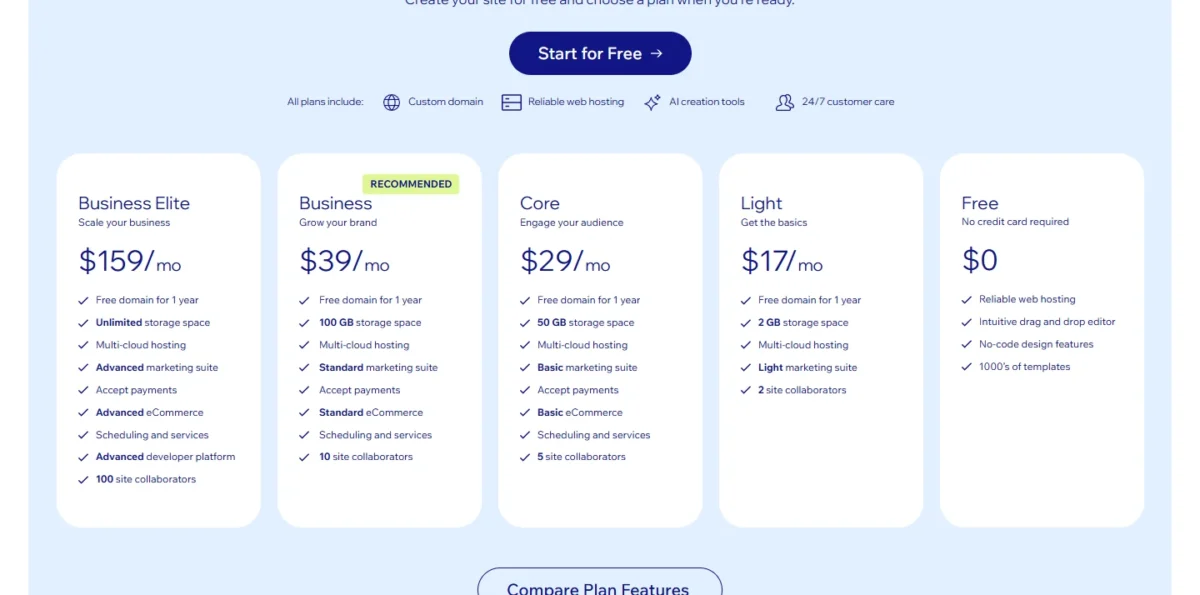
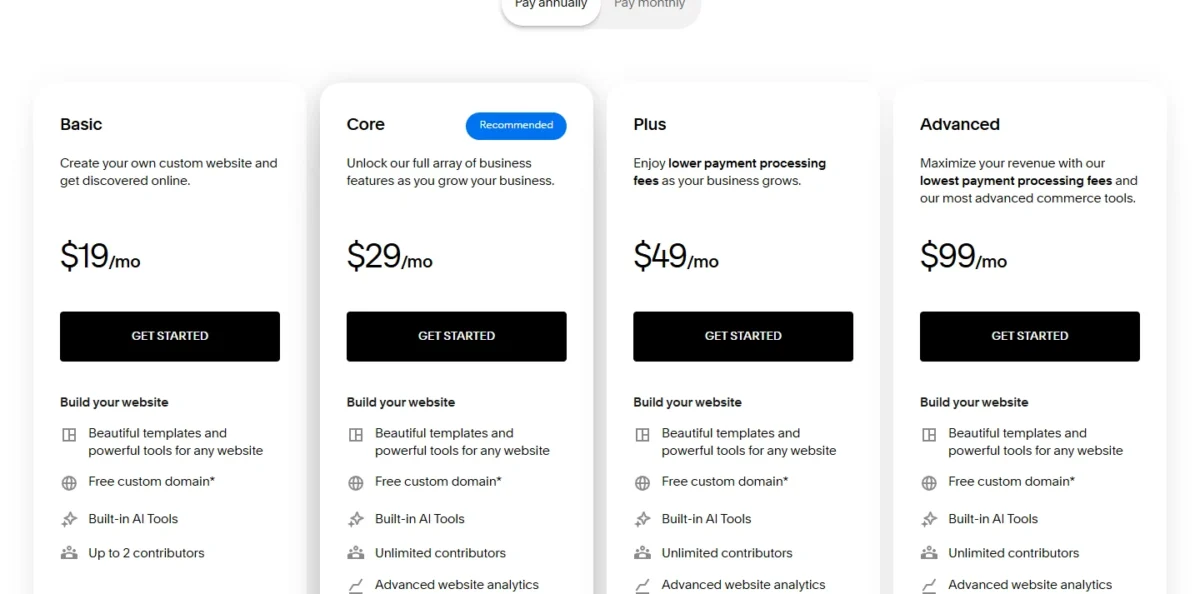
Wix is cheaper at the entry tier, $17 x 12 = $204 a year against $19 x 12 = $228, but that saving buys a site that cannot take payments. At the top the gap reverses: Business Elite costs $159 x 12 = $1,908 a year against $99 x 12 = $1,188 for Squarespace Advanced.
Paying Squarespace month to month costs more. Basic at $25 x 12 = $300 a year is $72 more than the $228 annual bill, and Core at $39 x 12 = $468 is $120 more than $29 x 12 = $348. Wix says additional subscription periods are available, but the prices its plans page displays are for yearly subscriptions.
First year vs renewal
The price on either pricing page is not guaranteed for year two. Wix labels its displayed prices an offer valid only for the initial term of yearly or multi-year subscriptions and prints no renewal price; the final price appears on the purchase page before payment.
Squarespace applies discounts to the first payment and charges the next renewal at full price (Squarespace plan guide). A price increase takes effect on your next renewal date. If you paid list price with no promo code, year two starts from that same list price unless an increase lands first.
Wix also offers a 14-day money-back guarantee. Before you commit to a multi-year Wix plan, read the final price on the purchase page. For the Wix side, see my Wix pricing guide.
Domain costs after year one
Both builders give a free domain for the first year on annual plans, and both charge for it from year two. Wix’s free year comes as a voucher with most Premium plans, valid only for a new domain bought from Wix, never to renew a domain you own.
Wix’s own blog puts a one-year .com renewal at $21.35 (Wix .com domain costs). Squarespace’s free domain covers select TLDs on annual billing and renews for $20 after the first year, the same $20 a year it charges for .com and .org (Squarespace domains FAQ).
Privacy is the bigger difference than the $21.35 – $20 = $1.35 renewal gap. Squarespace includes WHOIS privacy for all eligible Squarespace domains. On the Squarespace side, check my Squarespace pricing guide.
Wix lists WHOIS privacy and DNSSEC as optional add-ons on its domains page, so a privacy-minded owner pays one more line item there.
What a small business pays in year one and year two
For a services site that takes bookings and payments, year one costs $29 x 12 = $348 on Wix and $29 x 12 + $16 x 12 = $540 on Squarespace, because Squarespace adds Acuity. In year one a brochure site costs less on Wix, and a small shop at Core costs the same on both.
| Setup | Wix, year one | Wix, year two | Squarespace, year one | Squarespace, year two at list price |
|---|---|---|---|---|
| Brochure site, up to 2 editors | Light: $17 x 12 = $204 | Renewal not published + $21.35 domain | Basic: $19 x 12 = $228 | $19 x 12 + $20 = $248 |
| Services site with bookings and payments | Core: $29 x 12 = $348 | Renewal not published + $21.35 domain | Core + Acuity Starter: $29 x 12 + $16 x 12 = $540 | $29 x 12 + $16 x 12 + $20 = $560 |
| Small shop, 3 to 5 editors | Core: $29 x 12 = $348 | Renewal not published + $21.35 domain | Core: $29 x 12 = $348 | $29 x 12 + $20 = $368 |
Sources: Wix plans, Squarespace plan guide, Acuity Scheduling pricing, Wix .com domain costs, Squarespace domains FAQ, checked October 2026.
Assumptions: one site, yearly billing on Wix and annual billing on Squarespace, US list prices read on October 28, 2026, the free first-year domain used, a .com domain from year two. Sales tax, card processing, commerce fees, apps and premium domains are excluded.
Squarespace Basic is $19 a month billed annually with a 2% store fee, which is $19 x 12 = $228 a year before fees. Squarespace Core is $29 a month billed annually with a 0% store fee, which is $29 x 12 = $348 a year.
Take an illustrative shop that sells $1,000 a month. A 2% fee on those sales is 0.02 x 1,000 x 12 = 240 a year. Adding 240 to a 228 plan cost gives 468, and 468 – 348 = 120.
The same 2% fee reaches 10 a month when sales are 10 / 0.02 = 500 a month.
Core costs $29 – $19 = $10 a month more than Basic, so a Squarespace shop pays less in total on Core once its store sales pass $10 / 0.02 = $500 a month.
The limits that force an upgrade are where the year-two bill really moves:
- Wix Light to Core: the day you need payments, bookings, a third collaborator or more than 2 GB of storage
- Wix Core to Business: a sixth collaborator or more than 50 GB
- Squarespace Basic to Core: a third contributor, more than 30 minutes of video, JavaScript or code injection, or a 2% store fee above Core’s extra $29 – $19 = $10 a month
- Acuity Starter to Standard: a second bookable calendar or text message reminders
The price is only half of the choice; the other half is who answers when something breaks.
Wix vs Squarespace Support and Reliability
Wix fits better for owners who want a call. Wix Customer Care answers chat 24/7, and a Customer Care Expert can step in by chat, phone or email, with callback hours of 24/7 in English. Wix does not charge for phone, chat or email support.
Squarespace offers live chat in English only, Monday to Friday from 4:00AM to 8:00PM EST, and email 24 hours a day, 7 days a week, with a reply within 12 hours (Squarespace contact page). The contact page lists no phone line, so an owner who wants to talk a problem through is better served on Wix.
Reliability figures are vendor claims. Wix claims 99.99% uptime for its hosting; Squarespace says it hosts sites on its own servers and infrastructure. Neither claim is a measurement, so I give no verdict on speed or uptime.
With features, price and support side by side, each builder’s strengths and costs fit on one short list.
Wix vs Squarespace: Pros and Cons
Each line below carries the plan or condition behind it, so you can see which ones touch your site.
Wix pros and cons
Pros
- Free plan at $0 with hosting and no credit card, so you can build before paying
- Bookings and payments on one Core plan, $29 a month billed yearly
- 2,000+ templates and pixel-level placement on a fluid canvas
- Phone, chat or email with a Customer Care Expert at no charge from Wix
- Detailed SEO controls, including bulk import of up to 500 redirects
Cons
- Light ($17 a month billed yearly) lists no payments or scheduling
- Displayed prices hold for the initial term only, with no renewal price shown
- Storage and collaborators capped by plan: 2 GB and 2 on Light, 50 GB and 5 on Core
- WHOIS privacy is an add-on, and Wix’s blog puts a .com renewal at $21.35 a year
- A Wix site must run on Wix’s servers, so leaving means a rebuild
Squarespace pros and cons
Pros
- Every paid plan sells, from Basic at $19 a month billed annually
- Unlimited contributors from Core
- WHOIS privacy included for eligible domains
- One free Google Workspace inbox for the first year from Core
- Prints a pay-monthly price for every plan, from $25 for Basic, so you can skip the up-front year
Cons
- A 14-day trial instead of a free plan, and AI-built sites need a paid plan to publish
- Basic charges 2% on store sales and 7% on digital content and memberships (fees by plan)
- Bookings need Acuity, a second subscription from $16 a month billed annually
- No phone line on the contact page; email replies within 12 hours
- Export is a WordPress-format .xml file with one blog page, and trial sites cannot export
These lists weigh differently for a salon, a shop and a studio, so the next step is to match your top priority to a builder.
Which Is Better for Your Needs?
Match your top priority to a row; where two rows point different ways, the one that changes your monthly bill should win.
| Your priority | Better fit | Reason | Trade-off |
|---|---|---|---|
| Build before paying | Wix | Free plan at $0, no credit card | Wix branding and a free Wix URL until you buy a Premium plan |
| Take appointment bookings | Wix | Scheduling and services included from Core | Acuity Premium offers a HIPAA BAA, which the Wix Bookings page does not mention |
| Sell a few products cheaply | Squarespace | Basic sells for $19/mo billed annually | 2% store fee until you move to Core |
| More than five site editors | Squarespace | Unlimited contributors from Core | Wix Business stops at 10 collaborators |
| A phone call when something breaks | Wix | Phone with a Customer Care Expert | Squarespace lists chat and email only |
| A large video library | Depends | Squarespace caps video by hours; Wix caps storage in GB | Compare your library with 5 hours on Squarespace Core and 50 GB on Wix Core |
| Lowest year-two cost | Insufficient evidence | Wix prints no renewal price | Read the final price on Wix’s purchase page before committing |
Sources: Wix plans, Squarespace plan guide, checked October 2026.
A service business that books clients should start on Wix Core, and switch to Squarespace plus Acuity only if it needs the HIPAA BAA. A shop with few orders should start on Squarespace Basic and move to Core once the 2% store fee costs more than Core’s extra $29 – $19 = $10 a month.
A choice now is not permanent, but the two directions of a move are not equally easy.
Switching Between Wix and Squarespace
Moving in either direction means rebuilding the design by hand; what differs is how much content comes with you.
From Squarespace to Wix
- Publish the site and set it to Public, because Squarespace cannot export from a trial site.
- Export the .xml file (Squarespace export guide). It carries one blog page with its posts and up to 1,000 comments per post; extra blog pages, store pages, product blocks and content that relies on Squarespace’s JavaScript and CSS stay behind.
- Treat that file as an archive of your posts: Squarespace builds it for a WordPress import.
- Move the catalog separately, since the .xml file holds no store pages: Wix imports products from a CSV file or migrates a catalog with the Cart2Cart app. Then rebuild the pages in the Wix editor.
- Point old URLs at the new pages with Wix’s 301 redirects, up to 500 URLs per bulk import.
From Wix to Squarespace
- Export your products as a CSV file from Wix.
- Import them into Squarespace, which accepts products from other platforms or a .csv file from Basic up.
- Rebuild every page: a Wix site must run on Wix’s servers and cannot move to another host (Wix export help), though the content you build belongs to you.
- Copy blog posts and page text across by hand; Wix’s help article on exporting describes no site export file.
The asymmetry matters before you start: leaving Squarespace takes one blog’s posts with you in a file but leaves the store behind, while leaving Wix takes the product catalog as a CSV file.
How I Compared Wix and Squarespace
I read both vendors’ US pricing pages, plan help pages, and their feature, domain, scheduling, payments and support pages in October 2026. I then compared the plans that do the same job on yearly billing in US dollars and did the cost math myself.
Squarespace’s live pricing page shows another currency outside the US, so its US-dollar prices come from the Internet Archive’s copy of that page dated October 22, 2026, read on October 28, 2026.
The criteria were cost in year one and year two, payments, bookings, team and media limits, design and editing, AI drafting, SEO controls, support and switching.
Two limits shape the comparison: Squarespace’s templates page shows 28 Popular Designs without a catalog total, and the prices Wix’s plans page displays are yearly prices for the initial term only.
A few reader questions remain that the sections above do not settle.
FAQ
What is the downside of Wix?
The main downsides are plan gates and first-term pricing. Light at $17 a month billed yearly takes no payments and stops at 2 GB and 2 collaborators. Wix prints no renewal price, and a Wix site has to stay on Wix’s servers, so a later move means rebuilding every page.
Is Squarespace still a good choice in 2026?
Yes, for a small shop or a site with several editors. In October 2026 its four plans run $19 to $99 a month billed annually, every plan sells, and Core adds unlimited contributors. Scheduling now runs under the Acuity name for every customer, so bookings stay a separate subscription.
Can I use a domain I already own?
Yes, on both, but the free-domain offers do not cover it. Wix’s voucher pays only for a new domain bought from Wix and cannot renew one you own; you can still connect an outside domain on a paid plan. Squarespace’s free year applies to one new domain on select TLDs.
Final Verdict: Wix or Squarespace?
Choose by the job your site does first, then by the year-two bill.
Choose Wix if
- Clients book appointments with you, and one Core bill at $29 a month billed yearly should cover the site, payments and bookings
- You need weeks or months to build on the $0 Free plan before you pay
- Talking a problem through by phone matters more to you than email
- Your design needs elements placed anywhere on the page
Choose Squarespace if
- Your first sales come through a small store on Basic at $19 a month billed annually
- Six or more people will edit the site, which Core allows without a cap
- You would rather pay month to month at a printed price, from $25 for Basic
- Domain privacy should come at no extra charge
The two trade-offs to weigh: Wix gives a free start and bookings on one bill, but gates payments to Core and prints prices for the first term only. Squarespace sells from its cheapest plan and frees team size from Core, but adds Acuity for bookings.
Avoid Wix Light if you plan to sell anything, since it lists no payments. Skip Squarespace Basic if a third person needs to edit the site or you sell digital courses, where Basic’s Digital Product fee is the highest of Squarespace’s four plans. For the full picture of Squarespace, read my Squarespace review.
If neither builder fits your plan, my ranking of the best website builders for small business is the wider shortlist to read next.





