

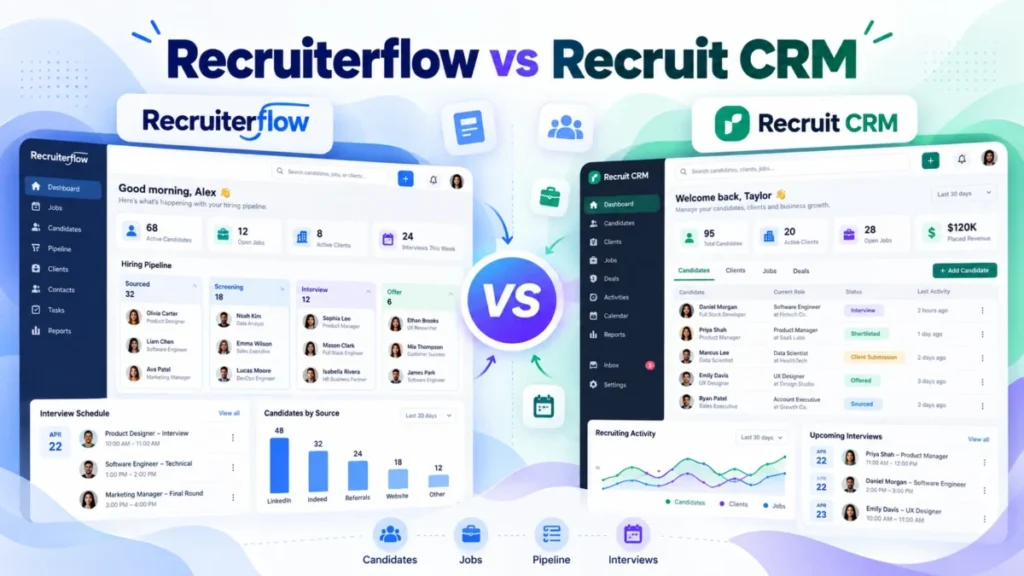
In Recruiterflow vs Recruit CRM, pick Recruiterflow if your perm or search desk runs on outreach sequences and wants one flat seat price. Pick Recruit CRM if you need a 30-day trial, a contract staffing desk or AI you pay for as you use it.
Recruiterflow’s Platform plan costs $119 per user per month billed annually, so a 5-person agency pays $119 x 5 seats x 12 months = $7,140 a year. That is the figure a Recruit CRM quote has to beat.
In This Article (10 sections)
The Verdict for Your Agency
If your agency places perm or search hires through email and LinkedIn sequences and wants a predictable bill, pick Recruiterflow. Its Platform plan puts sequences, recruitment automation and API access in one $119 seat price (annual billing).
Recruit CRM Business lifts the sequence limit to 1,000 and adds the open API, but Recruit CRM’s workflow automation consumes credits on every plan, Business included. A Business quote under $119 a seat still leaves that meter on your automation.
| Your agency | My pick | Deciding fact |
|---|---|---|
| Perm or search desk built on outreach sequences | Recruiterflow Platform | Sequences, recruitment automation and API access in the $119 seat price; Recruit CRM’s workflow automation uses credits on every plan |
| Contract staffing desk | Recruit CRM | Invoicing, timesheets and contractor portals on every plan; timesheets use credits per active contractor |
| Must try it before talking to sales | Recruit CRM | 30-day free trial on Pro and Business; Recruiterflow sells through a demo |
| Buying AI agents for every seat now | Recruiterflow AIRA, if the quote fits | All current and future AIRA agents included, no add-ons |
| Using AI on some desks, not every seat | Recruit CRM | Three AI agents on every plan; AI sourcing and data enrichment draw on pooled credits |
| Solo or 2-person desk on one pipeline | Recruit CRM Pro, if quoted under $119 a seat | Pro covers 1 hiring pipeline and 15 custom fields |
Sources: Recruiterflow pricing page and Recruit CRM pricing page, checked October 2026.
An agency still weighing Bullhorn, Loxo or Atlas against these two will find the wider field in my ranking of the best CRMs for recruiters. Each pick above rests on a few structural differences, lined up next.
Recruiterflow vs Recruit CRM at a Glance
Recruiterflow sells one flat-priced Platform plan plus a custom-quoted AIRA plan, while Recruit CRM sells three tiers (Pro, Business, Enterprise) whose metered features draw on a pooled credit allowance.
| Product | Pricing model | Entry plan per seat | AI agents on the entry plan | Open API on the entry plan | Trial |
|---|---|---|---|---|---|
| Recruiterflow | Platform plan at a published price; AIRA plan quoted | $119 a month billed annually, $149 billed monthly | No (AIRA plan only) | Yes | No trial listed; demo |
| Recruit CRM | Pro, Business, Enterprise per seat, plus pooled credits | Pro; get a US quote (see pricing below) | Yes: parsing, submission and pitching agents | No (Business and up) | 30-day free trial on Pro and Business |
Sources: Recruiterflow pricing page and Recruit CRM pricing page, checked October 2026.
Recruit CRM includes 24/7 live chat and a named account manager on every plan, and Enterprise adds quarterly business reviews. Recruiterflow’s own comparison page promises 24/7 support “for uninterrupted operations” and a dedicated success manager for every customer.
Both list unlimited jobs, candidates and contacts and a Chrome sourcing extension, so database size and LinkedIn capture do not separate them.
Both are agency ATS + CRM products; what a CRM does explains the client side if the term is new. The table leaves one cell open, Recruit CRM’s price, and that is where the cost question starts.
Pricing: What a 3-, 5- and 10-Person Agency Pays
Recruiterflow Platform costs $119 per user per month billed annually, or $1,428 a seat per year ($119 x 12 months). Monthly billing is $149 per user per month, or $1,788 a seat ($149 x 12 months).
| Team size | Recruiterflow Platform, annual billing | Recruiterflow Platform, monthly billing |
|---|---|---|
| 3 seats | $119 x 3 seats x 12 months = $4,284 | $149 x 3 seats x 12 months = $5,364 |
| 5 seats | $119 x 5 seats x 12 months = $7,140 | $149 x 5 seats x 12 months = $8,940 |
| 10 seats | $119 x 10 seats x 12 months = $14,280 | $149 x 10 seats x 12 months = $17,880 |
Sources: Recruiterflow pricing page, annual and monthly views, checked October 2026.
Ten months on monthly billing already cost $149 x 10 months = $1,490 a seat, more than the $1,428 annual price. Any agency that expects to keep Recruiterflow past ten months should take annual billing.
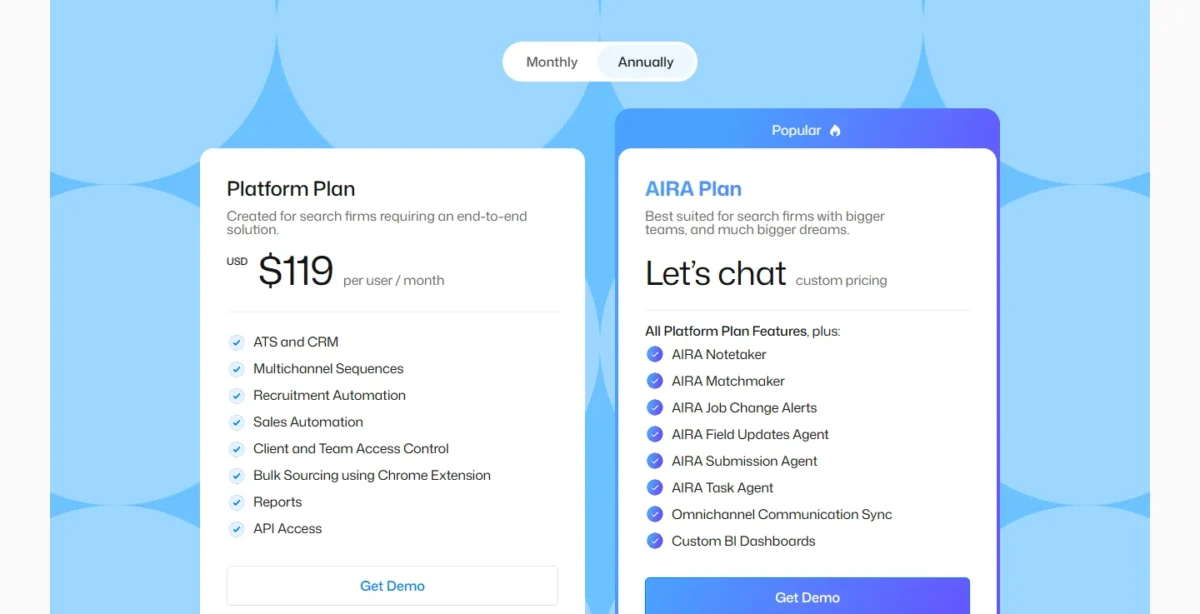
Two costs sit outside the table: paid white-glove migration, priced by data volume, and the quoted AIRA plan. Otherwise Recruiterflow’s number is fixed, so the open question is the Recruit CRM quote.
Recruit CRM: the break-even price to ask for
Recruit CRM costs less than Recruiterflow Platform for the same seats when its per-seat price on your plan is below $119 a month (annual) or $149 (monthly). Its included credits must also cover your metered use.
For an agency that needs more than one sequence or the open API, the plan to price is Business, not Pro.
Recruit CRM’s own pricing page does not settle the number. One capture on October 14, 2026 listed Business at $79 per user per month; another that day showed a higher list. Neither list names its billing term.
If the $79 figure is annual pricing, it sits $119 – $79 = $40 a seat below Recruiterflow’s annual price.
With the billing basis unknown, I treat neither list as the US price and let your written quote decide.
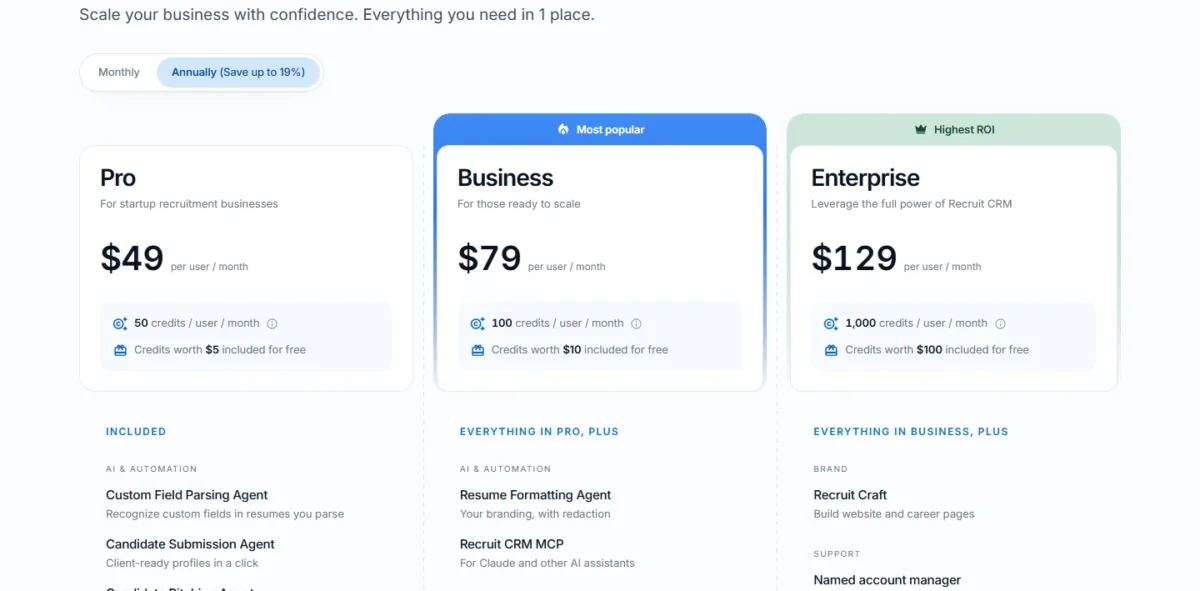
The page’s billing toggle reads “Annually (Save up to 19%)”, so a quote should name its billing term. Ask Recruit CRM sales three things:
- The US list price per user for Business, on annual and on monthly billing.
- The credits included per user on a US account, and the price of extra credits.
- The credits your heavy actions use: enrichment, AI sourcing, SMS and timesheets per contractor.
With the quote in hand, the CRM cost calculator adds migration and credit top-ups to the seat price. Price is half the question; how each vendor charges for AI is the other half.
AI: A Quoted Plan Versus a Credit Meter
Recruiterflow keeps its AI agents behind the custom-quoted AIRA plan with no usage meter. Recruit CRM puts three AI agents on every plan and meters AI sourcing, enrichment and notetaking through pooled credits. The first suits a firm buying AI for every seat; the second, a firm using it on some desks.
The AIRA plan adds the Notetaker, Matchmaker, Job Change Alerts, Field Updates, Submission and Task agents, plus omnichannel communication sync and custom BI dashboards.
AIRA customers get all current and future AIRA agents at no extra cost, with no add-ons. Once signed, new agents do not raise the bill; before the demo, Platform is the one Recruiterflow price you can budget.
Every Recruit CRM plan includes the Custom Field Parsing, Candidate Submission and Candidate Pitching agents and a GPT integration. Business adds the Resume Formatting Agent, which consumes credits, and Recruit CRM MCP, a connector for Claude and other AI assistants.
The metered side is larger: AI sourcing across 800M+ external profiles, data enrichment, job change alerts and the AI meeting notetaker all consume credits. Credits are pooled at the account level, and extra credits can be bought.
Pooling rewards a mixed team, where a heavy sourcer draws on credits lighter users leave unspent, and strains one where everyone sources all day. AI drafts the outreach; how many sequences can send it is a plan question on Recruit CRM, covered next.
Automation, Sequences and Reporting: The Plan Each One Needs
Recruit CRM Business is its plan for outreach at volume: the sequence row reads 1,000 with 500 active enrolments, and it adds the open API. Recruiterflow includes multichannel sequences, recruitment and sales automation, reports and API access on the Platform plan.
Recruit CRM’s workflow automation, which triggers actions across 1000+ apps, consumes credits on every plan. Its Zapier integration, included on Pro, connects 5000+ apps, and Recruit CRM’s integrations page adds Integrately and Pabbly. Recruiterflow’s integrations directory lists partners such as Aircall, 3cx and Arrange but prints no total.
An agency without a developer will lean on Recruit CRM’s Zapier route, available from Pro. An agency with one gets Recruiterflow’s API without moving up a tier, where Recruit CRM holds its open API for Business.
Reporting splits the same way. Recruit CRM includes a full reporting suite on every plan and charges credits for Advanced Analytics, custom reports and dashboards its team builds. Recruiterflow lists Reports on Platform and custom BI dashboards on AIRA.
Standard desk reporting is no reason to pick either; custom dashboards cost credits on one and a quoted plan on the other. The next question is when your plan stops being enough.
The Limits That Force an Upgrade
Recruit CRM Pro stops at 1 hiring pipeline, 15 custom fields, 1 mailbox connection per user and 1 sequence; SSO, audit logs, custom roles and the open API start at Business. Recruiterflow has two plans, so its one upgrade is to the quoted AIRA plan, for the AI agents.
| Plan | Hiring pipelines | Custom fields | Outreach sequences | Open API | SSO and audit logs |
|---|---|---|---|---|---|
| Recruit CRM Pro | 1 | 15 | 1 sequence | No | No |
| Recruit CRM Business | 100 | 100 | 1,000; 500 active enrolments | Yes | Yes |
| Recruiterflow Platform | Not published | Not published | Included | Yes | Not published |
Sources: Recruit CRM pricing page (same limits in both captures) and Recruiterflow pricing page, checked October 2026.
One hiring pipeline means retained search and contingency roles share the same stages, so an agency running both will want Business. Fifteen custom fields bite at migration: an agency arriving from Bullhorn with more must trim them or price Business.
The soft trigger is the credit pool: when it runs dry, you buy credits or move up, and Business carries twice Pro’s credits per user in both captures. Next comes how fast you can confirm fit and move your data.
Trial, Setup and Switching
Recruit CRM can be tried alone for 30 days, with free import and paid assisted migration. Recruiterflow sells through a demo, with a free Excel/CSV import and a paid white-glove migration it says typically takes 6–8 weeks.
Recruiterflow will discuss waiving the migration fee on multi-year contracts. It does not publish a contract length or a seat minimum, so ask for both before the demo ends.
On setup effort, Recruit CRM includes its help centre, training and webinars on every plan, and a 30-day trial lets you test that on your own desk. Recruiterflow’s comparison page claims 3–4 weeks to full adoption, so ask the demo team what that figure assumes.
A move from Bullhorn or a spreadsheet runs the same way for both:
- Export your records from the old system; both vendors list a free import, and Recruiterflow’s self-serve tool takes Excel or CSV files.
- Count your custom fields before pricing, since Recruit CRM Pro holds 15.
- List every active sequence and automation, and ask each vendor whether migration carries them over.
- Get the migration timeline and fee in writing from each vendor before you sign.
Both vendors also publish pages about each other, and those deserve a check too.
What Recruiterflow’s Comparison Page Leaves Out
Recruiterflow’s comparison page says its rival has “no AI agents or true automation features”. Recruit CRM’s pricing page lists three AI agents included in Pro: Custom Field Parsing, Candidate Submission and Candidate Pitching.
On AI agents, that comparison page is wrong, and the rows below set each of its claims beside the rival’s own pricing page.
| Claim about the rival | Where it appears | What the rival’s own pricing page shows |
|---|---|---|
| “No AI agents or true automation features” | Recruiterflow’s comparison page | Pro lists the Custom Field Parsing, Candidate Submission and Candidate Pitching agents, plus credit-metered workflow automation |
| Onboarding takes “6–8 months average” | Recruiterflow’s comparison page | Neither confirmed nor refuted: the pricing page gives no onboarding time, so the figure stays the comparison page’s claim |
Sources: Recruiterflow’s comparison page, Recruit CRM’s comparison page, checked against Recruit CRM’s pricing page, and Recruiterflow’s pricing page, October 2026.
Recruiterflow’s page does make one fair point: it calls its rival’s pricing “usage-based; costs rise with more use”. Recruit CRM’s pricing page bears that out, since sourcing, enrichment, SMS and calling draw on credits.
With the marketing filtered out, it is clearer whom each product serves badly.
Who Should Skip Each
Each product has three disqualifiers, and every one rests on a plan fact neither demo will change.
Skip Recruiterflow if:
- you want a self-serve trial; Recruiterflow’s pricing page lists no trial, and every plan button is a demo button
- you run a contract desk; neither Recruiterflow plan lists timesheets or invoicing on its pricing page
- you want AI agents at a published price; AIRA is quoted
Skip Recruit CRM if:
- you need more than 1 sequence or the open API but want to stay on Pro
- you want a fixed bill; credit-metered features include sourcing, enrichment, SMS, calling and timesheets
- you need more than 1 hiring pipeline on the entry plan
If neither fits, the other recruiting CRMs on my shortlist are where I would look next.
If your real gap is a sales pipeline for business development rather than candidate tracking, my list of the best CRM software overall is the better starting point.
FAQ
What is the best CRM for recruiters?
Between these two, the verdict table above gives my pick by desk type; for the wider field, see my best recruitment CRM shortlist.
Is Recruit CRM a legitimate company?
Yes. Recruit CRM’s company is Workforce Cloud Tech, Inc., 28 Mohawk Avenue, Norwood, NJ 07648, and GDPR tools come on every plan. Its footer links a data processing agreement, a GDPR page and a vulnerability disclosure program, which give a security review a starting point.
Is Recruiterflow a legitimate company?
Yes. Recruiterflow publishes its Platform price in a USD, EUR and GBP currency selector and links a data processing agreement and a data breach policy from its pricing page. The company says it is “Trusted by 2,100+ search firms globally” on its pricing page.
Where can I read independent reviews of both?
Read them on the review platforms themselves, filtered to agencies of your size, alongside my Recruit CRM review. I quote no star rating here: both vendors print ratings in their own marketing, and the rating table on Recruit CRM’s comparison page cites only “top review platforms” without naming one.





