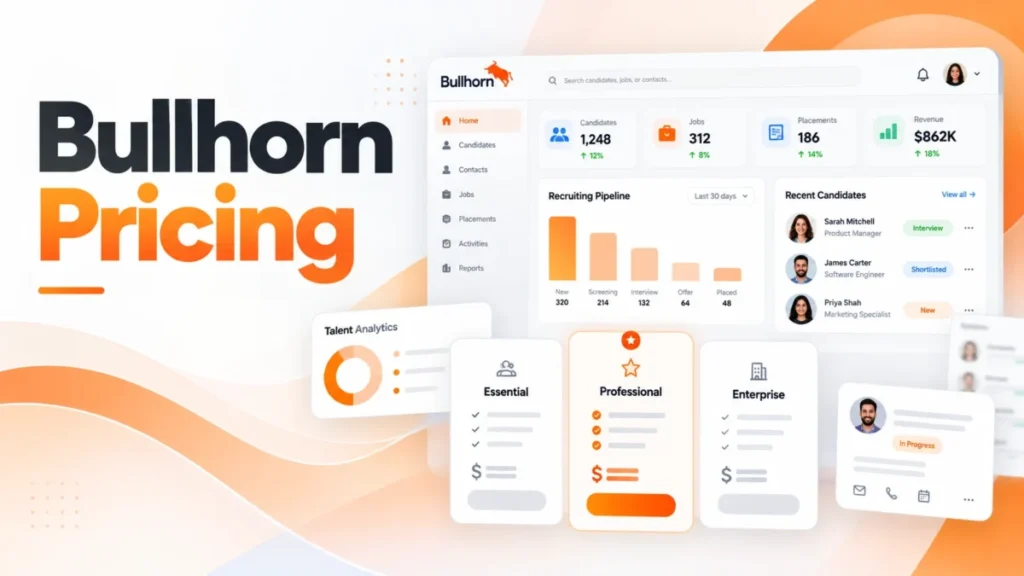
Bullhorn publishes two prices: Starter at $99 and Core at $165 per user per month, checked on bullhorn.com on October 14, 2026. Pro, Max and every add-on are quote-only, so only two of the four small-agency editions have a public price.
For a 10-recruiter desk, the published editions come to $990 a month on Starter (10 x $99) or $1,650 on Core (10 x $165). I would price Core first for most agencies, because LinkedIn integrations and the app marketplace start there.
In This Article (9 sections)
How Much Does Bullhorn Cost in 2026?
Starter costs $99 and Core $165 per user per month; Pro and Max show “Talk to us” instead of a price. The page gives no billing term, so monthly versus annual billing is a question for the quote.
| Edition | Published price | Price basis | Label on the pricing page |
|---|---|---|---|
| Bullhorn Starter | $99 | Per user per month | None |
| Bullhorn Core | $165 | Per user per month | None |
| Bullhorn Pro | Quote only (“Talk to us”) | Not published | Most popular |
| Bullhorn Max | Quote only (“Talk to us”) | Not published | All-new |
Sources: Bullhorn pricing page, checked October 14, 2026.
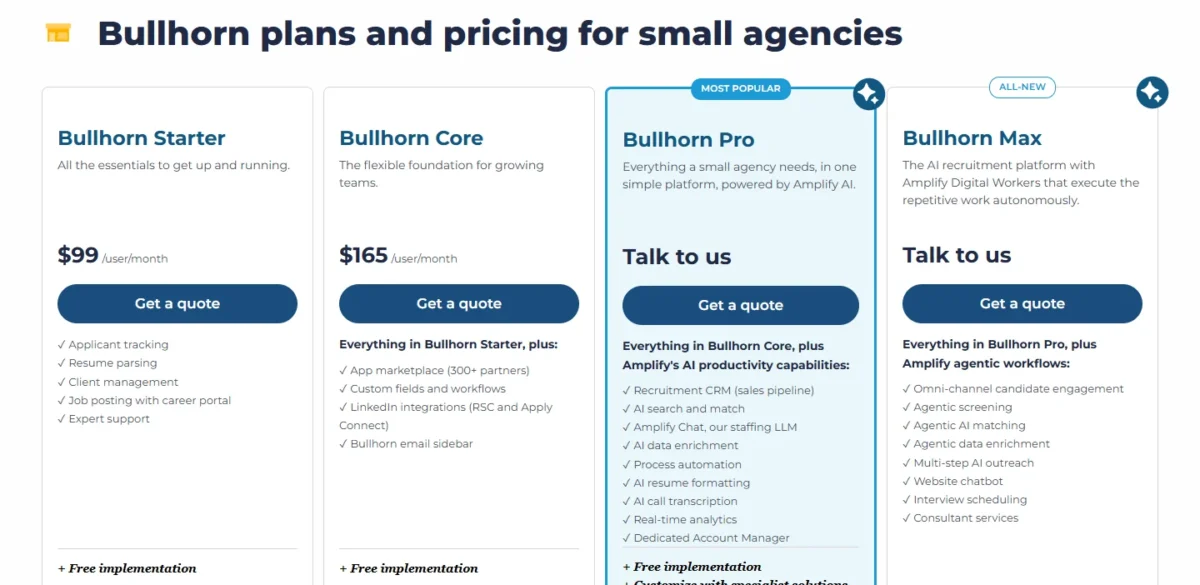
Only two of the four small-agency editions can be budgeted without a sales call. That gap hits hardest on Pro, labelled “Most popular”, whose price no buyer sees in advance.
This lineup is current: Max carries an “All-new” label, and Bullhorn says its new user interface rolled out in 2026. I would treat any guide quoting other small-agency plan names as out of date.
Two prices still do not say what a team gives up at $99, which is where the plan gates come in.
Features Each Bullhorn Plan Adds
Each step up adds one kind of work. Starter tracks candidates and clients, Core connects outside tools, Pro runs the sales side, and Max hands screening and outreach to AI agents.
| Edition | Adds over the edition below | Free implementation listed |
|---|---|---|
| Starter | Applicant tracking, resume parsing, client management, job posting with career portal, expert support | Yes |
| Core | App marketplace, custom fields and workflows, LinkedIn integrations (RSC and Apply Connect), Bullhorn email sidebar | Yes |
| Pro | Recruitment CRM (sales pipeline); process automation; real-time analytics; Amplify Chat; AI tools for search and match, enrichment, resume formatting and call transcription; a dedicated account manager | Yes |
| Max | Agentic screening, matching and data enrichment; multi-step AI outreach; omni-channel engagement; a website chatbot; interview scheduling; consultant services | Not listed |
Sources: Bullhorn pricing page, checked October 14, 2026.
The gates fall where the work changes. Starter to Core is about connecting tools; Core to Pro is about selling to clients.
Bullhorn Starter ($99): enough for a tiny desk
Yes, Starter covers a solo recruiter or a two-person desk that tracks candidates, jobs and clients and posts roles to its own career portal. Resume parsing and free implementation come with it.
The trade-off is isolation: Starter’s card lists no marketplace, custom fields or LinkedIn integrations. At $1,188 per user a year ($99 x 12 months), it is the lowest published price, and the wrong buy for a desk that sources on LinkedIn.
Bullhorn Core ($165): the default for a growing agency
Yes, Core is worth the gap ($165 minus $99, or $66 per user per month) for any team that sources on LinkedIn or uses a job board or background-check integration. Those connections arrive at Core, through LinkedIn’s RSC and Apply Connect integrations and the app marketplace.
Bullhorn Marketplace lists more than 300 partners spanning job boards, sourcing, background checks and VMS. Custom fields and workflows matter once two desks, say perm and contract, need different records.
For agencies past one or two recruiters, I would start the budget here. Core’s limit is what it still leaves out: no sales pipeline, automation or analytics on its card.
Bullhorn Pro (quote): the sales-pipeline edition
A Pro quote buys the Recruitment CRM sales pipeline, process automation, real-time analytics, Amplify AI tools and a dedicated account manager. Those matter when winning clients counts as much as filling roles.
Skip Pro if your desk serves a few steady clients and has no business development pipeline to manage.
Bullhorn Max (quote): AI agents for volume
Max fits high-volume desks that want screening, outreach and interview scheduling run by AI; I would not put a small executive-search desk on it.
The trade-off sits in the fine print. Max’s card lists consultant services but, unlike Starter, Core and Pro, no free implementation line, so ask what setup costs.
Per-user prices multiply with every hire, so the next question is what a real team pays.
Bullhorn Cost for 1, 10 and 25 Users
A 10-user team pays $11,880 a year on Starter or $19,800 on Core at the published per-user prices, before any add-on.
| Team size | Starter, per month | Starter, 12 months | Core, per month | Core, 12 months |
|---|---|---|---|---|
| 1 user | $99 | $1,188 | $165 | $1,980 |
| 10 users | $990 | $11,880 | $1,650 | $19,800 |
| 25 users | $2,475 | $29,700 | $4,125 | $49,500 |
Sources: Bullhorn pricing page, checked October 14, 2026. Totals are users x per-user price x 12 months; the page states no billing term.
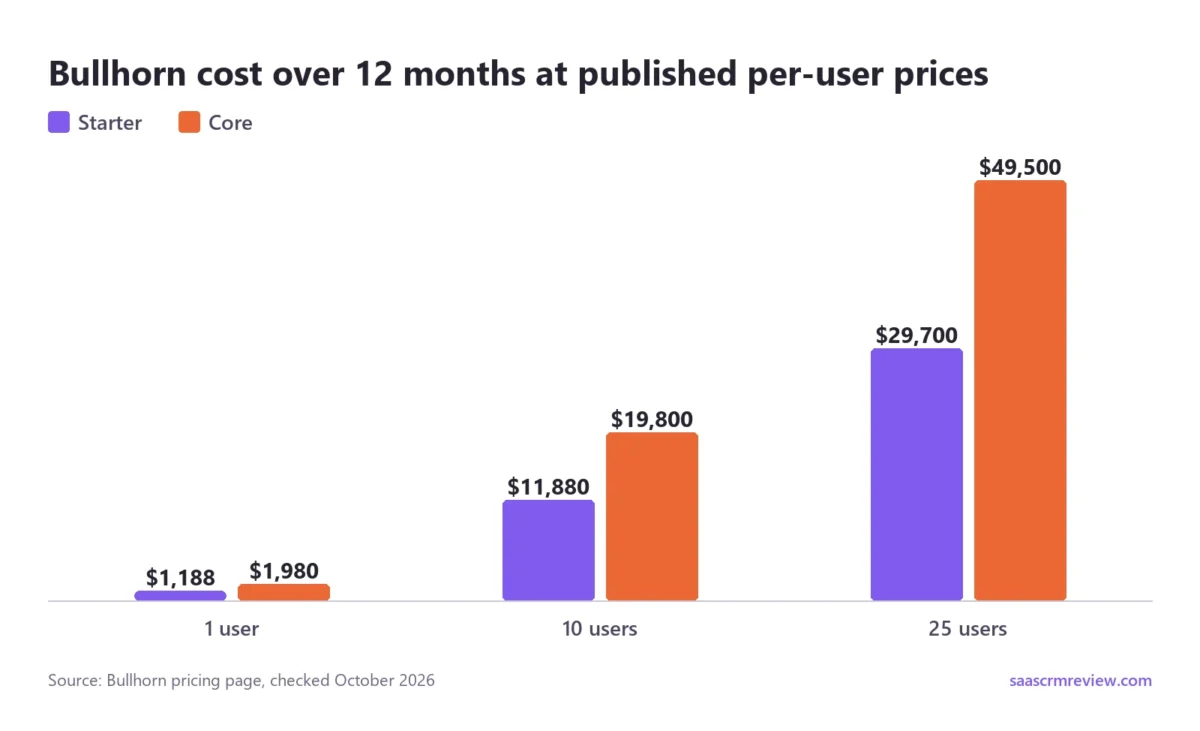
At 10 users, Core’s premium is $1,650 minus $990, or $660 a month. At 25 users the yearly gap is $49,500 minus $29,700, or $19,800, a full year of Core for 10 users. At that size, check which integrations the desks really use before paying for Core.
To model your own seat count with add-on and implementation lines, the CRM cost calculator takes the same per-user math further.
How to judge a Pro quote
Take an illustrative 10-user agency on Core that is weighing Pro. Every quote figure below is invented for this example, because Bullhorn publishes no Pro price.
- Today, from the table above: $19,800 a year.
- The invented upgrade quote: $230 a user each month, so $230 x 10 users x 12 months = $27,600 a year.
- The gap: $27,600 minus $19,800 = $7,800 a year, or $65 a user each month.
Recruitment Automation and Analytics are quote-only add-ons that overlap Pro’s card (see the add-on table below). Now suppose the agency’s separate quotes for them came to $700 a month together, or $8,400 a year ($700 x 12 months). Against those quotes, the upgrade saves $600 a year ($8,400 minus $7,800) and adds the sales pipeline.
The method works with any real quote: weigh Pro’s premium over Core against the add-on quotes for the same jobs, never against Core alone.
Add-Ons and Products Bullhorn Quotes Separately
Every add-on on Bullhorn’s pricing page is quote-only: each card ends in “Get a quote” with no price. Several overlap with items an edition already lists, which is where a buyer can avoid paying twice.
| Add-on | What its card lists | Similar items already in an edition |
|---|---|---|
| Amplify Digital Workers | Over 15 skills, such as match, screen, outreach and audit | Max (described as the platform with Digital Workers) |
| Amplify Search & Match | Internal and external search, saved alerts, auto-matching | Pro (AI search and match) |
| Recruitment Automation | Visual workflow builder, task and data health automations | Pro (process automation) |
| VMS Automation | 110+ VMS integrations, job record import | None listed |
| Middle Office | Timesheets, time interpretation, invoicing, pay and bill automation | Bullhorn One (the same four items) |
| Onboarding | Document delivery, compliance workflows, candidate portal | None listed |
| Messaging | SMS from Bullhorn, group broadcasts, automated messages | Front Office Enterprise (SMS messaging) |
| Analytics | Performance metrics, pipeline forecasting, staffing dashboards | Pro (real-time analytics) |
Sources: Bullhorn pricing page, checked October 14, 2026.
The overlap column is the one to use. A Core buyer quoting Search & Match, Recruitment Automation and Analytics separately is rebuilding much of Pro’s card, so ask for a Pro quote alongside. The standalone cards list more items than Pro’s one-line versions, so ask whether Pro includes the full product.
Bullhorn’s site menu still lists Bullhorn Automation, formerly Herefish; the pricing page sells automation as Recruitment Automation.
Editions for larger agencies and Salesforce firms
Bullhorn sells three quote-only editions to larger staffing firms with complex operations:
- Front Office Growth: applicant tracking, Recruitment CRM, AI Assistant, LinkedIn integrations, process automation and real-time analytics.
- Front Office Enterprise: Growth plus SMS messaging, a website chatbot, interview scheduling, configurable reporting and gamification.
- Bullhorn One: Enterprise plus timesheets, invoicing and billing, and pay and bill automation, in effect Middle Office built in.
Bullhorn Recruitment Cloud is a separate line built on Salesforce, in four quote-only editions: ATS, Front Office, Workforce Edition and 360. It belongs on the shortlist of a firm that already runs Salesforce.
Even with every product named, the page leaves the contract terms blank.
What Bullhorn’s Published Pricing Leaves Out
Bullhorn’s pricing page does not publish the billing term, contract length, minimum seat count or renewal terms for any edition, which is why I compare Bullhorn alternatives on contract terms. Implementation is listed as free on Starter, Core and Pro, but not on Max or the larger-agency editions.
Those gaps change the real commitment: a seat paid month to month and the same seat locked into a multi-year term are different purchases.
Before judging whether a quote is a good deal, get these answers in writing:
- Billing term: monthly or annual, and whether annual means paying up front.
- Contract length and automatic renewal.
- Any minimum number of users.
- How far the per-user price can rise at renewal.
- Implementation cost on Max, Front Office or Bullhorn One.
- Which add-ons the quote bundles, and how Pro’s included versions compare.
- How you export candidate and client data if you leave.
With the gaps listed, the remaining question is which edition to request a quote for.
Which Bullhorn Plan Should You Buy?
Buy Core if your team sources on LinkedIn or needs any marketplace integration; buy Starter only if the desk tracks candidates and clients without either.
| Your need | Edition to buy or quote | Why |
|---|---|---|
| Candidate, job and client tracking for 1-2 users | Starter | The lowest published price covers tracking and a career portal |
| LinkedIn sourcing or marketplace integrations | Core | Both are listed from Core |
| A client sales pipeline, automation or reporting | Pro | First edition listing Recruitment CRM |
| AI-run screening, outreach and scheduling | Max | Agentic workflows are Max items |
| A larger firm with complex operations | Front Office Growth or Enterprise | Positioned for larger staffing firms |
| Timesheets, invoicing and pay and bill | Bullhorn One or Middle Office | Both list pay and bill automation |
| A firm already running Salesforce | Recruitment Cloud | Built on Salesforce |
Sources: Bullhorn pricing page, checked October 14, 2026.
Bullhorn says over 4,500 of its customers are agencies with fewer than 10 users.
A plan that fits today can stop fitting after the next few hires.
When to Upgrade: What Forces the Next Edition
Four needs push a team to a bigger Bullhorn edition or product. The first three come in this order.
LinkedIn or an outside integration moves Starter to Core, and a sales pipeline, automation or analytics moves Core to Pro. AI-run screening and outreach moves Pro to Max. The fourth, timesheets and invoicing, can arise on any edition.
- Starter to Core: the first job board, background check or LinkedIn connection. For 10 users the step costs $7,920 a year (the $165 minus $99 gap x 10 users x 12 months).
- Core to Pro: business development needs its own pipeline, or a manager asks for real-time analytics. Price it with the method above.
- Pro to Max: screening and outreach volume outgrows the team. Max lists no free implementation, so ask about setup.
- Any edition to Middle Office or Bullhorn One: timesheets and invoicing move into Bullhorn, which offers middle and back office in North America.
Only the first trigger has a known price. A firm expecting the second within a year should quote Pro alongside Core before the first contract.
If those steps cost more than the work they remove, Bullhorn may be the wrong buy.
Who Should Skip Bullhorn, and Which Alternatives to Compare
Three buyers should skip Bullhorn:
- A corporate in-house HR team. Bullhorn is built exclusively for staffing and recruitment, so a team with no clients pays for client management it will not use.
- A solo recruiter who needs an add-on, such as Messaging or Onboarding, and wants a published price before buying. Every add-on needs a quote; only Starter and Core carry fixed per-user prices.
- A small agency that needs a sales pipeline but will not take a quote-based plan. The Recruitment CRM starts at Pro, which has no published price.
For alternatives to Bullhorn, my list of the best recruitment CRMs compared is a better starting point than a Bullhorn quote.
Three shorter questions remain on what Bullhorn is, trials and setup time.
FAQ
Is Bullhorn an ATS or a CRM?
Both. Bullhorn describes its applicant tracking and CRM as living in one system, so business development and placements share the same records. On the pricing page, though, the Recruitment CRM sales pipeline is listed from Pro, while Starter and Core list client management.
Does Bullhorn have a free trial?
Bullhorn’s pricing page lists no trial. It offers a quote or a live demo instead: every small-agency plan card leads to “Get a quote”, and the page closes with “Get a live demo”. Bring the quote checklist above to that demo.
How long does Bullhorn take to set up?
Bullhorn says small agencies can go live in under two weeks. In its outline, an expert partner configures the system to your workflow in week one, and week two finalizes settings with training videos and live support.